
Overview
This document provides a high-level description of the functionalities offered by the IBAN Management Service. The service enables management of the master account assigned to your institution as the Partner, as well as virtual accounts of endusers- including corporations. Within the service, it is possible to generate accounts, receive transfers, and send them.
The implementation of the service requires the payment institution to open a master account with a partnering bank. To initiate this process, please contact our Sales Department.
Abbreviations
This section shortly describes abbreviations and acronyms used in the document.
|
Abbreviation |
Description |
|
SDK |
Software Development Kit |
|
API |
Application Programming Interface |
|
IBAN |
International Bank Account Number |
|
OS |
Operative System |
|
IMS |
IBAN Management Service |
|
THC |
Transaction History Core |
|
AP |
Admin Panel |
Terminology
This section explains a meaning of key terms and concepts used in this document.
|
Name |
Description |
|
IBAN |
International bank account number. The IBAN length may vary depending on the country. More detailed information about the IBAN can be found in the IBAN generating chapter. |
|
IBAN prefix |
The part of the IBAN that identifies the bank or financial institution. It enables users to generate IBANs. |
|
Balance |
The current amount in the Antaca that is available for use. Each outgoing transfer reduces the balance, and each top-up to the account increases the balance. |
|
Master account |
This is the account number assigned to the Partner in the bank's system. |
|
Master balance |
Also referred to as the “partner balance”- it is shared with the Partner and the BIN sponsor. Both credit and deposit types are available. |
|
Partner |
An institution using Verestro products. Essentially, a Partner can be referred to as a Verestro client. |
|
IBAN Issuing Institution |
Licensed financial entity that generates and manages IBANs on behalf of its partners, ensuring compliance and settlement with the connected bank. |
|
Bank |
Licensed financial institution that holds and manages funds, processes payments, and provides financial services |
|
Currency |
Monetary unit- the name of the money used in a particular country or economic region. To see the list of the supported currencies please visit supported currencies chapter. |
Application components
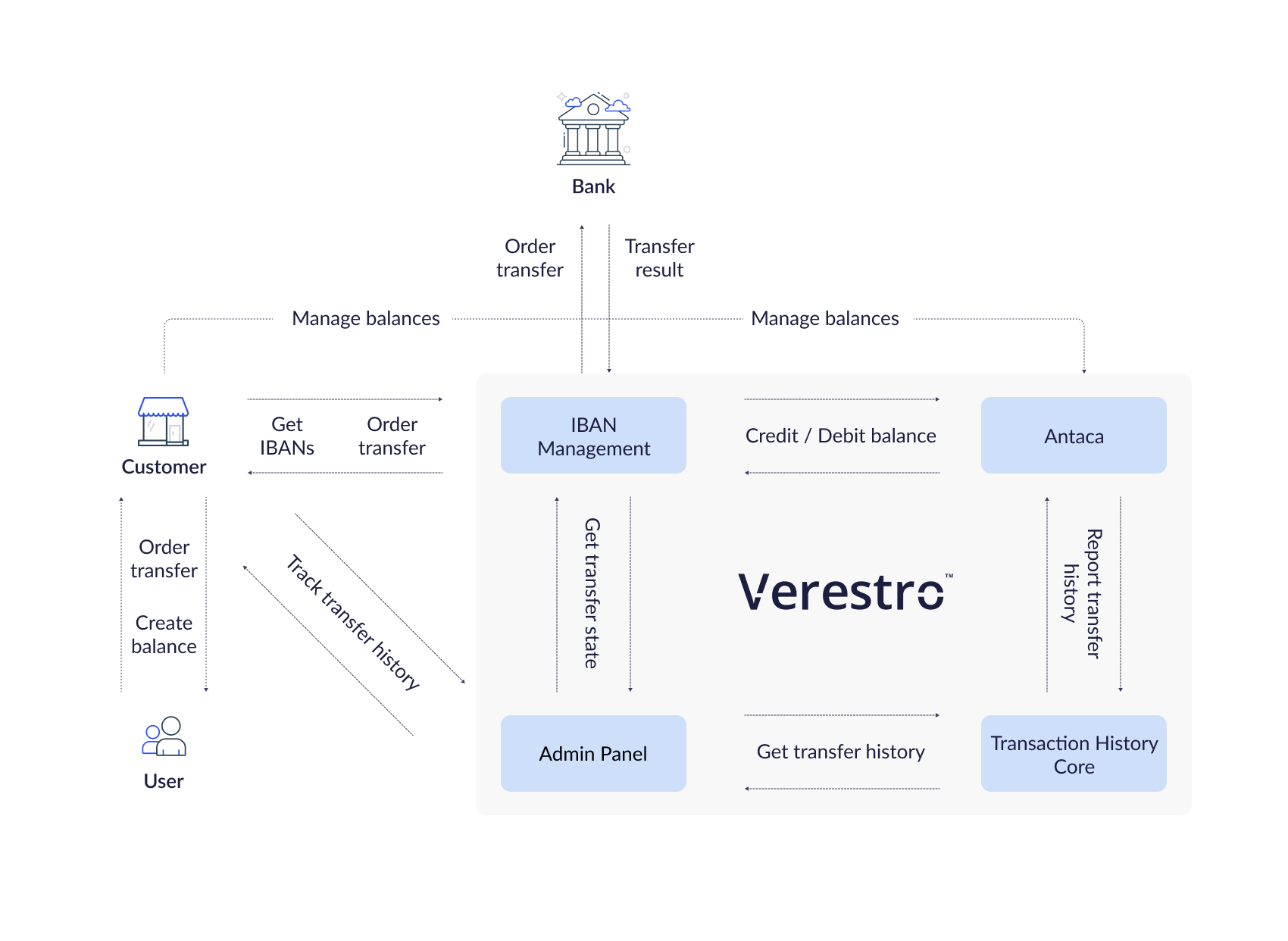
This chapter describes IBAN Management as a complete solution, divided into all the components that support and are required for managing the IBAN domain. The individual functionalities for which these services are responsible reduce the additional work on your part as a Partner. Processes such as transaction validation, debiting and topping up balances, and saving transaction history per enduser are handled on our side.
IBAN Management API
A backend component that, by communicating with internal and external services, enables the management of master and virtual accounts, including their creation and the execution of transfers.
Supporting services
The following services are not a direct part of the IBAN Management API implementation. However, they are involved in the processes of creating and issuing IBAN numbers. Additionally, they enable the execution of money transfers and the storage of transfer history.
Antaca API
A backend component responsible for creating and managing balances. Each account must be assigned to a balance in order to receive and initiate transfers. It is possible to automatically generate a virtual account based on a balance creation event in Antaca, or manually- using the appropriate API method or through the Admin Panel, which also requires the balance to be created beforehand. The IBAN Management Service also communicates with Antaca to debit or top up the balance of a user, corporation, or Partner.
Deployment in Antaca is required for bank account generation and transfer execution.
Transaction History Core
A backend component responsible for storing the history of performed transactions. The history is available in the Admin Panel as well as directly through the API. Configuration in THC is also available, allowing you to receive notifications.
Admin Panel
A tool for Partners to work with Verestro services. The main purpose of Admin Panel is to provide a web-based environment with the ability to manage Partner service actions. The features available in the Admin Panel within the IBAN service are accessible in a dedicated section. Depending on operator permissions, it is possible to generate accounts, view generated accounts, monitor transactions, and manage AML-related decisions.
The features available in the Admin Panel as part of the IBAN Management Service are available here. The availability of functionality depends on your role.
Application details
The IBAN Management Service enables the execution- receiving and sending-of various types of transfers. The available types depend on the sender’s and recipient’s countries, the transfer currency, as well as the capabilities of the respective bank.
This chapter provides a high-level overview of the integration methods, the differences between banks along with the supported transfer types, and the criteria that define each type of transfer.
|
Domain |
Description |
| IBAN generating | Domain of the solution responsible for generating IBANs using a special algorithm based on the IBAN prefix that Partner received from the Payment Institution. |
| IBAN transfer receiving | Domain of the solution responsible for handling incoming transfers to the received IBAN and thus for initiating the process of topping up recipient's balance. |
| IBAN transfer sending | Domain of the solution responsible for handling outgoing transfers and thus for initiating the sender's balance charging process. |
IBAN generating
The basis of the IBAN Management Service is a master account opened in a bank by a payment institution. Depending on the bank, the account is generated based on a prefix received after opening the master account, or it is generated directly by the bank. The IBAN prefix is assigned to your account in the Verestro system during configuration. Each IBAN prefix is created in the context of a specific currency. For example, if you want to have a master account in both PLN and USD, two prefixes will be assigned to your account in our system.
Note: Only one bank account number can be assigned to one balance. The account will be created in the currency of the balance.
IBAN structure
Each IBAN has a specific structure. The IBAN structure is defined in ISO 13616-1 and consists of:
- two-letter ISO 3166-1 country code;
- two check digits;
- up to thirty alphanumeric characters for a BBAN (Basic Bank Account Number) which has a fixed length per country and, included within it, a bank identifier with a fixed position and a fixed length per country.
Example: Polish IBAN numbers consist of 2 letters of the country and 26 digits according to the following division PL00123456789090909090909090.
PL |
2 letters of the country. |
00 12345678 |
2 digits of the checksum and 8 digits tracking a given bank and, for example, it's specific branch - IBAN prefix. Based on this number we will generate bank account numbers for every user in your context. |
9090909090909090 |
16 digits tracking a specific account. |
Transfer funds
After creating a balance and generating an IBAN number, you can perform fund transfer operations. Funds can be transferred in two directions: sending funds to a recipient's bank account and receiving funds into the balance using the assigned IBAN.
Depending on the origin of the IBAN and the countries of the sender's and recipient's accounts, the transfer may be processed as an internal, Elixir, SEPA, or SWIFT transfer. Transfer times may vary depending on the method used. Additional fees may also apply.
|
Transfer type |
Condition |
Potential transfer time |
Instant |
|
Internal |
The sender's IBAN and the recipient's IBAN indicate the Antaca balance within the same instance. |
Instant |
Yes |
|
Elixir |
The sender’s and recipient’s IBAN must have the currency PLN. Transfers between Polish banks using the Elixir system. |
Up to 1 business day
|
Yes, if the bank supports Elixir Express |
|
SEPA |
Both sender’s and recipient’s IBANs must be in EUR and in countries within the SEPA area. Both banks must participate in SEPA. |
Up to 1 business day
|
Yes, if SEPA Instant supported |
|
SWIFT |
Used for international transfers outside the SEPA zone or in currencies other than EUR. Also used if one bank doesn’t support SEPA. |
Up to 5 business day
|
No |
|
SORBNET |
Polish high-value domestic transfer system for PLN transactions. Used for large transfers- above 1million PLN. |
Instant |
Yes |
Integrated Banks
Our cooperation with the payment institution has enabled us to integrate with the banks listed below. This allows us to process transfers ordered by you and your endusers who have accounts generated in Antaca. The list of integrated banks is growing regularly, and we actively invite banking partners to join this cooperation. Please contact us if you are interested in partnering with us in offering IBAN services.
Supported transfer types
|
Integrated bank |
Elixir |
SEPA |
SWIFT |
SORBNET |
|
|
|
|
|
|
Supported currencies
|
Integrated bank |
PLN |
EUR |
USD |
|
|
|
|
|
Implementation model
The REST API implementation model was created for Partners who want to share the IBAN Management Service solution through server-to-server communication. After integration with the appropriate methods issued by IBAN Management Service your endusers will be able to display their IBANs assigned to their balances and order transfers to potential recipients. In this model, communication is carried out with accordance to the REST protocol- each action is reflected in a specific API method to which you must integrate. Partner authorization is performed by checking the signature in the x509 certificate, which was generated in the context of your Partner account during the onboarding process. REST methods provided by IBAN Management Service are described in the Technical documentation chapter.
@startuml
skinparam ParticipantPadding 30
skinparam BoxPadding 30
skinparam noteFontColor #FFFFFF
skinparam noteBackgroundColor #1C1E3F
skinparam noteBorderColor #1C1E3F
skinparam noteBorderThickness 1
skinparam sequence {
ArrowColor #1C1E3F
ArrowFontColor #1C1E3F
ActorBorderColor #1C1E3F
ActorBackgroundColor #FFFFFF
ActorFontStyle bold
ParticipantBorderColor #1C1E3F
ParticipantBackgroundColor #1C1E3F
ParticipantFontColor #FFFFFF
ParticipantFontStyle bold
LifeLineBackgroundColor #1C1E3F
LifeLineBorderColor #1C1E3F
}
participant "User" as user
participant "Partner App" as issuer
participant "Verestro" as ims
note right of user: In this case user authentication is Partners responsibility
user->issuer: Authenticate user
user<-issuer: Authentication success
user->issuer: Check my IBAN
issuer->ims: Get user IBANs
issuer-->ims: Provide x509 certificate
ims->ims: Validate certificate signature
issuer<-ims: Return user's IBAN
user<-issuer: Display IBAN to the user
user->issuer: Perform money transfer
note right of user: User provides receiver IBAN in Partner App
issuer->ims: Send funds on provided receivers IBAN
ims->ims: Order transfer
issuer<-ims: OK - Transfer ordered
user<-issuer: Transfer ordered
@enduml