
Use cases
This page describes practical scenarios for configuring Fee Management System (FMS).
Each use case shows the recommended configuration (data collector, pricing item, settlement type), explains the processing flow, and provides a calculation example.
For definitions of core concepts, see the Overview page.
End-user fee charging (instant settlement)
Instant settlement charges the end-user's balance in real time via Antaca every time a billable event occurs or a periodic check runs. This section covers the most common end-user fee scenarios.
Important: Charging an end-user's balance (instant settlement) can be done only by a licensed financial institution. If a partner uses another financial institution to perform charging, the legal responsibility for charging fees is on that financial institution's side.
Card maintenance fee
A periodic fee charged for every active card held by an end-user (e.g., monthly fee for a physical card). FMS retrieves a full list of active cards from Antaca as a CSV file, then charges each card holder individually.
|
Data collector |
Pricing item type |
Settlement type |
|
File Data Collector |
Unit |
Instant settlement |
Flow:
- On the first day of the billing period, FMS sends a request to Antaca for a list of active cards.
- Antaca returns a CSV file (e.g., 5 000 active physical cards).
- FMS processes each row and charges the end-user's balance.
Example:
Card maintenance fee = 1 EUR / month per active physical card.
If a user holds 2 active physical cards, the system charges 2 separate fee transactions of 1 EUR each — one per card.
Transaction fee
A fee charged instantly every time an end-user performs a specific transaction — for example, an ATM withdrawal, a POS purchase, an outgoing IBAN transfer, or a card issuance. FMS receives the transaction event in real time and charges the fee immediately.
|
Data collector |
Pricing item type |
Settlement type |
|
Occurrence Data Collector |
Unit |
Instant settlement |
Flow:
- End-user performs a transaction (e.g., ATM withdrawal).
- The external product (e.g., Antaca) publishes a transaction event.
- FMS receives the event, matches it against the active Pricing, calculates the fee, and charges the end-user's balance instantly.
Examples:
|
Scenario |
Calculation type |
Calculation |
|
ATM withdrawal fee |
Fixed |
2.00 EUR per withdrawal |
|
Card transaction fee |
Percentage |
1.5% of transaction amount |
|
Outgoing IBAN transfer fee |
Mixed |
0.50 EUR + 0.5% of transfer amount |
FMS can also be integrated with an external API to charge end-users via a third-party system instead of Antaca. This requires custom development on the product side.
Recommendation: We recommend charging transaction fees after the transaction has been cleared (settled), not at the authorization stage. While it is technically possible to charge fees on authorization, there is a risk that the transaction may be reversed or declined during clearing — in which case the fee would have already been collected.
Automated B2B billing (invoice settlement)
Invoice settlement does not execute any payment. Instead, FMS stores the calculated fees in the database and aggregates them into a settlement report (XLSX). The report serves as a basis for issuing an invoice to the client. This section covers the most common B2B billing scenarios.
Usage-based fees (tiered & volume pricing)
A fee calculated at the end of the billing period based on the total quantity of usage — for example, the number of transactions processed, active cards maintained, or cards issued. FMS retrieves the aggregated count from an external product's API and applies tiered or volume pricing.
|
Data collector |
Pricing item type |
Settlement type |
|
HTTP Query Data Collector |
Cumulative |
Invoice settlement |
Note: Historically, Occurrence Data Collector was also used with Cumulative pricing items. This approach is deprecated — all new usage-based fee configurations should use HTTP Query Data Collector.
Flow:
- At the end of the billing period, FMS sends an HTTP request to the external product's API.
- The API returns an aggregated count (e.g., numberOfActiveCards: 1 500).
- FMS applies the configured tiered or volume pricing to the count.
- The calculated fee is stored as an invoice settlement item in the report.
Tiered vs volume pricing
Both tiered and volume pricing use quantity ranges (tiers) to determine the fee rate. The key difference is how the rate is applied across tiers.
|
|
Tiered pricing |
Volume pricing |
|
Logic |
Each tier is billed at its own rate. Units in different tiers have different prices. |
A single rate is applied to all units based on which tier the total volume falls into. |
|
Tiers |
1–100: 1.00 EUR each |
1–100: 1.00 EUR each |
|
150 units |
(100 × 1.00) + (50 × 0.80) = 140.00 EUR |
150 × 0.80 = 120.00 EUR |
|
600 units |
(100 × 1.00) + (400 × 0.80) + (100 × 0.50) = 470.00 EUR |
600 × 0.50 = 300.00 EUR |
When to use which? Tiered pricing provides a gradual cost reduction as volume grows — the client always benefits from the lower rate on the incremental portion. Volume pricing offers a bigger discount at higher volumes, as the lowest tier rate applies to all units once the threshold is crossed.
Fixed recurring fees
A flat fee charged at regular intervals (daily, weekly, monthly, or yearly) regardless of usage. Typical examples include a monthly platform license fee or a yearly project fee. No Data Collector is required — FMS triggers the fee automatically based on the defined schedule.
|
Data collector |
Pricing item type |
Settlement type |
|
None (not required) |
Recurring |
Invoice settlement |
Example:
Monthly platform license fee = 500.00 EUR / month.
Every month, FMS automatically adds a 500.00 EUR line item to the settlement report.
Available recurring periods: daily, weekly, monthly, yearly.
Event-based aggregated fees
Similar to usage-based fees, but instead of retrieving an aggregated count from an API, FMS collects individual events in real time and aggregates them at the end of the billing period. The fee is then calculated using tiered or volume pricing on the accumulated total. This approach offers greater flexibility because each event carries its full set of properties, enabling granular filtering per event.
|
Data collector |
Pricing item type |
Settlement type |
|
Occurrence Data Collector |
Aggregated |
Invoice settlement |
Flow:
- During the billing period, FMS receives individual transaction events in real time (e.g., each ATM withdrawal).
- Events are accumulated and counted (with optional filters applied per event).
- At the end of the period, FMS applies tiered or volume pricing to the total count.
- The calculated fee is stored as an invoice settlement item.
Example:
A partner wants to bill a client for ATM withdrawal processing with tiered pricing, but only for inter-region transactions. FMS collects each transaction.cleared event, filters by type = "ATM" and region = "INTERREGIONAL", accumulates 320 matching events over the month, and applies tiered pricing to 320 units.
When to use Cumulative vs Aggregated?
|
Aspect |
Cumulative (HTTP Query) |
Aggregated (Occurrence) |
|
Data source |
Single aggregated count from API |
Individual events collected in real time |
|
Filtering flexibility |
Limited (depends on what the API exposes) |
Full (filters applied per event on all available properties) |
|
Best for |
Simple quantity metrics (e.g., total active cards, total active accounts) |
Scenarios requiring granular filtering (e.g., only inter-region ATM transactions) |
|
Recommended for new setups |
✔ (preferred approach) |
✔ (when filtering is required) |
Costs
Each invoice settlement pricing item can define both a price (unit price — what you charge) and a cost (unit cost — what you pay or deduct). In the settlement report, cost appears as a negative value in the Total cost column, while price appears as a positive value in the Total income column. The report automatically calculates Net income as Total income minus Total cost.
Depending on how you interpret the report columns, cost can serve two different business purposes:
|
Interpretation |
Invoice amount based on |
Cost column represents |
|
Cost tracking |
Total income column |
Your operational costs per fee type. Use Net income to track profit (revenue minus costs). |
|
Discount tracking |
Net income column |
Discounts or rebates per fee type. The client pays the net amount after deducting discounts. |
Settlement report example:
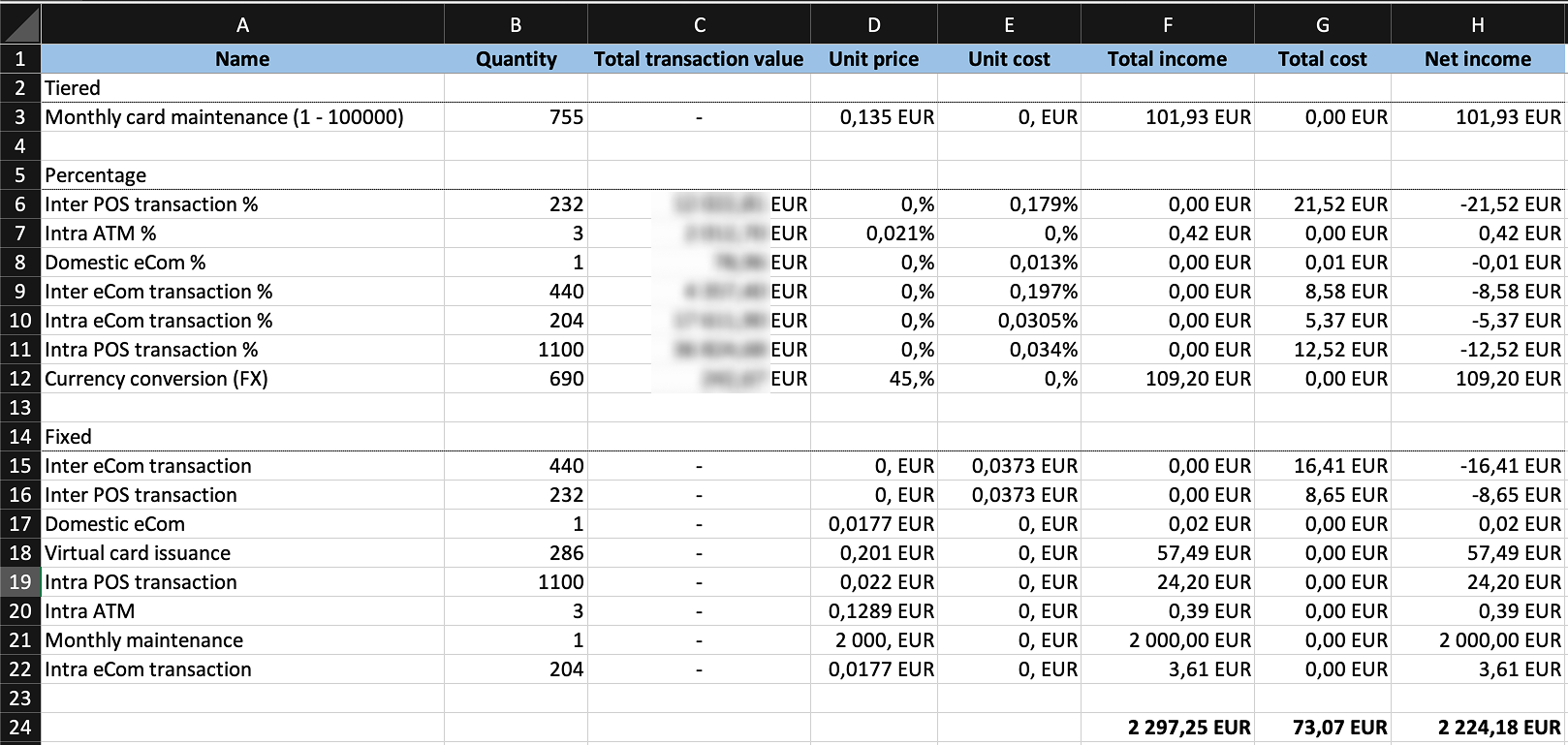
In the example report above, the bottom row shows totals: Total income is the gross amount, Total cost is the sum of all costs/discounts, and Net income is the final amount — either the profit or the invoiced amount, depending on interpretation.
Pricing item setup options
Beyond the core fee configuration (data collector, pricing item type, settlement type), each pricing item supports additional setup options that control how fees are filtered, converted, capped, or linked. Availability of each option depends on the settlement type.
Filtering
Each pricing item can include filters that narrow down which events trigger the fee. Filters are applied to properties available on the incoming event. This allows defining different fee rules for different transaction types, regions, or other criteria within the same Pricing.
The table below shows the most commonly used filter properties. Any property available on the incoming event can be used as a filter.
|
Filter property |
Description |
Example values |
|
type |
Transaction type |
ATM, POS, ECOM |
|
region |
Region of transaction |
INTERREGIONAL, INTRAREGIONAL, DOMESTIC |
|
countryCode |
Country code of transaction |
PL, DE, US |
|
currency |
Transaction currency |
EUR, USD, PLN |
|
amount |
Transaction amount |
amount > 10000 |
|
captureMode |
Capture mode of the transaction |
EMV, MAG, CONTACTLESS, ECOMMERCE |
|
digitizedWalletType |
Digital wallet type |
APPLE_PAY, GOOGLE_PAY, SAMSUNG_PAY |
|
terminalId |
ID of the terminal where the card was issued |
Specific terminal identifier |
Example:
A partner wants to charge 1.5% for inter-region ATM withdrawals but 0% for domestic ATM withdrawals.
Two pricing items are created with different filters: one with type = "ATM" AND region = "INTERREGIONAL", and one with type = "ATM" AND region = "DOMESTIC" with a zero fee.
Automatic currency conversion
FMS supports automatic currency conversion in two scenarios. In both cases, the system uses an averaged exchange rate from the day preceding the transaction date.
Case 1: Currency conversion for instant settlement
When the fee currency differs from the end-user's balance currency, FMS automatically converts the fee amount before charging the balance.
|
Parameter |
Value |
|
Defined fee |
1.00 EUR (card issuance) |
|
User's balance currency |
PLN |
|
Averaged exchange rate (previous day) |
1 EUR = 4.32 PLN |
|
Amount charged |
4.32 PLN |
Case 2: Currency conversion for invoice settlement
For percentage-based pricing items, a settlement currency must be defined. This is the currency in which the fee will appear in the settlement report. If the transaction was executed in a different currency, FMS converts the calculated fee to the settlement currency.
|
Parameter |
Value |
|
Total transaction value |
100 000 EUR |
|
Fee rate |
0.1% |
|
Settlement currency |
USD |
|
Averaged exchange rate (previous day) |
1 EUR = 1.08 USD |
|
Calculated fee in EUR |
100.00 EUR |
|
Fee in settlement report |
108.00 USD |
Exchange rate: In both cases, FMS uses the averaged exchange rate from the day preceding the date of the transaction that triggered the fee.
Minimum amount
A minimum amount can be defined per pricing item to ensure that the charged fee never falls below a specified threshold. If the calculated fee (e.g., percentage-based) is lower than the minimum, the minimum amount is charged instead.
Example:
Fee = 1.5% of ATM withdrawal, minimum = 2.00 EUR.
|
Withdrawal amount |
Calculated fee (1.5%) |
Minimum |
Charged amount |
|
50 EUR |
0.75 EUR |
2.00 EUR |
2.00 EUR (minimum applied) |
|
200 EUR |
3.00 EUR |
2.00 EUR |
3.00 EUR (calculated fee higher) |
The minimum amount is also subject to automatic currency conversion. If the end-user's balance is in a different currency, both the calculated fee and the minimum are converted before comparison.
Free tier
A free tier allows defining a number of fee-exempt events before charging begins. Two modes are available:
|
Free tier type |
Description |
Example |
|
Period-based |
A set number of events are free within each billing period (e.g., monthly). The counter resets at the start of every new period. |
1 ATM withdrawal per month is free. |
|
Lifetime |
A set number of events are free across the entire lifecycle. The counter never resets. |
First card issued for a user is free. |
Actor
When defining a free tier, an actor must be specified. The actor determines the object in the context of which the free tier counter is tracked. Any field from the incoming event can be used as the actor — the examples below show the most common choices.
|
Actor (example) |
Free tier counted per |
Example |
|
End-user |
Each end-user has their own free tier counter. |
First card issued for a given user is free (regardless of how many balances they have). |
|
Balance |
Each balance has its own free tier counter. |
First card issued for each balance is free (a user with 3 balances gets 3 free cards). |
|
Card |
Each card has its own free tier counter. |
1 free ATM withdrawal per month per card. |
Example (period-based, actor = end-user):
Free tier = 2 ATM withdrawals per month per end-user, fee = 2.00 EUR per withdrawal.
|
Withdrawal |
Free tier |
Charged |
Amount |
|
1st |
✔ Free |
✘ |
0.00 EUR |
|
2nd |
✔ Free |
✘ |
0.00 EUR |
|
3rd |
✘ |
✔ |
2.00 EUR |
|
4th |
✘ |
✔ |
2.00 EUR |
|
5th |
✘ |
✔ |
2.00 EUR |
Total charged in month: 3 × 2.00 EUR = 6.00 EUR (2 withdrawals free, 3 charged).
Reference transaction ID
When enabled, FMS links the fee transaction to the original transaction that triggered the fee by storing the original transaction's ID as a reference. This allows the partner's system to trace which fee corresponds to which source transaction.
Example:
An end-user performs an ATM withdrawal (transaction ID: txn-abc-123).
FMS charges a 2.00 EUR fee and stores txn-abc-123 as the reference transaction ID on the fee transaction.
The partner can then use this reference to correlate fees with source transactions in their own systems.
Transaction description
A static text description can be defined per pricing item. This description is attached to the fee transaction and visible to the end-user (e.g., in their transaction history). It helps the end-user understand what the fee was charged for.
Example:
Transaction description = "ATM withdrawal fee".
Every fee charged by this pricing item will display "ATM withdrawal fee" in the end-user's transaction history.
Currently, transaction description supports static text only. Dynamic values (e.g., transaction amount or date) cannot be included in the description.
Funding source
Funding source defines which balance is debited when an instant fee is charged. Two options are available:
|
Funding source |
Description |
Example |
|
User's balance |
The fee is debited from the end-user's balance (balance ID is taken from the event data). |
ATM withdrawal fee charged from the user's balance that the card is linked to. |
|
Fixed balance ID |
The fee is debited from a specific, pre-configured balance ID (hardcoded in the pricing item). |
All fees for a particular service are charged from a dedicated settlement balance. |
Pricing item setup options per settlement type
|
Setup option |
Instant settlement |
Invoice settlement |
|
Filtering |
✔ |
✔ |
|
Automatic currency conversion |
✔ |
✔ |
|
Minimum amount |
✔ |
✘ |
|
Free tier |
✔ |
✘ |
|
Reference transaction ID |
✔ |
✘ |
|
Transaction description |
✔ |
✘ |
|
Funding source |
✔ |
✘ |
Cashback
Cashback is technically handled by FMS using a reversed money flow — instead of debiting the end-user's balance, FMS credits the user's balance with a defined amount or percentage of the transaction value. From a business perspective, cashback is treated as a separate product.
For details on cashback configuration, flows, and examples, see the dedicated Cashback page.