Card Issuing and Core Banking
Verestro Antaca is responsible for card issuing and account opening. The system can perform KYC and eKYC of the user before card issuing. You can manage card and user balance through Antaca.
- Article
- Payment schemes
- Ranking of card issuing companies
- Regulatory and license impact on card issuing
- PCI DSS & other security requirements
- Multicurrency cards - 3 implementation options
- How to prepare for a card issuing project?
- Card Lifecycle Management
- VISA or Mastercard?
- Prepaid, debit or credit cards - the main differences
- Tips to avoid problems when implementing card issuing
- BIN Range or Separate BIN in Card Issuing
- IBANs, cards, balances - how to manage all of this?
- Issuing cards in various currencies
- What steps should be taken to start a card issuing project with Verestro outside the European Economic Area?
- What are the legal and payment scheme rules for launching a prepaid card program without KYC?
- Card Program – in-house or via BaaS?
- Reverse solicitation – marketing & promotion of card issuing in multiple countries
- Introduction
- Intro slides
- Overview
- Quick start
- Transactions Flow
- Technical documentation
- Your APIs for us - External Balance
- Your APIs for us - Shared authorization
- Your APIs for us - Notifications
- Digital Cards Design
- Physical Cards Design
- Legacy Transactions Notifier
- Frequently Asked Questions
- Crypto Widget - webview/iframe for your application
Article
You can find more knowledge about products on this site.
Payment schemes
In this document we describe how payment schemes (Mastercard and VISA) work.
Payment card business is a large global market, which was developed in the USA in the first half of XX century and has grown globally. In this document we will describe the main business principles and in the next chapters we will go into more details. We will focus mainly on Mastercard and VISA operations, as these are the largest payment schemes in the world and the main partners we work with.
Four Party Model

Let's start with the general relationships between the parties. In the Mastercard and VISA 4-party model (which is actually 5-party model) there are the following players:
1. Cardholder - has a contract with Card Issuer, which is usually a bank, financial institution, payment institution, credit union, etc. Cardholder keeps a card in a plastic or virtual form that he/she gets from Issuer. Cardholder makes a purchase transaction at Merchant or sometimes withdraws money from an ATM. In the case of an ATM transaction, the ATM operator (usually a bank) acts as Merchant in a standard purchase transaction.
- Cardholder is happy because he/she does not need to carry cash all the time and has money all the time in their pocket or phone.
- Cardholder has to pay card fees to Issuer for getting a payment card.
2. Merchant - delivers goods to Cardholder, but does not receive cash immediately, but accepts the card transaction, which gives him/her almost 100% confidence that he/she will receive money in a few hours or days.
- Merchant is happy because he/she sold goods, usually having sold more than Cardholder could afford with cash. Imagine the situation where you have to pay cash all the time. Would you always carry enough cash with you? What if you want to buy something, but you do not have enough cash?
- Merchant has to pay the so called "Merchant Fees" to Acquirer for processing the transaction. Usually, Merchant Fees are between 0,5-3% depending on transaction value, country, merchant segment, type of card etc. Merchant fees cover most, if not all, of the transaction processing costs. They usually include all the fees charged by Acquirer, Issuer, Mastercard or VISA for the transaction.
3. Issuer - Issuer is usually a bank, credit union or any other payment institution that delivers payment cards to cardholders (consumers or businesses). Issuer signs contracts with cardholders. On the other side of business, Issuer has a franchising or licensing contract with VISA and Mastercard and connects to their network using Issuing Processors. Verestro and our partners plays the role of Issuer and Issuer Processor in our card issuing or BIN sponsorship projects. During the transaction process, Issuer usually gets authorization, clearing and settlement messages that result in transfer of money from a cardholder account to Acquirer so that Acquirer could settle the transaction with Merchant.
- Issuer is happy because they charge card fees to Cardholder (for example monthly per card) and get transaction fees called Interchange Fee from Acquirer. Interchange fee is a very important part of Merchant Fees. In the European Union for consumer cards it is usually in the value of 0,2-0,3%, but in many countries, especially for business and credit cards, it can amount to 1-2% of the transaction value.
- Issuer has to cover costs of card issuing, which include:
- Cost of payment scheme (Mastercard or VISA) incl. monthly connection, license, authorization, clearing and many many other fees. This is usually the main part of Issuer's costs.
- Cost of other processors incl. transaction authorisation, card maintenance, card tokenization, plastic card manufacturing, personalisation, delivery, etc.
- Regulatory costs incl. payment license operations, Anti-Money Laundering processes, etc.
- Various costs connected with maintaining a relationship with Cardholder incl. proper communications, SLAs, etc.
4. Acquirer - Acquirer is usually a bank or payment institution that signs contracts with merchants, settles payment transactions with merchants and has acquiring contracts with a payment scheme. Acquirer usually provides a payment terminal to merchant locations, and makes sure if it works and is ready for transactions.
- Acquirer is happy because they charge Merchant Fees that usually consist of transaction fees (0,5-3%), sometimes fixed fees per transaction (0,01-0,5 EUR) and monthly fees per terminal.
- Acquirer needs to cover various fees, including regulatory fees, payment scheme costs, cost of processors, terminal purchase and costs of operations.
5. Payment Scheme - Payment Scheme (i.e. Mastercard or VISA) are key for keeping the model running. They develop technical systems that issuers and acquirers are connected to, they process transactions, they develop the market. However, they are also the biggest beneficiaries of the market growth as every new transaction represents revenue for Mastercard and VISA.
Key Processes
There are several processes that take place during card and transaction processing, and here we will briefly describe the most important ones:
- Card issuing process - this process or set of processes consists of multiple actions that Card Issuer needs to perform to issue a payment card. They are the following:
- regulatory compliance - every card issuer in the world needs to comply with law, get license from a national bank or financial regulator, work according to their recommendations and rules,
- Mastercard integration and licensing - it consists of a formal process, providing necessary cash collaterals, doing technical integration, getting security certifications etc.,
- card creation process - after signing a contract by a user, Card Issuer needs to create a new card number (using BIN of the issuer - BIN = first 6 or 8 digits of card). When a card number (PAN = Primary Account Number) is created, the card can immediately work as a virtual card or can be sent for personalisation if it is a plastic card. Usually, after the user receives the card (virtual or plastic), the user starts the card activation process, sets the card PIN and can start using it.
- Transaction process - this process consists of several operations that result in transfer of money from Cardholder account to Merchant. They are the following:
- Authorization process is an action that ensures that Merchant can immediately get information if Cardholder has money on his/her card account and if this card is not stolen. The authorisation can happen online (a direct request to Issuer's system to check the balance and card status) or offline (in this case a chip on the card makes a decision if it can approve the transaction without asking Issuer's systems).
- Clearing process is an action of payment scheme during which clearing files are delivered by acquirers to payment scheme and payment scheme calculates how much money each Acquirer should receive from each Issuer in the world.
- Settlement process is a process of transferring money from issuers to acquirers and later to merchants so that finally Merchant receives the transaction amount, less Merchant Fees, on his/her bank account. Every Issuer and Acquirer has settlement bank accounts that are used for transferring money from or to. Payment Schemes operate those accounts using something like Direct Debit / Credit to transfer money between Settlement Accounts of various financial institutions.
- 3DS - sometimes additional authentication mechanisms are used to ensure that the person initiating the card transaction is the actual cardholder. In the case of eCommerce transactions this process is called 3DS. During an Internet transaction, the user's browser opens the bank's website, where the user can authenticate the transaction using one-time passwords or other forms of authentication developed by Issuer. After the 3DS authentication is verified, Acquirer receives a special cryptogram that is included in the authorization message and validated later by Issuer during the authorization process.
- Tokenization - tokenization is a process of exchanging a real card number into a token number (similar to a card number) to enable digital and contactless payments. Usually it is connected with transactions performed in cooperation with the so called X-Pays (i.e. Apple Pay, Google Pay, Fitbit Pay etc.). The process of tokenization requires an integration with Mastercard Digital Enablement System (MDES) or Visa Tokenization system (VTS) to enable tokenized payments.
- Refund and reversal - special type of transactions that enable reversing payment transaction either immediately (reversal) or later (refund). Once this process has been initiated, Cardholder can receive money back after successful authorisation.
- Chargeback - process of complaint management. It can be initiated by Issuer in case Cardholder informs Issuer that he/she did not do the transaction or did not authorize it, or goods were not delivered etc. The process is costly for Issuer and Acquirer but ensures security of the system for cardholders.
- Card-to-card transactions and payouts - the so called "payment" or "credit transactions". In a standard purchase transaction money is transferred from Cardholder to Merchant. In a card-to-card transaction or payout transactions, the user gets money on his/her card or on the account linked to the card.
There are other important processes associated with payment systems and card transaction processing, but let's stop here and take a short break to understand these critical processes.
Ranking of card issuing companies
How to choose a BIN sponsor and card issuing partner?
Choosing a BIN sponsor or card issuer is a difficult decision for many partners. Most of our partners do not come from the payment card business, so they learn by doing. In this chapter, we are going to describe the key decision factors of choosing a card issuer and make a simple ranking that we will be upgrading and updating in the coming months and years, as not all information is available to us immediately. On purpose, we will not compare other companies to us, it would not be fair to include Verestro - our goal is to educate in this article.
There are the following key decision factors in choosing a card issuing partner:
-
- Does the card issuer share 100% of interchange with me?
- What is the currency conversion rate that the card issuer shares with me?
- How can I impact and earn on ATM withdrawal fees?
- How can I impact and earn on various consumer fees?
- Can the partner help me with getting the Mastercard or VISA marketing and financial support in the short and long run?
2. COSTS - Obvious point.
-
- What are fixed and variable fees?
- What is the level of fees in case of low volumes and high volumes?
- Is there any opportunity to minimize costs as the business grows?
- Read this article for more info on standard card issuing costs: Card issuing - financial details
3. FUNCTIONALITY & SERVICE - a very important point. Critical in the long run.
-
- Does the partner have mandatory functionalities?
- Does the partner offer currencies that I need for my users?
- What are other products that can increase usability or profit that the partner offers?
- Maybe a loyalty program?
- Any insurance offers and additional benefits that could be sold to customers?
- Perhaps invoice scanning and expense management?
- Maybe white label solutions?
- Card reload mechanisms?
- Payouts to cards?
- etc.
- Does the partner offer quick access to a developer zone or a test environment?
- Does the partner make their APIs public?
3. SECURITY AND FINANCIAL STABILITY - a critical point. Maybe it should be the first one.
-
- Is the partner a small start-up, burning money or a payment institution generating profits? Can you imagine what would happen to your portfolio and users in case of bankruptcy or hostile takeover?
- Who are the shareholders of the partner? Are these venture funds or strategic, long term investors?
- Does the card issuer make their financial statements public?
- Does the partner offer support in solving PCI DSS issues (Payment Card Industry Data Security Standards)?
- Is the partner audited annually?
- Does the partner work with banks and other large financial institutions or focus only on small, high-risk startups?
- Is the partner a small start-up, burning money or a payment institution generating profits? Can you imagine what would happen to your portfolio and users in case of bankruptcy or hostile takeover?
Here's an initial comparison of the best known card issuers in the European Union (grades: low - high):
| Name | Country | Revenue Share | Costs | Functionality & Service | Security & Financial Stability |
| Treezor.com | France | Medium | High | Medium | Medium |
| Swan.io | Denmark | Medium | High | Medium | Medium |
| Dipocket.org | Lithuania | High | Medium | Low | Low |
| Solarisgroup.com | Germany | Medium | High | Medium | Medium |
| Wallester.com | Estonia | Medium | Medium | High | Medium |
| Stripe | USA | Low | High | High | High |
| Weavr.io | Malta | Medium | Medium | Low | Medium |
| Verestro | Poland | Make your own assessment | Make your own assessment | Make your own assessment | Make your own assessment |
Source: Financial Stability results based on 2022 or 2023 results available in Internet; all other data from publicly available sources. Please make your own assessment.
Regulatory and license impact on card issuing
Legal issues related to regulatory or payment scheme rules often arise in questions we receive from our partners and clients. In this article I would like to summarize key dependencies, limitations and rules that have a very important impact on payment accounts opening, card issuing and also acquiring or money transfer activities.
When you are launching a payment institution, you have several areas to cover. One of the most important of them is a legal and rules area. Usually this impact can be divided into three main groups of activities: legal requirements, anti-money laundering requirements (which is a specific type of legal requirements) and payment scheme rules. Let me deep dive into each of them.
Legal requirements
To operate payment activities, almost in any country you need to get a payment license. There are various types of payment licenses depending on the country, so here I would like to summarize the most important details. In many cases you can hear about EMI (Electronic Money Institution license), Bank (Banking license), Credit Institution, Acquiring Institution etc. These requirements are usually connected with operational activities that the company needs to fulfill to perform payment operations for other entities. They consist of:
- Regulatory requirements in the areas of security, Know Your Customer, AML, liquidity operations, organizational structure etc.
- Audits performed by regulator
- Risk of penalties for both the company and sometimes persons involved in payment companies
- Outsourcing activities compliance
- Local laws that forbid processing customer or transaction data outside of the country
- etc.
It is important to understand details of such requirements and to follow changes of law and rules on a regular basis.
From the business point of view those requirements force us to :
- Officially register contracts with various partners at the regulator
- Get an approval for particular actions outsourced to partners
- Perform regular monitoring of payment activities done with cards issued for users of our partners
- Follow the national and EU sanction lists
- Being ready to block any transaction, account or card at any time
For our partners - just make sure that you follow the rules we inform you about. They are critical for our activity, licenses, so in fact they are securing your business.
AML and KYC requirements
AML (Anti-Money Laundering) and KYC (Know Your Customers) are part of legal requirements but it is worth presenting them as a separate group because they usually have the biggest impact on operations. The main goal of these rules is to ensure that payment organizations are not used to launder money, support terrorist or illegal activities. They also allow governments to monitor a payment activity area which may be helpful in fighting crime activities.
Key areas of impact of those requirements can be summarized as follows:
- Payment institution is obliged to perform KYC requirements as defined by the regulator - usually consisting of collected proofs of user identity verification (documents, videos, selfie, talks, and other measures)
- In case of business customers and business accounts, not only Board Members but also Beneficiaries of the companies need to go through a KYC and sanction list screening. Beneficiary is defined usually as a person with above 25% shares
- At any moment a payment institution must be ready to present these documents to the regulator
- Persons and entities placed on sanction lists cannot use services of a payment company
- Active monitoring of payment transactions for all users is required
- Sometimes proofs of income can be required
It is interesting that AML and KYC requirements do not block us from issuing cards or opening payment accounts for partners located outside the European Union with our payment companies licensed in the European Union. We are allowed to perform payment activities for Brazil, US, China citizens, as well as the Polish, German or French ones.
Make sure that you collect user documents and provide them during the user registration to us to fulfill those requirements.
Payment Scheme requirements
Payment Schemes (Mastercard, VISA or others) have separate requirements that must be followed by their partners and licensees. These requirements are similar to the previous ones but not always the same. Key requirements that do have impact on business are:
- We are licensed for a particular country or region. In our case it is the European Union countries (in fact the European Economic Area, which is a slightly different area). It means that with our European licenses we can issue cards for people residing, having addresses or working in the European Union. In case we would like to issue cards for people or entities from outside the European Union we have to get special Mastercard approval which is not impossible but may be difficult to achieve.
- We must follow payment scheme requirements on sanction lists and scan users and beneficiaries against OFAC (US Office of Foreign Assets Control) and United Nations sanction lists.
- We must be ready to follow Mastercard technical and rules requirements that sometimes may have impact on technical setup and use cases of your users.
- In case of mandates we need to be ready to implement on time necessary system updates to reach compliance with the Mastercard network.
Problematic areas
Usually problems in a business discussion come in the following areas:
- Can we issue cards for non-EU citizens? Answer: generally yes, but sometimes there may be problems, the majority of your business must be in Europe, your user addresses or office should be in Europe etc.
- What documents do we need to transfer to you during registration? Answer: selfie, international passport is usually a minimum.
Following regulatory, AML and payment scheme rules is critical for payment companies. We do not have a choice. This is part of the game of card issuing and we must follow requirements. However, it is good that such rules exist. They make our customers' money safer and minimize much bigger risks of running or supporting illegal activities.
Thanks for reading.
PCI DSS & other security requirements
Very often customers ask questions connected with security. In this article we would like to summarize key requirements connected with Payment Card Industry Data Security Standards (PCI DSS). There are other rules that we and our partners need to follow (like GDPR for example) but it will be the topic for another article.
The most important question that needs to be answered before going into details of PCI DSS requirements is - Am I actually processing payment card data?
Key PCI DSS requirements mentioned below apply only in case that the partner has access to card number (PAN - Primary Account Number), expiry data or other related card data. If the partner does not touch them, if the partner cannot see those numbers there is only one requirement - a simple Self Assessment Questionnaire (SAQ) needs to be fulfilled to confirm that the partner is compliant with PCI DSS requirements.
It is very important that you choose the correct way of integration with the card issuing platform. If you use our mobile SDKs or white label products, usually you will not have access to card data and will be able to approve your project just after fulfilling SAQ mentioned above. So please consider this way of integration to avoid additional costs and risks of PCI DSS compliance. However, if you connect via API, which is a usual way of integration, you will have to comply with security rules. Please read this section twice. This is the most important - choice of integration method will be decisive if you have to or not go through annual external audits and all hassle connected with PCI DSS.
Assuming you do process card data, depending on what your role is, different levels will be applied to you. You can be a merchant or a service provider. In simple terms, if you do the work for yourself then you are a merchant if you want to further provide the service (intermediary) you are most likely a service provider. In card issuing projects you will rather be a service provider because you offer cards to your users. Let me give some examples:
Service Provider - wallet, crypto wallet, money transfer organisation offering cards to own users etc.
Merchant - an insurance company that wants to use a card to send money to their users, a lending company that wants to send a card to users, a corporation or SME giving business payment cards to their employees etc.
Who is according to PCI DSS "Merchant"
PCI DSS, or the Payment Card Industry Data Security Standard, defines a merchant as any entity that accepts payment cards (such as credit cards and debit cards) as a form of payment. The term "merchant" can encompass a wide range of businesses and organizations, including traditional retail stores, e-commerce websites, restaurants, hotels, and service providers that handle cardholder data.
Under PCI DSS, merchants are required to comply with a set of security standards and practices to protect the payment card data they handle. These security measures are designed to ensure the confidentiality and integrity of cardholder data, reduce the risk of data breaches, and protect both customers and the payment card industry as a whole.
PCI DSS compliance requirements can vary depending on the merchant's size and the volume of card transactions they process. Merchants are typically categorized into different levels based on their transaction volume, with higher-volume merchants facing more stringent compliance requirements.
There are 4 levels of compliance and requirements depending on volumes of cards and transactions.
|
Level of PCI DSS |
Your business does |
What you should do |
|
4 |
· Less than 20 000 eCommerce transactions per year · Less than 1 million other transactions per year |
· Complete an annual Self-Assessment Questionnaire (SAQ) · Conduct quarterly network scans by an Approved Scanning Vendor (ASV) |
|
3 |
· 20 000 – 1 million transactions per year |
· Complete an annual Self-Assessment Questionnaire (SAQ) · Conduct quarterly network scans by an Approved Scanning Vendor (ASV) |
|
2 |
· 1-6 million transactions per year |
· Complete an annual Self-Assessment Questionnaire (SAQ) or ROC conducted by a QSA · Conduct quarterly network scans by an Approved Scanning Vendor (ASV) |
|
1 |
· 6 million + transactions per year |
· Complete an annual internal audit · Conduct quarterly network scans by an Approved Scanning Vendor (ASV) |
Who is according to PCI DSS "Service Provider"
According to the Payment Card Industry Data Security Standard (PCI DSS), a Service Provider is defined as any business or entity that is not a payment card brand (such as Visa or Mastercard) and is involved in the processing, storage, or transmission of payment card data on behalf of another organization. Service Providers play a crucial role in the payment card ecosystem, as they offer various services to help businesses accept and process card payments more effectively and securely.
Service Providers can include a wide range of businesses, such as:
- Payment processors
- Payment gateways
- Hosting providers
- Managed security service providers
- Data storage companies
- Point-of-sale (POS) system providers
- Customer relationship management (CRM) software providers
- Software-as-a-Service (SaaS) providers
Service providers are categorized based on the services they provide and their interactions with payment card data. Here are some common classifications of service providers based on PCI DSS:
|
Level of PCI DSS |
Your business does |
What you should do |
|
2 |
· < 300 000 transactions per year |
· Complete an annual Self-Assessment Questionnaire (SAQ) · Conduct quarterly network scans by an Approved Scanning Vendor (ASV) |
|
1 (Verestro has 1 level of PCI DSS) |
· > 300 000 transactions per year |
· Complete annual internal audit conducted by a Qualified Security Assessor (QSA) · Conduct quarterly PCI ASV scans |
Verestro has the 1st level Service Provider of PCI DSS, which means that we have to go through quarterly PCI ASV scans and an annual external audit performed by certified PCI DSS assessors. In accordance with the principles of PCI DSS, Verestro is obliged to check if the partner is working in compliance with the PCI rules, so we will be checking what the level of transactions and cards in your case is.
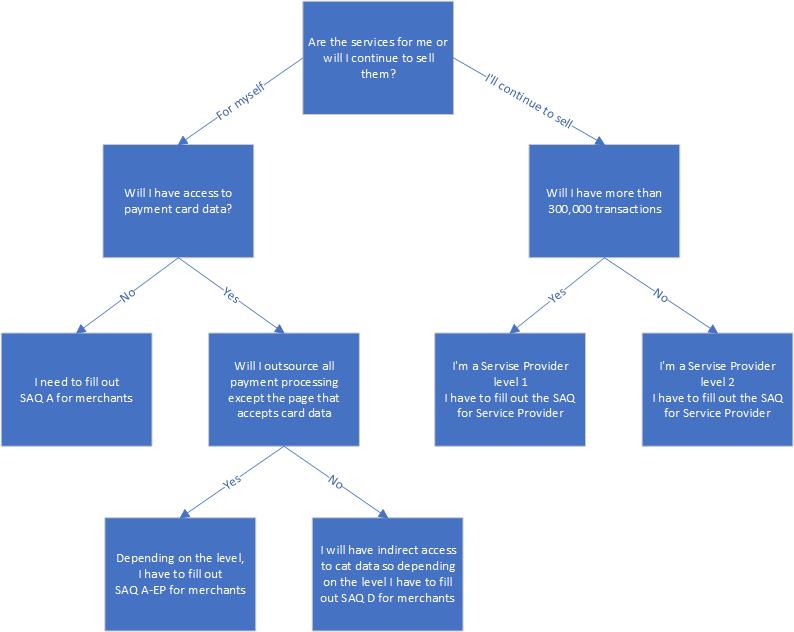
So let's remind our two possible scenarios:
Scenario 1 (The partner does not have any access to unencrypted PAN numbers) -> THIS IS THE BEST AND RECOMMENDED SCENARIO. In this scenario you will most likely use our SDKs and admin panel and full encryption of card data. Verestro will guide which Self-Assessment Questionnaire (SAQ A for merchants) is appropriate and ask a few questions (from SAQ). The document will have to be signed by the partner.
Scenario 2 (The partner can access unencrypted PAN numbers) -> in this scenario:
- Verestro will provide a Self-Assessment Questionnaire (SAQ), and ask a few questions. The document will have to be signed by the partner.
- The partner will perform quarterly PCI ASV (Approved Scanning Vendors) scans
(cost around 1k EUR quarterly or less) - The partner can choose any provider from the PCI Security Standards Council (PCI SSC) or Verestro can recommend a supplier. - Until the partner reaches 0,3 mln transactions/interactions annually with PAN numbers, the partner does not need to undergo an annual internal audit (in extreme situations, it is possible to require PCI internal audit from the partner).
If the partner plans to achieve 0,3 million transactions/interactions, there are two options:
- either the partner will move to a scenario that does not touch card numbers using some technology changes
- or the partner should perform an annual internal audit done by a PCI auditor (QSA)
If you would like to discuss your requirements in more detail and receive more information, please contact us.
Thanks for reading.
Multicurrency cards - 3 implementation options
Multi-currency topic is an interesting and important concept of card issuing that usually requires some explanation. Because of the very big market of currency conversion and usually very high fees of universal banks connected with international transactions, it became popular to implement multi-currency cards. Actually the first Revolut use case, heavily promoted several years ago, was connected with this topic. So let's go into details.
There is actually one problem that we want to solve when thinking of implementing multi-currency cards - how to enable the best and most effective card payments in an international environment? There are various approaches to this problem:
Scenario 1 - multi-currency cards and accounts
In this example we offer users multiple payment accounts in various currencies.
- The user gets a single payment card connected with all accounts.
- In case the user pays with currency X, the authorisation system recognises transaction currency and debits account of currency X.
- In case there is no money on this account, system debits another (default) currency.
This example is very often used, but it has a few disadvantages. The first is that the user must perform currency conversion before. It is an action before his/her travel and actually it is an unnecessary action from the logic's perspective. It should be more convenient for the user to have one account and cheap currency conversion during every transaction. But usually consumers like the solution because they can manage this currency problem in advance, see FX rate and can make decisions on how much money to convert.
Implementation of this scenario is not easy because card issuing companies either need to enable multi-currency functionality with Mastercard / VISA or to implement multiple settlement accounts with payment organizations and manage conversions accordingly based on transaction currency. There are additional fees that Mastercard and VISA charge for this service which can make this implementation costly.
Scenario 2 - currency conversion on a single account
Another way of solving the currency conversion topic is to think about how to enable the cheapest conversion during a transaction. In this example the user does not have to convert currency before his travel. He just uses his card while traveling. I personally like this approach the most because it is easier for me but in reality many customers prefer scenario 1.
In this scenario, to have dynamic rates, there is a need for online FX API integration and dynamic management of rates during authorisation. Usually card issuers use static conversion rates offered by Mastercard and VISA but this leads to some additional costs and margins. Ensuring dynamic currency conversion during authorization and proper conversion management may be difficult to achieve.
Scenario 3 - multiple cards for different currencies
The third way of managing the multi-currency topic today in the virtual card environment is issuing multiple cards to multiple accounts in various currencies. In today's world this is easily achievable as the cost of card issuing went heavily down. It works in the way that users have several cards, connected with various accounts and card visuals, visible in Apple Pay or Google Pay with the currency of a particular card. The user can choose a card which is the most convenient for him/her.
In this scenario we need to offer an inexpensive currency conversion mechanism as the user needs to manage balances on each account separately and perform conversion in advance.
This is actually the cheapest scenario of implementation.
While thinking about the multi-currency topic, please consider various scenarios and ways of solving problems. Sometimes the default plan (scenario 1) can be very costly from the transaction processing perspective because of additional fees of payment schemes.
Thanks for reading.
How to prepare for a card issuing project?
Do you want to issue cards to your users? In this article we describe what is required on your side to implement virtual or plastic cards in your applications.
Let's imagine you are a fintech, crypto wallet, lendtech or any other company with a concrete target segment, some or thousands of users and you have a mobile application for your customers. You have decided to go live with card issuance in order to increase revenue and user loyalty. Below we describe the main decisions and steps you need to take to get ready for a card issuing program:
- Decide on a card issuing partner - check out other articles we have on this topic in the Knowledge Center. Make sure that the partner has the necessary functionalities, legal requirements and flexibility that you can accept. Check your partner's financial standing. Contact us for more details.
- Analyse and describe your use cases - describe user flows, develop some initial graphs of how key processes will work. Focus on user onboarding, Know Your Customer steps, card generation and activation, card management and transaction flows. Read the Developer Zone requirements during this step to make sure you are ready to integrate without difficult customisations.
- Check the legal environment - try to analyse and understand the regulatory environment. Check if you can fulfill KYC requirements and how you can collect data from users. It is important that you submit a user selfie and document photos to the card issuer during the verification process. If you are working with us, please make sure that you have a European entity or branch in the EU to sign a contract with us for card issuing.
- Verify API integration - go to the Developer Zone and analyse APIs or SDKs that you will have to connect to. If you want to avoid PCI DSS audits and associated costs, consider using SDKs. It is highly recommended if you have a large group of users.
- Make P&L analysis - consider the revenues from card issuing and the costs of this product. Make sure you understand unit economics. You can use articles in our Knowledge Center to start this work. Choose an affordable partner - do not think that if something is more expensive, it is better in quality. The card issuing business is a cost-based business where low level unit economics matter, especially cost per card and cost per transaction. Revenue share from interchange fees or currency conversions is even more important than costs.
If you have checked these points, you are ready to sign a contract. Contact us sooner, let's work together. We can advise you on many of these points to build the best possible program for you. We have extensive experience in more than 30 countries on 5 continents. Make use of this knowledge to get started.
Thanks for reading.
Card Lifecycle Management
Once launching card issuing projects, our customers usually forget that it is a long-term activity that requires constant verification and improvements. It is very important that you understand and manage your card holders and use best practices in card lifecycle management. Let me summarize key activities from a timeline perspective.
Stage 1 - choosing a card issuing partner
Obvious step. Everybody focuses on financials and technical integration. Very few people check value-added services and other products. Almost no one is aware of PCI DSS & other security requirements that will make your life easier on stage 4 and later ones. Another common mistake is that you do not check the financial stability of your card issuing partner as if it is not important for your business and users.
Stage 2 - implementation
Obviously important. No comments. Check Dev Zone and implement. Make sure your developers read specs carefully. Make sure you understand AML and KYC regulations so that you can comply with rules and the project can be built on strong fundamentals. A common mistake is not to consider Stage 4 - card lifecycle management processes are forgotten.
Stage 3 - launch
Everybody focuses on this moment, plans campaigns, distributes cards. And usually this is the last implementation step of this new product. It is a mistake.
Stage 4 - card lifecycle management
Once you are up and running, it is very important that you are able to monitor your portfolio, create reports, organise personalised campaigns and manage your portfolio in a very active way. There are several rules to follow in order to maximise your portfolio's earnings and performance. The most important ones are summarised below:
- Portfolio Manager - have people that will be responsible for the management of your portfolio. 1 person is enough at the beginning. Make sure these people understand goals and work to make your cardholders active.
- Reporting system- make sure you have a flexible reporting system that gives you information not only about the number of issued cards and transactions, but more importantly on the behaviour of various customer groups:
- have reports how many customers used the card after 1-2 days, be able to find the user IDs,
- have reports with customers that used the card after 5 days, 15 days, 30 days,
- have reports on inactive customer groups.
- Actions - be ready to act basing on the user behaviour
- once you see that your customer is not using the card after 1-2 days - send him/her a notification or an educational reminder,
- once you see that the customer is not using the card for 15 days - maybe you should send a small digital gift to the customer and deliver it if he/she starts using card,
- if you see an inactive customer after 30 days - ask them why they are not using the card; maybe you will get a correct feedback.
- Reporting - again and again check if your actions work correctly. What is their success rate? How are your customers changing their behaviour?
- P&L analysis - make a detailed analysis from a financial perspective, incentivise users to do transactions that are bringing more revenue, think of increasing monthly fees for non-active users.
- Quality reporting - check the quality of your services, ask users for feedback regularly, collect information, analyse it, make actions to improve.
- Value-added services - think of launching new services that can improve performance of your portfolio. Maybe a voucher-based ending, card-to-card money transfers, loyalty programs etc. Ask us for best practices and tools that are easy to use.
- Education (super important) - never underestimate the importance of educational messages. You can teach customers how to use the card on the internet, tell them how to tokenise the card in Apple or Google Pay, show them how to pay at ATMs. Card issuers tend to forget how cheap and profitable it is to work on user education. Do not assume that everyone everywhere uses payment cards the way you use them today. People sometimes do not know how to use 3DS, they are afraid to use it, etc. Work on that.
- Learn, change, improve...
Card issuing is a long-term activity. Please do not think that you will launch it and everything will work properly. You should be constantly working to attract more users and teach existing users how to use the cards so that they add real value to your business. Good luck!
Thanks for reading.
VISA or Mastercard?
Sometimes our customers ask if it is better to issue VISA or Mastercard cards. In this article we would like to answer this question.
Main payment schemes
There are two main payment schemes in the card area that have almost monopolized global card business - VISA and Mastercard. Next to them there are several local schemes, sometimes going global that are also worth thinking of in more sophisticated global projects (like UnionPay China, JCB Japan, EC Karte Germany etc.) but in general in majority of projects you will do the business decision if you prefer to issue VISA or Mastercard cards.
In one sentence the answer is - usually it does not matter. But if you go into details, depending on the country or type of the program there may be some important differences worth considering.
Key decision points
Below we present some important decision points:
- Financial and marketing support - depending on the country and type of program VISA or Mastercard can decide to support your program financially or from some marketing assets. If so, it makes sense to consider this as an important factor in the decision making process. Check with your card issuing partner if there are such possibilities.
- Interchange differences - in some countries (outside of the European Union) there are slight but important differences in Interchange Fees which in the end means that you can earn more from every transaction. Check with your card issuer if such a situation exists on your market. If you are going to offer cards globally, it may also be possible that inter-regional (inter-continental) transactions will be more profitable in one payment scheme. So it is worth checking.
- Cost factors - usually fees connected with a card issuing program will be dictated by your card issuer or BIN Sponsor but in some cases a card issuer may have different fees depending on the cost of VISA or Mastercard transaction fees.
- Special local or global card benefits programs - both Mastercard and VISA are developing various loyalty, discount, value added services that can make your program more interesting for users. In Poland, for example, Mastercard is running a very attractive card benefit and loyalty program called "Priceless Specials". It is worth checking as it may be an important value added for your portfolio and users that may be much more important than any financial details.
- Brand and acceptance - in 95% of countries there is no visible difference in acceptance and brand between VISA and Mastercard. But in some cases it exists. For example if you are going to issue cards in Hungary - Mastercard is much more popular and customers are used to it. It is worth checking before making a decision.
- Educational and consulting support - it can be valuable help. In various projects, countries or regions payment schemes can have services or people that can help you a lot in defining a good value proposition and important details of a card issuing program. This may be very valuable as very often employees of Mastercard and VISA are very professional, have a lot of knowledge and can help you in developing your portfolio. If you have such support, try to use it.
- Shareholding connections - in some cases (like Verestro) one of the payment organizations (in our case - Mastercard) will be a shareholder of your partner. It may be very valuable as you will have in-depth support of the payment scheme and card issuer. It may be useful in various situations, difficult cases connected with rules etc. Make use of such cases, if you can.
Conclusion
Those are the main differences. It is worth considering. In the majority of cases your partner in card issuing will have some preferences and sometimes there will be no choice. But it is certainly worth considering when deciding which card issuer and payment scheme to choose.
Thanks for reading.
Prepaid, debit or credit cards - the main differences
Before launching a card issuing program, our customers consider which card product to use. In this article we will summarize the key differences and considerations.
There are three main groups of payment cards: pre-paid, debit and credit cards. Below we summarize the most important differences.
Prepaid cards
- user has to reload a card account to use a card (like in debit cards by the way)
- you can issue anonymous, non-reloadable gift cards
- in some cases merchants block BINs of prepaid cards more often than for debit or credit cards
- you can have consumer and business prepaid cards
- in many countries, from legal perspective, there is no difference between prepaid and debit cards
Debit cards
This is the biggest group of cards in the world:
- user has to have a payment account or current account connected with a card
- user has to go through a KYC (Know Your Customer) process
- user has to reload a payment account to use card
- usually you cannot issue anonymous cards, because in general they are always reloadable
- sometimes, if you give a loan to your customer, a debit card can work like a credit card
- you can have consumer or business debit cards
- you can have Gold or Platinum debit cards
Credit cards
- user applies for credit and gets it in the form of a card
- usually connected with a revolving credit (something like credit line) and a grace period (no interest for 40-50 days)
- because of the credit, the user needs to go through KYC and credit scoring, so it is more difficult to issue than prepaid or debit cards
- you can have Gold, Platinum or World Elite credit cards
- you can have consumer or business credit cards
- usually an interchange fee is a bit higher than in case of debit cards
- sometimes approval rates for transactions are higher, some merchants (car rental) require credit cards from their customers
- because credit line is connected with this product, usually it is more profitable than a prepaid or debit portfolio
These are the main differences between the above mentioned products. In most cases, you should be thinking about debit cards because they give you the same benefits as prepaid ones, and you can convert them into credit cards by giving loans to your customers.
Tips to avoid problems when implementing card issuing
So you have a good business case for issuing cards for your customers and you found a perfect vendor who can provide formal and technical services in this area. Right after signing the contract you’re ready to implement. What now?
Now it’s time to make sure that the implementation will be as smooth as possible and you and your team won’t get stuck on some of the common problems that may happen in the project. Of course each vendor has his own approach, but let us explain how to avoid some of them based on Verestro’s experience.
Preparing everything for you takes a moment
Depending on your particular setup we will need 4-8 weeks to prepare everything for you. From dedicated environments so that your customers and their cards will always be safe and secure, to ensuring that you will be able to use the cards in Apple and Google wallets and that your proper logo will appear in the 3DS confirmation screen when customers will be paying online. In the meantime you can focus on understanding all the APIs using Sandbox environment and make sure that your team is ready for the work in front of them – for example by analyzing the documentation carefully. Our services will be available for you one by one, so you don’t need to wait full 8 weeks to start implementation – usually first work on your side starts after 2-3 weeks from the kickoff meeting.
Test and adapt
Everyone is always eager to launch the product to final customers – that’s obvious. But it’s good to plan an extensive testing phase that will limit the potential volume of incidents that may happen once you’re live. A simple successful transaction done in ecommerce and brick and mortar POS is a very good prognosis, but should not be the end of testing phase. Take into account different scenarios and edge cases (like reversals and refunds – or even partial reversals). Take into account that there are many players in the world of payments and that a simple transaction is actually a connection of several backend systems (acquirer, issuer, payment network, additional vendors). The more you test, the less surprises will be there in the end.
Knowledge and understanding is key
Issuing cards and processing transactions is unfortunately not like riding a bike – it’s easy to forget. During the project with Verestro you’ll learn a lot about the world of payments and cards. Make sure this knowledge is gathered on your side and distributed between team members.
Plan your MVP
Rome wasn’t built in a day. Best banks did not simply appear in a moment. Issuing cards is a vast topic that requires a lot of iterations to make sure the basics are solid. It’s always good to start with essentials:
- Create user
- Create their balance
- Issue first card
- Digitize the card in Apple/Google Wallet
- Make first eCommerce transaction (with 3DS)
- Make first POS transaction
- Run ‘friends&family’ phase within your company
- Then start adding features and more functionalities
If you’ll start focusing on ‘nice-to-have’ features too early in the process, you may loose sight of more basic processes what may cause delays in the whole project.
Having all of that in mind should make your project more streamlined and effective.
BIN Range or Separate BIN in Card Issuing
Our customers usually ask if it makes sense to issue cards on a separate BIN fully dedicated for a particular project or just use BIN range and share it with other partners. Let me focus on this topic in this short article.
BIN range
There are not so many disadvantages of dedicating a BIN range for your project. In many cases this decision will be much better. Key reasons:
- The project is cheaper as we do not need to implement a new BIN with Mastercard or VISA for you. It is a saving of around 20.000 EUR and monthly maintenance costs are cheaper as well (500-1000 EUR monthly).
- The project is faster for the same reason. It is a saving of around 3-4 months.
- The setup of the BIN range is easier from an operational perspective, so you and we do not consume more mandays for the project.
The only slight disadvantage in such an approach is that there may be a situation when this BIN gets compromised because of some user behavior. It is a very rare situation but it could happen. If you share the BIN with other customers, there is a risk that you will have to change the BIN and cards for customers because of the actions of other customers. We believe that this risk is very small - it has never happened in our history.
Separate BIN
Some people believe that if they have "own" or "dedicated" BIN, the project will be much better. In reality it is not so. It is only more expensive and slower (see above). There is more work and some additional risks connected with the new BIN setup. However, the advantage of a separate BIN is the same as mentioned above - you do not share the BIN with other partners, so in case of BIN compromise, you will know that it happens because of your actions.
I do not see any additional big differences, disadvantages or benefits of using a separate BIN.
Thanks for reading.
IBANs, cards, balances - how to manage all of this?
Once you are starting a payment account and/or card issuing project you need to learn key definitions and relations between those various parameters.
Balance ID - this is a real "account" in the Verestro system. This number is connected with User ID and means that the user has an account and balance in our system. The user can keep money on this Balance ID. Of course, one user can have multiple balances but a single balance can belong to one user only
IBAN - this number is often mixed with Balance ID. IBAN is a number through which the user can receive money to his balance via wire transfer. IBAN is not a balance ID. Generally it does not make sense to have more than one IBAN for one balance. Normally you issue one IBAN for one balance. Usually a user can have more IBANs and balances if he wants to keep money on separate accounts, in various currencies etc.
Card number - easier to understand, just a card number issued to a particular balance ID (not to IBAN!). A user can have multiple cards connected to one balance ID.
Once preparing to project with Verestro, please learn the above definitions. More info here: https://developer.verestro.com/shelves/card-issuing-ibans
Issuing cards in various currencies
Verestro and its partners can issue cards in multiply currencies. Depending on the currency it is easier or more difficult but it is possible to issue cards in multiply currencies. Let me explain how to do it in this article.
Firstly, let's discuss that to issuing cards in particular currency (let's say CZK) means that user has an account in CZK and when he is paying 100 CZK his account gets debited with 100 CZK. To achieve this situation normally the card issuer needs to implement Settlement Service with Mastercard or VISA in CZK. This means that card issuer will have to send 100 CZK to Mastercard after the transaction so that Mastercard could transfer it to acquiring institution and later to merchant. Once this Settlement Service is enabled everything works well but the problem exists if issuer does not have Settlement Service in particular currency or sometimes such Settlement Service does not even exist and issuer must settle money in USD or EUR. Sometimes it is not worth spending money and time on new Settlement Service implementation as it can cost 25-40k euros.
In such situation we can implement Internal Settlement with partner in particular currency. It means that users will keep money in CZK, users will be charged 100 CZK if they pay 100 CZK but all money transfers between Verestro payment institutions and our partners will be happening in EUR. There will be some FX risks connected with this approach but they can be covered through a bit higher fees for users.
There is only one exception to this rule - it is necessary that we can hold money in this new currency in the banks where we hold accounts. It is necessary that accounts are stored in this particular currency to avoid difficult fluctuations.
Ask us for Internal Settlement if you are interested in card issuing in multiply currencies.
What steps should be taken to start a card issuing project with Verestro outside the European Economic Area?
What steps should be taken to start a card issuing project with Verestro outside the European Economic Area?
At Verestro, we are focused on simplifying global fintech space by building a multifunctional, multi-BIN-sponsor, multi-processor, multi-acquiring, multi-bank platform. Our final target is to offer payment and financial services globally in any country in the world. Today we are offering card management, tokenization and payments on 5 continents. We store above 5 mln cards and tokens. In the group we process over 2 bln USD in payment transactions annually.
If you are interested in issuing cards outside of Europe, we can start a project immediately. Normally such a process works in the following way:
1. You contact us and we talk about your plans.
2. You can start integration with our Sandbox immediately using the tech documentation and APIs released in our Developer Zone https://developer.verestro.com/.
3. We sign a contract to cover the services.
4. We search for BIN sponsors relevant for markets where you operate unless we have them already integrated and commercially ready.
5. You can issue cards, enable payouts to cards or enable other payments once you finalize your technical integration and we are ready with the chosen BIN sponsor on the particular market.
6. We take care of all operations, settlements. You take care of your go-to-market strategy, frontend, marketing, pricing, etc.
The big advantage of such an approach is that your platform is not dependent on a single BIN sponsor, you can work with multiple partners. You can also migrate the program easily to your own BINs once it grows and you become a direct Principal Member of Mastercard or VISA.
What are the legal and payment scheme rules for launching a prepaid card program without KYC?
Recently we have been asked the question: “What are the options for a merchant or cafeteria to launch a card program based on prepaid cards (such as lunch cards and gift cards) that doesn't require a KYC process?”
There are a lot of misleading pieces of data regarding prepaid cards and gift cards. Those issues are mainly caused by differences between the legal environment and Mastercard or VISA rules. In this article we would like to go deeper into this topic and explain what is possible and what is not possible.
Key regulatory and scheme requirements for prepaid card programs
Let’s start with key rules:
1. PSD2 (legal environment in Europe) and AML law say that payment institutions have to know their customers so full KYC must apply. Sometimes, depending on the country, some limited KYC rules are possible in case a payment institution issues a payment instrument with payment or transaction limits i.e. non-reloadable gift cards. We work in compliance with the Polish law which states that it is possible to issue anonymous cards only in case:
a. Value of monthly transactions is limited to 150 EUR
b. Value of such card is limited to 150 EUR
c. Only POS and eCommerce transactions are allowed
2. Mastercard and VISA rules claim that in case of specific non-reloadable prepaid cards it is possible to issue anonymous cards. It requires special approval for the program.
3. In some specific use cases (expense management, lunch cards) it is possible to perform KYB of the company selling prepaid cards only. In such a case money on account must belong to the company and the company can issue such cards with limited KYC to its employees or users.
Implementing reloadable and non-reloadable gift cards
Taking the above rules into account, we can imagine the following scenarios:
Scenario 1 – non-reloadable gift cards with limits up to 150 EUR with limited acceptance
It is possible to issue cards for such programs after approval of the payment scheme.
Scenario 2 – reloadable gift cards for the company and its business expenses
It is possible to sell gift cards connected to the business account of the company (after KYB) assuming payments are connected with expenses or specific use cases of this company.
Please contact us if you want to issue similar programs with simplified KYC rules. We will advise on the best scenario and try to find ways to quickly launch a prepaid card program that meets your business needs.
Card Program – in-house or via BaaS?
When launching a new card program, you must decide whether to do it yourself or hire a BIN sponsor or processor and outsource the program to an external entity. This article will address this question, arguing that flexibility and speed-to-market are the most important decision factors.
Let’s start with the definition of a card program and its various parts. Building a new card program requires making decisions in the following areas:
-
Regulatory license – all areas of licensing, relations with the local regulator, anti-money laundering (AML) topics, etc.
-
Card scheme licenses – relations with Mastercard and Visa, settlement processes with Mastercard and Visa, AML and security-related topics
-
Technology – choosing a card management system and/or card issuing processing system. Either in a form of software or a service provided by an external partner. If you are building software in-house, you need to think about software certification with Mastercard and Visa. If you are buying software, you need to think about long-term dependencies on your technical vendors.
-
Security – ensuring compliance with Payment Card Industry Data Security Standards including regular external audits performed by external auditors
-
Card production and delivery – choosing a provider of plastic cards and solving logistic related problems of cards being delivered to users
-
Settlements and collaterals – exchanging money with Mastercard or Visa schemes, hiring banks that need to act as settlement agents, ensuring money is processed on time and all collaterals are paid
-
Operations – ensuring smooth customer service operations including exchange of information with payment schemes, other banks, processing chargebacks & user claims
Building a new card program is almost like building a bank. You need a lot of competences, technology pieces, licenses etc. Obviously, it takes both money and time. It is impossible to run your own card program without 10-20 people being engaged in daily operations, scheme and regulatory compliance, not even talking about technology.
On the other hand, you have the possibility to start a program with a BIN Sponsor or Banking-as-a-Service (BaaS) partner who will be responsible for all those actions. In this case, you will have quick time-to-market but you will have to pay variable fees for those actions.
The answer to which is better is not actually that difficult. In our opinion, the best scenario is to choose a partner with whom you can quickly start (BIN sponsor) and convert your program to a direct license once it grows. This means you can start issuing cards in 3-4 months without high entry costs. You can start building a portfolio and earning first revenue. Once your portfolio reaches around 500,000 cards, it will be worth investing in your own licenses.
Launching card issuing quickly and cost-effectively is critical. While an in-house solution would cost €2.4 million over two years, leveraging Card as a Service (CaaS) / BaaS dramatically reduces both time and initial investment to just €0.2 million, with deployment in 3-4 months. This is the clear choice for agility and financial prudence.
Once you start a project with us, we ensure the flexibility of your development in the long run. We can act as a BIN sponsor and once you are willing to have your own licenses we can either help you in getting a Mastercard or Visa affiliate license or transfer your cards to your own principal membership. Once the cards are issued under your own license, we will act as an issuing processor, and you will only cover technology-related costs. This approach is flexible because it gives you the option to issue cards not only on your own license, but also to use our BIN sponsorship for various projects. This approach offers the best entry costs, the quickest time to market, and highly flexible development scenarios.
If you need more information about our work process, please contact us.
Reverse solicitation – marketing & promotion of card issuing in multiple countries
One of the limitations in global card issuing and account opening activities is connected with licenses and regulations for particular countries. Payment institutions have Mastercard or VISA licenses for particular countries as this is the way Mastercard and VISA systems work. In the European Union it is possible to get a license for the whole region but in other countries and regions you must get a license per country.
This makes the process of card issuing difficult in today’s digital economy because you usually do promotional and marketing activities in multiple countries. You have users from Europe, Asia, Africa, Americas and other continents. It would not be smart to limit your payment services only to users from particular countries.
This is a critical point and you should be discussing this point with your card issuer at the beginning of your cooperation with them. The answer to this problem is not easy or white-black. There are some important considerations that we present below:
- Multi card issuing and multi card processing – we believe that integrations with multiple card issuers that have licenses in multiple countries is critical for the success of global programs. Verestro works with payment organizations in multiple countries and solves this problem globally. In such cases, those problems disappear.
- Regulatory compliance – your payment institution must check if it is legally possible to open a payment account and provide payment cards to users from many countries. In case of our BIN sponsor we are allowed to open payment instruments and accounts to users from multiple countries assuming we fulfill AML requirements
- Mastercard and VISA rules – Mastercard and VISA give licenses for particular countries. It is impossible to get a license for all countries. There are some specific processes to get approval for program in other countries than you have payment scheme license but it is not clear in fact and there are some risks for every program
There are some general rules that you should follow as our partner so let us describe it:
- You should be able to prove that the main focus of your marketing actions is in Europe if your card issuer is based in the EU. We may ask some additional questions. Mastercard can have a look at places where transactions are happening etc. Try to focus on Europe.
- You should be able to provide proof that even if we are distributing cards to consumers living abroad there is an economic interest of those people in Europe. Maybe they travel to Europe, maybe they have employees in Europe etc.
- If you are distributing cards to companies, make sure they have headquarters or offices located and registered in Europe.
- The best would be that your users have resident addresses in the European Union that they are registering during card on-boarding. This solves all the problems.
- We would like to be aware of your marketing activities in countries outside of Europe. It is important that we are aware, maybe we inform local Mastercard so that they are aware.
Our intention in the long run is to solve this problem by working with multiple partners globally and grow with licenses to other countries together with our customers. Don’t hesitate to contact us if you want to do global card issuing business.
Introduction
In order to create card you have to perform four steps:

Create User
There are thre patches to create user: Self-registration in White Label App, Self-registration via Mobile SDK embeeded in your mobile app, sending user data to our backend directly via Life Cycle API.
White Label Application
Verestro has developed a mobile application for iOS and android. The application has a modular design which, can be personalized to the required functionalities, branded according to the guidelines and published in production. More about this solution can be found in White Label Application.
Mobile SDKs
Customers with their own infrastructure and well-established products who want to provide their users with new mobile functionalities in a fast and easy way, including secure payment instruments, may use dedicated SDKs. Verestro team actively supports their implementation and leads through necessary certification processes. More on SDK based implementation can be found in User Lifecycle & Card Management SDK.
Life Cycle API
If you need direct integration with your backend, you can use LC API - dedicated server-to-server REST API created for this purpose. More about LC API can be found in User Lifecycle & Card Management API.
KYC
In order to meet legal regulations Verestro supports the KYC (Known Your User) process aimed at verification of the customer to whom the services and payment instruments will be offered. As in the case of user registration, here, too, there is the flexibility of adjusting this solution both from the user's side in the mobile application and the processing of the application itself.
Manual KYC Process
The standard Verestro solution makes it possible to collect the necessary data and photos of documents and persons in the mobile application and send the thus prepared request via a secure channel to the Verestro infrastructure. This process is supported both in the implementation of the White Label Application and/or implementation of SDK in the customer application. All KYC data are available through a dedicated Administration Panel, through which the client at a specific access level verifies the data submitted by users.
Automatic eKYC
As KYC process requires customisations and flexibility, Verestro platform enables integration of external entities supporting this process. With the implementation of which it is possible to achieve full automation and thus reduce user verification time to a minimum. With KYC verification automation, the user can have a working payment device within 3-5 minutes of installing the application on their phone.
External KYC
For institutions that are expanding their offerings to include card issuance and already have a KYC process in place, LC API is a dedicated channel from setting KYC status with the user more about it in User Lifecycle & Card Management API.
Create Balance
The third step that brings the user closer to obtaining the card is the creation of a balance / account for the user, which is a dedicated place that maintains the current balance of available funds in a specific currency. Depending on the customer's needs, the user can have a virtually unlimited number of balances.
Automatic
The most commonly used solution is to automatically create the balance as soon as the user gets a positive KYC verification status. With this approach, the user receives the balance in the currency defined within the project.
Manual
A client can create a balance for a user on demand or enable the user to do so themselves. Regardless of the implementation method, the process of creating balances is available in a dedicated mobile application, the provided SDK, from the server-to-server connection and through a dedicated admin panel. More on balance management can be found in Card Management System.
Create Card
The final step is to create a card linked to the previously created balance. Verestro provides its customers with the ability to generate virtual and physical cards for its users. With the implementation of the application in the minimum configuration specified by Mastercard, where the user has a modern e-banking system along with a stylistically attractive physical representation of a virtual card. Processes related to issuing and managing cards are available in Card Management System.
Intro slides
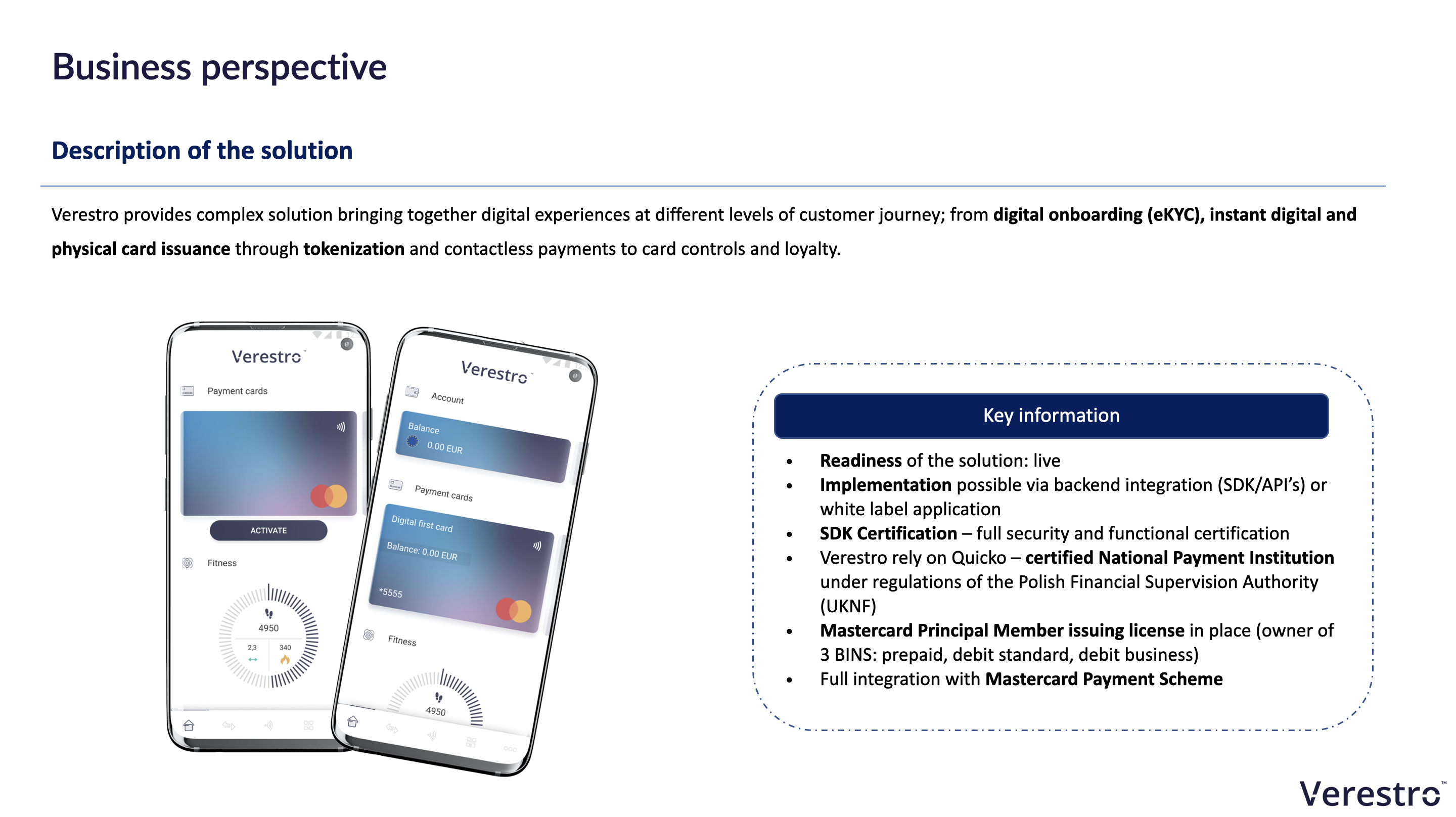
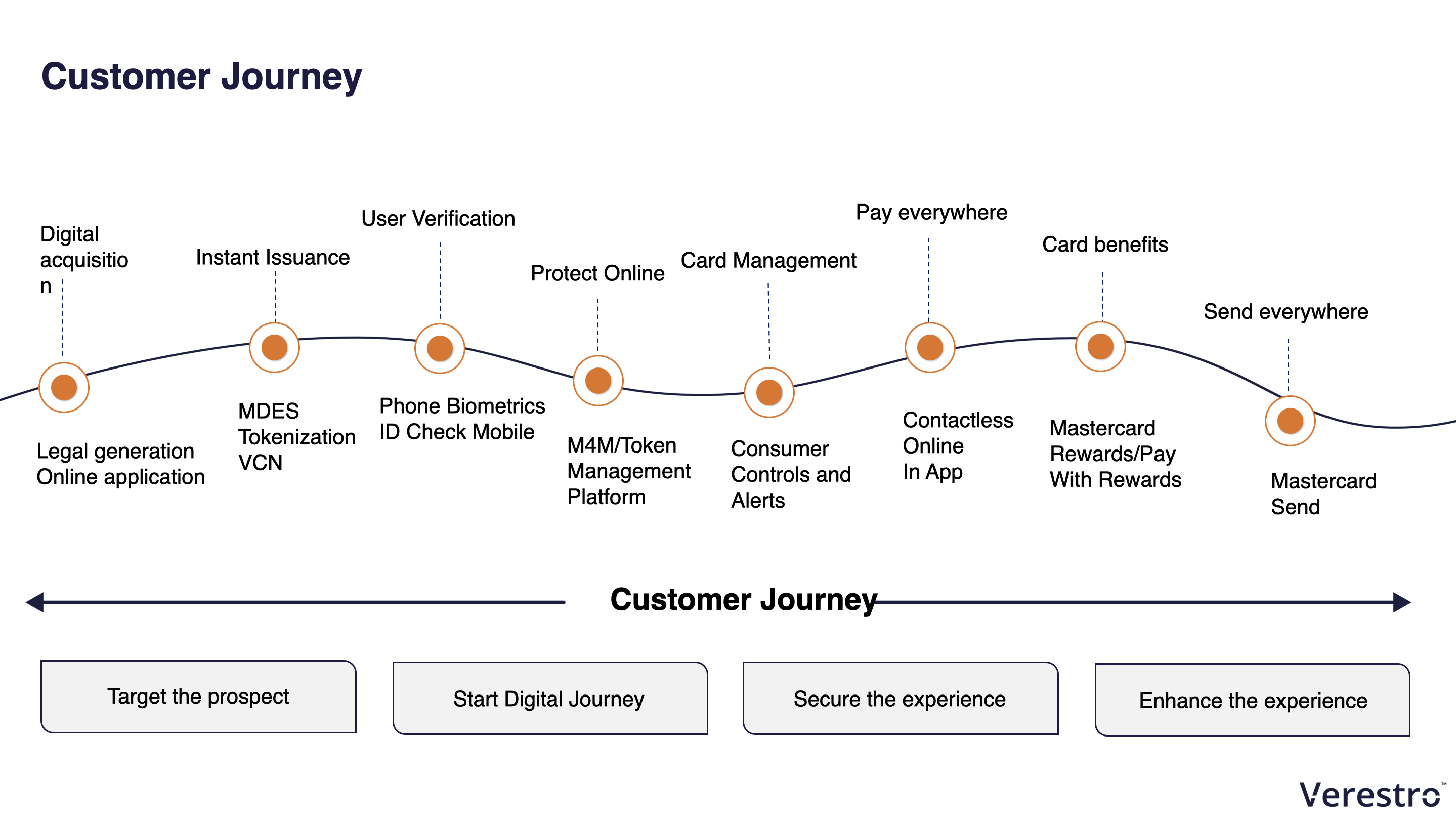
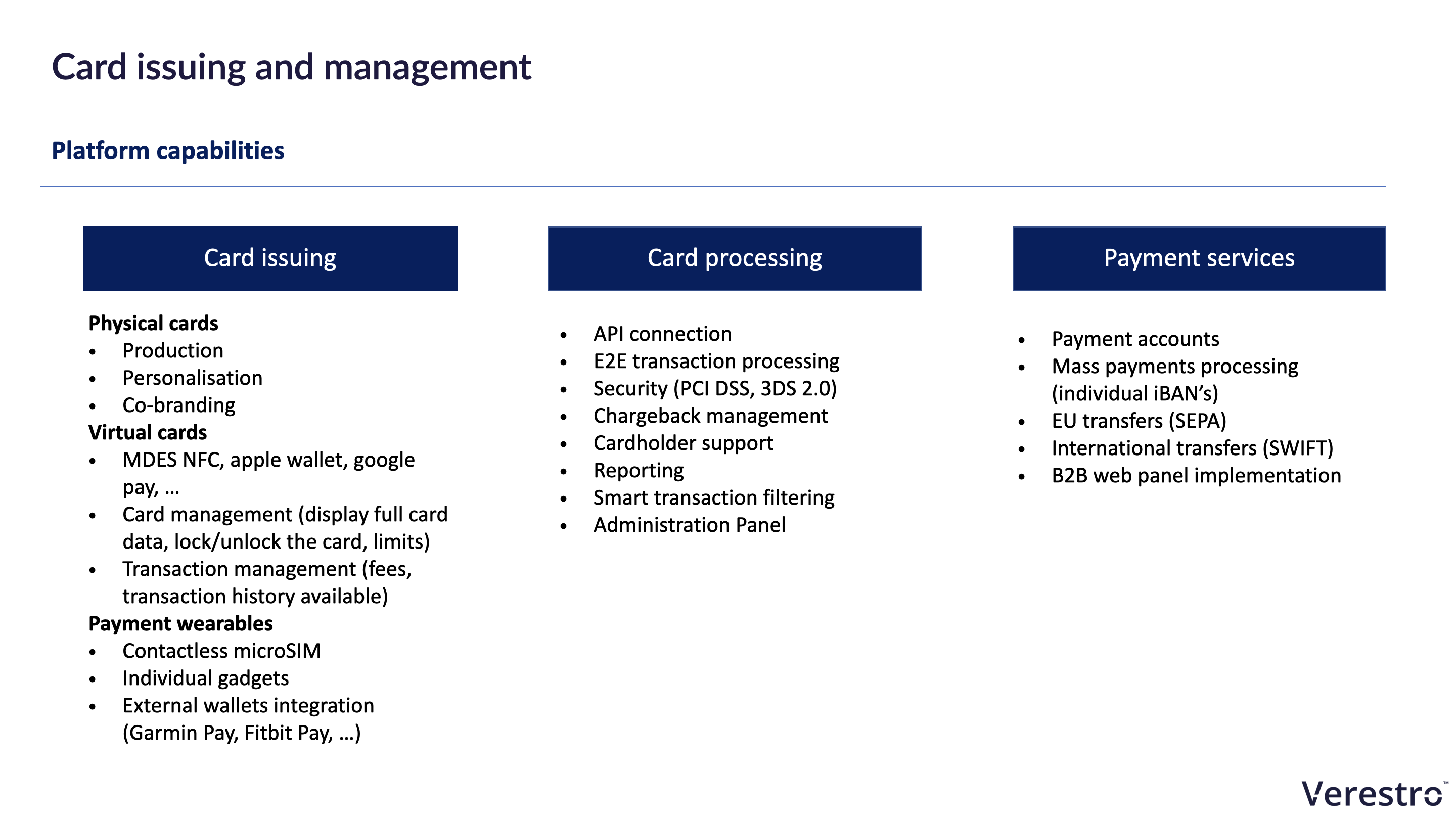
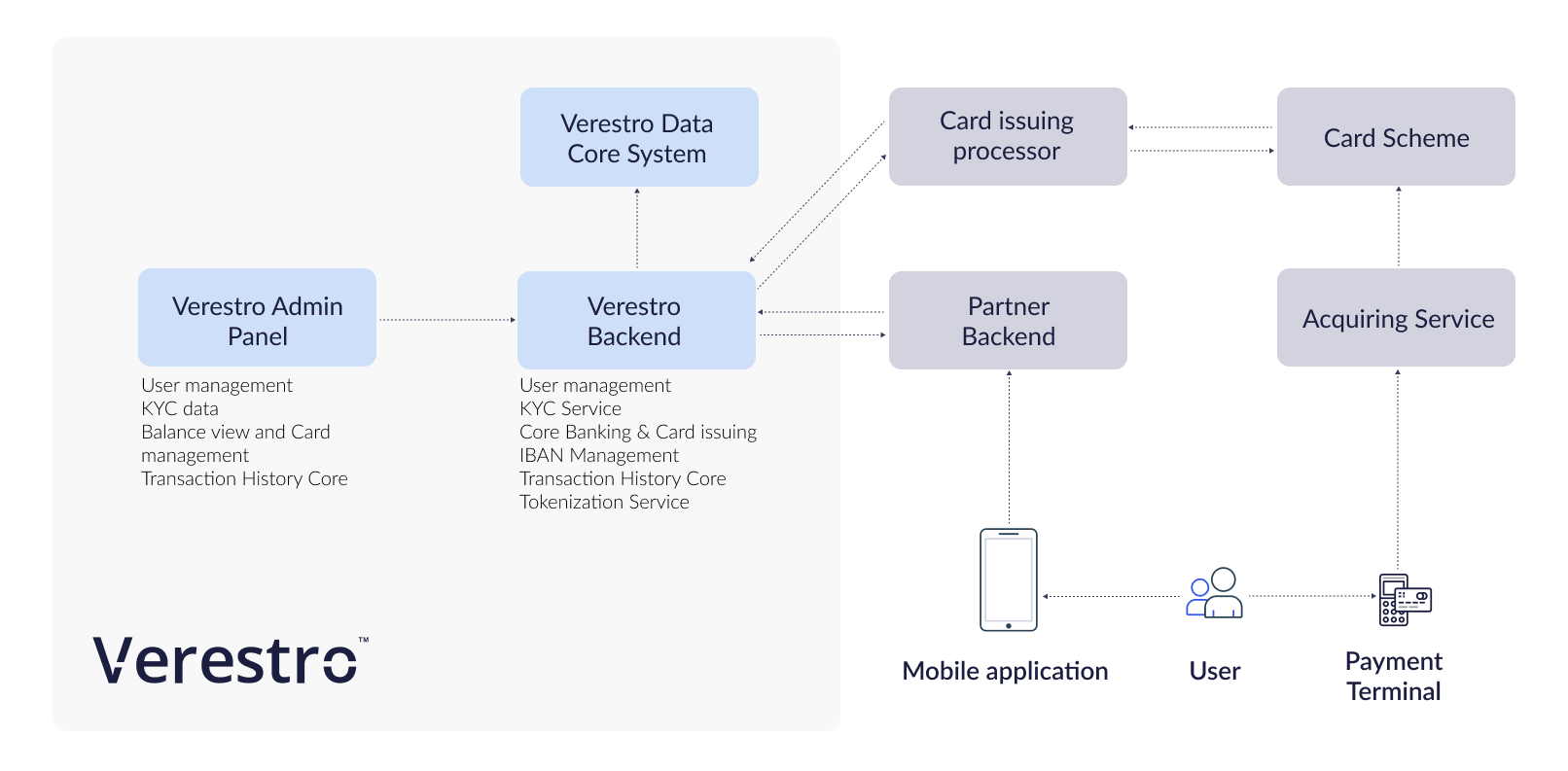
Architecture
API implementation
SDK implementation
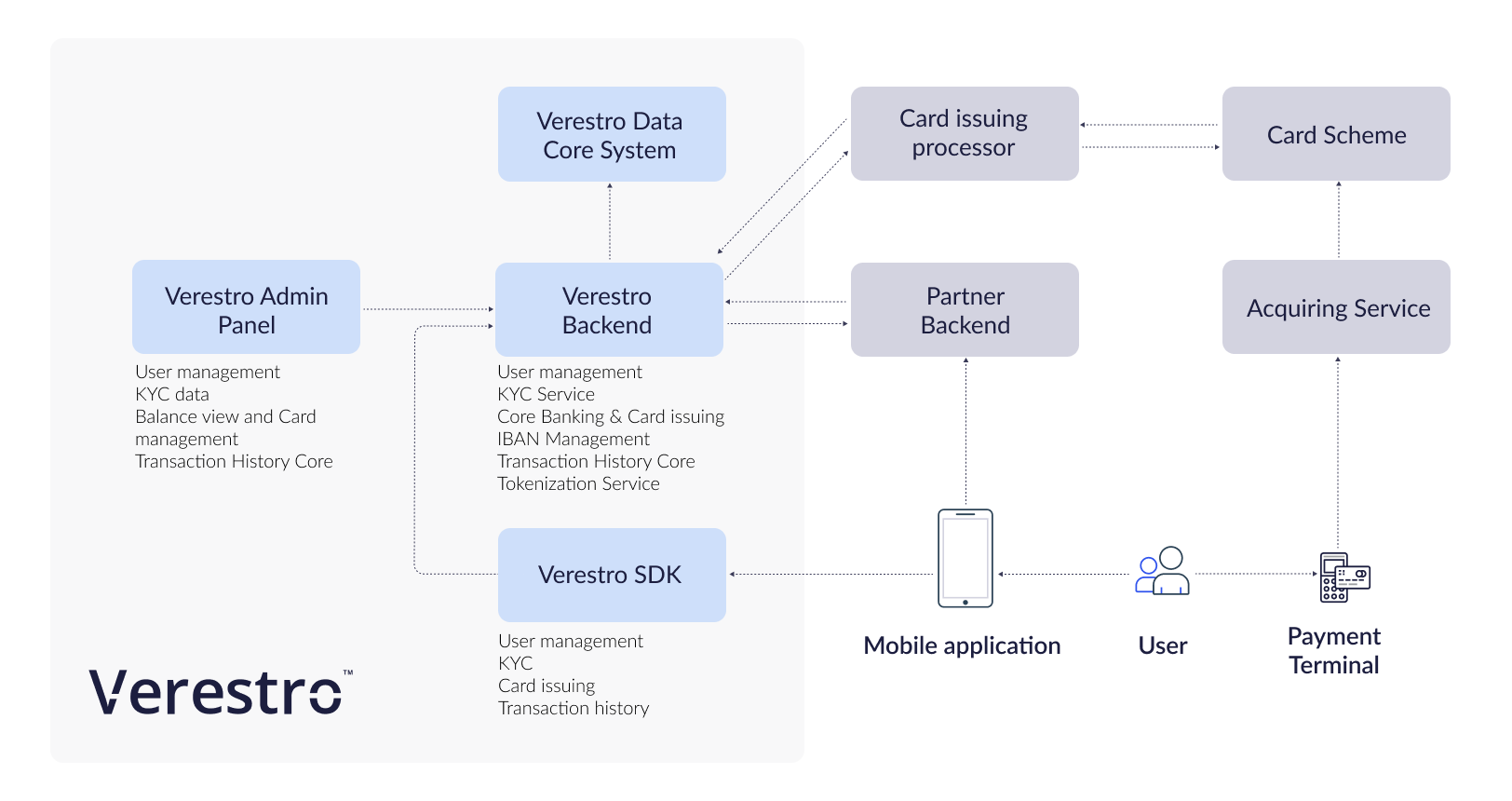
Overview
Verestro Card Management System is called ANTACA. The platform provides solutions for creating and managing users' accounts (called "balances"), processing eKYC (user authentication process) and issuing payment cards generated for them.
CMS Antaca provides dedicated services for:
- end-user mobile applications,
- server-to-server connections helpful in integration with existing customer databases,
- administrative panel, necessary from the point of view of financial institutions in the process of issuing cards and managing their clients' funds.
CMS Antaca supports all necessary use cases for various digital and plastic card issuing. It supports integration with multiple issuing processors and can be connected with the one chosen by Verestro partner.
Introduction to Card Issuing process
With the CMS Antaca you can offer your customers two types of cards:
- Virtual card - Digital card without any physical components.
- Physical card – The traditional plastic payment card.
To be able to issue a card for a user, 4 requirements must be met:
- You have to integrated with Verestro platform using JWE token (described below) or other integration methods (API, SDK, White Label).
- User must exist in Verestro database called DataCore. Make sure you register user via User Lifecycle API & SDK.
- User must be strongly verified according to KYC. You can use Verestro KYC (see below) or own KYC process.
- The user must have a User Balance under which the card will be generated.
After those 4 steps you can issue a card for the User.
Below we describe this process step by step:
- Step 1. Configuration & JWE Security,
- Step 2. User Lifecycle API & SDK,
- Step 3. User registration & KYC,
- Step 4. Create User Balance (account),
- Step 5. Card issuing.
Terminology
| Name |
Description |
| Customer | Institution which is using Verestro products. This institution decides which SDK should be used and how transaction should be processed. Basicly Customer can be called Verestro client. |
| User | User which is using Payment Hub Application. It is root of entity tree. User is identified in Wallet Server by some unique identifier which is provided after registration. User can have access to his data and operations based on session. User’s session is created after device pairing is performed. When session expires then user authentication have to be performed. Session is valid 10 minutes, however it is configurable parameter. |
| Card | Card belongs to the user. User can have many cards. Card is identified via internal id given after storing card on Wallet Server. Whole PAN is stored on Wallet Server which has PCI DSS certificate. |
| Device | Device belongs to user. When user starts using application after installation then device pairing is performed. After pairing device with some unique id, unique device installation id is generated and this installation is assigned to user. It is possible to have one active installation on specific device for specific user. |
| Session Token | Token which defines User. It is an authorization way of the User. This entity is created after paring device and this is needed to perform any actions in the application. When session is expired then user authentication needs to be performed. Session is valid 10 minute s, however it is configurable parameter. |
| Sender | Verestro Wallet user which triggers transaction to the Receiver (check User description). |
| Receiver |
Receiver can be identified in Wallet Server (Internal) or may be an entity that does not exist in Wallet Server (External). ◦ Internal – this type of Receiver has his own unique identifier just like sender. It can also act as a Sender in the transaction process, ◦ External – this type of Receiver does not exist in Wallet Server. Transfers that are made to this type of Receiver require the entering of his card data by Sender. |
| Mid | Merchant identifier. This entity is representing Merchant in Acquirer’s system. Customer have to provide the mid information to enable mid configuration in the Verestro system. Required to process 3DS authentication via Verestro System. |
| Acquirer | External institution responsible for processing transaction and 3ds requests ordered by the Verestro Payment Hub App. Acquirer connects with banks / card issuers and returns information whether the ordered action on a given card is possible. |
| PAN | (Primary Account Number) It is 14-19 (usually 16) digits number which is a unique identifier of the payment card issued to the customer's account. |
| Wallet Server | Provides the backend services to support Mobile Payment Application via Verestro Wallet SDK and is responsible for managing users, devices, cards , device tokens, storing transactions history and communication with Acquirers. |
| PCI DSS | PCI DSS (Payment Card Industry Data Security Standard) is a security standard used in environments where the data of payment cardholders is processed. The standard covers meticulous data processing control and protection of users against violations. |
| IBAN | IBAN (International Bank Account Number) is an international standard for bank account numbering that allows you to transfer funds to foreign accounts and to receive transfers from foreign entities to domestic bank accounts. One of the assumptions of the IBAN standard is to simplify the system of cross-border transfers. |
| QR |
A QR code (quick response code) is a two-dimensional barcode. Check here for more details. |
Configuration & JWE Security
To start the implementation, it is necessary to configure the payment processor. If we are using issuing processors already integrated with Verestro the process is simple and after quick information gathering (name of partner, BIN range, currency, remoteURL) a new card program can be setup for our partner.
You can communicate with the CMS Antaca API in three different dedicated channels:
- Mobile Application - Methods strarting with /Customers : designed for the mobile applications that use a session token sent in the header of each request. More about the possibilities of generating these tokens in the section White Label Application Overview.
- Server-to-server - methods starting with /Secure : this communication channel is protected by the x509 certificate. To start an implementation based on this communication channel, it is necessary to generate your own CSR and send it to Verestro. Verestro will sign it and return a valid certification in a response.
- Administrator and Customer Service (rarely used by partners) - methods starting with /admin : designed for the administration panel provided by Verestro.
Additional data encryption & integration
Some requests and responses contain sensitive data, to additionally secure the connection we require JSON Web Encryption (JWE).
|
normal
|
encrypted
|
|||
|---|---|---|---|---|
| Example of request with sensitive data. |
|
|
||
| Example ofresponse with sensitive data. |
|
|
JWE configuration
To setup connection we need from you enc and alg from JWE parameters. Acceptable values are:
- Algorithm used by Verestro to encipher content of message (enc) - A256GCM,
- Algorithm used by Verestro to encipher encryption key (alg) - RSA-OAEP-256,
- Algorithm needed from you to encipher content of message (enc) - A256GCM,
- Allowed algorithms for key encryption (alg) - RSA-OAEP-256 or RSA-OAEP.
Recommended JWE libraries for various programming languages:
Request
To process encrypted message you need to perform a few additional steps on top of standard message processing:
- Add headlines:
- Public-Key through which you can transfer to us your public key encoded b64 (more details below),
- Encrypted-Request headline confirming message encryption in both directions or Encrypt-Response when you need to get the encrypted response only; value true or false,
- Download Verestro Public Key - see in technical API specs on which endpoint,
- Use Verestro Public Key to create JWE and transfer data table in payload,
- Use token (string) received in Verestro response in point 3 below key encryption key in payload.
- for GET methods avoid point 2, 3, 4 above (headlines mentioned in point 1 are still necessary),
- for empty POST methods (without "body") use same rules as for GET message.
Response
After sending to CMS Antaca encrypted request you will receive from us encrypted message:
- Decipher token, which can be found in response below payload key (use your private key to perform this action),
- After decipher action you can see response in unencrypted form.
Additional information:
- Response are encrypted only in case of success - HTTP 20X,
- The only exception from the above mentioned rule is code 204 No content,
- In case of errors (i.e. validation errors) you will receive unencrypted response,
-
ENCRYPTION_REQUIRED,
-
INVALID_PUBLIC_KEY,
-
INVALID_PAYLOAD,
-
CANT_DECRYPT_PAYLOAD.
-
Example request:
|
Correct request
|
Sent request (incorrect)
|
Received by CMS Antaca (after decipher action with private key)
|
|---|---|---|
{"card_no" : 1337}
|
{"payload" : "eyJhbGciOiJSU0EtT0FFUC0yNTYiLCJlbmMiOiJBMjU2R0NNIn0.rdUrW12XCZQgLFDJ-2zAHWYYnaAanctceE1-Y6yJUplX0B2dLu-bvYOEJ83KxxUs-ZjA41R4PmAVilx1cTF4pv-7CZR0_ki85XRATBYF2-MvZdcC81fHy2QPU_ZsAEWAW00a1wKJmuEsgPB2m1aLZ7oK4fC1hciep4PyAtuWQRYHjhNb-UDT41_gDKTbnSGTwheL7S0mAJ_HsKfnZFHYUrM77UcxQGZKnH7Mzqvndf9THiMo0-3MWliYFDAm1bqN2_KTIoBNCprYjFnyIXPCjib73bjWX_P2ip5Ul84cngbQmFVzc7o91JrpJvYou1INS7zL4XKLFcADN4nZ_9ePWsm5_kX5SOMyUyEhOC9gusrLNAJ0MHaIFHni8WqnMAWM3_MC4OQDYetKax5bnHK6x42_5eFaf6ZmzmioKny5aGm-4Vo8TEu691FmPxglhyenWlMhvBvf6ZeVsy58Ofr0mi3TXjwYbAyas7m6sncxZu1FhEJ4da6gtNjmjuKdikOOntu8V71QQ07nczNqfGlUv0RcUc9uKJq5je4b9BEbK9WuQcroxmALqC4HTt1xhICHrVUA0d_t3fglhS2n7wNaKKCFq70ZWIrpdTaBd35kdVQOEjZgCavSjbZOzgOzcEqS6P2Blm7bZ7ZZBmnfk8y8M4m0xWoQNTmLC6nqz9bSbME.UEryKNClDxQZpyWu.6Lw_5CcZ9HiVxHfi_XTAFw.pYbQ6tdmQYe1kiPonm1GhA"} |
{"card_no" : 1337}
|
Example response:
|
Correct response
|
Sent response by CMS Antaca
|
Received by you
|
|---|---|---|
{"card_no" : 1338}
|
{"payload" : "eyJhbGciOiJSU0EtT0FFUC0yNTYiLCJlbmMiOiJBMjU2R0NNIn0.iPmvEKtMAMrrEiR89vlwsL77ZfqxXrcMiy-bx3z6_7HAo__aQzBpMVDtLyj3kTHYWxen8bhPuVyebXyaIHL20sekFzcIFFzvaGoyQYU6zOK8tPv81tgixQe8SDnEr5v9VWBfiHxtPvqlpQIig2is5ynBkyqjdpQWEagR3MpqpATGl7f-omG82Jq0OwZByWI8I6P89hczwgK37F-MUnQDxcRUM3RagbHKNeIcfmPdJpNeqFZHe45y4wUkTWN0uzW72qydkN_4uM9fy0nrUpgsJNbtJGAVIUVmDz4pIZkiI1zyGbfZX-PT7Wh9UNM06gEUf4i2goZY-m4wPB0n2zXvxzcEdfTH27iPp-aKiJjfJpYb_ZnHyklk__gZlAy9r7W0594dY-eBJ_iUa5aeDsFS2TIfsfjMJsL8NRWY2noiTw5lsneD8dwvr6N_rYcWoFXDyWXHoRitSSd2iYrB80gbeSOBW0wfKtPxNIZrR0uDhkE8FouS5Pk7QBw412kd43GtrEpAijqn3ne7MNUpCtuNfJ8e_NdGDLTR7CSHhC0jfFlchpIvklF42o216NO-OnyJsjdv1w4_w1ugs61fTHDl8lgBalOjOxauKwIvJJOyFdWmpjlXuzJhrray7ov25uh2ibvFv3Gfd2iuGUnLIZzYBOTT8ftGWTCGXTDvVOvzGbs.c3qMNb2Bne-7g0Wz.PInghFM6Q8Gn0p4Tlebig32s-ZrpLqTMqQDlpXLLYx0iq-StrKco_HrjdN4MxondP4CicCgseIjcV8JR29jKYX-nqKdchEYq_vVIzFHcNI_Mx7y1el192QbMyx6b0Gbj5L79wpuB7qCUqTBNhJZ2c07PuyPsewcNwglvnc-OrA-2vL6lJnBi5ZGH8gBH1cZCgmbrMpZGNFPG3oFpOn9JPzmnvQxe9tvSFFj5989A8d_XMHP-ZQ.dJZxnBRxJeMKswDsCA3cXA"} |
Check yourself by using Private Key included in the response. |
User Lifecycle API & SDK
Once Verestro configured a project for your program and you are ready to authenticate with us using JWE token you will need to register users on our platform.
Please check the following components:
- If you want to integrate directly from mobile appliacations or integrate server-to-server - User Lifecycle and Card Management API &SDK.
User registration & KYC
Once you registered users on our platform and would like to create accounts and issue cards for them you need to perform KYC. There are three alternative scenarios:
- You can use the Verestro KYC API in the verification process of your users.
- Users can register from the level of the mobile application using the SDK method /customers/me/register.
- You can also use a dedicated method in the server-to-server connection to initiate the verification of your users /secure/customers/(customerid)/register.
- If you already have KYC verification process on your side, just update the KYC flag for the user using User Lifecycle & Card Management API.
Once you registered users and performed KYC you can initiate account (called "balance") creation.
Create User Balance
It is main account balance that is connected with user account and card. Main User Balance attributes are currency, balance value and balance state. In order to create User Balance make sure user got through KYC process. KYC process can be either manual or automated. It can be performed by partner or Verestro. It is highly recommended that User Balance is hold by Verestro but we can approve projects where partner holds User Balance.
In order to create any payment card at Verestro CMS you have to create User Balance first. Payment card issued for particular User Balance cannot be moved to another balance later.
There is an important rule - one user can have multiply balances and for every balance user can have multiply payment cards.
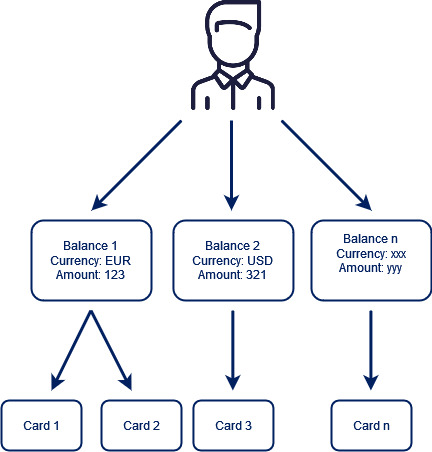
To create User Balance use the following methods:
- in case of server-to-server connection /secure/customers/(customerid)/balances,
- in case of integration through mobile application /customers/me/balances.
For more information about account / balance management please check technical APIs.
Card issuing
With the Antaca API you can offer your customers three types of cards:
- Virtual card - Digital card without any physical components.
- Physical card – The traditional plastic payment card.
To be able to issue a card for a user, 3 requirements must be met:
- User must exist in a PCI DSS compliant Data Core system in Verestro. Make sure you register user via User Lifecycle API & SDK.
- User must be strongly verified according to KYC. You can use Verestro KYC or own KYC process.
- The user must have a User Balance under which the card will be generated.
- After those 3 steps you can issue a card for the user.
Virtual card
If the API receives the request, it will create a 16-digit PAN (Permanent Account Number), CVC2 (Card Verification Code), and Expiry Date. You can then deliver this information to your customer.
@startuml
skinparam ParticipantPadding 30
skinparam BoxPadding 30
skinparam noteFontColor #FFFFFF
skinparam noteBackgroundColor #1C1E3F
skinparam noteBorderColor #1C1E3F
skinparam noteBorderThickness 1
skinparam sequence {
ArrowColor #1C1E3F
ArrowFontColor #1C1E3F
ActorBorderColor #1C1E3F
ActorBackgroundColor #FFFFFF
ActorFontStyle bold
ParticipantBorderColor #1C1E3F
ParticipantBackgroundColor #1C1E3F
ParticipantFontColor #FFFFFF
ParticipantFontStyle bold
LifeLineBackgroundColor #1C1E3F
LifeLineBorderColor #1C1E3F
}
actor user as u
participant "mobile app" as m
participant antaca as a
participant datacore as d
participant "payment processor" as t
u->m: 1. generate card
m->a: 2. generate card(userID, SaldoID, configuration ID)
a->t: 3. generate card(cardholder, terminal)
t-->a: 4. card data
a->d: 5. store card
d-->a: 6. status
a-->m: 7. status
@enduml
Physical card
@startuml
skinparam ParticipantPadding 30
skinparam BoxPadding 30
skinparam noteFontColor #FFFFFF
skinparam noteBackgroundColor #1C1E3F
skinparam noteBorderColor #1C1E3F
skinparam noteBorderThickness 1
skinparam sequence {
ArrowColor #1C1E3F
ArrowFontColor #1C1E3F
ActorBorderColor #1C1E3F
ActorBackgroundColor #FFFFFF
ActorFontStyle bold
ParticipantBorderColor #1C1E3F
ParticipantBackgroundColor #1C1E3F
ParticipantFontColor #FFFFFF
ParticipantFontStyle bold
LifeLineBackgroundColor #1C1E3F
LifeLineBorderColor #1C1E3F
}
actor user as u
participant "mobile app" as m
participant antaca as a
participant "payment processor" as t
participant "card personalization institution" as ac
u->m: 1. order card
m->a: 2. OrderCard(delivery address, userID, SaldoID, configuration ID)
a->t: 3. OrderCard(cardholder, delivery address, terminal)
t-->a: 4. status
a-->m: 5. status
t->t: 6. GeneratePAN and prepare binary file
t->ac: 7. order card
t->t: 8. Generate orderCardReport
a->t: 9. get orderCardReport
t-->a: 10. orderCardReport
a->a: 11. connect card with user and saldo
a->t: 12. linkCard(trackingNo, reference)
t-->a: 13. status
a->t: 14. getAllLinkedCards
t-->a: 15. full card data
a->a: 16. store card in DC
ac-->u: 17. delivery card
u->m: 18. activate card
m->a: 19. activateCard
a->t: 20. activateCard
t-->a: 21. status
a->t: 22. update PIN (wPIN)
t-->a: 23. status
a->a: 24. update status in DC
@enduml
Actions
Create virtual
This method enables creation of virtual payment card for already created user and balance.
Availability
| Collection | URL | Authentication | Encryption required | Available for admin roles |
| Customer |
POST /customers or for an asynchronous process |
Session token |
YES* - JWE *for an asynchronous process NO |
N/A |
| Admin | POST /admin |
Session token | YES* - JWE | Admin, Manager |
| API |
POST /secure or for an asynchronous process |
x509 certificate |
YES* - JWE *for an asynchronous process NO |
N/A |
Lock
This functionality enables temporary or fixed blocking of already issued cards. After card being blocked every authorisation request will be rejected. While using this method you need to inform CMS Antaca about reasons of card blocking. List of reasons is described below in the table.
| Code No | Card stop reason | irreversible |
| 1 | Card lost | YES |
| 2 | Card stolen | YES |
| 3 | Pending query | NO |
| 4 | Card consolidation | NO |
| 5 | Card inactive | YES |
| 6 | PIN tries exceeded | NO |
| 7 | Suspected fraud | NO |
| 8 | Card replaced | YES |
| 11 | Offline PIN attempts exceeded | NO |
Availability
| Collection | URL | Authentication | Encryption required | Available for admin roles |
| Customer |
POST /customers |
Session token |
NO |
N/A |
| Admin | Administrator blocks the card through the core of the administration panel | N/A | N/A | N/A |
| API | x509 certificate |
NO |
N/A |
Unlock
This functionality enables unblocking previously blocked card. It works in case the card was not blocked with Code No 1, 2, 5 or 8 described in the above table (card lost, card stolen, card inactive or card replaced). CMS Antaca does not need reasons for card unblocking.
Availability
| Collection | URL | Authentication | Encryption required | Available for admin roles |
| Customer |
POST /customers |
Session token |
NO |
N/A |
| Admin | Administrator unblocks the card through the core of the administration panel | N/A | N/A | N/A |
| API | x509 certificate |
NO |
N/A |
Remove
This functionality enables card deletion from CMS Antaca. Deleted card cannot be restored.
Availability
| Collection | URL | Authentication | Encryption required | Available for admin roles |
| Customer |
DELETE /customers |
Session token |
NO |
N/A |
| Admin | Administrator delete the card through the core of the administration panel | N/A | N/A | N/A |
| API |
Other APIs remove the card via LC or directly in DC |
N/A |
N/A |
N/A |
Get full data
This functionality enables receiving full card data (PAN, Expiry Date, CVC2 or CVV). Access to those data for user should be always connected with additional authorisation by user (fingerprint, application PIN).
Availability
| Collection | URL | Authentication | Encryption required | Available for admin roles |
| Customer | Session token |
YES |
N/A | |
| Admin | Administrator cannot view the full details of the cards | N/A | N/A | N/A |
| API | x509 certificate |
YES |
N/A |
Reset CVV
This functionality enables generation of new CVC2 or CVV number for virtual.
Availability
| Collection | URL | Authentication | Encryption required | Available for admin roles |
| Customer | Session token |
YES |
N/A | |
| Admin | POST /admin |
Session token | YES | Admin, Manager, Employee |
| API | N/A | N/A | N/A | N/A |
Order physical card
This functionality enables ordering plastic card. Process of card personalisation can take up to 48 hours depending on chosen personalisation center. Additionally card will be transferred to user by courier or post office. Physical card ordered by this functionality will be inactive until activation action.
The DEV/BETA environment does not support physical card order testing.
Availability
| Collection | URL | Authentication | Encryption required | Available for admin roles |
| Customer |
|
Session token |
YES |
N/A |
| Admin | Session token | YES | Admin, Manager, Employee | |
| API | x509 certificate | YES | N/A |
Link card
Around 48 hours after card ordering it will be visible in user resources. After Verestro receives confirmation from personalisation center that card was personalised CMS Antaca connects card with user account and balance. From this moment it can be visible for user and can be activated.
Set PIN
This functionality is available for physical and virtual cards. It enables setting up PIN that is used for face-to-face transactions (POS and ATM). In the case of virtual cards - for ATM withdrawals.
|
IMPORTANT:
|
Availability
| Collection | URL | Authentication | Encryption required | Available for admin roles |
| Customer |
POST https://prepaidapi.upaid.pl/customers/me/cards/{cardId}/pin |
Session token |
YES |
N/A |
| Admin | N/A | N/A | N/A | N/A |
| API | N/A | N/A | N/A | N/A |
Activate card
This functionality enables activation of previously ordered physical card. Card transactions will not work until card is activated.
Availability
| Collection | URL | Authentication | Encryption required | Available for admin roles |
| Customer |
|
Session token |
NO |
N/A |
| Admin | Session token | NO | Admin, Manager, Employee | |
| API | x509 certificate | NO | N/A |
Lock outside
This functionality enables blocking of card in CMS Antaca on request of external entities (MC or VISA or acquirers). It can be used in case user entered incorrect PIN 3 times or in other fraud related actions. This lock cannot be removed if card was blocked by Code No 1, 2, 5, 8 (see below). The table below contains all possible reasons of card lock.
| Code No | Card lock reason | Failure Action Code on POS/ATM | Irreversible |
| 1 | Card lost | 2008 | YES |
| 2 | Card stolen | 2009 | YES |
| 3 | Pending query | 1000 | NO |
| 4 | Card consolidation | 1016 | NO |
| 5 | Card inactive | 1018 | YES |
| 6 | PIN tries exceeded | 1006 | NO |
| 7 | Suspected fraud | 1002 | NO |
| 8 | Card replaced | 1011 | YES |
Corporations
Corporate Onboarding Process
The entire lifecycle begins with the mandatory submission and approval of corporate documents, followed by the setup of financial tools.
Know Your Business (KYB) and Corporate Approval
Before any financial operations can be set up, the corporation must successfully pass a Know Your Business (KYB) verification. This phase is crucial for regulatory compliance and fraud prevention.
-
Document Submission: The corporation provides all required legal and ownership documents.
- The submitted documents are reviewed by a compliance team to verify the identity and legitimacy of the business.
-
Approval: Upon successful verification, the corporation is formally approved and can proceed to the next phase. If the documentation is insufficient or a risk is identified, the corporation will be rejected or placed on hold.
Account and Balance Creation
Once the corporate is approved, a new account is created to hold and manage all financial instruments.
-
Account Creation: After creating a corporation via API,
dcCorporationIdis returned to use for balance and card creation.-
Endpoint:
POST/lifecycle/v1 /corporations
-
-
Balance: The balance is created with a starting value of zero. Funds can be loaded into this balance via bank transfer or other approved methods.
-
Endpoint:
POST/secureEndpoint requires the/balances dcCorporationIdparameter.
-
Card Issuance
With a corporate balance, the company can now issue payment cards to its authorized employees. These cards are linked to the corporate balance and are used for business-related expenses.
1. Virtual card
-
-
Endpoint:
POST/secure/cards /virtual
-
Endpoint requires the dcCorporationId parameter.
2. Physical card.
-
- Endpoint:
POST/secure/cards /physical - Endpoint:
POST/secure/cards /physical_with_pin
- Endpoint:
Endpoints require the dcCorporationId parameter.
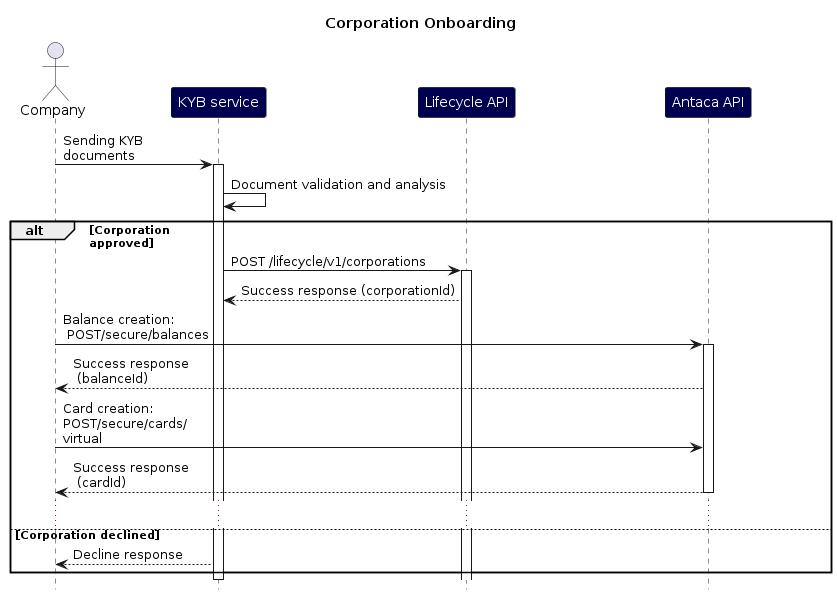
More information on Partner Balances and Deposit Requirements
Partner Balance
The partner balance is used in Verestro deployments together with the partner and BIN sponsor. The partner balance secures the financial liquidity of the BIN sponsor in the settlement process, while giving the partner the opportunity to manage the balances of its users.
Partner Credit Balance
Partner Credit Balance is used to process transactions of Partner especially in cases where User Balance is hold by Verestro. Examples of such projects are many standard projects where Partner is not financial institution or e-Wallet and does not hold User Balances on its side.
The main reason to use Partner Credit Balance is limiting transactions performed by Partner's users to funds hold on Partner Credit Balance. Verestro and its BIN sponsors cannot risk processing transactions without having funds available so this deposit needs to be used to enable transactions in such cases.
Partner through Verestro Administration Panel has access to actual level of Partner Credit Balance and can reload it by sending banking transfer to BIN Sponsor cooperating with Verestro. Partner can receive notification via e-email if Partner Credit Balance goes below pre-defined level.
@startuml
skinparam ParticipantPadding 30
skinparam BoxPadding 30
skinparam noteFontColor #FFFFFF
skinparam noteBackgroundColor #1C1E3F
skinparam noteBorderColor #1C1E3F
skinparam noteBorderThickness 1
skinparam sequence {
ArrowColor #1C1E3F
ArrowFontColor #1C1E3F
ActorBorderColor #1C1E3F
ActorBackgroundColor #FFFFFF
ActorFontStyle bold
ParticipantBorderColor #1C1E3F
ParticipantBackgroundColor #1C1E3F
ParticipantFontColor #FFFFFF
ParticipantFontStyle bold
LifeLineBackgroundColor #1C1E3F
LifeLineBorderColor #1C1E3F
}
participant Partner as p
participant "Issuer Bank" as b
participant "Licensed Issuer" as i
participant Antaca as a
actor "End users" as u
p->b: 1. bank transfer
b->b: 2. accounting of funds
b-->i: 3. accounting of funds
i->a: 4. top up credit balance
p->a: 5. top up user balance
a->a: 6. charge credit balance
alt
a->a: 7. top up user balance
a-->p: 8. success
else insufficient funds
a-->p: 9. fail (insufficient funds)
end
@enduml
Partner Deposit Balance
Partner Deposit Balance is used alternatively to Partner Credit Balance. Partner Deposit Balance is used to process transactions of Partner especially in cases where User Balance is not hold by Verestro. Examples of such projects are the ones with other wallet providers that already hold user balance or project where Verestro through its partners acts as BIN Sponsor or Principal Member for Affiliate Partner.
The main reason to use Partner Deposit Balance is limiting transactions performed by Partner's users to funds hold on Partner Deposit Balance. Verestro and its BIN sponsors cannot risk processing transactions without having funds available so this deposit needs to be used to enable transactions in such cases.
Partner through Verestro Administration Panel has access to actual level of Partner Deposit Balance and can reload it by sending banking transfer to BIN Sponsor cooperating with Verestro. Partner can receive notification via e-email if Partner Deposit Balance goes below pre-defined level.
@startuml
skinparam ParticipantPadding 30
skinparam BoxPadding 30
skinparam noteFontColor #FFFFFF
skinparam noteBackgroundColor #1C1E3F
skinparam noteBorderColor #1C1E3F
skinparam noteBorderThickness 1
skinparam sequence {
ArrowColor #1C1E3F
ArrowFontColor #1C1E3F
ActorBorderColor #1C1E3F
ActorBackgroundColor #FFFFFF
ActorFontStyle bold
ParticipantBorderColor #1C1E3F
ParticipantBackgroundColor #1C1E3F
ParticipantFontColor #FFFFFF
ParticipantFontStyle bold
LifeLineBackgroundColor #1C1E3F
LifeLineBorderColor #1C1E3F
}
participant Partner as p
participant "Issuer Bank" as b
participant "Licensed Issuer" as i
participant Antaca as a
participant "Payment cloud" as mc
participant "POS/ATM" as pos
actor "End users" as u
p->b: 1. bank transfer
b->b: 2. accounting of funds
b-->i: 3. accounting of funds
i->a: 4. top up deposit balance
u->pos: 5. make payment
pos->mc: 6. payment authorization
mc->a: 7. payment authorization
a->a: 8. charge deposit balance
alt Sufficient deposit funds
a->a: 9. lock user funds
alt Sufficient user funds
a-->mc: 10. authorization success
mc-->pos: 11. authorization success
pos-->u: 12. success
else Insufficient user funds
a-->mc: 13. authorization fail
mc-->pos: 14. authorization fail
pos-->u: 15. fail
end
else Insufficient deposit funds
a-->mc: 16. authorization fail
mc-->pos: 17. authorization fail
pos-->u: 18. fail
end
@enduml
Balance Summary in Administration Panel
Summary Balances are a control tool used for accounting and liquidity verification reasons. They are presented in Administration Panel in every currency used in the project.
Users
Presents sum of all User Balances in particular currency.
Wallet
Presents sum of all User Balances and all Partner Balances in particular currency.
Actions
Create user balance
This functionality enables creation of user balance in particular currency.
Create Partner Deposit Balance or Partner Credit Balance
Not used in standard projects. This functional enables Partner creation of new Partner Deposit Balance or Partner Credit Balance for particular projects.
Get User Balance
Enables getting user balance and list of cards connected to this balance (account).
Get Partner Deposit Balance or Partner Credit Balance
This functional enables Partner getting information of Partner Deposit Balance or Partner Credit Balance for particular projects.
Reload Partner Deposit Balance or Partner Credit Balance
Not used in standard project. This functional enables Verestro to reload Partner Deposit Balance or Partner Credit Balance for particular projects. It is used by Verestro.
Reload user balance
This functionality enables reloading User Balance.
Fee management
Fee Management System documentation: Fee Management Platform | Verestro Developer Zone.
It is possible to setup various fees charged to users for card issuing and account management activities. Fees can be setup through administration panel by customer or dedicated Verestro customer services. Fees can be managed in two ways:
- Partner can setup own fee management system and charge users completely outside of Verestro system
- Partner can use Verestro fee management module available in Administration Panel
There are various fees that can be configured via Administration Panel:
- fee for account creating
- fee for card creating
- monthly / weekly / daily fee per card
- POS transaction fees (fixed and percantage)
- eCom transaction fees
- ATM transaction fees
- Money transfer fee (IBAN Transfer)
- Currency conversion fees
- and others
There is implementation on-going to have conditional fees like - "if users do 1000 eur transaction monthly we do not charge monthly fee".
Please consult Verestro sales or Project Manager in case you need more information.
Other functionalities
You can find additional methods in API descriptions:
- API used for server-to-server connections,
- API used for mobile application-to-server connections (Access to documentation is available after establishing partnership with Verestro),
- API used for Administration Panel access (rarely used by partners) (Access to documentation is available after establishing partnership with Verestro).
In case of questions please let us know.
Quick start
Welcome to quick guide on Card issuing. This is a 4 step instruction on how to issue a card using Antaca service within our sandbox environment. If you don't have certificate, follow instructions here. Once you receive your certificate, follow the steps below:
Our sandbox environment has a basic configuration allowing maintaining balances on the Verestro side, without protection for the bin-sponsor (masterbalance)
Add user
Send POST request to /lifecycle/v1/wallet with user data. You’ll receive id in return - it is customer id, that will be needed in further steps.
Make sure you set kyc = SUCCESS. Users without finished Know Your Customer procedure cannot have cards & balances.
curl -X POST 'https://lifecycle.upaidtest.pl/lifecycle/v1/wallet' \
--cert /path/to/cert.pem \
--key /path/to/key.pem:password \
--header 'Content-Type: application/json' \
--header 'Accept: application/json' \
--header 'Issuer-Code: sandbox' \
--data-raw '{
    "firstName": "John",
    "lastName": "Doe",
    "phone": "481234567899",
    "email": "john.doe@verestro.com",
    "birthDate": "2000-01-01",
    "state": "VERIFIED",
    "kyc": "SUCCESS"
}'
Create user verification form
Send POST request to /secure/customers/{customerId}/verification using customer id you’ve received in previous step. It will create KYC verification form.
curl --location --request POST  'https://sandbox-antaca.secure-verestro.dev/secure/customers/{customerId}/verification' \
                                 --cert yourCertificate.crt:password \
                                 --key yourPrivate.key \
                                 --header 'Content-Type: multipart/form-data' \
                                 --header 'Accept: application/json' \
                                 --form 'firstName=Leon' \
                                 --form 'lastName=Bakiewicz' \
                                 --form 'imageFace=@/your/path/someFile.jpg' \
                                 --form 'street=Pieklo' \
                                 --form 'pesel=70010155587' \
                                 --form 'number=17a' \
                                 --form 'city=Lublin' \
                                 --form 'birthDate=1970-01-01' \
                                 --form 'postCode=20-128' \
                                 --form 'imageFront=@/your/path/someFile.jpg' \
                                 --form 'imageBack=@/your/path/someFile.jpg' \
                                 --form 'identityCardNo=ASD123456' \
                                 --form 'apartment=2' \
                                 --form 'documentType=passport' \
                                 --form 'country=PL' \
                                 --form 'documentExpirationDate=2025-01-30' \
                                 --form 'nationality=polish' \
                                 --form 'riskLvl=LOW'
Create user balance
/secure/customers/{customerId}/balances. In response you will receive the balanceId with which you will be able to generate a card in the next stepcurl --location --request POST 'https://sandbox-antaca.secure-verestro.dev/secure/customers/{customerId}/balances' \
--cert yourCertificate.crt:password \
--key yourPrivate.key \
--header 'Content-Type: application/json' \
--header 'Accept: application/json' \
--data-raw '{
"currency": "EUR"
}'if you are using IMS service, after the balance was created, the IBAN number will be generated automatically.
Create new virtual card
/secure/cards/virtual.Single ConfigID contains information about the card type (virtual/physical), currency and bin range. You will receive it at the stage of configuring your project in Verestro. In the case of sandbox, please use 0019167984
curl --location --request POST  'https://sandbox-antaca.secure-verestro.dev/secure/customers/{customerId}/cards/virtual' \
                                 --cert yourCertificate.crt:password \
                                 --key yourPrivate.key \
                                 --header 'Content-Type: application/json' \
                                 --header 'Accept: application/json' \
                                 --header 'Encrypt-Response: true' \
                                 --header 'Public-Key: {enduserPublicKey}' \
                                 --data-raw '{
                                    "balanceId": "0351eb09-3ac0-4234-a4ad-0a6ad52f248b",
                                    "configId": "0019167984",
                                    "dcUserId": 1337
                                 }'
Transactions Flow
A transaction in the processing flow can be in different states:
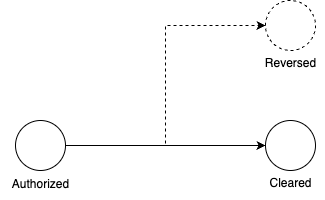
| Status | Description |
|
transaction was successfully authorized. Resources on Cardholder's account are blocked, and the amount is "promised" to the merchant. At this moment none of the resources transfer was performed. |
|
| CLEARED |
transaction is settled successfully. Resources on Cardholder's account gets unblocked and transferred to Merchant's account. Block on Cardholder account becomes charge, and "promised" amount becomes income on Merchant's account. |
| REVERSED |
transaction was withdrawn, for example as error reported by Merchant. Block is removed and resources on the Cardholder account stay unmoved. None of the transfers is performed. |
Transaction processing status in Antaca system:
| Status | Description | Example - Legacy Transaction Notifier |
| SUCCESS | indicates that the transaction (AUTHORIZED, CLEARED OR REVERSED) has been successfully processed in Antaca. | {"status":"SUCCESS","date":"2023-01-01T06:01:39+00:00","description":"Description","transaction":{"id":"79c353a-1421-46ca-8d74-c5dca67942fe","balanceId":"79c353a-1421-46ca-8d74-c5dca67942fe","resourceId":"79c353a-1421-46ca-8d74-c5dca67942fe","resource":"card","cardId":"100","externalTransactionId":"478927492","referenceExternalTransactionId":null,"type":"POS","category":"DEBIT","amount":300,"currency":"EUR","originalAmount":1000,"originalCurrency":"POL","status":"AUTHORIZED","description":"Description","date":"2023-01-01T06:01:39+00:00","referenceExternalTransactionDate":null,"transactionData":{"mcc":"5816","merchantIdentifier":"7498274892","captureMode":"ECOM","lastFourDigits":"1000","acquirerCountry":"POL"}}} |
| DECLINED |
indicates that the transaction has been declined. None of the funds are transferred from Cardholder's account.
The reason for the transaction rejection (description parameter) is listed in the documentation in the table below: https://developer.verestro.com/books/card-management-system/page/your-apis-for-us#bkmrk-external-transaction An example of a rejected transaction could be insufficient funds in the account (INSUFFICIENT_FUNDS). |
{"status":"DECLINED","date":"2023-01-01T06:01:39+00:00","description":"Description","transaction":{"id":"79c353a-1421-46ca-8d74-c5dca67942fe","balanceId":"79c353a-1421-46ca-8d74-c5dca67942fe","resourceId":"79c353a-1421-46ca-8d74-c5dca67942fe","resource":"card","cardId":"100","externalTransactionId":"74892729","referenceExternalTransactionId":null,"type":"POS","category":"DEBIT","amount":70000,"currency":"EUR","originalAmount":70000,"originalCurrency":"EUR","status":"AUTHORIZED","description":"Description","date":"2023-01-01T06:01:39+00:00","referenceExternalTransactionDate":null,"transactionData":{"mcc":"2312","merchantIdentifier":"000000136 ","captureMode":"ECOM","lastFourDigits":"1000","acquirerCountry":"POL"}}} |
| INVALID | indicates that the transaction can't be processed. None of the funds are transferred from Cardholder's account. | {"status":"INVALID","date":"2023-01-01T06:01:39+00:00","description":"Description","transaction":{"id":"79c353a-1421-46ca-8d74-c5dca67942fe","balanceId":"79c353a-1421-46ca-8d74-c5dca67942fe","resourceId":"79c353a-1421-46ca-8d74-c5dca67942fe","resource":"card","cardId":"100","externalTransactionId":"78391719","referenceExternalTransactionId":"783197893","type":"Adjustment","category":"CREDIT","amount":800,"currency":"EUR","originalAmount":null,"originalCurrency":null,"status":"REVERSED","description":"Description","date":"2023-01-01T06:01:39+00:00","referenceExternalTransactionDate":"2023-01-01T06:01:39+00:00","transactionData":[]}} |
Transaction Processing Cases
REVERSAL
Transaction reversal may occur in several cases:
- The merchant did not receive a timely response regarding the authorization status from the payment schema or there were connection problems on the payment schema which generated a timeout on the merchant's side.
- A timeout occurred on the merchant's side and the transaction could not be completed.
Below are examples of payloads from individual services: for (1.) Debit transaction and (2.) Reversal that follows:
| Legacy Transaction Notifier | Transaction History Core | External Balance | |
| 1. Debit transaction | {"status":"SUCCESS","date":"2023-01-01T10:10:57+00:00","description":"APPROVED","transaction":{"id":"24cbc777-de3f-42e2-b772-7d5427dc616e","balanceId":"16b53ddb-877c-4d6c-80c7-2d3750f24b65","resourceId":"59664b2b-8403-4205-a400-92283fa95ffe","resource":"card","cardId":"222","externalTransactionId":"177482","referenceExternalTransactionId":null,"type":"POS","category":"DEBIT","amount":2233,"currency":"EUR","originalAmount":76000,"originalCurrency":"THB","status":"AUTHORIZED","description":"Description","date":"2023-01-01T10:10:54+00:00","referenceExternalTransactionDate":null,"transactionData":{"mcc":"4121","merchantIdentifier":"12345678","captureMode":"ECOM","lastFourDigits":"1234","acquirerCountry":"THA"}}} |
{"id":81111111,"clientTransactionId":"24cbc777-de3f-42e2-b772-7d5427dc616e","amountMinor":2233,"currency":"EUR","type":"PURCHASE","status":"AUTHORIZED","timestamp":"2023-01-01T10:10:54Z","description":"Description","comment":null,"userId":111,"userExternalId":null,"cardId":222,"externalCardId":null,"deviceId":null,"externalDeviceId":null,"paymentTokenId":null,"cardLastFourDigits":"1234","paymentTokenLastFourDigits":null,"cardBin":"555770","userPhone":"48111222333","userEmail":"example@example.com","merchantName":"Description","merchantPostalCode":null,"merchantTransactionId":"177482","transactionCountryCode":"THA","comboCardAccountType":null,"issuerResponseInformation":null,"transactionChannel":"ECOMMERCE","area":"PREPAID","ibanId":null,"deviceInstallationId":null,"employeeGroupId":null,"issuerId":null,"corporationId":null,"mcc":"4121","mccCategory":null,"balanceId":"16b53ddb-877c-4d6c-80c7-2d3750f24b65","originalAmountMinor":76000,"originalCurrency":"THB","exchangeRate":34.053252272342,"balanceMinorValueAfterTransaction":20000,"commissionMinorValue":22,"clearingTimestamp":null,"parentId":null,"ica":null,"contrahent":{"iban":null,"bic":null,"name":"Description"},"attachmentStatus":"EMPTY","incorrectAttachmentStatusReason":null,"labels":[],"categoriesInfo":null,"walletReference":null,"balanceMinorValueBeforeTransaction":null,"interchangeMinorAmount":null,"interchangeCurrency":null} |
endpoint: transactions/debit
{"id":"24cbc777-de3f-42e2-b772-7d5427dc616e","balanceId":"16b53ddb-877c-4d6c-80c7-2d3750f24b65","resourceId":"59664b2b-8403-4205-a400-92283fa95ffe","resource":"card","transactionId":"177482","referenceTransactionId":null,"type":"pos","amount":2233,"currency":"EUR","originalAmount":76000,"originalCurrency":"THB","status":"AUTHORIZED","description":"Description","date":"2023-01-01T10:10:54+00:00","transactionData":{"mcc":"4121","merchantIdentifier":"12345678","merchantName":null,"captureMode":"ECOM","cardId":"222","lastFourDigits":"1234","acquirerCountry":"THA","mdesDigitizedWalletId":null,"cashbackPosCurrencyCode":null,"cashbackPosAmount":"0","lastFourDpan":null,"adjustmentReasonDescription":null,"retrievalReferenceNumber":"443322110088"}} |
| 2. Reverse transaction |
{"status":"SUCCESS","date":"2023-01-01T11:50:10+00:00","description":"APPROVED","transaction":{"id":"24cbc777-de3f-42e2-b772-7d5427dc616e","balanceId":"16b53ddb-877c-4d6c-80c7-2d3750f24b65","resourceId":"59664b2b-8403-4205-a400-92283fa95ffe","resource":"card","cardId":"222","externalTransactionId":"2678823","referenceExternalTransactionId":"177482","type":"Adjustment","category":"CREDIT","amount":2233,"currency":"EUR","originalAmount":null,"originalCurrency":null,"status":"REVERSED","description":"Description","date":"2023-01-01T13:43:30+00:00","referenceExternalTransactionDate":"2023-01-01T10:10:54+00:00","transactionData":[]}} |
{"id":81111111,"clientTransactionId":"24cbc777-de3f-42e2-b772-7d5427dc616e","amountMinor":0,"currency":"EUR","type":"PURCHASE","status":"REVERSED","timestamp":"2023-01-01T10:10:54Z","description":"Description","comment":null,"userId":111,"userExternalId":null,"cardId":222,"externalCardId":null,"deviceId":null,"externalDeviceId":null,"paymentTokenId":null,"cardLastFourDigits":"1234","paymentTokenLastFourDigits":null,"cardBin":"555770","userPhone":"48111222333","userEmail":"example@example.com","merchantName":"Description","merchantPostalCode":null,"merchantTransactionId":"2678823","transactionCountryCode":"THA","comboCardAccountType":null,"issuerResponseInformation":null,"transactionChannel":"ECOMMERCE","area":"PREPAID","ibanId":null,"deviceInstallationId":null,"employeeGroupId":null,"issuerId":null,"corporationId":null,"mcc":"4121","mccCategory":null,"balanceId":"16b53ddb-877c-4d6c-80c7-2d3750f24b65","originalAmountMinor":76000,"originalCurrency":"THB","exchangeRate":34.053252272342,"balanceMinorValueAfterTransaction":20000,"commissionMinorValue":22,"clearingTimestamp":null,"parentId":null,"ica":null,"contrahent":{"iban":null,"bic":null,"name":"Description"},"attachmentStatus":"EMPTY","incorrectAttachmentStatusReason":null,"labels":[],"categoriesInfo":null,"walletReference":null,"balanceMinorValueBeforeTransaction":null,"interchangeMinorAmount":null,"interchangeCurrency":null} |
endpoint:
transactions/force-credit
{"id":"24cbc777-de3f-42e2-b772-7d5427dc616e","balanceId":"16b53ddb-877c-4d6c-80c7-2d3750f24b65","resourceId":"59664b2b-8403-4205-a400-92283fa95ffe","resource":"card","transactionId":"2678823","referenceTransactionId":"177482","type":"adjustment","amount":2233,"currency":"EUR","originalAmount":null,"originalCurrency":null,"status":"REVERSED","description":"Description","date":"2023-01-01T13:43:30+00:00","transactionData":{"mcc":null,"merchantIdentifier":null,"merchantName":null,"captureMode":null,"cardId":"222","lastFourDigits":null,"acquirerCountry":null,"mdesDigitizedWalletId":null,"cashbackPosCurrencyCode":null,"cashbackPosAmount":null,"lastFourDpan":null,"adjustmentReasonDescription":null,"retrievalReferenceNumber":null}} |
Adjustments
Some transactions add funds instead of debiting accounts. Antaca reports such transactions with type: Adjustment.
Transactions of this type can be:
| adjustment transactions related to the debit transaction but reducing or increasing the final debit amount before clearing |
| adjustment transactions related (or not) to the another already cleared transaction, fe refund or offline transaction. |
| adjustment for transactions with currency conversion - when the acquirer let know to clear transaction to the card network, the previously determined FX added to the transaction amount is deposited into the company balance |
Example of adjustment - External Transaction Notifier:
{"status":"SUCCESS","date":"2023-01-01T06:01:39+00:00","description":"Description","transaction":{"id":"e79c353a-1421-46ca-8d74-c5dca67942fe","balanceId":"e79c353a-1421-46ca-8d74-c5dca67942fe","resourceId":"e79c353a-1421-46ca-8d74-c5dca67942fe","resource":"card","cardId":"22","externalTransactionId":"928562957345","referenceExternalTransactionId":"7489279234","type":"Adjustment","category":"CREDIT","amount":100,"currency":"EUR","originalAmount":25000,"originalCurrency":"PLN","status":"AUTHORIZED","description":"**********************************************************","date":"2023-01-01T06:01:39+00:00","referenceExternalTransactionDate":"2023-01-01T06:01:39+00:00","transactionData":{"mcc":"9311","merchantIdentifier":"7489274","captureMode":"ADJ","lastFourDigits":"1000"}}}
Technical documentation
Server-server connection
@swagger="https://s3.verestro.com/antaca-public/doc/api-docs-secure.json?AWSAccessKeyId=antaca-public&Signature=HQet9NmpUGWlJ6BdAUPH14xMb8A%3D&Expires=2642175342"
Your APIs for us - External Balance
External Balance
Features
Purpose and scope
Terminology
To use external balance you must have Banking License or Payment Institution License. Additionally if you don't directly own BIN range, total sum of transactions of your users will be limited by deposit called "Master Balance".
Security
To set secured server-server connection between our services Verestro requires a similar connection as in the case of client to Verestro communication based on the x509 certificate.
In the first step, Verestro will send to the client a CSR for the dev and production environments.
The next step is for the client to sign the CSR and send the certificate back to Verestro along with the base URL for the methods listed below. Verestro will authorize itself with each request with a certificate, which should be checked on the client side.
Idempotency Key
With some requests additional header X-Idempotency-Key could be send. This header contain unique random id allowing to identify single request.
If client send this header, operation should be triggered only once and for any further request with this key, response should be identical - in most cases, returned from cache.
example headers:
X-Idempotency-Key: 20e87975-dbfb-4c95-b239-169516c0b707External Balance API
Below you will find a list of endpoints that you should implement on your server side. Please pay special attention to the appropriate security of our connection, the syntax of requests that you can expect from the Verestro side, idempotency and the exact way in which you should respond to each request.
Process of linking balances
@startuml
skinparam ParticipantPadding 30
skinparam BoxPadding 30
skinparam noteFontColor #FFFFFF
skinparam noteBackgroundColor #1C1E3F
skinparam noteBorderColor #1C1E3F
skinparam noteBorderThickness 1
skinparam sequence {
ArrowColor #1C1E3F
ArrowFontColor #1C1E3F
ActorBorderColor #1C1E3F
ActorBackgroundColor #FFFFFF
ActorFontStyle bold
ParticipantBorderColor #1C1E3F
ParticipantBackgroundColor #1C1E3F
ParticipantFontColor #FFFFFF
ParticipantFontStyle bold
LifeLineBackgroundColor #1C1E3F
LifeLineBorderColor #1C1E3F
}
participant "Client server" as cs
participant Antaca as a
participant Lifecycle as lc
cs->lc: 1. create user by POST /wallet (firstName, lastName, phone, email)
lc-->cs: 2. userId
alt With own KYC process
cs->lc: 3. update KYC status by PUT /user (KYC)
else With Verestro KYC process
cs->a: 4. send KYC data by /register (user data with documents and selfie)
a->a: 5. process KYC
a->lc: 6. update KYC status
end
alt With automatic balance creation
lc-->a: 7. event about the new user with KYC
a->a: 8. create a balance in the default currency
a->cs: 10. link balance (userId, balanceId, currency)
cs-->a: 11. 204 (OK)
else Every time with create a balance
cs->a: 9. create balance by POST /balance (userId, currency)
a->cs: 10. link balance (userId, balanceId, currency)
cs-->a: 11. 204 (OK)
a-->cs: 12. 201 balance created
end
@enduml
- send a GET requests to retrieve information about specific balance. Using user ID and/or balance ID, Antaca can obtain information about balance currency and money amount.
- send a GET requests to retrieve information about all user’s balances. Using only user ID Antaca can retrieve list of users balances.
- delete link between balances
Remember to avoid billing problems
Deleting a balance is only possible when its status is 0. This also applies to situations in which a user with at least one balance is deleted.
Transaction processing
Remember to avoid communication errors
Verestro servers attach an X-Idempotency-Key to each request in the header. This header contains a unique ID for each request to ensure idempotence. Each request with a unique identifier in this header should be processed only once on the client side and the response to it should be identical - in most cases, returned from cache
example:
curl POST "https://server-domain.com/transactions/debit"
--header "X-Idempotency-Key: 21aa0c2a-5554-4071-bd48-b9c64a0b6270"
Transaction object
{
    "id": "b4f534ef-77c2-4f16-ab4d-496806a76fb6",
    "balanceId": "b334b384-328c-11ed-a261-0242ac120002",
    "resourceId": "9d673932-3291-11ed-a261-0242ac120002",
    "resource": "card",
    "transactionId": "ab3d89e4-3291-11ed-a261-0242ac120002",
    "referenceTransactionId": "b759931c-3291-11ed-a261-0242ac120002",
    "type": "POS",
    "amount": 10000,
    "currency": "PLN",
    "originalAmount": 10000,
    "originalCurrency": "PLN",
    "status": "AUTHORIZED",
    "description": "transaction description",
    "date": "2020-08-17T18:43:42+00:00",
    "transactionData": {
        "mcc": "5942",
        "merchantIdentifier": "003060300000005",
        "merchantName": "Book store",
        "captureMode": "NFC",
        "lastFourDigits": "4560",
        "acquirerCountry": "POL",
        "mdesDigitizedWalletId": "Google Pay",
        "cashbackPosCurrencyCode": "PLN",
        "cashbackPosAmount": 10000,
        "lastFourDpan": "7890",
        "adjustmentReasonDescription": "REFUND",
        "retrievalReferenceNumber": "749248185012",
        "cardId": "6876783"
    }
}| Parameter | Required | Description | Allowed values |
|---|---|---|---|
|
id |
TRUE | Unique identifier of the transaction in UUID format |
any value in UUID v4 format, eg. ddb55ff9-11ca-4621-9129-81f939e66011 |
|
balanceId |
TRUE | Unique user balance identifier | any string value (recommended uuid v4) |
| resourceId | TRUE | Unique resource identifier | any string value (recommended uuid v4) |
|
resource |
TRUE | Name of a resource. | balance, card |
|
transactionId |
TRUE |
Transaction identifier obtained from card network or generated on client side using the method to generate transaction in Antaca. IMPORTANT: this id may not be unique - it is generated by different systems |
any string value |
|
referenceTransactionId |
FALSE | Id of previous transaction to with current request relates | any string value (recommended uuid v4) |
|
type |
TRUE | Type of transaction | cashback, loan, payment, topup, commission, fee, funding, interest, withdrawal, pos, atm, cashback_at_pos, adjustment |
|
amount |
TRUE |
Transaction value in gross (minor value) For example: 12.34 EUR will be sent as 1234 |
integer value |
|
currency |
TRUE | Currency 3-letters code in ISO 4217 | ISO 4217 3-letter code |
|
originalAmount |
FALSE |
Original transaction value in gross (minor value) For example: 12.34 EUR will be sent as 1234 |
integer value |
|
originalCurrency |
FALSE | Original currency 3-letters code in ISO 4217 | ISO 4217 3-letter code |
|
status |
TRUE | Transaction status | AUTHORIZED, CLEARED, REVERSED |
|
description |
TRUE | Transaction description | any string value |
|
date |
TRUE | Date of transaction in UTC | date in UTC |
| transactionData | FALSE | Additional transaction data. This object presents detailed data depending on the transaction type | This object is described below |
|
Name
|
Required
|
Description
|
Allowed values
|
|---|---|---|---|
| mcc | FALSE | Merchant category code | any mcc value, eg. can be found here: https://global.alipay.com/docs/ac/files/mcclist |
| merchantIdentifier | FALSE | The merchant identifier for the transaction | |
| merchantName | FALSE | Name of merchant | |
| captureMode | FALSE | Capture mode | magstripe, manual, emv, on behalf (EMV), nfc, ecommerce, adj |
| lastFourDigits | FALSE | Last 4 digits of card | |
| acquirerCountry | FALSE | Country of acquirer | alpha-3 |
| mdesDigitizedWalletId | FALSE | The Wallet ID (Wallet Reference) used to digitize the card. | m4m, google pay, samsung pay, apple pay |
| cashbackPosCurrencyCode | FALSE | Represents the currency code of the cashback amount | ISO 4217 3-letter code |
| cashbackPosAmount | FALSE | Displays the actual cashback amount | integer value in gross |
| lastFourDpan | FALSE | Last 4 digits of Device Primary Account Number (tokenized PAN) | |
| adjustmentReasonDescription | FALSE |
Reason for adjustment |
eg. REFUND, MONEY_SEND, CHARGEBACK |
| retrievalReferenceNumber | FALSE | 12-digit number generated to record each transaction | |
| cardId | FALSE | The card identifier in string format. This value could be used to communicate with the Antaca services. | any string value. Mostly it should be eg. "1234" but it can change in the future and become UUID format. |
Integration with External Balance
API External balance
For the process to function correctly, the Client must implement all endpoints detailed in this chapter.
Below you will find a list of endpoints that you should implement on your server side. Please pay special attention to the appropriate security of our connection, the syntax of requests that you can expect from the Verestro side, idempotency and the exact way in which you should respond to each request. If you decide to implement external balance to be able to keep the balance on your side and authorize transactions, remember that the implementation of all the methods below is required to ensure the API works.
Link balance
This method is used to link customer balance between client and server. Requested balanceId will be used for communication between client and Verestro side.
If you create balance entity at your end you should create it after receiving this call. Do not create balance entity on your side as result of POST /secure/balances nor POST /secure/customers/{id}/balances, because link balance will be called before response to these methods.
POST https://server-domain.com/users/:id/balancespath parameters:
id - user identifier
|
Name
|
Required
|
Description
|
Allowed values
|
|---|---|---|---|
| balanceId | TRUE |
Unique identifier of balance. This ID will be used in communication between client and server. |
UUID v4 |
| currency | TRUE | Currency code | should be 3 letters code in ISO 4217 https://www.iban.com/currency-codes |
Headers:
Content-Type: application/json
Accept: application/json
request body:
{
    "balanceId":"2e520dc2-329d-11ed-a261-0242ac120002",
    "currency": "PLN"
}
parameters:
|
Name
|
Required
|
Description
|
Allowed values
|
|---|---|---|---|
| balanceId | TRUE |
Unique identifier of balance. This ID will be used in communication between client and server. |
UUID v4 |
| currency | TRUE | Currency code | should be 3 letters code in ISO 4217 https://www.iban.com/currency-codes |
response:
204 NoContenterror codes:
404 - should be returned if no user has been matched by requested path parameter.
Code 404
{
    "title": "USER_NOT_FOUND",
    "detail": "some specific details provided by server"
}
Get single user balance
Method used to obtain single user balance information.
GET https://server-domain.com/users/:id/balances/:balanceIdpath parameters:
|
Name
|
Required
|
Description
|
Allowed values
|
|---|---|---|---|
| id | TRUE |
User identifier. |
Integer |
| balanceId | TRUE |
Unique identifier of balance. This ID will be used in communication between client and server. |
UUID v4 |
id - user identifier
balanceId - unique balance identifier
headers:
Accept: application/jsonresponse:
200 OK
{
    "currency": "PLN",
    "amount": 250
}
response parameters:
|
Name
|
Required
|
Description
|
Allowed values
|
|---|---|---|---|
| amount | TRUE |
Actual balance amount in minor (penny)
|
integer value. For example: 12.34 EUR will be sent as 1234 |
| currency | TRUE | Currency code | should be 3 letters code in ISO 4217 https://www.iban.com/currency-codes |
currency  - three letter iso 4217 code
amount - actual balance amount in minor (penny), integer value. For example: 12.34 EUR will be sent as 1234
error codes:
404 - should be returned if no balance found by requested balanceId.
Code 404
{
    "title": "BALANCE_NOT_FOUND",
    "detail": "some specific details provided by server"
}
403 - if requested balance does not belong to user.
Code 403
{
    "title": "FORBIDDEN",
    "detail": "some specific details provided by server"
}
Get balance collection
This method should return collection of customer balances.
GET https://server-domain.com/users/:id/balancespath parameters:
|
Name
|
Required
|
Description
|
Allowed values
|
|---|---|---|---|
| id | TRUE |
User identifier |
Integer |
| balanceId | TRUE |
Unique identifier of balance. This ID will be used in communication between client and server. |
UUID v4 |
id - user identifierheaders:
Accept: application/jsonresponse:
200 OK
[
    {
        "id": "a072bd0e-328c-11ed-a261-0242ac120001",
        "currency": "PLN",
        "amount": 250
    },
    {
        "id": "b334a5e2-328c-11ed-a261-0242ac120002",
        "currency": "USD",
        "amount": 460
    }
]
If user has not created any balance yet, there should be returned empty collection.
200 OK
[]
response parameters:
|
Name
|
Required
|
Description
|
Allowed values
|
|---|---|---|---|
| id | TRUE |
Unique identifier of balance. This ID will be used in communication between client and server. |
UUID v4 |
| balanceId | TRUE |
Unique identifier of balance. This ID will be used in communication between client and server. |
UUID v4 |
| currency | TRUE | Currency code | should be 3 letters code in ISO 4217 https://www.iban.com/currency-codes |
id - unique identifier of user balance
currency  - three letter iso 4217 code
amount - actual balance amount in minor (penny), numeric value
Delete balance
This method is used to unattached balance from user. From legal point of view, balance should be deleted only if there is no money on it.
DELETE https://server-domain.com/users/:id/balances/:balanceIdpath parameters:
|
Name
|
Required
|
Description
|
Allowed values
|
|---|---|---|---|
| id |
TRUE |
User identifier |
Integer |
| balanceId | TRUE |
Unique identifier of balance. This ID will be used in communication between client and server. |
UUID v4 |
response:
204 No Contenterror responses:
404 - if requested balance has not been found.
Code 404
{
    "title": "BALANCE_NOT_FOUND",
    "detail": "some specific details provided by server"
}
403 - if requested balance does not belong to user.
Code 403
{
    "title": "FORBIDDEN",
    "detail": "some specific details provided by server"
}
Debit transaction
This kind of transaction is used to authorize transaction. In debit transactions Antaca asks 'if user has money?'.
POST https://server-domain.com/transactions/debitheaders:
Content-Type: application/json
X-Idempotency-Key: uuidV4
request body:
Description of the contents of the transaction object can be found above.
success response:
204 No Contenterror responses:
422
{
    "title": "INSUFFICIENT_FUNDS",
    "detail": "some specific details provided by server"
}
422
{
"title": "LIMITS_EXCEEDED",
"detail": "some specific details provided by server"
}422
{
"title": "FRAUDS_DETECTED",
"detail": "some specific details provided by server"
}404
{
"title": "BALANCE_NOT_FOUND",
"detail": "some specific details provided by server"
}409
{
"title": "CLIENT_ERROR",
"detail": "some specific details provided by server"
}Force debit transaction
This kind of transaction is used to inform server side that transaction has occurred.
For this request, actual transaction already happen so server can not reject this request. This behavior can occur for offline transactions fe: in plane, subway, for refunds and referring to previously authorized transactions.
POST https://server-domain.com/transactions/force-debitheaders:
Content-Type: application/json
X-Idempotency-Key: uuidV4
request body:
Description of the contents of the transaction object can be found above.
response:
204 No Contenterror response:
As mention in description section, we do not accept transaction rejection.
Credit transaction
Method is used to credit user balance. In credit transactions Antaca asks 'can user get money?'.
POST https://server-domain.com/transactions/creditheaders:
Content-Type: application/json
X-Idempotency-Key: uuidV4
request body:
Description of the contents of the transaction object can be found above.
success response:
204 No Contenterror responses:
404
{
    "title": "BALANCE_NOT_FOUND",
    "detail": "cannot find requested balance"
}
422
{
"title": "FRAUDS_DETECTED",
"detail": "some specific details provided by server"
}Force credit
Method is used to credit user balance. This kind of transaction is used to inform server side that transaction has occurred. For this request, actual transaction already happen so server can not reject this request.
POST https://server-domain.com/transactions/force-creditheaders:
Content-Type: application/json
X-Idempotency-Key: uuidV4
request body:
Description of the contents of the transaction object can be found above.
success response:
204 No Contenterror response:
As mention in description section, we do not accept transaction rejection.
Reversal
Method is used to revert any changes for previous transaction. Request body will be identical to transaction with client try to revert. If server cannot find referenced transaction then no action is required.
POST https://server-domain.com/transactions/reversalheaders:
Content-Type: application/json
X-Idempotency-Key: uuidV4
request body:
Description of the contents of the transaction object can be found above.
success response:
204 No Contenterror responses:
IMPORTANT: for this method, we do not accept any error. Only satisfying behavior is to revert referenced transaction and no action if cannot find transaction.
Therefore, if a transaction is not found on the partner's side, we expect not an HTTP 404 ERROR but an HTTP 2xx SUCCESS in this case.
It tells the Partner directly to reverse the transaction as if it never happened (it was rejected by Antaca, idle timeout, etc.). Usually, there will be no referenceTransactionId in it, but there are cases where there will be. Reversal does not refund the money. It only confirms that such a transaction did not take place. The money should be refunded by force-credit.
Update transaction status
From time to time, client will inform about clearings triggered by acquirer side. If client mark transaction as cleared it means that transaction will not be corrected by any other transaction request and requested amount is final.
This endpoint is used to inform about the change of the transaction status to CLEARED - the movement of funds should not occur here.
PUT https://server-domain.com/transactions/:transactionIdpath parameters:
|
Name
|
Required
|
Description
|
Allowed values
|
|---|---|---|---|
| transactionId | TRUE |
Transaction identifier obtained from card network or generated on client side using the method to generate transaction in Antaca. IMPORTANT: this id may not be unique - it is generated by different systems |
any string value |
request body:
Description of the contents of the transaction object can be found above.
success response:
204 No Contenterror responses:
404
{
    "title": "TRANSACTION_NOT_FOUND",
    "detail": "cannot find requested transaction"
}
Transaction Types Description
Debit transactions list:
|
Type |
Description |
|
POS |
POS transaction (A point-of-sale) applies to the situation when a customer makes a purchase and the payment is processed through the POS system. |
|
ATM |
ATM Transaction is when the cardholder uses a physical card at an ATM to withdraw cash. |
| Balance Inquiry |
Check the available balance of funds. |
|
Commission |
internal transaction for a partner who wants to debit user balance as a commission referenced to the other transaction. |
|
Fee |
internal transaction for a partner who wants to debit user balance as a fee. Antaca automatically credits company balance with the funds that were debit the user's balance |
|
Funding |
internal transaction type used to debit the user's balance. This type indicates that the funds still remain in the Antaca system, usually in conjunction with a payment type a credit transaction on the user's balance. Antaca automatically credit the credit partner balance with this transaction |
|
Interest |
internal transaction for a partner who wants debit the user's balance as part of the interest connected with credit agreement. |
|
Withdrawal |
internal transaction type used to debit the user's balance. This type indicates that the funds go outside the Antaca system, fe: withdrawal from an account at a bank branch. |
Credit transactions list:
|
TopUp |
internal transaction type used to top up the user's balance. This type indicates that the funds come from outside the Antaca system, fe: payment to an account at a bank branch. Antaca automatically debit the credit partner balance with this transaction |
|
Payment |
internal transaction type used to top up the user's balance. This type indicates that the funds come from the Antaca system, usually in conjunction with a funding type a debit transaction on the user's balance Antaca automatically debit the credit partner balance with this transaction |
|
Loan |
internal transaction for a partner who wants to top up the user's balance as part of the credit agreement. Antaca automatically debit the credit partner balance with this transaction |
|
CreditIbanTransfer |
internal transaction dedicated only for IMS API (via specific CN). IMS API uses this balance to credit funds on the user's balance. |
|
Cashback |
internal transaction for a partner who wants to top up the user's balance as part of the loyalty program Antaca automatically debit the credit partner balance with this transaction |
Your APIs for us - Shared authorization
Shared authorization
In this model, the Client's system, via a dedicated endpoint, receives an authorization request from Antaca and responds with either an approval or a decline. A positive response from the client is our signal to debit the funds from the balance in our system and finalize the payment, provided that other transactional conditions on Verestro's side are met (e.g., sufficient funds or AML rules).
Features
Purpose and scope
Terminology
Security
To set secured server-server connection between our services Verestro requires a similar connection as in the case of client to Verestro communication based on the x509 certificate.
In the first step, Verestro will send to the client a CSR for the dev and production environments.
The next step is for the client to sign the CSR and send the certificate back to Verestro along with the base URL for the methods listed below. Verestro will authorize itself with each request with a certificate, which should be checked on the client side.
Idempotency Key
With some requests additional header X-Idempotency-Key could be send. This header contain unique random id allowing to identify single request.
If client send this header, operation should be triggered only once and for any further request with this key, response should be identical - in most cases, returned from cache.
example headers:
X-Idempotency-Key: 20e87975-dbfb-4c95-b239-169516c0b707Shared Authorization API
Below you will find a list of endpoints that you should implement on your server side. Please pay special attention to the appropriate security of our connection, the syntax of requests that you can expect from the Verestro side, idempotency and the exact way in which you should respond to each request.
Transaction processing
Remember to avoid communication errors
Verestro servers attach an X-Idempotency-Key to each request in the header. This header contains a unique ID for each request to ensure idempotence. Each request with a unique identifier in this header should be processed only once on the client side and the response to it should be identical - in most cases, returned from cache
example:
curl POST "https://server-domain.com/transactions/debit"
--header "X-Idempotency-Key: 21aa0c2a-5554-4071-bd48-b9c64a0b6270"
Transaction object
{
    "id": "b4f534ef-77c2-4f16-ab4d-496806a76fb6",
    "balanceId": "b334b384-328c-11ed-a261-0242ac120002",
    "resourceId": "9d673932-3291-11ed-a261-0242ac120002",
    "resource": "card",
    "transactionId": "ab3d89e4-3291-11ed-a261-0242ac120002",
    "referenceTransactionId": "b759931c-3291-11ed-a261-0242ac120002",
    "type": "POS",
    "amount": 10000,
    "currency": "PLN",
    "originalAmount": 10000,
    "originalCurrency": "PLN",
    "status": "AUTHORIZED",
    "description": "transaction description",
    "date": "2020-08-17T18:43:42+00:00",
    "transactionData": {
        "mcc": "5942",
        "merchantIdentifier": "003060300000005",
        "merchantName": "Book store",
        "captureMode": "NFC",
        "lastFourDigits": "4560",
        "acquirerCountry": "POL",
        "mdesDigitizedWalletId": "Google Pay",
        "cashbackPosCurrencyCode": "PLN",
        "cashbackPosAmount": 10000,
        "lastFourDpan": "7890",
        "adjustmentReasonDescription": "REFUND",
        "retrievalReferenceNumber": "749248185012",
        "cardId": "6876783"
    }
}| Parameter | Required | Description | Allowed values |
|---|---|---|---|
|
id |
TRUE | Unique identifier of the transaction in UUID format |
any value in UUID v4 format, eg. ddb55ff9-11ca-4621-9129-81f939e66011 |
|
balanceId |
TRUE | Unique user balance identifier | any string value (recommended uuid v4) |
| resourceId | TRUE | Unique resource identifier | any string value (recommended uuid v4) |
|
resource |
TRUE | Name of a resource. | balance, card |
|
transactionId |
TRUE |
Transaction identifier obtained from card network or generated on client side using the method to generate transaction in Antaca. IMPORTANT: this id may not be unique - it is generated by different systems |
any string value |
|
referenceTransactionId |
FALSE | Id of previous transaction to witch current request relates | any string value (recommended uuid v4) |
|
type |
TRUE | Type of transaction | cashback, loan, payment, topup, commission, fee, funding, interest, withdrawal, pos, atm, cashback_at_pos, adjustment |
|
amount |
TRUE |
Transaction value in gross (minor value) For example: 12.34 EUR will be sent as 1234 |
integer value |
|
currency |
TRUE | Currency 3-letters code in ISO 4217 | ISO 4217 3-letter code |
|
originalAmount |
FALSE |
Original transaction value in gross (minor value) For example: 12.34 EUR will be sent as 1234 |
integer value |
|
originalCurrency |
FALSE | Original currency 3-letters code in ISO 4217 | ISO 4217 3-letter code |
|
status |
TRUE | Transaction status | AUTHORIZED, CLEARED, REVERSED |
|
description |
TRUE | Transaction description | any string value |
|
date |
TRUE | Date of transaction in UTC | date in UTC |
| transactionData | FALSE | Additional transaction data. This object presents detailed data depending on the transaction type | This object is described below |
|
Name
|
Required
|
Description
|
Allowed values
|
|---|---|---|---|
| mcc | FALSE | Merchant category code | any mcc value, eg. can be found here: https://global.alipay.com/docs/ac/files/mcclist |
| merchantIdentifier | FALSE | The merchant identifier for the transaction | |
| merchantName | FALSE | Name of merchant | |
| captureMode | FALSE | Capture mode | magstripe, manual, emv, on behalf (EMV), nfc, ecommerce, adj |
| lastFourDigits | FALSE | Last 4 digits of card | |
| acquirerCountry | FALSE | Country of acquirer | alpha-3 |
| mdesDigitizedWalletId | FALSE | The Wallet ID (Wallet Reference) used to digitize the card. | m4m, google pay, samsung pay, apple pay |
| cashbackPosCurrencyCode | FALSE | Represents the currency code of the cashback amount | ISO 4217 3-letter code |
| cashbackPosAmount | FALSE | Displays the actual cashback amount | integer value in gross |
| lastFourDpan | FALSE | Last 4 digits of Device Primary Account Number (tokenized PAN) | |
| adjustmentReasonDescription | FALSE |
Reason for adjustment |
eg. REFUND, MONEY_SEND, CHARGEBACK |
| retrievalReferenceNumber | FALSE | 12-digit number generated to record each transaction | |
| cardId | FALSE | The card identifier in string format. This value could be used to communicate with the Antaca services. | any string value. Mostly it should be eg. "1234" but it can change in the future and become UUID format. |
Integration with Shared Authorization
API Shared Authorization Details
For the process to function correctly, the Client must implement all endpoints detailed in this chapter.
Below you will find a list of endpoints that you should implement on your server side. Please pay special attention to the appropriate security of our connection, the syntax of requests that you can expect from the Verestro side, idempotency and the exact way in which you should respond to each request. If you decide to implement Shared Authorization API, remember that the implementation of all the methods below is required to ensure the API works.
Debit transaction
This kind of transaction is used to authorize transaction.
POST https://server-domain.com/transactions/debitheaders:
Content-Type: application/json
X-Idempotency-Key: uuidV4
request body:
Description of the contents of the transaction object can be found above.
success response:
204 No Contenterror responses:
422
{
    "title": "INSUFFICIENT_FUNDS",
    "detail": "some specific details provided by server"
}
422
{
"title": "LIMITS_EXCEEDED",
"detail": "some specific details provided by server"
}422
{
"title": "FRAUDS_DETECTED",
"detail": "some specific details provided by server"
}404
{
"title": "BALANCE_NOT_FOUND",
"detail": "some specific details provided by server"
}409
{
"title": "CLIENT_ERROR",
"detail": "some specific details provided by server"
}Force debit transaction
This kind of transaction is used to inform server side that transaction has occurred.
For this request, actual transaction already happen so server can not reject this request. This behavior can occur for offline transactions fe: in plane, subway, for refunds and referring to previously authorized transactions.
POST https://server-domain.com/transactions/force-debitheaders:
Content-Type: application/json
X-Idempotency-Key: uuidV4
request body:
Description of the contents of the transaction object can be found above.
response:
204 No Contenterror response:
As mention in description section, we do not accept transaction rejection.
Credit transaction
Method is used to credit user balance.
POST https://server-domain.com/transactions/creditheaders:
Content-Type: application/json
X-Idempotency-Key: uuidV4
request body:
Description of the contents of the transaction object can be found above.
success response:
204 No Contenterror responses:
404
{
    "title": "BALANCE_NOT_FOUND",
    "detail": "cannot find requested balance"
}
422
{
"title": "FRAUDS_DETECTED",
"detail": "some specific details provided by server"
}Force credit
Method is used to credit user balance. This kind of transaction is used to inform server side that transaction has occurred. For this request, actual transaction already happen so server can not reject this request.
POST https://server-domain.com/transactions/force-creditheaders:
Content-Type: application/json
X-Idempotency-Key: uuidV4
request body:
Description of the contents of the transaction object can be found above.
success response:
204 No Contenterror response:
As mention in description section, we do not accept transaction rejection.
Reversal
Method is used to revert any changes for previous transaction. Request body will be identical to transaction witch client try to revert. If server cannot find referenced transaction then no action is required.
POST https://server-domain.com/transactions/reversalheaders:
Content-Type: application/json
X-Idempotency-Key: uuidV4
request body:
Description of the contents of the transaction object can be found above.
success response:
204 No Contenterror responses:
IMPORTANT: for this method, we do not accept any error. Only satisfying behavior is to revert referenced transaction and no action if cannot find transaction.
It tells the Partner directly to reverse the transaction as if it never happened (it was rejected by Antaca, idle timeout, etc.). Usually, there will be no referenceTransactionId in it, but there are cases where there will be. Reversal does not refund the money. It only confirms that such a transaction did not take place. The money should be refunded by force-credit.
Your APIs for us - Notifications
We can send following information to your API endpoints:
- 3DS OTP code, so you can handle delivery to the user yourself via SMS, Push or other channel.
- Notifications about outcome of KYC process.
- Notifications about card locks/unlocks.
- Simple notification about transactions.
To make this work, you need to expose an API according to relevant section of this documentation.
Security
To set secured server-server connection between our services Verestro requires a similar connection as in the case of client to Verestro communication based on the x509 certificate.
In the first step, Verestro will send to the client a CSR for the dev and production environments.
The next step is for the client to sign the CSR and send the certificate back to Verestro along with the base URL for the methods listed below. Verestro will authorize itself with each request with a certificate, which should be checked on the client side.
Idempotency Key
With some requests additional header X-Idempotency-Key could be send. This header contain unique random id allowing to identify single request.
If client send this header, operation should be triggered only once and for any further request with this key, response should be identical - in most cases, returned from cache.
example headers:
X-Idempotency-Key: 20e87975-dbfb-4c95-b239-169516c0b7073DS External OTP Notifier
This document describes API for external OTP notifier handling. Clients that are interested into having OTP notifier on their side must have implement this API to allow communication with Antaca to provide one time password about the transaction to client own users.
API 3DS External OTP Notifier
Below you will find a list of endpoints that you should implement on your server side. Please pay special attention to the appropriate security of our connection, the syntax of requests that you can expect from the Verestro side, idempotency and the exact way in which you should respond to each request.
These notifications support sending Idempotency Key
Notification OTP
This method is used to transfer a one-time password generated for transactions without a card present in the 3DS standard.
POST https://server-domain.com/notifications/otpHeaders:
Content-Type: application/json
X-Idempotency-Key: 20e87975-dbfb-4c95-b239-169516c0b707
request body:
{
    "storageCustomerId": "1337",
    "storageCardId": "1337",
    "balanceId": "b334b384-328c-11ed-a261-0242ac120002",
    "amount": "1000",
    "currency": "PLN",
    "merchantName": "merchant test",
    "otp": "1111"
}
Parameters:
|
Parameter
|
Required
|
Description
|
Type
|
|---|---|---|---|
|
storageCustomerId |
TRUE | Customer identifier | integer value |
|
storageCardId |
TRUE | Card identifier | integer value |
|
balanceId |
TRUE | User balance identifier | uuid v4 |
| amount | TRUE | Transaction value in gross (minor value) | integer value |
| currency | TRUE |
Currency 3-letters code in ISO 4217 |
ISO 4217 3-letter code |
|
merchantName |
TRUE |
Merchant name |
string value |
| otp | TRUE | One time password | string value |
success response:
204 No Contenterror responses:
If an error is received, it is not possible to retry the request.
Code 422
{
    "detail": "some specific details provided by server"
}
External Verification Notifier
This document describes API for processed KYC verification notifier handling. Clients that are interested into having information about status KYC verification on their side must have implement this API to allow communication with Antaca.
Notifier provide notifications only with internal KYC status processes
These notifications support sending Idempotency Key
Notification verification In-progress
This method is used to transfer information about changed KYC verification status to 'IN_PROGRESS'.
POST https://server-domain.com/notifications/verificationInProgressHeaders:
Content-Type: application/json
X-Idempotency-Key: 20e87975-dbfb-4c95-b239-169516c0b707
request body:
{
  	"verificationId": "6faaa45a-41f6-4922-95fe-16e316ba7e91",
    "userId": "1337",
	"email": "leonbakiewicz@gmail.com",
    "firstName": "Leon",
    "lastName": "Bakiewicz",
    "status": "IN_PROGRESS",
  	"reason": null,
}
response:
204 No ContentNotification verification accepted
This method is used to transfer information about changed KYC verification status to 'ACCEPTED'.
POST https://server-domain.com/notifications/verificationAcceptedHeaders:
Content-Type: application/json
X-Idempotency-Key: 20e87975-dbfb-4c95-b239-169516c0b707
request body:
{
  	"verificationId": "6faaa45a-41f6-4922-95fe-16e316ba7e91",
    "userId": "1337",
	"email": "leonbakiewicz@gmail.com",
    "firstName": "Leon",
    "lastName": "Bakiewicz",
    "status": "ACCEPTED",
  	"reason": null,
}
response:
204 No ContentNotification verification rejected
This method is used to transfer information about changed KYC verification status to 'REJECTED'.
POST https://server-domain.com/notifications/verificationRejectedHeaders:
Content-Type: application/json
X-Idempotency-Key: 20e87975-dbfb-4c95-b239-169516c0b707
request body:
{
  	"verificationId": "6faaa45a-41f6-4922-95fe-16e316ba7e91",
    "userId": "1337",
	"email": "leonbakiewicz@gmail.com",
    "firstName": "Leon",
    "lastName": "Bakiewicz",
    "status": "REJECTED",
  	"reason": 'INVALID_CUSTOMER_DATA',
}
response:
204 No ContentNotification verification extended
This method is used to transfer information about extend verification.
POST https://server-domain.com/notifications/verificationExtended
Headers:
Content-Type: application/json
X-Idempotency-Key: 20e87975-dbfb-4c95-b239-169516c0b707
request body:
{
  	"verificationId": "6faaa45a-41f6-4922-95fe-16e316ba7e91",
    "userId": "1337",
	"email": "leonbakiewicz@gmail.com",
    "firstName": "Leon",
    "lastName": "Bakiewicz",
    "status": "ACCEPTED",
  	"reason": null,
}
response:
204 No ContentParameters:
|
Parameter
|
Required
|
Description
|
Type
|
|---|---|---|---|
|
verificationId |
TRUE | Verification identifier | uuid v4 |
|
userId |
TRUE | User identifier | integer value |
| TRUE | User's email address | string value | |
| firstName | TRUE | User first name |
string value |
| lastName | TRUE | User last name | string value |
| status | TRUE |
Verification status. Possible values:
|
string value |
| reason | TRUE |
Verification status reason ACCEPTED: null IN_PROGRESS: null REJECTED:
|
null/string value |
Sensitive data:
This method is used to share your public key for encryption.
GET https://server-domain.com/public-keyresponse:
200 OK
{
  "publicKey": "QSBwdWJsaWMga2V5IHNob3VsZCBiZSBoZXJlIGhvd2V2ZXIgaXQgd2FzIHRvbyBsb25nIDoo"
}
External Card Block Notifier
This document describes an external API for communicating card blocks, which requires client-side implementation for clients wishing to receive these notifications.
API External Card Notifier for Locks
This method is used to transfer information about a card's blocking status and the reason for it.
POST https://server-domain.com/notifications/cardLockedHeaders:
Content-Type: application/jsonRequest body:
{
  "dcCardId": "11",
  "date": "2025-06-17T13:42:54+00:00",
  "reason": "PIN_TRIES_EXCEEDED"
}
Parameters:
|
Parameter
|
Required
|
Description
|
Type
|
|---|---|---|---|
|
dcCardId |
TRUE | Card identifier | integer value |
|
date |
TRUE | Timestamp of lock | datetime |
|
reason |
TRUE | Reason of lock |
string value, possible values: CARD_LOST CARD_STOLEN PENDING_QUERY CARD_CONSOLIDATION CARD_INACTIVE PIN_TRIES_EXCEEDED SUSPECTED_FRAUD CARD_REPLACED |
Success response:
204 No ContentAPI External Card Notifier for Unlocks
This method is used to transfer information about that card is unlocked.
POST https://server-domain.com/notifications/cardUnlockedHeaders:
Content-Type: application/jsonRequest body:
{
  "dcCardId": "11",
  "date": "2025-06-17T13:42:54+00:00",
}
Parameters:
|
Parameter
|
Required
|
Description
|
Type
|
|---|---|---|---|
|
dcCardId |
TRUE | Card identifier | integer value |
|
date |
TRUE | Timestamp of unlock | datetime |
Success response:
204 No ContentExternal Transactional Lock Reason Notifier
This document describes an external API for communicating transactional lock reason actions, which requires client-side implementation for clients wishing to receive these notifications.
API External Transactional Lock Reason Added
This method is used to transfer information about that transactional lock reason is added.
POST https://server-domain.com/notifications/transactionalLockReasonAddedHeaders:
Content-Type: application/json
X-Idempotency-Key: 20e87975-dbfb-4c95-b239-169516c0b707
Request body:
{
  "resourceType": "corporation",
  "resourceId": "a3f33118-946d-4b9c-b27f-e009d28355fa",
  "lockReason": "FRAUD_SUSPECTED",
  "timestamp": "2025-06-17T13:42:54+00:00",
}
Parameters:
|
Parameter
|
Required
|
Description
|
Type
|
|---|---|---|---|
|
resourceType |
TRUE | Type of resource | string value: - corporation - user |
|
resourceId |
TRUE | Id of resource | numeric string or uuid |
|
lockReason |
TRUE | Reason of lock |
string value: DOCUMENT_EXPIRED |
|
timestamp |
TRUE | Datetime of add/remove lock reason |
datetime |
Success response:
204 No ContentAPI External Transactional Lock Reason Removed
This method is used to transfer information about that transactional lock reason is removed.
POST https://server-domain.com/notifications/transactionalLockReasonRemovedHeaders:
Content-Type: application/json
X-Idempotency-Key: 20e87975-dbfb-4c95-b239-169516c0b707
Request body:
{
  "resourceType": "corporation",
  "resourceId": "a3f33118-946d-4b9c-b27f-e009d28355fa",
  "lockReason": "FRAUD_SUSPECTED",
  "timestamp": "2025-06-17T13:42:54+00:00",
}
Parameters:
|
Parameter
|
Required
|
Description
|
Type
|
|---|---|---|---|
|
resourceType |
TRUE | Type of resource | string value: - corporation - user |
|
resourceId |
TRUE | Id of resource | numeric string or uuid |
|
lockReason |
TRUE | Reason of lock |
string value: DOCUMENT_EXPIRED |
|
timestamp |
TRUE | Datetime of add/remove lock reason |
datetime |
Success response:
204 No ContentTransactions notifier
To get notifications about transactions use Transaction History Core API
Digital Cards Design
Design Specifications for Graphic Designers and Customers Required for the MDES Manager Application
- Sizes required for the MDES Manager: 1536 px x 969 px
- File format: PNG
If you are submitting files to be verified by Verestro, you will need the SVG format. - The corners of the cards should not be rounded. The corners will be rounded in the application.
- Safety shape. If the card background blends with the Mastercard Symbol and reduces its visibility, a safety shape must be used to ensure sufficient contrast. Mastercard allows two forms: oval (an oval around the mark) or corner (a black or white corner shape). This guarantees the symbol remains clear and readable.



Remember that in the Apple Pay and Google Pay applications, the card number is placed in the bottom left corner of the cards. The card numbers should be visible.
What do we need for MDES Manager?
1. Preparation of the card for MDES Manager (according to the guidelines above).
2. Client's logo for MDES Manager (size: 1372px x 293px).
3. Client icon (favicon) for MDES Manager (size: 100px x 100px).
What do we need for 3ds?
1. Preparation of the client's logo for 3DS (size: 129px x 60 px).
The UX department will help provide logos and icons in appropriate sizes, please provide the icon and logo that will appear on a white background.
Download the Mastercard logo in SVG format for your project:

Physical Cards Design
Required Design Specifications for Graphic Designers and Customers Required
You should prepare two files:
- Preview (png).
- For printing (pdf, ai).
For printing (pdf, ai):
- Sizes required : 242 px x 153 px (The workspace in Adobe Illustrator should be exactly this size!)
- Bleeds: 5 mm
Below is a preview of the view in Adobe Illustrator. Note the size of the workspace and the visible bleeds (red line).

- Placed logos should be sent as vector graphic (paths, curves).
- Colour images should have at least 300 dpi print resolution.
- Indicate the fonts used and save them on the data carrier or convert any text to curves.
- On the printing card we put only:
- Your logo (vector).
- Authorized signature.
- All texts. This text "This card is issued by ... " is required.
- Custom service
- Category Identifier ("credit", "debit" or "prepaid")
- Contactless symbol.


Preview (png):
The preview includes all elements as for printing. Additionally, you need to include elements such as: Contactless Indicator, Mastercard Brand Mark, chip, signature panel (optional) & signature legend (optional), cardholder, card number, magnetic stripe, Mastercard hologram, valid thru.
more inspiration: https://www.figma.com/design/MY1hIQy8YdvEl9WEuqeqI3/Physical-cards?node-id=239-42&t=Ro7GQEsQjRX0CML3-1
Don’t forget!
Safety shape. If the card background blends with the Mastercard Symbol and reduces its visibility, a safety shape must be used to ensure sufficient contrast. Mastercard allows two forms: oval (an oval around the mark) or corner (a black or white corner shape). This guarantees the symbol remains clear and readable.
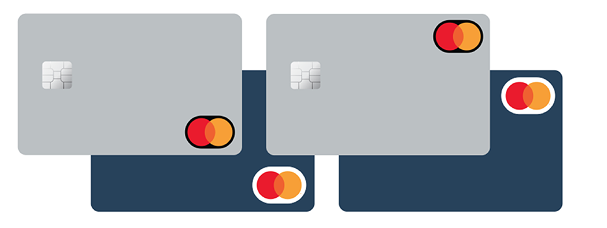
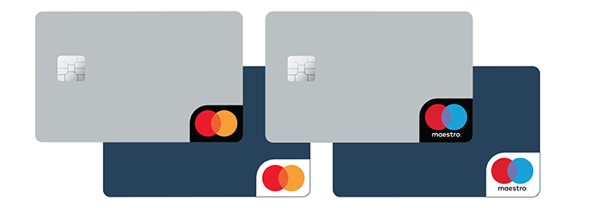
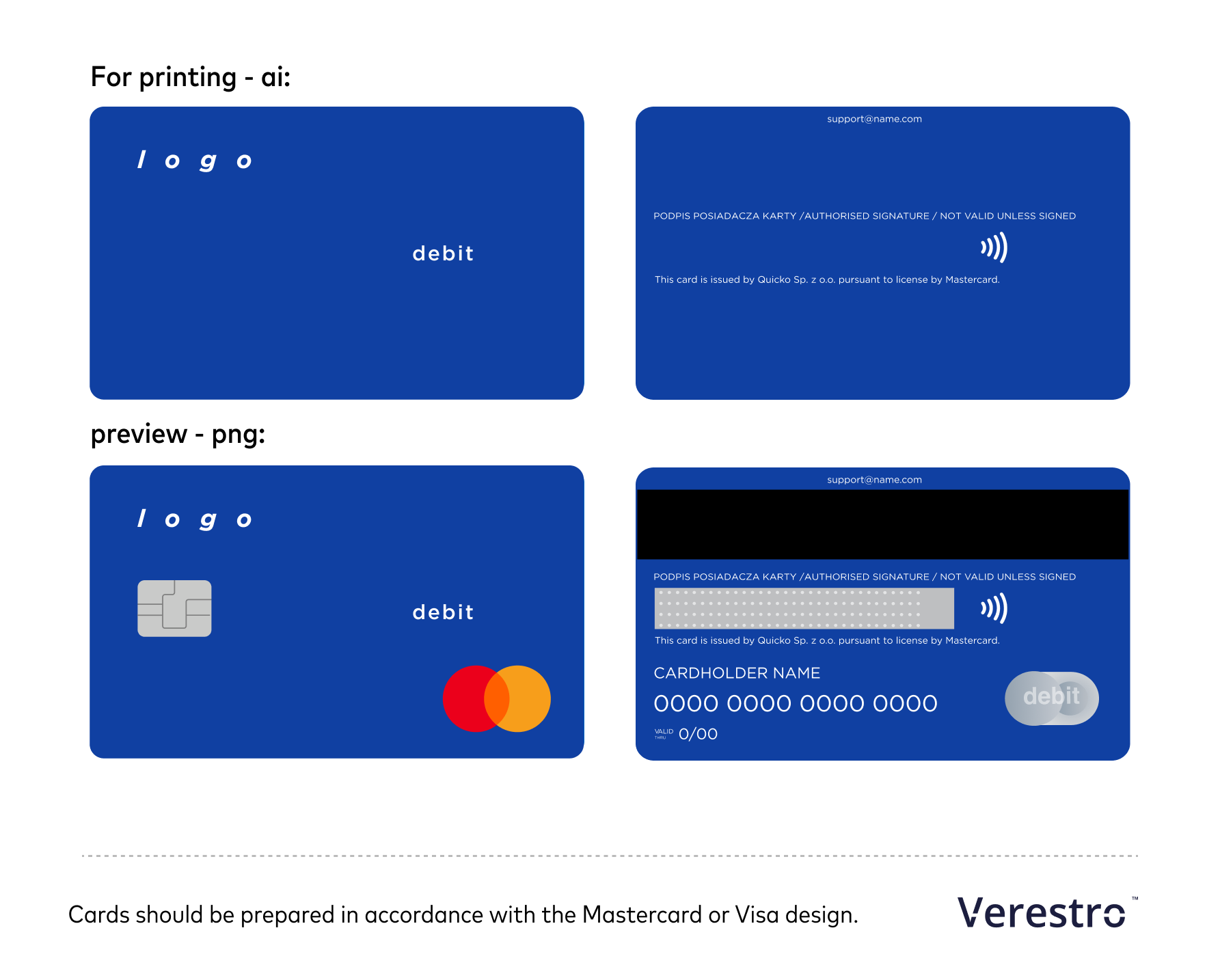
For a more detailed description of how to prepare the card and its appearance options, see the Mastercard Design Specifications for Graphic Designers and Customers.
Download the Mastercard logo in SVG format for your project:
Download the NFC symbol in SVG format:

Legacy Transactions Notifier
This document describes an API, that was deprecated and exists only to support legacy integrations. If you're working on new integration do not use this API. Use Transaction History Core API instead.
This document describes API for external transaction event notifications. Client who is interested in receiving notification about any transaction that occur in system, must implement below API.
These notifications support sending Idempotency Key
Security
Security for this endpoint is described in The Security section in the beginning of this page.
Api
For obtaining transaction event notification the Antaca is using single endpoint.
POST https://server-domain.com/notifications/transactionHeader
Content-Type: application/json
X-Idempotency-Key: 51ec546d-049a-4b8f-a05e-933938656eb2
Request body
{
  "status": "SUCCESS",
  "date": "2023-11-17T11:32:16+00:00",
  "description": "APPROVED",
  "transaction": {
    "id": "b4f534ef-77c2-4f16-ab4d-496806a76fb6",
    "balanceId": "60036f20-3b2c-470e-b9de-3c6cfbe8a5ff",
    "resourceId": "b3de5060-2ae2-4f3c-9b94-9c27a90dc6fe",
    "resource": "card",
    "cardId": "357970",
    "externalTransactionId": "d275ecb8-138e-4d0e-b5bf-c4158b4ce516",
    "referenceExternalTransactionId": null,
    "type": "POS",
    "category": "DEBIT",
    "amount": 10000,
    "currency": "PLN",
    "originalAmount": 12300,
    "originalCurrency": "PLN",
    "status": "AUTHORIZED",
    "description": "FrogShop Lublin POL",
    "date": "2023-11-17T11:32:16+00:00",
    "referenceExternalTransactionDate": null,
    "transactionData": {
      "mcc": "5122",
      "merchantIdentifier": "12345",
      "captureMode": "NFC",
      "lastFourDigits": "0911",
      "acquirerCountry": "POL"
    }
  }
}
Parameters:
| Name |
Required |
Description |
Allowed values |
| status |
TRUE | Status of the transaction processing. SUCCESS - indicates that the transaction has been successfully processed in Antaca. DECLINED - indicates that the transaction has been declined. INVALID - indicates that the transaction can't be processed. |
SUCCESS, DECLINED, INVALID |
| date |
TRUE | Date time of request generation in ISO 8601 date |
ISO 8601 date, eg. 2023-11-16T13:41:40+00:00 |
| description |
TRUE | Describes more details for returned status |
describes in description section details |
| transaction |
TRUE |
The transaction properties |
transaction object described in the transaction object section |
Description details:
| Value |
Description |
| APPROVED | Indicates a successful transaction. Antaca processed the transaction with no errors. |
| EXCEEDS_AMOUNT_LIMIT | Occurs when the transaction amount exceeds card limits. |
| INSUFFICIENT_FUNDS | There is not enough money on balance. |
| CARD_NOT_FOUND | Antaca cannot find card for which the transaction was invoked. |
| BALANCE_NOT_FOUND | Antaca cannot find balance for which the transaction was invoked. |
| INVALID_AMOUNT | Amount of the transaction was passed as <= 0. |
| INSUFFICIENT_FUNDS_ON_DEPOSIT_BALANCE | Deposit balance has not enough funds to process the transaction. |
| DEPOSIT_BALANCE_NOT_FOUND | Occurs when client has not configured deposit balance in currency used for rejected the transaction. |
| AML_EXCEPTION | AML regulations does not allow to process the transaction. |
| AMBIGUOUS_REFERENCED_TRANSACTION | Antaca cannot determine for which a transaction refer current the transaction request. System has found more then one transaction matched by transaction parameters. |
| REFERENCED_TRANSACTION_NOT_FOUND | System cannot find any transaction for which the request refer. |
| CURRENCY_MISMATCH | The transaction currency is different than balance currency. |
| CUSTOMER_NOT_FOUND | System cannot find customer who is involved in the transaction. |
| BUDGET_EXCEEDED | The budget limitation for an card or an customer has been exceeded. |
| LIMIT_EXCEED | General limitation for the transaction has been exceeded. |
| COLLATERAL_BALANCE_NOT_FOUND | System cannot find an collateral balance in proper currency configured for client instance. Those balances could be eg. deposit, credit, technical etc. |
| INSUFFICIENT_FUNDS_ON_COLLATERAL_BALANCE | An collateral balance has not enough funds to process transaction request. |
| UNKNOWN_TRANSACTION_TYPE | System cannot determine kind of the transaction and reject it for security reason. |
| UNKNOWN_ERROR | General error. System cannot match any of concrete description. |
Transaction object:
| Name |
Required |
Description |
Allowed values |
| id | TRUE |
Unique identifier of the transaction in UUID format. |
any value in UUID v4 format, eg. ddb55ff9-11ca-4621-9129-81f939e66011 |
| balanceId | TRUE | The balance identifier in UUID format. This could refere to a customer or any of collateral balance. | any value in uuid v4 format, eg. 6bb3745f-1ddf-4579-855f-913c3f272d19 |
| resourceId | TRUE | Identifier of resource used to process transaction. This is always in uuid format. | any value in uuid v4 format, eg. 846edf0f-9a96-4f1d-bc38-9c963605b9e8 |
| resource | TRUE | Name of resource used to process transaction. This could be eg. card, balance, creditBalance, depositBalance etc. This list could change in future so please do not hardcode this value. | card, balance, creditBalance, debitBalance |
| cardId | TRUE | The card identifier in string format. This value could be used to communicate with the Antaca services. | any string value. Mostly it should be eg. "1234" but it can change in the future and become UUID format. |
| externalTransactionId | TRUE | This is transaction identifier obtained from the transaction processor. This value is not unique and can be duplicated over time. The Antaca is not responsible for this value. | any string value |
| referenceExternalTransactionId | FALSE | This is similar like externalTransactionId except it refers to previously obtained a transaction. This value is not unique and can be duplicated over time. Antaca is not responsible for this value. | any string value |
| type | TRUE | Type of transaction. | This list could evolve over time so please check this documentation from time to time. POS, ATM, Cashback, AFT, Balance Inquiry, Payment, commission, fee, funding, interest, withdrawal, collateralDebit, companyDebit, ibanTechnicalDebit, cashback, creditIbanTransfer, loan, payment, topUp, collateralCredit, companyCredit, ibanTechnicalCredit |
| category | TRUE | Category of the transaction used for identification of funds movement. | CREDIT, DEBIT |
| amount | TRUE | Amount of the transaction. This is always integer in minor value. | any integer value greater than 0. |
| currency | FALSE | Currency of transaction in ISO 4217 3-letter code. | any ISO 4217 3 letter code eg. PLN, USD, EUR |
| originalAmount | FALSE | Amount of the original transaction in integer minor value. | any integer value greater than 0. Also this field could has null value |
| originalCurrency | FALSE | Currency of the original transaction in ISO 4217 3-letter code. | any ISO 4217 3 letter code eg. PLN, USD, EUR. Also this field could has null value |
| status | TRUE | Current status of the transaction (after Antaca service process). | AUTHORIZED, CLEARED, |
| description | TRUE | Detailed description of the transaction. | any string value |
| date | TRUE | Date of the transaction in ISO 8601 date. | any data specified by iso 8601. Eg. 2023-11-17T11:32:18+00:00 |
| referenceExternalTransactionDate | FALSE | Date of the transaction for which this transaction is refer to. Date in ISO 8601 date. | any data specified by ISO 8601. Eg. 2023-11-17T11:32:18+00:00 |
| transactionData | TRUE | The transaction data object described in the transaction data section. | Keep in mind that this object is always passed but it can be empty. |
Transaction data object
| Name |
Required |
Description |
Allowed values |
| mcc | FALSE | Merchant category code. | any mcc value, eg. can be found here: https://global.alipay.com/docs/ac/files/mcclist |
| merchantIdentifier | FALSE | The merchant identifier for the transaction. | |
| merchantName | FALSE | Name of the merchant. | |
| captureMode | FALSE | Capture mode. | magstripe, manual, emv, on behalf (EMV), nfc, ecommerce, adj |
| lastFourDigits | FALSE | last 4 digits of a card. | |
| acquirerCountry | FALSE | Country of acquirer. | ISO 3166-1 alpha-3 code |
| mdesDigitizedWalletId | FALSE | The Wallet ID (Wallet Reference) used to digitize the card. | m4m, google pay, samsung pay, apple pay |
| cashbackPosCurrencyCode | FALSE | Represents the currency code of the cashback amount. | ISO 4217 3-letter code |
| cashbackPosAmount | FALSE | Displays the actual cashback amount. | integer value in gross |
Response
Only responses with http code 200 & 204 are allowed.
200 OK

204 NoContent
In case of any other response code, Antaca will try to send a request once again (up to 5 times). Every time a request will be identical with the same X-idempotency-key. Keep in mind that if your service has answered properly, network errors can arise either way. If Antaca resends the request with the same X-Idempotency-Key, the response should be retrieved from the cache.
Transaction Types Description
Debit transactions list:
|
Type |
Description |
|
POS |
POS transaction (A point-of-sale) applies to the situation when a customer makes a purchase and the payment is processed through the POS system. |
|
ATM |
ATM Transaction is when the cardholder uses a physical card at an ATM to withdraw cash. |
| Balance Inquiry |
Check the available balance of funds. |
|
CollateralDebit |
internal transaction dedicated only for bin-sponsor (via PA) or internal Verestro APIs (via specific CN) to top up the credit/debit partner balance. Antaca automatically debits the credit partner balance with:
Antaca automatically debits the deposit partner balance with:
|
|
Commission |
internal transaction for a partner who wants to debit user balance as a commission referenced to the other transaction. |
|
CompanyDebit |
internal transaction dedicated only for bin-sponsor (via PA) or internal Verestro APIs (via specific CN) to debit company balance used for settlements between the partner and the bin-sponsor. Antaca automatically debits company balance with:
|
|
Fee |
internal transaction for a partner who wants to debit user balance as a fee. Antaca automatically credits company balance with the funds that were debit the user's balance |
|
Funding |
internal transaction type used to debit the user's balance. This type indicates that the funds still remain in the Antaca system, usually in conjunction with a payment type a credit transaction on the user's balance. Antaca automatically credit the credit partner balance with this transaction |
|
IbanTechnicalDebit |
internal transaction dedicated only for IMS API (via specific CN). IMS API uses this balance to account funds that could not be related to the user's balance |
|
Interest |
internal transaction for a partner who wants debit the user's balance as part of the interest connected with credit agreement. |
|
Withdrawal |
internal transaction type used to debit the user's balance. This type indicates that the funds go outside the Antaca system, fe: withdrawal from an account at a bank branch. |
Credit transactions list:
|
TopUp |
internal transaction type used to top up the user's balance. This type indicates that the funds come from outside the Antaca system, fe: payment to an account at a bank branch. Antaca automatically debit the credit partner balance with this transaction |
|
Payment |
internal transaction type used to top up the user's balance. This type indicates that the funds come from the Antaca system, usually in conjunction with a funding type a debit transaction on the user's balance Antaca automatically debit the credit partner balance with this transaction |
|
Loan |
internal transaction for a partner who wants to top up the user's balance as part of the credit agreement. Antaca automatically debit the credit partner balance with this transaction |
|
IbanTechnicalCredit |
internal transaction dedicated only for IMS API (via specific CN). IMS API uses this balance to account funds that could not be related to the user's balance |
|
interchangeCredit |
transaction automatically generated by Antaca as a result of settlement previously authorized transactions. This type of transaction top up only the company balance. |
|
CreditIbanTransfer |
internal transaction dedicated only for IMS API (via specific CN). IMS API uses this balance to credit funds on the user's balance. |
|
CompanyCredit |
internal transaction dedicated only for bin-sponsor (via PA) or internal Verestro APIs (via specific CN) to top up company balance used for settlements between the partner and the bin-sponsor. Antaca automatically credits company balance with:
|
|
CollateralCredit |
internal transaction dedicated only for bin-sponsor (via PA) or internal Verestro APIs (via specific CN) to top up the credit/debit partner balance. Antaca automatically credits the credit partner balance with:
Antaca automatically credits the deposit partner balance with:
|
|
Cashback |
internal transaction for a partner who wants to top up the user's balance as part of the loyalty program Antaca automatically debit the credit partner balance with this transaction |
Frequently Asked Questions
Frequently Asked Questions (FAQ)
Below you will find answers to the most common questions about the Card Issuing & Core Banking module.
If you can't find the answer you're looking for, please contact our Support team.
Go to the Card Issuing & Core Banking FAQ
Crypto Widget - webview/iframe for your application
Crypto Widget
Overview
Crypto Widget is a Verestro-hosted card widget for partner web and mobile applications. The widget is opened inside an iframe or WebView and allows the end user to view card data, transactions, limits, and selected card actions.
The partner application remains responsible for the customer journey before the widget is opened. Verestro is responsible for the widget session, card-data communication, card-data encryption, and the user interface displayed inside the widget.
Sensitive card data, such as PAN and CVV/CVC, is not processed by the partner backend. The partner backend only issues a Trusted Identity token that allows Verestro System to identify the end user and start the widget session.
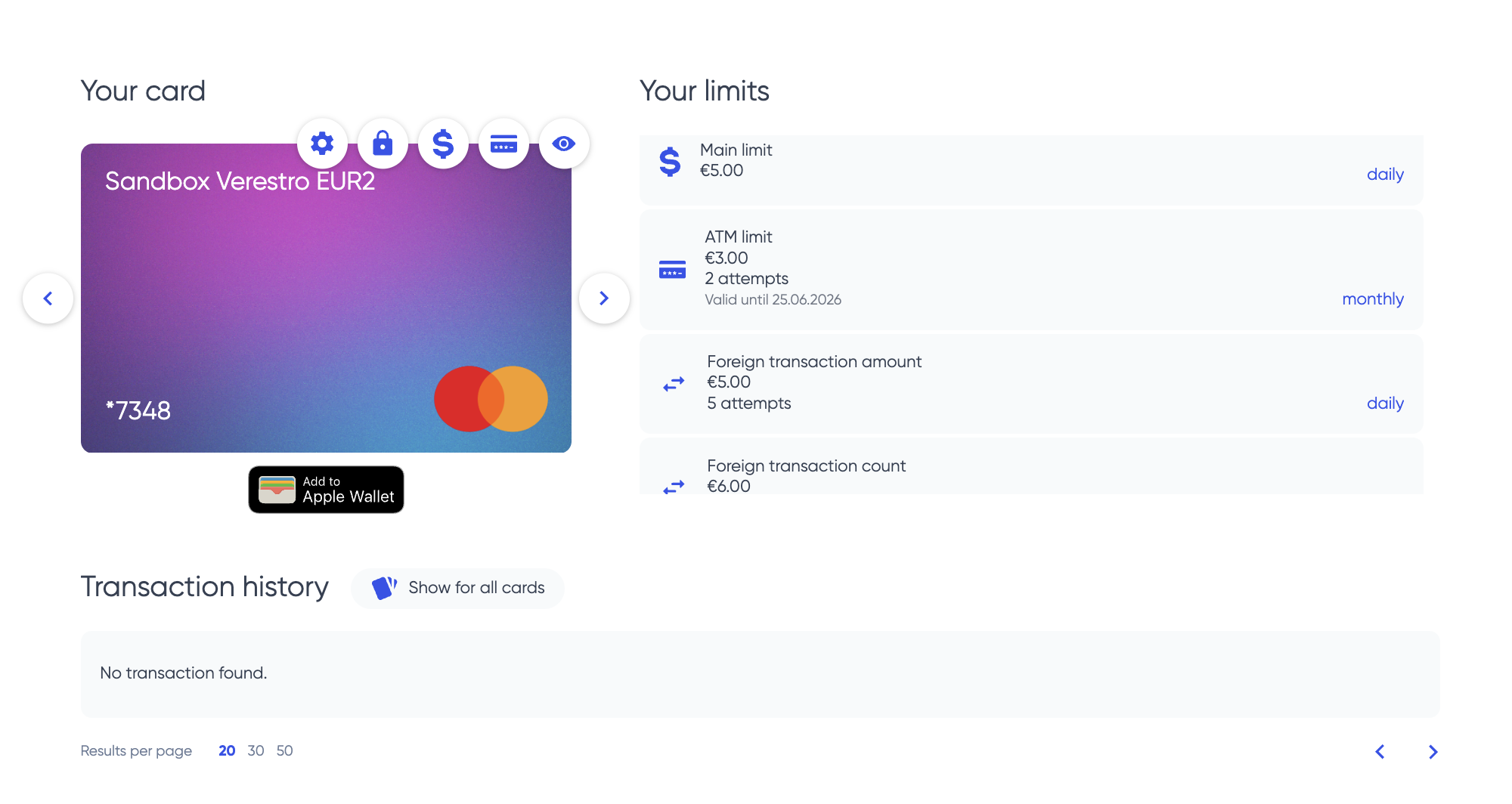
Business Overview
Crypto Widget is dedicated to partners that want to provide card functionality without building their own cardholder interface.
The partner is responsible for:
- customer acquisition,
- user verification and KYC,
- WPIN creation before LifeCycle user creation,
- terms and conditions acceptance,
- fee disclosure,
- card issuance trigger,
- opening the widget from the partner application.
Verestro provides:
- hosted card widget,
- card list and card status,
- card visual (Verestro displays card visual provided by Partner),
- transaction list and transaction details,
- limits view and limits update if enabled,
- sensitive card-data reveal protected by local WPIN check,
- encrypted card-details handling,
- widget session handling in Verestro System.
Integration Model
The integration is based on three main steps:
- Create the end user in Verestro System through LifeCycle API.
- Issue a Trusted Identity token for the end user.
- Open Crypto Widget with the Trusted Identity token.
Partner application
  -> requests Trusted Identity from partner backend
Partner backend
  -> issues Trusted Identity for an existing Verestro System user
Partner application
  -> opens Crypto Widget URL with Trusted Identity
Crypto Widget
  -> exchanges Trusted Identity for a widget session in Verestro System
Crypto Widget
  -> displays card data according to tenant configuration
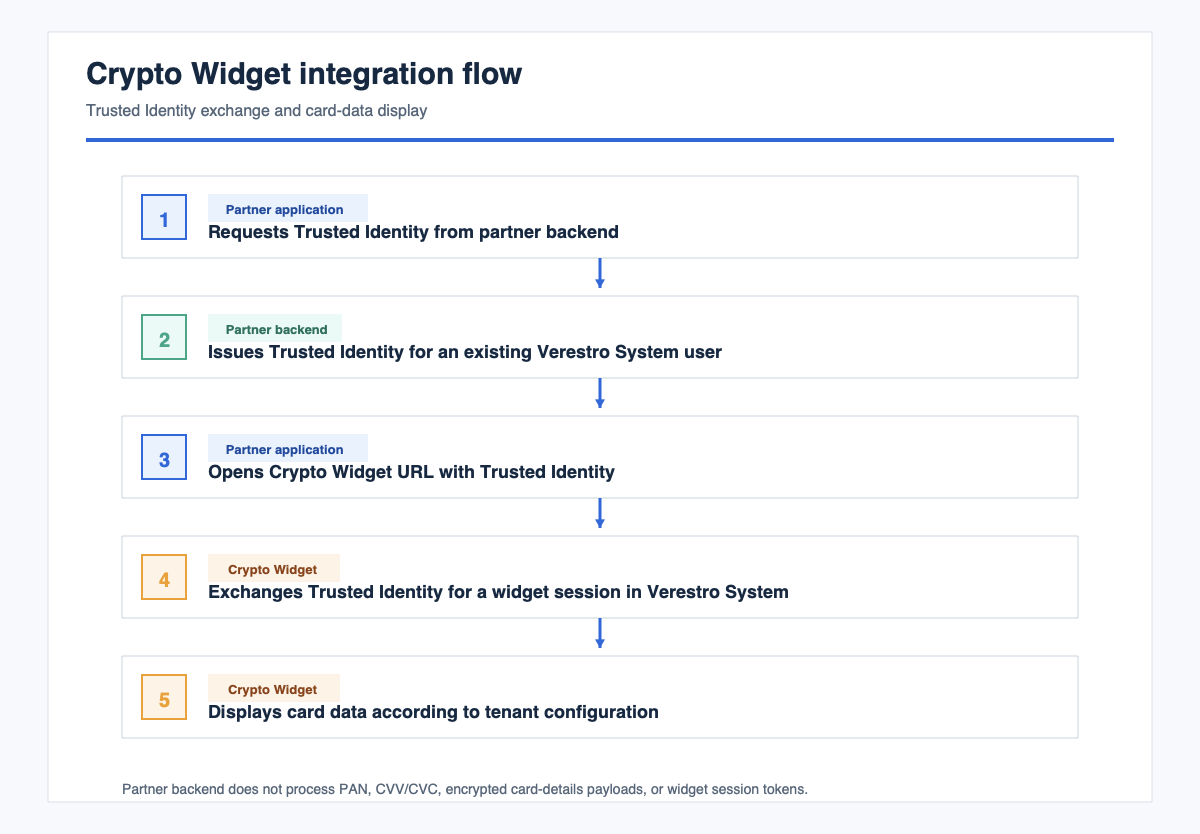
The partner must not read widget session tokens, card PAN, CVV/CVC, or encrypted card-details payloads.
Responsibilities
| Area | Partner | Verestro |
|---|---|---|
| User onboarding | Build onboarding, KYC, WPIN creation, consents, and fee disclosure | Provide integration requirements and LifeCycle API |
| WPIN | Collect WPIN before LifeCycle user creation and inject it during user creation | Use WPIN as the local gate before sensitive card data is shown |
| User creation | Create the end user in Verestro System through LifeCycle API | Process the created user in Verestro System |
| Card issuance | Trigger card issuance through the agreed server-to-server process | Provision card data in issuer-side systems |
| Trusted Identity | Issue signed Trusted Identity tokens from the partner backend | Verify Trusted Identity and create widget sessions |
| Widget hosting | Embed the provided widget URL | Host, configure, secure, and deploy Crypto Widget |
| Sensitive card data | Do not request, proxy, log, or store PAN/CVV | Display sensitive card data only after successful local WPIN check |
Requirements
Before opening Crypto Widget for an end user, complete all requirements in this section.
Partner Requirements
- Partner onboarding with Verestro is completed.
- Partner receives test and production widget URLs.
- Partner receives LifeCycle API and card-issuance API access.
- Partner receives the required Trusted Identity claims.
- Partner provides the certificate used to verify Trusted Identity signatures.
- Partner provides web origins or native WebView details for iframe/WebView allowlisting.
- Partner backend can issue short-lived Trusted Identity tokens.
End-User Requirements
- End user exists in Verestro System.
- End user was created through LifeCycle API.
- End user has WPIN injected during LifeCycle user creation.
- End user has an issued card, or card issuance was triggered before opening the widget.
- End user is identified by the user identifier used in the Trusted Identity token.
Technical Requirements
- Partner application can embed an iframe or native WebView.
- JavaScript is enabled.
- DOM storage is enabled.
- Web Crypto APIs are available.
- Session storage is not blocked.
- Partner backend signs Trusted Identity tokens with the private key that matches the certificate registered in Verestro System.
WPIN Requirement
WPIN must be created before the end user is injected into Verestro System through LifeCycle API.
This requirement is mandatory. Crypto Widget must not be used as the first place where the end user creates WPIN.
Required order:
- Partner verifies the end user in the partner application.
- Partner allows the end user to create WPIN.
- Partner creates the end user through LifeCycle API.
- Partner injects WPIN during LifeCycle user creation according to the LifeCycle contract.
- Partner completes consents, fee disclosure, and card issuance.
- Partner opens Crypto Widget for the end user.
Sensitive Card Data Protection
It is required to check WPIN before showing sensitive card data.
Sensitive card data includes:
- PAN,
- CVV/CVC,
- card expiry date if included in the configured reveal flow,
- any card-detail screen that reveals payment credentials.
WPIN is checked locally in Crypto Widget before sensitive card data is shown. This local check is a user-presence and consent gate inside the widget.
Rules:
- WPIN must exist before the end user opens Crypto Widget.
- WPIN must be injected during LifeCycle user creation.
- Partner must build the WPIN creation process before LifeCycle injection.
- Crypto Widget must not show sensitive card data when WPIN is missing.
- Crypto Widget must not show sensitive card data when WPIN check fails.
- Partner must not collect, proxy, log, or store sensitive card data displayed by Crypto Widget.
Architecture
Partner application
  |
  | iframe / WebView with Trusted Identity
  v
Crypto Widget
  |
  | Trusted Identity exchange
  v
Verestro System
  |
  | card, session, user, and transaction APIs
  v
Issuer-side card systems
  |
  | encrypted card-details payload
  v
Crypto Widget
  |
  | local WPIN check before reveal
  v
End user
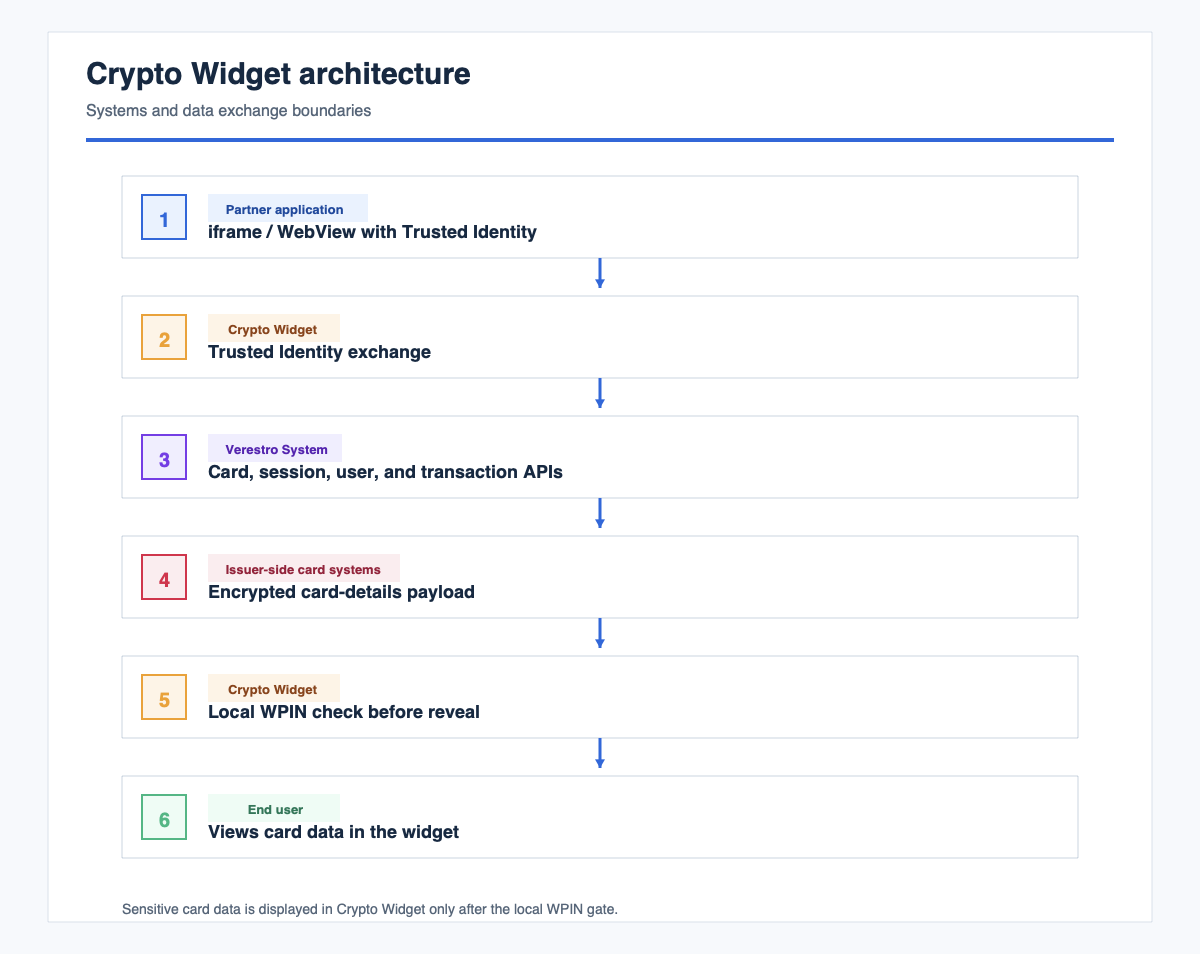
Components
| Component | Description |
|---|---|
| Partner application | Displays the entry point and embeds Crypto Widget |
| Partner backend | Creates users through LifeCycle API, triggers card issuance, and issues Trusted Identity |
| LifeCycle API | Creates the end user in Verestro System and receives required WPIN data |
| Crypto Widget | Displays card UI and handles local sensitive-data reveal |
| Verestro System | Verifies Trusted Identity, creates widget sessions, and exposes configured APIs |
| Issuer-side card systems | Provide card details, limits, balances, and card-management data |
Trusted Identity
Trusted Identity is a signed token issued by the partner backend. It identifies an existing end user in Verestro System.
Crypto Widget is opened with the following URL:
https://<widget-host>/widget?trustedIdentity=<JWS>
Processing flow:
- Crypto Widget reads the
trustedIdentityquery parameter. - Crypto Widget prepares local cryptographic material.
- Crypto Widget sends Trusted Identity to Verestro System.
- Verestro System verifies the signature with the partner certificate.
- Verestro System creates a widget session.
- Crypto Widget removes Trusted Identity from the browser URL.
- Crypto Widget opens the card dashboard.
Trusted Identity rules:
- Issue a new Trusted Identity for each widget session.
- Keep Trusted Identity short-lived.
- Sign Trusted Identity only on the partner backend.
- Do not expose the signing private key to the browser or mobile application.
- Include the Verestro System user identifier required by the integration contract.
- Include all additional claims agreed with Verestro.
Deployment
Verestro deploys Crypto Widget and provides the widget URL. The partner embeds that URL in the partner application.
Environments
The integration normally uses:
- test or beta environment,
- production environment.
For each environment, the partner provides:
- iframe origins for web applications,
- WebView details for native applications if applicable,
- certificate for Trusted Identity verification,
- expected widget entry URL,
- technical contacts for integration tests and go-live validation.
Iframe Example
<iframe
  src="https://<widget-host>/widget?trustedIdentity=<TRUSTED_IDENTITY>"
  width="100%"
  height="100%"
  allow="clipboard-read; clipboard-write"
  sandbox="allow-scripts allow-same-origin allow-forms allow-popups">
</iframe>
WebView Requirements
Enable the following in the native WebView:
- JavaScript,
- DOM storage,
- Web Crypto,
- session storage,
- navigation to the widget host.
Handle external redirects or popups only if the enabled card features require them.
Frame Security
The widget host must allow the partner origin through Content-Security-Policy: frame-ancestors.
If the iframe is blank, verify that the partner origin is allowlisted for frame embedding.
Configuration Options
Configuration is owned by Verestro and agreed per tenant.
| Option | Typical value | Description |
|---|---|---|
| Widget mode | Enabled | Enables widget routes and hides full web portal navigation |
| Token refresh | Enabled | Keeps the embedded widget session active |
| Birth date and nationality completion | Disabled | Partner collects required identity data before LifeCycle user creation |
| Add card button | Disabled | Card issuance is partner-driven before opening the widget |
| Alerts | Usually disabled | Keeps the widget scope focused on card data and card actions |
| Documents and tutorials | Usually disabled | Enabled only when agreed for the tenant |
| Wallet buttons | Disabled unless agreed | Requires additional wallet setup and permissions |
| Card limits | Enabled or disabled by agreement | Depends on the tenant scope |
| Sensitive card-data reveal | Enabled only with WPIN gate | PAN and CVV/CVC display requires successful local WPIN check |
Confirm the final configuration during integration tests. Do not infer production behavior from another tenant.
Application Flows
1. User Creation Flow
Partner application/backend
  -> collect required user data
  -> allow the end user to create WPIN
  -> create the end user through LifeCycle API with WPIN
  -> store or map the Verestro System user identifier
  -> trigger card issuance
  -> open Crypto Widget with Trusted Identity
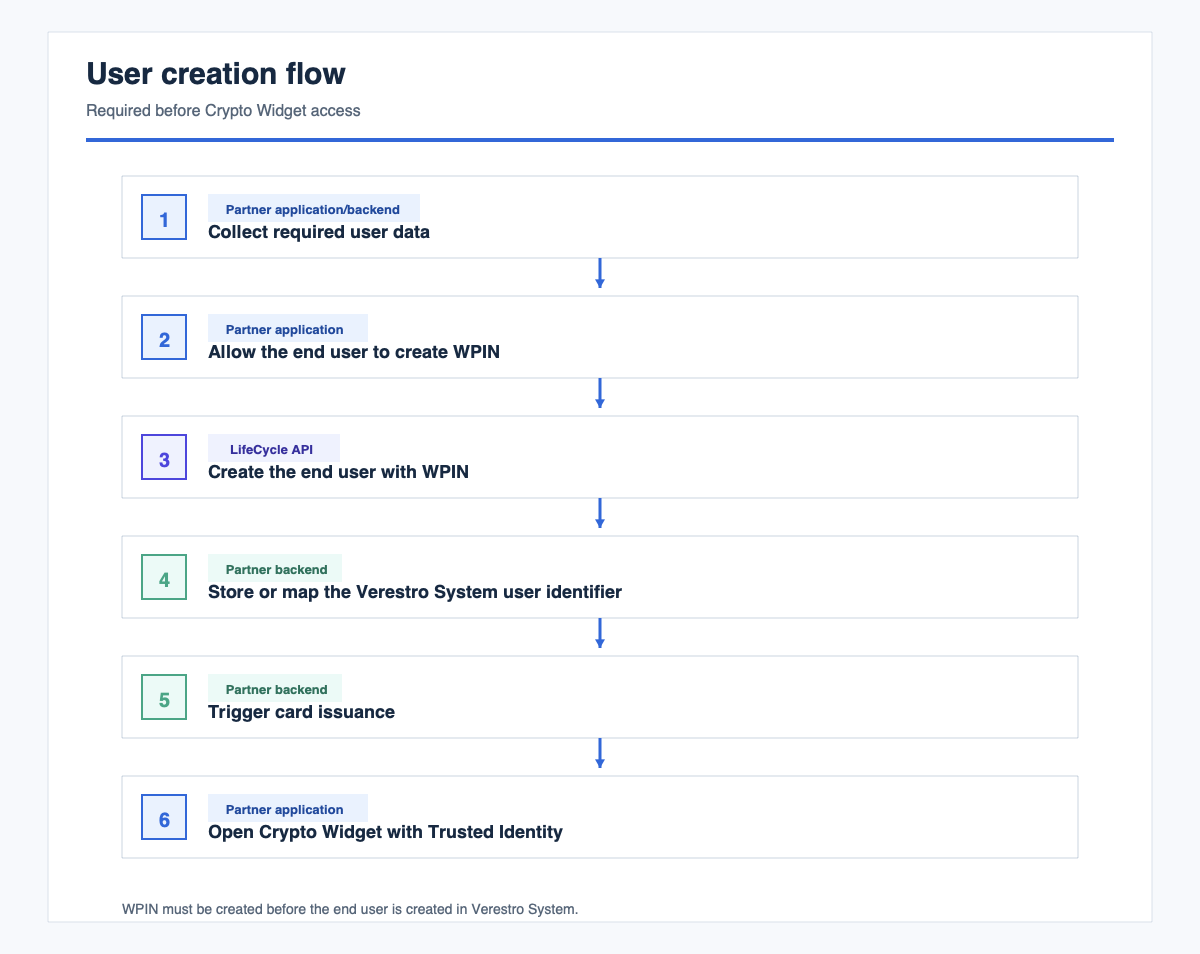 This flow is completed outside Crypto Widget.
2. Widget Launch Flow
End user selects the card entry point
  -> partner backend issues Trusted Identity
  -> partner application opens widget URL with Trusted Identity
  -> Crypto Widget exchanges Trusted Identity for a Verestro System session
  -> Crypto Widget opens the card dashboard
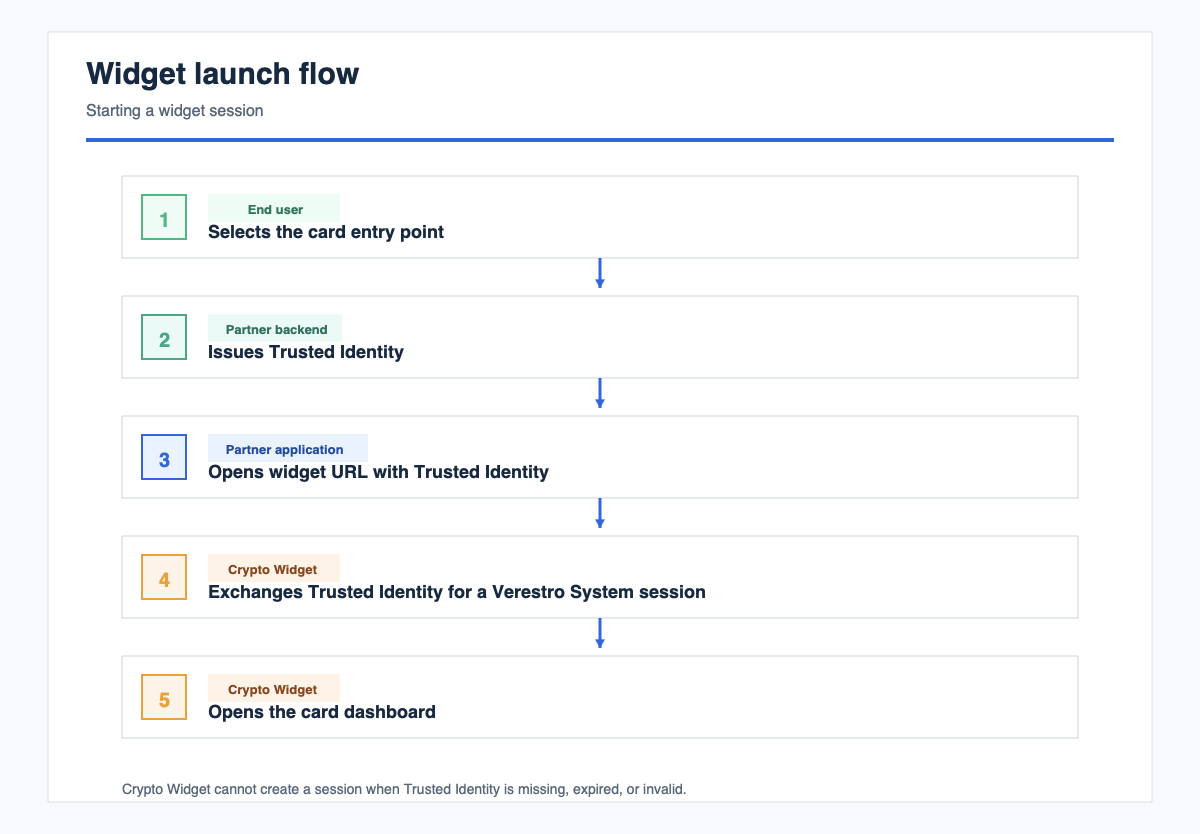 If Trusted Identity is missing, expired, or invalid, Crypto Widget cannot create a session.
3. Card Dashboard Flow
Widget session is active
  -> Crypto Widget loads the card list
  -> Crypto Widget loads selected card summary
  -> Crypto Widget loads transactions and configured card features
  -> end user uses available card actions
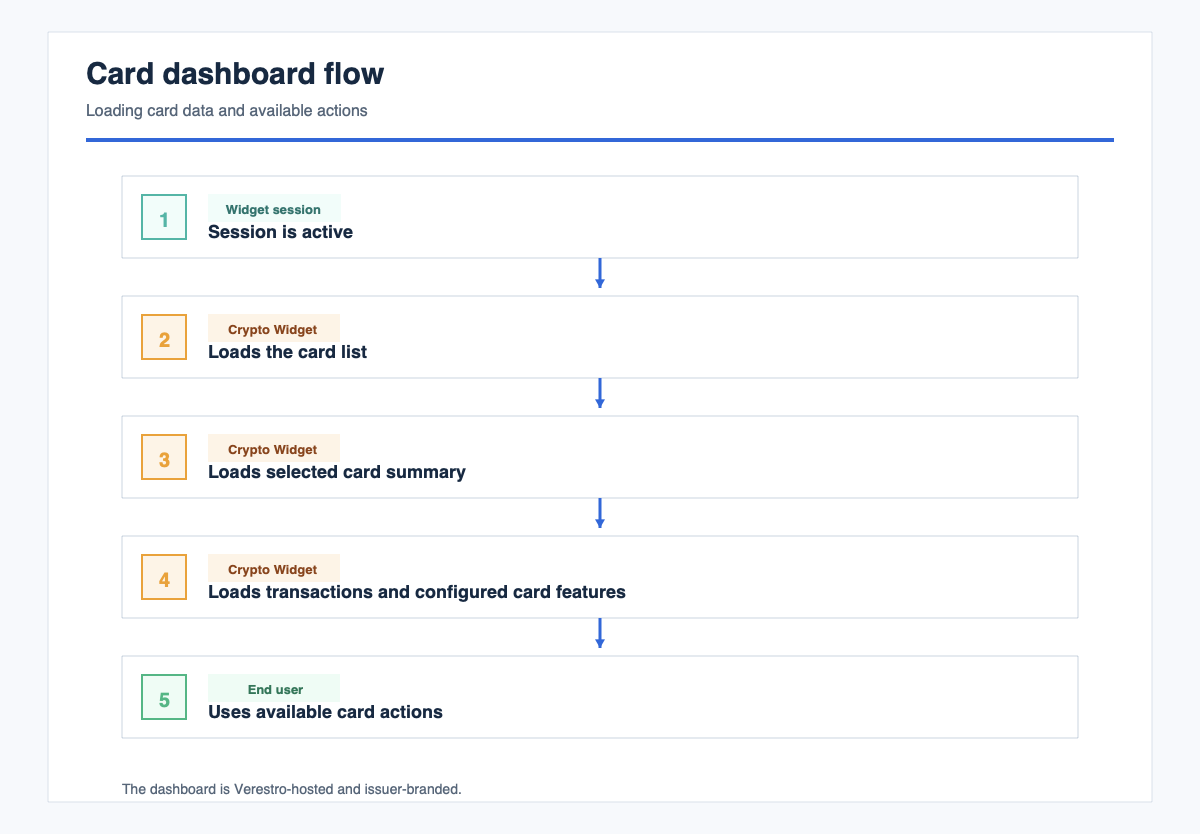 The dashboard is Verestro-hosted and issuer-branded. It does not expose partner application session data.
4. Sensitive Card Data Flow
End user selects show card details
  -> Crypto Widget asks for WPIN
  -> Crypto Widget checks WPIN locally
  -> if WPIN is valid, Crypto Widget requests encrypted card details
  -> Crypto Widget decrypts card details locally
  -> Crypto Widget shows sensitive card data
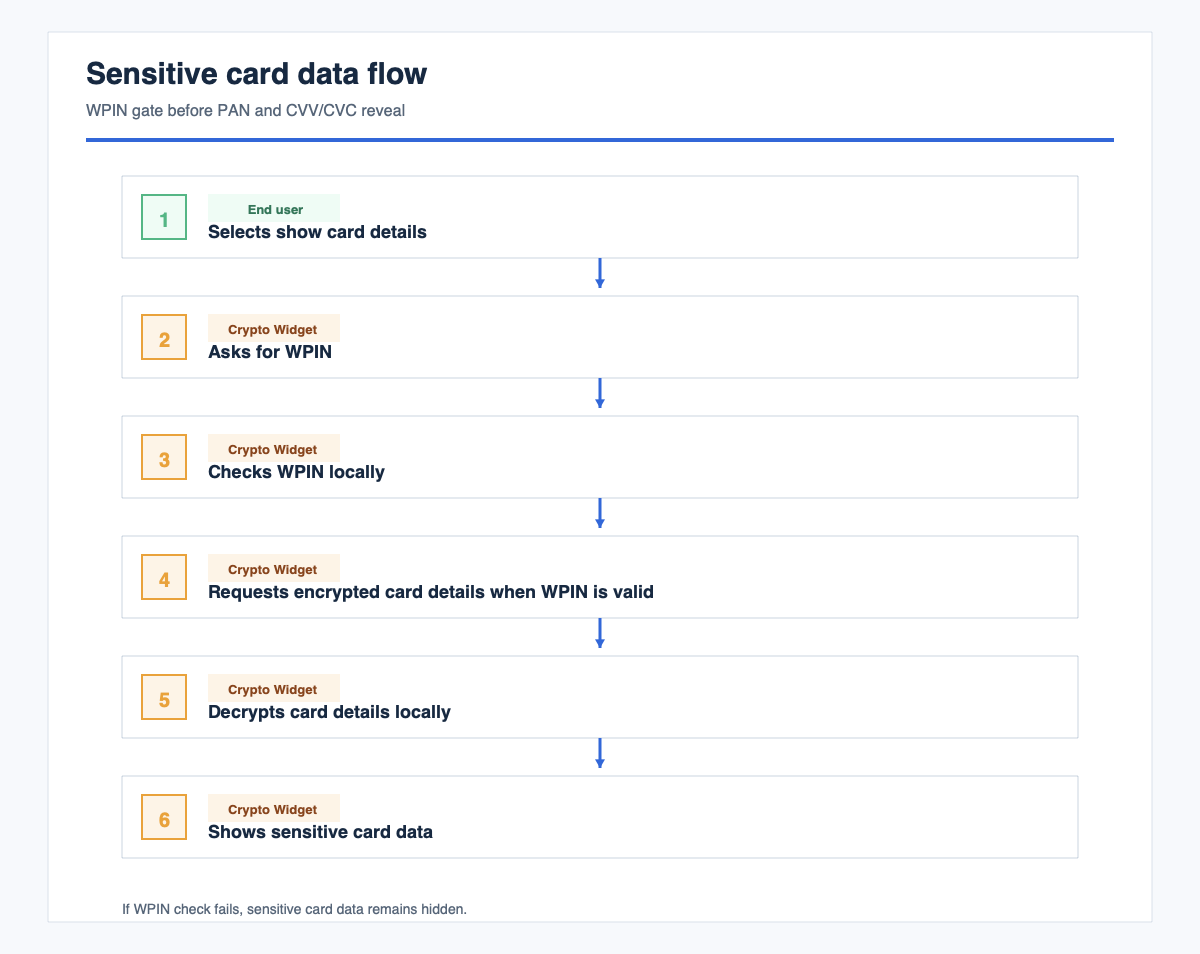 If WPIN check fails, sensitive card data remains hidden.
5. Transaction Flow
End user opens card dashboard
  -> Crypto Widget loads transactions
  -> end user selects a transaction
  -> Crypto Widget shows transaction details according to tenant configuration
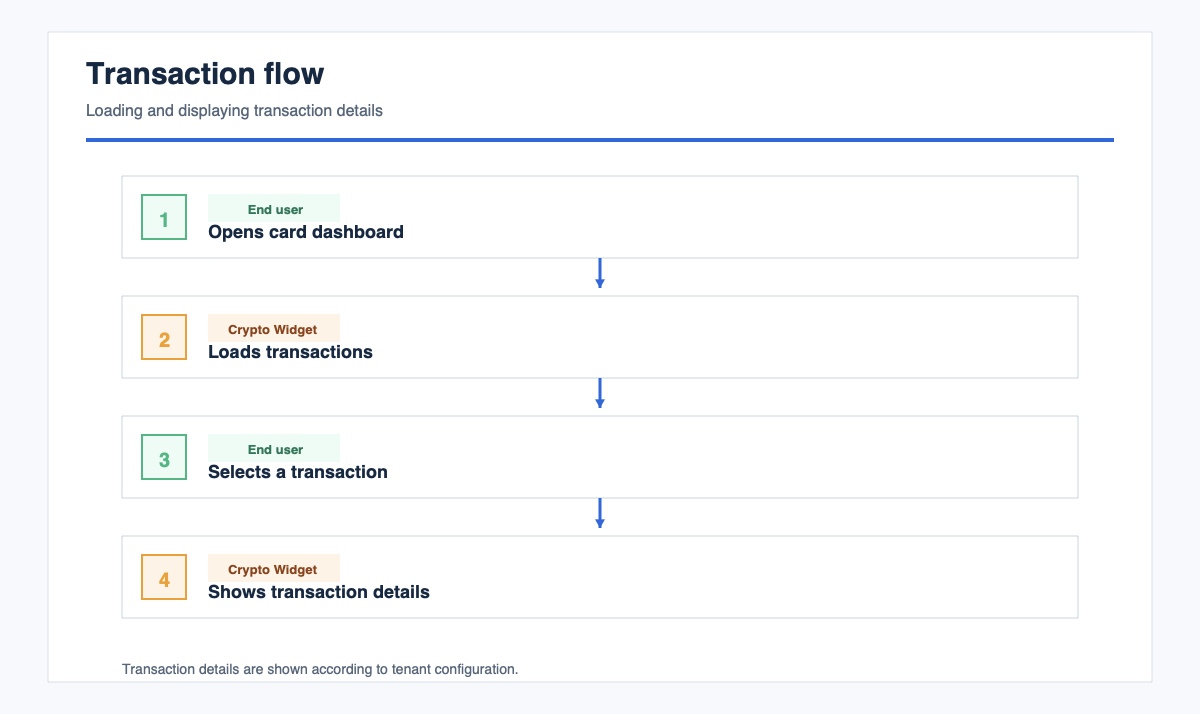
6. Limits Flow
End user opens limits
  -> Crypto Widget loads current limits
  -> end user reviews or edits limits if enabled
  -> Crypto Widget submits changes to the configured API
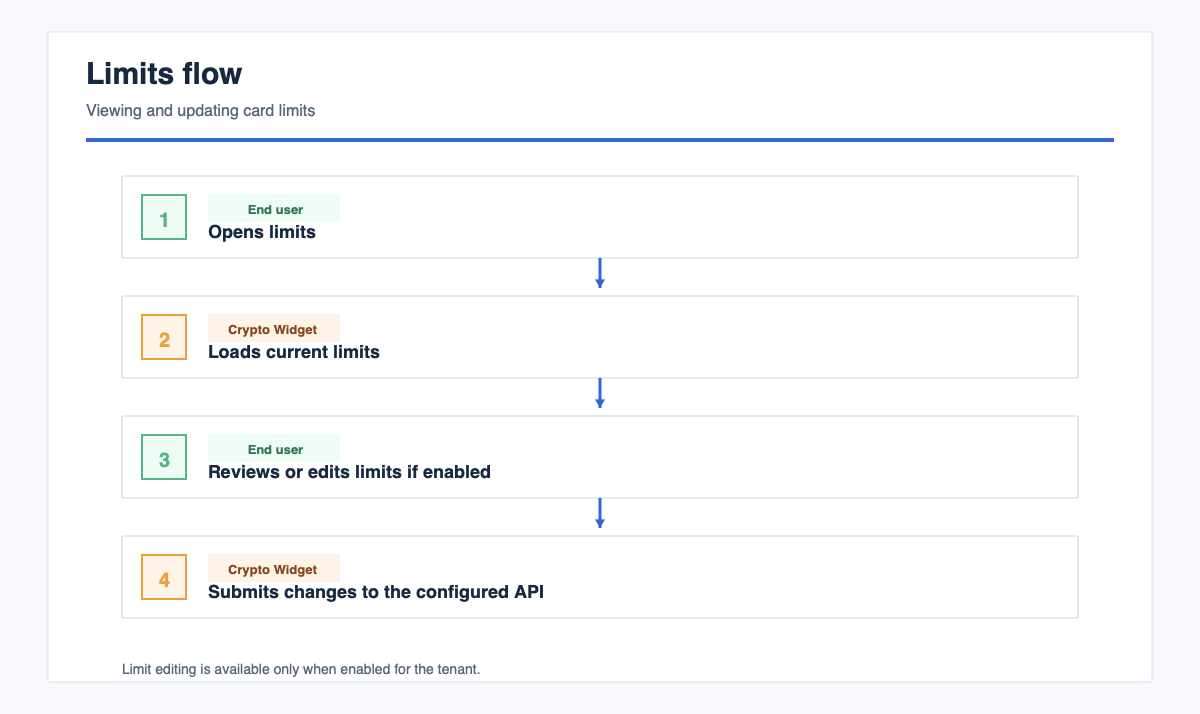 Limit editing is available only when enabled for the tenant.
7. Session Flow
Widget session is active
  -> Crypto Widget refreshes the session silently when configured
  -> if refresh succeeds, the end user continues
  -> if refresh fails, the widget session ends
  -> partner application opens the widget again with a fresh Trusted Identity
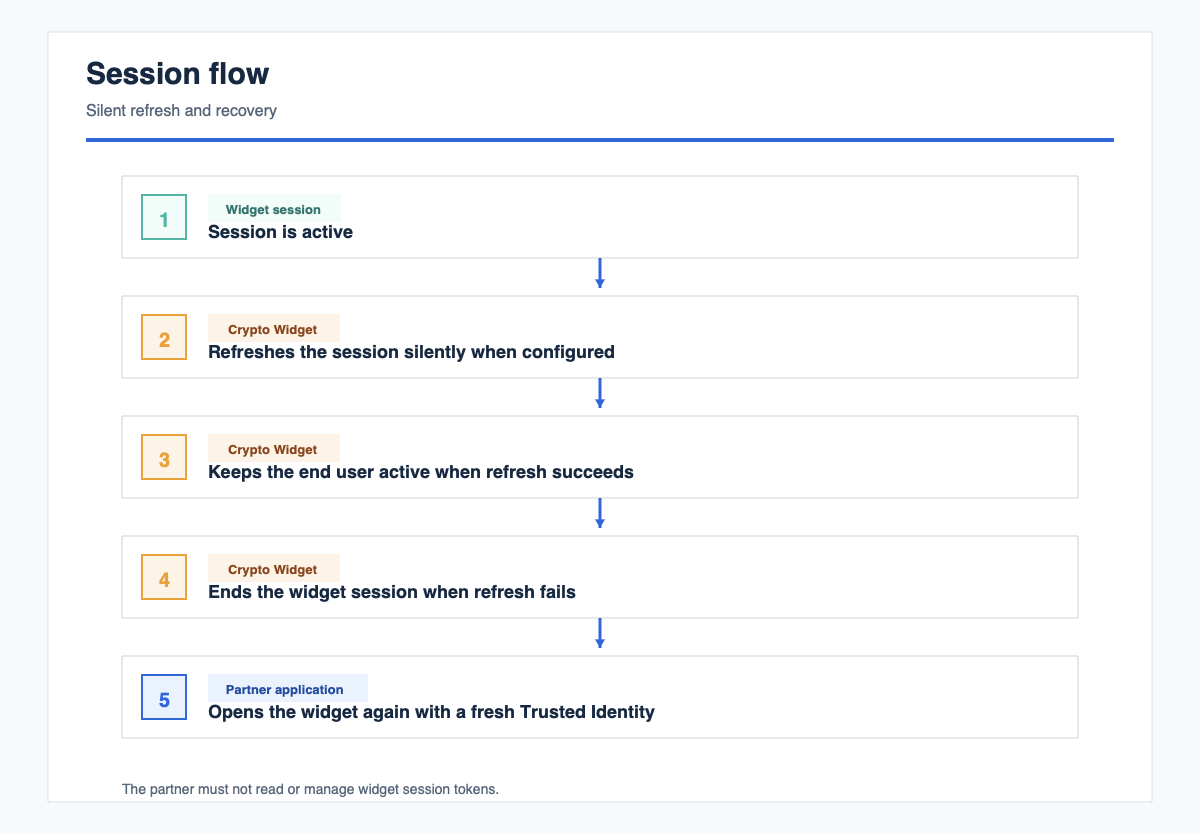 The partner cannot read or manage widget session tokens.
Implementation Checklist
- Build WPIN creation before LifeCycle user creation.
- Create the end user through LifeCycle API with required WPIN data.
- Store or map the Verestro System user identifier.
- Complete terms, conditions, fee disclosure, and card issuance before widget access.
- Register the Trusted Identity verification certificate with Verestro.
- Implement backend Trusted Identity issuing.
- Embed the widget URL in iframe or WebView.
- Provide partner origins for
frame-ancestorsallowlisting. - Test widget launch with valid, expired, missing, and malformed Trusted Identity.
- Test that sensitive card data is hidden before local WPIN check.
- Test that incorrect or missing WPIN does not reveal PAN/CVV.
- Test card list, transactions, limits, and configured card actions.
- Test session refresh and recovery with a fresh Trusted Identity.
Go-Live Criteria
- End user can create WPIN before LifeCycle user creation.
- LifeCycle user creation includes required WPIN data.
- Trusted Identity is accepted in test and production environments.
- Crypto Widget opens only for valid end users.
- Card dashboard loads inside the partner application.
- Sensitive card data is not shown before local WPIN check.
- Sensitive card data remains hidden after failed WPIN check.
- Partner backend does not receive PAN/CVV or widget session tokens.
- Partner production origin is allowlisted for iframe embedding.
- Session refresh and recovery behavior are validated.
Terminology
| Term | Description |
|---|---|
| Crypto Widget | Verestro-hosted card widget embedded in a partner application |
| WPIN | Wallet PIN used as a local gate before sensitive card data is shown |
| Sensitive card data | Card credentials such as PAN and CVV/CVC |
| LifeCycle API | API used by the partner backend to create end users in Verestro System |
| Trusted Identity | Partner-signed token used to start a widget session for an existing end user |
| Verestro System | Verestro platform that verifies Trusted Identity, creates widget sessions, and provides configured card APIs |
| iframe/WebView | Embedding method used by web and native partner applications |