Payout by link
The Payout by link product allows you or your application user (sender) to generate a payment link and then send this link to the potential recipient of your transfer. The recipient provides card number of the payment card to which he wants to receive the transfer.
- Article
- Payout to Cards
- Currency Management in Payouts to Cards
- Various forms of money transfers
- Payouts, eCom Transactions or Card-to-Card Payments?
- Cross-Border Card Transactions – Questions about FX Rates and Cash Flow
- Introduction
- Overview
- Use cases
- Onboarding
Article
You can find more knowledge about products on this site.
Payout to Cards
How does Payout to Cards work? Payout to Cards is a relatively new area of payment business that is not very common, so this article brings more information about it.
What is Payout to Cards? Actually, the answer is simple. It is nothing more than a normal bank transfer, but made to a card number instead of a bank account number.
Transfers to bank accounts are pretty common and I guess we understand how they work. A bank or another financial institution connects to Automated Clearing House (usually National Clearing Center or National Bank or inter-bank organization), implements the solution on both frontend (internet banking, mobile banking, internal systems) and backend (integration with core-banking system and ACH), and once Customer wants to send money and enters IBAN (bank account) of the receiver, the transfer is performed. In such a case the bank sends technical information to ACH and sends money or performs settlement either with another bank or National Bank, or any other payment organization responsible for this transfer.
Payouts to cards work completely in the same way, but the money transfer is done to Mastercard or VISA cards. At Mastercard, this solution is called "MoneySend" (sometimes Mastercard Send or Cross-Border Send), while at VISA it is called "VISA Direct". In case of such a transaction Customer of the bank or any other money transfer organization initiates payment via the Internet or mobile application and sends money to the Primary Account Number (card number) of the receiver. The settlement of money happens via the Mastercard and VISA networks - actually through settlement bank accounts registered at Mastercard and VISA to perform a card transaction. Money is taken from the settlement account of Originating Institution (sending institution) to the settlement account of Receiving Institution.
We present this on the chart below.

In fact, there are not many differences between a standard bank transfer and Payout to Cards. Real differences are a natural result of using payment cards to process transactions. The main differences are:
- Pricing - obviously pricing of such a Payout to Cards is different than a standard banking transfer - usually more expensive. This is the outcome of the pricing policy of VISA and Mastercard. Nothing else. On average, Payout to Card costs around 0,5-1% + 0,1-0,8 EUR per transaction.
- Speed of the transfer delivery - Receiver of a Payout to Cards transaction usually receives money (globally) within 30 minutes. It is a big game changer compared to SWIFT or SEPA transfers. It really works globally. Imagine that you can send money from Brazil to Germany in 30 minutes! From Singapore to Pakistan in 30 minutes!
- Using a card number - Receiver needs to share his/her card number (only 16 digits) with Sender. This is a significant problem because we do not like sharing card numbers with other people. Actually we are taught that it is risky. This can impact a user conversion in many use cases.
- Issues with a receiving network - Sometimes it is difficult or impossible to send transactions to particular countries. For example Germany or the USA are countries where such transactions are blocked - banks usually do not accept receiving Payouts to Cards. This may be a problem for some use cases and some transaction corridors.
- Maximum transaction value - VISA and Mastercard decided that there are some maximum transaction values. Usually it is around 5-10k EUR or USD per transaction. There are also some monthly limits per user. It does affect the user experience but this value is growing over time.
In general, it is a great functionality that works well for banks around the world as competitive to SWIFT and ACH. It gives added value to the user who wants to transfer money quickly, especially internationally. Worth considering for all money transfer organizations and banks. The implementation of Payout to Cards can be greatly simplified by Verestro and our partner payment organization Fenige. Please check us out!
Currency Management in Payouts to Cards
There are many questions about how to manage currencies in payout products. Let me briefly describe several possible scenarios.
Let's start with dependencies that have an impact on choosing various scenarios.
- Sender's card account currency - first you have a user with a payment account in a particular currency, for example USD, EUR, CHF, RON etc.
- Transaction currency - transaction that sending user can choose
- Acquirer settlement currency - there are settlement currencies that an acquiring institution (Originating Institution) cooperating with VISA or Mastercard uses to settle money with them, for example USD, EUR, PLN. Of course, it can differ from the user account currency.
- Receiver's card issuer settlement currency - a bank, which issues a card for the receiver, can have various settlement currencies with Mastercard or VISA.
- Receiving card settlement currency - additionally, there is a settlement currency of the receiver's card, issued by another bank. It can be any currency, for example UAH, CZK.

That's why it is complex. At various levels of transactions there are various currencies and of course in case of currency conversion at any step various additional FX fees apply. That's why the choice of currency management strategy is not an easy one.
Additional decision factors are related to particular use cases I want to present. There are a few possible ways of offering Payouts to the user. Let's have a look at 3 scenarios:
- User chooses how much money in their currency they want to transfer - example: User has an account in USD and wants to send 100 USD to a friend. User does not know if the friend has an account in USD, EUR or PLN. He/she does not care.
- A. In such a case there is no problem if Sender and Receiver, Acquirer and Issuer have an account in the same currency as available settlement accounts of Acquirer. Transactions will be processed and settled in the same currency through the chain. This almost always applies for USD, EUR transactions.
- B. If Sender has an account in USD, Acquirer has a settlement currency in USD, Issuer has a settlement currency in EUR, Receiver has a card account in EUR, there will be currency conversion that will happen on Receiver's side. His/her bank (card issuer) will convert the incoming USD to EUR and charge currency conversion fees.
- C. If Sender has an account in CZK, but Acquirer does not have a settlement currency in CZK, but only USD and Receiver has an account in USD, there will be conversion happening on Sender's (acquirer) side. The sending institution will convert 1000 CZK of User to USD, will charge currency conversion fees and Receiver will receive USD after conversion. Receiver's bank will not get any currency conversion fees.
- User chooses currency of Receiver - Example: User has an account in USD but needs to pay 100 EUR to Receiver because he/she knows that Receiver wants to get 100 EUR.
- D. It is possible to recognise the settlement currency of Receiver thanks to BIN tables shared through payment schemes. Thanks to it Sender will know that Receiver's card is issued in USD, so only USD will be allowed for this transaction. In such a case currency conversion will always happen on Sender's side. In case User has an account with EUR, their Acquirer (Originating Institution) will convert 100 EUR to USD and will initiate a transaction in USD. In case User account is in a different currency than the settlement account of Acquirer, additional currency conversion fees will apply and will be charged by Acquirer.
- User does not have a choice - in such a case we offer only a payment in currency defined by the payment provider, for example always the same currency as the User account.
- E. In such a case User can send only one currency. Usually the same as his/her account currency. If User's account currency is the same as the settlement account of Acquirer, the transaction will be processed as in point 1B, which means that currency conversion can happen on Receiver's side if Receiver's card currency is different from the settlement currency.
- F. In case User can send money in the currency which is not the settlement account of Acquirer in, some additional conversion fees will apply on Acquirer's side (like in scenario 1C).
It may look complicated, but if you look at it from the point of view of currency conversion points (5 places where conversion can happen) it is easier to understand.
Our recommendation is to use Scenario 1 and focus on implementing Scenario 1A (we can enable currencies which will be the most popular for your payment corridors). In some cases our partners use Scenario 2. It is important that calculation of commissions and spread is always dynamic, so Sender knows in advance the cost of these transactions.
I hope this article can help you understand currency conversion details. Thank you for reading.
Various forms of money transfers
There are multiple forms of money transfers. In this article we would like to summarize the most important pros and cons of every solution:
- SWIFT (Society for Worldwide Interbank Financial Telecommunication) - inter-banking payment scheme enabling global transfer, International standard
- Pros - almost any currency; global network, unlimited amount of transfer
- Cons - time of transaction (sometimes a week); cost of transaction (example: 0,3%+10 usd or more); available to banks only
- Payouts to Cards - using Mastercard and VISA network, global transfers, international standard
- Pros - almost any currency; global network; speed (even 30 minutes to transfer money between continents
- Cons - Cost of transaction (example: 1% + 0,5 usd), limited amount of transfer (10.000 USD)
- Crypto - using cryptography to transfer value, global transfer, international standard but sometimes forbidden by law
- Pros - multiple but virtual currencies; global network; speed (even 5 minutes)
- Cons - high costs (example: 1-2%), very often forbidden by regulators, risk of losing money, needs crypto exchange involvement
- SEPA (Single Euro Payment Area) - European standard or euro currency standard
- Pros - speed (immediately or 1 day), price (below 1 EUR)
- Cons - works only from EUR to EUR, works only in the European Union
- Payouts to wallets - various providers offer various payouts mechanisms to multiply local wallet providers or cash-out networks
- Pros - localization
- Cons - no global standard in speed and price, usually more expensive
- Virtual cards - you can issue a virtual card, send card data to the receiver and the receiver can use the card globally
- Pros - global standard, very quick and very cheap, receiver can use card for ATM withdrawal, POS and eCommerce payments
- Cons - non-standard way of sending money, receiver reluctance
- Local ACH (Automated Clearing House or local scheme) - there are multiple local or national payment schemes globally that you can use once you integrate with them. Usually requires a bank license to integrate.
- Pros - quick and cheap, standard in the country
- Cons - no global standard, works only locally
If you are asking yourself which solution you should use for your user it is actually a wrong question. We recommend using all. Give choice to your users, apply various fees on various methods of transfer, let users choose the best way of payments for them. It is actually very important strategy because:
- for users in Poland SEPA transfer or local ACH are the most common ways of payments nowadays
- for users in Ukraine Payouts to cards are the most common mechanism they have been using for years
- for users in USA SWIFT or local payment schemes are the most common mechanism
If you are building an international service, you really need multiple ways of sending money for your users.
Thanks for reading.
Payouts, eCom Transactions or Card-to-Card Payments?
While thinking about card-based money transfer solutions, our partners usually ask for three products - payouts to cards, eCom transactions or card-to-card payments. In this article we will describe differences between those 3 ways of money transfers.
Let me start with a chart.
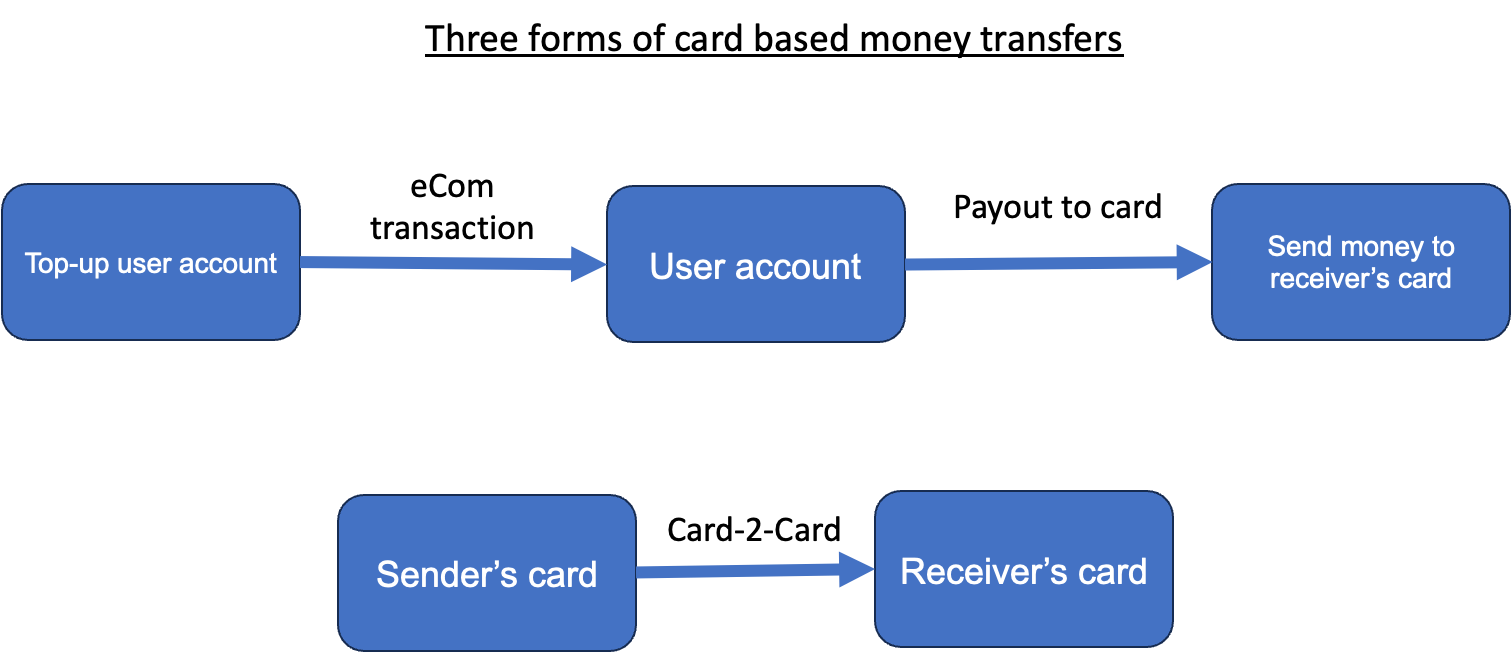
There are three use cases that you may be interested in. The choice of product depends on a use case decision.
Use Case 1. Top-up user account - in this case our starting point is the user's account kept somewhere in your systems. Your users need to reload this account with money. You can use various forms of transfers to your account, but if you want to reload an account from Mastercard or VISA card, we should enable eCom transactions to you. You will be registered as a merchant with our partnering acquirers and we will enable payments using cards, Apple Pay, Google Pay or other means of payment.
Use Case 2. Payout to card - in this case we assume that your user has an account and money on this account. We need to enable payments from this account to any card in the world. This money transfer will be very quick - less than 30 minutes. In this case you should be using our product called "Payouts to cards". This will enable your user to transfer money to any Mastercard or VISA card.
Use Case 3. Card-2-Card - in this case our assumption is that you do not have a user's account. You do not store the money of your users. You just want to enable a money transfer service from one card to another card. From Mastercard to VISA, VISA to Mastercard or Mastercard to Mastercard or VISA to VISA card. In such a case we recommend that you use our card-2-card product.
It is important not to mix those use cases and choose the correct product. All three products have different fees, AML requirements so please think of your use case and let's decide what to use.
Thanks for reading.
Cross-Border Card Transactions – Questions about FX Rates and Cash Flow
The topic of settlements of cross-border card transactions is often touched by our customers. It is not always clear how various fees are calculated. In this article we would like to explain how it works in detail.
The standard transaction flow
In general, a cross-border transaction works in the same way as a domestic transaction:
1. The cardholder presents the card to the merchant or terminal (either online by entering card data, or in a contactless way or as a standard plastic card transaction or at an ATM).
2. The acquirer gets card and transaction data from the terminal.
3. Based on the BIN table, the acquirer sends transaction authorization to Mastercard or VISA (Payment Schemes).
4. The payment scheme transfers authorization to the card issuer.
5. The card issuer approves or declines the authorization and blocks the amount on the cardholder account.
6. In case of approved transactions, the acquirer prepares a clearing file and sends it for settlement.
7. The payment scheme receives a clearing file and processes it.
8. The payment scheme takes money from the issuer settlement account and transfers it to the acquirer settlement account.
9. The payment scheme settles fees between itself, the issuer and the acquirer.
10. The merchant receives money for the transaction.
11. The acquirer charges merchant fees.
The added complexity of currency conversion in cross-border transactions
As mentioned above, this process is the same for domestic and cross-border transactions. However, in cross-border transactions the currency conversion process takes place, bringing an additional layer of complexity. As conversion applies at various moments of transaction, let me describe this in detail below:
1. Merchant and Acquirer
a. The merchant can agree with the acquirer that they want to receive money in one or multiple currencies. Depending on this contract, the acquirer will transfer money to the merchant in those currencies. It is impossible that ALL currencies in the world will be used, so usually merchants want to receive money in a few main currencies
b. The acquirer has Settlement Services with payment schemes in several or many currencies.
c. Depending on the Settlement Services, if a transaction is performed in currency X, the acquirer receives money in currency X. No currency conversion cost will apply at a payment scheme.
d. However, if the transaction is performed in currency X, but the acquirer does not have Settlement Service in this currency, the payment scheme will convert currency X to currency Y and send money to the acquirer in currency Y.
e. The acquirer will receive currency Y on their bank account and will either convert it to the merchant settlement currency or will transfer it directly to the merchant in currency Y.
f. Various fees charged by the acquirer can apply if the acquirer is performing currency conversion.
2. Payment Scheme
a. As described above, acquirers have Settlement Services enabled by Payment Schemes. Issuers have the same.
b. The issuer can have Settlement Service in main currencies:
i. Local currency
ii. EUR settlement
iii. USD settlement
iv. Eventually in other currencies
c. Every new Settlement Service is a paid service, so both issuers and acquirers must decide which is the correct setup of settlement services. Depending on this decision, the Payment Scheme will perform more or less currency conversion operations and will earn fees during this process.
d. The Payment Scheme provides issuers and acquirers with currency conversion tables which can act as a directional FX rate for them. However, the real FX rate for a particular transaction is performed at the moment of transaction settlement at the Payment Scheme.
e. This means that if the cardholder performs a transaction, his/her issuer is never sure what will be the settlement amount for this transaction
3. Issuer and Cardholder
a. Finally, depending on the Settlement Service agreed with the Payment Scheme, the issuer enables cards for their users.
b. The cardholder has usually (actually always) a payment account connected with this card and the cardholder knows that he/she holds money in a particular currency enabled by his/her bank / issuer.
c. It means that all transactions on this payment account will be charged in this particular currency.
d. Depending on the currency of the transaction and the settlement service enabled by the payment scheme, the issuer will perform the currency conversion and charge the cardholder additional fees.
Conclusion
This topic is highly complex and depends on many factors. Issuers and acquirers must make a decision which approach is the best for them, which Settlement Services to enable with Mastercard or VISA and what should be the fee charged for this service because it is impossible to avoid all risks connected with currency conversion changes.
Introduction
Payout to Card lets you and your users send funds directly from balance to a recipient via a simple payment link — no need to know their card details. Just share the link through SMS or messengers like WhatsApp or Telegram.
The recipient opens the link, enters their card number, and instantly receives the transfer.
Once your company completes the KYB process, you’ll be able to create balances, manage payouts, and track all transactions in our intuitive Admin Panel.
Tip: Check the DEMO version of the application here.
How to connect with us?
Integration with Payout by link can be divided into two parts. The first stage is business onboarding, where the terms of the contract are defined and all documents are confirmed (including KYB verification).
The second stage is technical integration. At this stage your company instance will be created in our system. Once we complete these steps, you can integrate your application with our API following Technical documentation.
Note: It is required that you have an account in Acquirer's system which will settle your transactions. For more informations please contact our Sale Department. We are suggesting to use Fenige - our partner acquiring institution.
Overview
The chapter focuses on the description of each of the components involved in the payout process and what each component is responsible for. All mentioned components and their responsibilities are made and managed by Verestro.
Terminology
|
Name |
Description |
|
Customer/Merchant |
Institution which uses and integrates with Verestro products. |
| Acquirer | An external institution that communicates with the card issuer, protects against fraud and taking responsible for executing the transaction and checking the correctness of 3D Secure authentication. |
| Balance | The current balance of funds for a given user stored in the Antaca service. |
| Card | A payment instrument issued by the issuer to a given user. You can send and receive funds using the card. |
|
Issuer |
The Bank/card issuer. It determines whether a given transaction can be performed and whether 3D Secure authentication is needed. |
|
Payout |
A method that allows you to order a transfer from your balance to provided payment card. |
|
User |
An end user, e.g. the entity to which the card was issued. |
|
Component |
An application service that is a part of the entire technical solution, for example Payout API. |
Application components
This chapter is describing all components involved in the processes included in the Payout to card product. Each of the sections below describes each of the components. Internal services are the key elements of the solution implemented on the Verestro side. Each of them has a separate responsibility in the entire Payout to card process. Below diagram describes every internal components in our Payout to card application. Payout to card is our internal service integrated with Antaca, thus enabling sender balance management, generating pay me link allowing to order payouts and connecting with acquirer to perform ordered transfer and handling 3D Secure process.'
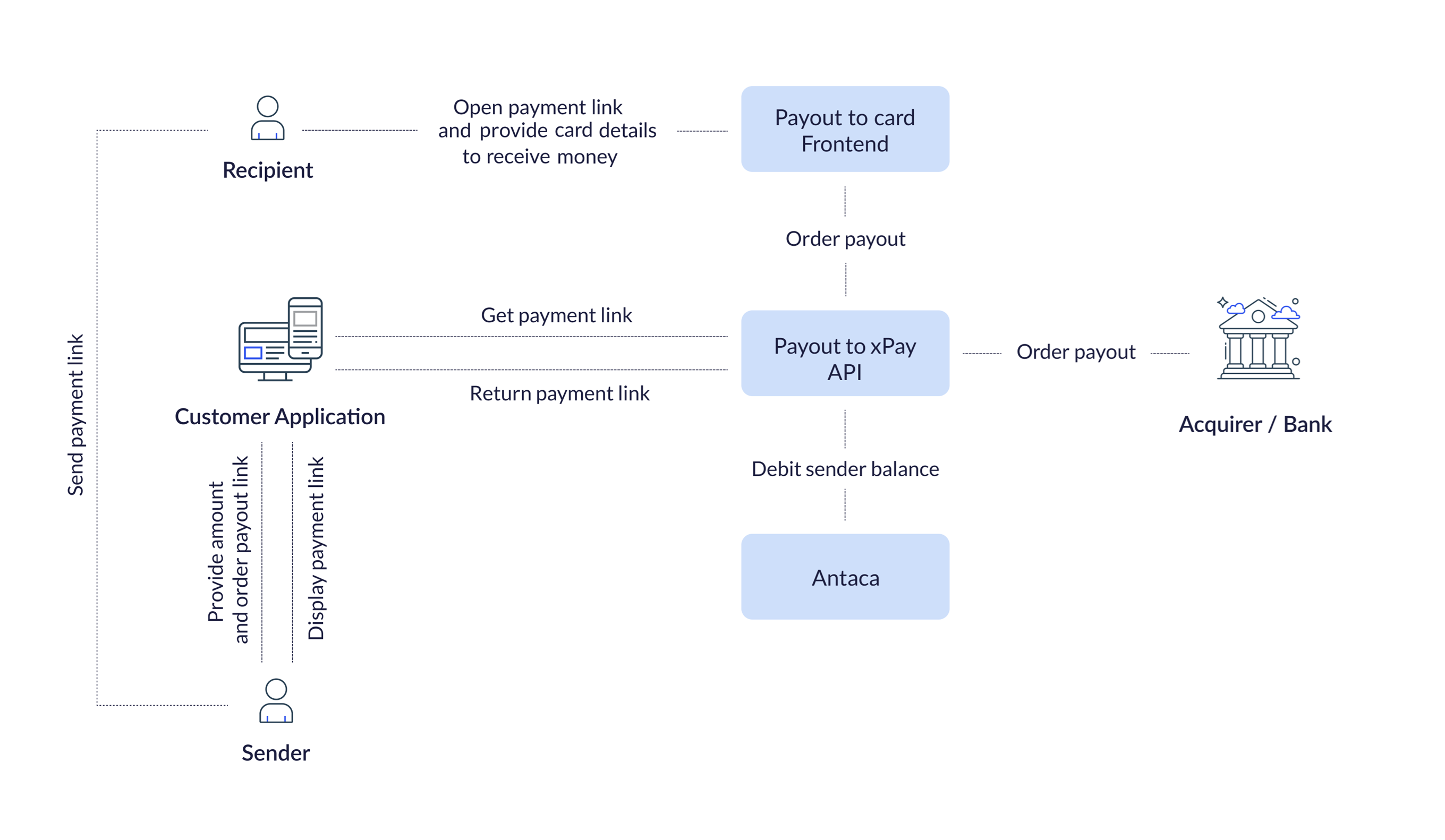
|
Component |
Description |
|
The backend component of the Payout to card application. It is responsible for opening a payment session, generating a payment link and ordering the transaction to an acquiring institution. |
|
|
The frontend component of the Payout to card application. It contains a frontend view to which the recipient of the payment link is redirected. In addition, it allows recipient to provide card data to receive money transfer from potential money sender. |
|
|
Backend component which manages balances and allows certain operations related to them. Such operations include creating a new balance, debiting and crediting a balance or deactivating a balance. This component is not part of the Payout to card application, but it is crucial to this service as the funds of the payout sender are taken from his balance in Antaca. |
@startuml
skinparam ParticipantPadding 30
skinparam BoxPadding 30
skinparam noteFontColor #FFFFFF
skinparam noteBackgroundColor #1C1E3F
skinparam noteBorderColor #1C1E3F
skinparam noteBorderThickness 1
skinparam sequence {
ArrowColor #1C1E3F
ArrowFontColor #1C1E3F
ActorBorderColor #1C1E3F
ActorBackgroundColor #FFFFFF
ActorFontStyle bold
ParticipantBorderColor #1C1E3F
ParticipantBackgroundColor #1C1E3F
ParticipantFontColor #FFFFFF
ParticipantFontStyle bold
LifeLineBackgroundColor #1C1E3F
LifeLineBorderColor #1C1E3F
}
actor "Sender" as sender
participant "Customer App" as customer
participant "Payout App" as verestrobackend
actor "Recipient" as user
== Customer's part of the process ==
sender->customer: Order payout (trx data)
customer->verestrobackend: Create payment link(trxData, balanceId)
verestrobackend->verestrobackend: Check if the user has sufficient funds
customer<-verestrobackend: Return payment link
sender<-customer: Return payment link
====
sender-->user: Send payment link
note left of user: Clicks on link
== Verestro's part of the process ==
user->verestrobackend: Redirect recipient to payment link webview
note right of verestrobackend: Recipient sees that he can claim money from sender
note right of verestrobackend: Recipient provides payment card number
verestrobackend<-verestrobackend: Make payout to recipient card
customer<-verestrobackend: Notify customer about payout status
user<--verestrobackend: Top up card if status success
====
@enduml
Payout to card
A component that supports all key Payout to Card processes. Each process is described below in the order of steps, starting from the payout initiation by the sender to the payment received on the proper card provided by the recipient. The Payout to Card component is responsible for the following actions:
| 1. Initialization of the payment shipment, i.e. the moment when the option to order a transfer to a given recipient was selected and completion of transfer information such as amount or currency was provided by money sender. Payout to card API checks whether the sender has sufficient funds in the balance. |
| 2. Payment link creation and thus opening a payment session in our system (storing information about the planned transaction, such as amount and currency). The generated payment link is returned to the sender so that the sender can send it to the potential recipient as a SMS message or via other communicators. |
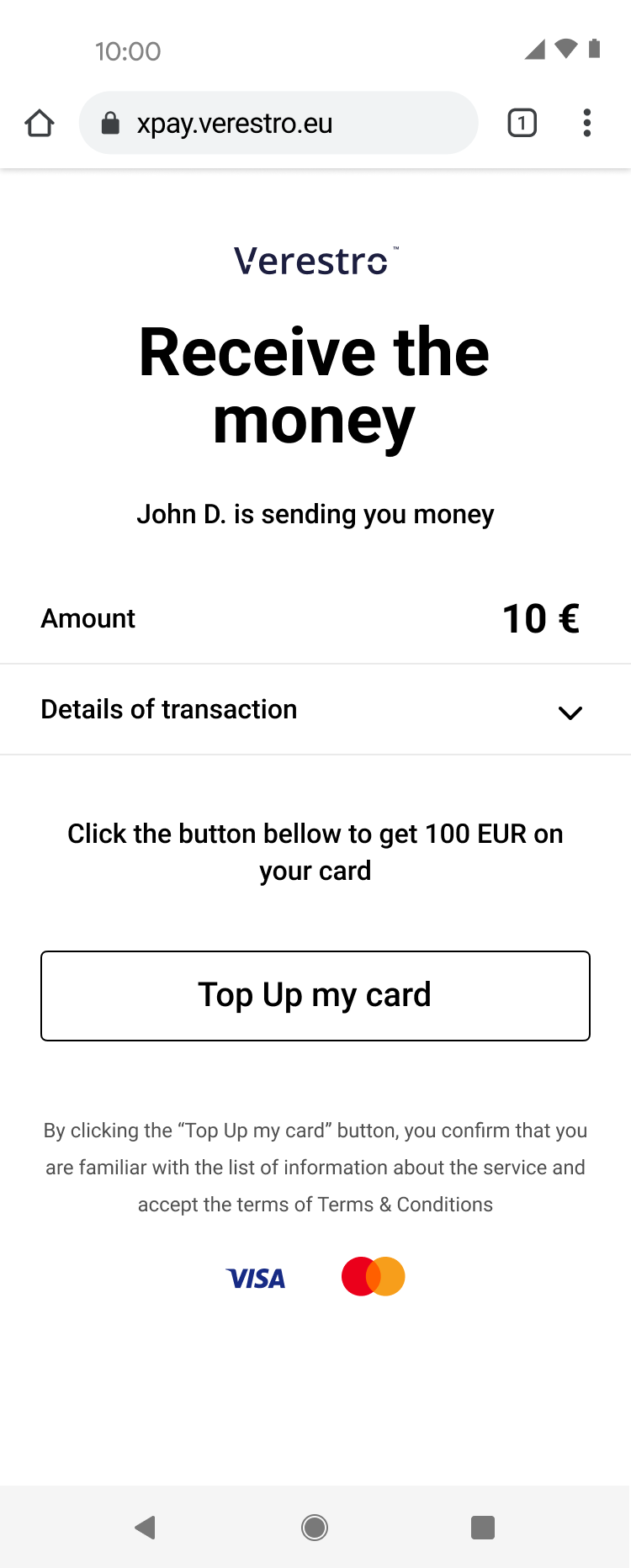
| 3. Opening Payout to card frontend view. This is the view to which the recipient is directed after clicking on the link received from the sender. This view shows what amount the sender is sending and how the recipient can receive the money (click on the proper button in the view to provide card number manually and receive the money). |
| 4. Processing payment. Payout to card API will perform the order to top up the recipient's card by contacting the acquiring institution and debiting the sender's balance in Antaca. |
Antaca
This is the initial component in the payout process. Antaca is responsible for creating balances for you company and it's users, or allowing to credit/debit your balance depending on the direction of the funds. Antaca also monitors the balance of each entity, ensuring that the requested action on the balance is performed after meeting specific conditions, for example, it is not possible to debit the balance for more funds than are currently in the balance (you cannot send 100 EUR if you have only 99 EUR on your balance). It is also not possible to top up a balance that has been deactivated. The table below shows Antaca's methods for creating, crediting and debiting a balance.
Tip: In the Payout to card product, Verestro is responsible for appropriately calling the Antaca methods that credit or debit the balance. You, as a Customer, only need to send us information on which balance and of what amount we should call a given operation.
Use cases
This chapter describes the business functions that can be performed by having a company balance in the Verestro system and using Payout to card. We also present end user default views presented during using the application.
Know your business
The first step to starting integration is to complete the KYB process. This process is required to identify and verify business clients. Automatic registration process ensures that all the information and documents provided by the clients gone properly through AML verification. Business client registration process may take around 10-15 minutes. At this link you can find out what exactly the KYB process is and what it looks like. KYB in Verestro is performed with the help of an external verification provider - Mobiltek.
Note: AML (Anti-Money Laundering) is a set of policies, procedures, and technologies that prevents money laundering.
Customer balance management
Description of methods in Antaca service to create and manage the balance.
| Method |
Description |
|
Method that allows you to create a balance for your company. |
|
|
Method that allows you to top up the created balance. |
|
|
Method that allows you to debit the created balance. |
Note: The balance for your corporation is created during its registration in our system.
You can create end-user balances from the Administration Panel created for your corporation or use the Create balance method mentioned above.
Initialize payment link
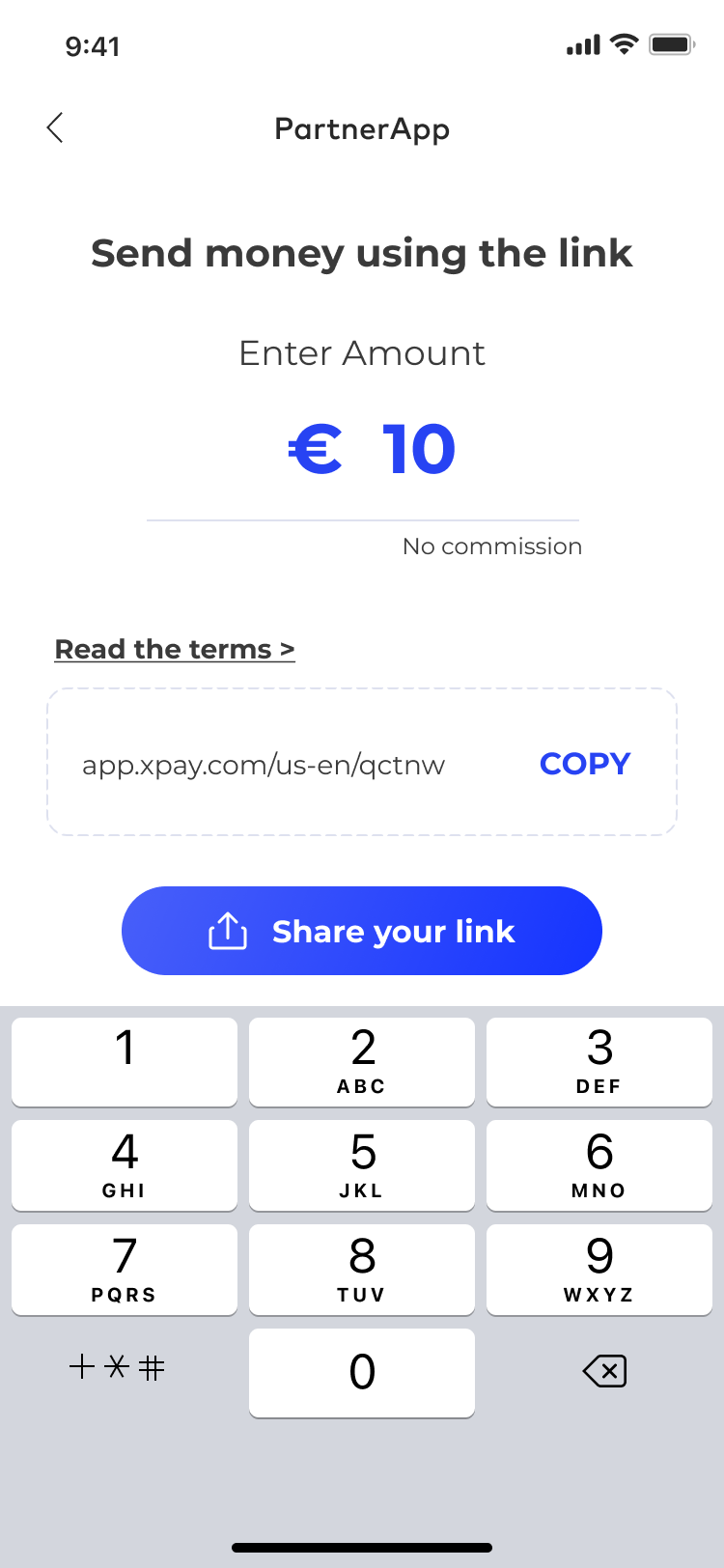
The card top-up process begins when the payment link is initialized. As a customer, you must provide transaction metadata such as the amount and currency in which the payout will be made. After confirming the entered data, a link is generated that you can send to the recipient.
Important! The first screen below (PartnerApp view) imitates the view from your application and you will be responsible for implementing this view.
UML presenting initialize payment link step by step
@startuml
skinparam ParticipantPadding 30
skinparam BoxPadding 30
skinparam noteFontColor #FFFFFF
skinparam noteBackgroundColor #1C1E3F
skinparam noteBorderColor #1C1E3F
skinparam noteBorderThickness 1
skinparam sequence {
ArrowColor #1C1E3F
ArrowFontColor #1C1E3F
ActorBorderColor #1C1E3F
ActorBackgroundColor #FFFFFF
ActorFontStyle bold
ParticipantBorderColor #1C1E3F
ParticipantBackgroundColor #1C1E3F
ParticipantFontColor #FFFFFF
ParticipantFontStyle bold
LifeLineBackgroundColor #1C1E3F
LifeLineBorderColor #1C1E3F
}
participant "Sender" as sender
participant "Customer" as cust
participant "Verestro" as oro
participant "Recipient" as user
sender->cust: Send money using payout
note right of sender: Money Sender has a balance in Antaca Verestro
cust->oro: Initialize payment link (provide transaction metadata)
oro->cust: Return generated payment link
cust->sender: Return generated payment link
sender->user: Send link to the receiver
@enduml
|
|
|
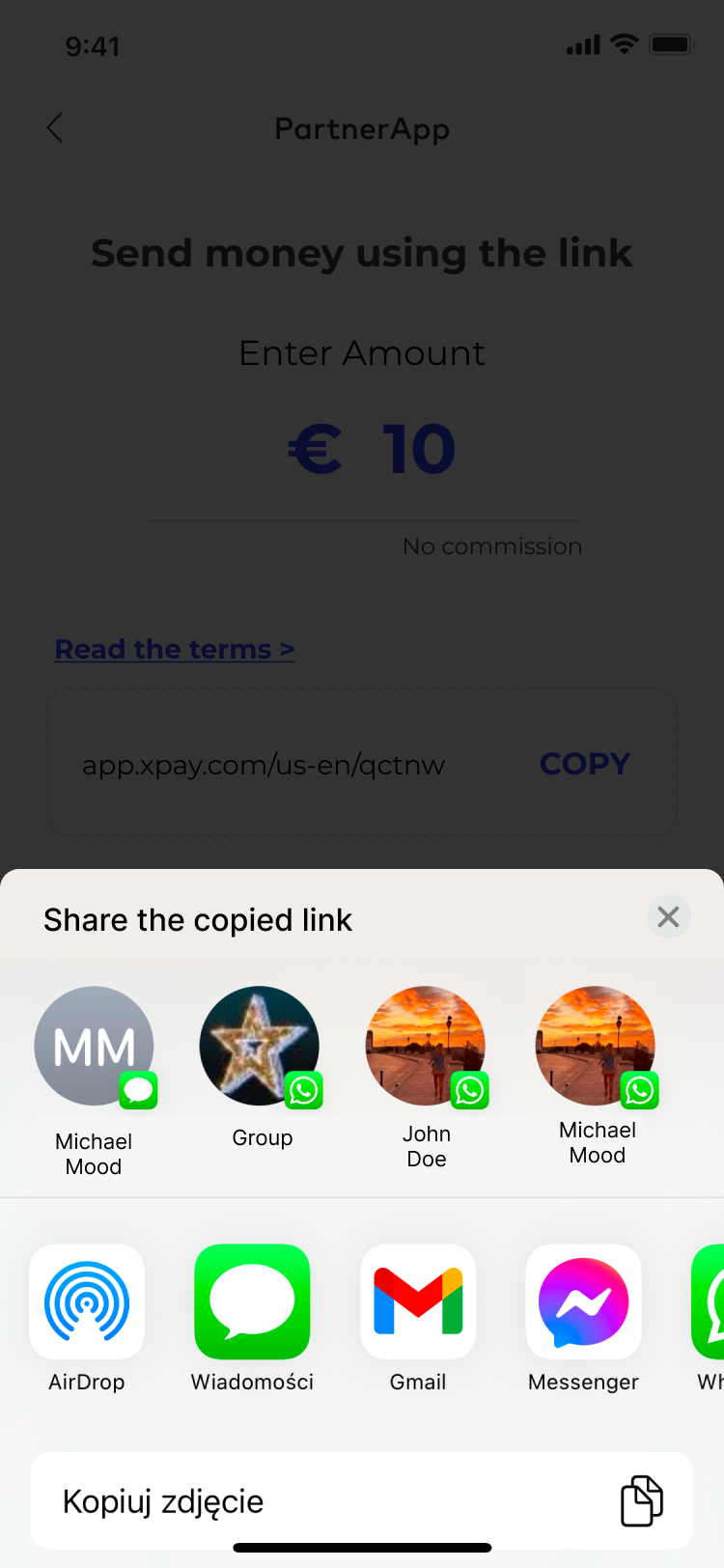
| 1. Sender provides transaction metadata and order payment link (this step takes place in Customer's application). | 2. Sender gets payment link and sends it to the recipient. |
Top-up card
The recipient of a payment link sent by the sender is the beneficiary of the transfer. Upon opening the link, the recipient is redirected to our responsive webview, where he/she can see a message indicating that a specific person intends to transfer a certain amount in a given currency.
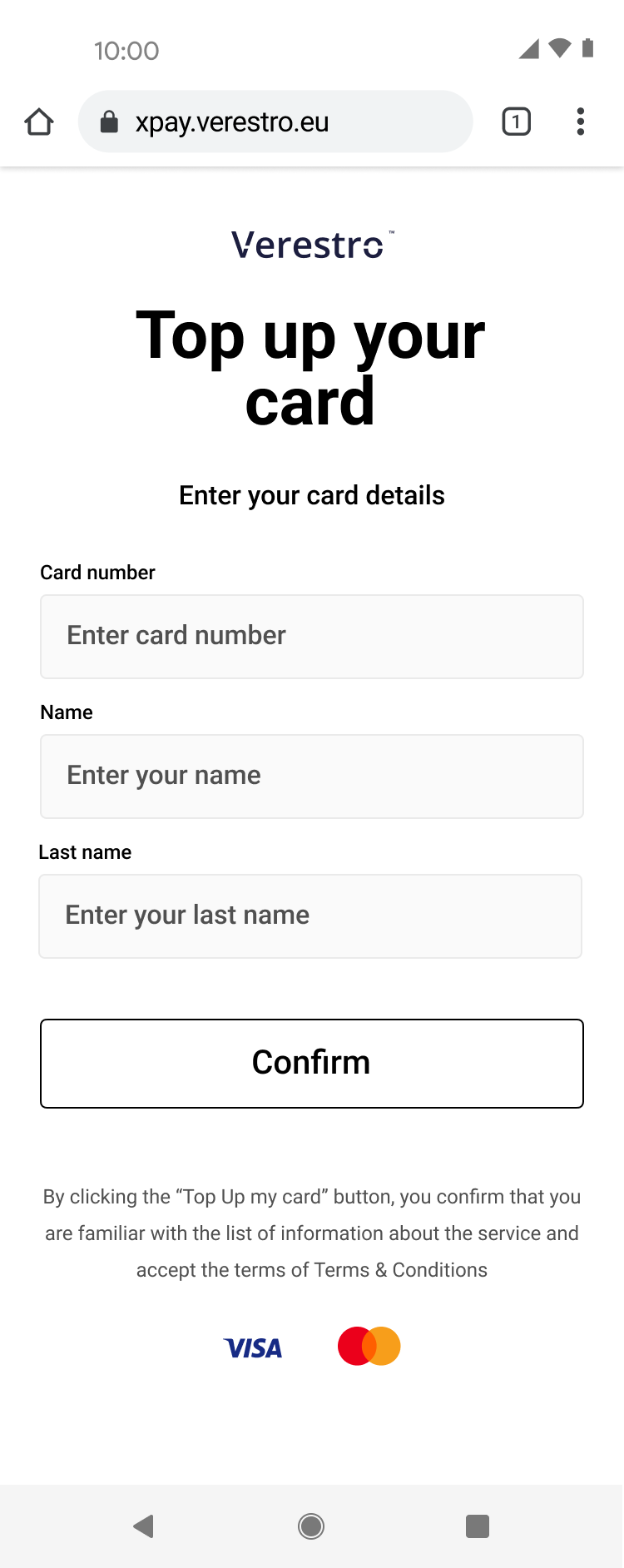
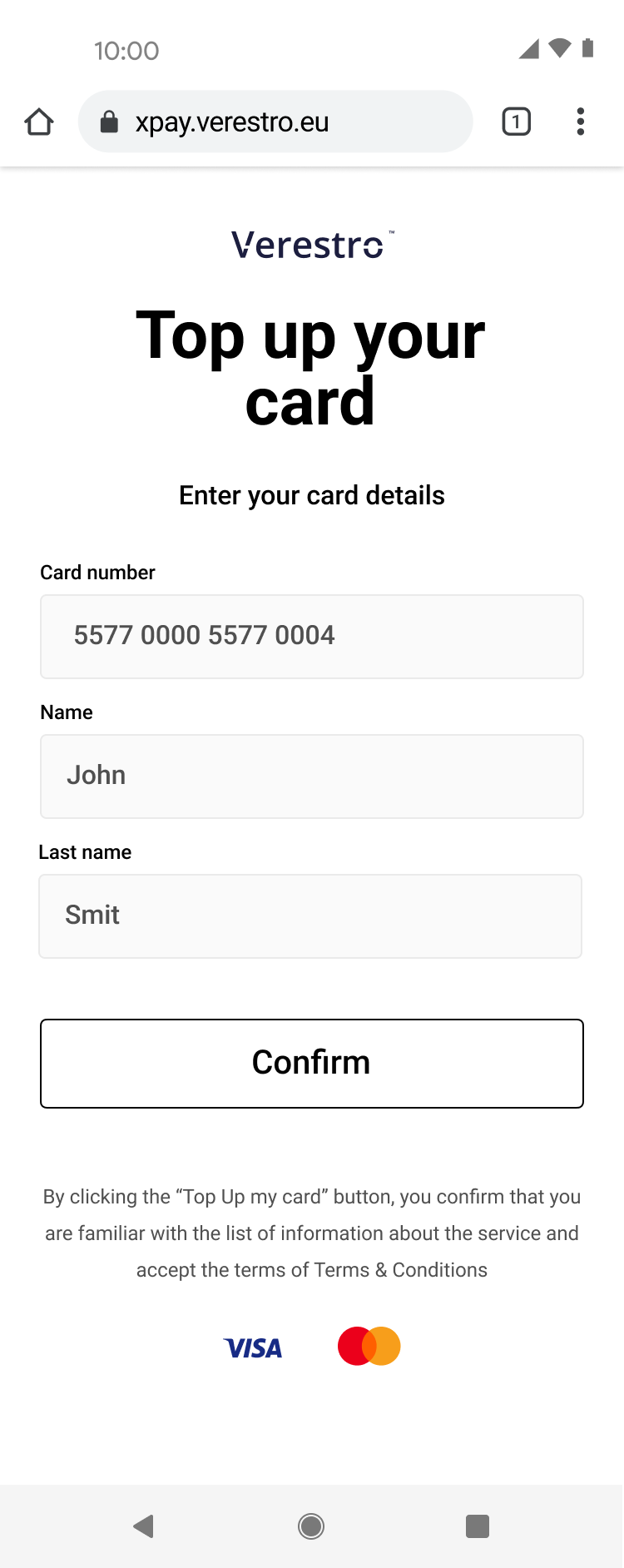
To claim these funds, the recipient is required to enter his/her card PAN (Primary Account Number) into the designated input field provided on this page. The recipient then confirms hir/her intention to accept the transfer by clicking the “Confirm” button. Once confirmed, the funds are credited to his/her balance immediately.
|
|
 |
|
|
|
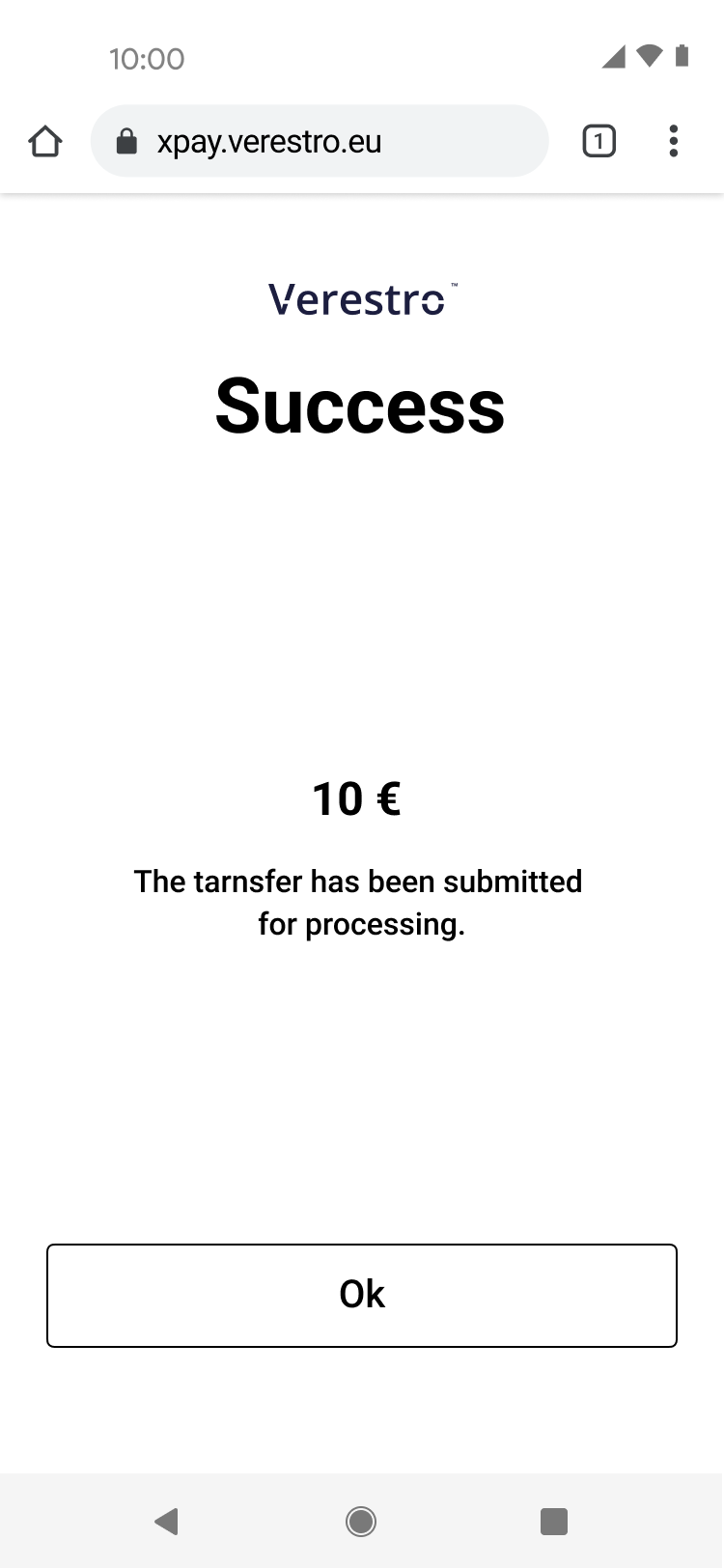
| 3. Recipient gets message with payment link from the Sender and clicks that link. | 4. Recipient is redirected to Payout to card and view (this step takes place in Verestro Payout to card application) and clicks Top Up my card button. | 5. The form to provide card number and cardholder details is shown to the Recipient. | 6. Recipient provide his card's number and his name. | 7. The status of the top up is shown to the Recipient. |

UML presenting top up card provided manually
@startuml
skinparam ParticipantPadding 30
skinparam BoxPadding 30
skinparam noteFontColor #FFFFFF
skinparam noteBackgroundColor #1C1E3F
skinparam noteBorderColor #1C1E3F
skinparam noteBorderThickness 1
skinparam sequence {
ArrowColor #1C1E3F
ArrowFontColor #1C1E3F
ActorBorderColor #1C1E3F
ActorBackgroundColor #FFFFFF
ActorFontStyle bold
ParticipantBorderColor #1C1E3F
ParticipantBackgroundColor #1C1E3F
ParticipantFontColor #FFFFFF
ParticipantFontStyle bold
LifeLineBackgroundColor #1C1E3F
LifeLineBorderColor #1C1E3F
}
participant "Money Receiver" as user
participant "Verestro" as payt
participant "Google/Apple Pay" as xpay
participant "Acquirer" as acq
note right of user: Money Receiver gets payment link via SMS/Messenger/etc sent by Sender
user->user: Open payment link
note right of user: Link redirects Money Receiver to the web browser
user->payt: Choose xPay card
payt->xpay: Get xPay card token
xpay->payt: Return xPay card token
payt->payt: Debit Money Sender's balance (declared transaction amount)
payt->acq: Payout to card
acq->user: Top up card from xPay card token
@enduml
Tip: After the transaction is completed, a notification will be sent to you informing you of the completion of the transaction and whether it was a success or failure.
Onboarding
This chapter is intended to present you the requirements that will allow you to use the Payout to Card solution in your Company. We have presented here what information is necessary to provide so that you can join the Payout to Card program and so that we can properly create the required corporate balance account for you thus allowing you to funds management and card issuing.
Business onboarding
|
To start using Money Transfers via Card you need to go through a few on-boarding steps: |
|
1. Please contact our sales - salesteam@verestro.com |
|
2. Please respond to some introduction question that will let us prepare proposal for you. |
|
3. You will receive offer for card issuing and payouts processes. |
|
4. If you accept the offer you will be asked to provide some company documents required for the AML verification process. |
|
5. You need to perform KYB process to pass verification of your company. |
|
6. And finally you will enable you your own balance in Verestro Payout to Card program. |
Technical onboarding
Tip: Please remember to inform us on which environment you want us to configure an account for you. Verestro Payout to Card offers two environments: TEST and PROD.
Important! Implementation of the solution is work in progress...