# Widget C2C

Widget C2C is dedicated for customers who want to enable their users receiving card to card transfers. Transfers made using the Card to Card Widget can be carried out by users registered in our service to recipients using our client's services, e.g. a bank, which ensures fast and secure transfers without the need to use traditional, often more expensive, international transfer methods.

# Article

You can find more knowledge about products on this site.

# Card to Card Widget - How Does it Work?

Verestro created the product **Card to Card Widget** to simplify and speed up cross-border money transfers by eliminating the barriers of traditional methods.

Transfers made using the Card to Card Widget can be carried out by users registered in our service to recipients using our client's services, e.g. a bank, which ensures fast and secure transfers without the need to use traditional, often more expensive, international transfer methods.

#### What is the Card to Card Widget solution from Verestro?

The Card-to-Card Widget is an intuitive solution for making money transfers directly between payment cards. To start using the service, the user goes through a quick and convenient registration process, which can be completed using popular platforms:

- Google,
- Apple,
- Facebook.

After logging in, the user goes through an intuitive **KYC** (Know Your Customer) process which allows for instant identity verification in accordance with the **AML** (Anti-Money Laundering) regulations. The system automatically analyzes user data, ensuring the highest level of security and protection against financial fraud.

After a successful verification, the user gains full access to the functionality of the service and can make cross-border transfers using **Visa and Mastercard cards**.

The user can perform the transfer based on one of the following paths:

- **manual process:** the user independently enters his/her card and recipient's data, specifying the transaction amount.

![](https://lh7-rt.googleusercontent.com/docsz/AD_4nXeEiSEOqk1Ux5IT347fjF3c339uZf04-ZaghpKTFtW7O2EfDeLwcPaIfvO52uDDPP7nFwQKkCNxnjpD3mgqgeU5icJCZPk7tThGIf2dQOUw_mBifQ_n1Irh3QFra7KoBMbfe2qjvw?key=z3WPK0T0W83lfQq_nU--XT-6)

- **money request:** the user receives a special link with previously defined recipient data and amount. The users can modify the transfer amount and select the card from which they want to send funds, without having to manually enter the information.

![](https://lh7-rt.googleusercontent.com/docsz/AD_4nXfXJbBvyDVfnKYiCZ_qGi01ZIw522IdH6oHnMdSJrv9JjeCdIO2QCzo4UnOazcxPq1bEjVCm8MCzdKh6dNpn5Is3RGvZieWnJF2z4vfDkfgVgvTOi5NSF4eISJgAcYr5fLb6R1b1Q?key=z3WPK0T0W83lfQq_nU--XT-6)

Regardless of the chosen path, the Card-to-Card Widget allows you to save both your card and give it any name, as well as to the recipient, so that the user can quickly and conveniently make subsequent transfers using their individual database of saved contacts.

Once the transaction is completed, the user receives email confirmation containing details of the transfer and its status. Plus, the full history of transfers made is available directly in the Card-to-Card Widget, which enables monitoring operations, expense control and quick access to archived transactions.

To ensure the highest level of security, the Card-to-Card Widget uses advanced data protection mechanisms, including information encryption, transaction authentication and full compliance with the PCI DSS standard. Thanks to this, every operation is protected against unauthorized access, and users can be sure that their data and funds are protected in accordance with the highest industry standards.

#### Who can benefit from launching the Card to Card Widget?

The Card-to-Card Widget is a comprehensive solution that enables fast, safe and economical money transfers. Thanks to it, our clients' users, especially from non-European countries, can receive funds from their friends, family or employers in Europe without having to choose between processing time and costs. The product can be used by a variety of industries, including:

- **Banks** – Traditional and digital banks can integrate the Card-to-Card Widget, offering their customers convenient and fast international transfers,
- **Fintechs** – Payment operators and fintech startups can expand their offerings with instant card transfers, increasing user satisfaction and loyalty.

However, the service has a much broader application and evolves in line with customer needs, also filling gaps in other areas where there is a need to optimize international peer-to-peer transfers.

#### What problems does the Card to Card Widget solve?

The Card to Card Widget is the answer to a number of problems that result from the limitations of traditional money transfer methods. This service effectively solves the challenges related to cost, processing time, convenience and availability of international transfers, while offering many benefits for both users and companies. Here are the main areas where the Card to Card Widget meets your needs:

- **Cost and speed** - traditional transfers, especially international ones, are often associated with long waiting times and high costs - especially in the case of transfers between different continents. A direct transfer between cards reduces costs and shortens transaction times. Thanks to this, people from e.g. African countries can receive funds from senders in Europe without unnecessary barriers and on more favorable terms.
- **Convenience** - thanks to the webview technology, users do not have to install additional applications, in addition, a simple and intuitive interface without the need to provide complicated banking details.
- **Accessibility** - in many regions where access to traditional banking services is limited, Verestro helps to increase financial inclusion.
- **Reach** - global and wide application enables both the use and increased competitiveness of many businesses.

#### What are the customization possibilities?

The Card to Card Widget offers a range of customization options that allow for full integration with your unique business needs and preferences. Here are the key personalization options:

- **Registration and login:** Users can choose one of the popular login methods – Facebook, Google or Apple. It is also possible to add other social media login methods, which makes the registration process quick and convenient.
- **Currencies:** The ability to configure different currencies - PLN, EUR, USD, allows for flexible adjustment of the service to international transfers and local user needs.
- **Branding elements:** Personalizing the interface allows you to customize the background, logo or header to match your brand identity, allowing for full visual consistency with the rest of the platform.
- **Transaction load:** The service gives flexibility in terms of who bears the transaction costs - the sender or the recipient. This functionality is ideal for customization according to company policy and user needs.

With these options, the Card to Card Widget can be fully tailored to each client's specific requirements, offering both convenience for users and flexibility for businesses.

#### Why should you choose Verestro’s solution?

The Verestro solution stands out from competing offers thanks to its holistic approach, which includes the development of functionality for both the end user and the business customer. Our easy integration makes the service fit seamlessly into existing systems, significantly increasing their attractiveness and value.

In the near future, we can expect the development of a dedicated panel enabling monitoring and analysis of transfers, functionalities in webview itself that will further simplify the process, as well as additional solutions to increase the level of security.

If you want to learn more about how [**Verestro**](https://www.verestro.com) can enhance your business with international card to card transfers, contact us today!

[**Beata Rzemieniak**](https://www.linkedin.com/in/beata-rzemieniak/)

# Introduction

C2C Widget is an intuitive solution for making money transfers directly between payment cards. To start using the service, the user goes through a quick and convenient registration process, which can be completed using popular platforms (Google, Apple, Facebook).

After logging in, the user goes through an intuitive KYC (Know Your Customer) process which allows for instant identity verification in accordance with the AML (Anti-Money Laundering) regulations. The system automatically analyzes user data, ensuring the highest level of security and protection against financial fraud. After a successful verification, the user gains full access to the functionality of the service and can make cross-border transfers using Visa and Mastercard cards.

## How to connect with us?

The first stage of integration with C2C Widget is business onboarding, where the terms of the contract are defined and all documents are confirmed (including KYB verification).

The second stage is technical integration, you can integrate your application with our API following Technical documentation.

<p class="callout info">**Note:** It is required that you have an account in Acquirer's system which will settle your transactions. For more informations please contact our Sale Department. We are suggesting to use [Fenige](https://www.fenige.com/) as this is our partner acquiring institution and we are fully integrated with this Acquirer</p>

# Overview

This chapter describes the terminology used in the document as well as the components of the Verestro system that are part of the C2C Widget.

## Terminology

<table border="1" cellpadding="1" cellspacing="0" id="bkmrk-abberations-descript" style="width: 924px; height: 433.188px;" width="708"><tbody><tr style="height: 35.4875px;" valign="TOP"><td bgcolor="#002060" style="width: 193.575px; height: 35.4875px;" width="129"><span style="font-family: Lato; color: #ecf0f1;">**Name**</span>

</td><td bgcolor="#002060" style="width: 645.625px; height: 35.4875px;" width="573">**<span style="font-family: Lato; color: #ecf0f1;">Description</span>**

</td></tr><tr style="height: 103.45px;"><td style="width: 193.575px; height: 103.45px;" width="353">Client User

</td><td style="width: 645.625px; height: 103.45px;">A user registered in the client service. Roles in the C2C Widget:

- generating and sending links to the C2C Widget to users outside the client application,
- is the recipient of a C2C transfer carried out using a widget,
- is not a direct user of the widget.

</td></tr><tr style="height: 56.65px;"><td style="width: 193.575px; height: 56.65px;">C2C User

</td><td style="width: 645.625px; height: 56.65px;">A user registered for a service hosted in the C2C Widget. Roles in the C2C Widget:

- registration in the C2C Widget,
- is the sender of a C2C transfer carried out using a C2C Widget

</td></tr><tr style="height: 47.2px;"><td style="width: 193.575px; height: 47.2px;">Client

</td><td style="width: 645.625px; height: 47.2px;">Verestro partner, enabling its users to receive transfers made by C2C users.

The client allows its users to generate a link to the widget to C2C users via its application.<span style="font-family: Lato;"></span>

</td></tr><tr style="height: 65.6px;"><td style="width: 193.575px; height: 65.6px;">App

</td><td style="width: 645.625px; height: 65.6px;"><span style="font-family: Lato;">A client application in which the client provides services to its users, e.g. a banking application. In the application, the client allows users to generate and send a link to a C2C Widget to a user outside the application.</span>

</td></tr><tr style="height: 48px;"><td style="width: 193.575px; height: 48px;">Acquirer

</td><td style="width: 645.625px; height: 48px;"><span style="font-family: Lato;">An external institution that communicates with the card issuer, protects against fraud and taking responsible for executing the transaction and checking the correctness of 3D Secure authentication.</span>

</td></tr><tr style="height: 30.4px;"><td style="width: 193.575px; height: 30.4px;">Card

</td><td style="width: 645.625px; height: 30.4px;"><span style="font-family: Lato;">It is a payment instrument issued by the issuer to a given user. Users can send funds using the card.</span>

</td></tr><tr style="height: 46.4px;"><td style="width: 193.575px; height: 46.4px;">Issuer

</td><td style="width: 645.625px; height: 46.4px;">Bank, card issuer. It determines whether a given transaction can be performed and whether 3D Secure authentication is needed.

</td></tr></tbody></table>

<p class="callout warning">Client user ≠ C2C user.  
Application ≠ C2C Widget.  
</p>

## <span style="font-family: Lato;">Application components</span>

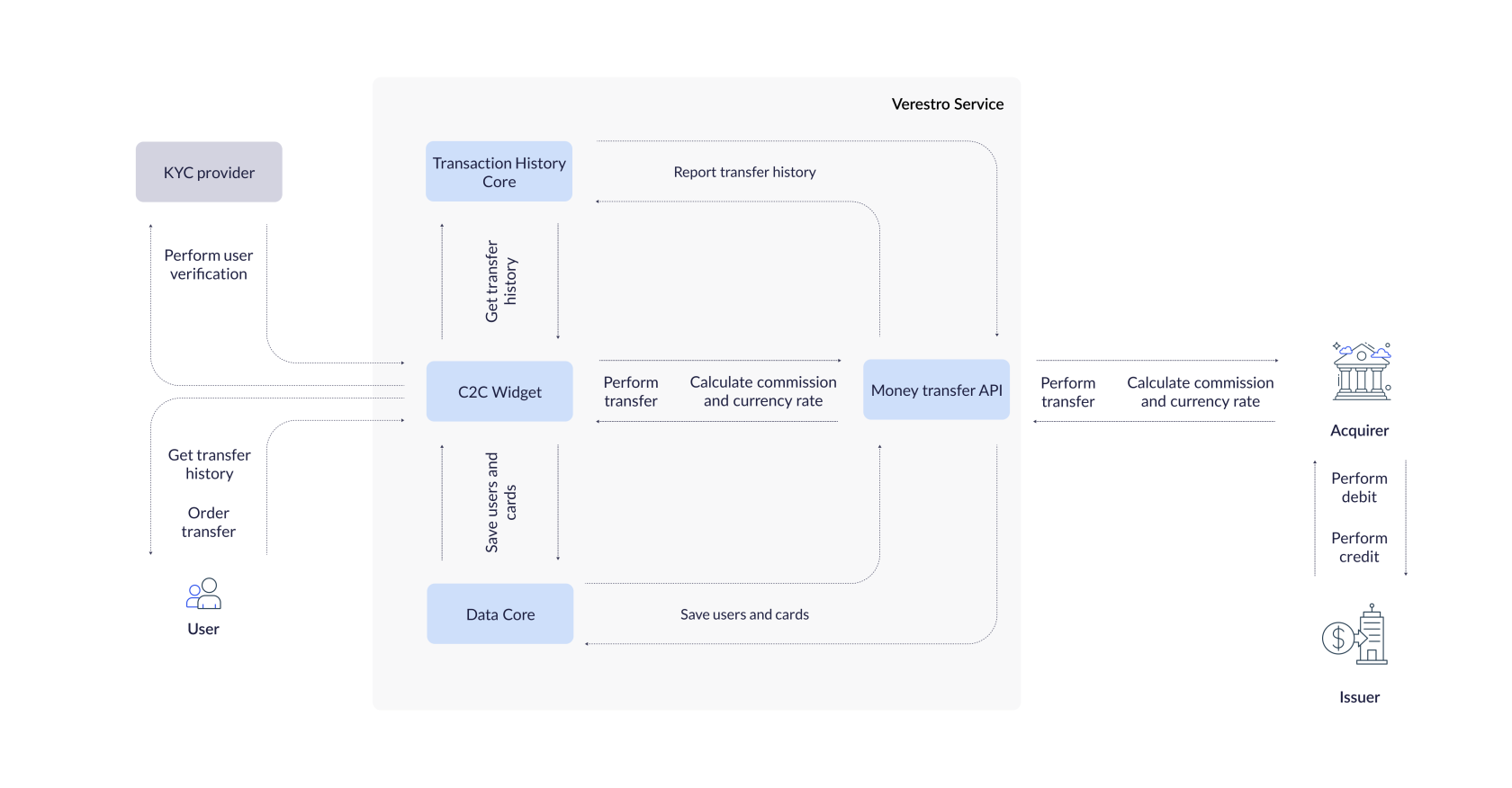
This chapter is describing all components involved in the processes included in the C2C Widget product. Each of the sections below describes one of the components.

[![10.png](https://developer.verestro.com/uploads/images/gallery/2025-07/scaled-1680-/p4t10.png)](https://developer.verestro.com/uploads/images/gallery/2025-07/p4t10.png)
#### <span style="font-family: Lato;">LC API (Data Core)</span>

The main purpose of Verestro [Lifecycle API &amp; SDK ](https://developer.verestro.com/books/user-lifecycle-card-management-api-sdk)web service is to add and manage user and payment cards in a safe way. All data are transfered to Verestro Data Core system which is placed in PCI compliant zone and is fully secure.

LIfecycle API is an internal service secured by x509 certificate, which increases the safety of transported data. The API communicates with the data storehouse called DataCore. DataCore is internal service and one of crucial components of Verestro's product line-up. Its main responsibility is to provide secure, PCI-DSS compliant storage for cardholder data. DataCore manages the status of the user and their aggregates. All other product in implementation connect to DataCore which returns information about the user and his aggregates.

#### <span style="font-family: Lato;">Money Transfer API</span>

[Money transfers](https://developer.verestro.com/books/money-transfers) (P2P Service) enable users to initiate domestic and international transfers. The platform has several available configurations: sending and receiving funds, payments from and to cards, transactions from and to stored value account (SVA), ACH transfers.

#### <span style="font-family: Lato;">THC (Transaction History Core) </span>

Service is designed to work in cooperation with other services from Verestro product line. This API offers methods that allow managing information about transactions. [Transaction History Core](https://developer.verestro.com/books/transaction-history-api) allows on checking the history of transactions in the C2C Widget.

#### <span style="font-family: Lato;">KYC Provider</span>

After logging in, the user goes through an intuitive process KYC, which allows for instant identity verification in accordance with the AML (Anti-Money Laundering) regulations. The system automatically analyzes user data, ensuring the highest level of security and protection against financial fraud.

In order to pass KYC, it is necessary to take a photo of an identity document and pass liveness. Liveness is a biometric verification that involves the user recording a short video of themselves showing their face and making gestures as instructed.

# Use cases

<span class="ts-alignment-element" data-is-focusable="true" id="bkmrk-this">This</span> <span class="ts-alignment-element" data-is-focusable="true" id="bkmrk-chapter">chapter</span> <span class="ts-alignment-element" data-is-focusable="true" id="bkmrk-describes">describes</span> <span class="ts-alignment-element" data-is-focusable="true" id="bkmrk-the">the</span> <span class="ts-alignment-element" data-is-focusable="true" id="bkmrk-processes">processes</span> <span class="ts-alignment-element" data-is-focusable="true" id="bkmrk-taking">taking</span> place <span class="ts-alignment-element" data-is-focusable="true" id="bkmrk-in">in</span> C2C Widget <span class="ts-alignment-element" data-is-focusable="true" id="bkmrk-from">from</span> <span class="ts-alignment-element" data-is-focusable="true" id="bkmrk-the-1">the</span> <span class="ts-alignment-element" data-is-focusable="true" id="bkmrk-point">point</span> <span class="ts-alignment-element" data-is-focusable="true" id="bkmrk-of">of</span> <span class="ts-alignment-element" data-is-focusable="true" id="bkmrk-view">view</span> of <span class="ts-alignment-element" data-is-focusable="true" id="bkmrk-your">your</span> <span class="ts-alignment-element" data-is-focusable="true" id="bkmrk-users">users</span><span class="ts-alignment-element" data-is-focusable="true" id="bkmrk-.">.</span>

### Transfers

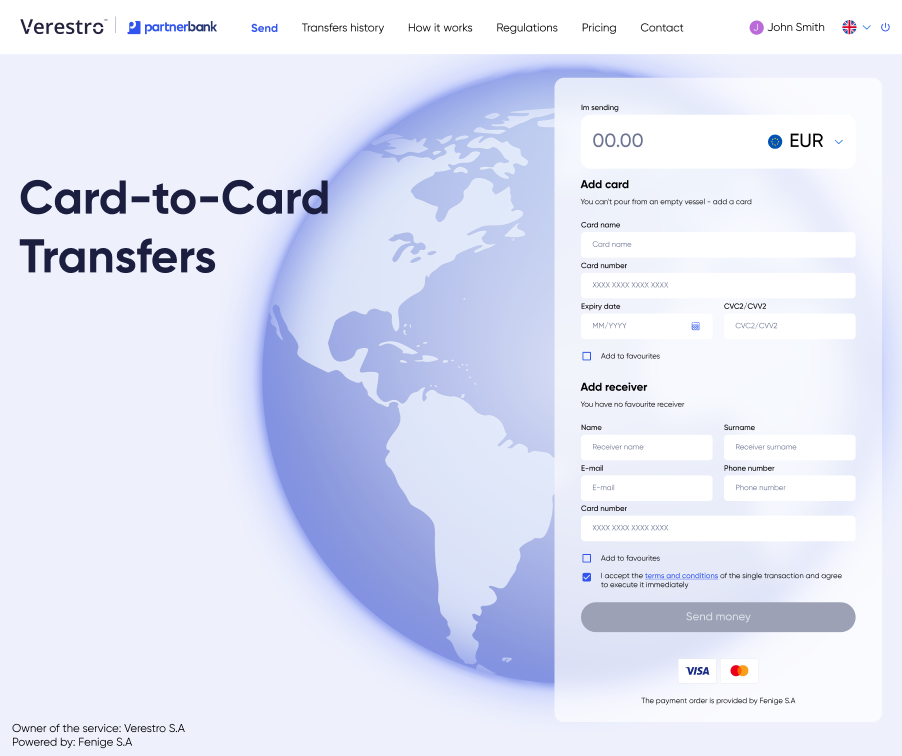
The user can perform the transfer based on one of the following paths:

##### Manual process

The user independently enters the card and recipient's data, specifying the transaction amount.

**![](https://lh7-rt.googleusercontent.com/docsz/AD_4nXdfR-BfNI505fEpEAk6lHgeJTaRjlASSQDWER3Rt74vaMnK9gNyC8TY_zTdrFaJmYByHmeYhZcLHC-_dhN-OKySXdNkJBPpsBQFQlRV2rAcuyZxsvqJXuj5fJTIw8rPKKDje36xDA?key=z3WPK0T0W83lfQq_nU--XT-6)**
##### Money request

The user receives a special link with previously defined recipient data and amount. The users can modify the transfer amount and select the card from which they want to send funds, without having to manually enter the information.

![](https://lh7-rt.googleusercontent.com/docsz/AD_4nXdClSMrNCRYBLhoxmXvDVJaB1gikaNyxoOBuPe35--Ny_5pb5fH49vRhrzR5lE_3y4sX2CxB7SFuBLNT7BZw7aCnhGGaH-iXLoTYGAnMjeDpC_wxghBDBUhYlo-YgKwjl70t7IBZA?key=z3WPK0T0W83lfQq_nU--XT-6)

### Registration

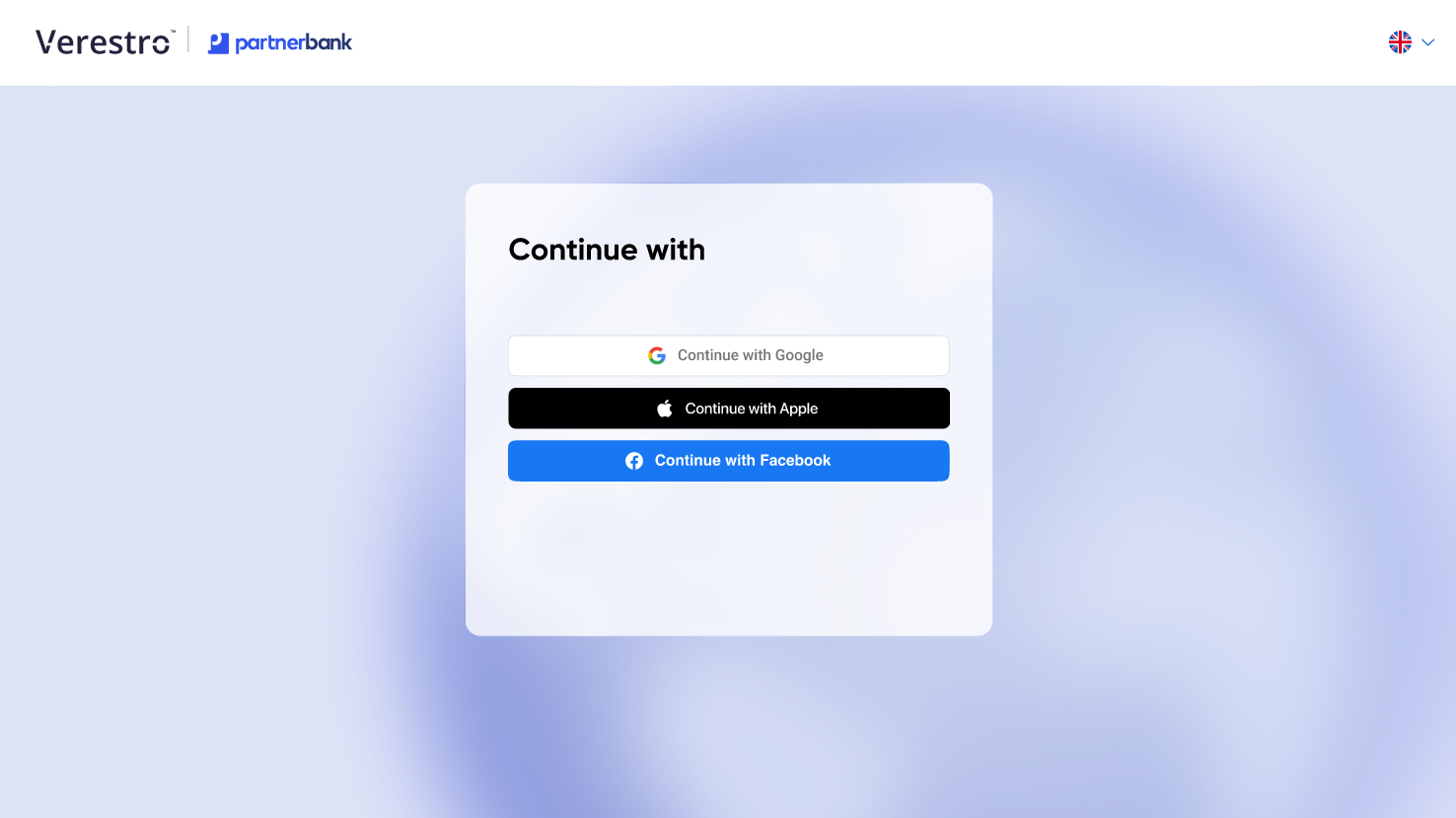
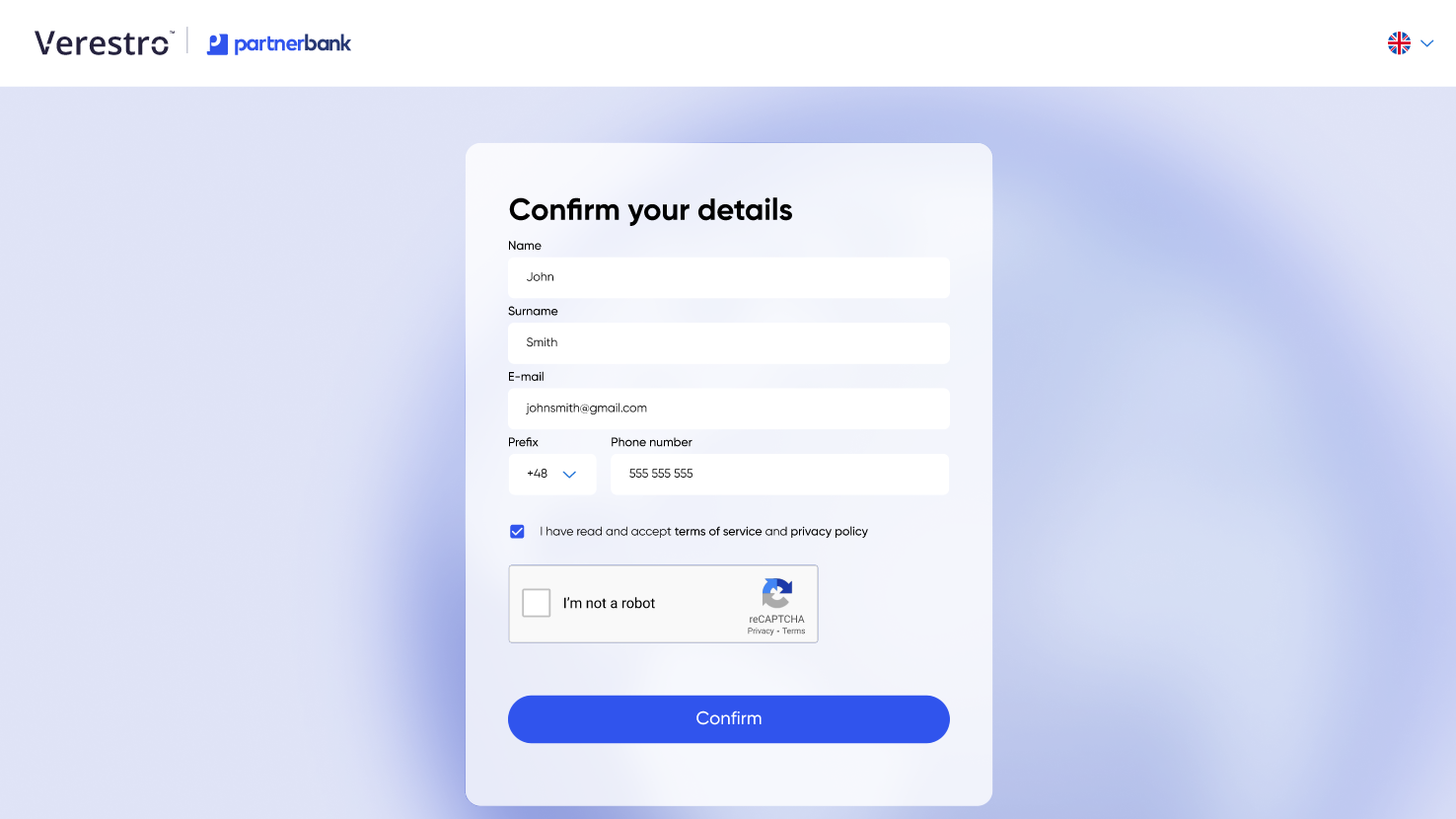
Users can choose one of the popular login methods – Facebook, Google or Apple. It is also possible to add other social media login methods, which makes the registration process quick and convenient.

[![image.png](https://developer.verestro.com/uploads/images/gallery/2025-02/scaled-1680-/sAMimage.png)](https://developer.verestro.com/uploads/images/gallery/2025-02/sAMimage.png)
[![image.png](https://developer.verestro.com/uploads/images/gallery/2025-02/scaled-1680-/Iiaimage.png)](https://developer.verestro.com/uploads/images/gallery/2025-02/Iiaimage.png)
### KYC verification

After logging in, the user goes through an intuitive process KYC, which allows for instant identity verification in accordance with the AML (Anti-Money Laundering) regulations. The system automatically analyzes user data, ensuring the highest level of security and protection against financial fraud.

In order to pass KYC, it is necessary to take a photo of an identity document and pass liveness. Liveness is a biometric verification that involves the user recording a short video of themselves showing their face and making gestures as instructed.

### ThreeDs authentication

Widget C2C supports the 3DS process and it is required when user is initiating a transaction. 3DS is a security protocol used in online payments to enhance the protection of payment card transactions. Its main purpose is to verify the identity of the user

This is an authentication method based on the alleged cardholder data check, biometric authentication and improved customer experience.

##   

# Onboarding

This chapter is intended to present you the requirements that will allow you to use C2C Widget in your business. We have presented here what information is necessary to provide so that you can join the C2C Widget program and so that we can properly create the required account for you in our system.

### <span style="font-family: Lato;">Business onboarding</span>

<table border="1" id="bkmrk-to-start-using-payto" style="border-collapse: collapse; width: 100%;"><tbody><tr><td bgcolor="#002060" style="width: 100%; height: 35.5px;" width="573">**<span style="font-family: Lato; color: #ecf0f1;">To start using C2C Widget you need to go through a few onboarding steps:</span>**

</td></tr><tr><td style="width: 100%;">1\. Please contact our sales - <span style="color: #3598db;">*salesteam@verestro.com* </span>

</td></tr><tr><td style="width: 100%;">2\. Please respond to some introduction question that will let us prepare proposal for you.

</td></tr><tr><td style="width: 100%;">3\. You will receive offer.

</td></tr><tr><td style="width: 100%;">4\. If you accept the offer you will be asked to provide some company documents required for the AML verification process.

</td></tr><tr><td style="width: 100%;">5\. After succesful AML process you will receive contract with our [partnering acquiring institution](https://www.fenige.com/).

</td></tr><tr><td style="width: 100%;">6\. And finally you will enable C2C Widget to enable card to card transfers.

</td></tr></tbody></table>

### Technical onboarding

<p class="callout warning">**Important!** Implementation of the solution in progress...</p>