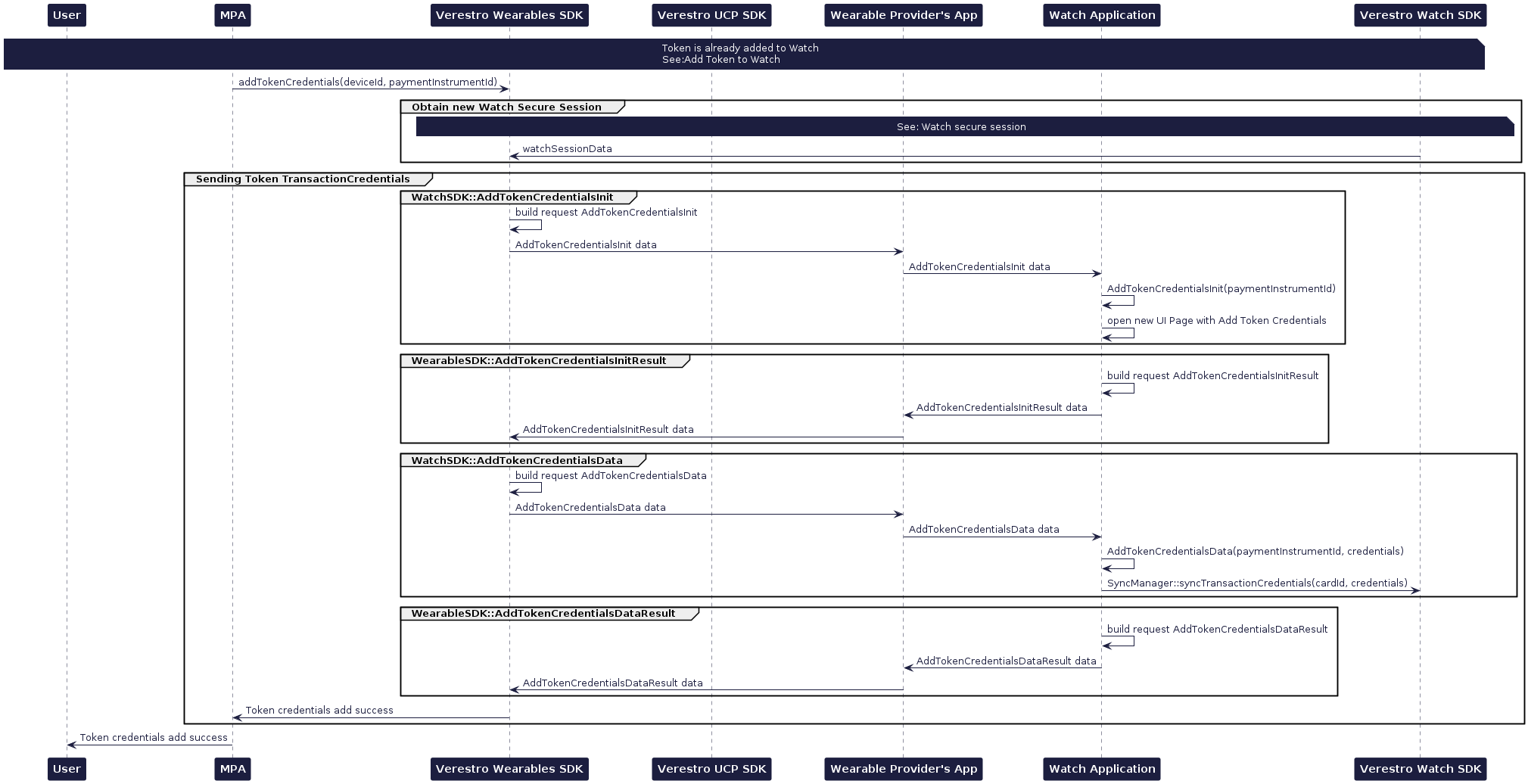
# Token Requestor / Issuer wallet

NFC Issuer Wallet with Mobile SDK. Mastercard MCBP 2.1 SDK and Visa VTS SDK.  
  
Due to the rename UCP and VCP are used interchangeably.

# Article

You can find more knowledge about products on this site.

# Issuer Wallet and Apple Pay / Google Pay - Differences

As we have implemented more than 50 contactless and tokenization projects for banks, fintechs and other payment institutions, let me share a quick view on key differences between various types of contactless payment technologies.

##### X-Pays

If you are a card issuer in today's world, you usually need to implement **Apple Pay** and **Google Pay** to let your users benefit from various payment activities on mobile phones. We think it is obligatory in today's world for standard card use cases. The power of Apple and Google is so strong that avoiding these platforms really impacts your customers.

In general, implementation of these technologies is not difficult. If you use our [**Token Management Platform**](https://developer.verestro.com/books/token-management-platform), implementation time can be reduced to weeks. Additionally, you have to sign contracts with Apple and Google. In the case of Apple, they charge additional fees for registering a card at Apple Pay. In the case of Google, they collect all transactions of your users to earn money on advertisement and data management. These are key disadvantages. In both cases you have to follow their requirements and changes, but if you cooperate with certified providers, you do not have problems with this, as a processor can solve these problems on your behalf.

Both Google and Apple solutions enable contactless, inApp and eCommerce payments on their browsers. The non-contactless payment transactions are an important part of these projects. You should focus not only on contactless payments.

It is worth mentioning that implementation of tokenization usually gives you access to other **X-Pays** like Fitbit Pay, Garmin Pay or others. They are much smaller companies and we treat them as nice-to-have in card issuing projects today.

##### Issuer Wallet SDK

Before Apple Pay and Google Pay appeared, both **Mastercard** and **VISA** invented other ways of contactless payments on mobile phones. They were called differently, but today they are mainly called Issuer Wallets. In such cases you do not sign contracts with Apple or Google, but you implement technology (both mobile SDKs and backend) that allows you to go live with contactless payments on mobile without signing contracts with Apple or Google. Actually it was possible for Android only, but recently (2023/2024) Apple allowed non-Apple Pay contactless payments on iPhones in the European Union.

In such cases you need to get and certify SDKs and backend components to go live with **contactless payments**. Such developments usually take 12-24 months and the software must be kept updated all the time, so it is actually better that you try to use a certified partner for this activity to avoid on-going development costs just for your project. From a contactless use case perspective, transactions work in a very similar way to X-Pays, but you have more flexibility. On Android, for example, you can implement a contactless payment just after unlocking the phone screen. You can - but do not have to - ask for additional authentication. You are also sure that data of your users and their transactions will not be shared with external entities (Apple and Google) for their benefit.

A big advantage of the Issuer Wallet SDK is that it can work not only on Android phones - for example, we have live implementations on Huawei devices. This detail has an important business impact on your users.

In today's world, working with Apple or Google is obligatory in our opinion, but we strongly recommend implementing Issuer Wallets at the same time, as it will give you more flexibility and business security in the long run. The costs and processes do not differ a lot, but the additional benefits of an issuer wallet such as flexibility, more devices, lower transaction costs make it worth implementing.

Read more: [**Push Provisioning to Google Pay and Apple Pay**](https://developer.verestro.com/books/knowledge-center/page/push-provisioning-step-by-step)

Thanks for reading.

# NFC on iPhone/iOS

#### What happened?

As part of an agreement between the European Union and Apple, Apple has decided to open access to its NFC module to 3rd party developers. It allows the creation of solutions for contactless payments (HCE), an alternative to Apple Pay.

This article aims to explain the challenges and opportunities related to this technology.

#### How it works?

- **NFC payments.** Users of participating third-party banking or wallet apps can initiate NFC transactions from within the app with compatible NFC terminals.
- **Default app settings.** Users can choose any eligible app as their default contactless payments app which will enable the app to support Field detect and Double-click features.
- **Field detect.** The default contactless payments app automatically launches when the user places the device in the presence of a compatible NFC terminal and after user authentication (if the iPhone is locked).
- **Double-click.** The default contactless payments app automatically launches when the user double-clicks the side button (for Face ID devices) or the Home button (for Touch ID) and after user authentication (if the iPhone is locked).
- **Payment support for non-default apps.** Eligible apps running in the foreground can prevent the system default contactless app from launching and interfering with the payment.

#### What are the differences compared to Android?

Since 2013 Android allows implementing alternatives to Google's own Google Pay, and there are already a few mature solutions on the market. [Apple's NFC API](https://developer.apple.com/documentation/corenfc) offers very similar capabilities from both a technical and user experience perspective. However, there are a few differences:

- **Not possible to directly ask a user to set your application as the default NFC payment app** - on Android, when users open your app, they can be presented with a dialog window that asks them if they want to use your app, as the default NFC payment app. Apple's documentation doesn't seem to hint at such a functionality.
- **Apple needs to give you special entitlement to access the NFC module** - without Apple's approval, it's not possible to include NFC payments into your app. This entitlement can be requested here: [https://developer.apple.com/contact/request/hce-payments-entitlement/](https://developer.apple.com/contact/request/hce-payments-entitlement/)
- **Security certification** - every app enabling NFC payments needs the EMVCo certification. As NFC on the Apple platform is a new thing, it's still not clear how exactly security certification will look like, however due to fundamental differences between Android and iOS we can expect slight differences.

#### What are the differences compared to Apple Pay?

Apple's API allows 3dr party developers to implement most of the functionality offered by Apple Pay. Two slight differences are:

- Power Reserve Mode - Apple Pay allows payments with the default card for some time after the iPhone battery is depleted.
- Express Transit Mode - allows to pay for public transport tickets in a few areas with compatible cards, without unlocking the iPhone. Full list of locations is [available here](https://support.apple.com/en-us/118625).

#### Will it work outside the EU?

Companies registered in the European Economic Area can offer this functionality to customers based in EEA. The table below shows various combinations of companies wanting to offer HCE payments in their App and customers, and the expected outcome according to Apple's requirements.

<table border="1" id="bkmrk-company-developing-a" style="border-collapse: collapse; width: 100%; height: 262.2px;"><tbody><tr style="height: 63.4px;"><td style="width: 33.2922%; height: 63.4px;">  
</td><td style="width: 33.2922%; height: 63.4px;">**Company developing App established &amp; licensed for payments in EEA**  
</td><td style="width: 33.2922%; height: 63.4px;">**Company developing App not present in EEA or not licensed for payments in EEA**   
</td></tr><tr style="height: 46.6px;"><td style="width: 33.2922%; height: 46.6px;">**EEA citizen, transacting in EEA country**  
</td><td style="width: 33.2922%; height: 46.6px;">✅HCE available  
</td><td style="width: 33.2922%; height: 46.6px;">❌HCE not Available  
</td></tr><tr style="height: 46.6px;"><td style="width: 33.2922%; height: 46.6px;">**EEA citizen, transacting outside EEA (traveling)**  
</td><td style="width: 33.2922%; height: 46.6px;">✅HCE available</td><td style="width: 33.2922%; height: 46.6px;">❌HCE not Available</td></tr><tr style="height: 59px;"><td style="width: 33.2922%; height: 59px;">**non-EEA citizen, transacting in EEA country (traveling)**

</td><td style="width: 33.2922%; height: 59px;">❌HCE not Available</td><td style="width: 33.2922%; height: 59px;">❌HCE not Available</td></tr><tr style="height: 46.6px;"><td style="width: 33.2922%; height: 46.6px;">**non-EEA citizen, transacting outside EEA country**</td><td style="width: 33.2922%; height: 46.6px;">❌HCE not Available</td><td style="width: 33.2922%; height: 46.6px;">❌HCE not Available</td></tr></tbody></table>

# On-device tokenization in India

Payment law in India required a few years ago that server based card-on-file systems are not allowed. Instead, there is a necessity to store user data on-device to perform transactions.

This is an interesting topic that impacted a lot of local players like big merchants, Cred, Phonepe or Amazon so let me describe it in some details because maybe it will be implemented in a few years in other countries as well.

Requirement for storing tokens in a secure way on customer devices forces us to implement and certify secure SDK in which payment token data will be saved. It is a similar concept to standard HCE (Host Card Emulation) implementation for mobile NFC payments. While registering to a merchant or wallet system, the user adds a payment card, performs tokenization with approval (One-Time-Passwords) of the issuing bank and the token connected with his card is stored in this wallet / SDK.

Once we have a secure place of storing the user's token on his mobile phone we can use this token for multiple purposes:

1. NFC / contactless payments - the user uses his phone to perform transactions on a contactless acceptance network. Token and payment keys are transferred through the contactless interface to the payment terminal and acquirer for authorization.
2. inApp - the user chooses products and adds them to the basket in the merchant app, clicks that he wants to pay with a particular wallet or payment brand and confirms the transaction in a wallet app. The token is taken from an SDK, transferred to the cooperating acquirer in the form of a DSRP message (Dynamic Secured Remote Payment) and processed in standard way
3. web purchase - the user chooses products and adds them to the basket on the merchant website, clicks that he/she wants to pay with a particular wallet or payment brand and receives a push notification in his/her mobile app to finalize the transaction. As above, the token is taken from an SDK, transferred to the cooperating acquirer in the form of a DSRP message (Dynamic Secured Remote Payment) and processed in standard way. There could be a possibility to store the token inside the browser of the user on his laptop / PC but this requires more discussion with Mastercard and VISA.

To enable these use cases, several implementation points needs to be considered:

- types of devices - an inApp and web purchase can work on all devices (iOS and Android) but NFC is enabled on Android only. Apple is blocking the NFC access outside of the European Union today.
- VISA vs Mastercard - do you need a solution working for both schemes? Are there any local certification requirements?
- Issuers - are banks ready to connect to your new X-Pay wallet? Which banks are enabled on local markets?
- local on-soil requirements - is there a need to store data in the country? What are the legal impacts?

This is an interesting development and area of work. We are live with a few partners and are happy to work with new ones. Please contact us if you are interested.

Thanks for reading.

# Introduction

<div id="bkmrk-token-requestor-serv" style="text-align: justify; line-height: 1.75;"><div style="padding: 24px 28px; border-radius: 12px; background: #252747; margin-bottom: 32px; color: white; font-family: Lato, Arial, sans-serif;"> **Token Requestor Service** is an end-to-end solution designed to enable **Issuer Wallets** for secure and flexible **NFC payments** on both Android and iOS platforms.

 Tailored for banks, fintechs, and other financial institutions, this solution empowers you to build a seamless and scalable digital payment ecosystem directly within your **Mobile Banking** or **Payment App**.

</div>##  Core Components of the Solution 

The Token Requestor Service is a set of components that together deliver a comprehensive and highly customizable payment experience:

<div style="display: grid; grid-template-columns: repeat(2, minmax(0, 1fr)); gap: 16px; margin-bottom: 32px;"><div style="border-radius: 8px; padding: 18px; background: #f8f9fb; box-sizing: border-box; color: #1F2937; font-family: Lato, Arial, sans-serif;"> **Android SDK**  
  
 <span style="color: #4B5563; line-height: 1.7;"> A certified and highly configurable library for managing token lifecycle and NFC transactions. Fully compliant with [**EMVCo standards**](https://www.emvco.com/approved-registered/approved-products/?action=search_products&approved_product_expiration_date=2020-08-31&px_search=&emvco_product_sbmp%5B0%5D=mobile-app-sdk&sort=approved_product_expiration_date&sort_order=ASC), the SDK supports integration into existing applications and ensures secure and smooth payment flows. </span> </div><div style="border-radius: 8px; padding: 18px; background: #f8f9fb; box-sizing: border-box; color: #1F2937; font-family: Lato, Arial, sans-serif;"> **iOS SDK**  
  
 <span style="color: #4B5563; line-height: 1.7;"> Enabling in-app token-based payments based on Apple's **HCE Transactions for Apps**. The solution allows you to create a **standalone wallet on iOS**, fully independent from Apple Pay. </span> </div><div style="border-radius: 8px; padding: 18px; background: #f8f9fb; box-sizing: border-box; color: #1F2937; font-family: Lato, Arial, sans-serif;"> **Huawei Wearables SDK**  
  
 <span style="color: #4B5563; line-height: 1.7;"> A dedicated SDK enabling tokenized **NFC payments on Huawei smartwatches**, compatible with both Android and iOS smartphone. </span> </div><div style="border-radius: 8px; padding: 18px; background: #f8f9fb; box-sizing: border-box; color: #1F2937; font-family: Lato, Arial, sans-serif;"> **Server Component**  
  
 <span style="color: #4B5563; line-height: 1.7;"> A backend system integrated with **Mastercard’s MDES**, **Visa’s VTS**, and a range of proprietary **Verestro services**, managing card digitization, provisioning, and lifecycle events. </span> </div></div>##  Key Capabilities 

<div style="display: grid; grid-template-columns: repeat(2, minmax(0, 1fr)); gap: 16px; margin-bottom: 32px;"><div style="padding: 18px; border-radius: 8px; background: #f8f9fb; box-sizing: border-box; color: #1F2937; font-family: Lato, Arial, sans-serif;"> **Full control over card, user, and token lifecycles**  
  
 <span style="color: #4B5563; line-height: 1.7;"> Manage how cards are issued, provisioned, and revoked within your own ecosystem. </span> </div><div style="padding: 18px; border-radius: 8px; background: #f8f9fb; box-sizing: border-box; color: #1F2937; font-family: Lato, Arial, sans-serif;"> **Support for Huawei smartwatches**  
  
 <span style="color: #4B5563; line-height: 1.7;"> Tokenized payments can be enabled on [Huawei wearable devices](https://developer.verestro.com/books/token-requestor-issuer-wallet/page/watch-integration) for both Android and iOS. Notably, **payments via Huawei smartwatches are also available when paired with iPhones, even outside the EEA**. </span> </div><div style="padding: 18px; border-radius: 8px; background: #f8f9fb; box-sizing: border-box; color: #1F2937; font-family: Lato, Arial, sans-serif;"> **Certified and secure**  
  
 <span style="color: #4B5563; line-height: 1.7;"> Built in compliance with global standards, including **EMVCo certification**, ensuring maximum security and interoperability. </span> </div><div style="padding: 18px; border-radius: 8px; background: #f8f9fb; box-sizing: border-box; color: #1F2937; font-family: Lato, Arial, sans-serif;"> **Customizable user experience**  
  
 <span style="color: #4B5563; line-height: 1.7;"> As an Issuer Wallet solution, you retain full flexibility over the UX, allowing seamless integration of additional products and services into your app. </span> </div></div>##  Easy Integration and Deployment 

Whether you're looking to add tokenized payments to an existing mobile application or launch a brand-new digital wallet, integration is simple.

**We provide:**

- A complete SDK package (Android and iOS)
- Backend server components
- Technical integration support
- Optionally, fully developed white-label applications

##  Ready to Get Started? 

<div style="padding: 20px; border-radius: 8px; background: #252747; color: white; font-family: Lato, Arial, sans-serif;">Launching tokenized NFC payments has never been easier. Simply:

1. **Open a project with MDES or VTS**
2. **Integrate our SDKs**
3. **Expand the services you offer to your customers**

We provide full documentation, fast onboarding, and professional support throughout the process.

👉 [**Explore documentation**](https://developer.verestro.com/books/token-requestor-issuer-wallet)

</div></div>

# Intro slides

<div id="bkmrk-mdes-and-vts-integra" style="display: flex; flex-wrap: wrap; align-items: center; gap: 30px; background: #252747; border-radius: 12px; padding: 24px 28px; margin-bottom: 32px; font-family: Lato, Arial, sans-serif;"><div style="flex: 1; min-width: 320px; color: white;"> **MDES** and **VTS** integration as token requestor. Issuer wallet or SDK integrated into mobile banking application. Available on all Android phones (including Huawei) and all countries. Enables mobile contactless transactions using NFC interface.

 </div><div style="flex: 0 0 340px; text-align: right;"> ![Mobile app preview](https://developer.verestro.com/attachments/49) </div></div><div id="bkmrk-api-mdes-%28mastercard" style="display: grid; grid-template-columns: repeat(2, minmax(0, 1fr)); gap: 16px; margin-bottom: 32px;"><div style="padding: 18px; border-radius: 8px; background: #f8f9fb; color: #1F2937; font-family: Lato, Arial, sans-serif;"> **API**  
  
 <span style="color: #4B5563; line-height: 1.7;">MDES (Mastercard Digital Enablement Service) and VTS (Visa Token Service)</span> </div><div style="padding: 18px; border-radius: 8px; background: #f8f9fb; color: #1F2937; font-family: Lato, Arial, sans-serif;"> **Readiness**  
  
 <span style="color: #4B5563; line-height: 1.7;">Live</span> </div><div style="padding: 18px; border-radius: 8px; background: #f8f9fb; color: #1F2937; font-family: Lato, Arial, sans-serif;"> **SDK available**  
  
 <span style="color: #4B5563; line-height: 1.7;">Yes</span> </div><div style="padding: 18px; border-radius: 8px; background: #f8f9fb; color: #1F2937; font-family: Lato, Arial, sans-serif;"> **White label solution available**  
  
 <span style="color: #4B5563; line-height: 1.7;">Yes</span> </div><div style="padding: 18px; border-radius: 8px; background: #f8f9fb; color: #1F2937; font-family: Lato, Arial, sans-serif;"> **Certification**  
  
 <span style="color: #4B5563; line-height: 1.7;">Yes, full security and functional certification</span> </div><div style="padding: 18px; border-radius: 8px; background: #f8f9fb; color: #1F2937; font-family: Lato, Arial, sans-serif;"> **Implementation time**  
  
 <span style="color: #4B5563; line-height: 1.7;">3 months from contracting</span> </div></div>##  Implementation Steps 

<div id="bkmrk-" style="text-align: center; margin: 20px 0 40px 0; font-family: Lato, Arial, sans-serif;"> [ ![Implementation steps](https://developer.verestro.com/attachments/50) ](https://developer.verestro.com/attachments/50)</div>##  Architecture 

<div id="bkmrk--1" style="text-align: center; margin: 20px 0 32px 0; font-family: Lato, Arial, sans-serif;"> [ ![Architecture overview](https://developer.verestro.com/uploads/images/gallery/2026-03/scaled-1680-/issuer-wallet-2.jpg) ](https://developer.verestro.com/uploads/images/gallery/2026-03/issuer-wallet-2.jpg)</div>

# Overview

<div id="bkmrk-verestro-cloud-payme" style="padding: 24px 28px; border-radius: 12px; background: #252747; margin-bottom: 32px; color: white; font-family: Lato, Arial, sans-serif;"> Verestro Cloud Payments is a solution developed to facilitate adopting cloud-based payments for the Customers. VCP provides functionalities for User identification and verification, Payment Instruments digitization and User data management. Cloud payments enables a card to be digitized into a wallet application on a mobile device and used for payment without the need for a Secure Element (SE) or a Trusted Execution Environment (TEE) to protect the card's sensitive assets, such as the keys needed for calculating the Application Cryptogram. Master Keys for the digitized card are kept securely on remote servers (for plastic in the chip), hence the term 'cloud-based payment,' and a limited number of keys (where each key can only be used to perform a single transaction) are downloaded to the application.

</div>##  Solution Components 

<div id="bkmrk-server-components-%E2%80%A2-" style="display: grid; grid-template-columns: repeat(2, minmax(0, 1fr)); gap: 16px; margin-bottom: 32px;"><div style="padding: 18px; border-radius: 8px; background: #f8f9fb; color: #1F2937; font-family: Lato, Arial, sans-serif;"> **Server components**  
  
 <span style="color: #4B5563;"> • Wallet Server - backend component,  
 • Wallet Admin Panel - frontend component </span> </div><div style="padding: 18px; border-radius: 8px; background: #f8f9fb; color: #1F2937; font-family: Lato, Arial, sans-serif;"> **Mobile components**  
  
 <span style="color: #4B5563;"> • Wallet SDK - Android and iOS libraries,  
 • Wearable SDK - libraries for payments with Huawei Smartwatches </span> </div></div>##  Benefits of Payment Token 

The MCBP service is an easy and secure way to replace a plastic payment card with a payment token. Recognition to the tokenization and digitization process without leaving the house, we can add our payment card to the mobile application and use only a mobile device during purchases.

The benefits of tokenization are felt by every participant in the process:

- **Issuer** - by implementing the tokenization service, it will provide its customers with much higher and safer access to innovative payment solutions.
- **Card Holder** - can freely use innovative payment solutions. The tokenization service will allow free and secure payments using any devices connected to the internet.

##  MCBP Introduction 

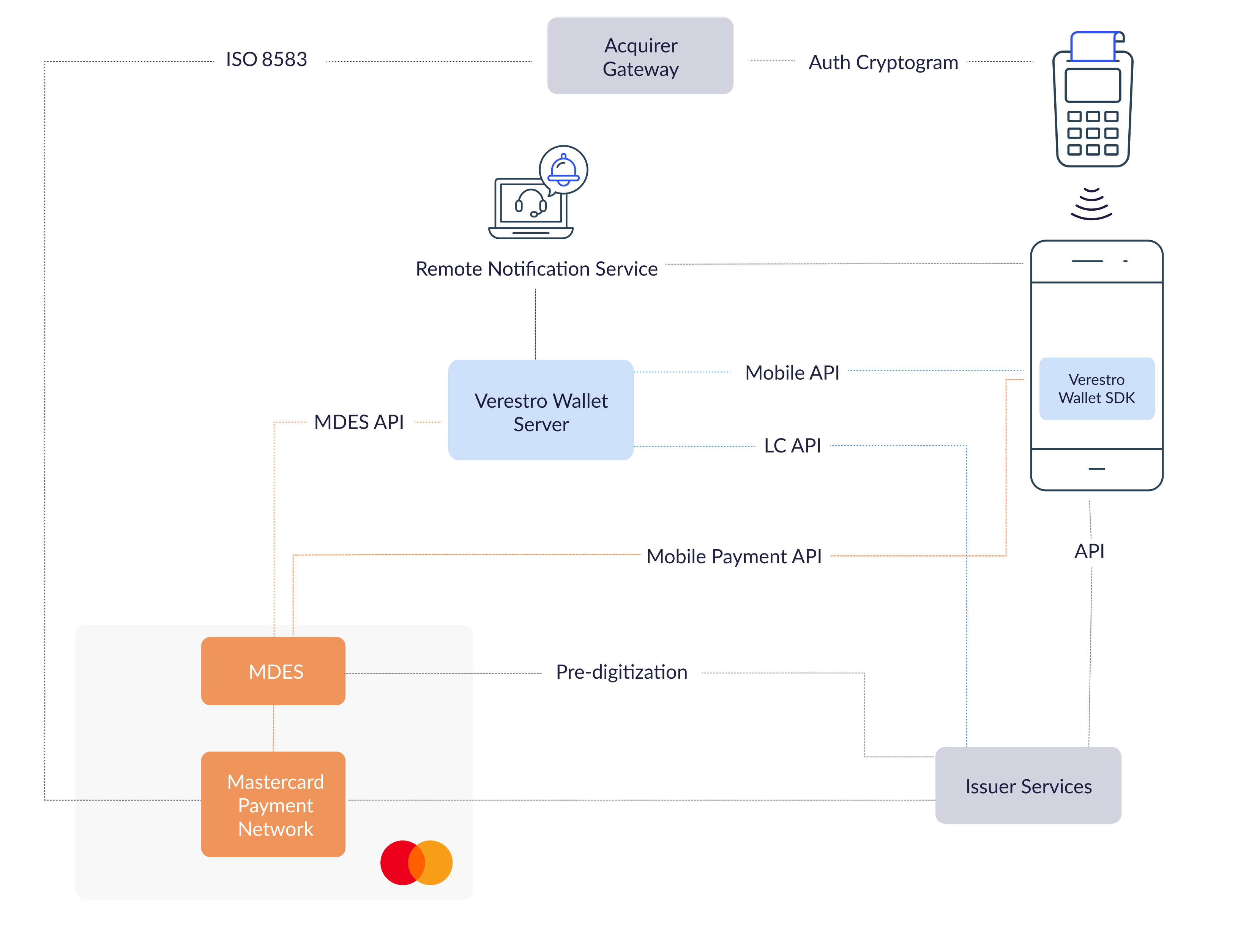
Mastercard Cloud-Based Payments (MCBP) is technology which enables a card to be digitized into an application on a mobile device. On plastic card, Master Keys needed for calculating cryptogram are stored in the Secure Element. Using MCBP there is no need for Secure Element since keys needed for calculating the cryptogram are kept securely on remote servers, hence the term 'cloud-based payment,' and a limited number of keys (where each key can only be used to perform a single transaction) are downloaded to the application. VCP is solution which provides functionalities for digitization, user data management and payments needed for final Customer to adopt MCBP.

### **MCBP High Level Architecture**
<div id="bkmrk-" style="text-align: center; margin: 20px 0 32px 0; font-family: Lato, Arial, sans-serif;"> [ ![MCBP High Level Architecture](https://developer.verestro.com/attachments/61) ](https://developer.verestro.com/attachments/61)</div>### **MCBP Key Components**

<table border="1" cellpadding="1" cellspacing="0" id="bkmrk-component-descriptio" style="width: 100%; border-collapse: collapse; margin-bottom: 24px; font-family: Lato, Arial, sans-serif; color: #4B5563;"> <tbody> <tr valign="TOP"> <td bgcolor="#252747" style="width: 28%; padding: 10px 12px;"> <span style="color: #ecf0f1;">**Component**</span> </td> <td bgcolor="#252747" style="width: 72%; padding: 10px 12px;"> <span style="color: #ecf0f1;">**Description**</span> </td> </tr> <tr> <td style="padding: 10px 12px; color: #4B5563;">MPA</td> <td style="padding: 10px 12px; color: #4B5563;">Mobile Payment Application (for Android and iOS Smartphones) provides frontend interface to the user and uses part of Verestro Wallet SDK which is responsible for payments using HCE. In case of wearable payments, MPA acts as companion app.</td> </tr> <tr> <td style="padding: 10px 12px; color: #4B5563;">Verestro Wallet Server</td> <td style="padding: 10px 12px; color: #4B5563;">Provides the backend services to support Mobile Payment Application via Verestro Wallet SDK and is responsible for managing users, devices, cards, Payment Tokens and communication with MDES. Wallet Server acts as Token Requestor on behalf of Issuer in context of digitization.</td> </tr> <tr> <td style="padding: 10px 12px; color: #4B5563;">Verestro Wallet SDK</td> <td style="padding: 10px 12px; color: #4B5563;">Provides all functionalities needed for MPA to perform all needed operations related to MCBP.</td> </tr> <tr> <td style="padding: 10px 12px; color: #4B5563;">MDES</td> <td style="padding: 10px 12px; color: #4B5563;">Token Service Provider which supports digitization (transforming the card into Payment Token) and is responsible for management, generation and provisioning of transaction credentials into mobile devices to enable simpler and more secure digital payment experience.</td> </tr> <tr> <td style="padding: 10px 12px; color: #4B5563;">Remote Notification Service</td> <td style="padding: 10px 12px; color: #4B5563;">Wallet Server communicates with the MPA also using Remote Notification Service. For Android is used Firebase Cloud Messaging.</td> </tr> <tr> <td style="padding: 10px 12px; color: #4B5563;">Issuer</td> <td style="padding: 10px 12px; color: #4B5563;">Issuer is responsible for card issuing, accepting authorization digitization requests and accepting transactions which uses token.</td> </tr> </tbody></table>

##  Description 

### **Wallet Types**

VCP supports following wallet types which can be used in the implementation:

- **OPEN** - user registers itself in the application and provides data like PAN etc.,
- **CLOSED** - user data are passed automatically from Customer servers without User interaction to Wallet Server.

### **Implementation Models**

Verestro provides two different implementation models for products: **integrated** and **standalone** version.

<div id="bkmrk-integrated-in-this-m" style="display: grid; grid-template-columns: repeat(2, minmax(0, 1fr)); gap: 16px; margin-bottom: 32px;"><div style="padding: 18px; border-radius: 8px; background: #f8f9fb; color: #1F2937; font-family: Lato, Arial, sans-serif;"> **Integrated**  
  
 <span style="color: #4B5563;">In this model Customer is owner of MPA. Verestro provides Wallet SDK and Wallet Server. Customer is responsible for direct User authentication and passes the result of the authentication to Wallet SDK. Online operations which need to be performed by User using Wallet Server require valid session on Wallet Server. To obtain user online session with Wallet Server, Customer needs to pass Trusted Identity. </span> </div><div style="padding: 18px; border-radius: 8px; background: #f8f9fb; color: #1F2937; font-family: Lato, Arial, sans-serif;"> **Standalone**  
  
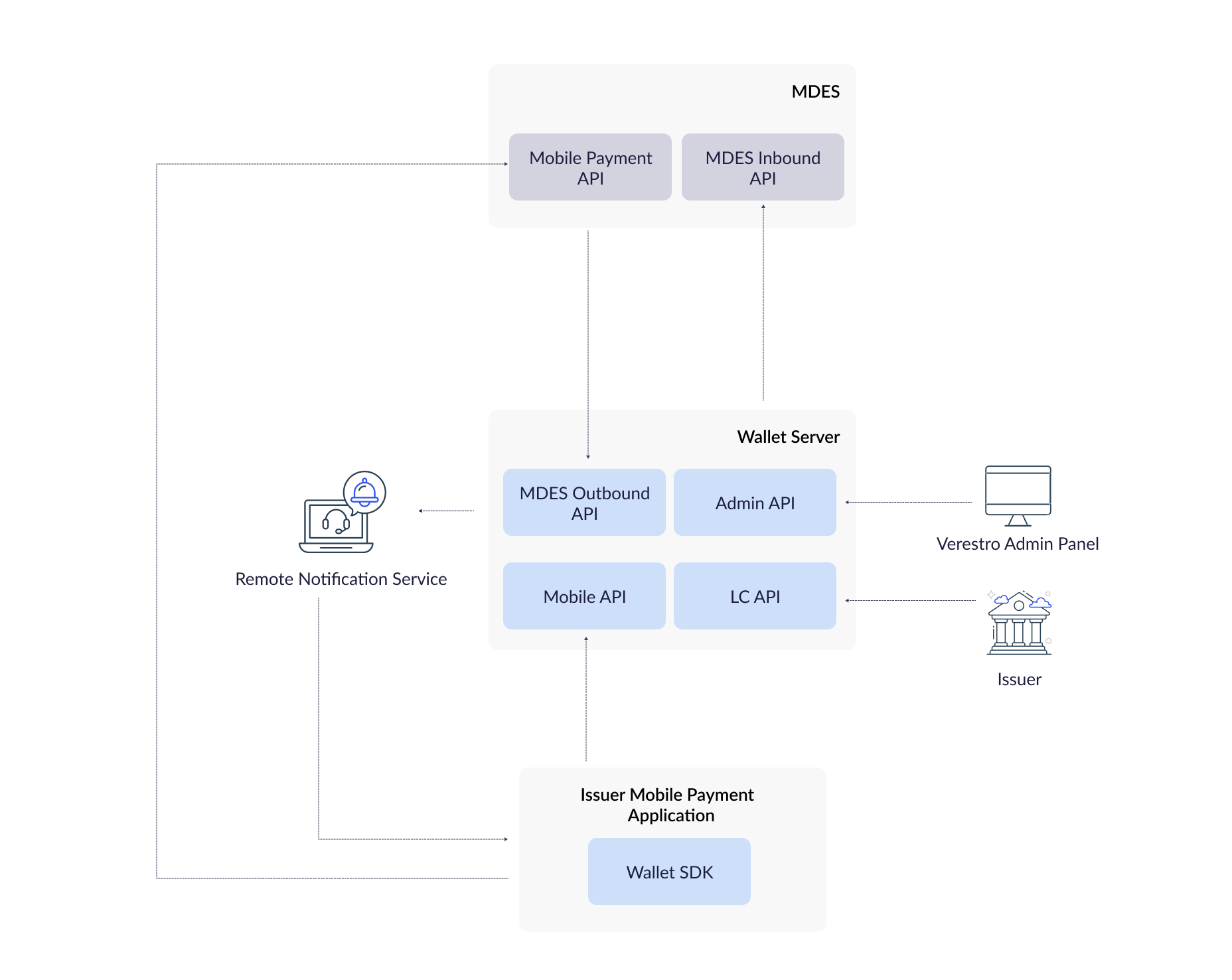
 <span style="color: #4B5563;">In this model Verestro provides MPA, Wallet SDK and Wallet Server. Furthermore, Verestro manages direct user authentication. </span> </div></div>### **Architecture**

<div id="bkmrk--1" style="text-align: center; margin: 20px 0 32px 0; font-family: Lato, Arial, sans-serif;"> [ ![Architecture](https://developer.verestro.com/attachments/51) ](https://developer.verestro.com/attachments/51)</div>### **Server Components**

Server components are applications which need to be deployed on remote server to make possible to connect them by network.

#### **Deployment Models**

Verestro offers two deployment models of server components: **On-premise** and **SaaS**.

<div id="bkmrk-on-premise-server-co" style="display: grid; grid-template-columns: repeat(2, minmax(0, 1fr)); gap: 16px; margin-bottom: 32px;"><div style="padding: 18px; border-radius: 8px; background: #f8f9fb; color: #1F2937; font-family: Lato, Arial, sans-serif;"> **On-premise**  
  
 <span style="color: #4B5563;">Server components also can be deployed on Customer infrastructure. Applications are designed to be deployed using [Kubernetes](https://kubernetes.io/) as system for automating deployment, scaling, and management of containerized applications. For more details please contact Verestro representative. </span> </div><div style="padding: 18px; border-radius: 8px; background: #f8f9fb; color: #1F2937; font-family: Lato, Arial, sans-serif;"> **SaaS**  
  
 <span style="color: #4B5563;">Server components are designed to be deployed in SaaS model. In this case everything is deployed and configured on Verestro side. Verestro is responsible for maintaining infrastructure, deploying applications and monitoring. </span> </div></div>#### **Wallet Server**

Wallet Server is a backend component which consists of few internal services which are responsible for managing users, devices, cards, Payment Tokens, transaction history. It acts as Token Requestor on behalf of Issuer and is compliant with PCI Data Security Standard.

**It exposes:**

- **mobile API** - available via Wallet SDK to perform operations directly from mobile device,
- **LC API** - server API dedicated for Issuer to manage users and cards data on Wallet Server,
- **MDES Outbound API** - server API dedicated for MDES,
- **Verestro Cloud Payments External API** - dedicated for external clients (e.g. Issuer) to manage Payment Tokens,
- **Transaction History API** - API to receive and collect information on performed financial transactions.

**Wallet Server operates with domain objects like:**

- **User** - root of entity tree. User is identified in Wallet Server via some unique identifier which can be external id given by Customer. User can have access to his data and operations based on session. Session is created after pairing device and when is expired then User authentication needs to be performed. Session is valid for a configurable period of time.
- **Device** - belongs to User. When User starts using application after installation then device pairing is performed. After pairing device with some unique id (constant across installations and users), unique device installation id is generated and this installation is assigned to particular User. It is possible to have one active installation on specific device for specific User. If other User starts using application on same device then another device pairing is performed and all data from previous installation will be wiped.
- **Card** - belongs to User. User can have many cards. Card is identified via internal id given after storing card on Wallet Server. Whole PAN is stored on Wallet Server (always or short period of time).
- **Payment Token** - after PAN digitization, device Payment Token is created also on Wallet Server side without any sensitive data. One PAN can have one device Payment Token on specific device installation at the same time which is INACTIVE, ACTIVE or SUSPENDED.

<div id="bkmrk--2" style="text-align: center; margin: 20px 0 32px 0; font-family: Lato, Arial, sans-serif;"> [ ![Wallet Server](https://developer.verestro.com/attachments/58) ](https://developer.verestro.com/attachments/58)</div>#### **Wallet Admin Panel**

Web frontend application which is dedicated for back office to manage all User data.

### **Mobile Components**

#### **Wallet SDK**

Verestro provides Software Development Kit (SDK) called Wallet SDK which can be used in Mobile Payment Application. As a company, Verestro provides many products which can be used in single application. For that reason Wallet SDK is divided into separated modules which covers different functionalities. There are two main modules dedicated for Verestro Cloud Payments: **MDC SDK** and **VCP SDK**.

**MDC SDK** is core Verestro module responsible for user data management: authentication, payment cards management - since these are main functionalities used in every product. VCP SDK is dedicated for performing digitization and payments using Payment Token. In payment context VCP SDK wraps Mastercard Cloud Based Payment SDK.

#### **Wearables SDK**

Product supports contactless payments using Huawei smartwatches. There are multiple SDKs to be implemented both - on smartphone and wearable device. Smartphone app serves as companion app in this process. Wearable payments are fully compliant with smartphone-only solution, and act alongside it. Wearables SDK is extension, but uses wallet SDK even if smartphone payments are not necessary in project.

#### **Requirements**

<div class="callout warning" id="bkmrk-important%21-wallet-sd">**Important!** Wallet SDK has some mandatory requirements to make it work:

- device cannot be rooted,
- Android OS image (ROM) should be genuine in version 6.0 (Marshmallow) or above,
- devices cannot have enabled debugging.
 
</div>There are also some **not mandatory** requirements, but Customer needs to be aware of them to maintain functionalities:

- NFC module necessary for HCE payments,
- lock screen necessary for locally-verified user authentication.

#### **Security**

Wallet SDK was developed according to security requirements included in Security Guide MCBP SDK for Android. However Wallet SDK cannot guarantee full MPA protection and MPA must provide additional layer of security to protect user interface (mainly when PAN is manually entered in the application) and data processing within application. More detailed information can be found in *Wallet SDK API.* Moreover all sensitive data are passed as chars or bytes arrays. Wallet SDK copies the arrays and clears that copies just after processing. MPA should clear provided sensitive data immediately after passing them to Wallet SDK.

**Security Checks and Data Clearing**

On Wallet SDK side are performed security checks which includes static code analysis protection and dynamic analysis protection. Security checks consists of:

- root access detection,
- hooking protection,
- debugging protection,
- custom ROM protection,
- data tampering protection,
- man in the middle protection.

Security checks are performed periodically, if Wallet SDK detects any of above things all data hold by Wallet SDK will be cleared and security report will be sent to Wallet Server. MPA will be informed about such detection.

**Communication with Wallet Server**

Communication from genuine applications which are installed on genuine devices is accepted by the Wallet Server. Wallet SDK at the very beginning performs authentication of application and device to Wallet Server. This authentication may take advantage of Google Play Integrity which is a 3rd-party trusted side in whole authentication. Google Play Integrity verifies device and sign information about device and application. Signed data from Play Integrity are sent to the Wallet Server. Wallet Server verifies data and allow or does not allow for further communication. Application is verified according preconfigured application certificate digest used for signing application.

<p class="callout warning">**Important!** There is a limit of requests to Google Play Integrity API: 10 000 per day. If Customer predicts that there will be more installations per day then this limit needs to be increased during Google Project Setup. </p>

Wallet SDK communicates with Wallet Server using TLS 1.2. Wallet SDK performs public key certificate pinning when it tries to establish connection with Wallet Server (similar with connection to MDES). Certificates for the pinning needs to be provided to SDK. Sensitive information are additionally encrypted and/or signed.

**Versioning**

Wallet SDK uses semantic versioning. It means that every release has own version which is MAJOR.MINOR.PATCH, where:

- MAJOR version increases when SDK has incompatible API changes,
- MINOR version increases when new functionality is added in a backwards compatible manner,
- PATCH version increases when new backwards compatible bug fixes are introduced.

MAJOR versions are supported 6 months and Customer needs to migrate to new version if they want to maintain support.

#### **Remote Notification Service**

Wallet SDK is responsible for remote notification processing. However MPA is responsible for obtaining FCM registration token, handling FCM token update and receiving remote notifications. Before passing remote notification to SDK, MPA needs to verify if given message is dedicated for SDK by checking sender Id. Sender Id is configured during onboarding. Verestro will create new FCM project and provide data needed to obtain FCM token for given project. Due to observing some issues with FCM token refresh notification from FCM service, additional check of new token availability is recommended (e.g. on application start). See more in *Wallet SDK API.*

#### **Access**

Wallet SDK is stored as artifacts in maven repository. Access there is provided during onboarding by Verestro representative.

### **Configuration**

Whole product has configuration which needs to be fulfilled. This configuration also consists of data which are set in MDES. More details are described in *Wallet Configuration*.

### **User Experience for Contactless Transactions**

MDES offers a few options for customers for defining user experience for contactless transactions. Final option is the choice of CDCVM type (Mobile PIN, Locally-verified CDCVM) and CVM model (Always, Flexible, Card-like).

#### **CDCVM Types**

There are two types of Consumer Device Cardholder Verification Method (CDCVM) which are supported by MDES.

##### **Mobile PIN CDCVM**

A PIN value (4–8 digits) that the cardholder enters on the mobile device and that is validated online by MDES during the transaction authorization process. Since Locally-verified is mostly preferable option, Mobile PIN is out of scope.

##### **Locally-verified CDCVM**

A CDCVM entered on and validated by the consumer's mobile device, for example system device PIN, pattern, password or biometric methods (such as fingerprint, iris or facial recognition). Swipe (slide to unlock) is not a valid cardholder verification method and must not be supported. These methods are commonly associated with a device unlock process and are validated on the cardholder's mobile device. The payment component embedded in the Mobile Payment Application will use the outcome of this authentication process. A Locally-verified CDCVM applies to all the payment tokens of a given Mobile Payment Application instance ("Wallet-level"). In some parts of system this type is also named as Custom.

### **CVM Models**

For two CDCVM types customer can apply different user experience CVM Models.

#### **Always CVM**

In this model the card profiles supplied to the SDK are configured to indicate that the mobile device supports on-device cardholder authentication. When transactions are performed on a POS supporting CDCVM, the POS will delegate cardholder authentication to the mobile device the terminal will not request an Online PIN on the terminal. In POS which does not support CDCVM cardholder authentication is required using Online PIN. This model requires the cardholder's mobile device to authenticate the cardholder for all transactions (LVT, HVT, Transit). CDCVM can be performed using either a Mobile PIN or a Locally-verified CDCVM. MPA is expected to decline any transaction for which cardholder authentication is not performed or is unsuccessful.

Below are presented sample diagrams which show how the transactions can look like:

*Always LVT, HVT - single tap*

<div id="bkmrk--3" style="text-align: center; margin: 20px 0 32px 0; font-family: Lato, Arial, sans-serif;"> [ ![Always LVT, HVT - single tap](https://developer.verestro.com/attachments/52) ](https://developer.verestro.com/attachments/52)</div>*Always LVT, HVT - double tap*

<div id="bkmrk--4" style="text-align: center; margin: 20px 0 32px 0; font-family: Lato, Arial, sans-serif;"> [ ![Always LVT, HVT - double tap](https://developer.verestro.com/attachments/54) ](https://developer.verestro.com/attachments/54)</div>#### **Flexible CVM**

In this model the card profile also indicates that the mobile device supports on device cardholder authentication Mobile PIN or Locally-verified CDCVM. However rather than applying authentication for every transaction the MPA defines flexible criteria such as allowing multiple transactions between each authentication. This criteria are often named as Lost &amp; Stolen options or velocity checks. For transit transactions cardholder authentication is not expected.

Below are presented sample diagrams which show how the transactions can look like:

*Flexible LVT*

<div id="bkmrk--5" style="text-align: center; margin: 20px 0 32px 0; font-family: Lato, Arial, sans-serif;"> [ ![Flexible LVT](https://developer.verestro.com/attachments/56) ](https://developer.verestro.com/attachments/56)</div>*Flexible HVT - single tap*

<div id="bkmrk--6" style="text-align: center; margin: 20px 0 32px 0; font-family: Lato, Arial, sans-serif;"> [ ![Flexible HVT - single tap](https://developer.verestro.com/attachments/57) ](https://developer.verestro.com/attachments/57)</div>*Flexible HVT, LVT with Velocity counters - double tap*

<div id="bkmrk--7" style="text-align: center; margin: 20px 0 32px 0; font-family: Lato, Arial, sans-serif;"> [ ![Flexible HVT, LVT with Velocity counters - double tap](https://developer.verestro.com/attachments/60) ](https://developer.verestro.com/attachments/60)</div>#### **Card-like CVM**

In this model the card profiles supplied to the SDK are configured to indicate that the mobile wallet is not capable of supporting on device cardholder verification. This means that when transactions are performed with a Point of Sale (POS) terminal, the POS will treat the transaction in the same way as a card transaction. Typically this means that low value transactions (LVTs) will be processed without additional user authentication and if supported, high value transactions will require an online PIN to be provided on POS. This model is put here just for general information, however it is not preferred for issuer wallets.

Below are presented sample diagrams which show how the transactions can look like:

*Card like LVT*

<div id="bkmrk--8" style="text-align: center; margin: 20px 0 32px 0; font-family: Lato, Arial, sans-serif;"> [ ![Card like LVT](https://developer.verestro.com/attachments/55) ](https://developer.verestro.com/attachments/55)</div>*Card like HVT*

<div id="bkmrk--9" style="text-align: center; margin: 20px 0 32px 0; font-family: Lato, Arial, sans-serif;"> [ ![Card like HVT](https://developer.verestro.com/attachments/53) ](https://developer.verestro.com/attachments/53)</div>#### **Lost &amp; Stolen Options**

The Lost &amp; Stolen options are dedicated to control performing transactions allowed before requiring cardholder authentication. This limits fraud risk if the cardholder's mobile device is lost or stolen. Lost &amp; Stolen options can be applied only for Flexible CDCVM. These options also are known as velocity check counters. Wallet SDK provides interface which is invoked during transaction. Transaction information like range, rich transaction type, amount are provided within this interface. MPA can implement various checks to support velocity check counters using transaction information. MPA for example can count LVT transactions and allow only some predefined number of LVT transactions without cardholder authentication.

#### **Transit Transactions**

Transit transactions are transactions with given Merchant Category Code performed e.g. on traffic gates like: underground. It is up to Customer if wants to enable such transactions or not (option selected during MDES onboarding). Transit transactions are enabled in every CVM model, however for Always CDCVM needs to be performed for every transaction, for Card-Like and Flexible CDCVM can be skipped.

### **Tokenization/Digitization**

Tokenization is a process which enable to replace sensitive data, e.g. card number, with another string of characters - a secure payment token - as a result of which card data remains inaccessible. Payment tokens are assigned to a given device of the card owner, which means that an unauthorized person, even if he obtains the token data, will not be able to use them via another device. It is also secured inside the SDK. As a result of the tokenization process, the customer comes into possession of Transaction Credentials in a mobile application on his device.

<div id="bkmrk--10" style="text-align: center; margin: 20px 0 32px 0; font-family: Lato, Arial, sans-serif;"> [ ![Tokenization/Digitization](https://developer.verestro.com/attachments/62) ](https://developer.verestro.com/attachments/62)</div>#### **Digitization decisions**

<div id="bkmrk-green-approved-appro" style="display: grid; grid-template-columns: repeat(3, minmax(0, 1fr)); gap: 16px; margin-bottom: 32px;"><div style="padding: 18px; border-radius: 8px; background: #f8f9fb; color: #1F2937; font-family: Lato, Arial, sans-serif;"> <span style="display: inline-block; padding: 4px 10px; border-radius: 999px; background: #DCFCE7; color: #166534; font-weight: 600; font-size: 13px;"> Green </span>   
  
 **APPROVED**  
  
 <span style="color: #4B5563;"> Approve the digitization request without further cardholder interaction. </span> </div><div style="padding: 18px; border-radius: 8px; background: #f8f9fb; color: #1F2937; font-family: Lato, Arial, sans-serif;"> <span style="display: inline-block; padding: 4px 10px; border-radius: 999px; background: #FEF3C7; color: #92400E; font-weight: 600; font-size: 13px;"> Yellow </span>   
  
 **REQUIRE\_ADDITIONAL\_AUTHENTICATION**  
  
 <span style="color: #4B5563;"> Approve the digitization request but seek additional cardholder authentication. </span> </div><div style="padding: 18px; border-radius: 8px; background: #f8f9fb; color: #1F2937; font-family: Lato, Arial, sans-serif;"> <span style="display: inline-block; padding: 4px 10px; border-radius: 999px; background: #FEE2E2; color: #991B1B; font-weight: 600; font-size: 13px;"> Red </span>   
  
 **DECLINED**  
  
 <span style="color: #4B5563;"> Decline the digitization. </span> </div></div>##  Main processes 

### **User and cards registration into wallet server**

User with unique identifier known on issuer side is registered along with cards in the Wallet Server. After that process, device can be paired.

### **Pairing device for particular user by trusted identity**

Authentication of the device in context of given user. Process needed to allow access to wallet server from that particular device.

In the integrated model signed user identifier passed from issuer into wallet server via SDK is used to authenticate given user.

### **Digitization of the card**

When device is paired user can have access to his own data: cards. After that he can digitize chosen card which was previously added into wallet server.

**Two digitization approaches are supported:**

<div id="bkmrk-one-step-digitizatio" style="display: grid; grid-template-columns: repeat(2, minmax(0, 1fr)); gap: 16px; margin-bottom: 32px;"><div style="padding: 18px; border-radius: 8px; background: #f8f9fb; color: #1F2937; font-family: Lato, Arial, sans-serif;"> **One-Step Digitization**  
  
 <span style="color: #4B5563;">Simplified process for implementations requiring no additional authentication. Expects **APPROVED** or **DECLINED** outcome only. </span> </div><div style="padding: 18px; border-radius: 8px; background: #f8f9fb; color: #1F2937; font-family: Lato, Arial, sans-serif;"> **Multi-Step Digitization**  
  
 <span style="color: #4B5563;">Includes eligibility checking, terms &amp; conditions display, and digitization. May result in **APPROVED**, **DECLINED**, or **REQUIRE\_ADDITIONAL\_AUTHENTICATION** outcome. </span> </div></div>### **Digitized card profile provisioning on the device**

After successful digitization, digitized card profile is delivered to device. Since only limited number of keys for transaction is delivered to the device, SDK triggers replenishment to cover up the number of transaction credentials.

### **Transaction credentials replenishment**

Transaction Credentials are unique per-transaction keys used to calculate cryptograms. Each set of credentials can only be used for one transaction.

**Three replenishment** strategies are supported:

<div id="bkmrk-automatic-after-ever" style="display: grid; grid-template-columns: repeat(3, minmax(0, 1fr)); gap: 16px; margin-bottom: 32px;"><div style="padding: 18px; border-radius: 8px; background: #f8f9fb; color: #1F2937; font-family: Lato, Arial, sans-serif;"> **Automatic**  
  
 <span style="color: #4B5563;">After every transaction, Wallet SDK checks if the number of transaction credentials has fallen below a preconfigured threshold. If so, replenishment is triggered automatically. </span> </div><div style="padding: 18px; border-radius: 8px; background: #f8f9fb; color: #1F2937; font-family: Lato, Arial, sans-serif;"> **Initial**  
  
 <span style="color: #4B5563;">Occurs directly after successful token activation without requiring any MPA action. </span> </div><div style="padding: 18px; border-radius: 8px; background: #f8f9fb; color: #1F2937; font-family: Lato, Arial, sans-serif;"> **Manual**  
  
 <span style="color: #4B5563;">Allows explicit user-initiated credential refresh when automatic processes fail, particularly when internet connectivity is limited. </span> </div></div>### **Payment**

Solution delivers multiple options to process and complete payments. Contactless smartphone payments, wearable contactless payments, DSRP, one-tap, two-tap.

### **Payment history (Optional)**

It is possible to store transactions on wallet server. Retrieving data is possible using one of SDK functionalities or dedicated API methods.

##  Main steps and implementation 

<div id="bkmrk-issuer-integration-w" style="padding: 20px; border-radius: 8px; background: #f8f9fb; color: #252747; margin-bottom: 28px; font-family: Lato, Arial, sans-serif;"> **Issuer integration with MDES.**

<div style="margin-bottom: 18px;"> **Completing BPMS/ICG file - configuration for issuers in MDES:**

<div style="color: #4B5563; line-height: 1.7; padding-left: 18px;"> • PAN ranges allowed for digitization,  
 • channel for the authorization cards for the digitization: predigitization API/ISO 8583 messages,  
 • digitization path, </div> </div><div style="margin-bottom: 18px;"> **Completing PCG file - configuration for token requestors (wallet configuration):**

<div style="color: #4B5563; line-height: 1.7; padding-left: 18px;"> • parameters for connection,  
 • transactions user experience, </div> </div><div style="margin-bottom: 18px;"> **Exchanging certificates:**

<div style="color: #4B5563; line-height: 1.7; padding-left: 18px;"> • connection,  
 • external wrapping key,  
 • payload encryption to mdes,  
 • tav, </div> </div><div style="margin-bottom: 12px;"> **Adopt LC API to pass users and cards into wallet server and manage them later** </div><div style="margin-bottom: 12px;"> **Integrate SDK into issuer application** </div><div> **Implement signing user identity to authenticate user on wallet server via SDK** </div></div>

# Use Cases

<span class="inline-comment-marker" data-ref="1f01a141-77b9-4ab5-b9af-74a2b46a6fc6">Version 2.2  
</span><span class="inline-comment-marker" data-ref="1f01a141-77b9-4ab5-b9af-74a2b46a6fc6">October 2025</span>

<span class="inline-comment-marker" data-ref="1f01a141-77b9-4ab5-b9af-74a2b46a6fc6">This section is dedicated for use cases which can be done by different API and initiated from different sources.  
</span>

### <span class="inline-comment-marker" data-ref="1f01a141-77b9-4ab5-b9af-74a2b46a6fc6">Wallet Server LC API Initiated</span>

This section describes use cases which can be initiated using Wallet Server LC API. <span class="inline-comment-marker" data-ref="e431807d-6f59-4a18-8aa7-4ecdd9f2d09c">This API should be used by</span> Customers to manage Users and cards data on Wallet Server.

#### User with Card Registration

User with Card Registration is process when user and cards are transferred to Wallet Server to make possible use them in different processes (e.g. digitization) later in the application. Registration needs to be done as the first step

@startuml  
skinparam ParticipantPadding 30  
skinparam BoxPadding 30  
skinparam noteFontColor #FFFFFF  
skinparam noteBackgroundColor #1C1E3F  
skinparam noteBorderColor #1C1E3F  
skinparam noteBorderThickness 1  
skinparam sequence {  
ArrowColor #1C1E3F  
ArrowFontColor #1C1E3F  
ActorBorderColor #1C1E3F  
ActorBackgroundColor #FFFFFF  
ActorFontStyle bold  
ParticipantBorderColor #1C1E3F  
ParticipantBackgroundColor #1C1E3F  
ParticipantFontColor #FFFFFF  
ParticipantFontStyle bold  
LifeLineBackgroundColor #1C1E3F  
LifeLineBorderColor #1C1E3F  
}  
actor User  
participant MPA  
participant "Wallet SDK" as SDK  
participant "Wallet Server" as WS  
participant Issuer  
Issuer -&gt; WS: 1. addUserWithCard(userData, cardData)  
activate Issuer  
activate WS  
WS --&gt; Issuer: 2. response(cardId)  
deactivate WS  
Issuer -&gt; Issuer: 3. storeCardId  
deactivate Issuer  
@enduml

#### Card Reissuing

Since plastic cards have expiration date, Issuers may want to reissue them. In most cases PAN remains the same and only expiration date is extended. It is worth to mention that MDES does not check PAN expiry date for transactions performed with Payment Token. MDES offers API for Issuers where is possibility to update expiration date or even whole PAN for already provisioned Payment Tokens. In context of integration there are a few options:

- Issuer has own processor which is integrated with Customer Service MDES API and there is a possibility to update PAN or expiration date. Then reissuing is done only on processor side. Wallet Server will be notified by MDES about the change.
- Issuer uses Verestro Token Management Platform and reissuing is possible using LC API.
- Issuer uses only Wallet Server which acts as Token Requestor and there is no possibility to update PAN or expiration date for given Payment Token. Issuer needs to delete previous card and add new one. Users need to make digitization again.

All options needs to be considered individually and discussed with Verestro representative.

#### User Deletion

During this process all data related to given User are deleted. Payment Tokens are deleted asynchronously.

@startuml  
skinparam ParticipantPadding 30  
skinparam BoxPadding 30  
skinparam noteFontColor #FFFFFF  
skinparam noteBackgroundColor #1C1E3F  
skinparam noteBorderColor #1C1E3F  
skinparam noteBorderThickness 1  
skinparam sequence {  
ArrowColor #1C1E3F  
ArrowFontColor #1C1E3F  
ActorBorderColor #1C1E3F  
ActorBackgroundColor #FFFFFF  
ActorFontStyle bold  
ParticipantBorderColor #1C1E3F  
ParticipantBackgroundColor #1C1E3F  
ParticipantFontColor #FFFFFF  
ParticipantFontStyle bold  
LifeLineBackgroundColor #1C1E3F  
LifeLineBorderColor #1C1E3F  
}  
actor User  
participant MPA  
participant "Wallet SDK" as SDK  
participant "Wallet Server" as WS  
participant Issuer  
Issuer -&gt; WS: 1. deleteUser(userId)  
activate Issuer  
activate WS  
WS -&gt; WS: 2. delete cards, devices  
WS --&gt; Issuer: 3. response  
deactivate Issuer  
loop All Payment Tokens for given User  
WS -&gt; MDES: 4. delete token  
activate MDES  
MDES --&gt; WS: 5. response  
opt   
WS -&gt;&gt; Issuer: 6. send Payment Token event   
end  
deactivate WS  
deactivate MDES  
end  
@enduml

#### Card Deletion

During card deletion process all data related to given card are deleted. Payment Tokens are deleted asynchronously.

@startuml  
skinparam ParticipantPadding 30  
skinparam BoxPadding 30  
skinparam noteFontColor #FFFFFF  
skinparam noteBackgroundColor #1C1E3F  
skinparam noteBorderColor #1C1E3F  
skinparam noteBorderThickness 1  
skinparam sequence {  
ArrowColor #1C1E3F  
ArrowFontColor #1C1E3F  
ActorBorderColor #1C1E3F  
ActorBackgroundColor #FFFFFF  
ActorFontStyle bold  
ParticipantBorderColor #1C1E3F  
ParticipantBackgroundColor #1C1E3F  
ParticipantFontColor #FFFFFF  
ParticipantFontStyle bold  
LifeLineBackgroundColor #1C1E3F  
LifeLineBorderColor #1C1E3F  
}  
actor User  
participant MPA  
participant "Wallet SDK" as SDK  
participant "Wallet Server" as WS  
participant MDES  
Issuer -&gt; WS: 1. deleteCard(cardId)  
activate WS  
activate Issuer  
WS -&gt; WS: 2. deleteCard  
WS --&gt; Issuer: 3. response  
deactivate Issuer  
loop All Payment Tokens for card  
WS -&gt; MDES: 4. Delete token  
activate MDES  
MDES -&gt; MDES: 5. Delete token mapping  
MDES --&gt; WS: 6. response  
opt  
WS -&gt;&gt; Issuer: 7. send Payment Token event  
end  
deactivate MDES  
WS -&gt; SDK: 8. deliverMessage(paymentTokenDelete)  
NOTE LEFT: See: Handle Message From Server  
deactivate WS  
deactivate MPA  
activate SDK  
alt Request session if required  
SDK -&gt; MDES: 9. request session  
activate MDES  
MDES --&gt; SDK: 10. response  
MDES -&gt; WS: 11. sendRemoteNotificationMessage  
deactivate MDES  
activate WS  
WS -&gt; SDK: 12. deliverMessage(mdesRemoteMessage)  
NOTE LEFT: See: Handle Message From Server  
deactivate WS  
deactivate MPA  
end  
SDK -&gt; MDES: 13. delete(tokenUniqueReference)  
activate MDES  
MDES --&gt; SDK: 14. response  
deactivate MDES  
SDK -&gt; SDK: 15. Delete transaction credentials, card profile  
SDK -&gt; MPA: 16. onPaymentInstrumentStatusChanged(id, status)  
deactivate SDK  
end  
deactivate MPA  
@enduml

### Wallet SDK Initiated

#### Wallet SDK Setup

Setup of Wallet SDK (both modules VCP SDK and MDC SDK) is main step which needs to be made at very beginning. During setup main configuration should be provided. Moreover there is some configuration which is related with HCE payments: MPA should be registered as default application for payment (Tap &amp; Pay) and also should implement HostApduService to emulate an NFC card inside an Android service component. Please find more details in *Wallet SDK API* document.

@startuml  
skinparam ParticipantPadding 30  
skinparam BoxPadding 30  
skinparam noteFontColor #FFFFFF  
skinparam noteBackgroundColor #1C1E3F  
skinparam noteBorderColor #1C1E3F  
skinparam noteBorderThickness 1  
skinparam sequence {  
ArrowColor #1C1E3F  
ArrowFontColor #1C1E3F  
ActorBorderColor #1C1E3F  
ActorBackgroundColor #FFFFFF  
ActorFontStyle bold  
ParticipantBorderColor #1C1E3F  
ParticipantBackgroundColor #1C1E3F  
ParticipantFontColor #FFFFFF  
ParticipantFontStyle bold  
LifeLineBackgroundColor #1C1E3F  
LifeLineBorderColor #1C1E3F  
}  
participant MPA  
participant "Wallet SDK" as SDK  
MPA -&gt; SDK: 1. MDC:setup(configuration)  
activate MPA  
activate SDK  
SDK --&gt; MPA: 2. result  
MPA -&gt; SDK: 3. UCP:setup(configuration)  
SDK --&gt; MPA: 4. result  
deactivate MPA  
deactivate SDK  
@enduml

#### Pair Device on Wallet Server

This section describes pairing device process. Device pairing is process which authenticates device in context of given user. During this process device data and keys used in communication are exchanged with Wallet Server. To make possible device pairing, user needs to be already registered on the Wallet Server. Every device is identified by unique identifier. After every pairing device request, Wallet Server gives unique installation identifier. It means that particular installation of the application installed on particular device belongs to given User. Different Users can use same device for separate installations. If any active installation on given device already exists during pairing device, Wallet Server will delete and create new installation in context of new user. Only one active installation is possible on particular device. Device pairing is the first process which should be done after user registration. Pairing device should be done only once for individual installation.

<div class="wiki-content" id="bkmrk--3"></div><div id="bkmrk--4"><div class="no-print" id="bkmrk--58"></div></div>##### Pair Device By Trusted Identity

In the integrated model, [Trusted Identity](https://developer.verestro.com/books/user-lifecycle-card-management-api-sdk/page/trusted-identity) is used to proof User authenticity. User is firstly authenticated on the Customer side. Trusted Identity should be generated on Issuer backend side and pass via Wallet SDK, since mobile environment is treated as unsecure. Algorithm of generating Trusted Identity is placed in Wallet SDK API specification.

Access to User data stored on Wallet Server is possible only when session is established. After paring device session is automatically generated for particular User.

If previously on given device was installation which had Payment Tokens, during pairing these Payment Tokens are deleted asynchronously.

@startuml  
skinparam ParticipantPadding 30  
skinparam BoxPadding 30  
skinparam noteFontColor #FFFFFF  
skinparam noteBackgroundColor #1C1E3F  
skinparam noteBorderColor #1C1E3F  
skinparam noteBorderThickness 1  
skinparam sequence {  
ArrowColor #1C1E3F  
ArrowFontColor #1C1E3F  
ActorBorderColor #1C1E3F  
ActorBackgroundColor #FFFFFF  
ActorFontStyle bold  
ParticipantBorderColor #1C1E3F  
ParticipantBackgroundColor #1C1E3F  
ParticipantFontColor #FFFFFF  
ParticipantFontStyle bold  
LifeLineBackgroundColor #1C1E3F  
LifeLineBorderColor #1C1E3F  
}  
actor User  
participant MPA  
participant "Wallet SDK" as SDK  
participant "Wallet Server" as WS  
participant "Issuer" as Issuer  
participant "MDES" as MDES  
MPA-&gt;Issuer: 1. authenticate  
activate MPA  
activate Issuer  
Issuer-&gt;Issuer: 2. generateTrustedIdentity - signed user id  
Issuer--&gt; MPA: 3. response(trustedIdentity)  
deactivate Issuer  
MPA -&gt; MPA: 4. obtainRNSToken(walletFirebase)  
MPA-&gt; SDK: 5. MDC:pairDeviceByTrustedIdentity\\r(trustedIdentity, rnsRegistrationToken)  
activate SDK  
SDK -&gt; SDK: 6. isDevicePaired  
alt isDevicePaired=true  
SDK --&gt; MPA: 7. result  
else isDevicePaired=false  
SDK-&gt; WS: 8. pairDeviceByTrustedIdentity\\r(trustedIdentity, rnsRegistrationToken, deviceInfo)  
activate WS  
WS-&gt; WS: 9. verify trusted identity  
alt isActiveInstallationOnGivenDevice  
WS -&gt; WS: 10. deleteActiveInstallation  
WS -&gt; MDES: 11. deleteDeviceTokens  
activate MDES  
deactivate MDES  
note left: asynchronous  
end  
WS -&gt; WS: 12. createNewDeviceInstallationRecordForUser  
WS --&gt; SDK: 13. response\\r (userSessionToken, installationId)  
deactivate WS  
SDK -&gt; SDK: 14. store userSessionToken  
SDK--&gt;MPA: 15. result  
deactivate MPA  
deactivate SDK  
end  
@enduml

#### Card Digitization

Card digitization is process which allows to transform plastic card into <span class="inline-comment-marker" data-ref="46eb6b92-02a7-4b31-bc4b-4b13f9cdbcf8">Payment Token</span>. To perform digitization, card data should be placed already on Wallet Server and device should be already paired. Card digitization process uses Wallet Server identifier of the card. There are two ways of performing card digitization. Usage of the API's depends on needs in given implementation.

<div class="wiki-content" id="bkmrk--6"></div><div id="bkmrk--7"><div class="no-print" id="bkmrk--59"></div></div>##### Card Digitization Ways

Depending on implementation card can be digitized in different way using different approach. There are following ways of card digitization:

- one step - which is the simplest way of card digitization and should be used in project implementation where card can be just digitized without any additional staff like additional User authentication or showing T&amp;C or showing card art from MDES,
- multi step - which should be used when digitization will require additional User authentication, showing T&amp;C or showing card art from MDES.

##### Card Digitization Ways - One Step

One step digitization is dedicated for implementations where there is no additional User authentication and <span class="inline-comment-marker" data-ref="3576f8a9-b10e-4e3d-905f-5cd80ceaebc4">there is no need to show terms and conditions before every digitization or show card art from MDES</span>. Mostly it should be used in Issuer applications where NFC payments is added as a new functionality without additional staff which is used in dedicated wallets. Only transaction outcomes APPROVED(see APPROVED) or DECLINE(see DECLINE) are expected in this type of digitization.

@startuml  
skinparam ParticipantPadding 30  
skinparam BoxPadding 30  
skinparam noteFontColor #FFFFFF  
skinparam noteBackgroundColor #1C1E3F  
skinparam noteBorderColor #1C1E3F  
skinparam noteBorderThickness 1  
skinparam sequence {  
ArrowColor #1C1E3F  
ArrowFontColor #1C1E3F  
ActorBorderColor #1C1E3F  
ActorBackgroundColor #FFFFFF  
ActorFontStyle bold  
ParticipantBorderColor #1C1E3F  
ParticipantBackgroundColor #1C1E3F  
ParticipantFontColor #FFFFFF  
ParticipantFontStyle bold  
LifeLineBackgroundColor #1C1E3F  
LifeLineBorderColor #1C1E3F  
}  
actor User  
participant "MPA" as MPA  
participant "Wallet SDK" as SDK  
participant "Wallet Server" as WS  
participant MDES as MDES  
participant Issuer  
MPA -&gt; SDK: 1. UCP:Cards#digitize\\r(paymentInstrumentId=verestroCardId, userLanguageCode, securityCode?)  
activate MPA  
activate SDK  
SDK -&gt; SDK: 2. isDeviceRegisteredForPayment  
alt isDeviceRegisteredForPayment=false  
SDK -&gt; WS: 3. getPkCertificate  
activate WS  
WS -&gt; MDES: 4. getPkCertificate  
activate MDES  
MDES --&gt; WS: 5. response(pkCertificate)  
WS --&gt; SDK: 6. response(pkCertificate)  
SDK -&gt; SDK: 7. prepareDataForRegistration(pkCertificate)  
SDK -&gt; WS: 8. registerDeviceForPayment\\r (paymentDeviceInfo, userSessionToken)  
WS -&gt; MDES: 9. registerMobilePaymentApplication\\r (paymentDeviceInfo)  
MDES --&gt; WS: 10. response(mobileKeys,\\r remoteManagementUrl)  
WS --&gt; SDK: 11. response(mobileKeys,\\r remoteManagementUrl)  
end  
SDK -&gt; SDK: 12. isPaymentInstrumentDigitized  
alt isPaymentInstrumentDigitized=true  
SDK --&gt; MPA: 13. result  
else isPaymentInstrumentDigitized=false  
SDK -&gt; WS: 14. digitizeCard\\r (cardId, userSessionToken)  
WS -&gt; MDES: 15. checkEligibility(cardData, paymentAppId,\\r paymentAppInstanceId)  
MDES --&gt; WS: 16. response (eligibilityReceipt)  
WS -&gt; MDES: 17. digitize(eligibilityReceipt)  
MDES --&gt; WS: 18. response  
deactivate MDES  
WS --&gt; SDK: 19. response(paymentTokenInfo)  
deactivate WS  
SDK --&gt; MPA: 20. result  
deactivate SDK  
deactivate MPA  
end  
deactivate SDK  
deactivate MPA  
note over SDK, WS #1C1E3F: See Card digitization outcome Approved or Decline diagram  
@enduml

##### Card Digitization Ways - Multi step

Multi step digitization should be used in implementations where terms and <span class="inline-comment-marker" data-ref="cc8ef17e-fba8-4e96-8e39-04999b5fc855">conditions</span> are displayed before every digitization, additional user authentication is needed or card art need to be used from MDES. Multi step digitization consists of following steps:

- checking card eligibility
- showing T&amp;C
- digitizing card

Digitization may finished with different outcomes(see Card Digitization Outcomes).

<div id="bkmrk-%40startumlskinparam-p-5" style="background-color: #ffffff; color: #080808;">@startuml  
skinparam ParticipantPadding 30  
skinparam BoxPadding 30  
skinparam maxMessageSize 120  
skinparam noteFontColor #FFFFFF  
skinparam noteBackgroundColor #1C1E3F  
skinparam noteBorderColor #1C1E3F  
skinparam noteBorderThickness 1  
skinparam sequence {  
ArrowColor #1C1E3F  
ArrowFontColor #1C1E3F  
ActorBorderColor #1C1E3F  
ActorBackgroundColor #FFFFFF  
ActorFontStyle bold  
ParticipantBorderColor #1C1E3F  
ParticipantBackgroundColor #1C1E3F  
ParticipantFontColor #FFFFFF  
ParticipantFontStyle bold  
LifeLineBackgroundColor #1C1E3F  
LifeLineBorderColor #1C1E3F  
}  
actor User  
participant MPA  
participant "Wallet SDK" as SDK  
participant "Wallet Server" as WS  
participant MDES  
participant Issuer  
MPA -&gt; SDK: 1. UCP:Cards#checkEligibility(paymentInstrumentId=verestroCardId, locale)  
activate MPA  
activate SDK  
SDK -&gt; SDK: 2. isDeviceRegisteredForPayment  
alt isDeviceRegisteredForPayment=false  
SDK -&gt; WS: 3. getPkCertificate  
activate WS  
WS -&gt; MDES: 4. getPkCertificate  
activate MDES  
MDES --&gt; WS: 5. response(pkCertificate)  
WS --&gt; SDK: 6. response(pkCertificate)  
SDK -&gt; SDK: 7. prepareDataForRegistration(pkCertificate)  
SDK -&gt; WS: 8. registerDeviceForPayment (paymentDeviceInfo, userSessionToken)  
WS -&gt; MDES: 9. registerMobilePaymentApplication (paymentDeviceInfo)  
MDES --&gt; WS: 10. response(mobileKeys, remoteManagementUrl)  
WS --&gt; SDK: 11. response(mobileKeys, remoteManagementUrl)  
end  
SDK -&gt; WS: 12. checkEligibility(paymentInstrumentId,userSessionToken)  
WS -&gt; MDES: 13. checkEligibility(card)  
MDES --&gt;WS: 14. response(termsAndConditionsAssetId, eligibilityReceipt)  
WS --&gt; SDK: 15. response(termsAndConditionsAssetId, digitizationRef)  
SDK --&gt; MPA: 16. result(termsAndConditionsAssetId)  
MPA -&gt; SDK: 17. UCP:getAsset(termsAndConditionsAssetId)  
SDK -&gt; WS: 18. getAsset(termsAndConditionsAssetId)  
WS -&gt; MDES: 19. getAsset(termsAndConditionsAssetId)  
MDES --&gt; WS: 20. response(content)  
deactivate MDES  
WS --&gt; SDK: 21. response(content)  
deactivate WS  
SDK --&gt; MPA: 22. result  
deactivate SDK  
MPA -&gt; User: 23. show T&amp;C  
deactivate MPA  
User -&gt; MPA: 24. accept  
activate MPA  
MPA -&gt; SDK: 25. UCP:Cards#digitize(paymentInstrumentId, cvc?)  
activate SDK  
SDK -&gt; WS: 26. digitize(digitizationRef, cvc?, userSessionToken)  
activate WS  
WS -&gt;MDES: 27. digitize(eligibilityReceipt, cvc?)  
activate MDES  
MDES --&gt; WS: 28. response(additionalAuthenticationRequired, authenticationMethods?, tokenInfo, productConfig)  
deactivate MDES  
WS --&gt; SDK: 29. response(additionalAuthenticationRequired, authenticationMethods?, tokenInfo, productConfig)  
deactivate WS  
SDK --&gt; MPA: 30. result  
deactivate SDK  
MPA -&gt; User: 31. please wait  
deactivate MPA  
note over SDK, WS #1C1E3F: See Card digitization outcome Approved or Decline or Require Additional Authentication diagram  
@enduml</div>##### Card Digitazation Outcomes

There are following digitization outcomes which should be handled differently:

- APPROVED
- DECLINED
- REQUIRE\_ADDITIONAL\_AUTHENTICATION

##### APPROVED

This digitization outcome always refers to green path digitization decision. When digitization is APPROVED then profile provisioning(See Profile Provisioning) starts automatically. According to MDES architecture just after digitization Payment Token is in INACTIVE state even though does not require additional User authentication. Due that fact new flag was introduced which informs which Payment Token exactly needs to be additionally authenticated. After successful provisioning token is activated and then SDK will perform Transaction Credentials - Initial Replenishment.

@startuml  
skinparam ParticipantPadding 30  
skinparam BoxPadding 30  
skinparam noteFontColor #FFFFFF  
skinparam noteBackgroundColor #1C1E3F  
skinparam noteBorderColor #1C1E3F  
skinparam noteBorderThickness 1  
skinparam sequence {  
ArrowColor #1C1E3F  
ArrowFontColor #1C1E3F  
ActorBorderColor #1C1E3F  
ActorBackgroundColor #FFFFFF  
ActorFontStyle bold  
ParticipantBorderColor #1C1E3F  
ParticipantBackgroundColor #1C1E3F  
ParticipantFontColor #FFFFFF  
ParticipantFontStyle bold  
LifeLineBackgroundColor #1C1E3F  
LifeLineBorderColor #1C1E3F  
}  
actor User  
participant MPA  
participant "Wallet SDK" as SDK  
participant "Wallet Server" as WS  
participant MDES as MDES  
participant Issuer  
group APPROVED  
MDES --&gt; WS : 1. responseFromDigitization(APPROVED, cardDigitizationData)  
activate MDES  
activate WS  
opt  
WS -&gt;&gt;Issuer: 2. send Payment Token Event  
end  
WS --&gt; SDK : 3. response(digitizatonData, paymentToken)  
deactivate WS  
activate SDK  
SDK --&gt; MPA : 4. result  
activate MPA  
MPA --&gt; User : 5. result  
deactivate MPA  
... Profile Provisioning ...  
note over MPA, MDES #1C1E3F: See Profile Provisioning diagram  
... MDES Token Activation ...  
SDK -&gt; MDES: 6. notifyProvisioningResult  
MDES -&gt; MDES: 7. createTokenMapping  
MDES -&gt; WS: 8. notifyTokenUpdated(Active)  
deactivate MDES  
activate WS  
opt  
WS -&gt;&gt;Issuer: 9. send Payment Token Event  
end  
WS -&gt; SDK: 10. deliverMessage(paymentTokenActive)  
NOTE LEFT: See: Handle Message From Server  
deactivate WS  
SDK -&gt; SDK: 11. updateTokenStatus  
SDK -&gt; MPA: 12. onPaymentInstrumentStatusChanged(id, status)  
deactivate MPA  
deactivate SDK  
... Initial Replenishment ...  
note over SDK, MDES #1C1E3F: Just after token activation transaction credentials initial replenishment is performed by SDK\\r. See Transaction Credentials Initial Replenishment diagram  
end  
@enduml

##### DECLINE

This digitization outcome refers to red digitization decision.

@startuml  
skinparam ParticipantPadding 30  
skinparam BoxPadding 30  
skinparam noteFontColor #FFFFFF  
skinparam noteBackgroundColor #1C1E3F  
skinparam noteBorderColor #1C1E3F  
skinparam noteBorderThickness 1  
skinparam sequence {  
ArrowColor #1C1E3F  
ArrowFontColor #1C1E3F  
ActorBorderColor #1C1E3F  
ActorBackgroundColor #FFFFFF  
ActorFontStyle bold  
ParticipantBorderColor #1C1E3F  
ParticipantBackgroundColor #1C1E3F  
ParticipantFontColor #FFFFFF  
ParticipantFontStyle bold  
LifeLineBackgroundColor #1C1E3F  
LifeLineBorderColor #1C1E3F  
}  
actor User  
participant MPA  
participant "Wallet SDK" as SDK  
participant "Wallet Server" as WS  
participant MDES as MDES  
group APPROVED  
MDES --&gt; WS : 1. responseFromDigitization(DECLINED)  
activate MDES  
deactivate MDES  
activate WS  
WS --&gt; SDK : 2. response(error)  
deactivate WS  
activate SDK  
SDK --&gt; MPA : 3. result  
deactivate SDK  
activate MPA  
MPA --&gt; User : 4 result  
deactivate MPA  
@enduml

##### REQUIRE\_ADDITIONAL\_AUTHENTICATION

This digitization outcome always refers to yellow path digitization decision. When digitization is REQUIRE\_ADDITIONAL\_AUTHENTICATION then profile provisioning(See Profile Provisioning) starts automatically but remain INACTIVE until the User is authenticated(see Card Digitization Activation). Flag *additionalAuthenticationRequired* informs if additional user authentication is needed or not.

@startuml  
skinparam ParticipantPadding 30  
skinparam BoxPadding 30  
skinparam noteFontColor #FFFFFF  
skinparam noteBackgroundColor #1C1E3F  
skinparam noteBorderColor #1C1E3F  
skinparam noteBorderThickness 1  
skinparam sequence {  
ArrowColor #1C1E3F  
ArrowFontColor #1C1E3F  
ActorBorderColor #1C1E3F  
ActorBackgroundColor #FFFFFF  
ActorFontStyle bold  
ParticipantBorderColor #1C1E3F  
ParticipantBackgroundColor #1C1E3F  
ParticipantFontColor #FFFFFF  
ParticipantFontStyle bold  
LifeLineBackgroundColor #1C1E3F  
LifeLineBorderColor #1C1E3F  
}  
actor User  
participant MPA  
participant "Wallet SDK" as SDK  
participant "Wallet Server" as WS  
participant MDES as MDES  
participant Issuer  
group REQUIRE\_ADDITIONAL\_AUTHENTICATION  
MDES --&gt; WS : 1. responseFromDigitization(response(additionalAuthenticationRequired=true, authenticationMethods?, tokenInfo, productConfig))  
activate MDES  
deactivate MDES  
activate WS  
opt  
WS -&gt;&gt; Issuer: 2. send Payment Token event  
end  
WS --&gt; SDK : 3. response(response(additionalAuthenticationRequired=true, authenticationMethods?, tokenInfo, productConfig))  
deactivate WS  
activate SDK  
SDK --&gt; MPA : 4. result  
deactivate SDK  
activate MPA  
MPA --&gt; User : 5. result  
deactivate MPA  
... Profile Provisioning ...  
note over MPA, MDES #1C1E3F: See Profile Provisioning diagram  
... Card Digitization Activation ...  
note over MPA, MDES #1C1E3F: See Card Digitization Activation diagram  
end  
@enduml

##### Card Digitization Activation

This process is applicable only if digitization has infomation that additional authentication is required. During this process User can choose one of the additional authentication methods. If user-entered authentication code is chosen then MDES will send authentication code which later should be provided by User for submission. Once user enters correct authentication code, Payment Token is activated by MDES asynchronously. After activation Wallet Server is notified that Payment Token is activated and this information is passed to Wallet SDK. After Payment Token activation, Wallet SDK start Transaction Credentials - Initial Replenishment.

NOTE: Submit authentication value is allowed only if provisioning is finished.

@startuml  
skinparam ParticipantPadding 30  
skinparam BoxPadding 30  
skinparam noteFontColor #FFFFFF  
skinparam noteBackgroundColor #1C1E3F  
skinparam noteBorderColor #1C1E3F  
skinparam noteBorderThickness 1  
skinparam sequence {  
ArrowColor #1C1E3F  
ArrowFontColor #1C1E3F  
ActorBorderColor #1C1E3F  
ActorBackgroundColor #FFFFFF  
ActorFontStyle bold  
ParticipantBorderColor #1C1E3F  
ParticipantBackgroundColor #1C1E3F  
ParticipantFontColor #FFFFFF  
ParticipantFontStyle bold  
LifeLineBackgroundColor #1C1E3F  
LifeLineBorderColor #1C1E3F  
}  
actor User  
participant MPA  
participant "Wallet SDK" as SDK  
participant "Wallet Server" as WS  
participant MDES as MDES  
alt Just after digitization  
MDES --&gt; WS : 1. responseFromDigitization(additionalAuthenticationRequired=true, \\rauthenticationMethods?, tokenInfo,productConfig)  
activate MDES  
activate WS  
WS --&gt; SDK : 2. response(additionalAuthenticationRequired=true, \\rauthenticationMethods?, tokenInfo, productConfig)  
activate SDK  
SDK --&gt; MPA: 3. result(authenticationMethods)  
activate MPA  
else Activation not finished after digitization  
User -&gt; MPA: 4. activate token  
MPA -&gt; SDK: 5. UCP::getAdditionalAuthenticationMethods(paymentInstrumentId)  
SDK -&gt; WS: 6. getAuthenticationMethods(cardId, userSessionToken)  
WS --&gt; SDK: 7. response(authenticationMethods)  
SDK --&gt; MPA: 8. result(authenticationMethods)  
end  
MPA --&gt; User: 9. show authentication methods  
User -&gt; MPA: 10. select authentication method  
MPA -&gt; SDK: 11. UCP::submitTokenAuthenticationMethod(authenticationMethod)  
deactivate MPA  
SDK -&gt; WS: 12. submitTokenAuthenticationMethod(authenticationMethod, userSessionToken)  
deactivate SDK  
WS -&gt; MDES: 13. submitAuthenticationMethod(authenticationMethod)  
deactivate WS  
MDES -&gt; Issuer: 14. deliverAuthCode(authCode)  
deactivate MDES  
activate Issuer  
Issuer -&gt; User: 15. deliver authCode  
deactivate Issuer  
alt Provisioning finished - onProvisioningSuccess(paymentInstrumentId) was called  
User -&gt; MPA: 16. enter authCode  
NOTE LEFT: User should have possibility to enter code\\n only when provisioning finished  
activate MPA  
MPA -&gt; SDK: 17. UCP::submitTokenAuthenticationValue(authCode)  
activate SDK  
SDK -&gt; WS: 18. submitTokenAuthenticationValue(authCode, userSessionToken)  
activate WS  
WS -&gt; WS: 19. checkProvisioningStatus  
WS -&gt; MDES: 20. submitAuthenticationValue(authCode)  
activate MDES  
MDES -&gt; MDES: 21. verify authCode  
MDES --&gt; WS: 22. response  
WS --&gt; SDK: 23. response  
deactivate WS  
SDK --&gt; MPA: 24. response  
deactivate SDK  
deactivate MPA  
MDES -&gt; MDES: 25. createTokenMapping  
MDES -&gt; WS: 26. notifyTokenUpdated(Active)  
deactivate MDES  
activate WS  
opt  
WS -&gt;&gt;Issuer: 27. send Payment Token event  
end  
WS -&gt; SDK: 28. deliverMessage(paymentTokenActive)  
NOTE LEFT: See: Handle Message From Server  
deactivate WS  
SDK -&gt; SDK: 29. updateTokenStatus  
SDK -&gt; MPA: 30. onPaymentInstrumentStatusChanged(id, status)  
deactivate MPA  
deactivate SDK  
end  
... Initial Replenishment ...  
note over SDK, MDES #1C1E3F: Just after token activation transaction credentials initial replenishment is performed by SDK\\r. See Transaction Credentials Initial Replenishment diagram  
@enduml

#### Handle Message From Server

In whole system there are processes where server needs to send messages to the device. Wallet Server has separate component which is responsible for sending messages to the device. This component uses different channels for message delivery. There are two channels: SSE(Server Sent Events) and RNS(Remote Notification Service). When message is ready for delivery, Wallet Server uses both channels to deliver such message. In first versions of Wallet Server only RNS was used, however sometimes messages were not delivered and to improve delivery new SSE channel was introduced. This channel helps in processes which start from the device and device expects message from the server. Moreover device checks messages which are still not delivered on actions where such messages are expected. Below diagram describes how delivery message process works and how needs to be handled on MPA side.

@startuml  
skinparam ParticipantPadding 30  
skinparam BoxPadding 30  
skinparam noteFontColor #FFFFFF  
skinparam noteBackgroundColor #1C1E3F  
skinparam noteBorderColor #1C1E3F  
skinparam noteBorderThickness 1  
skinparam sequence {  
ArrowColor #1C1E3F  
ArrowFontColor #1C1E3F  
ActorBorderColor #1C1E3F  
ActorBackgroundColor #FFFFFF  
ActorFontStyle bold  
ParticipantBorderColor #1C1E3F  
ParticipantBackgroundColor #1C1E3F  
ParticipantFontColor #FFFFFF  
ParticipantFontStyle bold  
LifeLineBackgroundColor #1C1E3F  
LifeLineBorderColor #1C1E3F  
}  
actor User  
participant "MPA" as MPA  
participant "Wallet SDK" as SDK  
participant "Wallet Server" as WS  
participant "RNS" as RNS  
opt  
SDK -&gt; WS: 1. callActionAfterWhichMessageIsExpected  
WS --&gt; SDK: 2. response  
SDK -&gt; WS: 3. openSSEConnection  
end  
WS -&gt; WS: messageReadyForDelivery  
opt If device has opened connection  
WS -&gt; SDK: 4. deliverUsingSSE  
end  
WS -&gt; RNS: 5. deliverMessage  
RNS --&gt; WS: 6. response  
RNS -&gt; MPA: 7. deliverMessage  
MPA -&gt; MPA: 8. checkWalletSenderId  
MPA-&gt; SDK: 9. MDC:CloudMessage#process(pushData)  
SDK -&gt; SDK: 10. deduplicateMessage  
SDK -&gt; WS: 11. acknowledgeMessage  
WS --&gt; SDK: 12. response  
SDK -&gt; SDK: 13. processMessage  
...Obtain pending messages...  
MPA -&gt; SDK: 14. someActionWhereMessageMayBeStillPending  
SDK -&gt; SDK: 15. doAction  
SDK -&gt;&gt; WS: 16. getPendingMessages  
WS --&gt; SDK: 17. response  
SDK -&gt; SDK: do actions from 10 to 13

@enduml

#### Update RNS Token

Wallet Server is responsible for sending push notifications to the Wallet SDK. For that reason RNS token is passed to Wallet Server during pairing device or in some cases is obtained by SDK from MPA whenere is needed. However this token can be <span class="inline-comment-marker" data-ref="7c0abc8d-e6eb-4ccd-bd51-3df8c31751fa">updated</span>. MPA will be notified when token is being updated and then needs to obtain new RNS token and update via Wallet SDK on Wallet Server. Retrieving push notifications and RNS tokens is responsibility of the MPA.

@startuml  
skinparam ParticipantPadding 30  
skinparam BoxPadding 30  
skinparam noteFontColor #FFFFFF  
skinparam noteBackgroundColor #1C1E3F  
skinparam noteBorderColor #1C1E3F  
skinparam noteBorderThickness 1  
skinparam sequence {  
ArrowColor #1C1E3F  
ArrowFontColor #1C1E3F  
ActorBorderColor #1C1E3F  
ActorBackgroundColor #FFFFFF  
ActorFontStyle bold  
ParticipantBorderColor #1C1E3F  
ParticipantBackgroundColor #1C1E3F  
ParticipantFontColor #FFFFFF  
ParticipantFontStyle bold  
LifeLineBackgroundColor #1C1E3F  
LifeLineBorderColor #1C1E3F  
}  
actor User  
participant MPA  
participant "Wallet SDK" as SDK  
participant "Wallet Server" as WS  
participant "Remote Notification Service" as RNS  
activate RNS  
RNS -&gt; MPA: 1. onTokenRefresh  
deactivate RNS  
activate MPA  
MPA -&gt; MPA: 2. obtainNewToken(walletFirebase)  
MPA -&gt; SDK: 3. MDC::updateRegistrationToken(newRNSToken)  
activate SDK  
SDK -&gt; WS: 4. updateRNSToken(deviceInstallationId, newRNSToken)  
activate WS  
WS -&gt; WS: 5. updateRNSToken  
WS --&gt; SDK: 6. response  
deactivate WS  
SDK --&gt; MPA: 7. result  
deactivate SDK  
deactivate MPA  
deactivate RNS  
@enduml

#### Profile Provisioning

During this process digitized card profile is delivered to the device. This process is triggered automatically after successful digitization where outcome is APPROVED or REQUIRE\_ADDITIONAL\_AUTHENTICATION. It is not possible to retry provisioning itself. To retry provisioning, previous token needs to be deleted and new digitization called hence when SDK reports that provisioning has failed then given token is automatically deleted and User can perform digitization once again. During process there is few point of failures and provisioning can be not finished at all. In this scenario Payment Tokens which are not provisioned for long period of time are delete by Wallet Server (see Removing Not Provisioned Tokens). From User perspective it can be good approach to treat digitization and provisioning as one process and inform User about steps(if User has to wait long time without any information then can treat this as some failure). From MPA perspective can be also good approach to wait for provisioning status as long as User stays on view dedicated to it. If User wants to cancel the process because provisioning status is not available for long period of time it is recommended to delete Payment Token(see Delete Payment Token via SDK) once User click cancel or back. Thanks to deletion, new digitization can be called and User does not have to wait until Payment Token is deleted by Wallet Server due to lack of provisioning.

@startuml  
skinparam ParticipantPadding 30  
skinparam BoxPadding 30  
skinparam noteFontColor #FFFFFF  
skinparam noteBackgroundColor #1C1E3F  
skinparam noteBorderColor #1C1E3F  
skinparam noteBorderThickness 1  
skinparam sequence {  
ArrowColor #1C1E3F  
ArrowFontColor #1C1E3F  
ActorBorderColor #1C1E3F  
ActorBackgroundColor #FFFFFF  
ActorFontStyle bold  
ParticipantBorderColor #1C1E3F  
ParticipantBackgroundColor #1C1E3F  
ParticipantFontColor #FFFFFF  
ParticipantFontStyle bold  
LifeLineBackgroundColor #1C1E3F  
LifeLineBorderColor #1C1E3F  
}  
actor User  
participant MPA  
participant "Wallet SDK" as SDK  
participant "Wallet Server" as WS  
participant MDES as MDES  
MDES-&gt;WS: 1. sendRemoteNotificationMessage(mdesRemoteMessage)  
activate MDES  
deactivate MDES  
activate WS  
WS-&gt; SDK: 2. deliverMessage(mdesRemoteMessage)  
NOTE LEFT: See: Handle Message From Server  
deactivate WS  
activate SDK  
SDK-&gt; MDES: 3. provision  
activate MDES  
MDES --&gt; SDK: 4. response(cardProfile)  
SDK-&gt; MDES: 5. notify provisioning result  
MDES --&gt; SDK: 6. response  
deactivate MDES  
SDK -&gt; SDK: 7. store card profile  
SDK -&gt; WS: 8. confirmProvisioningStatus(SUCCESS/FAILURE)  
activate WS  
alt FAILURE  
WS -&gt; MDES: 9. deleteToken  
activate MDES  
MDES --&gt; WS: 10. response  
deactivate MDES  
WS --&gt; SDK: 11. response  
SDK -&gt; SDK: 12. deleteToken  
SDK -&gt; MPA: 13. onProvisioningFailure  
activate MPA  
MPA -&gt; User: 14. please try again  
deactivate MPA  
else SUCCESS  
WS --&gt; SDK: 15. response  
deactivate WS  
SDK -&gt; MPA: 16. onProvisioningSuccess(paymentInstrument)  
deactivate SDK  
activate MPA  
MPA -&gt; User: 17. card digitized successfully  
deactivate MPA  
end  
@enduml

#### Getting Asset

Every field which's name consists of *assetId* is an identifier to some static asset. This asset can be:

- Card art
- Mastercard brand logos
- Issuers's logos
- Terms and Conditions

There are different types of assets and multiple formats may be supported. For example a single image may be supported in various file formats or variant sizes and most appropriate format to use for a particular device.

@startuml  
skinparam ParticipantPadding 30  
skinparam BoxPadding 30  
skinparam noteFontColor #FFFFFF  
skinparam noteBackgroundColor #1C1E3F  
skinparam noteBorderColor #1C1E3F  
skinparam noteBorderThickness 1  
skinparam sequence {  
ArrowColor #1C1E3F  
ArrowFontColor #1C1E3F  
ActorBorderColor #1C1E3F  
ActorBackgroundColor #FFFFFF  
ActorFontStyle bold  
ParticipantBorderColor #1C1E3F  
ParticipantBackgroundColor #1C1E3F  
ParticipantFontColor #FFFFFF  
ParticipantFontStyle bold  
LifeLineBackgroundColor #1C1E3F  
LifeLineBorderColor #1C1E3F  
}  
actor User  
participant MPA  
participant "Wallet SDK" as SDK  
participant "Wallet Server" as WS  
participant "MDES" as MDES  
MPA -&gt; SDK: 1. UCP::getAsset(assetId)  
activate SDK  
SDK -&gt; WS: 2. getAsset(assetId)  
activate WS  
WS -&gt; MDES: 3. getAsset(assetId)  
activate MDES  
MDES --&gt; WS: 4. response(content)  
deactivate MDES  
WS --&gt; SDK: 5. response(content)  
deactivate WS  
SDK --&gt; MPA: 6. result(content)  
deactivate SDK  
@enduml

#### Transaction Credentials Replenishment

Transaction Credentials are unique per transactions keys that are used to calculate cryptograms in transactions. Each set of credentials is linked with a unique Application Transaction Counter (ATC). Each set of credentials can only be used for one transaction. There is a limit (set on MDES onboarding) of transaction credentials stored on device.

<div class="wiki-content" id="bkmrk--17"></div><div id="bkmrk--18"><div class="no-print" id="bkmrk--60"></div></div>##### Transaction Credentials - Automatic Replenishment

After every transaction Wallet SDK checks if number of transaction credentials is below, <span class="inline-comment-marker" data-ref="2bbc5830-4941-47f2-bd97-a3a35569a276">preconfigured during SDK setup, threshold</span>. If yes then SDK will call replenish. During replenish process transaction credentials are being delivered to mobile <span class="inline-comment-marker" data-ref="b8671fd3-4188-4ecc-9fbb-0403986e0acc">application.</span>

<span class="inline-comment-marker" data-ref="b8671fd3-4188-4ecc-9fbb-0403986e0acc">@startuml  
skinparam ParticipantPadding 30  
skinparam BoxPadding 30  
skinparam noteFontColor #FFFFFF  
skinparam noteBackgroundColor #1C1E3F  
skinparam noteBorderColor #1C1E3F  
skinparam noteBorderThickness 1  
skinparam sequence {  
ArrowColor #1C1E3F  
ArrowFontColor #1C1E3F  
ActorBorderColor #1C1E3F  
ActorBackgroundColor #FFFFFF  
ActorFontStyle bold  
ParticipantBorderColor #1C1E3F  
ParticipantBackgroundColor #1C1E3F  
ParticipantFontColor #FFFFFF  
ParticipantFontStyle bold  
LifeLineBackgroundColor #1C1E3F  
LifeLineBorderColor #1C1E3F  
}  
actor User  
participant MPA  
participant "Wallet SDK" as SDK  
participant "Wallet Server" as WS  
participant MDES as MDES  
SDK-&gt;SDK: 1. detectTransactionCredentialsRemainingBelowThreshold  
alt Request session if required  
activate SDK  
SDK-&gt; MDES: 2. requestSession  
activate MDES  
MDES--&gt; SDK: 3. response  
MDES-&gt; WS: 4. sendRemoteNotificationMessage(mdesRemoteMessage)  
deactivate MDES  
activate WS  
WS -&gt; SDK: 5. deliverMessage(mdesRemoteMessage)  
NOTE LEFT: See: Handle Message From Server  
deactivate WS  
end  
SDK-&gt; MDES: 6. replenish  
activate MDES  
MDES-&gt; MDES: 7. checkIfPaymentTokenIsActive  
MDES--&gt;SDK: 8. response(transactionCredentials)  
deactivate MDES  
SDK-&gt;MPA: 9. onReplenishSuccess(paymentInstrument)  
deactivate SDK  
@enduml</span>

##### Transaction Credentials - Initial Replenishment

Initial replenishment is process which starts directly after successful token activation. Wallet SDK is notified by Wallet Server using push notification or refreshing payment instruments. <span class="inline-comment-marker" data-ref="63c21bed-4be0-4176-9511-0039ab9652fe">No action is needed by MP</span>A.

@startuml  
skinparam ParticipantPadding 30  
skinparam BoxPadding 30  
skinparam noteFontColor #FFFFFF  
skinparam noteBackgroundColor #1C1E3F  
skinparam noteBorderColor #1C1E3F  
skinparam noteBorderThickness 1  
skinparam sequence {  
ArrowColor #1C1E3F  
ArrowFontColor #1C1E3F  
ActorBorderColor #1C1E3F  
ActorBackgroundColor #FFFFFF  
ActorFontStyle bold  
ParticipantBorderColor #1C1E3F  
ParticipantBackgroundColor #1C1E3F  
ParticipantFontColor #FFFFFF  
ParticipantFontStyle bold  
LifeLineBackgroundColor #1C1E3F  
LifeLineBorderColor #1C1E3F  
}  
actor User  
participant MPA  
participant "Wallet SDK" as SDK  
participant "Wallet Server" as WS  
participant MDES as MDES  
WS -&gt; SDK: 1. notifyTokenUpdated(Active)  
activate WS  
deactivate WS  
activate SDK  
alt Request session if required  
SDK-&gt; MDES: 2. requestSession  
activate MDES  
MDES--&gt; SDK: 3. response  
MDES-&gt; WS: 4. sendRemoteNotificationMessage(mdesRemoteMessage)  
deactivate MDES  
activate WS  
WS-&gt; SDK: 5. deliverMessage(mdesRemoteMessage)  
NOTE LEFT: See: Handle Message From Server  
deactivate WS  
end  
SDK-&gt; MDES: 6. replenish  
activate MDES  
MDES-&gt; MDES: 7. checkIfPaymentTokenIsActive  
MDES--&gt;SDK: 8. response(transactionCredentials)  
deactivate MDES  
SDK -&gt; MPA: 9. onReplenishSuccess(paymentInstrument)  
deactivate SDK  
@enduml

##### Transaction Credentials - Manual Replenishment

There are scenarios when automatic replenish is not possible <span class="inline-comment-marker" data-ref="59014813-e32f-41fd-bb97-2860cfca193d">(user is not able to connect with Internet)</span> and after some number of transactions, transaction credentials number will decrease to 0. In such case MPA should handle NO\_TRANSACTION\_CREDENTIALS error from transaction listener, show user proper alert and call replenish method manually. MPA can also check number of transaction credentials at any other time.

@startuml  
skinparam ParticipantPadding 30  
skinparam BoxPadding 30  
skinparam noteFontColor #FFFFFF  
skinparam noteBackgroundColor #1C1E3F  
skinparam noteBorderColor #1C1E3F  
skinparam noteBorderThickness 1  
skinparam sequence {  
ArrowColor #1C1E3F  
ArrowFontColor #1C1E3F  
ActorBorderColor #1C1E3F  
ActorBackgroundColor #FFFFFF  
ActorFontStyle bold  
ParticipantBorderColor #1C1E3F  
ParticipantBackgroundColor #1C1E3F  
ParticipantFontColor #FFFFFF  
ParticipantFontStyle bold  
LifeLineBackgroundColor #1C1E3F  
LifeLineBorderColor #1C1E3F  
}  
actor User  
participant MPA  
participant "Wallet SDK" as SDK  
participant "Wallet Server" as WS  
participant MDES as MDES  
MPA -&gt; SDK: 1. UCP::replenishCredentials(paymentInstrumentId)  
activate MPA  
deactivate MPA  
activate SDK  
alt Request session if required  
SDK-&gt; MDES: 2. requestSession  
activate MDES  
MDES--&gt; SDK: 3. response  
MDES-&gt; WS: 4. sendRemoteNotificationMessage  
deactivate MDES  
activate WS  
WS-&gt; SDK: 5. deliverMessage(mdesRemoteMessage)  
NOTE LEFT: See: Handle Message From Server  
deactivate WS  
end  
SDK-&gt; MDES: 6. replenish  
activate MDES  
MDES-&gt; MDES: 7. checkIfPaymentTokenIsActive  
MDES--&gt;SDK: 8. response(transactionCredentials)  
deactivate MDES  
SDK -&gt; MPA: 9. onReplenishSuccess(paymentInstrument)  
deactivate SDK  
@enduml

#### Transacting

Wallet SDK provides functionalities to make contactless payments (using HCE) and e-commerce payments.

<div class="wiki-content" id="bkmrk--22"></div><div id="bkmrk--23"><div class="no-print" id="bkmrk--61"></div></div>##### Contactless Transaction

<span class="inline-comment-marker" data-ref="b7d3ee33-9998-413f-8a70-ebd438c7a880">Contactless transaction uses Android HCE. On MPA side HostApduService should be implemented. Depending on chosen</span> CDCVM and on how transaction is started, user experience is different and MPA should interact with Wallet SDK in different way. The final decision about transaction processing belongs to MPA. Wallet SDK provides transaction information and based on that and User authentication, MPA can advise to proceed, decline or require authentication(if User should be authenticated but was not). For contactless transaction Wallet SDK provides result of transaction. This result is only from the communication between <span class="inline-comment-marker" data-ref="fae99527-edc8-46b7-bebb-f80dd3ed609f">MPA</span> and Terminal. Transaction Processing with <span class="inline-comment-marker" data-ref="f5f5c410-628a-4113-bf98-2dbc95aeed51">Payment Network</span> is done separately (see Transaction Processing). Also after every contactless transaction, Transaction Credentials Replenishment is performed automatically by SDK if needed(see Transaction Credentials - Automatic Replenishment).

NOTE: The way of authentication depends on MPA. For transaction User may also choose specific card. If no card is chosen, SDK will use the one which is set as default for contactless payments. Whenever user is authenticated or chose card for payment MPA should pass this information when *onContactlessPaymentStarted* is called.

As was described above, the final decision(PROCEED, DECLINE, AUTHENTICATION\_REQUIRED) for given transaction is taken on MPA side based on transaction information and User authentication. Because of that reason there could be different scenarios which may occur and transaction experience will be single or double tap.

Sample scenarios:

- User can be already authenticated and if MPA will not decline transaction then will be processed as single tap,
- velocity check counters can be applied and even if User was not authenticated MPA can decide to proceed transaction without authentication, taking decision based on transaction information,
- User was not authenticated but MPA recognised transaction as authentication needed. MPA returns AUTHENTICATION\_REQUIRED decision and and SDK informs MPA that authentication is needed.

**Contactless Transaction with MasterCard Token**

@startuml  
skinparam ParticipantPadding 30  
skinparam BoxPadding 30  
skinparam maxMessageSize 120  
skinparam noteFontColor #FFFFFF  
skinparam noteBackgroundColor #1C1E3F  
skinparam noteBorderColor #1C1E3F  
skinparam noteBorderThickness 1  
skinparam sequence {  
ArrowColor #1C1E3F  
ArrowFontColor #1C1E3F  
ActorBorderColor #1C1E3F  
ActorBackgroundColor #FFFFFF  
ActorFontStyle bold  
ParticipantBorderColor #1C1E3F  
ParticipantBackgroundColor #1C1E3F  
ParticipantFontColor #FFFFFF  
ParticipantFontStyle bold  
LifeLineBackgroundColor #1C1E3F  
LifeLineBorderColor #1C1E3F  
}  
actor User  
participant MPA  
participant "HostApduService" as HAS  
participant "Wallet SDK" as SDK  
participant Terminal as TER  
opt User selects particular card for payment  
MPA -&gt; User: 1. showCards  
activate MPA  
User -&gt; MPA: 2. selectCard  
deactivate MPA  
end  
User -&gt; MPA: 3. pay  
User -&gt; TER : 4. contactless 1st tap  
activate TER  
loop  
TER -&gt; HAS: 5. processCommandApdu(commandApdu, extras)  
activate HAS  
HAS -&gt; SDK: 6. UCP::Pay#processHceApduCommand(apdu, extras)  
activate SDK  
group Select PPSE  
SDK -&gt; MPA: 7. onContactlessPaymentStarted()  
activate MPA  
MPA -&gt; MPA: 8. checkIsUserAuthenticated  
alt isAuthenticated=true  
MPA -&gt; SDK: 9. UCP::Pay#setUserAuthenticatedForPayment(paymentInstrumentId, pin?)  
end  
alt selectedCard == null  
SDK -&gt; SDK: 10. useDefaultPaymentInstrumentForContactless  
else selectedCard != null  
MPA -&gt; SDK: 11. UCP::Pay#selectForPayment(selectedPaymentInstrumentId)  
deactivate MPA  
end  
end  
group Generate AC command  
SDK -&gt; MPA: 12. getFinalDecisionForTransaction(isUserAuthenticated,recommendedAdvice, trxInfo)  
activate MPA  
MPA -&gt; MPA: 13. checkTrxAndAuthentication  
MPA --&gt; SDK: 14. result(advice)  
deactivate MPA  
end  
SDK --&gt; HAS: 15. responseApdu  
HAS --&gt; TER: 16. responseApdu  
deactivate HAS  
end  
alt advice=AUTHENTICATION\_REQUIRED  
SDK -&gt; MPA: 17. onAuthRequiredForContactless(paymentInstrument, trxInfo)  
activate MPA  
MPA -&gt; User: 18. show authentication view with trx info  
User -&gt; MPA: 19. authenticate  
User -&gt; TER: 20. contactless 2nd tap  
loop  
TER -&gt; HAS: 21. processCommandApdu(commandApdu, extras)  
activate HAS  
HAS -&gt; SDK: 22. UCP::Pay#processHceApduCommand(apdu, extras)  
group Select PPSE  
SDK -&gt; MPA: 23. onContactlessPaymentStarted()  
MPA -&gt; MPA: 24. checkIsUserAuthenticated  
alt isAuthenticated=true  
MPA -&gt; SDK: 25. UCP::Pay#setUserAuthenticatedForPayment(paymentInstrumentId, pin?)  
end  
alt selectedCard == null  
SDK -&gt; SDK: 26. useDefaultPaymentInstrumentForContactless  
else selectedCard != null  
MPA -&gt; SDK: 27. UCP::Pay#selectForPayment(selectedPaymentInstrumentId)  
end  
end  
group Generate AC command  
SDK -&gt; MPA: 28. getFinalDecisionForTransaction(isUserAuthenticated=true,recommendedAdvice, trxInfo)  
MPA -&gt; MPA: 29. checkTrxAndAuthentication  
MPA --&gt; SDK: 30. result(PROCEED)  
end  
SDK --&gt; HAS: 31. responseApdu  
HAS --&gt; TER: 32. responseApdu  
deactivate HAS  
deactivate TER  
end  
end  
SDK -&gt; MPA: 33. onContactlessPaymentCompleted(paymentInstrument, trxInfo, trxResult)  
deactivate SDK  
MPA -&gt; User: 34. show trx info view  
deactivate MPA  
...Transaction Processing ...  
note over HAS #1C1E3F: See Transaction Processing diagram  
...Transaction Credentials Automatic Replenishment ...  
note over HAS #1C1E3F: See Transaction Credentials Automatic Replenishment diagram  
@enduml

**Contactless Transaction with Visa Token**

@startuml  
skinparam ParticipantPadding 30  
skinparam BoxPadding 30  
skinparam maxMessageSize 120  
skinparam noteFontColor #FFFFFF  
skinparam noteBackgroundColor #1C1E3F  
skinparam noteBorderColor #1C1E3F  
skinparam noteBorderThickness 1  
skinparam sequence {  
ArrowColor #1C1E3F  
ArrowFontColor #1C1E3F  
ActorBorderColor #1C1E3F  
ActorBackgroundColor #FFFFFF  
ActorFontStyle bold  
ParticipantBorderColor #1C1E3F  
ParticipantBackgroundColor #1C1E3F  
ParticipantFontColor #FFFFFF  
ParticipantFontStyle bold  
LifeLineBackgroundColor #1C1E3F  
LifeLineBorderColor #1C1E3F  
}  
actor User  
participant MPA  
participant "HostApduService" as HAS  
participant "Wallet SDK" as SDK  
participant Terminal as TER  
participant "VTS Backend" as VTS  
User -&gt; MPA: tap&amp;pay on Terminal or launch MPA  
MPA -&gt; SDK: initialize MDC SDK &amp; UCP SDK  
... VTS SDK initialization ...  
SDK -&gt; SDK: VTS#initialize  
alt Android &gt;= 11  
SDK -&gt; SDK: VTS#VerifyApps offline  
alt VTS#VerifyApps success  
SDK -&gt; SDK: VTS#enableOfflinePayments()  
SDK -&gt; MPA: onPaymentAllowed  
else VTS#VerifyApps failure  
...All Visa card payments will finish with failure ...  
end  
else Android &lt; 11  
SDK -&gt; VTS: VTS#DPELogin online  
alt VTS#DPELogin success  
VTS -&gt; SDK: response(dpeLoginSession)  
SDK -&gt; MPA: onPaymentAllowed  
else VTS#DPELogin failure  
... all Visa card payments will finish with failure ...  
end  
end  
opt User selects particular card for payment  
MPA -&gt; User: 1. showCards  
activate MPA  
User -&gt; MPA: 2. selectCard  
deactivate MPA  
end  
User -&gt; MPA: 3. pay  
User -&gt; TER : 4. contactless 1st tap  
activate TER  
loop  
TER -&gt; HAS: 5. processCommandApdu(commandApdu, extras)  
activate HAS  
HAS -&gt; SDK: 6. UCP::Pay#processHceApduCommand(apdu, extras)  
SDK -&gt; SDK: Recognize Visa Card and verify if Payment Allowed\\nBreaks  
alt Payment using Visa Card and VTS not allow to payment  
SDK --&gt; MPA: onContactlessPaymentAborted(PAYMENT\_NOT\_ALLOWED)\\nMPA must wait for onPaymentAllowed callback  
destroy MPA  
end  
activate SDK  
group Select PPSE  
SDK -&gt; MPA: 7. onContactlessPaymentStarted()  
activate MPA  
MPA -&gt; MPA: 8. checkIsUserAuthenticated  
alt isAuthenticated=true  
MPA -&gt; SDK: 9. UCP::Pay#setUserAuthenticatedForPayment(paymentInstrumentId, pin?)  
end  
alt selectedCard == null  
SDK -&gt; SDK: 10. useDefaultPaymentInstrumentForContactless  
else selectedCard != null  
MPA -&gt; SDK: 11. UCP::Pay#selectForPayment(selectedPaymentInstrumentId)  
deactivate MPA  
end  
end  
group Generate AC command  
SDK -&gt; MPA: 12. getFinalDecisionForTransaction(isUserAuthenticated,recommendedAdvice, trxInfo)  
activate MPA  
MPA -&gt; MPA: 13. checkTrxAndAuthentication  
MPA --&gt; SDK: 14. result(advice)  
deactivate MPA  
end  
SDK --&gt; HAS: 15. responseApdu  
HAS --&gt; TER: 16. responseApdu  
deactivate HAS  
end  
alt advice=AUTHENTICATION\_REQUIRED  
SDK -&gt; MPA: 17. onAuthRequiredForContactless(paymentInstrument, trxInfo)  
activate MPA  
MPA -&gt; User: 18. show authentication view with trx info  
User -&gt; MPA: 19. authenticate  
User -&gt; TER: 20. contactless 2nd tap  
loop  
TER -&gt; HAS: 21. processCommandApdu(commandApdu, extras)  
activate HAS  
HAS -&gt; SDK: 22. UCP::Pay#processHceApduCommand(apdu, extras)  
group Select PPSE  
SDK -&gt; MPA: 23. onContactlessPaymentStarted()  
MPA -&gt; MPA: 24. checkIsUserAuthenticated  
alt isAuthenticated=true  
MPA -&gt; SDK: 25. UCP::Pay#setUserAuthenticatedForPayment(paymentInstrumentId, pin?)  
end  
alt selectedCard == null  
SDK -&gt; SDK: 26. useDefaultPaymentInstrumentForContactless  
else selectedCard != null  
MPA -&gt; SDK: 27. UCP::Pay#selectForPayment(selectedPaymentInstrumentId)  
end  
end  
group Generate AC command  
SDK -&gt; MPA: 28. getFinalDecisionForTransaction(isUserAuthenticated=true,recommendedAdvice, trxInfo)  
MPA -&gt; MPA: 29. checkTrxAndAuthentication  
MPA --&gt; SDK: 30. result(PROCEED)  
end  
SDK --&gt; HAS: 31. responseApdu  
HAS --&gt; TER: 32. responseApdu  
deactivate HAS  
deactivate TER  
end  
end  
SDK -&gt; MPA: 33. onContactlessPaymentCompleted(paymentInstrument, trxInfo, trxResult)  
deactivate SDK  
MPA -&gt; User: 34. show trx info view  
deactivate MPA  
...Transaction Processing ...  
note over HAS #1C1E3F: See Transaction Processing diagram  
...Transaction Credentials Automatic Replenishment ...  
note over HAS #1C1E3F: See Transaction Credentials Automatic Replenishment diagram  
@enduml

##### E-commerce transaction

E-commerce transaction can be processed using DSRP. Every DSRP transaction has to be authenticated. Depending on implementation e-commerce payment can be preceded with one time password authentication or just device level authentication.

@startuml  
skinparam ParticipantPadding 30  
skinparam BoxPadding 30  
skinparam noteFontColor #FFFFFF  
skinparam noteBackgroundColor #1C1E3F  
skinparam noteBorderColor #1C1E3F  
skinparam noteBorderThickness 1  
skinparam sequence {  
ArrowColor #1C1E3F  
ArrowFontColor #1C1E3F  
ActorBorderColor #1C1E3F  
ActorBackgroundColor #FFFFFF  
ActorFontStyle bold  
ParticipantBorderColor #1C1E3F  
ParticipantBackgroundColor #1C1E3F  
ParticipantFontColor #FFFFFF  
ParticipantFontStyle bold  
LifeLineBackgroundColor #1C1E3F  
LifeLineBorderColor #1C1E3F  
}  
actor User  
box "Consumer mobile android device" #white  
participant "Merchant App" as MerchantApp  
participant MPA  
participant "Wallet SDK" as SDK  
end box  
participant Merchant  
participant "Wallet Server" as WS  
participant MDES  
participant Issuer  
participant "Payment Gateway" as PG  
User -&gt; MerchantApp: 1. pay  
activate MerchantApp  
MerchantApp -&gt; Merchant: 2. startTransaction  
activate Merchant  
Merchant --&gt; MerchantApp: 3. response(transactionId,\\r unpredictableNumber)  
deactivate Merchant  
MerchantApp -&gt; MPA: 4. getDsrpData(transactionId, trxInfo)  
deactivate MerchantApp  
activate MPA  
alt One Time Password  
MPA -&gt; User: 5. select payment instrument  
User -&gt; MPA: 6. payment instrument  
MPA -&gt; SDK: 7. UCP::requestAuthCodeForPayment(transactionId \\ras authenticationRequestId)  
activate SDK  
SDK -&gt; WS: 8. requestAuthenticationCodeForPayment(authenticationRequestId)  
activate WS  
WS -&gt; MDES: 9. requestAuthenticationCodeForPayment(authenticationRequestId)  
activate MDES  
MDES -&gt; Issuer: 10. sendAuthenticationCode  
activate Issuer  
Issuer --&gt; MDES: 11. response  
MDES --&gt; WS: 12. response  
deactivate MDES  
WS --&gt; SDK: 13. response  
deactivate WS  
SDK --&gt; MPA: 14. result  
Issuer -&gt; User: 15. sendAuthenticationCode(authenticationCode)  
deactivate Issuer  
User -&gt; MPA: 16. provide authentication code  
MPA -&gt; SDK: 17. UCP::validateAuthenticationCodeForPayment(authenticationCode,\\r transactionId)  
SDK -&gt; WS: 18. validateAuthenticationCodeForPayment(authenticationCode,\\r authenticationRequestId)  
WS -&gt; MDES: 19. authenticate(authenticationCode,\\r authenticationRequestId)  
MDES --&gt; WS: 20. response  
deactivate MDES  
WS -&gt; WS: 21. createDigitalSignature(authenticationRequestId)  
WS --&gt; SDK: 22. response(digitlSignature)  
SDK --&gt; MPA: 23. result(digitalSignature)  
else Device Level Auth  
MPA -&gt; User: 24. show authentication view  
User -&gt; MPA: 25. authenticate  
end  
MPA -&gt; SDK: 26. UCP::setUserAuthenticatedForPayment(id, pin?)  
MPA -&gt; SDK: 27. UCP::processDsrpTransaction(id, trxInfo)  
SDK --&gt; MPA: 28. result(dsrpData)  
MPA --&gt; MerchantApp: 29. result(dsrpData)  
activate MerchantApp  
MerchantApp -&gt; MerchantApp: 30. encryptPaymentDataForTransit(dsrpData)  
MerchantApp -&gt; Merchant: 31. finishTransaction(encryptedPaymentData, \\rdigitalSignature?, transactionId)  
activate Merchant  
opt  
Merchant -&gt; Merchant: 32. validateSignature  
note right: this check is needed to proof that given transactionId\\n\\r was preceded with OTP  
end  
Merchant -&gt; PG: 33. processPayment(pan, exp, cryptogram)  
activate PG  
PG --&gt; Merchant: 34. response  
Merchant --&gt; MerchantApp: 35. response  
MerchantApp -&gt; User: 36. show result  
deactivate PG  
deactivate Merchant  
deactivate MerchantApp  
@enduml

##### Transaction Processing

Transaction Processing starts after contactless communication between terminal and MPA in case of contactless payment or after payment gateway transaction authorization initiation in case of e-commerce payment. After authorization MDES notifies Wallet Server about the result of the authorization and sends transaction information. Transaction information is sent to MPA.

@startuml  
skinparam ParticipantPadding 30  
skinparam BoxPadding 30  
skinparam noteFontColor #FFFFFF  
skinparam noteBackgroundColor #1C1E3F  
skinparam noteBorderColor #1C1E3F  
skinparam noteBorderThickness 1  
skinparam sequence {  
ArrowColor #1C1E3F  
ArrowFontColor #1C1E3F  
ActorBorderColor #1C1E3F  
ActorBackgroundColor #FFFFFF  
ActorFontStyle bold  
ParticipantBorderColor #1C1E3F  
ParticipantBackgroundColor #1C1E3F  
ParticipantFontColor #FFFFFF  
ParticipantFontStyle bold  
LifeLineBackgroundColor #1C1E3F  
LifeLineBorderColor #1C1E3F  
}  
actor User  
participant MPA  
participant "Wallet SDK" as SDK  
participant "Wallet Server" as WS  
participant "Terminal/PG" as TER  
participant "Payment Network" as PN  
participant MDES  
participant Issuer  
TER -&gt; PN: 1. authorizeTransaction(tokenPAN, cryptogram)  
activate PN  
activate TER  
PN -&gt; MDES: 2. detokenize  
activate MDES  
MDES -&gt; MDES: 3. lookup token mapping  
MDES --&gt; PN: 4. response(PAN)  
deactivate MDES  
PN -&gt; Issuer: 5. authorize(PAN)  
activate Issuer  
Issuer --&gt; PN: 6. response  
deactivate Issuer  
PN --&gt; TER: 7. response  
deactivate TER  
PN -&gt; MDES: 8. storeTransactionDetails  
deactivate PN  
activate MDES  
MDES -&gt; WS: 9. pushTransactionDetails  
deactivate MDES  
activate WS  
alt store transaction enabled  
WS -&gt; WS: 10. storeTransaction  
end  
opt  
WS -&gt;&gt;Issuer: 11. send transaction event  
end  
WS -&gt; SDK: 12. deliverMessage(trxInfo)  
NOTE LEFT: See: Handle Message From Server  
deactivate WS  
activate SDK  
SDK -&gt; MPA: 13. onNewTransaction(trxDetails)  
deactivate SDK  
activate MPA  
MPA -&gt; User: 14. showSystemNotification(trxDetails)  
deactivate MPA  
@enduml

#### Setting Defaults for Payment

SDK manages default Payment Instrument for contactless payments. After digitization, if there is no default Payment Instrument, SDK sets digitized Payment Instrument after activation as default. In case where there are more than one active Payment Instruments and current default Payment Instrument is deleted or suspended, the SDK will set first active Payment Instrument as default. Default Payment Instrument can be changed at any time. Only active Payment Instrument can be set as default.

@startuml  
skinparam ParticipantPadding 30  
skinparam BoxPadding 30  
skinparam noteFontColor #FFFFFF  
skinparam noteBackgroundColor #1C1E3F  
skinparam noteBorderColor #1C1E3F  
skinparam noteBorderThickness 1  
skinparam sequence {  
ArrowColor #1C1E3F  
ArrowFontColor #1C1E3F  
ActorBorderColor #1C1E3F  
ActorBackgroundColor #FFFFFF  
ActorFontStyle bold  
ParticipantBorderColor #1C1E3F  
ParticipantBackgroundColor #1C1E3F  
ParticipantFontColor #FFFFFF  
ParticipantFontStyle bold  
LifeLineBackgroundColor #1C1E3F  
LifeLineBorderColor #1C1E3F  
}  
actor User  
participant MPA  
participant "Wallet SDK" as SDK  
MPA-&gt;User: 1. payment instrument list  
activate MPA  
User-&gt;MPA: 2. choose default for contactless payment)  
MPA-&gt;SDK: 3. UCP::setDefaultForContactless(paymentInstrumentId)  
activate SDK  
SDK-&gt; SDK: 4. storeDefault  
SDK--&gt;MPA: 5. result  
deactivate MPA  
deactivate SDK  
@enduml

#### Login On Wallet Server

User data are protected by User session token which is issued by Wallet Server after providing authentication factor. Authentication factor is provided first in pairing device and then session is created. Since session has limited period of validity, it needs to be refreshed using login on Wallet Server methods.

<div class="no-print" id="bkmrk--62"></div>Login on Wallet Server using Trusted Identity

<span class="inline-comment-marker" data-ref="9f5a29d0-cb23-4250-8d69-36eb12a9f054">In the Integrated implementation model </span><span class="inline-comment-marker" data-ref="69b19563-486d-488b-83c4-a22b63866f30">User authentication doesn't occur directly on Wallet Server</span><span class="inline-comment-marker" data-ref="9f5a29d0-cb23-4250-8d69-36eb12a9f054">. Wallet Server will require User authentication when some user data will be requested.</span><span class="inline-comment-marker" data-ref="2b4f7219-a07f-4150-8e26-7f7fb8df1303"> If</span><span class="inline-comment-marker" data-ref="9f5a29d0-cb23-4250-8d69-36eb12a9f054"> User session token is no longer valid, </span><span class="inline-comment-marker" data-ref="34504657-2221-4043-a22a-fc5cc2215dc2">SDK will return USER\_UNATHORIZED error</span><span class="inline-comment-marker" data-ref="9f5a29d0-cb23-4250-8d69-36eb12a9f054">. In such case Trusted Identity needs to be prepared on </span><span class="inline-comment-marker" data-ref="5cb1b457-14e4-4c99-96eb-08e5fa81ff03">Issuer server</span><span class="inline-comment-marker" data-ref="9f5a29d0-cb23-4250-8d69-36eb12a9f054"> and sent via Wallet SDK in loginByTrustedIdentity method. </span><span class="inline-comment-marker" data-ref="9f5a29d0-cb23-4250-8d69-36eb12a9f054">MPA can decide whether ask User to provide authentication data or not. The latter case regards situation when user is already authenticated and Trusted Identity can be immediately returned from Issuer based on already valid session on Issuer side</span>. During login process Wallet Server checks if given device still exists, if not then responds with CANT\_FIND\_DEVICE status which is interpreted on SDK side as given device is deleted and all local data stored on SDK side are cleared.

Since MDC 2.14.5 for devices which are already paired, Wallet SDK will try to asynchronously register device in new delivery message service. To make it possible *CloudMessagingRegistrationProvider* needs to be implemented and provided within setup.

@startuml  
skinparam ParticipantPadding 30  
skinparam BoxPadding 30  
skinparam noteFontColor #FFFFFF  
skinparam noteBackgroundColor #1C1E3F  
skinparam noteBorderColor #1C1E3F  
skinparam noteBorderThickness 1  
skinparam sequence {  
ArrowColor #1C1E3F  
ArrowFontColor #1C1E3F  
ActorBorderColor #1C1E3F  
ActorBackgroundColor #FFFFFF  
ActorFontStyle bold  
ParticipantBorderColor #1C1E3F  
ParticipantBackgroundColor #1C1E3F  
ParticipantFontColor #FFFFFF  
ParticipantFontStyle bold  
LifeLineBackgroundColor #1C1E3F  
LifeLineBorderColor #1C1E3F  
}  
actor User  
participant MPA  
participant "Wallet SDK" as SDK  
participant "Wallet Server" as WS  
participant "Issuer" as Issuer  
MPA -&gt; SDK: 1. invoke API  
activate MPA  
activate SDK  
SDK -&gt; WS: 2. invoke API  
activate WS  
WS --&gt; SDK: 3. response(USER\_UNATHORIZED)  
deactivate WS  
SDK --&gt; MPA: 4. result(USER\_UNATHORIZED)  
MPA-&gt;User: 5. show authenticate view  
User-&gt;MPA: 6. put authentication data  
MPA-&gt;Issuer: 7. authenticate  
activate Issuer  
Issuer -&gt; Issuer: 8. generateTrustedIdentity - signed user id  
Issuer --&gt; MPA: 9. response(trustedIdentity)  
deactivate Issuer  
MPA-&gt; SDK: 10. MDC::loginByTrustedIdentity(trustedIdentity)  
SDK-&gt; WS: 11. loginByTrustedIdentity(trustedIdentity)  
alt Device not registered in new delivery message service  
SDK -&gt; MPA: 12. CloudMessagingRegistrationProvider::getRegistrationToken  
SDK -&gt;&gt; WS: 13. registerDeviceForNewMessageDelivery(cloudMessageToken)  
WS --&gt; SDK: 14. response  
end  
activate WS  
WS -&gt; WS: 15. check if device exists  
alt device exists  
WS-&gt; WS: 16. verify trusted identity  
WS --&gt; SDK: 17. response(userSessionToken)  
SDK -&gt; SDK: 18. store(userSessionToken)  
SDK--&gt;MPA: 19. result  
MPA -&gt; SDK: 20. invoke API  
else device not exists  
WS --&gt; SDK: 21. response(CANT\_FIND\_DEVICE)  
deactivate WS  
SDK -&gt; SDK: 22. clearAllLocalData  
SDK --&gt; MPA: 23. result(CANT\_FIND\_DEVICE)  
deactivate MPA  
deactivate SDK  
... Pair device ...  
note over MPA, WS #1C1E3F: See Pairing Device diagram  
MPA -&gt; SDK: 24. invoke API  
end  
@enduml

#### Getting Cards

When cards are already placed on Wallet Server, then they can be displayed to User in the application. Cards have identifiers which can be used e.g. for digitization.

@startuml  
skinparam ParticipantPadding 30  
skinparam BoxPadding 30  
skinparam noteFontColor #FFFFFF  
skinparam noteBackgroundColor #1C1E3F  
skinparam noteBorderColor #1C1E3F  
skinparam noteBorderThickness 1  
skinparam sequence {  
ArrowColor #1C1E3F  
ArrowFontColor #1C1E3F  
ActorBorderColor #1C1E3F  
ActorBackgroundColor #FFFFFF  
ActorFontStyle bold  
ParticipantBorderColor #1C1E3F  
ParticipantBackgroundColor #1C1E3F  
ParticipantFontColor #FFFFFF  
ParticipantFontStyle bold  
LifeLineBackgroundColor #1C1E3F  
LifeLineBorderColor #1C1E3F  
}  
actor User  
participant MPA  
participant "Wallet SDK" as SDK  
participant "Wallet Server" as WS  
MPA-&gt;SDK: 1. MDC::getAllCards  
activate MPA  
activate SDK  
SDK -&gt; WS: 2. getAllCards(userSessionToken)  
WS --&gt; SDK: 3. response(userCards)  
deactivate WS  
SDK --&gt; MPA: 4. result(cardList)  
deactivate SDK  
deactivate MPA  
@enduml

#### Getting Payment Intruments

After digitization process, payment instrument is stored in VCP SDK module of Wallet SDK. Payment instrument in context of VCP SDK is digitized card and contains i<span class="inline-comment-marker" data-ref="c217c90e-aeb1-45cd-b912-b94a8b187a0f">nformation like</span>:

- id (specified id which helps MPA to identify payment instrument which was digitized from MPA),
- status,
- transaction credentials count,
- paymentTokenId etc. .

MPA can get information about all Payment Instruments from the Wallet SDK at any time. Payment instruments will be retrieved only from local storage that is part of SDK. Payment Tokens for Payment Instruments can be refreshed/pulled from Wallet Server on demand. This scenario should be considered only when User e.g. makes swipe to refresh.

@startuml  
skinparam ParticipantPadding 30  
skinparam BoxPadding 30  
skinparam noteFontColor #FFFFFF  
skinparam noteBackgroundColor #1C1E3F  
skinparam noteBorderColor #1C1E3F  
skinparam noteBorderThickness 1  
skinparam sequence {  
ArrowColor #1C1E3F  
ArrowFontColor #1C1E3F  
ActorBorderColor #1C1E3F  
ActorBackgroundColor #FFFFFF  
ActorFontStyle bold  
ParticipantBorderColor #1C1E3F  
ParticipantBackgroundColor #1C1E3F  
ParticipantFontColor #FFFFFF  
ParticipantFontStyle bold  
LifeLineBackgroundColor #1C1E3F  
LifeLineBorderColor #1C1E3F  
}  
actor User  
participant MPA  
participant "Wallet SDK" as SDK  
participant "Wallet Server" as WS  
participant "Issuer" as IS  
MPA-&gt;SDK: 1. UCP::getAllPaymentInstruments(refresh)  
activate MPA  
alt refresh = true  
activate SDK  
SDK -&gt; WS: 2. getAllPaymentTokens(userSessionToken)  
activate WS  
WS -&gt; SDK: 3. response(devicePaymentTokens)  
deactivate WS  
SDK -&gt; SDK: 4. updateLocalStorage  
end  
SDK --&gt; MPA: 5. result(paymentInstrumentList)  
deactivate SDK  
deactivate MPA  
@enduml

#### Getting Transaction History

<span class="inline-comment-marker" data-ref="219e0d06-3d08-4c8e-b07b-edf00a9646e4">It is possible that transaction history will be stored on Wallet Server for infinite time</span>. <span class="inline-comment-marker" data-ref="9a21ab0b-13b1-4d44-a1c2-d37b19917ae3">This should be specified during onboarding.</span> <span class="inline-comment-marker" data-ref="d3c6fb05-0ad6-4801-a5a5-0b57de8724a4">If this options is enabled, MPA can retrieve transaction history for given user and filtering.</span> Transactions are returned in corresponding parts for better user experience. If next part is available then response from previous part contain information needed for requesting next part. MPA should check if next part is not empty and then make another request.

@startuml  
skinparam ParticipantPadding 30  
skinparam BoxPadding 30  
skinparam noteFontColor #FFFFFF  
skinparam noteBackgroundColor #1C1E3F  
skinparam noteBorderColor #1C1E3F  
skinparam noteBorderThickness 1  
skinparam sequence {  
ArrowColor #1C1E3F  
ArrowFontColor #1C1E3F  
ActorBorderColor #1C1E3F  
ActorBackgroundColor #FFFFFF  
ActorFontStyle bold  
ParticipantBorderColor #1C1E3F  
ParticipantBackgroundColor #1C1E3F  
ParticipantFontColor #FFFFFF  
ParticipantFontStyle bold  
LifeLineBackgroundColor #1C1E3F  
LifeLineBorderColor #1C1E3F  
}  
actor User  
participant MPA  
participant "Wallet SDK" as SDK  
participant "Wallet Server" as WS  
loop next != null  
MPA-&gt;SDK: 1. MDC::getTransactionsHistory(filters, next?)  
activate MPA  
activate SDK  
SDK -&gt; WS: 2. getTransactionHistory(filters, next?, userSessionToken, ...)  
activate WS  
WS -&gt; SDK: 3. response(transactionHistoryList, next?)  
deactivate WS  
SDK --&gt; MPA: 4. result(transactionHistoryList, next?)  
deactivate SDK  
deactivate MPA  
end  
@enduml

#### Payment Token Lifecycle Management via SDK

Payment Token lifecycle management can be done via SDK.

<div class="no-print" id="bkmrk--63"></div>##### Delete Payment Token via SDK

Payment Token can be deleted using SDK.

@startuml  
skinparam ParticipantPadding 30  
skinparam BoxPadding 30  
skinparam noteFontColor #FFFFFF  
skinparam noteBackgroundColor #1C1E3F  
skinparam noteBorderColor #1C1E3F  
skinparam noteBorderThickness 1  
skinparam sequence {  
ArrowColor #1C1E3F  
ArrowFontColor #1C1E3F  
ActorBorderColor #1C1E3F  
ActorBackgroundColor #FFFFFF  
ActorFontStyle bold  
ParticipantBorderColor #1C1E3F  
ParticipantBackgroundColor #1C1E3F  
ParticipantFontColor #FFFFFF  
ParticipantFontStyle bold  
LifeLineBackgroundColor #1C1E3F  
LifeLineBorderColor #1C1E3F  
}  
actor User  
participant MPA  
participant "Wallet SDK" as SDK  
participant "Wallet Server" as WS  
participant MDES  
participant Issuer  
User -&gt; MPA: 1. Delete payment token  
activate MPA  
MPA -&gt; SDK: 2. UCP::delete(paymentInstrumentId, reason)  
deactivate MPA  
activate SDK  
SDK -&gt; WS: 3. deletePaymentToken(userSessionToken, paymentTokenId, reason)  
activate WS  
WS -&gt; MDES: 4. Delete token  
activate MDES  
MDES -&gt; MDES: 5. Delete token mapping  
MDES --&gt; WS: 6. response  
deactivate MDES  
WS --&gt; SDK: 7. response  
opt  
WS -&gt;&gt; Issuer: 8. send Payment Token event  
end  
deactivate WS  
alt Request session if required  
SDK -&gt; MDES: 9. request session  
activate MDES  
MDES --&gt; SDK: 10. response  
MDES -&gt; WS: 11. sendRemoteNotificationMessage  
deactivate MDES  
activate WS  
WS -&gt; SDK: 12. deliverMessage(mdesRemoteMessage)  
NOTE LEFT: See: Handle Message From Server  
deactivate WS  
end  
SDK -&gt; MDES: 13. delete(tokenUniqueReference)  
activate MDES  
MDES --&gt; SDK: 14. response  
deactivate MDES  
SDK -&gt; SDK: 15. Delete transaction credentials, card profile  
SDK -&gt; MPA: 16. onPaymentInstrumentStatusChanged(id, status)  
deactivate SDK  
MPA --&gt; User: 17. show update view  
deactivate MPA  
@enduml

#### Errors Reporting

<span class="inline-comment-marker" data-ref="52e5d7e3-97f6-45df-ad12-9c992171ea03">Wallet SDK performs some security checks. When any issue is detected, Wallet SDK reports error to Wallet Server and clears own data. Also notification to MPA is called.</span>

<span class="inline-comment-marker" data-ref="52e5d7e3-97f6-45df-ad12-9c992171ea03">@startuml  
skinparam ParticipantPadding 30  
skinparam BoxPadding 30  
skinparam noteFontColor #FFFFFF  
skinparam noteBackgroundColor #1C1E3F  
skinparam noteBorderColor #1C1E3F  
skinparam noteBorderThickness 1  
skinparam sequence {  
ArrowColor #1C1E3F  
ArrowFontColor #1C1E3F  
ActorBorderColor #1C1E3F  
ActorBackgroundColor #FFFFFF  
ActorFontStyle bold  
ParticipantBorderColor #1C1E3F  
ParticipantBackgroundColor #1C1E3F  
ParticipantFontColor #FFFFFF  
ParticipantFontStyle bold  
LifeLineBackgroundColor #1C1E3F  
LifeLineBorderColor #1C1E3F  
}  
actor User  
participant MPA  
participant "Wallet SDK" as SDK  
participant "Wallet Server" as WS  
SDK -&gt; SDK: 1. detectSecurityIssue  
activate SDK  
SDK -&gt; SDK: 2. clearSDKData  
SDK -&gt; WS: 3. reportSecurityIssue  
activate WS  
deactivate WS  
deactivate SDK  
SDK -&gt; MPA: 4. onSecurityIssueAppeared(event)  
activate MPA  
deactivate MPA  
MPA -&gt; User: 5. show information  
@enduml  
</span>

#### Device Unpairing

Unpairing device clears all modules data and report that fact only if possible to server. If server receives this signal then removes all device data including provisioned Payment Tokens. If not then data are cleared locally only - similar like during app uninstallation. This can be used for scenario when MPA does not want to use SDK at all or for scenario when MPA supports switching between users accounts on the same installation. If MPA detects that new User is trying to log into application in case when previous had digitized cards, immediately should clear all data from previous, since SDK stores data in context of one User only.

@startuml  
skinparam ParticipantPadding 30  
skinparam BoxPadding 30  
skinparam noteFontColor #FFFFFF  
skinparam noteBackgroundColor #1C1E3F  
skinparam noteBorderColor #1C1E3F  
skinparam noteBorderThickness 1  
skinparam sequence {  
ArrowColor #1C1E3F  
ArrowFontColor #1C1E3F  
ActorBorderColor #1C1E3F  
ActorBackgroundColor #FFFFFF  
ActorFontStyle bold  
ParticipantBorderColor #1C1E3F  
ParticipantBackgroundColor #1C1E3F  
ParticipantFontColor #FFFFFF  
ParticipantFontStyle bold  
LifeLineBackgroundColor #1C1E3F  
LifeLineBorderColor #1C1E3F  
}  
actor User  
participant MPA  
participant "Wallet SDK" as SDK  
participant "Wallet Server" as WS  
MPA -&gt; SDK: 1. MDC::unpairDevice  
activate MPA  
activate SDK  
opt  
SDK -&gt; WS: 2. unpairDevice  
activate WS  
WS --&gt; SDK: 3. response  
deactivate WS  
end  
SDK -&gt; SDK: 4. clearAllData  
SDK --&gt; MPA: 5. result  
deactivate SDK  
deactivate MPA  
@enduml

#### MDES Initiated

This section describes use cases which are initiated from MDES.

<div class="no-print" id="bkmrk--64"></div>##### Re-digitization

Re-digitization process can be triggered by MDES for several use cases:

**Token Expiry**

One month before token expiry MDES will request for redigitization.

**Attribute Change**

Issuer may perform an attribute change at the BIN account-range level impacting theri MDES enabled ranges. Some device tokens may need to have their data refreshed to match the new attributes.

**BIN Account-Range Split**

Issuer may perform a BIN account-range split. Some existing tokens may need to be updated to ensure that they are linked to the correct funding BIN account ranges internally.

**PAN Update in Different Account Range**

Issuer may update existing PAN with new Pan in a different BIN account range.

For above cases:

- token unique reference remains the same
- token expiration date is extended by three years from the date of redigitization

After successful redigitization process transaction credentials replenishment is called in case where Payment Token is active.

@startuml  
skinparam ParticipantPadding 30  
skinparam BoxPadding 30  
skinparam noteFontColor #FFFFFF  
skinparam noteBackgroundColor #1C1E3F  
skinparam noteBorderColor #1C1E3F  
skinparam noteBorderThickness 1  
skinparam sequence {  
ArrowColor #1C1E3F  
ArrowFontColor #1C1E3F  
ActorBorderColor #1C1E3F  
ActorBackgroundColor #FFFFFF  
ActorFontStyle bold  
ParticipantBorderColor #1C1E3F  
ParticipantBackgroundColor #1C1E3F  
ParticipantFontColor #FFFFFF  
ParticipantFontStyle bold  
LifeLineBackgroundColor #1C1E3F  
LifeLineBorderColor #1C1E3F  
}  
actor User  
participant MPA  
participant "Wallet SDK" as SDK  
participant "Wallet Server" as WS  
participant MDES  
MDES -&gt; WS: 1. notifyTokenUpdated(redigitize=true)  
activate MDES  
activate WS  
WS -&gt; MDES: 2. redigitize  
MDES --&gt; WS: 3. response  
WS --&gt; MDES: 4. response  
deactivate MDES  
deactivate WS  
MDES-&gt;WS: 5. sendRemoteNotificationMessage(mdesRemoteMessage)  
activate MDES  
deactivate MDES  
activate WS  
WS-&gt; SDK: 6. deliverMessage(mdesRemoteMessage)  
NOTE LEFT: See: Handle Message From Server  
deactivate WS  
activate SDK  
SDK-&gt; MDES: 7. provision(redigitize=true)  
activate MDES  
MDES --&gt; SDK: 8. response(cardProfile)  
SDK-&gt; MDES: 9. notify provisioning result(redigitize=true)  
MDES --&gt; SDK: 10. response  
SDK -&gt; WS: 11. confirmReProvisioningStatus(SUCCESS/FAILURE)  
alt FAILURE  
WS -&gt; WS: 12. markRedigitizationAsFailed  
note left: redigitization process will be retried after some period of time  
SDK -&gt; MPA: 13. onReProvisioningFailure(paymentInstrument)  
else SUCCESS  
SDK -&gt; SDK: 14. clearTransactionCredentials  
SDK -&gt; MPA: 15. onReProvisioningSuccess(paymentInstrument)  
deactivate SDK  
MDES -&gt; WS: 16. notifyTokenUpdated(redigitized=false)  
deactivate MDES  
activate WS  
opt  
WS -&gt;&gt; Issuer: 17. send Payment Token event  
end  
WS -&gt; SDK: 18. deliverMessage(PAYMENT\_TOKEN\_INFO\_CHANGE(redigitized=true))  
NOTE LEFT: See: Handle Message From Server  
deactivate WS  
activate SDK  
SDK -&gt; SDK: 19. replenish  
... Automatic Replenishment ...  
note over SDK, MDES #1C1E3F: Just after reprovisioning transaction credentials initial replenishment is performed by SDK\\r. See Transaction Credentials Initial Replenishment diagram  
end  
@enduml

#### Wallet Server Initiated

Since important processes are asynchronous in MDES and there are many point of failures, wallet server provides additional functionalities to resolve some failure scenarios by running some operations on own side.

<div class="no-print" id="bkmrk--65"></div>##### Removing Not Provisioned Tokens

Wallet Server checks periodically DEVICE Payment Tokens and verify if provisioning is completed. These Payment Tokens which have provisioning status in progress for long period of time are deleted automatically and from User perspective process needs to be started again. By default this period is set to 1 hour but can be modified.

@startuml  
skinparam ParticipantPadding 30  
skinparam BoxPadding 30  
skinparam noteFontColor #FFFFFF  
skinparam noteBackgroundColor #1C1E3F  
skinparam noteBorderColor #1C1E3F  
skinparam noteBorderThickness 1  
skinparam sequence {  
ArrowColor #1C1E3F  
ArrowFontColor #1C1E3F  
ActorBorderColor #1C1E3F  
ActorBackgroundColor #FFFFFF  
ActorFontStyle bold  
ParticipantBorderColor #1C1E3F  
ParticipantBackgroundColor #1C1E3F  
ParticipantFontColor #FFFFFF  
ParticipantFontStyle bold  
LifeLineBackgroundColor #1C1E3F  
LifeLineBorderColor #1C1E3F  
}  
actor User  
participant MPA  
participant "Wallet SDK" as SDK  
participant "Wallet Server" as WS  
participant MDES  
WS -&gt; WS: 1. find not provisioned payment tokens for a\\r long period of time  
activate WS  
loop Not provisioned payment tokens for a long period of time  
WS -&gt; MDES: 2. Delete token  
activate MDES  
MDES -&gt; MDES: 3. Delete token mapping  
MDES --&gt; WS: 4. response  
deactivate MDES  
opt  
WS -&gt;&gt; Issuer: 5. send Payment Token event  
end  
WS -&gt; SDK: 6. deliverMessage(paymentTokenDelete)  
NOTE LEFT: See: Handle Message From Server  
deactivate WS  
activate SDK  
alt Request session if required  
SDK -&gt; MDES: 7. request session  
activate MDES  
MDES --&gt; SDK: 8. response  
MDES -&gt; WS: 9. sendRemoteNotificationMessage  
deactivate MDES  
activate WS  
WS -&gt; SDK: 10. deliverMessage(mdesRemoteMessage)  
NOTE LEFT: See: Handle Message From Server  
deactivate WS  
end  
SDK -&gt; MDES: 11. delete(tokenUniqueReference)  
activate MDES  
MDES --&gt; SDK: 12. response  
deactivate MDES  
SDK -&gt; SDK: 13. Delete transaction credentials, card profile  
SDK -&gt; MPA: 14. onPaymentInstrumentStatusChanged(id, status)  
deactivate SDK  
end  
deactivate MPA  
@enduml

#### Wallet Server Admin API Initiated

This section describes use cases which are initiated from Wallet Server Admin Panel.

<div class="no-print" id="bkmrk--66"></div>##### Admin Card Deletion

During this process all data related to given card are deleted. Payment Tokens are deleted asynchronously.

@startuml  
skinparam ParticipantPadding 30  
skinparam BoxPadding 30  
skinparam noteFontColor #FFFFFF  
skinparam noteBackgroundColor #1C1E3F  
skinparam noteBorderColor #1C1E3F  
skinparam noteBorderThickness 1  
skinparam sequence {  
ArrowColor #1C1E3F  
ArrowFontColor #1C1E3F  
ActorBorderColor #1C1E3F  
ActorBackgroundColor #FFFFFF  
ActorFontStyle bold  
ParticipantBorderColor #1C1E3F  
ParticipantBackgroundColor #1C1E3F  
ParticipantFontColor #FFFFFF  
ParticipantFontStyle bold  
LifeLineBackgroundColor #1C1E3F  
LifeLineBorderColor #1C1E3F  
}  
actor User  
participant MPA  
participant "Wallet SDK" as SDK  
participant "Wallet Server" as WS  
participant MDES  
participant "Admin Panel" as AP  
participant Issuer  
AP -&gt; WS: 1. deleteCard(cardId)  
activate WS  
activate AP  
WS -&gt; WS: 2. deleteCard  
WS --&gt; AP: 3. response  
deactivate AP  
loop All Payment Tokens for card  
WS -&gt; MDES: 4. Delete token  
activate MDES  
MDES -&gt; MDES: 5. Delete token mapping  
MDES --&gt; WS: 6. response  
deactivate MDES  
opt  
WS -&gt;&gt;Issuer: 7. send Payment Token event  
end  
WS -&gt; SDK: 8. deliverMessage(paymentTokenDelete)  
NOTE LEFT: See: Handle Message From Server  
deactivate WS  
activate SDK  
alt Request session if required  
SDK -&gt; MDES: 9. request session  
activate MDES  
MDES --&gt; SDK: 10. response  
MDES -&gt; WS: 11. sendRemoteNotificationMessage  
deactivate MDES  
activate WS  
WS -&gt; SDK: 12. deliverMessage(mdesRemoteMessage)  
NOTE LEFT: See: Handle Message From Server  
deactivate WS  
end  
SDK -&gt; MDES: 13. delete(tokenUniqueReference)  
activate MDES  
MDES --&gt; SDK: 14. response  
deactivate MDES  
SDK -&gt; SDK: 15. Delete transaction credentials, card profile  
SDK -&gt; MPA: 16. onPaymentInstrumentStatusChanged(id, status)  
deactivate SDK  
end  
deactivate MPA  
@enduml

##### Admin Device Deletion

During this process all data related to given device are deleted. Payment Tokens are deleted asynchronously.

@startuml  
skinparam ParticipantPadding 30  
skinparam BoxPadding 30  
skinparam noteFontColor #FFFFFF  
skinparam noteBackgroundColor #1C1E3F  
skinparam noteBorderColor #1C1E3F  
skinparam noteBorderThickness 1  
skinparam sequence {  
ArrowColor #1C1E3F  
ArrowFontColor #1C1E3F  
ActorBorderColor #1C1E3F  
ActorBackgroundColor #FFFFFF  
ActorFontStyle bold  
ParticipantBorderColor #1C1E3F  
ParticipantBackgroundColor #1C1E3F  
ParticipantFontColor #FFFFFF  
ParticipantFontStyle bold  
LifeLineBackgroundColor #1C1E3F  
LifeLineBorderColor #1C1E3F  
}  
actor User  
participant MPA  
participant "Wallet SDK" as SDK  
participant "Wallet Server" as WS  
participant MDES  
participant "Admin Panel" as AP  
AP -&gt; WS: 1. deleteDevice(deviceInstallationId)  
activate AP  
activate WS  
WS --&gt; AP: 2. response  
deactivate AP  
loop All Payment Tokens for given device  
WS -&gt; MDES: 3. delete token  
activate MDES  
MDES --&gt; WS: 4. response  
deactivate WS  
deactivate MDES  
end  
@enduml


##### Admin Token Deletion

Payment Token can be deleted via admin panel.

@startuml  
skinparam ParticipantPadding 30  
skinparam BoxPadding 30  
skinparam noteFontColor #FFFFFF  
skinparam noteBackgroundColor #1C1E3F  
skinparam noteBorderColor #1C1E3F  
skinparam noteBorderThickness 1  
skinparam sequence {  
ArrowColor #1C1E3F  
ArrowFontColor #1C1E3F  
ActorBorderColor #1C1E3F  
ActorBackgroundColor #FFFFFF  
ActorFontStyle bold  
ParticipantBorderColor #1C1E3F  
ParticipantBackgroundColor #1C1E3F  
ParticipantFontColor #FFFFFF  
ParticipantFontStyle bold  
LifeLineBackgroundColor #1C1E3F  
LifeLineBorderColor #1C1E3F  
}  
actor User  
participant MPA  
participant "Wallet SDK" as SDK  
participant "Wallet Server" as WS  
participant MDES  
participant "Admin Panel" as AP  
AP -&gt; WS: 1. deletePaymentToken(paymentTokenId)  
activate AP  
activate WS  
WS -&gt; MDES: 2. Delete token  
activate MDES  
MDES -&gt; MDES: 3. Delete token mapping  
MDES --&gt; WS: 4. response  
deactivate MDES  
WS --&gt; AP: 5. response  
deactivate AP  
opt  
WS -&gt;&gt; Issuer: 6. send Payment Token event  
end  
WS -&gt; SDK: 7. deliverMessage(paymentTokenDeleted)  
deactivate WS  
activate SDK  
NOTE LEFT: See: Handle Message From Server  
deactivate MDES  
alt Request session if required  
SDK -&gt; MDES: 8. request session  
activate MDES  
MDES --&gt; SDK: 9. response  
MDES -&gt; WS: 10. sendRemoteNotificationMessage  
deactivate MDES  
activate WS  
WS -&gt; SDK: 11. deliverMessage(mdesRemoteMessage)  
NOTE LEFT: See: Handle Message From Server  
deactivate WS  
end  
SDK -&gt; MDES: 12. delete(tokenUniqueReference)  
activate MDES  
MDES --&gt; SDK: 13. response  
deactivate MDES  
SDK -&gt; SDK: 14. Delete transaction credentials, card profile  
SDK -&gt; MPA: 15. onPaymentInstrumentStatusChanged(id, status)  
deactivate SDK  
MPA --&gt; User: 16. show update view  
deactivate MPA  
@enduml


##### Admin Token Suspension

Payment Token can be suspended via admin panel.

@startuml  
skinparam ParticipantPadding 30  
skinparam BoxPadding 30  
skinparam noteFontColor #FFFFFF  
skinparam noteBackgroundColor #1C1E3F  
skinparam noteBorderColor #1C1E3F  
skinparam noteBorderThickness 1  
skinparam sequence {  
ArrowColor #1C1E3F  
ArrowFontColor #1C1E3F  
ActorBorderColor #1C1E3F  
ActorBackgroundColor #FFFFFF  
ActorFontStyle bold  
ParticipantBorderColor #1C1E3F  
ParticipantBackgroundColor #1C1E3F  
ParticipantFontColor #FFFFFF  
ParticipantFontStyle bold  
LifeLineBackgroundColor #1C1E3F  
LifeLineBorderColor #1C1E3F  
}  
actor User  
participant MPA  
participant "Wallet SDK" as SDK  
participant "Wallet Server" as WS  
participant MDES  
participant "Admin Panel" as AP  
participant Issuer  
AP -&gt; WS: 1. suspendToken(paymentTokenId)  
activate WS  
activate AP  
WS -&gt; MDES: 2. suspend token  
activate MDES  
MDES -&gt; MDES: 3. Suspend token  
MDES --&gt; WS: 4. response  
deactivate MDES  
WS --&gt; AP: 5. response  
deactivate AP  
opt  
WS -&gt;&gt; Issuer: 6. send Payment Token event  
end  
WS -&gt; SDK: 7. deliverMessage(paymentTokenSuspend)  
NOTE LEFT: See: Handle Message From Server  
deactivate WS  
activate SDK  
SDK -&gt; SDK: 8. suspend  
SDK -&gt; MPA: 9. onPaymentInstrumentStatusChanged(id, status)  
deactivate SDK  
deactivate MPA  
@enduml

##### Admin Token Unsuspension

Payment Token can be unsuspended via admin panel.

@startuml  
skinparam ParticipantPadding 30  
skinparam BoxPadding 30  
skinparam noteFontColor #FFFFFF  
skinparam noteBackgroundColor #1C1E3F  
skinparam noteBorderColor #1C1E3F  
skinparam noteBorderThickness 1  
skinparam sequence {  
ArrowColor #1C1E3F  
ArrowFontColor #1C1E3F  
ActorBorderColor #1C1E3F  
ActorBackgroundColor #FFFFFF  
ActorFontStyle bold  
ParticipantBorderColor #1C1E3F  
ParticipantBackgroundColor #1C1E3F  
ParticipantFontColor #FFFFFF  
ParticipantFontStyle bold  
LifeLineBackgroundColor #1C1E3F  
LifeLineBorderColor #1C1E3F  
}  
actor User  
participant MPA  
participant "Wallet SDK" as SDK  
participant "Wallet Server" as WS  
participant MDES  
participant "Admin Panel" as AP  
AP -&gt; WS: 1. unsuspendToken(paymentTokenId)  
activate WS  
activate AP  
WS -&gt; MDES: 2. unsuspend token  
activate MDES  
MDES -&gt; MDES: 3. Unsuspend token  
MDES --&gt; WS: 4. response  
deactivate MDES  
WS --&gt; AP: 5. response  
deactivate AP  
opt  
WS -&gt;&gt;Issuer: 6. send Payment Token event  
end  
WS -&gt; SDK: 7. deliverMessage(paymentTokenUnsuspend)  
deactivate WS  
activate SDK  
SDK -&gt; SDK: 8. activate  
SDK -&gt; MPA: 9. onPaymentInstrumentStatusChanged(id, status)  
deactivate SDK  
deactivate MPA  
... Replenishment ...  
note over SDK, MDES #1C1E3F: Just after token activation transaction credentials replenishment is performed by SDK\\r. See Transaction Credentials Automatic Replenishment diagram  
@enduml

##### Admin User Deletion

During this process all data related to given User are deleted. Payment Tokens are deleted asynchronously.

@startuml  
skinparam ParticipantPadding 30  
skinparam BoxPadding 30  
skinparam noteFontColor #FFFFFF  
skinparam noteBackgroundColor #1C1E3F  
skinparam noteBorderColor #1C1E3F  
skinparam noteBorderThickness 1  
skinparam sequence {  
ArrowColor #1C1E3F  
ArrowFontColor #1C1E3F  
ActorBorderColor #1C1E3F  
ActorBackgroundColor #FFFFFF  
ActorFontStyle bold  
ParticipantBorderColor #1C1E3F  
ParticipantBackgroundColor #1C1E3F  
ParticipantFontColor #FFFFFF  
ParticipantFontStyle bold  
LifeLineBackgroundColor #1C1E3F  
LifeLineBorderColor #1C1E3F  
}  
actor User  
participant MPA  
participant "Wallet SDK" as SDK  
participant "Wallet Server" as WS  
participant MDES  
participant "Admin Panel" as AP  
AP -&gt; WS: 1. deleteUser(userId)  
activate AP  
activate WS  
WS -&gt; WS: 2. delete cards, devices  
WS --&gt; AP: 3. response  
deactivate AP  
loop All Payment Tokens for given User  
WS -&gt; MDES: 4. delete token  
activate MDES  
MDES --&gt; WS: 5. response  
deactivate WS  
deactivate MDES  
end  
@enduml

#### Summary of Changes

This section describes changes introduced in next version based on time

##### Version 2.0

- Base version of the document describing VCP Solution for cards

##### Version 2.1

- Introduced *onContactlessPaymentStarted* in <span style="text-decoration: underline;">Contactless Transaction</span> use case
- Added new use case: <span style="text-decoration: underline;">Handle Message From Server</span>
- Introduced provider for *cloudMessageRegistrationToken* in <span style="text-decoration: underline;">Login On Wallet Server</span> use case
- Updated all use cases with new way of message delivery from server
- Added sending Payment Token event when token is created or updated


<div class="no-print" id="bkmrk--67"></div>

# Use Cases (MDES&VTS)

<span class="inline-comment-marker" data-ref="1f01a141-77b9-4ab5-b9af-74a2b46a6fc6">Version 2.2  
</span><span class="inline-comment-marker" data-ref="1f01a141-77b9-4ab5-b9af-74a2b46a6fc6">October 2025</span>

<span class="inline-comment-marker" data-ref="1f01a141-77b9-4ab5-b9af-74a2b46a6fc6">This section is dedicated for use cases which can be done by different API and initiated from different sources.  
</span>

### <span class="inline-comment-marker" data-ref="1f01a141-77b9-4ab5-b9af-74a2b46a6fc6">Wallet Server LC API Initiated</span>

This section describes use cases which can be initiated using Wallet Server LC API. <span class="inline-comment-marker" data-ref="e431807d-6f59-4a18-8aa7-4ecdd9f2d09c">This API should be used by</span> Customers to manage Users and cards data on Wallet Server.

#### User with Card Registration

User with Card Registration is process when user and cards are transferred to Wallet Server to make possible use them in different processes (e.g. digitization) later in the application. Registration needs to be done as the first step

@startuml  
skinparam ParticipantPadding 30  
skinparam BoxPadding 30  
skinparam noteFontColor #FFFFFF  
skinparam noteBackgroundColor #1C1E3F  
skinparam noteBorderColor #1C1E3F  
skinparam noteBorderThickness 1  
skinparam sequence {  
ArrowColor #1C1E3F  
ArrowFontColor #1C1E3F  
ActorBorderColor #1C1E3F  
ActorBackgroundColor #FFFFFF  
ActorFontStyle bold  
ParticipantBorderColor #1C1E3F  
ParticipantBackgroundColor #1C1E3F  
ParticipantFontColor #FFFFFF  
ParticipantFontStyle bold  
LifeLineBackgroundColor #1C1E3F  
LifeLineBorderColor #1C1E3F  
}  
actor User  
participant MPA  
participant "Wallet SDK" as SDK  
participant "Wallet Server" as WS  
participant Issuer  
Issuer -&gt; WS: 1. addUserWithCard(userData, cardData)  
activate Issuer  
activate WS  
WS --&gt; Issuer: 2. response(cardId)  
deactivate WS  
Issuer -&gt; Issuer: 3. storeCardId  
deactivate Issuer  
@enduml

#### Card Reissuing

Since plastic cards have expiration date, Issuers may want to reissue them. In most cases PAN remains the same and only expiration date is extended.

**TSP MDES**

It is worth to mention that MDES does not check PAN expiry date for transactions performed with Payment Token. MDES offers API for Issuers where is possibility to update expiration date or even whole PAN for already provisioned Payment Tokens. In context of integration there are a few options:

- Issuer has own processor which is integrated with Customer Service MDES API and there is a possibility to update PAN or expiration date. Then reissuing is done only on processor side. Wallet Server will be notified by MDES about the change.
- Issuer uses Verestro Token Management Platform and reissuing is possible using LC API.
- Issuer uses only Wallet Server which acts as Token Requestor and there is no possibility to update PAN or expiration date for given Payment Token. Issuer needs to delete previous card and add new one. Users need to make digitization again.

All options needs to be considered individually and discussed with Verestro representative.

**TSP VTS**

//todo

#### User Deletion

During this process all data related to given User are deleted. Payment Tokens are deleted asynchronously.

@startuml  
skinparam ParticipantPadding 30  
skinparam BoxPadding 30  
skinparam noteFontColor #FFFFFF  
skinparam noteBackgroundColor #1C1E3F  
skinparam noteBorderColor #1C1E3F  
skinparam noteBorderThickness 1  
skinparam sequence {  
ArrowColor #1C1E3F  
ArrowFontColor #1C1E3F  
ActorBorderColor #1C1E3F  
ActorBackgroundColor #FFFFFF  
ActorFontStyle bold  
ParticipantBorderColor #1C1E3F  
ParticipantBackgroundColor #1C1E3F  
ParticipantFontColor #FFFFFF  
ParticipantFontStyle bold  
LifeLineBackgroundColor #1C1E3F  
LifeLineBorderColor #1C1E3F  
}  
actor User  
participant MPA  
participant "Wallet SDK" as SDK  
participant "Wallet Server" as WS  
participant Issuer  
participant "TSP" as TSP  
Issuer -&gt; WS: 1. deleteUser(userId)  
activate Issuer  
activate WS  
WS -&gt; WS: 2. delete cards, devices  
WS --&gt; Issuer: 3. response  
deactivate Issuer  
loop All Payment Tokens for given User  
WS -&gt; TSP: 4. delete token  
activate TSP  
TSP --&gt; WS: 5. response  
opt  
WS -&gt;&gt; Issuer: 6. send Payment Token event   
end  
deactivate WS  
deactivate TSP  
end  
@enduml

<div id="bkmrk-%40startuml-skinparam-" style="color: #000000; background-color: #fffffe; font-family: 'Droid Sans Mono', 'monospace', monospace; font-weight: normal; font-size: 14px; line-height: 19px; white-space: pre;"></div>#### Card Deletion

During card deletion process all data related to given card are deleted. Payment Tokens are deleted asynchronously.

**TSP MDES**

@startuml  
skinparam ParticipantPadding 30  
skinparam BoxPadding 30  
skinparam noteFontColor #FFFFFF  
skinparam noteBackgroundColor #1C1E3F  
skinparam noteBorderColor #1C1E3F  
skinparam noteBorderThickness 1  
skinparam sequence {  
ArrowColor #1C1E3F  
ArrowFontColor #1C1E3F  
ActorBorderColor #1C1E3F  
ActorBackgroundColor #FFFFFF  
ActorFontStyle bold  
ParticipantBorderColor #1C1E3F  
ParticipantBackgroundColor #1C1E3F  
ParticipantFontColor #FFFFFF  
ParticipantFontStyle bold  
LifeLineBackgroundColor #1C1E3F  
LifeLineBorderColor #1C1E3F  
}  
actor User  
participant MPA  
participant "Wallet SDK" as SDK  
participant "Wallet Server" as WS  
participant MDES  
Issuer -&gt; WS: 1. deleteCard(cardId)  
activate WS  
activate Issuer  
WS -&gt; WS: 2. deleteCard  
WS --&gt; Issuer: 3. response  
deactivate Issuer  
loop All Payment Tokens for card  
WS -&gt; MDES: 4. Delete token  
activate MDES  
MDES -&gt; MDES: 5. Delete token mapping  
MDES --&gt; WS: 6. response  
opt  
WS -&gt;&gt; Issuer: 7. send Payment Token event  
end  
deactivate MDES  
WS -&gt; SDK: 8. deliverMessage(paymentTokenDelete)  
NOTE LEFT: See: Handle Message From Server  
deactivate WS  
deactivate MPA  
activate SDK  
alt Request session if required  
SDK -&gt; MDES: 9. request session  
activate MDES  
MDES --&gt; SDK: 10. response  
MDES -&gt; WS: 11. sendRemoteNotificationMessage  
deactivate MDES  
activate WS  
WS -&gt; SDK: 12. deliverMessage(mdesRemoteMessage)  
NOTE LEFT: See: Handle Message From Server  
deactivate WS  
deactivate MPA  
end  
SDK -&gt; MDES: 13. delete(tokenUniqueReference)  
activate MDES  
MDES --&gt; SDK: 14. response  
deactivate MDES  
SDK -&gt; SDK: 15. Delete transaction credentials, card profile  
SDK -&gt; MPA: 16. onPaymentInstrumentStatusChanged(id, status)  
deactivate SDK  
end  
deactivate MPA  
@enduml

**TSP VTS**

@startuml  
autonumber  
skinparam ParticipantPadding 30  
skinparam BoxPadding 30  
skinparam noteFontColor #FFFFFF  
skinparam noteBackgroundColor #1C1E3F  
skinparam noteBorderColor #1C1E3F  
skinparam noteBorderThickness 1  
skinparam sequence {  
ArrowColor #1C1E3F  
ArrowFontColor #1C1E3F  
ActorBorderColor #1C1E3F  
ActorBackgroundColor #FFFFFF  
ActorFontStyle bold  
ParticipantBorderColor #1C1E3F  
ParticipantBackgroundColor #1C1E3F  
ParticipantFontColor #FFFFFF  
ParticipantFontStyle bold  
LifeLineBackgroundColor #1C1E3F  
LifeLineBorderColor #1C1E3F  
}  
actor User  
participant MPA  
participant "Wallet SDK" as SDK  
participant "Wallet Server" as WS  
participant "VTS" as TSP  
participant Issuer  
Issuer -&gt; WS: deleteCard(cardId)  
activate WS  
activate Issuer  
WS -&gt; WS: deleteCard  
WS --&gt; Issuer: response  
deactivate Issuer  
loop All Payment Tokens for card  
WS -&gt; TSP: delete token  
activate TSP  
TSP -&gt; TSP: delete token mapping  
TSP --&gt; WS: response  
deactivate TSP  
opt  
WS -&gt;&gt; Issuer: send Payment Token event  
end  
WS -&gt; SDK: deliverMessage(paymentTokenDelete)  
NOTE LEFT: See: Handle Message From Server  
deactivate WS  
activate SDK  
SDK -&gt; SDK: delete transaction credentials, card profile  
SDK -&gt; MPA: onPaymentInstrumentStatusChanged(id, status)  
deactivate SDK  
end  
@enduml

### Wallet SDK Initiated

#### Wallet SDK Setup

Setup of Wallet SDK (both modules VCP SDK and MDC SDK) is main step which needs to be made at very beginning. During setup main configuration should be provided. Moreover there is some configuration which is related with HCE payments: MPA should be registered as default application for payment (Tap &amp; Pay) and also should implement HostApduService to emulate an NFC card inside an Android service component. Please find more details in *Wallet SDK API* document.

@startuml  
skinparam ParticipantPadding 30  
skinparam BoxPadding 30  
skinparam noteFontColor #FFFFFF  
skinparam noteBackgroundColor #1C1E3F  
skinparam noteBorderColor #1C1E3F  
skinparam noteBorderThickness 1  
skinparam sequence {  
ArrowColor #1C1E3F  
ArrowFontColor #1C1E3F  
ActorBorderColor #1C1E3F  
ActorBackgroundColor #FFFFFF  
ActorFontStyle bold  
ParticipantBorderColor #1C1E3F  
ParticipantBackgroundColor #1C1E3F  
ParticipantFontColor #FFFFFF  
ParticipantFontStyle bold  
LifeLineBackgroundColor #1C1E3F  
LifeLineBorderColor #1C1E3F  
}  
participant MPA  
participant "Wallet SDK" as SDK  
MPA -&gt; SDK: 1. MDC:setup(configuration)  
activate MPA  
activate SDK  
SDK --&gt; MPA: 2. result  
MPA -&gt; SDK: 3. UCP:setup(configuration)  
SDK --&gt; MPA: 4. result  
deactivate MPA  
deactivate SDK  
@enduml

#### Pair Device on Wallet Server

This section describes pairing device process. Device pairing is process which authenticates device in context of given user. During this process device data and keys used in communication are exchanged with Wallet Server. To make possible device pairing, user needs to be already registered on the Wallet Server. Every device is identified by unique identifier. After every pairing device request, Wallet Server gives unique installation identifier. It means that particular installation of the application installed on particular device belongs to given User. Different Users can use same device for separate installations. If any active installation on given device already exists during pairing device, Wallet Server will delete and create new installation in context of new user. Only one active installation is possible on particular device. Device pairing is the first process which should be done after user registration. Pairing device should be done only once for individual installation.

<div class="wiki-content" id="bkmrk--3"></div><div id="bkmrk--4"><div class="no-print" id="bkmrk--58"></div></div>##### Pair Device By Trusted Identity

In the integrated model, [Trusted Identity](https://developer.verestro.com/books/user-lifecycle-card-management-api-sdk/page/trusted-identity) is used to proof User authenticity. User is firstly authenticated on the Customer side. Trusted Identity should be generated on Issuer backend side and pass via Wallet SDK, since mobile environment is treated as unsecure. Algorithm of generating Trusted Identity is placed in Wallet SDK API specification.

Access to User data stored on Wallet Server is possible only when session is established. After paring device session is automatically generated for particular User.

If previously on given device was installation which had Payment Tokens, during pairing these Payment Tokens are deleted asynchronously.

@startuml  
skinparam ParticipantPadding 30  
skinparam BoxPadding 30  
skinparam noteFontColor #FFFFFF  
skinparam noteBackgroundColor #1C1E3F  
skinparam noteBorderColor #1C1E3F  
skinparam noteBorderThickness 1  
skinparam sequence {  
ArrowColor #1C1E3F  
ArrowFontColor #1C1E3F  
ActorBorderColor #1C1E3F  
ActorBackgroundColor #FFFFFF  
ActorFontStyle bold  
ParticipantBorderColor #1C1E3F  
ParticipantBackgroundColor #1C1E3F  
ParticipantFontColor #FFFFFF  
ParticipantFontStyle bold  
LifeLineBackgroundColor #1C1E3F  
LifeLineBorderColor #1C1E3F  
}  
actor User  
participant MPA  
participant "Wallet SDK" as SDK  
participant "Wallet Server" as WS  
participant "Issuer" as Issuer  
participant "MDES" as MDES  
MPA-&gt;Issuer: 1. authenticate  
activate MPA  
activate Issuer  
Issuer-&gt;Issuer: 2. generateTrustedIdentity - signed user id  
Issuer--&gt; MPA: 3. response(trustedIdentity)  
deactivate Issuer  
MPA -&gt; MPA: 4. obtainRNSToken(walletFirebase)  
MPA-&gt; SDK: 5. MDC:pairDeviceByTrustedIdentity\\r(trustedIdentity, rnsRegistrationToken)  
activate SDK  
SDK -&gt; SDK: 6. isDevicePaired  
alt isDevicePaired=true  
SDK --&gt; MPA: 7. result  
else isDevicePaired=false  
SDK-&gt; WS: 8. pairDeviceByTrustedIdentity\\r(trustedIdentity, rnsRegistrationToken, deviceInfo)  
activate WS  
WS-&gt; WS: 9. verify trusted identity  
alt isActiveInstallationOnGivenDevice  
WS -&gt; WS: 10. deleteActiveInstallation  
WS -&gt; MDES: 11. deleteDeviceTokens  
activate MDES  
deactivate MDES  
note left: asynchronous  
end  
WS -&gt; WS: 12. createNewDeviceInstallationRecordForUser  
WS --&gt; SDK: 13. response\\r (userSessionToken, installationId)  
deactivate WS  
SDK -&gt; SDK: 14. store userSessionToken  
SDK--&gt;MPA: 15. result  
deactivate MPA  
deactivate SDK  
end  
@enduml

#### Card Digitization

Card digitization is process which allows to transform plastic card into <span class="inline-comment-marker" data-ref="46eb6b92-02a7-4b31-bc4b-4b13f9cdbcf8">Payment Token</span>. To perform digitization, card data should be placed already on Wallet Server and device should be already paired. Card digitization process uses Wallet Server identifier of the card. There are two ways of performing card digitization. Usage of the API's depends on needs in given implementation.

<div class="wiki-content" id="bkmrk--6"></div><div id="bkmrk--7"><div class="no-print" id="bkmrk--59"></div></div>##### Card Digitization Ways

Depending on implementation card can be digitized in different way using different approach. There are following ways of card digitization:

- one step - which is the simplest way of card digitization and should be used in project implementation where card can be just digitized without any additional staff like additional User authentication or showing T&amp;C or showing card art from TSP,
- multi step - which should be used when digitization will require additional User authentication, showing T&amp;C or showing card art from TSP.

##### Card Digitization Ways - One Step

One step digitization is dedicated for implementations where there is no additional User authentication and <span class="inline-comment-marker" data-ref="3576f8a9-b10e-4e3d-905f-5cd80ceaebc4">there is no need to show terms and conditions before every digitization or show card art from TSP</span>. Mostly it should be used in Issuer applications where NFC payments is added as a new functionality without additional staff which is used in dedicated wallets. Only transaction outcomes APPROVED(see APPROVED) or DECLINE(see DECLINE) are expected in this type of digitization.

@startuml  
skinparam ParticipantPadding 30  
skinparam BoxPadding 30  
skinparam noteFontColor #FFFFFF  
skinparam noteBackgroundColor #1C1E3F  
skinparam noteBorderColor #1C1E3F  
skinparam noteBorderThickness 1  
skinparam sequence {  
ArrowColor #1C1E3F  
ArrowFontColor #1C1E3F  
ActorBorderColor #1C1E3F  
ActorBackgroundColor #FFFFFF  
ActorFontStyle bold  
ParticipantBorderColor #1C1E3F  
ParticipantBackgroundColor #1C1E3F  
ParticipantFontColor #FFFFFF  
ParticipantFontStyle bold  
LifeLineBackgroundColor #1C1E3F  
LifeLineBorderColor #1C1E3F  
}  
actor User  
participant "MPA" as MPA  
participant "Wallet SDK" as SDK  
participant "Wallet Server" as WS  
participant MDES as MDES  
participant Issuer  
MPA -&gt; SDK: 1. UCP:Cards#digitize\\r(paymentInstrumentId=verestroCardId, userLanguageCode, securityCode?)  
activate MPA  
activate SDK  
SDK -&gt; SDK: 2. isDeviceRegisteredForPayment  
alt isDeviceRegisteredForPayment=false  
SDK -&gt; WS: 3. getPkCertificate  
activate WS  
WS -&gt; MDES: 4. getPkCertificate  
activate MDES  
MDES --&gt; WS: 5. response(pkCertificate)  
WS --&gt; SDK: 6. response(pkCertificate)  
SDK -&gt; SDK: 7. prepareDataForRegistration(pkCertificate)  
SDK -&gt; WS: 8. registerDeviceForPayment\\r (paymentDeviceInfo, userSessionToken)  
WS -&gt; MDES: 9. registerMobilePaymentApplication\\r (paymentDeviceInfo)  
MDES --&gt; WS: 10. response(mobileKeys,\\r remoteManagementUrl)  
WS --&gt; SDK: 11. response(mobileKeys,\\r remoteManagementUrl)  
end  
SDK -&gt; SDK: 12. isPaymentInstrumentDigitized  
alt isPaymentInstrumentDigitized=true  
SDK --&gt; MPA: 13. result  
else isPaymentInstrumentDigitized=false  
SDK -&gt; WS: 14. digitizeCard\\r (cardId, userSessionToken)  
WS -&gt; MDES: 15. checkEligibility(cardData, paymentAppId,\\r paymentAppInstanceId)  
MDES --&gt; WS: 16. response (eligibilityReceipt)  
WS -&gt; MDES: 17. digitize(eligibilityReceipt)  
MDES --&gt; WS: 18. response  
deactivate MDES  
WS --&gt; SDK: 19. response(paymentTokenInfo)  
deactivate WS  
SDK --&gt; MPA: 20. result  
deactivate SDK  
deactivate MPA  
end  
deactivate SDK  
deactivate MPA  
note over SDK, WS #1C1E3F: See Card digitization outcome Approved or Decline diagram  
@enduml

##### Card Digitization Ways - Multi step

Multi step digitization should be used in implementations where terms and <span class="inline-comment-marker" data-ref="cc8ef17e-fba8-4e96-8e39-04999b5fc855">conditions</span> are displayed before every digitization, additional user authentication is needed or card art need to be used from TSP. Multi step digitization consists of following steps:

- checking card eligibility
- showing T&amp;C
- digitizing card

Digitization may finished with different outcomes(see Card Digitization Outcomes).

**TSP MDES**

@startuml  
skinparam ParticipantPadding 30  
skinparam BoxPadding 30  
skinparam maxMessageSize 120  
skinparam noteFontColor #FFFFFF  
skinparam noteBackgroundColor #1C1E3F  
skinparam noteBorderColor #1C1E3F  
skinparam noteBorderThickness 1  
skinparam sequence {  
ArrowColor #1C1E3F  
ArrowFontColor #1C1E3F  
ActorBorderColor #1C1E3F  
ActorBackgroundColor #FFFFFF  
ActorFontStyle bold  
ParticipantBorderColor #1C1E3F  
ParticipantBackgroundColor #1C1E3F  
ParticipantFontColor #FFFFFF  
ParticipantFontStyle bold  
LifeLineBackgroundColor #1C1E3F  
LifeLineBorderColor #1C1E3F  
}  
actor User  
participant MPA  
participant "Wallet SDK" as SDK  
participant "Wallet Server" as WS  
participant MDES  
participant Issuer  
MPA -&gt; SDK: 1. UCP:Cards#checkEligibility(paymentInstrumentId=verestroCardId, locale)  
activate MPA  
activate SDK  
SDK -&gt; SDK: 2. isDeviceRegisteredForPayment  
alt isDeviceRegisteredForPayment=false  
SDK -&gt; WS: 3. getPkCertificate  
activate WS  
WS -&gt; MDES: 4. getPkCertificate  
activate MDES  
MDES --&gt; WS: 5. response(pkCertificate)  
WS --&gt; SDK: 6. response(pkCertificate)  
SDK -&gt; SDK: 7. prepareDataForRegistration(pkCertificate)  
SDK -&gt; WS: 8. registerDeviceForPayment (paymentDeviceInfo, userSessionToken)  
WS -&gt; MDES: 9. registerMobilePaymentApplication (paymentDeviceInfo)  
MDES --&gt; WS: 10. response(mobileKeys, remoteManagementUrl)  
WS --&gt; SDK: 11. response(mobileKeys, remoteManagementUrl)  
end  
SDK -&gt; WS: 12. checkEligibility(paymentInstrumentId,userSessionToken)  
WS -&gt; MDES: 13. checkEligibility(card)  
MDES --&gt;WS: 14. response(termsAndConditionsAssetId, eligibilityReceipt)  
WS --&gt; SDK: 15. response(termsAndConditionsAssetId, digitizationRef)  
SDK --&gt; MPA: 16. result(termsAndConditionsAssetId)  
MPA -&gt; SDK: 17. UCP:getAsset(termsAndConditionsAssetId)  
SDK -&gt; WS: 18. getAsset(termsAndConditionsAssetId)  
WS -&gt; MDES: 19. getAsset(termsAndConditionsAssetId)  
MDES --&gt; WS: 20. response(content)  
deactivate MDES  
WS --&gt; SDK: 21. response(content)  
deactivate WS  
SDK --&gt; MPA: 22. result  
deactivate SDK  
MPA -&gt; User: 23. show T&amp;C  
deactivate MPA  
User -&gt; MPA: 24. accept  
activate MPA  
MPA -&gt; SDK: 25. UCP:Cards#digitize(paymentInstrumentId, cvc?)  
activate SDK  
SDK -&gt; WS: 26. digitize(digitizationRef, cvc?, userSessionToken)  
activate WS  
WS -&gt;MDES: 27. digitize(eligibilityReceipt, cvc?)  
activate MDES  
MDES --&gt; WS: 28. response(additionalAuthenticationRequired, authenticationMethods?, tokenInfo, productConfig)  
deactivate MDES  
WS --&gt; SDK: 29. response(additionalAuthenticationRequired, authenticationMethods?, tokenInfo, productConfig)  
deactivate WS  
SDK --&gt; MPA: 30. result  
deactivate SDK  
MPA -&gt; User: 31. please wait  
deactivate MPA  
note over SDK, WS #1C1E3F: See Card digitization outcome Approved or Decline or Require Additional Authentication diagram  
@enduml

<div id="bkmrk--2" style="background-color: #ffffff; color: #080808;"></div><div id="bkmrk--5" style="background-color: #ffffff; color: #080808;"></div><div id="bkmrk--8" style="background-color: #ffffff; color: #080808;"></div><div id="bkmrk--9" style="background-color: #ffffff; color: #080808;"></div><div id="bkmrk--10" style="background-color: #ffffff; color: #080808;"></div><div id="bkmrk--1" style="background-color: #ffffff; color: #080808;"></div><div id="bkmrk--11" style="background-color: #ffffff; color: #080808;"></div>**TSP VTS**

@startuml  
skinparam ParticipantPadding 30  
skinparam BoxPadding 30  
skinparam noteFontColor #FFFFFF  
skinparam noteBackgroundColor #1C1E3F  
skinparam noteBorderColor #1C1E3F  
skinparam noteBorderThickness 1  
skinparam sequence {  
ArrowColor #1C1E3F  
ArrowFontColor #1C1E3F  
ActorBorderColor #1C1E3F  
ActorBackgroundColor #FFFFFF  
ActorFontStyle bold  
ParticipantBorderColor #1C1E3F  
ParticipantBackgroundColor #1C1E3F  
ParticipantFontColor #FFFFFF  
ParticipantFontStyle bold  
LifeLineBackgroundColor #1C1E3F  
LifeLineBorderColor #1C1E3F  
}  
actor User  
participant MPA  
participant "Wallet SDK" as SDK  
participant "Wallet Server" as WS  
participant VTS  
participant Issuer  
MPA -&gt; SDK: UCP:Cards#checkEligibility(paymentInstrumentId=verestroCardId, \\nuserLanguageCode, userCountryCode, securityCode?)  
activate MPA  
activate SDK  
SDK -&gt; SDK: isDeviceEnrolledInVts()  
alt isDeviceEnrolled=false  
SDK -&gt; WS: getDeviceData(uniqueDeviceId)  
activate WS  
WS --&gt; SDK: response(deviceData)  
deactivate WS  
SDK -&gt; SDK: create vtsEnrollDeviceRequest &amp; vtsEnrollDpeDeviceRequest  
SDK -&gt; WS: enroll(uniqueDeviceId, vtsEnrollDeviceRequest, dpeEnrollDeviceRequest, userSessionToken)  
activate WS  
WS -&gt; VTS: enrollDevice(vtsEnrollDeviceRequest)  
activate VTS  
VTS --&gt; WS: response(vtsEnrollDeviceResponse)  
WS -&gt; VTS: enrollDevice(vtsDpeEnrollDeviceRequest)  
VTS --&gt; WS: response(vtsDpeEnrollDeviceResponse)  
WS --&gt; SDK: response(vtsEnrollDeviceDpeResponse)  
deactivate WS  
deactivate VTS  
SDK -&gt; SDK: processEnrollDasResponse(vtsEnrollDeviceDpeResponse)  
SDK -&gt; VTS: Async::initialize with DPE Service  
activate VTS  
VTS --&gt; SDK: Async::DPE login complete  
deactivate VTS  
end  
SDK -&gt; WS: getPkCertificate  
activate WS  
WS --&gt; SDK: response(pkCertificate)  
SDK -&gt; WS: enrollPan(paymentInstrumentId=verestroCardId, \\nuserLanguageCode, userCountryCode, securityCode?, userSessionToken)  
WS -&gt; VTS: panEnrollments(card, cvv2)  
activate VTS  
VTS --&gt; WS: response(vPanEnrollmentId, termsAndConditionsAssetId)  
deactivate VTS  
WS --&gt; SDK: response(termsAndConditionsAssetId, digitizationRef)  
deactivate WS  
SDK --&gt; MPA: result(termsAndConditionsAssetId)  
alt termsAndConditionsAssetId != null  
MPA -&gt; SDK: UCP:getAsset(termsAndConditionsAssetId)  
SDK -&gt; WS: getAsset(termsAndConditionsAssetId)  
activate WS  
WS -&gt; VTS: getContent(termsAndConditionsAssetId)  
activate VTS  
VTS --&gt; WS: response(content)  
deactivate VTS  
WS --&gt; SDK: response(content)  
deactivate WS  
SDK --&gt; MPA: result  
deactivate SDK  
MPA -&gt; User: show T&amp;C  
User -&gt; MPA: accept  
deactivate MPA  
end  
MPA -&gt; SDK: UCP:Cards#digitize(paymentInstrumentId, securityCode?)  
activate MPA  
activate SDK  
SDK -&gt; WS: provision(digitizationRef, securityCode?, userSessionToken)  
WS -&gt; VTS: panEnrollments(vPanEnrollmentId, cvv2?)  
activate VTS  
VTS --&gt; WS: response(vtsProvisioningResponse, vProvisionedTokenId,\\nstepUpRequest presets?, tokenInfo, productConfig)  
deactivate VTS  
WS --&gt; SDK: response(vtsProvisioningResponse, \\nadditionalAuthenticationRequired, \\nauthenticationMethods?,\\ntokenInfo, productConfig)  
SDK --&gt; MPA: result  
deactivate WS  
deactivate SDK  
deactivate MPA  
note over MPA, WS #1C1E3F: See Card digitization outcome Approved or Decline or Require Additional Authentication diagram  
@enduml

##### Card Digitazation Outcomes

There are following digitization outcomes which should be handled differently:

- APPROVED
- DECLINED
- REQUIRE\_ADDITIONAL\_AUTHENTICATION

##### APPROVED

This digitization outcome always refers to green path digitization decision. When digitization is APPROVED then profile provisioning(See Profile Provisioning) starts automatically.

**TSP MDES**

According to MDES architecture just after digitization Payment Token is in INACTIVE state even though does not require additional User authentication. Due that fact new flag (additionalAuthenticationRequired) was introduced which informs which Payment Token exactly needs to be additionally authenticated. After successful provisioning token is activated and then SDK will perform Transaction Credentials - Initial Replenishment.

@startuml  
skinparam ParticipantPadding 30  
skinparam BoxPadding 30  
skinparam noteFontColor #FFFFFF  
skinparam noteBackgroundColor #1C1E3F  
skinparam noteBorderColor #1C1E3F  
skinparam noteBorderThickness 1  
skinparam sequence {  
ArrowColor #1C1E3F  
ArrowFontColor #1C1E3F  
ActorBorderColor #1C1E3F  
ActorBackgroundColor #FFFFFF  
ActorFontStyle bold  
ParticipantBorderColor #1C1E3F  
ParticipantBackgroundColor #1C1E3F  
ParticipantFontColor #FFFFFF  
ParticipantFontStyle bold  
LifeLineBackgroundColor #1C1E3F  
LifeLineBorderColor #1C1E3F  
}  
actor User  
participant MPA  
participant "Wallet SDK" as SDK  
participant "Wallet Server" as WS  
participant MDES as MDES  
participant Issuer  
group APPROVED  
MDES --&gt; WS : 1. responseFromDigitization(APPROVED, cardDigitizationData)  
activate MDES  
activate WS  
opt  
WS -&gt;&gt;Issuer: 2. send Payment Token Event  
end  
WS --&gt; SDK : 3. response(digitizatonData, paymentToken)  
deactivate WS  
activate SDK  
SDK --&gt; MPA : 4. result  
activate MPA  
MPA --&gt; User : 5. result  
deactivate MPA  
... Profile Provisioning ...  
note over MPA, MDES #1C1E3F: See Profile Provisioning diagram  
... MDES Token Activation ...  
SDK -&gt; MDES: 6. notifyProvisioningResult  
MDES -&gt; MDES: 7. createTokenMapping  
MDES -&gt; WS: 8. notifyTokenUpdated(Active)  
deactivate MDES  
activate WS  
opt  
WS -&gt;&gt;Issuer: 9. send Payment Token Event  
end  
WS -&gt; SDK: 10. deliverMessage(paymentTokenActive)  
NOTE LEFT: See: Handle Message From Server  
deactivate WS  
SDK -&gt; SDK: 11. updateTokenStatus  
SDK -&gt; MPA: 12. onPaymentInstrumentStatusChanged(id, status)  
deactivate MPA  
deactivate SDK  
... Initial Replenishment ...  
note over SDK, MDES #1C1E3F: Just after token activation transaction credentials initial replenishment is performed by SDK\\r. See Transaction Credentials Initial Replenishment diagram  
end  
@enduml

**TSP VTS** VTS Payment token just after digitization is in ACTIVE state and contains transaction credentials making Token ready to use.

@startuml  
autonumber  
skinparam ParticipantPadding 30  
skinparam BoxPadding 30  
skinparam noteFontColor #FFFFFF  
skinparam noteBackgroundColor #1C1E3F  
skinparam noteBorderColor #1C1E3F  
skinparam noteBorderThickness 1  
skinparam sequence {  
ArrowColor #1C1E3F  
ArrowFontColor #1C1E3F  
ActorBorderColor #1C1E3F  
ActorBackgroundColor #FFFFFF  
ActorFontStyle bold  
ParticipantBorderColor #1C1E3F  
ParticipantBackgroundColor #1C1E3F  
ParticipantFontColor #FFFFFF  
ParticipantFontStyle bold  
LifeLineBackgroundColor #1C1E3F  
LifeLineBorderColor #1C1E3F  
}  
actor User  
participant MPA  
participant "Wallet SDK" as SDK  
participant "Wallet Server" as WS  
participant "VTS" as VTS  
participant Issuer  
group APPROVED  
VTS --&gt; WS: response from Provision(tokenStatus=ACTIVE)  
activate WS  
opt  
WS -&gt;&gt; Issuer: send Payment Token event  
end  
WS --&gt; SDK: response from Provision(\\ntokenStatus=ACTIVE\\nadditionalAuthenticationRequired=false)  
deactivate WS  
... Profile Provisioning ...  
note over MPA, VTS #1C1E3F: See Profile Provisioning diagram  
... Card Digitization Activation ...  
SDK -&gt; MPA: onPaymentInstrumentStatusChanged(id, status)  
deactivate MPA  
end  
@enduml

##### DECLINE

This digitization outcome refers to red digitization decision.

**TSP MDES**

@startuml  
skinparam ParticipantPadding 30  
skinparam BoxPadding 30  
skinparam noteFontColor #FFFFFF  
skinparam noteBackgroundColor #1C1E3F  
skinparam noteBorderColor #1C1E3F  
skinparam noteBorderThickness 1  
skinparam sequence {  
ArrowColor #1C1E3F  
ArrowFontColor #1C1E3F  
ActorBorderColor #1C1E3F  
ActorBackgroundColor #FFFFFF  
ActorFontStyle bold  
ParticipantBorderColor #1C1E3F  
ParticipantBackgroundColor #1C1E3F  
ParticipantFontColor #FFFFFF  
ParticipantFontStyle bold  
LifeLineBackgroundColor #1C1E3F  
LifeLineBorderColor #1C1E3F  
}  
actor User  
participant MPA  
participant "Wallet SDK" as SDK  
participant "Wallet Server" as WS  
participant MDES as MDES  
group APPROVED  
MDES --&gt; WS : 1. responseFromDigitization(DECLINED)  
activate MDES  
deactivate MDES  
activate WS  
WS --&gt; SDK : 2. response(error)  
deactivate WS  
activate SDK  
SDK --&gt; MPA : 3. result  
deactivate SDK  
activate MPA  
MPA --&gt; User : 4 result  
deactivate MPA  
@enduml

**TSP VTS**

<div id="bkmrk-%40startumlautonumbers-2" style="background-color: #ffffff; color: #080808;">@startuml  
autonumber  
skinparam ParticipantPadding 30  
skinparam BoxPadding 30  
skinparam noteFontColor #FFFFFF  
skinparam noteBackgroundColor #1C1E3F  
skinparam noteBorderColor #1C1E3F  
skinparam noteBorderThickness 1  
skinparam sequence {  
ArrowColor #1C1E3F  
ArrowFontColor #1C1E3F  
ActorBorderColor #1C1E3F  
ActorBackgroundColor #FFFFFF  
ActorFontStyle bold  
ParticipantBorderColor #1C1E3F  
ParticipantBackgroundColor #1C1E3F  
ParticipantFontColor #FFFFFF  
ParticipantFontStyle bold  
LifeLineBackgroundColor #1C1E3F  
LifeLineBorderColor #1C1E3F  
}  
actor User  
participant MPA  
participant "Wallet SDK" as SDK  
participant "Wallet Server" as WS  
participant "VTS" as VTS  
participant Issuer  
VTS --&gt; WS: response from Provision(DECLINE)  
activate WS  
opt  
WS -&gt;&gt; Issuer: send Payment Token event  
end  
WS --&gt; SDK: response(error)  
deactivate WS  
activate SDK  
SDK -&gt; MPA: error  
deactivate SDK  
activate MPA  
MPA -&gt; User: error  
deactivate MPA  
deactivate User  
@enduml</div>##### REQUIRE\_ADDITIONAL\_AUTHENTICATION

This digitization outcome always refers to yellow path digitization decision. When digitization is REQUIRE\_ADDITIONAL\_AUTHENTICATION then profile provisioning(See Profile Provisioning) starts automatically but remain INACTIVE until the User is authenticated(see Card Digitization Activation). Flag *additionalAuthenticationRequired* informs if additional user authentication is needed or not.

**TSP MDES**

@startuml  
skinparam ParticipantPadding 30  
skinparam BoxPadding 30  
skinparam noteFontColor #FFFFFF  
skinparam noteBackgroundColor #1C1E3F  
skinparam noteBorderColor #1C1E3F  
skinparam noteBorderThickness 1  
skinparam sequence {  
ArrowColor #1C1E3F  
ArrowFontColor #1C1E3F  
ActorBorderColor #1C1E3F  
ActorBackgroundColor #FFFFFF  
ActorFontStyle bold  
ParticipantBorderColor #1C1E3F  
ParticipantBackgroundColor #1C1E3F  
ParticipantFontColor #FFFFFF  
ParticipantFontStyle bold  
LifeLineBackgroundColor #1C1E3F  
LifeLineBorderColor #1C1E3F  
}  
actor User  
participant MPA  
participant "Wallet SDK" as SDK  
participant "Wallet Server" as WS  
participant MDES as MDES  
participant Issuer  
group REQUIRE\_ADDITIONAL\_AUTHENTICATION  
MDES --&gt; WS : 1. responseFromDigitization(response(additionalAuthenticationRequired=true, authenticationMethods?, tokenInfo, productConfig))  
activate MDES  
deactivate MDES  
activate WS  
opt  
WS -&gt;&gt; Issuer: 2. send Payment Token event  
end  
WS --&gt; SDK : 3. response(response(additionalAuthenticationRequired=true, authenticationMethods?, tokenInfo, productConfig))  
deactivate WS  
activate SDK  
SDK --&gt; MPA : 4. result  
deactivate SDK  
activate MPA  
MPA --&gt; User : 5. result  
deactivate MPA  
... Profile Provisioning ...  
note over MPA, MDES #1C1E3F: See Profile Provisioning diagram  
... Card Digitization Activation ...  
note over MPA, MDES #1C1E3F: See Card Digitization Activation diagram  
end  
@enduml

**TSP VTS**

@startuml  
autonumber  
skinparam ParticipantPadding 30  
skinparam BoxPadding 30  
skinparam noteFontColor #FFFFFF  
skinparam noteBackgroundColor #1C1E3F  
skinparam noteBorderColor #1C1E3F  
skinparam noteBorderThickness 1  
skinparam sequence {  
ArrowColor #1C1E3F  
ArrowFontColor #1C1E3F  
ActorBorderColor #1C1E3F  
ActorBackgroundColor #FFFFFF  
ActorFontStyle bold  
ParticipantBorderColor #1C1E3F  
ParticipantBackgroundColor #1C1E3F  
ParticipantFontColor #FFFFFF  
ParticipantFontStyle bold  
LifeLineBackgroundColor #1C1E3F  
LifeLineBorderColor #1C1E3F  
}  
actor User  
participant MPA  
participant "Wallet SDK" as SDK  
participant "Wallet Server" as WS  
participant "VTS Backend" as VTS  
participant Issuer  
group REQUIRE\_ADDITIONAL\_AUTHENTICATION  
VTS --&gt; WS: response from Provision(tokenStatus=INACTIVE, stepUpRequest presents)  
activate WS  
opt  
WS -&gt;&gt; Issuer: send Payment Token event  
end  
WS --&gt; SDK: response from Provision(tokenStatus=INACTIVE,\\nadditionalAuthenticationRequired=true,\\nauthenticationMethods)  
deactivate WS  
deactivate MPA  
... Profile Provisioning ...  
note over MPA, VTS #1C1E3F: See Profile Provisioning diagram  
... Card Digitization Activation ...  
note over MPA, VTS #1C1E3F: See Card Digitization Activation diagram  
end  
@enduml

##### Card Digitization Activation

This process is applicable only if digitization has infomation that additional authentication is required. During this process User can choose one of the additional authentication methods. If user-entered authentication code is chosen then TSP will send authentication code which later should be provided by User for submission. Once user enters correct authentication code, Payment Token is activated by TSP asynchronously. After activation Wallet Server is notified that Payment Token is activated and this information is passed to Wallet SDK. After Payment Token activation, Wallet SDK start Transaction Credentials - Initial Replenishment.

**TSP MDES**

NOTE: Submit authentication value is allowed only if provisioning is finished.

@startuml  
skinparam ParticipantPadding 30  
skinparam BoxPadding 30  
skinparam noteFontColor #FFFFFF  
skinparam noteBackgroundColor #1C1E3F  
skinparam noteBorderColor #1C1E3F  
skinparam noteBorderThickness 1  
skinparam sequence {  
ArrowColor #1C1E3F  
ArrowFontColor #1C1E3F  
ActorBorderColor #1C1E3F  
ActorBackgroundColor #FFFFFF  
ActorFontStyle bold  
ParticipantBorderColor #1C1E3F  
ParticipantBackgroundColor #1C1E3F  
ParticipantFontColor #FFFFFF  
ParticipantFontStyle bold  
LifeLineBackgroundColor #1C1E3F  
LifeLineBorderColor #1C1E3F  
}  
actor User  
participant MPA  
participant "Wallet SDK" as SDK  
participant "Wallet Server" as WS  
participant MDES as MDES  
alt Just after digitization  
MDES --&gt; WS : 1. responseFromDigitization(additionalAuthenticationRequired=true, \\rauthenticationMethods?, tokenInfo,productConfig)  
activate MDES  
activate WS  
WS --&gt; SDK : 2. response(additionalAuthenticationRequired=true, \\rauthenticationMethods?, tokenInfo, productConfig)  
activate SDK  
SDK --&gt; MPA: 3. result(authenticationMethods)  
activate MPA  
else Activation not finished after digitization  
User -&gt; MPA: 4. activate token  
MPA -&gt; SDK: 5. UCP::getAdditionalAuthenticationMethods(paymentInstrumentId)  
SDK -&gt; WS: 6. getAuthenticationMethods(cardId, userSessionToken)  
WS --&gt; SDK: 7. response(authenticationMethods)  
SDK --&gt; MPA: 8. result(authenticationMethods)  
end  
MPA --&gt; User: 9. show authentication methods  
User -&gt; MPA: 10. select authentication method  
MPA -&gt; SDK: 11. UCP::submitTokenAuthenticationMethod(authenticationMethod)  
deactivate MPA  
SDK -&gt; WS: 12. submitTokenAuthenticationMethod(authenticationMethod, userSessionToken)  
deactivate SDK  
WS -&gt; MDES: 13. submitAuthenticationMethod(authenticationMethod)  
deactivate WS  
MDES -&gt; Issuer: 14. deliverAuthCode(authCode)  
deactivate MDES  
activate Issuer  
Issuer -&gt; User: 15. deliver authCode  
deactivate Issuer  
alt Provisioning finished - onProvisioningSuccess(paymentInstrumentId) was called  
User -&gt; MPA: 16. enter authCode  
NOTE LEFT: User should have possibility to enter code\\n only when provisioning finished  
activate MPA  
MPA -&gt; SDK: 17. UCP::submitTokenAuthenticationValue(authCode)  
activate SDK  
SDK -&gt; WS: 18. submitTokenAuthenticationValue(authCode, userSessionToken)  
activate WS  
WS -&gt; WS: 19. checkProvisioningStatus  
WS -&gt; MDES: 20. submitAuthenticationValue(authCode)  
activate MDES  
MDES -&gt; MDES: 21. verify authCode  
MDES --&gt; WS: 22. response  
WS --&gt; SDK: 23. response  
deactivate WS  
SDK --&gt; MPA: 24. response  
deactivate SDK  
deactivate MPA  
MDES -&gt; MDES: 25. createTokenMapping  
MDES -&gt; WS: 26. notifyTokenUpdated(Active)  
deactivate MDES  
activate WS  
opt  
WS -&gt;&gt;Issuer: 27. send Payment Token event  
end  
WS -&gt; SDK: 28. deliverMessage(paymentTokenActive)  
NOTE LEFT: See: Handle Message From Server  
deactivate WS  
SDK -&gt; SDK: 29. updateTokenStatus  
SDK -&gt; MPA: 30. onPaymentInstrumentStatusChanged(id, status)  
deactivate MPA  
deactivate SDK  
end  
... Initial Replenishment ...  
note over SDK, MDES #1C1E3F: Just after token activation transaction credentials initial replenishment is performed by SDK\\r. See Transaction Credentials Initial Replenishment diagram  
@enduml

**TSP VTS**

@startuml  
autonumber  
skinparam ParticipantPadding 30  
skinparam BoxPadding 30  
skinparam noteFontColor #FFFFFF  
skinparam noteBackgroundColor #1C1E3F  
skinparam noteBorderColor #1C1E3F  
skinparam noteBorderThickness 1  
skinparam sequence {  
ArrowColor #1C1E3F  
ArrowFontColor #1C1E3F  
ActorBorderColor #1C1E3F  
ActorBackgroundColor #FFFFFF  
ActorFontStyle bold  
ParticipantBorderColor #1C1E3F  
ParticipantBackgroundColor #1C1E3F  
ParticipantFontColor #FFFFFF  
ParticipantFontStyle bold  
LifeLineBackgroundColor #1C1E3F  
LifeLineBorderColor #1C1E3F  
}  
actor User  
participant MPA  
participant "Wallet SDK" as SDK  
participant "Wallet Server" as WS  
participant "VTS" as VTS  
participant Issuer  
alt Just after digitization  
VTS --&gt; WS: response from Provision(tokenStatus=INACTIVE,\\nstepUpRequest presents)  
activate VTS  
activate WS  
WS --&gt; SDK: response from Provision(\\ntokenStatus=INACTIVE\\nadditionalAuthenticationRequired=true\\nadditionalAuthenticationMethods)  
activate SDK  
SDK --&gt; MPA: result(authenticationMethods)  
activate MPA  
else Activation not finished after digitization  
User -&gt; MPA: activate token  
MPA -&gt; SDK: UCP::getAdditionalAuthenticationMethods(\\r GetAdditionalAuthenticationMethods)  
SDK -&gt; WS: getAuthenticationMethods(paymentTokenId)  
WS --&gt; SDK: response(authenticationMethods)  
SDK --&gt; MPA: result(authenticationMethods)  
end  
MPA --&gt; User: show authenticationMethods  
User -&gt; MPA: select authentication method  
MPA -&gt; SDK: UCP::submitAuthenticationMethod(SubmitAuthenticationMethod)  
deactivate MPA  
SDK -&gt; WS: submitAuthenticationMethod(\\r paymentTokenId, authenticationMethodId)  
deactivate SDK  
WS -&gt; VTS: stepUpRequest(id)  
deactivate WS  
VTS -&gt; Issuer: deliverAuthCode(authCode)  
deactivate VTS  
activate Issuer  
Issuer -&gt; User: deliver authCode  
deactivate Issuer  
alt Provisioning finished  
User -&gt; MPA: enter authentication code  
NOTE LEFT: User should have possibility to enter code\\n only when provisioning finished  
activate MPA  
MPA -&gt; SDK: UCP::submitAuthenticationValue(SubmitAuthenticationValue)  
deactivate MPA  
activate SDK  
SDK -&gt; WS: submitAuthenticationValue(\\r paymentTokenId, authenticationCode)  
activate WS  
WS -&gt; WS: checkProvisioningStatus  
WS -&gt; VTS: validate OTP(authenticationCode)  
activate VTS  
VTS -&gt; VTS: verify OTP  
VTS --&gt; WS: response  
WS --&gt; SDK: response  
deactivate WS  
SDK --&gt; MPA: result  
deactivate SDK  
activate MPA  
MPA -&gt; User: show: please wait  
deactivate MPA  
VTS -&gt; VTS: createTokenMapping  
VTS -&gt; WS: token status updated(Active)  
deactivate VTS  
activate WS  
opt  
WS -&gt;&gt; Issuer: send Payment Token event  
end  
WS -&gt; SDK: deliverMessage(paymentTokenActive)  
NOTE LEFT: See: Handle Message From Server  
deactivate WS  
activate SDK  
SDK -&gt; SDK: updateTokenStatus(ACTIVE)  
SDK -&gt; MPA: onPaymentInstrumentStatusChanged(id, status)  
deactivate SDK  
activate MPA  
MPA -&gt; User: show: card activated  
deactivate MPA  
end  
... Initial Replenishment ...  
note over SDK, MDES #1C1E3F: Just after token activation transaction credentials initial replenishment is performed by SDK.\\rSee Transaction Credentials Initial Replenishment diagram  
@enduml

#### Handle Message From Server

In whole system there are processes where server needs to send messages to the device. Wallet Server has separate component which is responsible for sending messages to the device. This component uses different channels for message delivery. There are two channels: SSE(Server Sent Events) and RNS(Remote Notification Service). When message is ready for delivery, Wallet Server uses both channels to deliver such message. In first versions of Wallet Server only RNS was used, however sometimes messages were not delivered and to improve delivery new SSE channel was introduced. This channel helps in processes which start from the device and device expects message from the server. Moreover device checks messages which are still not delivered on actions where such messages are expected. Below diagram describes how delivery message process works and how needs to be handled on MPA side.

@startuml  
skinparam ParticipantPadding 30  
skinparam BoxPadding 30  
skinparam noteFontColor #FFFFFF  
skinparam noteBackgroundColor #1C1E3F  
skinparam noteBorderColor #1C1E3F  
skinparam noteBorderThickness 1  
skinparam sequence {  
ArrowColor #1C1E3F  
ArrowFontColor #1C1E3F  
ActorBorderColor #1C1E3F  
ActorBackgroundColor #FFFFFF  
ActorFontStyle bold  
ParticipantBorderColor #1C1E3F  
ParticipantBackgroundColor #1C1E3F  
ParticipantFontColor #FFFFFF  
ParticipantFontStyle bold  
LifeLineBackgroundColor #1C1E3F  
LifeLineBorderColor #1C1E3F  
}  
actor User  
participant "MPA" as MPA  
participant "Wallet SDK" as SDK  
participant "Wallet Server" as WS  
participant "RNS" as RNS  
opt  
SDK -&gt; WS: 1. callActionAfterWhichMessageIsExpected  
WS --&gt; SDK: 2. response  
SDK -&gt; WS: 3. openSSEConnection  
end  
WS -&gt; WS: messageReadyForDelivery  
opt If device has opened connection  
WS -&gt; SDK: 4. deliverUsingSSE  
end  
WS -&gt; RNS: 5. deliverMessage  
RNS --&gt; WS: 6. response  
RNS -&gt; MPA: 7. deliverMessage  
MPA -&gt; MPA: 8. checkWalletSenderId  
MPA-&gt; SDK: 9. MDC:CloudMessage#process(pushData)  
SDK -&gt; SDK: 10. deduplicateMessage  
SDK -&gt; WS: 11. acknowledgeMessage  
WS --&gt; SDK: 12. response  
SDK -&gt; SDK: 13. processMessage  
...Obtain pending messages...  
MPA -&gt; SDK: 14. someActionWhereMessageMayBeStillPending  
SDK -&gt; SDK: 15. doAction  
SDK -&gt;&gt; WS: 16. getPendingMessages  
WS --&gt; SDK: 17. response  
SDK -&gt; SDK: do actions from 10 to 13

@enduml

#### Update RNS Token

Wallet Server is responsible for sending push notifications to the Wallet SDK. For that reason RNS token is passed to Wallet Server during pairing device or in some cases is obtained by SDK from MPA whenere is needed. However this token can be <span class="inline-comment-marker" data-ref="7c0abc8d-e6eb-4ccd-bd51-3df8c31751fa">updated</span>. MPA will be notified when token is being updated and then needs to obtain new RNS token and update via Wallet SDK on Wallet Server. Retrieving push notifications and RNS tokens is responsibility of the MPA.

@startuml  
skinparam ParticipantPadding 30  
skinparam BoxPadding 30  
skinparam noteFontColor #FFFFFF  
skinparam noteBackgroundColor #1C1E3F  
skinparam noteBorderColor #1C1E3F  
skinparam noteBorderThickness 1  
skinparam sequence {  
ArrowColor #1C1E3F  
ArrowFontColor #1C1E3F  
ActorBorderColor #1C1E3F  
ActorBackgroundColor #FFFFFF  
ActorFontStyle bold  
ParticipantBorderColor #1C1E3F  
ParticipantBackgroundColor #1C1E3F  
ParticipantFontColor #FFFFFF  
ParticipantFontStyle bold  
LifeLineBackgroundColor #1C1E3F  
LifeLineBorderColor #1C1E3F  
}  
actor User  
participant MPA  
participant "Wallet SDK" as SDK  
participant "Wallet Server" as WS  
participant "Remote Notification Service" as RNS  
activate RNS  
RNS -&gt; MPA: 1. onTokenRefresh  
deactivate RNS  
activate MPA  
MPA -&gt; MPA: 2. obtainNewToken(walletFirebase)  
MPA -&gt; SDK: 3. MDC::updateRegistrationToken(newRNSToken)  
activate SDK  
SDK -&gt; WS: 4. updateRNSToken(deviceInstallationId, newRNSToken)  
activate WS  
WS -&gt; WS: 5. updateRNSToken  
WS --&gt; SDK: 6. response  
deactivate WS  
SDK --&gt; MPA: 7. result  
deactivate SDK  
deactivate MPA  
deactivate RNS  
@enduml

#### Profile Provisioning

During this process digitized card profile is delivered to the device. This process is triggered automatically after successful digitization where outcome is APPROVED or REQUIRE\_ADDITIONAL\_AUTHENTICATION. It is not possible to retry provisioning itself. To retry provisioning, previous token needs to be deleted and new digitization called hence when SDK reports that provisioning has failed then given token is automatically deleted and User can perform digitization once again. During process there is few point of failures and provisioning can be not finished at all. In this scenario Payment Tokens which are not provisioned for long period of time are delete by Wallet Server (see Removing Not Provisioned Tokens). From User perspective it can be good approach to treat digitization and provisioning as one process and inform User about steps(if User has to wait more then 1minute from digitzation without any information then can treat this as some failure). From MPA perspective can be also good approach to wait for provisioning status as long as User stays on view dedicated to it. If User wants to cancel the process because provisioning status is not available for long period of time it is recommended to delete Payment Token(see Delete Payment Token via SDK) once User click cancel or back. Thanks to deletion, new digitization can be called and User does not have to wait until Payment Token is deleted by Wallet Server due to lack of provisioning.

**TSP MDES**

Provisioning process is asynchronosus, after digitization profile is provided to Wallet SDK using different channel. Application should wait for 1minute for provisionig success or failure callback.

@startuml  
skinparam ParticipantPadding 30  
skinparam BoxPadding 30  
skinparam noteFontColor #FFFFFF  
skinparam noteBackgroundColor #1C1E3F  
skinparam noteBorderColor #1C1E3F  
skinparam noteBorderThickness 1  
skinparam sequence {  
ArrowColor #1C1E3F  
ArrowFontColor #1C1E3F  
ActorBorderColor #1C1E3F  
ActorBackgroundColor #FFFFFF  
ActorFontStyle bold  
ParticipantBorderColor #1C1E3F  
ParticipantBackgroundColor #1C1E3F  
ParticipantFontColor #FFFFFF  
ParticipantFontStyle bold  
LifeLineBackgroundColor #1C1E3F  
LifeLineBorderColor #1C1E3F  
}  
actor User  
participant MPA  
participant "Wallet SDK" as SDK  
participant "Wallet Server" as WS  
participant MDES as MDES  
MDES-&gt;WS: 1. sendRemoteNotificationMessage(mdesRemoteMessage)  
activate MDES  
deactivate MDES  
activate WS  
WS-&gt; SDK: 2. deliverMessage(mdesRemoteMessage)  
NOTE LEFT: See: Handle Message From Server  
deactivate WS  
activate SDK  
SDK-&gt; MDES: 3. provision  
activate MDES  
MDES --&gt; SDK: 4. response(cardProfile)  
SDK-&gt; MDES: 5. notify provisioning result  
MDES --&gt; SDK: 6. response  
deactivate MDES  
SDK -&gt; SDK: 7. store card profile  
SDK -&gt; WS: 8. confirmProvisioningStatus(SUCCESS/FAILURE)  
activate WS  
alt FAILURE  
WS -&gt; MDES: 9. deleteToken  
activate MDES  
MDES --&gt; WS: 10. response  
deactivate MDES  
WS --&gt; SDK: 11. response  
SDK -&gt; SDK: 12. deleteToken  
SDK -&gt; MPA: 13. onProvisioningFailure  
activate MPA  
MPA -&gt; User: 14. please try again  
deactivate MPA  
else SUCCESS  
WS --&gt; SDK: 15. response  
deactivate WS  
SDK -&gt; MPA: 16. onProvisioningSuccess(paymentInstrument)  
deactivate SDK  
activate MPA  
MPA -&gt; User: 17. card digitized successfully  
deactivate MPA  
end  
@enduml

**TSP VTS**

Provisioning process is part of digitiaztion and called internally after performing cad digitization on Wallet Server. After digitization profile is saved internally, but requires internal communication with 20s timeout. Application should wait or onProvisioningSuccess or onProvisioningFailure.

#### Getting Asset

Every field which's name consists of *assetId* is an identifier to some static asset. This asset can be:

- Card art
- Mastercard brand logos
- Issuers's logos
- Terms and Conditions

There are different types of assets and multiple formats may be supported. For example a single image may be supported in various file formats or variant sizes and most appropriate format to use for a particular device.

@startuml  
skinparam ParticipantPadding 30  
skinparam BoxPadding 30  
skinparam noteFontColor #FFFFFF  
skinparam noteBackgroundColor #1C1E3F  
skinparam noteBorderColor #1C1E3F  
skinparam noteBorderThickness 1  
skinparam sequence {  
ArrowColor #1C1E3F  
ArrowFontColor #1C1E3F  
ActorBorderColor #1C1E3F  
ActorBackgroundColor #FFFFFF  
ActorFontStyle bold  
ParticipantBorderColor #1C1E3F  
ParticipantBackgroundColor #1C1E3F  
ParticipantFontColor #FFFFFF  
ParticipantFontStyle bold  
LifeLineBackgroundColor #1C1E3F  
LifeLineBorderColor #1C1E3F  
}  
actor User  
participant MPA  
participant "Wallet SDK" as SDK  
participant "Wallet Server" as WS  
participant "TSP" as TSP  
MPA -&gt; SDK: 1. UCP::getAsset(assetId)  
activate SDK  
SDK -&gt; WS: 2. getAsset(assetId)  
activate WS  
WS -&gt; TSP: 3. get(assetId)  
activate TSP  
TSP --&gt; WS: 4. response(content)  
deactivate TSP  
WS --&gt; SDK: 5. response(content)  
deactivate WS  
SDK --&gt; MPA: 6. result(content)  
deactivate SDK  
@enduml

#### Transaction Credentials Replenishment

Transaction Credentials are unique per transactions keys that are used to calculate cryptograms in transactions. Each set of credentials is linked with a unique Application Transaction Counter (ATC). Each set of credentials can only be used for one transaction. There is a limit (set on MDES onboarding) of transaction credentials stored on device.

<div class="wiki-content" id="bkmrk--17"></div><div id="bkmrk--18"><div class="no-print" id="bkmrk--60"></div></div>##### Transaction Credentials - Automatic Replenishment

After every transaction Wallet SDK checks if number of transaction credentials is below, <span class="inline-comment-marker" data-ref="2bbc5830-4941-47f2-bd97-a3a35569a276">preconfigured during SDK setup, threshold</span>. If yes then SDK will call replenish. During replenish process transaction credentials are being delivered to mobile <span class="inline-comment-marker" data-ref="b8671fd3-4188-4ecc-9fbb-0403986e0acc">application.</span>

<span class="inline-comment-marker" data-ref="b8671fd3-4188-4ecc-9fbb-0403986e0acc">@startuml  
skinparam ParticipantPadding 30  
skinparam BoxPadding 30  
skinparam noteFontColor #FFFFFF  
skinparam noteBackgroundColor #1C1E3F  
skinparam noteBorderColor #1C1E3F  
skinparam noteBorderThickness 1  
skinparam sequence {  
ArrowColor #1C1E3F  
ArrowFontColor #1C1E3F  
ActorBorderColor #1C1E3F  
ActorBackgroundColor #FFFFFF  
ActorFontStyle bold  
ParticipantBorderColor #1C1E3F  
ParticipantBackgroundColor #1C1E3F  
ParticipantFontColor #FFFFFF  
ParticipantFontStyle bold  
LifeLineBackgroundColor #1C1E3F  
LifeLineBorderColor #1C1E3F  
}  
actor User  
participant MPA  
participant "Wallet SDK" as SDK  
participant "Wallet Server" as WS  
participant MDES as MDES  
SDK-&gt;SDK: 1. detectTransactionCredentialsRemainingBelowThreshold  
alt Request session if required  
activate SDK  
SDK-&gt; MDES: 2. requestSession  
activate MDES  
MDES--&gt; SDK: 3. response  
MDES-&gt; WS: 4. sendRemoteNotificationMessage(mdesRemoteMessage)  
deactivate MDES  
activate WS  
WS -&gt; SDK: 5. deliverMessage(mdesRemoteMessage)  
NOTE LEFT: See: Handle Message From Server  
deactivate WS  
end  
SDK-&gt; MDES: 6. replenish  
activate MDES  
MDES-&gt; MDES: 7. checkIfPaymentTokenIsActive  
MDES--&gt;SDK: 8. response(transactionCredentials)  
deactivate MDES  
SDK-&gt;MPA: 9. onReplenishSuccess(paymentInstrument)  
deactivate SDK  
@enduml</span>

##### Transaction Credentials - Initial Replenishment

**TSP MDES**

Initial replenishment is process which starts directly after successful token activation. Wallet SDK is notified by Wallet Server using push notification or refreshing payment instruments. <span class="inline-comment-marker" data-ref="63c21bed-4be0-4176-9511-0039ab9652fe">No action is needed by MP</span>A.

@startuml  
skinparam ParticipantPadding 30  
skinparam BoxPadding 30  
skinparam noteFontColor #FFFFFF  
skinparam noteBackgroundColor #1C1E3F  
skinparam noteBorderColor #1C1E3F  
skinparam noteBorderThickness 1  
skinparam sequence {  
ArrowColor #1C1E3F  
ArrowFontColor #1C1E3F  
ActorBorderColor #1C1E3F  
ActorBackgroundColor #FFFFFF  
ActorFontStyle bold  
ParticipantBorderColor #1C1E3F  
ParticipantBackgroundColor #1C1E3F  
ParticipantFontColor #FFFFFF  
ParticipantFontStyle bold  
LifeLineBackgroundColor #1C1E3F  
LifeLineBorderColor #1C1E3F  
}  
actor User  
participant MPA  
participant "Wallet SDK" as SDK  
participant "Wallet Server" as WS  
participant MDES as MDES  
WS -&gt; SDK: 1. notifyTokenUpdated(Active)  
activate WS  
deactivate WS  
activate SDK  
alt Request session if required  
SDK-&gt; MDES: 2. requestSession  
activate MDES  
MDES--&gt; SDK: 3. response  
MDES-&gt; WS: 4. sendRemoteNotificationMessage(mdesRemoteMessage)  
deactivate MDES  
activate WS  
WS-&gt; SDK: 5. deliverMessage(mdesRemoteMessage)  
NOTE LEFT: See: Handle Message From Server  
deactivate WS  
end  
SDK-&gt; MDES: 6. replenish  
activate MDES  
MDES-&gt; MDES: 7. checkIfPaymentTokenIsActive  
MDES--&gt;SDK: 8. response(transactionCredentials)  
deactivate MDES  
SDK -&gt; MPA: 9. onReplenishSuccess(paymentInstrument)  
deactivate SDK  
@enduml

**TSP VTS**

VTS Initiali Transaction Credentials Replenishement process depends on token Status after provisioning.   
\* For ACTIVE state replenishment process is not called and LUK is saved immediatelly along Token Profile  
\* For INACTIVE process is called directly after Token Activation

//todo diagram

##### Transaction Credentials - Manual Replenishment

**TSP MDES**

There are scenarios when automatic replenish is not possible <span class="inline-comment-marker" data-ref="59014813-e32f-41fd-bb97-2860cfca193d">(user is not able to connect with Internet)</span> and after some number of transactions, transaction credentials number will decrease to 0. In such case MPA should handle NO\_TRANSACTION\_CREDENTIALS error from transaction listener, show user proper alert and call replenish method manually. MPA can also check number of transaction credentials at any other time.

@startuml  
skinparam ParticipantPadding 30  
skinparam BoxPadding 30  
skinparam noteFontColor #FFFFFF  
skinparam noteBackgroundColor #1C1E3F  
skinparam noteBorderColor #1C1E3F  
skinparam noteBorderThickness 1  
skinparam sequence {  
ArrowColor #1C1E3F  
ArrowFontColor #1C1E3F  
ActorBorderColor #1C1E3F  
ActorBackgroundColor #FFFFFF  
ActorFontStyle bold  
ParticipantBorderColor #1C1E3F  
ParticipantBackgroundColor #1C1E3F  
ParticipantFontColor #FFFFFF  
ParticipantFontStyle bold  
LifeLineBackgroundColor #1C1E3F  
LifeLineBorderColor #1C1E3F  
}  
actor User  
participant MPA  
participant "Wallet SDK" as SDK  
participant "Wallet Server" as WS  
participant MDES as MDES  
MPA -&gt; SDK: 1. UCP::replenishCredentials(paymentInstrumentId)  
activate MPA  
deactivate MPA  
activate SDK  
alt Request session if required  
SDK-&gt; MDES: 2. requestSession  
activate MDES  
MDES--&gt; SDK: 3. response  
MDES-&gt; WS: 4. sendRemoteNotificationMessage  
deactivate MDES  
activate WS  
WS-&gt; SDK: 5. deliverMessage(mdesRemoteMessage)  
NOTE LEFT: See: Handle Message From Server  
deactivate WS  
end  
SDK-&gt; MDES: 6. replenish  
activate MDES  
MDES-&gt; MDES: 7. checkIfPaymentTokenIsActive  
MDES--&gt;SDK: 8. response(transactionCredentials)  
deactivate MDES  
SDK -&gt; MPA: 9. onReplenishSuccess(paymentInstrument)  
deactivate SDK  
@enduml

**TSP VTS**

VTS uses LUK mechnism which allows to perform transaction after reaching max credentials usage (depends on Issuer configuration, usually 5). Then VTS allow to process up to next 5 transactions until returning DECLINE.  
Verestro SDK along VTS performs LUK Credentials replenishement automatically when internet connection is available.  
//todo verifivation with Visa if Mechanism starts automatically when User enable internet connection or requires start Application.

#### Transacting

Wallet SDK provides functionalities to make contactless payments (using HCE) and e-commerce payments.

<div class="wiki-content" id="bkmrk--22"></div><div id="bkmrk--23"><div class="no-print" id="bkmrk--61"></div></div>##### Contactless Transaction

<span class="inline-comment-marker" data-ref="b7d3ee33-9998-413f-8a70-ebd438c7a880">Contactless transaction uses Android HCE. On MPA side HostApduService should be implemented. Depending on chosen</span> CDCVM and on how transaction is started, user experience is different and MPA should interact with Wallet SDK in different way. The final decision about transaction processing belongs to MPA. Wallet SDK provides transaction information and based on that and User authentication, MPA can advise to proceed, decline or require authentication(if User should be authenticated but was not). For contactless transaction Wallet SDK provides result of transaction. This result is only from the communication between <span class="inline-comment-marker" data-ref="fae99527-edc8-46b7-bebb-f80dd3ed609f">MPA</span> and Terminal. Transaction Processing with <span class="inline-comment-marker" data-ref="f5f5c410-628a-4113-bf98-2dbc95aeed51">Payment Network</span> is done separately (see Transaction Processing). Also after every contactless transaction, Transaction Credentials Replenishment is performed automatically by SDK if needed(see Transaction Credentials - Automatic Replenishment).

NOTE: The way of authentication depends on MPA. For transaction User may also choose specific card. If no card is chosen, SDK will use the one which is set as default for contactless payments. Whenever user is authenticated or chose card for payment MPA should pass this information when *onContactlessPaymentStarted* is called.

As was described above, the final decision(PROCEED, DECLINE, AUTHENTICATION\_REQUIRED) for given transaction is taken on MPA side based on transaction information and User authentication. Because of that reason there could be different scenarios which may occur and transaction experience will be single or double tap.

Sample scenarios:

- User can be already authenticated and if MPA will not decline transaction then will be processed as single tap,
- velocity check counters can be applied and even if User was not authenticated MPA can decide to proceed transaction without authentication, taking decision based on transaction information,
- User was not authenticated but MPA recognised transaction as authentication needed. MPA returns AUTHENTICATION\_REQUIRED decision and and SDK informs MPA that authentication is needed.

**TSP MDES**

All transactions can be performed offline from the MPA perspective.   
In case of lack transaction credentials an transaction will be stopped by Wallet SDK and user requested to replenish credentials.

@startuml  
skinparam ParticipantPadding 30  
skinparam BoxPadding 30  
skinparam maxMessageSize 120  
skinparam noteFontColor #FFFFFF  
skinparam noteBackgroundColor #1C1E3F  
skinparam noteBorderColor #1C1E3F  
skinparam noteBorderThickness 1  
skinparam sequence {  
ArrowColor #1C1E3F  
ArrowFontColor #1C1E3F  
ActorBorderColor #1C1E3F  
ActorBackgroundColor #FFFFFF  
ActorFontStyle bold  
ParticipantBorderColor #1C1E3F  
ParticipantBackgroundColor #1C1E3F  
ParticipantFontColor #FFFFFF  
ParticipantFontStyle bold  
LifeLineBackgroundColor #1C1E3F  
LifeLineBorderColor #1C1E3F  
}  
actor User  
participant MPA  
participant "HostApduService" as HAS  
participant "Wallet SDK" as SDK  
participant Terminal as TER  
opt User selects particular card for payment  
MPA -&gt; User: 1. showCards  
activate MPA  
User -&gt; MPA: 2. selectCard  
deactivate MPA  
end  
User -&gt; MPA: 3. pay  
User -&gt; TER : 4. contactless 1st tap  
activate TER  
loop  
TER -&gt; HAS: 5. processCommandApdu(commandApdu, extras)  
activate HAS  
HAS -&gt; SDK: 6. UCP::Pay#processHceApduCommand(apdu, extras)  
activate SDK  
group Select PPSE  
SDK -&gt; MPA: 7. onContactlessPaymentStarted()  
activate MPA  
MPA -&gt; MPA: 8. checkIsUserAuthenticated  
alt isAuthenticated=true  
MPA -&gt; SDK: 9. UCP::Pay#setUserAuthenticatedForPayment(paymentInstrumentId, pin?)  
end  
alt selectedCard == null  
SDK -&gt; SDK: 10. useDefaultPaymentInstrumentForContactless  
else selectedCard != null  
MPA -&gt; SDK: 11. UCP::Pay#selectForPayment(selectedPaymentInstrumentId)  
deactivate MPA  
end  
end  
group Generate AC command  
SDK -&gt; MPA: 12. getFinalDecisionForTransaction(isUserAuthenticated,recommendedAdvice, trxInfo)  
activate MPA  
MPA -&gt; MPA: 13. checkTrxAndAuthentication  
MPA --&gt; SDK: 14. result(advice)  
deactivate MPA  
end  
SDK --&gt; HAS: 15. responseApdu  
HAS --&gt; TER: 16. responseApdu  
deactivate HAS  
end  
alt advice=AUTHENTICATION\_REQUIRED  
SDK -&gt; MPA: 17. onAuthRequiredForContactless(paymentInstrument, trxInfo)  
activate MPA  
MPA -&gt; User: 18. show authentication view with trx info  
User -&gt; MPA: 19. authenticate  
User -&gt; TER: 20. contactless 2nd tap  
loop  
TER -&gt; HAS: 21. processCommandApdu(commandApdu, extras)  
activate HAS  
HAS -&gt; SDK: 22. UCP::Pay#processHceApduCommand(apdu, extras)  
group Select PPSE  
SDK -&gt; MPA: 23. onContactlessPaymentStarted()  
MPA -&gt; MPA: 24. checkIsUserAuthenticated  
alt isAuthenticated=true  
MPA -&gt; SDK: 25. UCP::Pay#setUserAuthenticatedForPayment(paymentInstrumentId, pin?)  
end  
alt selectedCard == null  
SDK -&gt; SDK: 26. useDefaultPaymentInstrumentForContactless  
else selectedCard != null  
MPA -&gt; SDK: 27. UCP::Pay#selectForPayment(selectedPaymentInstrumentId)  
end  
end  
group Generate AC command  
SDK -&gt; MPA: 28. getFinalDecisionForTransaction(isUserAuthenticated=true,recommendedAdvice, trxInfo)  
MPA -&gt; MPA: 29. checkTrxAndAuthentication  
MPA --&gt; SDK: 30. result(PROCEED)  
end  
SDK --&gt; HAS: 31. responseApdu  
HAS --&gt; TER: 32. responseApdu  
deactivate HAS  
deactivate TER  
end  
end  
SDK -&gt; MPA: 33. onContactlessPaymentCompleted(paymentInstrument, trxInfo, trxResult)  
deactivate SDK  
MPA -&gt; User: 34. show trx info view  
deactivate MPA  
...Transaction Processing ...  
note over HAS #1C1E3F: See Transaction Processing diagram  
...Transaction Credentials Automatic Replenishment ...  
note over HAS #1C1E3F: See Transaction Credentials Automatic Replenishment diagram  
@enduml

**TSP VTS**

Using MPA in offline mode for perfoming transaction depends on Android Version. Starting from Android 11(API Level 30) payment can be possible without internet connection. For Android version 8-10 VTS SDK performs intenally HTTP request to Visa Security Services and obtain secure session. It's done once until application closed (by User or System).   
Visa uses LUK (Limited Use Key) as transaction credential. During project onboarding Wallet Provider configures credentials threshold and Issuer defines their threshold. Usually values 5 and 10. It means replenish is called after 5 payments, byt Issuer allows to pay up to 10 payments without replenish credentials. Additionally LUK expires after 27 days from replenishement.  
For offline transacion (eg transit) VTS SDK uses ODA certificated which is valid for 2months.

@startuml  
autonumber  
skinparam ParticipantPadding 30  
skinparam BoxPadding 30  
skinparam noteFontColor #FFFFFF  
skinparam noteBackgroundColor #1C1E3F  
skinparam noteBorderColor #1C1E3F  
skinparam noteBorderThickness 1  
skinparam sequence {  
ArrowColor #1C1E3F  
ArrowFontColor #1C1E3F  
ActorBorderColor #1C1E3F  
ActorBackgroundColor #FFFFFF  
ActorFontStyle bold  
ParticipantBorderColor #1C1E3F  
ParticipantBackgroundColor #1C1E3F  
ParticipantFontColor #FFFFFF  
ParticipantFontStyle bold  
LifeLineBackgroundColor #1C1E3F  
LifeLineBorderColor #1C1E3F  
}  
actor User  
participant MPA  
participant "HostApduService" as HAS  
participant "Wallet SDK" as SDK  
participant Terminal as TER  
participant VTS as VTS  
User -&gt; MPA: tap&amp;pay on Terminal or launch MPA  
activate User  
deactivate User  
alt Verestro SDK not initialized  
... Verestro SDK initialization ...  
MPA -&gt; SDK: initialize MDC SDK &amp; UCP SDK  
activate SDK  
deactivate SDK  
... VTS SDK initialization ...  
SDK -&gt; SDK: VTS#initialize  
activate SDK  
alt Android &gt;= 11  
SDK -&gt; SDK: VTS#VerifyApps offline  
alt VTS#VerifyApps success  
SDK -&gt; SDK: VTS#enableOfflinePayments()  
SDK -&gt; MPA: onPaymentAllowed  
deactivate SDK  
else VTS#VerifyApps failure  
...All Visa card payments will finish with ABORTED due to security verification failed ...  
end

else Android &lt; 11 &amp; user is online  
SDK -&gt; VTS: VTS#DPELogin online  
activate SDK  
alt VTS#DPELogin success  
VTS -&gt; SDK: response(dpeLoginSession)  
SDK -&gt; MPA: onPaymentAllowed  
deactivate SDK  
else VTS#DPELogin failure  
... all Visa card payments will finish with failure (PAYMENT\_NOT\_ALLOWED) ...  
end  
end  
end  
opt User selects particular card for payment  
MPA -&gt; User: showCards  
activate User  
activate MPA  
User -&gt; MPA: selectCard  
deactivate User  
deactivate MPA  
end  
User -&gt; MPA: pay  
activate User  
User -&gt; TER : contactless 1st tap  
deactivate User  
activate TER  
loop  
TER -&gt; HAS: processCommandApdu(commandApdu, extras)  
activate HAS  
HAS -&gt; SDK: UCP::Pay#processHceApduCommand(context, apdu, extras)  
activate SDK  
SDK -&gt; MPA: onContactlessPaymentStarted()  
activate MPA  
SDK -&gt; SDK: Recognize Visa Card and verify\\nif Payment Allowed for Android Version below 11  
alt Payment using Visa Card and VTS not allow to payment  
SDK -&gt; VTS: Async::Perform DPE Login  
SDK --&gt; MPA: onContactlessPaymentAborted(PAYMENT\_NOT\_ALLOWED)\\nMPA must wait for onPaymentAllowed callback  
MPA --&gt; User: Verify internet connection\\nand wait for instructions  
destroy User  
alt DPE login success (requires internet connection)  
VTS --&gt; SDK: Async::DPE login session  
SDK --&gt; MPA: onPaymentAllowed()  
MPA --&gt; User: Request retry payment  
destroy User  
end  
end  
activate SDK  
group Select PPSE  
MPA -&gt; MPA: checkIsUserAuthenticated  
alt isAuthenticated=true  
MPA -&gt; SDK: UCP::Pay#setUserAuthenticatedForPayment(paymentInstrumentId, pin?)  
end  
alt selectedCard == null  
SDK -&gt; SDK: useDefaultPaymentInstrumentForContactless  
else selectedCard != null  
MPA -&gt; SDK: UCP::Pay#selectForPayment(selectedPaymentInstrumentId)  
end  
end  
group Generate AC command  
SDK -&gt; MPA: getFinalDecisionForTransaction(isUserAuthenticated, recommendedAdvice, trxInfo, trxData)  
MPA -&gt; MPA: checkTrxAndAuthentication  
MPA --&gt; SDK: result(advice)  
deactivate MPA  
end  
SDK --&gt; HAS: responseApdu  
HAS --&gt; TER: responseApdu  
deactivate HAS  
end  
alt advice=AUTHENTICATION\_REQUIRED  
SDK -&gt; MPA: onAuthRequiredForContactless(paymentInstrument, trxInfo, trxData)  
activate MPA  
activate User  
MPA -&gt; User: show authentication view with trx info  
User -&gt; MPA: authenticate  
User -&gt; TER: contactless 2nd tap  
deactivate User  
loop  
TER -&gt; HAS: processCommandApdu(commandApdu, extras)  
activate HAS  
HAS -&gt; SDK: UCP::Pay#processHceApduCommand(context, apdu, extras)  
SDK -&gt; MPA: onContactlessPaymentStarted()  
group Select PPSE  
activate MPA  
deactivate MPA  
MPA -&gt; MPA: checkIsUserAuthenticated  
alt isAuthenticated=true  
MPA -&gt; SDK: UCP::Pay#setUserAuthenticatedForPayment(paymentInstrumentId, pin?)  
end  
alt selectedCard == null  
SDK -&gt; SDK: useDefaultPaymentInstrumentForContactless  
else selectedCard != null  
MPA -&gt; SDK: UCP::Pay#selectForPayment(selectedPaymentInstrumentId)  
end  
end  
group Generate AC command  
SDK -&gt; MPA: getFinalDecisionForTransaction(isUserAuthenticated=true, recommendedAdvice, trxInfo, trxData)  
MPA -&gt; MPA: checkTrxAndAuthentication  
MPA --&gt; SDK: result(PROCEED)  
end  
SDK --&gt; HAS: responseApdu  
HAS --&gt; TER: responseApdu  
deactivate HAS  
deactivate TER  
end  
end  
SDK -&gt; MPA: onContactlessPaymentCompleted(paymentInstrument, trxInfo, trxResult, trxData)  
deactivate SDK  
MPA -&gt; User: show trx info view  
deactivate MPA  
...Transaction Processing ...  
note over HAS #1C1E3F: See Transaction Processing diagram  
...Transaction Credentials Automatic Replenishment ...  
note over HAS #1C1E3F: See Transaction Credentials Automatic Replenishment diagram  
@enduml

##### E-commerce transaction

**TSP MDES**

E-commerce transaction can be processed using DSRP. Every DSRP transaction has to be authenticated. Depending on implementation e-commerce payment can be preceded with one time password authentication or just device level authentication.

@startuml  
skinparam ParticipantPadding 30  
skinparam BoxPadding 30  
skinparam noteFontColor #FFFFFF  
skinparam noteBackgroundColor #1C1E3F  
skinparam noteBorderColor #1C1E3F  
skinparam noteBorderThickness 1  
skinparam sequence {  
ArrowColor #1C1E3F  
ArrowFontColor #1C1E3F  
ActorBorderColor #1C1E3F  
ActorBackgroundColor #FFFFFF  
ActorFontStyle bold  
ParticipantBorderColor #1C1E3F  
ParticipantBackgroundColor #1C1E3F  
ParticipantFontColor #FFFFFF  
ParticipantFontStyle bold  
LifeLineBackgroundColor #1C1E3F  
LifeLineBorderColor #1C1E3F  
}  
actor User  
box "Consumer mobile android device" #white  
participant "Merchant App" as MerchantApp  
participant MPA  
participant "Wallet SDK" as SDK  
end box  
participant Merchant  
participant "Wallet Server" as WS  
participant MDES  
participant Issuer  
participant "Payment Gateway" as PG  
User -&gt; MerchantApp: 1. pay  
activate MerchantApp  
MerchantApp -&gt; Merchant: 2. startTransaction  
activate Merchant  
Merchant --&gt; MerchantApp: 3. response(transactionId,\\r unpredictableNumber)  
deactivate Merchant  
MerchantApp -&gt; MPA: 4. getDsrpData(transactionId, trxInfo)  
deactivate MerchantApp  
activate MPA  
alt One Time Password  
MPA -&gt; User: 5. select payment instrument  
User -&gt; MPA: 6. payment instrument  
MPA -&gt; SDK: 7. UCP::requestAuthCodeForPayment(transactionId \\ras authenticationRequestId)  
activate SDK  
SDK -&gt; WS: 8. requestAuthenticationCodeForPayment(authenticationRequestId)  
activate WS  
WS -&gt; MDES: 9. requestAuthenticationCodeForPayment(authenticationRequestId)  
activate MDES  
MDES -&gt; Issuer: 10. sendAuthenticationCode  
activate Issuer  
Issuer --&gt; MDES: 11. response  
MDES --&gt; WS: 12. response  
deactivate MDES  
WS --&gt; SDK: 13. response  
deactivate WS  
SDK --&gt; MPA: 14. result  
Issuer -&gt; User: 15. sendAuthenticationCode(authenticationCode)  
deactivate Issuer  
User -&gt; MPA: 16. provide authentication code  
MPA -&gt; SDK: 17. UCP::validateAuthenticationCodeForPayment(authenticationCode,\\r transactionId)  
SDK -&gt; WS: 18. validateAuthenticationCodeForPayment(authenticationCode,\\r authenticationRequestId)  
WS -&gt; MDES: 19. authenticate(authenticationCode,\\r authenticationRequestId)  
MDES --&gt; WS: 20. response  
deactivate MDES  
WS -&gt; WS: 21. createDigitalSignature(authenticationRequestId)  
WS --&gt; SDK: 22. response(digitlSignature)  
SDK --&gt; MPA: 23. result(digitalSignature)  
else Device Level Auth  
MPA -&gt; User: 24. show authentication view  
User -&gt; MPA: 25. authenticate  
end  
MPA -&gt; SDK: 26. UCP::setUserAuthenticatedForPayment(id, pin?)  
MPA -&gt; SDK: 27. UCP::processDsrpTransaction(id, trxInfo)  
SDK --&gt; MPA: 28. result(dsrpData)  
MPA --&gt; MerchantApp: 29. result(dsrpData)  
activate MerchantApp  
MerchantApp -&gt; MerchantApp: 30. encryptPaymentDataForTransit(dsrpData)  
MerchantApp -&gt; Merchant: 31. finishTransaction(encryptedPaymentData, \\rdigitalSignature?, transactionId)  
activate Merchant  
opt  
Merchant -&gt; Merchant: 32. validateSignature  
note right: this check is needed to proof that given transactionId\\n\\r was preceded with OTP  
end  
Merchant -&gt; PG: 33. processPayment(pan, exp, cryptogram)  
activate PG  
PG --&gt; Merchant: 34. response  
Merchant --&gt; MerchantApp: 35. response  
MerchantApp -&gt; User: 36. show result  
deactivate PG  
deactivate Merchant  
deactivate MerchantApp  
@enduml  
  
**TSP VTS**

Not available in Verestro SDK.

##### Transaction Processing

Transaction Processing starts after contactless communication between terminal and MPA in case of contactless payment or after payment gateway transaction authorization initiation in case of e-commerce payment. After authorization TSP notifies Wallet Server about the result of the authorization and sends transaction information. Transaction information is sent to MPA.

**TSP MDES**

@startuml  
skinparam ParticipantPadding 30  
skinparam BoxPadding 30  
skinparam noteFontColor #FFFFFF  
skinparam noteBackgroundColor #1C1E3F  
skinparam noteBorderColor #1C1E3F  
skinparam noteBorderThickness 1  
skinparam sequence {  
ArrowColor #1C1E3F  
ArrowFontColor #1C1E3F  
ActorBorderColor #1C1E3F  
ActorBackgroundColor #FFFFFF  
ActorFontStyle bold  
ParticipantBorderColor #1C1E3F  
ParticipantBackgroundColor #1C1E3F  
ParticipantFontColor #FFFFFF  
ParticipantFontStyle bold  
LifeLineBackgroundColor #1C1E3F  
LifeLineBorderColor #1C1E3F  
}  
actor User  
participant MPA  
participant "Wallet SDK" as SDK  
participant "Wallet Server" as WS  
participant "Terminal/PG" as TER  
participant "Payment Network" as PN  
participant MDES  
participant Issuer  
TER -&gt; PN: 1. authorizeTransaction(tokenPAN, cryptogram)  
activate PN  
activate TER  
PN -&gt; MDES: 2. detokenize  
activate MDES  
MDES -&gt; MDES: 3. lookup token mapping  
MDES --&gt; PN: 4. response(PAN)  
deactivate MDES  
PN -&gt; Issuer: 5. authorize(PAN)  
activate Issuer  
Issuer --&gt; PN: 6. response  
deactivate Issuer  
PN --&gt; TER: 7. response  
deactivate TER  
PN -&gt; MDES: 8. storeTransactionDetails  
deactivate PN  
activate MDES  
MDES -&gt; WS: 9. pushTransactionDetails  
deactivate MDES  
activate WS  
alt store transaction enabled  
WS -&gt; WS: 10. storeTransaction  
end  
opt  
WS -&gt;&gt;Issuer: 11. send transaction event  
end  
WS -&gt; SDK: 12. deliverMessage(trxInfo)  
NOTE LEFT: See: Handle Message From Server  
deactivate WS  
activate SDK  
SDK -&gt; MPA: 13. onNewTransaction(trxDetails)  
deactivate SDK  
activate MPA  
MPA -&gt; User: 14. showSystemNotification(trxDetails)  
deactivate MPA  
@enduml  
  
**TSP VTS** //todo works like MDES

#### Setting Defaults for Payment

SDK manages default Payment Instrument for contactless payments. After digitization, if there is no default Payment Instrument, SDK sets digitized Payment Instrument after activation as default. In case where there are more than one active Payment Instruments and current default Payment Instrument is deleted or suspended, the SDK will set first active Payment Instrument as default. Default Payment Instrument can be changed at any time. Only active Payment Instrument can be set as default.

@startuml  
skinparam ParticipantPadding 30  
skinparam BoxPadding 30  
skinparam noteFontColor #FFFFFF  
skinparam noteBackgroundColor #1C1E3F  
skinparam noteBorderColor #1C1E3F  
skinparam noteBorderThickness 1  
skinparam sequence {  
ArrowColor #1C1E3F  
ArrowFontColor #1C1E3F  
ActorBorderColor #1C1E3F  
ActorBackgroundColor #FFFFFF  
ActorFontStyle bold  
ParticipantBorderColor #1C1E3F  
ParticipantBackgroundColor #1C1E3F  
ParticipantFontColor #FFFFFF  
ParticipantFontStyle bold  
LifeLineBackgroundColor #1C1E3F  
LifeLineBorderColor #1C1E3F  
}  
actor User  
participant MPA  
participant "Wallet SDK" as SDK  
MPA-&gt;User: 1. payment instrument list  
activate MPA  
User-&gt;MPA: 2. choose default for contactless payment)  
MPA-&gt;SDK: 3. UCP::setDefaultForContactless(paymentInstrumentId)  
activate SDK  
SDK-&gt; SDK: 4. storeDefault  
SDK--&gt;MPA: 5. result  
deactivate MPA  
deactivate SDK  
@enduml

#### Login On Wallet Server

User data are protected by User session token which is issued by Wallet Server after providing authentication factor. Authentication factor is provided first in pairing device and then session is created. Since session has limited period of validity, it needs to be refreshed using login on Wallet Server methods.

<div class="no-print" id="bkmrk--62"></div>Login on Wallet Server using Trusted Identity

<span class="inline-comment-marker" data-ref="9f5a29d0-cb23-4250-8d69-36eb12a9f054">In the Integrated implementation model </span><span class="inline-comment-marker" data-ref="69b19563-486d-488b-83c4-a22b63866f30">User authentication doesn't occur directly on Wallet Server</span><span class="inline-comment-marker" data-ref="9f5a29d0-cb23-4250-8d69-36eb12a9f054">. Wallet Server will require User authentication when some user data will be requested.</span><span class="inline-comment-marker" data-ref="2b4f7219-a07f-4150-8e26-7f7fb8df1303"> If</span><span class="inline-comment-marker" data-ref="9f5a29d0-cb23-4250-8d69-36eb12a9f054"> User session token is no longer valid, </span><span class="inline-comment-marker" data-ref="34504657-2221-4043-a22a-fc5cc2215dc2">SDK will return USER\_UNATHORIZED error</span><span class="inline-comment-marker" data-ref="9f5a29d0-cb23-4250-8d69-36eb12a9f054">. In such case Trusted Identity needs to be prepared on </span><span class="inline-comment-marker" data-ref="5cb1b457-14e4-4c99-96eb-08e5fa81ff03">Issuer server</span><span class="inline-comment-marker" data-ref="9f5a29d0-cb23-4250-8d69-36eb12a9f054"> and sent via Wallet SDK in loginByTrustedIdentity method. </span><span class="inline-comment-marker" data-ref="9f5a29d0-cb23-4250-8d69-36eb12a9f054">MPA can decide whether ask User to provide authentication data or not. The latter case regards situation when user is already authenticated and Trusted Identity can be immediately returned from Issuer based on already valid session on Issuer side</span>. During login process Wallet Server checks if given device still exists, if not then responds with CANT\_FIND\_DEVICE status which is interpreted on SDK side as given device is deleted and all local data stored on SDK side are cleared.

Since MDC 2.14.5 for devices which are already paired, Wallet SDK will try to asynchronously register device in new delivery message service. To make it possible *CloudMessagingRegistrationProvider* needs to be implemented and provided within setup.

@startuml  
skinparam ParticipantPadding 30  
skinparam BoxPadding 30  
skinparam noteFontColor #FFFFFF  
skinparam noteBackgroundColor #1C1E3F  
skinparam noteBorderColor #1C1E3F  
skinparam noteBorderThickness 1  
skinparam sequence {  
ArrowColor #1C1E3F  
ArrowFontColor #1C1E3F  
ActorBorderColor #1C1E3F  
ActorBackgroundColor #FFFFFF  
ActorFontStyle bold  
ParticipantBorderColor #1C1E3F  
ParticipantBackgroundColor #1C1E3F  
ParticipantFontColor #FFFFFF  
ParticipantFontStyle bold  
LifeLineBackgroundColor #1C1E3F  
LifeLineBorderColor #1C1E3F  
}  
actor User  
participant MPA  
participant "Wallet SDK" as SDK  
participant "Wallet Server" as WS  
participant "Issuer" as Issuer  
MPA -&gt; SDK: 1. invoke API  
activate MPA  
activate SDK  
SDK -&gt; WS: 2. invoke API  
activate WS  
WS --&gt; SDK: 3. response(USER\_UNATHORIZED)  
deactivate WS  
SDK --&gt; MPA: 4. result(USER\_UNATHORIZED)  
MPA-&gt;User: 5. show authenticate view  
User-&gt;MPA: 6. put authentication data  
MPA-&gt;Issuer: 7. authenticate  
activate Issuer  
Issuer -&gt; Issuer: 8. generateTrustedIdentity - signed user id  
Issuer --&gt; MPA: 9. response(trustedIdentity)  
deactivate Issuer  
MPA-&gt; SDK: 10. MDC::loginByTrustedIdentity(trustedIdentity)  
SDK-&gt; WS: 11. loginByTrustedIdentity(trustedIdentity)  
alt Device not registered in new delivery message service  
SDK -&gt; MPA: 12. CloudMessagingRegistrationProvider::getRegistrationToken  
SDK -&gt;&gt; WS: 13. registerDeviceForNewMessageDelivery(cloudMessageToken)  
WS --&gt; SDK: 14. response  
end  
activate WS  
WS -&gt; WS: 15. check if device exists  
alt device exists  
WS-&gt; WS: 16. verify trusted identity  
WS --&gt; SDK: 17. response(userSessionToken)  
SDK -&gt; SDK: 18. store(userSessionToken)  
SDK--&gt;MPA: 19. result  
MPA -&gt; SDK: 20. invoke API  
else device not exists  
WS --&gt; SDK: 21. response(CANT\_FIND\_DEVICE)  
deactivate WS  
SDK -&gt; SDK: 22. clearAllLocalData  
SDK --&gt; MPA: 23. result(CANT\_FIND\_DEVICE)  
deactivate MPA  
deactivate SDK  
... Pair device ...  
note over MPA, WS #1C1E3F: See Pairing Device diagram  
MPA -&gt; SDK: 24. invoke API  
end  
@enduml

#### Getting Cards

When cards are already placed on Wallet Server, then they can be displayed to User in the application. Cards have identifiers which can be used e.g. for digitization.

@startuml  
skinparam ParticipantPadding 30  
skinparam BoxPadding 30  
skinparam noteFontColor #FFFFFF  
skinparam noteBackgroundColor #1C1E3F  
skinparam noteBorderColor #1C1E3F  
skinparam noteBorderThickness 1  
skinparam sequence {  
ArrowColor #1C1E3F  
ArrowFontColor #1C1E3F  
ActorBorderColor #1C1E3F  
ActorBackgroundColor #FFFFFF  
ActorFontStyle bold  
ParticipantBorderColor #1C1E3F  
ParticipantBackgroundColor #1C1E3F  
ParticipantFontColor #FFFFFF  
ParticipantFontStyle bold  
LifeLineBackgroundColor #1C1E3F  
LifeLineBorderColor #1C1E3F  
}  
actor User  
participant MPA  
participant "Wallet SDK" as SDK  
participant "Wallet Server" as WS  
MPA-&gt;SDK: 1. MDC::getAllCards  
activate MPA  
activate SDK  
SDK -&gt; WS: 2. getAllCards(userSessionToken)  
WS --&gt; SDK: 3. response(userCards)  
deactivate WS  
SDK --&gt; MPA: 4. result(cardList)  
deactivate SDK  
deactivate MPA  
@enduml

#### Getting Payment Intruments

After digitization process, payment instrument is stored in VCP SDK module of Wallet SDK. Payment instrument in context of VCP SDK is digitized card and contains i<span class="inline-comment-marker" data-ref="c217c90e-aeb1-45cd-b912-b94a8b187a0f">nformation like</span>:

- id (specified id which helps MPA to identify payment instrument which was digitized from MPA),
- status,
- transaction credentials count,
- paymentTokenId etc. .

MPA can get information about all Payment Instruments from the Wallet SDK at any time. Payment instruments will be retrieved only from local storage that is part of SDK. Payment Tokens for Payment Instruments can be refreshed/pulled from Wallet Server on demand. This scenario should be considered only when User e.g. makes swipe to refresh.

@startuml  
skinparam ParticipantPadding 30  
skinparam BoxPadding 30  
skinparam noteFontColor #FFFFFF  
skinparam noteBackgroundColor #1C1E3F  
skinparam noteBorderColor #1C1E3F  
skinparam noteBorderThickness 1  
skinparam sequence {  
ArrowColor #1C1E3F  
ArrowFontColor #1C1E3F  
ActorBorderColor #1C1E3F  
ActorBackgroundColor #FFFFFF  
ActorFontStyle bold  
ParticipantBorderColor #1C1E3F  
ParticipantBackgroundColor #1C1E3F  
ParticipantFontColor #FFFFFF  
ParticipantFontStyle bold  
LifeLineBackgroundColor #1C1E3F  
LifeLineBorderColor #1C1E3F  
}  
actor User  
participant MPA  
participant "Wallet SDK" as SDK  
participant "Wallet Server" as WS  
participant "Issuer" as IS  
MPA-&gt;SDK: 1. UCP::getAllPaymentInstruments(refresh)  
activate MPA  
alt refresh = true  
activate SDK  
SDK -&gt; WS: 2. getAllPaymentTokens(userSessionToken)  
activate WS  
WS -&gt; SDK: 3. response(devicePaymentTokens)  
deactivate WS  
SDK -&gt; SDK: 4. updateLocalStorage  
end  
SDK --&gt; MPA: 5. result(paymentInstrumentList)  
deactivate SDK  
deactivate MPA  
@enduml

#### Getting Transaction History

<span class="inline-comment-marker" data-ref="219e0d06-3d08-4c8e-b07b-edf00a9646e4">It is possible that transaction history will be stored on Wallet Server for infinite time</span>. <span class="inline-comment-marker" data-ref="9a21ab0b-13b1-4d44-a1c2-d37b19917ae3">This should be specified during onboarding.</span> <span class="inline-comment-marker" data-ref="d3c6fb05-0ad6-4801-a5a5-0b57de8724a4">If this options is enabled, MPA can retrieve transaction history for given user and filtering.</span> Transactions are returned in corresponding parts for better user experience. If next part is available then response from previous part contain information needed for requesting next part. MPA should check if next part is not empty and then make another request.

@startuml  
skinparam ParticipantPadding 30  
skinparam BoxPadding 30  
skinparam noteFontColor #FFFFFF  
skinparam noteBackgroundColor #1C1E3F  
skinparam noteBorderColor #1C1E3F  
skinparam noteBorderThickness 1  
skinparam sequence {  
ArrowColor #1C1E3F  
ArrowFontColor #1C1E3F  
ActorBorderColor #1C1E3F  
ActorBackgroundColor #FFFFFF  
ActorFontStyle bold  
ParticipantBorderColor #1C1E3F  
ParticipantBackgroundColor #1C1E3F  
ParticipantFontColor #FFFFFF  
ParticipantFontStyle bold  
LifeLineBackgroundColor #1C1E3F  
LifeLineBorderColor #1C1E3F  
}  
actor User  
participant MPA  
participant "Wallet SDK" as SDK  
participant "Wallet Server" as WS  
loop next != null  
MPA-&gt;SDK: 1. MDC::getTransactionsHistory(filters, next?)  
activate MPA  
activate SDK  
SDK -&gt; WS: 2. getTransactionHistory(filters, next?, userSessionToken, ...)  
activate WS  
WS -&gt; SDK: 3. response(transactionHistoryList, next?)  
deactivate WS  
SDK --&gt; MPA: 4. result(transactionHistoryList, next?)  
deactivate SDK  
deactivate MPA  
end  
@enduml

#### Payment Token Lifecycle Management via SDK

Payment Token lifecycle management can be done via SDK.

<div class="no-print" id="bkmrk--63"></div>##### Delete Payment Token via SDK

Payment Token can be deleted using SDK.

**TSP MDES**

@startuml  
skinparam ParticipantPadding 30  
skinparam BoxPadding 30  
skinparam noteFontColor #FFFFFF  
skinparam noteBackgroundColor #1C1E3F  
skinparam noteBorderColor #1C1E3F  
skinparam noteBorderThickness 1  
skinparam sequence {  
ArrowColor #1C1E3F  
ArrowFontColor #1C1E3F  
ActorBorderColor #1C1E3F  
ActorBackgroundColor #FFFFFF  
ActorFontStyle bold  
ParticipantBorderColor #1C1E3F  
ParticipantBackgroundColor #1C1E3F  
ParticipantFontColor #FFFFFF  
ParticipantFontStyle bold  
LifeLineBackgroundColor #1C1E3F  
LifeLineBorderColor #1C1E3F  
}  
actor User  
participant MPA  
participant "Wallet SDK" as SDK  
participant "Wallet Server" as WS  
participant MDES  
participant Issuer  
User -&gt; MPA: 1. Delete payment token  
activate MPA  
MPA -&gt; SDK: 2. UCP::delete(paymentInstrumentId, reason)  
deactivate MPA  
activate SDK  
SDK -&gt; WS: 3. deletePaymentToken(userSessionToken, paymentTokenId, reason)  
activate WS  
WS -&gt; MDES: 4. Delete token  
activate MDES  
MDES -&gt; MDES: 5. Delete token mapping  
MDES --&gt; WS: 6. response  
deactivate MDES  
WS --&gt; SDK: 7. response  
opt  
WS -&gt;&gt; Issuer: 8. send Payment Token event  
end  
deactivate WS  
alt Request session if required  
SDK -&gt; MDES: 9. request session  
activate MDES  
MDES --&gt; SDK: 10. response  
MDES -&gt; WS: 11. sendRemoteNotificationMessage  
deactivate MDES  
activate WS  
WS -&gt; SDK: 12. deliverMessage(mdesRemoteMessage)  
NOTE LEFT: See: Handle Message From Server  
deactivate WS  
end  
SDK -&gt; MDES: 13. delete(tokenUniqueReference)  
activate MDES  
MDES --&gt; SDK: 14. response  
deactivate MDES  
SDK -&gt; SDK: 15. Delete transaction credentials, card profile  
SDK -&gt; MPA: 16. onPaymentInstrumentStatusChanged(id, status)  
deactivate SDK  
MPA --&gt; User: 17. show update view  
deactivate MPA  
@enduml

**TSP VTS**

//todo works like MDES

#### Errors Reporting

<span class="inline-comment-marker" data-ref="52e5d7e3-97f6-45df-ad12-9c992171ea03">Wallet SDK performs some security checks. When any issue is detected, Wallet SDK reports error to Wallet Server and clears own data. Also notification to MPA is called.</span>

<span class="inline-comment-marker" data-ref="52e5d7e3-97f6-45df-ad12-9c992171ea03">@startuml  
skinparam ParticipantPadding 30  
skinparam BoxPadding 30  
skinparam noteFontColor #FFFFFF  
skinparam noteBackgroundColor #1C1E3F  
skinparam noteBorderColor #1C1E3F  
skinparam noteBorderThickness 1  
skinparam sequence {  
ArrowColor #1C1E3F  
ArrowFontColor #1C1E3F  
ActorBorderColor #1C1E3F  
ActorBackgroundColor #FFFFFF  
ActorFontStyle bold  
ParticipantBorderColor #1C1E3F  
ParticipantBackgroundColor #1C1E3F  
ParticipantFontColor #FFFFFF  
ParticipantFontStyle bold  
LifeLineBackgroundColor #1C1E3F  
LifeLineBorderColor #1C1E3F  
}  
actor User  
participant MPA  
participant "Wallet SDK" as SDK  
participant "Wallet Server" as WS  
SDK -&gt; SDK: 1. detectSecurityIssue  
activate SDK  
SDK -&gt; SDK: 2. clearSDKData  
SDK -&gt; WS: 3. reportSecurityIssue  
activate WS  
deactivate WS  
deactivate SDK  
SDK -&gt; MPA: 4. onSecurityIssueAppeared(event)  
activate MPA  
deactivate MPA  
MPA -&gt; User: 5. show information  
@enduml  
</span>

#### Device Unpairing

Unpairing device clears all modules data and report that fact only if possible to server. If server receives this signal then removes all device data including provisioned Payment Tokens. If not then data are cleared locally only - similar like during app uninstallation. This can be used for scenario when MPA does not want to use SDK at all or for scenario when MPA supports switching between users accounts on the same installation. If MPA detects that new User is trying to log into application in case when previous had digitized cards, immediately should clear all data from previous, since SDK stores data in context of one User only.

@startuml  
skinparam ParticipantPadding 30  
skinparam BoxPadding 30  
skinparam noteFontColor #FFFFFF  
skinparam noteBackgroundColor #1C1E3F  
skinparam noteBorderColor #1C1E3F  
skinparam noteBorderThickness 1  
skinparam sequence {  
ArrowColor #1C1E3F  
ArrowFontColor #1C1E3F  
ActorBorderColor #1C1E3F  
ActorBackgroundColor #FFFFFF  
ActorFontStyle bold  
ParticipantBorderColor #1C1E3F  
ParticipantBackgroundColor #1C1E3F  
ParticipantFontColor #FFFFFF  
ParticipantFontStyle bold  
LifeLineBackgroundColor #1C1E3F  
LifeLineBorderColor #1C1E3F  
}  
actor User  
participant MPA  
participant "Wallet SDK" as SDK  
participant "Wallet Server" as WS  
MPA -&gt; SDK: 1. MDC::unpairDevice  
activate MPA  
activate SDK  
opt  
SDK -&gt; WS: 2. unpairDevice  
activate WS  
WS --&gt; SDK: 3. response  
deactivate WS  
end  
SDK -&gt; SDK: 4. clearAllData  
SDK --&gt; MPA: 5. result  
deactivate SDK  
deactivate MPA  
@enduml

#### MDES Initiated

This section describes use cases which are initiated from MDES.

<div class="no-print" id="bkmrk--64"></div>##### Re-digitization

Re-digitization process can be triggered by MDES for several use cases:

**Token Expiry**

One month before token expiry MDES will request for redigitization.

**Attribute Change**

Issuer may perform an attribute change at the BIN account-range level impacting theri MDES enabled ranges. Some device tokens may need to have their data refreshed to match the new attributes.

**BIN Account-Range Split**

Issuer may perform a BIN account-range split. Some existing tokens may need to be updated to ensure that they are linked to the correct funding BIN account ranges internally.

**PAN Update in Different Account Range**

Issuer may update existing PAN with new Pan in a different BIN account range.

For above cases:

- token unique reference remains the same
- token expiration date is extended by three years from the date of redigitization

After successful redigitization process transaction credentials replenishment is called in case where Payment Token is active.

@startuml  
skinparam ParticipantPadding 30  
skinparam BoxPadding 30  
skinparam noteFontColor #FFFFFF  
skinparam noteBackgroundColor #1C1E3F  
skinparam noteBorderColor #1C1E3F  
skinparam noteBorderThickness 1  
skinparam sequence {  
ArrowColor #1C1E3F  
ArrowFontColor #1C1E3F  
ActorBorderColor #1C1E3F  
ActorBackgroundColor #FFFFFF  
ActorFontStyle bold  
ParticipantBorderColor #1C1E3F  
ParticipantBackgroundColor #1C1E3F  
ParticipantFontColor #FFFFFF  
ParticipantFontStyle bold  
LifeLineBackgroundColor #1C1E3F  
LifeLineBorderColor #1C1E3F  
}  
actor User  
participant MPA  
participant "Wallet SDK" as SDK  
participant "Wallet Server" as WS  
participant MDES  
MDES -&gt; WS: 1. notifyTokenUpdated(redigitize=true)  
activate MDES  
activate WS  
WS -&gt; MDES: 2. redigitize  
MDES --&gt; WS: 3. response  
WS --&gt; MDES: 4. response  
deactivate MDES  
deactivate WS  
MDES-&gt;WS: 5. sendRemoteNotificationMessage(mdesRemoteMessage)  
activate MDES  
deactivate MDES  
activate WS  
WS-&gt; SDK: 6. deliverMessage(mdesRemoteMessage)  
NOTE LEFT: See: Handle Message From Server  
deactivate WS  
activate SDK  
SDK-&gt; MDES: 7. provision(redigitize=true)  
activate MDES  
MDES --&gt; SDK: 8. response(cardProfile)  
SDK-&gt; MDES: 9. notify provisioning result(redigitize=true)  
MDES --&gt; SDK: 10. response  
SDK -&gt; WS: 11. confirmReProvisioningStatus(SUCCESS/FAILURE)  
alt FAILURE  
WS -&gt; WS: 12. markRedigitizationAsFailed  
note left: redigitization process will be retried after some period of time  
SDK -&gt; MPA: 13. onReProvisioningFailure(paymentInstrument)  
else SUCCESS  
SDK -&gt; SDK: 14. clearTransactionCredentials  
SDK -&gt; MPA: 15. onReProvisioningSuccess(paymentInstrument)  
deactivate SDK  
MDES -&gt; WS: 16. notifyTokenUpdated(redigitized=false)  
deactivate MDES  
activate WS  
opt  
WS -&gt;&gt; Issuer: 17. send Payment Token event  
end  
WS -&gt; SDK: 18. deliverMessage(PAYMENT\_TOKEN\_INFO\_CHANGE(redigitized=true))  
NOTE LEFT: See: Handle Message From Server  
deactivate WS  
activate SDK  
SDK -&gt; SDK: 19. replenish  
... Automatic Replenishment ...  
note over SDK, MDES #1C1E3F: Just after reprovisioning transaction credentials initial replenishment is performed by SDK\\r. See Transaction Credentials Initial Replenishment diagram  
end  
@enduml

#### Wallet Server Initiated

Since important processes are asynchronous in MDES and there are many point of failures, wallet server provides additional functionalities to resolve some failure scenarios by running some operations on own side.

<div class="no-print" id="bkmrk--65"></div>##### Removing Not Provisioned Tokens

Wallet Server checks periodically DEVICE Payment Tokens and verify if provisioning is completed. These Payment Tokens which have provisioning status in progress for long period of time are deleted automatically and from User perspective process needs to be started again. By default this period is set to 1 hour but can be modified.

@startuml  
skinparam ParticipantPadding 30  
skinparam BoxPadding 30  
skinparam noteFontColor #FFFFFF  
skinparam noteBackgroundColor #1C1E3F  
skinparam noteBorderColor #1C1E3F  
skinparam noteBorderThickness 1  
skinparam sequence {  
ArrowColor #1C1E3F  
ArrowFontColor #1C1E3F  
ActorBorderColor #1C1E3F  
ActorBackgroundColor #FFFFFF  
ActorFontStyle bold  
ParticipantBorderColor #1C1E3F  
ParticipantBackgroundColor #1C1E3F  
ParticipantFontColor #FFFFFF  
ParticipantFontStyle bold  
LifeLineBackgroundColor #1C1E3F  
LifeLineBorderColor #1C1E3F  
}  
actor User  
participant MPA  
participant "Wallet SDK" as SDK  
participant "Wallet Server" as WS  
participant MDES  
WS -&gt; WS: 1. find not provisioned payment tokens for a\\r long period of time  
activate WS  
loop Not provisioned payment tokens for a long period of time  
WS -&gt; MDES: 2. Delete token  
activate MDES  
MDES -&gt; MDES: 3. Delete token mapping  
MDES --&gt; WS: 4. response  
deactivate MDES  
opt  
WS -&gt;&gt; Issuer: 5. send Payment Token event  
end  
WS -&gt; SDK: 6. deliverMessage(paymentTokenDelete)  
NOTE LEFT: See: Handle Message From Server  
deactivate WS  
activate SDK  
alt Request session if required  
SDK -&gt; MDES: 7. request session  
activate MDES  
MDES --&gt; SDK: 8. response  
MDES -&gt; WS: 9. sendRemoteNotificationMessage  
deactivate MDES  
activate WS  
WS -&gt; SDK: 10. deliverMessage(mdesRemoteMessage)  
NOTE LEFT: See: Handle Message From Server  
deactivate WS  
end  
SDK -&gt; MDES: 11. delete(tokenUniqueReference)  
activate MDES  
MDES --&gt; SDK: 12. response  
deactivate MDES  
SDK -&gt; SDK: 13. Delete transaction credentials, card profile  
SDK -&gt; MPA: 14. onPaymentInstrumentStatusChanged(id, status)  
deactivate SDK  
end  
deactivate MPA  
@enduml

#### Wallet Server Admin API Initiated

This section describes use cases which are initiated from Wallet Server Admin Panel.

<div class="no-print" id="bkmrk--66"></div>##### Admin Card Deletion

During this process all data related to given card are deleted. Payment Tokens are deleted asynchronously.

@startuml  
skinparam ParticipantPadding 30  
skinparam BoxPadding 30  
skinparam noteFontColor #FFFFFF  
skinparam noteBackgroundColor #1C1E3F  
skinparam noteBorderColor #1C1E3F  
skinparam noteBorderThickness 1  
skinparam sequence {  
ArrowColor #1C1E3F  
ArrowFontColor #1C1E3F  
ActorBorderColor #1C1E3F  
ActorBackgroundColor #FFFFFF  
ActorFontStyle bold  
ParticipantBorderColor #1C1E3F  
ParticipantBackgroundColor #1C1E3F  
ParticipantFontColor #FFFFFF  
ParticipantFontStyle bold  
LifeLineBackgroundColor #1C1E3F  
LifeLineBorderColor #1C1E3F  
}  
actor User  
participant MPA  
participant "Wallet SDK" as SDK  
participant "Wallet Server" as WS  
participant MDES  
participant "Admin Panel" as AP  
participant Issuer  
AP -&gt; WS: 1. deleteCard(cardId)  
activate WS  
activate AP  
WS -&gt; WS: 2. deleteCard  
WS --&gt; AP: 3. response  
deactivate AP  
loop All Payment Tokens for card  
WS -&gt; MDES: 4. Delete token  
activate MDES  
MDES -&gt; MDES: 5. Delete token mapping  
MDES --&gt; WS: 6. response  
deactivate MDES  
opt  
WS -&gt;&gt;Issuer: 7. send Payment Token event  
end  
WS -&gt; SDK: 8. deliverMessage(paymentTokenDelete)  
NOTE LEFT: See: Handle Message From Server  
deactivate WS  
activate SDK  
alt Request session if required  
SDK -&gt; MDES: 9. request session  
activate MDES  
MDES --&gt; SDK: 10. response  
MDES -&gt; WS: 11. sendRemoteNotificationMessage  
deactivate MDES  
activate WS  
WS -&gt; SDK: 12. deliverMessage(mdesRemoteMessage)  
NOTE LEFT: See: Handle Message From Server  
deactivate WS  
end  
SDK -&gt; MDES: 13. delete(tokenUniqueReference)  
activate MDES  
MDES --&gt; SDK: 14. response  
deactivate MDES  
SDK -&gt; SDK: 15. Delete transaction credentials, card profile  
SDK -&gt; MPA: 16. onPaymentInstrumentStatusChanged(id, status)  
deactivate SDK  
end  
deactivate MPA  
@enduml

##### Admin Device Deletion

During this process all data related to given device are deleted. Payment Tokens are deleted asynchronously.

@startuml  
skinparam ParticipantPadding 30  
skinparam BoxPadding 30  
skinparam noteFontColor #FFFFFF  
skinparam noteBackgroundColor #1C1E3F  
skinparam noteBorderColor #1C1E3F  
skinparam noteBorderThickness 1  
skinparam sequence {  
ArrowColor #1C1E3F  
ArrowFontColor #1C1E3F  
ActorBorderColor #1C1E3F  
ActorBackgroundColor #FFFFFF  
ActorFontStyle bold  
ParticipantBorderColor #1C1E3F  
ParticipantBackgroundColor #1C1E3F  
ParticipantFontColor #FFFFFF  
ParticipantFontStyle bold  
LifeLineBackgroundColor #1C1E3F  
LifeLineBorderColor #1C1E3F  
}  
actor User  
participant MPA  
participant "Wallet SDK" as SDK  
participant "Wallet Server" as WS  
participant MDES  
participant "Admin Panel" as AP  
AP -&gt; WS: 1. deleteDevice(deviceInstallationId)  
activate AP  
activate WS  
WS --&gt; AP: 2. response  
deactivate AP  
loop All Payment Tokens for given device  
WS -&gt; MDES: 3. delete token  
activate MDES  
MDES --&gt; WS: 4. response  
deactivate WS  
deactivate MDES  
end  
@enduml


##### Admin Token Deletion

Payment Token can be deleted via admin panel.

@startuml  
skinparam ParticipantPadding 30  
skinparam BoxPadding 30  
skinparam noteFontColor #FFFFFF  
skinparam noteBackgroundColor #1C1E3F  
skinparam noteBorderColor #1C1E3F  
skinparam noteBorderThickness 1  
skinparam sequence {  
ArrowColor #1C1E3F  
ArrowFontColor #1C1E3F  
ActorBorderColor #1C1E3F  
ActorBackgroundColor #FFFFFF  
ActorFontStyle bold  
ParticipantBorderColor #1C1E3F  
ParticipantBackgroundColor #1C1E3F  
ParticipantFontColor #FFFFFF  
ParticipantFontStyle bold  
LifeLineBackgroundColor #1C1E3F  
LifeLineBorderColor #1C1E3F  
}  
actor User  
participant MPA  
participant "Wallet SDK" as SDK  
participant "Wallet Server" as WS  
participant MDES  
participant "Admin Panel" as AP  
AP -&gt; WS: 1. deletePaymentToken(paymentTokenId)  
activate AP  
activate WS  
WS -&gt; MDES: 2. Delete token  
activate MDES  
MDES -&gt; MDES: 3. Delete token mapping  
MDES --&gt; WS: 4. response  
deactivate MDES  
WS --&gt; AP: 5. response  
deactivate AP  
opt  
WS -&gt;&gt; Issuer: 6. send Payment Token event  
end  
WS -&gt; SDK: 7. deliverMessage(paymentTokenDeleted)  
deactivate WS  
activate SDK  
NOTE LEFT: See: Handle Message From Server  
deactivate MDES  
alt Request session if required  
SDK -&gt; MDES: 8. request session  
activate MDES  
MDES --&gt; SDK: 9. response  
MDES -&gt; WS: 10. sendRemoteNotificationMessage  
deactivate MDES  
activate WS  
WS -&gt; SDK: 11. deliverMessage(mdesRemoteMessage)  
NOTE LEFT: See: Handle Message From Server  
deactivate WS  
end  
SDK -&gt; MDES: 12. delete(tokenUniqueReference)  
activate MDES  
MDES --&gt; SDK: 13. response  
deactivate MDES  
SDK -&gt; SDK: 14. Delete transaction credentials, card profile  
SDK -&gt; MPA: 15. onPaymentInstrumentStatusChanged(id, status)  
deactivate SDK  
MPA --&gt; User: 16. show update view  
deactivate MPA  
@enduml


##### Admin Token Suspension

Payment Token can be suspended via admin panel.

@startuml  
skinparam ParticipantPadding 30  
skinparam BoxPadding 30  
skinparam noteFontColor #FFFFFF  
skinparam noteBackgroundColor #1C1E3F  
skinparam noteBorderColor #1C1E3F  
skinparam noteBorderThickness 1  
skinparam sequence {  
ArrowColor #1C1E3F  
ArrowFontColor #1C1E3F  
ActorBorderColor #1C1E3F  
ActorBackgroundColor #FFFFFF  
ActorFontStyle bold  
ParticipantBorderColor #1C1E3F  
ParticipantBackgroundColor #1C1E3F  
ParticipantFontColor #FFFFFF  
ParticipantFontStyle bold  
LifeLineBackgroundColor #1C1E3F  
LifeLineBorderColor #1C1E3F  
}  
actor User  
participant MPA  
participant "Wallet SDK" as SDK  
participant "Wallet Server" as WS  
participant MDES  
participant "Admin Panel" as AP  
participant Issuer  
AP -&gt; WS: 1. suspendToken(paymentTokenId)  
activate WS  
activate AP  
WS -&gt; MDES: 2. suspend token  
activate MDES  
MDES -&gt; MDES: 3. Suspend token  
MDES --&gt; WS: 4. response  
deactivate MDES  
WS --&gt; AP: 5. response  
deactivate AP  
opt  
WS -&gt;&gt; Issuer: 6. send Payment Token event  
end  
WS -&gt; SDK: 7. deliverMessage(paymentTokenSuspend)  
NOTE LEFT: See: Handle Message From Server  
deactivate WS  
activate SDK  
SDK -&gt; SDK: 8. suspend  
SDK -&gt; MPA: 9. onPaymentInstrumentStatusChanged(id, status)  
deactivate SDK  
deactivate MPA  
@enduml

##### Admin Token Unsuspension

Payment Token can be unsuspended via admin panel.

@startuml  
skinparam ParticipantPadding 30  
skinparam BoxPadding 30  
skinparam noteFontColor #FFFFFF  
skinparam noteBackgroundColor #1C1E3F  
skinparam noteBorderColor #1C1E3F  
skinparam noteBorderThickness 1  
skinparam sequence {  
ArrowColor #1C1E3F  
ArrowFontColor #1C1E3F  
ActorBorderColor #1C1E3F  
ActorBackgroundColor #FFFFFF  
ActorFontStyle bold  
ParticipantBorderColor #1C1E3F  
ParticipantBackgroundColor #1C1E3F  
ParticipantFontColor #FFFFFF  
ParticipantFontStyle bold  
LifeLineBackgroundColor #1C1E3F  
LifeLineBorderColor #1C1E3F  
}  
actor User  
participant MPA  
participant "Wallet SDK" as SDK  
participant "Wallet Server" as WS  
participant MDES  
participant "Admin Panel" as AP  
AP -&gt; WS: 1. unsuspendToken(paymentTokenId)  
activate WS  
activate AP  
WS -&gt; MDES: 2. unsuspend token  
activate MDES  
MDES -&gt; MDES: 3. Unsuspend token  
MDES --&gt; WS: 4. response  
deactivate MDES  
WS --&gt; AP: 5. response  
deactivate AP  
opt  
WS -&gt;&gt;Issuer: 6. send Payment Token event  
end  
WS -&gt; SDK: 7. deliverMessage(paymentTokenUnsuspend)  
deactivate WS  
activate SDK  
SDK -&gt; SDK: 8. activate  
SDK -&gt; MPA: 9. onPaymentInstrumentStatusChanged(id, status)  
deactivate SDK  
deactivate MPA  
... Replenishment ...  
note over SDK, MDES #1C1E3F: Just after token activation transaction credentials replenishment is performed by SDK\\r. See Transaction Credentials Automatic Replenishment diagram  
@enduml

##### Admin User Deletion

During this process all data related to given User are deleted. Payment Tokens are deleted asynchronously.

@startuml  
skinparam ParticipantPadding 30  
skinparam BoxPadding 30  
skinparam noteFontColor #FFFFFF  
skinparam noteBackgroundColor #1C1E3F  
skinparam noteBorderColor #1C1E3F  
skinparam noteBorderThickness 1  
skinparam sequence {  
ArrowColor #1C1E3F  
ArrowFontColor #1C1E3F  
ActorBorderColor #1C1E3F  
ActorBackgroundColor #FFFFFF  
ActorFontStyle bold  
ParticipantBorderColor #1C1E3F  
ParticipantBackgroundColor #1C1E3F  
ParticipantFontColor #FFFFFF  
ParticipantFontStyle bold  
LifeLineBackgroundColor #1C1E3F  
LifeLineBorderColor #1C1E3F  
}  
actor User  
participant MPA  
participant "Wallet SDK" as SDK  
participant "Wallet Server" as WS  
participant MDES  
participant "Admin Panel" as AP  
AP -&gt; WS: 1. deleteUser(userId)  
activate AP  
activate WS  
WS -&gt; WS: 2. delete cards, devices  
WS --&gt; AP: 3. response  
deactivate AP  
loop All Payment Tokens for given User  
WS -&gt; MDES: 4. delete token  
activate MDES  
MDES --&gt; WS: 5. response  
deactivate WS  
deactivate MDES  
end  
@enduml

#### Summary of Changes

This section describes changes introduced in next version based on time

##### Version 2.0

- Base version of the document describing VCP Solution for cards

##### Version 2.1

- Introduced *onContactlessPaymentStarted* in <span style="text-decoration: underline;">Contactless Transaction</span> use case
- Added new use case: <span style="text-decoration: underline;">Handle Message From Server</span>
- Introduced provider for *cloudMessageRegistrationToken* in <span style="text-decoration: underline;">Login On Wallet Server</span> use case
- Updated all use cases with new way of message delivery from server
- Added sending Payment Token event when token is created or updated


<div class="no-print" id="bkmrk--67"></div>

# Technical documentation

You can find technical documentation on this site.

# Technical Documentation VCP SDK

## VCP SDK Introduction

### Basic abbreviations and definitions

<table class="relative-table wrapped confluenceTable" id="bkmrk-field-description-cd" style="width: 97.5%; height: 934.2px;"><tbody><tr style="height: 29.8px;"><th class="confluenceTh mceSelected align-center" style="width: 12.4712%; height: 29.8px;">**Field**</th><th class="confluenceTh mceSelected align-center" style="width: 87.5431%; height: 29.8px;">**Description**</th></tr><tr style="height: 29.8px;"><td class="confluenceTd mceSelected" style="width: 12.4712%; height: 29.8px;">CDCVM</td><td class="confluenceTd mceSelected" style="width: 87.5431%; height: 29.8px;">Consumer Device Cardholder Verification Method</td></tr><tr style="height: 29.8px;"><td class="confluenceTd mceSelected" style="width: 12.4712%; height: 29.8px;">CVM</td><td class="confluenceTd mceSelected" style="width: 87.5431%; height: 29.8px;">Cardholder Verification Method</td></tr><tr style="height: 83px;"><td class="confluenceTd mceSelected" style="width: 12.4712%; height: 83px;">Contactless</td><td class="confluenceTd mceSelected" style="width: 87.5431%; height: 83px;">Transactions performed by tapping the mobile device on a POS, which starts data exchange. On the Android device operating system passes received data from POS to the HCE service, implemented in the MPA,   
and then to VCP SDK. HCE support is required for contactless transactions

</td></tr><tr style="height: 60.6px;"><td class="confluenceTd mceSelected" style="width: 12.4712%; height: 60.6px;">DSRP</td><td class="confluenceTd mceSelected" style="width: 87.5431%; height: 60.6px;">Digital Secure Remote Payments - transactions initiated from a mobile device, engaging interaction with  
the remote merchant system. HCE support is not required for DSRP transactions

</td></tr><tr style="height: 38.2px;"><td class="confluenceTd mceSelected" style="width: 12.4712%; height: 38.2px;">FCM</td><td class="confluenceTd mceSelected" style="width: 87.5431%; height: 38.2px;">Firebase Cloud Messaging

</td></tr><tr style="height: 29.8px;"><td class="confluenceTd mceSelected" style="width: 12.4712%; height: 29.8px;">HCE</td><td class="confluenceTd mceSelected" style="width: 87.5431%; height: 29.8px;">Host Card Emulation</td></tr><tr style="height: 29.8px;"><td class="confluenceTd mceSelected" style="width: 12.4712%; height: 29.8px;">IBAN</td><td class="confluenceTd mceSelected" style="width: 87.5431%; height: 29.8px;">Bank Account Number</td></tr><tr style="height: 29.8px;"><td class="confluenceTd mceSelected" style="width: 12.4712%; height: 29.8px;">MCBP</td><td class="confluenceTd mceSelected" style="width: 87.5431%; height: 29.8px;">Mastercard Cloud Based Payments</td></tr><tr style="height: 38.2px;"><td class="confluenceTd mceSelected" style="width: 12.4712%; height: 38.2px;">MDC</td><td class="confluenceTd mceSelected" style="width: 87.5431%; height: 38.2px;">Mobile Data Core. Verestro core library.

</td></tr><tr style="height: 38.2px;"><td class="confluenceTd mceSelected" style="width: 12.4712%; height: 38.2px;">MPA</td><td class="confluenceTd mceSelected" style="width: 87.5431%; height: 38.2px;">Mobile Payment Application - an application that uses VCP SDK for payments

</td></tr><tr style="height: 29.8px;"><td class="confluenceTd mceSelected" style="width: 12.4712%; height: 29.8px;">NFC</td><td class="confluenceTd mceSelected" style="width: 87.5431%; height: 29.8px;">Near Field Communication</td></tr><tr style="height: 60.6px;"><td class="confluenceTd mceSelected" style="width: 12.4712%; height: 60.6px;">One tap</td><td class="confluenceTd mceSelected" style="width: 87.5431%; height: 60.6px;">Flow in a contactless transaction, in which the consumer after authentication(using the PIN, fingerprint, etc.)  
taps the device to POS to start exchanging data

</td></tr><tr style="height: 29.8px;"><td class="confluenceTd mceSelected" style="width: 12.4712%; height: 29.8px;">PAN</td><td class="confluenceTd mceSelected" style="width: 87.5431%; height: 29.8px;">Primary account number. Know as a card number. </td></tr><tr style="height: 68.6px;"><td class="confluenceTd mceSelected" style="width: 12.4712%; height: 68.6px;">Payment Instrument</td><td class="confluenceTd mceSelected" style="width: 87.5431%; height: 68.6px;">Model keeping all data considering entity used for payments

</td></tr><tr style="height: 29.8px;"><td class="confluenceTd mceSelected" style="width: 12.4712%; height: 29.8px;">POS</td><td class="confluenceTd mceSelected" style="width: 87.5431%; height: 29.8px;">Point Of Sale</td></tr><tr style="height: 60.6px;"><td class="confluenceTd mceSelected" style="width: 12.4712%; height: 60.6px;">QRC</td><td class="confluenceTd mceSelected" style="width: 87.5431%; height: 60.6px;">QR Code transactions - allows consumer generate QR code to present to a merchant,  
who then scans it to take payment

</td></tr><tr style="height: 38.2px;"><td class="confluenceTd mceSelected" style="width: 12.4712%; height: 38.2px;">SUK</td><td class="confluenceTd mceSelected" style="width: 87.5431%; height: 38.2px;">Single Use Key - unique credential used for single transaction for Mastercard

</td></tr><tr style="height: 29.8px;"><td style="width: 12.4712%; height: 29.8px;">LUK</td><td style="width: 87.5431%; height: 29.8px;">Limited Use Key - payment credential for usage with Visa

</td></tr><tr style="height: 60.6px;"><td class="confluenceTd mceSelected" style="width: 12.4712%; height: 60.6px;">Two tap </td><td class="confluenceTd mceSelected" style="width: 87.5431%; height: 60.6px;">Flow in a contactless transaction, in which consumer firstly taps device to POS,  
authenticates(using the PIN, fingerprint, etc.), then taps to POS one more time for exchanging data

</td></tr><tr style="height: 29.8px;"><td class="confluenceTd mceSelected" style="width: 12.4712%; height: 29.8px;">TVC</td><td class="confluenceTd mceSelected" style="width: 87.5431%; height: 29.8px;">Token Verification Code</td></tr><tr style="height: 29.8px;"><td class="confluenceTd mceSelected" style="width: 12.4712%; height: 29.8px;">EWS</td><td class="confluenceTd mceSelected" style="width: 87.5431%; height: 29.8px;">External Wallet Server</td></tr><tr style="height: 29.8px;"><td style="width: 12.4712%; height: 29.8px;">VCP  
</td><td style="width: 87.5431%; height: 29.8px;">Verestro Cloud Payment</td></tr></tbody></table>

### What is VCP SDK?

The VCP (Verestro Cloud Payments) SDK is a module for digitization, payment, and token management for available payment instruments. Usage of VCP SDK depends on Mobile DC SDK which is the core of the Verestro module. Payment instruments can be provided to VCP SDK using the Mobile DC module.payment

### How VCP SDK works?

Provides methods to manage digitization using main domains:

- IBANs
- Payment
- Cloud Messaging
- Cards
- External Wallet Server

Depending on the selected payment instrument source (Card, Iban, External Wallet Server) VCP SDK allows to digitize it and provide methods for the payment process.

Usage of the following domains depends on client requirements.

### Versioning and backward compatibility

SDK version contains three digits. For example: 1.0.0.

- <span class="inline-comment-marker" data-ref="03becbf9-1eb0-4372-85dc-b8e25fd6091a">First version digit tracks compatibility-breaking changes in SDK public APIs. It is mandatory to update the application code to use SDK when this is incremented</span>.
- Second version digit tracks new, not compatibility-breaking changes in public API of SDK. It is optional to update the application code when this digit is incremented.
- Third version digit tracks internal changes in SDK. No updates in application code are necessary to update to the version, which has this number incremented.

Changes not breaking compatibility:

- Adding a new optional interface to SDK setup
- Adding a new method to any domain
- Adding a new ENUM value to input or output
- <span class="inline-comment-marker" data-ref="7c56a080-20be-4a7a-9ad3-a6b062d53896">Adding a new field in the input or output model</span>

## <span class="inline-comment-marker" data-ref="7c56a080-20be-4a7a-9ad3-a6b062d53896">Technical overview</span>

### <span class="inline-comment-marker" data-ref="7c56a080-20be-4a7a-9ad3-a6b062d53896">SDK Basic configuration</span>

The minSdkVersion must be at least 23 (Android 6.0). The application must use AndroidX.

SDK is available on the Verestro maven repository and can be configured in a project using the Gradle build system.

**The username and password are provided by Verestro.**

<table class="wysiwyg-macro" data-macro-body-type="PLAIN_TEXT" data-macro-id="4d87e775-bd2f-4fa9-a47a-a4d754e863ce" data-macro-name="code" data-macro-parameters="theme=Eclipse" data-macro-schema-version="1" id="bkmrk-repositories%7B-maven-" style="width: 95.9259%; height: 243px;"><tbody><tr style="height: 243px;"><td class="wysiwyg-macro-body" style="width: 99.8552%; height: 243px;">```
repositories{
	maven {
		credentials {
			username "<enter_username_here>"
			password "<enter_password_here>"
		}
		url "https://artifactory.upaid.pl/artifactory/libs-release-local/"


		//if the sync time takes too long, add filters to match the repository with specific modules as below
		content {
    		includeGroupByRegex "pl.upaid.*"
    		includeGroup "com.mastercard"
            includeGroup "com.visa" //Only when Visa is used
		}
	}
}
```

</td></tr></tbody></table>

VCP SDK is available in two versions: debug and release.

Debug version is ended with appendix "-debug" in version name. Samples below:

**For release version:**

<table class="wysiwyg-macro" data-macro-body-type="PLAIN_TEXT" data-macro-id="a31f41c8-d313-47cf-a975-950aac95b09c" data-macro-name="code" data-macro-parameters="theme=Eclipse" data-macro-schema-version="1" id="bkmrk-dependencies%7B-implem"><tbody><tr><td class="wysiwyg-macro-body">```
dependencies{
	implementation 'pl.upaid.module:ucpsdk:{version}'

    //Use below code ONLY if using Visa

    //implementation 'pl.upaid.internal.module:vts_v6:{verestroVtsModuleVersion}'
        
    //def strictVtsVersionBeta = "6.4.1-sandbox"
    //def strictVtsVersionProduction = "6.4.1-production"
    
    //implementation 'com.visa:cbp' + strictVtsVersionBeta
    //implementation 'com.visa:cbp' + strictVtsVersionProduction
}

```

</td></tr></tbody></table>

**For debug version:**

<table class="wysiwyg-macro" data-macro-body-type="PLAIN_TEXT" data-macro-id="0337931a-60ba-4853-83c1-81ff8fc35fe7" data-macro-name="code" data-macro-parameters="theme=Eclipse" data-macro-schema-version="1" id="bkmrk-dependencies%7B-implem-0"><tbody><tr><td class="wysiwyg-macro-body">```
dependencies{
	implementation 'pl.upaid.module:ucpsdk:{version}-debug'

    //Use below code ONLY if using Visa

    //implementation 'pl.upaid.internal.module:vts_v6:{verestroVtsModuleVersion}-debug'
        
    //def strictVtsVersionBeta = "6.4.0-sandbox"
    //def strictVtsVersionProduction = "6.4.0-production"
    
    //implementation('com.visa:cbp') {
    //    version { strictly strictVtsVersionBeta }
    //}

    
}
```

</td></tr></tbody></table>

**Min SDK Version**

The minSdkVersion must be at least 23 (Android 6.0). In case of using SDK on lower Android API version declare in the application manifest.

<table class="wysiwyg-macro" data-macro-body-type="PLAIN_TEXT" data-macro-id="8772f259-4b73-431d-a965-a0dc5cc3b0eb" data-macro-name="code" data-macro-parameters="theme=Eclipse" data-macro-schema-version="1" id="bkmrk-%3Cuses-sdk-tools%3Aover"><tbody><tr><td class="wysiwyg-macro-body">```
<uses-sdk tools:overrideLibrary="pl.upaid.nativesecurity, 
pl.upaid.module.ucpsdk,
pl.upaid.module.mobiledc,
pl.upaid.internal.module.mcbp-v3,
pl.upaid.internal.module:vts_v6,
pl.upaid.internal.module.security, 
pl.upaid.internal.module.worker, 
com.mastercard.mpsdk,
com.visa.cbp" />
```

</td></tr></tbody></table>

SDK cannot be initialized on a lower Android API version, and none of the SDK methods should be used on it.

###   
VCP SDK Application Signing requirements

**Mastercard:**

There is no requirement related to Application signing.

**Visa:**

Both sandbox (test) and production environment require APK signed with valid key.  
To add Application as Trusted in Visa services please provide Signing Key Certificate from chain in PEM format using below script:

```
keytool -exportcert -keystore your_apk_keystore.jks -alias your_keystore_key_alias -rfc -file certificate.pem
```

Output will be provided in *certificate.pem* file.   
Please provide an result to Verestro representative with related *applicationId* (package).  
**Note:** When using only Google Play signing key tests local tests related to Visa tokenization and payments will be not possible.

### VCP SDK Size

The size of SDK is dependent on its distribution system.

The table below shows the size of the module for the ask and bundle file.

<table class="wrapped relative-table confluenceTable" id="bkmrk-format-size-notes-ap" style="width: 100%; height: 139.8px;"><tbody><tr style="height: 29.8px;"><th class="confluenceTh mceSelected" style="width: 14.7744%; height: 29.8px;">**Format**</th><th class="confluenceTh mceSelected" style="width: 12.643%; height: 29.8px;">**Size increment**</th><th class="confluenceTh mceSelected" style="width: 72.5965%; height: 29.8px;">**Notes**</th></tr><tr style="height: 29.8px;"><td class="confluenceTd mceSelected" style="width: 14.7744%; height: 29.8px;">APK all architectures </td><td class="confluenceTd mceSelected" style="width: 12.643%; height: 29.8px;">~13,6 MB</td><td class="confluenceTd mceSelected" style="width: 72.5965%; height: 29.8px;">Size compared to empty application. Size already include Mobile DC library size as it's required dependency.</td></tr><tr><td style="width: 14.7744%;">APK Arm64</td><td style="width: 12.643%;">~2.8 MB</td><td style="width: 72.5965%;">Size compared to empty application. Size already include Mobile DC library size as it's required dependency.</td></tr></tbody></table>

**<span class="inline-comment-marker" data-ref="0b504998-42ff-45b5-914f-e2eb8d437d7f">VCP size already includes Mobile DC SDK size.</span>**

<span class="inline-comment-marker" data-ref="0b504998-42ff-45b5-914f-e2eb8d437d7f">Additional information:</span>

- size from the table above is referred to release version;
- <span class="inline-comment-marker" data-ref="0b504998-42ff-45b5-914f-e2eb8d437d7f">size depends on configured proguard;</span><span class="inline-comment-marker" data-ref="0b504998-42ff-45b5-914f-e2eb8d437d7f">  
    </span>

### <span class="inline-comment-marker" data-ref="0b504998-42ff-45b5-914f-e2eb8d437d7f">VCP SDK Usage</span>

<span class="inline-comment-marker" data-ref="0b504998-42ff-45b5-914f-e2eb8d437d7f">This chapter describes the structure and basic usage of VCP SDK.</span>

####   


#### <span class="inline-comment-marker" data-ref="0b504998-42ff-45b5-914f-e2eb8d437d7f">Domains</span>

Every of the described facades is divided into domains with different responsibilities. Available domains:

- IBANs
- Payment
- Cloud Messaging
- Cards
- External Wallet Server

Every domain contains domain-related methods.

#### Error handling

Works like in Mobile DC SDK, but provides additional BackendException reason codes (only when Verestro Wallet Server is used) and additional exceptions for specific methods.

SDK provides errors by exceptions, which could be caught by the application and shown on UI with a detailed message.

**Note**: VCP SDK can throw exceptions from Mobile DC SDK as its core of the Verestro module.

<table class="wrapped relative-table confluenceTable" id="bkmrk-exception-type-excep"><tbody><tr><th class="confluenceTh mceSelected">**Exception type**</th><th class="confluenceTh mceSelected">**Exception class**</th><th class="confluenceTh mceSelected">**Description**</th></tr><tr><td class="confluenceTd mceSelected">SDK validation</td><td class="confluenceTd mceSelected">ValidationException</td><td class="confluenceTd mceSelected">Additional reason codes for ValidationException used in Mobile DC SDK </td></tr><tr><td class="confluenceTd mceSelected">Backend exception</td><td class="confluenceTd mceSelected">BackendException</td><td class="confluenceTd mceSelected">Additional reason codes for BackendException used in Mobile DC SDK.

**Note:** Not applicable for[ External Wallet Server domain ](https://wiki.verestro.com/display/UCP/External+Wallet+Server+domain)

</td></tr><tr><td class="confluenceTd mceSelected" colspan="1">SDK exception</td><td class="confluenceTd mceSelected" colspan="1">UcpSdkException</td><td class="confluenceTd mceSelected" colspan="1">Something went wrong on the SDK side, check the table below with possible reasons </td></tr><tr><td class="confluenceTd mceSelected">Process related</td><td class="confluenceTd mceSelected">-</td><td class="confluenceTd mceSelected">As every process is different some methods could throw a specified exception

Types of possible exceptions are described in the method description

</td></tr></tbody></table>

Additional BackendException reason codes:

<table class="relative-table wrapped confluenceTable" id="bkmrk-reason-description-i" style="width: 100%; height: 944.4px;"><tbody><tr style="height: 29.8px;"><th class="confluenceTh mceSelected" style="width: 32.7658%; height: 29.8px;">**Reason**</th><th class="confluenceTh mceSelected" style="width: 67.1151%; height: 29.8px;">**Description**

</th></tr><tr style="height: 29.8px;"><td class="confluenceTd mceSelected" style="width: 32.7658%; height: 29.8px;">INTERNAL\_ERROR</td><td class="confluenceTd mceSelected" style="width: 67.1151%; height: 29.8px;">Error occurred on server

</td></tr><tr style="height: 29.8px;"><td class="confluenceTd mceSelected" style="width: 32.7658%; height: 29.8px;">VALIDATION\_ERROR

</td><td class="confluenceTd mceSelected" style="width: 67.1151%; height: 29.8px;">Client sent invalid data

</td></tr><tr style="height: 29.8px;"><td class="confluenceTd mceSelected" style="width: 32.7658%; height: 29.8px;">CRYPTOGRAPHY\_ERROR

</td><td class="confluenceTd mceSelected" style="width: 67.1151%; height: 29.8px;">Error occurred during cryptography operation

</td></tr><tr style="height: 29.8px;"><td class="confluenceTd mceSelected" style="width: 32.7658%; height: 29.8px;">PAYMENT\_CARD\_PREDIGITIZE\_ERROR

</td><td class="confluenceTd mceSelected" style="width: 67.1151%; height: 29.8px;">Predigitize of payment card failed

</td></tr><tr style="height: 29.8px;"><td class="confluenceTd mceSelected" style="width: 32.7658%; height: 29.8px;">PAYMENT\_IBAN\_PREDIGITIZE\_ERROR

</td><td class="confluenceTd mceSelected" style="width: 67.1151%; height: 29.8px;">Predigitize of payment IBAN failed

</td></tr><tr style="height: 29.8px;"><td class="confluenceTd mceSelected" style="width: 32.7658%; height: 29.8px;">PAYMENT\_CARD\_DIGITIZE\_ERROR

</td><td class="confluenceTd mceSelected" style="width: 67.1151%; height: 29.8px;">Digitize of payment card failed

</td></tr><tr style="height: 29.8px;"><td class="confluenceTd mceSelected" style="width: 32.7658%; height: 29.8px;">PAYMENT\_IBAN\_DIGITIZE\_ERROR

</td><td class="confluenceTd mceSelected" style="width: 67.1151%; height: 29.8px;">Digitize of payment IBAN failed

</td></tr><tr style="height: 46.6px;"><td class="confluenceTd mceSelected" style="width: 32.7658%; height: 46.6px;">PAYMENT\_CARD\_PREDIGITIZE\_NOT\_EXECUTED

</td><td class="confluenceTd mceSelected" style="width: 67.1151%; height: 46.6px;">Predigitize for payment card must be executed

</td></tr><tr style="height: 46.6px;"><td class="confluenceTd mceSelected" style="width: 32.7658%; height: 46.6px;">PAYMENT\_IBAN\_PREDIGITIZE\_NOT\_EXECUTED

</td><td class="confluenceTd mceSelected" style="width: 67.1151%; height: 46.6px;">Predigitize for payment IBAN must be executed

</td></tr><tr style="height: 29.8px;"><td class="confluenceTd mceSelected" style="width: 32.7658%; height: 29.8px;">CLIENT\_UNAUTHORIZED

</td><td class="confluenceTd mceSelected" style="width: 67.1151%; height: 29.8px;">Client of the API is unauthorized

</td></tr><tr style="height: 29.8px;"><td class="confluenceTd mceSelected" style="width: 32.7658%; height: 29.8px;">USER\_UNAUTHORIZED

</td><td class="confluenceTd mceSelected" style="width: 67.1151%; height: 29.8px;">User is unauthorized

</td></tr><tr style="height: 29.8px;"><td class="confluenceTd mceSelected" style="width: 32.7658%; height: 29.8px;">CANT\_FIND\_USER

</td><td class="confluenceTd mceSelected" style="width: 67.1151%; height: 29.8px;">Cannot find user

</td></tr><tr style="height: 29.8px;"><td class="confluenceTd mceSelected" style="width: 32.7658%; height: 29.8px;">CANT\_FIND\_DEVICE

</td><td class="confluenceTd mceSelected" style="width: 67.1151%; height: 29.8px;">Cannot find device

</td></tr><tr style="height: 29.8px;"><td class="confluenceTd mceSelected" style="width: 32.7658%; height: 29.8px;">CANT\_FIND\_IBAN

</td><td class="confluenceTd mceSelected" style="width: 67.1151%; height: 29.8px;">Cannot find payment IBAN

</td></tr><tr style="height: 29.8px;"><td class="confluenceTd mceSelected" style="width: 32.7658%; height: 29.8px;">CANT\_FIND\_CARD

</td><td class="confluenceTd mceSelected" style="width: 67.1151%; height: 29.8px;">Cannot find payment card

</td></tr><tr style="height: 29.8px;"><td class="confluenceTd mceSelected" style="width: 32.7658%; height: 29.8px;">CANT\_FIND\_PAYMENT\_TOKEN

</td><td class="confluenceTd mceSelected" style="width: 67.1151%; height: 29.8px;">Cannot find payment token

</td></tr><tr style="height: 29.8px;"><td class="confluenceTd mceSelected" style="width: 32.7658%; height: 29.8px;">OPERATION\_NOT\_SUPPORTED

</td><td class="confluenceTd mceSelected" style="width: 67.1151%; height: 29.8px;">Requested operation is not supported

</td></tr><tr style="height: 29.8px;"><td class="confluenceTd mceSelected" style="width: 32.7658%; height: 29.8px;">OPERATION\_NOT\_ALLOWED

</td><td class="confluenceTd mceSelected" style="width: 67.1151%; height: 29.8px;">Requested operation is not allowed

</td></tr><tr style="height: 29.8px;"><td class="confluenceTd mceSelected" style="width: 32.7658%; height: 29.8px;">DEVICE\_TEMPORARILY\_LOCKED

</td><td class="confluenceTd mceSelected" style="width: 67.1151%; height: 29.8px;">Device is temporarily locked

</td></tr><tr style="height: 29.8px;"><td class="confluenceTd mceSelected" style="width: 32.7658%; height: 29.8px;">DEVICE\_PERMANENTLY\_LOCKED

</td><td class="confluenceTd mceSelected" style="width: 67.1151%; height: 29.8px;">Device is permanently locked

</td></tr><tr style="height: 46.6px;"><td class="confluenceTd mceSelected" style="width: 32.7658%; height: 46.6px;">INVALID\_PAN

</td><td class="confluenceTd mceSelected" style="width: 67.1151%; height: 46.6px;">The PAN format is not valid, or other data associated with the PAN was incorrect or entered incorrectly

</td></tr><tr style="height: 29.8px;"><td class="confluenceTd mceSelected" style="width: 32.7658%; height: 29.8px;">MISSING\_EXPIRY\_DATE

</td><td class="confluenceTd mceSelected" style="width: 67.1151%; height: 29.8px;">The expiry date is required for this product but was missing

</td></tr><tr style="height: 29.8px;"><td class="confluenceTd mceSelected" style="width: 32.7658%; height: 29.8px;">PAN\_INELIGIBLE

</td><td class="confluenceTd mceSelected" style="width: 67.1151%; height: 29.8px;">The PAN is not in an approved account range for TSP

</td></tr><tr style="height: 29.8px;"><td class="confluenceTd mceSelected" style="width: 32.7658%; height: 29.8px;">DEVICE\_INELIGIBLE

</td><td class="confluenceTd mceSelected" style="width: 67.1151%; height: 29.8px;">The device is not supported for use

</td></tr><tr style="height: 29.8px;"><td class="confluenceTd mceSelected" style="width: 32.7658%; height: 29.8px;">PAN\_INELIGIBLE\_FOR\_DEVICE

</td><td class="confluenceTd mceSelected" style="width: 67.1151%; height: 29.8px;">The PAN is not allowed to be provisioned to the device because of Issuer rules

</td></tr><tr style="height: 29.8px;"><td style="width: 32.7658%; height: 29.8px;">PAN\_ALREADY\_PROVISIONED

</td><td style="width: 67.1151%; height: 29.8px;">The PAN is already provisioned for this device

</td></tr><tr style="height: 29.8px;"><td class="confluenceTd mceSelected" style="width: 32.7658%; height: 29.8px;">IBAN\_INELIGIBLE

</td><td class="confluenceTd mceSelected" style="width: 67.1151%; height: 29.8px;">The financial account does not have an associated account range in TSP

</td></tr><tr style="height: 29.8px;"><td class="confluenceTd mceSelected" style="width: 32.7658%; height: 29.8px;">PARALLEL\_REQUESTS\_ATTEMPTS

</td><td class="confluenceTd mceSelected" style="width: 67.1151%; height: 29.8px;">Action is already processing. Please try again after the time included in headers

</td></tr><tr style="height: 29.8px;"><td class="confluenceTd mceSelected" style="width: 32.7658%; height: 29.8px;">INVALID\_JWS\_TOKEN</td><td class="confluenceTd mceSelected" style="width: 67.1151%; height: 29.8px;">Specified JWS token is invalid</td></tr></tbody></table>

Additional ValidationException reason codes:

<table class="relative-table wrapped confluenceTable" id="bkmrk-reason-description-i-0"><tbody><tr><th class="confluenceTh mceSelected">**Reason**</th><th class="confluenceTh mceSelected">**Description**</th></tr><tr><td class="confluenceTd mceSelected">INVALID\_SECURITY\_CODE

</td><td class="confluenceTd mceSelected">Security code is empty

</td></tr><tr><td class="confluenceTd mceSelected">INVALID\_LANGUAGE\_CODE

</td><td class="confluenceTd mceSelected">Language code is empty

</td></tr><tr><td class="confluenceTd mceSelected">INVALID\_PAYMENT\_INSTRUMENT\_ID

</td><td class="confluenceTd mceSelected">Payment instrument id is empty</td></tr></tbody></table>

UcpSdkException reason codes:

<table class="relative-table wrapped confluenceTable" id="bkmrk-reason-description-p"><tbody><tr><th class="confluenceTh mceSelected">**Reason**</th><th class="confluenceTh mceSelected">**Description**</th></tr><tr><td class="confluenceTd mceSelected">PUSH\_INVALID\_SOURCE

</td><td class="confluenceTd mceSelected">Relates to push processing process. Push message should be consumed in another module

</td></tr><tr><td class="confluenceTd mceSelected">PUSH\_INVALID\_PUSH\_CONTENT

</td><td class="confluenceTd mceSelected">Cannot process push message. The message is invalid or some process failed

</td></tr><tr><td class="confluenceTd mceSelected" colspan="1">PAYMENT\_INSTRUMENT\_DEFAULT\_NOT\_FOUND

</td><td class="confluenceTd mceSelected" colspan="1">Cannot find default PaymentInstrument</td></tr><tr><td class="confluenceTd mceSelected">PAYMENT\_INSTRUMENT\_NOT\_FOUND

</td><td class="confluenceTd mceSelected">Selected PaymentInstrument cannot be found, is not digitized or active

</td></tr><tr><td class="confluenceTd mceSelected" colspan="1">APPLICATION\_PROCESS\_NOT\_KILLED</td><td class="confluenceTd mceSelected" colspan="1">Occurs when after using the reset method, there is a try of using any of the facade methods without previously stopping the application process

</td></tr></tbody></table>

####   


#### Facade

The facade is an entry point to communication with VCP SDK.

Contains SDK initialization method and domains which allows for payment instrument management.

####   


#### Method structure

Please read Mobile DC Documentation for details.

####   


#### Multiple facade types

VCP SDK provides three public APIs with the same functionalities, the APIs are:

- UcpJavaApi for projects which use Java programming language.
- UcpKotlinApi for projects which use Kotlin programming language.

The difference between the APIs is a way of providing data to SDK methods and getting the results from them. Input and output as information data are the same.

This documentation presents I/O types in a Kotlin way as it’s easier to mark nullable fields (as a question mark).

####   


#### HceApduService registration

To register HceApduService firstly it needs to be created a class that extends a default HostApduService. Added class needs to be added to the manifest file as a service.

Properly configured meta-data in service will also register an application as tap&amp;pay ready.

Exemplary service below:

<table class="wysiwyg-macro" data-macro-body-type="PLAIN_TEXT" data-macro-id="d22519fa-f9d1-440f-aecd-71ff1fc4b423" data-macro-name="code" data-macro-parameters="theme=Eclipse" data-macro-schema-version="1" id="bkmrk-%3Cservice-android%3Anam" style="width: 85.3086%; height: 180.8px;"><tbody><tr style="height: 180.8px;"><td class="wysiwyg-macro-body" style="width: 99.8734%; height: 180.8px;">```
<service
	android:name=".WalletHceService"
	android:exported="true"
	android:permission="android.permission.BIND_NFC_SERVICE">
		
		<intent-filter>
			<action android:name="android.nfc.cardemulation.action.HOST_APDU_SERVICE" />		
		</intent-filter>
		
		<meta-data
			android:name="android.nfc.cardemulation.host_apdu_service"
			android:resource="@xml/hce_apdu_service" />
 </service>
```

</td></tr></tbody></table>

Below listing of the default source file hce\_apud\_service.xml:

<table class="wysiwyg-macro" data-macro-body-type="PLAIN_TEXT" data-macro-id="25a93d27-98a0-4d9a-885d-7cd3898f6105" data-macro-name="code" data-macro-parameters="theme=Eclipse" data-macro-schema-version="1" id="bkmrk-%3Chost-apdu-service-x" style="width: 105.185%; height: 361px;"><tbody><tr style="height: 392.6px;"><td class="wysiwyg-macro-body" style="width: 100%; height: 392.6px;">```
<host-apdu-service xmlns:android="http://schemas.android.com/apk/res/android"
	android:apduServiceBanner="@drawable/hce_logo"
	android:description="@string/hce_service_description"
	android:requireDeviceUnlock="false">
	<!-- If the requireDeviceUnlock is set to false, on some phones you can pay if the screen is not awake, 
    but on most devices the screen must be awake to make a payment. -->
	
	<aid-group
    	    android:category="payment"
    	    android:description="@string/aid_description">

		<!-- Following is a PPSE AID. You must always include this AID in order for payments to work-->

	 	<aid-filter android:name="325041592E5359532E4444463031" />

		<!-- Following AID list is specific to the application requirements.
	       If your application supports the type of card that these AID represents,
	       you must include those AID in your configuration file -->

		<aid-filter android:name="A0000000041010" /> <!-- Mastercard DEBIT/CREDIT -->
	    <aid-filter android:name="A0000000042203" /> <!-- Mastercard US DEBIT/CREDIT -->
	    <aid-filter android:name="A0000000043060" /> <!-- Maestro DEBIT -->
	    <aid-filter android:name="A0000000049100" /> <!-- Private label AID-->

        <!-- uncomment only when Visa is used-->
        <!--  <aid-filter android:name="A0000000031010" /> --> <!-- VISA DEBIT/CREDIT -->
        <!--  <aid-filter android:name="A0000000980840" /> --> <!-- US COMMON DEBIT -->
        <!--  <aid-filter android:name="A0000000032020" /> --> <!-- VPAY -->
        <!--  <aid-filter android:name="A0000000032010" /> --> <!-- VISA ELECTRON -->
        <!--  <aid-filter android:name="A0000000033010" /> --> <!-- VISA INTERLINK -->
        <!--  <aid-filter android:name="A00000000307010001" /> --> <!-- PRIVATE LABEL -->
	</aid-group>
</host-apdu-service>
```

</td></tr></tbody></table>

Check if the application is set as default for payment.

<table class="wysiwyg-macro" data-macro-body-type="PLAIN_TEXT" data-macro-id="d85e34d7-a0d5-40e3-92b8-a1ae6a87df29" data-macro-name="code" data-macro-parameters="language=java" data-macro-schema-version="1" id="bkmrk-fun-issystemdefault%28"><tbody><tr><td class="wysiwyg-macro-body">```
fun isSystemDefault(): Boolean {
	val cardEmulation = CardEmulation.getInstance(NfcAdapter.getDefaultAdapter(context))
    return cardEmulation.isDefaultServiceForCategory(
        WalletHceService::class.java,
        CardEmulation.CATEGORY_PAYMENT
    )
}
```

</td></tr></tbody></table>

Request for set your application as default for payment - will show a dialog for the user to approve the changes.

<table class="wysiwyg-macro" data-macro-body-type="PLAIN_TEXT" data-macro-id="a727ccf5-39af-4d76-ac09-6444d47e6e2d" data-macro-name="code" data-macro-parameters="language=java" data-macro-schema-version="1" id="bkmrk-fun-requestforsystem"><tbody><tr><td class="wysiwyg-macro-body">```
fun requestForSystemDefault() {
    val intent = Intent().apply {
        action = "android.nfc.cardemulation.action.ACTION_CHANGE_DEFAULT"
        putExtra("component", WalletHceService::class.java)
        putExtra("category", CardEmulation.CATEGORY_PAYMENT)
    }
    context.startActivity(intent)
}
```

</td></tr></tbody></table>

If the application is not set as default for payment and wants to make payment from opened application needs to set the preferred service. Requires system option "On top application is the default for HCE" enabled.

<table class="wysiwyg-macro" data-macro-body-type="PLAIN_TEXT" data-macro-id="a24ce388-246e-4adc-bdc5-193d89f5c9c4" data-macro-name="code" data-macro-parameters="language=java" data-macro-schema-version="1" id="bkmrk-fun-registerasontoph"><tbody><tr><td class="wysiwyg-macro-body">```
fun registerAsOnTopHceApplication() {
	val cardEmulation = CardEmulation.getInstance(NfcAdapter.getDefaultAdapter(context))
    cardEmulation.setPreferredService(
        activity, ComponentName(activity, WalletHceService::class.java)
    )
}


fun unregisterFromOnTopHceApplication() {
	val cardEmulation = CardEmulation.getInstance(NfcAdapter.getDefaultAdapter(context))
    cardEmulation.unsetPreferredService(activity)
}
```

</td></tr></tbody></table>

####   


#### Models

##### PaymentInstrument

<table class="relative-table wrapped confluenceTable" id="bkmrk-parameter-type-descr" style="width: 100%; height: 1046px;"><tbody><tr style="height: 29.8px;"><th class="confluenceTh mceSelected" style="width: 28.3066%; height: 29.8px;">**Parameter**</th><th class="confluenceTh mceSelected" style="width: 22.0016%; height: 29.8px;">**Type**</th><th class="confluenceTh mceSelected" style="width: 49.6919%; height: 29.8px;">**Description**</th></tr><tr style="height: 102.6px;"><td class="confluenceTd mceSelected" style="width: 28.3066%; height: 102.6px;"><span class="inline-comment-marker" data-ref="10b1b523-a3e5-485e-8027-4458b10cb6fe">id</span></td><td class="confluenceTd mceSelected" style="width: 22.0016%; height: 102.6px;">String</td><td class="confluenceTd mceSelected" style="width: 49.6919%; height: 102.6px;">Id of payment instrument. For card it is cardId, for IBAN sha256Hex.

In the context of the External Wallet Server use tokenUniqueReference from MDES

</td></tr><tr style="height: 46.6px;"><td class="confluenceTd mceSelected" style="width: 28.3066%; height: 46.6px;">paymentTokenId</td><td class="confluenceTd mceSelected" style="width: 22.0016%; height: 46.6px;">String</td><td class="confluenceTd mceSelected" style="width: 49.6919%; height: 46.6px;">Id of payment token. Used for getting transactions history (see Mobile DC documentation) only for selected token id </td></tr><tr style="height: 35.4px;"><td class="confluenceTd mceSelected" style="width: 28.3066%; height: 35.4px;">displayablePanDigits</td><td class="confluenceTd mceSelected" style="width: 22.0016%; height: 35.4px;">String</td><td class="confluenceTd mceSelected" style="width: 49.6919%; height: 35.4px;">Token last 4 digits which can be used to display

</td></tr><tr style="height: 35.4px;"><td class="confluenceTd mceSelected" style="width: 28.3066%; height: 35.4px;">paymentInstrumentStatus</td><td class="confluenceTd mceSelected" style="width: 22.0016%; height: 35.4px;">PaymentInstrumentStatus</td><td class="confluenceTd mceSelected" style="width: 49.6919%; height: 35.4px;">Enum with status of payment instrument.

</td></tr><tr style="height: 57.8px;"><td class="confluenceTd mceSelected" style="width: 28.3066%; height: 57.8px;">contactlessSupported</td><td class="confluenceTd mceSelected" style="width: 22.0016%; height: 57.8px;">Boolean</td><td class="confluenceTd mceSelected" style="width: 49.6919%; height: 57.8px;">Information if payment instrument supports contactless transactions.

</td></tr><tr style="height: 57.8px;"><td class="confluenceTd mceSelected" style="width: 28.3066%; height: 57.8px;">dsrpSupported</td><td class="confluenceTd mceSelected" style="width: 22.0016%; height: 57.8px;">Boolean</td><td class="confluenceTd mceSelected" style="width: 49.6919%; height: 57.8px;">Information if the payment instrument supports DSRP transactions.

</td></tr><tr style="height: 57.8px;"><td class="confluenceTd mceSelected" style="width: 28.3066%; height: 57.8px;">qrcSupported</td><td class="confluenceTd mceSelected" style="width: 22.0016%; height: 57.8px;">Boolean</td><td class="confluenceTd mceSelected" style="width: 49.6919%; height: 57.8px;">Information if the payment instrument supports QR transactions.

</td></tr><tr style="height: 35.4px;"><td class="confluenceTd mceSelected" style="width: 28.3066%; height: 35.4px;">onDeviceCvmSupported</td><td class="confluenceTd mceSelected" style="width: 22.0016%; height: 35.4px;">Boolean</td><td class="confluenceTd mceSelected" style="width: 49.6919%; height: 35.4px;">Information about supporting CVM on device.

</td></tr><tr style="height: 35.4px;"><td class="confluenceTd mceSelected" style="width: 28.3066%; height: 35.4px;">credentialsCount</td><td class="confluenceTd mceSelected" style="width: 22.0016%; height: 35.4px;">Int</td><td class="confluenceTd mceSelected" style="width: 49.6919%; height: 35.4px;">Amount of credentials that can be used for payments.

Always 0 for Visa Cards.

</td></tr><tr style="height: 57.8px;"><td class="confluenceTd mceSelected" style="width: 28.3066%; height: 57.8px;">isDefaultForContactlessPayment

</td><td class="confluenceTd mceSelected" style="width: 22.0016%; height: 57.8px;">Boolean</td><td class="confluenceTd mceSelected" style="width: 49.6919%; height: 57.8px;">Information if payment instrument is default for contactless payments.

</td></tr><tr style="height: 57.8px;"><td class="confluenceTd mceSelected" style="width: 28.3066%; height: 57.8px;">isDefaultForRemotePayment</td><td class="confluenceTd mceSelected" style="width: 22.0016%; height: 57.8px;">Boolean</td><td class="confluenceTd mceSelected" style="width: 49.6919%; height: 57.8px;">Information if payment instrument is default for remote payments.

</td></tr><tr style="height: 80.2px;"><td style="width: 28.3066%; height: 80.2px;">additionalAuthenticationRequired</td><td style="width: 22.0016%; height: 80.2px;">Boolean  
</td><td style="width: 49.6919%; height: 80.2px;">Is additional authentication for payment token activation required. If true, available authentication methods can be obtained using getAdditionalAuthenticationMethods

</td></tr><tr style="height: 80.2px;"><td style="width: 28.3066%; height: 80.2px;">tokenLastFourDigits</td><td style="width: 22.0016%; height: 80.2px;">String?  
</td><td style="width: 49.6919%; height: 80.2px;">Payment Token last four digits. Present only when multistep digitization is used(checkEligibility and digitize called separately).

</td></tr><tr style="height: 80.2px;"><td style="width: 28.3066%; height: 80.2px;">paymentInstrumentExpirationDate</td><td style="width: 22.0016%; height: 80.2px;">String?  
</td><td style="width: 49.6919%; height: 80.2px;">Payment instrument expiry date in format MM/YY. Present only when multistep digitization is used(checkEligibility and digitize called separately).

</td></tr><tr style="height: 80.2px;"><td style="width: 28.3066%; height: 80.2px;">paymentInstrumentLastFourDigits  
</td><td style="width: 22.0016%; height: 80.2px;">String?  
</td><td style="width: 49.6919%; height: 80.2px;">Payment instrument last four digits. Present only when multistep digitization is used(checkEligibility and digitize called separately).

</td></tr><tr style="height: 80.2px;"><td style="width: 28.3066%; height: 80.2px;">productConfig  
</td><td style="width: 22.0016%; height: 80.2px;">ProductConfig?  
</td><td style="width: 49.6919%; height: 80.2px;">Payment Token configuration. Present only when multistep digitization is used(checkEligibility and digitize called separately).

</td></tr><tr style="height: 35.4px;"><td style="width: 28.3066%; height: 35.4px;">provisioningStatus  
</td><td style="width: 22.0016%; height: 35.4px;">String  
</td><td style="width: 49.6919%; height: 35.4px;">Current state of provisioning process. One of:   
IN\_PROGRESS - in case of waiting for *onProvisioningSuccess*(),   
SUCCESS - when token is provisioned.

</td></tr><tr><td style="width: 28.3066%;">paymentTokenExpirationDate</td><td style="width: 22.0016%;">String?</td><td style="width: 49.6919%;">Payment token expiry date in format MM/YY. Not present when External Wallet Server is enabled.

</td></tr></tbody></table>

###   


##### PaymentInstrumentStatus

<table class="relative-table wrapped confluenceTable" id="bkmrk-field-description-in" style="width: 90.9877%;"><tbody><tr><th class="confluenceTh mceSelected" style="width: 15.8485%;">**Field**</th><th class="confluenceTh mceSelected" style="width: 84.1515%;">**Description**</th></tr><tr><td class="confluenceTd mceSelected" style="width: 15.8485%;">INACTIVE</td><td class="confluenceTd mceSelected" style="width: 84.1515%;">Payment instrument is not <span class="inline-comment-marker" data-ref="feec450f-de11-4043-9fb1-7708355745fe">active</span>, it can not be used for transactions.

The activation process depends on integration. Read the product overview for more information.

</td></tr><tr><td class="confluenceTd mceSelected" style="width: 15.8485%;">ACTIVE</td><td class="confluenceTd mceSelected" style="width: 84.1515%;">Payment instrument is active and it can be used for transactions.

</td></tr><tr><td class="confluenceTd mceSelected" style="width: 15.8485%;">SUSPENDED</td><td class="confluenceTd mceSelected" style="width: 84.1515%;">Payment instrument is suspended.</td></tr><tr><td class="confluenceTd mceSelected" style="width: 15.8485%;">DELETED</td><td class="confluenceTd mceSelected" style="width: 84.1515%;">Payment instrument is DELETED.

</td></tr><tr><td class="confluenceTd mceSelected" style="width: 15.8485%;">UNKNOWN</td><td class="confluenceTd mceSelected" style="width: 84.1515%;">Payment instrument status is unknown.</td></tr></tbody></table>

#####   


##### AdditionalAuthenticationMethod

<table class="relative-table wrapped confluenceTable" id="bkmrk-parameter-type-descr-0" style="width: 100%; height: 286.2px;"><tbody><tr style="height: 29.8px;"><th class="confluenceTh mceSelected" style="width: 15.3276%; height: 29.8px;">**Parameter**</th><th class="confluenceTh mceSelected" style="width: 27.3165%; height: 29.8px;">**Type**</th><th class="confluenceTh mceSelected" style="width: 57.356%; height: 29.8px;">**Description**</th></tr><tr style="height: 29.8px;"><td class="confluenceTd mceSelected" style="width: 15.3276%; height: 29.8px;">id</td><td class="confluenceTd mceSelected" style="width: 27.3165%; height: 29.8px;">String</td><td class="confluenceTd mceSelected" style="width: 57.356%; height: 29.8px;">Identifier of additional authentication method </td></tr><tr style="height: 150.2px;"><td class="confluenceTd mceSelected" style="width: 15.3276%; height: 150.2px;">name</td><td class="confluenceTd mceSelected" style="width: 27.3165%; height: 150.2px;">String</td><td class="confluenceTd mceSelected" style="width: 57.356%; height: 150.2px;">Method name. One of:

OTP\_TO\_CARDHOLDER\_NUMBER, OTP\_TO\_CARDHOLDER\_EMAIL, CARDHOLDER\_TO\_CALL\_CUSTOMER\_SERVICE, CARDHOLDER\_TO\_VISIT\_WEBSITE, CARDHOLDER\_TO\_USE\_ISSUER\_MOBILE\_APPLICATION, ISSUER\_TO\_CALL\_CARDHOLDER\_NUMBER

</td></tr><tr style="height: 29.8px;"><td class="confluenceTd mceSelected" style="width: 15.3276%; height: 29.8px;">value</td><td class="confluenceTd mceSelected" style="width: 27.3165%; height: 29.8px;">String</td><td class="confluenceTd mceSelected" style="width: 57.356%; height: 29.8px;">Value depends on method name. Described below. </td></tr><tr style="height: 46.6px;"><td class="confluenceTd mceSelected" colspan="1" style="width: 15.3276%; height: 46.6px;">issuerParameters</td><td class="confluenceTd mceSelected" colspan="1" style="width: 27.3165%; height: 46.6px;">AuthMethodsIssuerParameters?</td><td class="confluenceTd mceSelected" colspan="1" style="width: 57.356%; height: 46.6px;">Non null if method is CARDHOLDER\_TO\_USE\_ISSUER\_MOBILE\_APPLICATION</td></tr></tbody></table>

####   


##### Additional authentication method values:

<div id="bkmrk-method-value-descrip"><table class="relative-table confluenceTable" style="width: 105.679%; height: 364.6px;"><tbody><tr style="height: 29.8px;"><th class="confluenceTh mceSelected" style="width: 42.398%; height: 29.8px;">**Method**</th><th class="confluenceTh mceSelected" style="width: 14.0915%; height: 29.8px;">**Value**</th><th class="confluenceTh mceSelected" style="width: 43.5105%; height: 29.8px;">**Description**</th></tr><tr style="height: 57.8px;"><td class="confluenceTd mceSelected" style="width: 42.398%; height: 57.8px;">`OTP_TO_CARDHOLDER_NUMBER`</td><td class="confluenceTd mceSelected" style="width: 14.0915%; height: 57.8px;">Masked phone number

</td><td class="confluenceTd mceSelected" style="width: 43.5105%; height: 57.8px;">Text message to Account holder’s mobile phone number. The value will be the Account holder’s masked mobile phone number.</td></tr><tr style="height: 49px;"><td class="confluenceTd mceSelected" style="width: 42.398%; height: 49px;">`OTP_TO_CARDHOLDER_EMAIL`</td><td class="confluenceTd mceSelected" style="width: 14.0915%; height: 49px;">Masked email

</td><td class="confluenceTd mceSelected" style="width: 43.5105%; height: 49px;">Email to Account holder’s email address. The value will be the Account holder’s masked email address.</td></tr><tr style="height: 57.8px;"><td class="confluenceTd mceSelected" colspan="1" style="width: 42.398%; height: 57.8px;">`CARDHOLDER_TO_CALL_CUSTOMER_SERVICE`</td><td class="confluenceTd mceSelected" colspan="1" style="width: 14.0915%; height: 57.8px;">Phone number

</td><td class="confluenceTd mceSelected" colspan="1" style="width: 43.5105%; height: 57.8px;">Account holder-initiated call. The value will be the phone number for the Account holder to call Customer Service.

</td></tr><tr style="height: 51.6px;"><td class="confluenceTd mceSelected" colspan="1" style="width: 42.398%; height: 51.6px;">`CARDHOLDER_TO_VISIT_WEBSITE`</td><td class="confluenceTd mceSelected" colspan="1" style="width: 14.0915%; height: 51.6px;">Website URL

</td><td class="confluenceTd mceSelected" colspan="1" style="width: 43.5105%; height: 51.6px;">Account holder to visit a website. The value will be the website URL.

</td></tr><tr style="height: 57.8px;"><td class="confluenceTd mceSelected" colspan="1" style="width: 42.398%; height: 57.8px;">`CARDHOLDER_TO_USE_ISSUER_MOBILE_APPLICATION`</td><td class="confluenceTd mceSelected" colspan="1" style="width: 14.0915%; height: 57.8px;">Application name

</td><td class="confluenceTd mceSelected" colspan="1" style="width: 43.5105%; height: 57.8px;">(Conditional) Issuer’s mobile app name. The method is available for both MDES and VTS but the value will be presented only for VTS.

</td></tr><tr style="height: 60.8px;"><td class="confluenceTd mceSelected" colspan="1" style="width: 42.398%; height: 60.8px;">`ISSUER_TO_CALL_CARDHOLDER_NUMBER`</td><td class="confluenceTd mceSelected" colspan="1" style="width: 14.0915%; height: 60.8px;">Masked phone number

</td><td class="confluenceTd mceSelected" colspan="1" style="width: 43.5105%; height: 60.8px;">Issuer-initiated voice call to Account holder’s phone. The value will be the Account holder’s masked voice call phone number.

</td></tr></tbody></table>

</div>####   


##### AuthMethodsIssuerParameters contains the following fields:

<table class="wrapped confluenceTable" id="bkmrk-parameter-type-descr-1" style="width: 100%;"><tbody><tr><th class="confluenceTh mceSelected" style="width: 11.2481%;">**Parameter**</th><th class="confluenceTh mceSelected" style="width: 31.8915%;">**Type**</th><th class="confluenceTh mceSelected" style="width: 56.8603%;">**Description**</th></tr><tr><td class="confluenceTd mceSelected" style="width: 11.2481%;">mdes</td><td class="confluenceTd mceSelected" style="width: 31.8915%;">AuthMethodsIssuerParametersMdes?</td><td class="confluenceTd mceSelected" style="width: 56.8603%;">Plain AuthMethodsIssuerParametersMdes object, required for MDES Payment Token</td></tr><tr><td class="confluenceTd mceSelected" style="width: 11.2481%;">vts</td><td class="confluenceTd mceSelected" style="width: 31.8915%;">AuthMethodsIssuerParametersVts?</td><td class="confluenceTd mceSelected" style="width: 56.8603%;">Required for VTS Payment token</td></tr></tbody></table>

####   


##### AuthMethodsIssuerParametersMdes contains following fields:

<table class="wrapped confluenceTable" id="bkmrk-parameter-type-descr-2" style="width: 100%;"><tbody><tr><th class="confluenceTh mceSelected" style="width: 11.3721%;">**Parameter**</th><th class="confluenceTh mceSelected" style="width: 36.2145%;">**Type**</th><th class="confluenceTh mceSelected" style="width: 52.4134%;">**Description**</th></tr><tr><td class="confluenceTd mceSelected" colspan="1" style="width: 11.3721%;">android</td><td class="confluenceTd mceSelected" colspan="1" style="width: 36.2145%;">AuthMethodsIssuerParametersMdesAndroid</td><td class="confluenceTd mceSelected" colspan="1" style="width: 52.4134%;">Plain AuthMethodsIssuerParametersMdesAndroid object. Required for Android device</td></tr><tr><td class="confluenceTd mceSelected" colspan="1" style="width: 11.3721%;">ios</td><td class="confluenceTd mceSelected" colspan="1" style="width: 36.2145%;">AuthMethodsIssuerParametersMdesIos</td><td class="confluenceTd mceSelected" colspan="1" style="width: 52.4134%;">Plain AuthMethodsIssuerParametersMdesIos object. Required for IOS device</td></tr></tbody></table>

####   


##### AuthMethodsIssuerParametersMdesAndroid contains following fields:

<table class="wrapped confluenceTable" id="bkmrk-parameter-type-descr-3" style="width: 100%;"><colgroup><col style="width: 13.2254%;"></col><col style="width: 9.14786%;"></col><col style="width: 77.6267%;"></col></colgroup><tbody><tr><th class="confluenceTh">**Parameter**</th><th class="confluenceTh">**Type**</th><th class="confluenceTh">**Description**</th></tr><tr><td class="confluenceTd">action</td><td class="confluenceTd">String?</td><td class="confluenceTd">Name of the action to be performed</td></tr><tr><td class="confluenceTd">packageName</td><td class="confluenceTd">String?</td><td class="confluenceTd">The package name of the issuer's mobile app</td></tr><tr><td class="confluenceTd" colspan="1">extraTextValue</td><td class="confluenceTd" colspan="1">String?</td><td class="confluenceTd" colspan="1">Contains the data to be passed through to the target app in the intent as an extra key/value pair with key ‘android.intent.extra.TEXT’. This is Base64-encoded data of a JSON object of the MobileAppActivationParameters. This object is not described since the whole payload is passed to the issuer app</td></tr></tbody></table>

##### AuthMethodsIssuerParametersMdesIos contains following fields:

<table class="wrapped confluenceTable" id="bkmrk-parameter-type-descr-4" style="width: 100%;"><colgroup><col style="width: 14.0915%;"></col><col style="width: 7.91314%;"></col><col style="width: 77.9954%;"></col></colgroup><tbody><tr><th class="confluenceTh">**Parameter**</th><th class="confluenceTh">**Type**</th><th class="confluenceTh">**Description**</th></tr><tr><td class="confluenceTd">deepLinkingUrl</td><td class="confluenceTd">String?</td><td class="confluenceTd">The deep linking URL of the issuer’s iOS mobile app. This identifies the app that the URL will resolve to. If the app is not installed on the user’s device, this URL can be used to open a link to the appropriate iOS app store for the user to download and install the app.</td></tr><tr><td class="confluenceTd">extraTextValue</td><td class="confluenceTd">String?</td><td class="confluenceTd">Contains the data to be passed through to the target app in the deep linking URL as a query parameter. It should be appended to the deepLinkingUrl when invoked in the format: deepLinkingUrl + ‘?extraTextValue=’ + extraTextValue. This is Base64-encoded data of a JSON object of the MobileAppActivationParameters. This object is not described since the whole payload is passed to the issuer app.</td></tr></tbody></table>

##### AuthMethodsIssuerParametersVts contains following fields:

<table class="wrapped confluenceTable" id="bkmrk-parameter-type-descr-5" style="width: 100%; height: 123px;"><colgroup><col style="width: 10.5068%;"></col><col style="width: 35.353%;"></col><col style="width: 54.1402%;"></col></colgroup><tbody><tr style="height: 29.8px;"><th class="confluenceTh" style="height: 29.8px;">**Parameter**</th><th class="confluenceTh" style="height: 29.8px;">**Type**</th><th class="confluenceTh" style="height: 29.8px;">**Description**</th></tr><tr style="height: 46.6px;"><td class="confluenceTd" style="height: 46.6px;">android</td><td class="confluenceTd" style="height: 46.6px;">AuthMethodsIssuerParametersVtsAndroid?</td><td class="confluenceTd" style="height: 46.6px;">Plain AuthMethodsIssuerParametersVtsAndroid object.   
Required for Android devices</td></tr><tr style="height: 46.6px;"><td class="confluenceTd" style="height: 46.6px;">ios</td><td class="confluenceTd" style="height: 46.6px;">AuthMethodsIssuerParametersVtsIos?</td><td class="confluenceTd" style="height: 46.6px;">Plain AuthMethodsIssuerParametersVtsIos object.   
Required for IOS devices</td></tr></tbody></table>

##### AuthMethodsIssuerParametersVtsAndroid contains following fields:

<table class="wrapped confluenceTable" id="bkmrk-parameter-type-descr-6" style="width: 100%;"><colgroup><col style="width: 14.4623%;"></col><col style="width: 8.40437%;"></col><col style="width: 77.1333%;"></col></colgroup><tbody><tr><th class="confluenceTh">**Parameter**</th><th class="confluenceTh">**Type**</th><th class="confluenceTh">**Description**</th></tr><tr><td class="confluenceTd">appId</td><td class="confluenceTd">String?</td><td class="confluenceTd">Unique identifier for the application within the application store.</td></tr><tr><td class="confluenceTd">appUrl</td><td class="confluenceTd">String?</td><td class="confluenceTd">URL of the application in the application store.</td></tr><tr><td class="confluenceTd" colspan="1">intentUrl</td><td class="confluenceTd" colspan="1">String?</td><td class="confluenceTd" colspan="1">URL of banking app designed to respond to authentication code handling.</td></tr><tr><td class="confluenceTd" colspan="1">requestPayload</td><td class="confluenceTd" colspan="1">String?</td><td class="confluenceTd" colspan="1">The request payload is to be sent to the banking application on behalf of Visa.   
This field is opaque to wallet providers.</td></tr></tbody></table>

##### AuthMethodsIssuerParametersVtsIos contains following fields:

<table class="wrapped confluenceTable" id="bkmrk-parameter-type-descr-7" style="width: 100%;"><colgroup><col style="width: 13.9679%;"></col><col style="width: 9.02226%;"></col><col style="width: 77.0099%;"></col></colgroup><tbody><tr><th class="confluenceTh">**Parameter**</th><th class="confluenceTh">**Type**</th><th class="confluenceTh">**Description**</th></tr><tr><td class="confluenceTd">appId</td><td class="confluenceTd">String?</td><td class="confluenceTd">Unique identifier for the application within the application store.</td></tr><tr><td class="confluenceTd">appUrl</td><td class="confluenceTd">String?</td><td class="confluenceTd">URL of the application in the application store.</td></tr><tr><td class="confluenceTd" colspan="1">intentUrl</td><td class="confluenceTd" colspan="1">String?</td><td class="confluenceTd" colspan="1">URL of banking app designed to respond to authentication code handling.</td></tr><tr><td class="confluenceTd" colspan="1">requestPayload</td><td class="confluenceTd" colspan="1">String?</td><td class="confluenceTd" colspan="1">The request payload is to be sent to the banking application on behalf of Visa.   
This field is opaque to wallet providers.</td></tr></tbody></table>

#####   


##### ContactlessTransactionInformation

<table class="relative-table wrapped confluenceTable" id="bkmrk-parameter-type-descr-8" style="width: 100%;"><tbody><tr><th class="confluenceTh mceSelected" style="width: 19.2831%;">**Parameter**</th><th class="confluenceTh mceSelected" style="width: 26.4529%;">**Type**</th><th class="confluenceTh mceSelected" style="width: 54.2641%;">**Description**</th></tr><tr><td class="confluenceTd mceSelected" style="width: 19.2831%;">currencyCode</td><td class="confluenceTd mceSelected" style="width: 26.4529%;">ByteArray</td><td class="confluenceTd mceSelected" style="width: 54.2641%;">Code of currency, that was used in transaction. Formatted in ISO 4271.

</td></tr><tr><td class="confluenceTd mceSelected" style="width: 19.2831%;">amount</td><td class="confluenceTd mceSelected" style="width: 26.4529%;">ByteArray</td><td class="confluenceTd mceSelected" style="width: 54.2641%;">Transaction amount in bytes. Can be formatted as Int in pennies.</td></tr><tr><td class="confluenceTd mceSelected" colspan="1" style="width: 19.2831%;">transactionRange</td><td class="confluenceTd mceSelected" colspan="1" style="width: 26.4529%;">ContactlessTransactionRange</td><td class="confluenceTd mceSelected" colspan="1" style="width: 54.2641%;">Type of transaction range.

</td></tr><tr><td class="confluenceTd mceSelected" colspan="1" style="width: 19.2831%;"><span class="inline-comment-marker" data-ref="45fc6055-c369-48d3-b068-ecaf126a6b33">richTransactionType</span></td><td class="confluenceTd mceSelected" colspan="1" style="width: 26.4529%;">ContactlessRichTransactionType</td><td class="confluenceTd mceSelected" colspan="1" style="width: 54.2641%;">Rich transaction type.

</td></tr><tr><td class="confluenceTd mceSelected" colspan="1" style="width: 19.2831%;"><span class="inline-comment-marker" data-ref="94cd9284-9531-46be-b500-f7a1a4a53b71">merchantAndLocation</span></td><td class="confluenceTd mceSelected" colspan="1" style="width: 26.4529%;">ByteArray</td><td class="confluenceTd mceSelected" colspan="1" style="width: 54.2641%;">Merchant and location data from terminal. Can be formatted as String, by using UTF\_8 Charset.</td></tr></tbody></table>


**ContactlessTransactionRange**

<table class="relative-table wrapped confluenceTable" id="bkmrk-value-description-lv"><colgroup><col></col><col></col></colgroup><tbody><tr><th class="confluenceTh">**Value**</th><th class="confluenceTh">**Description**

</th></tr><tr><td class="confluenceTd">LVT</td><td class="confluenceTd">Low value transaction</td></tr><tr><td class="confluenceTd" colspan="1">HVT</td><td class="confluenceTd" colspan="1">High value transaction

</td></tr><tr><td class="confluenceTd" colspan="1">UNKNOWN</td><td class="confluenceTd" colspan="1">Unknown</td></tr></tbody></table>

**ContactlessRichTransactionType**

<table class="relative-table wrapped confluenceTable" id="bkmrk-value-purchase-refun"><colgroup><col></col></colgroup><tbody><tr><th class="confluenceTh">**Value**</th></tr><tr><td class="confluenceTd">PURCHASE</td></tr><tr><td class="confluenceTd" colspan="1">REFUND</td></tr><tr><td class="confluenceTd" colspan="1">CASH</td></tr><tr><td class="confluenceTd" colspan="1">TRANSIT</td></tr><tr><td class="confluenceTd" colspan="1">PURCHASE\_WITH\_CASHBACK</td></tr><tr><td class="confluenceTd" colspan="1">UNKNOWN</td></tr></tbody></table>


##### DsrpTransactionInfo

<table class="relative-table confluenceTable" id="bkmrk-parameter-type-descr-9" style="width: 63.4568%; height: 165.771px;"><tbody><tr style="height: 29.7917px;"><th class="confluenceTh mceSelected" style="width: 30.1658%; height: 29.7917px;">**Parameter**</th><th class="confluenceTh mceSelected" style="width: 10.3417%; height: 29.7917px;">**Type**</th><th class="confluenceTh mceSelected" style="width: 59.2331%; height: 29.7917px;">**Descruption**</th></tr><tr style="height: 29.7917px;"><td class="confluenceTd mceSelected" style="width: 30.1658%; height: 29.7917px;">amount</td><td class="confluenceTd mceSelected" style="width: 10.3417%; height: 29.7917px;">Long</td><td class="confluenceTd mceSelected" style="width: 59.2331%; height: 29.7917px;">Transaction amount</td></tr><tr style="height: 35.3958px;"><td class="confluenceTd mceSelected" style="width: 30.1658%; height: 35.3958px;">currencyCode</td><td class="confluenceTd mceSelected" style="width: 10.3417%; height: 35.3958px;">Int</td><td class="confluenceTd mceSelected" style="width: 59.2331%; height: 35.3958px;"><del class="diffdel"></del>Code of currency, that was used in transaction.

<del class="diffdel"></del></td></tr><tr style="height: 35.3958px;"><td class="confluenceTd mceSelected" style="width: 30.1658%; height: 35.3958px;">countryCode</td><td class="confluenceTd mceSelected" style="width: 10.3417%; height: 35.3958px;">Int</td><td class="confluenceTd mceSelected" style="width: 59.2331%; height: 35.3958px;">Code of country.

</td></tr><tr style="height: 35.3958px;"><td class="confluenceTd mceSelected" style="width: 30.1658%; height: 35.3958px;">issuerCryptogramType</td><td class="confluenceTd mceSelected" style="width: 10.3417%; height: 35.3958px;">String</td><td class="confluenceTd mceSelected" style="width: 59.2331%; height: 35.3958px;">Cryptogram type.</td></tr></tbody></table>

##### TransactionAbortReason

<table class="wrapped confluenceTable" id="bkmrk-value-description-wa" style="width: 100%; height: 483px;"><tbody><tr style="height: 29.8px;"><th class="confluenceTh mceSelected" style="width: 28.4477%; height: 29.8px;">**Value**</th><th class="confluenceTh mceSelected" style="width: 71.5523%; height: 29.8px;">**Description**</th></tr><tr style="height: 29.8px;"><td class="confluenceTd mceSelected" style="width: 28.4477%; height: 29.8px;">WALLET\_CANCEL\_REQUEST</td><td class="confluenceTd mceSelected" style="width: 71.5523%; height: 29.8px;">Indicates that the wallet has requested a transaction cancellation during payment.</td></tr><tr style="height: 57.8px;"><td class="confluenceTd mceSelected" style="width: 28.4477%; height: 57.8px;"><span class="inline-comment-marker" data-ref="eb10ac78-95d8-4275-a8a6-1010777c6da8">CARD\_ERROR</span></td><td class="confluenceTd mceSelected" style="width: 71.5523%; height: 57.8px;">This indicates that a problem has been detected in the MChipEngine processing.

In some implementations, this can indicate badly formatted card profile data.

</td></tr><tr style="height: 35.4px;"><td class="confluenceTd mceSelected" style="width: 28.4477%; height: 35.4px;"><span class="inline-comment-marker" data-ref="eb10ac78-95d8-4275-a8a6-1010777c6da8">TERMINAL\_ERROR</span></td><td class="confluenceTd mceSelected" style="width: 71.5523%; height: 35.4px;">This indicates incorrect terminal behavior.

</td></tr><tr style="height: 46.6px;"><td class="confluenceTd mceSelected" style="width: 28.4477%; height: 46.6px;"><span class="inline-comment-marker" data-ref="eb10ac78-95d8-4275-a8a6-1010777c6da8">NO\_TRANSACTION\_CREDENTIALS </span></td><td class="confluenceTd mceSelected" style="width: 71.5523%; height: 46.6px;"><span class="inline-comment-marker" data-ref="eb10ac78-95d8-4275-a8a6-1010777c6da8">There are no transaction credentials to finalize payment. The application should call replenish Credentials method to enable payment possibility.  
</span></td></tr><tr style="height: 46.6px;"><td class="confluenceTd mceSelected" style="width: 28.4477%; height: 46.6px;"><span class="inline-comment-marker" data-ref="eb10ac78-95d8-4275-a8a6-1010777c6da8">NO\_CARDS</span></td><td class="confluenceTd mceSelected" style="width: 71.5523%; height: 46.6px;"><span class="inline-comment-marker" data-ref="eb10ac78-95d8-4275-a8a6-1010777c6da8">There is no active PaymentInstrument to start payment</span>. Called when no card is added to Wallet or SDK is cleared by Security Issue (onSecurityIssueAppeared event).</td></tr><tr style="height: 237px;"><td class="confluenceTd mceSelected" style="width: 28.4477%; height: 237px;">TERMINAL\_INACTIVITY\_TIMEOUT</td><td class="confluenceTd mceSelected" style="width: 71.5523%; height: 237px;">There is a problem with communication between the terminal and payment device.

For example, the terminal could abort communication with the mobile device for  
a long period of time and then trigger a timeout.

Usually, a mobile device loses connection during payment due to a wrong or too short tap on the terminal.

The application should ignore this status as SDK waits for connection establishment and it could produce getting duplicate callbacks during payment.

**Note:** When user authentication is already provided it could be cleared - the application should handle card selection (if a non-default card is selected) and payment authentication again.

**Note:** Deprecated in 2.6.7, no longer used due to time difference between connection lost and providing result to application. Replaced by CONNECTION\_LOST which works immediatelly.

</td></tr><tr><td style="width: 28.4477%;">CONNECTION\_LOST  
</td><td style="width: 71.5523%;">Connection between terminal and device is lost and payment is terminated.

</td></tr><tr><td style="width: 28.4477%;">PAYMENT\_NOT\_ALLOWED</td><td style="width: 71.5523%;">Payment is not allowed at this moment.   
Mastercard: Application should show error and user should retry payment.  
  
Visa: Visa requires online security services connection before performing payment on Android versions below 11.   
When connected internet connection is no more required until application close.  
During a Payment application should wait for UcpVtsPaymentAllowedListener::onPaymentAllowed()

<div style="background-color: #ffffff; color: #080808;">  
</div></td></tr></tbody></table>

##### NewTransaction

<table class="relative-table wrapped confluenceTable" id="bkmrk-field-type-descripti" style="width: 100%; height: 701px;"><tbody><tr style="height: 29.8px;"><th class="confluenceTh mceSelected" style="width: 22.8677%; height: 29.8px;">**Field**</th><th class="confluenceTh mceSelected" style="width: 8.28244%; height: 29.8px;">**Type**</th><th class="confluenceTh mceSelected" style="width: 68.8498%; height: 29.8px;">**Description**</th></tr><tr style="height: 35.4px;"><td class="confluenceTd mceSelected" style="width: 22.8677%; height: 35.4px;">clientTransactionId

</td><td class="confluenceTd mceSelected" style="width: 8.28244%; height: 35.4px;">String?

</td><td class="confluenceTd mceSelected" style="width: 68.8498%; height: 35.4px;">Identifier of transaction in TSP

</td></tr><tr style="height: 57.8px;"><td class="confluenceTd mceSelected" style="width: 22.8677%; height: 57.8px;">type

</td><td class="confluenceTd mceSelected" style="width: 8.28244%; height: 57.8px;">String

</td><td class="confluenceTd mceSelected" style="width: 68.8498%; height: 57.8px;">The transaction type. One of: \[UNKNOWN, PURCHASE, REFUND, PAYMENT, ATM\_WITHDRAWAL, CASH\_DISBURSEMENT, ATM\_DEPOSIT, ATM\_TRANSFER\]

</td></tr><tr style="height: 57.8px;"><td class="confluenceTd mceSelected" style="width: 22.8677%; height: 57.8px;">amountMinor

</td><td class="confluenceTd mceSelected" style="width: 8.28244%; height: 57.8px;">Long

</td><td class="confluenceTd mceSelected" style="width: 68.8498%; height: 57.8px;">The monetary amount in terms of the minor units of the currency. For example,   
`EUR 2.35' will return 235, and `BHD -1.345' will return -1345

</td></tr><tr style="height: 35.4px;"><td class="confluenceTd mceSelected" style="width: 22.8677%; height: 35.4px;">currency

</td><td class="confluenceTd mceSelected" style="width: 8.28244%; height: 35.4px;">String

</td><td class="confluenceTd mceSelected" style="width: 68.8498%; height: 35.4px;">3-digit ISO 4217 currency code

</td></tr><tr style="height: 35.4px;"><td class="confluenceTd mceSelected" style="width: 22.8677%; height: 35.4px;">timestamp

</td><td class="confluenceTd mceSelected" style="width: 8.28244%; height: 35.4px;">String

</td><td class="confluenceTd mceSelected" style="width: 68.8498%; height: 35.4px;">The date/time when the transaction occurred. In ISO 8601 extended format

</td></tr><tr style="height: 35.4px;"><td class="confluenceTd mceSelected" style="width: 22.8677%; height: 35.4px;">merchantName

</td><td class="confluenceTd mceSelected" style="width: 8.28244%; height: 35.4px;">String?

</td><td class="confluenceTd mceSelected" style="width: 68.8498%; height: 35.4px;">The merchant (``doing business as'') name

</td></tr><tr style="height: 35.4px;"><td class="confluenceTd mceSelected" style="width: 22.8677%; height: 35.4px;">merchantPostalCode

</td><td class="confluenceTd mceSelected" style="width: 8.28244%; height: 35.4px;">String?

</td><td class="confluenceTd mceSelected" style="width: 68.8498%; height: 35.4px;">The postal code of the merchant

</td></tr><tr style="height: 57.8px;"><td class="confluenceTd mceSelected" style="width: 22.8677%; height: 57.8px;">transactionCountryCode

</td><td class="confluenceTd mceSelected" style="width: 8.28244%; height: 57.8px;">String?

</td><td class="confluenceTd mceSelected" style="width: 68.8498%; height: 57.8px;">The country in which the transaction was performed. Expressed as a 3-letter (alpha-3) country code as defined in ISO 3166-1

</td></tr><tr style="height: 57.8px;"><td class="confluenceTd mceSelected" style="width: 22.8677%; height: 57.8px;">comboCardAccountType

</td><td class="confluenceTd mceSelected" style="width: 8.28244%; height: 57.8px;">String?

</td><td class="confluenceTd mceSelected" style="width: 68.8498%; height: 57.8px;">An indicator if Credit or Debit was chosen for a tokenized combo card at the time of the transaction. One of: \[UNKNOWN, CREDIT, DEBIT\]

</td></tr><tr style="height: 169.8px;"><td class="confluenceTd mceSelected" style="width: 22.8677%; height: 169.8px;">issuerResponseInformation

</td><td class="confluenceTd mceSelected" style="width: 8.28244%; height: 169.8px;">String?

</td><td class="confluenceTd mceSelected" style="width: 68.8498%; height: 169.8px;">Additional information is provided by the issuer for a declined transaction. Only returned if the transaction is declined. One of: \[UNKNOWN, INVALID\_CARD\_NUMBER, FORMAT\_ERROR, MAX\_AMOUNT\_EXCEEDED, EXPIRED\_CARD, PIN\_AUTHORIZATION\_FAILED, TRANSACTION\_NOT\_PERMITTED, WITHDRAWL\_AMOUNT\_EXCEEDED, RESTRICTED\_CARD, WITHDRAWL\_COUNT\_EXCEEDED, PIN\_TRIES\_NUMBER\_EXCEEDED, INCORRECT\_PIN, DUPLICATE\_TRANSMISSION\]

</td></tr><tr style="height: 57.8px;"><td class="confluenceTd mceSelected" style="width: 22.8677%; height: 57.8px;">status

</td><td class="confluenceTd mceSelected" style="width: 8.28244%; height: 57.8px;">String

</td><td class="confluenceTd mceSelected" style="width: 68.8498%; height: 57.8px;">The authorization status of the transaction. One of: \[AUTHORIZED, DECLINED, CLEARED, REVERSED\]

</td></tr><tr style="height: 35.4px;"><td class="confluenceTd mceSelected" style="width: 22.8677%; height: 35.4px;">paymentTokenId

</td><td class="confluenceTd mceSelected" style="width: 8.28244%; height: 35.4px;">String

</td><td class="confluenceTd mceSelected" style="width: 68.8498%; height: 35.4px;">Identifier of payment token in VCP

</td></tr></tbody></table>

##### ContactlessTransactionData

<table class="relative-table wrapped confluenceTable" id="bkmrk-parameter-type-descr-10" style="width: 100%;"><colgroup><col style="width: 19.1595%;"></col><col style="width: 27.0677%;"></col><col style="width: 53.7728%;"></col></colgroup><tbody><tr><th class="confluenceTh">**Parameter**</th><th class="confluenceTh">**Type**</th><th class="confluenceTh">**Description**</th></tr><tr><td class="confluenceTd" colspan="1">currencyNumber</td><td class="confluenceTd" colspan="1">Int</td><td class="confluenceTd" colspan="1">Currency number assigned to the currencyCode in ISO 4271 e.g.: for PLN is 985.</td></tr><tr><td class="confluenceTd">currencyCode</td><td class="confluenceTd">String?</td><td class="confluenceTd">Code of currency, that was used in transaction formatted in ISO 4271. e.g.: PLN

Could be null as the terminal provides only the currencyNumber and a valid code could be not found.

</td></tr><tr><td class="confluenceTd">amountMinor</td><td class="confluenceTd">Long</td><td class="confluenceTd">The monetary amount in terms of the minor units of the currency. For example, `EUR 2.35' will return 235,</td></tr><tr><td class="confluenceTd" colspan="1">transactionRange</td><td class="confluenceTd" colspan="1">ContactlessTransactionRange</td><td class="confluenceTd" colspan="1">Type of transaction range.

</td></tr><tr><td class="confluenceTd" colspan="1"><span class="inline-comment-marker" data-ref="45fc6055-c369-48d3-b068-ecaf126a6b33">richTransactionType</span></td><td class="confluenceTd" colspan="1">ContactlessRichTransactionType</td><td class="confluenceTd" colspan="1">Rich transaction type.

</td></tr><tr><td class="confluenceTd" colspan="1"><span class="inline-comment-marker" data-ref="94cd9284-9531-46be-b500-f7a1a4a53b71">merchantAndLocation</span></td><td class="confluenceTd" colspan="1">String</td><td class="confluenceTd" colspan="1">Merchant and location data from terminal.

**Deprecated** - field shouldn't be used as it could be not configured in terminal configuration or provides invalid data.

</td></tr></tbody></table>

**ContactlessTransactionRange**

<table class="relative-table wrapped confluenceTable" id="bkmrk-value-description-lv-0"><colgroup><col></col><col></col></colgroup><tbody><tr><th class="confluenceTh">Value</th><th class="confluenceTh">Description

</th></tr><tr><td class="confluenceTd">LVT</td><td class="confluenceTd">Low value transaction</td></tr><tr><td class="confluenceTd" colspan="1">HVT</td><td class="confluenceTd" colspan="1">High value transaction

</td></tr><tr><td class="confluenceTd" colspan="1">UNKNOWN</td><td class="confluenceTd" colspan="1">Unknown</td></tr></tbody></table>

**ContactlessRichTransactionType**

<table class="relative-table wrapped confluenceTable" id="bkmrk-value-description-pu"><colgroup><col></col><col></col></colgroup><tbody><tr><th class="confluenceTh">Value</th><th class="confluenceTh" colspan="1">Description</th></tr><tr><td class="confluenceTd">PURCHASE</td><td class="confluenceTd" colspan="1">  
</td></tr><tr><td class="confluenceTd" colspan="1">REFUND</td><td class="confluenceTd" colspan="1">  
</td></tr><tr><td class="confluenceTd" colspan="1">CASH</td><td class="confluenceTd" colspan="1">  
</td></tr><tr><td class="confluenceTd" colspan="1">TRANSIT</td><td class="confluenceTd" colspan="1">  
</td></tr><tr><td class="confluenceTd" colspan="1">PURCHASE\_WITH\_CASHBACK</td><td class="confluenceTd" colspan="1">  
</td></tr><tr><td class="confluenceTd" colspan="1">UNKNOWN</td><td class="confluenceTd" colspan="1">  
</td></tr><tr><td class="confluenceTd" colspan="1">WITHDRAWAL</td><td class="confluenceTd" colspan="1">  
</td></tr><tr><td class="confluenceTd" colspan="1">ATM\_CONTACTLESS</td><td class="confluenceTd" colspan="1">  
</td></tr></tbody></table>

##### Report

<table class="wrapped relative-table confluenceTable" id="bkmrk-parameter-type-descr-11"><tbody><tr><th class="confluenceTh mceSelected">**Parameter**</th><th class="confluenceTh mceSelected">**Type**</th><th class="confluenceTh mceSelected">**Description**</th></tr><tr><td class="confluenceTd mceSelected">name</td><td class="confluenceTd mceSelected">String</td><td class="confluenceTd mceSelected">Action name</td></tr><tr><td class="confluenceTd mceSelected">description</td><td class="confluenceTd mceSelected">String</td><td class="confluenceTd mceSelected">Action details message.</td></tr><tr><td class="confluenceTd mceSelected">isSuccess</td><td class="confluenceTd mceSelected">Boolean</td><td class="confluenceTd mceSelected">Result of action. True when action is finished successfully, false otherwise.</td></tr><tr><td class="confluenceTd mceSelected">timestamp</td><td class="confluenceTd mceSelected">Long</td><td class="confluenceTd mceSelected">Time when the action occurred.</td></tr><tr><td class="confluenceTd mceSelected" colspan="1">errorMessage</td><td class="confluenceTd mceSelected" colspan="1">String?</td><td class="confluenceTd mceSelected" colspan="1">Detailed error message when isSuccess is false.</td></tr></tbody></table>

##### ContactlessAdvice

<table class="relative-table wrapped confluenceTable" id="bkmrk-parameter-descriptio" style="width: 100%; height: 264.8px;"><tbody><tr style="height: 29.8px;"><th class="confluenceTh mceSelected" style="width: 24.9686%; height: 29.8px;">**Parameter**</th><th class="confluenceTh mceSelected" style="width: 75.0314%; height: 29.8px;">**Description**</th></tr><tr style="height: 102.6px;"><td class="confluenceTd mceSelected" colspan="1" style="width: 24.9686%; height: 102.6px;">DECLINE</td><td class="confluenceTd mceSelected" colspan="1" style="width: 75.0314%; height: 102.6px;">Declines a processing transaction.

When provided by SDK in *getFinalDecisionForTransaction* wallet should not overrule a DECLINE.

If the MPA overrules a DECLINE (and forces it into PROCEED), the transaction is likely to be declined by the issuer in the authorization response.

</td></tr><tr style="height: 102.6px;"><td class="confluenceTd mceSelected" style="width: 24.9686%; height: 102.6px;">AUTHENTICATION\_REQUIRED</td><td class="confluenceTd mceSelected" style="width: 75.0314%; height: 102.6px;">An user authentication is required for transaction processing, which could be overruled on the MPA side.  
When the MPA decision is AUTHENTICATION\_REQUIRED, SDK will ask for user authentication in the *onAuthRequiredForContactless* method.

</td></tr><tr style="height: 29.8px;"><td class="confluenceTd mceSelected" style="width: 24.9686%; height: 29.8px;">PROCEED</td><td class="confluenceTd mceSelected" style="width: 75.0314%; height: 29.8px;">Transaction can be processed.</td></tr></tbody></table>

##### ContactlessTransactionResult

<p class="callout warning">**Important:** MPA should always refer to transaction results on the terminal.</p>

<table class="wrapped relative-table confluenceTable" id="bkmrk-value-description-is" style="width: 100%;"><tbody><tr><th class="confluenceTh mceSelected" style="width: 24.5974%;">**Value**</th><th class="confluenceTh mceSelected" style="width: 63.2889%;">**Description**</th><th class="confluenceTh mceSelected" colspan="1" style="width: 12.1137%;">**Is success on MPA side**

</th></tr><tr><td class="confluenceTd mceSelected" style="width: 24.5974%;">AUTHORIZE\_ONLINE</td><td class="confluenceTd mceSelected" style="width: 63.2889%;">This indicates that the SDK returned an ARQC cryptogram using valid credentials and the POS will send the transaction online for authorization.

The SDK is not informed whether or not the issuer actually approved or declined the transaction since this information is only returned to the terminal.

Should be treated as transaction success on the MPA side.

</td><td class="confluenceTd mceSelected" colspan="1" style="width: 12.1137%;">Yes</td></tr><tr><td class="confluenceTd mceSelected" style="width: 24.5974%;"><span class="inline-comment-marker" data-ref="eb10ac78-95d8-4275-a8a6-1010777c6da8">AUTHENTICATE\_OFFLINE</span></td><td class="confluenceTd mceSelected" style="width: 63.2889%;">This indicates that the POS requested a decline (AAC) with a CDA signature.

SDK will have returned a cryptogram using valid credentials and the POS can authenticate the card offline using the CDA signature.

Typically a POS will request a decline when it simply wants to authenticate that a legitimate digital card is being used without requesting any authorization.

Should be treated as transaction success on the MPA side.

</td><td class="confluenceTd mceSelected" colspan="1" style="width: 12.1137%;">Yes</td></tr><tr><td class="confluenceTd mceSelected" style="width: 24.5974%;"><span class="inline-comment-marker" data-ref="eb10ac78-95d8-4275-a8a6-1010777c6da8">DECLINE\_BY\_TERMINAL</span></td><td class="confluenceTd mceSelected" style="width: 63.2889%;">The POS has requested a decline without a CDA signature. This may correspond to a real decline by the terminal, or (in rare cases) to an online authentication request.

Paying on the terminal with offline-only network connectivity can also return this callback.

<span class="markedContent">Application Cryptogram was generated with genuine credentials.</span>

Should be treated as transaction success on the MPA side.

</td><td class="confluenceTd mceSelected" colspan="1" style="width: 12.1137%;">Yes</td></tr><tr><td class="confluenceTd mceSelected" style="width: 24.5974%;"><span class="inline-comment-marker" data-ref="eb10ac78-95d8-4275-a8a6-1010777c6da8">DECLINE\_BY\_CARD</span></td><td class="confluenceTd mceSelected" style="width: 63.2889%;">The digitized card has declined the transaction. A non-exhaustive list of possible reasons may be:

- Context mismatch between first and second tap
- Terminal is offline-only
- Terminal is a transit gate, and transit transactions are not allowed by the card profile
- Transaction is international, while the card profile is domestic-only

</td><td class="confluenceTd mceSelected" colspan="1" style="width: 12.1137%;">No</td></tr><tr><td class="confluenceTd mceSelected" style="width: 24.5974%;"><span class="inline-comment-marker" data-ref="eb10ac78-95d8-4275-a8a6-1010777c6da8">WALLET\_ACTION\_REQUIRED</span></td><td class="confluenceTd mceSelected" style="width: 63.2889%;">If the *getFinalDecisionForTransaction* returns an AUTHENTICATION\_REQUIRED status then this result will be returned.

The SDK will have declined the transaction but requested that the POS should keep the context active for a subsequent tap.

If the POS does not support mobile devices then the merchant may need to repeat the transaction with the same amount so that the second tap can take place.

</td><td class="confluenceTd mceSelected" colspan="1" style="width: 12.1137%;">No</td></tr></tbody></table>


####   


#### External libraries

The SDK uses several external Apache 2.0 libraries:

- com.nimbusds:nimbus-jose-jwt
- commons-codec:commons-codec
- com.fasterxml.jackson.core:jackson-core
- com.fasterxml.jackson.core:jackson-annotations
- com.fasterxml.jackson.core:jackson-databind
- com.fasterxml.jackson.module:jackson-module-kotlin
- io.insert-koin:koin-android
- io.reactivex.rxjava2:rxjava
- io.reactivex.rxjava2:rxandroid
- com.squareup.retrofit2:adapter-rxjava2
- com.squareup.retrofit2:retrofit
- com.squareup.retrofit2:converter
- com.squareup.okhttp3:logging
- com.squareup.okhttp3:okhttp<del class="diffdel"></del>
- com.google.zxing:core
- <del class="diffdel"></del>net.sf.flexjson:flexjson

## VCP SDK Setup

VCP SDK has to be configured every time when is used. Before VCP SDK usage Mobile DC SDK should be already configured.

### setup

<table class="wysiwyg-macro" data-macro-body-type="RICH_TEXT" data-macro-id="b1181dc1-aac2-4c0e-8e31-6b09aa2b3aa4" data-macro-name="info" data-macro-schema-version="1" id="bkmrk-synchronous.-offline" style="border-collapse: collapse; width: 100%; height: 147.4px;"><tbody><tr style="height: 147.4px;"><td class="wysiwyg-macro-body" style="width: 99.8765%; height: 147.4px;"><p class="callout info">Synchronous. Offline.  
Contains all the necessary data to configure SDK.  
Should be called at the very beginning of the application lifecycle. For example in the Android Application::onCreate method.</p>

<p class="callout info">Requires MobileDC setup() already finished</p>

<p class="callout info">Setup methods could be called in another thread then Main to improve application start time. In case of calling setup method in another thread application must check before every SDK usage if setup method is already finished.</p>

<p class="callout info">When SDK is integrated into the app and user can enable or disable it as a featere - the SDK setup can be ommited during Application start and loaded on demand.</p>

<p class="callout warning">**Important:** Before calling VCP SDK setup you must call setup from Mobile DC SDK.  
</p>

<p class="callout info"><u>Implementation of Application::on Create should be as quick as possible. Invocation time directly impacts on the performance of payment and loading first aplication screen.</u></p>

</td></tr></tbody></table>

**Input**

<table class="relative-table wrapped confluenceTable" id="bkmrk-parameter-type-descr-12" style="width: 100.247%;"><colgroup><col style="width: 16.375%;"></col><col style="width: 16.5%;"></col><col style="width: 46.625%;"></col><col style="width: 20.5%;"></col></colgroup><tbody><tr><th class="confluenceTh">**Parameter**</th><th class="confluenceTh">**Type**</th><th class="confluenceTh">**Description**</th><th class="confluenceTh" colspan="1">**Validation conditions**

</th></tr><tr><td class="confluenceTd">ucpConfiguration</td><td class="confluenceTd">UcpConfiguration</td><td class="confluenceTd">VCP configuration provided in builder described below.

</td><td class="confluenceTd" colspan="1">Not empty.</td></tr></tbody></table>

**UcpConfigurationBuilder** contains the following methods:

<table class="relative-table wrapped confluenceTable" id="bkmrk-metod-parameter-desc" style="width: 108.272%; height: 1170px;"><colgroup><col style="width: 25.9852%;"></col><col style="width: 24.432%;"></col><col style="width: 38.6174%;"></col><col style="width: 10.9654%;"></col></colgroup><tbody><tr style="height: 60.4px;"><th class="confluenceTh" style="height: 60.4px;">**Metod**</th><th class="confluenceTh" style="height: 60.4px;">**Parameter**</th><th class="confluenceTh" style="height: 60.4px;">**Description**</th><th class="confluenceTh" style="height: 60.4px;">**Validation conditions**

</th></tr><tr style="height: 29.8px;"><td class="confluenceTd" style="height: 29.8px;">withApplication</td><td class="confluenceTd" style="height: 29.8px;">Application</td><td class="confluenceTd" style="height: 29.8px;">Application context.</td><td class="confluenceTd" style="height: 29.8px;">Not empty</td></tr><tr style="height: 82.8px;"><td class="confluenceTd" style="height: 82.8px;">withCvmModel</td><td class="confluenceTd" style="height: 82.8px;">WalletCvmModel (enum)</td><td class="confluenceTd" style="height: 82.8px;">Customer Verification Method: CDCVM\_ALWAYS, FLEXIBLE\_CDCVM, CARD\_LIKE

</td><td class="confluenceTd" style="height: 82.8px;">Not empty</td></tr><tr style="height: 105.2px;"><td class="confluenceTd" style="height: 105.2px;">withUserAuthMode</td><td class="confluenceTd" style="height: 105.2px;">WalletAuthMode (enum)</td><td class="confluenceTd" style="height: 105.2px;">User authentication mode: WALLET\_PIN, CUSTOM, NONE

Contact Verestro to select proper configuration

</td><td class="confluenceTd" style="height: 105.2px;">Not empty</td></tr><tr style="height: 60.4px;"><td class="confluenceTd" style="height: 60.4px;"><span class="inline-comment-marker" data-ref="e01423e9-624c-4dbc-b4b6-892ce67f4e66">withUcpPaymentInstrument  
EventListener</span>

</td><td class="confluenceTd" style="height: 60.4px;">UcpPaymentInstrument  
EventListener

</td><td class="confluenceTd" style="height: 60.4px;">Global listener for actions on PaymentInstrument.

</td><td class="confluenceTd" style="height: 60.4px;">Not empty</td></tr><tr style="height: 97px;"><td class="confluenceTd" style="height: 97px;"><span class="inline-comment-marker" data-ref="a5682a66-0bf0-46a2-a368-2704014a3b24">withUcpTransaction  
EventListener</span></td><td class="confluenceTd" style="height: 97px;">UcpTransactionEventListener

</td><td class="confluenceTd" style="height: 97px;">Deprecated - use MobileDcApiConfigurationBuilder.withOptionalMobileDcTransactionEventListener from MDC SDK instead. Global listener for actions during transaction processing

</td><td class="confluenceTd" style="height: 97px;">Not empty</td></tr><tr style="height: 63.4px;"><td class="confluenceTd" style="height: 63.4px;">withTransactionAcceptance  
EventListener</td><td class="confluenceTd" style="height: 63.4px;">UcpTransactionAcceptance  
EventListener</td><td class="confluenceTd" style="height: 63.4px;">Global listener which allow application take final decision about transaction acceptance during transaction</td><td class="confluenceTd" style="height: 63.4px;">Not empty</td></tr><tr style="height: 60.4px;"><td class="confluenceTd" style="height: 60.4px;">withReplenishThreshold</td><td class="confluenceTd" style="height: 60.4px;">Int</td><td class="confluenceTd" style="height: 60.4px;">Number of credentials below which replenish process will automatically begin

</td><td class="confluenceTd" style="height: 60.4px;">Not empty</td></tr><tr style="height: 150px;"><td class="confluenceTd" style="height: 150px;"><span class="inline-comment-marker" data-ref="4d39da91-8e0f-477d-9549-efa093d2069d">withMcbpPinningCertificates</span></td><td class="confluenceTd" style="height: 150px;">List&lt;String&gt;</td><td class="confluenceTd" style="height: 150px;">List of public key certificates in PEM format.

Pass list with empty String if *withOptionalUcpMcbpHttpExecutor* mentioned below is used with custom HTTP communication.

</td><td class="confluenceTd" style="height: 150px;">Not empty List

</td></tr><tr style="height: 80.2px;"><td class="confluenceTd" style="height: 80.2px;">withOptionalEventsReports</td><td class="confluenceTd" style="height: 80.2px;">UcpEventReportListener</td><td class="confluenceTd" style="height: 80.2px;"><span class="inline-comment-marker" data-ref="c2970197-56be-4e91-8754-2e76fc136377">Global listener for most important internal SDK actions related to token management. Could be useful for logs grabbing and debugging on debug.  
</span></td><td class="confluenceTd" style="height: 80.2px;">Optional</td></tr><tr style="height: 46.6px;"><td class="confluenceTd" style="height: 46.6px;">withOptional  
ExternalWalletServer</td><td class="confluenceTd" style="height: 46.6px;">  
</td><td class="confluenceTd" style="height: 46.6px;">Prepares SDK for using external wallet server.</td><td class="confluenceTd" style="height: 46.6px;">Optional</td></tr><tr style="height: 113.8px;"><td class="confluenceTd" style="height: 113.8px;">withOptional  
UcpMcbpHttpExecutor</td><td class="confluenceTd" style="height: 113.8px;">UcpMcbpHttpExecutor/  
DefaultUcpMcbpHttpExecutor</td><td class="confluenceTd" style="height: 113.8px;">Global listener for connection between SDK and MasterCards API. Could be use for adding action before connection - use DefaultUcpMcbpHttpExecutor or for completely replace this connection - use UcpMcbpHttpExecutor.</td><td class="confluenceTd" style="height: 113.8px;">Optional</td></tr><tr style="height: 46.6px;"><td class="confluenceTd" style="height: 46.6px;">withOptional  
UcpReProvisionEventListener</td><td class="confluenceTd" style="height: 46.6px;">UcpReProvisionEventListener</td><td class="confluenceTd" style="height: 46.6px;">Global listener for actions during reprovisioning.</td><td class="confluenceTd" style="height: 46.6px;">Optional</td></tr><tr style="height: 97px;"><td style="height: 97px;">withOptional  
UcpTransactionConfiguration  
</td><td style="height: 97px;">UcpTransactionConfiguration  
</td><td style="height: 97px;">Transaction configuration. Allow to enable deprecated authentication timer called when authentication is peformed.

Timer is disabled by default, usage is not recomended.

</td><td style="height: 97px;">Optional  
</td></tr><tr style="height: 46.6px;"><td style="height: 46.6px;">withOptionalWallet  
McbpHttpExecutor</td><td style="height: 46.6px;">  
</td><td style="height: 46.6px;">Prepares SDK for processing CMS-D HTTP requests with Wallet Server proxy.

</td><td style="height: 46.6px;">Optional</td></tr><tr style="height: 29.8px;"><td style="height: 29.8px;">withOptionalEnableVisaSDK</td><td style="height: 29.8px;">  
</td><td style="height: 29.8px;">Enables Visa SDK usage, requires gradle dependencies configuration

</td><td style="height: 29.8px;">Optional</td></tr><tr><td>withOptionalVtsPayment  
ReadyCallback</td><td><div style="background-color: #ffffff; color: #080808;">UcpVtsPaymentAllowedListener</div></td><td>Provides information if payment with Visa Token is allowed with callback onPaymentAllowed().   
Application should wait for callback when Visa Card is used. Receiving callback requires enabled internet connection. Can be switched anytime and SDK will detect connection change.  
  
When connected internet connection is no more required until application close.

</td><td>Optional</td></tr></tbody></table>

**UcpPaymentInstrumentEventListener**

Contains callbacks for PaymentInstrument.

<table class="relative-table wrapped confluenceTable" id="bkmrk-method-name-paramete" style="width: 102.346%;"><colgroup><col style="width: 18.665%;"></col><col style="width: 19.5303%;"></col><col style="width: 61.8047%;"></col></colgroup><tbody><tr><th class="confluenceTh">**Method name**</th><th class="confluenceTh">**Parameters**</th><th class="confluenceTh">**Description**

</th></tr><tr><td class="confluenceTd">onProvisioning  
Success</td><td class="confluenceTd">paymentInstrument: PaymentInstrument

</td><td class="confluenceTd">Method called after provisioning process. Information about PaymentInstrument activation process will be provided in onPaymentInstrumentStatusChanged callback described below

</td></tr><tr><td class="confluenceTd">onProvisioning  
Failure</td><td class="confluenceTd">errorMessage: String?,

exception: Exception?

</td><td class="confluenceTd">Method called after provisioning failure. Try processing digitization again

</td></tr><tr><td class="confluenceTd">onReplenish  
Success</td><td class="confluenceTd">paymentInstrument: PaymentInstrument

numberOfTransactionCredentials: Int

</td><td class="confluenceTd">Method called after successfully transaction credentials replenish. Provides information about PaymentInstrument and number of new transaction credentials.

Depending on flow is called after activation process and when requested by SDK based on *replenishThreshold* configuration.

**Note:** Replenish could be called just after transaction based on *withRplenishThreshold* configuration. It's recommended to not do complex process here. It could affect on next transaction processing time when multiple transactions are done in row

</td></tr><tr><td class="confluenceTd">onReplenish  
Failure</td><td class="confluenceTd">paymentInstrument: PaymentInstrument,

errorMessage: String?,

exception: Exception?

</td><td class="confluenceTd">Method called after replenish failure with PaymentInstrument

**Note:** Replenish could be called just after transaction based on *withRplenishThreshold* configuration. It's recommended to not do complex process here. It could affect on next transaction processing time when multiple transactions are done in row

</td></tr><tr><td class="confluenceTd">onPayment  
Instrument  
StatusChanged</td><td class="confluenceTd">newStatus: PaymentInstrument  
Status

paymentInstrumentId: String

</td><td class="confluenceTd">Provides information about PaymentInstrumentStatus state (check model) for selected payment instrument id

</td></tr><tr><td class="confluenceTd" colspan="1">onNewTransaction</td><td class="confluenceTd" colspan="1">newTransaction: <span class="inline-comment-marker" data-ref="0cd57191-533f-4d1d-ac3e-3a5e723c1394">NewTransaction</span>

</td><td class="confluenceTd" colspan="1">Provides online result with details of transaction processed in VCP

Works only when application is online

</td></tr></tbody></table>

**UcpTransactionEventListener**

Callbacks related to transaction process.

<p class="callout warning">**Important:** It's recommended to not do complex process in there callbacks. It could <span lang="en">significantly</span> affect on transaction processing time.</p>

<table class="wrapped confluenceTable" id="bkmrk-method-name-paramete-0" style="width: 140.37%; height: 805.8px;"><colgroup><col style="width: 14.8343%;"></col><col style="width: 36.2163%;"></col><col style="width: 48.9493%;"></col></colgroup><tbody><tr style="height: 29.8px;"><th class="confluenceTh" style="height: 29.8px;">Method name</th><th class="confluenceTh" style="height: 29.8px;">Parameters</th><th class="confluenceTh" style="height: 29.8px;">Description

</th></tr><tr style="height: 80.2px;"><td class="confluenceTd" style="height: 80.2px;">onAuthRequired  
ForContactless

</td><td class="confluenceTd" style="height: 80.2px;">paymentInstrument: PaymentInstrument, transactionInformation:   
<s>ContactlessTransactionInformation</s>  
transactionData: ContactlessTransactionData

</td><td class="confluenceTd" style="height: 80.2px;">Called when user authentication is required during contactless transaction

ContactlessTransactionInformation is deprecated in version 2.2.4.

</td></tr><tr style="height: 46.6px;"><td class="confluenceTd" style="height: 46.6px;">onAuthRequired  
ForDsrp

</td><td class="confluenceTd" style="height: 46.6px;">paymentInstrument: PaymentInstrument, dsrpTransactionInfo: DsrpTransactionInfo

</td><td class="confluenceTd" style="height: 46.6px;">Called when user authentication is required during Dsrp transaction

</td></tr><tr style="height: 113.8px;"><td class="confluenceTd" style="height: 113.8px;"><span style="text-decoration: line-through;">onAuthTimer</span>  
<span style="text-decoration: line-through;">Updated</span></td><td class="confluenceTd" style="height: 113.8px;">secondsRemaining: Int</td><td class="confluenceTd" style="height: 113.8px;">Called on every update of remaining time for performing transaction, as SDK starts transaction timer based on card profile configuration.  
Note: Deprecated and disabled by default in version 2.6.7.

To enable use configuration avaialble in SDK *setup::withOptionalUcpTransactionConfiguration.*

</td></tr><tr style="height: 130.6px;"><td style="height: 130.6px;">onContactless  
PaymentStarted

</td><td style="height: 130.6px;">\-

</td><td style="height: 130.6px;">Called on very beginnging of every transaction start (SELECT\_PPSE APDU command). E.g. first tap to terminal or second tap if *onAuthRequiredForContactless* method was called.  
  
Locks communication until method is finished.   
Method duration directly impacts on transaction time.

</td></tr><tr style="height: 147.4px;"><td class="confluenceTd" style="height: 147.4px;">onContactless  
Payment  
Completed

</td><td class="confluenceTd" style="height: 147.4px;">paymentInstrument: PaymentInstrument  
transactionInformation: <s>ContactlessTransactionInformation</s>

transactionResult: ContactlessTransactionResult  
transactionData : ContactlessTransactionData,

transactionId:String

</td><td class="confluenceTd" style="height: 147.4px;">Called when transaction is completed with information about transaction and result.

ContactlessTransactionInformation is deprecated in version 2.2.4.

transactionId - transaction identifier for Mastercard transactions, allow to match transaction with processed transaction notification from Mobile DC SDK: *EventNewTransaction::clientTransactionId.*

</td></tr><tr style="height: 63.4px;"><td class="confluenceTd" style="height: 63.4px;">onContactless  
Payment  
Incident

</td><td class="confluenceTd" style="height: 63.4px;">paymentInstrument: PaymentInstrument,

exception: Exception

</td><td class="confluenceTd" style="height: 63.4px;">Called when something went wrong during transaction and Mastercard marked transaction as incident

</td></tr><tr style="height: 147.4px;"><td class="confluenceTd" style="height: 147.4px;">onContactless  
Payment  
Aborted

</td><td class="confluenceTd" style="height: 147.4px;">paymentInstrument: PaymentInstrument?,

abortReason: TransactionAbortReason,

exception: Exception

</td><td class="confluenceTd" style="height: 147.4px;">Called when transaction is aborted during payment from some reason described in method parameter

PaymentInstrument could be null if abortReason = TransactionAbortReason.NO\_CARDS is returned.

Note: SDK clears passed selected card with method *selectForPayment()* and authentication with *setUserAuthenticatedForPayment()*

</td></tr><tr style="height: 46.6px;"><td class="confluenceTd" style="height: 46.6px;"><span style="text-decoration: line-through;">onTransaction</span>  
<span style="text-decoration: line-through;">Stopped</span>

</td><td class="confluenceTd" style="height: 46.6px;">  
</td><td class="confluenceTd" style="height: 46.6px;">Method called on transaction stopped by SDK.  
Deprecated in version 2.6.7, no longer used.

</td></tr></tbody></table>

**UcpTransactionAcceptanceEventListener**

Callbacks related to transaction process.

<p class="callout warning">**Important:** It's recommended to not do complex process in there callbacks. It could <span lang="en">significantly</span> affect on transaction processing time.</p>

<table class="relative-table wrapped confluenceTable" id="bkmrk-method-name-paramete-1" style="width: 100%;"><colgroup><col style="width: 14.0915%;"></col><col style="width: 29.6627%;"></col><col style="width: 56.2458%;"></col></colgroup><tbody><tr><th class="confluenceTh">**Method name**</th><th class="confluenceTh">**Parameters**</th><th class="confluenceTh">**Description**

</th></tr><tr><td class="confluenceTd">getFinal  
Decision  
ForTransaction

</td><td class="confluenceTd"><span class="inline-comment-marker" data-ref="6d6b39f4-d179-4d4b-9722-41d965d00c4b">isUserAuthenticated : Boolean</span>

<span class="inline-comment-marker" data-ref="6d6b39f4-d179-4d4b-9722-41d965d00c4b">recommendedAdvice : ContactlessAdvice</span>

<span class="inline-comment-marker" data-ref="6d6b39f4-d179-4d4b-9722-41d965d00c4b">trasactionInformation : <s>ContactlessTransactionInformation</s></span>

<span class="inline-comment-marker" data-ref="6d6b39f4-d179-4d4b-9722-41d965d00c4b">transactionData : ContactlessTransactionData  
</span>

</td><td class="confluenceTd"><span class="inline-comment-marker" data-ref="9e549d88-6ffd-42a0-a7ea-65d7457c8f90">Called on every transaction for the final decision about transaction processing</span>

<span class="inline-comment-marker" data-ref="9e549d88-6ffd-42a0-a7ea-65d7457c8f90">An application can decide based on information about authentication, transaction details like amount, currency, and transaction types</span>

<span class="inline-comment-marker" data-ref="9e549d88-6ffd-42a0-a7ea-65d7457c8f90">The method also provide recommended by MCBP advice based on transaction</span>

<span class="inline-comment-marker" data-ref="9e549d88-6ffd-42a0-a7ea-65d7457c8f90">ContactlessTransactionInformation is deprecated in version 2.2.4.</span>

</td></tr></tbody></table>

**UcpEventReportsListener**

<table class="relative-table wrapped confluenceTable" id="bkmrk-method-name-paramete-2"><colgroup><col></col><col></col><col></col></colgroup><tbody><tr><th class="confluenceTh">**Method name**</th><th class="confluenceTh">**Parameters**</th><th class="confluenceTh">**Description**

</th></tr><tr><td class="confluenceTd">onNewReport

</td><td class="confluenceTd">report: Report

</td><td class="confluenceTd">Return logs related to token management.

</td></tr></tbody></table>

**UcpReProvisionEventListener**

Called when transaction is completed with information about transaction and result.

ContactlessTransactionInformation is deprecated in version 2.2.4.

<table class="wrapped confluenceTable" id="bkmrk-method-name-paramete-3" style="width: 100%;"><colgroup><col style="width: 18.9122%;"></col><col style="width: 19.532%;"></col><col style="width: 61.5558%;"></col></colgroup><tbody><tr><th class="confluenceTh">**Method Name**</th><th class="confluenceTh">**Parameters**</th><th class="confluenceTh">**Description**</th></tr><tr><td class="confluenceTd">onReProvisionSuccess</td><td class="confluenceTd">paymentInstrument: PaymentInstrument</td><td class="confluenceTd">Method called after reProvisioning process.   
Information about PaymentInstrument activation process will be provided in onPaymentInstrumentStatusChanged callback.

</td></tr><tr><td class="confluenceTd" colspan="1">onReProvisionFailure</td><td class="confluenceTd" colspan="1">paymentInstrument : PaymentInstrument

errorMessage : String?

exception : Exception?

</td><td class="confluenceTd" colspan="1">Method called after reProvisioning failure. Try again.

</td></tr></tbody></table>

**UcpMcbpHttpExecutor**

<table class="relative-table wrapped confluenceTable" id="bkmrk-method-name-paramete-4" style="width: 100%;"><colgroup><col style="width: 8.89988%;"></col><col style="width: 34.758%;"></col><col style="width: 56.3421%;"></col></colgroup><thead><tr><th class="confluenceTh">Method name

</th><th class="confluenceTh">Parameters

</th><th class="confluenceTh">Description

</th></tr></thead><tbody><tr><td class="confluenceTd">execute

</td><td class="confluenceTd">ucpMcbpRequestType: UcpMcbpHttpExecutorRequestType,  
ucpMcbpHttpMethod:

UcpMcbpHttpMethod,  
url: String,  
requestData:Any,  
requestProperties:

Map&lt;String, String&gt;

</td><td class="confluenceTd">Called on every time if SDK want to connect to MasterCard and should return UcpMcbpHttpResponse.

requestData could be one of request data type: UcpMcbpRequestSessionRequestData,  
UcpMcbpReplenishRequestData, UcpMcbpProvisionRequestData, UcpMcbpNotifyProvisioningResultRequestData,  
UcpMcbpChangeMobilePinRequestData, UcpMcbpDeleteRequestData.

```
ucpMcbpHttpMethod could be one of: POST, GET.
```

```
ucpMcbpRequestType could be one of: REQUEST_SESSION, REPLENISH, PROVISION,<br></br>NOTIFY_PROVISIONING_RESULT, CHANGE_MOBILE_PIN, DELETE.
```

</td></tr></tbody></table>

**DefaultUcpMcbpHttpExecutor**

<table class="relative-table wrapped confluenceTable" id="bkmrk-method-name-paramete-5" style="width: 118.765%;"><colgroup><col style="width: 9.02349%;"></col><col style="width: 35.6048%;"></col><col style="width: 55.3717%;"></col></colgroup><thead><tr><th class="confluenceTh">Method name

</th><th class="confluenceTh">Parameters

</th><th class="confluenceTh">Description

</th></tr></thead><tbody><tr><td class="confluenceTd">execute

</td><td class="confluenceTd">ucpMcbpRequestType: UcpMcbpHttpExecutorRequestType

ucpMcbpHttpMethod: UcpMcbpHttpMethod

url: String

requestData: Any

requestProperties: Map&lt;String, String&gt;

</td><td class="confluenceTd">Called on every time if SDK want to connect to MasterCard and should return super.execute method.

requestData could be one of request data type: UcpMcbpRequestSessionRequestData,  
UcpMcbpReplenishRequestData, UcpMcbpProvisionRequestData, UcpMcbpNotifyProvisioningResultRequestData,  
UcpMcbpChangeMobilePinRequestData, UcpMcbpDeleteRequestData.

```
ucpMcbpHttpMethod could be one of: POST, GET.
```

```
ucpMcbpRequestType could be one of: REQUEST_SESSION, REPLENISH, PROVISION,<br></br>NOTIFY_PROVISIONING_RESULT, CHANGE_MOBILE_PIN, DELETE.
```

</td></tr></tbody></table>

**UcpTransactionConfiguration**

<table class="relative-table wrapped confluenceTable" id="bkmrk-parameter-type-descr-13" style="width: 118.765%;"><colgroup><col style="width: 18.2897%;"></col><col style="width: 12.7328%;"></col><col style="width: 68.9529%;"></col></colgroup><thead><tr><th class="confluenceTh">Parameter

</th><th class="confluenceTh">Type

</th><th class="confluenceTh">Description

</th></tr></thead><tbody><tr><td class="confluenceTd">enableTransaction  
AuthenticationTimer

</td><td class="confluenceTd">Boolean  
</td><td class="confluenceTd">Allows to enable deprecated authentication timer.

Timer is started along *setUserAuthenticatedForPayment(),* result is available in *onAuthTimerUpdated().*

</td></tr></tbody></table>

**<span class="inline-comment-marker" data-ref="e549c1d0-32d9-408c-a644-7043266241c5">Callback samples:</span>**

**UcpTransactionEventListener**

<table class="wysiwyg-macro" data-macro-body-type="PLAIN_TEXT" data-macro-id="f95cd121-bc54-44fb-8357-739aa373e85a" data-macro-name="code" data-macro-parameters="theme=Eclipse" data-macro-schema-version="1" id="bkmrk-%2F%2F-ucptransactioneve"><tbody><tr><td class="wysiwyg-macro-body">```
// UcpTransactionEventListener comments

class BankingAppUcpTransactionEventListener : UcpTransactionEventListener {

    override fun onAuthRequiredForContactless(event: EventAuthRequiredForContactless) {
        //authorization is required for transaction, open payment screen with authorization
        //show PaymentInstrument and ContactlessTransactionData available in event object

        showPaymentScreen(event.paymentInstrument, event.transactionData)
    }


    override fun onAuthRequiredForDsrp(event: EventAuthRequiredForDsrp) {
        //authorization is required for transaction, open payment screen with authorization
        //show PaymentInstrument and DSRP transaction information available in event object

        showPaymentScreen(event.paymentInstrument, event.dsrpTransactionInfo)
    }

    override fun onAuthTimerUpdated(event: EventAuthTimerUpdated) {
        //check if user is on payment screen and update timer
        //when timer is 0, application should close payment with failure
        
		//deprcated, disabled by default, read method description how to enable
    }

    override fun onContactlessPaymentAborted(event: EventContactlessPaymentAborted) {
        //looks like payment is aborted, can provide result to payment screen 
        //and show user what is abort reason
    }

    override fun onContactlessPaymentCompleted(event: EventContactlessPaymentCompleted) {
        //payment completed, provide result to payment information
        //REMEMBER Transaction is processed on terminal and this is where 
        //you will see final transaction result
    }

    override fun onContactlessPaymentIncident(event: EventContactlessPaymentIncident) {
        //something went wrong during transaction, provide result to user
    }

    override fun onTransactionStopped() {
        //deprecated, not used anymore, 
    }
    
    override fun onContactlessPaymentStarted() {
        //Payment started or resumed after callback onAuthReqiredForContactless
        //Best place for checking if user is authenticated for payment and call
        //setUserAuthenticatedForPayment() and selectForPayment() methods if non-defaut card is selected
    }
}
```

</td></tr></tbody></table>

**UcpPaymentInstrumentEventListener**

<table class="wysiwyg-macro" data-macro-body-type="PLAIN_TEXT" data-macro-id="597e1056-57b0-45d3-a5b0-ec74775319fe" data-macro-name="code" data-macro-parameters="theme=Eclipse" data-macro-schema-version="1" id="bkmrk-class-bankingapppaym"><tbody><tr><td class="wysiwyg-macro-body">```
class BankingAppPaymentInstrumentEventListener : UcpPaymentInstrumentEventListener {

    override fun onNewTransaction(event: EventNewTransaction) {
        //information about new transaction processed by issuer
    }

    override fun onPaymentInstrumentStatusChanged(event: EventPaymentInstrumentStatusChanged) {
        //status of payment instrument was changed, refresh list, inform user about new status
    }

    override fun onProvisioningFailure(event: EventProvisioningFailure) {
        //provisioning failed, try again
    }

    override fun onProvisioningSuccess(event: EventProvisioningSuccess) {
        //provisioning success, wait for status and replenish changes until user can pay 
        //or provide activation method when required
    }

    override fun onReplenishFailure(event: EventReplenishFailure) {
        //transaction credentials replenish failed
    }

    override fun onReplenishSuccess(event: EventReplenishSuccess) {
        //transaction credentials replenish success
    }
}
```

</td></tr></tbody></table>

**UcpTransactionAcceptanceEventListener**

<table class="wysiwyg-macro" data-macro-body-type="PLAIN_TEXT" data-macro-id="d25ff082-144f-4320-b2bf-49db69852c0e" data-macro-name="code" data-macro-parameters="theme=Eclipse" data-macro-schema-version="1" id="bkmrk-class-bankingappucpt"><tbody><tr><td class="wysiwyg-macro-body">```
class BankingAppUcpTransactionAcceptanceEventListener : UcpTransactionAcceptanceEventListener {

    //Sample implementation of transaction acceptance listener
    
	//For the scanario when authentication is required on issuer side for every transaction 
    //field even.isUserAuthenticated must be always true, otherwise 
    //ContactlessAdvice.AUTHENTICATION_REQUIRED should be returned

    override fun getFinalDecisionForTransaction(event: EventGetFinalDecision): ContactlessAdvice {

        val isScreenUnlocked = isScreenUnlocked()
        val isScreenProtectedByKeyguard = isScreenUnlocked()

        val isLvtTransaction =
            event.transactionInformation.transactionRange == ContactlessTransactionRange.LVT

        //discard all Transit transaction
        if (event.transactionInformation.richTransactionType == ContactlessRichTransactionType.TRANSIT) {
            return ContactlessAdvice.DECLINE
        }

        //allow for transaction when user is authenticated for payment and screen unlocked
        if (event.isUserAuthenticated && isScreenUnlocked) {
            return ContactlessAdvice.PROCEED
        }

        //allow for LVT transaction on unlocked screen when protected and don't require authentication
        if (isLvtTransaction && isScreenProtectedByKeyguard && isScreenUnlocked) {
            return ContactlessAdvice.PROCEED
        }

        // ...
        // much more cases

        //require authentication anyway
        return ContactlessAdvice.AUTHENTICATION_REQUIRED
    }
}
```

</td></tr></tbody></table>

**UcpEventReportsListener**

<table class="wysiwyg-macro" data-macro-body-type="PLAIN_TEXT" data-macro-id="594bbdc2-a343-41e2-8554-b74d8411ec8e" data-macro-name="code" data-macro-schema-version="1" id="bkmrk-class-bankreporteven"><tbody><tr><td class="wysiwyg-macro-body">```
class BankReportEventListener : UcpEventReportsListener {

    override fun onNewReport(report: Report) {
       //may be used for debugging SDK or gathering reports on client's app or backend
  	}
}
```

</td></tr></tbody></table>

**UcpMcbpHttpExecutor**

<table class="wysiwyg-macro" data-macro-body-type="PLAIN_TEXT" data-macro-id="d3abd2c6-fa50-4d28-b215-7776e03857ef" data-macro-name="code" data-macro-parameters="theme=Eclipse" data-macro-schema-version="1" id="bkmrk-%2F%2Fuse-ucpmcbphttpexe"><tbody><tr><td class="wysiwyg-macro-body">```
//Use UcpMcbpHTtpExecutor as supertype if you want to replace connection
class BankUcpMcbpHttpExecutor : UcpMcbpHttpExecutor {
 
    override fun execute(
        ucpMcbpRequestType: UcpMcbpHttpExecutorRequestType,
        ucpMcbpHttpMethod: UcpMcbpHttpMethod,
        url: String,
        requestData: Any,
        requestProperties: Map<String, String>
    ): UcpMcbpHttpResponse {
 
 
        //additional action before request
 
 
        //invoke connect by custom connector
        return when (ucpMcbpRequestType) {
            UcpMcbpHttpExecutorRequestType.REQUEST_SESSION -> {
                executeRequestSession(ucpMcbpHttpMethod, url, requestData as UcpMcbpRequestSessionRequestData, 
                requestProperties)
            }
            UcpMcbpHttpExecutorRequestType.PROVISION -> {
                executeProvision(ucpMcbpHttpMethod, url, requestData as UcpMcbpProvisionRequestData, 
                requestProperties)
            }
            UcpMcbpHttpExecutorRequestType.REPLENISH -> {
                executeReplenish(ucpMcbpHttpMethod, url, requestData as UcpMcbpReplenishRequestData, 
                requestProperties)
            }
            UcpMcbpHttpExecutorRequestType.NOTIFY_PROVISIONING_RESULT -> {
                executeNotifyProvisioningResult(ucpMcbpHttpMethod, url, 
                requestData as UcpMcbpNotifyProvisioningResultRequestData, requestProperties)
            }
            UcpMcbpHttpExecutorRequestType.CHANGE_MOBILE_PIN -> {
                executeChangeMobilePin(ucpMcbpHttpMethod, url, 
                requestData as UcpMcbpChangeMobilePinRequestData, requestProperties)
            }
            UcpMcbpHttpExecutorRequestType.DELETE -> {
                executeDelete(ucpMcbpHttpMethod, url, requestData as UcpMcbpDeleteRequestData, 
                requestProperties)
            }
        }
    }
}
```

</td></tr></tbody></table>

**DefaultUcpMcbpHttpExecutor**

<table class="wysiwyg-macro" data-macro-body-type="PLAIN_TEXT" data-macro-id="806653f8-cb70-4ee6-b03a-af2146adbda9" data-macro-name="code" data-macro-parameters="theme=Eclipse" data-macro-schema-version="1" id="bkmrk-%2F%2Fuse-defaultucpmcbp"><tbody><tr><td class="wysiwyg-macro-body">```
//Use DefaultUcpMcbpHTtpExecutor as supertype if you want to only add some action before connection
class BankDefaultUcpMcbpHttpExecutor : DefaultUcpMcbpHttpExecutor() {
    override fun execute(
        ucpMcbpRequestType: UcpMcbpHttpExecutorRequestType,
        ucpMcbpHttpMethod: UcpMcbpHttpMethod,
        url: String,
        requestData: Any,
        requestProperties: Map<String, String>
    ): UcpMcbpHttpResponse {
 
        //additional action before request
 
        return super.execute(
            ucpMcbpRequestType,
            ucpMcbpHttpMethod,
            url,
            requestData,
            requestProperties
        )
    }
}
```

</td></tr></tbody></table>

**UcpReProvisionEventListener**

<table class="wysiwyg-macro" data-macro-body-type="PLAIN_TEXT" data-macro-id="0b90198d-9290-4443-86c6-3b0a6bd847ea" data-macro-name="code" data-macro-parameters="theme=Eclipse" data-macro-schema-version="1" id="bkmrk-class-bankingappucpr"><tbody><tr><td class="wysiwyg-macro-body">```
class BankingAppUcpReProvisiongEventListener : UcpReProvisionEventListener() {
     override fun onReProvisionSuccess(event: EventReProvisionSuccess) {
     	//reProvisioning success, wait for status and replenish changes until user can pay 
  	}
 	
	override fun onReProvisionFailure(event: EventReProvisionFailure) {
       //reProvisioning failed, try again.
  	}
}
```

</td></tr></tbody></table>

**UcpTransactionConfiguration**

```
class BankingAppUcpTransactionConfiguration : UcpTransactionConfiguration {
    override val enableTransactionAuthenticationTimer: Boolean = false
}
```

**UcpVtsPaymentAllowedListener**

```
class BankingAppUcpVtsPaymentAllowedListener : UcpVtsPaymentAllowedListener {
    override fun onPaymentAllowed() {
        //when during a payment an status of PAYMENT_NOT_ALLOWED is received 
        //Application UI should show transaction error and wait for onPaymentAllowed() callback
        //When received callback shouuld inform UI to process transaction again
    }}
```

**Sample VCP SDK setup implementation**

Mobile DC setup() and VCP setup() method could be called on MainThread in Application:onCreate as blocking or another thread.  
When applicaiton has multiple dependencies there is possible to call both setup() methods on another thread (MobileDC setup() method must be already finished until VCP setup() is called).   
<span style="text-decoration: underline;">Important:</span> In case of loading SDK on another thread and using contactless payments HostApduService must be used asynchronous way to prevet using SDK until loading is finished - check sample for method *PaymentService:processHceApduCommand*.

<table class="wysiwyg-macro" data-macro-body-type="PLAIN_TEXT" data-macro-id="6b18f40a-c6e5-4a00-b778-5ad8749ac94a" data-macro-name="code" data-macro-parameters="theme=Eclipse" data-macro-schema-version="1" id="bkmrk-fun-setup%28-applicati"><tbody><tr><td class="wysiwyg-macro-body">```
fun setup(
    application: Application,
    walletCvmModel: WalletCvmModel,
    walletAuthUserMode: WalletAuthUserMode,
    mcbpPinningCertificates: List<String>,
    replenishThreshold: Int
) {

    val ucpConfiguration = UcpConfiguration.create(
        UcpConfigurationBuilder()
            .withApplication(application)
            .withCvmModel(walletCvmModel)
            .withUserAuthMode(walletAuthUserMode)
            //marked as deprecated - see description above
            .withUcpTransactionEventListener(BankingAppUcpTransactionEventListener())
            .withUcpPaymentInstrumentEventListener(BankingAppPaymentInstrumentEventListener())
            .withMcbpPinningCertificates(mcbpPinningCertificates)
            .withUcpTransactionAcceptanceEventListener(BankingAppUcpTransactionAcceptanceEventListener())
            .withReplenishThreshold(replenishThreshold)
			.withOptionalEventsReports(BankReportEventListener())
    		.withOptionalUcpMcbpHttpExecutor(BankUcpMcbpHttpExecutor())
			//if you want to only add additional action before connection use below implementation
			//.withOptionalUcpMcbpHttpExecutor(BankDefaultUcpMcbpHttpExecutor())
			.withOptionalUcpReProvisionEventListener(BankingAppUcpReProvisionEventListener())
            //if you want to change standard transaction configuration use configuration below
            .withOptionalUcpTransactionConfiguration(BankingAppUcpTransactionConfiguration())
            //.withOptionalEnableVisaSDK() //optional when Visa is used
            //.withOptionalVtsPaymentReadyCallback(BankingAppUcpVtsPaymentAllowedListener()) //optional when Visa is used
    )

    UcpApiKotlin().setup(ucpConfiguration)
}
```

</td></tr></tbody></table>

### reset (DEPRECATED - use restart instead)

<table class="wysiwyg-macro" data-macro-body-type="RICH_TEXT" data-macro-id="b1181dc1-aac2-4c0e-8e31-6b09aa2b3aa4" data-macro-name="info" data-macro-schema-version="1" id="bkmrk-synchronous.-offline-0"><tbody><tr><td class="wysiwyg-macro-body"><p class="callout info">Synchronous. Offline.  
Method for resetting SDK to uninitialized state.  
**NOTE:** According to MCBP Deployment team there is no possibility for resetting SDK without killing application process for clearing all MC SDK local variables. **<span class="inline-comment-marker" data-ref="446c57fc-0c0a-4914-bf39-874fb230ecc1">Please kill application process after using this method</span>**<span class="inline-comment-marker" data-ref="446c57fc-0c0a-4914-bf39-874fb230ecc1">. Trying using any facade method without stopping application process will cause throwing UcpSdkException.   
</span><span class="inline-comment-marker" data-ref="446c57fc-0c0a-4914-bf39-874fb230ecc1">To avoid closing application use restart() methods.  
</span></p>

</td></tr></tbody></table>

**Input**

No input.

**Output**

No output.

**Sample**

**Sample VCP SDK reset implementation:**

<table class="wysiwyg-macro" data-macro-body-type="PLAIN_TEXT" data-macro-id="d3abd2c6-fa50-4d28-b215-7776e03857ef" data-macro-name="code" data-macro-parameters="theme=Eclipse" data-macro-schema-version="1" id="bkmrk-fun-reset%28%29-%7B-ucpapi"><tbody><tr><td class="wysiwyg-macro-body">```
fun reset() {
    UcpApiKotlin().reset()

	//Terminating JVM according to MC SDK Sample Application
    Runtime.getRuntime().exit(0);
}
```

</td></tr></tbody></table>

### restart

<table class="wysiwyg-macro" data-macro-body-type="RICH_TEXT" data-macro-id="b1181dc1-aac2-4c0e-8e31-6b09aa2b3aa4" data-macro-name="info" data-macro-schema-version="1" id="bkmrk-synchronous.-offline-1"><tbody><tr><td class="wysiwyg-macro-body">Synchronous. Offline.

Method for resetting SDK to uninitialized state.

Replaces reset() method which requires killing application process.

When restart finishes with error, application should repeat action.

**NOTE:** SDK must be already initialized to call restart() method. During restart() SDK internally initializes SDK again.

</td></tr></tbody></table>

**Input**

No input.

**Output**

<table class="wysiwyg-macro" data-macro-body-type="RICH_TEXT" data-macro-id="e51e890a-09ee-49e9-8443-c0ded3d4e3de" data-macro-name="info" data-macro-schema-version="1" id="bkmrk-success-callback-whe" style="width: 95.5556%;"><tbody><tr><td class="wysiwyg-macro-body" style="width: 100%;"><p class="callout success">Success callback when SDK data is cleared and SDK is ready to use again. No any action is required to call facade methods.</p>

<p class="callout danger">Failure callback when something went wrong during restart. Application should repeat action.</p>

</td></tr></tbody></table>

**Sample**

**Sample VCP SDK reset implementation:**

<table class="wysiwyg-macro" data-macro-body-type="PLAIN_TEXT" data-macro-id="d3abd2c6-fa50-4d28-b215-7776e03857ef" data-macro-name="code" data-macro-parameters="theme=Eclipse" data-macro-schema-version="1" id="bkmrk-ucpapikotlin%28%29.resta"><tbody><tr><td class="wysiwyg-macro-body">```
UcpApiKotlin().restart({
    //restart finished with success. UCP & MDC data is cleared, SDK is now ready to use without calling MDC & UCP setup methods
}, {
    //some error occured, please repeat action
})
```

</td></tr></tbody></table>

##   
Cards domain  


### delete

<table class="wysiwyg-macro" data-macro-body-type="RICH_TEXT" data-macro-id="b6521ea5-fcb7-4b2d-bb43-bed6b3d36ace" data-macro-name="info" data-macro-schema-version="1" id="bkmrk-asynchronous.-online"><tbody><tr><td class="wysiwyg-macro-body"><p class="callout info">Asynchronous. Online.|  
Method allows delete PaymentInstument from VCP.  
Payment token will be removed remote and local storage.  
Result of action will be notified with *onPaymentInstrumentStatusChanged*.</p>

</td></tr></tbody></table>

**Input**

<table class="relative-table wrapped confluenceTable" id="bkmrk-parameter-type-descr-14" style="width: 78.2716%;"><colgroup><col style="width: 24.0126%;"></col><col style="width: 15.0079%;"></col><col style="width: 35.543%;"></col><col style="width: 25.5944%;"></col></colgroup><tbody><tr><th class="confluenceTh">**Parameter**</th><th class="confluenceTh">**Type**</th><th class="confluenceTh">**Description**</th><th class="confluenceTh">**Validation conditions**</th></tr><tr><td class="confluenceTd">paymentInstrumentId</td><td class="confluenceTd">String</td><td class="confluenceTd">Id of PaymentInstrument to delete

</td><td class="confluenceTd">Not empty.</td></tr><tr><td class="confluenceTd" colspan="1">reason</td><td class="confluenceTd" colspan="1">CharArray?</td><td class="confluenceTd" colspan="1">Optional reason of deletion

</td><td class="confluenceTd" colspan="1">  
</td></tr></tbody></table>

**Output**

<table class="wysiwyg-macro" data-macro-body-type="RICH_TEXT" data-macro-id="dcd90cf0-b262-4524-b6fe-3b8cff9622cb" data-macro-name="info" data-macro-schema-version="1" id="bkmrk-success-%2F-failure-ca"><tbody><tr><td class="wysiwyg-macro-body"><p class="callout info">Success / failure callback</p>

</td></tr></tbody></table>

**Sample**

<table class="wysiwyg-macro" data-macro-body-type="PLAIN_TEXT" data-macro-id="8df40eef-c58c-4cd5-9453-d934b38c602e" data-macro-name="code" data-macro-parameters="theme=Eclipse" data-macro-schema-version="1" id="bkmrk-fun-delete%28paymentin"><tbody><tr><td class="wysiwyg-macro-body">```
fun delete(paymentInstrumentId: String, reason: CharArray?) {
    ucpApi.cardsService
            .delete(paymentInstrumentId, reason,
                    {
                        //PaymentInstrument delete requested
                        //wait for confirmation from onPaymentInstrumentStatusChanged
                    },
                    { throwable ->
                        //Something went wrong, check excetpion with documentation
                    }
            )
}
```

</td></tr></tbody></table>

### checkEligibility

<table class="wysiwyg-macro" data-macro-body-type="RICH_TEXT" data-macro-id="b6521ea5-fcb7-4b2d-bb43-bed6b3d36ace" data-macro-name="info" data-macro-schema-version="1" id="bkmrk-asynchronous.-online-0"><tbody><tr><td class="wysiwyg-macro-body"><p class="callout info">Asynchronous. Online.  
Check eligibility required to process digitize.</p>

</td></tr></tbody></table>

**Input**

<table class="relative-table confluenceTable" id="bkmrk-parameter-type-descr-15"><colgroup><col></col><col></col><col></col></colgroup><tbody><tr><th class="confluenceTh">**Parameter**</th><th class="confluenceTh">**Type**</th><th class="confluenceTh">**Description**</th></tr><tr><td class="confluenceTd">checkEligibility</td><td class="confluenceTd">CheckEligibility</td><td class="confluenceTd">CheckEligibility object

</td></tr></tbody></table>

CheckEligibility

<table class="relative-table confluenceTable" id="bkmrk-parameter-type-descr-16"><colgroup><col></col><col></col><col></col></colgroup><thead><tr><th class="confluenceTh">**Parameter**

</th><th class="confluenceTh">**Type**

</th><th class="confluenceTh">**Description**

</th></tr></thead><tbody><tr><td class="confluenceTd">paymentInstrumentId</td><td class="confluenceTd">String</td><td class="confluenceTd">Identifier of payment instrument

</td></tr><tr><td class="confluenceTd">paymentInstrumentType</td><td class="confluenceTd">PaymentInstrumentType</td><td class="confluenceTd">Payment instrument type. One of: \[MASTERCARD,VISA\]

</td></tr><tr><td class="confluenceTd" colspan="1">userLanguage</td><td class="confluenceTd" colspan="1">String</td><td class="confluenceTd" colspan="1">User language</td></tr><tr><td class="confluenceTd" colspan="1">userCountry</td><td class="confluenceTd" colspan="1">String</td><td class="confluenceTd" colspan="1">User country</td></tr></tbody></table>

**Output**

<table class="wysiwyg-macro" data-macro-body-type="RICH_TEXT" data-macro-id="9b441ed3-52d6-4cd8-a6ba-ab0c8adbec43" data-macro-name="info" data-macro-schema-version="1" id="bkmrk-success-callback-wit"><tbody><tr><td class="wysiwyg-macro-body"><p class="callout success">Success callback with CheckEligibilityResult.</p>

</td></tr></tbody></table>

CheckEligibilityResult

<table class="relative-table confluenceTable" id="bkmrk-parameter-type-descr-17"><colgroup><col></col><col></col><col></col></colgroup><thead><tr><th class="confluenceTh">**Parameter**

</th><th class="confluenceTh">**Type**

</th><th class="confluenceTh">**Description**

</th></tr></thead><tbody><tr><td class="confluenceTd">termsAndConditionsAssetId</td><td class="confluenceTd">String</td><td class="confluenceTd">Identifier of Terms and Conditions asset

</td></tr></tbody></table>

<table class="wysiwyg-macro" data-macro-body-type="RICH_TEXT" data-macro-id="cf58172a-fbda-4ffa-af0f-0ba7e291634e" data-macro-name="info" data-macro-schema-version="1" id="bkmrk-failure-callback"><tbody><tr><td class="wysiwyg-macro-body"><p class="callout danger">Failure callback</p>

</td></tr></tbody></table>

**Sample**

<table class="wysiwyg-macro" data-macro-body-type="PLAIN_TEXT" data-macro-id="8df40eef-c58c-4cd5-9453-d934b38c602e" data-macro-name="code" data-macro-parameters="theme=Eclipse" data-macro-schema-version="1" id="bkmrk-private-fun-checkeli"><tbody><tr><td class="wysiwyg-macro-body">```
private fun checkEligibility(
    paymentInstrumentId: String,
    paymentInstrumentType: PaymentInstrumentType,
    userLanguage: String,
    userCountry: String
) {

    ucpApi.cardsService
        .checkEligibility(
            CheckEligibility(
                paymentInstrumentId,
                paymentInstrumentType,
                userLanguage,
                userCountry
            ),
            { checkEligibilityResult ->
                //Handle result
            },
            { throwable ->
                //Something went wrong, check exception with documentation
            }
        )
}
```

</td></tr></tbody></table>

### digitize 

<table class="wysiwyg-macro" data-macro-body-type="RICH_TEXT" data-macro-id="a54b4d7c-d37c-434c-98d3-7a795fca28b1" data-macro-name="info" data-macro-schema-version="1" id="bkmrk-asynchronous.-online-1"><tbody><tr><td class="wysiwyg-macro-body"><p class="callout info">Asynchronous. Online.  
Use only when *checkEligibility* method is used.  
Creates payment token in VCP backend.  
Expect push after successful finish and then proceed using process method in Cloud Messaging domain.</p>

</td></tr></tbody></table>

####   


**Input**

<table class="relative-table wrapped confluenceTable" id="bkmrk-parameter-type-descr-18"><colgroup><col></col><col></col><col></col><col></col></colgroup><tbody><tr><th class="confluenceTh">Parameter</th><th class="confluenceTh">Type</th><th class="confluenceTh">Description</th><th class="confluenceTh">Validation conditions</th></tr><tr><td class="confluenceTd">digitizationRequest</td><td class="confluenceTd">DigitizationRequest</td><td class="confluenceTd">Plain object of DigitizationRequest

</td><td class="confluenceTd">Not empty</td></tr></tbody></table>

DigitizationRequest object contains following fields:

<table class="relative-table wrapped confluenceTable" id="bkmrk-parameter-type-descr-19" style="width: 100%;"><colgroup><col style="width: 20.7658%;"></col><col style="width: 21.5086%;"></col><col style="width: 37.2064%;"></col><col style="width: 20.5192%;"></col></colgroup><tbody><tr><th class="confluenceTh">**Parameter**</th><th class="confluenceTh">**Type**</th><th class="confluenceTh">**Description**</th><th class="confluenceTh">**Validation conditions**</th></tr><tr><td class="confluenceTd">paymentInstrumentId</td><td class="confluenceTd">String</td><td class="confluenceTd">Identifier of payment instrument

</td><td class="confluenceTd">Not empty</td></tr><tr><td class="confluenceTd">paymentInstrumentType</td><td class="confluenceTd">PaymentInstrumentType</td><td class="confluenceTd">Payment instrument type. One of: \[MASTERCARD,VISA\]

</td><td class="confluenceTd">Not empty</td></tr><tr><td class="confluenceTd"><span class="inline-comment-marker" data-ref="8d18a631-d814-480a-b35c-d2a68e3024ca">securityCode</span></td><td class="confluenceTd">CharArray?</td><td class="confluenceTd">Optional. The CVC2 for the card to be digitized</td><td class="confluenceTd">  
</td></tr><tr><td><span class="inline-comment-marker" data-ref="8d18a631-d814-480a-b35c-d2a68e3024ca">externalPaymentTokenId</span></td><td>String?</td><td>Optional. Unique external identifier of Payment Token</td><td>  
</td></tr></tbody></table>

####   


**Output**

<table class="wysiwyg-macro" data-macro-body-type="RICH_TEXT" data-macro-id="e51e890a-09ee-49e9-8443-c0ded3d4e3de" data-macro-name="info" data-macro-schema-version="1" id="bkmrk-success-callback-wit-0"><tbody><tr><td class="wysiwyg-macro-body"><p class="callout success">Success callback with DigitizationResult object</p>

</td></tr></tbody></table>

<table class="relative-table wrapped confluenceTable" id="bkmrk-parameter-type-descr-20" style="font-family: -apple-system, BlinkMacSystemFont, 'Segoe UI', Oxygen, Ubuntu, Roboto, Cantarell, 'Fira Sans', 'Droid Sans', 'Helvetica Neue', sans-serif; font-size: 14px;"><colgroup><col></col><col></col><col></col></colgroup><tbody><tr><th class="confluenceTh">**Parameter**</th><th class="confluenceTh">**Type**</th><th class="confluenceTh">**Description**</th></tr><tr><td class="confluenceTd">digitizationResult</td><td class="confluenceTd">DigitizationResult</td><td class="confluenceTd"><span class="inline-comment-marker" data-ref="0b849460-ccc7-4dd0-a6e4-e930d9eb4b7f">Plain object of DigitizationResult</span>

</td></tr></tbody></table>

DigitizationResult contains following fields.

<table class="relative-table wrapped confluenceTable" id="bkmrk-parameter-type-descr-21" style="width: 107.407%;"><colgroup><col style="width: 28.6703%;"></col><col style="width: 33.6141%;"></col><col style="width: 37.6909%;"></col></colgroup><tbody><tr><th class="confluenceTh">**Parameter**</th><th class="confluenceTh">**Type**</th><th class="confluenceTh">**Description**</th></tr><tr><td class="confluenceTd">paymentInstrument</td><td class="confluenceTd">PaymentInstrument</td><td class="confluenceTd">Plain object of PaymentInstrument

</td></tr><tr><td class="confluenceTd">additionalAuthenticationMethods</td><td class="confluenceTd">List&lt;AdditionalAuthenticationMethod&gt;?</td><td class="confluenceTd">All available additional authentication method</td></tr><tr><td class="confluenceTd">productConfig</td><td class="confluenceTd">ProductConfig</td><td class="confluenceTd">Plain object of ProductConfig, contains Payment Token configuration</td></tr><tr><td>externalPaymentTokenId</td><td>String?</td><td>Optional. External payment token id configured by the consumer. In case of identifier duplicate an random id is generated</td></tr></tbody></table>

ProductConfig contains following fields.

<table class="wrapped confluenceTable" id="bkmrk-parameter-type-descr-22" style="width: 100%;"><colgroup><col style="width: 23.9769%;"></col><col style="width: 13.106%;"></col><col style="width: 62.9172%;"></col></colgroup><tbody><tr><th class="confluenceTh">**Parameter**</th><th class="confluenceTh">**Type**</th><th class="confluenceTh">**Description**</th></tr><tr><td class="confluenceTd">isCoBranded</td><td class="confluenceTd">Boolean</td><td class="confluenceTd">Whether the product is co-branded</td></tr><tr><td class="confluenceTd" colspan="1">coBrandName</td><td class="confluenceTd" colspan="1">String?</td><td class="confluenceTd" colspan="1">Name of the co-branded partner</td></tr><tr><td class="confluenceTd" colspan="1">foregroundColor</td><td class="confluenceTd" colspan="1">String</td><td class="confluenceTd" colspan="1">Foreground color, used to overlay text on top of the card image</td></tr><tr><td class="confluenceTd" colspan="1">backgroundColor</td><td class="confluenceTd" colspan="1">String</td><td class="confluenceTd" colspan="1">Background color, used to overlay text on top of the card image</td></tr><tr><td class="confluenceTd" colspan="1">labelColor</td><td class="confluenceTd" colspan="1">String?</td><td class="confluenceTd" colspan="1">Label color of the mobile wallet entry for the card</td></tr><tr><td class="confluenceTd" colspan="1">issuerName</td><td class="confluenceTd" colspan="1">String</td><td class="confluenceTd" colspan="1">Name of the issuing bank</td></tr><tr><td class="confluenceTd">shortDescription</td><td class="confluenceTd">String</td><td class="confluenceTd">A short description for this product</td></tr><tr><td class="confluenceTd" colspan="1">longDescription</td><td class="confluenceTd" colspan="1">String?</td><td class="confluenceTd" colspan="1">A long description for this product</td></tr><tr><td class="confluenceTd" colspan="1">custoremServiceUrl</td><td class="confluenceTd" colspan="1">String?</td><td class="confluenceTd" colspan="1">Customer service website of the issuing bank</td></tr><tr><td class="confluenceTd" colspan="1">customerServiceEmail</td><td class="confluenceTd" colspan="1">String?</td><td class="confluenceTd" colspan="1">Customer service email address of issuing bank</td></tr><tr><td class="confluenceTd" colspan="1">customerServicePhoneNumber</td><td class="confluenceTd" colspan="1">String?</td><td class="confluenceTd" colspan="1">Customer service phone number of the issuing bank</td></tr><tr><td class="confluenceTd" colspan="1">productConfigIssuer</td><td class="confluenceTd" colspan="1">ProductConfigIssuer?</td><td class="confluenceTd" colspan="1">Contains one or more mobile app details that may be used to deep link from the Mobile Payment App to the issuer mobile app</td></tr><tr><td class="confluenceTd" colspan="1">onlineBankingLoginUrl</td><td class="confluenceTd" colspan="1">String?</td><td class="confluenceTd" colspan="1">Login URL for the issuing bank's online banking website</td></tr><tr><td class="confluenceTd" colspan="1">termsAndConditionsUrl</td><td class="confluenceTd" colspan="1">String?</td><td class="confluenceTd" colspan="1">URL linking to the issuing bank's terms and conditions for this product</td></tr><tr><td class="confluenceTd" colspan="1">privacyPolicyUrl</td><td class="confluenceTd" colspan="1">String?</td><td class="confluenceTd" colspan="1">URL linking to the issuing bank's privacy policy for this product</td></tr><tr><td class="confluenceTd" colspan="1">issuerProductConfigCode</td><td class="confluenceTd" colspan="1">String?</td><td class="confluenceTd" colspan="1">Freeform identifier for this product configuration as assigned by the issuer</td></tr><tr><td class="confluenceTd" colspan="1">contactName</td><td class="confluenceTd" colspan="1">String?</td><td class="confluenceTd" colspan="1">Name of the issuing bank</td></tr><tr><td class="confluenceTd" colspan="1">bankAppName</td><td class="confluenceTd" colspan="1">String?</td><td class="confluenceTd" colspan="1">Name of banking application for display</td></tr><tr><td class="confluenceTd" colspan="1">bankAppAddress</td><td class="confluenceTd" colspan="1">String?</td><td class="confluenceTd" colspan="1">The package name for the destination mobile application</td></tr><tr><td class="confluenceTd" colspan="1">unsupportedPresentationTypes</td><td class="confluenceTd" colspan="1">String?</td><td class="confluenceTd" colspan="1">The presentation types that are not supported such as "MSR" (for example). This is an advisory field to tell the wallet provider that they should not include the unsupported presentation type returned in this field in the provisioning request</td></tr><tr><td class="confluenceTd" colspan="1">unsupportedCardVerificationTypes</td><td class="confluenceTd" colspan="1">String?</td><td class="confluenceTd" colspan="1">The card verification types that are not supported such as "AVS" (for example). This is an advisory field to let the wallet provider know which card verification services are not supported for a given payment instrument. The wallet provider can use this information to relax any field validations on the Customer UI (such as Address)</td></tr><tr><td class="confluenceTd" colspan="1">issuerFlags</td><td class="confluenceTd" colspan="1">List&lt;ProductConfigIssuerFlags&gt;?</td><td class="confluenceTd" colspan="1">List of plain ProductConfigIssuerFlags object. Contains issuer flags</td></tr><tr><td class="confluenceTd" colspan="1">brandLogoAssetId</td><td class="confluenceTd" colspan="1">String</td><td class="confluenceTd" colspan="1">The Mastercard or Maestro brand logo associated with this card. Provided as an Asset ID</td></tr><tr><td class="confluenceTd" colspan="1">issuerLogoAssetId</td><td class="confluenceTd" colspan="1">String</td><td class="confluenceTd" colspan="1">The logo of the issuing bank. Provided as a Asset ID</td></tr><tr><td class="confluenceTd" colspan="1">coBrandLogoAssetId</td><td class="confluenceTd" colspan="1">String?</td><td class="confluenceTd" colspan="1">The co-brand logo (if any) for this product. Provided as an Asset ID</td></tr><tr><td class="confluenceTd" colspan="1">cardBackgroundCombinedAssetId</td><td class="confluenceTd" colspan="1">String?</td><td class="confluenceTd" colspan="1">The card image used to represent the digital card in the wallet. This ‘combined’ option contains the Mastercard, bank and any co-brand logos. Provided as an Asset ID</td></tr><tr><td class="confluenceTd" colspan="1">cardBackgroundAssetId</td><td class="confluenceTd" colspan="1">String?</td><td class="confluenceTd" colspan="1">The card image used to represent the digital card in the wallet. This ‘non-combined’ option does not contain the Mastercard, bank, or cobrand logos. Provided as an Asset ID</td></tr><tr><td class="confluenceTd" colspan="1">iconAssetId</td><td class="confluenceTd" colspan="1">String</td><td class="confluenceTd" colspan="1">The icon representing the primary brand(s) associated with this product. Provided as an Asset ID</td></tr></tbody></table>

ProductConfigIssuer contains following fields.

<table class="wrapped confluenceTable" id="bkmrk-parameter-type-descr-23" style="width: 100%;"><colgroup><col style="width: 30.9023%;"></col><col style="width: 39.5567%;"></col><col style="width: 29.541%;"></col></colgroup><tbody><tr><th class="confluenceTh">**Parameter**</th><th class="confluenceTh">**Type**</th><th class="confluenceTh">**Description**</th></tr><tr><td class="confluenceTd">openIssuerAndroidIntent</td><td class="confluenceTd">ProductConfigOpenIssuerAndroidIntent?</td><td class="confluenceTd">AndroidIntent object can be used to open the issuer mobile app</td></tr><tr><td class="confluenceTd">activateWithIssuerAndroidIntent</td><td class="confluenceTd">ProductConfigActivateWithIssuerAndroidIntent?</td><td class="confluenceTd">AndroidIntent object can be used to open the issuer mobile app</td></tr><tr><td class="confluenceTd" colspan="1">openIssuerIOSDeepLinkingUrl</td><td class="confluenceTd" colspan="1">ProductConfigOpenIssuerIOSDeepLinkingUrl?</td><td class="confluenceTd" colspan="1">IOSDeepLinkingUrl object can be used to open the issuer mobile app</td></tr><tr><td class="confluenceTd" colspan="1">activateWithIssuerIOSDeepLinkingUrl</td><td class="confluenceTd" colspan="1">ProductConfigActivateWithIssuerIOSDeepLinkingUrl?</td><td class="confluenceTd" colspan="1">IOSDeepLinkingUrl object can be used to open the issuer mobile app</td></tr></tbody></table>

ProductConfigOpenIssuerAndroidIntent contains following fields.

<table class="wrapped confluenceTable" id="bkmrk-parameter-type-descr-24" style="width: 100%;"><colgroup><col style="width: 13.3494%;"></col><col style="width: 8.15868%;"></col><col style="width: 78.492%;"></col></colgroup><tbody><tr><th class="confluenceTh">**Parameter**</th><th class="confluenceTh">**Type**</th><th class="confluenceTh">**Description**</th></tr><tr><td class="confluenceTd">action</td><td class="confluenceTd">String</td><td class="confluenceTd">The name of the action to be performed. This is a fully qualified name including the package name in order to create an explicit intent</td></tr><tr><td class="confluenceTd">packageName</td><td class="confluenceTd">String</td><td class="confluenceTd">The package name of the issuer’s mobile app. This identifies the app that the intent will resolve to. If the app is not installed on the user’s device, this package name can be used to open a link to the appropriate Android app store for the user to download and install the app</td></tr><tr><td class="confluenceTd" colspan="1">extraTextValue</td><td class="confluenceTd" colspan="1">String</td><td class="confluenceTd" colspan="1">Contains the data to be passed through to the target app in the intent as an extra key/value pair with key ‘android.intent.extra.TEXT’. This is Base64-encoded data of a JSON object</td></tr></tbody></table>

ProductConfigActivateWithIssuerAndroidIntent contains following fields.

<table class="relative-table wrapped confluenceTable" id="bkmrk-parameter-type-descr-25" style="width: 100%;"><colgroup><col style="width: 13.4734%;"></col><col style="width: 7.66561%;"></col><col style="width: 78.861%;"></col></colgroup><tbody><tr><th class="confluenceTh">**Parameter**</th><th class="confluenceTh">**Type**</th><th class="confluenceTh">**Description**</th></tr><tr><td class="confluenceTd">action</td><td class="confluenceTd">String</td><td class="confluenceTd">The name of the action to be performed. This is a fully qualified name including the package name in order to create an explicit intent</td></tr><tr><td class="confluenceTd">packageName</td><td class="confluenceTd">String</td><td class="confluenceTd">The package name of the issuer’s mobile app. This identifies the app that the intent will resolve to. If the app is not installed on the user’s device, this package name can be used to open a link to the appropriate Android app store for the user to download and install the app</td></tr><tr><td class="confluenceTd">extraTextValue</td><td class="confluenceTd">String</td><td class="confluenceTd">Contains the data to be passed through to the target app in the intent as an extra key/value pair with key ‘android.intent.extra.TEXT’. This is Base64-encoded data of a JSON object</td></tr></tbody></table>

ProductConfigOpenIssuerIOSDeepLinkingUrl contains following fields.

<table class="wrapped confluenceTable" id="bkmrk-parameter-type-descr-26" style="width: 100%;"><colgroup><col style="width: 13.2262%;"></col><col style="width: 7.90932%;"></col><col style="width: 78.8645%;"></col></colgroup><tbody><tr><th class="confluenceTh">**Parameter**</th><th class="confluenceTh">**Type**</th><th class="confluenceTh">**Description**</th></tr><tr><td class="confluenceTd">deepLinkinUrl</td><td class="confluenceTd">String</td><td class="confluenceTd">The deep linking URL of the issuer’s iOS mobile app. This identifies the app that the URL will resolve to. If the app is not installed on the user’s device, this URL can be used to open a link to the appropriate iOS app store for the user to download and install the app</td></tr><tr><td class="confluenceTd">extraTextValue</td><td class="confluenceTd">String</td><td class="confluenceTd">Contains the data to be passed through to the target app in the deep linking URL as a query parameter.It should be appended to the deepLinkingUrl when invoked in the format: deepLinkingUrl + ‘?extraTextValue=’ + extraTextValue. This is Base64-encoded data of a JSON object</td></tr></tbody></table>

ProductConfigActivateWithIssuerIOSDeepLinkingUrl contains following fields.

<table class="wrapped confluenceTable" id="bkmrk-parameter-type-descr-27" style="width: 100%;"><colgroup><col style="width: 13.8443%;"></col><col style="width: 7.53849%;"></col><col style="width: 78.6173%;"></col></colgroup><tbody><tr><th class="confluenceTh">**Parameter**</th><th class="confluenceTh">**Type**</th><th class="confluenceTh">**Description**</th></tr><tr><td class="confluenceTd">deepLinkingUrl</td><td class="confluenceTd">String</td><td class="confluenceTd">The deep linking URL of the issuer’s iOS mobile app. This identifies the app that the URL will resolve to. If the app is not installed on the user’s device, this URL can be used to open a link to the appropriate iOS app store for the user to download and install the app</td></tr><tr><td class="confluenceTd">extraTextValue</td><td class="confluenceTd">String</td><td class="confluenceTd">Contains the data to be passed through to the target app in the deep linking URL as a query parameter. It should be appended to the deepLinkingUrl when invoked in the format: deepLinkingUrl + ‘?extraTextValue=’ + extraTextValue. This is Base64-encoded data of a JSON object</td></tr></tbody></table>

ProductConfigIssuerFlags contains following fields.

<table class="wrapped confluenceTable" id="bkmrk-parameter-type-descr-28"><colgroup><col></col><col></col><col></col></colgroup><tbody><tr><th class="confluenceTh">**Parameter**</th><th class="confluenceTh">**Type**</th><th class="confluenceTh">**Description**</th></tr><tr><td class="confluenceTd">deviceBinding</td><td class="confluenceTd">Boolean</td><td class="confluenceTd">Device binding</td></tr><tr><td class="confluenceTd">cardholderVerification</td><td class="confluenceTd">Boolean</td><td class="confluenceTd">Whether the issuer participating in step-up flow</td></tr><tr><td class="confluenceTd" colspan="1">trustedBeneficiaryEnrollment</td><td class="confluenceTd" colspan="1">Boolean</td><td class="confluenceTd" colspan="1">Whether this is a trusted beneficiary enrollment</td></tr><tr><td class="confluenceTd" colspan="1">delegateAuthenticationSupported</td><td class="confluenceTd" colspan="1">String</td><td class="confluenceTd" colspan="1">Whether issuer supports delegated authentication</td></tr></tbody></table>

<table class="wysiwyg-macro" data-macro-body-type="RICH_TEXT" data-macro-id="7c700f72-2bbf-40d7-8787-008c86ac6cce" data-macro-name="info" data-macro-schema-version="1" id="bkmrk-failure-callback-0"><tbody><tr><td class="wysiwyg-macro-body"><p class="callout danger">Failure callback</p>

</td></tr></tbody></table>

Sample

<table class="wysiwyg-macro" data-macro-body-type="PLAIN_TEXT" data-macro-id="2497edf6-c01c-4fee-a32b-bf770f7230ba" data-macro-name="code" data-macro-parameters="theme=Eclipse" data-macro-schema-version="1" id="bkmrk-fun-digitizecard%28dig"><tbody><tr><td class="wysiwyg-macro-body">```
fun digitizeCard(digitizationRequest: DigitizationRequest) {

    ucpApi.cardsService
            .digitize( digitizationRequest,
                    { digitizationResult ->
                        //digitization success, provisioning is in progress
                        //application should listen to push message and provide content to UCP
                        //refresh you payment instrument list form Cards::getPaymentInstruments
                        //new PaymentInstrument should be visible with INACTIVE state

                        //when push processed wait for onProvisioningSuccess or Failure callback
                        //and status change
                    },
                    { throwable ->
                        //Something went wrong, check exception with documentation
                    }
            )
}
```

</td></tr></tbody></table>

###   


### digitize (deprecated)

<table class="wysiwyg-macro" data-macro-body-type="RICH_TEXT" data-macro-id="a54b4d7c-d37c-434c-98d3-7a795fca28b1" data-macro-name="info" data-macro-schema-version="1" id="bkmrk-asynchronous.-online-2"><tbody><tr><td class="wysiwyg-macro-body"><p class="callout info">Asynchronous. Online.  
Deprecated - use digitize(DigitizationGreenPath) instead.  
Creates payment token in VCP backend.  
Expect push after successful finish and then proceed using process method in Cloud Messaging domain.</p>

</td></tr></tbody></table>

**Input**

<table class="relative-table wrapped confluenceTable" id="bkmrk-parameter-type-descr-29" style="width: 100%; height: 188.8px;"><colgroup><col style="width: 16.44%;"></col><col style="width: 10.8779%;"></col><col style="width: 57.4781%;"></col><col style="width: 15.204%;"></col></colgroup><tbody><tr style="height: 46.6px;"><th class="confluenceTh" style="height: 46.6px;">**Parameter**</th><th class="confluenceTh" style="height: 46.6px;">**Type**</th><th class="confluenceTh" style="height: 46.6px;">**Description**</th><th class="confluenceTh" style="height: 46.6px;">**Validation conditions**</th></tr><tr style="height: 49px;"><td class="confluenceTd" style="height: 49px;">paymentInstrumentId</td><td class="confluenceTd" style="height: 49px;">String</td><td class="confluenceTd" style="height: 49px;">Identifier of payment instrument

</td><td class="confluenceTd" style="height: 49px;">Not empty.</td></tr><tr style="height: 57.8px;"><td class="confluenceTd" colspan="1" style="height: 57.8px;">userLanguage</td><td class="confluenceTd" colspan="1" style="height: 57.8px;">String</td><td class="confluenceTd" colspan="1" style="height: 57.8px;">Language preference selected by the consumer. Formatted as an   
ISO-639-1 two letter language code

</td><td class="confluenceTd" colspan="1" style="height: 57.8px;">Not empty.</td></tr><tr style="height: 35.4px;"><td class="confluenceTd" colspan="1" style="height: 35.4px;">securityCode</td><td class="confluenceTd" colspan="1" style="height: 35.4px;">CharArray?</td><td class="confluenceTd" colspan="1" style="height: 35.4px;">Optional. The CVC2 for the card to be digitized

</td><td class="confluenceTd" colspan="1" style="height: 35.4px;">  
</td></tr></tbody></table>

####   


**Output**

<table class="wysiwyg-macro" data-macro-body-type="RICH_TEXT" data-macro-id="7c700f72-2bbf-40d7-8787-008c86ac6cce" data-macro-name="info" data-macro-schema-version="1" id="bkmrk-success-%2F-failure-ca-0"><tbody><tr><td class="wysiwyg-macro-body"><p class="callout info">Success / failure callback</p>

</td></tr></tbody></table>

#####   


**Sample**

<table class="wysiwyg-macro" data-macro-body-type="PLAIN_TEXT" data-macro-id="2497edf6-c01c-4fee-a32b-bf770f7230ba" data-macro-name="code" data-macro-parameters="theme=Eclipse" data-macro-schema-version="1" id="bkmrk-fun-digitizecard%28-pa"><tbody><tr><td class="wysiwyg-macro-body">```
fun digitizeCard(
        paymentInstrumentId: String,
        languageCode: String,
        securityCode: CharArray) {

    ucpApi.cardsService
            .digitize(paymentInstrumentId, languageCode, securityCode,
                    {
                        //digitization success, provisioning is in progress
                        //application should listen to push message and provide content to UCP
                        //refresh you payment instrument list form Cards::getPaymentInstruments
                        //new PaymentInstrument should be visible with INACTIVE state

                        //when push processed wait for onProvisioningSuccess or Failure callback
                        //and status change
                    },
                    { throwable ->
                        //Something went wrong, check exception with documentation
                    }
            )
}
```

</td></tr></tbody></table>

### digitize

<table class="wysiwyg-macro" data-macro-body-type="RICH_TEXT" data-macro-id="a54b4d7c-d37c-434c-98d3-7a795fca28b1" data-macro-name="info" data-macro-schema-version="1" id="bkmrk-asynchronous.-online-3"><tbody><tr><td class="wysiwyg-macro-body"><p class="callout info">Asynchronous. Online.  
Creates payment token in VCP backend.  
Expect push after successful finish and then proceed using process method in Cloud Messaging domain.</p>

</td></tr></tbody></table>

**Input**

<table class="relative-table wrapped confluenceTable" id="bkmrk-parameter-type-descr-30"><colgroup><col></col><col></col><col></col><col></col></colgroup><tbody><tr><th class="confluenceTh">Parameter</th><th class="confluenceTh">Type</th><th class="confluenceTh">Description</th><th class="confluenceTh">Validation conditions</th></tr><tr><td class="confluenceTd">digitizationGreenPath</td><td class="confluenceTd">DigitizationGreenPath</td><td class="confluenceTd">Plain object of DigitizationGreenPath

</td><td class="confluenceTd">Not empty</td></tr></tbody></table>

DigitizationGreenPath contains following fields.

<table class="relative-table wrapped confluenceTable" id="bkmrk-parameter-type-descr-31"><colgroup><col></col><col></col><col></col></colgroup><tbody><tr><th class="confluenceTh">**Parameter**</th><th class="confluenceTh">**Type**</th><th class="confluenceTh">**Description**</th></tr><tr><td class="confluenceTd">paymentInstrumentId</td><td class="confluenceTd">String</td><td class="confluenceTd">Identifier of payment instrument

</td></tr><tr><td class="confluenceTd">paymentInstrumentType</td><td class="confluenceTd">PaymentInstrumentType</td><td class="confluenceTd">Payment instrument type. One of: \[MASTERCARD,VISA\]</td></tr><tr><td class="confluenceTd">securityCode</td><td class="confluenceTd">CharArray?</td><td class="confluenceTd">Optional. The CVC2 for the card to be digitized</td></tr><tr><td>userLanguage</td><td>String</td><td>User language</td></tr><tr><td>userCountry</td><td>String</td><td>User country</td></tr><tr><td>externalPaymentTokenId</td><td>String?</td><td>Optional. Unique external identifier of Payment Token</td></tr></tbody></table>

**Output**

<table class="wysiwyg-macro" data-macro-body-type="RICH_TEXT" data-macro-id="7c700f72-2bbf-40d7-8787-008c86ac6cce" data-macro-name="info" data-macro-schema-version="1" id="bkmrk-success-%2F-failure-ca-1"><tbody><tr><td class="wysiwyg-macro-body"><p class="callout info">Success / failure callback</p>

</td></tr></tbody></table>

#####   


**Sample**

```
fun digitizeCard(digitizationGreenPath: DigitizationGreenPath) {

    ucpApi.cardsService
            .digitize(digitizationGreenPath,
                    {
                        //digitization success, provisioning is in progress
                        //application should listen to push message and provide content to UCP
                        //refresh you payment instrument list form Cards::getPaymentInstruments
                        //new PaymentInstrument should be visible with INACTIVE state

                        //when push processed wait for onProvisioningSuccess or Failure callback
                        //and status change
                    },
                    { throwable ->
                        //Something went wrong, check exception with documentation
                    }
            )
}
```

### getAdditionalAuthenticationMethods

<table class="wysiwyg-macro" data-macro-body-type="RICH_TEXT" data-macro-id="b6521ea5-fcb7-4b2d-bb43-bed6b3d36ace" data-macro-name="info" data-macro-schema-version="1" id="bkmrk-asynchronous.-online-4"><tbody><tr><td class="wysiwyg-macro-body"><p class="callout info">Asynchronous. Online.  
Retrieves additional user authentication methods.</p>

</td></tr></tbody></table>

**Input**

<table class="relative-table wrapped confluenceTable" id="bkmrk-parameter-type-descr-32"><colgroup><col></col><col></col><col></col><col></col></colgroup><tbody><tr><th class="confluenceTh">**Parameter**</th><th class="confluenceTh">**Type**</th><th class="confluenceTh">**Description**</th><th class="confluenceTh" colspan="1">**Validation conditions**</th></tr><tr><td class="confluenceTd" colspan="1">getAdditionalAuthenticationMethods</td><td class="confluenceTd" colspan="1">GetAdditionalAuthenticationMethods</td><td class="confluenceTd" colspan="1">Plain object of GetAdditionalAuthenticationMethods

</td><td class="confluenceTd" colspan="1">Not empty</td></tr></tbody></table>

Fields of GetAdditionalAuthenticationMethods object:

<table class="relative-table wrapped confluenceTable" id="bkmrk-parameter-type-descr-33"><colgroup><col></col><col></col><col></col></colgroup><tbody><tr><th class="confluenceTh">**Parameter**</th><th class="confluenceTh">**Type**</th><th class="confluenceTh">**Description**</th></tr><tr><td class="confluenceTd">paymentInstrumentId</td><td class="confluenceTd">String</td><td class="confluenceTd">Identifier of payment instrument</td></tr></tbody></table>

####   


**Output**

<table class="wysiwyg-macro" data-macro-body-type="RICH_TEXT" data-macro-id="e51e890a-09ee-49e9-8443-c0ded3d4e3de" data-macro-name="info" data-macro-schema-version="1" id="bkmrk-success-callback-wit-1"><tbody><tr><td class="wysiwyg-macro-body"><p class="callout success">Success callback with AdditionalAuthenticationMethods object.</p>

</td></tr></tbody></table>

<table class="relative-table wrapped confluenceTable" id="bkmrk-parameter-type-descr-34"><colgroup><col></col><col></col><col></col></colgroup><tbody><tr><th class="confluenceTh">**Parameter**</th><th class="confluenceTh">**Type**</th><th class="confluenceTh">**Description**</th></tr><tr><td class="confluenceTd">additionalAuthenticationMethods</td><td class="confluenceTd">AdditionalAuthenticationMethods</td><td class="confluenceTd">Object carrying list of AdditionalAuthenticationMethod</td></tr></tbody></table>

AdditionalAuthenticationMethods contains following value:

<table class="relative-table wrapped confluenceTable" id="bkmrk-parameter-type-descr-35"><colgroup><col></col><col></col><col></col></colgroup><tbody><tr><th class="confluenceTh">**Parameter**</th><th class="confluenceTh">**Type**</th><th class="confluenceTh">**Description**</th></tr><tr><td class="confluenceTd" colspan="1">additionalAuthenticationMethods</td><td class="confluenceTd" colspan="1">List&lt;AdditionalAuthenticationMethod&gt;</td><td class="confluenceTd" colspan="1">List of AdditionalAuthenticationMethod objects</td></tr></tbody></table>

<table class="wysiwyg-macro" data-macro-body-type="RICH_TEXT" data-macro-id="f01d9d4e-b2a1-483a-b5e8-c35e98aefe29" data-macro-name="info" data-macro-schema-version="1" id="bkmrk-failure-callback."><tbody><tr><td class="wysiwyg-macro-body"><p class="callout danger">Failure callback.</p>

</td></tr></tbody></table>

**Sample**

<table class="wysiwyg-macro" data-macro-body-type="PLAIN_TEXT" data-macro-id="85dfd7e7-6a3a-4ea3-b833-870c773db788" data-macro-name="code" data-macro-parameters="language=java|theme=Eclipse" data-macro-schema-version="1" id="bkmrk-private-fun-getaddit"><tbody><tr><td class="wysiwyg-macro-body">```
private fun getAdditionalAuthenticationMethods() {
    val getAdditionalAuthenticationMethod =
        GetAdditionalAuthenticationMethods("paymentInstrumentId")

    ucpApi
        .cardsService
        .getAdditionalAuthenticationMethods(
            getAdditionalAuthenticationMethod,
            { additionalAuthenticationMethods ->
                //Handle result
            },
            { throwable ->
                //Something went wrong, check exception with documentation
            })
}
```

</td></tr></tbody></table>

### submitTokenAuthenticationValue

<table class="wysiwyg-macro" data-macro-body-type="RICH_TEXT" data-macro-id="b6521ea5-fcb7-4b2d-bb43-bed6b3d36ace" data-macro-name="info" data-macro-schema-version="1" id="bkmrk-asynchronous.-online-5"><tbody><tr><td class="wysiwyg-macro-body"><p class="callout info">Asynchronous. Online.  
Submit authentication code when additional user authentication is required.</p>

</td></tr></tbody></table>

**Input**

<table class="relative-table confluenceTable" id="bkmrk-parameter-type-descr-36"><colgroup><col></col><col></col><col></col></colgroup><tbody><tr><th class="confluenceTh">Parameter</th><th class="confluenceTh">Type</th><th class="confluenceTh">Description</th></tr><tr><td class="confluenceTd" colspan="1">paymentInstrumentId</td><td class="confluenceTd" colspan="1">String</td><td class="confluenceTd" colspan="1">Identifier of payment instrument

</td></tr><tr><td class="confluenceTd">authenticationCode</td><td class="confluenceTd">String</td><td class="confluenceTd">Authentication code</td></tr></tbody></table>

####   


**Output**

<table class="wysiwyg-macro" data-macro-body-type="RICH_TEXT" data-macro-id="9b441ed3-52d6-4cd8-a6ba-ab0c8adbec43" data-macro-name="info" data-macro-schema-version="1" id="bkmrk-success-callback%2Ffai" style="width: 35.679%;"><tbody><tr><td class="wysiwyg-macro-body" style="width: 100%;"><p class="callout info">Success callback/failure callback.</p>

</td></tr></tbody></table>

#####   


**Sample**

<table class="wysiwyg-macro" data-macro-body-type="PLAIN_TEXT" data-macro-id="8df40eef-c58c-4cd5-9453-d934b38c602e" data-macro-name="code" data-macro-parameters="theme=Eclipse" data-macro-schema-version="1" id="bkmrk-private-fun-submitau"><tbody><tr><td class="wysiwyg-macro-body">```
private fun submitAuthenticationValue(paymentInstrumentId: String, authenticationCode: String) {

    ucpApi.cardsService
        .submitAuthenticationValue(
            SubmitAuthenticationValue(
                paymentInstrumentId,
                authenticationCode
            ),
            {
                //Handle success
            },
            { throwable ->
                //Something went wrong, check exception with documentation
            }
        )
}
```

</td></tr></tbody></table>

### submitTokenAuthenticationMethod

<table class="wysiwyg-macro" data-macro-body-type="RICH_TEXT" data-macro-id="b6521ea5-fcb7-4b2d-bb43-bed6b3d36ace" data-macro-name="info" data-macro-schema-version="1" id="bkmrk-asynchronous.-online-6"><tbody><tr><td class="wysiwyg-macro-body"><p class="callout info">Asynchronous. Online.  
Submit authentication method when additional user authentication is required.</p>

</td></tr></tbody></table>

**Input**

<table class="relative-table wrapped confluenceTable" id="bkmrk-parameter-type-descr-37" style="width: 100%;"><colgroup><col style="width: 21.3844%;"></col><col style="width: 9.01967%;"></col><col style="width: 69.5959%;"></col></colgroup><tbody><tr><th class="confluenceTh">**Parameter**</th><th class="confluenceTh">**Type**</th><th class="confluenceTh">**Description**</th></tr><tr><td class="confluenceTd" colspan="1">paymentInstrumentId</td><td class="confluenceTd" colspan="1">String</td><td class="confluenceTd" colspan="1">Identifier of payment instrument

</td></tr><tr><td class="confluenceTd">authenticationMethodId</td><td class="confluenceTd">String</td><td class="confluenceTd">Id of authentication method. Get it when digitize method return additionalAuthenticationRequired set to true.</td></tr></tbody></table>

####   


**Output**

<table class="wysiwyg-macro" data-macro-body-type="RICH_TEXT" data-macro-id="9b441ed3-52d6-4cd8-a6ba-ab0c8adbec43" data-macro-name="info" data-macro-schema-version="1" id="bkmrk-success-callback%2Ffai-0"><tbody><tr><td class="wysiwyg-macro-body"><p class="callout info">Success callback/failure callback.</p>

</td></tr></tbody></table>

#####   


**Sample**

<table class="wysiwyg-macro" data-macro-body-type="PLAIN_TEXT" data-macro-id="8df40eef-c58c-4cd5-9453-d934b38c602e" data-macro-name="code" data-macro-parameters="theme=Eclipse" data-macro-schema-version="1" id="bkmrk-private-fun-submitau-0"><tbody><tr><td class="wysiwyg-macro-body">```
private fun submitAuthenticationMethod(paymentInstrumentId: String, authenticationMethodId: String) {

    ucpApi.cardsService
        .submitAuthenticationMethod(
            SubmitAuthenticationMethod(
                paymentInstrumentId,
                authenticationMethodId
            ),
            {
                //Handle success
            },
            { throwable ->
                //Something went wrong, check exception with documentation
            }
        )
}
```

</td></tr></tbody></table>

### getAllPaymentInstruments

<table class="wysiwyg-macro" data-macro-body-type="RICH_TEXT" data-macro-id="e4ba943f-9372-45a7-b692-23d020ff7e44" data-macro-name="info" data-macro-schema-version="1" id="bkmrk-asynchronous.-online-7" style="width: 66.7901%; height: 102.6px;"><tbody><tr style="height: 102.6px;"><td class="wysiwyg-macro-body" style="width: 99.7665%; height: 102.6px;"><p class="callout info">Asynchronous. Online/Offline.  
<span class="inline-comment-marker" data-ref="c2d25370-36c1-48bc-80c0-1abbef4f5385">Method for getting all payment instruments from local or remote storage.  
</span><span class="inline-comment-marker" data-ref="c2d25370-36c1-48bc-80c0-1abbef4f5385">Local storage is always instant available and should be used to increase UX.  
</span><span class="inline-comment-marker" data-ref="c2d25370-36c1-48bc-80c0-1abbef4f5385">Use remote way when possible to keep your payment instruments always up to date.   
</span></p>

</td></tr></tbody></table>

**Input**

<table class="wrapped confluenceTable" id="bkmrk-parameter-type-descr-38"><colgroup><col></col><col></col><col></col><col></col></colgroup><tbody><tr><th class="confluenceTh">Parameter</th><th class="confluenceTh">Type</th><th class="confluenceTh">Description</th><th class="confluenceTh">Validation conditions</th></tr><tr><td class="confluenceTd">refresh</td><td class="confluenceTd">Boolean</td><td class="confluenceTd">Refresh all PaymentInstrument objects state with remote VCP server (network and user session required)</td><td class="confluenceTd">  
</td></tr></tbody></table>

**Output**

<table class="wysiwyg-macro" data-macro-body-type="RICH_TEXT" data-macro-id="e51e890a-09ee-49e9-8443-c0ded3d4e3de" data-macro-name="info" data-macro-schema-version="1" id="bkmrk-success-callback-wit-2"><tbody><tr><td class="wysiwyg-macro-body"><p class="callout success">Success callback with list of PaymentInstrument objects.</p>

</td></tr></tbody></table>

<table class="relative-table wrapped confluenceTable" id="bkmrk-parameter-type-descr-39"><colgroup><col></col><col></col><col></col></colgroup><tbody><tr><th class="confluenceTh">**Parameter**</th><th class="confluenceTh">**Type**</th><th class="confluenceTh">**Description**</th></tr><tr><td class="confluenceTd">paymentInstruments</td><td class="confluenceTd">List&lt;PaymentInstrument&gt;</td><td class="confluenceTd">List of retrieved payment instruments from local or remote storage</td></tr></tbody></table>

<table class="wysiwyg-macro" data-macro-body-type="RICH_TEXT" data-macro-id="f01d9d4e-b2a1-483a-b5e8-c35e98aefe29" data-macro-name="info" data-macro-schema-version="1" id="bkmrk-failure-callback.-0"><tbody><tr><td class="wysiwyg-macro-body"><p class="callout danger">Failure callback.</p>

</td></tr></tbody></table>

**Sample**

<table class="wysiwyg-macro" data-macro-body-type="PLAIN_TEXT" data-macro-id="a320a087-fbca-4ef7-9175-1ca82f95518d" data-macro-name="code" data-macro-parameters="theme=Eclipse" data-macro-schema-version="1" id="bkmrk-fun-getallpaymentins"><tbody><tr><td class="wysiwyg-macro-body">```
fun getAllPaymentInstrument(refresh: Boolean) {
    ucpApi.cardsService
            .getAllPaymentInstruments( refresh,
                    { paymentInstruments ->
                        //List of PaymentInstrument from local or remote storage
                    },
                    { throwable ->
                        //Something went wrong, check exception with documentation
                    }
            )
}
```

</td></tr></tbody></table>

###   


### getPaymentInstrument (deprecated)

<table class="wysiwyg-macro" data-macro-body-type="RICH_TEXT" data-macro-id="b6521ea5-fcb7-4b2d-bb43-bed6b3d36ace" data-macro-name="info" data-macro-schema-version="1" id="bkmrk-asynchronous.-online-8"><tbody><tr><td class="wysiwyg-macro-body"><p class="callout info">Asynchronous. Online/Offline.  
Deprecated - use getAllPaymentInstruments instead.  
Method for getting single PaymentInstrument from local or remote storage object based on id.  
Local storage is always instant available and should be used to incerese UX.  
<span class="inline-comment-marker" data-ref="244d20e5-2a70-4cf7-8e4c-4a38449cb9a2">Use remote way when possible to keep your payment instruments always up to date.   
</span></p>

</td></tr></tbody></table>

**Input**

<table class="wrapped confluenceTable" id="bkmrk-parameter-type-descr-40"><colgroup><col></col><col></col><col></col><col></col></colgroup><tbody><tr><th class="confluenceTh">Parameter</th><th class="confluenceTh">Type</th><th class="confluenceTh">Description</th><th class="confluenceTh">Validation conditions</th></tr><tr><td class="confluenceTd">paymentInstrumentId</td><td class="confluenceTd">String</td><td class="confluenceTd">Id of instrument to retrieve</td><td class="confluenceTd">Not empty</td></tr><tr><td class="confluenceTd">refresh</td><td class="confluenceTd">Boolean</td><td class="confluenceTd">Refresh selected PaymentInstrument state with remote VCP server (network required)</td><td class="confluenceTd">  
</td></tr></tbody></table>

**Output**

<table class="wysiwyg-macro" data-macro-body-type="RICH_TEXT" data-macro-id="7c700f72-2bbf-40d7-8787-008c86ac6cce" data-macro-name="info" data-macro-schema-version="1" id="bkmrk-success-callback-wit-3"><tbody><tr><td class="wysiwyg-macro-body"><p class="callout success">Success callback with PaymentInstument object.</p>

</td></tr></tbody></table>

<table class="wrapped relative-table confluenceTable" id="bkmrk-parameter-type-descr-41"><colgroup><col></col><col></col><col></col></colgroup><tbody><tr><th class="confluenceTh">**Parameter**</th><th class="confluenceTh">**Type**</th><th class="confluenceTh">**Description**</th></tr><tr><td class="confluenceTd">paymentInstrument</td><td class="confluenceTd">PaymentInstrument</td><td class="confluenceTd">Retrieved payment instrument</td></tr></tbody></table>

<table class="wysiwyg-macro" data-macro-body-type="RICH_TEXT" data-macro-id="8668e3d2-4616-4c98-838c-bad5528bf323" data-macro-name="info" data-macro-schema-version="1" id="bkmrk-failure-callback.-1"><tbody><tr><td class="wysiwyg-macro-body"><p class="callout danger">Failure callback.</p>

</td></tr></tbody></table>

**Sample**

<table class="wysiwyg-macro" data-macro-body-type="PLAIN_TEXT" data-macro-id="ad2e11bd-9f0d-4d79-b59d-f48b867f05e0" data-macro-name="code" data-macro-parameters="theme=Eclipse" data-macro-schema-version="1" id="bkmrk-fun-getpaymentinstru"><tbody><tr><td class="wysiwyg-macro-body">```
fun getPaymentInstrument(paymentInstrumentId: String, refresh: Boolean) {
    ucpApi.cardsService
            .getPaymentInstrument(paymentInstrumentId, refresh,
                    { paymentInstrument ->
                        //PaymentInstrument from local or remote storage
                    },
                    { throwable ->
                        //Something went wrong, check exception with documentation
                    }
            )
}
```

</td></tr></tbody></table>

##   


## IBANs domain

###   


### digitize

<table class="wysiwyg-macro" data-macro-body-type="RICH_TEXT" data-macro-id="ee592d11-5678-49f6-bdee-71cd093ae072" data-macro-name="info" data-macro-schema-version="1" id="bkmrk-asynchronous.-online-9"><tbody><tr><td class="wysiwyg-macro-body"><p class="callout info">Asynchronous. Online.  
Registers user and device if already not registered in VCP backend. Creates payment token in VCP backend.  
Expect push after successfull finish and then proceed using process method in Cloud Messaging domain.</p>

</td></tr></tbody></table>

**Input**

<table class="relative-table confluenceTable wrapped" id="bkmrk-parameter-type-descr-42" style="width: 100%;"><colgroup><col style="width: 18.4178%;"></col><col style="width: 9.88799%;"></col><col style="width: 57.85%;"></col><col style="width: 13.8443%;"></col></colgroup><tbody><tr><th class="confluenceTh">**Parameter**</th><th class="confluenceTh">**Type**</th><th class="confluenceTh">**Description**</th><th class="confluenceTh">**Validation conditions**</th></tr><tr><td class="confluenceTd">signedAccountInfo</td><td class="confluenceTd">String</td><td class="confluenceTd">Signed AccountInfo per RFC 7519

Instruction how to sign data with JWT can be found in *Data signing and encryption* chapter in Mobile DC documentation

</td><td class="confluenceTd">Not empty.</td></tr><tr><td class="confluenceTd">fcmRegistrationToken</td><td class="confluenceTd">CharArray</td><td class="confluenceTd">FCM Cloud messaging registration token

</td><td class="confluenceTd">Not empty.</td></tr><tr><td class="confluenceTd">languageCode</td><td class="confluenceTd">String</td><td class="confluenceTd">Language preference selected by the consumer. Formatted as an ISO-639-1 two letter language code

</td><td class="confluenceTd">Not empty.</td></tr></tbody></table>

**AccountInfo:**

<table class="relative-table confluenceTable wrapped" id="bkmrk-parameter-type-descr-43"><colgroup><col></col><col></col><col></col><col></col></colgroup><tbody><tr><th class="confluenceTh">**Parameter**</th><th class="confluenceTh">**Type**</th><th class="confluenceTh">**Description**</th><th class="confluenceTh">**Validation conditions**

</th></tr><tr><td class="confluenceTd">userId</td><td class="confluenceTd">String</td><td class="confluenceTd">External user id

</td><td class="confluenceTd">Not empty.</td></tr><tr><td class="confluenceTd" colspan="1">iban</td><td class="confluenceTd" colspan="1">String</td><td class="confluenceTd" colspan="1">Bank Account Number</td><td class="confluenceTd" colspan="1">Not empty.</td></tr><tr><td class="confluenceTd" colspan="1">countryCode</td><td class="confluenceTd" colspan="1">String</td><td class="confluenceTd" colspan="1">The country of the financial account

Expressed as a 3-letter (alpha-3 country code as defined in ISO 3166-1

</td><td class="confluenceTd" colspan="1">Not empty.</td></tr></tbody></table>

**Output**

<table class="wysiwyg-macro" data-macro-body-type="RICH_TEXT" data-macro-id="7c700f72-2bbf-40d7-8787-008c86ac6cce" data-macro-name="info" data-macro-schema-version="1" id="bkmrk-success-callback.-ca"><tbody><tr><td class="wysiwyg-macro-body"><p class="callout success">Success callback. Called when device token digitization finished with success .Result contains *IbanDigitizationResult* object.</p>

<p class="callout info">Note: Cloud token digitization fail doesn't affect on success/failure callback.</p>

</td></tr></tbody></table>

IbanDigitizationResult contains following fields:

<table class="relative-table confluenceTable wrapped" id="bkmrk-parameter-type-descr-44" style="width: 100%;"><colgroup><col style="width: 27.8121%;"></col><col style="width: 20.0255%;"></col><col style="width: 52.1624%;"></col></colgroup><tbody><tr><th class="confluenceTh">**Parameter**</th><th class="confluenceTh">**Type**</th><th class="confluenceTh">**Description**</th></tr><tr><td class="confluenceTd">(DEPRECATED) cloudDigitizationSuccess</td><td class="confluenceTd">Boolean</td><td class="confluenceTd">Cloud Token Digitization Details</td></tr><tr><td class="confluenceTd" colspan="1">result</td><td class="confluenceTd" colspan="1">CloudDigitizationResult</td><td class="confluenceTd" colspan="1">Cloud Token Digitization Details. One of: SUCCEED, FAILED, DISABLED, UNKNOWN</td></tr></tbody></table>

<table class="wysiwyg-macro" data-macro-body-type="RICH_TEXT" data-macro-id="60c0b11e-990c-484a-9113-b82ec678c03d" data-macro-name="info" data-macro-schema-version="1" id="bkmrk-failure-callback.-ca" style="font-family: -apple-system, BlinkMacSystemFont, 'Segoe UI', Oxygen, Ubuntu, Roboto, Cantarell, 'Fira Sans', 'Droid Sans', 'Helvetica Neue', sans-serif; font-size: 14px;"><tbody><tr><td class="wysiwyg-macro-body"><p class="callout danger">Failure callback. Called when **device token** digitization finished with failure.</p>

</td></tr></tbody></table>

**Sample**

Sample generation of *signedAccountInfo* (see *Data signing and encryption* chapter in Mobile DC documentation)

<table class="wysiwyg-macro" data-macro-body-type="PLAIN_TEXT" data-macro-id="7ee370b6-1f92-4eb2-88b1-8749961cd4f1" data-macro-name="code" data-macro-schema-version="1" id="bkmrk-class-signedaccounti"><tbody><tr><td class="wysiwyg-macro-body">```
class SignedAccountInfo {
    fun generate() {
        val claims = JWTClaimsSet.Builder()
            .claim("userId", "externalUserId")
            .claim("iban", "IN15HIND23467433866365")
            .claim("countryCode", "IND")
            .build()

        val signedAccountInfo = JwtGenerator.generate(claims, certificates, privateKey)
        // ...
    }

```

</td></tr></tbody></table>

<table class="wysiwyg-macro" data-macro-body-type="PLAIN_TEXT" data-macro-id="edfea95a-000f-4f04-94df-cce9eaff0e79" data-macro-name="code" data-macro-parameters="theme=Eclipse" data-macro-schema-version="1" id="bkmrk-fun-digitizeiban%28-si"><tbody><tr><td class="wysiwyg-macro-body">```
fun digitizeIban(
        signedAccountInfo: String,
        fcmRegistrationToken: CharArray,
        languageCode: String) {

    ucpApi.ibansService
            .digitize(signedAccountInfo, fcmRegistrationToken, languageCode,
                    { ibanDigitizationResult ->

                        //Device token digitization finished with success
                        //wait for onProvisioning(Success/Failure) callback and onTokenStatusChanged when success

                        val cloudDigitizationResult = ibanDigitizationResult.result

                        //check status of Cloud Token
                    },
                    { throwable ->
                        //Something went wrong, check exception with documentation
                    }
            )
}
```

</td></tr></tbody></table>

###   


### createTVC  


<table class="wysiwyg-macro" data-macro-body-type="RICH_TEXT" data-macro-id="635a2ae5-f214-4546-b9ad-3897645013b3" data-macro-name="info" data-macro-schema-version="1" id="bkmrk-asynchronous.-online-10"><tbody><tr><td class="wysiwyg-macro-body"><p class="callout info">Asynchronous. Online.  
Provides Transaction Verification Code required to process cloud payments.</p>

</td></tr></tbody></table>

**Input**

<table class="relative-table wrapped confluenceTable" id="bkmrk-parameter-type-descr-45" style="width: 100%;"><colgroup><col style="width: 14.2151%;"></col><col style="width: 8.27634%;"></col><col style="width: 63.2935%;"></col><col style="width: 14.2151%;"></col></colgroup><tbody><tr><th class="confluenceTh">**Parameter**</th><th class="confluenceTh">**Type**</th><th class="confluenceTh">**Description**</th><th class="confluenceTh">**Validation conditions**</th></tr><tr><td class="confluenceTd">signedIbanInfo</td><td class="confluenceTd">String</td><td class="confluenceTd">Signed IbanInfo per RFC 7519

Instruction how to sign data with JWT can be found in *Data signing and encryption* chapter in Mobile DC documentation

</td><td class="confluenceTd">Not empty.</td></tr></tbody></table>

IbanInfo

<table class="relative-table wrapped confluenceTable" id="bkmrk-parameter-type-descr-46"><colgroup><col></col><col></col><col></col><col></col></colgroup><tbody><tr><th class="confluenceTh">**Parameter**</th><th class="confluenceTh">**Type**</th><th class="confluenceTh">**Description**</th><th class="confluenceTh">**Validation conditions**

</th></tr><tr><td class="confluenceTd">ibanId</td><td class="confluenceTd">String</td><td class="confluenceTd">Iban id returned in *addUserWithIban* methdod or *sha256Hex(iban)*

</td><td class="confluenceTd">Not empty.</td></tr></tbody></table>

**Output**

<table class="wysiwyg-macro" data-macro-body-type="RICH_TEXT" data-macro-id="7c700f72-2bbf-40d7-8787-008c86ac6cce" data-macro-name="info" data-macro-schema-version="1" id="bkmrk-success-callback-wit-4"><tbody><tr><td class="wysiwyg-macro-body"><p class="callout success">Success callback with Tvc object or encrypted Tvc object as String.</p>

</td></tr></tbody></table>

<table class="relative-table wrapped confluenceTable" id="bkmrk-parameter-type-descr-47" style="font-family: -apple-system, BlinkMacSystemFont, 'Segoe UI', Oxygen, Ubuntu, Roboto, Cantarell, 'Fira Sans', 'Droid Sans', 'Helvetica Neue', sans-serif; font-size: 14px; width: 100%;"><colgroup><col style="width: 10.8776%;"></col><col style="width: 10.5068%;"></col><col style="width: 78.6156%;"></col></colgroup><tbody><tr><th class="confluenceTh">**Parameter**</th><th class="confluenceTh">**Type**</th><th class="confluenceTh">**Description**</th></tr><tr><td class="confluenceTd">plainTvc</td><td class="confluenceTd">PlainTvc?</td><td class="confluenceTd">Plain PlainTvc object

</td></tr><tr><td class="confluenceTd">encryptedTvc</td><td class="confluenceTd">CharArray?</td><td class="confluenceTd">Encrypted PlainTvc object per RFC 7516

Present when client decide to encrypt data. Instruction how tu use JWE can be found in *Data signing and encryption* chapter in Mobile DC documentation

</td></tr></tbody></table>

PlainTvc object contains following fields.

<table class="relative-table wrapped confluenceTable" id="bkmrk-parameter-type-descr-48"><colgroup><col></col><col></col><col></col></colgroup><tbody><tr><th class="confluenceTh">**Parameter**</th><th class="confluenceTh">**Type**</th><th class="confluenceTh">**Description**</th></tr><tr><td class="confluenceTd">accountNumber</td><td class="confluenceTd">CharArray</td><td class="confluenceTd">Primary Account Number for the transaction – this is the Token PAN

</td></tr><tr><td class="confluenceTd">dynamicExpiryDate</td><td class="confluenceTd">CharArray</td><td class="confluenceTd">Dynamic expiration date for the token. Expressed in YYMM format

</td></tr><tr><td class="confluenceTd" colspan="1">dynamicCVC</td><td class="confluenceTd" colspan="1">CharArray</td><td class="confluenceTd" colspan="1">Dynamic CVC</td></tr></tbody></table>

<table class="wysiwyg-macro" data-macro-body-type="RICH_TEXT" data-macro-id="32685088-3a3d-41b8-b304-d969d6331ead" data-macro-name="info" data-macro-schema-version="1" id="bkmrk-failure-callback-whe"><tbody><tr><td class="wysiwyg-macro-body"><p class="callout danger">Failure callback when TVC cannot be created.</p>

</td></tr></tbody></table>

**Sample**

Sample generation of *signedIbanInfo* (see *Data signing and encryption* chapter in Mobile DC documentation)

<table class="wysiwyg-macro" data-macro-body-type="PLAIN_TEXT" data-macro-id="471ef791-1f27-4e88-bde6-41937f9b2650" data-macro-name="code" data-macro-parameters="theme=Eclipse" data-macro-schema-version="1" id="bkmrk-class-signedibaninfo"><tbody><tr><td class="wysiwyg-macro-body">```
class SignedIbanInfo {
    fun generate() {
        val claims = JWTClaimsSet.Builder()
            .claim("ibanId", "798c5c64d93c87b8ed7f108cde4753eb66faff760121ef2a05d0f44fb066b03b")
            .build();

        val signedIbanInfo = JwtGenerator.generate(claims, certificates, privateKey);
        // ...
    }
}
```

</td></tr></tbody></table>

<table class="wysiwyg-macro" data-macro-body-type="PLAIN_TEXT" data-macro-id="a8bfba8b-21c4-4989-840a-11b87f27ce72" data-macro-name="code" data-macro-parameters="theme=Eclipse" data-macro-schema-version="1" id="bkmrk-fun-createtvc%28signed"><tbody><tr><td class="wysiwyg-macro-body">```
fun createTvc(signedIbanInfo: String) {
    ucpApi.ibansService
            .createTVC(signedIbanInfo, { tvc ->
                //result object could contains encrypted TVC
                val encryptedTvc: String? = tvc.encryptedTvc

                //or decrypted(plain) TVC object with parameters described in documentation
                val plainTvc = tvc.plainTvc
            }, { throwable ->
                //Something went wrong, check exception with documentation
            })
}
```

</td></tr></tbody></table>

### createPaymentData

<table class="wysiwyg-macro" data-macro-body-type="RICH_TEXT" data-macro-id="635a2ae5-f214-4546-b9ad-3897645013b3" data-macro-name="info" data-macro-schema-version="1" id="bkmrk-asynchronous.-online-11"><tbody><tr><td class="wysiwyg-macro-body"><p class="callout info">Asynchronous. Online.  
This method is responsible for creating payment data for given IBAN. Depending on configuration returned data are dedicated for payment using UCAF or TVC. Also depending on configuration payment data are returned in plain or encrypted form.</p>

</td></tr></tbody></table>

**Input**

<table class="relative-table wrapped confluenceTable" id="bkmrk-parameter-type-descr-49" style="width: 100%;"><colgroup><col style="width: 10.754%;"></col><col style="width: 7.53773%;"></col><col style="width: 66.7515%;"></col><col style="width: 14.9567%;"></col></colgroup><tbody><tr><th class="confluenceTh">**Parameter**</th><th class="confluenceTh">**Type**</th><th class="confluenceTh">**Description**</th><th class="confluenceTh">**Validation conditions**</th></tr><tr><td class="confluenceTd">signedIbanInfo</td><td class="confluenceTd">String</td><td class="confluenceTd">Signed IbanInfo per RFC 7519

Instruction how to sign data with JWT can be found in *Data signing and encryption* chapter in Mobile DC documentation

</td><td class="confluenceTd">Not empty.</td></tr></tbody></table>

IbanInfo

<table class="relative-table wrapped confluenceTable" id="bkmrk-parameter-type-descr-50"><colgroup><col></col><col></col><col></col><col></col></colgroup><tbody><tr><th class="confluenceTh">**Parameter**</th><th class="confluenceTh">**Type**</th><th class="confluenceTh">**Description**</th><th class="confluenceTh">**Validation conditions**

</th></tr><tr><td class="confluenceTd">ibanId</td><td class="confluenceTd">String</td><td class="confluenceTd">Iban id returned in *addUserWithIban* methdod or *sha256Hex(iban)*

</td><td class="confluenceTd">Not empty.</td></tr><tr><td class="confluenceTd" colspan="1">userId</td><td class="confluenceTd" colspan="1">String</td><td class="confluenceTd" colspan="1">External user id given by the client</td><td class="confluenceTd" colspan="1">Not empty.</td></tr></tbody></table>

**Output**

<table class="wysiwyg-macro" data-macro-body-type="RICH_TEXT" data-macro-id="7c700f72-2bbf-40d7-8787-008c86ac6cce" data-macro-name="info" data-macro-schema-version="1" id="bkmrk-success-callback-wit-5"><tbody><tr><td class="wysiwyg-macro-body"><p class="callout success">Success callback with <span class="inline-comment-marker" data-ref="994dfca1-269e-494c-b163-9081ead35090">PaymentData</span> object or encrypted payment data object as String.</p>

</td></tr></tbody></table>

<table class="relative-table wrapped confluenceTable" id="bkmrk-parameter-type-descr-51" style="font-family: -apple-system, BlinkMacSystemFont, 'Segoe UI', Oxygen, Ubuntu, Roboto, Cantarell, 'Fira Sans', 'Droid Sans', 'Helvetica Neue', sans-serif; font-size: 14px; width: 100%;"><colgroup><col style="width: 16.6873%;"></col><col style="width: 13.2215%;"></col><col style="width: 70.0913%;"></col></colgroup><tbody><tr><th class="confluenceTh">**Parameter**</th><th class="confluenceTh">**Type**</th><th class="confluenceTh">**Description**</th></tr><tr><td class="confluenceTd">plainPaymentData</td><td class="confluenceTd">PlainPaymentData?</td><td class="confluenceTd">Plain PlainPaymentData object

</td></tr><tr><td class="confluenceTd">encryptedPaymentData</td><td class="confluenceTd">String?</td><td class="confluenceTd">Encrypted PlainPaymentData object per RFC 7516

Present when client decide to encrypt data. Instruction how tu use JWE can be found in *Data signing and encryption* chapter in Mobile DC documentation

</td></tr></tbody></table>

PlainPaymentData object contains following fields.

<table class="relative-table wrapped confluenceTable" id="bkmrk-parameter-type-descr-52" style="width: 100%;"><colgroup><col style="width: 18.9122%;"></col><col style="width: 8.52722%;"></col><col style="width: 72.5605%;"></col></colgroup><tbody><tr><th class="confluenceTh">**Parameter**</th><th class="confluenceTh">**Type**</th><th class="confluenceTh">**Description**</th></tr><tr><td class="confluenceTd">accountNumber</td><td class="confluenceTd">String</td><td class="confluenceTd">Primary Account Number for the transaction – this is the Token PAN

</td></tr><tr><td class="confluenceTd" colspan="1">applicationExpiryDate</td><td class="confluenceTd" colspan="1">String?</td><td class="confluenceTd" colspan="1">Required only for UCAF. Application expiry date for the Token. Expressed in YYMMDD format</td></tr><tr><td class="confluenceTd" colspan="1">panSequenceNumber</td><td class="confluenceTd" colspan="1">String?</td><td class="confluenceTd" colspan="1">Rrquired only for UCAF. Application PAN sequence number for the Token</td></tr><tr><td class="confluenceTd" colspan="1">track2Equivalent</td><td class="confluenceTd" colspan="1">String?</td><td class="confluenceTd" colspan="1">Required only for UCAF. Track 2 equivalent data for the Token. Expressed according to ISO/IEC 7813, excluding start sentinel, end sentinel, and Longitudinal Redundancy Check (LRC), using hex nibble 'D' as field separator, and padded to whole bytes using one hex nibble 'F' as needed</td></tr><tr><td class="confluenceTd" colspan="1">ucafCryptogram</td><td class="confluenceTd" colspan="1">String?</td><td class="confluenceTd" colspan="1">Required only for UCAF. UCAF cryptogram</td></tr><tr><td class="confluenceTd">dynamicExpiryDate</td><td class="confluenceTd">String?</td><td class="confluenceTd">Dynamic expiration date for the token. Expressed in YYMM format

</td></tr><tr><td class="confluenceTd" colspan="1">dynamicCVC</td><td class="confluenceTd" colspan="1">String?</td><td class="confluenceTd" colspan="1">Dynamic CVC</td></tr></tbody></table>

<table class="wysiwyg-macro" data-macro-body-type="RICH_TEXT" data-macro-id="32685088-3a3d-41b8-b304-d969d6331ead" data-macro-name="info" data-macro-schema-version="1" id="bkmrk-failure-callback-whe-0"><tbody><tr><td class="wysiwyg-macro-body"><p class="callout danger">Failure callback when PaymentData cannot be created.</p>

</td></tr></tbody></table>

**Sample**

<span class="inline-comment-marker" data-ref="a2b69958-1b22-459d-9cfc-9cad6072164e">Sample generation of </span>*<span class="inline-comment-marker" data-ref="a2b69958-1b22-459d-9cfc-9cad6072164e">signedIbanInfo</span>*<span class="inline-comment-marker" data-ref="a2b69958-1b22-459d-9cfc-9cad6072164e"> (see [Data signing and encryption](https://wiki.verestro.com/display/UCP/Data+signing+and+encryption)</span><span class="inline-comment-marker" data-ref="a2b69958-1b22-459d-9cfc-9cad6072164e"> chapter in Mobile DC documentation)</span>

<table class="wysiwyg-macro" data-macro-body-type="PLAIN_TEXT" data-macro-id="471ef791-1f27-4e88-bde6-41937f9b2650" data-macro-name="code" data-macro-parameters="theme=Eclipse" data-macro-schema-version="1" id="bkmrk-class-signedibaninfo-0"><tbody><tr><td class="wysiwyg-macro-body">```
class SignedIbanInfo {
    fun generate() {
        val claims = JWTClaimsSet.Builder()
            .claim("ibanId", "798c5c64d93c87b8ed7f108cde4753eb66faff760121ef2a05d0f44fb066b03b")
			.claim("userId", "123")
            .build();

        val signedIbanInfo = JwtGenerator.generate(claims, certificates, privateKey);
        // ...
    }
}
```

</td></tr></tbody></table>

<table class="wysiwyg-macro" data-macro-body-type="PLAIN_TEXT" data-macro-id="a8bfba8b-21c4-4989-840a-11b87f27ce72" data-macro-name="code" data-macro-parameters="theme=Eclipse" data-macro-schema-version="1" id="bkmrk-fun-createpaymentdat"><tbody><tr><td class="wysiwyg-macro-body">```
fun createPaymentData(signedIbanInfo: String) {
    ucpApi.ibansService
            .createPaymentData(signedIbanInfo, { paymentData ->
                //result object could contains encrypted PaymentData
                val encryptedPaymentData: String? = paymentData.encryptedPaymentData

                //or decrypted(plain) PaymentData object with parameters described in documentation
                val plainPaymentData = paymentData.plainPaymentData
            }, { throwable ->
                //Something went wrong, check exception with documentation
            })
}
```

</td></tr></tbody></table>

### getAllPaymentInstruments  


<table class="wysiwyg-macro" data-macro-body-type="RICH_TEXT" data-macro-id="e4ba943f-9372-45a7-b692-23d020ff7e44" data-macro-name="info" data-macro-schema-version="1" id="bkmrk-asynchronous.-online-12"><tbody><tr><td class="wysiwyg-macro-body"><p class="callout info">Asynchronous. Online/Offline.  
<span class="inline-comment-marker" data-ref="93dd5d97-9101-45b8-b284-b4fc95d0b1b7">Method for getting all payment instruments from local or remote storage.  
</span>Local storage is always instant available and should be used to incerese UX.  
<span class="inline-comment-marker" data-ref="93dd5d97-9101-45b8-b284-b4fc95d0b1b7">Use remote way when possible to keep your payment instruments always up to date.   
</span></p>

</td></tr></tbody></table>

**Input**

<table class="wrapped confluenceTable" id="bkmrk-parameter-type-descr-53" style="width: 100%;"><colgroup><col style="width: 10.754%;"></col><col style="width: 9.26765%;"></col><col style="width: 62.673%;"></col><col style="width: 17.3053%;"></col></colgroup><tbody><tr><th class="confluenceTh">**Parameter**</th><th class="confluenceTh">**Type**</th><th class="confluenceTh">**Description**</th><th class="confluenceTh">**Validation conditions**</th></tr><tr><td class="confluenceTd">refresh</td><td class="confluenceTd">Boolean</td><td class="confluenceTd">Refresh all PaymentInstrument objects state with remote VCP server (network required)</td><td class="confluenceTd">  
</td></tr></tbody></table>

**Output**

<table class="wysiwyg-macro" data-macro-body-type="RICH_TEXT" data-macro-id="e51e890a-09ee-49e9-8443-c0ded3d4e3de" data-macro-name="info" data-macro-schema-version="1" id="bkmrk-success-callback-wit-6"><tbody><tr><td class="wysiwyg-macro-body"><p class="callout success">Success callback with list of PaymentInstrument objects</p>

</td></tr></tbody></table>

<table class="relative-table wrapped confluenceTable" id="bkmrk-parameter-type-descr-54" style="font-family: -apple-system, BlinkMacSystemFont, 'Segoe UI', Oxygen, Ubuntu, Roboto, Cantarell, 'Fira Sans', 'Droid Sans', 'Helvetica Neue', sans-serif; font-size: 14px;"><colgroup><col></col><col></col><col></col></colgroup><tbody><tr><th class="confluenceTh">**Parameter**</th><th class="confluenceTh">**Type**</th><th class="confluenceTh">**Description**</th></tr><tr><td class="confluenceTd">paymentInstruments</td><td class="confluenceTd">List&lt;PaymentInstrument&gt;</td><td class="confluenceTd">List of retrieved payment instruments</td></tr></tbody></table>

<table class="wysiwyg-macro" data-macro-body-type="RICH_TEXT" data-macro-id="f01d9d4e-b2a1-483a-b5e8-c35e98aefe29" data-macro-name="info" data-macro-schema-version="1" id="bkmrk-failure-callback-1"><tbody><tr><td class="wysiwyg-macro-body"><p class="callout danger">Failure callback</p>

</td></tr></tbody></table>

**Sample**

<table class="wysiwyg-macro" data-macro-body-type="PLAIN_TEXT" data-macro-id="a320a087-fbca-4ef7-9175-1ca82f95518d" data-macro-name="code" data-macro-parameters="theme=Eclipse" data-macro-schema-version="1" id="bkmrk-fun-getallpaymentins-0"><tbody><tr><td class="wysiwyg-macro-body">```
fun getAllPaymentInstrument(refresh: Boolean) {
    ucpApi.ibansService
            .getAllPaymentInstruments( refresh,
                    { paymentInstruments ->
                        //List of PaymentInstrument from local or remote storage
                    },
                    { throwable ->
                        //Something went wrong, check exception with documentation
                    }
            )
}
```

</td></tr></tbody></table>

### getPaymentInstrument(deprecated)

<table class="wysiwyg-macro" data-macro-body-type="RICH_TEXT" data-macro-id="b6521ea5-fcb7-4b2d-bb43-bed6b3d36ace" data-macro-name="info" data-macro-schema-version="1" id="bkmrk-asynchronous.-online-13" style="font-family: -apple-system, BlinkMacSystemFont, 'Segoe UI', Oxygen, Ubuntu, Roboto, Cantarell, 'Fira Sans', 'Droid Sans', 'Helvetica Neue', sans-serif; font-size: 14px;"><tbody><tr><td class="wysiwyg-macro-body"><p class="callout info">Asynchronous. Online/Offline.  
Use *getAllPaymentInstruments* instead.  
<span class="inline-comment-marker" data-ref="c9628f10-fb48-409f-9322-fe238fc987f6">Method for getting single PaymentInstrument from local or remote storage object based on id.  
</span>Local storage is always instant available and should be used to incerese UX.  
<span class="inline-comment-marker" data-ref="c9628f10-fb48-409f-9322-fe238fc987f6">Use remote way when possible to keep your payment instruments always up to date.   
</span></p>

</td></tr></tbody></table>

**Input**

<table class="wrapped confluenceTable" id="bkmrk-parameter-type-descr-55" style="width: 100%; height: 139.8px;"><colgroup><col style="width: 18.9122%;"></col><col style="width: 8.52874%;"></col><col style="width: 55.5009%;"></col><col style="width: 17.0581%;"></col></colgroup><tbody><tr style="height: 46.6px;"><th class="confluenceTh" style="height: 46.6px;">**Parameter**</th><th class="confluenceTh" style="height: 46.6px;">**Type**</th><th class="confluenceTh" style="height: 46.6px;">**Description**</th><th class="confluenceTh" style="height: 46.6px;">**Validation conditions**</th></tr><tr style="height: 46.6px;"><td class="confluenceTd" style="height: 46.6px;">paymentInstrumentId</td><td class="confluenceTd" style="height: 46.6px;">String</td><td class="confluenceTd" style="height: 46.6px;">Id of instrument to retrieve.</td><td class="confluenceTd" style="height: 46.6px;">Not empty</td></tr><tr style="height: 46.6px;"><td class="confluenceTd" style="height: 46.6px;">refresh</td><td class="confluenceTd" style="height: 46.6px;">Boolean</td><td class="confluenceTd" style="height: 46.6px;">Refresh selected PaymentInstrument state with remote VCP server (network required)</td><td class="confluenceTd" style="height: 46.6px;">  
</td></tr></tbody></table>

**Output**

<table class="wysiwyg-macro" data-macro-body-type="RICH_TEXT" data-macro-id="7c700f72-2bbf-40d7-8787-008c86ac6cce" data-macro-name="info" data-macro-schema-version="1" id="bkmrk-success-callback-wit-7"><tbody><tr><td class="wysiwyg-macro-body"><p class="callout success">Success callback with PaymentInstument object</p>

</td></tr></tbody></table>

<table class="wrapped confluenceTable" id="bkmrk-parameter-type-descr-56" style="width: 62.2222%; height: 76.4px;"><colgroup><col style="width: 29.4363%;"></col><col style="width: 29.2276%;"></col><col style="width: 41.3361%;"></col></colgroup><tbody><tr style="height: 29.8px;"><th class="confluenceTh" style="height: 29.8px;">**Parameter**</th><th class="confluenceTh" style="height: 29.8px;">**Type**</th><th class="confluenceTh" style="height: 29.8px;">**Description**</th></tr><tr style="height: 46.6px;"><td class="confluenceTd" style="height: 46.6px;">paymentInstrument</td><td class="confluenceTd" style="height: 46.6px;">PaymentInstrument</td><td class="confluenceTd" style="height: 46.6px;">Retrieved payment instrument</td></tr></tbody></table>

<table class="wysiwyg-macro" data-macro-body-type="RICH_TEXT" data-macro-id="8668e3d2-4616-4c98-838c-bad5528bf323" data-macro-name="info" data-macro-schema-version="1" id="bkmrk-failure-callback-2"><tbody><tr><td class="wysiwyg-macro-body"><p class="callout danger">Failure callback</p>

</td></tr></tbody></table>

**Sample**

<table class="wysiwyg-macro" data-macro-body-type="PLAIN_TEXT" data-macro-id="ad2e11bd-9f0d-4d79-b59d-f48b867f05e0" data-macro-name="code" data-macro-parameters="theme=Eclipse" data-macro-schema-version="1" id="bkmrk-fun-getpaymentinstru-0"><tbody><tr><td class="wysiwyg-macro-body">```
fun getPaymentInstrument(paymentInstrumentId: String, refresh: Boolean) {
    ucpApi.ibansService
            .getPaymentInstrument(paymentInstrumentId, refresh,
                    { paymentInstrument ->
                        //PaymentInstrument from local or remote storage
                    },
                    { throwable ->
                        //Something went wrong, check exception with documentation
                    }
            )
}
```

</td></tr></tbody></table>

### delete

<table class="wysiwyg-macro" data-macro-body-type="RICH_TEXT" data-macro-id="b6521ea5-fcb7-4b2d-bb43-bed6b3d36ace" data-macro-name="info" data-macro-schema-version="1" id="bkmrk-asynchronous.-online-14"><tbody><tr><td class="wysiwyg-macro-body"><p class="callout info">Asynchronous. Online.  
Method allows delete PaymentInstument from VCP.  
Payment token will be removed remote and local storage.  
Result of action will be notified with *onPaymentInstrumentStatusChanged*.</p>

</td></tr></tbody></table>

**Input**

<table class="relative-table wrapped confluenceTable" id="bkmrk-parameter-type-descr-57" style="width: 75.4321%; height: 131px;"><colgroup><col style="width: 25.2459%;"></col><col style="width: 14.588%;"></col><col style="width: 36.2317%;"></col><col style="width: 23.9344%;"></col></colgroup><tbody><tr style="height: 46.6px;"><th class="confluenceTh" style="height: 46.6px;">Parameter</th><th class="confluenceTh" style="height: 46.6px;">Type</th><th class="confluenceTh" style="height: 46.6px;">Description</th><th class="confluenceTh" style="height: 46.6px;">Validation conditions</th></tr><tr style="height: 49px;"><td class="confluenceTd" style="height: 49px;">paymentInstrumentId</td><td class="confluenceTd" style="height: 49px;">String</td><td class="confluenceTd" style="height: 49px;">Id of PaymentInstrument to delete

</td><td class="confluenceTd" style="height: 49px;">Not empty.</td></tr><tr style="height: 35.4px;"><td class="confluenceTd" colspan="1" style="height: 35.4px;">reason</td><td class="confluenceTd" colspan="1" style="height: 35.4px;">CharArray?</td><td class="confluenceTd" colspan="1" style="height: 35.4px;">Optional reason of deletion

</td><td class="confluenceTd" colspan="1" style="height: 35.4px;">  
</td></tr></tbody></table>

**Output**

<table class="wysiwyg-macro" data-macro-body-type="RICH_TEXT" data-macro-id="dcd90cf0-b262-4524-b6fe-3b8cff9622cb" data-macro-name="info" data-macro-schema-version="1" id="bkmrk-success-%2F-failure-ca-2"><tbody><tr><td class="wysiwyg-macro-body"><p class="callout info">Success / failure callback</p>

</td></tr></tbody></table>

**Sample**

<table class="wysiwyg-macro" data-macro-body-type="PLAIN_TEXT" data-macro-id="8df40eef-c58c-4cd5-9453-d934b38c602e" data-macro-name="code" data-macro-parameters="theme=Eclipse" data-macro-schema-version="1" id="bkmrk-fun-delete%28paymentin-0"><tbody><tr><td class="wysiwyg-macro-body">```
fun delete(paymentInstrumentId: String, reason: CharArray?) {
    ucpApi.ibansService
            .delete(paymentInstrumentId, reason,
                    {
                        //PaymentInstrument delete requested
                        //wait for confirmation from onPaymentInstrumentStatusChanged
                    },
                    { throwable ->
                        //Something went wrong, check excetpion with documentation
                    }
            )
}
```

</td></tr></tbody></table>

## Payment domain

### setDefaultForContactless

<table class="wysiwyg-macro" data-macro-body-type="RICH_TEXT" data-macro-id="0408a777-6d92-4c95-bb91-6e10011084e1" data-macro-name="info" data-macro-schema-version="1" id="bkmrk-asynchronous.-offlin"><tbody><tr><td class="wysiwyg-macro-body"><p class="callout info">Asynchronous. Offline.  
Sets payment instrument as default for contactless payment.  
Payment instrument set as default will be used if no other payment instrument was selected by method selectForPayment.  
Default payment instrument will be used automatically after linking with PoS terminal.  
Make sure PaymentInstrument status is ACTIVE. Only active payments instruments can be set as default.</p>

</td></tr></tbody></table>

**Input**

<table class="relative-table wrapped confluenceTable" id="bkmrk-parameter-type-descr-58"><colgroup><col></col><col></col><col></col><col></col></colgroup><tbody><tr><th class="confluenceTh">**Parameter**</th><th class="confluenceTh">**Type**</th><th class="confluenceTh">**Description**</th><th class="confluenceTh">**Validation conditions**</th></tr><tr><td class="confluenceTd">paymentInstrumentId</td><td class="confluenceTd">String</td><td class="confluenceTd">Payment instrument identity

</td><td class="confluenceTd">Not empty</td></tr></tbody></table>

**Output**

<table class="wysiwyg-macro" data-macro-body-type="RICH_TEXT" data-macro-id="5a3e0346-d3fd-470d-95f0-5ae1748666ff" data-macro-name="info" data-macro-schema-version="1" id="bkmrk-success-%2F-failure-ca-3"><tbody><tr><td class="wysiwyg-macro-body"><p class="callout info">Success / failure callback</p>

</td></tr></tbody></table>

**Sample**

<table class="wysiwyg-macro" data-macro-body-type="PLAIN_TEXT" data-macro-id="ad2e11bd-9f0d-4d79-b59d-f48b867f05e0" data-macro-name="code" data-macro-parameters="theme=Eclipse" data-macro-schema-version="1" id="bkmrk-fun-setdefaultforcon" style="width: 67.4074%; height: 277px;"><tbody><tr style="height: 277px;"><td class="wysiwyg-macro-body" style="width: 99.8055%; height: 277px;">```
fun setDefaultForContactless(paymentInstrument: PaymentInstrument) {

    if (paymentInstrument.status != PaymentInstrumentStatus.ACTIVE) {
        //make sure selected PaymentInstrument can be seta as default
        return
    }

    val paymentInstrumentId = paymentInstrument.id

    ucpApi.paymentService
            .setDefaultForContactless(paymentInstrumentId, {
                //success
            }, { throwable ->
                //Something went wrong, check exception with documentation
            })
}
```

</td></tr></tbody></table>

###   


### getDefaultForContactless

<table class="wysiwyg-macro" data-macro-body-type="RICH_TEXT" data-macro-id="209f58fa-983c-4619-a63d-d982a7fcbdcf" data-macro-name="info" data-macro-schema-version="1" id="bkmrk-asynchronous.-offlin-0"><tbody><tr><td class="wysiwyg-macro-body"><p class="callout info">Asynchronous. Offline.Provides default PaymentInstrument for contactless payment.</p>

<p class="callout info">Throws DefaultPaymentInstrumentNotFoundException when no PaymentInstrument is set as default.</p>

</td></tr></tbody></table>

**Input**

<table class="wysiwyg-macro" data-macro-body-type="RICH_TEXT" data-macro-id="ff8ee823-139a-41da-b076-5e7bb90aa668" data-macro-name="info" data-macro-schema-version="1" id="bkmrk-no-input-parameters"><tbody><tr><td class="wysiwyg-macro-body"><p class="callout info">No input parameters</p>

</td></tr></tbody></table>

**Output**

<table class="wysiwyg-macro" data-macro-body-type="RICH_TEXT" data-macro-id="5a3e0346-d3fd-470d-95f0-5ae1748666ff" data-macro-name="info" data-macro-schema-version="1" id="bkmrk-success-callback-wit-8"><tbody><tr><td class="wysiwyg-macro-body"><p class="callout success">Success callback with id new default PaymentInstrument</p>

</td></tr></tbody></table>

<table class="relative-table wrapped confluenceTable" id="bkmrk-parameter-type-descr-59" style="font-family: -apple-system, BlinkMacSystemFont, 'Segoe UI', Oxygen, Ubuntu, Roboto, Cantarell, 'Fira Sans', 'Droid Sans', 'Helvetica Neue', sans-serif; font-size: 14px;"><colgroup><col></col><col></col><col></col></colgroup><tbody><tr><th class="confluenceTh">**Parameter**</th><th class="confluenceTh">**Type**</th><th class="confluenceTh">**Description**</th></tr><tr><td class="confluenceTd">paymentInstrument</td><td class="confluenceTd">PaymentInstrument</td><td class="confluenceTd">Default Payment instrument</td></tr></tbody></table>

<table class="wysiwyg-macro" data-macro-body-type="RICH_TEXT" data-macro-id="0f33776b-48dc-492d-a3cc-e513cfebd6f2" data-macro-name="info" data-macro-schema-version="1" id="bkmrk-failure-callback.-2"><tbody><tr><td class="wysiwyg-macro-body"><p class="callout danger">Failure callback.</p>

</td></tr></tbody></table>

**Sample**

<table class="wysiwyg-macro" data-macro-body-type="PLAIN_TEXT" data-macro-id="e1adc42d-9693-455d-ae91-301dcb439c9c" data-macro-name="code" data-macro-parameters="theme=Eclipse" data-macro-schema-version="1" id="bkmrk-fun-getdefaultforcon"><tbody><tr><td class="wysiwyg-macro-body">```
fun getDefaultForContactless() {
    ucpApi.paymentService
            .getDefaultForContactless({ paymentInstrument ->
                // use PaymentInstrument
            }, { throwable ->
                when (throwable) {
                    is DefaultPaymentInstrumentNotFoundException -> {
                        //there is no default PaymentInstrument
                    }
                    else -> {
                        //check another exception with documentation
                    }
                }
            })
}
```

</td></tr></tbody></table>

### setDefaultForRemote (deprecated)

<table class="wysiwyg-macro" data-macro-body-type="RICH_TEXT" data-macro-id="a49b6595-0410-4024-896f-78e4e01fcbab" data-macro-name="info" data-macro-schema-version="1" id="bkmrk-asynchronous.-offlin-1"><tbody><tr><td class="wysiwyg-macro-body"><p class="callout info">Asynchronous. Offline.  
Sets payment instrument as default for DSRP payment.  
Payment instrument set as default will be used if no other payment instrument was selected by method selectForPayment.  
Default payment instrument will be used automatically to remote payments.</p>

</td></tr></tbody></table>

**Input**

<table class="relative-table wrapped confluenceTable" id="bkmrk-parameter-type-descr-60" style="width: 77.284%;"><colgroup><col style="width: 27.0945%;"></col><col style="width: 10.3387%;"></col><col style="width: 34.0463%;"></col><col style="width: 28.5205%;"></col></colgroup><tbody><tr><th class="confluenceTh">**Parameter**</th><th class="confluenceTh">**Type**</th><th class="confluenceTh">**Description**</th><th class="confluenceTh">**Validation conditions**</th></tr><tr><td class="confluenceTd">paymentInstrumentId</td><td class="confluenceTd">String</td><td class="confluenceTd">Payment instrument identity

</td><td class="confluenceTd">Not empty</td></tr></tbody></table>

**Output**

<table class="wysiwyg-macro" data-macro-body-type="RICH_TEXT" data-macro-id="35741875-bc30-4c64-9fa7-d5c05a4b6b14" data-macro-name="info" data-macro-schema-version="1" id="bkmrk-success-%2F-failure-ca-4"><tbody><tr><td class="wysiwyg-macro-body"><p class="callout info">Success / failure callback</p>

</td></tr></tbody></table>

**Sample**

<table class="wysiwyg-macro" data-macro-body-type="PLAIN_TEXT" data-macro-id="f2e32868-55d5-4153-b507-e53cb84f6b2d" data-macro-name="code" data-macro-parameters="theme=Eclipse" data-macro-schema-version="1" id="bkmrk-fun-setdefaultforrem"><tbody><tr><td class="wysiwyg-macro-body">```
fun setDefaultForRemote(paymentInstrument: PaymentInstrument) {

    if (paymentInstrument.status != PaymentInstrumentStatus.ACTIVE
            && !paymentInstrument.dsrpSupported) {
        
        //make sure selected PaymentInstrument can be set as default
        return
    }

    val paymentInstrumentId = paymentInstrument.id

    ucpApi.paymentService
            .setDefaultForRemote(paymentInstrumentId, {
                //success
            }, { throwable ->
                //Something went wrong, check exception with documentation
            })
}
```

</td></tr></tbody></table>

### getDefaultForRemote (deprecated)

<table class="wysiwyg-macro" data-macro-body-type="RICH_TEXT" data-macro-id="209f58fa-983c-4619-a63d-d982a7fcbdcf" data-macro-name="info" data-macro-schema-version="1" id="bkmrk-asynchronous.-offlin-2"><tbody><tr><td class="wysiwyg-macro-body"><p class="callout info">Asynchronous. Offline.  
Provides default PaymentInstrument for remote payments.  
Throws DefaultPaymentInstrumentNotFoundException when no PaymentInstrument is set as default.</p>

</td></tr></tbody></table>

**Input**

<table class="wysiwyg-macro" data-macro-body-type="RICH_TEXT" data-macro-id="ff8ee823-139a-41da-b076-5e7bb90aa668" data-macro-name="info" data-macro-schema-version="1" id="bkmrk-no-input-parameters-0"><tbody><tr><td class="wysiwyg-macro-body"><p class="callout info">No input parameters</p>

</td></tr></tbody></table>

**Output**

<table class="wysiwyg-macro" data-macro-body-type="RICH_TEXT" data-macro-id="5a3e0346-d3fd-470d-95f0-5ae1748666ff" data-macro-name="info" data-macro-schema-version="1" id="bkmrk-success-callback-wit-9"><tbody><tr><td class="wysiwyg-macro-body"><p class="callout success">Success callback with id new default PaymentInstrument</p>

</td></tr></tbody></table>

<table class="relative-table wrapped confluenceTable" id="bkmrk-parameter-type-descr-61" style="font-family: -apple-system, BlinkMacSystemFont, 'Segoe UI', Oxygen, Ubuntu, Roboto, Cantarell, 'Fira Sans', 'Droid Sans', 'Helvetica Neue', sans-serif; font-size: 14px;"><colgroup><col></col><col></col><col></col></colgroup><tbody><tr><th class="confluenceTh">**Parameter**</th><th class="confluenceTh">**Type**</th><th class="confluenceTh">**Description**</th></tr><tr><td class="confluenceTd">paymentInstrument</td><td class="confluenceTd">PaymentInstrument</td><td class="confluenceTd">Default Payment instrument</td></tr></tbody></table>

<table class="wysiwyg-macro" data-macro-body-type="RICH_TEXT" data-macro-id="0f33776b-48dc-492d-a3cc-e513cfebd6f2" data-macro-name="info" data-macro-schema-version="1" id="bkmrk-failure-callback.-3"><tbody><tr><td class="wysiwyg-macro-body"><p class="callout danger">Failure callback.</p>

</td></tr></tbody></table>

**Sample**

<table class="wysiwyg-macro" data-macro-body-type="PLAIN_TEXT" data-macro-id="239ae538-313d-4744-8c45-4a384ad1613f" data-macro-name="code" data-macro-parameters="theme=Eclipse" data-macro-schema-version="1" id="bkmrk-fun-getdefaultforrem"><tbody><tr><td class="wysiwyg-macro-body">```
fun getDefaultForRemote() {
    ucpApi.paymentService
            .getDefaultForRemote({ paymentInstrument ->
                // use PaymentInstrument
            }, { throwable ->
                when (throwable) {
                    is DefaultPaymentInstrumentNotFoundException -> {
                        //there is no default PaymentInstrument
                    }
                    else -> {
                        //check another exception with documentation
                    }
                }
            })
}
```

</td></tr></tbody></table>

### selectForPayment

<table class="wysiwyg-macro" data-macro-body-type="RICH_TEXT" data-macro-id="c079b4b4-46c7-4a9d-8cc8-e415b7e3894c" data-macro-name="info" data-macro-schema-version="1" id="bkmrk-asynchronous.-offlin-3"><tbody><tr><td class="wysiwyg-macro-body"><p class="callout info">Asynchronous. Offline.  
Sets payment instrument as primary for next incoming payment.</p>

</td></tr></tbody></table>

**Input**

<table class="relative-table wrapped confluenceTable" id="bkmrk-parameter-type-descr-62"><colgroup><col></col><col></col><col></col><col></col></colgroup><tbody><tr><th class="confluenceTh">**Parameter**</th><th class="confluenceTh">**Type**</th><th class="confluenceTh">**Description**</th><th class="confluenceTh">**Validation conditions**</th></tr><tr><td class="confluenceTd">paymentInstrumentd</td><td class="confluenceTd">String</td><td class="confluenceTd">Payment instrument identity

</td><td class="confluenceTd">Not empty</td></tr></tbody></table>

**Output**

<table class="wysiwyg-macro" data-macro-body-type="RICH_TEXT" data-macro-id="793c4579-5a04-4ac4-bf42-9d90fb6975cc" data-macro-name="info" data-macro-schema-version="1" id="bkmrk-success-%2F-failure-ca-5"><tbody><tr><td class="wysiwyg-macro-body"><p class="callout info">Success / failure callback</p>

</td></tr></tbody></table>

**Sample**

<table class="wysiwyg-macro" data-macro-body-type="RICH_TEXT" data-macro-id="c7979339-4ea1-4e7d-bc32-f28b4f369d9f" data-macro-name="info" data-macro-schema-version="1" id="bkmrk-note%3A-this-is-only-s"><tbody><tr><td class="wysiwyg-macro-body"><p class="callout info">**Note:** This is only sample payment scenation</p>

</td></tr></tbody></table>

<table class="wysiwyg-macro" data-macro-body-type="PLAIN_TEXT" data-macro-id="64245325-87a7-4ca7-a004-27bb7db77a6e" data-macro-name="code" data-macro-parameters="theme=Eclipse" data-macro-schema-version="1" id="bkmrk-%2F%2Fsample-scenario-of"><tbody><tr><td class="wysiwyg-macro-body">```
//sample scenario of starting payment with authentication before payment

fun startPayment(paymentInstrument: PaymentInstrument) {

    //checking conditions before payment
    val isActive = paymentInstrument.status != PaymentInstrumentStatus.ACTIVE
    val isContactlessSupported = paymentInstrument.contactlessSupported
    val hasTransactionCredentials = paymentInstrument.credentialsCount > 0

    if (!isActive || !isContactlessSupported || !hasTransactionCredentials) {
        //PaymentInstrument doesn't meet requirements for payment
        return
    }
    
    //selecting PaymentInstrument to payment
    ucpApi.paymentService
            .selectForPayment(paymentInstrument.id, {
                //selection success

                //request user authentication when 
                //... authentication presented

                //use setUserAuthenticatedForPayment method

            }, { throwable ->
                //something went wrong, check exception with documentation
            })
}
```

</td></tr></tbody></table>

### setUserAuthenticatedForPayment

<table class="wysiwyg-macro" data-macro-body-type="RICH_TEXT" data-macro-id="0b5cc75e-efd7-4403-bf84-f7bcf1a5b3fc" data-macro-name="info" data-macro-schema-version="1" id="bkmrk-asynchronous.-offlin-4"><tbody><tr><td class="wysiwyg-macro-body"><p class="callout info">Asynchronous. Offline.  
Sets user as authenticated to payment with provided payment instrument.  
</p>

<p class="callout info">Authentication clearing depends on authentication timer configuration in *UcpTransactionConfiguration:enableTransactionAuthenticationTimer*.  
By default timer is disabled and authentication is cancelled when user perform transaction and SDK send callback *onContactlessPaymentCompleted/Aborted/Incident* from *UcpTransactionEventListener*.  
When timer is enabled authentication is cleared when auth timer finishes - it could casue problems when user start to pay just before timer finish. Authentication could be cleared by SDK during payement.  
</p>

<p class="callout info">If application call *setUserAuthenticatedForPayment* without contactless payment context and authentication timer is disabled, authentication is never cleared by SDK. To clear authentication use *abortUserAuthenticationForPayment.*</p>

<p class="callout info">*UcpTransactionEventListener:onContactlessPaymentStarted* is recommended place for payment authentication.</p>

<p class="callout warning">**Note:** User can be authenticated based on conditions like screen unlock. Method must be called before payment in method UcpTransactionEventListener:onContactlessPaymentStarted()  
Make sure that authentication on this step is done securely. Transaction information is not available on this step.  
</p>

</td></tr></tbody></table>

**Input**

<table class="relative-table wrapped confluenceTable" id="bkmrk-parameter-type-descr-63"><colgroup><col></col><col></col><col></col><col></col></colgroup><tbody><tr><th class="confluenceTh">**Parameter**</th><th class="confluenceTh">**Type**</th><th class="confluenceTh">**Description**</th><th class="confluenceTh">**Validation conditions**</th></tr><tr><td class="confluenceTd">paymentInstrumentId</td><td class="confluenceTd">String</td><td class="confluenceTd">Payment instrument identity

</td><td class="confluenceTd">Not empty</td></tr><tr><td class="confluenceTd" colspan="1">pin</td><td class="confluenceTd" colspan="1">CharArray?</td><td class="confluenceTd" colspan="1">PIN or null for CUSTOM WalletAuthUserMode

</td><td class="confluenceTd" colspan="1">  
</td></tr></tbody></table>

**Output**

<table class="wysiwyg-macro" data-macro-body-type="RICH_TEXT" data-macro-id="cf7c5544-d338-4397-82c3-c70f04210d2c" data-macro-name="info" data-macro-schema-version="1" id="bkmrk-success-%2F-failure-ca-6"><tbody><tr><td class="wysiwyg-macro-body"><p class="callout info">Success / failure callback</p>

</td></tr></tbody></table>

**Sample**

Basic user authentication usage below, call when user is authenticated.

<table class="wysiwyg-macro" data-macro-body-type="PLAIN_TEXT" data-macro-id="e9c29c14-9bd0-416c-ade7-3d41ac9a155b" data-macro-name="code" data-macro-parameters="theme=Eclipse" data-macro-schema-version="1" id="bkmrk-private-fun-setusera"><tbody><tr><td class="wysiwyg-macro-body">```
private fun setUserAuthenticatedForPayment(
    paymentInstrument: PaymentInstrument,
    pinProvidedByUser: CharArray
) {
    ucpApi
        .paymentService
        .setUserAuthenticatedForPayment(paymentInstrument.id, pinProvidedByUser,
            {
                //user authentication provided
                //start one tap payment or continue two tap with 2nd tap to terminal after authentication
                //listen for auth timer changes
                //user abortUserAuthentication method when transaction cancelled by user
            }, { throwable ->
                //some error, check exception
            })
}
```

</td></tr></tbody></table>

Optional authentication before making transaction based on custom conditions.

<table class="wysiwyg-macro" data-macro-body-type="PLAIN_TEXT" data-macro-id="66a17e97-a2e6-4bef-af75-29a4e8bfeccb" data-macro-name="code" data-macro-parameters="theme=Eclipse" data-macro-schema-version="1" id="bkmrk-class-wallethceservi"><tbody><tr><td class="wysiwyg-macro-body">```
override fun onContactlessPaymentStarted() {

    //check internal conditions
    //like user performed authentication, is logged in application, is device unlocked etc
    val isUserAuthenticated = true

    //check if use selected any token for payment and select it in UCP SDK
    //otherwise default token will be used
    if (getSelectedPaymentInstrumentId() != null) {

        ucpApi
            .paymentService
            .selectForPayment(
                paymentInstrumentId = getSelectedPaymentInstrumentId(),
                success = {
                    //token will be used for actual payment
                    //call setUserAuthenticatedForPayment here - sample below in "else" block
                },
                failure = { throwable ->
                    //something went wrong, check throwable with documentation
                }
            )
    } else {

        if (isUserAuthenticated) {
            ucpApi
                .paymentService
                .setUserAuthenticatedForPayment(
                    paymentInstrumentId = getSelectedPaymentInstrumentId(),
                    pin = null, //or pin if MobilePin is used
                    success = 
                        //user authenticated in SDK
                    }, failure = {
                        //authentication failure, check exception
                    }
                )
        }
    }
}
```

</td></tr></tbody></table>

### abortUserAuthenticationForPayment

<table class="wysiwyg-macro" data-macro-body-type="RICH_TEXT" data-macro-id="b9579cd8-fe2a-484c-a114-b7f7a3a62044" data-macro-name="info" data-macro-schema-version="1" id="bkmrk-asynchronous.-offlin-5"><tbody><tr><td class="wysiwyg-macro-body"><p class="callout info">Asynchronous. Offline.</p>

<p class="callout info">Abort user authentication during ongoing transaction. After calling this method transaction is cancelled and timer stopped.</p>

<p class="callout info">  
</p>

</td></tr></tbody></table>

**Input**

<table class="wysiwyg-macro" data-macro-body-type="RICH_TEXT" data-macro-id="d4674c46-0b7b-42f1-af3a-59a045da0ce0" data-macro-name="info" data-macro-schema-version="1" id="bkmrk-no-input-parameters-1"><tbody><tr><td class="wysiwyg-macro-body">No input parameters

</td></tr></tbody></table>

**Output**

<table class="wysiwyg-macro" data-macro-body-type="RICH_TEXT" data-macro-id="f6d2960c-b4b5-4929-99e8-a0f163fc1b7d" data-macro-name="info" data-macro-schema-version="1" id="bkmrk-success-%2F-failure-ca-7"><tbody><tr><td class="wysiwyg-macro-body"><p class="callout info">Success / failure callback</p>

</td></tr></tbody></table>

**Sample**

<table class="wysiwyg-macro" data-macro-body-type="PLAIN_TEXT" data-macro-id="e9c29c14-9bd0-416c-ade7-3d41ac9a155b" data-macro-name="code" data-macro-parameters="theme=Eclipse" data-macro-schema-version="1" id="bkmrk-fun-abortuserauthent"><tbody><tr><td class="wysiwyg-macro-body">```
fun abortUserAuthenticationForPayment() {
    ucpApi
            .paymentService
            .abortUserAuthenticationForPayment(
                    {
                        //user authentication aborted
                        //listen for auth timer changes
                    },
                    { throwable ->
                        //some error, check exception
                    })
}
```

</td></tr></tbody></table>

### processHceApduCommand

<table class="wysiwyg-macro" data-macro-body-type="RICH_TEXT" data-macro-id="483f5b4c-f2ab-4b71-ac5d-03c5c8512159" data-macro-name="info" data-macro-schema-version="1" id="bkmrk-synchronous.-offline-2"><tbody><tr><td class="wysiwyg-macro-body"><p class="callout info">Synchronous. Offline.  
Processes APDU command from Point Of Sale (PoS) terminal. Returns callback APDU command to pass back to PoS.  
Should be called inside registered Android Service extending HostApduService in implementation of overridden processCommandApdu method.</p>

</td></tr></tbody></table>

**Input**

<table class="relative-table wrapped confluenceTable" id="bkmrk-parameter-type-descr-64" style="width: 100%;"><colgroup><col style="width: 12.6059%;"></col><col style="width: 10.1383%;"></col><col style="width: 61.5575%;"></col><col style="width: 15.6984%;"></col></colgroup><tbody><tr><th class="confluenceTh">**Parameter**</th><th class="confluenceTh">**Type**</th><th class="confluenceTh">**Description**</th><th class="confluenceTh">**Validation conditions**</th></tr><tr><td class="confluenceTd">context</td><td class="confluenceTd">Context</td><td class="confluenceTd">Application context, can be provided from HostApduService

</td><td class="confluenceTd">Not empty</td></tr><tr><td class="confluenceTd" colspan="1">apdu</td><td class="confluenceTd" colspan="1">ByteArray</td><td class="confluenceTd" colspan="1">APDU command from HostApduService::processCommandApdu method parameter

</td><td class="confluenceTd" colspan="1">Not empty</td></tr><tr><td class="confluenceTd" colspan="1">extras</td><td class="confluenceTd" colspan="1">Bundle?</td><td class="confluenceTd" colspan="1">Extras object from HostApduService::processCom mandApdu method parameter

</td><td class="confluenceTd" colspan="1">  
</td></tr></tbody></table>

**Output**

<table class="wysiwyg-macro" data-macro-body-type="RICH_TEXT" data-macro-id="f6d2960c-b4b5-4929-99e8-a0f163fc1b7d" data-macro-name="info" data-macro-schema-version="1" id="bkmrk-apdu-result---method"><tbody><tr><td class="wysiwyg-macro-body"><p class="callout info">Apdu result - method called synchronous without callback</p>

</td></tr></tbody></table>

<table class="relative-table wrapped confluenceTable" id="bkmrk-parameter.-type-desc"><colgroup><col></col><col></col><col></col></colgroup><tbody><tr><th class="confluenceTh">**Parameter.**</th><th class="confluenceTh">**Type**</th><th class="confluenceTh">**Description**</th></tr><tr><td class="confluenceTd">apdu</td><td class="confluenceTd">ByteArray</td><td class="confluenceTd">APDU command to return in implementation of overridden processCommandApdu method

</td></tr></tbody></table>

**Sample (synchronized HostApduService)**

Use this version if MobileDC:setup and UCP:setup() method is called in Application:onCreate on Main Thread.

<table class="wysiwyg-macro" data-macro-body-type="PLAIN_TEXT" data-macro-id="2ab5facc-87fb-4fd3-9e15-c239d976beb3" data-macro-name="code" data-macro-parameters="theme=Eclipse" data-macro-schema-version="1" id="bkmrk-%2F%2Fwallethceservice-m"><tbody><tr><td class="wysiwyg-macro-body">```
//WalletHceService must be registerd in AndroidManifest as nfc service 
class WalletHceService : HostApduService() {

	//...
    //private val ucpApi = ..

    override fun processCommandApdu(commandApdu: ByteArray, extras: Bundle?): ByteArray? {
        return ucpApi 
            .paymentService
            .processHceApduCommand(this, commandApdu, extras)
    }
	//..
}
```

</td></tr></tbody></table>

**Sample (aynchronous HostApduService)**

Use this version if SDK is called on another thread and HostApduService can receive APDU until VCP SDK is still in loading state.

```
//WalletHceService must be registerd in AndroidManifest as nfc service 
class WalletHceService : HostApduService() {

	//...
    //private val ucpApi = ..
    
	override fun processCommandApdu(commandApdu: ByteArray, extras: Bundle?): ByteArray? {

		//UcpSdkStateApplicationSingleton is sample class which keep SDK state and allow to observe when SDK load is finished
    	if (UcpSdkStateApplicationSingleton.isLoaded()) {
        	val result = processCommandApduInUcpSdk(context, commandApdu, extras)
        	sendResponseApdu(result)
    	} else {
        	sendResponseApdu(null)

        	UcpSdkStateApplicationSingleton.listenForSdkReady(
            	onSdkLoadListener = {
                	val result = processCommandApduInUcpSdk(context, commandApdu, extras)
                	sendResponseApdu(result)
            	}
        	)
    	}

    	return null
	}

	override fun onDeactivated(reason: Int) {
    	if (UcpSdkStateApplicationSingleton.isLoaded()) {
        	return ucpApi
            	.paymentService
            	.handleHceApduDeactivationEvent(reason)
    	}
	}
	
    
    private fun processCommandApduInUcpSdk(
        context: Context,
        commandApdu: ByteArray,
        extras: Bundle?
    ): ByteArray? {
        return ucpApi
            .paymentService
            .processHceApduCommand(context, commandApdu, extras)
    }
}

//sample objec which helps to listen SDK state
object UcpSdkStateApplicationSingleton : UcpSdkState {

	//flag could be synchronized
    private var isLoaded = false

    private var onSdkLoadListener: (() -> Unit)? = null

    override fun listenForSdkReady(onSdkLoadListener: () -> Unit) {
        this.onSdkLoadListener = onSdkLoadListener
        if (isLoaded) this.onSdkLoadListener?.invoke()
    }
        
	//call when SDK loading thread is finished
    //setupMdc() -> setupUcp() -> UcpSdkStateApplicationSingleton.onUcpSdkLoaded()
    override fun onUcpSdkLoaded() {
        isLoaded = true
        onSdkLoadListener?.invoke()
    }

    override fun isLoaded(): Boolean {
        return isLoaded
    }
}
```

### replenishCredentials

<table class="wysiwyg-macro" data-macro-body-type="RICH_TEXT" data-macro-id="ed743d68-0c46-47ef-86a4-65498d35fa21" data-macro-name="info" data-macro-schema-version="1" id="bkmrk-asynchronous.-online-15"><tbody><tr><td class="wysiwyg-macro-body"><p class="callout info">Asynchronous. Online. User login session not required.  
Method for manually replenishing payment credentials.  
Application will receive push notification and notified about replenish process with global callback described in *setup* chapter. </p>

</td></tr></tbody></table>

**Input**

<table class="relative-table wrapped confluenceTable" id="bkmrk-parameter-type-descr-65"><colgroup><col></col><col></col><col></col><col></col></colgroup><tbody><tr><th class="confluenceTh">**Parameter**</th><th class="confluenceTh">**Type**</th><th class="confluenceTh">**Description**</th><th class="confluenceTh">**Validation conditions**</th></tr><tr><td class="confluenceTd">paymentInstrumentId</td><td class="confluenceTd">String</td><td class="confluenceTd">Id of paymentInstrument that needs it credentials replenished

</td><td class="confluenceTd">Not empty</td></tr></tbody></table>

**Output**

<table class="wysiwyg-macro" data-macro-body-type="RICH_TEXT" data-macro-id="7c700f72-2bbf-40d7-8787-008c86ac6cce" data-macro-name="info" data-macro-schema-version="1" id="bkmrk-success-%2F-failure-ca-8"><tbody><tr><td class="wysiwyg-macro-body"><p class="callout info">Success / failure callback</p>

</td></tr></tbody></table>

**Sample**

<table class="wysiwyg-macro" data-macro-body-type="PLAIN_TEXT" data-macro-id="b4e132e8-2961-48ad-8fd7-07578a20bd4e" data-macro-name="code" data-macro-parameters="theme=Eclipse" data-macro-schema-version="1" id="bkmrk-fun-replenishcredent"><tbody><tr><td class="wysiwyg-macro-body">```
fun replenishCredentials(paymentInstrumentId: String) {
    ucpApi.paymentService
            .replenishCredentials(paymentInstrumentId,
                    {
                        //request for credentials replenish finished with success
                        //wait for push notification and pass to valid module
                        //when push processed application will be informed about replenish success/failure
                        //read chapter with setup for more information
                    },
                    { throwable ->
                        //Something went wrong, check exception with documentation
                    })
}
```

</td></tr></tbody></table>

### restartContactlessAuthTimer

<table class="wysiwyg-macro" data-macro-body-type="RICH_TEXT" data-macro-id="2118fa5b-e6dd-47fa-8c10-2b2d47f8220e" data-macro-name="info" data-macro-schema-version="1" id="bkmrk-asynchronous.-offlin-6"><tbody><tr><td class="wysiwyg-macro-body"><p class="callout info">Asynchronous. Offline.  
Resets auth timer during payment. After calling method auth countdown will start again with default value from card profile.  
Default auth time is provided by card profile.</p>

</td></tr></tbody></table>

**Input**

<table class="wysiwyg-macro" data-macro-body-type="RICH_TEXT" data-macro-id="96e99f31-5827-4832-8d56-9f7f1c9c40a4" data-macro-name="info" data-macro-schema-version="1" id="bkmrk-no-input-parameters-2"><tbody><tr><td class="wysiwyg-macro-body"><p class="callout info">No input parameters</p>

</td></tr></tbody></table>

**Output**

<table class="wysiwyg-macro" data-macro-body-type="RICH_TEXT" data-macro-id="ee6c320e-67f9-4576-b443-e7f6d8a33861" data-macro-name="info" data-macro-schema-version="1" id="bkmrk-success-%2F-failure-ca-9"><tbody><tr><td class="wysiwyg-macro-body"><p class="callout info">Success / failure callback</p>

</td></tr></tbody></table>

### requestAuthenticationCodeForPayment

<table class="wysiwyg-macro" data-macro-body-type="RICH_TEXT" data-macro-id="b6521ea5-fcb7-4b2d-bb43-bed6b3d36ace" data-macro-name="info" data-macro-schema-version="1" id="bkmrk-asynchronous.-online-16"><tbody><tr><td class="wysiwyg-macro-body"><p class="callout info">Asynchronous. Online.  
Method dedicated for requesting authentication code for payment. Authentication code is delivered via Issuer. Only one valid Authentication Code can exist at a time for a given paymentInstrumentId and authenticationRequestId. Multiple valid codes can exist for the same token if different authenticationRequestIds are provided each in a different call. Once an Authentication Code has been generated for a given paymentInstrumentId and authenticationRequestId, it will be valid for a limited validity period, after which the code will expire. Method can be called again with the same authenticationRequestId and token unique reference , in order to trigger re-send. When an active authentication code exists for a given paymentInstrumentId and authenticationRequestId it is delivered again to the issuer. If the code has expired or the attempts has been exceeded then new code will be generated.</p>

</td></tr></tbody></table>

**Input**

<table class="relative-table wrapped confluenceTable" id="bkmrk-parameter-type-descr-66" style="width: 100%;"><colgroup><col style="width: 25.7108%;"></col><col style="width: 26.0813%;"></col><col style="width: 34.7345%;"></col><col style="width: 13.4734%;"></col></colgroup><tbody><tr><th class="confluenceTh">**Parameter**</th><th class="confluenceTh">**Type**</th><th class="confluenceTh">**Description**</th><th class="confluenceTh" colspan="1">**Validation conditions**</th></tr><tr><td class="confluenceTd" colspan="1">requestAuthenticationCodeForPayment</td><td class="confluenceTd" colspan="1">RequestAuthenticationCodeForPayment</td><td class="confluenceTd" colspan="1">Plain RequestAuthenticationCodeForPayment object

</td><td class="confluenceTd" colspan="1">Not empty</td></tr></tbody></table>

RequestAuthenticationCodeForPayment object contains following fields

<table class="relative-table wrapped confluenceTable" id="bkmrk-parameter-type-descr-67" style="width: 100%;"><colgroup><col style="width: 21.2608%;"></col><col style="width: 7.17133%;"></col><col style="width: 59.7014%;"></col><col style="width: 11.8665%;"></col></colgroup><tbody><tr><th class="confluenceTh">**Parameter**</th><th class="confluenceTh">**Type**</th><th class="confluenceTh">**Description**</th><th class="confluenceTh" colspan="1">**Validation conditions**</th></tr><tr><td class="confluenceTd" colspan="1">paymentInstrumentId</td><td class="confluenceTd" colspan="1">String</td><td class="confluenceTd" colspan="1">Identifier of payment instrument

</td><td class="confluenceTd" colspan="1">Not empty</td></tr><tr><td class="confluenceTd">authenticationRequestId</td><td class="confluenceTd">String</td><td class="confluenceTd">Authentication request id up to 64 alphanumeric characters long.   
A new id should be used for each instance than an account holder needs to be authenticated</td><td class="confluenceTd" colspan="1">Not empty</td></tr></tbody></table>

**Output**

<table class="wysiwyg-macro" data-macro-body-type="RICH_TEXT" data-macro-id="9b441ed3-52d6-4cd8-a6ba-ab0c8adbec43" data-macro-name="info" data-macro-schema-version="1" id="bkmrk-success-callback%2Ffai-1"><tbody><tr><td class="wysiwyg-macro-body"><p class="callout info">Success callback/failure callback.</p>

</td></tr></tbody></table>

**Sample**

<table class="wysiwyg-macro" data-macro-body-type="PLAIN_TEXT" data-macro-id="e5e7394c-6a47-4b31-bd26-67faeb268f18" data-macro-name="code" data-macro-parameters="language=java|theme=Eclipse" data-macro-schema-version="1" id="bkmrk-fun-requestauthentic"><tbody><tr><td class="wysiwyg-macro-body">```
fun requestAuthenticationCodeForPayment(requestAuthenticationCodeForPayment: RequestAuthenticationCodeForPayment) {
    ucpApi.paymentService
            .requestAuthenticationCodeForPayment( requestAuthenticationCodeForPayment,
                    { 
                        //Requesting Authentication Code went successfully.
                    },
                    { throwable ->
                        //Something went wrong, check exception with documentation
                    }
            )
}
```

</td></tr></tbody></table>

### validateAuthenticationCodeForPayment

<table class="wysiwyg-macro" data-macro-body-type="RICH_TEXT" data-macro-id="b6521ea5-fcb7-4b2d-bb43-bed6b3d36ace" data-macro-name="info" data-macro-schema-version="1" id="bkmrk-asynchronous.-online-17"><tbody><tr><td class="wysiwyg-macro-body"><p class="callout info">Asynchronous. Online.  
Method dedicated for validation of an Authentication Code generated by the requestAuthenticationCodeForPayment() method. It is given limited number of attempts to enter a correct Authentication Code(typically 3 attempts), after which the Authentication Code becomes invalid.</p>

</td></tr></tbody></table>

**Input**

<table class="relative-table wrapped confluenceTable" id="bkmrk-parameter-type-descr-68"><colgroup><col></col><col></col><col></col><col></col></colgroup><tbody><tr><th class="confluenceTh">Parameter</th><th class="confluenceTh">Type</th><th class="confluenceTh">Description</th><th class="confluenceTh" colspan="1">Validation conditions</th></tr><tr><td class="confluenceTd" colspan="1">validateAuthenticationCodeForPayment</td><td class="confluenceTd" colspan="1">ValidateAuthenticationCodeForPayment</td><td class="confluenceTd" colspan="1">Plain ValidateAuthenticationCodeForPayment object

</td><td class="confluenceTd" colspan="1">Not empty</td></tr></tbody></table>

ValidateAuthenticationCodeForPayment object contains following fields

<table class="relative-table wrapped confluenceTable" id="bkmrk-parameter-type-descr-69" style="width: 100%;"><colgroup><col style="width: 20.6423%;"></col><col style="width: 8.28229%;"></col><col style="width: 56.4895%;"></col><col style="width: 14.5859%;"></col></colgroup><tbody><tr><th class="confluenceTh">Parameter</th><th class="confluenceTh">Type</th><th class="confluenceTh">Description</th><th class="confluenceTh" colspan="1">Validation conditions</th></tr><tr><td class="confluenceTd" colspan="1">paymentInstrumentId</td><td class="confluenceTd" colspan="1">String</td><td class="confluenceTd" colspan="1">Identifier of payment instrument

</td><td class="confluenceTd" colspan="1">Not empty</td></tr><tr><td class="confluenceTd">authenticationRequestId</td><td class="confluenceTd">String</td><td class="confluenceTd">Authentication request id provided to the requestAuthenticationCodeForPayment when the authentication code was requested.</td><td class="confluenceTd" colspan="1">Not empty</td></tr><tr><td class="confluenceTd" colspan="1">authenticationCode</td><td class="confluenceTd" colspan="1">String</td><td class="confluenceTd" colspan="1">Authentication Code to authenticate the account holder</td><td class="confluenceTd" colspan="1">Not empty</td></tr></tbody></table>

**Output**

<table class="wysiwyg-macro" data-macro-body-type="RICH_TEXT" data-macro-id="9b441ed3-52d6-4cd8-a6ba-ab0c8adbec43" data-macro-name="info" data-macro-schema-version="1" id="bkmrk-success-callback-wit-10"><tbody><tr><td class="wysiwyg-macro-body"><p class="callout success">Success callback with ValidateAuthenticationCodeForPaymentResult object.</p>

</td></tr></tbody></table>

ValidateAuthenticationCodeForPaymentResult object contains following field

<table class="relative-table wrapped confluenceTable" id="bkmrk-parameter-type-descr-70"><colgroup><col></col><col></col><col></col></colgroup><tbody><tr><th class="confluenceTh">**Parameter**</th><th class="confluenceTh">**Type**</th><th class="confluenceTh">**Description**</th></tr><tr><td class="confluenceTd" colspan="1">signedAuthenticationProcessData</td><td class="confluenceTd" colspan="1">String</td><td class="confluenceTd" colspan="1">Signed AuthenticationProcessData per RFC 7519

</td></tr></tbody></table>

AuthenticationProcessData model

<table class="relative-table confluenceTable" id="bkmrk-parameter-type-descr-71"><colgroup><col></col><col></col><col></col></colgroup><tbody><tr><th class="confluenceTh">**Parameter**</th><th class="confluenceTh">**Type**</th><th class="confluenceTh">**Description**</th></tr><tr><td class="confluenceTd" colspan="1">authenticationRequestId</td><td class="confluenceTd" colspan="1">String</td><td class="confluenceTd" colspan="1">Authentication request id

</td></tr></tbody></table>

**Sample**

<table class="wysiwyg-macro" data-macro-body-type="PLAIN_TEXT" data-macro-id="e5e7394c-6a47-4b31-bd26-67faeb268f18" data-macro-name="code" data-macro-parameters="language=java|theme=Eclipse" data-macro-schema-version="1" id="bkmrk-fun-validateauthenti"><tbody><tr><td class="wysiwyg-macro-body">```
fun validateAuthenticationCodeForPayment(validateAuthenticationCodeForPayment: ValidateAuthenticationCodeForPayment) {
    ucpApi.paymentService
            .validateAuthenticationCodeForPayment( validateAuthenticationCodeForPayment,
                    { validateAuthenticationCodeForPaymentResult ->
                        //ValidateAuthenticationCodeForPaymentResult plain object, 
                        //contains data to validate on backend
						val signedAuthenticationProcessData = ValidateAuthenticationCodeForPaymentResult
                        		.signedAuthenticationProcessData
                    },
                    { throwable ->
                        //Something went wrong, check exception with documentation
                    }
            )
}
```

</td></tr></tbody></table>

Sample verification of signedAuthenticationProcessData (see *Data signing and encryption* chapter in Mobile DC documentation)

<table class="wysiwyg-macro" data-macro-body-type="PLAIN_TEXT" data-macro-id="471ef791-1f27-4e88-bde6-41937f9b2650" data-macro-name="code" data-macro-parameters="theme=Eclipse" data-macro-schema-version="1" id="bkmrk-class-signedauthenti"><tbody><tr><td class="wysiwyg-macro-body">```
class SignedAuthenticationProcessData {
    fun verifyAndGetAuthenticationRequestID() {
        val jwtClaimsSet = JWTVerifier.verify(signedAuthenticationProcessData, rsaPublicKey, 600);
        val authenticationRequestId = jwtClaimsSet.getStringClaim("authenticationRequestId")        
        // ...
    }
}
```

</td></tr></tbody></table>

### processDsrpTransaction(deprecated)

<table class="wysiwyg-macro" data-macro-body-type="RICH_TEXT" data-macro-id="0b5cc75e-efd7-4403-bf84-f7bcf1a5b3fc" data-macro-name="info" data-macro-schema-version="1" id="bkmrk-asynchronous.-online-18"><tbody><tr><td class="wysiwyg-macro-body"><p class="callout info">Asynchronous. Online.</p>

</td></tr></tbody></table>

**Input**

<table class="relative-table confluenceTable" id="bkmrk-parameter-type-descr-72"><colgroup><col></col><col></col><col></col><col></col></colgroup><tbody><tr><th class="confluenceTh">**Parameter**</th><th class="confluenceTh">**Type**</th><th class="confluenceTh">**Description**</th><th class="confluenceTh">**Validation conditions**</th></tr><tr><td class="confluenceTd">paymentInstrumentId</td><td class="confluenceTd">String</td><td class="confluenceTd">Payment instrument identity

</td><td class="confluenceTd">Not empty</td></tr><tr><td class="confluenceTd" colspan="1">dsrpTransactionInfo</td><td class="confluenceTd" colspan="1">DsrpTransactionInfo</td><td class="confluenceTd" colspan="1"></td><td class="confluenceTd" colspan="1">  
</td></tr></tbody></table>

**Output**

<table class="wysiwyg-macro" data-macro-body-type="RICH_TEXT" data-macro-id="cf7c5544-d338-4397-82c3-c70f04210d2c" data-macro-name="info" data-macro-schema-version="1" id="bkmrk-success-callback-wit-11"><tbody><tr><td class="wysiwyg-macro-body"><p class="callout success">Success callback with cryptogram for payment</p>

</td></tr></tbody></table>

<table class="wysiwyg-macro" data-macro-body-type="RICH_TEXT" data-macro-id="abe44ba2-0122-4253-80a8-2bc9c563b86c" data-macro-name="info" data-macro-schema-version="1" id="bkmrk-failure-callback-3"><tbody><tr><td class="wysiwyg-macro-body"><p class="callout danger">Failure callback</p>

</td></tr></tbody></table>

### processDsrpTransaction

<table class="wysiwyg-macro" data-macro-body-type="RICH_TEXT" data-macro-id="b6521ea5-fcb7-4b2d-bb43-bed6b3d36ace" data-macro-name="info" data-macro-schema-version="1" id="bkmrk-asynchronous.-offlin-7"><tbody><tr><td class="wysiwyg-macro-body"><p class="callout info">Asynchronous. Offline.  
Method dedicated for starting DSRP transaction.  
Every DSRP transaction has to be authenticated before processing.  
Depending on implementation payment can be process with OTP authentication or device level authentication.</p>

</td></tr></tbody></table>

<table class="relative-table wrapped confluenceTable" id="bkmrk-parameter-type-descr-73" style="width: 90.1235%;"><colgroup><col style="width: 22.6704%;"></col><col style="width: 22.5313%;"></col><col style="width: 33.1015%;"></col><col style="width: 21.6968%;"></col></colgroup><tbody><tr><th class="confluenceTh">**Parameter**</th><th class="confluenceTh">**Type**</th><th class="confluenceTh">**Description**</th><th class="confluenceTh" colspan="1">**Validation conditions**</th></tr><tr><td class="confluenceTd" colspan="1">processDsrpTransaction</td><td class="confluenceTd" colspan="1">ProcessDsrpTransaction</td><td class="confluenceTd" colspan="1">Plain ProcessDsrpTransaction object

</td><td class="confluenceTd" colspan="1">Not empty</td></tr></tbody></table>

ProcessDsrpTranasction object contains following fields

<table class="relative-table wrapped confluenceTable" id="bkmrk-parameter-type-descr-74" style="width: 89.6296%; height: 134.172px;"><colgroup><col style="width: 24.4648%;"></col><col style="width: 21.2538%;"></col><col style="width: 31.8043%;"></col><col style="width: 22.3242%;"></col></colgroup><tbody><tr style="height: 46.5938px;"><th class="confluenceTh" style="height: 46.5938px;">**Parameter**</th><th class="confluenceTh" style="height: 46.5938px;">**Type**</th><th class="confluenceTh" style="height: 46.5938px;">**Description**</th><th class="confluenceTh" colspan="1" style="height: 46.5938px;">**Validation conditions**</th></tr><tr style="height: 57.7812px;"><td class="confluenceTd" colspan="1" style="height: 57.7812px;">paymentInstrumentId</td><td class="confluenceTd" colspan="1" style="height: 57.7812px;">String</td><td class="confluenceTd" colspan="1" style="height: 57.7812px;">Identifier of payment instrument

</td><td class="confluenceTd" colspan="1" style="height: 57.7812px;">Not empty</td></tr><tr style="height: 29.7969px;"><td class="confluenceTd" style="height: 29.7969px;">dsrpTransactionInfo</td><td class="confluenceTd" style="height: 29.7969px;">DsrpTransactionInfo</td><td class="confluenceTd" style="height: 29.7969px;">Plain DsrpTransactionInfo object</td><td class="confluenceTd" colspan="1" style="height: 29.7969px;">Not empty</td></tr></tbody></table>

DsrpTransactionInfo object contains following fields

<table class="relative-table wrapped confluenceTable" id="bkmrk-parameter-type-descr-75" style="width: 100%;"><colgroup><col style="width: 14.8331%;"></col><col style="width: 12.9752%;"></col><col style="width: 60.3252%;"></col><col style="width: 11.8665%;"></col></colgroup><tbody><tr><th class="confluenceTh">**Parameter**</th><th class="confluenceTh">**Type**</th><th class="confluenceTh">**Description**</th><th class="confluenceTh">**Validation conditions**</th></tr><tr><td class="confluenceTd">amountMinor</td><td class="confluenceTd">Long</td><td class="confluenceTd">A long representing the transaction amount without the decimal. For instance 119.00 USD will be 11900 </td><td class="confluenceTd">Not empty</td></tr><tr><td class="confluenceTd">currencyCode</td><td class="confluenceTd">String</td><td class="confluenceTd">A char (integer) representing the transaction currency code with 3 numeric digits as per ISO 4217. For instance, value will be 840 for USD. The maximum value allowed is 999.</td><td class="confluenceTd">Not empty</td></tr><tr><td class="confluenceTd">countryCode</td><td class="confluenceTd">String?</td><td class="confluenceTd">A 3 digit ISO 3166 numeric country code, e.g., 826 for UK. If not sent, this value is initialized with 000.</td><td class="confluenceTd">  
</td></tr><tr><td class="confluenceTd">issuer  
Cryptogram  
Type</td><td class="confluenceTd">DsrpIssuer  
Cryptogram  
Type</td><td class="confluenceTd">Enum with value represented by "UCAF" or "DE55" depending on cryptogram data format is to be used.</td><td class="confluenceTd">Not empty</td></tr><tr><td>unpredictable  
Number</td><td>Long  
</td><td>A long representing the random number generated by the merchant or by the Payment Gateway. The maximum value is 4,294,967,295.</td><td>Not empty</td></tr><tr><td>transactionType  
</td><td>Dsrp  
Transaction  
Type  
</td><td>A type of financial transaction, one of: PURCHASE, CASH, PURCHASE\_WITH\_CASHBACK, REFUND  
</td><td>Not empty</td></tr><tr><td>transactionDate  
</td><td>Date?  
</td><td>A Date object indicating date of transaction.</td><td>  
</td></tr></tbody></table>

**Output**

<table class="wysiwyg-macro" data-macro-body-type="RICH_TEXT" data-macro-id="9b441ed3-52d6-4cd8-a6ba-ab0c8adbec43" data-macro-name="info" data-macro-schema-version="1" id="bkmrk-success-callback-wit-12"><tbody><tr><td class="wysiwyg-macro-body"><p class="callout success">Success callback with ProcessDsrpTransactionResult object.</p>

</td></tr></tbody></table>

ProcessDsrpTransactionResult object contains following field

<table class="relative-table wrapped confluenceTable" id="bkmrk-parameter-type-descr-76" style="width: 100%; height: 433.4px;"><colgroup><col style="width: 16.5637%;"></col><col style="width: 12.6054%;"></col><col style="width: 70.8309%;"></col></colgroup><tbody><tr style="height: 29.8px;"><th class="confluenceTh" style="height: 29.8px;">**Parameter**</th><th class="confluenceTh" style="height: 29.8px;">**Type**</th><th class="confluenceTh" style="height: 29.8px;">**Description**</th></tr><tr style="height: 66.2px;"><td class="confluenceTd" style="height: 66.2px;"><span class="line" id="bkmrk-transactioncryptogra" lang="kotlin"><span class="py">transaction  
Cryptogram  
Data</span></span></td><td class="confluenceTd" style="height: 66.2px;">ByteArray</td><td class="confluenceTd" style="height: 66.2px;">A byte array containing a formatted response, either UCAF or a set of TLV data for the merchant to populate DE55 data.

</td></tr><tr style="height: 35.4px;"><td style="height: 35.4px;"><span class="line" id="bkmrk-pan" lang="kotlin"><span class="py">pan  
</span></span></td><td style="height: 35.4px;">String  
</td><td style="height: 35.4px;">String containing the PAN of the card used.

</td></tr><tr style="height: 49.4px;"><td style="height: 49.4px;"><span class="line" id="bkmrk-pansequencenumber" lang="kotlin"><span class="py">panSequence  
Number</span></span></td><td style="height: 49.4px;">Int  
</td><td style="height: 49.4px;">An integer value specifying the PAN Sequence Number (PSN) of the card used.

</td></tr><tr style="height: 66.2px;"><td style="height: 66.2px;"><span class="line" id="bkmrk-cryptogramtype" lang="kotlin"><span class="py">cryptogramType</span></span></td><td style="height: 66.2px;">DsrpIssuer  
Cryptogram  
Type</td><td style="height: 66.2px;">Enum value as UCAF or DE55 depending on cryptogram data format is used.

</td></tr><tr style="height: 35.4px;"><td style="height: 35.4px;"><span class="line" id="bkmrk-track2data" lang="kotlin"><span class="py">track2Data  
</span></span></td><td style="height: 35.4px;">String  
</td><td style="height: 35.4px;">String containing the data elements of track 2 according to ISO/IEC 7813.

</td></tr><tr style="height: 80.2px;"><td style="height: 80.2px;"><span class="line" id="bkmrk-par" lang="kotlin"><span class="py">par  
</span></span></td><td style="height: 80.2px;">String  
</td><td style="height: 80.2px;">String representation of byte array of permanent account reference. A non-financial reference assigned to each unique PAN and used to link a Payment Account represented by that PAN to affiliated Payment Tokens.

</td></tr><tr style="height: 35.4px;"><td style="height: 35.4px;"><span class="line" id="bkmrk-expirationdate" lang="kotlin"><span class="py">expirationDate  
</span></span></td><td style="height: 35.4px;">String  
</td><td style="height: 35.4px;">Date in ISO-8601 (YYYY-MM-DD) format indicating expiry date of the card.

</td></tr><tr style="height: 35.4px;"><td style="height: 35.4px;"><span class="line" id="bkmrk-transactionid" lang="kotlin"><span class="py">transactionId  
</span></span></td><td style="height: 35.4px;">String  
</td><td style="height: 35.4px;">Hexed byte array containing a Transaction Identifier.

</td></tr></tbody></table>

<span class="inline-comment-marker" data-ref="bf38c412-2250-4f3f-a858-09457dead5b7">**Errors**</span>

<span class="inline-comment-marker" data-ref="bf38c412-2250-4f3f-a858-09457dead5b7"><span class="line" id="bkmrk-dsrppaymentexception-1" lang="kotlin"><span class="nc">DsrpPaymentException exception throwed on error in DSRP processing  
</span></span></span>

<table class="relative-table wrapped confluenceTable" id="bkmrk-dsrppaymentexception-0" style="width: 100%; height: 510.2px;"><colgroup><col style="width: 33.1194%;"></col><col style="width: 66.8806%;"></col></colgroup><tbody><tr style="height: 29.8px;"><th class="confluenceTh" style="height: 29.8px;">**DsrpPaymentException.reason**</th><th class="confluenceTh" style="height: 29.8px;">**Description**</th></tr><tr style="height: 41px;"><td style="height: 41px;"><span class="line" id="bkmrk-dsrp_invalid_input" lang="kotlin"><span class="py">DSRP\_INVALID\_INPUT</span></span></td><td style="height: 41px;">Invalid input data.

</td></tr><tr style="height: 41px;"><td style="height: 41px;"><span class="line" id="bkmrk-dsrp_unexpected_data" lang="kotlin"><span class="py">DSRP\_UNEXPECTED\_DATA  
</span></span></td><td style="height: 41px;">Provided data is valid in context of validation, but doesn't mee

</td></tr><tr style="height: 60.6px;"><td class="confluenceTd" style="height: 60.6px;">DSRP\_AUTHENTICATION\_REQUIRED</td><td class="confluenceTd" style="height: 60.6px;">Authentication is not provided for DSRP payment. Authenticate and process DSRP transaction again.

</td></tr><tr style="height: 46.6px;"><td style="height: 46.6px;"><span class="line" id="bkmrk-dsrp_token_inactive" lang="kotlin"><span class="py">DSRP\_TOKEN\_INACTIVE  
</span></span></td><td style="height: 46.6px;">Token used for DSRP is inactive.

</td></tr><tr style="height: 60.6px;"><td style="height: 60.6px;"><span class="line" id="bkmrk-dsrp_no_transaction_" lang="kotlin"><span class="py">DSRP\_NO\_TRANSACTION\_CREDENTIALS</span></span></td><td style="height: 60.6px;">There is no transaction credentials to procees DSRP payment

</td></tr><tr style="height: 49.4px;"><td style="height: 49.4px;"><span class="line" id="bkmrk-dsrp_not_supported_b" lang="kotlin"><span class="py">DSRP\_NOT\_SUPPORTED\_BY\_CARD</span></span></td><td style="height: 49.4px;">DSRP is not suported by Card.

</td></tr><tr style="height: 46.6px;"><td style="height: 46.6px;"><span class="line" id="bkmrk-dsrp_transaction_dec" lang="kotlin"><span class="py">DSRP\_TRANSACTION\_DECLINED  
</span></span></td><td style="height: 46.6px;">Transaction is declined by Card.

</td></tr><tr style="height: 41.4px;"><td style="height: 41.4px;"><span class="line" id="bkmrk-dsrp_incompatible_pr" lang="kotlin"><span class="py">DSRP\_INCOMPATIBLE\_PROFILE  
</span></span></td><td style="height: 41.4px;">Card profile is incomaptible with DSRP.

</td></tr><tr style="height: 46.6px;"><td style="height: 46.6px;"><span class="line" id="bkmrk-dsrp_wrong_state" lang="kotlin"><span class="py">DSRP\_WRONG\_STATE  
</span></span></td><td style="height: 46.6px;">DSRP transaction is in wrong state.

</td></tr><tr style="height: 46.6px;"><td style="height: 46.6px;"><span class="line" id="bkmrk-dsrp_internal_error" lang="kotlin"><span class="py">DSRP\_INTERNAL\_ERROR  
</span></span></td><td style="height: 46.6px;">Unknowne error during DSRP processing.

</td></tr></tbody></table>

<span class="inline-comment-marker" data-ref="bf38c412-2250-4f3f-a858-09457dead5b7">**Sample** **DSRP transaction with device level authentication**</span>

<table class="wysiwyg-macro" data-macro-body-type="PLAIN_TEXT" data-macro-id="e5e7394c-6a47-4b31-bd26-67faeb268f18" data-macro-name="code" data-macro-parameters="language=java|theme=Eclipse" data-macro-schema-version="1" id="bkmrk-%2F%2F-after-merchant-ap"><tbody><tr><td class="wysiwyg-macro-body">```
// After Merchant App delivers DSRP data application should authenticate user with device level authentication 
// and next execute setUserAuthenticationForPayment().

// Values for DsrpTransactionInfo delivered by Merchant APP 

val dsrpTransactionInfo: DsrpTransactionInfo = 
	DsrpTransactionInfo(amount, currencyCode, countryCode, issuerCryptographyType)
val processDsrpTransaction: ProcessDsrpTransaction = 
	ProcessDsrpTransaction(paymentInstrumentId, dsrpTransactionInfo)

private fun setUserAuthenticatedForPayment(
    paymentInstrumentId: String,
    pinProvidedByUser: CharArray
) {
    ucpApi
        .paymentService
        .setUserAuthenticatedForPayment(paymentInstrumentId, pinProvidedByUser,
            {
                //After succesfully authentication for payment MPA should execute processDsrpTransaction()
            }, { throwable ->
                //some error, check exception
            })
}

fun processDsrpTransaction(processDsrpTransaction : ProcessDsrpTransaction) {
    ucpApi.paymentService
            .processDsrpTransaction( processDsrpTransaction,
                    { processDsrpTranasctionResult ->
                        //DSRP transaction result with details went successfully result 
                        //should be delivered to Merchant APP
                    },
                    { throwable ->
                        //Something went wrong, check exception with documentation
                    }
            )
}
```

</td></tr></tbody></table>

**Sample DSRP transaction with OTP authentication**

<table class="wysiwyg-macro" data-macro-body-type="PLAIN_TEXT" data-macro-id="85dfd7e7-6a3a-4ea3-b833-870c773db788" data-macro-name="code" data-macro-parameters="language=java|theme=Eclipse" data-macro-schema-version="1" id="bkmrk-%2F%2F-after-merchant-ap-0"><tbody><tr><td class="wysiwyg-macro-body">```
// After Merchant App delivers DSRP data user should request authentication 
// code for payment with selected paymentInstrument.

// Values for DsrpTransactionInfo delivered by Merchant APP 

val dsrpTransactionInfo: DsrpTransactionInfo = 
		DsrpTransactionInfo(amount, currencyCode, countryCode, issuerCryptographyType)
val processDsrpTransaction: ProcessDsrpTransaction = 
		ProcessDsrpTransaction(paymentInstrumentId, dsrpTransactionInfo)

val requestAuthenticationCodeForPayment: RequestAuthenticationCodeForPayment = 
		RequestAuthenticationCodeForPayment(paymentInstrumentId, authenticationRequestId)
fun requestAuthenticationCodeForPayment(requestAuthenticationCodeForPayment) {
   		ucpApi.paymentService.requestAuthenticationCodeForPayment( requestAuthenticationCodeForPayment,
                    {
                        //When requesting went successfully User will get authentication code. 
						//In next step authentication code should be passed to MPA and application 
                        //should validate this code with validateAuthenticationCode() method
                    },
                    { throwable ->
                        //Something went wrong, check exception with documentation
                    }
            )
}

val validateAuthenticationCode: ValidateAuthenticationCode = 
	ValidateAuthenticationCode(paymentInstrumentId, authenticationRequestId, authenticationCodeProvidedByUser)
fun validateAuthenticationCode(validateAuthenticationCode) {
    ucpApi.paymentService
            .validateAuthenticationCode( validateAuthenticationCode,
                    { validateAuthenticationCodeResulty ->
                        //ValidateAuthenticationCodeResult plain object
                        val signedAuthenticationProcessData = validateAuthenticationCodeResulty
                        		.signedAuthenticationProcessData

						//If validation went successfully MPA should show authentication view, 
                        //and after valid authentication MPA should execute setUserAuthenticatedForPayment()
                    },
                    { throwable ->
                        //Something went wrong, check exception with documentation
                    }
            )
}

private fun setUserAuthenticatedForPayment(
    paymentInstrumentId: String,
    pinProvidedByUser: CharArray
) {
    ucpApi
        .paymentService
        .setUserAuthenticatedForPayment(paymentInstrumentId, pinProvidedByUser,
            {
                //After succesfully authentication for payment MPA should execute processDsrpTransaction()
            }, { throwable ->
                //some error, check exception
            })
}

fun processDsrpTransaction(processDsrpTransaction : ProcessDsrpTransaction) {
    ucpApi.paymentService
            .processDsrpTransaction( processDsrpTransaction,
                    { processDsrpTransactionResult ->
	                    //DSRP transaction result with details went successfully result 
                        //should be delivered to Merchant APP
                    },
                    { throwable ->
                        //Something went wrong, check exception with documentation
                    }
            )
}
```

</td></tr></tbody></table>

**Sample input and output DSRP data:**

```Java
Input:
amountMinor: 4321,
countryCode: 840, 
currencyCode: 840,
issuerCryptogramType: UCAF,
transactionDate: Apr 25, 2023 09:41:05, //Date() toString() format
transactionType: PURCHASE,
unpredictableNumber: 29496729

Output:
pan: 5204830959972699
track2Data: 5204830959972699D26052010000000000000
expirationDate: 2026-05-31 //YYYY-MM-DD
par: 500170A4PEV2GLWPFD00N6H5AX2YB
panSequenceNumber: 0
transactionId: df25a522a075680acbaa407fdc8a0348a321f77afa2f0231cd38f28e7ae691e2
cryptogramType: UCAF
transactionCryptogramData: 414d506a6d4a474650306149414155427768575a47674144464b553d //in Hex
```

## Cloud messaging domain

### process (deprecated in 2.6.7)  


<table class="wysiwyg-macro" data-macro-body-type="RICH_TEXT" data-macro-id="8c55c77f-922b-4c51-9bb8-f34f7baff5c6" data-macro-name="info" data-macro-schema-version="1" id="bkmrk-asynchronous.-online-19"><tbody><tr><td class="wysiwyg-macro-body"><p class="callout info">Asynchronous. Online. User login session not required.  
Processes data sent by VCP backend (push notification data).  
Application should check senderId in RemoteMessage object (RemoteMessage::from method) and check source in Mobile DC SDK before passing data to this method.  
Method can throw InvalidPushException in case of invalid push content passed to it.  
Refer Mobile DC documentation how to handle push.</p>

<p class="callout info">Deprecated in 2.6.7, use MobileDC:CloudMessaging:process() instead.</p>

</td></tr></tbody></table>

**Input**

<table class="relative-table wrapped confluenceTable" id="bkmrk-parameter-type-descr-77" style="font-family: -apple-system, BlinkMacSystemFont, 'Segoe UI', Oxygen, Ubuntu, Roboto, Cantarell, 'Fira Sans', 'Droid Sans', 'Helvetica Neue', sans-serif; font-size: 14px; width: 100%;"><colgroup><col style="width: 11.7429%;"></col><col style="width: 18.6607%;"></col><col style="width: 51.9202%;"></col><col style="width: 17.6761%;"></col></colgroup><tbody><tr><th class="confluenceTh">**Parameter**</th><th class="confluenceTh">**Type**</th><th class="confluenceTh">**Description**</th><th class="confluenceTh">**Validation conditions**</th></tr><tr><td class="confluenceTd">pushData</td><td class="confluenceTd">Map&lt;String, String&gt;</td><td class="confluenceTd">Data received from notification service in object RemoteMessage object

</td><td class="confluenceTd">Not empty</td></tr></tbody></table>

**Output**

<table class="wysiwyg-macro" data-macro-body-type="RICH_TEXT" data-macro-id="b1aad203-ab5c-49ac-b183-c1e790e77d4c" data-macro-name="info" data-macro-schema-version="1" id="bkmrk-success-%2F-failure-ca-10"><tbody><tr><td class="wysiwyg-macro-body"><p class="callout info">Success / failure callback. When request fails try again</p>

</td></tr></tbody></table>

**Sample**

<table class="wysiwyg-macro" data-macro-body-type="PLAIN_TEXT" data-macro-id="8cdeb452-493e-403b-af7e-b06de0d12a7b" data-macro-name="code" data-macro-parameters="theme=Eclipse" data-macro-schema-version="1" id="bkmrk-%2F%2Ffirebasemessagings"><tbody><tr><td class="wysiwyg-macro-body">```
//FirebaseMessagingService class from Firebase

override fun onMessageReceived(remoteMessage: RemoteMessage) {
    super.onMessageReceived(remoteMessage)

    val senderId: String = remoteMessage.from
    val pushData = remoteMessage.data

	//check push source only when push source is uPaid sender Id

    if (isUpaidSenderId(senderId)) {

		//checking push source and passing to proper uPaid module

        mobileDcApi
            .cloudMessagingService
            .getSource(pushData, { source ->
                when (source) {
                    "UCP" -> processUcpPush(pushData)
                }
            }, {
                //some error
            })

    } else {
        //proceed push from another source
    }
}

private fun processUcpPush(pushData: Map<String, String>) {
    ucpApi
        .cloudMessagingService
        .process(pushData, {
            //push processed in Mobile DC
        }, {
            //some error
        })
}
```

</td></tr></tbody></table>

### processMcbpNotificationData

<table class="wysiwyg-macro" data-macro-body-type="RICH_TEXT" data-macro-id="8c55c77f-922b-4c51-9bb8-f34f7baff5c6" data-macro-name="info" data-macro-schema-version="1" id="bkmrk-asynchronous.-online-20"><tbody><tr><td class="wysiwyg-macro-body"><p class="callout info"><span class="inline-comment-marker" data-ref="59ac763c-290b-4ded-a793-34fba23bb346">Asynchronous. Offline.   
</span><span class="inline-comment-marker" data-ref="2d8f4d78-cdb8-4193-944a-b4d98e1ad6c2">Processes data sent by MC</span><span class="inline-comment-marker" data-ref="82acd20d-2d28-4a95-9d45-c2e57c15c6a4">BP.  
</span><span class="inline-comment-marker" data-ref="59ac763c-290b-4ded-a793-34fba23bb346">Application should check senderId in RemoteMessage object before passing data to VCP SDK.  
</span><span class="inline-comment-marker" data-ref="59ac763c-290b-4ded-a793-34fba23bb346">Basic configuration for push processing from External Wallet Server: [External Wallet Server domain](https://wiki.verestro.com/display/UCP/External+Wallet+Server+domain).  
</span><span class="inline-comment-marker" data-ref="59ac763c-290b-4ded-a793-34fba23bb346">Method can throw InvalidPushException in case of invalid push content passed to it.</span></p>

<p class="callout warning"><span class="inline-comment-marker" data-ref="59ac763c-290b-4ded-a793-34fba23bb346">**Note:** External Wallet Server Registration process mus be finished before push processing.   
</span></p>

</td></tr></tbody></table>

**Input**

<table class="relative-table wrapped confluenceTable" id="bkmrk-parameter-type-descr-78" style="width: 98.3951%;"><colgroup><col style="width: 16.8342%;"></col><col style="width: 7.66095%;"></col><col style="width: 55.9069%;"></col><col style="width: 19.598%;"></col></colgroup><tbody><tr><th class="confluenceTh">**Parameter**</th><th class="confluenceTh">**Type**</th><th class="confluenceTh">**Description**</th><th class="confluenceTh">**Validation conditions**</th></tr><tr><td class="confluenceTd">encryptedPayload</td><td class="confluenceTd">String</td><td class="confluenceTd">Data received from notification service in object RemoteMessage object

</td><td class="confluenceTd">Not empty</td></tr></tbody></table>

**Output**

<table class="wysiwyg-macro" data-macro-body-type="RICH_TEXT" data-macro-id="ef08529c-1412-4f11-981d-4eccd90a9f60" data-macro-name="info" data-macro-schema-version="1" id="bkmrk-success-%2F-failure-ca-11"><tbody><tr><td class="wysiwyg-macro-body"><p class="callout info">Success / failure callback</p>

</td></tr></tbody></table>

<table class="wysiwyg-macro" data-macro-body-type="PLAIN_TEXT" data-macro-id="0cbf03b5-8f75-4d45-8af6-7f6ee45c67d9" data-macro-name="code" data-macro-parameters="theme=Eclipse" data-macro-schema-version="1" id="bkmrk-%2F%2Ffirebasemessagings-0"><tbody><tr><td class="wysiwyg-macro-body">```
//FirebaseMessagingService class from Firebase


override fun onMessageReceived(remoteMessage: RemoteMessage) {
    super.onMessageReceived(remoteMessage)

    val senderId: String? = remoteMessage.from
    val pushData = remoteMessage.data

    //check push source based on senderId
    if (isVerestroSenderId(senderId)) {

        val verestroPayload: String = readVerestrpPushContent(pushData)

        ucpApi
            .cloudMessagingService
            .processMcbpNotificationData(verestroPayload, {
                //push processed in VCP
            }, {
                //some error
            })
        
    } else {
        //proceed push from another source
    }
}
```

</td></tr></tbody></table>

## External Wallet Server domain

Chapter contains method for SDK when External Wallet Server is used.

Usage of method requires additional configuration with external API.

Basic MDES cloud messaging configuration:

<table class="relative-table confluenceTable" id="bkmrk-environment-fcm-send" style="width: 37.5309%;"><colgroup><col style="width: 47.9263%;"></col><col style="width: 52.0737%;"></col></colgroup><tbody><tr><th class="confluenceTh">**Environment**</th><th class="confluenceTh">**FCM Sender Id**</th></tr><tr><td class="confluenceTd">MTF</td><td class="confluenceTd">502118574555</td></tr><tr><td class="confluenceTd">PRODUCTION</td><td class="confluenceTd">993764297204</td></tr></tbody></table>

### prepareRegistrationData

<table class="wysiwyg-macro" data-macro-body-type="RICH_TEXT" data-macro-id="90ae7cc4-9c04-47a6-b153-a3819765a665" data-macro-name="info" data-macro-schema-version="1" id="bkmrk-asynchronous.-offlin-8" style="width: 46.2963%;"><tbody><tr><td class="wysiwyg-macro-body" style="width: 100%;"><p class="callout info">Asynchronous. Offline.  
Method for preparing data used for activation.  
Should be used before calling register method.</p>

</td></tr></tbody></table>

**Input**

<table class="relative-table wrapped confluenceTable" id="bkmrk-parameter-type-descr-79" style="width: 100%;"><colgroup><col style="width: 21.2608%;"></col><col style="width: 10.7497%;"></col><col style="width: 47.9647%;"></col><col style="width: 20.0247%;"></col></colgroup><tbody><tr><th class="confluenceTh">**Parameter**</th><th class="confluenceTh">**Type**</th><th class="confluenceTh">**Description**</th><th class="confluenceTh">**Validation conditions**</th></tr><tr><td class="confluenceTd" colspan="1">paymentAppInstanceId</td><td class="confluenceTd" colspan="1">String</td><td class="confluenceTd" colspan="1">Identifier for the specific Mobile Payment App instance</td><td class="confluenceTd" colspan="1">Not empty</td></tr><tr><td class="confluenceTd" colspan="1">paymentAppProviderId</td><td class="confluenceTd" colspan="1">String</td><td class="confluenceTd" colspan="1">Globally unique identifier for the Wallet Provider, as assigned by MDES</td><td class="confluenceTd" colspan="1">Not empty</td></tr><tr><td class="confluenceTd" colspan="1"><span class="inline-comment-marker" data-ref="7c1986b8-a0e6-4695-9f3c-88a1ee35635a">publicKeyCertificate</span></td><td class="confluenceTd" colspan="1">String</td><td class="confluenceTd" colspan="1">CMS-D public key certificate in pem format</td><td class="confluenceTd" colspan="1">Not empty</td></tr><tr><td class="confluenceTd">mobilePin</td><td class="confluenceTd">CharArray?</td><td class="confluenceTd">Mobile PIN used to payment confirmation

</td><td class="confluenceTd">  
</td></tr></tbody></table>

**Output**

<table class="wysiwyg-macro" data-macro-body-type="RICH_TEXT" data-macro-id="7c700f72-2bbf-40d7-8787-008c86ac6cce" data-macro-name="info" data-macro-schema-version="1" id="bkmrk-success-callback-wit-13"><tbody><tr><td class="wysiwyg-macro-body"><p class="callout success">Success callback with PrepareRegistrationResponse object.</p>

</td></tr></tbody></table>

<table class="relative-table wrapped confluenceTable" id="bkmrk-parameter-type-descr-80"><colgroup><col></col><col></col><col></col></colgroup><tbody><tr><th class="confluenceTh">**Parameter**</th><th class="confluenceTh">**Type**</th><th class="confluenceTh">**Description**</th></tr><tr><td class="confluenceTd" colspan="1"><span class="inline-comment-marker" data-ref="f160b01e-9b7b-49f0-b4c7-bfe62506219c">publicKeyCertificateFingerprint</span></td><td class="confluenceTd" colspan="1">String</td><td class="confluenceTd" colspan="1">CMS certificate fingerprint. Used algorithm: hex(sha1(certificate.encoded))</td></tr><tr><td class="confluenceTd">encryptedRgk</td><td class="confluenceTd">String</td><td class="confluenceTd">Encrypted randomly-generated 128-bit AES key.</td></tr><tr><td class="confluenceTd" colspan="1"><span class="inline-comment-marker" data-ref="a7aaba43-296b-46cc-b960-11e798147132">deviceInfo</span></td><td class="confluenceTd" colspan="1">EwsDeviceInfo</td><td class="confluenceTd" colspan="1">Device info.</td></tr><tr><td class="confluenceTd">deviceFingerprint</td><td class="confluenceTd">String</td><td class="confluenceTd">Unique device fingerprint.</td></tr><tr><td class="confluenceTd">encryptedPin</td><td class="confluenceTd">String?</td><td class="confluenceTd">Encrypted pin (if passed in input).</td></tr></tbody></table>

<span class="inline-comment-marker" data-ref="5b2eba54-b6c6-44dc-94a1-77b016e6aea9">EwsDeviceInfo</span> model:

<table class="relative-table wrapped confluenceTable" id="bkmrk-parameter-type-descr-81"><colgroup><col></col><col></col><col></col></colgroup><tbody><tr><th class="confluenceTh">**Parameter**</th><th class="confluenceTh">**Type**</th><th class="confluenceTh">**Description**</th></tr><tr><td class="confluenceTd">deviceName</td><td class="confluenceTd">String</td><td class="confluenceTd">Device model name.</td></tr><tr><td class="confluenceTd" colspan="1">formFactor</td><td class="confluenceTd" colspan="1">String</td><td class="confluenceTd" colspan="1">The form factor of the target provisioned device.</td></tr><tr><td class="confluenceTd" colspan="1">storageTechnology</td><td class="confluenceTd" colspan="1">String</td><td class="confluenceTd" colspan="1">The architecture or technology used for token storage.</td></tr><tr><td class="confluenceTd" colspan="1">osName</td><td class="confluenceTd" colspan="1">String</td><td class="confluenceTd" colspan="1">The name of the operating system of the target provisioned device.</td></tr><tr><td class="confluenceTd" colspan="1">osVersion</td><td class="confluenceTd" colspan="1">String</td><td class="confluenceTd" colspan="1">The version of the operating system of the target provisioned device.</td></tr><tr><td class="confluenceTd" colspan="1">nfcCapable</td><td class="confluenceTd" colspan="1">Boolean</td><td class="confluenceTd" colspan="1">Whether the target provisioned device has NFC capability.

</td></tr></tbody></table>

<table class="wysiwyg-macro" data-macro-body-type="RICH_TEXT" data-macro-id="e3542ff8-9509-4889-a7cf-aa179dcdce47" data-macro-name="info" data-macro-schema-version="1" id="bkmrk-failure-callback-4"><tbody><tr><td class="wysiwyg-macro-body"><p class="callout danger">Failure callback</p>

</td></tr></tbody></table>

**Sample**

<table class="wysiwyg-macro" data-macro-body-type="PLAIN_TEXT" data-macro-id="f144678d-f76d-4bce-9b3b-f6ef3a7d1525" data-macro-name="code" data-macro-parameters="theme=Eclipse" data-macro-schema-version="1" id="bkmrk-fun-prepareregistrat"><tbody><tr><td class="wysiwyg-macro-body">```
fun prepareRegistrationData(
        paymentAppInstanceId: String,
        paymentAppProviderId: String,
        publicKeyCertificate: String,
        mobilePin: CharArray?) {

    ucpApi
            .ewsService
            .prepareRegistrationData(paymentAppInstanceId,
                    paymentAppProviderId,
                    publicKeyCertificate,
                    mobilePin,
                    { prepareRegistrationResponse ->
                        //Prepared data for registration including encryptedMobilePin if mobilePin is used
                    },
                    { throwable ->
                        //Something went wrong, check exception with documentation
                    }
            )
}
```

</td></tr></tbody></table>

### register

<table class="wysiwyg-macro" data-macro-body-type="RICH_TEXT" data-macro-id="c1929180-fa9c-46e6-94b9-f4f4538f68e8" data-macro-name="info" data-macro-schema-version="1" id="bkmrk-asynchronous.-online-21"><tbody><tr><td class="wysiwyg-macro-body"><p class="callout info">Asynchronous. Online.  
Method used for registration new Mobile Payment App instance with MDES for use.</p>

</td></tr></tbody></table>

**Input**

<table class="relative-table wrapped confluenceTable" id="bkmrk-parameter-type-descr-82"><colgroup><col></col><col></col><col></col><col></col></colgroup><tbody><tr><th class="confluenceTh">**Parameter**</th><th class="confluenceTh">**Type**</th><th class="confluenceTh">**Description**</th><th class="confluenceTh">**Validation conditions**</th></tr><tr><td class="confluenceTd">mobileKeysetId</td><td class="confluenceTd">String</td><td class="confluenceTd">Identifies the Mobile Keys used for this remote management session

</td><td class="confluenceTd">Not empty</td></tr><tr><td class="confluenceTd" colspan="1">ewsMobileKeys</td><td class="confluenceTd" colspan="1">EwsMobileKeys</td><td class="confluenceTd" colspan="1">Contains the mobile keys used to secure the communication during subsequent remote management sessions

</td><td class="confluenceTd" colspan="1">Not empty</td></tr><tr><td class="confluenceTd" colspan="1">remoteManagementUrl</td><td class="confluenceTd" colspan="1">String</td><td class="confluenceTd" colspan="1">The URL endpoint for subsequent remote management sessions

The Mobile Payment App must store this URL for future use in order to be able to request new remote management sessions

</td><td class="confluenceTd" colspan="1">Not empty</td></tr></tbody></table>

<span class="inline-comment-marker" data-ref="b8a79bc3-29a7-4cf3-874a-50a55f086f31">EwsMobileKeys</span>

<table class="relative-table wrapped confluenceTable" id="bkmrk-parameter-type-descr-83" style="width: 100%;"><colgroup><col style="width: 17.9234%;"></col><col style="width: 10.2509%;"></col><col style="width: 71.8258%;"></col></colgroup><tbody><tr><th class="confluenceTh">**Parameter**</th><th class="confluenceTh">**Type**</th><th class="confluenceTh">**Description**</th></tr><tr><td class="confluenceTd">transportKey</td><td class="confluenceTd">String</td><td class="confluenceTd">The Mobile Transport Key used to provide confidentiality of data at the transport level between the Mobile Payment App and MDES

</td></tr><tr><td class="confluenceTd" colspan="1">macKey</td><td class="confluenceTd" colspan="1">String</td><td class="confluenceTd" colspan="1">The Mobile MAC Key used to provide integrity of data at the transport level between the Mobile Payment App and MDES

</td></tr><tr><td class="confluenceTd" colspan="1">dataEncryptionKey</td><td class="confluenceTd" colspan="1">String</td><td class="confluenceTd" colspan="1">The Mobile Data Encryption Key used to encrypt any sensitive data at the data field level between the Mobile Payment App and MDES

</td></tr></tbody></table>

**Output**

<table class="wysiwyg-macro" data-macro-body-type="RICH_TEXT" data-macro-id="2537f605-96bb-4a57-9323-85c318916f61" data-macro-name="info" data-macro-schema-version="1" id="bkmrk-success-%2F-failure-ca-12" style="font-family: -apple-system, BlinkMacSystemFont, 'Segoe UI', Oxygen, Ubuntu, Roboto, Cantarell, 'Fira Sans', 'Droid Sans', 'Helvetica Neue', sans-serif; font-size: 14px;"><tbody><tr><td class="wysiwyg-macro-body"><p class="callout info">Success / failure callback</p>

</td></tr></tbody></table>

**<span class="inline-comment-marker" data-ref="a5061c05-1058-49ec-a30b-db1a55f7807e">Sample</span>**

<table class="wysiwyg-macro" data-macro-body-type="PLAIN_TEXT" data-macro-id="4d7e78ad-1754-4a4c-a677-f5b8558226cd" data-macro-name="code" data-macro-parameters="theme=Eclipse" data-macro-schema-version="1" id="bkmrk-fun-register%28-mobile"><tbody><tr><td class="wysiwyg-macro-body">```
fun register(
        mobileKeysetId: String,
        ewsMobileKeys: EwsMobileKeys,
        remoteManagementUrl: String) {

    ucpApi
            .ewsService
            .register(mobileKeysetId, ewsMobileKeys, remoteManagementUrl,
                    {
                        //Device registration success 
                        //application should listen to push messages and UcpPaymentInstrumentEventListener callbacks
                    },
                    { throwable ->
                        //Something went wrong, check exception with documentation  
                    }
            )
}
```

</td></tr></tbody></table>

### activate

<table class="wysiwyg-macro" data-macro-body-type="RICH_TEXT" data-macro-id="9f6ec765-6e80-48e4-812b-18ce55b0fe8c" data-macro-name="info" data-macro-schema-version="1" id="bkmrk-asynchronous.-online-22"><tbody><tr><td class="wysiwyg-macro-body"><p class="callout info">Asynchronous. Online.  
Method to <span class="inline-comment-marker" data-ref="ff9d0111-3920-44a2-b330-463baf9590fa">activate</span> PaymentInstrument.  
Should be used only on PaymentInstrumens which PaymentInstrumentStatus is <span class="inline-comment-marker" data-ref="1d2e0778-2b5f-434a-9e52-b1830fb9616f">SUSPENDED or INACTIVE</span>.  
Changes PaymentInstrumentStatus to <span class="inline-comment-marker" data-ref="dd4d9205-50e7-47a0-84f0-3c339107fff1">ACTIVE</span>, calls for transaction credentials replenish and set PaymentInstrument as default for payment when no other PaymentInstrument is available.  
Method can be used when onProvisioningSuccess callback is trigerred to instantly activate card.</p>

</td></tr></tbody></table>

**Input**

<table class="relative-table wrapped confluenceTable" id="bkmrk-parameter-type-descr-84"><colgroup><col></col><col></col><col></col><col></col></colgroup><tbody><tr><th class="confluenceTh">**Parameter**</th><th class="confluenceTh">**Type**</th><th class="confluenceTh">**Description**</th><th class="confluenceTh">**Validation conditions**</th></tr><tr><td class="confluenceTd"><span class="inline-comment-marker" data-ref="3166a877-9c9a-461e-9079-2b095d1dd082">paymentInstrumentId</span></td><td class="confluenceTd">String</td><td class="confluenceTd">Id of paymentInstrument to activate.</td><td class="confluenceTd">Not empty.</td></tr></tbody></table>

**Output**

<table class="wysiwyg-macro" data-macro-body-type="RICH_TEXT" data-macro-id="650992b9-37f6-4086-98af-1af4af596154" data-macro-name="info" data-macro-schema-version="1" id="bkmrk-success-%2F-failure-ca-13"><tbody><tr><td class="wysiwyg-macro-body"><p class="callout info">Success / failure callback</p>

</td></tr></tbody></table>

**<span class="inline-comment-marker" data-ref="299a20fa-c6e7-4d9a-a57d-41bc8c8aa147">Sample</span>**

<table class="wysiwyg-macro" data-macro-body-type="PLAIN_TEXT" data-macro-id="8333bc00-d86d-4db1-84e9-114273160b9b" data-macro-name="code" data-macro-parameters="theme=Eclipse" data-macro-schema-version="1" id="bkmrk-fun-activate%28payment"><tbody><tr><td class="wysiwyg-macro-body">```
fun activate(paymentInstrumentId: String) {
    ucpApi
		.ewsService
        .activate(paymentInstrumentId,
		{
         	//Changes PaymentInstrumentStatus to ACTIVE, set card as default for payment if another 
            //is not already setted Performing replenish, 
            //application should listen to push message with information about replenish success/failure 
        }, 
		{ throwable ->
        	//Something went wrong, check exception with documentation
        }
	)
}
```

</td></tr></tbody></table>

### suspend

<table class="wysiwyg-macro" data-macro-body-type="RICH_TEXT" data-macro-id="569b41ca-4709-4ecd-9ae2-2348dd7812f9" data-macro-name="info" data-macro-schema-version="1" id="bkmrk-asynchronous.-offlin-9"><tbody><tr><td class="wysiwyg-macro-body"><p class="callout info">Asynchronous. Offline.  
Method for suspending paymentInstrument.  
Changes PaymentInstrumentStatus to <span class="inline-comment-marker" data-ref="9c3b02cf-ddf4-42a1-9d19-31999c7e7998">SUSPENDED</span>.  
Use activate method to allow payments again.</p>

</td></tr></tbody></table>

**Input**

<table class="relative-table wrapped confluenceTable" id="bkmrk-parameter-type-descr-85"><colgroup><col></col><col></col><col></col><col></col></colgroup><tbody><tr><th class="confluenceTh">**Parameter**</th><th class="confluenceTh">**Type**</th><th class="confluenceTh">**Description**</th><th class="confluenceTh">**Validation conditions**</th></tr><tr><td class="confluenceTd">paymentInstrumentId</td><td class="confluenceTd">String</td><td class="confluenceTd">Id of paymentInstrument to suspend.</td><td class="confluenceTd">Not empty.</td></tr></tbody></table>

**Output**

<table class="wysiwyg-macro" data-macro-body-type="RICH_TEXT" data-macro-id="7f7ad572-ce70-48b9-800b-2d2fa0222ad3" data-macro-name="info" data-macro-schema-version="1" id="bkmrk-success-%2F-failure-ca-14" style="font-family: -apple-system, BlinkMacSystemFont, 'Segoe UI', Oxygen, Ubuntu, Roboto, Cantarell, 'Fira Sans', 'Droid Sans', 'Helvetica Neue', sans-serif; font-size: 14px;"><tbody><tr><td class="wysiwyg-macro-body"><p class="callout info">Success / failure callback</p>

</td></tr></tbody></table>

**<span class="inline-comment-marker" data-ref="6d9aaca9-6653-4fdc-92d9-e1ea110e536a">Sample</span>**

<table class="wysiwyg-macro" data-macro-body-type="PLAIN_TEXT" data-macro-id="8333bc00-d86d-4db1-84e9-114273160b9b" data-macro-name="code" data-macro-parameters="theme=Eclipse" data-macro-schema-version="1" id="bkmrk-fun-suspend%28paymenti"><tbody><tr><td class="wysiwyg-macro-body">```
fun suspend(paymentInstrumentId: String) {
    	ucpApi
			.ewsService
            .suspend(paymentInstrumentId,
			{
           		 //Changes PaymentInstrumentStatus to SUSPENDED.
            }, 
			{ throwable ->
            	 //Something went wrong, check exception with documentation
            }
	)
}
```

</td></tr></tbody></table>

### getPaymentInstrument

<table class="wysiwyg-macro" data-macro-body-type="RICH_TEXT" data-macro-id="30e98e58-ee95-4078-941d-9461cf478a5a" data-macro-name="info" data-macro-schema-version="1" id="bkmrk-asynchronous.-offlin-10"><tbody><tr><td class="wysiwyg-macro-body"><p class="callout info">Asynchronous. Offline.  
Method for getting single PaymentInstrument from local storage object based on id.</p>

</td></tr></tbody></table>

**Input**

<table class="relative-table wrapped confluenceTable" id="bkmrk-parameter-type-descr-86"><colgroup><col></col><col></col><col></col><col></col></colgroup><tbody><tr><th class="confluenceTh">**Parameter**</th><th class="confluenceTh">**Type**</th><th class="confluenceTh">**Description**</th><th class="confluenceTh">**Validation conditions**</th></tr><tr><td class="confluenceTd">paymentInstrumentId</td><td class="confluenceTd">String</td><td class="confluenceTd">Id of paymentInstrument to get.

</td><td class="confluenceTd">Not empty.</td></tr></tbody></table>

**Output**

<table class="wysiwyg-macro" data-macro-body-type="RICH_TEXT" data-macro-id="2d9978ce-35b8-42ef-a8cc-c06769fbfec2" data-macro-name="info" data-macro-schema-version="1" id="bkmrk-success-callback-wit-14"><tbody><tr><td class="wysiwyg-macro-body"><p class="callout success">Success callback with PaymentInstrument object.</p>

</td></tr></tbody></table>

<table class="wrapped relative-table confluenceTable" id="bkmrk-parameter-type-descr-87"><colgroup><col></col><col></col><col></col></colgroup><tbody><tr><th class="confluenceTh">**Parameter**</th><th class="confluenceTh">**Type**</th><th class="confluenceTh">**Description**</th></tr><tr><td class="confluenceTd">paymentInstrument</td><td class="confluenceTd">PaymentInstrument</td><td class="confluenceTd">Retrieved paymentInstrument</td></tr></tbody></table>

<table class="wysiwyg-macro" data-macro-body-type="RICH_TEXT" data-macro-id="06a47435-610a-49fc-9c46-f39594598d54" data-macro-name="info" data-macro-schema-version="1" id="bkmrk-failure-callback.-4"><tbody><tr><td class="wysiwyg-macro-body"><p class="callout danger">Failure callback.</p>

</td></tr></tbody></table>

**Sample**

<table class="wysiwyg-macro" data-macro-body-type="PLAIN_TEXT" data-macro-id="8333bc00-d86d-4db1-84e9-114273160b9b" data-macro-name="code" data-macro-parameters="theme=Eclipse" data-macro-schema-version="1" id="bkmrk-fun-getpaymentinstru-1"><tbody><tr><td class="wysiwyg-macro-body">```
fun getPaymentInstrument(paymentInstrumentId: String) {
    ucpApi.ewsService
            .getPaymentInstrument(paymentInstrumentId,
                    { paymentInstrument ->
                        //PaymentInstrument from local storage
                    },
                    { throwable ->
                        //Something went wrong, check exception with documentation
                    }
            )
}
```

</td></tr></tbody></table>

### getAllPaymentInstruments

<table class="wysiwyg-macro" data-macro-body-type="RICH_TEXT" data-macro-id="e4ba943f-9372-45a7-b692-23d020ff7e44" data-macro-name="info" data-macro-schema-version="1" id="bkmrk-asynchronous.-offlin-11"><tbody><tr><td class="wysiwyg-macro-body"><p class="callout info">Asynchronous. Offline.  
Method for getting all payment instruments from local storage.</p>

</td></tr></tbody></table>

**Input**

<table class="wysiwyg-macro" data-macro-body-type="RICH_TEXT" data-macro-id="70fd3419-b36d-47be-9687-92a9a981f00c" data-macro-name="info" data-macro-schema-version="1" id="bkmrk-no-input-parameters-3"><tbody><tr><td class="wysiwyg-macro-body">No input parameters

</td></tr></tbody></table>

**Output**

<table class="wysiwyg-macro" data-macro-body-type="RICH_TEXT" data-macro-id="657c7a09-2a79-4aa4-a9f8-940e67440972" data-macro-name="info" data-macro-schema-version="1" id="bkmrk-success-callback-wit-15"><tbody><tr><td class="wysiwyg-macro-body"><p class="callout success">Success callback with list of PaymentInstrument objects.</p>

</td></tr></tbody></table>

<table class="relative-table wrapped confluenceTable" id="bkmrk-parameter-type-descr-88"><colgroup><col></col><col></col><col></col></colgroup><tbody><tr><th class="confluenceTh">**Parameter**</th><th class="confluenceTh">**Type**</th><th class="confluenceTh">**Description**</th></tr><tr><td class="confluenceTd">paymentInstruments</td><td class="confluenceTd">List&lt;PaymentInstrument&gt;</td><td class="confluenceTd">List of retrieved payment instruments from local storage</td></tr></tbody></table>

<table class="wysiwyg-macro" data-macro-body-type="RICH_TEXT" data-macro-id="3eb083bb-d94b-4e7f-a167-fda57e44e705" data-macro-name="info" data-macro-schema-version="1" id="bkmrk-failure-callback.-5"><tbody><tr><td class="wysiwyg-macro-body"><p class="callout danger">Failure callback.</p>

</td></tr></tbody></table>

**Sample**

<table class="wysiwyg-macro" data-macro-body-type="PLAIN_TEXT" data-macro-id="edbfe0cc-6fb4-4c4f-b8ed-1ab98260ff59" data-macro-name="code" data-macro-parameters="theme=Eclipse" data-macro-schema-version="1" id="bkmrk-fun-getallpaymentins-1"><tbody><tr><td class="wysiwyg-macro-body">```
fun getAllPaymentInstrument() {
    ucpApi.ewsService
            .getAllPaymentInstruments(
                    { paymentInstruments ->
                        //List of PaymentInstrument from local storage
                    },
                    { throwable ->
                        //Something went wrong, check exception with documentation
                    }
            )
}
```

</td></tr></tbody></table>

### getEncryptedPin

<table class="wysiwyg-macro" data-macro-body-type="RICH_TEXT" data-macro-id="b9579cd8-fe2a-484c-a114-b7f7a3a62044" data-macro-name="info" data-macro-schema-version="1" id="bkmrk-asynchronous.-offlin-12" style="width: 80.1235%; height: 83.8px;"><tbody><tr style="height: 83.8px;"><td class="wysiwyg-macro-body" style="width: 99.8459%; height: 83.8px;"><p class="callout info">Asynchronous. Offline.|  
Method for encrypting mobilePin. When updated on MDES call method onMobilePinChganged.</p>

</td></tr></tbody></table>

**Input**

<table class="relative-table wrapped confluenceTable" id="bkmrk-parameter-type-descr-89"><colgroup><col></col><col></col><col></col><col></col></colgroup><tbody><tr><th class="confluenceTh">**Parameter**</th><th class="confluenceTh">**Type**</th><th class="confluenceTh">**Description**</th><th class="confluenceTh">**Validation conditions**</th></tr><tr><td class="confluenceTd" colspan="1">pin</td><td class="confluenceTd" colspan="1">CharArray</td><td class="confluenceTd" colspan="1">PIN to encrypt.</td><td class="confluenceTd" colspan="1">Not empty.</td></tr></tbody></table>

**Output**

<table class="wysiwyg-macro" data-macro-body-type="RICH_TEXT" data-macro-id="650992b9-37f6-4086-98af-1af4af596154" data-macro-name="info" data-macro-schema-version="1" id="bkmrk-success-callback-wit-16" style="font-family: -apple-system, BlinkMacSystemFont, 'Segoe UI', Oxygen, Ubuntu, Roboto, Cantarell, 'Fira Sans', 'Droid Sans', 'Helvetica Neue', sans-serif; font-size: 14px; width: 42.8395%; height: 35.3906px;"><tbody><tr style="height: 35.3906px;"><td class="wysiwyg-macro-body" style="width: 100%; height: 35.3906px;"><p class="callout success">Success callback with encrypted mobile PIN.</p>

</td></tr></tbody></table>

<table class="relative-table wrapped confluenceTable" id="bkmrk-parameter-type-descr-90" style="font-family: -apple-system, BlinkMacSystemFont, 'Segoe UI', Oxygen, Ubuntu, Roboto, Cantarell, 'Fira Sans', 'Droid Sans', 'Helvetica Neue', sans-serif; font-size: 14px;"><colgroup><col></col><col></col><col></col></colgroup><tbody><tr><th class="confluenceTh">**Parameter**</th><th class="confluenceTh">**Type**</th><th class="confluenceTh">**Description**</th></tr><tr><td class="confluenceTd">encryptedMobilePin</td><td class="confluenceTd">String</td><td class="confluenceTd">Hex encoded encrypted mobile PIN.</td></tr></tbody></table>

<table class="wysiwyg-macro" data-macro-body-type="RICH_TEXT" data-macro-id="a8bc88db-1fb1-48ee-94d1-c49cc14446e0" data-macro-name="info" data-macro-schema-version="1" id="bkmrk-failure-callback.-6"><tbody><tr><td class="wysiwyg-macro-body"><p class="callout danger">Failure callback.</p>

</td></tr></tbody></table>

**Sample**

<table class="wysiwyg-macro" data-macro-body-type="PLAIN_TEXT" data-macro-id="8333bc00-d86d-4db1-84e9-114273160b9b" data-macro-name="code" data-macro-parameters="theme=Eclipse" data-macro-schema-version="1" id="bkmrk-fun-getencryptedpin%28"><tbody><tr><td class="wysiwyg-macro-body">```
fun getEncryptedPin(pin: CharArray) {
    ucpApi
            .ewsService
            .getEncryptedPin(pin, { encryptedPin ->
                //call to Wallet Server with new created encrypted mobile PIN
                //when updated call onMobilePinChanged method
            }, {
                //Something went wrong, check exception with documentation
            })
}


```

</td></tr></tbody></table>

### onMobilePinChanged

<table class="wysiwyg-macro" data-macro-body-type="RICH_TEXT" data-macro-id="264aa8f7-d4d2-4ff2-845a-11ddb240a5c8" data-macro-name="info" data-macro-schema-version="1" id="bkmrk-asynchronous.-online-23"><tbody><tr><td class="wysiwyg-macro-body"><p class="callout info">Asynchronous. Online.  
<span class="inline-comment-marker" data-ref="e9698825-23b8-4d3f-953f-83d66d42e2b6">Method for informing SDK about mobilePin change</span>.  
Should be used when mobilePin changed.  
<span class="inline-comment-marker" data-ref="6c5a335c-8200-4bbe-9a8c-fbf847ca371d">The result of action is deletion of existing transaction credentials and replenish.</span></p>

</td></tr></tbody></table>

**Input**

<table class="wysiwyg-macro" data-macro-body-type="RICH_TEXT" data-macro-id="1f5c7de8-ff6f-4367-bba9-421ef1eac5a8" data-macro-name="info" data-macro-schema-version="1" id="bkmrk-no-input-parameters-4"><tbody><tr><td class="wysiwyg-macro-body">No input parameters

</td></tr></tbody></table>

**Output**

<table class="wysiwyg-macro" data-macro-body-type="RICH_TEXT" data-macro-id="54a8a571-d66b-4f7a-8e2f-a57692b1ea0b" data-macro-name="info" data-macro-schema-version="1" id="bkmrk-success-%2F-failure-ca-15"><tbody><tr><td class="wysiwyg-macro-body"><p class="callout info">Success / failure callback</p>

</td></tr></tbody></table>

**Sample**

<table class="wysiwyg-macro" data-macro-body-type="PLAIN_TEXT" data-macro-id="edbfe0cc-6fb4-4c4f-b8ed-1ab98260ff59" data-macro-name="code" data-macro-parameters="theme=Eclipse" data-macro-schema-version="1" id="bkmrk-fun-reactonmobilepin"><tbody><tr><td class="wysiwyg-macro-body">```
fun reactOnMobilePinChanged() {
    ucpApi
        .ewsService
        .onMobilePinChanged(
            {
				// Informing SDK about changing mobile pin processed succesfully.
				// SDK should delete and next replenish transaction credentials. 
				// Listen for UcpPaymentInstrumentEventListener events
            }, { throwable ->
				// Something went wrong, check exception with documentation.
            })
}
```

</td></tr></tbody></table>

### delete 

<table class="wysiwyg-macro" data-macro-body-type="RICH_TEXT" data-macro-id="9f6ec765-6e80-48e4-812b-18ce55b0fe8c" data-macro-name="info" data-macro-schema-version="1" id="bkmrk-asynchronous.-online-24"><tbody><tr><td class="wysiwyg-macro-body"><p class="callout info"><span class="inline-comment-marker" data-ref="2b97399e-8161-4657-8e08-afbd39460d45">Asynchronous. Online.  
</span><span class="inline-comment-marker" data-ref="2b97399e-8161-4657-8e08-afbd39460d45">Method to removing PaymentInstrument.  
</span><span class="inline-comment-marker" data-ref="2b97399e-8161-4657-8e08-afbd39460d45">Removed transaction credentials and PaymentInstrument from local storage and in MDES.  
</span>When success PaymentInstrument will be no longer available in *getPaymentInstrument* and *getPaymentInstruments* methods.</p>

</td></tr></tbody></table>

**Input**

<table class="relative-table wrapped confluenceTable" id="bkmrk-parameter-type-descr-91"><colgroup><col></col><col></col><col></col><col></col></colgroup><tbody><tr><th class="confluenceTh">**Parameter**</th><th class="confluenceTh">**Type**</th><th class="confluenceTh">**Description**</th><th class="confluenceTh">**Validation conditions**</th></tr><tr><td class="confluenceTd"><span class="inline-comment-marker" data-ref="3166a877-9c9a-461e-9079-2b095d1dd082">paymentInstrumentId</span></td><td class="confluenceTd">String</td><td class="confluenceTd">Id of paymentInstrument to delete.</td><td class="confluenceTd">Not empty.</td></tr></tbody></table>

**Output**

<table class="wysiwyg-macro" data-macro-body-type="RICH_TEXT" data-macro-id="650992b9-37f6-4086-98af-1af4af596154" data-macro-name="info" data-macro-schema-version="1" id="bkmrk-success-%2F-failure-ca-16"><tbody><tr><td class="wysiwyg-macro-body"><p class="callout info">Success / failure callback</p>

</td></tr></tbody></table>

**<span class="inline-comment-marker" data-ref="299a20fa-c6e7-4d9a-a57d-41bc8c8aa147">Sample</span>**

<table class="wysiwyg-macro" data-macro-body-type="PLAIN_TEXT" data-macro-id="8333bc00-d86d-4db1-84e9-114273160b9b" data-macro-name="code" data-macro-parameters="theme=Eclipse" data-macro-schema-version="1" id="bkmrk-fun-delete%28paymentin-1"><tbody><tr><td class="wysiwyg-macro-body">```
fun delete(paymentInstrumentId: String) {
    ucpApi
            .ewsService
            .delete(paymentInstrumentId,
                    {
                        //Selected Payment instrument is removed
                    },
                    { throwable ->
                        //Something went wrong, check exception with documentation
                    }
            )
}
```

</td></tr></tbody></table>

## Assets Domain

### getAsset

<table class="wysiwyg-macro" data-macro-body-type="RICH_TEXT" data-macro-id="ee592d11-5678-49f6-bdee-71cd093ae072" data-macro-name="info" data-macro-schema-version="1" id="bkmrk-asynchronous.-online-25"><tbody><tr><td class="wysiwyg-macro-body"><p class="callout info">Asynchronous. Online.  
Method for getting all assets for selected assetId.</p>

</td></tr></tbody></table>

**Input**

<table class="relative-table wrapped confluenceTable" id="bkmrk-parameter-type-descr-92"><colgroup><col></col><col></col><col></col><col></col></colgroup><tbody><tr><th class="confluenceTh">**Parameter**</th><th class="confluenceTh">**Type**</th><th class="confluenceTh">**Description**</th><th class="confluenceTh">**Validation conditions**</th></tr><tr><td class="confluenceTd">assetId</td><td class="confluenceTd">String</td><td class="confluenceTd">Id of assets to retrive</td><td class="confluenceTd">Not empty</td></tr></tbody></table>

**Output**

<table class="wysiwyg-macro" data-macro-body-type="RICH_TEXT" data-macro-id="7c700f72-2bbf-40d7-8787-008c86ac6cce" data-macro-name="info" data-macro-schema-version="1" id="bkmrk-success-callback-wit-17"><tbody><tr><td class="wysiwyg-macro-body"><p class="callout success">Success callback with list of Assets objects.</p>

</td></tr></tbody></table>

<table class="confluenceTable" id="bkmrk-parameter-type-descr-93"><colgroup><col></col><col></col><col></col></colgroup><tbody><tr><th class="confluenceTh">**Parameter**</th><th class="confluenceTh">**Type**</th><th class="confluenceTh">**Description**</th></tr><tr><td class="confluenceTd">ucpAsset</td><td class="confluenceTd">UcpAsset</td><td class="confluenceTd">Plain UcpAsset object</td></tr></tbody></table>

UcpAsset object contains following field

<table class="confluenceTable" id="bkmrk-parameter-type-descr-94"><colgroup><col></col><col></col><col></col></colgroup><tbody><tr><th class="confluenceTh">**Parameter**</th><th class="confluenceTh">**Type**</th><th class="confluenceTh">**Description**</th></tr><tr><td class="confluenceTd">content</td><td class="confluenceTd">List&lt;UcpAssetContent&gt;</td><td class="confluenceTd">Plain list of UcpAssetContent objects</td></tr></tbody></table>

UcpAssetContent contains following fields.

<table class="relative-table wrapped confluenceTable" id="bkmrk-parameter-type-descr-95"><colgroup><col></col><col></col><col></col></colgroup><tbody><tr><th class="confluenceTh">**Parameter**</th><th class="confluenceTh">**Type**</th><th class="confluenceTh">**Description**</th></tr><tr><td class="confluenceTd">data</td><td class="confluenceTd">String</td><td class="confluenceTd">The data for this asset. Base64-encoded data, given in the format as specified in type.</td></tr><tr><td class="confluenceTd" colspan="1">type</td><td class="confluenceTd" colspan="1">String</td><td class="confluenceTd" colspan="1">The data MIME type. One of: application/pdf, text/plain, text/html, image/png, image/svg+xml, image/pdf.</td></tr><tr><td class="confluenceTd" colspan="1">width</td><td class="confluenceTd" colspan="1">Long?</td><td class="confluenceTd" colspan="1">For image assets, the width of this image. Specified in pixels.</td></tr><tr><td class="confluenceTd" colspan="1">height</td><td class="confluenceTd" colspan="1">Long?</td><td class="confluenceTd" colspan="1">For image assets, the width of this image. Specified in pixels.</td></tr></tbody></table>

<table class="wysiwyg-macro" data-macro-body-type="RICH_TEXT" data-macro-id="60c0b11e-990c-484a-9113-b82ec678c03d" data-macro-name="info" data-macro-schema-version="1" id="bkmrk-failure-callback-5"><tbody><tr><td class="wysiwyg-macro-body"><p class="callout danger">Failure callback</p>

</td></tr></tbody></table>

**Sample**

<table class="wysiwyg-macro" data-macro-body-type="PLAIN_TEXT" data-macro-id="8ce351a1-4a82-4e0f-be90-0f5be6a1c1c7" data-macro-name="code" data-macro-parameters="theme=Eclipse" data-macro-schema-version="1" id="bkmrk-fun-getasset%28assetid"><tbody><tr><td class="wysiwyg-macro-body">```
fun getAsset(assetId: String) {
    ucpApi.assetsService
            .getAssets( assetId,
                    { ucpAsset ->
                        //List of assets of selected assetId
						val ucpAssetContentList = ucpAsset.content
                    },
                    { throwable ->
                        //Something went wrong, check exception with documentation
                    }
            )
}
```

</td></tr></tbody></table>

## DOCUMENT CHANGELOG

Vesion 2.10.12

- **IMPORTANT: Mobile DC dependency can no longer be declared as saperate dependency in the same application when UCP is declared. MDC will be available as default.**
- UCP is now built as a [fused library](https://developer.android.com/build/publish-library/fused-library)
- Updated Mobile DC to 2.17.5
- Updated AGP to 9.0.1
- Updated Gradle to 9.3.1

Vesion 2.10.10

- Added new field for digitization: *formFactor*
- Mobile DC updated to 2.17.3

Vesion 2.10.0

- Introduced support for 16kb page sizes: [https://developer.android.com/guide/practices/page-sizes](https://developer.android.com/guide/practices/page-sizes)
- Security tools updated to newest version
- Kotlin version updated to 2.0.21(minimum Kotlin version in an application using SDK is 1.8.22)
- AGP updated to 8.11.1
- Mobile DC updated to 2.17.0

Version 2.9.10

- Added new parameter *transactionId* to method *onContactlessPaymentCompleted* for Mastercard transactions.   
    New transaction identifier allow to match transaction with processed transaction notification *MobileDC::EventNewTransaction::clientTransactionId.*
- Mobile DC updated to 2.16.12

  
Version 2.9.8

- **IMPORTANT: Security tools updated to newest version. Recommneded update when using version 2.9.x due to changes fixes in security tools.**
- Visa SDK updated to 6.4.0
- Mobile DC updated to 2.16.10

Version 2.9.5

- Added MC *mtf* host name
- Update Mobile DC to 2.16.5

Version 2.9.4

- **Important:** Apply security and functional certification changes related to intruduction new security tools. Changes in security thread management and working in background
- Update Mobile DC to 2.16.4

Version 2.8.7

- Update Mobile DC to 2.15.8

Version 2.8.6

- Small fixes to 2.8.5

Version 2.8.5

- Update Proguard rules related to R8 changes

Version 2.8.2

- Added new field "externalPaymentTokenId" in DigitizationGreenPath, DigitizationRequest and DigitizationResult models.
- Added new optional configuration withOptionalWalletMcbpHttpExecutor
- Marked configuration withUcpTransactionEventListener from UcpConfigurationBuilder as deprecated. Use MobileDcTransactionEventListener.optionalMobileDcTransactionEventListener from MDC SDK instead.

Version 2.7.4

- Added new field "paymentTokenExpirationDate" in PaymentInstrument model.

Version 2.7.3

- update MobileDC dependency to 2.15.3

Version 2.7.1

- update MobileDC dependency to 2.15.1

Version 2.7.0

- update MobileDC dependency to 2.15.0

Version 2.6.9.2

- update MobileDC dependency to 2.14.7.2

Version 2.6.9.1 - Hotfix possible OutOfMemoryException in MDC 2.14.7

- update MobileDC dependency to 2.14.7.1

Version 2.6.9 - don't use, could cause OOM Exception

<div class="wiki-content" id="bkmrk--90"></div><div class="wiki-content" id="bkmrk--91"></div><div class="wiki-content" id="bkmrk--139"></div><div class="wiki-content" id="bkmrk--140"></div>- Updated Mobile DC dependency to 2.14.7.
- Updated *processDsrpTransaction* method.

Version 2.6.7

<div class="wiki-content" id="bkmrk-updated-mobile-dc-de-0"><div class="wiki-content">- Updated Mobile DC dependency to 2.14.6
- Added support for Mastercard India datacenter.
- **important** Added new method to UcpTransactionEventListener - *onContactlessPaymentStarted()***.** Callback allows application to get event about new transaction and it's a best place for token selection and user authentication. Read more in Product Overview.
- Due to adding new place for contactless payment authentiocation also updated code samples for *HostApduSevice* implementation and method *setUserAuthenthenticatedForPayment()*
- **Important** CloudMessagingService:process became deprecated due to introducing delivery message from server service. Read more in Product Overview and Mobile DC specification.
- **Important** Added new status *AbortReason:CONNECTION\_LOST* for *UcpTransactionEventListener:onContactlessPaymentAborted.* Status TERMINAL\_INACTIVITY\_TIMEOUT became deprecated. Change significally improves contactless payment UX. Method works immediatelly when connection between device and terminal is lost.
- **Important** Aded new optional configuration for *UcpTransactionConfiguration* with field *enableTransactionAuthenticationTimer.* Timer is now disabled by default, previously was always enabled and could cause problems when authentication time leading to zero and user performs transaction. It could cause clearing user authentication during processing payment on terminal. Change is related to other payments optimizations and introducing *onContactlessPaymentStarted()* and new *AbortReason CONNECTION\_LOST.* Please align your code to new changes, enabling timer is not recommended.

</div></div>Version 2.5.7

<div class="wiki-content" id="bkmrk-updated-mobile-dc-de"><div class="wiki-content">- Updated Mobile DC dependency to 2.13.7

</div></div>Version 2.5.6

<div class="wiki-content" id="bkmrk-resolved-google-play">- Resolved Google Play Console Security warning
- Updated Mobile DC dependency to 2.13.6

</div>Version 2.5.5

<div class="wiki-content" id="bkmrk-wrap-in-try-catch-bl">- Wrap in try-catch block callbacks from SDK *setup()* method to prevent breaking process in SDK. Read more in *setup*() method description.

</div>Version 2.5.3

- Update internal libraries. **IMPORTANT** Read more in Mobile DC changelog for version 2.13.3

Version 2.5.2

- Fixed UcpMcbpHttpExecutor from version 2.5.1. The issue doesn't impact on other functionality

Version 2.5.1

- Methods marked as deprecated:
    
    
    - reset (use restart instead)
    - getPaymentInstrument (use getAllPaymentInstruments instead)
    - setDefaultForRemote (usage is redundant)
    - getDefaultForRemote (usage is redundant)
    - processDsrpTransaction(use new processDsrpTransaction method with *ProcessDsrpTransaction* added model)
- Added new methods related to OTP authentication code:
    
    
    - requestAuthenticationCodeForPayment
    - validateAuthenticationCodeForPayment
- Added new methods for supporting yellow-path token activation:
    
    
    - checkEligibility
    - digitize (new version with support for checkEligibility usage)
    
    
    - submitTokenAuthenticationMethod
    - submitTokenAuthenticationValue
    - getAdditionalAuthenticationMethods
- Fixed getPaymentInstrument method (case invalid error when session expired error occurred).
- Updated Kotlin version to 1.5.31 and Koin to 2.1.6.
- Removed unused permissions *ACCESS\_FINE\_LOCATION* and *com.google.android.c2dm.permission.RECEIVE .*
- Added logs for all facade methods (available in SDK debug version).

Version 2.4.4

- Updated MDC SDK to 2.12.1 - fixed aggressive security process check
- Updated documentation for TransactionAbortReason:TERMINAL\_INACTIVITY\_TIMEOUT model

Version 2.4.3

- IMPORTANT Update security tools after EMV Security Evaluation - refer to Mobile DC technical documentation version changelog (version 2.12.0)
- Update Gradle and R8 tools
- Handled authentication flow for ContactlessRichTransactionType REFUND. SDK requires authentication if not provided.
- Improved description for ContactlesssTransactionResult model in documentation.
- Added new ContactlessRichTransactionType: WITHDRAWAL and ATM\_CONTACTLESS

Version 2.3.24

- Added new state for TransactionAbortReason::TERMINAL\_INACTIVITY\_TIMEOUT. Previously status was part of TransactionAbortReason::TERMINAL\_ERROR and produces contactless payment aborted handling problems. Status is used in onContactlessPaymentAborted callback. Application can ignore this state and do not perform any action.
- Added method on UcpApi for SDK restart(). Unlike reset() new method is asynchronous and allows to usage VCP SDK without application kill. Method clears all VCP SDK data and restarts to initial state.
- Introduced new approach to handling security issue. When application will call any SDK method after security issue reporting, UcpSkdExpcetion with SECURITY\_EVENT\_OCCURRED will be returned. Previously APPLICATION\_PROCESS\_NOT\_KILLED was returned. Change doesn't impact onSecurityIssue callback.
- Added Assets Domain and getAsset() method.
- Added verification of input parameters in token profile and transaction credentials replenish.
- Added more details in callbacks onProvisioningFailure and onReplenishFailure about errors in token related operations.

Version 2.3.22.2 - hotfix

- Added more validation for input parameters for External Wallet Server service
- Added data verification before accessing data in CMS-D processes
- Improved catching exceptions for MCBP processes
- Improved flow for reset() method - added protection agains processing messaging after SDK reset()
- Changed algorithm for calculating publicKeyCertificateFingerprint in PrepareRegistrationDataResponse. From hex(sha1(certificate.publicKey.encoded)) to hex(sha1(certificate.encoded))
- Added support for multiple calling setUserAuthenticatedForPayment() method

Version 2.3.22

- Improved internal SDK logs reporting
- Using androidX in end project is necessary now
- Improved automatic replenish credentials process
- Added handling ReDigititzation process in SDK. Use withOptionalReProvisionEventListener method in SDK setup method to observe PaymentInstrument changes

Version 2.3.21

- Added optional UcpHttpExecutor for handling CMS-D communication to UcpConfiguration
- Replenish process optimization

Version 2.3.18

- Updated security libraries

Version 2.3.17

- Fixed parsing merchantAndLocation field from ContactlessTransactionData.
- Added EWS configuration parameter in setup.

Version 2.3.13

- Added new parameter *result* to IbanDigitizationResult model
- Parameter *cloudDigitizationSuccess* in IbanDigitizationResult is now deprecated

Version 2.3.12

- Core module with update.
- Added new reports to Wallet Server.

Version 2.3.11

- Added new method in Payment Service: processDsrpTransaction
- Added new method in User Service: resendOtp
- Added new paremeter in createPaymentData IbanInfo model: userId
- Improved default PaymentInstrument management
- Fixed clearing SDK state when unpairing device (MobileDC unPair method)

<div class="wiki-content" id="bkmrk--93"></div><div class="wiki-content" id="bkmrk--94"></div>Version 2.3.8

- Improved facade exception throwing, now contains more details about error.
- Removing whitespaces from merchantAndLocation in ContectlessTransactionData model
- Updated security harmful process check mechanism
- Added MCBP cloud messaging queue handling to prevent processing errors

Version 2.3.2

- Fixed SDK provisionning process on Google Pixel devices
- Improved default Payment Instrument management
- Updated security harmful process check mechanism

Version 2.3.1

- Added *delete* method in External Wallet Server domain
- Added more detailed descriptions for methods from External Wallet Server domain
- Added more information about models related to payment processing

Version 2.2.7

- Added reset functionality.
- Addded method in Ibans service createPaymentDat.
- Method createTVC iban service is now deprecated.
- Added global listener for most important internal SDK actions related to token managem

Version 2.2.6

- Added new exception parameter to EventContactlessPaymentAborted, EventContactlessPaymentIncident, EventReplenishFailure, EventProvisioningFailure
- Fixed problem with flow cutting on digitalization process

Version 2.2.4

- Added new enum state TransactionAbortReason.NO\_CARDS. Callback onContactlessPaymentAborted is now called when no card is available for payment.
- Added new model ContactlessTransactionData with better formatting terminal data. New object is added for events EventGetFinalDecision, EventAuthRequiredForContactless, EventContactlessPaymentCompleted.
- ContactlessTransactionInformation is now deprecated.

<span class="inline-comment-marker" data-ref="e46aa36d-3f39-4af7-8b36-e51edeafeec3">Version 2.2.3</span>

- Fixed setting default PaymentInstrument after activation
- Fixed doubled callback onPaymentInstrumentStatusChanged for DELETED status

Version 2.2.2

- Fixed dependencies conflicts
- Consumer Proguard rules update
- <span class="inline-comment-marker" data-ref="e46aa36d-3f39-4af7-8b36-e51edeafeec3">Certificate pinning implementation improvement</span>

Version 2.2.0

- Added new method in EWS Service - getEncryptedPin
- SDK startup optimization

<span class="inline-comment-marker" data-ref="3e5bebb4-c150-4421-ba64-9bb54287b905">Version 2.1.1</span>

- Fixed dependencies for release version
- Added information about SDK size
- Added information about SDK integration on lower Android API level

Version 2.1.0

- <span class="inline-comment-marker" data-ref="3e5bebb4-c150-4421-ba64-9bb54287b905">Added new methods in External Wallet Server domain (activate, suspend, getPaymentInstrument, getPaymentInstruments, onMobilePinChanged)</span>

Version 2.0.0

- Changed approach to SDK setup
- Added UcpSdkException
- Added new reason codes to existing exceptions
- New methods in cards domain: digitize, getPaymentInstrument, getAllPaymentInstruments, delete
- New methods in ibans domain: digitize, getPaymentInstrument, getAllPaymentInstruments, delete
- New methods in cloud messaging domain: processMcbpNotificationData
- New methods in payment domain: abortUserAuthenticationForPayment, replenishCredentials, restartContactlessTimer
- New methods in external wallet server domain: prepareRegistrationData, register

Version 1.0.1

- Created

<div class="notranslate" id="bkmrk--114" style="all: initial;"></div><div class="notranslate" id="bkmrk--97" style="all: initial;"></div>

# New Page

# Token Requestor / Issuer wallet

NFC Issuer Wallet with Mobile SDK. Mastercard MCBP 2.1 SDK and Visa VTS SDK.  
  
Due to the rename UCP and VCP are used interchangeably.

# Article

You can find more knowledge about products on this site.

# Issuer Wallet and Apple Pay / Google Pay - Differences

As we have implemented more than 50 contactless and tokenization projects for banks, fintechs and other payment institutions, let me share a quick view on key differences between various types of contactless payment technologies.

##### X-Pays

If you are a card issuer in today's world, you usually need to implement **Apple Pay** and **Google Pay** to let your users benefit from various payment activities on mobile phones. We think it is obligatory in today's world for standard card use cases. The power of Apple and Google is so strong that avoiding these platforms really impacts your customers.

In general, implementation of these technologies is not difficult. If you use our [**Token Management Platform**](https://developer.verestro.com/books/token-management-platform), implementation time can be reduced to weeks. Additionally, you have to sign contracts with Apple and Google. In the case of Apple, they charge additional fees for registering a card at Apple Pay. In the case of Google, they collect all transactions of your users to earn money on advertisement and data management. These are key disadvantages. In both cases you have to follow their requirements and changes, but if you cooperate with certified providers, you do not have problems with this, as a processor can solve these problems on your behalf.

Both Google and Apple solutions enable contactless, inApp and eCommerce payments on their browsers. The non-contactless payment transactions are an important part of these projects. You should focus not only on contactless payments.

It is worth mentioning that implementation of tokenization usually gives you access to other **X-Pays** like Fitbit Pay, Garmin Pay or others. They are much smaller companies and we treat them as nice-to-have in card issuing projects today.

##### Issuer Wallet SDK

Before Apple Pay and Google Pay appeared, both **Mastercard** and **VISA** invented other ways of contactless payments on mobile phones. They were called differently, but today they are mainly called Issuer Wallets. In such cases you do not sign contracts with Apple or Google, but you implement technology (both mobile SDKs and backend) that allows you to go live with contactless payments on mobile without signing contracts with Apple or Google. Actually it was possible for Android only, but recently (2023/2024) Apple allowed non-Apple Pay contactless payments on iPhones in the European Union.

In such cases you need to get and certify SDKs and backend components to go live with **contactless payments**. Such developments usually take 12-24 months and the software must be kept updated all the time, so it is actually better that you try to use a certified partner for this activity to avoid on-going development costs just for your project. From a contactless use case perspective, transactions work in a very similar way to X-Pays, but you have more flexibility. On Android, for example, you can implement a contactless payment just after unlocking the phone screen. You can - but do not have to - ask for additional authentication. You are also sure that data of your users and their transactions will not be shared with external entities (Apple and Google) for their benefit.

A big advantage of the Issuer Wallet SDK is that it can work not only on Android phones - for example, we have live implementations on Huawei devices. This detail has an important business impact on your users.

In today's world, working with Apple or Google is obligatory in our opinion, but we strongly recommend implementing Issuer Wallets at the same time, as it will give you more flexibility and business security in the long run. The costs and processes do not differ a lot, but the additional benefits of an issuer wallet such as flexibility, more devices, lower transaction costs make it worth implementing.

Read more: [**Push Provisioning to Google Pay and Apple Pay**](https://developer.verestro.com/books/knowledge-center/page/push-provisioning-step-by-step)

Thanks for reading.

# NFC on iPhone/iOS

#### What happened?

As part of an agreement between the European Union and Apple, Apple has decided to open access to its NFC module to 3rd party developers. It allows the creation of solutions for contactless payments (HCE), an alternative to Apple Pay.

This article aims to explain the challenges and opportunities related to this technology.

#### How it works?

- **NFC payments.** Users of participating third-party banking or wallet apps can initiate NFC transactions from within the app with compatible NFC terminals.
- **Default app settings.** Users can choose any eligible app as their default contactless payments app which will enable the app to support Field detect and Double-click features.
- **Field detect.** The default contactless payments app automatically launches when the user places the device in the presence of a compatible NFC terminal and after user authentication (if the iPhone is locked).
- **Double-click.** The default contactless payments app automatically launches when the user double-clicks the side button (for Face ID devices) or the Home button (for Touch ID) and after user authentication (if the iPhone is locked).
- **Payment support for non-default apps.** Eligible apps running in the foreground can prevent the system default contactless app from launching and interfering with the payment.

#### What are the differences compared to Android?

Since 2013 Android allows implementing alternatives to Google's own Google Pay, and there are already a few mature solutions on the market. [Apple's NFC API](https://developer.apple.com/documentation/corenfc) offers very similar capabilities from both a technical and user experience perspective. However, there are a few differences:

- **Not possible to directly ask a user to set your application as the default NFC payment app** - on Android, when users open your app, they can be presented with a dialog window that asks them if they want to use your app, as the default NFC payment app. Apple's documentation doesn't seem to hint at such a functionality.
- **Apple needs to give you special entitlement to access the NFC module** - without Apple's approval, it's not possible to include NFC payments into your app. This entitlement can be requested here: [https://developer.apple.com/contact/request/hce-payments-entitlement/](https://developer.apple.com/contact/request/hce-payments-entitlement/)
- **Security certification** - every app enabling NFC payments needs the EMVCo certification. As NFC on the Apple platform is a new thing, it's still not clear how exactly security certification will look like, however due to fundamental differences between Android and iOS we can expect slight differences.

#### What are the differences compared to Apple Pay?

Apple's API allows 3dr party developers to implement most of the functionality offered by Apple Pay. Two slight differences are:

- Power Reserve Mode - Apple Pay allows payments with the default card for some time after the iPhone battery is depleted.
- Express Transit Mode - allows to pay for public transport tickets in a few areas with compatible cards, without unlocking the iPhone. Full list of locations is [available here](https://support.apple.com/en-us/118625).

#### Will it work outside the EU?

Companies registered in the European Economic Area can offer this functionality to customers based in EEA. The table below shows various combinations of companies wanting to offer HCE payments in their App and customers, and the expected outcome according to Apple's requirements.

<table border="1" id="bkmrk-company-developing-a" style="border-collapse: collapse; width: 100%; height: 262.2px;"><tbody><tr style="height: 63.4px;"><td style="width: 33.2922%; height: 63.4px;">  
</td><td style="width: 33.2922%; height: 63.4px;">**Company developing App established &amp; licensed for payments in EEA**  
</td><td style="width: 33.2922%; height: 63.4px;">**Company developing App not present in EEA or not licensed for payments in EEA**   
</td></tr><tr style="height: 46.6px;"><td style="width: 33.2922%; height: 46.6px;">**EEA citizen, transacting in EEA country**  
</td><td style="width: 33.2922%; height: 46.6px;">✅HCE available  
</td><td style="width: 33.2922%; height: 46.6px;">❌HCE not Available  
</td></tr><tr style="height: 46.6px;"><td style="width: 33.2922%; height: 46.6px;">**EEA citizen, transacting outside EEA (traveling)**  
</td><td style="width: 33.2922%; height: 46.6px;">✅HCE available</td><td style="width: 33.2922%; height: 46.6px;">❌HCE not Available</td></tr><tr style="height: 59px;"><td style="width: 33.2922%; height: 59px;">**non-EEA citizen, transacting in EEA country (traveling)**

</td><td style="width: 33.2922%; height: 59px;">❌HCE not Available</td><td style="width: 33.2922%; height: 59px;">❌HCE not Available</td></tr><tr style="height: 46.6px;"><td style="width: 33.2922%; height: 46.6px;">**non-EEA citizen, transacting outside EEA country**</td><td style="width: 33.2922%; height: 46.6px;">❌HCE not Available</td><td style="width: 33.2922%; height: 46.6px;">❌HCE not Available</td></tr></tbody></table>

# On-device tokenization in India

Payment law in India required a few years ago that server based card-on-file systems are not allowed. Instead, there is a necessity to store user data on-device to perform transactions.

This is an interesting topic that impacted a lot of local players like big merchants, Cred, Phonepe or Amazon so let me describe it in some details because maybe it will be implemented in a few years in other countries as well.

Requirement for storing tokens in a secure way on customer devices forces us to implement and certify secure SDK in which payment token data will be saved. It is a similar concept to standard HCE (Host Card Emulation) implementation for mobile NFC payments. While registering to a merchant or wallet system, the user adds a payment card, performs tokenization with approval (One-Time-Passwords) of the issuing bank and the token connected with his card is stored in this wallet / SDK.

Once we have a secure place of storing the user's token on his mobile phone we can use this token for multiple purposes:

1. NFC / contactless payments - the user uses his phone to perform transactions on a contactless acceptance network. Token and payment keys are transferred through the contactless interface to the payment terminal and acquirer for authorization.
2. inApp - the user chooses products and adds them to the basket in the merchant app, clicks that he wants to pay with a particular wallet or payment brand and confirms the transaction in a wallet app. The token is taken from an SDK, transferred to the cooperating acquirer in the form of a DSRP message (Dynamic Secured Remote Payment) and processed in standard way
3. web purchase - the user chooses products and adds them to the basket on the merchant website, clicks that he/she wants to pay with a particular wallet or payment brand and receives a push notification in his/her mobile app to finalize the transaction. As above, the token is taken from an SDK, transferred to the cooperating acquirer in the form of a DSRP message (Dynamic Secured Remote Payment) and processed in standard way. There could be a possibility to store the token inside the browser of the user on his laptop / PC but this requires more discussion with Mastercard and VISA.

To enable these use cases, several implementation points needs to be considered:

- types of devices - an inApp and web purchase can work on all devices (iOS and Android) but NFC is enabled on Android only. Apple is blocking the NFC access outside of the European Union today.
- VISA vs Mastercard - do you need a solution working for both schemes? Are there any local certification requirements?
- Issuers - are banks ready to connect to your new X-Pay wallet? Which banks are enabled on local markets?
- local on-soil requirements - is there a need to store data in the country? What are the legal impacts?

This is an interesting development and area of work. We are live with a few partners and are happy to work with new ones. Please contact us if you are interested.

Thanks for reading.

# Introduction

**Token Requestor Service** is an end-to-end solution designed to enable **Issuer Wallets** for secure and flexible **NFC payments** on both Android and iOS platforms. Tailored for banks, fintechs, and other financial institutions, this solution empowers you to build a seamless and scalable digital payment ecosystem directly within your **Mobile Banking** or **Payment App**.

### A Complete Ecosystem for Tokenized Payments

The Token Requestor Service is a set of components that together deliver a comprehensive and highly customizable payment experience:

- **Android SDK**  
    A certified and highly configurable library for managing token lifecycle and NFC transactions. Fully compliant with [**EMVCo** standards](https://www.emvco.com/approved-registered/approved-products/?action=search_products&amp;approved_product_expiration_date=2020-08-31&amp;px_search=&amp;emvco_product_sbmp%5B0%5D=mobile-app-sdk&amp;sort=approved_product_expiration_date&amp;sort_order=ASC), the SDK supports integration into existing applications and ensures secure and smooth payment flows.
- **iOS SDK**  
    Enabling in-app token-based payments based on Apple's **HCE Transactions for Apps**. The solution allows you to create a **standalone wallet on iOS**, fully independent from Apple Pay.
- **Huawei Wearables SDK**  
    <span style="caret-color: rgb(0, 0, 0); color: rgb(0, 0, 0); font-family: -webkit-standard; font-size: medium; font-style: normal; font-variant-caps: normal; font-weight: 400; letter-spacing: normal; orphans: auto; text-align: start; text-indent: 0px; text-transform: none; white-space: normal; widows: auto; word-spacing: 0px; -webkit-text-stroke-width: 0px; text-decoration: none; display: inline !important; float: none;">A dedicated SDK enabling tokenized </span>**NFC payments on Huawei smartwatches**<span style="caret-color: rgb(0, 0, 0); color: rgb(0, 0, 0); font-family: -webkit-standard; font-size: medium; font-style: normal; font-variant-caps: normal; font-weight: 400; letter-spacing: normal; orphans: auto; text-align: start; text-indent: 0px; text-transform: none; white-space: normal; widows: auto; word-spacing: 0px; -webkit-text-stroke-width: 0px; text-decoration: none; display: inline !important; float: none;">, compatible with both Android and iOS smartphone. </span>
- **Server Component**  
    A backend system integrated with **Mastercard’s MDES**, **Visa’s VTS**, and a range of proprietary **Verestro services**, managing card digitization, provisioning, and lifecycle events.

### Key Capabilities

- **Full control over card, user, and token lifecycles**  
    Manage how cards are issued, provisioned, and revoked within your own ecosystem.
- **Support for Huawei smartwatches**  
    Tokenized payments can be enabled on [Huawei wearable devices ](https://developer.verestro.com/books/token-requestor-issuer-wallet/page/watch-integration)for both Android and iOS. Notably, **payments via Huawei smartwatches are also available when paired with iPhones, even outside the EEA**.
- **Certified and secure**  
    Built in compliance with global standards, including **EMVCo certification**, ensuring maximum security and interoperability.
- **Customizable user experience**  
    As an Issuer Wallet solution, you retain full flexibility over the UX, allowing seamless integration of additional products and services into your app.

### Easy Integration and Deployment

Whether you're looking to add tokenized payments to an existing mobile application or launch a brand-new digital wallet, integration is simple. We provide:

- A complete SDK package (Android and iOS)
- Backend server components
- Technical integration support
- Optionally, fully developed white-label applications

---

## Ready to Get Started?

Launching tokenized NFC payments has never been easier. Simply:

1. **Open a project with MDES or VTS**
2. **Integrate our SDKs**
3. **Expand the services you offer to your customers**

We provide full documentation, fast onboarding, and professional support throughout the process.

Explore more at:  
👉 [developer.verestro.com/books/token-requestor](https://developer.verestro.com/books/token-requestor-issuer-wallet)

# Intro slides

### Card Tokenization

MDES and VTS integration as token requestor. Issuer wallet or SDK integrated into mobile banking application. Available on all Android phones (including Huawei) and all countries. Enables mobile contactless transactions using NFC interface.

<table border="1" cellpadding="1" cellspacing="0" id="bkmrk-abbreviation-descrip" style="width: 978px; height: 212.188px;" width="712"><tbody><tr style="height: 35.3646px;" valign="TOP"><td bgcolor="#1C1E3F" style="width: 214.594px; height: 35.3646px;" width="353"><span style="font-family: Lato; color: #ecf0f1;">**API**</span>

</td><td style="width: 624.573px; height: 35.3646px;" width="353"> **MDES** (Mastercard Digital Enablement Service) and **VTS** (Visa Token Service)</td></tr><tr style="height: 35.3646px;" valign="TOP"><td bgcolor="#1C1E3F" style="width: 214.594px; height: 35.3646px;" width="353"><span style="font-family: Lato; color: #ecf0f1;">**Readiness**</span>

</td><td style="width: 624.573px; height: 35.3646px;" width="353"> Live

</td></tr><tr style="height: 35.3646px;" valign="TOP"><td bgcolor="#1C1E3F" style="width: 214.594px; height: 35.3646px;" width="353"><span style="font-family: Lato; color: #ecf0f1;">**SDK available**</span>

</td><td style="width: 624.573px; height: 35.3646px;" width="353"> Yes</td></tr><tr style="height: 35.3646px;" valign="TOP"><td bgcolor="#1C1E3F" style="width: 214.594px; height: 35.3646px;" width="353"><span style="font-family: Lato; color: #ecf0f1;">**White label solution available**</span>

</td><td style="width: 624.573px; height: 35.3646px;" width="353"> Yes</td></tr><tr style="height: 35.3646px;"><td bgcolor="#1C1E3F" style="width: 214.594px; height: 35.3646px;" width="353"><span style="font-family: Lato; color: #ecf0f1;">**Certification**</span>

</td><td style="width: 624.573px; height: 35.3646px;" width="353"> Yes, full security and functional certification</td></tr><tr style="height: 35.3646px;"><td bgcolor="#1C1E3F" style="width: 214.594px; height: 35.3646px;" width="353"><span style="font-family: Lato; color: #ecf0f1;">**Implementation time**</span>

</td><td style="width: 624.573px; height: 35.3646px;" width="353"> 3 months from contracting</td></tr></tbody></table>

[![image-1657286927149.png](https://developer.verestro.com/uploads/images/gallery/2022-07/scaled-1680-/image-1657286927149.png)](https://developer.verestro.com/uploads/images/gallery/2022-07/image-1657286927149.png)

## Implementation Steps

[![PBA.png](https://developer.verestro.com/uploads/images/gallery/2022-07/scaled-1680-/pba.png)](https://developer.verestro.com/uploads/images/gallery/2022-07/pba.png)

## Architecture

[![Issuer wallet-2.jpg](https://developer.verestro.com/uploads/images/gallery/2026-03/scaled-1680-/issuer-wallet-2.jpg)](https://developer.verestro.com/uploads/images/gallery/2026-03/issuer-wallet-2.jpg)

![image-1656856519887.54.25.png](https://developer.verestro.com/uploads/images/gallery/2022-07/scaled-1680-/image-1656856519887-54-25.png)

# Overview

Verestro Cloud Payments is a solution developed to facilitate adopting cloud-based payments for the Customers. VCP provides functionalities for User identification and verification, Payment Instruments digitization, including cards and IBAN-based instruments, User data management, address management and transaction history management <strong>(to review)</strong>. Cloud payments enables a card to be digitized into a wallet application on a mobile device and used for payment without the need for a Secure Element (SE) or a Trusted Execution Environment (TEE) to protect the card's sensitive assets, such as the keys needed for calculating the Application Cryptogram.

Master Keys for the digitized card are kept securely on remote servers (for plastic in the chip), hence the term 'cloud-based payment,' and a limited number of keys (where each key can only be used to perform a single transaction) are downloaded to the application.

Solution consists of:

- **server** components: 
    - Wallet Server - backend component,
    - Wallet Admin Panel - frontend component,
- **mobile** components: 
    - Wallet SDK - MDC SDK for user, device, card and address management and VCP SDK for payment tokenization, payments and IBAN-based payment instruments <strong>(to review)</strong>,
    - Wearable SDK - libraries for payments with Huawei Smartwatches.

## Benefits of Payment Token

The MCBP service is an easy and secure way to replace a plastic payment card with a payment token. Recognition to the tokenization and digitization process without leaving the house, we can add our payment card to the mobile application and use only a mobile device during purchases.

The benefits of tokenization are felt by every participant in the process:

- **Issuer** - by implementing the tokenization service, it will provide its customers with much higher and safer access to innovative payment solutions.
- **Card Holder** - can freely use innovative payment solutions. The tokenization service will allow free and secure payments using any devices connected to the internet.
- **Device manufacturer** - TBD

## MCBP Introduction

Mastercard Cloud-Based Payments (MCBP) is technology which enables a card to be digitized into an application on a mobile device. On plastic card, Master Keys needed for calculating cryptogram are stored in the Secure Element. Using MCBP there is no need for Secure Element since keys needed for calculating the cryptogram are kept securely on remote servers, hence the term 'cloud-based payment,' and a limited number of keys (where each key can only be used to perform a single transaction) are downloaded to the application. VCP is solution which provides functionalities for digitization, user data management and payments needed for final Customer to adopt MCBP.

### MCBP High Level Architecture

[![MCBP High Level Architecture](https://developer.verestro.com/uploads/images/gallery/2022-06/scaled-1680-/image-1654374212441.png)](https://developer.verestro.com/uploads/images/gallery/2022-06/image-1654374212441.png)

### MCBP Key Components

<table id="bkmrk-component-descriptio"><thead><tr><th>Component</th><th>Description</th></tr></thead><tbody><tr><td>MPA</td><td>Mobile Payment Application (for Android and iOS Smartphones) provides frontend interface to the user and uses part of Verestro Wallet SDK which is responsible for payments using HCE. In case of wearable payments, MPA acts as companion app.</td></tr><tr><td>Verestro Wallet Server</td><td>Provides the backend services to support Mobile Payment Application via Verestro Wallet SDK and is responsible for managing users, devices, cards, Payment Tokens and communication with MDES. Wallet Server acts as Token Requestor on behalf of Issuer in context of digitization.</td></tr><tr><td>Verestro Wallet SDK</td><td>Provides all functionalities needed for MPA to perform all needed operations related to MCBP.</td></tr><tr><td>MDES</td><td>Token Service Provider which supports digitization (transforming the card into Payment Token) and is responsible for management, generation and provisioning of transaction credentials into mobile devices to enable simpler and more secure digital payment experience.</td></tr><tr><td>Remote Notification Service</td><td>Wallet Server communicates with the MPA also using Remote Notification Service. For Android is used Firebase Cloud Messaging.</td></tr><tr><td>Issuer</td><td>Issuer is responsible for card issuing, accepting authorization digitization requests and accepting transactions which uses token.</td></tr></tbody></table>

## Description

### Wallet Types

VCP supports following wallet types which can be used in the implementation:

- **OPEN** - user registers itself in the application and provides data like PAN etc.,
- **CLOSED** - user data are passed automatically from Customer servers without User interaction to Wallet Server.

### Implementation Models

Verestro provides two different implementation models for products: integrated and standalone version.

**Integrated**

In this model Customer is owner of MPA. Verestro provides Wallet SDK and Wallet Server. Customer is responsible for direct User authentication and passes the result of the authentication to Wallet SDK. Online operations which need to be performed by User using Wallet Server require valid session on Wallet Server. To obtain user online session with Wallet Server, Customer needs to pass Trusted Identity.

**Standalone**

In this model Verestro provides MPA, Wallet SDK and Wallet Server. Furthermore, Verestro manages direct user authentication.

### Architecture

[![Architecture](https://developer.verestro.com/uploads/images/gallery/2022-06/scaled-1680-/image-1654374565801.png)](https://developer.verestro.com/uploads/images/gallery/2022-06/image-1654374565801.png)

### Server Components

Server components are applications which need to be deployed on remote server to make possible to connect them by network.

#### Deployment Models

Verestro offers two deployment models of server components: On-premise and SaaS.

**SaaS** - Server components are designed to be deployed in SaaS model. In this case everything is deployed and configured on Verestro side. Verestro is responsible for maintaining infrastructure, deploying applications and monitoring.

**On-premise** - Server components also can be deployed on Customer infrastructure. Applications are designed to be deployed using [Kubernetes](https://kubernetes.io/) as system for automating deployment, scaling, and management of containerized applications. For more details please contact Verestro representative.

#### Wallet Server

Wallet Server is a backend component which consists of few internal services which are responsible for managing users, devices, cards, Payment Tokens, transaction history. It acts as Token Requestor on behalf of Issuer and is compliant with PCI Data Security Standard.

It exposes:

- **mobile API** - available via Wallet SDK to perform operations directly from mobile device,
- **LC API** - server API dedicated for Issuer to manage users and cards data on Wallet Server,
- **MDES Outbound API** - server API dedicated for MDES,
- **Verestro Cloud Payments External API** - dedicated for external clients (e.g. Issuer) to manage Payment Tokens,
- **Transaction History API** - API to receive and collect information on performed financial transactions.

Wallet Server operates with domain objects like:

- **User** - root of entity tree. User is identified in Wallet Server via some unique identifier which can be external id given by Customer. User can have access to his data and operations based on session. Session is created after pairing device and when is expired then User authentication needs to be performed. Session is valid for a configurable period of time.
- **Device** - belongs to User. When User starts using application after installation then device pairing is performed. After pairing device with some unique id (constant across installations and users), unique device installation id is generated and this installation is assigned to particular User. It is possible to have one active installation on specific device for specific User. If other User starts using application on same device then another device pairing is performed and all data from previous installation will be wiped.
- **Card** - belongs to User. User can have many cards. Card is identified via internal id given after storing card on Wallet Server. Whole PAN is stored on Wallet Server (always or short period of time).
- **Payment Token** - after PAN digitization, device Payment Token is created also on Wallet Server side without any sensitive data. One PAN can have one device Payment Token on specific device installation at the same time which is INACTIVE, ACTIVE or SUSPENDED.

[![Wallet Server Domain Objects](https://developer.verestro.com/uploads/images/gallery/2022-06/scaled-1680-/image-1654374710316.png)](https://developer.verestro.com/uploads/images/gallery/2022-06/image-1654374710316.png)

#### Wallet Admin Panel

Web frontend application which is dedicated for back office to manage all User data.

### Mobile Components

#### Wallet SDK

Verestro provides Software Development Kit (SDK) called Wallet SDK which can be used in Mobile Payment Application. As a company, Verestro provides many products which can be used in single application. For that reason Wallet SDK is divided into separated modules which covers different functionalities. There are two main modules dedicated for Verestro Cloud Payments: MDC SDK and VCP SDK. MDC SDK is core Verestro module responsible for user data management: authentication, payment cards management - since these are main functionalities used in every product. VCP SDK is dedicated for performing digitization and payments using Payment Token. In payment context VCP SDK wraps Mastercard Cloud Based Payment SDK.

#### Wearables SDK

Product supports contactless payments using Huawei smartwatches. There are multiple SDKs to be implemented both - on smartphone and wearable device. Smartphone app serves as companion app in this process. Wearable payments are fully compliant with smartphone-only solution, and act alongside it. Wearables SDK is extension, but uses wallet SDK even if smartphone payments are not necessary in project.

#### Requirements

Wallet SDK has some mandatory requirements to make it work:

- device cannot be rooted,
- Android OS image (ROM) should be genuine in version 6.0 (Marshmallow) or above,
- devices cannot have enabled debugging.

There are also some not mandatory requirements, but Customer needs to be aware of them to maintain functionalities:

- NFC module necessary for HCE payments,
- lock screen necessary for locally-verified user authentication.

#### Security

Wallet SDK was developed according to security requirements included in Security Guide MCBP SDK for Android. However Wallet SDK cannot guarantee full MPA protection and MPA must provide additional layer of security to protect user interface (mainly when PAN is manually entered in the application) and data processing within application. More detailed information can be found in *Wallet SDK API.* Moreover all sensitive data are passed as chars or bytes arrays. Wallet SDK copies the arrays and clears that copies just after processing. MPA should clear provided sensitive data immediately after passing them to Wallet SDK.

**Security Checks and Data Clearing**

On Wallet SDK side are performed security checks which includes static code analysis protection and dynamic analysis protection. Security checks consists of:

- root access detection,
- hooking protection,
- debugging protection,
- custom ROM protection,
- data tampering protection,
- man in the middle protection.

Security checks are performed periodically, if Wallet SDK detects any of above things all data hold by Wallet SDK will be cleared and security report will be sent to Wallet Server. MPA will be informed about such detection.

**Communication with Wallet Server**

Communication from genuine applications which are installed on genuine devices is accepted by the Wallet Server. Wallet SDK at the very beginning performs authentication of application and device to Wallet Server. This authentication may take advantage of Google Play Integrity which is a 3rd-party trusted side in whole authentication. Google Play Integrity verifies device and sign information about device and application. Signed data from Play Integrity are sent to the Wallet Server. Wallet Server verifies data and allow or does not allow for further communication. Application is verified according preconfigured application certificate digest used for signing application.

> **Important:** There is a limit of requests to Google Play Integrity API: 10 000 per day. If Customer predicts that there will be more installations per day then this limit needs to be increased during Google Project Setup.

Wallet SDK communicates with Wallet Server using TLS 1.2. Wallet SDK performs public key certificate pinning when it tries to establish connection with Wallet Server (similar with connection to MDES). Certificates for the pinning needs to be provided to SDK. Sensitive information are additionally encrypted and/or signed.

**Versioning**

Wallet SDK uses semantic versioning. It means that every release has own version which is MAJOR.MINOR.PATCH, where:

- MAJOR version increases when SDK has incompatible API changes,
- MINOR version increases when new functionality is added in a backwards compatible manner,
- PATCH version increases when new backwards compatible bug fixes are introduced.

MAJOR versions are supported 6 months and Customer needs to migrate to new version if they want to maintain support.

#### Remote Notification Service

Wallet SDK is responsible for remote notification processing. However MPA is responsible for obtaining FCM registration token, handling FCM token update and receiving remote notifications. Before passing remote notification to SDK, MPA needs to verify if given message is dedicated for SDK by checking sender Id. Sender Id is configured during onboarding. Verestro will create new FCM project and provide data needed to obtain FCM token for given project. Due to observing some issues with FCM token refresh notification from FCM service, additional check of new token availability is recommended (e.g. on application start). See more in *Wallet SDK API.*

#### Access

Wallet SDK is stored as artifacts in maven repository. Access there is provided during onboarding by Verestro representative.

### Configuration

Whole product has configuration which needs to be fulfilled. This configuration also consists of data which are set in MDES. More details are described in *Wallet Configuration*.

### User Experience for Contactless Transactions

MDES offers a few options for customers for defining user experience for contactless transactions. Final option is the choice of CDCVM type (Mobile PIN, Locally-verified CDCVM) and CVM model (Always, Flexible, Card-like).

#### CDCVM Types

There are two types of Consumer Device Cardholder Verification Method (CDCVM) which are supported by MDES.

#### Mobile PIN CDCVM

A PIN value (4–8 digits) that the cardholder enters on the mobile device and that is validated online by MDES during the transaction authorization process. Since Locally-verified is mostly preferable option, Mobile PIN is out of scope.

#### Locally-verified CDCVM

A CDCVM entered on and validated by the consumer's mobile device, for example system device PIN, pattern, password or biometric methods (such as fingerprint, iris or facial recognition). Swipe (slide to unlock) is not a valid cardholder verification method and must not be supported. These methods are commonly associated with a device unlock process and are validated on the cardholder's mobile device. The payment component embedded in the Mobile Payment Application will use the outcome of this authentication process. A Locally-verified CDCVM applies to all the payment tokens of a given Mobile Payment Application instance ("Wallet-level"). In some parts of system this type is also named as Custom.

### CVM Models

For two CDCVM types customer can apply different user experience CVM Models.

#### Always CVM

In this model the card profiles supplied to the SDK are configured to indicate that the mobile device supports on-device cardholder authentication. When transactions are performed on a POS supporting CDCVM, the POS will delegate cardholder authentication to the mobile device the terminal will not request an Online PIN on the terminal. In POS which does not support CDCVM cardholder authentication is required using Online PIN. This model requires the cardholder's mobile device to authenticate the cardholder for all transactions (LVT, HVT, Transit). CDCVM can be performed using either a Mobile PIN or a Locally-verified CDCVM. MPA is expected to decline any transaction for which cardholder authentication is not performed or is unsuccessful.

Below are presented sample diagrams which show how the transactions can look like:

*Always LVT, HVT - single tap*

[![Always LVT, HVT - single tap](https://developer.verestro.com/uploads/images/gallery/2022-06/scaled-1680-/image-1654375111845.png)](https://developer.verestro.com/uploads/images/gallery/2022-06/image-1654375111845.png)

*Always LVT, HVT - double tap*

[![Always LVT, HVT - double tap](https://developer.verestro.com/uploads/images/gallery/2022-06/scaled-1680-/image-1654375121955.png)](https://developer.verestro.com/uploads/images/gallery/2022-06/image-1654375121955.png)

#### Flexible CVM

In this model the card profile also indicates that the mobile device supports on device cardholder authentication Mobile PIN or Locally-verified CDCVM. However rather than applying authentication for every transaction the MPA defines flexible criteria such as allowing multiple transactions between each authentication. This criteria are often named as Lost &amp; Stolen options or velocity checks. For transit transactions cardholder authentication is not expected.

Below are presented sample diagrams which show how the transactions can look like:

*Flexible LVT*

[![Flexible LVT](https://developer.verestro.com/uploads/images/gallery/2022-06/scaled-1680-/image-1654375214373.png)](https://developer.verestro.com/uploads/images/gallery/2022-06/image-1654375214373.png)

*Flexible HVT - single tap*

[![Flexible HVT - single tap](https://developer.verestro.com/uploads/images/gallery/2022-06/scaled-1680-/image-1654375231686.png)](https://developer.verestro.com/uploads/images/gallery/2022-06/image-1654375231686.png)

*Flexible HVT, LVT with Velocity counters - double tap*

[![Flexible HVT, LVT with Velocity counters - double tap](https://developer.verestro.com/uploads/images/gallery/2022-06/scaled-1680-/image-1654375238935.png)](https://developer.verestro.com/uploads/images/gallery/2022-06/image-1654375238935.png)

#### Card-like CVM

In this model the card profiles supplied to the SDK are configured to indicate that the mobile wallet is not capable of supporting on device cardholder verification. This means that when transactions are performed with a Point of Sale (POS) terminal, the POS will treat the transaction in the same way as a card transaction. Typically this means that low value transactions (LVTs) will be processed without additional user authentication and if supported, high value transactions will require an online PIN to be provided on POS. This model is put here just for general information, however it is not preferred for issuer wallets.

Below are presented sample diagrams which show how the transactions can look like:

*Card like LVT*

[![Card like LVT](https://developer.verestro.com/uploads/images/gallery/2022-06/scaled-1680-/image-1654375297218.png)](https://developer.verestro.com/uploads/images/gallery/2022-06/image-1654375297218.png)

*Card like HVT*

[![Card like HVT](https://developer.verestro.com/uploads/images/gallery/2022-06/scaled-1680-/image-1654375302023.png)](https://developer.verestro.com/uploads/images/gallery/2022-06/image-1654375302023.png)

#### Lost &amp; Stolen Options

The Lost &amp; Stolen options are dedicated to control performing transactions allowed before requiring cardholder authentication. This limits fraud risk if the cardholder's mobile device is lost or stolen. Lost &amp; Stolen options can be applied only for Flexible CDCVM. These options also are known as velocity check counters. Wallet SDK provides interface which is invoked during transaction. Transaction information like range, rich transaction type, amount are provided within this interface. MPA can implement various checks to support velocity check counters using transaction information. MPA for example can count LVT transactions and allow only some predefined number of LVT transactions without cardholder authentication.

#### Transit Transactions

Transit transactions are transactions with given Merchant Category Code performed e.g. on traffic gates like: underground. It is up to Customer if wants to enable such transactions or not (option selected during MDES onboarding). Transit transactions are enabled in every CVM model, however for Always CDCVM needs to be performed for every transaction, for Card-Like and Flexible CDCVM can be skipped.

### Tokenization/Digitization

Tokenization is a process which enable to replace sensitive data, e.g. card number, with another string of characters - a secure payment token - as a result of which card data remains inaccessible. Payment tokens are assigned to a given device of the card owner, which means that an unauthorized person, even if he obtains the token data, will not be able to use them via another device. It is also secured inside the SDK. As a result of the tokenization process, the customer comes into possession of Transaction Credentials in a mobile application on his device.

![Tokenization/Digitization](https://developer.verestro.com/uploads/images/gallery/2022-06/embedded-image-ypcbgte3.png)

#### Digitization decisions

- **Green (APPROVED)** - Approve the digitization request without further cardholder interaction,
- **Yellow (REQUIRE\_ADDITIONAL\_AUTHENTICATION)** - Approve the digitization request but seek additional cardholder authentication,
- **Red (DECLINED)** - Decline the digitization.

## Main processes

### User and cards registration into wallet server

User with unique identifier known on issuer side is registered along with cards in the Wallet Server. After that process, device can be paired.

### Pairing device for particular user by trusted identity

Authentication of the device in context of given user. Process needed to allow access to wallet server from that particular device.

In the integrated model signed user identifier passed from issuer into wallet server via SDK is used to authenticate given user.

### Digitization of the card

When device is paired user can have access to his own data: cards. After that he can digitize chosen card which was previously added into wallet server.

Two digitization approaches are supported:

**One-Step Digitization** - simplified process for implementations requiring no additional authentication. Expects APPROVED or DECLINED outcome only.

**Multi-Step Digitization** - includes eligibility checking, terms &amp; conditions display, and digitization. May result in APPROVED, DECLINED, or REQUIRE\_ADDITIONAL\_AUTHENTICATION outcome.

### Digitized card profile provisioning on the device

After successful digitization, digitized card profile is delivered to device. Since only limited number of keys for transaction is delivered to the device, SDK triggers replenishment to cover up the number of transaction credentials.

### Transaction credentials replenishment

Transaction Credentials are unique per-transaction keys used to calculate cryptograms. Each set of credentials can only be used for one transaction.

Three replenishment strategies are supported:

**Automatic** - after every transaction, Wallet SDK checks if the number of transaction credentials has fallen below a preconfigured threshold. If so, replenishment is triggered automatically.

**Initial** - occurs directly after successful token activation without requiring any MPA action.

**Manual** - allows explicit user-initiated credential refresh when automatic processes fail, particularly when internet connectivity is limited.

### Payment

Solution delivers multiple options to process and complete payments. Contactless smartphone payments, wearable contactless payments, DSRP, one-tap, two-tap.

### Payment history (Optional) <strong>(to review)</strong>

It is possible to store transactions on wallet server. Retrieving data is possible using one of SDK functionalities or dedicated API methods. In addition to basic history listing, available transaction history features may include transaction filtering and pagination, transaction details, notes and custom data updates, categories, receipt or photo attachments, download links for attachments and monthly spending summaries <strong>(to review)</strong>.

## Main steps and implementation

Issuer integration with MDES.

- Completing BPMS/ICG file - configuration for issuers in MDES: 
    - PAN ranges allowed for digitization,
    - channel for the authorization cards for the digitization: predigitization API/ISO 8583 messages,
    - digitization path,
- Completing PCG file - configuration for token requestors (wallet configuration): 
    - parameters for connection,
    - transactions user experience,
- Exchanging certificates: 
    - connection,
    - external wrapping key,
    - payload encryption to mdes,
    - tav,
- Adopt LC API to pass users and cards into wallet server and manage them later,
- Integrate SDK into issuer application,
- Implement signing user identity to authenticate user on wallet server via SDK.

# Use Cases

<span class="inline-comment-marker" data-ref="1f01a141-77b9-4ab5-b9af-74a2b46a6fc6">Version 2.2  
</span><span class="inline-comment-marker" data-ref="1f01a141-77b9-4ab5-b9af-74a2b46a6fc6">October 2025</span>

<span class="inline-comment-marker" data-ref="1f01a141-77b9-4ab5-b9af-74a2b46a6fc6">This section is dedicated for use cases which can be done by different API and initiated from different sources.  
</span>

### <span class="inline-comment-marker" data-ref="1f01a141-77b9-4ab5-b9af-74a2b46a6fc6">Wallet Server LC API Initiated</span>

This section describes use cases which can be initiated using Wallet Server LC API. <span class="inline-comment-marker" data-ref="e431807d-6f59-4a18-8aa7-4ecdd9f2d09c">This API should be used by</span> Customers to manage Users and cards data on Wallet Server.

#### User with Card Registration

User with Card Registration is process when user and cards are transferred to Wallet Server to make possible use them in different processes (e.g. digitization) later in the application. Registration needs to be done as the first step

@startuml  
skinparam ParticipantPadding 30  
skinparam BoxPadding 30  
skinparam noteFontColor #FFFFFF  
skinparam noteBackgroundColor #1C1E3F  
skinparam noteBorderColor #1C1E3F  
skinparam noteBorderThickness 1  
skinparam sequence {  
ArrowColor #1C1E3F  
ArrowFontColor #1C1E3F  
ActorBorderColor #1C1E3F  
ActorBackgroundColor #FFFFFF  
ActorFontStyle bold  
ParticipantBorderColor #1C1E3F  
ParticipantBackgroundColor #1C1E3F  
ParticipantFontColor #FFFFFF  
ParticipantFontStyle bold  
LifeLineBackgroundColor #1C1E3F  
LifeLineBorderColor #1C1E3F  
}  
actor User  
participant MPA  
participant "Wallet SDK" as SDK  
participant "Wallet Server" as WS  
participant Issuer  
Issuer -&gt; WS: 1. addUserWithCard(userData, cardData)  
activate Issuer  
activate WS  
WS --&gt; Issuer: 2. response(cardId)  
deactivate WS  
Issuer -&gt; Issuer: 3. storeCardId  
deactivate Issuer  
@enduml

#### Card Reissuing

Since plastic cards have expiration date, Issuers may want to reissue them. In most cases PAN remains the same and only expiration date is extended. It is worth to mention that MDES does not check PAN expiry date for transactions performed with Payment Token. MDES offers API for Issuers where is possibility to update expiration date or even whole PAN for already provisioned Payment Tokens. In context of integration there are a few options:

- Issuer has own processor which is integrated with Customer Service MDES API and there is a possibility to update PAN or expiration date. Then reissuing is done only on processor side. Wallet Server will be notified by MDES about the change.
- Issuer uses Verestro Token Management Platform and reissuing is possible using LC API.
- Issuer uses only Wallet Server which acts as Token Requestor and there is no possibility to update PAN or expiration date for given Payment Token. Issuer needs to delete previous card and add new one. Users need to make digitization again.

All options needs to be considered individually and discussed with Verestro representative.

#### User Deletion

During this process all data related to given User are deleted. Payment Tokens are deleted asynchronously.

@startuml  
skinparam ParticipantPadding 30  
skinparam BoxPadding 30  
skinparam noteFontColor #FFFFFF  
skinparam noteBackgroundColor #1C1E3F  
skinparam noteBorderColor #1C1E3F  
skinparam noteBorderThickness 1  
skinparam sequence {  
ArrowColor #1C1E3F  
ArrowFontColor #1C1E3F  
ActorBorderColor #1C1E3F  
ActorBackgroundColor #FFFFFF  
ActorFontStyle bold  
ParticipantBorderColor #1C1E3F  
ParticipantBackgroundColor #1C1E3F  
ParticipantFontColor #FFFFFF  
ParticipantFontStyle bold  
LifeLineBackgroundColor #1C1E3F  
LifeLineBorderColor #1C1E3F  
}  
actor User  
participant MPA  
participant "Wallet SDK" as SDK  
participant "Wallet Server" as WS  
participant Issuer  
Issuer -&gt; WS: 1. deleteUser(userId)  
activate Issuer  
activate WS  
WS -&gt; WS: 2. delete cards, devices  
WS --&gt; Issuer: 3. response  
deactivate Issuer  
loop All Payment Tokens for given User  
WS -&gt; MDES: 4. delete token  
activate MDES  
MDES --&gt; WS: 5. response  
opt   
WS -&gt;&gt; Issuer: 6. send Payment Token event   
end  
deactivate WS  
deactivate MDES  
end  
@enduml

#### Card Deletion

During card deletion process all data related to given card are deleted. Payment Tokens are deleted asynchronously.

@startuml  
skinparam ParticipantPadding 30  
skinparam BoxPadding 30  
skinparam noteFontColor #FFFFFF  
skinparam noteBackgroundColor #1C1E3F  
skinparam noteBorderColor #1C1E3F  
skinparam noteBorderThickness 1  
skinparam sequence {  
ArrowColor #1C1E3F  
ArrowFontColor #1C1E3F  
ActorBorderColor #1C1E3F  
ActorBackgroundColor #FFFFFF  
ActorFontStyle bold  
ParticipantBorderColor #1C1E3F  
ParticipantBackgroundColor #1C1E3F  
ParticipantFontColor #FFFFFF  
ParticipantFontStyle bold  
LifeLineBackgroundColor #1C1E3F  
LifeLineBorderColor #1C1E3F  
}  
actor User  
participant MPA  
participant "Wallet SDK" as SDK  
participant "Wallet Server" as WS  
participant MDES  
Issuer -&gt; WS: 1. deleteCard(cardId)  
activate WS  
activate Issuer  
WS -&gt; WS: 2. deleteCard  
WS --&gt; Issuer: 3. response  
deactivate Issuer  
loop All Payment Tokens for card  
WS -&gt; MDES: 4. Delete token  
activate MDES  
MDES -&gt; MDES: 5. Delete token mapping  
MDES --&gt; WS: 6. response  
opt  
WS -&gt;&gt; Issuer: 7. send Payment Token event  
end  
deactivate MDES  
WS -&gt; SDK: 8. deliverMessage(paymentTokenDelete)  
NOTE LEFT: See: Handle Message From Server  
deactivate WS  
deactivate MPA  
activate SDK  
alt Request session if required  
SDK -&gt; MDES: 9. request session  
activate MDES  
MDES --&gt; SDK: 10. response  
MDES -&gt; WS: 11. sendRemoteNotificationMessage  
deactivate MDES  
activate WS  
WS -&gt; SDK: 12. deliverMessage(mdesRemoteMessage)  
NOTE LEFT: See: Handle Message From Server  
deactivate WS  
deactivate MPA  
end  
SDK -&gt; MDES: 13. delete(tokenUniqueReference)  
activate MDES  
MDES --&gt; SDK: 14. response  
deactivate MDES  
SDK -&gt; SDK: 15. Delete transaction credentials, card profile  
SDK -&gt; MPA: 16. onPaymentInstrumentStatusChanged(id, status)  
deactivate SDK  
end  
deactivate MPA  
@enduml

### Wallet SDK Initiated

#### Wallet SDK Setup

Setup of Wallet SDK (both modules VCP SDK and MDC SDK) is main step which needs to be made at very beginning. During setup main configuration should be provided. Moreover there is some configuration which is related with HCE payments: MPA should be registered as default application for payment (Tap &amp; Pay) and also should implement HostApduService to emulate an NFC card inside an Android service component. Please find more details in *Wallet SDK API* document.

@startuml  
skinparam ParticipantPadding 30  
skinparam BoxPadding 30  
skinparam noteFontColor #FFFFFF  
skinparam noteBackgroundColor #1C1E3F  
skinparam noteBorderColor #1C1E3F  
skinparam noteBorderThickness 1  
skinparam sequence {  
ArrowColor #1C1E3F  
ArrowFontColor #1C1E3F  
ActorBorderColor #1C1E3F  
ActorBackgroundColor #FFFFFF  
ActorFontStyle bold  
ParticipantBorderColor #1C1E3F  
ParticipantBackgroundColor #1C1E3F  
ParticipantFontColor #FFFFFF  
ParticipantFontStyle bold  
LifeLineBackgroundColor #1C1E3F  
LifeLineBorderColor #1C1E3F  
}  
participant MPA  
participant "Wallet SDK" as SDK  
MPA -&gt; SDK: 1. MDC:setup(configuration)  
activate MPA  
activate SDK  
SDK --&gt; MPA: 2. result  
MPA -&gt; SDK: 3. UCP:setup(configuration)  
SDK --&gt; MPA: 4. result  
deactivate MPA  
deactivate SDK  
@enduml

#### Pair Device on Wallet Server

This section describes pairing device process. Device pairing is process which authenticates device in context of given user. During this process device data and keys used in communication are exchanged with Wallet Server. To make possible device pairing, user needs to be already registered on the Wallet Server. Every device is identified by unique identifier. After every pairing device request, Wallet Server gives unique installation identifier. It means that particular installation of the application installed on particular device belongs to given User. Different Users can use same device for separate installations. If any active installation on given device already exists during pairing device, Wallet Server will delete and create new installation in context of new user. Only one active installation is possible on particular device. Device pairing is the first process which should be done after user registration. Pairing device should be done only once for individual installation.

<div class="wiki-content" id="bkmrk--3"></div><div id="bkmrk--4"><div class="no-print" id="bkmrk--58"></div></div>##### Pair Device By Trusted Identity

In the integrated model, [Trusted Identity](https://developer.verestro.com/books/user-lifecycle-card-management-api-sdk/page/trusted-identity) is used to proof User authenticity. User is firstly authenticated on the Customer side. Trusted Identity should be generated on Issuer backend side and pass via Wallet SDK, since mobile environment is treated as unsecure. Algorithm of generating Trusted Identity is placed in Wallet SDK API specification.

Access to User data stored on Wallet Server is possible only when session is established. After paring device session is automatically generated for particular User.

If previously on given device was installation which had Payment Tokens, during pairing these Payment Tokens are deleted asynchronously.

@startuml  
skinparam ParticipantPadding 30  
skinparam BoxPadding 30  
skinparam noteFontColor #FFFFFF  
skinparam noteBackgroundColor #1C1E3F  
skinparam noteBorderColor #1C1E3F  
skinparam noteBorderThickness 1  
skinparam sequence {  
ArrowColor #1C1E3F  
ArrowFontColor #1C1E3F  
ActorBorderColor #1C1E3F  
ActorBackgroundColor #FFFFFF  
ActorFontStyle bold  
ParticipantBorderColor #1C1E3F  
ParticipantBackgroundColor #1C1E3F  
ParticipantFontColor #FFFFFF  
ParticipantFontStyle bold  
LifeLineBackgroundColor #1C1E3F  
LifeLineBorderColor #1C1E3F  
}  
actor User  
participant MPA  
participant "Wallet SDK" as SDK  
participant "Wallet Server" as WS  
participant "Issuer" as Issuer  
participant "MDES" as MDES  
MPA-&gt;Issuer: 1. authenticate  
activate MPA  
activate Issuer  
Issuer-&gt;Issuer: 2. generateTrustedIdentity - signed user id  
Issuer--&gt; MPA: 3. response(trustedIdentity)  
deactivate Issuer  
MPA -&gt; MPA: 4. obtainRNSToken(walletFirebase)  
MPA-&gt; SDK: 5. MDC:pairDeviceByTrustedIdentity\\r(trustedIdentity, rnsRegistrationToken)  
activate SDK  
SDK -&gt; SDK: 6. isDevicePaired  
alt isDevicePaired=true  
SDK --&gt; MPA: 7. result  
else isDevicePaired=false  
SDK-&gt; WS: 8. pairDeviceByTrustedIdentity\\r(trustedIdentity, rnsRegistrationToken, deviceInfo)  
activate WS  
WS-&gt; WS: 9. verify trusted identity  
alt isActiveInstallationOnGivenDevice  
WS -&gt; WS: 10. deleteActiveInstallation  
WS -&gt; MDES: 11. deleteDeviceTokens  
activate MDES  
deactivate MDES  
note left: asynchronous  
end  
WS -&gt; WS: 12. createNewDeviceInstallationRecordForUser  
WS --&gt; SDK: 13. response\\r (userSessionToken, installationId)  
deactivate WS  
SDK -&gt; SDK: 14. store userSessionToken  
SDK--&gt;MPA: 15. result  
deactivate MPA  
deactivate SDK  
end  
@enduml

#### Card Digitization

Card digitization is process which allows to transform plastic card into <span class="inline-comment-marker" data-ref="46eb6b92-02a7-4b31-bc4b-4b13f9cdbcf8">Payment Token</span>. To perform digitization, card data should be placed already on Wallet Server and device should be already paired. Card digitization process uses Wallet Server identifier of the card. There are two ways of performing card digitization. Usage of the API's depends on needs in given implementation.

<div class="wiki-content" id="bkmrk--6"></div><div id="bkmrk--7"><div class="no-print" id="bkmrk--59"></div></div>##### Card Digitization Ways

Depending on implementation card can be digitized in different way using different approach. There are following ways of card digitization:

- one step - which is the simplest way of card digitization and should be used in project implementation where card can be just digitized without any additional staff like additional User authentication or showing T&amp;C or showing card art from MDES,
- multi step - which should be used when digitization will require additional User authentication, showing T&amp;C or showing card art from MDES.

##### Card Digitization Ways - One Step

One step digitization is dedicated for implementations where there is no additional User authentication and <span class="inline-comment-marker" data-ref="3576f8a9-b10e-4e3d-905f-5cd80ceaebc4">there is no need to show terms and conditions before every digitization or show card art from MDES</span>. Mostly it should be used in Issuer applications where NFC payments is added as a new functionality without additional staff which is used in dedicated wallets. Only transaction outcomes APPROVED(see APPROVED) or DECLINE(see DECLINE) are expected in this type of digitization.

@startuml  
skinparam ParticipantPadding 30  
skinparam BoxPadding 30  
skinparam noteFontColor #FFFFFF  
skinparam noteBackgroundColor #1C1E3F  
skinparam noteBorderColor #1C1E3F  
skinparam noteBorderThickness 1  
skinparam sequence {  
ArrowColor #1C1E3F  
ArrowFontColor #1C1E3F  
ActorBorderColor #1C1E3F  
ActorBackgroundColor #FFFFFF  
ActorFontStyle bold  
ParticipantBorderColor #1C1E3F  
ParticipantBackgroundColor #1C1E3F  
ParticipantFontColor #FFFFFF  
ParticipantFontStyle bold  
LifeLineBackgroundColor #1C1E3F  
LifeLineBorderColor #1C1E3F  
}  
actor User  
participant "MPA" as MPA  
participant "Wallet SDK" as SDK  
participant "Wallet Server" as WS  
participant MDES as MDES  
participant Issuer  
MPA -&gt; SDK: 1. UCP:Cards#digitize\\r(paymentInstrumentId=verestroCardId, userLanguageCode, securityCode?)  
activate MPA  
activate SDK  
SDK -&gt; SDK: 2. isDeviceRegisteredForPayment  
alt isDeviceRegisteredForPayment=false  
SDK -&gt; WS: 3. getPkCertificate  
activate WS  
WS -&gt; MDES: 4. getPkCertificate  
activate MDES  
MDES --&gt; WS: 5. response(pkCertificate)  
WS --&gt; SDK: 6. response(pkCertificate)  
SDK -&gt; SDK: 7. prepareDataForRegistration(pkCertificate)  
SDK -&gt; WS: 8. registerDeviceForPayment\\r (paymentDeviceInfo, userSessionToken)  
WS -&gt; MDES: 9. registerMobilePaymentApplication\\r (paymentDeviceInfo)  
MDES --&gt; WS: 10. response(mobileKeys,\\r remoteManagementUrl)  
WS --&gt; SDK: 11. response(mobileKeys,\\r remoteManagementUrl)  
end  
SDK -&gt; SDK: 12. isPaymentInstrumentDigitized  
alt isPaymentInstrumentDigitized=true  
SDK --&gt; MPA: 13. result  
else isPaymentInstrumentDigitized=false  
SDK -&gt; WS: 14. digitizeCard\\r (cardId, userSessionToken)  
WS -&gt; MDES: 15. checkEligibility(cardData, paymentAppId,\\r paymentAppInstanceId)  
MDES --&gt; WS: 16. response (eligibilityReceipt)  
WS -&gt; MDES: 17. digitize(eligibilityReceipt)  
MDES --&gt; WS: 18. response  
deactivate MDES  
WS --&gt; SDK: 19. response(paymentTokenInfo)  
deactivate WS  
SDK --&gt; MPA: 20. result  
deactivate SDK  
deactivate MPA  
end  
deactivate SDK  
deactivate MPA  
note over SDK, WS #1C1E3F: See Card digitization outcome Approved or Decline diagram  
@enduml

##### Card Digitization Ways - Multi step

Multi step digitization should be used in implementations where terms and <span class="inline-comment-marker" data-ref="cc8ef17e-fba8-4e96-8e39-04999b5fc855">conditions</span> are displayed before every digitization, additional user authentication is needed or card art need to be used from MDES. Multi step digitization consists of following steps:

- checking card eligibility
- showing T&amp;C
- digitizing card

Digitization may finished with different outcomes(see Card Digitization Outcomes).

<div id="bkmrk-%40startumlskinparam-p-5" style="background-color: #ffffff; color: #080808;">@startuml  
skinparam ParticipantPadding 30  
skinparam BoxPadding 30  
skinparam maxMessageSize 120  
skinparam noteFontColor #FFFFFF  
skinparam noteBackgroundColor #1C1E3F  
skinparam noteBorderColor #1C1E3F  
skinparam noteBorderThickness 1  
skinparam sequence {  
ArrowColor #1C1E3F  
ArrowFontColor #1C1E3F  
ActorBorderColor #1C1E3F  
ActorBackgroundColor #FFFFFF  
ActorFontStyle bold  
ParticipantBorderColor #1C1E3F  
ParticipantBackgroundColor #1C1E3F  
ParticipantFontColor #FFFFFF  
ParticipantFontStyle bold  
LifeLineBackgroundColor #1C1E3F  
LifeLineBorderColor #1C1E3F  
}  
actor User  
participant MPA  
participant "Wallet SDK" as SDK  
participant "Wallet Server" as WS  
participant MDES  
participant Issuer  
MPA -&gt; SDK: 1. UCP:Cards#checkEligibility(paymentInstrumentId=verestroCardId, locale)  
activate MPA  
activate SDK  
SDK -&gt; SDK: 2. isDeviceRegisteredForPayment  
alt isDeviceRegisteredForPayment=false  
SDK -&gt; WS: 3. getPkCertificate  
activate WS  
WS -&gt; MDES: 4. getPkCertificate  
activate MDES  
MDES --&gt; WS: 5. response(pkCertificate)  
WS --&gt; SDK: 6. response(pkCertificate)  
SDK -&gt; SDK: 7. prepareDataForRegistration(pkCertificate)  
SDK -&gt; WS: 8. registerDeviceForPayment (paymentDeviceInfo, userSessionToken)  
WS -&gt; MDES: 9. registerMobilePaymentApplication (paymentDeviceInfo)  
MDES --&gt; WS: 10. response(mobileKeys, remoteManagementUrl)  
WS --&gt; SDK: 11. response(mobileKeys, remoteManagementUrl)  
end  
SDK -&gt; WS: 12. checkEligibility(paymentInstrumentId,userSessionToken)  
WS -&gt; MDES: 13. checkEligibility(card)  
MDES --&gt;WS: 14. response(termsAndConditionsAssetId, eligibilityReceipt)  
WS --&gt; SDK: 15. response(termsAndConditionsAssetId, digitizationRef)  
SDK --&gt; MPA: 16. result(termsAndConditionsAssetId)  
MPA -&gt; SDK: 17. UCP:getAsset(termsAndConditionsAssetId)  
SDK -&gt; WS: 18. getAsset(termsAndConditionsAssetId)  
WS -&gt; MDES: 19. getAsset(termsAndConditionsAssetId)  
MDES --&gt; WS: 20. response(content)  
deactivate MDES  
WS --&gt; SDK: 21. response(content)  
deactivate WS  
SDK --&gt; MPA: 22. result  
deactivate SDK  
MPA -&gt; User: 23. show T&amp;C  
deactivate MPA  
User -&gt; MPA: 24. accept  
activate MPA  
MPA -&gt; SDK: 25. UCP:Cards#digitize(paymentInstrumentId, cvc?)  
activate SDK  
SDK -&gt; WS: 26. digitize(digitizationRef, cvc?, userSessionToken)  
activate WS  
WS -&gt;MDES: 27. digitize(eligibilityReceipt, cvc?)  
activate MDES  
MDES --&gt; WS: 28. response(additionalAuthenticationRequired, authenticationMethods?, tokenInfo, productConfig)  
deactivate MDES  
WS --&gt; SDK: 29. response(additionalAuthenticationRequired, authenticationMethods?, tokenInfo, productConfig)  
deactivate WS  
SDK --&gt; MPA: 30. result  
deactivate SDK  
MPA -&gt; User: 31. please wait  
deactivate MPA  
note over SDK, WS #1C1E3F: See Card digitization outcome Approved or Decline or Require Additional Authentication diagram  
@enduml</div>##### Card Digitazation Outcomes

There are following digitization outcomes which should be handled differently:

- APPROVED
- DECLINED
- REQUIRE\_ADDITIONAL\_AUTHENTICATION

##### APPROVED

This digitization outcome always refers to green path digitization decision. When digitization is APPROVED then profile provisioning(See Profile Provisioning) starts automatically. According to MDES architecture just after digitization Payment Token is in INACTIVE state even though does not require additional User authentication. Due that fact new flag was introduced which informs which Payment Token exactly needs to be additionally authenticated. After successful provisioning token is activated and then SDK will perform Transaction Credentials - Initial Replenishment.

@startuml  
skinparam ParticipantPadding 30  
skinparam BoxPadding 30  
skinparam noteFontColor #FFFFFF  
skinparam noteBackgroundColor #1C1E3F  
skinparam noteBorderColor #1C1E3F  
skinparam noteBorderThickness 1  
skinparam sequence {  
ArrowColor #1C1E3F  
ArrowFontColor #1C1E3F  
ActorBorderColor #1C1E3F  
ActorBackgroundColor #FFFFFF  
ActorFontStyle bold  
ParticipantBorderColor #1C1E3F  
ParticipantBackgroundColor #1C1E3F  
ParticipantFontColor #FFFFFF  
ParticipantFontStyle bold  
LifeLineBackgroundColor #1C1E3F  
LifeLineBorderColor #1C1E3F  
}  
actor User  
participant MPA  
participant "Wallet SDK" as SDK  
participant "Wallet Server" as WS  
participant MDES as MDES  
participant Issuer  
group APPROVED  
MDES --&gt; WS : 1. responseFromDigitization(APPROVED, cardDigitizationData)  
activate MDES  
activate WS  
opt  
WS -&gt;&gt;Issuer: 2. send Payment Token Event  
end  
WS --&gt; SDK : 3. response(digitizatonData, paymentToken)  
deactivate WS  
activate SDK  
SDK --&gt; MPA : 4. result  
activate MPA  
MPA --&gt; User : 5. result  
deactivate MPA  
... Profile Provisioning ...  
note over MPA, MDES #1C1E3F: See Profile Provisioning diagram  
... MDES Token Activation ...  
SDK -&gt; MDES: 6. notifyProvisioningResult  
MDES -&gt; MDES: 7. createTokenMapping  
MDES -&gt; WS: 8. notifyTokenUpdated(Active)  
deactivate MDES  
activate WS  
opt  
WS -&gt;&gt;Issuer: 9. send Payment Token Event  
end  
WS -&gt; SDK: 10. deliverMessage(paymentTokenActive)  
NOTE LEFT: See: Handle Message From Server  
deactivate WS  
SDK -&gt; SDK: 11. updateTokenStatus  
SDK -&gt; MPA: 12. onPaymentInstrumentStatusChanged(id, status)  
deactivate MPA  
deactivate SDK  
... Initial Replenishment ...  
note over SDK, MDES #1C1E3F: Just after token activation transaction credentials initial replenishment is performed by SDK\\r. See Transaction Credentials Initial Replenishment diagram  
end  
@enduml

##### DECLINE

This digitization outcome refers to red digitization decision.

@startuml  
skinparam ParticipantPadding 30  
skinparam BoxPadding 30  
skinparam noteFontColor #FFFFFF  
skinparam noteBackgroundColor #1C1E3F  
skinparam noteBorderColor #1C1E3F  
skinparam noteBorderThickness 1  
skinparam sequence {  
ArrowColor #1C1E3F  
ArrowFontColor #1C1E3F  
ActorBorderColor #1C1E3F  
ActorBackgroundColor #FFFFFF  
ActorFontStyle bold  
ParticipantBorderColor #1C1E3F  
ParticipantBackgroundColor #1C1E3F  
ParticipantFontColor #FFFFFF  
ParticipantFontStyle bold  
LifeLineBackgroundColor #1C1E3F  
LifeLineBorderColor #1C1E3F  
}  
actor User  
participant MPA  
participant "Wallet SDK" as SDK  
participant "Wallet Server" as WS  
participant MDES as MDES  
group APPROVED  
MDES --&gt; WS : 1. responseFromDigitization(DECLINED)  
activate MDES  
deactivate MDES  
activate WS  
WS --&gt; SDK : 2. response(error)  
deactivate WS  
activate SDK  
SDK --&gt; MPA : 3. result  
deactivate SDK  
activate MPA  
MPA --&gt; User : 4 result  
deactivate MPA  
@enduml

##### REQUIRE\_ADDITIONAL\_AUTHENTICATION

This digitization outcome always refers to yellow path digitization decision. When digitization is REQUIRE\_ADDITIONAL\_AUTHENTICATION then profile provisioning(See Profile Provisioning) starts automatically but remain INACTIVE until the User is authenticated(see Card Digitization Activation). Flag *additionalAuthenticationRequired* informs if additional user authentication is needed or not.

@startuml  
skinparam ParticipantPadding 30  
skinparam BoxPadding 30  
skinparam noteFontColor #FFFFFF  
skinparam noteBackgroundColor #1C1E3F  
skinparam noteBorderColor #1C1E3F  
skinparam noteBorderThickness 1  
skinparam sequence {  
ArrowColor #1C1E3F  
ArrowFontColor #1C1E3F  
ActorBorderColor #1C1E3F  
ActorBackgroundColor #FFFFFF  
ActorFontStyle bold  
ParticipantBorderColor #1C1E3F  
ParticipantBackgroundColor #1C1E3F  
ParticipantFontColor #FFFFFF  
ParticipantFontStyle bold  
LifeLineBackgroundColor #1C1E3F  
LifeLineBorderColor #1C1E3F  
}  
actor User  
participant MPA  
participant "Wallet SDK" as SDK  
participant "Wallet Server" as WS  
participant MDES as MDES  
participant Issuer  
group REQUIRE\_ADDITIONAL\_AUTHENTICATION  
MDES --&gt; WS : 1. responseFromDigitization(response(additionalAuthenticationRequired=true, authenticationMethods?, tokenInfo, productConfig))  
activate MDES  
deactivate MDES  
activate WS  
opt  
WS -&gt;&gt; Issuer: 2. send Payment Token event  
end  
WS --&gt; SDK : 3. response(response(additionalAuthenticationRequired=true, authenticationMethods?, tokenInfo, productConfig))  
deactivate WS  
activate SDK  
SDK --&gt; MPA : 4. result  
deactivate SDK  
activate MPA  
MPA --&gt; User : 5. result  
deactivate MPA  
... Profile Provisioning ...  
note over MPA, MDES #1C1E3F: See Profile Provisioning diagram  
... Card Digitization Activation ...  
note over MPA, MDES #1C1E3F: See Card Digitization Activation diagram  
end  
@enduml

##### Card Digitization Activation

This process is applicable only if digitization has infomation that additional authentication is required. During this process User can choose one of the additional authentication methods. If user-entered authentication code is chosen then MDES will send authentication code which later should be provided by User for submission. Once user enters correct authentication code, Payment Token is activated by MDES asynchronously. After activation Wallet Server is notified that Payment Token is activated and this information is passed to Wallet SDK. After Payment Token activation, Wallet SDK start Transaction Credentials - Initial Replenishment.

NOTE: Submit authentication value is allowed only if provisioning is finished.

@startuml  
skinparam ParticipantPadding 30  
skinparam BoxPadding 30  
skinparam noteFontColor #FFFFFF  
skinparam noteBackgroundColor #1C1E3F  
skinparam noteBorderColor #1C1E3F  
skinparam noteBorderThickness 1  
skinparam sequence {  
ArrowColor #1C1E3F  
ArrowFontColor #1C1E3F  
ActorBorderColor #1C1E3F  
ActorBackgroundColor #FFFFFF  
ActorFontStyle bold  
ParticipantBorderColor #1C1E3F  
ParticipantBackgroundColor #1C1E3F  
ParticipantFontColor #FFFFFF  
ParticipantFontStyle bold  
LifeLineBackgroundColor #1C1E3F  
LifeLineBorderColor #1C1E3F  
}  
actor User  
participant MPA  
participant "Wallet SDK" as SDK  
participant "Wallet Server" as WS  
participant MDES as MDES  
alt Just after digitization  
MDES --&gt; WS : 1. responseFromDigitization(additionalAuthenticationRequired=true, \\rauthenticationMethods?, tokenInfo,productConfig)  
activate MDES  
activate WS  
WS --&gt; SDK : 2. response(additionalAuthenticationRequired=true, \\rauthenticationMethods?, tokenInfo, productConfig)  
activate SDK  
SDK --&gt; MPA: 3. result(authenticationMethods)  
activate MPA  
else Activation not finished after digitization  
User -&gt; MPA: 4. activate token  
MPA -&gt; SDK: 5. UCP::getAdditionalAuthenticationMethods(paymentInstrumentId)  
SDK -&gt; WS: 6. getAuthenticationMethods(cardId, userSessionToken)  
WS --&gt; SDK: 7. response(authenticationMethods)  
SDK --&gt; MPA: 8. result(authenticationMethods)  
end  
MPA --&gt; User: 9. show authentication methods  
User -&gt; MPA: 10. select authentication method  
MPA -&gt; SDK: 11. UCP::submitTokenAuthenticationMethod(authenticationMethod)  
deactivate MPA  
SDK -&gt; WS: 12. submitTokenAuthenticationMethod(authenticationMethod, userSessionToken)  
deactivate SDK  
WS -&gt; MDES: 13. submitAuthenticationMethod(authenticationMethod)  
deactivate WS  
MDES -&gt; Issuer: 14. deliverAuthCode(authCode)  
deactivate MDES  
activate Issuer  
Issuer -&gt; User: 15. deliver authCode  
deactivate Issuer  
alt Provisioning finished - onProvisioningSuccess(paymentInstrumentId) was called  
User -&gt; MPA: 16. enter authCode  
NOTE LEFT: User should have possibility to enter code\\n only when provisioning finished  
activate MPA  
MPA -&gt; SDK: 17. UCP::submitTokenAuthenticationValue(authCode)  
activate SDK  
SDK -&gt; WS: 18. submitTokenAuthenticationValue(authCode, userSessionToken)  
activate WS  
WS -&gt; WS: 19. checkProvisioningStatus  
WS -&gt; MDES: 20. submitAuthenticationValue(authCode)  
activate MDES  
MDES -&gt; MDES: 21. verify authCode  
MDES --&gt; WS: 22. response  
WS --&gt; SDK: 23. response  
deactivate WS  
SDK --&gt; MPA: 24. response  
deactivate SDK  
deactivate MPA  
MDES -&gt; MDES: 25. createTokenMapping  
MDES -&gt; WS: 26. notifyTokenUpdated(Active)  
deactivate MDES  
activate WS  
opt  
WS -&gt;&gt;Issuer: 27. send Payment Token event  
end  
WS -&gt; SDK: 28. deliverMessage(paymentTokenActive)  
NOTE LEFT: See: Handle Message From Server  
deactivate WS  
SDK -&gt; SDK: 29. updateTokenStatus  
SDK -&gt; MPA: 30. onPaymentInstrumentStatusChanged(id, status)  
deactivate MPA  
deactivate SDK  
end  
... Initial Replenishment ...  
note over SDK, MDES #1C1E3F: Just after token activation transaction credentials initial replenishment is performed by SDK\\r. See Transaction Credentials Initial Replenishment diagram  
@enduml

#### Handle Message From Server

In whole system there are processes where server needs to send messages to the device. Wallet Server has separate component which is responsible for sending messages to the device. This component uses different channels for message delivery. There are two channels: SSE(Server Sent Events) and RNS(Remote Notification Service). When message is ready for delivery, Wallet Server uses both channels to deliver such message. In first versions of Wallet Server only RNS was used, however sometimes messages were not delivered and to improve delivery new SSE channel was introduced. This channel helps in processes which start from the device and device expects message from the server. Moreover device checks messages which are still not delivered on actions where such messages are expected. Below diagram describes how delivery message process works and how needs to be handled on MPA side.

@startuml  
skinparam ParticipantPadding 30  
skinparam BoxPadding 30  
skinparam noteFontColor #FFFFFF  
skinparam noteBackgroundColor #1C1E3F  
skinparam noteBorderColor #1C1E3F  
skinparam noteBorderThickness 1  
skinparam sequence {  
ArrowColor #1C1E3F  
ArrowFontColor #1C1E3F  
ActorBorderColor #1C1E3F  
ActorBackgroundColor #FFFFFF  
ActorFontStyle bold  
ParticipantBorderColor #1C1E3F  
ParticipantBackgroundColor #1C1E3F  
ParticipantFontColor #FFFFFF  
ParticipantFontStyle bold  
LifeLineBackgroundColor #1C1E3F  
LifeLineBorderColor #1C1E3F  
}  
actor User  
participant "MPA" as MPA  
participant "Wallet SDK" as SDK  
participant "Wallet Server" as WS  
participant "RNS" as RNS  
opt  
SDK -&gt; WS: 1. callActionAfterWhichMessageIsExpected  
WS --&gt; SDK: 2. response  
SDK -&gt; WS: 3. openSSEConnection  
end  
WS -&gt; WS: messageReadyForDelivery  
opt If device has opened connection  
WS -&gt; SDK: 4. deliverUsingSSE  
end  
WS -&gt; RNS: 5. deliverMessage  
RNS --&gt; WS: 6. response  
RNS -&gt; MPA: 7. deliverMessage  
MPA -&gt; MPA: 8. checkWalletSenderId  
MPA-&gt; SDK: 9. MDC:CloudMessage#process(pushData)  
SDK -&gt; SDK: 10. deduplicateMessage  
SDK -&gt; WS: 11. acknowledgeMessage  
WS --&gt; SDK: 12. response  
SDK -&gt; SDK: 13. processMessage  
...Obtain pending messages...  
MPA -&gt; SDK: 14. someActionWhereMessageMayBeStillPending  
SDK -&gt; SDK: 15. doAction  
SDK -&gt;&gt; WS: 16. getPendingMessages  
WS --&gt; SDK: 17. response  
SDK -&gt; SDK: do actions from 10 to 13

@enduml

#### Update RNS Token

Wallet Server is responsible for sending push notifications to the Wallet SDK. For that reason RNS token is passed to Wallet Server during pairing device or in some cases is obtained by SDK from MPA whenere is needed. However this token can be <span class="inline-comment-marker" data-ref="7c0abc8d-e6eb-4ccd-bd51-3df8c31751fa">updated</span>. MPA will be notified when token is being updated and then needs to obtain new RNS token and update via Wallet SDK on Wallet Server. Retrieving push notifications and RNS tokens is responsibility of the MPA.

@startuml  
skinparam ParticipantPadding 30  
skinparam BoxPadding 30  
skinparam noteFontColor #FFFFFF  
skinparam noteBackgroundColor #1C1E3F  
skinparam noteBorderColor #1C1E3F  
skinparam noteBorderThickness 1  
skinparam sequence {  
ArrowColor #1C1E3F  
ArrowFontColor #1C1E3F  
ActorBorderColor #1C1E3F  
ActorBackgroundColor #FFFFFF  
ActorFontStyle bold  
ParticipantBorderColor #1C1E3F  
ParticipantBackgroundColor #1C1E3F  
ParticipantFontColor #FFFFFF  
ParticipantFontStyle bold  
LifeLineBackgroundColor #1C1E3F  
LifeLineBorderColor #1C1E3F  
}  
actor User  
participant MPA  
participant "Wallet SDK" as SDK  
participant "Wallet Server" as WS  
participant "Remote Notification Service" as RNS  
activate RNS  
RNS -&gt; MPA: 1. onTokenRefresh  
deactivate RNS  
activate MPA  
MPA -&gt; MPA: 2. obtainNewToken(walletFirebase)  
MPA -&gt; SDK: 3. MDC::updateRegistrationToken(newRNSToken)  
activate SDK  
SDK -&gt; WS: 4. updateRNSToken(deviceInstallationId, newRNSToken)  
activate WS  
WS -&gt; WS: 5. updateRNSToken  
WS --&gt; SDK: 6. response  
deactivate WS  
SDK --&gt; MPA: 7. result  
deactivate SDK  
deactivate MPA  
deactivate RNS  
@enduml

#### Profile Provisioning

During this process digitized card profile is delivered to the device. This process is triggered automatically after successful digitization where outcome is APPROVED or REQUIRE\_ADDITIONAL\_AUTHENTICATION. It is not possible to retry provisioning itself. To retry provisioning, previous token needs to be deleted and new digitization called hence when SDK reports that provisioning has failed then given token is automatically deleted and User can perform digitization once again. During process there is few point of failures and provisioning can be not finished at all. In this scenario Payment Tokens which are not provisioned for long period of time are delete by Wallet Server (see Removing Not Provisioned Tokens). From User perspective it can be good approach to treat digitization and provisioning as one process and inform User about steps(if User has to wait long time without any information then can treat this as some failure). From MPA perspective can be also good approach to wait for provisioning status as long as User stays on view dedicated to it. If User wants to cancel the process because provisioning status is not available for long period of time it is recommended to delete Payment Token(see Delete Payment Token via SDK) once User click cancel or back. Thanks to deletion, new digitization can be called and User does not have to wait until Payment Token is deleted by Wallet Server due to lack of provisioning.

@startuml  
skinparam ParticipantPadding 30  
skinparam BoxPadding 30  
skinparam noteFontColor #FFFFFF  
skinparam noteBackgroundColor #1C1E3F  
skinparam noteBorderColor #1C1E3F  
skinparam noteBorderThickness 1  
skinparam sequence {  
ArrowColor #1C1E3F  
ArrowFontColor #1C1E3F  
ActorBorderColor #1C1E3F  
ActorBackgroundColor #FFFFFF  
ActorFontStyle bold  
ParticipantBorderColor #1C1E3F  
ParticipantBackgroundColor #1C1E3F  
ParticipantFontColor #FFFFFF  
ParticipantFontStyle bold  
LifeLineBackgroundColor #1C1E3F  
LifeLineBorderColor #1C1E3F  
}  
actor User  
participant MPA  
participant "Wallet SDK" as SDK  
participant "Wallet Server" as WS  
participant MDES as MDES  
MDES-&gt;WS: 1. sendRemoteNotificationMessage(mdesRemoteMessage)  
activate MDES  
deactivate MDES  
activate WS  
WS-&gt; SDK: 2. deliverMessage(mdesRemoteMessage)  
NOTE LEFT: See: Handle Message From Server  
deactivate WS  
activate SDK  
SDK-&gt; MDES: 3. provision  
activate MDES  
MDES --&gt; SDK: 4. response(cardProfile)  
SDK-&gt; MDES: 5. notify provisioning result  
MDES --&gt; SDK: 6. response  
deactivate MDES  
SDK -&gt; SDK: 7. store card profile  
SDK -&gt; WS: 8. confirmProvisioningStatus(SUCCESS/FAILURE)  
activate WS  
alt FAILURE  
WS -&gt; MDES: 9. deleteToken  
activate MDES  
MDES --&gt; WS: 10. response  
deactivate MDES  
WS --&gt; SDK: 11. response  
SDK -&gt; SDK: 12. deleteToken  
SDK -&gt; MPA: 13. onProvisioningFailure  
activate MPA  
MPA -&gt; User: 14. please try again  
deactivate MPA  
else SUCCESS  
WS --&gt; SDK: 15. response  
deactivate WS  
SDK -&gt; MPA: 16. onProvisioningSuccess(paymentInstrument)  
deactivate SDK  
activate MPA  
MPA -&gt; User: 17. card digitized successfully  
deactivate MPA  
end  
@enduml

#### Getting Asset

Every field which's name consists of *assetId* is an identifier to some static asset. This asset can be:

- Card art
- Mastercard brand logos
- Issuers's logos
- Terms and Conditions

There are different types of assets and multiple formats may be supported. For example a single image may be supported in various file formats or variant sizes and most appropriate format to use for a particular device.

@startuml  
skinparam ParticipantPadding 30  
skinparam BoxPadding 30  
skinparam noteFontColor #FFFFFF  
skinparam noteBackgroundColor #1C1E3F  
skinparam noteBorderColor #1C1E3F  
skinparam noteBorderThickness 1  
skinparam sequence {  
ArrowColor #1C1E3F  
ArrowFontColor #1C1E3F  
ActorBorderColor #1C1E3F  
ActorBackgroundColor #FFFFFF  
ActorFontStyle bold  
ParticipantBorderColor #1C1E3F  
ParticipantBackgroundColor #1C1E3F  
ParticipantFontColor #FFFFFF  
ParticipantFontStyle bold  
LifeLineBackgroundColor #1C1E3F  
LifeLineBorderColor #1C1E3F  
}  
actor User  
participant MPA  
participant "Wallet SDK" as SDK  
participant "Wallet Server" as WS  
participant "MDES" as MDES  
MPA -&gt; SDK: 1. UCP::getAsset(assetId)  
activate SDK  
SDK -&gt; WS: 2. getAsset(assetId)  
activate WS  
WS -&gt; MDES: 3. getAsset(assetId)  
activate MDES  
MDES --&gt; WS: 4. response(content)  
deactivate MDES  
WS --&gt; SDK: 5. response(content)  
deactivate WS  
SDK --&gt; MPA: 6. result(content)  
deactivate SDK  
@enduml

#### Transaction Credentials Replenishment

Transaction Credentials are unique per transactions keys that are used to calculate cryptograms in transactions. Each set of credentials is linked with a unique Application Transaction Counter (ATC). Each set of credentials can only be used for one transaction. There is a limit (set on MDES onboarding) of transaction credentials stored on device.

<div class="wiki-content" id="bkmrk--17"></div><div id="bkmrk--18"><div class="no-print" id="bkmrk--60"></div></div>##### Transaction Credentials - Automatic Replenishment

After every transaction Wallet SDK checks if number of transaction credentials is below, <span class="inline-comment-marker" data-ref="2bbc5830-4941-47f2-bd97-a3a35569a276">preconfigured during SDK setup, threshold</span>. If yes then SDK will call replenish. During replenish process transaction credentials are being delivered to mobile <span class="inline-comment-marker" data-ref="b8671fd3-4188-4ecc-9fbb-0403986e0acc">application.</span>

<span class="inline-comment-marker" data-ref="b8671fd3-4188-4ecc-9fbb-0403986e0acc">@startuml  
skinparam ParticipantPadding 30  
skinparam BoxPadding 30  
skinparam noteFontColor #FFFFFF  
skinparam noteBackgroundColor #1C1E3F  
skinparam noteBorderColor #1C1E3F  
skinparam noteBorderThickness 1  
skinparam sequence {  
ArrowColor #1C1E3F  
ArrowFontColor #1C1E3F  
ActorBorderColor #1C1E3F  
ActorBackgroundColor #FFFFFF  
ActorFontStyle bold  
ParticipantBorderColor #1C1E3F  
ParticipantBackgroundColor #1C1E3F  
ParticipantFontColor #FFFFFF  
ParticipantFontStyle bold  
LifeLineBackgroundColor #1C1E3F  
LifeLineBorderColor #1C1E3F  
}  
actor User  
participant MPA  
participant "Wallet SDK" as SDK  
participant "Wallet Server" as WS  
participant MDES as MDES  
SDK-&gt;SDK: 1. detectTransactionCredentialsRemainingBelowThreshold  
alt Request session if required  
activate SDK  
SDK-&gt; MDES: 2. requestSession  
activate MDES  
MDES--&gt; SDK: 3. response  
MDES-&gt; WS: 4. sendRemoteNotificationMessage(mdesRemoteMessage)  
deactivate MDES  
activate WS  
WS -&gt; SDK: 5. deliverMessage(mdesRemoteMessage)  
NOTE LEFT: See: Handle Message From Server  
deactivate WS  
end  
SDK-&gt; MDES: 6. replenish  
activate MDES  
MDES-&gt; MDES: 7. checkIfPaymentTokenIsActive  
MDES--&gt;SDK: 8. response(transactionCredentials)  
deactivate MDES  
SDK-&gt;MPA: 9. onReplenishSuccess(paymentInstrument)  
deactivate SDK  
@enduml</span>

##### Transaction Credentials - Initial Replenishment

Initial replenishment is process which starts directly after successful token activation. Wallet SDK is notified by Wallet Server using push notification or refreshing payment instruments. <span class="inline-comment-marker" data-ref="63c21bed-4be0-4176-9511-0039ab9652fe">No action is needed by MP</span>A.

@startuml  
skinparam ParticipantPadding 30  
skinparam BoxPadding 30  
skinparam noteFontColor #FFFFFF  
skinparam noteBackgroundColor #1C1E3F  
skinparam noteBorderColor #1C1E3F  
skinparam noteBorderThickness 1  
skinparam sequence {  
ArrowColor #1C1E3F  
ArrowFontColor #1C1E3F  
ActorBorderColor #1C1E3F  
ActorBackgroundColor #FFFFFF  
ActorFontStyle bold  
ParticipantBorderColor #1C1E3F  
ParticipantBackgroundColor #1C1E3F  
ParticipantFontColor #FFFFFF  
ParticipantFontStyle bold  
LifeLineBackgroundColor #1C1E3F  
LifeLineBorderColor #1C1E3F  
}  
actor User  
participant MPA  
participant "Wallet SDK" as SDK  
participant "Wallet Server" as WS  
participant MDES as MDES  
WS -&gt; SDK: 1. notifyTokenUpdated(Active)  
activate WS  
deactivate WS  
activate SDK  
alt Request session if required  
SDK-&gt; MDES: 2. requestSession  
activate MDES  
MDES--&gt; SDK: 3. response  
MDES-&gt; WS: 4. sendRemoteNotificationMessage(mdesRemoteMessage)  
deactivate MDES  
activate WS  
WS-&gt; SDK: 5. deliverMessage(mdesRemoteMessage)  
NOTE LEFT: See: Handle Message From Server  
deactivate WS  
end  
SDK-&gt; MDES: 6. replenish  
activate MDES  
MDES-&gt; MDES: 7. checkIfPaymentTokenIsActive  
MDES--&gt;SDK: 8. response(transactionCredentials)  
deactivate MDES  
SDK -&gt; MPA: 9. onReplenishSuccess(paymentInstrument)  
deactivate SDK  
@enduml

##### Transaction Credentials - Manual Replenishment

There are scenarios when automatic replenish is not possible <span class="inline-comment-marker" data-ref="59014813-e32f-41fd-bb97-2860cfca193d">(user is not able to connect with Internet)</span> and after some number of transactions, transaction credentials number will decrease to 0. In such case MPA should handle NO\_TRANSACTION\_CREDENTIALS error from transaction listener, show user proper alert and call replenish method manually. MPA can also check number of transaction credentials at any other time.

@startuml  
skinparam ParticipantPadding 30  
skinparam BoxPadding 30  
skinparam noteFontColor #FFFFFF  
skinparam noteBackgroundColor #1C1E3F  
skinparam noteBorderColor #1C1E3F  
skinparam noteBorderThickness 1  
skinparam sequence {  
ArrowColor #1C1E3F  
ArrowFontColor #1C1E3F  
ActorBorderColor #1C1E3F  
ActorBackgroundColor #FFFFFF  
ActorFontStyle bold  
ParticipantBorderColor #1C1E3F  
ParticipantBackgroundColor #1C1E3F  
ParticipantFontColor #FFFFFF  
ParticipantFontStyle bold  
LifeLineBackgroundColor #1C1E3F  
LifeLineBorderColor #1C1E3F  
}  
actor User  
participant MPA  
participant "Wallet SDK" as SDK  
participant "Wallet Server" as WS  
participant MDES as MDES  
MPA -&gt; SDK: 1. UCP::replenishCredentials(paymentInstrumentId)  
activate MPA  
deactivate MPA  
activate SDK  
alt Request session if required  
SDK-&gt; MDES: 2. requestSession  
activate MDES  
MDES--&gt; SDK: 3. response  
MDES-&gt; WS: 4. sendRemoteNotificationMessage  
deactivate MDES  
activate WS  
WS-&gt; SDK: 5. deliverMessage(mdesRemoteMessage)  
NOTE LEFT: See: Handle Message From Server  
deactivate WS  
end  
SDK-&gt; MDES: 6. replenish  
activate MDES  
MDES-&gt; MDES: 7. checkIfPaymentTokenIsActive  
MDES--&gt;SDK: 8. response(transactionCredentials)  
deactivate MDES  
SDK -&gt; MPA: 9. onReplenishSuccess(paymentInstrument)  
deactivate SDK  
@enduml

#### Transacting

Wallet SDK provides functionalities to make contactless payments (using HCE) and e-commerce payments.

<div class="wiki-content" id="bkmrk--22"></div><div id="bkmrk--23"><div class="no-print" id="bkmrk--61"></div></div>##### Contactless Transaction

<span class="inline-comment-marker" data-ref="b7d3ee33-9998-413f-8a70-ebd438c7a880">Contactless transaction uses Android HCE. On MPA side HostApduService should be implemented. Depending on chosen</span> CDCVM and on how transaction is started, user experience is different and MPA should interact with Wallet SDK in different way. The final decision about transaction processing belongs to MPA. Wallet SDK provides transaction information and based on that and User authentication, MPA can advise to proceed, decline or require authentication(if User should be authenticated but was not). For contactless transaction Wallet SDK provides result of transaction. This result is only from the communication between <span class="inline-comment-marker" data-ref="fae99527-edc8-46b7-bebb-f80dd3ed609f">MPA</span> and Terminal. Transaction Processing with <span class="inline-comment-marker" data-ref="f5f5c410-628a-4113-bf98-2dbc95aeed51">Payment Network</span> is done separately (see Transaction Processing). Also after every contactless transaction, Transaction Credentials Replenishment is performed automatically by SDK if needed(see Transaction Credentials - Automatic Replenishment).

NOTE: The way of authentication depends on MPA. For transaction User may also choose specific card. If no card is chosen, SDK will use the one which is set as default for contactless payments. Whenever user is authenticated or chose card for payment MPA should pass this information when *onContactlessPaymentStarted* is called.

As was described above, the final decision(PROCEED, DECLINE, AUTHENTICATION\_REQUIRED) for given transaction is taken on MPA side based on transaction information and User authentication. Because of that reason there could be different scenarios which may occur and transaction experience will be single or double tap.

Sample scenarios:

- User can be already authenticated and if MPA will not decline transaction then will be processed as single tap,
- velocity check counters can be applied and even if User was not authenticated MPA can decide to proceed transaction without authentication, taking decision based on transaction information,
- User was not authenticated but MPA recognised transaction as authentication needed. MPA returns AUTHENTICATION\_REQUIRED decision and and SDK informs MPA that authentication is needed.

**Contactless Transaction with MasterCard Token**

@startuml  
skinparam ParticipantPadding 30  
skinparam BoxPadding 30  
skinparam maxMessageSize 120  
skinparam noteFontColor #FFFFFF  
skinparam noteBackgroundColor #1C1E3F  
skinparam noteBorderColor #1C1E3F  
skinparam noteBorderThickness 1  
skinparam sequence {  
ArrowColor #1C1E3F  
ArrowFontColor #1C1E3F  
ActorBorderColor #1C1E3F  
ActorBackgroundColor #FFFFFF  
ActorFontStyle bold  
ParticipantBorderColor #1C1E3F  
ParticipantBackgroundColor #1C1E3F  
ParticipantFontColor #FFFFFF  
ParticipantFontStyle bold  
LifeLineBackgroundColor #1C1E3F  
LifeLineBorderColor #1C1E3F  
}  
actor User  
participant MPA  
participant "HostApduService" as HAS  
participant "Wallet SDK" as SDK  
participant Terminal as TER  
opt User selects particular card for payment  
MPA -&gt; User: 1. showCards  
activate MPA  
User -&gt; MPA: 2. selectCard  
deactivate MPA  
end  
User -&gt; MPA: 3. pay  
User -&gt; TER : 4. contactless 1st tap  
activate TER  
loop  
TER -&gt; HAS: 5. processCommandApdu(commandApdu, extras)  
activate HAS  
HAS -&gt; SDK: 6. UCP::Pay#processHceApduCommand(apdu, extras)  
activate SDK  
group Select PPSE  
SDK -&gt; MPA: 7. onContactlessPaymentStarted()  
activate MPA  
MPA -&gt; MPA: 8. checkIsUserAuthenticated  
alt isAuthenticated=true  
MPA -&gt; SDK: 9. UCP::Pay#setUserAuthenticatedForPayment(paymentInstrumentId, pin?)  
end  
alt selectedCard == null  
SDK -&gt; SDK: 10. useDefaultPaymentInstrumentForContactless  
else selectedCard != null  
MPA -&gt; SDK: 11. UCP::Pay#selectForPayment(selectedPaymentInstrumentId)  
deactivate MPA  
end  
end  
group Generate AC command  
SDK -&gt; MPA: 12. getFinalDecisionForTransaction(isUserAuthenticated,recommendedAdvice, trxInfo)  
activate MPA  
MPA -&gt; MPA: 13. checkTrxAndAuthentication  
MPA --&gt; SDK: 14. result(advice)  
deactivate MPA  
end  
SDK --&gt; HAS: 15. responseApdu  
HAS --&gt; TER: 16. responseApdu  
deactivate HAS  
end  
alt advice=AUTHENTICATION\_REQUIRED  
SDK -&gt; MPA: 17. onAuthRequiredForContactless(paymentInstrument, trxInfo)  
activate MPA  
MPA -&gt; User: 18. show authentication view with trx info  
User -&gt; MPA: 19. authenticate  
User -&gt; TER: 20. contactless 2nd tap  
loop  
TER -&gt; HAS: 21. processCommandApdu(commandApdu, extras)  
activate HAS  
HAS -&gt; SDK: 22. UCP::Pay#processHceApduCommand(apdu, extras)  
group Select PPSE  
SDK -&gt; MPA: 23. onContactlessPaymentStarted()  
MPA -&gt; MPA: 24. checkIsUserAuthenticated  
alt isAuthenticated=true  
MPA -&gt; SDK: 25. UCP::Pay#setUserAuthenticatedForPayment(paymentInstrumentId, pin?)  
end  
alt selectedCard == null  
SDK -&gt; SDK: 26. useDefaultPaymentInstrumentForContactless  
else selectedCard != null  
MPA -&gt; SDK: 27. UCP::Pay#selectForPayment(selectedPaymentInstrumentId)  
end  
end  
group Generate AC command  
SDK -&gt; MPA: 28. getFinalDecisionForTransaction(isUserAuthenticated=true,recommendedAdvice, trxInfo)  
MPA -&gt; MPA: 29. checkTrxAndAuthentication  
MPA --&gt; SDK: 30. result(PROCEED)  
end  
SDK --&gt; HAS: 31. responseApdu  
HAS --&gt; TER: 32. responseApdu  
deactivate HAS  
deactivate TER  
end  
end  
SDK -&gt; MPA: 33. onContactlessPaymentCompleted(paymentInstrument, trxInfo, trxResult)  
deactivate SDK  
MPA -&gt; User: 34. show trx info view  
deactivate MPA  
...Transaction Processing ...  
note over HAS #1C1E3F: See Transaction Processing diagram  
...Transaction Credentials Automatic Replenishment ...  
note over HAS #1C1E3F: See Transaction Credentials Automatic Replenishment diagram  
@enduml

**Contactless Transaction with Visa Token**

@startuml  
skinparam ParticipantPadding 30  
skinparam BoxPadding 30  
skinparam maxMessageSize 120  
skinparam noteFontColor #FFFFFF  
skinparam noteBackgroundColor #1C1E3F  
skinparam noteBorderColor #1C1E3F  
skinparam noteBorderThickness 1  
skinparam sequence {  
ArrowColor #1C1E3F  
ArrowFontColor #1C1E3F  
ActorBorderColor #1C1E3F  
ActorBackgroundColor #FFFFFF  
ActorFontStyle bold  
ParticipantBorderColor #1C1E3F  
ParticipantBackgroundColor #1C1E3F  
ParticipantFontColor #FFFFFF  
ParticipantFontStyle bold  
LifeLineBackgroundColor #1C1E3F  
LifeLineBorderColor #1C1E3F  
}  
actor User  
participant MPA  
participant "HostApduService" as HAS  
participant "Wallet SDK" as SDK  
participant Terminal as TER  
participant "VTS Backend" as VTS  
User -&gt; MPA: tap&amp;pay on Terminal or launch MPA  
MPA -&gt; SDK: initialize MDC SDK &amp; UCP SDK  
... VTS SDK initialization ...  
SDK -&gt; SDK: VTS#initialize  
alt Android &gt;= 11  
SDK -&gt; SDK: VTS#VerifyApps offline  
alt VTS#VerifyApps success  
SDK -&gt; SDK: VTS#enableOfflinePayments()  
SDK -&gt; MPA: onPaymentAllowed  
else VTS#VerifyApps failure  
...All Visa card payments will finish with failure ...  
end  
else Android &lt; 11  
SDK -&gt; VTS: VTS#DPELogin online  
alt VTS#DPELogin success  
VTS -&gt; SDK: response(dpeLoginSession)  
SDK -&gt; MPA: onPaymentAllowed  
else VTS#DPELogin failure  
... all Visa card payments will finish with failure ...  
end  
end  
opt User selects particular card for payment  
MPA -&gt; User: 1. showCards  
activate MPA  
User -&gt; MPA: 2. selectCard  
deactivate MPA  
end  
User -&gt; MPA: 3. pay  
User -&gt; TER : 4. contactless 1st tap  
activate TER  
loop  
TER -&gt; HAS: 5. processCommandApdu(commandApdu, extras)  
activate HAS  
HAS -&gt; SDK: 6. UCP::Pay#processHceApduCommand(apdu, extras)  
SDK -&gt; SDK: Recognize Visa Card and verify if Payment Allowed\\nBreaks  
alt Payment using Visa Card and VTS not allow to payment  
SDK --&gt; MPA: onContactlessPaymentAborted(PAYMENT\_NOT\_ALLOWED)\\nMPA must wait for onPaymentAllowed callback  
destroy MPA  
end  
activate SDK  
group Select PPSE  
SDK -&gt; MPA: 7. onContactlessPaymentStarted()  
activate MPA  
MPA -&gt; MPA: 8. checkIsUserAuthenticated  
alt isAuthenticated=true  
MPA -&gt; SDK: 9. UCP::Pay#setUserAuthenticatedForPayment(paymentInstrumentId, pin?)  
end  
alt selectedCard == null  
SDK -&gt; SDK: 10. useDefaultPaymentInstrumentForContactless  
else selectedCard != null  
MPA -&gt; SDK: 11. UCP::Pay#selectForPayment(selectedPaymentInstrumentId)  
deactivate MPA  
end  
end  
group Generate AC command  
SDK -&gt; MPA: 12. getFinalDecisionForTransaction(isUserAuthenticated,recommendedAdvice, trxInfo)  
activate MPA  
MPA -&gt; MPA: 13. checkTrxAndAuthentication  
MPA --&gt; SDK: 14. result(advice)  
deactivate MPA  
end  
SDK --&gt; HAS: 15. responseApdu  
HAS --&gt; TER: 16. responseApdu  
deactivate HAS  
end  
alt advice=AUTHENTICATION\_REQUIRED  
SDK -&gt; MPA: 17. onAuthRequiredForContactless(paymentInstrument, trxInfo)  
activate MPA  
MPA -&gt; User: 18. show authentication view with trx info  
User -&gt; MPA: 19. authenticate  
User -&gt; TER: 20. contactless 2nd tap  
loop  
TER -&gt; HAS: 21. processCommandApdu(commandApdu, extras)  
activate HAS  
HAS -&gt; SDK: 22. UCP::Pay#processHceApduCommand(apdu, extras)  
group Select PPSE  
SDK -&gt; MPA: 23. onContactlessPaymentStarted()  
MPA -&gt; MPA: 24. checkIsUserAuthenticated  
alt isAuthenticated=true  
MPA -&gt; SDK: 25. UCP::Pay#setUserAuthenticatedForPayment(paymentInstrumentId, pin?)  
end  
alt selectedCard == null  
SDK -&gt; SDK: 26. useDefaultPaymentInstrumentForContactless  
else selectedCard != null  
MPA -&gt; SDK: 27. UCP::Pay#selectForPayment(selectedPaymentInstrumentId)  
end  
end  
group Generate AC command  
SDK -&gt; MPA: 28. getFinalDecisionForTransaction(isUserAuthenticated=true,recommendedAdvice, trxInfo)  
MPA -&gt; MPA: 29. checkTrxAndAuthentication  
MPA --&gt; SDK: 30. result(PROCEED)  
end  
SDK --&gt; HAS: 31. responseApdu  
HAS --&gt; TER: 32. responseApdu  
deactivate HAS  
deactivate TER  
end  
end  
SDK -&gt; MPA: 33. onContactlessPaymentCompleted(paymentInstrument, trxInfo, trxResult)  
deactivate SDK  
MPA -&gt; User: 34. show trx info view  
deactivate MPA  
...Transaction Processing ...  
note over HAS #1C1E3F: See Transaction Processing diagram  
...Transaction Credentials Automatic Replenishment ...  
note over HAS #1C1E3F: See Transaction Credentials Automatic Replenishment diagram  
@enduml

##### E-commerce transaction

E-commerce transaction can be processed using DSRP. Every DSRP transaction has to be authenticated. Depending on implementation e-commerce payment can be preceded with one time password authentication or just device level authentication.

@startuml  
skinparam ParticipantPadding 30  
skinparam BoxPadding 30  
skinparam noteFontColor #FFFFFF  
skinparam noteBackgroundColor #1C1E3F  
skinparam noteBorderColor #1C1E3F  
skinparam noteBorderThickness 1  
skinparam sequence {  
ArrowColor #1C1E3F  
ArrowFontColor #1C1E3F  
ActorBorderColor #1C1E3F  
ActorBackgroundColor #FFFFFF  
ActorFontStyle bold  
ParticipantBorderColor #1C1E3F  
ParticipantBackgroundColor #1C1E3F  
ParticipantFontColor #FFFFFF  
ParticipantFontStyle bold  
LifeLineBackgroundColor #1C1E3F  
LifeLineBorderColor #1C1E3F  
}  
actor User  
box "Consumer mobile android device" #white  
participant "Merchant App" as MerchantApp  
participant MPA  
participant "Wallet SDK" as SDK  
end box  
participant Merchant  
participant "Wallet Server" as WS  
participant MDES  
participant Issuer  
participant "Payment Gateway" as PG  
User -&gt; MerchantApp: 1. pay  
activate MerchantApp  
MerchantApp -&gt; Merchant: 2. startTransaction  
activate Merchant  
Merchant --&gt; MerchantApp: 3. response(transactionId,\\r unpredictableNumber)  
deactivate Merchant  
MerchantApp -&gt; MPA: 4. getDsrpData(transactionId, trxInfo)  
deactivate MerchantApp  
activate MPA  
alt One Time Password  
MPA -&gt; User: 5. select payment instrument  
User -&gt; MPA: 6. payment instrument  
MPA -&gt; SDK: 7. UCP::requestAuthCodeForPayment(transactionId \\ras authenticationRequestId)  
activate SDK  
SDK -&gt; WS: 8. requestAuthenticationCodeForPayment(authenticationRequestId)  
activate WS  
WS -&gt; MDES: 9. requestAuthenticationCodeForPayment(authenticationRequestId)  
activate MDES  
MDES -&gt; Issuer: 10. sendAuthenticationCode  
activate Issuer  
Issuer --&gt; MDES: 11. response  
MDES --&gt; WS: 12. response  
deactivate MDES  
WS --&gt; SDK: 13. response  
deactivate WS  
SDK --&gt; MPA: 14. result  
Issuer -&gt; User: 15. sendAuthenticationCode(authenticationCode)  
deactivate Issuer  
User -&gt; MPA: 16. provide authentication code  
MPA -&gt; SDK: 17. UCP::validateAuthenticationCodeForPayment(authenticationCode,\\r transactionId)  
SDK -&gt; WS: 18. validateAuthenticationCodeForPayment(authenticationCode,\\r authenticationRequestId)  
WS -&gt; MDES: 19. authenticate(authenticationCode,\\r authenticationRequestId)  
MDES --&gt; WS: 20. response  
deactivate MDES  
WS -&gt; WS: 21. createDigitalSignature(authenticationRequestId)  
WS --&gt; SDK: 22. response(digitlSignature)  
SDK --&gt; MPA: 23. result(digitalSignature)  
else Device Level Auth  
MPA -&gt; User: 24. show authentication view  
User -&gt; MPA: 25. authenticate  
end  
MPA -&gt; SDK: 26. UCP::setUserAuthenticatedForPayment(id, pin?)  
MPA -&gt; SDK: 27. UCP::processDsrpTransaction(id, trxInfo)  
SDK --&gt; MPA: 28. result(dsrpData)  
MPA --&gt; MerchantApp: 29. result(dsrpData)  
activate MerchantApp  
MerchantApp -&gt; MerchantApp: 30. encryptPaymentDataForTransit(dsrpData)  
MerchantApp -&gt; Merchant: 31. finishTransaction(encryptedPaymentData, \\rdigitalSignature?, transactionId)  
activate Merchant  
opt  
Merchant -&gt; Merchant: 32. validateSignature  
note right: this check is needed to proof that given transactionId\\n\\r was preceded with OTP  
end  
Merchant -&gt; PG: 33. processPayment(pan, exp, cryptogram)  
activate PG  
PG --&gt; Merchant: 34. response  
Merchant --&gt; MerchantApp: 35. response  
MerchantApp -&gt; User: 36. show result  
deactivate PG  
deactivate Merchant  
deactivate MerchantApp  
@enduml

##### Transaction Processing

Transaction Processing starts after contactless communication between terminal and MPA in case of contactless payment or after payment gateway transaction authorization initiation in case of e-commerce payment. After authorization MDES notifies Wallet Server about the result of the authorization and sends transaction information. Transaction information is sent to MPA.

@startuml  
skinparam ParticipantPadding 30  
skinparam BoxPadding 30  
skinparam noteFontColor #FFFFFF  
skinparam noteBackgroundColor #1C1E3F  
skinparam noteBorderColor #1C1E3F  
skinparam noteBorderThickness 1  
skinparam sequence {  
ArrowColor #1C1E3F  
ArrowFontColor #1C1E3F  
ActorBorderColor #1C1E3F  
ActorBackgroundColor #FFFFFF  
ActorFontStyle bold  
ParticipantBorderColor #1C1E3F  
ParticipantBackgroundColor #1C1E3F  
ParticipantFontColor #FFFFFF  
ParticipantFontStyle bold  
LifeLineBackgroundColor #1C1E3F  
LifeLineBorderColor #1C1E3F  
}  
actor User  
participant MPA  
participant "Wallet SDK" as SDK  
participant "Wallet Server" as WS  
participant "Terminal/PG" as TER  
participant "Payment Network" as PN  
participant MDES  
participant Issuer  
TER -&gt; PN: 1. authorizeTransaction(tokenPAN, cryptogram)  
activate PN  
activate TER  
PN -&gt; MDES: 2. detokenize  
activate MDES  
MDES -&gt; MDES: 3. lookup token mapping  
MDES --&gt; PN: 4. response(PAN)  
deactivate MDES  
PN -&gt; Issuer: 5. authorize(PAN)  
activate Issuer  
Issuer --&gt; PN: 6. response  
deactivate Issuer  
PN --&gt; TER: 7. response  
deactivate TER  
PN -&gt; MDES: 8. storeTransactionDetails  
deactivate PN  
activate MDES  
MDES -&gt; WS: 9. pushTransactionDetails  
deactivate MDES  
activate WS  
alt store transaction enabled  
WS -&gt; WS: 10. storeTransaction  
end  
opt  
WS -&gt;&gt;Issuer: 11. send transaction event  
end  
WS -&gt; SDK: 12. deliverMessage(trxInfo)  
NOTE LEFT: See: Handle Message From Server  
deactivate WS  
activate SDK  
SDK -&gt; MPA: 13. onNewTransaction(trxDetails)  
deactivate SDK  
activate MPA  
MPA -&gt; User: 14. showSystemNotification(trxDetails)  
deactivate MPA  
@enduml

#### Setting Defaults for Payment

SDK manages default Payment Instrument for contactless payments. After digitization, if there is no default Payment Instrument, SDK sets digitized Payment Instrument after activation as default. In case where there are more than one active Payment Instruments and current default Payment Instrument is deleted or suspended, the SDK will set first active Payment Instrument as default. Default Payment Instrument can be changed at any time. Only active Payment Instrument can be set as default.

@startuml  
skinparam ParticipantPadding 30  
skinparam BoxPadding 30  
skinparam noteFontColor #FFFFFF  
skinparam noteBackgroundColor #1C1E3F  
skinparam noteBorderColor #1C1E3F  
skinparam noteBorderThickness 1  
skinparam sequence {  
ArrowColor #1C1E3F  
ArrowFontColor #1C1E3F  
ActorBorderColor #1C1E3F  
ActorBackgroundColor #FFFFFF  
ActorFontStyle bold  
ParticipantBorderColor #1C1E3F  
ParticipantBackgroundColor #1C1E3F  
ParticipantFontColor #FFFFFF  
ParticipantFontStyle bold  
LifeLineBackgroundColor #1C1E3F  
LifeLineBorderColor #1C1E3F  
}  
actor User  
participant MPA  
participant "Wallet SDK" as SDK  
MPA-&gt;User: 1. payment instrument list  
activate MPA  
User-&gt;MPA: 2. choose default for contactless payment)  
MPA-&gt;SDK: 3. UCP::setDefaultForContactless(paymentInstrumentId)  
activate SDK  
SDK-&gt; SDK: 4. storeDefault  
SDK--&gt;MPA: 5. result  
deactivate MPA  
deactivate SDK  
@enduml

#### Login On Wallet Server

User data are protected by User session token which is issued by Wallet Server after providing authentication factor. Authentication factor is provided first in pairing device and then session is created. Since session has limited period of validity, it needs to be refreshed using login on Wallet Server methods.

<div class="no-print" id="bkmrk--62"></div>Login on Wallet Server using Trusted Identity

<span class="inline-comment-marker" data-ref="9f5a29d0-cb23-4250-8d69-36eb12a9f054">In the Integrated implementation model </span><span class="inline-comment-marker" data-ref="69b19563-486d-488b-83c4-a22b63866f30">User authentication doesn't occur directly on Wallet Server</span><span class="inline-comment-marker" data-ref="9f5a29d0-cb23-4250-8d69-36eb12a9f054">. Wallet Server will require User authentication when some user data will be requested.</span><span class="inline-comment-marker" data-ref="2b4f7219-a07f-4150-8e26-7f7fb8df1303"> If</span><span class="inline-comment-marker" data-ref="9f5a29d0-cb23-4250-8d69-36eb12a9f054"> User session token is no longer valid, </span><span class="inline-comment-marker" data-ref="34504657-2221-4043-a22a-fc5cc2215dc2">SDK will return USER\_UNATHORIZED error</span><span class="inline-comment-marker" data-ref="9f5a29d0-cb23-4250-8d69-36eb12a9f054">. In such case Trusted Identity needs to be prepared on </span><span class="inline-comment-marker" data-ref="5cb1b457-14e4-4c99-96eb-08e5fa81ff03">Issuer server</span><span class="inline-comment-marker" data-ref="9f5a29d0-cb23-4250-8d69-36eb12a9f054"> and sent via Wallet SDK in loginByTrustedIdentity method. </span><span class="inline-comment-marker" data-ref="9f5a29d0-cb23-4250-8d69-36eb12a9f054">MPA can decide whether ask User to provide authentication data or not. The latter case regards situation when user is already authenticated and Trusted Identity can be immediately returned from Issuer based on already valid session on Issuer side</span>. During login process Wallet Server checks if given device still exists, if not then responds with CANT\_FIND\_DEVICE status which is interpreted on SDK side as given device is deleted and all local data stored on SDK side are cleared.

Since MDC 2.14.5 for devices which are already paired, Wallet SDK will try to asynchronously register device in new delivery message service. To make it possible *CloudMessagingRegistrationProvider* needs to be implemented and provided within setup.

@startuml  
skinparam ParticipantPadding 30  
skinparam BoxPadding 30  
skinparam noteFontColor #FFFFFF  
skinparam noteBackgroundColor #1C1E3F  
skinparam noteBorderColor #1C1E3F  
skinparam noteBorderThickness 1  
skinparam sequence {  
ArrowColor #1C1E3F  
ArrowFontColor #1C1E3F  
ActorBorderColor #1C1E3F  
ActorBackgroundColor #FFFFFF  
ActorFontStyle bold  
ParticipantBorderColor #1C1E3F  
ParticipantBackgroundColor #1C1E3F  
ParticipantFontColor #FFFFFF  
ParticipantFontStyle bold  
LifeLineBackgroundColor #1C1E3F  
LifeLineBorderColor #1C1E3F  
}  
actor User  
participant MPA  
participant "Wallet SDK" as SDK  
participant "Wallet Server" as WS  
participant "Issuer" as Issuer  
MPA -&gt; SDK: 1. invoke API  
activate MPA  
activate SDK  
SDK -&gt; WS: 2. invoke API  
activate WS  
WS --&gt; SDK: 3. response(USER\_UNATHORIZED)  
deactivate WS  
SDK --&gt; MPA: 4. result(USER\_UNATHORIZED)  
MPA-&gt;User: 5. show authenticate view  
User-&gt;MPA: 6. put authentication data  
MPA-&gt;Issuer: 7. authenticate  
activate Issuer  
Issuer -&gt; Issuer: 8. generateTrustedIdentity - signed user id  
Issuer --&gt; MPA: 9. response(trustedIdentity)  
deactivate Issuer  
MPA-&gt; SDK: 10. MDC::loginByTrustedIdentity(trustedIdentity)  
SDK-&gt; WS: 11. loginByTrustedIdentity(trustedIdentity)  
alt Device not registered in new delivery message service  
SDK -&gt; MPA: 12. CloudMessagingRegistrationProvider::getRegistrationToken  
SDK -&gt;&gt; WS: 13. registerDeviceForNewMessageDelivery(cloudMessageToken)  
WS --&gt; SDK: 14. response  
end  
activate WS  
WS -&gt; WS: 15. check if device exists  
alt device exists  
WS-&gt; WS: 16. verify trusted identity  
WS --&gt; SDK: 17. response(userSessionToken)  
SDK -&gt; SDK: 18. store(userSessionToken)  
SDK--&gt;MPA: 19. result  
MPA -&gt; SDK: 20. invoke API  
else device not exists  
WS --&gt; SDK: 21. response(CANT\_FIND\_DEVICE)  
deactivate WS  
SDK -&gt; SDK: 22. clearAllLocalData  
SDK --&gt; MPA: 23. result(CANT\_FIND\_DEVICE)  
deactivate MPA  
deactivate SDK  
... Pair device ...  
note over MPA, WS #1C1E3F: See Pairing Device diagram  
MPA -&gt; SDK: 24. invoke API  
end  
@enduml

#### Getting Cards

When cards are already placed on Wallet Server, then they can be displayed to User in the application. Cards have identifiers which can be used e.g. for digitization.

@startuml  
skinparam ParticipantPadding 30  
skinparam BoxPadding 30  
skinparam noteFontColor #FFFFFF  
skinparam noteBackgroundColor #1C1E3F  
skinparam noteBorderColor #1C1E3F  
skinparam noteBorderThickness 1  
skinparam sequence {  
ArrowColor #1C1E3F  
ArrowFontColor #1C1E3F  
ActorBorderColor #1C1E3F  
ActorBackgroundColor #FFFFFF  
ActorFontStyle bold  
ParticipantBorderColor #1C1E3F  
ParticipantBackgroundColor #1C1E3F  
ParticipantFontColor #FFFFFF  
ParticipantFontStyle bold  
LifeLineBackgroundColor #1C1E3F  
LifeLineBorderColor #1C1E3F  
}  
actor User  
participant MPA  
participant "Wallet SDK" as SDK  
participant "Wallet Server" as WS  
MPA-&gt;SDK: 1. MDC::getAllCards  
activate MPA  
activate SDK  
SDK -&gt; WS: 2. getAllCards(userSessionToken)  
WS --&gt; SDK: 3. response(userCards)  
deactivate WS  
SDK --&gt; MPA: 4. result(cardList)  
deactivate SDK  
deactivate MPA  
@enduml

#### Getting Payment Intruments

After digitization process, payment instrument is stored in VCP SDK module of Wallet SDK. Payment instrument in context of VCP SDK is digitized card and contains i<span class="inline-comment-marker" data-ref="c217c90e-aeb1-45cd-b912-b94a8b187a0f">nformation like</span>:

- id (specified id which helps MPA to identify payment instrument which was digitized from MPA),
- status,
- transaction credentials count,
- paymentTokenId etc. .

MPA can get information about all Payment Instruments from the Wallet SDK at any time. Payment instruments will be retrieved only from local storage that is part of SDK. Payment Tokens for Payment Instruments can be refreshed/pulled from Wallet Server on demand. This scenario should be considered only when User e.g. makes swipe to refresh.

@startuml  
skinparam ParticipantPadding 30  
skinparam BoxPadding 30  
skinparam noteFontColor #FFFFFF  
skinparam noteBackgroundColor #1C1E3F  
skinparam noteBorderColor #1C1E3F  
skinparam noteBorderThickness 1  
skinparam sequence {  
ArrowColor #1C1E3F  
ArrowFontColor #1C1E3F  
ActorBorderColor #1C1E3F  
ActorBackgroundColor #FFFFFF  
ActorFontStyle bold  
ParticipantBorderColor #1C1E3F  
ParticipantBackgroundColor #1C1E3F  
ParticipantFontColor #FFFFFF  
ParticipantFontStyle bold  
LifeLineBackgroundColor #1C1E3F  
LifeLineBorderColor #1C1E3F  
}  
actor User  
participant MPA  
participant "Wallet SDK" as SDK  
participant "Wallet Server" as WS  
participant "Issuer" as IS  
MPA-&gt;SDK: 1. UCP::getAllPaymentInstruments(refresh)  
activate MPA  
alt refresh = true  
activate SDK  
SDK -&gt; WS: 2. getAllPaymentTokens(userSessionToken)  
activate WS  
WS -&gt; SDK: 3. response(devicePaymentTokens)  
deactivate WS  
SDK -&gt; SDK: 4. updateLocalStorage  
end  
SDK --&gt; MPA: 5. result(paymentInstrumentList)  
deactivate SDK  
deactivate MPA  
@enduml

#### Getting Transaction History

<span class="inline-comment-marker" data-ref="219e0d06-3d08-4c8e-b07b-edf00a9646e4">It is possible that transaction history will be stored on Wallet Server for infinite time</span>. <span class="inline-comment-marker" data-ref="9a21ab0b-13b1-4d44-a1c2-d37b19917ae3">This should be specified during onboarding.</span> <span class="inline-comment-marker" data-ref="d3c6fb05-0ad6-4801-a5a5-0b57de8724a4">If this options is enabled, MPA can retrieve transaction history for given user and filtering.</span> Transactions are returned in corresponding parts for better user experience. If next part is available then response from previous part contain information needed for requesting next part. MPA should check if next part is not empty and then make another request.

@startuml  
skinparam ParticipantPadding 30  
skinparam BoxPadding 30  
skinparam noteFontColor #FFFFFF  
skinparam noteBackgroundColor #1C1E3F  
skinparam noteBorderColor #1C1E3F  
skinparam noteBorderThickness 1  
skinparam sequence {  
ArrowColor #1C1E3F  
ArrowFontColor #1C1E3F  
ActorBorderColor #1C1E3F  
ActorBackgroundColor #FFFFFF  
ActorFontStyle bold  
ParticipantBorderColor #1C1E3F  
ParticipantBackgroundColor #1C1E3F  
ParticipantFontColor #FFFFFF  
ParticipantFontStyle bold  
LifeLineBackgroundColor #1C1E3F  
LifeLineBorderColor #1C1E3F  
}  
actor User  
participant MPA  
participant "Wallet SDK" as SDK  
participant "Wallet Server" as WS  
loop next != null  
MPA-&gt;SDK: 1. MDC::getTransactionsHistory(filters, next?)  
activate MPA  
activate SDK  
SDK -&gt; WS: 2. getTransactionHistory(filters, next?, userSessionToken, ...)  
activate WS  
WS -&gt; SDK: 3. response(transactionHistoryList, next?)  
deactivate WS  
SDK --&gt; MPA: 4. result(transactionHistoryList, next?)  
deactivate SDK  
deactivate MPA  
end  
@enduml

#### Payment Token Lifecycle Management via SDK

Payment Token lifecycle management can be done via SDK.

<div class="no-print" id="bkmrk--63"></div>##### Delete Payment Token via SDK

Payment Token can be deleted using SDK.

@startuml  
skinparam ParticipantPadding 30  
skinparam BoxPadding 30  
skinparam noteFontColor #FFFFFF  
skinparam noteBackgroundColor #1C1E3F  
skinparam noteBorderColor #1C1E3F  
skinparam noteBorderThickness 1  
skinparam sequence {  
ArrowColor #1C1E3F  
ArrowFontColor #1C1E3F  
ActorBorderColor #1C1E3F  
ActorBackgroundColor #FFFFFF  
ActorFontStyle bold  
ParticipantBorderColor #1C1E3F  
ParticipantBackgroundColor #1C1E3F  
ParticipantFontColor #FFFFFF  
ParticipantFontStyle bold  
LifeLineBackgroundColor #1C1E3F  
LifeLineBorderColor #1C1E3F  
}  
actor User  
participant MPA  
participant "Wallet SDK" as SDK  
participant "Wallet Server" as WS  
participant MDES  
participant Issuer  
User -&gt; MPA: 1. Delete payment token  
activate MPA  
MPA -&gt; SDK: 2. UCP::delete(paymentInstrumentId, reason)  
deactivate MPA  
activate SDK  
SDK -&gt; WS: 3. deletePaymentToken(userSessionToken, paymentTokenId, reason)  
activate WS  
WS -&gt; MDES: 4. Delete token  
activate MDES  
MDES -&gt; MDES: 5. Delete token mapping  
MDES --&gt; WS: 6. response  
deactivate MDES  
WS --&gt; SDK: 7. response  
opt  
WS -&gt;&gt; Issuer: 8. send Payment Token event  
end  
deactivate WS  
alt Request session if required  
SDK -&gt; MDES: 9. request session  
activate MDES  
MDES --&gt; SDK: 10. response  
MDES -&gt; WS: 11. sendRemoteNotificationMessage  
deactivate MDES  
activate WS  
WS -&gt; SDK: 12. deliverMessage(mdesRemoteMessage)  
NOTE LEFT: See: Handle Message From Server  
deactivate WS  
end  
SDK -&gt; MDES: 13. delete(tokenUniqueReference)  
activate MDES  
MDES --&gt; SDK: 14. response  
deactivate MDES  
SDK -&gt; SDK: 15. Delete transaction credentials, card profile  
SDK -&gt; MPA: 16. onPaymentInstrumentStatusChanged(id, status)  
deactivate SDK  
MPA --&gt; User: 17. show update view  
deactivate MPA  
@enduml

#### Errors Reporting

<span class="inline-comment-marker" data-ref="52e5d7e3-97f6-45df-ad12-9c992171ea03">Wallet SDK performs some security checks. When any issue is detected, Wallet SDK reports error to Wallet Server and clears own data. Also notification to MPA is called.</span>

<span class="inline-comment-marker" data-ref="52e5d7e3-97f6-45df-ad12-9c992171ea03">@startuml  
skinparam ParticipantPadding 30  
skinparam BoxPadding 30  
skinparam noteFontColor #FFFFFF  
skinparam noteBackgroundColor #1C1E3F  
skinparam noteBorderColor #1C1E3F  
skinparam noteBorderThickness 1  
skinparam sequence {  
ArrowColor #1C1E3F  
ArrowFontColor #1C1E3F  
ActorBorderColor #1C1E3F  
ActorBackgroundColor #FFFFFF  
ActorFontStyle bold  
ParticipantBorderColor #1C1E3F  
ParticipantBackgroundColor #1C1E3F  
ParticipantFontColor #FFFFFF  
ParticipantFontStyle bold  
LifeLineBackgroundColor #1C1E3F  
LifeLineBorderColor #1C1E3F  
}  
actor User  
participant MPA  
participant "Wallet SDK" as SDK  
participant "Wallet Server" as WS  
SDK -&gt; SDK: 1. detectSecurityIssue  
activate SDK  
SDK -&gt; SDK: 2. clearSDKData  
SDK -&gt; WS: 3. reportSecurityIssue  
activate WS  
deactivate WS  
deactivate SDK  
SDK -&gt; MPA: 4. onSecurityIssueAppeared(event)  
activate MPA  
deactivate MPA  
MPA -&gt; User: 5. show information  
@enduml  
</span>

#### Device Unpairing

Unpairing device clears all modules data and report that fact only if possible to server. If server receives this signal then removes all device data including provisioned Payment Tokens. If not then data are cleared locally only - similar like during app uninstallation. This can be used for scenario when MPA does not want to use SDK at all or for scenario when MPA supports switching between users accounts on the same installation. If MPA detects that new User is trying to log into application in case when previous had digitized cards, immediately should clear all data from previous, since SDK stores data in context of one User only.

@startuml  
skinparam ParticipantPadding 30  
skinparam BoxPadding 30  
skinparam noteFontColor #FFFFFF  
skinparam noteBackgroundColor #1C1E3F  
skinparam noteBorderColor #1C1E3F  
skinparam noteBorderThickness 1  
skinparam sequence {  
ArrowColor #1C1E3F  
ArrowFontColor #1C1E3F  
ActorBorderColor #1C1E3F  
ActorBackgroundColor #FFFFFF  
ActorFontStyle bold  
ParticipantBorderColor #1C1E3F  
ParticipantBackgroundColor #1C1E3F  
ParticipantFontColor #FFFFFF  
ParticipantFontStyle bold  
LifeLineBackgroundColor #1C1E3F  
LifeLineBorderColor #1C1E3F  
}  
actor User  
participant MPA  
participant "Wallet SDK" as SDK  
participant "Wallet Server" as WS  
MPA -&gt; SDK: 1. MDC::unpairDevice  
activate MPA  
activate SDK  
opt  
SDK -&gt; WS: 2. unpairDevice  
activate WS  
WS --&gt; SDK: 3. response  
deactivate WS  
end  
SDK -&gt; SDK: 4. clearAllData  
SDK --&gt; MPA: 5. result  
deactivate SDK  
deactivate MPA  
@enduml

#### MDES Initiated

This section describes use cases which are initiated from MDES.

<div class="no-print" id="bkmrk--64"></div>##### Re-digitization

Re-digitization process can be triggered by MDES for several use cases:

**Token Expiry**

One month before token expiry MDES will request for redigitization.

**Attribute Change**

Issuer may perform an attribute change at the BIN account-range level impacting theri MDES enabled ranges. Some device tokens may need to have their data refreshed to match the new attributes.

**BIN Account-Range Split**

Issuer may perform a BIN account-range split. Some existing tokens may need to be updated to ensure that they are linked to the correct funding BIN account ranges internally.

**PAN Update in Different Account Range**

Issuer may update existing PAN with new Pan in a different BIN account range.

For above cases:

- token unique reference remains the same
- token expiration date is extended by three years from the date of redigitization

After successful redigitization process transaction credentials replenishment is called in case where Payment Token is active.

@startuml  
skinparam ParticipantPadding 30  
skinparam BoxPadding 30  
skinparam noteFontColor #FFFFFF  
skinparam noteBackgroundColor #1C1E3F  
skinparam noteBorderColor #1C1E3F  
skinparam noteBorderThickness 1  
skinparam sequence {  
ArrowColor #1C1E3F  
ArrowFontColor #1C1E3F  
ActorBorderColor #1C1E3F  
ActorBackgroundColor #FFFFFF  
ActorFontStyle bold  
ParticipantBorderColor #1C1E3F  
ParticipantBackgroundColor #1C1E3F  
ParticipantFontColor #FFFFFF  
ParticipantFontStyle bold  
LifeLineBackgroundColor #1C1E3F  
LifeLineBorderColor #1C1E3F  
}  
actor User  
participant MPA  
participant "Wallet SDK" as SDK  
participant "Wallet Server" as WS  
participant MDES  
MDES -&gt; WS: 1. notifyTokenUpdated(redigitize=true)  
activate MDES  
activate WS  
WS -&gt; MDES: 2. redigitize  
MDES --&gt; WS: 3. response  
WS --&gt; MDES: 4. response  
deactivate MDES  
deactivate WS  
MDES-&gt;WS: 5. sendRemoteNotificationMessage(mdesRemoteMessage)  
activate MDES  
deactivate MDES  
activate WS  
WS-&gt; SDK: 6. deliverMessage(mdesRemoteMessage)  
NOTE LEFT: See: Handle Message From Server  
deactivate WS  
activate SDK  
SDK-&gt; MDES: 7. provision(redigitize=true)  
activate MDES  
MDES --&gt; SDK: 8. response(cardProfile)  
SDK-&gt; MDES: 9. notify provisioning result(redigitize=true)  
MDES --&gt; SDK: 10. response  
SDK -&gt; WS: 11. confirmReProvisioningStatus(SUCCESS/FAILURE)  
alt FAILURE  
WS -&gt; WS: 12. markRedigitizationAsFailed  
note left: redigitization process will be retried after some period of time  
SDK -&gt; MPA: 13. onReProvisioningFailure(paymentInstrument)  
else SUCCESS  
SDK -&gt; SDK: 14. clearTransactionCredentials  
SDK -&gt; MPA: 15. onReProvisioningSuccess(paymentInstrument)  
deactivate SDK  
MDES -&gt; WS: 16. notifyTokenUpdated(redigitized=false)  
deactivate MDES  
activate WS  
opt  
WS -&gt;&gt; Issuer: 17. send Payment Token event  
end  
WS -&gt; SDK: 18. deliverMessage(PAYMENT\_TOKEN\_INFO\_CHANGE(redigitized=true))  
NOTE LEFT: See: Handle Message From Server  
deactivate WS  
activate SDK  
SDK -&gt; SDK: 19. replenish  
... Automatic Replenishment ...  
note over SDK, MDES #1C1E3F: Just after reprovisioning transaction credentials initial replenishment is performed by SDK\\r. See Transaction Credentials Initial Replenishment diagram  
end  
@enduml

#### Wallet Server Initiated

Since important processes are asynchronous in MDES and there are many point of failures, wallet server provides additional functionalities to resolve some failure scenarios by running some operations on own side.

<div class="no-print" id="bkmrk--65"></div>##### Removing Not Provisioned Tokens

Wallet Server checks periodically DEVICE Payment Tokens and verify if provisioning is completed. These Payment Tokens which have provisioning status in progress for long period of time are deleted automatically and from User perspective process needs to be started again. By default this period is set to 1 hour but can be modified.

@startuml  
skinparam ParticipantPadding 30  
skinparam BoxPadding 30  
skinparam noteFontColor #FFFFFF  
skinparam noteBackgroundColor #1C1E3F  
skinparam noteBorderColor #1C1E3F  
skinparam noteBorderThickness 1  
skinparam sequence {  
ArrowColor #1C1E3F  
ArrowFontColor #1C1E3F  
ActorBorderColor #1C1E3F  
ActorBackgroundColor #FFFFFF  
ActorFontStyle bold  
ParticipantBorderColor #1C1E3F  
ParticipantBackgroundColor #1C1E3F  
ParticipantFontColor #FFFFFF  
ParticipantFontStyle bold  
LifeLineBackgroundColor #1C1E3F  
LifeLineBorderColor #1C1E3F  
}  
actor User  
participant MPA  
participant "Wallet SDK" as SDK  
participant "Wallet Server" as WS  
participant MDES  
WS -&gt; WS: 1. find not provisioned payment tokens for a\\r long period of time  
activate WS  
loop Not provisioned payment tokens for a long period of time  
WS -&gt; MDES: 2. Delete token  
activate MDES  
MDES -&gt; MDES: 3. Delete token mapping  
MDES --&gt; WS: 4. response  
deactivate MDES  
opt  
WS -&gt;&gt; Issuer: 5. send Payment Token event  
end  
WS -&gt; SDK: 6. deliverMessage(paymentTokenDelete)  
NOTE LEFT: See: Handle Message From Server  
deactivate WS  
activate SDK  
alt Request session if required  
SDK -&gt; MDES: 7. request session  
activate MDES  
MDES --&gt; SDK: 8. response  
MDES -&gt; WS: 9. sendRemoteNotificationMessage  
deactivate MDES  
activate WS  
WS -&gt; SDK: 10. deliverMessage(mdesRemoteMessage)  
NOTE LEFT: See: Handle Message From Server  
deactivate WS  
end  
SDK -&gt; MDES: 11. delete(tokenUniqueReference)  
activate MDES  
MDES --&gt; SDK: 12. response  
deactivate MDES  
SDK -&gt; SDK: 13. Delete transaction credentials, card profile  
SDK -&gt; MPA: 14. onPaymentInstrumentStatusChanged(id, status)  
deactivate SDK  
end  
deactivate MPA  
@enduml

#### Wallet Server Admin API Initiated

This section describes use cases which are initiated from Wallet Server Admin Panel.

<div class="no-print" id="bkmrk--66"></div>##### Admin Card Deletion

During this process all data related to given card are deleted. Payment Tokens are deleted asynchronously.

@startuml  
skinparam ParticipantPadding 30  
skinparam BoxPadding 30  
skinparam noteFontColor #FFFFFF  
skinparam noteBackgroundColor #1C1E3F  
skinparam noteBorderColor #1C1E3F  
skinparam noteBorderThickness 1  
skinparam sequence {  
ArrowColor #1C1E3F  
ArrowFontColor #1C1E3F  
ActorBorderColor #1C1E3F  
ActorBackgroundColor #FFFFFF  
ActorFontStyle bold  
ParticipantBorderColor #1C1E3F  
ParticipantBackgroundColor #1C1E3F  
ParticipantFontColor #FFFFFF  
ParticipantFontStyle bold  
LifeLineBackgroundColor #1C1E3F  
LifeLineBorderColor #1C1E3F  
}  
actor User  
participant MPA  
participant "Wallet SDK" as SDK  
participant "Wallet Server" as WS  
participant MDES  
participant "Admin Panel" as AP  
participant Issuer  
AP -&gt; WS: 1. deleteCard(cardId)  
activate WS  
activate AP  
WS -&gt; WS: 2. deleteCard  
WS --&gt; AP: 3. response  
deactivate AP  
loop All Payment Tokens for card  
WS -&gt; MDES: 4. Delete token  
activate MDES  
MDES -&gt; MDES: 5. Delete token mapping  
MDES --&gt; WS: 6. response  
deactivate MDES  
opt  
WS -&gt;&gt;Issuer: 7. send Payment Token event  
end  
WS -&gt; SDK: 8. deliverMessage(paymentTokenDelete)  
NOTE LEFT: See: Handle Message From Server  
deactivate WS  
activate SDK  
alt Request session if required  
SDK -&gt; MDES: 9. request session  
activate MDES  
MDES --&gt; SDK: 10. response  
MDES -&gt; WS: 11. sendRemoteNotificationMessage  
deactivate MDES  
activate WS  
WS -&gt; SDK: 12. deliverMessage(mdesRemoteMessage)  
NOTE LEFT: See: Handle Message From Server  
deactivate WS  
end  
SDK -&gt; MDES: 13. delete(tokenUniqueReference)  
activate MDES  
MDES --&gt; SDK: 14. response  
deactivate MDES  
SDK -&gt; SDK: 15. Delete transaction credentials, card profile  
SDK -&gt; MPA: 16. onPaymentInstrumentStatusChanged(id, status)  
deactivate SDK  
end  
deactivate MPA  
@enduml

##### Admin Device Deletion

During this process all data related to given device are deleted. Payment Tokens are deleted asynchronously.

@startuml  
skinparam ParticipantPadding 30  
skinparam BoxPadding 30  
skinparam noteFontColor #FFFFFF  
skinparam noteBackgroundColor #1C1E3F  
skinparam noteBorderColor #1C1E3F  
skinparam noteBorderThickness 1  
skinparam sequence {  
ArrowColor #1C1E3F  
ArrowFontColor #1C1E3F  
ActorBorderColor #1C1E3F  
ActorBackgroundColor #FFFFFF  
ActorFontStyle bold  
ParticipantBorderColor #1C1E3F  
ParticipantBackgroundColor #1C1E3F  
ParticipantFontColor #FFFFFF  
ParticipantFontStyle bold  
LifeLineBackgroundColor #1C1E3F  
LifeLineBorderColor #1C1E3F  
}  
actor User  
participant MPA  
participant "Wallet SDK" as SDK  
participant "Wallet Server" as WS  
participant MDES  
participant "Admin Panel" as AP  
AP -&gt; WS: 1. deleteDevice(deviceInstallationId)  
activate AP  
activate WS  
WS --&gt; AP: 2. response  
deactivate AP  
loop All Payment Tokens for given device  
WS -&gt; MDES: 3. delete token  
activate MDES  
MDES --&gt; WS: 4. response  
deactivate WS  
deactivate MDES  
end  
@enduml


##### Admin Token Deletion

Payment Token can be deleted via admin panel.

@startuml  
skinparam ParticipantPadding 30  
skinparam BoxPadding 30  
skinparam noteFontColor #FFFFFF  
skinparam noteBackgroundColor #1C1E3F  
skinparam noteBorderColor #1C1E3F  
skinparam noteBorderThickness 1  
skinparam sequence {  
ArrowColor #1C1E3F  
ArrowFontColor #1C1E3F  
ActorBorderColor #1C1E3F  
ActorBackgroundColor #FFFFFF  
ActorFontStyle bold  
ParticipantBorderColor #1C1E3F  
ParticipantBackgroundColor #1C1E3F  
ParticipantFontColor #FFFFFF  
ParticipantFontStyle bold  
LifeLineBackgroundColor #1C1E3F  
LifeLineBorderColor #1C1E3F  
}  
actor User  
participant MPA  
participant "Wallet SDK" as SDK  
participant "Wallet Server" as WS  
participant MDES  
participant "Admin Panel" as AP  
AP -&gt; WS: 1. deletePaymentToken(paymentTokenId)  
activate AP  
activate WS  
WS -&gt; MDES: 2. Delete token  
activate MDES  
MDES -&gt; MDES: 3. Delete token mapping  
MDES --&gt; WS: 4. response  
deactivate MDES  
WS --&gt; AP: 5. response  
deactivate AP  
opt  
WS -&gt;&gt; Issuer: 6. send Payment Token event  
end  
WS -&gt; SDK: 7. deliverMessage(paymentTokenDeleted)  
deactivate WS  
activate SDK  
NOTE LEFT: See: Handle Message From Server  
deactivate MDES  
alt Request session if required  
SDK -&gt; MDES: 8. request session  
activate MDES  
MDES --&gt; SDK: 9. response  
MDES -&gt; WS: 10. sendRemoteNotificationMessage  
deactivate MDES  
activate WS  
WS -&gt; SDK: 11. deliverMessage(mdesRemoteMessage)  
NOTE LEFT: See: Handle Message From Server  
deactivate WS  
end  
SDK -&gt; MDES: 12. delete(tokenUniqueReference)  
activate MDES  
MDES --&gt; SDK: 13. response  
deactivate MDES  
SDK -&gt; SDK: 14. Delete transaction credentials, card profile  
SDK -&gt; MPA: 15. onPaymentInstrumentStatusChanged(id, status)  
deactivate SDK  
MPA --&gt; User: 16. show update view  
deactivate MPA  
@enduml


##### Admin Token Suspension

Payment Token can be suspended via admin panel.

@startuml  
skinparam ParticipantPadding 30  
skinparam BoxPadding 30  
skinparam noteFontColor #FFFFFF  
skinparam noteBackgroundColor #1C1E3F  
skinparam noteBorderColor #1C1E3F  
skinparam noteBorderThickness 1  
skinparam sequence {  
ArrowColor #1C1E3F  
ArrowFontColor #1C1E3F  
ActorBorderColor #1C1E3F  
ActorBackgroundColor #FFFFFF  
ActorFontStyle bold  
ParticipantBorderColor #1C1E3F  
ParticipantBackgroundColor #1C1E3F  
ParticipantFontColor #FFFFFF  
ParticipantFontStyle bold  
LifeLineBackgroundColor #1C1E3F  
LifeLineBorderColor #1C1E3F  
}  
actor User  
participant MPA  
participant "Wallet SDK" as SDK  
participant "Wallet Server" as WS  
participant MDES  
participant "Admin Panel" as AP  
participant Issuer  
AP -&gt; WS: 1. suspendToken(paymentTokenId)  
activate WS  
activate AP  
WS -&gt; MDES: 2. suspend token  
activate MDES  
MDES -&gt; MDES: 3. Suspend token  
MDES --&gt; WS: 4. response  
deactivate MDES  
WS --&gt; AP: 5. response  
deactivate AP  
opt  
WS -&gt;&gt; Issuer: 6. send Payment Token event  
end  
WS -&gt; SDK: 7. deliverMessage(paymentTokenSuspend)  
NOTE LEFT: See: Handle Message From Server  
deactivate WS  
activate SDK  
SDK -&gt; SDK: 8. suspend  
SDK -&gt; MPA: 9. onPaymentInstrumentStatusChanged(id, status)  
deactivate SDK  
deactivate MPA  
@enduml

##### Admin Token Unsuspension

Payment Token can be unsuspended via admin panel.

@startuml  
skinparam ParticipantPadding 30  
skinparam BoxPadding 30  
skinparam noteFontColor #FFFFFF  
skinparam noteBackgroundColor #1C1E3F  
skinparam noteBorderColor #1C1E3F  
skinparam noteBorderThickness 1  
skinparam sequence {  
ArrowColor #1C1E3F  
ArrowFontColor #1C1E3F  
ActorBorderColor #1C1E3F  
ActorBackgroundColor #FFFFFF  
ActorFontStyle bold  
ParticipantBorderColor #1C1E3F  
ParticipantBackgroundColor #1C1E3F  
ParticipantFontColor #FFFFFF  
ParticipantFontStyle bold  
LifeLineBackgroundColor #1C1E3F  
LifeLineBorderColor #1C1E3F  
}  
actor User  
participant MPA  
participant "Wallet SDK" as SDK  
participant "Wallet Server" as WS  
participant MDES  
participant "Admin Panel" as AP  
AP -&gt; WS: 1. unsuspendToken(paymentTokenId)  
activate WS  
activate AP  
WS -&gt; MDES: 2. unsuspend token  
activate MDES  
MDES -&gt; MDES: 3. Unsuspend token  
MDES --&gt; WS: 4. response  
deactivate MDES  
WS --&gt; AP: 5. response  
deactivate AP  
opt  
WS -&gt;&gt;Issuer: 6. send Payment Token event  
end  
WS -&gt; SDK: 7. deliverMessage(paymentTokenUnsuspend)  
deactivate WS  
activate SDK  
SDK -&gt; SDK: 8. activate  
SDK -&gt; MPA: 9. onPaymentInstrumentStatusChanged(id, status)  
deactivate SDK  
deactivate MPA  
... Replenishment ...  
note over SDK, MDES #1C1E3F: Just after token activation transaction credentials replenishment is performed by SDK\\r. See Transaction Credentials Automatic Replenishment diagram  
@enduml

##### Admin User Deletion

During this process all data related to given User are deleted. Payment Tokens are deleted asynchronously.

@startuml  
skinparam ParticipantPadding 30  
skinparam BoxPadding 30  
skinparam noteFontColor #FFFFFF  
skinparam noteBackgroundColor #1C1E3F  
skinparam noteBorderColor #1C1E3F  
skinparam noteBorderThickness 1  
skinparam sequence {  
ArrowColor #1C1E3F  
ArrowFontColor #1C1E3F  
ActorBorderColor #1C1E3F  
ActorBackgroundColor #FFFFFF  
ActorFontStyle bold  
ParticipantBorderColor #1C1E3F  
ParticipantBackgroundColor #1C1E3F  
ParticipantFontColor #FFFFFF  
ParticipantFontStyle bold  
LifeLineBackgroundColor #1C1E3F  
LifeLineBorderColor #1C1E3F  
}  
actor User  
participant MPA  
participant "Wallet SDK" as SDK  
participant "Wallet Server" as WS  
participant MDES  
participant "Admin Panel" as AP  
AP -&gt; WS: 1. deleteUser(userId)  
activate AP  
activate WS  
WS -&gt; WS: 2. delete cards, devices  
WS --&gt; AP: 3. response  
deactivate AP  
loop All Payment Tokens for given User  
WS -&gt; MDES: 4. delete token  
activate MDES  
MDES --&gt; WS: 5. response  
deactivate WS  
deactivate MDES  
end  
@enduml

#### Summary of Changes

This section describes changes introduced in next version based on time

##### Version 2.0

- Base version of the document describing VCP Solution for cards

##### Version 2.1

- Introduced *onContactlessPaymentStarted* in <span style="text-decoration: underline;">Contactless Transaction</span> use case
- Added new use case: <span style="text-decoration: underline;">Handle Message From Server</span>
- Introduced provider for *cloudMessageRegistrationToken* in <span style="text-decoration: underline;">Login On Wallet Server</span> use case
- Updated all use cases with new way of message delivery from server
- Added sending Payment Token event when token is created or updated


<div class="no-print" id="bkmrk--67"></div>

# Technical documentation

You can find technical documentation on this site.

# Technical Documentation VCP SDK

## VCP SDK Introduction

### Basic abbreviations and definitions

<table class="relative-table wrapped confluenceTable" id="bkmrk-field-description-cd" style="width: 97.5%; height: 934.2px;"><tbody><tr style="height: 29.8px;"><th class="confluenceTh mceSelected align-center" style="width: 12.4712%; height: 29.8px;">**Field**</th><th class="confluenceTh mceSelected align-center" style="width: 87.5431%; height: 29.8px;">**Description**</th></tr><tr style="height: 29.8px;"><td class="confluenceTd mceSelected" style="width: 12.4712%; height: 29.8px;">CDCVM</td><td class="confluenceTd mceSelected" style="width: 87.5431%; height: 29.8px;">Consumer Device Cardholder Verification Method</td></tr><tr style="height: 29.8px;"><td class="confluenceTd mceSelected" style="width: 12.4712%; height: 29.8px;">CVM</td><td class="confluenceTd mceSelected" style="width: 87.5431%; height: 29.8px;">Cardholder Verification Method</td></tr><tr style="height: 83px;"><td class="confluenceTd mceSelected" style="width: 12.4712%; height: 83px;">Contactless</td><td class="confluenceTd mceSelected" style="width: 87.5431%; height: 83px;">Transactions performed by tapping the mobile device on a POS, which starts data exchange. On the Android device operating system passes received data from POS to the HCE service, implemented in the MPA,   
and then to VCP SDK. HCE support is required for contactless transactions

</td></tr><tr style="height: 60.6px;"><td class="confluenceTd mceSelected" style="width: 12.4712%; height: 60.6px;">DSRP</td><td class="confluenceTd mceSelected" style="width: 87.5431%; height: 60.6px;">Digital Secure Remote Payments - transactions initiated from a mobile device, engaging interaction with  
the remote merchant system. HCE support is not required for DSRP transactions

</td></tr><tr style="height: 38.2px;"><td class="confluenceTd mceSelected" style="width: 12.4712%; height: 38.2px;">FCM</td><td class="confluenceTd mceSelected" style="width: 87.5431%; height: 38.2px;">Firebase Cloud Messaging

</td></tr><tr style="height: 29.8px;"><td class="confluenceTd mceSelected" style="width: 12.4712%; height: 29.8px;">HCE</td><td class="confluenceTd mceSelected" style="width: 87.5431%; height: 29.8px;">Host Card Emulation</td></tr><tr style="height: 29.8px;"><td class="confluenceTd mceSelected" style="width: 12.4712%; height: 29.8px;">IBAN</td><td class="confluenceTd mceSelected" style="width: 87.5431%; height: 29.8px;">Bank Account Number</td></tr><tr style="height: 29.8px;"><td class="confluenceTd mceSelected" style="width: 12.4712%; height: 29.8px;">MCBP</td><td class="confluenceTd mceSelected" style="width: 87.5431%; height: 29.8px;">Mastercard Cloud Based Payments</td></tr><tr style="height: 38.2px;"><td class="confluenceTd mceSelected" style="width: 12.4712%; height: 38.2px;">MDC</td><td class="confluenceTd mceSelected" style="width: 87.5431%; height: 38.2px;">Mobile Data Core. Verestro core library.

</td></tr><tr style="height: 38.2px;"><td class="confluenceTd mceSelected" style="width: 12.4712%; height: 38.2px;">MPA</td><td class="confluenceTd mceSelected" style="width: 87.5431%; height: 38.2px;">Mobile Payment Application - an application that uses VCP SDK for payments

</td></tr><tr style="height: 29.8px;"><td class="confluenceTd mceSelected" style="width: 12.4712%; height: 29.8px;">NFC</td><td class="confluenceTd mceSelected" style="width: 87.5431%; height: 29.8px;">Near Field Communication</td></tr><tr style="height: 60.6px;"><td class="confluenceTd mceSelected" style="width: 12.4712%; height: 60.6px;">One tap</td><td class="confluenceTd mceSelected" style="width: 87.5431%; height: 60.6px;">Flow in a contactless transaction, in which the consumer after authentication(using the PIN, fingerprint, etc.)  
taps the device to POS to start exchanging data

</td></tr><tr style="height: 29.8px;"><td class="confluenceTd mceSelected" style="width: 12.4712%; height: 29.8px;">PAN</td><td class="confluenceTd mceSelected" style="width: 87.5431%; height: 29.8px;">Primary account number. Know as a card number. </td></tr><tr style="height: 68.6px;"><td class="confluenceTd mceSelected" style="width: 12.4712%; height: 68.6px;">Payment Instrument</td><td class="confluenceTd mceSelected" style="width: 87.5431%; height: 68.6px;">Model keeping all data considering entity used for payments

</td></tr><tr style="height: 29.8px;"><td class="confluenceTd mceSelected" style="width: 12.4712%; height: 29.8px;">POS</td><td class="confluenceTd mceSelected" style="width: 87.5431%; height: 29.8px;">Point Of Sale</td></tr><tr style="height: 60.6px;"><td class="confluenceTd mceSelected" style="width: 12.4712%; height: 60.6px;">QRC</td><td class="confluenceTd mceSelected" style="width: 87.5431%; height: 60.6px;">QR Code transactions - allows consumer generate QR code to present to a merchant,  
who then scans it to take payment

</td></tr><tr style="height: 38.2px;"><td class="confluenceTd mceSelected" style="width: 12.4712%; height: 38.2px;">SUK</td><td class="confluenceTd mceSelected" style="width: 87.5431%; height: 38.2px;">Single Use Key - unique credential used for single transaction for Mastercard

</td></tr><tr style="height: 29.8px;"><td style="width: 12.4712%; height: 29.8px;">LUK</td><td style="width: 87.5431%; height: 29.8px;">Limited Use Key - payment credential for usage with Visa

</td></tr><tr style="height: 60.6px;"><td class="confluenceTd mceSelected" style="width: 12.4712%; height: 60.6px;">Two tap </td><td class="confluenceTd mceSelected" style="width: 87.5431%; height: 60.6px;">Flow in a contactless transaction, in which consumer firstly taps device to POS,  
authenticates(using the PIN, fingerprint, etc.), then taps to POS one more time for exchanging data

</td></tr><tr style="height: 29.8px;"><td class="confluenceTd mceSelected" style="width: 12.4712%; height: 29.8px;">TVC</td><td class="confluenceTd mceSelected" style="width: 87.5431%; height: 29.8px;">Token Verification Code</td></tr><tr style="height: 29.8px;"><td class="confluenceTd mceSelected" style="width: 12.4712%; height: 29.8px;">EWS</td><td class="confluenceTd mceSelected" style="width: 87.5431%; height: 29.8px;">External Wallet Server</td></tr><tr style="height: 29.8px;"><td style="width: 12.4712%; height: 29.8px;">VCP  
</td><td style="width: 87.5431%; height: 29.8px;">Verestro Cloud Payment</td></tr></tbody></table>

### What is VCP SDK?

The VCP (Verestro Cloud Payments) SDK is a module for digitization, payment, and token management for available payment instruments. Usage of VCP SDK depends on Mobile DC SDK which is the core of the Verestro module. Payment instruments can be provided to VCP SDK using the Mobile DC module.payment

### How VCP SDK works?

Provides methods to manage digitization using main domains:

- IBANs
- Payment
- Cloud Messaging
- Cards
- External Wallet Server

Depending on the selected payment instrument source (Card, Iban, External Wallet Server) VCP SDK allows to digitize it and provide methods for the payment process.

Usage of the following domains depends on client requirements.

### Versioning and backward compatibility

SDK version contains three digits. For example: 1.0.0.

- <span class="inline-comment-marker" data-ref="03becbf9-1eb0-4372-85dc-b8e25fd6091a">First version digit tracks compatibility-breaking changes in SDK public APIs. It is mandatory to update the application code to use SDK when this is incremented</span>.
- Second version digit tracks new, not compatibility-breaking changes in public API of SDK. It is optional to update the application code when this digit is incremented.
- Third version digit tracks internal changes in SDK. No updates in application code are necessary to update to the version, which has this number incremented.

Changes not breaking compatibility:

- Adding a new optional interface to SDK setup
- Adding a new method to any domain
- Adding a new ENUM value to input or output
- <span class="inline-comment-marker" data-ref="7c56a080-20be-4a7a-9ad3-a6b062d53896">Adding a new field in the input or output model</span>

## <span class="inline-comment-marker" data-ref="7c56a080-20be-4a7a-9ad3-a6b062d53896">Technical overview</span>

### <span class="inline-comment-marker" data-ref="7c56a080-20be-4a7a-9ad3-a6b062d53896">SDK Basic configuration</span>

The minSdkVersion must be at least 23 (Android 6.0). The application must use AndroidX.

SDK is available on the Verestro maven repository and can be configured in a project using the Gradle build system.

**The username and password are provided by Verestro.**

<table class="wysiwyg-macro" data-macro-body-type="PLAIN_TEXT" data-macro-id="4d87e775-bd2f-4fa9-a47a-a4d754e863ce" data-macro-name="code" data-macro-parameters="theme=Eclipse" data-macro-schema-version="1" id="bkmrk-repositories%7B-maven-" style="width: 95.9259%; height: 243px;"><tbody><tr style="height: 243px;"><td class="wysiwyg-macro-body" style="width: 99.8552%; height: 243px;">```
repositories{
	maven {
		credentials {
			username "<enter_username_here>"
			password "<enter_password_here>"
		}
		url "https://artifactory.upaid.pl/artifactory/libs-release-local/"


		//if the sync time takes too long, add filters to match the repository with specific modules as below
		content {
    		includeGroupByRegex "pl.upaid.*"
    		includeGroup "com.mastercard"
            includeGroup "com.visa" //Only when Visa is used
		}
	}
}
```

</td></tr></tbody></table>

VCP SDK is available in two versions: debug and release.

Debug version is ended with appendix "-debug" in version name. Samples below:

**For release version:**

<table class="wysiwyg-macro" data-macro-body-type="PLAIN_TEXT" data-macro-id="a31f41c8-d313-47cf-a975-950aac95b09c" data-macro-name="code" data-macro-parameters="theme=Eclipse" data-macro-schema-version="1" id="bkmrk-dependencies%7B-implem"><tbody><tr><td class="wysiwyg-macro-body">```
dependencies{
	implementation 'pl.upaid.module:ucpsdk:{version}'

    //Use below code ONLY if using Visa

    //implementation 'pl.upaid.internal.module:vts_v6:{verestroVtsModuleVersion}'
        
    //def strictVtsVersionBeta = "6.4.0-sandbox"
    //def strictVtsVersionProduction = "6.4.0-production"
    
    //implementation('com.visa:cbp') {
    //    version { strictly strictVtsVersionBeta }
    //}
}

```

</td></tr></tbody></table>

**For debug version:**

<table class="wysiwyg-macro" data-macro-body-type="PLAIN_TEXT" data-macro-id="0337931a-60ba-4853-83c1-81ff8fc35fe7" data-macro-name="code" data-macro-parameters="theme=Eclipse" data-macro-schema-version="1" id="bkmrk-dependencies%7B-implem-0"><tbody><tr><td class="wysiwyg-macro-body">```
dependencies{
	implementation 'pl.upaid.module:ucpsdk:{version}-debug'

    //Use below code ONLY if using Visa

    //implementation 'pl.upaid.internal.module:vts_v6:{verestroVtsModuleVersion}-debug'
        
    //def strictVtsVersionBeta = "6.4.0-sandbox"
    //def strictVtsVersionProduction = "6.4.0-production"
    
    //implementation('com.visa:cbp') {
    //    version { strictly strictVtsVersionBeta }
    //}

    
}
```

</td></tr></tbody></table>

**Min SDK Version**

The minSdkVersion must be at least 23 (Android 6.0). In case of using SDK on lower Android API version declare in the application manifest.

<table class="wysiwyg-macro" data-macro-body-type="PLAIN_TEXT" data-macro-id="8772f259-4b73-431d-a965-a0dc5cc3b0eb" data-macro-name="code" data-macro-parameters="theme=Eclipse" data-macro-schema-version="1" id="bkmrk-%3Cuses-sdk-tools%3Aover"><tbody><tr><td class="wysiwyg-macro-body">```
<uses-sdk tools:overrideLibrary="pl.upaid.nativesecurity, 
pl.upaid.module.ucpsdk,
pl.upaid.module.mobiledc,
pl.upaid.internal.module.mcbp-v3,
pl.upaid.internal.module:vts_v6,
pl.upaid.internal.module.security, 
pl.upaid.internal.module.worker, 
com.mastercard.mpsdk,
com.visa.cbp" />
```

</td></tr></tbody></table>

SDK cannot be initialized on a lower Android API version, and none of the SDK methods should be used on it.

###   
VCP SDK Application Signing requirements

**Mastercard:**

There is no requirement related to Application signing.

**Visa:**

Both sandbox (test) and production environment require APK signed with valid key.  
To add Application as Trusted in Visa services please provide Signing Key Certificate from chain in PEM format using below script:

```
keytool -exportcert -keystore your_apk_keystore.jks -alias your_keystore_key_alias -rfc -file certificate.pem
```

Output will be provided in *certificate.pem* file.   
Please provide an result to Verestro representative with related *applicationId* (package).  
**Note:** When using only Google Play signing key tests local tests related to Visa tokenization and payments will be not possible.

### VCP SDK Size

The size of SDK is dependent on its distribution system.

The table below shows the size of the module for the ask and bundle file.

<table class="wrapped relative-table confluenceTable" id="bkmrk-format-size-notes-ap" style="width: 100%; height: 139.8px;"><tbody><tr style="height: 29.8px;"><th class="confluenceTh mceSelected" style="width: 14.7744%; height: 29.8px;">**Format**</th><th class="confluenceTh mceSelected" style="width: 12.643%; height: 29.8px;">**Size increment**</th><th class="confluenceTh mceSelected" style="width: 72.5965%; height: 29.8px;">**Notes**</th></tr><tr style="height: 29.8px;"><td class="confluenceTd mceSelected" style="width: 14.7744%; height: 29.8px;">APK all architectures </td><td class="confluenceTd mceSelected" style="width: 12.643%; height: 29.8px;">~13,6 MB</td><td class="confluenceTd mceSelected" style="width: 72.5965%; height: 29.8px;">Size compared to empty application. Size already include Mobile DC library size as it's required dependency.</td></tr><tr><td style="width: 14.7744%;">APK Arm64</td><td style="width: 12.643%;">~2.8 MB</td><td style="width: 72.5965%;">Size compared to empty application. Size already include Mobile DC library size as it's required dependency.</td></tr></tbody></table>

**<span class="inline-comment-marker" data-ref="0b504998-42ff-45b5-914f-e2eb8d437d7f">VCP size already includes Mobile DC SDK size.</span>**

<span class="inline-comment-marker" data-ref="0b504998-42ff-45b5-914f-e2eb8d437d7f">Additional information:</span>

- size from the table above is referred to release version;
- <span class="inline-comment-marker" data-ref="0b504998-42ff-45b5-914f-e2eb8d437d7f">size depends on configured proguard;</span><span class="inline-comment-marker" data-ref="0b504998-42ff-45b5-914f-e2eb8d437d7f">  
    </span>

### <span class="inline-comment-marker" data-ref="0b504998-42ff-45b5-914f-e2eb8d437d7f">VCP SDK Usage</span>

<span class="inline-comment-marker" data-ref="0b504998-42ff-45b5-914f-e2eb8d437d7f">This chapter describes the structure and basic usage of VCP SDK.</span>

####   


#### <span class="inline-comment-marker" data-ref="0b504998-42ff-45b5-914f-e2eb8d437d7f">Domains</span>

Every of the described facades is divided into domains with different responsibilities. Available domains:

- IBANs
- Payment
- Cloud Messaging
- Cards
- External Wallet Server
- Assets <strong>(to review)</strong>

Every domain contains domain-related methods.

#### Error handling

Works like in Mobile DC SDK, but provides additional BackendException reason codes (only when Verestro Wallet Server is used) and additional exceptions for specific methods.

SDK provides errors by exceptions, which could be caught by the application and shown on UI with a detailed message.

**Note**: VCP SDK can throw exceptions from Mobile DC SDK as its core of the Verestro module.

<table class="wrapped relative-table confluenceTable" id="bkmrk-exception-type-excep"><tbody><tr><th class="confluenceTh mceSelected">**Exception type**</th><th class="confluenceTh mceSelected">**Exception class**</th><th class="confluenceTh mceSelected">**Description**</th></tr><tr><td class="confluenceTd mceSelected">SDK validation</td><td class="confluenceTd mceSelected">ValidationException</td><td class="confluenceTd mceSelected">Additional reason codes for ValidationException used in Mobile DC SDK </td></tr><tr><td class="confluenceTd mceSelected">Backend exception</td><td class="confluenceTd mceSelected">BackendException</td><td class="confluenceTd mceSelected">Additional reason codes for BackendException used in Mobile DC SDK.

**Note:** Not applicable for[ External Wallet Server domain ](https://wiki.verestro.com/display/UCP/External+Wallet+Server+domain)

</td></tr><tr><td class="confluenceTd mceSelected" colspan="1">SDK exception</td><td class="confluenceTd mceSelected" colspan="1">UcpSdkException</td><td class="confluenceTd mceSelected" colspan="1">Something went wrong on the SDK side, check the table below with possible reasons </td></tr><tr><td class="confluenceTd mceSelected">Process related</td><td class="confluenceTd mceSelected">-</td><td class="confluenceTd mceSelected">As every process is different some methods could throw a specified exception

Types of possible exceptions are described in the method description

</td></tr></tbody></table>

Additional BackendException reason codes:

<table class="relative-table wrapped confluenceTable" id="bkmrk-reason-description-i" style="width: 100%; height: 944.4px;"><tbody><tr style="height: 29.8px;"><th class="confluenceTh mceSelected" style="width: 32.7658%; height: 29.8px;">**Reason**</th><th class="confluenceTh mceSelected" style="width: 67.1151%; height: 29.8px;">**Description**

</th></tr><tr style="height: 29.8px;"><td class="confluenceTd mceSelected" style="width: 32.7658%; height: 29.8px;">INTERNAL\_ERROR</td><td class="confluenceTd mceSelected" style="width: 67.1151%; height: 29.8px;">Error occurred on server

</td></tr><tr style="height: 29.8px;"><td class="confluenceTd mceSelected" style="width: 32.7658%; height: 29.8px;">VALIDATION\_ERROR

</td><td class="confluenceTd mceSelected" style="width: 67.1151%; height: 29.8px;">Client sent invalid data

</td></tr><tr style="height: 29.8px;"><td class="confluenceTd mceSelected" style="width: 32.7658%; height: 29.8px;">CRYPTOGRAPHY\_ERROR

</td><td class="confluenceTd mceSelected" style="width: 67.1151%; height: 29.8px;">Error occurred during cryptography operation

</td></tr><tr style="height: 29.8px;"><td class="confluenceTd mceSelected" style="width: 32.7658%; height: 29.8px;">PAYMENT\_CARD\_PREDIGITIZE\_ERROR

</td><td class="confluenceTd mceSelected" style="width: 67.1151%; height: 29.8px;">Predigitize of payment card failed

</td></tr><tr style="height: 29.8px;"><td class="confluenceTd mceSelected" style="width: 32.7658%; height: 29.8px;">PAYMENT\_IBAN\_PREDIGITIZE\_ERROR

</td><td class="confluenceTd mceSelected" style="width: 67.1151%; height: 29.8px;">Predigitize of payment IBAN failed

</td></tr><tr style="height: 29.8px;"><td class="confluenceTd mceSelected" style="width: 32.7658%; height: 29.8px;">PAYMENT\_CARD\_DIGITIZE\_ERROR

</td><td class="confluenceTd mceSelected" style="width: 67.1151%; height: 29.8px;">Digitize of payment card failed

</td></tr><tr style="height: 29.8px;"><td class="confluenceTd mceSelected" style="width: 32.7658%; height: 29.8px;">PAYMENT\_IBAN\_DIGITIZE\_ERROR

</td><td class="confluenceTd mceSelected" style="width: 67.1151%; height: 29.8px;">Digitize of payment IBAN failed

</td></tr><tr style="height: 46.6px;"><td class="confluenceTd mceSelected" style="width: 32.7658%; height: 46.6px;">PAYMENT\_CARD\_PREDIGITIZE\_NOT\_EXECUTED

</td><td class="confluenceTd mceSelected" style="width: 67.1151%; height: 46.6px;">Predigitize for payment card must be executed

</td></tr><tr style="height: 46.6px;"><td class="confluenceTd mceSelected" style="width: 32.7658%; height: 46.6px;">PAYMENT\_IBAN\_PREDIGITIZE\_NOT\_EXECUTED

</td><td class="confluenceTd mceSelected" style="width: 67.1151%; height: 46.6px;">Predigitize for payment IBAN must be executed

</td></tr><tr style="height: 29.8px;"><td class="confluenceTd mceSelected" style="width: 32.7658%; height: 29.8px;">CLIENT\_UNAUTHORIZED

</td><td class="confluenceTd mceSelected" style="width: 67.1151%; height: 29.8px;">Client of the API is unauthorized

</td></tr><tr style="height: 29.8px;"><td class="confluenceTd mceSelected" style="width: 32.7658%; height: 29.8px;">USER\_UNAUTHORIZED

</td><td class="confluenceTd mceSelected" style="width: 67.1151%; height: 29.8px;">User is unauthorized

</td></tr><tr style="height: 29.8px;"><td class="confluenceTd mceSelected" style="width: 32.7658%; height: 29.8px;">CANT\_FIND\_USER

</td><td class="confluenceTd mceSelected" style="width: 67.1151%; height: 29.8px;">Cannot find user

</td></tr><tr style="height: 29.8px;"><td class="confluenceTd mceSelected" style="width: 32.7658%; height: 29.8px;">CANT\_FIND\_DEVICE

</td><td class="confluenceTd mceSelected" style="width: 67.1151%; height: 29.8px;">Cannot find device

</td></tr><tr style="height: 29.8px;"><td class="confluenceTd mceSelected" style="width: 32.7658%; height: 29.8px;">CANT\_FIND\_IBAN

</td><td class="confluenceTd mceSelected" style="width: 67.1151%; height: 29.8px;">Cannot find payment IBAN

</td></tr><tr style="height: 29.8px;"><td class="confluenceTd mceSelected" style="width: 32.7658%; height: 29.8px;">CANT\_FIND\_CARD

</td><td class="confluenceTd mceSelected" style="width: 67.1151%; height: 29.8px;">Cannot find payment card

</td></tr><tr style="height: 29.8px;"><td class="confluenceTd mceSelected" style="width: 32.7658%; height: 29.8px;">CANT\_FIND\_PAYMENT\_TOKEN

</td><td class="confluenceTd mceSelected" style="width: 67.1151%; height: 29.8px;">Cannot find payment token

</td></tr><tr style="height: 29.8px;"><td class="confluenceTd mceSelected" style="width: 32.7658%; height: 29.8px;">OPERATION\_NOT\_SUPPORTED

</td><td class="confluenceTd mceSelected" style="width: 67.1151%; height: 29.8px;">Requested operation is not supported

</td></tr><tr style="height: 29.8px;"><td class="confluenceTd mceSelected" style="width: 32.7658%; height: 29.8px;">OPERATION\_NOT\_ALLOWED

</td><td class="confluenceTd mceSelected" style="width: 67.1151%; height: 29.8px;">Requested operation is not allowed

</td></tr><tr style="height: 29.8px;"><td class="confluenceTd mceSelected" style="width: 32.7658%; height: 29.8px;">DEVICE\_TEMPORARILY\_LOCKED

</td><td class="confluenceTd mceSelected" style="width: 67.1151%; height: 29.8px;">Device is temporarily locked

</td></tr><tr style="height: 29.8px;"><td class="confluenceTd mceSelected" style="width: 32.7658%; height: 29.8px;">DEVICE\_PERMANENTLY\_LOCKED

</td><td class="confluenceTd mceSelected" style="width: 67.1151%; height: 29.8px;">Device is permanently locked

</td></tr><tr style="height: 46.6px;"><td class="confluenceTd mceSelected" style="width: 32.7658%; height: 46.6px;">INVALID\_PAN

</td><td class="confluenceTd mceSelected" style="width: 67.1151%; height: 46.6px;">The PAN format is not valid, or other data associated with the PAN was incorrect or entered incorrectly

</td></tr><tr style="height: 29.8px;"><td class="confluenceTd mceSelected" style="width: 32.7658%; height: 29.8px;">MISSING\_EXPIRY\_DATE

</td><td class="confluenceTd mceSelected" style="width: 67.1151%; height: 29.8px;">The expiry date is required for this product but was missing

</td></tr><tr style="height: 29.8px;"><td class="confluenceTd mceSelected" style="width: 32.7658%; height: 29.8px;">PAN\_INELIGIBLE

</td><td class="confluenceTd mceSelected" style="width: 67.1151%; height: 29.8px;">The PAN is not in an approved account range for TSP

</td></tr><tr style="height: 29.8px;"><td class="confluenceTd mceSelected" style="width: 32.7658%; height: 29.8px;">DEVICE\_INELIGIBLE

</td><td class="confluenceTd mceSelected" style="width: 67.1151%; height: 29.8px;">The device is not supported for use

</td></tr><tr style="height: 29.8px;"><td class="confluenceTd mceSelected" style="width: 32.7658%; height: 29.8px;">PAN\_INELIGIBLE\_FOR\_DEVICE

</td><td class="confluenceTd mceSelected" style="width: 67.1151%; height: 29.8px;">The PAN is not allowed to be provisioned to the device because of Issuer rules

</td></tr><tr style="height: 29.8px;"><td style="width: 32.7658%; height: 29.8px;">PAN\_ALREADY\_PROVISIONED

</td><td style="width: 67.1151%; height: 29.8px;">The PAN is already provisioned for this device

</td></tr><tr style="height: 29.8px;"><td class="confluenceTd mceSelected" style="width: 32.7658%; height: 29.8px;">IBAN\_INELIGIBLE

</td><td class="confluenceTd mceSelected" style="width: 67.1151%; height: 29.8px;">The financial account does not have an associated account range in TSP

</td></tr><tr style="height: 29.8px;"><td class="confluenceTd mceSelected" style="width: 32.7658%; height: 29.8px;">PARALLEL\_REQUESTS\_ATTEMPTS

</td><td class="confluenceTd mceSelected" style="width: 67.1151%; height: 29.8px;">Action is already processing. Please try again after the time included in headers

</td></tr><tr style="height: 29.8px;"><td class="confluenceTd mceSelected" style="width: 32.7658%; height: 29.8px;">INVALID\_JWS\_TOKEN</td><td class="confluenceTd mceSelected" style="width: 67.1151%; height: 29.8px;">Specified JWS token is invalid</td></tr></tbody></table>

Additional ValidationException reason codes:

<table class="relative-table wrapped confluenceTable" id="bkmrk-reason-description-i-0"><tbody><tr><th class="confluenceTh mceSelected">**Reason**</th><th class="confluenceTh mceSelected">**Description**</th></tr><tr><td class="confluenceTd mceSelected">INVALID\_SECURITY\_CODE

</td><td class="confluenceTd mceSelected">Security code is empty

</td></tr><tr><td class="confluenceTd mceSelected">INVALID\_LANGUAGE\_CODE

</td><td class="confluenceTd mceSelected">Language code is empty

</td></tr><tr><td class="confluenceTd mceSelected">INVALID\_PAYMENT\_INSTRUMENT\_ID

</td><td class="confluenceTd mceSelected">Payment instrument id is empty</td></tr></tbody></table>

UcpSdkException reason codes:

<table class="relative-table wrapped confluenceTable" id="bkmrk-reason-description-p"><tbody><tr><th class="confluenceTh mceSelected">**Reason**</th><th class="confluenceTh mceSelected">**Description**</th></tr><tr><td class="confluenceTd mceSelected">PUSH\_INVALID\_SOURCE

</td><td class="confluenceTd mceSelected">Relates to push processing process. Push message should be consumed in another module

</td></tr><tr><td class="confluenceTd mceSelected">PUSH\_INVALID\_PUSH\_CONTENT

</td><td class="confluenceTd mceSelected">Cannot process push message. The message is invalid or some process failed

</td></tr><tr><td class="confluenceTd mceSelected" colspan="1">PAYMENT\_INSTRUMENT\_DEFAULT\_NOT\_FOUND

</td><td class="confluenceTd mceSelected" colspan="1">Cannot find default PaymentInstrument</td></tr><tr><td class="confluenceTd mceSelected">PAYMENT\_INSTRUMENT\_NOT\_FOUND

</td><td class="confluenceTd mceSelected">Selected PaymentInstrument cannot be found, is not digitized or active

</td></tr><tr><td class="confluenceTd mceSelected" colspan="1">APPLICATION\_PROCESS\_NOT\_KILLED</td><td class="confluenceTd mceSelected" colspan="1">Occurs when after using the reset method, there is a try of using any of the facade methods without previously stopping the application process

</td></tr></tbody></table>

####   


#### Facade

The facade is an entry point to communication with VCP SDK.

Contains SDK initialization method and domains which allows for payment instrument management.

####   


#### Method structure

Please read Mobile DC Documentation for details.

####   


#### Multiple facade types

VCP SDK provides three public APIs with the same functionalities, the APIs are:

- UcpJavaApi for projects which use Java programming language.
- UcpKotlinApi for projects which use Kotlin programming language.

The difference between the APIs is a way of providing data to SDK methods and getting the results from them. Input and output as information data are the same.

This documentation presents I/O types in a Kotlin way as it’s easier to mark nullable fields (as a question mark).

####   


#### HceApduService registration

To register HceApduService firstly it needs to be created a class that extends a default HostApduService. Added class needs to be added to the manifest file as a service.

Properly configured meta-data in service will also register an application as tap&amp;pay ready.

Exemplary service below:

<table class="wysiwyg-macro" data-macro-body-type="PLAIN_TEXT" data-macro-id="d22519fa-f9d1-440f-aecd-71ff1fc4b423" data-macro-name="code" data-macro-parameters="theme=Eclipse" data-macro-schema-version="1" id="bkmrk-%3Cservice-android%3Anam" style="width: 85.3086%; height: 180.8px;"><tbody><tr style="height: 180.8px;"><td class="wysiwyg-macro-body" style="width: 99.8734%; height: 180.8px;">```
<service
	android:name=".WalletHceService"
	android:exported="true"
	android:permission="android.permission.BIND_NFC_SERVICE">
		
		<intent-filter>
			<action android:name="android.nfc.cardemulation.action.HOST_APDU_SERVICE" />		
		</intent-filter>
		
		<meta-data
			android:name="android.nfc.cardemulation.host_apdu_service"
			android:resource="@xml/hce_apdu_service" />
 </service>
```

</td></tr></tbody></table>

Below listing of the default source file hce\_apud\_service.xml:

<table class="wysiwyg-macro" data-macro-body-type="PLAIN_TEXT" data-macro-id="25a93d27-98a0-4d9a-885d-7cd3898f6105" data-macro-name="code" data-macro-parameters="theme=Eclipse" data-macro-schema-version="1" id="bkmrk-%3Chost-apdu-service-x" style="width: 105.185%; height: 361px;"><tbody><tr style="height: 392.6px;"><td class="wysiwyg-macro-body" style="width: 100%; height: 392.6px;">```
<host-apdu-service xmlns:android="http://schemas.android.com/apk/res/android"
	android:apduServiceBanner="@drawable/hce_logo"
	android:description="@string/hce_service_description"
	android:requireDeviceUnlock="false">
	<!-- If the requireDeviceUnlock is set to false, on some phones you can pay if the screen is not awake, 
    but on most devices the screen must be awake to make a payment. -->
	
	<aid-group
    	    android:category="payment"
    	    android:description="@string/aid_description">

		<!-- Following is a PPSE AID. You must always include this AID in order for payments to work-->

	 	<aid-filter android:name="325041592E5359532E4444463031" />

		<!-- Following AID list is specific to the application requirements.
	       If your application supports the type of card that these AID represents,
	       you must include those AID in your configuration file -->

		<aid-filter android:name="A0000000041010" /> <!-- Mastercard DEBIT/CREDIT -->
	    <aid-filter android:name="A0000000042203" /> <!-- Mastercard US DEBIT/CREDIT -->
	    <aid-filter android:name="A0000000043060" /> <!-- Maestro DEBIT -->
	    <aid-filter android:name="A0000000049100" /> <!-- Private label AID-->

        <!-- uncomment only when Visa is used-->
        <!--  <aid-filter android:name="A0000000031010" /> --> <!-- VISA DEBIT/CREDIT -->
        <!--  <aid-filter android:name="A0000000980840" /> --> <!-- US COMMON DEBIT -->
        <!--  <aid-filter android:name="A0000000032020" /> --> <!-- VPAY -->
        <!--  <aid-filter android:name="A0000000032010" /> --> <!-- VISA ELECTRON -->
        <!--  <aid-filter android:name="A0000000033010" /> --> <!-- VISA INTERLINK -->
        <!--  <aid-filter android:name="A00000000307010001" /> --> <!-- PRIVATE LABEL -->
	</aid-group>
</host-apdu-service>
```

</td></tr></tbody></table>

Check if the application is set as default for payment.

<table class="wysiwyg-macro" data-macro-body-type="PLAIN_TEXT" data-macro-id="d85e34d7-a0d5-40e3-92b8-a1ae6a87df29" data-macro-name="code" data-macro-parameters="language=java" data-macro-schema-version="1" id="bkmrk-fun-issystemdefault%28"><tbody><tr><td class="wysiwyg-macro-body">```
fun isSystemDefault(): Boolean {
	val cardEmulation = CardEmulation.getInstance(NfcAdapter.getDefaultAdapter(context))
    return cardEmulation.isDefaultServiceForCategory(
        WalletHceService::class.java,
        CardEmulation.CATEGORY_PAYMENT
    )
}
```

</td></tr></tbody></table>

Request for set your application as default for payment - will show a dialog for the user to approve the changes.

<table class="wysiwyg-macro" data-macro-body-type="PLAIN_TEXT" data-macro-id="a727ccf5-39af-4d76-ac09-6444d47e6e2d" data-macro-name="code" data-macro-parameters="language=java" data-macro-schema-version="1" id="bkmrk-fun-requestforsystem"><tbody><tr><td class="wysiwyg-macro-body">```
fun requestForSystemDefault() {
    val intent = Intent().apply {
        action = "android.nfc.cardemulation.action.ACTION_CHANGE_DEFAULT"
        putExtra("component", WalletHceService::class.java)
        putExtra("category", CardEmulation.CATEGORY_PAYMENT)
    }
    context.startActivity(intent)
}
```

</td></tr></tbody></table>

If the application is not set as default for payment and wants to make payment from opened application needs to set the preferred service. Requires system option "On top application is the default for HCE" enabled.

<table class="wysiwyg-macro" data-macro-body-type="PLAIN_TEXT" data-macro-id="a24ce388-246e-4adc-bdc5-193d89f5c9c4" data-macro-name="code" data-macro-parameters="language=java" data-macro-schema-version="1" id="bkmrk-fun-registerasontoph"><tbody><tr><td class="wysiwyg-macro-body">```
fun registerAsOnTopHceApplication() {
	val cardEmulation = CardEmulation.getInstance(NfcAdapter.getDefaultAdapter(context))
    cardEmulation.setPreferredService(
        activity, ComponentName(activity, WalletHceService::class.java)
    )
}


fun unregisterFromOnTopHceApplication() {
	val cardEmulation = CardEmulation.getInstance(NfcAdapter.getDefaultAdapter(context))
    cardEmulation.unsetPreferredService(activity)
}
```

</td></tr></tbody></table>

####   


#### Models

##### PaymentInstrument

<table class="relative-table wrapped confluenceTable" id="bkmrk-parameter-type-descr" style="width: 100%; height: 1046px;"><tbody><tr style="height: 29.8px;"><th class="confluenceTh mceSelected" style="width: 28.3066%; height: 29.8px;">**Parameter**</th><th class="confluenceTh mceSelected" style="width: 22.0016%; height: 29.8px;">**Type**</th><th class="confluenceTh mceSelected" style="width: 49.6919%; height: 29.8px;">**Description**</th></tr><tr style="height: 102.6px;"><td class="confluenceTd mceSelected" style="width: 28.3066%; height: 102.6px;"><span class="inline-comment-marker" data-ref="10b1b523-a3e5-485e-8027-4458b10cb6fe">id</span></td><td class="confluenceTd mceSelected" style="width: 22.0016%; height: 102.6px;">String</td><td class="confluenceTd mceSelected" style="width: 49.6919%; height: 102.6px;">Id of payment instrument. For card it is cardId, for IBAN sha256Hex.

In the context of the External Wallet Server use tokenUniqueReference from MDES

</td></tr><tr style="height: 46.6px;"><td class="confluenceTd mceSelected" style="width: 28.3066%; height: 46.6px;">paymentTokenId</td><td class="confluenceTd mceSelected" style="width: 22.0016%; height: 46.6px;">String</td><td class="confluenceTd mceSelected" style="width: 49.6919%; height: 46.6px;">Id of payment token. Used for getting transactions history (see Mobile DC documentation) only for selected token id </td></tr><tr style="height: 35.4px;"><td class="confluenceTd mceSelected" style="width: 28.3066%; height: 35.4px;">displayablePanDigits</td><td class="confluenceTd mceSelected" style="width: 22.0016%; height: 35.4px;">String</td><td class="confluenceTd mceSelected" style="width: 49.6919%; height: 35.4px;">Token last 4 digits which can be used to display

</td></tr><tr style="height: 35.4px;"><td class="confluenceTd mceSelected" style="width: 28.3066%; height: 35.4px;">paymentInstrumentStatus</td><td class="confluenceTd mceSelected" style="width: 22.0016%; height: 35.4px;">PaymentInstrumentStatus</td><td class="confluenceTd mceSelected" style="width: 49.6919%; height: 35.4px;">Enum with status of payment instrument.

</td></tr><tr style="height: 57.8px;"><td class="confluenceTd mceSelected" style="width: 28.3066%; height: 57.8px;">contactlessSupported</td><td class="confluenceTd mceSelected" style="width: 22.0016%; height: 57.8px;">Boolean</td><td class="confluenceTd mceSelected" style="width: 49.6919%; height: 57.8px;">Information if payment instrument supports contactless transactions.

</td></tr><tr style="height: 57.8px;"><td class="confluenceTd mceSelected" style="width: 28.3066%; height: 57.8px;">dsrpSupported</td><td class="confluenceTd mceSelected" style="width: 22.0016%; height: 57.8px;">Boolean</td><td class="confluenceTd mceSelected" style="width: 49.6919%; height: 57.8px;">Information if the payment instrument supports DSRP transactions.

</td></tr><tr style="height: 57.8px;"><td class="confluenceTd mceSelected" style="width: 28.3066%; height: 57.8px;">qrcSupported</td><td class="confluenceTd mceSelected" style="width: 22.0016%; height: 57.8px;">Boolean</td><td class="confluenceTd mceSelected" style="width: 49.6919%; height: 57.8px;">Information if the payment instrument supports QR transactions.

</td></tr><tr style="height: 35.4px;"><td class="confluenceTd mceSelected" style="width: 28.3066%; height: 35.4px;">onDeviceCvmSupported</td><td class="confluenceTd mceSelected" style="width: 22.0016%; height: 35.4px;">Boolean</td><td class="confluenceTd mceSelected" style="width: 49.6919%; height: 35.4px;">Information about supporting CVM on device.

</td></tr><tr style="height: 35.4px;"><td class="confluenceTd mceSelected" style="width: 28.3066%; height: 35.4px;">credentialsCount</td><td class="confluenceTd mceSelected" style="width: 22.0016%; height: 35.4px;">Int</td><td class="confluenceTd mceSelected" style="width: 49.6919%; height: 35.4px;">Amount of credentials that can be used for payments.

Always 0 for Visa Cards.

</td></tr><tr style="height: 57.8px;"><td class="confluenceTd mceSelected" style="width: 28.3066%; height: 57.8px;">isDefaultForContactlessPayment

</td><td class="confluenceTd mceSelected" style="width: 22.0016%; height: 57.8px;">Boolean</td><td class="confluenceTd mceSelected" style="width: 49.6919%; height: 57.8px;">Information if payment instrument is default for contactless payments.

</td></tr><tr style="height: 57.8px;"><td class="confluenceTd mceSelected" style="width: 28.3066%; height: 57.8px;">isDefaultForRemotePayment</td><td class="confluenceTd mceSelected" style="width: 22.0016%; height: 57.8px;">Boolean</td><td class="confluenceTd mceSelected" style="width: 49.6919%; height: 57.8px;">Information if payment instrument is default for remote payments.

</td></tr><tr style="height: 80.2px;"><td style="width: 28.3066%; height: 80.2px;">additionalAuthenticationRequired</td><td style="width: 22.0016%; height: 80.2px;">Boolean  
</td><td style="width: 49.6919%; height: 80.2px;">Is additional authentication for payment token activation required. If true, available authentication methods can be obtained using getAdditionalAuthenticationMethods

</td></tr><tr style="height: 80.2px;"><td style="width: 28.3066%; height: 80.2px;">tokenLastFourDigits</td><td style="width: 22.0016%; height: 80.2px;">String?  
</td><td style="width: 49.6919%; height: 80.2px;">Payment Token last four digits. Present only when multistep digitization is used(checkEligibility and digitize called separately).

</td></tr><tr style="height: 80.2px;"><td style="width: 28.3066%; height: 80.2px;">paymentInstrumentExpirationDate</td><td style="width: 22.0016%; height: 80.2px;">String?  
</td><td style="width: 49.6919%; height: 80.2px;">Payment instrument expiry date in format MM/YY. Present only when multistep digitization is used(checkEligibility and digitize called separately).

</td></tr><tr style="height: 80.2px;"><td style="width: 28.3066%; height: 80.2px;">paymentInstrumentLastFourDigits  
</td><td style="width: 22.0016%; height: 80.2px;">String?  
</td><td style="width: 49.6919%; height: 80.2px;">Payment instrument last four digits. Present only when multistep digitization is used(checkEligibility and digitize called separately).

</td></tr><tr style="height: 80.2px;"><td style="width: 28.3066%; height: 80.2px;">productConfig  
</td><td style="width: 22.0016%; height: 80.2px;">ProductConfig?  
</td><td style="width: 49.6919%; height: 80.2px;">Payment Token configuration. Present only when multistep digitization is used(checkEligibility and digitize called separately).

</td></tr><tr style="height: 35.4px;"><td style="width: 28.3066%; height: 35.4px;">provisioningStatus  
</td><td style="width: 22.0016%; height: 35.4px;">String  
</td><td style="width: 49.6919%; height: 35.4px;">Current state of provisioning process. One of:   
IN\_PROGRESS - in case of waiting for *onProvisioningSuccess*(),   
SUCCESS - when token is provisioned.

</td></tr><tr><td style="width: 28.3066%;">paymentTokenExpirationDate</td><td style="width: 22.0016%;">String?</td><td style="width: 49.6919%;">Payment token expiry date in format MM/YY. Not present when External Wallet Server is enabled.

</td></tr></tbody></table>

###   


##### PaymentInstrumentStatus

<table class="relative-table wrapped confluenceTable" id="bkmrk-field-description-in" style="width: 90.9877%;"><tbody><tr><th class="confluenceTh mceSelected" style="width: 15.8485%;">**Field**</th><th class="confluenceTh mceSelected" style="width: 84.1515%;">**Description**</th></tr><tr><td class="confluenceTd mceSelected" style="width: 15.8485%;">INACTIVE</td><td class="confluenceTd mceSelected" style="width: 84.1515%;">Payment instrument is not <span class="inline-comment-marker" data-ref="feec450f-de11-4043-9fb1-7708355745fe">active</span>, it can not be used for transactions.

The activation process depends on integration. Read the product overview for more information.

</td></tr><tr><td class="confluenceTd mceSelected" style="width: 15.8485%;">ACTIVE</td><td class="confluenceTd mceSelected" style="width: 84.1515%;">Payment instrument is active and it can be used for transactions.

</td></tr><tr><td class="confluenceTd mceSelected" style="width: 15.8485%;">SUSPENDED</td><td class="confluenceTd mceSelected" style="width: 84.1515%;">Payment instrument is suspended.</td></tr><tr><td class="confluenceTd mceSelected" style="width: 15.8485%;">DELETED</td><td class="confluenceTd mceSelected" style="width: 84.1515%;">Payment instrument is DELETED.

</td></tr><tr><td class="confluenceTd mceSelected" style="width: 15.8485%;">UNKNOWN</td><td class="confluenceTd mceSelected" style="width: 84.1515%;">Payment instrument status is unknown.</td></tr></tbody></table>

#####   


##### AdditionalAuthenticationMethod

<table class="relative-table wrapped confluenceTable" id="bkmrk-parameter-type-descr-0" style="width: 100%; height: 286.2px;"><tbody><tr style="height: 29.8px;"><th class="confluenceTh mceSelected" style="width: 15.3276%; height: 29.8px;">**Parameter**</th><th class="confluenceTh mceSelected" style="width: 27.3165%; height: 29.8px;">**Type**</th><th class="confluenceTh mceSelected" style="width: 57.356%; height: 29.8px;">**Description**</th></tr><tr style="height: 29.8px;"><td class="confluenceTd mceSelected" style="width: 15.3276%; height: 29.8px;">id</td><td class="confluenceTd mceSelected" style="width: 27.3165%; height: 29.8px;">String</td><td class="confluenceTd mceSelected" style="width: 57.356%; height: 29.8px;">Identifier of additional authentication method </td></tr><tr style="height: 150.2px;"><td class="confluenceTd mceSelected" style="width: 15.3276%; height: 150.2px;">name</td><td class="confluenceTd mceSelected" style="width: 27.3165%; height: 150.2px;">String</td><td class="confluenceTd mceSelected" style="width: 57.356%; height: 150.2px;">Method name. One of:

OTP\_TO\_CARDHOLDER\_NUMBER, OTP\_TO\_CARDHOLDER\_EMAIL, CARDHOLDER\_TO\_CALL\_CUSTOMER\_SERVICE, CARDHOLDER\_TO\_VISIT\_WEBSITE, CARDHOLDER\_TO\_USE\_ISSUER\_MOBILE\_APPLICATION, ISSUER\_TO\_CALL\_CARDHOLDER\_NUMBER

</td></tr><tr style="height: 29.8px;"><td class="confluenceTd mceSelected" style="width: 15.3276%; height: 29.8px;">value</td><td class="confluenceTd mceSelected" style="width: 27.3165%; height: 29.8px;">String</td><td class="confluenceTd mceSelected" style="width: 57.356%; height: 29.8px;">Value depends on method name. Described below. </td></tr><tr style="height: 46.6px;"><td class="confluenceTd mceSelected" colspan="1" style="width: 15.3276%; height: 46.6px;">issuerParameters</td><td class="confluenceTd mceSelected" colspan="1" style="width: 27.3165%; height: 46.6px;">AuthMethodsIssuerParameters?</td><td class="confluenceTd mceSelected" colspan="1" style="width: 57.356%; height: 46.6px;">Non null if method is CARDHOLDER\_TO\_USE\_ISSUER\_MOBILE\_APPLICATION</td></tr></tbody></table>

####   


##### Additional authentication method values:

<div id="bkmrk-method-value-descrip"><table class="relative-table confluenceTable" style="width: 105.679%; height: 364.6px;"><tbody><tr style="height: 29.8px;"><th class="confluenceTh mceSelected" style="width: 42.398%; height: 29.8px;">**Method**</th><th class="confluenceTh mceSelected" style="width: 14.0915%; height: 29.8px;">**Value**</th><th class="confluenceTh mceSelected" style="width: 43.5105%; height: 29.8px;">**Description**</th></tr><tr style="height: 57.8px;"><td class="confluenceTd mceSelected" style="width: 42.398%; height: 57.8px;">`OTP_TO_CARDHOLDER_NUMBER`</td><td class="confluenceTd mceSelected" style="width: 14.0915%; height: 57.8px;">Masked phone number

</td><td class="confluenceTd mceSelected" style="width: 43.5105%; height: 57.8px;">Text message to Account holder’s mobile phone number. The value will be the Account holder’s masked mobile phone number.</td></tr><tr style="height: 49px;"><td class="confluenceTd mceSelected" style="width: 42.398%; height: 49px;">`OTP_TO_CARDHOLDER_EMAIL`</td><td class="confluenceTd mceSelected" style="width: 14.0915%; height: 49px;">Masked email

</td><td class="confluenceTd mceSelected" style="width: 43.5105%; height: 49px;">Email to Account holder’s email address. The value will be the Account holder’s masked email address.</td></tr><tr style="height: 57.8px;"><td class="confluenceTd mceSelected" colspan="1" style="width: 42.398%; height: 57.8px;">`CARDHOLDER_TO_CALL_CUSTOMER_SERVICE`</td><td class="confluenceTd mceSelected" colspan="1" style="width: 14.0915%; height: 57.8px;">Phone number

</td><td class="confluenceTd mceSelected" colspan="1" style="width: 43.5105%; height: 57.8px;">Account holder-initiated call. The value will be the phone number for the Account holder to call Customer Service.

</td></tr><tr style="height: 51.6px;"><td class="confluenceTd mceSelected" colspan="1" style="width: 42.398%; height: 51.6px;">`CARDHOLDER_TO_VISIT_WEBSITE`</td><td class="confluenceTd mceSelected" colspan="1" style="width: 14.0915%; height: 51.6px;">Website URL

</td><td class="confluenceTd mceSelected" colspan="1" style="width: 43.5105%; height: 51.6px;">Account holder to visit a website. The value will be the website URL.

</td></tr><tr style="height: 57.8px;"><td class="confluenceTd mceSelected" colspan="1" style="width: 42.398%; height: 57.8px;">`CARDHOLDER_TO_USE_ISSUER_MOBILE_APPLICATION`</td><td class="confluenceTd mceSelected" colspan="1" style="width: 14.0915%; height: 57.8px;">Application name

</td><td class="confluenceTd mceSelected" colspan="1" style="width: 43.5105%; height: 57.8px;">(Conditional) Issuer’s mobile app name. The method is available for both MDES and VTS but the value will be presented only for VTS.

</td></tr><tr style="height: 60.8px;"><td class="confluenceTd mceSelected" colspan="1" style="width: 42.398%; height: 60.8px;">`ISSUER_TO_CALL_CARDHOLDER_NUMBER`</td><td class="confluenceTd mceSelected" colspan="1" style="width: 14.0915%; height: 60.8px;">Masked phone number

</td><td class="confluenceTd mceSelected" colspan="1" style="width: 43.5105%; height: 60.8px;">Issuer-initiated voice call to Account holder’s phone. The value will be the Account holder’s masked voice call phone number.

</td></tr></tbody></table>

</div>####   


##### AuthMethodsIssuerParameters contains the following fields:

<table class="wrapped confluenceTable" id="bkmrk-parameter-type-descr-1" style="width: 100%;"><tbody><tr><th class="confluenceTh mceSelected" style="width: 11.2481%;">**Parameter**</th><th class="confluenceTh mceSelected" style="width: 31.8915%;">**Type**</th><th class="confluenceTh mceSelected" style="width: 56.8603%;">**Description**</th></tr><tr><td class="confluenceTd mceSelected" style="width: 11.2481%;">mdes</td><td class="confluenceTd mceSelected" style="width: 31.8915%;">AuthMethodsIssuerParametersMdes?</td><td class="confluenceTd mceSelected" style="width: 56.8603%;">Plain AuthMethodsIssuerParametersMdes object, required for MDES Payment Token</td></tr><tr><td class="confluenceTd mceSelected" style="width: 11.2481%;">vts</td><td class="confluenceTd mceSelected" style="width: 31.8915%;">AuthMethodsIssuerParametersVts?</td><td class="confluenceTd mceSelected" style="width: 56.8603%;">Required for VTS Payment token</td></tr></tbody></table>

####   


##### AuthMethodsIssuerParametersMdes contains following fields:

<table class="wrapped confluenceTable" id="bkmrk-parameter-type-descr-2" style="width: 100%;"><tbody><tr><th class="confluenceTh mceSelected" style="width: 11.3721%;">**Parameter**</th><th class="confluenceTh mceSelected" style="width: 36.2145%;">**Type**</th><th class="confluenceTh mceSelected" style="width: 52.4134%;">**Description**</th></tr><tr><td class="confluenceTd mceSelected" colspan="1" style="width: 11.3721%;">android</td><td class="confluenceTd mceSelected" colspan="1" style="width: 36.2145%;">AuthMethodsIssuerParametersMdesAndroid</td><td class="confluenceTd mceSelected" colspan="1" style="width: 52.4134%;">Plain AuthMethodsIssuerParametersMdesAndroid object. Required for Android device</td></tr><tr><td class="confluenceTd mceSelected" colspan="1" style="width: 11.3721%;">ios</td><td class="confluenceTd mceSelected" colspan="1" style="width: 36.2145%;">AuthMethodsIssuerParametersMdesIos</td><td class="confluenceTd mceSelected" colspan="1" style="width: 52.4134%;">Plain AuthMethodsIssuerParametersMdesIos object. Required for IOS device</td></tr></tbody></table>

####   


##### AuthMethodsIssuerParametersMdesAndroid contains following fields:

<table class="wrapped confluenceTable" id="bkmrk-parameter-type-descr-3" style="width: 100%;"><colgroup><col style="width: 13.2254%;"></col><col style="width: 9.14786%;"></col><col style="width: 77.6267%;"></col></colgroup><tbody><tr><th class="confluenceTh">**Parameter**</th><th class="confluenceTh">**Type**</th><th class="confluenceTh">**Description**</th></tr><tr><td class="confluenceTd">action</td><td class="confluenceTd">String?</td><td class="confluenceTd">Name of the action to be performed</td></tr><tr><td class="confluenceTd">packageName</td><td class="confluenceTd">String?</td><td class="confluenceTd">The package name of the issuer's mobile app</td></tr><tr><td class="confluenceTd" colspan="1">extraTextValue</td><td class="confluenceTd" colspan="1">String?</td><td class="confluenceTd" colspan="1">Contains the data to be passed through to the target app in the intent as an extra key/value pair with key ‘android.intent.extra.TEXT’. This is Base64-encoded data of a JSON object of the MobileAppActivationParameters. This object is not described since the whole payload is passed to the issuer app</td></tr></tbody></table>

##### AuthMethodsIssuerParametersMdesIos contains following fields:

<table class="wrapped confluenceTable" id="bkmrk-parameter-type-descr-4" style="width: 100%;"><colgroup><col style="width: 14.0915%;"></col><col style="width: 7.91314%;"></col><col style="width: 77.9954%;"></col></colgroup><tbody><tr><th class="confluenceTh">**Parameter**</th><th class="confluenceTh">**Type**</th><th class="confluenceTh">**Description**</th></tr><tr><td class="confluenceTd">deepLinkingUrl</td><td class="confluenceTd">String?</td><td class="confluenceTd">The deep linking URL of the issuer’s iOS mobile app. This identifies the app that the URL will resolve to. If the app is not installed on the user’s device, this URL can be used to open a link to the appropriate iOS app store for the user to download and install the app.</td></tr><tr><td class="confluenceTd">extraTextValue</td><td class="confluenceTd">String?</td><td class="confluenceTd">Contains the data to be passed through to the target app in the deep linking URL as a query parameter. It should be appended to the deepLinkingUrl when invoked in the format: deepLinkingUrl + ‘?extraTextValue=’ + extraTextValue. This is Base64-encoded data of a JSON object of the MobileAppActivationParameters. This object is not described since the whole payload is passed to the issuer app.</td></tr></tbody></table>

##### AuthMethodsIssuerParametersVts contains following fields:

<table class="wrapped confluenceTable" id="bkmrk-parameter-type-descr-5" style="width: 100%; height: 123px;"><colgroup><col style="width: 10.5068%;"></col><col style="width: 35.353%;"></col><col style="width: 54.1402%;"></col></colgroup><tbody><tr style="height: 29.8px;"><th class="confluenceTh" style="height: 29.8px;">**Parameter**</th><th class="confluenceTh" style="height: 29.8px;">**Type**</th><th class="confluenceTh" style="height: 29.8px;">**Description**</th></tr><tr style="height: 46.6px;"><td class="confluenceTd" style="height: 46.6px;">android</td><td class="confluenceTd" style="height: 46.6px;">AuthMethodsIssuerParametersVtsAndroid?</td><td class="confluenceTd" style="height: 46.6px;">Plain AuthMethodsIssuerParametersVtsAndroid object.   
Required for Android devices</td></tr><tr style="height: 46.6px;"><td class="confluenceTd" style="height: 46.6px;">ios</td><td class="confluenceTd" style="height: 46.6px;">AuthMethodsIssuerParametersVtsIos?</td><td class="confluenceTd" style="height: 46.6px;">Plain AuthMethodsIssuerParametersVtsIos object.   
Required for IOS devices</td></tr></tbody></table>

##### AuthMethodsIssuerParametersVtsAndroid contains following fields:

<table class="wrapped confluenceTable" id="bkmrk-parameter-type-descr-6" style="width: 100%;"><colgroup><col style="width: 14.4623%;"></col><col style="width: 8.40437%;"></col><col style="width: 77.1333%;"></col></colgroup><tbody><tr><th class="confluenceTh">**Parameter**</th><th class="confluenceTh">**Type**</th><th class="confluenceTh">**Description**</th></tr><tr><td class="confluenceTd">appId</td><td class="confluenceTd">String?</td><td class="confluenceTd">Unique identifier for the application within the application store.</td></tr><tr><td class="confluenceTd">appUrl</td><td class="confluenceTd">String?</td><td class="confluenceTd">URL of the application in the application store.</td></tr><tr><td class="confluenceTd" colspan="1">intentUrl</td><td class="confluenceTd" colspan="1">String?</td><td class="confluenceTd" colspan="1">URL of banking app designed to respond to authentication code handling.</td></tr><tr><td class="confluenceTd" colspan="1">requestPayload</td><td class="confluenceTd" colspan="1">String?</td><td class="confluenceTd" colspan="1">The request payload is to be sent to the banking application on behalf of Visa.   
This field is opaque to wallet providers.</td></tr></tbody></table>

##### AuthMethodsIssuerParametersVtsIos contains following fields:

<table class="wrapped confluenceTable" id="bkmrk-parameter-type-descr-7" style="width: 100%;"><colgroup><col style="width: 13.9679%;"></col><col style="width: 9.02226%;"></col><col style="width: 77.0099%;"></col></colgroup><tbody><tr><th class="confluenceTh">**Parameter**</th><th class="confluenceTh">**Type**</th><th class="confluenceTh">**Description**</th></tr><tr><td class="confluenceTd">appId</td><td class="confluenceTd">String?</td><td class="confluenceTd">Unique identifier for the application within the application store.</td></tr><tr><td class="confluenceTd">appUrl</td><td class="confluenceTd">String?</td><td class="confluenceTd">URL of the application in the application store.</td></tr><tr><td class="confluenceTd" colspan="1">intentUrl</td><td class="confluenceTd" colspan="1">String?</td><td class="confluenceTd" colspan="1">URL of banking app designed to respond to authentication code handling.</td></tr><tr><td class="confluenceTd" colspan="1">requestPayload</td><td class="confluenceTd" colspan="1">String?</td><td class="confluenceTd" colspan="1">The request payload is to be sent to the banking application on behalf of Visa.   
This field is opaque to wallet providers.</td></tr></tbody></table>

#####   


##### ContactlessTransactionInformation

<table class="relative-table wrapped confluenceTable" id="bkmrk-parameter-type-descr-8" style="width: 100%;"><tbody><tr><th class="confluenceTh mceSelected" style="width: 19.2831%;">**Parameter**</th><th class="confluenceTh mceSelected" style="width: 26.4529%;">**Type**</th><th class="confluenceTh mceSelected" style="width: 54.2641%;">**Description**</th></tr><tr><td class="confluenceTd mceSelected" style="width: 19.2831%;">currencyCode</td><td class="confluenceTd mceSelected" style="width: 26.4529%;">ByteArray</td><td class="confluenceTd mceSelected" style="width: 54.2641%;">Code of currency, that was used in transaction. Formatted in ISO 4271.

</td></tr><tr><td class="confluenceTd mceSelected" style="width: 19.2831%;">amount</td><td class="confluenceTd mceSelected" style="width: 26.4529%;">ByteArray</td><td class="confluenceTd mceSelected" style="width: 54.2641%;">Transaction amount in bytes. Can be formatted as Int in pennies.</td></tr><tr><td class="confluenceTd mceSelected" colspan="1" style="width: 19.2831%;">transactionRange</td><td class="confluenceTd mceSelected" colspan="1" style="width: 26.4529%;">ContactlessTransactionRange</td><td class="confluenceTd mceSelected" colspan="1" style="width: 54.2641%;">Type of transaction range.

</td></tr><tr><td class="confluenceTd mceSelected" colspan="1" style="width: 19.2831%;"><span class="inline-comment-marker" data-ref="45fc6055-c369-48d3-b068-ecaf126a6b33">richTransactionType</span></td><td class="confluenceTd mceSelected" colspan="1" style="width: 26.4529%;">ContactlessRichTransactionType</td><td class="confluenceTd mceSelected" colspan="1" style="width: 54.2641%;">Rich transaction type.

</td></tr><tr><td class="confluenceTd mceSelected" colspan="1" style="width: 19.2831%;"><span class="inline-comment-marker" data-ref="94cd9284-9531-46be-b500-f7a1a4a53b71">merchantAndLocation</span></td><td class="confluenceTd mceSelected" colspan="1" style="width: 26.4529%;">ByteArray</td><td class="confluenceTd mceSelected" colspan="1" style="width: 54.2641%;">Merchant and location data from terminal. Can be formatted as String, by using UTF\_8 Charset.</td></tr></tbody></table>


**ContactlessTransactionRange**

<table class="relative-table wrapped confluenceTable" id="bkmrk-value-description-lv"><colgroup><col></col><col></col></colgroup><tbody><tr><th class="confluenceTh">**Value**</th><th class="confluenceTh">**Description**

</th></tr><tr><td class="confluenceTd">LVT</td><td class="confluenceTd">Low value transaction</td></tr><tr><td class="confluenceTd" colspan="1">HVT</td><td class="confluenceTd" colspan="1">High value transaction

</td></tr><tr><td class="confluenceTd" colspan="1">UNKNOWN</td><td class="confluenceTd" colspan="1">Unknown</td></tr></tbody></table>

**ContactlessRichTransactionType**

<table class="relative-table wrapped confluenceTable" id="bkmrk-value-purchase-refun"><colgroup><col></col></colgroup><tbody><tr><th class="confluenceTh">**Value**</th></tr><tr><td class="confluenceTd">PURCHASE</td></tr><tr><td class="confluenceTd" colspan="1">REFUND</td></tr><tr><td class="confluenceTd" colspan="1">CASH</td></tr><tr><td class="confluenceTd" colspan="1">TRANSIT</td></tr><tr><td class="confluenceTd" colspan="1">PURCHASE\_WITH\_CASHBACK</td></tr><tr><td class="confluenceTd" colspan="1">UNKNOWN</td></tr></tbody></table>


##### DsrpTransactionInfo

<table class="relative-table confluenceTable" id="bkmrk-parameter-type-descr-9" style="width: 63.4568%; height: 165.771px;"><tbody><tr style="height: 29.7917px;"><th class="confluenceTh mceSelected" style="width: 30.1658%; height: 29.7917px;">**Parameter**</th><th class="confluenceTh mceSelected" style="width: 10.3417%; height: 29.7917px;">**Type**</th><th class="confluenceTh mceSelected" style="width: 59.2331%; height: 29.7917px;">**Descruption**</th></tr><tr style="height: 29.7917px;"><td class="confluenceTd mceSelected" style="width: 30.1658%; height: 29.7917px;">amount</td><td class="confluenceTd mceSelected" style="width: 10.3417%; height: 29.7917px;">Long</td><td class="confluenceTd mceSelected" style="width: 59.2331%; height: 29.7917px;">Transaction amount</td></tr><tr style="height: 35.3958px;"><td class="confluenceTd mceSelected" style="width: 30.1658%; height: 35.3958px;">currencyCode</td><td class="confluenceTd mceSelected" style="width: 10.3417%; height: 35.3958px;">Int</td><td class="confluenceTd mceSelected" style="width: 59.2331%; height: 35.3958px;"><del class="diffdel"></del>Code of currency, that was used in transaction.

<del class="diffdel"></del></td></tr><tr style="height: 35.3958px;"><td class="confluenceTd mceSelected" style="width: 30.1658%; height: 35.3958px;">countryCode</td><td class="confluenceTd mceSelected" style="width: 10.3417%; height: 35.3958px;">Int</td><td class="confluenceTd mceSelected" style="width: 59.2331%; height: 35.3958px;">Code of country.

</td></tr><tr style="height: 35.3958px;"><td class="confluenceTd mceSelected" style="width: 30.1658%; height: 35.3958px;">issuerCryptogramType</td><td class="confluenceTd mceSelected" style="width: 10.3417%; height: 35.3958px;">String</td><td class="confluenceTd mceSelected" style="width: 59.2331%; height: 35.3958px;">Cryptogram type.</td></tr></tbody></table>

##### TransactionAbortReason

<table class="wrapped confluenceTable" id="bkmrk-value-description-wa" style="width: 100%; height: 483px;"><tbody><tr style="height: 29.8px;"><th class="confluenceTh mceSelected" style="width: 28.4477%; height: 29.8px;">**Value**</th><th class="confluenceTh mceSelected" style="width: 71.5523%; height: 29.8px;">**Description**</th></tr><tr style="height: 29.8px;"><td class="confluenceTd mceSelected" style="width: 28.4477%; height: 29.8px;">WALLET\_CANCEL\_REQUEST</td><td class="confluenceTd mceSelected" style="width: 71.5523%; height: 29.8px;">Indicates that the wallet has requested a transaction cancellation during payment.</td></tr><tr style="height: 57.8px;"><td class="confluenceTd mceSelected" style="width: 28.4477%; height: 57.8px;"><span class="inline-comment-marker" data-ref="eb10ac78-95d8-4275-a8a6-1010777c6da8">CARD\_ERROR</span></td><td class="confluenceTd mceSelected" style="width: 71.5523%; height: 57.8px;">This indicates that a problem has been detected in the MChipEngine processing.

In some implementations, this can indicate badly formatted card profile data.

</td></tr><tr style="height: 35.4px;"><td class="confluenceTd mceSelected" style="width: 28.4477%; height: 35.4px;"><span class="inline-comment-marker" data-ref="eb10ac78-95d8-4275-a8a6-1010777c6da8">TERMINAL\_ERROR</span></td><td class="confluenceTd mceSelected" style="width: 71.5523%; height: 35.4px;">This indicates incorrect terminal behavior.

</td></tr><tr style="height: 46.6px;"><td class="confluenceTd mceSelected" style="width: 28.4477%; height: 46.6px;"><span class="inline-comment-marker" data-ref="eb10ac78-95d8-4275-a8a6-1010777c6da8">NO\_TRANSACTION\_CREDENTIALS </span></td><td class="confluenceTd mceSelected" style="width: 71.5523%; height: 46.6px;"><span class="inline-comment-marker" data-ref="eb10ac78-95d8-4275-a8a6-1010777c6da8">There are no transaction credentials to finalize payment. The application should call replenish Credentials method to enable payment possibility.  
</span></td></tr><tr style="height: 46.6px;"><td class="confluenceTd mceSelected" style="width: 28.4477%; height: 46.6px;"><span class="inline-comment-marker" data-ref="eb10ac78-95d8-4275-a8a6-1010777c6da8">NO\_CARDS</span></td><td class="confluenceTd mceSelected" style="width: 71.5523%; height: 46.6px;"><span class="inline-comment-marker" data-ref="eb10ac78-95d8-4275-a8a6-1010777c6da8">There is no active PaymentInstrument to start payment</span>. Called when no card is added to Wallet or SDK is cleared by Security Issue (onSecurityIssueAppeared event).</td></tr><tr style="height: 237px;"><td class="confluenceTd mceSelected" style="width: 28.4477%; height: 237px;">TERMINAL\_INACTIVITY\_TIMEOUT</td><td class="confluenceTd mceSelected" style="width: 71.5523%; height: 237px;">There is a problem with communication between the terminal and payment device.

For example, the terminal could abort communication with the mobile device for  
a long period of time and then trigger a timeout.

Usually, a mobile device loses connection during payment due to a wrong or too short tap on the terminal.

The application should ignore this status as SDK waits for connection establishment and it could produce getting duplicate callbacks during payment.

**Note:** When user authentication is already provided it could be cleared - the application should handle card selection (if a non-default card is selected) and payment authentication again.

**Note:** Deprecated in 2.6.7, no longer used due to time difference between connection lost and providing result to application. Replaced by CONNECTION\_LOST which works immediatelly.

</td></tr><tr><td style="width: 28.4477%;">CONNECTION\_LOST  
</td><td style="width: 71.5523%;">Connection between terminal and device is lost and payment is terminated.

</td></tr><tr><td style="width: 28.4477%;">PAYMENT\_NOT\_ALLOWED</td><td style="width: 71.5523%;">Payment is not allowed at this moment.   
For Mastercard Card application should show error and user should retry payment.  
For Visa Card application should wait for UcpVtsPaymentAllowedListener::onPaymentAllowed()

<div style="background-color: #ffffff; color: #080808;">  
</div></td></tr></tbody></table>

##### NewTransaction

<table class="relative-table wrapped confluenceTable" id="bkmrk-field-type-descripti" style="width: 100%; height: 701px;"><tbody><tr style="height: 29.8px;"><th class="confluenceTh mceSelected" style="width: 22.8677%; height: 29.8px;">**Field**</th><th class="confluenceTh mceSelected" style="width: 8.28244%; height: 29.8px;">**Type**</th><th class="confluenceTh mceSelected" style="width: 68.8498%; height: 29.8px;">**Description**</th></tr><tr style="height: 35.4px;"><td class="confluenceTd mceSelected" style="width: 22.8677%; height: 35.4px;">clientTransactionId

</td><td class="confluenceTd mceSelected" style="width: 8.28244%; height: 35.4px;">String?

</td><td class="confluenceTd mceSelected" style="width: 68.8498%; height: 35.4px;">Identifier of transaction in TSP

</td></tr><tr style="height: 57.8px;"><td class="confluenceTd mceSelected" style="width: 22.8677%; height: 57.8px;">type

</td><td class="confluenceTd mceSelected" style="width: 8.28244%; height: 57.8px;">String

</td><td class="confluenceTd mceSelected" style="width: 68.8498%; height: 57.8px;">The transaction type. One of: \[UNKNOWN, PURCHASE, REFUND, PAYMENT, ATM\_WITHDRAWAL, CASH\_DISBURSEMENT, ATM\_DEPOSIT, ATM\_TRANSFER\]

</td></tr><tr style="height: 57.8px;"><td class="confluenceTd mceSelected" style="width: 22.8677%; height: 57.8px;">amountMinor

</td><td class="confluenceTd mceSelected" style="width: 8.28244%; height: 57.8px;">Long

</td><td class="confluenceTd mceSelected" style="width: 68.8498%; height: 57.8px;">The monetary amount in terms of the minor units of the currency. For example,   
`EUR 2.35' will return 235, and `BHD -1.345' will return -1345

</td></tr><tr style="height: 35.4px;"><td class="confluenceTd mceSelected" style="width: 22.8677%; height: 35.4px;">currency

</td><td class="confluenceTd mceSelected" style="width: 8.28244%; height: 35.4px;">String

</td><td class="confluenceTd mceSelected" style="width: 68.8498%; height: 35.4px;">3-digit ISO 4217 currency code

</td></tr><tr style="height: 35.4px;"><td class="confluenceTd mceSelected" style="width: 22.8677%; height: 35.4px;">timestamp

</td><td class="confluenceTd mceSelected" style="width: 8.28244%; height: 35.4px;">String

</td><td class="confluenceTd mceSelected" style="width: 68.8498%; height: 35.4px;">The date/time when the transaction occurred. In ISO 8601 extended format

</td></tr><tr style="height: 35.4px;"><td class="confluenceTd mceSelected" style="width: 22.8677%; height: 35.4px;">merchantName

</td><td class="confluenceTd mceSelected" style="width: 8.28244%; height: 35.4px;">String?

</td><td class="confluenceTd mceSelected" style="width: 68.8498%; height: 35.4px;">The merchant (``doing business as'') name

</td></tr><tr style="height: 35.4px;"><td class="confluenceTd mceSelected" style="width: 22.8677%; height: 35.4px;">merchantPostalCode

</td><td class="confluenceTd mceSelected" style="width: 8.28244%; height: 35.4px;">String?

</td><td class="confluenceTd mceSelected" style="width: 68.8498%; height: 35.4px;">The postal code of the merchant

</td></tr><tr style="height: 57.8px;"><td class="confluenceTd mceSelected" style="width: 22.8677%; height: 57.8px;">transactionCountryCode

</td><td class="confluenceTd mceSelected" style="width: 8.28244%; height: 57.8px;">String?

</td><td class="confluenceTd mceSelected" style="width: 68.8498%; height: 57.8px;">The country in which the transaction was performed. Expressed as a 3-letter (alpha-3) country code as defined in ISO 3166-1

</td></tr><tr style="height: 57.8px;"><td class="confluenceTd mceSelected" style="width: 22.8677%; height: 57.8px;">comboCardAccountType

</td><td class="confluenceTd mceSelected" style="width: 8.28244%; height: 57.8px;">String?

</td><td class="confluenceTd mceSelected" style="width: 68.8498%; height: 57.8px;">An indicator if Credit or Debit was chosen for a tokenized combo card at the time of the transaction. One of: \[UNKNOWN, CREDIT, DEBIT\]

</td></tr><tr style="height: 169.8px;"><td class="confluenceTd mceSelected" style="width: 22.8677%; height: 169.8px;">issuerResponseInformation

</td><td class="confluenceTd mceSelected" style="width: 8.28244%; height: 169.8px;">String?

</td><td class="confluenceTd mceSelected" style="width: 68.8498%; height: 169.8px;">Additional information is provided by the issuer for a declined transaction. Only returned if the transaction is declined. One of: \[UNKNOWN, INVALID\_CARD\_NUMBER, FORMAT\_ERROR, MAX\_AMOUNT\_EXCEEDED, EXPIRED\_CARD, PIN\_AUTHORIZATION\_FAILED, TRANSACTION\_NOT\_PERMITTED, WITHDRAWL\_AMOUNT\_EXCEEDED, RESTRICTED\_CARD, WITHDRAWL\_COUNT\_EXCEEDED, PIN\_TRIES\_NUMBER\_EXCEEDED, INCORRECT\_PIN, DUPLICATE\_TRANSMISSION\]

</td></tr><tr style="height: 57.8px;"><td class="confluenceTd mceSelected" style="width: 22.8677%; height: 57.8px;">status

</td><td class="confluenceTd mceSelected" style="width: 8.28244%; height: 57.8px;">String

</td><td class="confluenceTd mceSelected" style="width: 68.8498%; height: 57.8px;">The authorization status of the transaction. One of: \[AUTHORIZED, DECLINED, CLEARED, REVERSED\]

</td></tr><tr style="height: 35.4px;"><td class="confluenceTd mceSelected" style="width: 22.8677%; height: 35.4px;">paymentTokenId

</td><td class="confluenceTd mceSelected" style="width: 8.28244%; height: 35.4px;">String

</td><td class="confluenceTd mceSelected" style="width: 68.8498%; height: 35.4px;">Identifier of payment token in VCP

</td></tr></tbody></table>

##### ContactlessTransactionData

<table class="relative-table wrapped confluenceTable" id="bkmrk-parameter-type-descr-10" style="width: 100%;"><colgroup><col style="width: 19.1595%;"></col><col style="width: 27.0677%;"></col><col style="width: 53.7728%;"></col></colgroup><tbody><tr><th class="confluenceTh">**Parameter**</th><th class="confluenceTh">**Type**</th><th class="confluenceTh">**Description**</th></tr><tr><td class="confluenceTd" colspan="1">currencyNumber</td><td class="confluenceTd" colspan="1">Int</td><td class="confluenceTd" colspan="1">Currency number assigned to the currencyCode in ISO 4271 e.g.: for PLN is 985.</td></tr><tr><td class="confluenceTd">currencyCode</td><td class="confluenceTd">String?</td><td class="confluenceTd">Code of currency, that was used in transaction formatted in ISO 4271. e.g.: PLN

Could be null as the terminal provides only the currencyNumber and a valid code could be not found.

</td></tr><tr><td class="confluenceTd">amountMinor</td><td class="confluenceTd">Long</td><td class="confluenceTd">The monetary amount in terms of the minor units of the currency. For example, `EUR 2.35' will return 235,</td></tr><tr><td class="confluenceTd" colspan="1">transactionRange</td><td class="confluenceTd" colspan="1">ContactlessTransactionRange</td><td class="confluenceTd" colspan="1">Type of transaction range.

</td></tr><tr><td class="confluenceTd" colspan="1"><span class="inline-comment-marker" data-ref="45fc6055-c369-48d3-b068-ecaf126a6b33">richTransactionType</span></td><td class="confluenceTd" colspan="1">ContactlessRichTransactionType</td><td class="confluenceTd" colspan="1">Rich transaction type.

</td></tr><tr><td class="confluenceTd" colspan="1"><span class="inline-comment-marker" data-ref="94cd9284-9531-46be-b500-f7a1a4a53b71">merchantAndLocation</span></td><td class="confluenceTd" colspan="1">String</td><td class="confluenceTd" colspan="1">Merchant and location data from terminal.

**Deprecated** - field shouldn't be used as it could be not configured in terminal configuration or provides invalid data.

</td></tr></tbody></table>

**ContactlessTransactionRange**

<table class="relative-table wrapped confluenceTable" id="bkmrk-value-description-lv-0"><colgroup><col></col><col></col></colgroup><tbody><tr><th class="confluenceTh">Value</th><th class="confluenceTh">Description

</th></tr><tr><td class="confluenceTd">LVT</td><td class="confluenceTd">Low value transaction</td></tr><tr><td class="confluenceTd" colspan="1">HVT</td><td class="confluenceTd" colspan="1">High value transaction

</td></tr><tr><td class="confluenceTd" colspan="1">UNKNOWN</td><td class="confluenceTd" colspan="1">Unknown</td></tr></tbody></table>

**ContactlessRichTransactionType**

<table class="relative-table wrapped confluenceTable" id="bkmrk-value-description-pu"><colgroup><col></col><col></col></colgroup><tbody><tr><th class="confluenceTh">Value</th><th class="confluenceTh" colspan="1">Description</th></tr><tr><td class="confluenceTd">PURCHASE</td><td class="confluenceTd" colspan="1">  
</td></tr><tr><td class="confluenceTd" colspan="1">REFUND</td><td class="confluenceTd" colspan="1">  
</td></tr><tr><td class="confluenceTd" colspan="1">CASH</td><td class="confluenceTd" colspan="1">  
</td></tr><tr><td class="confluenceTd" colspan="1">TRANSIT</td><td class="confluenceTd" colspan="1">  
</td></tr><tr><td class="confluenceTd" colspan="1">PURCHASE\_WITH\_CASHBACK</td><td class="confluenceTd" colspan="1">  
</td></tr><tr><td class="confluenceTd" colspan="1">UNKNOWN</td><td class="confluenceTd" colspan="1">  
</td></tr><tr><td class="confluenceTd" colspan="1">WITHDRAWAL</td><td class="confluenceTd" colspan="1">  
</td></tr><tr><td class="confluenceTd" colspan="1">ATM\_CONTACTLESS</td><td class="confluenceTd" colspan="1">  
</td></tr></tbody></table>

##### Report

<table class="wrapped relative-table confluenceTable" id="bkmrk-parameter-type-descr-11"><tbody><tr><th class="confluenceTh mceSelected">**Parameter**</th><th class="confluenceTh mceSelected">**Type**</th><th class="confluenceTh mceSelected">**Description**</th></tr><tr><td class="confluenceTd mceSelected">name</td><td class="confluenceTd mceSelected">String</td><td class="confluenceTd mceSelected">Action name</td></tr><tr><td class="confluenceTd mceSelected">description</td><td class="confluenceTd mceSelected">String</td><td class="confluenceTd mceSelected">Action details message.</td></tr><tr><td class="confluenceTd mceSelected">isSuccess</td><td class="confluenceTd mceSelected">Boolean</td><td class="confluenceTd mceSelected">Result of action. True when action is finished successfully, false otherwise.</td></tr><tr><td class="confluenceTd mceSelected">timestamp</td><td class="confluenceTd mceSelected">Long</td><td class="confluenceTd mceSelected">Time when the action occurred.</td></tr><tr><td class="confluenceTd mceSelected" colspan="1">errorMessage</td><td class="confluenceTd mceSelected" colspan="1">String?</td><td class="confluenceTd mceSelected" colspan="1">Detailed error message when isSuccess is false.</td></tr></tbody></table>

##### ContactlessAdvice

<table class="relative-table wrapped confluenceTable" id="bkmrk-parameter-descriptio" style="width: 100%; height: 264.8px;"><tbody><tr style="height: 29.8px;"><th class="confluenceTh mceSelected" style="width: 24.9686%; height: 29.8px;">**Parameter**</th><th class="confluenceTh mceSelected" style="width: 75.0314%; height: 29.8px;">**Description**</th></tr><tr style="height: 102.6px;"><td class="confluenceTd mceSelected" colspan="1" style="width: 24.9686%; height: 102.6px;">DECLINE</td><td class="confluenceTd mceSelected" colspan="1" style="width: 75.0314%; height: 102.6px;">Declines a processing transaction.

When provided by SDK in *getFinalDecisionForTransaction* wallet should not overrule a DECLINE.

If the MPA overrules a DECLINE (and forces it into PROCEED), the transaction is likely to be declined by the issuer in the authorization response.

</td></tr><tr style="height: 102.6px;"><td class="confluenceTd mceSelected" style="width: 24.9686%; height: 102.6px;">AUTHENTICATION\_REQUIRED</td><td class="confluenceTd mceSelected" style="width: 75.0314%; height: 102.6px;">An user authentication is required for transaction processing, which could be overruled on the MPA side.  
When the MPA decision is AUTHENTICATION\_REQUIRED, SDK will ask for user authentication in the *onAuthRequiredForContactless* method.

</td></tr><tr style="height: 29.8px;"><td class="confluenceTd mceSelected" style="width: 24.9686%; height: 29.8px;">PROCEED</td><td class="confluenceTd mceSelected" style="width: 75.0314%; height: 29.8px;">Transaction can be processed.</td></tr></tbody></table>

##### ContactlessTransactionResult

<p class="callout warning">**Important:** MPA should always refer to transaction results on the terminal.</p>

<table class="wrapped relative-table confluenceTable" id="bkmrk-value-description-is" style="width: 100%;"><tbody><tr><th class="confluenceTh mceSelected" style="width: 24.5974%;">**Value**</th><th class="confluenceTh mceSelected" style="width: 63.2889%;">**Description**</th><th class="confluenceTh mceSelected" colspan="1" style="width: 12.1137%;">**Is success on MPA side**

</th></tr><tr><td class="confluenceTd mceSelected" style="width: 24.5974%;">AUTHORIZE\_ONLINE</td><td class="confluenceTd mceSelected" style="width: 63.2889%;">This indicates that the SDK returned an ARQC cryptogram using valid credentials and the POS will send the transaction online for authorization.

The SDK is not informed whether or not the issuer actually approved or declined the transaction since this information is only returned to the terminal.

Should be treated as transaction success on the MPA side.

</td><td class="confluenceTd mceSelected" colspan="1" style="width: 12.1137%;">Yes</td></tr><tr><td class="confluenceTd mceSelected" style="width: 24.5974%;"><span class="inline-comment-marker" data-ref="eb10ac78-95d8-4275-a8a6-1010777c6da8">AUTHENTICATE\_OFFLINE</span></td><td class="confluenceTd mceSelected" style="width: 63.2889%;">This indicates that the POS requested a decline (AAC) with a CDA signature.

SDK will have returned a cryptogram using valid credentials and the POS can authenticate the card offline using the CDA signature.

Typically a POS will request a decline when it simply wants to authenticate that a legitimate digital card is being used without requesting any authorization.

Should be treated as transaction success on the MPA side.

</td><td class="confluenceTd mceSelected" colspan="1" style="width: 12.1137%;">Yes</td></tr><tr><td class="confluenceTd mceSelected" style="width: 24.5974%;"><span class="inline-comment-marker" data-ref="eb10ac78-95d8-4275-a8a6-1010777c6da8">DECLINE\_BY\_TERMINAL</span></td><td class="confluenceTd mceSelected" style="width: 63.2889%;">The POS has requested a decline without a CDA signature. This may correspond to a real decline by the terminal, or (in rare cases) to an online authentication request.

Paying on the terminal with offline-only network connectivity can also return this callback.

<span class="markedContent">Application Cryptogram was generated with genuine credentials.</span>

Should be treated as transaction success on the MPA side.

</td><td class="confluenceTd mceSelected" colspan="1" style="width: 12.1137%;">Yes</td></tr><tr><td class="confluenceTd mceSelected" style="width: 24.5974%;"><span class="inline-comment-marker" data-ref="eb10ac78-95d8-4275-a8a6-1010777c6da8">DECLINE\_BY\_CARD</span></td><td class="confluenceTd mceSelected" style="width: 63.2889%;">The digitized card has declined the transaction. A non-exhaustive list of possible reasons may be:

- Context mismatch between first and second tap
- Terminal is offline-only
- Terminal is a transit gate, and transit transactions are not allowed by the card profile
- Transaction is international, while the card profile is domestic-only

</td><td class="confluenceTd mceSelected" colspan="1" style="width: 12.1137%;">No</td></tr><tr><td class="confluenceTd mceSelected" style="width: 24.5974%;"><span class="inline-comment-marker" data-ref="eb10ac78-95d8-4275-a8a6-1010777c6da8">WALLET\_ACTION\_REQUIRED</span></td><td class="confluenceTd mceSelected" style="width: 63.2889%;">If the *getFinalDecisionForTransaction* returns an AUTHENTICATION\_REQUIRED status then this result will be returned.

The SDK will have declined the transaction but requested that the POS should keep the context active for a subsequent tap.

If the POS does not support mobile devices then the merchant may need to repeat the transaction with the same amount so that the second tap can take place.

</td><td class="confluenceTd mceSelected" colspan="1" style="width: 12.1137%;">No</td></tr></tbody></table>


####   


#### External libraries

The SDK uses several external Apache 2.0 libraries:

- com.nimbusds:nimbus-jose-jwt
- commons-codec:commons-codec
- com.fasterxml.jackson.core:jackson-core
- com.fasterxml.jackson.core:jackson-annotations
- com.fasterxml.jackson.core:jackson-databind
- com.fasterxml.jackson.module:jackson-module-kotlin
- io.insert-koin:koin-android
- io.reactivex.rxjava2:rxjava
- io.reactivex.rxjava2:rxandroid
- com.squareup.retrofit2:adapter-rxjava2
- com.squareup.retrofit2:retrofit
- com.squareup.retrofit2:converter
- com.squareup.okhttp3:logging
- com.squareup.okhttp3:okhttp<del class="diffdel"></del>
- com.google.zxing:core
- <del class="diffdel"></del>net.sf.flexjson:flexjson

## VCP SDK Setup

VCP SDK has to be configured every time when is used. Before VCP SDK usage Mobile DC SDK should be already configured.

### setup

<table class="wysiwyg-macro" data-macro-body-type="RICH_TEXT" data-macro-id="b1181dc1-aac2-4c0e-8e31-6b09aa2b3aa4" data-macro-name="info" data-macro-schema-version="1" id="bkmrk-synchronous.-offline" style="border-collapse: collapse; width: 100%; height: 147.4px;"><tbody><tr style="height: 147.4px;"><td class="wysiwyg-macro-body" style="width: 99.8765%; height: 147.4px;"><p class="callout info">Synchronous. Offline.  
Contains all the necessary data to configure SDK.  
Should be called at the very beginning of the application lifecycle. For example in the Android Application::onCreate method.</p>

<p class="callout info">Requires MobileDC setup() already finished</p>

<p class="callout info">Setup methods could be called in another thread then Main to improve application start time. In case of calling setup method in another thread application must check before every SDK usage if setup method is already finished.</p>

<p class="callout info">When SDK is integrated into the app and user can enable or disable it as a featere - the SDK setup can be ommited during Application start and loaded on demand.</p>

<p class="callout warning">**Important:** Before calling VCP SDK setup you must call setup from Mobile DC SDK.  
</p>

<p class="callout info"><u>Implementation of Application::on Create should be as quick as possible. Invocation time directly impacts on the performance of payment and loading first aplication screen.</u></p>

</td></tr></tbody></table>

**Input**

<table class="relative-table wrapped confluenceTable" id="bkmrk-parameter-type-descr-12" style="width: 100.247%;"><colgroup><col style="width: 16.375%;"></col><col style="width: 16.5%;"></col><col style="width: 46.625%;"></col><col style="width: 20.5%;"></col></colgroup><tbody><tr><th class="confluenceTh">**Parameter**</th><th class="confluenceTh">**Type**</th><th class="confluenceTh">**Description**</th><th class="confluenceTh" colspan="1">**Validation conditions**

</th></tr><tr><td class="confluenceTd">ucpConfiguration</td><td class="confluenceTd">UcpConfiguration</td><td class="confluenceTd">VCP configuration provided in builder described below.

</td><td class="confluenceTd" colspan="1">Not empty.</td></tr></tbody></table>

**UcpConfigurationBuilder** contains the following methods:

<table class="relative-table wrapped confluenceTable" id="bkmrk-metod-parameter-desc" style="width: 108.272%; height: 1170px;"><colgroup><col style="width: 25.9852%;"></col><col style="width: 24.432%;"></col><col style="width: 38.6174%;"></col><col style="width: 10.9654%;"></col></colgroup><tbody><tr style="height: 60.4px;"><th class="confluenceTh" style="height: 60.4px;">**Metod**</th><th class="confluenceTh" style="height: 60.4px;">**Parameter**</th><th class="confluenceTh" style="height: 60.4px;">**Description**</th><th class="confluenceTh" style="height: 60.4px;">**Validation conditions**

</th></tr><tr style="height: 29.8px;"><td class="confluenceTd" style="height: 29.8px;">withApplication</td><td class="confluenceTd" style="height: 29.8px;">Application</td><td class="confluenceTd" style="height: 29.8px;">Application context.</td><td class="confluenceTd" style="height: 29.8px;">Not empty</td></tr><tr style="height: 82.8px;"><td class="confluenceTd" style="height: 82.8px;">withCvmModel</td><td class="confluenceTd" style="height: 82.8px;">WalletCvmModel (enum)</td><td class="confluenceTd" style="height: 82.8px;">Customer Verification Method: CDCVM\_ALWAYS, FLEXIBLE\_CDCVM, CARD\_LIKE

</td><td class="confluenceTd" style="height: 82.8px;">Not empty</td></tr><tr style="height: 105.2px;"><td class="confluenceTd" style="height: 105.2px;">withUserAuthMode</td><td class="confluenceTd" style="height: 105.2px;">WalletAuthMode (enum)</td><td class="confluenceTd" style="height: 105.2px;">User authentication mode: WALLET\_PIN, CUSTOM, NONE

Contact Verestro to select proper configuration

</td><td class="confluenceTd" style="height: 105.2px;">Not empty</td></tr><tr style="height: 60.4px;"><td class="confluenceTd" style="height: 60.4px;"><span class="inline-comment-marker" data-ref="e01423e9-624c-4dbc-b4b6-892ce67f4e66">withUcpPaymentInstrument  
EventListener</span>

</td><td class="confluenceTd" style="height: 60.4px;">UcpPaymentInstrument  
EventListener

</td><td class="confluenceTd" style="height: 60.4px;">Global listener for actions on PaymentInstrument.

</td><td class="confluenceTd" style="height: 60.4px;">Not empty</td></tr><tr style="height: 97px;"><td class="confluenceTd" style="height: 97px;"><span class="inline-comment-marker" data-ref="a5682a66-0bf0-46a2-a368-2704014a3b24">withUcpTransaction  
EventListener</span></td><td class="confluenceTd" style="height: 97px;">UcpTransactionEventListener

</td><td class="confluenceTd" style="height: 97px;">Deprecated - use MobileDcApiConfigurationBuilder.withOptionalMobileDcTransactionEventListener from MDC SDK instead. Global listener for actions during transaction processing

</td><td class="confluenceTd" style="height: 97px;">Not empty</td></tr><tr style="height: 63.4px;"><td class="confluenceTd" style="height: 63.4px;">withTransactionAcceptance  
EventListener</td><td class="confluenceTd" style="height: 63.4px;">UcpTransactionAcceptance  
EventListener</td><td class="confluenceTd" style="height: 63.4px;">Global listener which allow application take final decision about transaction acceptance during transaction</td><td class="confluenceTd" style="height: 63.4px;">Not empty</td></tr><tr style="height: 60.4px;"><td class="confluenceTd" style="height: 60.4px;">withReplenishThreshold</td><td class="confluenceTd" style="height: 60.4px;">Int</td><td class="confluenceTd" style="height: 60.4px;">Number of credentials below which replenish process will automatically begin

</td><td class="confluenceTd" style="height: 60.4px;">Not empty</td></tr><tr style="height: 150px;"><td class="confluenceTd" style="height: 150px;"><span class="inline-comment-marker" data-ref="4d39da91-8e0f-477d-9549-efa093d2069d">withMcbpPinningCertificates</span></td><td class="confluenceTd" style="height: 150px;">List&lt;String&gt;</td><td class="confluenceTd" style="height: 150px;">List of public key certificates in PEM format.

Pass list with empty String if *withOptionalUcpMcbpHttpExecutor* mentioned below is used with custom HTTP communication.

</td><td class="confluenceTd" style="height: 150px;">Not empty List

</td></tr><tr style="height: 80.2px;"><td class="confluenceTd" style="height: 80.2px;">withOptionalEventsReports</td><td class="confluenceTd" style="height: 80.2px;">UcpEventReportListener</td><td class="confluenceTd" style="height: 80.2px;"><span class="inline-comment-marker" data-ref="c2970197-56be-4e91-8754-2e76fc136377">Global listener for most important internal SDK actions related to token management. Could be useful for logs grabbing and debugging on debug.  
</span></td><td class="confluenceTd" style="height: 80.2px;">Optional</td></tr><tr style="height: 46.6px;"><td class="confluenceTd" style="height: 46.6px;">withOptional  
ExternalWalletServer</td><td class="confluenceTd" style="height: 46.6px;">  
</td><td class="confluenceTd" style="height: 46.6px;">Prepares SDK for using external wallet server.</td><td class="confluenceTd" style="height: 46.6px;">Optional</td></tr><tr style="height: 113.8px;"><td class="confluenceTd" style="height: 113.8px;">withOptional  
UcpMcbpHttpExecutor</td><td class="confluenceTd" style="height: 113.8px;">UcpMcbpHttpExecutor/  
DefaultUcpMcbpHttpExecutor</td><td class="confluenceTd" style="height: 113.8px;">Global listener for connection between SDK and MasterCards API. Could be use for adding action before connection - use DefaultUcpMcbpHttpExecutor or for completely replace this connection - use UcpMcbpHttpExecutor.</td><td class="confluenceTd" style="height: 113.8px;">Optional</td></tr><tr style="height: 46.6px;"><td class="confluenceTd" style="height: 46.6px;">withOptional  
UcpReProvisionEventListener</td><td class="confluenceTd" style="height: 46.6px;">UcpReProvisionEventListener</td><td class="confluenceTd" style="height: 46.6px;">Global listener for actions during reprovisioning.</td><td class="confluenceTd" style="height: 46.6px;">Optional</td></tr><tr style="height: 97px;"><td style="height: 97px;">withOptional  
UcpTransactionConfiguration  
</td><td style="height: 97px;">UcpTransactionConfiguration  
</td><td style="height: 97px;">Transaction configuration. Allow to enable deprecated authentication timer called when authentication is peformed.

Timer is disabled by default, usage is not recomended.

</td><td style="height: 97px;">Optional  
</td></tr><tr style="height: 46.6px;"><td style="height: 46.6px;">withOptionalWallet  
McbpHttpExecutor</td><td style="height: 46.6px;">  
</td><td style="height: 46.6px;">Prepares SDK for processing CMS-D HTTP requests with Wallet Server proxy.

</td><td style="height: 46.6px;">Optional</td></tr><tr style="height: 29.8px;"><td style="height: 29.8px;">withOptionalEnableVisaSDK</td><td style="height: 29.8px;">  
</td><td style="height: 29.8px;">Enables Visa SDK usage, requires gradle dependencies configuration

</td><td style="height: 29.8px;">Optional</td></tr><tr><td>withOptionalVtsPayment  
ReadyCallback</td><td><div style="background-color: #ffffff; color: #080808;">UcpVtsPaymentAllowedListener</div></td><td>Provides information if payment with Visa Token is allowed with callback onPaymentAllowed().   
Application should wait for callback when Visa Card is used.

</td><td>Optional</td></tr></tbody></table>

**UcpPaymentInstrumentEventListener**

Contains callbacks for PaymentInstrument.

<table class="relative-table wrapped confluenceTable" id="bkmrk-method-name-paramete" style="width: 102.346%;"><colgroup><col style="width: 18.665%;"></col><col style="width: 19.5303%;"></col><col style="width: 61.8047%;"></col></colgroup><tbody><tr><th class="confluenceTh">**Method name**</th><th class="confluenceTh">**Parameters**</th><th class="confluenceTh">**Description**

</th></tr><tr><td class="confluenceTd">onProvisioning  
Success</td><td class="confluenceTd">paymentInstrument: PaymentInstrument

</td><td class="confluenceTd">Method called after provisioning process. Information about PaymentInstrument activation process will be provided in onPaymentInstrumentStatusChanged callback described below

</td></tr><tr><td class="confluenceTd">onProvisioning  
Failure</td><td class="confluenceTd">errorMessage: String?,

exception: Exception?

</td><td class="confluenceTd">Method called after provisioning failure. Try processing digitization again

</td></tr><tr><td class="confluenceTd">onReplenish  
Success</td><td class="confluenceTd">paymentInstrument: PaymentInstrument

numberOfTransactionCredentials: Int

</td><td class="confluenceTd">Method called after successfully transaction credentials replenish. Provides information about PaymentInstrument and number of new transaction credentials.

Depending on flow is called after activation process and when requested by SDK based on *replenishThreshold* configuration.

**Note:** Replenish could be called just after transaction based on *withRplenishThreshold* configuration. It's recommended to not do complex process here. It could affect on next transaction processing time when multiple transactions are done in row

</td></tr><tr><td class="confluenceTd">onReplenish  
Failure</td><td class="confluenceTd">paymentInstrument: PaymentInstrument,

errorMessage: String?,

exception: Exception?

</td><td class="confluenceTd">Method called after replenish failure with PaymentInstrument

**Note:** Replenish could be called just after transaction based on *withRplenishThreshold* configuration. It's recommended to not do complex process here. It could affect on next transaction processing time when multiple transactions are done in row

</td></tr><tr><td class="confluenceTd">onPayment  
Instrument  
StatusChanged</td><td class="confluenceTd">newStatus: PaymentInstrument  
Status

paymentInstrumentId: String

</td><td class="confluenceTd">Provides information about PaymentInstrumentStatus state (check model) for selected payment instrument id

</td></tr><tr><td class="confluenceTd" colspan="1">onNewTransaction</td><td class="confluenceTd" colspan="1">newTransaction: <span class="inline-comment-marker" data-ref="0cd57191-533f-4d1d-ac3e-3a5e723c1394">NewTransaction</span>

</td><td class="confluenceTd" colspan="1">Provides online result with details of transaction processed in VCP

Works only when application is online

</td></tr></tbody></table>

**UcpTransactionEventListener**

Callbacks related to transaction process.

<p class="callout warning">**Important:** It's recommended to not do complex process in there callbacks. It could <span lang="en">significantly</span> affect on transaction processing time.</p>

<table class="wrapped confluenceTable" id="bkmrk-method-name-paramete-0" style="width: 140.37%; height: 805.8px;"><colgroup><col style="width: 14.8343%;"></col><col style="width: 36.2163%;"></col><col style="width: 48.9493%;"></col></colgroup><tbody><tr style="height: 29.8px;"><th class="confluenceTh" style="height: 29.8px;">Method name</th><th class="confluenceTh" style="height: 29.8px;">Parameters</th><th class="confluenceTh" style="height: 29.8px;">Description

</th></tr><tr style="height: 80.2px;"><td class="confluenceTd" style="height: 80.2px;">onAuthRequired  
ForContactless

</td><td class="confluenceTd" style="height: 80.2px;">paymentInstrument: PaymentInstrument, transactionInformation:   
<s>ContactlessTransactionInformation</s>  
transactionData: ContactlessTransactionData

</td><td class="confluenceTd" style="height: 80.2px;">Called when user authentication is required during contactless transaction

ContactlessTransactionInformation is deprecated in version 2.2.4.

</td></tr><tr style="height: 46.6px;"><td class="confluenceTd" style="height: 46.6px;">onAuthRequired  
ForDsrp

</td><td class="confluenceTd" style="height: 46.6px;">paymentInstrument: PaymentInstrument, dsrpTransactionInfo: DsrpTransactionInfo

</td><td class="confluenceTd" style="height: 46.6px;">Called when user authentication is required during Dsrp transaction

</td></tr><tr style="height: 113.8px;"><td class="confluenceTd" style="height: 113.8px;"><span style="text-decoration: line-through;">onAuthTimer</span>  
<span style="text-decoration: line-through;">Updated</span></td><td class="confluenceTd" style="height: 113.8px;">secondsRemaining: Int</td><td class="confluenceTd" style="height: 113.8px;">Called on every update of remaining time for performing transaction, as SDK starts transaction timer based on card profile configuration.  
Note: Deprecated and disabled by default in version 2.6.7.

To enable use configuration avaialble in SDK *setup::withOptionalUcpTransactionConfiguration.*

</td></tr><tr style="height: 130.6px;"><td style="height: 130.6px;">onContactless  
PaymentStarted

</td><td style="height: 130.6px;">\-

</td><td style="height: 130.6px;">Called on very beginnging of every transaction start (SELECT\_PPSE APDU command). E.g. first tap to terminal or second tap if *onAuthRequiredForContactless* method was called.  
  
Locks communication until method is finished.   
Method duration directly impacts on transaction time.

</td></tr><tr style="height: 147.4px;"><td class="confluenceTd" style="height: 147.4px;">onContactless  
Payment  
Completed

</td><td class="confluenceTd" style="height: 147.4px;">paymentInstrument: PaymentInstrument  
transactionInformation: <s>ContactlessTransactionInformation</s>

transactionResult: ContactlessTransactionResult  
transactionData : ContactlessTransactionData,

transactionId:String

</td><td class="confluenceTd" style="height: 147.4px;">Called when transaction is completed with information about transaction and result.

ContactlessTransactionInformation is deprecated in version 2.2.4.

transactionId - transaction identifier for Mastercard transactions, allow to match transaction with processed transaction notification from Mobile DC SDK: *EventNewTransaction::clientTransactionId.*

</td></tr><tr style="height: 63.4px;"><td class="confluenceTd" style="height: 63.4px;">onContactless  
Payment  
Incident

</td><td class="confluenceTd" style="height: 63.4px;">paymentInstrument: PaymentInstrument,

exception: Exception

</td><td class="confluenceTd" style="height: 63.4px;">Called when something went wrong during transaction and Mastercard marked transaction as incident

</td></tr><tr style="height: 147.4px;"><td class="confluenceTd" style="height: 147.4px;">onContactless  
Payment  
Aborted

</td><td class="confluenceTd" style="height: 147.4px;">paymentInstrument: PaymentInstrument?,

abortReason: TransactionAbortReason,

exception: Exception

</td><td class="confluenceTd" style="height: 147.4px;">Called when transaction is aborted during payment from some reason described in method parameter

PaymentInstrument could be null if abortReason = TransactionAbortReason.NO\_CARDS is returned.

Note: SDK clears passed selected card with method *selectForPayment()* and authentication with *setUserAuthenticatedForPayment()*

</td></tr><tr style="height: 46.6px;"><td class="confluenceTd" style="height: 46.6px;"><span style="text-decoration: line-through;">onTransaction</span>  
<span style="text-decoration: line-through;">Stopped</span>

</td><td class="confluenceTd" style="height: 46.6px;">  
</td><td class="confluenceTd" style="height: 46.6px;">Method called on transaction stopped by SDK.  
Deprecated in version 2.6.7, no longer used.

</td></tr></tbody></table>

**UcpTransactionAcceptanceEventListener**

Callbacks related to transaction process.

<p class="callout warning">**Important:** It's recommended to not do complex process in there callbacks. It could <span lang="en">significantly</span> affect on transaction processing time.</p>

<table class="relative-table wrapped confluenceTable" id="bkmrk-method-name-paramete-1" style="width: 100%;"><colgroup><col style="width: 14.0915%;"></col><col style="width: 29.6627%;"></col><col style="width: 56.2458%;"></col></colgroup><tbody><tr><th class="confluenceTh">**Method name**</th><th class="confluenceTh">**Parameters**</th><th class="confluenceTh">**Description**

</th></tr><tr><td class="confluenceTd">getFinal  
Decision  
ForTransaction

</td><td class="confluenceTd"><span class="inline-comment-marker" data-ref="6d6b39f4-d179-4d4b-9722-41d965d00c4b">isUserAuthenticated : Boolean</span>

<span class="inline-comment-marker" data-ref="6d6b39f4-d179-4d4b-9722-41d965d00c4b">recommendedAdvice : ContactlessAdvice</span>

<span class="inline-comment-marker" data-ref="6d6b39f4-d179-4d4b-9722-41d965d00c4b">trasactionInformation : <s>ContactlessTransactionInformation</s></span>

<span class="inline-comment-marker" data-ref="6d6b39f4-d179-4d4b-9722-41d965d00c4b">transactionData : ContactlessTransactionData  
</span>

</td><td class="confluenceTd"><span class="inline-comment-marker" data-ref="9e549d88-6ffd-42a0-a7ea-65d7457c8f90">Called on every transaction for the final decision about transaction processing</span>

<span class="inline-comment-marker" data-ref="9e549d88-6ffd-42a0-a7ea-65d7457c8f90">An application can decide based on information about authentication, transaction details like amount, currency, and transaction types</span>

<span class="inline-comment-marker" data-ref="9e549d88-6ffd-42a0-a7ea-65d7457c8f90">The method also provide recommended by MCBP advice based on transaction</span>

<span class="inline-comment-marker" data-ref="9e549d88-6ffd-42a0-a7ea-65d7457c8f90">ContactlessTransactionInformation is deprecated in version 2.2.4.</span>

</td></tr></tbody></table>

**UcpEventReportsListener**

<table class="relative-table wrapped confluenceTable" id="bkmrk-method-name-paramete-2"><colgroup><col></col><col></col><col></col></colgroup><tbody><tr><th class="confluenceTh">**Method name**</th><th class="confluenceTh">**Parameters**</th><th class="confluenceTh">**Description**

</th></tr><tr><td class="confluenceTd">onNewReport

</td><td class="confluenceTd">report: Report

</td><td class="confluenceTd">Return logs related to token management.

</td></tr></tbody></table>

**UcpReProvisionEventListener**

Called when transaction is completed with information about transaction and result.

ContactlessTransactionInformation is deprecated in version 2.2.4.

<table class="wrapped confluenceTable" id="bkmrk-method-name-paramete-3" style="width: 100%;"><colgroup><col style="width: 18.9122%;"></col><col style="width: 19.532%;"></col><col style="width: 61.5558%;"></col></colgroup><tbody><tr><th class="confluenceTh">**Method Name**</th><th class="confluenceTh">**Parameters**</th><th class="confluenceTh">**Description**</th></tr><tr><td class="confluenceTd">onReProvisionSuccess</td><td class="confluenceTd">paymentInstrument: PaymentInstrument</td><td class="confluenceTd">Method called after reProvisioning process.   
Information about PaymentInstrument activation process will be provided in onPaymentInstrumentStatusChanged callback.

</td></tr><tr><td class="confluenceTd" colspan="1">onReProvisionFailure</td><td class="confluenceTd" colspan="1">paymentInstrument : PaymentInstrument

errorMessage : String?

exception : Exception?

</td><td class="confluenceTd" colspan="1">Method called after reProvisioning failure. Try again.

</td></tr></tbody></table>

**UcpMcbpHttpExecutor**

<table class="relative-table wrapped confluenceTable" id="bkmrk-method-name-paramete-4" style="width: 100%;"><colgroup><col style="width: 8.89988%;"></col><col style="width: 34.758%;"></col><col style="width: 56.3421%;"></col></colgroup><thead><tr><th class="confluenceTh">Method name

</th><th class="confluenceTh">Parameters

</th><th class="confluenceTh">Description

</th></tr></thead><tbody><tr><td class="confluenceTd">execute

</td><td class="confluenceTd">ucpMcbpRequestType: UcpMcbpHttpExecutorRequestType,  
ucpMcbpHttpMethod:

UcpMcbpHttpMethod,  
url: String,  
requestData:Any,  
requestProperties:

Map&lt;String, String&gt;

</td><td class="confluenceTd">Called on every time if SDK want to connect to MasterCard and should return UcpMcbpHttpResponse.

requestData could be one of request data type: UcpMcbpRequestSessionRequestData,  
UcpMcbpReplenishRequestData, UcpMcbpProvisionRequestData, UcpMcbpNotifyProvisioningResultRequestData,  
UcpMcbpChangeMobilePinRequestData, UcpMcbpDeleteRequestData.

```
ucpMcbpHttpMethod could be one of: POST, GET.
```

```
ucpMcbpRequestType could be one of: REQUEST_SESSION, REPLENISH, PROVISION,<br></br>NOTIFY_PROVISIONING_RESULT, CHANGE_MOBILE_PIN, DELETE.
```

</td></tr></tbody></table>

**DefaultUcpMcbpHttpExecutor**

<table class="relative-table wrapped confluenceTable" id="bkmrk-method-name-paramete-5" style="width: 118.765%;"><colgroup><col style="width: 9.02349%;"></col><col style="width: 35.6048%;"></col><col style="width: 55.3717%;"></col></colgroup><thead><tr><th class="confluenceTh">Method name

</th><th class="confluenceTh">Parameters

</th><th class="confluenceTh">Description

</th></tr></thead><tbody><tr><td class="confluenceTd">execute

</td><td class="confluenceTd">ucpMcbpRequestType: UcpMcbpHttpExecutorRequestType

ucpMcbpHttpMethod: UcpMcbpHttpMethod

url: String

requestData: Any

requestProperties: Map&lt;String, String&gt;

</td><td class="confluenceTd">Called on every time if SDK want to connect to MasterCard and should return super.execute method.

requestData could be one of request data type: UcpMcbpRequestSessionRequestData,  
UcpMcbpReplenishRequestData, UcpMcbpProvisionRequestData, UcpMcbpNotifyProvisioningResultRequestData,  
UcpMcbpChangeMobilePinRequestData, UcpMcbpDeleteRequestData.

```
ucpMcbpHttpMethod could be one of: POST, GET.
```

```
ucpMcbpRequestType could be one of: REQUEST_SESSION, REPLENISH, PROVISION,<br></br>NOTIFY_PROVISIONING_RESULT, CHANGE_MOBILE_PIN, DELETE.
```

</td></tr></tbody></table>

**UcpTransactionConfiguration**

<table class="relative-table wrapped confluenceTable" id="bkmrk-parameter-type-descr-13" style="width: 118.765%;"><colgroup><col style="width: 18.2897%;"></col><col style="width: 12.7328%;"></col><col style="width: 68.9529%;"></col></colgroup><thead><tr><th class="confluenceTh">Parameter

</th><th class="confluenceTh">Type

</th><th class="confluenceTh">Description

</th></tr></thead><tbody><tr><td class="confluenceTd">enableTransaction  
AuthenticationTimer

</td><td class="confluenceTd">Boolean  
</td><td class="confluenceTd">Allows to enable deprecated authentication timer.

Timer is started along *setUserAuthenticatedForPayment(),* result is available in *onAuthTimerUpdated().*

</td></tr></tbody></table>

**<span class="inline-comment-marker" data-ref="e549c1d0-32d9-408c-a644-7043266241c5">Callback samples:</span>**

**UcpTransactionEventListener**

<table class="wysiwyg-macro" data-macro-body-type="PLAIN_TEXT" data-macro-id="f95cd121-bc54-44fb-8357-739aa373e85a" data-macro-name="code" data-macro-parameters="theme=Eclipse" data-macro-schema-version="1" id="bkmrk-%2F%2F-ucptransactioneve"><tbody><tr><td class="wysiwyg-macro-body">```
// UcpTransactionEventListener comments

class BankingAppUcpTransactionEventListener : UcpTransactionEventListener {

    override fun onAuthRequiredForContactless(event: EventAuthRequiredForContactless) {
        //authorization is required for transaction, open payment screen with authorization
        //show PaymentInstrument and ContactlessTransactionData available in event object

        showPaymentScreen(event.paymentInstrument, event.transactionData)
    }


    override fun onAuthRequiredForDsrp(event: EventAuthRequiredForDsrp) {
        //authorization is required for transaction, open payment screen with authorization
        //show PaymentInstrument and DSRP transaction information available in event object

        showPaymentScreen(event.paymentInstrument, event.dsrpTransactionInfo)
    }

    override fun onAuthTimerUpdated(event: EventAuthTimerUpdated) {
        //check if user is on payment screen and update timer
        //when timer is 0, application should close payment with failure
        
		//deprcated, disabled by default, read method description how to enable
    }

    override fun onContactlessPaymentAborted(event: EventContactlessPaymentAborted) {
        //looks like payment is aborted, can provide result to payment screen 
        //and show user what is abort reason
    }

    override fun onContactlessPaymentCompleted(event: EventContactlessPaymentCompleted) {
        //payment completed, provide result to payment information
        //REMEMBER Transaction is processed on terminal and this is where 
        //you will see final transaction result
    }

    override fun onContactlessPaymentIncident(event: EventContactlessPaymentIncident) {
        //something went wrong during transaction, provide result to user
    }

    override fun onTransactionStopped() {
        //deprecated, not used anymore, 
    }
    
    override fun onContactlessPaymentStarted() {
        //Payment started or resumed after callback onAuthReqiredForContactless
        //Best place for checking if user is authenticated for payment and call
        //setUserAuthenticatedForPayment() and selectForPayment() methods if non-defaut card is selected
    }
}
```

</td></tr></tbody></table>

**UcpPaymentInstrumentEventListener**

<table class="wysiwyg-macro" data-macro-body-type="PLAIN_TEXT" data-macro-id="597e1056-57b0-45d3-a5b0-ec74775319fe" data-macro-name="code" data-macro-parameters="theme=Eclipse" data-macro-schema-version="1" id="bkmrk-class-bankingapppaym"><tbody><tr><td class="wysiwyg-macro-body">```
class BankingAppPaymentInstrumentEventListener : UcpPaymentInstrumentEventListener {

    override fun onNewTransaction(event: EventNewTransaction) {
        //information about new transaction processed by issuer
    }

    override fun onPaymentInstrumentStatusChanged(event: EventPaymentInstrumentStatusChanged) {
        //status of payment instrument was changed, refresh list, inform user about new status
    }

    override fun onProvisioningFailure(event: EventProvisioningFailure) {
        //provisioning failed, try again
    }

    override fun onProvisioningSuccess(event: EventProvisioningSuccess) {
        //provisioning success, wait for status and replenish changes until user can pay 
        //or provide activation method when required
    }

    override fun onReplenishFailure(event: EventReplenishFailure) {
        //transaction credentials replenish failed
    }

    override fun onReplenishSuccess(event: EventReplenishSuccess) {
        //transaction credentials replenish success
    }
}
```

</td></tr></tbody></table>

**UcpTransactionAcceptanceEventListener**

<table class="wysiwyg-macro" data-macro-body-type="PLAIN_TEXT" data-macro-id="d25ff082-144f-4320-b2bf-49db69852c0e" data-macro-name="code" data-macro-parameters="theme=Eclipse" data-macro-schema-version="1" id="bkmrk-class-bankingappucpt"><tbody><tr><td class="wysiwyg-macro-body">```
class BankingAppUcpTransactionAcceptanceEventListener : UcpTransactionAcceptanceEventListener {

    //Sample implementation of transaction acceptance listener
    
	//For the scanario when authentication is required on issuer side for every transaction 
    //field even.isUserAuthenticated must be always true, otherwise 
    //ContactlessAdvice.AUTHENTICATION_REQUIRED should be returned

    override fun getFinalDecisionForTransaction(event: EventGetFinalDecision): ContactlessAdvice {

        val isScreenUnlocked = isScreenUnlocked()
        val isScreenProtectedByKeyguard = isScreenUnlocked()

        val isLvtTransaction =
            event.transactionInformation.transactionRange == ContactlessTransactionRange.LVT

        //discard all Transit transaction
        if (event.transactionInformation.richTransactionType == ContactlessRichTransactionType.TRANSIT) {
            return ContactlessAdvice.DECLINE
        }

        //allow for transaction when user is authenticated for payment and screen unlocked
        if (event.isUserAuthenticated && isScreenUnlocked) {
            return ContactlessAdvice.PROCEED
        }

        //allow for LVT transaction on unlocked screen when protected and don't require authentication
        if (isLvtTransaction && isScreenProtectedByKeyguard && isScreenUnlocked) {
            return ContactlessAdvice.PROCEED
        }

        // ...
        // much more cases

        //require authentication anyway
        return ContactlessAdvice.AUTHENTICATION_REQUIRED
    }
}
```

</td></tr></tbody></table>

**UcpEventReportsListener**

<table class="wysiwyg-macro" data-macro-body-type="PLAIN_TEXT" data-macro-id="594bbdc2-a343-41e2-8554-b74d8411ec8e" data-macro-name="code" data-macro-schema-version="1" id="bkmrk-class-bankreporteven"><tbody><tr><td class="wysiwyg-macro-body">```
class BankReportEventListener : UcpEventReportsListener {

    override fun onNewReport(report: Report) {
       //may be used for debugging SDK or gathering reports on client's app or backend
  	}
}
```

</td></tr></tbody></table>

**UcpMcbpHttpExecutor**

<table class="wysiwyg-macro" data-macro-body-type="PLAIN_TEXT" data-macro-id="d3abd2c6-fa50-4d28-b215-7776e03857ef" data-macro-name="code" data-macro-parameters="theme=Eclipse" data-macro-schema-version="1" id="bkmrk-%2F%2Fuse-ucpmcbphttpexe"><tbody><tr><td class="wysiwyg-macro-body">```
//Use UcpMcbpHTtpExecutor as supertype if you want to replace connection
class BankUcpMcbpHttpExecutor : UcpMcbpHttpExecutor {
 
    override fun execute(
        ucpMcbpRequestType: UcpMcbpHttpExecutorRequestType,
        ucpMcbpHttpMethod: UcpMcbpHttpMethod,
        url: String,
        requestData: Any,
        requestProperties: Map<String, String>
    ): UcpMcbpHttpResponse {
 
 
        //additional action before request
 
 
        //invoke connect by custom connector
        return when (ucpMcbpRequestType) {
            UcpMcbpHttpExecutorRequestType.REQUEST_SESSION -> {
                executeRequestSession(ucpMcbpHttpMethod, url, requestData as UcpMcbpRequestSessionRequestData, 
                requestProperties)
            }
            UcpMcbpHttpExecutorRequestType.PROVISION -> {
                executeProvision(ucpMcbpHttpMethod, url, requestData as UcpMcbpProvisionRequestData, 
                requestProperties)
            }
            UcpMcbpHttpExecutorRequestType.REPLENISH -> {
                executeReplenish(ucpMcbpHttpMethod, url, requestData as UcpMcbpReplenishRequestData, 
                requestProperties)
            }
            UcpMcbpHttpExecutorRequestType.NOTIFY_PROVISIONING_RESULT -> {
                executeNotifyProvisioningResult(ucpMcbpHttpMethod, url, 
                requestData as UcpMcbpNotifyProvisioningResultRequestData, requestProperties)
            }
            UcpMcbpHttpExecutorRequestType.CHANGE_MOBILE_PIN -> {
                executeChangeMobilePin(ucpMcbpHttpMethod, url, 
                requestData as UcpMcbpChangeMobilePinRequestData, requestProperties)
            }
            UcpMcbpHttpExecutorRequestType.DELETE -> {
                executeDelete(ucpMcbpHttpMethod, url, requestData as UcpMcbpDeleteRequestData, 
                requestProperties)
            }
        }
    }
}
```

</td></tr></tbody></table>

**DefaultUcpMcbpHttpExecutor**

<table class="wysiwyg-macro" data-macro-body-type="PLAIN_TEXT" data-macro-id="806653f8-cb70-4ee6-b03a-af2146adbda9" data-macro-name="code" data-macro-parameters="theme=Eclipse" data-macro-schema-version="1" id="bkmrk-%2F%2Fuse-defaultucpmcbp"><tbody><tr><td class="wysiwyg-macro-body">```
//Use DefaultUcpMcbpHTtpExecutor as supertype if you want to only add some action before connection
class BankDefaultUcpMcbpHttpExecutor : DefaultUcpMcbpHttpExecutor() {
    override fun execute(
        ucpMcbpRequestType: UcpMcbpHttpExecutorRequestType,
        ucpMcbpHttpMethod: UcpMcbpHttpMethod,
        url: String,
        requestData: Any,
        requestProperties: Map<String, String>
    ): UcpMcbpHttpResponse {
 
        //additional action before request
 
        return super.execute(
            ucpMcbpRequestType,
            ucpMcbpHttpMethod,
            url,
            requestData,
            requestProperties
        )
    }
}
```

</td></tr></tbody></table>

**UcpReProvisionEventListener**

<table class="wysiwyg-macro" data-macro-body-type="PLAIN_TEXT" data-macro-id="0b90198d-9290-4443-86c6-3b0a6bd847ea" data-macro-name="code" data-macro-parameters="theme=Eclipse" data-macro-schema-version="1" id="bkmrk-class-bankingappucpr"><tbody><tr><td class="wysiwyg-macro-body">```
class BankingAppUcpReProvisiongEventListener : UcpReProvisionEventListener() {
     override fun onReProvisionSuccess(event: EventReProvisionSuccess) {
     	//reProvisioning success, wait for status and replenish changes until user can pay 
  	}
 	
	override fun onReProvisionFailure(event: EventReProvisionFailure) {
       //reProvisioning failed, try again.
  	}
}
```

</td></tr></tbody></table>

**UcpTransactionConfiguration**

```
class BankingAppUcpTransactionConfiguration : UcpTransactionConfiguration {
    override val enableTransactionAuthenticationTimer: Boolean = false
}
```

**UcpVtsPaymentAllowedListener**

```
class BankingAppUcpVtsPaymentAllowedListener : UcpVtsPaymentAllowedListener {
    override fun onPaymentAllowed() {
        //when during a payment an status of PAYMENT_NOT_ALLOWED is received 
        //Application UI should show transaction error and wait for onPaymentAllowed() callback
        //When received callback shouuld inform UI to process transaction again
    }}
```

**Sample VCP SDK setup implementation**

Mobile DC setup() and VCP setup() method could be called on MainThread in Application:onCreate as blocking or another thread.  
When applicaiton has multiple dependencies there is possible to call both setup() methods on another thread (MobileDC setup() method must be already finished until VCP setup() is called).   
<span style="text-decoration: underline;">Important:</span> In case of loading SDK on another thread and using contactless payments HostApduService must be used asynchronous way to prevet using SDK until loading is finished - check sample for method *PaymentService:processHceApduCommand*.

<table class="wysiwyg-macro" data-macro-body-type="PLAIN_TEXT" data-macro-id="6b18f40a-c6e5-4a00-b778-5ad8749ac94a" data-macro-name="code" data-macro-parameters="theme=Eclipse" data-macro-schema-version="1" id="bkmrk-fun-setup%28-applicati"><tbody><tr><td class="wysiwyg-macro-body">```
fun setup(
    application: Application,
    walletCvmModel: WalletCvmModel,
    walletAuthUserMode: WalletAuthUserMode,
    mcbpPinningCertificates: List<String>,
    replenishThreshold: Int
) {

    val ucpConfiguration = UcpConfiguration.create(
        UcpConfigurationBuilder()
            .withApplication(application)
            .withCvmModel(walletCvmModel)
            .withUserAuthMode(walletAuthUserMode)
            //marked as deprecated - see description above
            .withUcpTransactionEventListener(BankingAppUcpTransactionEventListener())
            .withUcpPaymentInstrumentEventListener(BankingAppPaymentInstrumentEventListener())
            .withMcbpPinningCertificates(mcbpPinningCertificates)
            .withUcpTransactionAcceptanceEventListener(BankingAppUcpTransactionAcceptanceEventListener())
            .withReplenishThreshold(replenishThreshold)
			.withOptionalEventsReports(BankReportEventListener())
    		.withOptionalUcpMcbpHttpExecutor(BankUcpMcbpHttpExecutor())
			//if you want to only add additional action before connection use below implementation
			//.withOptionalUcpMcbpHttpExecutor(BankDefaultUcpMcbpHttpExecutor())
			.withOptionalUcpReProvisionEventListener(BankingAppUcpReProvisionEventListener())
            //if you want to change standard transaction configuration use configuration below
            .withOptionalUcpTransactionConfiguration(BankingAppUcpTransactionConfiguration())
            //.withOptionalEnableVisaSDK() //optional when Visa is used
            //.withOptionalVtsPaymentReadyCallback(BankingAppUcpVtsPaymentAllowedListener()) //optional when Visa is used
    )

    UcpApiKotlin().setup(ucpConfiguration)
}
```

</td></tr></tbody></table>

### reset (DEPRECATED - use restart instead)

<table class="wysiwyg-macro" data-macro-body-type="RICH_TEXT" data-macro-id="b1181dc1-aac2-4c0e-8e31-6b09aa2b3aa4" data-macro-name="info" data-macro-schema-version="1" id="bkmrk-synchronous.-offline-0"><tbody><tr><td class="wysiwyg-macro-body"><p class="callout info">Synchronous. Offline.  
Method for resetting SDK to uninitialized state.  
**NOTE:** According to MCBP Deployment team there is no possibility for resetting SDK without killing application process for clearing all MC SDK local variables. **<span class="inline-comment-marker" data-ref="446c57fc-0c0a-4914-bf39-874fb230ecc1">Please kill application process after using this method</span>**<span class="inline-comment-marker" data-ref="446c57fc-0c0a-4914-bf39-874fb230ecc1">. Trying using any facade method without stopping application process will cause throwing UcpSdkException.   
</span><span class="inline-comment-marker" data-ref="446c57fc-0c0a-4914-bf39-874fb230ecc1">To avoid closing application use restart() methods.  
</span></p>

</td></tr></tbody></table>

**Input**

No input.

**Output**

No output.

**Sample**

**Sample VCP SDK reset implementation:**

<table class="wysiwyg-macro" data-macro-body-type="PLAIN_TEXT" data-macro-id="d3abd2c6-fa50-4d28-b215-7776e03857ef" data-macro-name="code" data-macro-parameters="theme=Eclipse" data-macro-schema-version="1" id="bkmrk-fun-reset%28%29-%7B-ucpapi"><tbody><tr><td class="wysiwyg-macro-body">```
fun reset() {
    UcpApiKotlin().reset()

	//Terminating JVM according to MC SDK Sample Application
    Runtime.getRuntime().exit(0);
}
```

</td></tr></tbody></table>

### restart

<table class="wysiwyg-macro" data-macro-body-type="RICH_TEXT" data-macro-id="b1181dc1-aac2-4c0e-8e31-6b09aa2b3aa4" data-macro-name="info" data-macro-schema-version="1" id="bkmrk-synchronous.-offline-1"><tbody><tr><td class="wysiwyg-macro-body">Synchronous. Offline.

Method for resetting SDK to uninitialized state.

Replaces reset() method which requires killing application process.

When restart finishes with error, application should repeat action.

**NOTE:** SDK must be already initialized to call restart() method. During restart() SDK internally initializes SDK again.

</td></tr></tbody></table>

**Input**

No input.

**Output**

<table class="wysiwyg-macro" data-macro-body-type="RICH_TEXT" data-macro-id="e51e890a-09ee-49e9-8443-c0ded3d4e3de" data-macro-name="info" data-macro-schema-version="1" id="bkmrk-success-callback-whe" style="width: 95.5556%;"><tbody><tr><td class="wysiwyg-macro-body" style="width: 100%;"><p class="callout success">Success callback when SDK data is cleared and SDK is ready to use again. No any action is required to call facade methods.</p>

<p class="callout danger">Failure callback when something went wrong during restart. Application should repeat action.</p>

</td></tr></tbody></table>

**Sample**

**Sample VCP SDK reset implementation:**

<table class="wysiwyg-macro" data-macro-body-type="PLAIN_TEXT" data-macro-id="d3abd2c6-fa50-4d28-b215-7776e03857ef" data-macro-name="code" data-macro-parameters="theme=Eclipse" data-macro-schema-version="1" id="bkmrk-ucpapikotlin%28%29.resta"><tbody><tr><td class="wysiwyg-macro-body">```
UcpApiKotlin().restart({
    //restart finished with success. UCP & MDC data is cleared, SDK is now ready to use without calling MDC & UCP setup methods
}, {
    //some error occured, please repeat action
})
```

</td></tr></tbody></table>

##   
Cards domain  


### delete

<table class="wysiwyg-macro" data-macro-body-type="RICH_TEXT" data-macro-id="b6521ea5-fcb7-4b2d-bb43-bed6b3d36ace" data-macro-name="info" data-macro-schema-version="1" id="bkmrk-asynchronous.-online"><tbody><tr><td class="wysiwyg-macro-body"><p class="callout info">Asynchronous. Online.|  
Method allows delete PaymentInstument from VCP.  
Payment token will be removed remote and local storage.  
Result of action will be notified with *onPaymentInstrumentStatusChanged*.</p>

</td></tr></tbody></table>

**Input**

<table class="relative-table wrapped confluenceTable" id="bkmrk-parameter-type-descr-14" style="width: 78.2716%;"><colgroup><col style="width: 24.0126%;"></col><col style="width: 15.0079%;"></col><col style="width: 35.543%;"></col><col style="width: 25.5944%;"></col></colgroup><tbody><tr><th class="confluenceTh">**Parameter**</th><th class="confluenceTh">**Type**</th><th class="confluenceTh">**Description**</th><th class="confluenceTh">**Validation conditions**</th></tr><tr><td class="confluenceTd">paymentInstrumentId</td><td class="confluenceTd">String</td><td class="confluenceTd">Id of PaymentInstrument to delete

</td><td class="confluenceTd">Not empty.</td></tr><tr><td class="confluenceTd" colspan="1">reason</td><td class="confluenceTd" colspan="1">CharArray?</td><td class="confluenceTd" colspan="1">Optional reason of deletion

</td><td class="confluenceTd" colspan="1">  
</td></tr></tbody></table>

**Output**

<table class="wysiwyg-macro" data-macro-body-type="RICH_TEXT" data-macro-id="dcd90cf0-b262-4524-b6fe-3b8cff9622cb" data-macro-name="info" data-macro-schema-version="1" id="bkmrk-success-%2F-failure-ca"><tbody><tr><td class="wysiwyg-macro-body"><p class="callout info">Success / failure callback</p>

</td></tr></tbody></table>

**Sample**

<table class="wysiwyg-macro" data-macro-body-type="PLAIN_TEXT" data-macro-id="8df40eef-c58c-4cd5-9453-d934b38c602e" data-macro-name="code" data-macro-parameters="theme=Eclipse" data-macro-schema-version="1" id="bkmrk-fun-delete%28paymentin"><tbody><tr><td class="wysiwyg-macro-body">```
fun delete(paymentInstrumentId: String, reason: CharArray?) {
    ucpApi.cardsService
            .delete(paymentInstrumentId, reason,
                    {
                        //PaymentInstrument delete requested
                        //wait for confirmation from onPaymentInstrumentStatusChanged
                    },
                    { throwable ->
                        //Something went wrong, check excetpion with documentation
                    }
            )
}
```

</td></tr></tbody></table>

### checkEligibility

<table class="wysiwyg-macro" data-macro-body-type="RICH_TEXT" data-macro-id="b6521ea5-fcb7-4b2d-bb43-bed6b3d36ace" data-macro-name="info" data-macro-schema-version="1" id="bkmrk-asynchronous.-online-0"><tbody><tr><td class="wysiwyg-macro-body"><p class="callout info">Asynchronous. Online.  
Check eligibility required to process digitize.</p>

</td></tr></tbody></table>

**Input**

<table class="relative-table confluenceTable" id="bkmrk-parameter-type-descr-15"><colgroup><col></col><col></col><col></col></colgroup><tbody><tr><th class="confluenceTh">**Parameter**</th><th class="confluenceTh">**Type**</th><th class="confluenceTh">**Description**</th></tr><tr><td class="confluenceTd">checkEligibility</td><td class="confluenceTd">CheckEligibility</td><td class="confluenceTd">CheckEligibility object

</td></tr></tbody></table>

CheckEligibility

<table class="relative-table confluenceTable" id="bkmrk-parameter-type-descr-16"><colgroup><col></col><col></col><col></col></colgroup><thead><tr><th class="confluenceTh">**Parameter**

</th><th class="confluenceTh">**Type**

</th><th class="confluenceTh">**Description**

</th></tr></thead><tbody><tr><td class="confluenceTd">paymentInstrumentId</td><td class="confluenceTd">String</td><td class="confluenceTd">Identifier of payment instrument

</td></tr><tr><td class="confluenceTd">paymentInstrumentType</td><td class="confluenceTd">PaymentInstrumentType</td><td class="confluenceTd">Payment instrument type. One of: \[MASTERCARD,VISA\]

</td></tr><tr><td class="confluenceTd" colspan="1">userLanguage</td><td class="confluenceTd" colspan="1">String</td><td class="confluenceTd" colspan="1">User language</td></tr><tr><td class="confluenceTd" colspan="1">userCountry</td><td class="confluenceTd" colspan="1">String</td><td class="confluenceTd" colspan="1">User country</td></tr></tbody></table>

**Output**

<table class="wysiwyg-macro" data-macro-body-type="RICH_TEXT" data-macro-id="9b441ed3-52d6-4cd8-a6ba-ab0c8adbec43" data-macro-name="info" data-macro-schema-version="1" id="bkmrk-success-callback-wit"><tbody><tr><td class="wysiwyg-macro-body"><p class="callout success">Success callback with CheckEligibilityResult.</p>

</td></tr></tbody></table>

CheckEligibilityResult

<table class="relative-table confluenceTable" id="bkmrk-parameter-type-descr-17"><colgroup><col></col><col></col><col></col></colgroup><thead><tr><th class="confluenceTh">**Parameter**

</th><th class="confluenceTh">**Type**

</th><th class="confluenceTh">**Description**

</th></tr></thead><tbody><tr><td class="confluenceTd">termsAndConditionsAssetId</td><td class="confluenceTd">String</td><td class="confluenceTd">Identifier of Terms and Conditions asset

</td></tr></tbody></table>

<table class="wysiwyg-macro" data-macro-body-type="RICH_TEXT" data-macro-id="cf58172a-fbda-4ffa-af0f-0ba7e291634e" data-macro-name="info" data-macro-schema-version="1" id="bkmrk-failure-callback"><tbody><tr><td class="wysiwyg-macro-body"><p class="callout danger">Failure callback</p>

</td></tr></tbody></table>

**Sample**

<table class="wysiwyg-macro" data-macro-body-type="PLAIN_TEXT" data-macro-id="8df40eef-c58c-4cd5-9453-d934b38c602e" data-macro-name="code" data-macro-parameters="theme=Eclipse" data-macro-schema-version="1" id="bkmrk-private-fun-checkeli"><tbody><tr><td class="wysiwyg-macro-body">```
private fun checkEligibility(
    paymentInstrumentId: String,
    paymentInstrumentType: PaymentInstrumentType,
    userLanguage: String,
    userCountry: String
) {

    ucpApi.cardsService
        .checkEligibility(
            CheckEligibility(
                paymentInstrumentId,
                paymentInstrumentType,
                userLanguage,
                userCountry
            ),
            { checkEligibilityResult ->
                //Handle result
            },
            { throwable ->
                //Something went wrong, check exception with documentation
            }
        )
}
```

</td></tr></tbody></table>

### digitize 

<table class="wysiwyg-macro" data-macro-body-type="RICH_TEXT" data-macro-id="a54b4d7c-d37c-434c-98d3-7a795fca28b1" data-macro-name="info" data-macro-schema-version="1" id="bkmrk-asynchronous.-online-1"><tbody><tr><td class="wysiwyg-macro-body"><p class="callout info">Asynchronous. Online.  
Use only when *checkEligibility* method is used.  
Creates payment token in VCP backend.  
Expect push after successful finish and then proceed using process method in Cloud Messaging domain.</p>

</td></tr></tbody></table>

####   


**Input**

<table class="relative-table wrapped confluenceTable" id="bkmrk-parameter-type-descr-18"><colgroup><col></col><col></col><col></col><col></col></colgroup><tbody><tr><th class="confluenceTh">Parameter</th><th class="confluenceTh">Type</th><th class="confluenceTh">Description</th><th class="confluenceTh">Validation conditions</th></tr><tr><td class="confluenceTd">digitizationRequest</td><td class="confluenceTd">DigitizationRequest</td><td class="confluenceTd">Plain object of DigitizationRequest

</td><td class="confluenceTd">Not empty</td></tr></tbody></table>

DigitizationRequest object contains following fields:

<table class="relative-table wrapped confluenceTable" id="bkmrk-parameter-type-descr-19" style="width: 100%;"><colgroup><col style="width: 20.7658%;"></col><col style="width: 21.5086%;"></col><col style="width: 37.2064%;"></col><col style="width: 20.5192%;"></col></colgroup><tbody><tr><th class="confluenceTh">**Parameter**</th><th class="confluenceTh">**Type**</th><th class="confluenceTh">**Description**</th><th class="confluenceTh">**Validation conditions**</th></tr><tr><td class="confluenceTd">paymentInstrumentId</td><td class="confluenceTd">String</td><td class="confluenceTd">Identifier of payment instrument

</td><td class="confluenceTd">Not empty</td></tr><tr><td class="confluenceTd">paymentInstrumentType</td><td class="confluenceTd">PaymentInstrumentType</td><td class="confluenceTd">Payment instrument type. One of: \[MASTERCARD,VISA\]

</td><td class="confluenceTd">Not empty</td></tr><tr><td class="confluenceTd"><span class="inline-comment-marker" data-ref="8d18a631-d814-480a-b35c-d2a68e3024ca">securityCode</span></td><td class="confluenceTd">CharArray?</td><td class="confluenceTd">Optional. The CVC2 for the card to be digitized</td><td class="confluenceTd">  
</td></tr><tr><td><span class="inline-comment-marker" data-ref="8d18a631-d814-480a-b35c-d2a68e3024ca">externalPaymentTokenId</span></td><td>String?</td><td>Optional. Unique external identifier of Payment Token</td><td>  
</td></tr></tbody></table>

####   


**Output**

<table class="wysiwyg-macro" data-macro-body-type="RICH_TEXT" data-macro-id="e51e890a-09ee-49e9-8443-c0ded3d4e3de" data-macro-name="info" data-macro-schema-version="1" id="bkmrk-success-callback-wit-0"><tbody><tr><td class="wysiwyg-macro-body"><p class="callout success">Success callback with DigitizationResult object</p>

</td></tr></tbody></table>

<table class="relative-table wrapped confluenceTable" id="bkmrk-parameter-type-descr-20" style="font-family: -apple-system, BlinkMacSystemFont, 'Segoe UI', Oxygen, Ubuntu, Roboto, Cantarell, 'Fira Sans', 'Droid Sans', 'Helvetica Neue', sans-serif; font-size: 14px;"><colgroup><col></col><col></col><col></col></colgroup><tbody><tr><th class="confluenceTh">**Parameter**</th><th class="confluenceTh">**Type**</th><th class="confluenceTh">**Description**</th></tr><tr><td class="confluenceTd">digitizationResult</td><td class="confluenceTd">DigitizationResult</td><td class="confluenceTd"><span class="inline-comment-marker" data-ref="0b849460-ccc7-4dd0-a6e4-e930d9eb4b7f">Plain object of DigitizationResult</span>

</td></tr></tbody></table>

DigitizationResult contains following fields.

<table class="relative-table wrapped confluenceTable" id="bkmrk-parameter-type-descr-21" style="width: 107.407%;"><colgroup><col style="width: 28.6703%;"></col><col style="width: 33.6141%;"></col><col style="width: 37.6909%;"></col></colgroup><tbody><tr><th class="confluenceTh">**Parameter**</th><th class="confluenceTh">**Type**</th><th class="confluenceTh">**Description**</th></tr><tr><td class="confluenceTd">paymentInstrument</td><td class="confluenceTd">PaymentInstrument</td><td class="confluenceTd">Plain object of PaymentInstrument

</td></tr><tr><td class="confluenceTd">additionalAuthenticationMethods</td><td class="confluenceTd">List&lt;AdditionalAuthenticationMethod&gt;?</td><td class="confluenceTd">All available additional authentication method</td></tr><tr><td class="confluenceTd">productConfig</td><td class="confluenceTd">ProductConfig</td><td class="confluenceTd">Plain object of ProductConfig, contains Payment Token configuration</td></tr><tr><td>externalPaymentTokenId</td><td>String?</td><td>Optional. External payment token id configured by the consumer. In case of identifier duplicate an random id is generated</td></tr></tbody></table>

ProductConfig contains following fields.

<table class="wrapped confluenceTable" id="bkmrk-parameter-type-descr-22" style="width: 100%;"><colgroup><col style="width: 23.9769%;"></col><col style="width: 13.106%;"></col><col style="width: 62.9172%;"></col></colgroup><tbody><tr><th class="confluenceTh">**Parameter**</th><th class="confluenceTh">**Type**</th><th class="confluenceTh">**Description**</th></tr><tr><td class="confluenceTd">isCoBranded</td><td class="confluenceTd">Boolean</td><td class="confluenceTd">Whether the product is co-branded</td></tr><tr><td class="confluenceTd" colspan="1">coBrandName</td><td class="confluenceTd" colspan="1">String?</td><td class="confluenceTd" colspan="1">Name of the co-branded partner</td></tr><tr><td class="confluenceTd" colspan="1">foregroundColor</td><td class="confluenceTd" colspan="1">String</td><td class="confluenceTd" colspan="1">Foreground color, used to overlay text on top of the card image</td></tr><tr><td class="confluenceTd" colspan="1">backgroundColor</td><td class="confluenceTd" colspan="1">String</td><td class="confluenceTd" colspan="1">Background color, used to overlay text on top of the card image</td></tr><tr><td class="confluenceTd" colspan="1">labelColor</td><td class="confluenceTd" colspan="1">String?</td><td class="confluenceTd" colspan="1">Label color of the mobile wallet entry for the card</td></tr><tr><td class="confluenceTd" colspan="1">issuerName</td><td class="confluenceTd" colspan="1">String</td><td class="confluenceTd" colspan="1">Name of the issuing bank</td></tr><tr><td class="confluenceTd">shortDescription</td><td class="confluenceTd">String</td><td class="confluenceTd">A short description for this product</td></tr><tr><td class="confluenceTd" colspan="1">longDescription</td><td class="confluenceTd" colspan="1">String?</td><td class="confluenceTd" colspan="1">A long description for this product</td></tr><tr><td class="confluenceTd" colspan="1">custoremServiceUrl</td><td class="confluenceTd" colspan="1">String?</td><td class="confluenceTd" colspan="1">Customer service website of the issuing bank</td></tr><tr><td class="confluenceTd" colspan="1">customerServiceEmail</td><td class="confluenceTd" colspan="1">String?</td><td class="confluenceTd" colspan="1">Customer service email address of issuing bank</td></tr><tr><td class="confluenceTd" colspan="1">customerServicePhoneNumber</td><td class="confluenceTd" colspan="1">String?</td><td class="confluenceTd" colspan="1">Customer service phone number of the issuing bank</td></tr><tr><td class="confluenceTd" colspan="1">productConfigIssuer</td><td class="confluenceTd" colspan="1">ProductConfigIssuer?</td><td class="confluenceTd" colspan="1">Contains one or more mobile app details that may be used to deep link from the Mobile Payment App to the issuer mobile app</td></tr><tr><td class="confluenceTd" colspan="1">onlineBankingLoginUrl</td><td class="confluenceTd" colspan="1">String?</td><td class="confluenceTd" colspan="1">Login URL for the issuing bank's online banking website</td></tr><tr><td class="confluenceTd" colspan="1">termsAndConditionsUrl</td><td class="confluenceTd" colspan="1">String?</td><td class="confluenceTd" colspan="1">URL linking to the issuing bank's terms and conditions for this product</td></tr><tr><td class="confluenceTd" colspan="1">privacyPolicyUrl</td><td class="confluenceTd" colspan="1">String?</td><td class="confluenceTd" colspan="1">URL linking to the issuing bank's privacy policy for this product</td></tr><tr><td class="confluenceTd" colspan="1">issuerProductConfigCode</td><td class="confluenceTd" colspan="1">String?</td><td class="confluenceTd" colspan="1">Freeform identifier for this product configuration as assigned by the issuer</td></tr><tr><td class="confluenceTd" colspan="1">contactName</td><td class="confluenceTd" colspan="1">String?</td><td class="confluenceTd" colspan="1">Name of the issuing bank</td></tr><tr><td class="confluenceTd" colspan="1">bankAppName</td><td class="confluenceTd" colspan="1">String?</td><td class="confluenceTd" colspan="1">Name of banking application for display</td></tr><tr><td class="confluenceTd" colspan="1">bankAppAddress</td><td class="confluenceTd" colspan="1">String?</td><td class="confluenceTd" colspan="1">The package name for the destination mobile application</td></tr><tr><td class="confluenceTd" colspan="1">unsupportedPresentationTypes</td><td class="confluenceTd" colspan="1">String?</td><td class="confluenceTd" colspan="1">The presentation types that are not supported such as "MSR" (for example). This is an advisory field to tell the wallet provider that they should not include the unsupported presentation type returned in this field in the provisioning request</td></tr><tr><td class="confluenceTd" colspan="1">unsupportedCardVerificationTypes</td><td class="confluenceTd" colspan="1">String?</td><td class="confluenceTd" colspan="1">The card verification types that are not supported such as "AVS" (for example). This is an advisory field to let the wallet provider know which card verification services are not supported for a given payment instrument. The wallet provider can use this information to relax any field validations on the Customer UI (such as Address)</td></tr><tr><td class="confluenceTd" colspan="1">issuerFlags</td><td class="confluenceTd" colspan="1">List&lt;ProductConfigIssuerFlags&gt;?</td><td class="confluenceTd" colspan="1">List of plain ProductConfigIssuerFlags object. Contains issuer flags</td></tr><tr><td class="confluenceTd" colspan="1">brandLogoAssetId</td><td class="confluenceTd" colspan="1">String</td><td class="confluenceTd" colspan="1">The Mastercard or Maestro brand logo associated with this card. Provided as an Asset ID</td></tr><tr><td class="confluenceTd" colspan="1">issuerLogoAssetId</td><td class="confluenceTd" colspan="1">String</td><td class="confluenceTd" colspan="1">The logo of the issuing bank. Provided as a Asset ID</td></tr><tr><td class="confluenceTd" colspan="1">coBrandLogoAssetId</td><td class="confluenceTd" colspan="1">String?</td><td class="confluenceTd" colspan="1">The co-brand logo (if any) for this product. Provided as an Asset ID</td></tr><tr><td class="confluenceTd" colspan="1">cardBackgroundCombinedAssetId</td><td class="confluenceTd" colspan="1">String?</td><td class="confluenceTd" colspan="1">The card image used to represent the digital card in the wallet. This ‘combined’ option contains the Mastercard, bank and any co-brand logos. Provided as an Asset ID</td></tr><tr><td class="confluenceTd" colspan="1">cardBackgroundAssetId</td><td class="confluenceTd" colspan="1">String?</td><td class="confluenceTd" colspan="1">The card image used to represent the digital card in the wallet. This ‘non-combined’ option does not contain the Mastercard, bank, or cobrand logos. Provided as an Asset ID</td></tr><tr><td class="confluenceTd" colspan="1">iconAssetId</td><td class="confluenceTd" colspan="1">String</td><td class="confluenceTd" colspan="1">The icon representing the primary brand(s) associated with this product. Provided as an Asset ID</td></tr></tbody></table>

ProductConfigIssuer contains following fields.

<table class="wrapped confluenceTable" id="bkmrk-parameter-type-descr-23" style="width: 100%;"><colgroup><col style="width: 30.9023%;"></col><col style="width: 39.5567%;"></col><col style="width: 29.541%;"></col></colgroup><tbody><tr><th class="confluenceTh">**Parameter**</th><th class="confluenceTh">**Type**</th><th class="confluenceTh">**Description**</th></tr><tr><td class="confluenceTd">openIssuerAndroidIntent</td><td class="confluenceTd">ProductConfigOpenIssuerAndroidIntent?</td><td class="confluenceTd">AndroidIntent object can be used to open the issuer mobile app</td></tr><tr><td class="confluenceTd">activateWithIssuerAndroidIntent</td><td class="confluenceTd">ProductConfigActivateWithIssuerAndroidIntent?</td><td class="confluenceTd">AndroidIntent object can be used to open the issuer mobile app</td></tr><tr><td class="confluenceTd" colspan="1">openIssuerIOSDeepLinkingUrl</td><td class="confluenceTd" colspan="1">ProductConfigOpenIssuerIOSDeepLinkingUrl?</td><td class="confluenceTd" colspan="1">IOSDeepLinkingUrl object can be used to open the issuer mobile app</td></tr><tr><td class="confluenceTd" colspan="1">activateWithIssuerIOSDeepLinkingUrl</td><td class="confluenceTd" colspan="1">ProductConfigActivateWithIssuerIOSDeepLinkingUrl?</td><td class="confluenceTd" colspan="1">IOSDeepLinkingUrl object can be used to open the issuer mobile app</td></tr></tbody></table>

ProductConfigOpenIssuerAndroidIntent contains following fields.

<table class="wrapped confluenceTable" id="bkmrk-parameter-type-descr-24" style="width: 100%;"><colgroup><col style="width: 13.3494%;"></col><col style="width: 8.15868%;"></col><col style="width: 78.492%;"></col></colgroup><tbody><tr><th class="confluenceTh">**Parameter**</th><th class="confluenceTh">**Type**</th><th class="confluenceTh">**Description**</th></tr><tr><td class="confluenceTd">action</td><td class="confluenceTd">String</td><td class="confluenceTd">The name of the action to be performed. This is a fully qualified name including the package name in order to create an explicit intent</td></tr><tr><td class="confluenceTd">packageName</td><td class="confluenceTd">String</td><td class="confluenceTd">The package name of the issuer’s mobile app. This identifies the app that the intent will resolve to. If the app is not installed on the user’s device, this package name can be used to open a link to the appropriate Android app store for the user to download and install the app</td></tr><tr><td class="confluenceTd" colspan="1">extraTextValue</td><td class="confluenceTd" colspan="1">String</td><td class="confluenceTd" colspan="1">Contains the data to be passed through to the target app in the intent as an extra key/value pair with key ‘android.intent.extra.TEXT’. This is Base64-encoded data of a JSON object</td></tr></tbody></table>

ProductConfigActivateWithIssuerAndroidIntent contains following fields.

<table class="relative-table wrapped confluenceTable" id="bkmrk-parameter-type-descr-25" style="width: 100%;"><colgroup><col style="width: 13.4734%;"></col><col style="width: 7.66561%;"></col><col style="width: 78.861%;"></col></colgroup><tbody><tr><th class="confluenceTh">**Parameter**</th><th class="confluenceTh">**Type**</th><th class="confluenceTh">**Description**</th></tr><tr><td class="confluenceTd">action</td><td class="confluenceTd">String</td><td class="confluenceTd">The name of the action to be performed. This is a fully qualified name including the package name in order to create an explicit intent</td></tr><tr><td class="confluenceTd">packageName</td><td class="confluenceTd">String</td><td class="confluenceTd">The package name of the issuer’s mobile app. This identifies the app that the intent will resolve to. If the app is not installed on the user’s device, this package name can be used to open a link to the appropriate Android app store for the user to download and install the app</td></tr><tr><td class="confluenceTd">extraTextValue</td><td class="confluenceTd">String</td><td class="confluenceTd">Contains the data to be passed through to the target app in the intent as an extra key/value pair with key ‘android.intent.extra.TEXT’. This is Base64-encoded data of a JSON object</td></tr></tbody></table>

ProductConfigOpenIssuerIOSDeepLinkingUrl contains following fields.

<table class="wrapped confluenceTable" id="bkmrk-parameter-type-descr-26" style="width: 100%;"><colgroup><col style="width: 13.2262%;"></col><col style="width: 7.90932%;"></col><col style="width: 78.8645%;"></col></colgroup><tbody><tr><th class="confluenceTh">**Parameter**</th><th class="confluenceTh">**Type**</th><th class="confluenceTh">**Description**</th></tr><tr><td class="confluenceTd">deepLinkinUrl</td><td class="confluenceTd">String</td><td class="confluenceTd">The deep linking URL of the issuer’s iOS mobile app. This identifies the app that the URL will resolve to. If the app is not installed on the user’s device, this URL can be used to open a link to the appropriate iOS app store for the user to download and install the app</td></tr><tr><td class="confluenceTd">extraTextValue</td><td class="confluenceTd">String</td><td class="confluenceTd">Contains the data to be passed through to the target app in the deep linking URL as a query parameter.It should be appended to the deepLinkingUrl when invoked in the format: deepLinkingUrl + ‘?extraTextValue=’ + extraTextValue. This is Base64-encoded data of a JSON object</td></tr></tbody></table>

ProductConfigActivateWithIssuerIOSDeepLinkingUrl contains following fields.

<table class="wrapped confluenceTable" id="bkmrk-parameter-type-descr-27" style="width: 100%;"><colgroup><col style="width: 13.8443%;"></col><col style="width: 7.53849%;"></col><col style="width: 78.6173%;"></col></colgroup><tbody><tr><th class="confluenceTh">**Parameter**</th><th class="confluenceTh">**Type**</th><th class="confluenceTh">**Description**</th></tr><tr><td class="confluenceTd">deepLinkingUrl</td><td class="confluenceTd">String</td><td class="confluenceTd">The deep linking URL of the issuer’s iOS mobile app. This identifies the app that the URL will resolve to. If the app is not installed on the user’s device, this URL can be used to open a link to the appropriate iOS app store for the user to download and install the app</td></tr><tr><td class="confluenceTd">extraTextValue</td><td class="confluenceTd">String</td><td class="confluenceTd">Contains the data to be passed through to the target app in the deep linking URL as a query parameter. It should be appended to the deepLinkingUrl when invoked in the format: deepLinkingUrl + ‘?extraTextValue=’ + extraTextValue. This is Base64-encoded data of a JSON object</td></tr></tbody></table>

ProductConfigIssuerFlags contains following fields.

<table class="wrapped confluenceTable" id="bkmrk-parameter-type-descr-28"><colgroup><col></col><col></col><col></col></colgroup><tbody><tr><th class="confluenceTh">**Parameter**</th><th class="confluenceTh">**Type**</th><th class="confluenceTh">**Description**</th></tr><tr><td class="confluenceTd">deviceBinding</td><td class="confluenceTd">Boolean</td><td class="confluenceTd">Device binding</td></tr><tr><td class="confluenceTd">cardholderVerification</td><td class="confluenceTd">Boolean</td><td class="confluenceTd">Whether the issuer participating in step-up flow</td></tr><tr><td class="confluenceTd" colspan="1">trustedBeneficiaryEnrollment</td><td class="confluenceTd" colspan="1">Boolean</td><td class="confluenceTd" colspan="1">Whether this is a trusted beneficiary enrollment</td></tr><tr><td class="confluenceTd" colspan="1">delegateAuthenticationSupported</td><td class="confluenceTd" colspan="1">String</td><td class="confluenceTd" colspan="1">Whether issuer supports delegated authentication</td></tr></tbody></table>

<table class="wysiwyg-macro" data-macro-body-type="RICH_TEXT" data-macro-id="7c700f72-2bbf-40d7-8787-008c86ac6cce" data-macro-name="info" data-macro-schema-version="1" id="bkmrk-failure-callback-0"><tbody><tr><td class="wysiwyg-macro-body"><p class="callout danger">Failure callback</p>

</td></tr></tbody></table>

Sample

<table class="wysiwyg-macro" data-macro-body-type="PLAIN_TEXT" data-macro-id="2497edf6-c01c-4fee-a32b-bf770f7230ba" data-macro-name="code" data-macro-parameters="theme=Eclipse" data-macro-schema-version="1" id="bkmrk-fun-digitizecard%28dig"><tbody><tr><td class="wysiwyg-macro-body">```
fun digitizeCard(digitizationRequest: DigitizationRequest) {

    ucpApi.cardsService
            .digitize( digitizationRequest,
                    { digitizationResult ->
                        //digitization success, provisioning is in progress
                        //application should listen to push message and provide content to UCP
                        //refresh you payment instrument list form Cards::getPaymentInstruments
                        //new PaymentInstrument should be visible with INACTIVE state

                        //when push processed wait for onProvisioningSuccess or Failure callback
                        //and status change
                    },
                    { throwable ->
                        //Something went wrong, check exception with documentation
                    }
            )
}
```

</td></tr></tbody></table>

###   


### digitize (deprecated)

<table class="wysiwyg-macro" data-macro-body-type="RICH_TEXT" data-macro-id="a54b4d7c-d37c-434c-98d3-7a795fca28b1" data-macro-name="info" data-macro-schema-version="1" id="bkmrk-asynchronous.-online-2"><tbody><tr><td class="wysiwyg-macro-body"><p class="callout info">Asynchronous. Online.  
Deprecated - use digitize(DigitizationGreenPath) instead.  
Creates payment token in VCP backend.  
Expect push after successful finish and then proceed using process method in Cloud Messaging domain.</p>

</td></tr></tbody></table>

**Input**

<table class="relative-table wrapped confluenceTable" id="bkmrk-parameter-type-descr-29" style="width: 100%; height: 188.8px;"><colgroup><col style="width: 16.44%;"></col><col style="width: 10.8779%;"></col><col style="width: 57.4781%;"></col><col style="width: 15.204%;"></col></colgroup><tbody><tr style="height: 46.6px;"><th class="confluenceTh" style="height: 46.6px;">**Parameter**</th><th class="confluenceTh" style="height: 46.6px;">**Type**</th><th class="confluenceTh" style="height: 46.6px;">**Description**</th><th class="confluenceTh" style="height: 46.6px;">**Validation conditions**</th></tr><tr style="height: 49px;"><td class="confluenceTd" style="height: 49px;">paymentInstrumentId</td><td class="confluenceTd" style="height: 49px;">String</td><td class="confluenceTd" style="height: 49px;">Identifier of payment instrument

</td><td class="confluenceTd" style="height: 49px;">Not empty.</td></tr><tr style="height: 57.8px;"><td class="confluenceTd" colspan="1" style="height: 57.8px;">userLanguage</td><td class="confluenceTd" colspan="1" style="height: 57.8px;">String</td><td class="confluenceTd" colspan="1" style="height: 57.8px;">Language preference selected by the consumer. Formatted as an   
ISO-639-1 two letter language code

</td><td class="confluenceTd" colspan="1" style="height: 57.8px;">Not empty.</td></tr><tr style="height: 35.4px;"><td class="confluenceTd" colspan="1" style="height: 35.4px;">securityCode</td><td class="confluenceTd" colspan="1" style="height: 35.4px;">CharArray?</td><td class="confluenceTd" colspan="1" style="height: 35.4px;">Optional. The CVC2 for the card to be digitized

</td><td class="confluenceTd" colspan="1" style="height: 35.4px;">  
</td></tr></tbody></table>

####   


**Output**

<table class="wysiwyg-macro" data-macro-body-type="RICH_TEXT" data-macro-id="7c700f72-2bbf-40d7-8787-008c86ac6cce" data-macro-name="info" data-macro-schema-version="1" id="bkmrk-success-%2F-failure-ca-0"><tbody><tr><td class="wysiwyg-macro-body"><p class="callout info">Success / failure callback</p>

</td></tr></tbody></table>

#####   


**Sample**

<table class="wysiwyg-macro" data-macro-body-type="PLAIN_TEXT" data-macro-id="2497edf6-c01c-4fee-a32b-bf770f7230ba" data-macro-name="code" data-macro-parameters="theme=Eclipse" data-macro-schema-version="1" id="bkmrk-fun-digitizecard%28-pa"><tbody><tr><td class="wysiwyg-macro-body">```
fun digitizeCard(
        paymentInstrumentId: String,
        languageCode: String,
        securityCode: CharArray) {

    ucpApi.cardsService
            .digitize(paymentInstrumentId, languageCode, securityCode,
                    {
                        //digitization success, provisioning is in progress
                        //application should listen to push message and provide content to UCP
                        //refresh you payment instrument list form Cards::getPaymentInstruments
                        //new PaymentInstrument should be visible with INACTIVE state

                        //when push processed wait for onProvisioningSuccess or Failure callback
                        //and status change
                    },
                    { throwable ->
                        //Something went wrong, check exception with documentation
                    }
            )
}
```

</td></tr></tbody></table>

### digitize

<table class="wysiwyg-macro" data-macro-body-type="RICH_TEXT" data-macro-id="a54b4d7c-d37c-434c-98d3-7a795fca28b1" data-macro-name="info" data-macro-schema-version="1" id="bkmrk-asynchronous.-online-3"><tbody><tr><td class="wysiwyg-macro-body"><p class="callout info">Asynchronous. Online.  
Creates payment token in VCP backend.  
Expect push after successful finish and then proceed using process method in Cloud Messaging domain.</p>

</td></tr></tbody></table>

**Input**

<table class="relative-table wrapped confluenceTable" id="bkmrk-parameter-type-descr-30"><colgroup><col></col><col></col><col></col><col></col></colgroup><tbody><tr><th class="confluenceTh">Parameter</th><th class="confluenceTh">Type</th><th class="confluenceTh">Description</th><th class="confluenceTh">Validation conditions</th></tr><tr><td class="confluenceTd">digitizationGreenPath</td><td class="confluenceTd">DigitizationGreenPath</td><td class="confluenceTd">Plain object of DigitizationGreenPath

</td><td class="confluenceTd">Not empty</td></tr></tbody></table>

DigitizationGreenPath contains following fields.

<table class="relative-table wrapped confluenceTable" id="bkmrk-parameter-type-descr-31"><colgroup><col></col><col></col><col></col></colgroup><tbody><tr><th class="confluenceTh">**Parameter**</th><th class="confluenceTh">**Type**</th><th class="confluenceTh">**Description**</th></tr><tr><td class="confluenceTd">paymentInstrumentId</td><td class="confluenceTd">String</td><td class="confluenceTd">Identifier of payment instrument

</td></tr><tr><td class="confluenceTd">paymentInstrumentType</td><td class="confluenceTd">PaymentInstrumentType</td><td class="confluenceTd">Payment instrument type. One of: \[MASTERCARD,VISA\]</td></tr><tr><td class="confluenceTd">securityCode</td><td class="confluenceTd">CharArray?</td><td class="confluenceTd">Optional. The CVC2 for the card to be digitized</td></tr><tr><td>userLanguage</td><td>String</td><td>User language</td></tr><tr><td>userCountry</td><td>String</td><td>User country</td></tr><tr><td>externalPaymentTokenId</td><td>String?</td><td>Optional. Unique external identifier of Payment Token</td></tr></tbody></table>

**Output**

<table class="wysiwyg-macro" data-macro-body-type="RICH_TEXT" data-macro-id="7c700f72-2bbf-40d7-8787-008c86ac6cce" data-macro-name="info" data-macro-schema-version="1" id="bkmrk-success-%2F-failure-ca-1"><tbody><tr><td class="wysiwyg-macro-body"><p class="callout info">Success / failure callback</p>

</td></tr></tbody></table>

#####   


**Sample**

```
fun digitizeCard(digitizationGreenPath: DigitizationGreenPath) {

    ucpApi.cardsService
            .digitize(digitizationGreenPath,
                    {
                        //digitization success, provisioning is in progress
                        //application should listen to push message and provide content to UCP
                        //refresh you payment instrument list form Cards::getPaymentInstruments
                        //new PaymentInstrument should be visible with INACTIVE state

                        //when push processed wait for onProvisioningSuccess or Failure callback
                        //and status change
                    },
                    { throwable ->
                        //Something went wrong, check exception with documentation
                    }
            )
}
```

### getAdditionalAuthenticationMethods

<table class="wysiwyg-macro" data-macro-body-type="RICH_TEXT" data-macro-id="b6521ea5-fcb7-4b2d-bb43-bed6b3d36ace" data-macro-name="info" data-macro-schema-version="1" id="bkmrk-asynchronous.-online-4"><tbody><tr><td class="wysiwyg-macro-body"><p class="callout info">Asynchronous. Online.  
Retrieves additional user authentication methods.</p>

</td></tr></tbody></table>

**Input**

<table class="relative-table wrapped confluenceTable" id="bkmrk-parameter-type-descr-32"><colgroup><col></col><col></col><col></col><col></col></colgroup><tbody><tr><th class="confluenceTh">**Parameter**</th><th class="confluenceTh">**Type**</th><th class="confluenceTh">**Description**</th><th class="confluenceTh" colspan="1">**Validation conditions**</th></tr><tr><td class="confluenceTd" colspan="1">getAdditionalAuthenticationMethods</td><td class="confluenceTd" colspan="1">GetAdditionalAuthenticationMethods</td><td class="confluenceTd" colspan="1">Plain object of GetAdditionalAuthenticationMethods

</td><td class="confluenceTd" colspan="1">Not empty</td></tr></tbody></table>

Fields of GetAdditionalAuthenticationMethods object:

<table class="relative-table wrapped confluenceTable" id="bkmrk-parameter-type-descr-33"><colgroup><col></col><col></col><col></col></colgroup><tbody><tr><th class="confluenceTh">**Parameter**</th><th class="confluenceTh">**Type**</th><th class="confluenceTh">**Description**</th></tr><tr><td class="confluenceTd">paymentInstrumentId</td><td class="confluenceTd">String</td><td class="confluenceTd">Identifier of payment instrument</td></tr></tbody></table>

####   


**Output**

<table class="wysiwyg-macro" data-macro-body-type="RICH_TEXT" data-macro-id="e51e890a-09ee-49e9-8443-c0ded3d4e3de" data-macro-name="info" data-macro-schema-version="1" id="bkmrk-success-callback-wit-1"><tbody><tr><td class="wysiwyg-macro-body"><p class="callout success">Success callback with AdditionalAuthenticationMethods object.</p>

</td></tr></tbody></table>

<table class="relative-table wrapped confluenceTable" id="bkmrk-parameter-type-descr-34"><colgroup><col></col><col></col><col></col></colgroup><tbody><tr><th class="confluenceTh">**Parameter**</th><th class="confluenceTh">**Type**</th><th class="confluenceTh">**Description**</th></tr><tr><td class="confluenceTd">additionalAuthenticationMethods</td><td class="confluenceTd">AdditionalAuthenticationMethods</td><td class="confluenceTd">Object carrying list of AdditionalAuthenticationMethod</td></tr></tbody></table>

AdditionalAuthenticationMethods contains following value:

<table class="relative-table wrapped confluenceTable" id="bkmrk-parameter-type-descr-35"><colgroup><col></col><col></col><col></col></colgroup><tbody><tr><th class="confluenceTh">**Parameter**</th><th class="confluenceTh">**Type**</th><th class="confluenceTh">**Description**</th></tr><tr><td class="confluenceTd" colspan="1">additionalAuthenticationMethods</td><td class="confluenceTd" colspan="1">List&lt;AdditionalAuthenticationMethod&gt;</td><td class="confluenceTd" colspan="1">List of AdditionalAuthenticationMethod objects</td></tr></tbody></table>

<table class="wysiwyg-macro" data-macro-body-type="RICH_TEXT" data-macro-id="f01d9d4e-b2a1-483a-b5e8-c35e98aefe29" data-macro-name="info" data-macro-schema-version="1" id="bkmrk-failure-callback."><tbody><tr><td class="wysiwyg-macro-body"><p class="callout danger">Failure callback.</p>

</td></tr></tbody></table>

**Sample**

<table class="wysiwyg-macro" data-macro-body-type="PLAIN_TEXT" data-macro-id="85dfd7e7-6a3a-4ea3-b833-870c773db788" data-macro-name="code" data-macro-parameters="language=java|theme=Eclipse" data-macro-schema-version="1" id="bkmrk-private-fun-getaddit"><tbody><tr><td class="wysiwyg-macro-body">```
private fun getAdditionalAuthenticationMethods() {
    val getAdditionalAuthenticationMethod =
        GetAdditionalAuthenticationMethods("paymentInstrumentId")

    ucpApi
        .cardsService
        .getAdditionalAuthenticationMethods(
            getAdditionalAuthenticationMethod,
            { additionalAuthenticationMethods ->
                //Handle result
            },
            { throwable ->
                //Something went wrong, check exception with documentation
            })
}
```

</td></tr></tbody></table>

### submitTokenAuthenticationValue

<table class="wysiwyg-macro" data-macro-body-type="RICH_TEXT" data-macro-id="b6521ea5-fcb7-4b2d-bb43-bed6b3d36ace" data-macro-name="info" data-macro-schema-version="1" id="bkmrk-asynchronous.-online-5"><tbody><tr><td class="wysiwyg-macro-body"><p class="callout info">Asynchronous. Online.  
Submit authentication code when additional user authentication is required.</p>

</td></tr></tbody></table>

**Input**

<table class="relative-table confluenceTable" id="bkmrk-parameter-type-descr-36"><colgroup><col></col><col></col><col></col></colgroup><tbody><tr><th class="confluenceTh">Parameter</th><th class="confluenceTh">Type</th><th class="confluenceTh">Description</th></tr><tr><td class="confluenceTd" colspan="1">paymentInstrumentId</td><td class="confluenceTd" colspan="1">String</td><td class="confluenceTd" colspan="1">Identifier of payment instrument

</td></tr><tr><td class="confluenceTd">authenticationCode</td><td class="confluenceTd">String</td><td class="confluenceTd">Authentication code</td></tr></tbody></table>

####   


**Output**

<table class="wysiwyg-macro" data-macro-body-type="RICH_TEXT" data-macro-id="9b441ed3-52d6-4cd8-a6ba-ab0c8adbec43" data-macro-name="info" data-macro-schema-version="1" id="bkmrk-success-callback%2Ffai" style="width: 35.679%;"><tbody><tr><td class="wysiwyg-macro-body" style="width: 100%;"><p class="callout info">Success callback/failure callback.</p>

</td></tr></tbody></table>

#####   


**Sample**

<table class="wysiwyg-macro" data-macro-body-type="PLAIN_TEXT" data-macro-id="8df40eef-c58c-4cd5-9453-d934b38c602e" data-macro-name="code" data-macro-parameters="theme=Eclipse" data-macro-schema-version="1" id="bkmrk-private-fun-submitau"><tbody><tr><td class="wysiwyg-macro-body">```
private fun submitAuthenticationValue(paymentInstrumentId: String, authenticationCode: String) {

    ucpApi.cardsService
        .submitAuthenticationValue(
            SubmitAuthenticationValue(
                paymentInstrumentId,
                authenticationCode
            ),
            {
                //Handle success
            },
            { throwable ->
                //Something went wrong, check exception with documentation
            }
        )
}
```

</td></tr></tbody></table>

### submitTokenAuthenticationMethod

<table class="wysiwyg-macro" data-macro-body-type="RICH_TEXT" data-macro-id="b6521ea5-fcb7-4b2d-bb43-bed6b3d36ace" data-macro-name="info" data-macro-schema-version="1" id="bkmrk-asynchronous.-online-6"><tbody><tr><td class="wysiwyg-macro-body"><p class="callout info">Asynchronous. Online.  
Submit authentication method when additional user authentication is required.</p>

</td></tr></tbody></table>

**Input**

<table class="relative-table wrapped confluenceTable" id="bkmrk-parameter-type-descr-37" style="width: 100%;"><colgroup><col style="width: 21.3844%;"></col><col style="width: 9.01967%;"></col><col style="width: 69.5959%;"></col></colgroup><tbody><tr><th class="confluenceTh">**Parameter**</th><th class="confluenceTh">**Type**</th><th class="confluenceTh">**Description**</th></tr><tr><td class="confluenceTd" colspan="1">paymentInstrumentId</td><td class="confluenceTd" colspan="1">String</td><td class="confluenceTd" colspan="1">Identifier of payment instrument

</td></tr><tr><td class="confluenceTd">authenticationMethodId</td><td class="confluenceTd">String</td><td class="confluenceTd">Id of authentication method. Get it when digitize method return additionalAuthenticationRequired set to true.</td></tr></tbody></table>

####   


**Output**

<table class="wysiwyg-macro" data-macro-body-type="RICH_TEXT" data-macro-id="9b441ed3-52d6-4cd8-a6ba-ab0c8adbec43" data-macro-name="info" data-macro-schema-version="1" id="bkmrk-success-callback%2Ffai-0"><tbody><tr><td class="wysiwyg-macro-body"><p class="callout info">Success callback/failure callback.</p>

</td></tr></tbody></table>

#####   


**Sample**

<table class="wysiwyg-macro" data-macro-body-type="PLAIN_TEXT" data-macro-id="8df40eef-c58c-4cd5-9453-d934b38c602e" data-macro-name="code" data-macro-parameters="theme=Eclipse" data-macro-schema-version="1" id="bkmrk-private-fun-submitau-0"><tbody><tr><td class="wysiwyg-macro-body">```
private fun submitAuthenticationMethod(paymentInstrumentId: String, authenticationMethodId: String) {

    ucpApi.cardsService
        .submitAuthenticationMethod(
            SubmitAuthenticationMethod(
                paymentInstrumentId,
                authenticationMethodId
            ),
            {
                //Handle success
            },
            { throwable ->
                //Something went wrong, check exception with documentation
            }
        )
}
```

</td></tr></tbody></table>

### getAllPaymentInstruments

<table class="wysiwyg-macro" data-macro-body-type="RICH_TEXT" data-macro-id="e4ba943f-9372-45a7-b692-23d020ff7e44" data-macro-name="info" data-macro-schema-version="1" id="bkmrk-asynchronous.-online-7" style="width: 66.7901%; height: 102.6px;"><tbody><tr style="height: 102.6px;"><td class="wysiwyg-macro-body" style="width: 99.7665%; height: 102.6px;"><p class="callout info">Asynchronous. Online/Offline.  
<span class="inline-comment-marker" data-ref="c2d25370-36c1-48bc-80c0-1abbef4f5385">Method for getting all payment instruments from local or remote storage.  
</span><span class="inline-comment-marker" data-ref="c2d25370-36c1-48bc-80c0-1abbef4f5385">Local storage is always instant available and should be used to increase UX.  
</span><span class="inline-comment-marker" data-ref="c2d25370-36c1-48bc-80c0-1abbef4f5385">Use remote way when possible to keep your payment instruments always up to date.   
</span></p>

</td></tr></tbody></table>

**Input**

<table class="wrapped confluenceTable" id="bkmrk-parameter-type-descr-38"><colgroup><col></col><col></col><col></col><col></col></colgroup><tbody><tr><th class="confluenceTh">Parameter</th><th class="confluenceTh">Type</th><th class="confluenceTh">Description</th><th class="confluenceTh">Validation conditions</th></tr><tr><td class="confluenceTd">refresh</td><td class="confluenceTd">Boolean</td><td class="confluenceTd">Refresh all PaymentInstrument objects state with remote VCP server (network and user session required)</td><td class="confluenceTd">  
</td></tr></tbody></table>

**Output**

<table class="wysiwyg-macro" data-macro-body-type="RICH_TEXT" data-macro-id="e51e890a-09ee-49e9-8443-c0ded3d4e3de" data-macro-name="info" data-macro-schema-version="1" id="bkmrk-success-callback-wit-2"><tbody><tr><td class="wysiwyg-macro-body"><p class="callout success">Success callback with list of PaymentInstrument objects.</p>

</td></tr></tbody></table>

<table class="relative-table wrapped confluenceTable" id="bkmrk-parameter-type-descr-39"><colgroup><col></col><col></col><col></col></colgroup><tbody><tr><th class="confluenceTh">**Parameter**</th><th class="confluenceTh">**Type**</th><th class="confluenceTh">**Description**</th></tr><tr><td class="confluenceTd">paymentInstruments</td><td class="confluenceTd">List&lt;PaymentInstrument&gt;</td><td class="confluenceTd">List of retrieved payment instruments from local or remote storage</td></tr></tbody></table>

<table class="wysiwyg-macro" data-macro-body-type="RICH_TEXT" data-macro-id="f01d9d4e-b2a1-483a-b5e8-c35e98aefe29" data-macro-name="info" data-macro-schema-version="1" id="bkmrk-failure-callback.-0"><tbody><tr><td class="wysiwyg-macro-body"><p class="callout danger">Failure callback.</p>

</td></tr></tbody></table>

**Sample**

<table class="wysiwyg-macro" data-macro-body-type="PLAIN_TEXT" data-macro-id="a320a087-fbca-4ef7-9175-1ca82f95518d" data-macro-name="code" data-macro-parameters="theme=Eclipse" data-macro-schema-version="1" id="bkmrk-fun-getallpaymentins"><tbody><tr><td class="wysiwyg-macro-body">```
fun getAllPaymentInstrument(refresh: Boolean) {
    ucpApi.cardsService
            .getAllPaymentInstruments( refresh,
                    { paymentInstruments ->
                        //List of PaymentInstrument from local or remote storage
                    },
                    { throwable ->
                        //Something went wrong, check exception with documentation
                    }
            )
}
```

</td></tr></tbody></table>

###   


### getPaymentInstrument (deprecated)

<table class="wysiwyg-macro" data-macro-body-type="RICH_TEXT" data-macro-id="b6521ea5-fcb7-4b2d-bb43-bed6b3d36ace" data-macro-name="info" data-macro-schema-version="1" id="bkmrk-asynchronous.-online-8"><tbody><tr><td class="wysiwyg-macro-body"><p class="callout info">Asynchronous. Online/Offline.  
Deprecated - use getAllPaymentInstruments instead.  
Method for getting single PaymentInstrument from local or remote storage object based on id.  
Local storage is always instant available and should be used to incerese UX.  
<span class="inline-comment-marker" data-ref="244d20e5-2a70-4cf7-8e4c-4a38449cb9a2">Use remote way when possible to keep your payment instruments always up to date.   
</span></p>

</td></tr></tbody></table>

**Input**

<table class="wrapped confluenceTable" id="bkmrk-parameter-type-descr-40"><colgroup><col></col><col></col><col></col><col></col></colgroup><tbody><tr><th class="confluenceTh">Parameter</th><th class="confluenceTh">Type</th><th class="confluenceTh">Description</th><th class="confluenceTh">Validation conditions</th></tr><tr><td class="confluenceTd">paymentInstrumentId</td><td class="confluenceTd">String</td><td class="confluenceTd">Id of instrument to retrieve</td><td class="confluenceTd">Not empty</td></tr><tr><td class="confluenceTd">refresh</td><td class="confluenceTd">Boolean</td><td class="confluenceTd">Refresh selected PaymentInstrument state with remote VCP server (network required)</td><td class="confluenceTd">  
</td></tr></tbody></table>

**Output**

<table class="wysiwyg-macro" data-macro-body-type="RICH_TEXT" data-macro-id="7c700f72-2bbf-40d7-8787-008c86ac6cce" data-macro-name="info" data-macro-schema-version="1" id="bkmrk-success-callback-wit-3"><tbody><tr><td class="wysiwyg-macro-body"><p class="callout success">Success callback with PaymentInstument object.</p>

</td></tr></tbody></table>

<table class="wrapped relative-table confluenceTable" id="bkmrk-parameter-type-descr-41"><colgroup><col></col><col></col><col></col></colgroup><tbody><tr><th class="confluenceTh">**Parameter**</th><th class="confluenceTh">**Type**</th><th class="confluenceTh">**Description**</th></tr><tr><td class="confluenceTd">paymentInstrument</td><td class="confluenceTd">PaymentInstrument</td><td class="confluenceTd">Retrieved payment instrument</td></tr></tbody></table>

<table class="wysiwyg-macro" data-macro-body-type="RICH_TEXT" data-macro-id="8668e3d2-4616-4c98-838c-bad5528bf323" data-macro-name="info" data-macro-schema-version="1" id="bkmrk-failure-callback.-1"><tbody><tr><td class="wysiwyg-macro-body"><p class="callout danger">Failure callback.</p>

</td></tr></tbody></table>

**Sample**

<table class="wysiwyg-macro" data-macro-body-type="PLAIN_TEXT" data-macro-id="ad2e11bd-9f0d-4d79-b59d-f48b867f05e0" data-macro-name="code" data-macro-parameters="theme=Eclipse" data-macro-schema-version="1" id="bkmrk-fun-getpaymentinstru"><tbody><tr><td class="wysiwyg-macro-body">```
fun getPaymentInstrument(paymentInstrumentId: String, refresh: Boolean) {
    ucpApi.cardsService
            .getPaymentInstrument(paymentInstrumentId, refresh,
                    { paymentInstrument ->
                        //PaymentInstrument from local or remote storage
                    },
                    { throwable ->
                        //Something went wrong, check exception with documentation
                    }
            )
}
```

</td></tr></tbody></table>

##   


## IBANs domain

###   


### digitize

<table class="wysiwyg-macro" data-macro-body-type="RICH_TEXT" data-macro-id="ee592d11-5678-49f6-bdee-71cd093ae072" data-macro-name="info" data-macro-schema-version="1" id="bkmrk-asynchronous.-online-9"><tbody><tr><td class="wysiwyg-macro-body"><p class="callout info">Asynchronous. Online.  
Registers user and device if already not registered in VCP backend. Creates payment token in VCP backend.  
Expect push after successfull finish and then proceed using process method in Cloud Messaging domain.</p>

</td></tr></tbody></table>

**Input**

<table class="relative-table confluenceTable wrapped" id="bkmrk-parameter-type-descr-42" style="width: 100%;"><colgroup><col style="width: 18.4178%;"></col><col style="width: 9.88799%;"></col><col style="width: 57.85%;"></col><col style="width: 13.8443%;"></col></colgroup><tbody><tr><th class="confluenceTh">**Parameter**</th><th class="confluenceTh">**Type**</th><th class="confluenceTh">**Description**</th><th class="confluenceTh">**Validation conditions**</th></tr><tr><td class="confluenceTd">signedAccountInfo</td><td class="confluenceTd">String</td><td class="confluenceTd">Signed AccountInfo per RFC 7519

Instruction how to sign data with JWT can be found in *Data signing and encryption* chapter in Mobile DC documentation

</td><td class="confluenceTd">Not empty.</td></tr><tr><td class="confluenceTd">fcmRegistrationToken</td><td class="confluenceTd">CharArray</td><td class="confluenceTd">FCM Cloud messaging registration token

</td><td class="confluenceTd">Not empty.</td></tr><tr><td class="confluenceTd">languageCode</td><td class="confluenceTd">String</td><td class="confluenceTd">Language preference selected by the consumer. Formatted as an ISO-639-1 two letter language code

</td><td class="confluenceTd">Not empty.</td></tr></tbody></table>

**AccountInfo:**

<table class="relative-table confluenceTable wrapped" id="bkmrk-parameter-type-descr-43"><colgroup><col></col><col></col><col></col><col></col></colgroup><tbody><tr><th class="confluenceTh">**Parameter**</th><th class="confluenceTh">**Type**</th><th class="confluenceTh">**Description**</th><th class="confluenceTh">**Validation conditions**

</th></tr><tr><td class="confluenceTd">userId</td><td class="confluenceTd">String</td><td class="confluenceTd">External user id

</td><td class="confluenceTd">Not empty.</td></tr><tr><td class="confluenceTd" colspan="1">iban</td><td class="confluenceTd" colspan="1">String</td><td class="confluenceTd" colspan="1">Bank Account Number</td><td class="confluenceTd" colspan="1">Not empty.</td></tr><tr><td class="confluenceTd" colspan="1">countryCode</td><td class="confluenceTd" colspan="1">String</td><td class="confluenceTd" colspan="1">The country of the financial account

Expressed as a 3-letter (alpha-3 country code as defined in ISO 3166-1

</td><td class="confluenceTd" colspan="1">Not empty.</td></tr></tbody></table>

**Output**

<table class="wysiwyg-macro" data-macro-body-type="RICH_TEXT" data-macro-id="7c700f72-2bbf-40d7-8787-008c86ac6cce" data-macro-name="info" data-macro-schema-version="1" id="bkmrk-success-callback.-ca"><tbody><tr><td class="wysiwyg-macro-body"><p class="callout success">Success callback. Called when device token digitization finished with success .Result contains *IbanDigitizationResult* object.</p>

<p class="callout info">Note: Cloud token digitization fail doesn't affect on success/failure callback.</p>

</td></tr></tbody></table>

IbanDigitizationResult contains following fields:

<table class="relative-table confluenceTable wrapped" id="bkmrk-parameter-type-descr-44" style="width: 100%;"><colgroup><col style="width: 27.8121%;"></col><col style="width: 20.0255%;"></col><col style="width: 52.1624%;"></col></colgroup><tbody><tr><th class="confluenceTh">**Parameter**</th><th class="confluenceTh">**Type**</th><th class="confluenceTh">**Description**</th></tr><tr><td class="confluenceTd">(DEPRECATED) cloudDigitizationSuccess</td><td class="confluenceTd">Boolean</td><td class="confluenceTd">Cloud Token Digitization Details</td></tr><tr><td class="confluenceTd" colspan="1">result</td><td class="confluenceTd" colspan="1">CloudDigitizationResult</td><td class="confluenceTd" colspan="1">Cloud Token Digitization Details. One of: SUCCEED, FAILED, DISABLED, UNKNOWN</td></tr></tbody></table>

<table class="wysiwyg-macro" data-macro-body-type="RICH_TEXT" data-macro-id="60c0b11e-990c-484a-9113-b82ec678c03d" data-macro-name="info" data-macro-schema-version="1" id="bkmrk-failure-callback.-ca" style="font-family: -apple-system, BlinkMacSystemFont, 'Segoe UI', Oxygen, Ubuntu, Roboto, Cantarell, 'Fira Sans', 'Droid Sans', 'Helvetica Neue', sans-serif; font-size: 14px;"><tbody><tr><td class="wysiwyg-macro-body"><p class="callout danger">Failure callback. Called when **device token** digitization finished with failure.</p>

</td></tr></tbody></table>

**Sample**

Sample generation of *signedAccountInfo* (see *Data signing and encryption* chapter in Mobile DC documentation)

<table class="wysiwyg-macro" data-macro-body-type="PLAIN_TEXT" data-macro-id="7ee370b6-1f92-4eb2-88b1-8749961cd4f1" data-macro-name="code" data-macro-schema-version="1" id="bkmrk-class-signedaccounti"><tbody><tr><td class="wysiwyg-macro-body">```
class SignedAccountInfo {
    fun generate() {
        val claims = JWTClaimsSet.Builder()
            .claim("userId", "externalUserId")
            .claim("iban", "IN15HIND23467433866365")
            .claim("countryCode", "IND")
            .build()

        val signedAccountInfo = JwtGenerator.generate(claims, certificates, privateKey)
        // ...
    }

```

</td></tr></tbody></table>

<table class="wysiwyg-macro" data-macro-body-type="PLAIN_TEXT" data-macro-id="edfea95a-000f-4f04-94df-cce9eaff0e79" data-macro-name="code" data-macro-parameters="theme=Eclipse" data-macro-schema-version="1" id="bkmrk-fun-digitizeiban%28-si"><tbody><tr><td class="wysiwyg-macro-body">```
fun digitizeIban(
        signedAccountInfo: String,
        fcmRegistrationToken: CharArray,
        languageCode: String) {

    ucpApi.ibansService
            .digitize(signedAccountInfo, fcmRegistrationToken, languageCode,
                    { ibanDigitizationResult ->

                        //Device token digitization finished with success
                        //wait for onProvisioning(Success/Failure) callback and onTokenStatusChanged when success

                        val cloudDigitizationResult = ibanDigitizationResult.result

                        //check status of Cloud Token
                    },
                    { throwable ->
                        //Something went wrong, check exception with documentation
                    }
            )
}
```

</td></tr></tbody></table>

###   


### createTVC  


<table class="wysiwyg-macro" data-macro-body-type="RICH_TEXT" data-macro-id="635a2ae5-f214-4546-b9ad-3897645013b3" data-macro-name="info" data-macro-schema-version="1" id="bkmrk-asynchronous.-online-10"><tbody><tr><td class="wysiwyg-macro-body"><p class="callout info">Asynchronous. Online.  
Provides Transaction Verification Code required to process cloud payments.</p>

</td></tr></tbody></table>

**Input**

<table class="relative-table wrapped confluenceTable" id="bkmrk-parameter-type-descr-45" style="width: 100%;"><colgroup><col style="width: 14.2151%;"></col><col style="width: 8.27634%;"></col><col style="width: 63.2935%;"></col><col style="width: 14.2151%;"></col></colgroup><tbody><tr><th class="confluenceTh">**Parameter**</th><th class="confluenceTh">**Type**</th><th class="confluenceTh">**Description**</th><th class="confluenceTh">**Validation conditions**</th></tr><tr><td class="confluenceTd">signedIbanInfo</td><td class="confluenceTd">String</td><td class="confluenceTd">Signed IbanInfo per RFC 7519

Instruction how to sign data with JWT can be found in *Data signing and encryption* chapter in Mobile DC documentation

</td><td class="confluenceTd">Not empty.</td></tr></tbody></table>

IbanInfo

<table class="relative-table wrapped confluenceTable" id="bkmrk-parameter-type-descr-46"><colgroup><col></col><col></col><col></col><col></col></colgroup><tbody><tr><th class="confluenceTh">**Parameter**</th><th class="confluenceTh">**Type**</th><th class="confluenceTh">**Description**</th><th class="confluenceTh">**Validation conditions**

</th></tr><tr><td class="confluenceTd">ibanId</td><td class="confluenceTd">String</td><td class="confluenceTd">Iban id returned in *addUserWithIban* methdod or *sha256Hex(iban)*

</td><td class="confluenceTd">Not empty.</td></tr></tbody></table>

**Output**

<table class="wysiwyg-macro" data-macro-body-type="RICH_TEXT" data-macro-id="7c700f72-2bbf-40d7-8787-008c86ac6cce" data-macro-name="info" data-macro-schema-version="1" id="bkmrk-success-callback-wit-4"><tbody><tr><td class="wysiwyg-macro-body"><p class="callout success">Success callback with Tvc object or encrypted Tvc object as String.</p>

</td></tr></tbody></table>

<table class="relative-table wrapped confluenceTable" id="bkmrk-parameter-type-descr-47" style="font-family: -apple-system, BlinkMacSystemFont, 'Segoe UI', Oxygen, Ubuntu, Roboto, Cantarell, 'Fira Sans', 'Droid Sans', 'Helvetica Neue', sans-serif; font-size: 14px; width: 100%;"><colgroup><col style="width: 10.8776%;"></col><col style="width: 10.5068%;"></col><col style="width: 78.6156%;"></col></colgroup><tbody><tr><th class="confluenceTh">**Parameter**</th><th class="confluenceTh">**Type**</th><th class="confluenceTh">**Description**</th></tr><tr><td class="confluenceTd">plainTvc</td><td class="confluenceTd">PlainTvc?</td><td class="confluenceTd">Plain PlainTvc object

</td></tr><tr><td class="confluenceTd">encryptedTvc</td><td class="confluenceTd">CharArray?</td><td class="confluenceTd">Encrypted PlainTvc object per RFC 7516

Present when client decide to encrypt data. Instruction how tu use JWE can be found in *Data signing and encryption* chapter in Mobile DC documentation

</td></tr></tbody></table>

PlainTvc object contains following fields.

<table class="relative-table wrapped confluenceTable" id="bkmrk-parameter-type-descr-48"><colgroup><col></col><col></col><col></col></colgroup><tbody><tr><th class="confluenceTh">**Parameter**</th><th class="confluenceTh">**Type**</th><th class="confluenceTh">**Description**</th></tr><tr><td class="confluenceTd">accountNumber</td><td class="confluenceTd">CharArray</td><td class="confluenceTd">Primary Account Number for the transaction – this is the Token PAN

</td></tr><tr><td class="confluenceTd">dynamicExpiryDate</td><td class="confluenceTd">CharArray</td><td class="confluenceTd">Dynamic expiration date for the token. Expressed in YYMM format

</td></tr><tr><td class="confluenceTd" colspan="1">dynamicCVC</td><td class="confluenceTd" colspan="1">CharArray</td><td class="confluenceTd" colspan="1">Dynamic CVC</td></tr></tbody></table>

<table class="wysiwyg-macro" data-macro-body-type="RICH_TEXT" data-macro-id="32685088-3a3d-41b8-b304-d969d6331ead" data-macro-name="info" data-macro-schema-version="1" id="bkmrk-failure-callback-whe"><tbody><tr><td class="wysiwyg-macro-body"><p class="callout danger">Failure callback when TVC cannot be created.</p>

</td></tr></tbody></table>

**Sample**

Sample generation of *signedIbanInfo* (see *Data signing and encryption* chapter in Mobile DC documentation)

<table class="wysiwyg-macro" data-macro-body-type="PLAIN_TEXT" data-macro-id="471ef791-1f27-4e88-bde6-41937f9b2650" data-macro-name="code" data-macro-parameters="theme=Eclipse" data-macro-schema-version="1" id="bkmrk-class-signedibaninfo"><tbody><tr><td class="wysiwyg-macro-body">```
class SignedIbanInfo {
    fun generate() {
        val claims = JWTClaimsSet.Builder()
            .claim("ibanId", "798c5c64d93c87b8ed7f108cde4753eb66faff760121ef2a05d0f44fb066b03b")
            .build();

        val signedIbanInfo = JwtGenerator.generate(claims, certificates, privateKey);
        // ...
    }
}
```

</td></tr></tbody></table>

<table class="wysiwyg-macro" data-macro-body-type="PLAIN_TEXT" data-macro-id="a8bfba8b-21c4-4989-840a-11b87f27ce72" data-macro-name="code" data-macro-parameters="theme=Eclipse" data-macro-schema-version="1" id="bkmrk-fun-createtvc%28signed"><tbody><tr><td class="wysiwyg-macro-body">```
fun createTvc(signedIbanInfo: String) {
    ucpApi.ibansService
            .createTVC(signedIbanInfo, { tvc ->
                //result object could contains encrypted TVC
                val encryptedTvc: String? = tvc.encryptedTvc

                //or decrypted(plain) TVC object with parameters described in documentation
                val plainTvc = tvc.plainTvc
            }, { throwable ->
                //Something went wrong, check exception with documentation
            })
}
```

</td></tr></tbody></table>

### createPaymentData

<table class="wysiwyg-macro" data-macro-body-type="RICH_TEXT" data-macro-id="635a2ae5-f214-4546-b9ad-3897645013b3" data-macro-name="info" data-macro-schema-version="1" id="bkmrk-asynchronous.-online-11"><tbody><tr><td class="wysiwyg-macro-body"><p class="callout info">Asynchronous. Online.  
This method is responsible for creating payment data for given IBAN. Depending on configuration returned data are dedicated for payment using UCAF or TVC. Also depending on configuration payment data are returned in plain or encrypted form.</p>

</td></tr></tbody></table>

**Input**

<table class="relative-table wrapped confluenceTable" id="bkmrk-parameter-type-descr-49" style="width: 100%;"><colgroup><col style="width: 10.754%;"></col><col style="width: 7.53773%;"></col><col style="width: 66.7515%;"></col><col style="width: 14.9567%;"></col></colgroup><tbody><tr><th class="confluenceTh">**Parameter**</th><th class="confluenceTh">**Type**</th><th class="confluenceTh">**Description**</th><th class="confluenceTh">**Validation conditions**</th></tr><tr><td class="confluenceTd">signedIbanInfo</td><td class="confluenceTd">String</td><td class="confluenceTd">Signed IbanInfo per RFC 7519

Instruction how to sign data with JWT can be found in *Data signing and encryption* chapter in Mobile DC documentation

</td><td class="confluenceTd">Not empty.</td></tr></tbody></table>

IbanInfo

<table class="relative-table wrapped confluenceTable" id="bkmrk-parameter-type-descr-50"><colgroup><col></col><col></col><col></col><col></col></colgroup><tbody><tr><th class="confluenceTh">**Parameter**</th><th class="confluenceTh">**Type**</th><th class="confluenceTh">**Description**</th><th class="confluenceTh">**Validation conditions**

</th></tr><tr><td class="confluenceTd">ibanId</td><td class="confluenceTd">String</td><td class="confluenceTd">Iban id returned in *addUserWithIban* methdod or *sha256Hex(iban)*

</td><td class="confluenceTd">Not empty.</td></tr><tr><td class="confluenceTd" colspan="1">userId</td><td class="confluenceTd" colspan="1">String</td><td class="confluenceTd" colspan="1">External user id given by the client</td><td class="confluenceTd" colspan="1">Not empty.</td></tr></tbody></table>

**Output**

<table class="wysiwyg-macro" data-macro-body-type="RICH_TEXT" data-macro-id="7c700f72-2bbf-40d7-8787-008c86ac6cce" data-macro-name="info" data-macro-schema-version="1" id="bkmrk-success-callback-wit-5"><tbody><tr><td class="wysiwyg-macro-body"><p class="callout success">Success callback with <span class="inline-comment-marker" data-ref="994dfca1-269e-494c-b163-9081ead35090">PaymentData</span> object or encrypted payment data object as String.</p>

</td></tr></tbody></table>

<table class="relative-table wrapped confluenceTable" id="bkmrk-parameter-type-descr-51" style="font-family: -apple-system, BlinkMacSystemFont, 'Segoe UI', Oxygen, Ubuntu, Roboto, Cantarell, 'Fira Sans', 'Droid Sans', 'Helvetica Neue', sans-serif; font-size: 14px; width: 100%;"><colgroup><col style="width: 16.6873%;"></col><col style="width: 13.2215%;"></col><col style="width: 70.0913%;"></col></colgroup><tbody><tr><th class="confluenceTh">**Parameter**</th><th class="confluenceTh">**Type**</th><th class="confluenceTh">**Description**</th></tr><tr><td class="confluenceTd">plainPaymentData</td><td class="confluenceTd">PlainPaymentData?</td><td class="confluenceTd">Plain PlainPaymentData object

</td></tr><tr><td class="confluenceTd">encryptedPaymentData</td><td class="confluenceTd">String?</td><td class="confluenceTd">Encrypted PlainPaymentData object per RFC 7516

Present when client decide to encrypt data. Instruction how tu use JWE can be found in *Data signing and encryption* chapter in Mobile DC documentation

</td></tr></tbody></table>

PlainPaymentData object contains following fields.

<table class="relative-table wrapped confluenceTable" id="bkmrk-parameter-type-descr-52" style="width: 100%;"><colgroup><col style="width: 18.9122%;"></col><col style="width: 8.52722%;"></col><col style="width: 72.5605%;"></col></colgroup><tbody><tr><th class="confluenceTh">**Parameter**</th><th class="confluenceTh">**Type**</th><th class="confluenceTh">**Description**</th></tr><tr><td class="confluenceTd">accountNumber</td><td class="confluenceTd">String</td><td class="confluenceTd">Primary Account Number for the transaction – this is the Token PAN

</td></tr><tr><td class="confluenceTd" colspan="1">applicationExpiryDate</td><td class="confluenceTd" colspan="1">String?</td><td class="confluenceTd" colspan="1">Required only for UCAF. Application expiry date for the Token. Expressed in YYMMDD format</td></tr><tr><td class="confluenceTd" colspan="1">panSequenceNumber</td><td class="confluenceTd" colspan="1">String?</td><td class="confluenceTd" colspan="1">Rrquired only for UCAF. Application PAN sequence number for the Token</td></tr><tr><td class="confluenceTd" colspan="1">track2Equivalent</td><td class="confluenceTd" colspan="1">String?</td><td class="confluenceTd" colspan="1">Required only for UCAF. Track 2 equivalent data for the Token. Expressed according to ISO/IEC 7813, excluding start sentinel, end sentinel, and Longitudinal Redundancy Check (LRC), using hex nibble 'D' as field separator, and padded to whole bytes using one hex nibble 'F' as needed</td></tr><tr><td class="confluenceTd" colspan="1">ucafCryptogram</td><td class="confluenceTd" colspan="1">String?</td><td class="confluenceTd" colspan="1">Required only for UCAF. UCAF cryptogram</td></tr><tr><td class="confluenceTd">dynamicExpiryDate</td><td class="confluenceTd">String?</td><td class="confluenceTd">Dynamic expiration date for the token. Expressed in YYMM format

</td></tr><tr><td class="confluenceTd" colspan="1">dynamicCVC</td><td class="confluenceTd" colspan="1">String?</td><td class="confluenceTd" colspan="1">Dynamic CVC</td></tr></tbody></table>

<table class="wysiwyg-macro" data-macro-body-type="RICH_TEXT" data-macro-id="32685088-3a3d-41b8-b304-d969d6331ead" data-macro-name="info" data-macro-schema-version="1" id="bkmrk-failure-callback-whe-0"><tbody><tr><td class="wysiwyg-macro-body"><p class="callout danger">Failure callback when PaymentData cannot be created.</p>

</td></tr></tbody></table>

**Sample**

<span class="inline-comment-marker" data-ref="a2b69958-1b22-459d-9cfc-9cad6072164e">Sample generation of </span>*<span class="inline-comment-marker" data-ref="a2b69958-1b22-459d-9cfc-9cad6072164e">signedIbanInfo</span>*<span class="inline-comment-marker" data-ref="a2b69958-1b22-459d-9cfc-9cad6072164e"> (see [Data signing and encryption](https://wiki.verestro.com/display/UCP/Data+signing+and+encryption)</span><span class="inline-comment-marker" data-ref="a2b69958-1b22-459d-9cfc-9cad6072164e"> chapter in Mobile DC documentation)</span>

<table class="wysiwyg-macro" data-macro-body-type="PLAIN_TEXT" data-macro-id="471ef791-1f27-4e88-bde6-41937f9b2650" data-macro-name="code" data-macro-parameters="theme=Eclipse" data-macro-schema-version="1" id="bkmrk-class-signedibaninfo-0"><tbody><tr><td class="wysiwyg-macro-body">```
class SignedIbanInfo {
    fun generate() {
        val claims = JWTClaimsSet.Builder()
            .claim("ibanId", "798c5c64d93c87b8ed7f108cde4753eb66faff760121ef2a05d0f44fb066b03b")
			.claim("userId", "123")
            .build();

        val signedIbanInfo = JwtGenerator.generate(claims, certificates, privateKey);
        // ...
    }
}
```

</td></tr></tbody></table>

<table class="wysiwyg-macro" data-macro-body-type="PLAIN_TEXT" data-macro-id="a8bfba8b-21c4-4989-840a-11b87f27ce72" data-macro-name="code" data-macro-parameters="theme=Eclipse" data-macro-schema-version="1" id="bkmrk-fun-createpaymentdat"><tbody><tr><td class="wysiwyg-macro-body">```
fun createPaymentData(signedIbanInfo: String) {
    ucpApi.ibansService
            .createPaymentData(signedIbanInfo, { paymentData ->
                //result object could contains encrypted PaymentData
                val encryptedPaymentData: String? = paymentData.encryptedPaymentData

                //or decrypted(plain) PaymentData object with parameters described in documentation
                val plainPaymentData = paymentData.plainPaymentData
            }, { throwable ->
                //Something went wrong, check exception with documentation
            })
}
```

</td></tr></tbody></table>

### getAllPaymentInstruments  


<table class="wysiwyg-macro" data-macro-body-type="RICH_TEXT" data-macro-id="e4ba943f-9372-45a7-b692-23d020ff7e44" data-macro-name="info" data-macro-schema-version="1" id="bkmrk-asynchronous.-online-12"><tbody><tr><td class="wysiwyg-macro-body"><p class="callout info">Asynchronous. Online/Offline.  
<span class="inline-comment-marker" data-ref="93dd5d97-9101-45b8-b284-b4fc95d0b1b7">Method for getting all payment instruments from local or remote storage.  
</span>Local storage is always instant available and should be used to incerese UX.  
<span class="inline-comment-marker" data-ref="93dd5d97-9101-45b8-b284-b4fc95d0b1b7">Use remote way when possible to keep your payment instruments always up to date.   
</span></p>

</td></tr></tbody></table>

**Input**

<table class="wrapped confluenceTable" id="bkmrk-parameter-type-descr-53" style="width: 100%;"><colgroup><col style="width: 10.754%;"></col><col style="width: 9.26765%;"></col><col style="width: 62.673%;"></col><col style="width: 17.3053%;"></col></colgroup><tbody><tr><th class="confluenceTh">**Parameter**</th><th class="confluenceTh">**Type**</th><th class="confluenceTh">**Description**</th><th class="confluenceTh">**Validation conditions**</th></tr><tr><td class="confluenceTd">refresh</td><td class="confluenceTd">Boolean</td><td class="confluenceTd">Refresh all PaymentInstrument objects state with remote VCP server (network required)</td><td class="confluenceTd">  
</td></tr></tbody></table>

**Output**

<table class="wysiwyg-macro" data-macro-body-type="RICH_TEXT" data-macro-id="e51e890a-09ee-49e9-8443-c0ded3d4e3de" data-macro-name="info" data-macro-schema-version="1" id="bkmrk-success-callback-wit-6"><tbody><tr><td class="wysiwyg-macro-body"><p class="callout success">Success callback with list of PaymentInstrument objects</p>

</td></tr></tbody></table>

<table class="relative-table wrapped confluenceTable" id="bkmrk-parameter-type-descr-54" style="font-family: -apple-system, BlinkMacSystemFont, 'Segoe UI', Oxygen, Ubuntu, Roboto, Cantarell, 'Fira Sans', 'Droid Sans', 'Helvetica Neue', sans-serif; font-size: 14px;"><colgroup><col></col><col></col><col></col></colgroup><tbody><tr><th class="confluenceTh">**Parameter**</th><th class="confluenceTh">**Type**</th><th class="confluenceTh">**Description**</th></tr><tr><td class="confluenceTd">paymentInstruments</td><td class="confluenceTd">List&lt;PaymentInstrument&gt;</td><td class="confluenceTd">List of retrieved payment instruments</td></tr></tbody></table>

<table class="wysiwyg-macro" data-macro-body-type="RICH_TEXT" data-macro-id="f01d9d4e-b2a1-483a-b5e8-c35e98aefe29" data-macro-name="info" data-macro-schema-version="1" id="bkmrk-failure-callback-1"><tbody><tr><td class="wysiwyg-macro-body"><p class="callout danger">Failure callback</p>

</td></tr></tbody></table>

**Sample**

<table class="wysiwyg-macro" data-macro-body-type="PLAIN_TEXT" data-macro-id="a320a087-fbca-4ef7-9175-1ca82f95518d" data-macro-name="code" data-macro-parameters="theme=Eclipse" data-macro-schema-version="1" id="bkmrk-fun-getallpaymentins-0"><tbody><tr><td class="wysiwyg-macro-body">```
fun getAllPaymentInstrument(refresh: Boolean) {
    ucpApi.ibansService
            .getAllPaymentInstruments( refresh,
                    { paymentInstruments ->
                        //List of PaymentInstrument from local or remote storage
                    },
                    { throwable ->
                        //Something went wrong, check exception with documentation
                    }
            )
}
```

</td></tr></tbody></table>

### getPaymentInstrument(deprecated)

<table class="wysiwyg-macro" data-macro-body-type="RICH_TEXT" data-macro-id="b6521ea5-fcb7-4b2d-bb43-bed6b3d36ace" data-macro-name="info" data-macro-schema-version="1" id="bkmrk-asynchronous.-online-13" style="font-family: -apple-system, BlinkMacSystemFont, 'Segoe UI', Oxygen, Ubuntu, Roboto, Cantarell, 'Fira Sans', 'Droid Sans', 'Helvetica Neue', sans-serif; font-size: 14px;"><tbody><tr><td class="wysiwyg-macro-body"><p class="callout info">Asynchronous. Online/Offline.  
Use *getAllPaymentInstruments* instead.  
<span class="inline-comment-marker" data-ref="c9628f10-fb48-409f-9322-fe238fc987f6">Method for getting single PaymentInstrument from local or remote storage object based on id.  
</span>Local storage is always instant available and should be used to incerese UX.  
<span class="inline-comment-marker" data-ref="c9628f10-fb48-409f-9322-fe238fc987f6">Use remote way when possible to keep your payment instruments always up to date.   
</span></p>

</td></tr></tbody></table>

**Input**

<table class="wrapped confluenceTable" id="bkmrk-parameter-type-descr-55" style="width: 100%; height: 139.8px;"><colgroup><col style="width: 18.9122%;"></col><col style="width: 8.52874%;"></col><col style="width: 55.5009%;"></col><col style="width: 17.0581%;"></col></colgroup><tbody><tr style="height: 46.6px;"><th class="confluenceTh" style="height: 46.6px;">**Parameter**</th><th class="confluenceTh" style="height: 46.6px;">**Type**</th><th class="confluenceTh" style="height: 46.6px;">**Description**</th><th class="confluenceTh" style="height: 46.6px;">**Validation conditions**</th></tr><tr style="height: 46.6px;"><td class="confluenceTd" style="height: 46.6px;">paymentInstrumentId</td><td class="confluenceTd" style="height: 46.6px;">String</td><td class="confluenceTd" style="height: 46.6px;">Id of instrument to retrieve.</td><td class="confluenceTd" style="height: 46.6px;">Not empty</td></tr><tr style="height: 46.6px;"><td class="confluenceTd" style="height: 46.6px;">refresh</td><td class="confluenceTd" style="height: 46.6px;">Boolean</td><td class="confluenceTd" style="height: 46.6px;">Refresh selected PaymentInstrument state with remote VCP server (network required)</td><td class="confluenceTd" style="height: 46.6px;">  
</td></tr></tbody></table>

**Output**

<table class="wysiwyg-macro" data-macro-body-type="RICH_TEXT" data-macro-id="7c700f72-2bbf-40d7-8787-008c86ac6cce" data-macro-name="info" data-macro-schema-version="1" id="bkmrk-success-callback-wit-7"><tbody><tr><td class="wysiwyg-macro-body"><p class="callout success">Success callback with PaymentInstument object</p>

</td></tr></tbody></table>

<table class="wrapped confluenceTable" id="bkmrk-parameter-type-descr-56" style="width: 62.2222%; height: 76.4px;"><colgroup><col style="width: 29.4363%;"></col><col style="width: 29.2276%;"></col><col style="width: 41.3361%;"></col></colgroup><tbody><tr style="height: 29.8px;"><th class="confluenceTh" style="height: 29.8px;">**Parameter**</th><th class="confluenceTh" style="height: 29.8px;">**Type**</th><th class="confluenceTh" style="height: 29.8px;">**Description**</th></tr><tr style="height: 46.6px;"><td class="confluenceTd" style="height: 46.6px;">paymentInstrument</td><td class="confluenceTd" style="height: 46.6px;">PaymentInstrument</td><td class="confluenceTd" style="height: 46.6px;">Retrieved payment instrument</td></tr></tbody></table>

<table class="wysiwyg-macro" data-macro-body-type="RICH_TEXT" data-macro-id="8668e3d2-4616-4c98-838c-bad5528bf323" data-macro-name="info" data-macro-schema-version="1" id="bkmrk-failure-callback-2"><tbody><tr><td class="wysiwyg-macro-body"><p class="callout danger">Failure callback</p>

</td></tr></tbody></table>

**Sample**

<table class="wysiwyg-macro" data-macro-body-type="PLAIN_TEXT" data-macro-id="ad2e11bd-9f0d-4d79-b59d-f48b867f05e0" data-macro-name="code" data-macro-parameters="theme=Eclipse" data-macro-schema-version="1" id="bkmrk-fun-getpaymentinstru-0"><tbody><tr><td class="wysiwyg-macro-body">```
fun getPaymentInstrument(paymentInstrumentId: String, refresh: Boolean) {
    ucpApi.ibansService
            .getPaymentInstrument(paymentInstrumentId, refresh,
                    { paymentInstrument ->
                        //PaymentInstrument from local or remote storage
                    },
                    { throwable ->
                        //Something went wrong, check exception with documentation
                    }
            )
}
```

</td></tr></tbody></table>

### delete

<table class="wysiwyg-macro" data-macro-body-type="RICH_TEXT" data-macro-id="b6521ea5-fcb7-4b2d-bb43-bed6b3d36ace" data-macro-name="info" data-macro-schema-version="1" id="bkmrk-asynchronous.-online-14"><tbody><tr><td class="wysiwyg-macro-body"><p class="callout info">Asynchronous. Online.  
Method allows delete PaymentInstument from VCP.  
Payment token will be removed remote and local storage.  
Result of action will be notified with *onPaymentInstrumentStatusChanged*.</p>

</td></tr></tbody></table>

**Input**

<table class="relative-table wrapped confluenceTable" id="bkmrk-parameter-type-descr-57" style="width: 75.4321%; height: 131px;"><colgroup><col style="width: 25.2459%;"></col><col style="width: 14.588%;"></col><col style="width: 36.2317%;"></col><col style="width: 23.9344%;"></col></colgroup><tbody><tr style="height: 46.6px;"><th class="confluenceTh" style="height: 46.6px;">Parameter</th><th class="confluenceTh" style="height: 46.6px;">Type</th><th class="confluenceTh" style="height: 46.6px;">Description</th><th class="confluenceTh" style="height: 46.6px;">Validation conditions</th></tr><tr style="height: 49px;"><td class="confluenceTd" style="height: 49px;">paymentInstrumentId</td><td class="confluenceTd" style="height: 49px;">String</td><td class="confluenceTd" style="height: 49px;">Id of PaymentInstrument to delete

</td><td class="confluenceTd" style="height: 49px;">Not empty.</td></tr><tr style="height: 35.4px;"><td class="confluenceTd" colspan="1" style="height: 35.4px;">reason</td><td class="confluenceTd" colspan="1" style="height: 35.4px;">CharArray?</td><td class="confluenceTd" colspan="1" style="height: 35.4px;">Optional reason of deletion

</td><td class="confluenceTd" colspan="1" style="height: 35.4px;">  
</td></tr></tbody></table>

**Output**

<table class="wysiwyg-macro" data-macro-body-type="RICH_TEXT" data-macro-id="dcd90cf0-b262-4524-b6fe-3b8cff9622cb" data-macro-name="info" data-macro-schema-version="1" id="bkmrk-success-%2F-failure-ca-2"><tbody><tr><td class="wysiwyg-macro-body"><p class="callout info">Success / failure callback</p>

</td></tr></tbody></table>

**Sample**

<table class="wysiwyg-macro" data-macro-body-type="PLAIN_TEXT" data-macro-id="8df40eef-c58c-4cd5-9453-d934b38c602e" data-macro-name="code" data-macro-parameters="theme=Eclipse" data-macro-schema-version="1" id="bkmrk-fun-delete%28paymentin-0"><tbody><tr><td class="wysiwyg-macro-body">```
fun delete(paymentInstrumentId: String, reason: CharArray?) {
    ucpApi.ibansService
            .delete(paymentInstrumentId, reason,
                    {
                        //PaymentInstrument delete requested
                        //wait for confirmation from onPaymentInstrumentStatusChanged
                    },
                    { throwable ->
                        //Something went wrong, check excetpion with documentation
                    }
            )
}
```

</td></tr></tbody></table>

## Payment domain

### setDefaultForContactless

<table class="wysiwyg-macro" data-macro-body-type="RICH_TEXT" data-macro-id="0408a777-6d92-4c95-bb91-6e10011084e1" data-macro-name="info" data-macro-schema-version="1" id="bkmrk-asynchronous.-offlin"><tbody><tr><td class="wysiwyg-macro-body"><p class="callout info">Asynchronous. Offline.  
Sets payment instrument as default for contactless payment.  
Payment instrument set as default will be used if no other payment instrument was selected by method selectForPayment.  
Default payment instrument will be used automatically after linking with PoS terminal.  
Make sure PaymentInstrument status is ACTIVE. Only active payments instruments can be set as default.</p>

</td></tr></tbody></table>

**Input**

<table class="relative-table wrapped confluenceTable" id="bkmrk-parameter-type-descr-58"><colgroup><col></col><col></col><col></col><col></col></colgroup><tbody><tr><th class="confluenceTh">**Parameter**</th><th class="confluenceTh">**Type**</th><th class="confluenceTh">**Description**</th><th class="confluenceTh">**Validation conditions**</th></tr><tr><td class="confluenceTd">paymentInstrumentId</td><td class="confluenceTd">String</td><td class="confluenceTd">Payment instrument identity

</td><td class="confluenceTd">Not empty</td></tr></tbody></table>

**Output**

<table class="wysiwyg-macro" data-macro-body-type="RICH_TEXT" data-macro-id="5a3e0346-d3fd-470d-95f0-5ae1748666ff" data-macro-name="info" data-macro-schema-version="1" id="bkmrk-success-%2F-failure-ca-3"><tbody><tr><td class="wysiwyg-macro-body"><p class="callout info">Success / failure callback</p>

</td></tr></tbody></table>

**Sample**

<table class="wysiwyg-macro" data-macro-body-type="PLAIN_TEXT" data-macro-id="ad2e11bd-9f0d-4d79-b59d-f48b867f05e0" data-macro-name="code" data-macro-parameters="theme=Eclipse" data-macro-schema-version="1" id="bkmrk-fun-setdefaultforcon" style="width: 67.4074%; height: 277px;"><tbody><tr style="height: 277px;"><td class="wysiwyg-macro-body" style="width: 99.8055%; height: 277px;">```
fun setDefaultForContactless(paymentInstrument: PaymentInstrument) {

    if (paymentInstrument.status != PaymentInstrumentStatus.ACTIVE) {
        //make sure selected PaymentInstrument can be seta as default
        return
    }

    val paymentInstrumentId = paymentInstrument.id

    ucpApi.paymentService
            .setDefaultForContactless(paymentInstrumentId, {
                //success
            }, { throwable ->
                //Something went wrong, check exception with documentation
            })
}
```

</td></tr></tbody></table>

###   


### getDefaultForContactless

<table class="wysiwyg-macro" data-macro-body-type="RICH_TEXT" data-macro-id="209f58fa-983c-4619-a63d-d982a7fcbdcf" data-macro-name="info" data-macro-schema-version="1" id="bkmrk-asynchronous.-offlin-0"><tbody><tr><td class="wysiwyg-macro-body"><p class="callout info">Asynchronous. Offline.Provides default PaymentInstrument for contactless payment.</p>

<p class="callout info">Throws DefaultPaymentInstrumentNotFoundException when no PaymentInstrument is set as default.</p>

</td></tr></tbody></table>

**Input**

<table class="wysiwyg-macro" data-macro-body-type="RICH_TEXT" data-macro-id="ff8ee823-139a-41da-b076-5e7bb90aa668" data-macro-name="info" data-macro-schema-version="1" id="bkmrk-no-input-parameters"><tbody><tr><td class="wysiwyg-macro-body"><p class="callout info">No input parameters</p>

</td></tr></tbody></table>

**Output**

<table class="wysiwyg-macro" data-macro-body-type="RICH_TEXT" data-macro-id="5a3e0346-d3fd-470d-95f0-5ae1748666ff" data-macro-name="info" data-macro-schema-version="1" id="bkmrk-success-callback-wit-8"><tbody><tr><td class="wysiwyg-macro-body"><p class="callout success">Success callback with id new default PaymentInstrument</p>

</td></tr></tbody></table>

<table class="relative-table wrapped confluenceTable" id="bkmrk-parameter-type-descr-59" style="font-family: -apple-system, BlinkMacSystemFont, 'Segoe UI', Oxygen, Ubuntu, Roboto, Cantarell, 'Fira Sans', 'Droid Sans', 'Helvetica Neue', sans-serif; font-size: 14px;"><colgroup><col></col><col></col><col></col></colgroup><tbody><tr><th class="confluenceTh">**Parameter**</th><th class="confluenceTh">**Type**</th><th class="confluenceTh">**Description**</th></tr><tr><td class="confluenceTd">paymentInstrument</td><td class="confluenceTd">PaymentInstrument</td><td class="confluenceTd">Default Payment instrument</td></tr></tbody></table>

<table class="wysiwyg-macro" data-macro-body-type="RICH_TEXT" data-macro-id="0f33776b-48dc-492d-a3cc-e513cfebd6f2" data-macro-name="info" data-macro-schema-version="1" id="bkmrk-failure-callback.-2"><tbody><tr><td class="wysiwyg-macro-body"><p class="callout danger">Failure callback.</p>

</td></tr></tbody></table>

**Sample**

<table class="wysiwyg-macro" data-macro-body-type="PLAIN_TEXT" data-macro-id="e1adc42d-9693-455d-ae91-301dcb439c9c" data-macro-name="code" data-macro-parameters="theme=Eclipse" data-macro-schema-version="1" id="bkmrk-fun-getdefaultforcon"><tbody><tr><td class="wysiwyg-macro-body">```
fun getDefaultForContactless() {
    ucpApi.paymentService
            .getDefaultForContactless({ paymentInstrument ->
                // use PaymentInstrument
            }, { throwable ->
                when (throwable) {
                    is DefaultPaymentInstrumentNotFoundException -> {
                        //there is no default PaymentInstrument
                    }
                    else -> {
                        //check another exception with documentation
                    }
                }
            })
}
```

</td></tr></tbody></table>

### setDefaultForRemote (deprecated)

<table class="wysiwyg-macro" data-macro-body-type="RICH_TEXT" data-macro-id="a49b6595-0410-4024-896f-78e4e01fcbab" data-macro-name="info" data-macro-schema-version="1" id="bkmrk-asynchronous.-offlin-1"><tbody><tr><td class="wysiwyg-macro-body"><p class="callout info">Asynchronous. Offline.  
Sets payment instrument as default for DSRP payment.  
Payment instrument set as default will be used if no other payment instrument was selected by method selectForPayment.  
Default payment instrument will be used automatically to remote payments.</p>

</td></tr></tbody></table>

**Input**

<table class="relative-table wrapped confluenceTable" id="bkmrk-parameter-type-descr-60" style="width: 77.284%;"><colgroup><col style="width: 27.0945%;"></col><col style="width: 10.3387%;"></col><col style="width: 34.0463%;"></col><col style="width: 28.5205%;"></col></colgroup><tbody><tr><th class="confluenceTh">**Parameter**</th><th class="confluenceTh">**Type**</th><th class="confluenceTh">**Description**</th><th class="confluenceTh">**Validation conditions**</th></tr><tr><td class="confluenceTd">paymentInstrumentId</td><td class="confluenceTd">String</td><td class="confluenceTd">Payment instrument identity

</td><td class="confluenceTd">Not empty</td></tr></tbody></table>

**Output**

<table class="wysiwyg-macro" data-macro-body-type="RICH_TEXT" data-macro-id="35741875-bc30-4c64-9fa7-d5c05a4b6b14" data-macro-name="info" data-macro-schema-version="1" id="bkmrk-success-%2F-failure-ca-4"><tbody><tr><td class="wysiwyg-macro-body"><p class="callout info">Success / failure callback</p>

</td></tr></tbody></table>

**Sample**

<table class="wysiwyg-macro" data-macro-body-type="PLAIN_TEXT" data-macro-id="f2e32868-55d5-4153-b507-e53cb84f6b2d" data-macro-name="code" data-macro-parameters="theme=Eclipse" data-macro-schema-version="1" id="bkmrk-fun-setdefaultforrem"><tbody><tr><td class="wysiwyg-macro-body">```
fun setDefaultForRemote(paymentInstrument: PaymentInstrument) {

    if (paymentInstrument.status != PaymentInstrumentStatus.ACTIVE
            && !paymentInstrument.dsrpSupported) {
        
        //make sure selected PaymentInstrument can be set as default
        return
    }

    val paymentInstrumentId = paymentInstrument.id

    ucpApi.paymentService
            .setDefaultForRemote(paymentInstrumentId, {
                //success
            }, { throwable ->
                //Something went wrong, check exception with documentation
            })
}
```

</td></tr></tbody></table>

### getDefaultForRemote (deprecated)

<table class="wysiwyg-macro" data-macro-body-type="RICH_TEXT" data-macro-id="209f58fa-983c-4619-a63d-d982a7fcbdcf" data-macro-name="info" data-macro-schema-version="1" id="bkmrk-asynchronous.-offlin-2"><tbody><tr><td class="wysiwyg-macro-body"><p class="callout info">Asynchronous. Offline.  
Provides default PaymentInstrument for remote payments.  
Throws DefaultPaymentInstrumentNotFoundException when no PaymentInstrument is set as default.</p>

</td></tr></tbody></table>

**Input**

<table class="wysiwyg-macro" data-macro-body-type="RICH_TEXT" data-macro-id="ff8ee823-139a-41da-b076-5e7bb90aa668" data-macro-name="info" data-macro-schema-version="1" id="bkmrk-no-input-parameters-0"><tbody><tr><td class="wysiwyg-macro-body"><p class="callout info">No input parameters</p>

</td></tr></tbody></table>

**Output**

<table class="wysiwyg-macro" data-macro-body-type="RICH_TEXT" data-macro-id="5a3e0346-d3fd-470d-95f0-5ae1748666ff" data-macro-name="info" data-macro-schema-version="1" id="bkmrk-success-callback-wit-9"><tbody><tr><td class="wysiwyg-macro-body"><p class="callout success">Success callback with id new default PaymentInstrument</p>

</td></tr></tbody></table>

<table class="relative-table wrapped confluenceTable" id="bkmrk-parameter-type-descr-61" style="font-family: -apple-system, BlinkMacSystemFont, 'Segoe UI', Oxygen, Ubuntu, Roboto, Cantarell, 'Fira Sans', 'Droid Sans', 'Helvetica Neue', sans-serif; font-size: 14px;"><colgroup><col></col><col></col><col></col></colgroup><tbody><tr><th class="confluenceTh">**Parameter**</th><th class="confluenceTh">**Type**</th><th class="confluenceTh">**Description**</th></tr><tr><td class="confluenceTd">paymentInstrument</td><td class="confluenceTd">PaymentInstrument</td><td class="confluenceTd">Default Payment instrument</td></tr></tbody></table>

<table class="wysiwyg-macro" data-macro-body-type="RICH_TEXT" data-macro-id="0f33776b-48dc-492d-a3cc-e513cfebd6f2" data-macro-name="info" data-macro-schema-version="1" id="bkmrk-failure-callback.-3"><tbody><tr><td class="wysiwyg-macro-body"><p class="callout danger">Failure callback.</p>

</td></tr></tbody></table>

**Sample**

<table class="wysiwyg-macro" data-macro-body-type="PLAIN_TEXT" data-macro-id="239ae538-313d-4744-8c45-4a384ad1613f" data-macro-name="code" data-macro-parameters="theme=Eclipse" data-macro-schema-version="1" id="bkmrk-fun-getdefaultforrem"><tbody><tr><td class="wysiwyg-macro-body">```
fun getDefaultForRemote() {
    ucpApi.paymentService
            .getDefaultForRemote({ paymentInstrument ->
                // use PaymentInstrument
            }, { throwable ->
                when (throwable) {
                    is DefaultPaymentInstrumentNotFoundException -> {
                        //there is no default PaymentInstrument
                    }
                    else -> {
                        //check another exception with documentation
                    }
                }
            })
}
```

</td></tr></tbody></table>

### selectForPayment

<table class="wysiwyg-macro" data-macro-body-type="RICH_TEXT" data-macro-id="c079b4b4-46c7-4a9d-8cc8-e415b7e3894c" data-macro-name="info" data-macro-schema-version="1" id="bkmrk-asynchronous.-offlin-3"><tbody><tr><td class="wysiwyg-macro-body"><p class="callout info">Asynchronous. Offline.  
Sets payment instrument as primary for next incoming payment.</p>

</td></tr></tbody></table>

**Input**

<table class="relative-table wrapped confluenceTable" id="bkmrk-parameter-type-descr-62"><colgroup><col></col><col></col><col></col><col></col></colgroup><tbody><tr><th class="confluenceTh">**Parameter**</th><th class="confluenceTh">**Type**</th><th class="confluenceTh">**Description**</th><th class="confluenceTh">**Validation conditions**</th></tr><tr><td class="confluenceTd">paymentInstrumentd</td><td class="confluenceTd">String</td><td class="confluenceTd">Payment instrument identity

</td><td class="confluenceTd">Not empty</td></tr></tbody></table>

**Output**

<table class="wysiwyg-macro" data-macro-body-type="RICH_TEXT" data-macro-id="793c4579-5a04-4ac4-bf42-9d90fb6975cc" data-macro-name="info" data-macro-schema-version="1" id="bkmrk-success-%2F-failure-ca-5"><tbody><tr><td class="wysiwyg-macro-body"><p class="callout info">Success / failure callback</p>

</td></tr></tbody></table>

**Sample**

<table class="wysiwyg-macro" data-macro-body-type="RICH_TEXT" data-macro-id="c7979339-4ea1-4e7d-bc32-f28b4f369d9f" data-macro-name="info" data-macro-schema-version="1" id="bkmrk-note%3A-this-is-only-s"><tbody><tr><td class="wysiwyg-macro-body"><p class="callout info">**Note:** This is only sample payment scenation</p>

</td></tr></tbody></table>

<table class="wysiwyg-macro" data-macro-body-type="PLAIN_TEXT" data-macro-id="64245325-87a7-4ca7-a004-27bb7db77a6e" data-macro-name="code" data-macro-parameters="theme=Eclipse" data-macro-schema-version="1" id="bkmrk-%2F%2Fsample-scenario-of"><tbody><tr><td class="wysiwyg-macro-body">```
//sample scenario of starting payment with authentication before payment

fun startPayment(paymentInstrument: PaymentInstrument) {

    //checking conditions before payment
    val isActive = paymentInstrument.status != PaymentInstrumentStatus.ACTIVE
    val isContactlessSupported = paymentInstrument.contactlessSupported
    val hasTransactionCredentials = paymentInstrument.credentialsCount > 0

    if (!isActive || !isContactlessSupported || !hasTransactionCredentials) {
        //PaymentInstrument doesn't meet requirements for payment
        return
    }
    
    //selecting PaymentInstrument to payment
    ucpApi.paymentService
            .selectForPayment(paymentInstrument.id, {
                //selection success

                //request user authentication when 
                //... authentication presented

                //use setUserAuthenticatedForPayment method

            }, { throwable ->
                //something went wrong, check exception with documentation
            })
}
```

</td></tr></tbody></table>

### setUserAuthenticatedForPayment

<table class="wysiwyg-macro" data-macro-body-type="RICH_TEXT" data-macro-id="0b5cc75e-efd7-4403-bf84-f7bcf1a5b3fc" data-macro-name="info" data-macro-schema-version="1" id="bkmrk-asynchronous.-offlin-4"><tbody><tr><td class="wysiwyg-macro-body"><p class="callout info">Asynchronous. Offline.  
Sets user as authenticated to payment with provided payment instrument.  
</p>

<p class="callout info">Authentication clearing depends on authentication timer configuration in *UcpTransactionConfiguration:enableTransactionAuthenticationTimer*.  
By default timer is disabled and authentication is cancelled when user perform transaction and SDK send callback *onContactlessPaymentCompleted/Aborted/Incident* from *UcpTransactionEventListener*.  
When timer is enabled authentication is cleared when auth timer finishes - it could casue problems when user start to pay just before timer finish. Authentication could be cleared by SDK during payement.  
</p>

<p class="callout info">If application call *setUserAuthenticatedForPayment* without contactless payment context and authentication timer is disabled, authentication is never cleared by SDK. To clear authentication use *abortUserAuthenticationForPayment.*</p>

<p class="callout info">*UcpTransactionEventListener:onContactlessPaymentStarted* is recommended place for payment authentication.</p>

<p class="callout warning">**Note:** User can be authenticated based on conditions like screen unlock. Method must be called before payment in method UcpTransactionEventListener:onContactlessPaymentStarted()  
Make sure that authentication on this step is done securely. Transaction information is not available on this step.  
</p>

</td></tr></tbody></table>

**Input**

<table class="relative-table wrapped confluenceTable" id="bkmrk-parameter-type-descr-63"><colgroup><col></col><col></col><col></col><col></col></colgroup><tbody><tr><th class="confluenceTh">**Parameter**</th><th class="confluenceTh">**Type**</th><th class="confluenceTh">**Description**</th><th class="confluenceTh">**Validation conditions**</th></tr><tr><td class="confluenceTd">paymentInstrumentId</td><td class="confluenceTd">String</td><td class="confluenceTd">Payment instrument identity

</td><td class="confluenceTd">Not empty</td></tr><tr><td class="confluenceTd" colspan="1">pin</td><td class="confluenceTd" colspan="1">CharArray?</td><td class="confluenceTd" colspan="1">PIN or null for CUSTOM WalletAuthUserMode

</td><td class="confluenceTd" colspan="1">  
</td></tr></tbody></table>

**Output**

<table class="wysiwyg-macro" data-macro-body-type="RICH_TEXT" data-macro-id="cf7c5544-d338-4397-82c3-c70f04210d2c" data-macro-name="info" data-macro-schema-version="1" id="bkmrk-success-%2F-failure-ca-6"><tbody><tr><td class="wysiwyg-macro-body"><p class="callout info">Success / failure callback</p>

</td></tr></tbody></table>

**Sample**

Basic user authentication usage below, call when user is authenticated.

<table class="wysiwyg-macro" data-macro-body-type="PLAIN_TEXT" data-macro-id="e9c29c14-9bd0-416c-ade7-3d41ac9a155b" data-macro-name="code" data-macro-parameters="theme=Eclipse" data-macro-schema-version="1" id="bkmrk-private-fun-setusera"><tbody><tr><td class="wysiwyg-macro-body">```
private fun setUserAuthenticatedForPayment(
    paymentInstrument: PaymentInstrument,
    pinProvidedByUser: CharArray
) {
    ucpApi
        .paymentService
        .setUserAuthenticatedForPayment(paymentInstrument.id, pinProvidedByUser,
            {
                //user authentication provided
                //start one tap payment or continue two tap with 2nd tap to terminal after authentication
                //listen for auth timer changes
                //user abortUserAuthentication method when transaction cancelled by user
            }, { throwable ->
                //some error, check exception
            })
}
```

</td></tr></tbody></table>

Optional authentication before making transaction based on custom conditions.

<table class="wysiwyg-macro" data-macro-body-type="PLAIN_TEXT" data-macro-id="66a17e97-a2e6-4bef-af75-29a4e8bfeccb" data-macro-name="code" data-macro-parameters="theme=Eclipse" data-macro-schema-version="1" id="bkmrk-class-wallethceservi"><tbody><tr><td class="wysiwyg-macro-body">```
override fun onContactlessPaymentStarted() {

    //check internal conditions
    //like user performed authentication, is logged in application, is device unlocked etc
    val isUserAuthenticated = true

    //check if use selected any token for payment and select it in UCP SDK
    //otherwise default token will be used
    if (getSelectedPaymentInstrumentId() != null) {

        ucpApi
            .paymentService
            .selectForPayment(
                paymentInstrumentId = getSelectedPaymentInstrumentId(),
                success = {
                    //token will be used for actual payment
                    //call setUserAuthenticatedForPayment here - sample below in "else" block
                },
                failure = { throwable ->
                    //something went wrong, check throwable with documentation
                }
            )
    } else {

        if (isUserAuthenticated) {
            ucpApi
                .paymentService
                .setUserAuthenticatedForPayment(
                    paymentInstrumentId = getSelectedPaymentInstrumentId(),
                    pin = null, //or pin if MobilePin is used
                    success = 
                        //user authenticated in SDK
                    }, failure = {
                        //authentication failure, check exception
                    }
                )
        }
    }
}
```

</td></tr></tbody></table>

### abortUserAuthenticationForPayment

<table class="wysiwyg-macro" data-macro-body-type="RICH_TEXT" data-macro-id="b9579cd8-fe2a-484c-a114-b7f7a3a62044" data-macro-name="info" data-macro-schema-version="1" id="bkmrk-asynchronous.-offlin-5"><tbody><tr><td class="wysiwyg-macro-body"><p class="callout info">Asynchronous. Offline.</p>

<p class="callout info">Abort user authentication during ongoing transaction. After calling this method transaction is cancelled and timer stopped.</p>

<p class="callout info">  
</p>

</td></tr></tbody></table>

**Input**

<table class="wysiwyg-macro" data-macro-body-type="RICH_TEXT" data-macro-id="d4674c46-0b7b-42f1-af3a-59a045da0ce0" data-macro-name="info" data-macro-schema-version="1" id="bkmrk-no-input-parameters-1"><tbody><tr><td class="wysiwyg-macro-body">No input parameters

</td></tr></tbody></table>

**Output**

<table class="wysiwyg-macro" data-macro-body-type="RICH_TEXT" data-macro-id="f6d2960c-b4b5-4929-99e8-a0f163fc1b7d" data-macro-name="info" data-macro-schema-version="1" id="bkmrk-success-%2F-failure-ca-7"><tbody><tr><td class="wysiwyg-macro-body"><p class="callout info">Success / failure callback</p>

</td></tr></tbody></table>

**Sample**

<table class="wysiwyg-macro" data-macro-body-type="PLAIN_TEXT" data-macro-id="e9c29c14-9bd0-416c-ade7-3d41ac9a155b" data-macro-name="code" data-macro-parameters="theme=Eclipse" data-macro-schema-version="1" id="bkmrk-fun-abortuserauthent"><tbody><tr><td class="wysiwyg-macro-body">```
fun abortUserAuthenticationForPayment() {
    ucpApi
            .paymentService
            .abortUserAuthenticationForPayment(
                    {
                        //user authentication aborted
                        //listen for auth timer changes
                    },
                    { throwable ->
                        //some error, check exception
                    })
}
```

</td></tr></tbody></table>

### processHceApduCommand

<table class="wysiwyg-macro" data-macro-body-type="RICH_TEXT" data-macro-id="483f5b4c-f2ab-4b71-ac5d-03c5c8512159" data-macro-name="info" data-macro-schema-version="1" id="bkmrk-synchronous.-offline-2"><tbody><tr><td class="wysiwyg-macro-body"><p class="callout info">Synchronous. Offline.  
Processes APDU command from Point Of Sale (PoS) terminal. Returns callback APDU command to pass back to PoS.  
Should be called inside registered Android Service extending HostApduService in implementation of overridden processCommandApdu method.</p>

</td></tr></tbody></table>

**Input**

<table class="relative-table wrapped confluenceTable" id="bkmrk-parameter-type-descr-64" style="width: 100%;"><colgroup><col style="width: 12.6059%;"></col><col style="width: 10.1383%;"></col><col style="width: 61.5575%;"></col><col style="width: 15.6984%;"></col></colgroup><tbody><tr><th class="confluenceTh">**Parameter**</th><th class="confluenceTh">**Type**</th><th class="confluenceTh">**Description**</th><th class="confluenceTh">**Validation conditions**</th></tr><tr><td class="confluenceTd">context</td><td class="confluenceTd">Context</td><td class="confluenceTd">Application context, can be provided from HostApduService

</td><td class="confluenceTd">Not empty</td></tr><tr><td class="confluenceTd" colspan="1">apdu</td><td class="confluenceTd" colspan="1">ByteArray</td><td class="confluenceTd" colspan="1">APDU command from HostApduService::processCommandApdu method parameter

</td><td class="confluenceTd" colspan="1">Not empty</td></tr><tr><td class="confluenceTd" colspan="1">extras</td><td class="confluenceTd" colspan="1">Bundle?</td><td class="confluenceTd" colspan="1">Extras object from HostApduService::processCom mandApdu method parameter

</td><td class="confluenceTd" colspan="1">  
</td></tr></tbody></table>

**Output**

<table class="wysiwyg-macro" data-macro-body-type="RICH_TEXT" data-macro-id="f6d2960c-b4b5-4929-99e8-a0f163fc1b7d" data-macro-name="info" data-macro-schema-version="1" id="bkmrk-apdu-result---method"><tbody><tr><td class="wysiwyg-macro-body"><p class="callout info">Apdu result - method called synchronous without callback</p>

</td></tr></tbody></table>

<table class="relative-table wrapped confluenceTable" id="bkmrk-parameter.-type-desc"><colgroup><col></col><col></col><col></col></colgroup><tbody><tr><th class="confluenceTh">**Parameter.**</th><th class="confluenceTh">**Type**</th><th class="confluenceTh">**Description**</th></tr><tr><td class="confluenceTd">apdu</td><td class="confluenceTd">ByteArray</td><td class="confluenceTd">APDU command to return in implementation of overridden processCommandApdu method

</td></tr></tbody></table>

**Sample (synchronized HostApduService)**

Use this version if MobileDC:setup and UCP:setup() method is called in Application:onCreate on Main Thread.

<table class="wysiwyg-macro" data-macro-body-type="PLAIN_TEXT" data-macro-id="2ab5facc-87fb-4fd3-9e15-c239d976beb3" data-macro-name="code" data-macro-parameters="theme=Eclipse" data-macro-schema-version="1" id="bkmrk-%2F%2Fwallethceservice-m"><tbody><tr><td class="wysiwyg-macro-body">```
//WalletHceService must be registerd in AndroidManifest as nfc service 
class WalletHceService : HostApduService() {

	//...
    //private val ucpApi = ..

    override fun processCommandApdu(commandApdu: ByteArray, extras: Bundle?): ByteArray? {
        return ucpApi 
            .paymentService
            .processHceApduCommand(this, commandApdu, extras)
    }
	//..
}
```

</td></tr></tbody></table>

**Sample (aynchronous HostApduService)**

Use this version if SDK is called on another thread and HostApduService can receive APDU until VCP SDK is still in loading state.

```
//WalletHceService must be registerd in AndroidManifest as nfc service 
class WalletHceService : HostApduService() {

	//...
    //private val ucpApi = ..
    
	override fun processCommandApdu(commandApdu: ByteArray, extras: Bundle?): ByteArray? {

		//UcpSdkStateApplicationSingleton is sample class which keep SDK state and allow to observe when SDK load is finished
    	if (UcpSdkStateApplicationSingleton.isLoaded()) {
        	val result = processCommandApduInUcpSdk(context, commandApdu, extras)
        	sendResponseApdu(result)
    	} else {
        	sendResponseApdu(null)

        	UcpSdkStateApplicationSingleton.listenForSdkReady(
            	onSdkLoadListener = {
                	val result = processCommandApduInUcpSdk(context, commandApdu, extras)
                	sendResponseApdu(result)
            	}
        	)
    	}

    	return null
	}

	override fun onDeactivated(reason: Int) {
    	if (UcpSdkStateApplicationSingleton.isLoaded()) {
        	return ucpApi
            	.paymentService
            	.handleHceApduDeactivationEvent(reason)
    	}
	}
	
    
    private fun processCommandApduInUcpSdk(
        context: Context,
        commandApdu: ByteArray,
        extras: Bundle?
    ): ByteArray? {
        return ucpApi
            .paymentService
            .processHceApduCommand(context, commandApdu, extras)
    }
}

//sample objec which helps to listen SDK state
object UcpSdkStateApplicationSingleton : UcpSdkState {

	//flag could be synchronized
    private var isLoaded = false

    private var onSdkLoadListener: (() -> Unit)? = null

    override fun listenForSdkReady(onSdkLoadListener: () -> Unit) {
        this.onSdkLoadListener = onSdkLoadListener
        if (isLoaded) this.onSdkLoadListener?.invoke()
    }
        
	//call when SDK loading thread is finished
    //setupMdc() -> setupUcp() -> UcpSdkStateApplicationSingleton.onUcpSdkLoaded()
    override fun onUcpSdkLoaded() {
        isLoaded = true
        onSdkLoadListener?.invoke()
    }

    override fun isLoaded(): Boolean {
        return isLoaded
    }
}
```

### replenishCredentials

<table class="wysiwyg-macro" data-macro-body-type="RICH_TEXT" data-macro-id="ed743d68-0c46-47ef-86a4-65498d35fa21" data-macro-name="info" data-macro-schema-version="1" id="bkmrk-asynchronous.-online-15"><tbody><tr><td class="wysiwyg-macro-body"><p class="callout info">Asynchronous. Online. User login session not required.  
Method for manually replenishing payment credentials.  
Application will receive push notification and notified about replenish process with global callback described in *setup* chapter. </p>

</td></tr></tbody></table>

**Input**

<table class="relative-table wrapped confluenceTable" id="bkmrk-parameter-type-descr-65"><colgroup><col></col><col></col><col></col><col></col></colgroup><tbody><tr><th class="confluenceTh">**Parameter**</th><th class="confluenceTh">**Type**</th><th class="confluenceTh">**Description**</th><th class="confluenceTh">**Validation conditions**</th></tr><tr><td class="confluenceTd">paymentInstrumentId</td><td class="confluenceTd">String</td><td class="confluenceTd">Id of paymentInstrument that needs it credentials replenished

</td><td class="confluenceTd">Not empty</td></tr></tbody></table>

**Output**

<table class="wysiwyg-macro" data-macro-body-type="RICH_TEXT" data-macro-id="7c700f72-2bbf-40d7-8787-008c86ac6cce" data-macro-name="info" data-macro-schema-version="1" id="bkmrk-success-%2F-failure-ca-8"><tbody><tr><td class="wysiwyg-macro-body"><p class="callout info">Success / failure callback</p>

</td></tr></tbody></table>

**Sample**

<table class="wysiwyg-macro" data-macro-body-type="PLAIN_TEXT" data-macro-id="b4e132e8-2961-48ad-8fd7-07578a20bd4e" data-macro-name="code" data-macro-parameters="theme=Eclipse" data-macro-schema-version="1" id="bkmrk-fun-replenishcredent"><tbody><tr><td class="wysiwyg-macro-body">```
fun replenishCredentials(paymentInstrumentId: String) {
    ucpApi.paymentService
            .replenishCredentials(paymentInstrumentId,
                    {
                        //request for credentials replenish finished with success
                        //wait for push notification and pass to valid module
                        //when push processed application will be informed about replenish success/failure
                        //read chapter with setup for more information
                    },
                    { throwable ->
                        //Something went wrong, check exception with documentation
                    })
}
```

</td></tr></tbody></table>

### restartContactlessAuthTimer

<table class="wysiwyg-macro" data-macro-body-type="RICH_TEXT" data-macro-id="2118fa5b-e6dd-47fa-8c10-2b2d47f8220e" data-macro-name="info" data-macro-schema-version="1" id="bkmrk-asynchronous.-offlin-6"><tbody><tr><td class="wysiwyg-macro-body"><p class="callout info">Asynchronous. Offline.  
Resets auth timer during payment. After calling method auth countdown will start again with default value from card profile.  
Default auth time is provided by card profile.</p>

</td></tr></tbody></table>

**Input**

<table class="wysiwyg-macro" data-macro-body-type="RICH_TEXT" data-macro-id="96e99f31-5827-4832-8d56-9f7f1c9c40a4" data-macro-name="info" data-macro-schema-version="1" id="bkmrk-no-input-parameters-2"><tbody><tr><td class="wysiwyg-macro-body"><p class="callout info">No input parameters</p>

</td></tr></tbody></table>

**Output**

<table class="wysiwyg-macro" data-macro-body-type="RICH_TEXT" data-macro-id="ee6c320e-67f9-4576-b443-e7f6d8a33861" data-macro-name="info" data-macro-schema-version="1" id="bkmrk-success-%2F-failure-ca-9"><tbody><tr><td class="wysiwyg-macro-body"><p class="callout info">Success / failure callback</p>

</td></tr></tbody></table>

### requestAuthenticationCodeForPayment

<table class="wysiwyg-macro" data-macro-body-type="RICH_TEXT" data-macro-id="b6521ea5-fcb7-4b2d-bb43-bed6b3d36ace" data-macro-name="info" data-macro-schema-version="1" id="bkmrk-asynchronous.-online-16"><tbody><tr><td class="wysiwyg-macro-body"><p class="callout info">Asynchronous. Online.  
Method dedicated for requesting authentication code for payment. Authentication code is delivered via Issuer. Only one valid Authentication Code can exist at a time for a given paymentInstrumentId and authenticationRequestId. Multiple valid codes can exist for the same token if different authenticationRequestIds are provided each in a different call. Once an Authentication Code has been generated for a given paymentInstrumentId and authenticationRequestId, it will be valid for a limited validity period, after which the code will expire. Method can be called again with the same authenticationRequestId and token unique reference , in order to trigger re-send. When an active authentication code exists for a given paymentInstrumentId and authenticationRequestId it is delivered again to the issuer. If the code has expired or the attempts has been exceeded then new code will be generated.</p>

</td></tr></tbody></table>

**Input**

<table class="relative-table wrapped confluenceTable" id="bkmrk-parameter-type-descr-66" style="width: 100%;"><colgroup><col style="width: 25.7108%;"></col><col style="width: 26.0813%;"></col><col style="width: 34.7345%;"></col><col style="width: 13.4734%;"></col></colgroup><tbody><tr><th class="confluenceTh">**Parameter**</th><th class="confluenceTh">**Type**</th><th class="confluenceTh">**Description**</th><th class="confluenceTh" colspan="1">**Validation conditions**</th></tr><tr><td class="confluenceTd" colspan="1">requestAuthenticationCodeForPayment</td><td class="confluenceTd" colspan="1">RequestAuthenticationCodeForPayment</td><td class="confluenceTd" colspan="1">Plain RequestAuthenticationCodeForPayment object

</td><td class="confluenceTd" colspan="1">Not empty</td></tr></tbody></table>

RequestAuthenticationCodeForPayment object contains following fields

<table class="relative-table wrapped confluenceTable" id="bkmrk-parameter-type-descr-67" style="width: 100%;"><colgroup><col style="width: 21.2608%;"></col><col style="width: 7.17133%;"></col><col style="width: 59.7014%;"></col><col style="width: 11.8665%;"></col></colgroup><tbody><tr><th class="confluenceTh">**Parameter**</th><th class="confluenceTh">**Type**</th><th class="confluenceTh">**Description**</th><th class="confluenceTh" colspan="1">**Validation conditions**</th></tr><tr><td class="confluenceTd" colspan="1">paymentInstrumentId</td><td class="confluenceTd" colspan="1">String</td><td class="confluenceTd" colspan="1">Identifier of payment instrument

</td><td class="confluenceTd" colspan="1">Not empty</td></tr><tr><td class="confluenceTd">authenticationRequestId</td><td class="confluenceTd">String</td><td class="confluenceTd">Authentication request id up to 64 alphanumeric characters long.   
A new id should be used for each instance than an account holder needs to be authenticated</td><td class="confluenceTd" colspan="1">Not empty</td></tr></tbody></table>

**Output**

<table class="wysiwyg-macro" data-macro-body-type="RICH_TEXT" data-macro-id="9b441ed3-52d6-4cd8-a6ba-ab0c8adbec43" data-macro-name="info" data-macro-schema-version="1" id="bkmrk-success-callback%2Ffai-1"><tbody><tr><td class="wysiwyg-macro-body"><p class="callout info">Success callback/failure callback.</p>

</td></tr></tbody></table>

**Sample**

<table class="wysiwyg-macro" data-macro-body-type="PLAIN_TEXT" data-macro-id="e5e7394c-6a47-4b31-bd26-67faeb268f18" data-macro-name="code" data-macro-parameters="language=java|theme=Eclipse" data-macro-schema-version="1" id="bkmrk-fun-requestauthentic"><tbody><tr><td class="wysiwyg-macro-body">```
fun requestAuthenticationCodeForPayment(requestAuthenticationCodeForPayment: RequestAuthenticationCodeForPayment) {
    ucpApi.paymentService
            .requestAuthenticationCodeForPayment( requestAuthenticationCodeForPayment,
                    { 
                        //Requesting Authentication Code went successfully.
                    },
                    { throwable ->
                        //Something went wrong, check exception with documentation
                    }
            )
}
```

</td></tr></tbody></table>

### validateAuthenticationCodeForPayment

<table class="wysiwyg-macro" data-macro-body-type="RICH_TEXT" data-macro-id="b6521ea5-fcb7-4b2d-bb43-bed6b3d36ace" data-macro-name="info" data-macro-schema-version="1" id="bkmrk-asynchronous.-online-17"><tbody><tr><td class="wysiwyg-macro-body"><p class="callout info">Asynchronous. Online.  
Method dedicated for validation of an Authentication Code generated by the requestAuthenticationCodeForPayment() method. It is given limited number of attempts to enter a correct Authentication Code(typically 3 attempts), after which the Authentication Code becomes invalid.</p>

</td></tr></tbody></table>

**Input**

<table class="relative-table wrapped confluenceTable" id="bkmrk-parameter-type-descr-68"><colgroup><col></col><col></col><col></col><col></col></colgroup><tbody><tr><th class="confluenceTh">Parameter</th><th class="confluenceTh">Type</th><th class="confluenceTh">Description</th><th class="confluenceTh" colspan="1">Validation conditions</th></tr><tr><td class="confluenceTd" colspan="1">validateAuthenticationCodeForPayment</td><td class="confluenceTd" colspan="1">ValidateAuthenticationCodeForPayment</td><td class="confluenceTd" colspan="1">Plain ValidateAuthenticationCodeForPayment object

</td><td class="confluenceTd" colspan="1">Not empty</td></tr></tbody></table>

ValidateAuthenticationCodeForPayment object contains following fields

<table class="relative-table wrapped confluenceTable" id="bkmrk-parameter-type-descr-69" style="width: 100%;"><colgroup><col style="width: 20.6423%;"></col><col style="width: 8.28229%;"></col><col style="width: 56.4895%;"></col><col style="width: 14.5859%;"></col></colgroup><tbody><tr><th class="confluenceTh">Parameter</th><th class="confluenceTh">Type</th><th class="confluenceTh">Description</th><th class="confluenceTh" colspan="1">Validation conditions</th></tr><tr><td class="confluenceTd" colspan="1">paymentInstrumentId</td><td class="confluenceTd" colspan="1">String</td><td class="confluenceTd" colspan="1">Identifier of payment instrument

</td><td class="confluenceTd" colspan="1">Not empty</td></tr><tr><td class="confluenceTd">authenticationRequestId</td><td class="confluenceTd">String</td><td class="confluenceTd">Authentication request id provided to the requestAuthenticationCodeForPayment when the authentication code was requested.</td><td class="confluenceTd" colspan="1">Not empty</td></tr><tr><td class="confluenceTd" colspan="1">authenticationCode</td><td class="confluenceTd" colspan="1">String</td><td class="confluenceTd" colspan="1">Authentication Code to authenticate the account holder</td><td class="confluenceTd" colspan="1">Not empty</td></tr></tbody></table>

**Output**

<table class="wysiwyg-macro" data-macro-body-type="RICH_TEXT" data-macro-id="9b441ed3-52d6-4cd8-a6ba-ab0c8adbec43" data-macro-name="info" data-macro-schema-version="1" id="bkmrk-success-callback-wit-10"><tbody><tr><td class="wysiwyg-macro-body"><p class="callout success">Success callback with ValidateAuthenticationCodeForPaymentResult object.</p>

</td></tr></tbody></table>

ValidateAuthenticationCodeForPaymentResult object contains following field

<table class="relative-table wrapped confluenceTable" id="bkmrk-parameter-type-descr-70"><colgroup><col></col><col></col><col></col></colgroup><tbody><tr><th class="confluenceTh">**Parameter**</th><th class="confluenceTh">**Type**</th><th class="confluenceTh">**Description**</th></tr><tr><td class="confluenceTd" colspan="1">signedAuthenticationProcessData</td><td class="confluenceTd" colspan="1">String</td><td class="confluenceTd" colspan="1">Signed AuthenticationProcessData per RFC 7519

</td></tr></tbody></table>

AuthenticationProcessData model

<table class="relative-table confluenceTable" id="bkmrk-parameter-type-descr-71"><colgroup><col></col><col></col><col></col></colgroup><tbody><tr><th class="confluenceTh">**Parameter**</th><th class="confluenceTh">**Type**</th><th class="confluenceTh">**Description**</th></tr><tr><td class="confluenceTd" colspan="1">authenticationRequestId</td><td class="confluenceTd" colspan="1">String</td><td class="confluenceTd" colspan="1">Authentication request id

</td></tr></tbody></table>

**Sample**

<table class="wysiwyg-macro" data-macro-body-type="PLAIN_TEXT" data-macro-id="e5e7394c-6a47-4b31-bd26-67faeb268f18" data-macro-name="code" data-macro-parameters="language=java|theme=Eclipse" data-macro-schema-version="1" id="bkmrk-fun-validateauthenti"><tbody><tr><td class="wysiwyg-macro-body">```
fun validateAuthenticationCodeForPayment(validateAuthenticationCodeForPayment: ValidateAuthenticationCodeForPayment) {
    ucpApi.paymentService
            .validateAuthenticationCodeForPayment( validateAuthenticationCodeForPayment,
                    { validateAuthenticationCodeForPaymentResult ->
                        //ValidateAuthenticationCodeForPaymentResult plain object, 
                        //contains data to validate on backend
						val signedAuthenticationProcessData = ValidateAuthenticationCodeForPaymentResult
                        		.signedAuthenticationProcessData
                    },
                    { throwable ->
                        //Something went wrong, check exception with documentation
                    }
            )
}
```

</td></tr></tbody></table>

Sample verification of signedAuthenticationProcessData (see *Data signing and encryption* chapter in Mobile DC documentation)

<table class="wysiwyg-macro" data-macro-body-type="PLAIN_TEXT" data-macro-id="471ef791-1f27-4e88-bde6-41937f9b2650" data-macro-name="code" data-macro-parameters="theme=Eclipse" data-macro-schema-version="1" id="bkmrk-class-signedauthenti"><tbody><tr><td class="wysiwyg-macro-body">```
class SignedAuthenticationProcessData {
    fun verifyAndGetAuthenticationRequestID() {
        val jwtClaimsSet = JWTVerifier.verify(signedAuthenticationProcessData, rsaPublicKey, 600);
        val authenticationRequestId = jwtClaimsSet.getStringClaim("authenticationRequestId")        
        // ...
    }
}
```

</td></tr></tbody></table>

### processDsrpTransaction(deprecated)

<table class="wysiwyg-macro" data-macro-body-type="RICH_TEXT" data-macro-id="0b5cc75e-efd7-4403-bf84-f7bcf1a5b3fc" data-macro-name="info" data-macro-schema-version="1" id="bkmrk-asynchronous.-online-18"><tbody><tr><td class="wysiwyg-macro-body"><p class="callout info">Asynchronous. Online.</p>

</td></tr></tbody></table>

**Input**

<table class="relative-table confluenceTable" id="bkmrk-parameter-type-descr-72"><colgroup><col></col><col></col><col></col><col></col></colgroup><tbody><tr><th class="confluenceTh">**Parameter**</th><th class="confluenceTh">**Type**</th><th class="confluenceTh">**Description**</th><th class="confluenceTh">**Validation conditions**</th></tr><tr><td class="confluenceTd">paymentInstrumentId</td><td class="confluenceTd">String</td><td class="confluenceTd">Payment instrument identity

</td><td class="confluenceTd">Not empty</td></tr><tr><td class="confluenceTd" colspan="1">dsrpTransactionInfo</td><td class="confluenceTd" colspan="1">DsrpTransactionInfo</td><td class="confluenceTd" colspan="1"></td><td class="confluenceTd" colspan="1">  
</td></tr></tbody></table>

**Output**

<table class="wysiwyg-macro" data-macro-body-type="RICH_TEXT" data-macro-id="cf7c5544-d338-4397-82c3-c70f04210d2c" data-macro-name="info" data-macro-schema-version="1" id="bkmrk-success-callback-wit-11"><tbody><tr><td class="wysiwyg-macro-body"><p class="callout success">Success callback with cryptogram for payment</p>

</td></tr></tbody></table>

<table class="wysiwyg-macro" data-macro-body-type="RICH_TEXT" data-macro-id="abe44ba2-0122-4253-80a8-2bc9c563b86c" data-macro-name="info" data-macro-schema-version="1" id="bkmrk-failure-callback-3"><tbody><tr><td class="wysiwyg-macro-body"><p class="callout danger">Failure callback</p>

</td></tr></tbody></table>

### processDsrpTransaction

<table class="wysiwyg-macro" data-macro-body-type="RICH_TEXT" data-macro-id="b6521ea5-fcb7-4b2d-bb43-bed6b3d36ace" data-macro-name="info" data-macro-schema-version="1" id="bkmrk-asynchronous.-offlin-7"><tbody><tr><td class="wysiwyg-macro-body"><p class="callout info">Asynchronous. Offline.  
Method dedicated for starting DSRP transaction.  
Every DSRP transaction has to be authenticated before processing.  
Depending on implementation payment can be process with OTP authentication or device level authentication.</p>

</td></tr></tbody></table>

<table class="relative-table wrapped confluenceTable" id="bkmrk-parameter-type-descr-73" style="width: 90.1235%;"><colgroup><col style="width: 22.6704%;"></col><col style="width: 22.5313%;"></col><col style="width: 33.1015%;"></col><col style="width: 21.6968%;"></col></colgroup><tbody><tr><th class="confluenceTh">**Parameter**</th><th class="confluenceTh">**Type**</th><th class="confluenceTh">**Description**</th><th class="confluenceTh" colspan="1">**Validation conditions**</th></tr><tr><td class="confluenceTd" colspan="1">processDsrpTransaction</td><td class="confluenceTd" colspan="1">ProcessDsrpTransaction</td><td class="confluenceTd" colspan="1">Plain ProcessDsrpTransaction object

</td><td class="confluenceTd" colspan="1">Not empty</td></tr></tbody></table>

ProcessDsrpTranasction object contains following fields

<table class="relative-table wrapped confluenceTable" id="bkmrk-parameter-type-descr-74" style="width: 89.6296%; height: 134.172px;"><colgroup><col style="width: 24.4648%;"></col><col style="width: 21.2538%;"></col><col style="width: 31.8043%;"></col><col style="width: 22.3242%;"></col></colgroup><tbody><tr style="height: 46.5938px;"><th class="confluenceTh" style="height: 46.5938px;">**Parameter**</th><th class="confluenceTh" style="height: 46.5938px;">**Type**</th><th class="confluenceTh" style="height: 46.5938px;">**Description**</th><th class="confluenceTh" colspan="1" style="height: 46.5938px;">**Validation conditions**</th></tr><tr style="height: 57.7812px;"><td class="confluenceTd" colspan="1" style="height: 57.7812px;">paymentInstrumentId</td><td class="confluenceTd" colspan="1" style="height: 57.7812px;">String</td><td class="confluenceTd" colspan="1" style="height: 57.7812px;">Identifier of payment instrument

</td><td class="confluenceTd" colspan="1" style="height: 57.7812px;">Not empty</td></tr><tr style="height: 29.7969px;"><td class="confluenceTd" style="height: 29.7969px;">dsrpTransactionInfo</td><td class="confluenceTd" style="height: 29.7969px;">DsrpTransactionInfo</td><td class="confluenceTd" style="height: 29.7969px;">Plain DsrpTransactionInfo object</td><td class="confluenceTd" colspan="1" style="height: 29.7969px;">Not empty</td></tr></tbody></table>

DsrpTransactionInfo object contains following fields

<table class="relative-table wrapped confluenceTable" id="bkmrk-parameter-type-descr-75" style="width: 100%;"><colgroup><col style="width: 14.8331%;"></col><col style="width: 12.9752%;"></col><col style="width: 60.3252%;"></col><col style="width: 11.8665%;"></col></colgroup><tbody><tr><th class="confluenceTh">**Parameter**</th><th class="confluenceTh">**Type**</th><th class="confluenceTh">**Description**</th><th class="confluenceTh">**Validation conditions**</th></tr><tr><td class="confluenceTd">amountMinor</td><td class="confluenceTd">Long</td><td class="confluenceTd">A long representing the transaction amount without the decimal. For instance 119.00 USD will be 11900 </td><td class="confluenceTd">Not empty</td></tr><tr><td class="confluenceTd">currencyCode</td><td class="confluenceTd">String</td><td class="confluenceTd">A char (integer) representing the transaction currency code with 3 numeric digits as per ISO 4217. For instance, value will be 840 for USD. The maximum value allowed is 999.</td><td class="confluenceTd">Not empty</td></tr><tr><td class="confluenceTd">countryCode</td><td class="confluenceTd">String?</td><td class="confluenceTd">A 3 digit ISO 3166 numeric country code, e.g., 826 for UK. If not sent, this value is initialized with 000.</td><td class="confluenceTd">  
</td></tr><tr><td class="confluenceTd">issuer  
Cryptogram  
Type</td><td class="confluenceTd">DsrpIssuer  
Cryptogram  
Type</td><td class="confluenceTd">Enum with value represented by "UCAF" or "DE55" depending on cryptogram data format is to be used.</td><td class="confluenceTd">Not empty</td></tr><tr><td>unpredictable  
Number</td><td>Long  
</td><td>A long representing the random number generated by the merchant or by the Payment Gateway. The maximum value is 4,294,967,295.</td><td>Not empty</td></tr><tr><td>transactionType  
</td><td>Dsrp  
Transaction  
Type  
</td><td>A type of financial transaction, one of: PURCHASE, CASH, PURCHASE\_WITH\_CASHBACK, REFUND  
</td><td>Not empty</td></tr><tr><td>transactionDate  
</td><td>Date?  
</td><td>A Date object indicating date of transaction.</td><td>  
</td></tr></tbody></table>

**Output**

<table class="wysiwyg-macro" data-macro-body-type="RICH_TEXT" data-macro-id="9b441ed3-52d6-4cd8-a6ba-ab0c8adbec43" data-macro-name="info" data-macro-schema-version="1" id="bkmrk-success-callback-wit-12"><tbody><tr><td class="wysiwyg-macro-body"><p class="callout success">Success callback with ProcessDsrpTransactionResult object.</p>

</td></tr></tbody></table>

ProcessDsrpTransactionResult object contains following field

<table class="relative-table wrapped confluenceTable" id="bkmrk-parameter-type-descr-76" style="width: 100%; height: 433.4px;"><colgroup><col style="width: 16.5637%;"></col><col style="width: 12.6054%;"></col><col style="width: 70.8309%;"></col></colgroup><tbody><tr style="height: 29.8px;"><th class="confluenceTh" style="height: 29.8px;">**Parameter**</th><th class="confluenceTh" style="height: 29.8px;">**Type**</th><th class="confluenceTh" style="height: 29.8px;">**Description**</th></tr><tr style="height: 66.2px;"><td class="confluenceTd" style="height: 66.2px;"><span class="line" id="bkmrk-transactioncryptogra" lang="kotlin"><span class="py">transaction  
Cryptogram  
Data</span></span></td><td class="confluenceTd" style="height: 66.2px;">ByteArray</td><td class="confluenceTd" style="height: 66.2px;">A byte array containing a formatted response, either UCAF or a set of TLV data for the merchant to populate DE55 data.

</td></tr><tr style="height: 35.4px;"><td style="height: 35.4px;"><span class="line" id="bkmrk-pan" lang="kotlin"><span class="py">pan  
</span></span></td><td style="height: 35.4px;">String  
</td><td style="height: 35.4px;">String containing the PAN of the card used.

</td></tr><tr style="height: 49.4px;"><td style="height: 49.4px;"><span class="line" id="bkmrk-pansequencenumber" lang="kotlin"><span class="py">panSequence  
Number</span></span></td><td style="height: 49.4px;">Int  
</td><td style="height: 49.4px;">An integer value specifying the PAN Sequence Number (PSN) of the card used.

</td></tr><tr style="height: 66.2px;"><td style="height: 66.2px;"><span class="line" id="bkmrk-cryptogramtype" lang="kotlin"><span class="py">cryptogramType</span></span></td><td style="height: 66.2px;">DsrpIssuer  
Cryptogram  
Type</td><td style="height: 66.2px;">Enum value as UCAF or DE55 depending on cryptogram data format is used.

</td></tr><tr style="height: 35.4px;"><td style="height: 35.4px;"><span class="line" id="bkmrk-track2data" lang="kotlin"><span class="py">track2Data  
</span></span></td><td style="height: 35.4px;">String  
</td><td style="height: 35.4px;">String containing the data elements of track 2 according to ISO/IEC 7813.

</td></tr><tr style="height: 80.2px;"><td style="height: 80.2px;"><span class="line" id="bkmrk-par" lang="kotlin"><span class="py">par  
</span></span></td><td style="height: 80.2px;">String  
</td><td style="height: 80.2px;">String representation of byte array of permanent account reference. A non-financial reference assigned to each unique PAN and used to link a Payment Account represented by that PAN to affiliated Payment Tokens.

</td></tr><tr style="height: 35.4px;"><td style="height: 35.4px;"><span class="line" id="bkmrk-expirationdate" lang="kotlin"><span class="py">expirationDate  
</span></span></td><td style="height: 35.4px;">String  
</td><td style="height: 35.4px;">Date in ISO-8601 (YYYY-MM-DD) format indicating expiry date of the card.

</td></tr><tr style="height: 35.4px;"><td style="height: 35.4px;"><span class="line" id="bkmrk-transactionid" lang="kotlin"><span class="py">transactionId  
</span></span></td><td style="height: 35.4px;">String  
</td><td style="height: 35.4px;">Hexed byte array containing a Transaction Identifier.

</td></tr></tbody></table>

<span class="inline-comment-marker" data-ref="bf38c412-2250-4f3f-a858-09457dead5b7">**Errors**</span>

<span class="inline-comment-marker" data-ref="bf38c412-2250-4f3f-a858-09457dead5b7"><span class="line" id="bkmrk-dsrppaymentexception-1" lang="kotlin"><span class="nc">DsrpPaymentException exception throwed on error in DSRP processing  
</span></span></span>

<table class="relative-table wrapped confluenceTable" id="bkmrk-dsrppaymentexception-0" style="width: 100%; height: 510.2px;"><colgroup><col style="width: 33.1194%;"></col><col style="width: 66.8806%;"></col></colgroup><tbody><tr style="height: 29.8px;"><th class="confluenceTh" style="height: 29.8px;">**DsrpPaymentException.reason**</th><th class="confluenceTh" style="height: 29.8px;">**Description**</th></tr><tr style="height: 41px;"><td style="height: 41px;"><span class="line" id="bkmrk-dsrp_invalid_input" lang="kotlin"><span class="py">DSRP\_INVALID\_INPUT</span></span></td><td style="height: 41px;">Invalid input data.

</td></tr><tr style="height: 41px;"><td style="height: 41px;"><span class="line" id="bkmrk-dsrp_unexpected_data" lang="kotlin"><span class="py">DSRP\_UNEXPECTED\_DATA  
</span></span></td><td style="height: 41px;">Provided data is valid in context of validation, but doesn't mee

</td></tr><tr style="height: 60.6px;"><td class="confluenceTd" style="height: 60.6px;">DSRP\_AUTHENTICATION\_REQUIRED</td><td class="confluenceTd" style="height: 60.6px;">Authentication is not provided for DSRP payment. Authenticate and process DSRP transaction again.

</td></tr><tr style="height: 46.6px;"><td style="height: 46.6px;"><span class="line" id="bkmrk-dsrp_token_inactive" lang="kotlin"><span class="py">DSRP\_TOKEN\_INACTIVE  
</span></span></td><td style="height: 46.6px;">Token used for DSRP is inactive.

</td></tr><tr style="height: 60.6px;"><td style="height: 60.6px;"><span class="line" id="bkmrk-dsrp_no_transaction_" lang="kotlin"><span class="py">DSRP\_NO\_TRANSACTION\_CREDENTIALS</span></span></td><td style="height: 60.6px;">There is no transaction credentials to procees DSRP payment

</td></tr><tr style="height: 49.4px;"><td style="height: 49.4px;"><span class="line" id="bkmrk-dsrp_not_supported_b" lang="kotlin"><span class="py">DSRP\_NOT\_SUPPORTED\_BY\_CARD</span></span></td><td style="height: 49.4px;">DSRP is not suported by Card.

</td></tr><tr style="height: 46.6px;"><td style="height: 46.6px;"><span class="line" id="bkmrk-dsrp_transaction_dec" lang="kotlin"><span class="py">DSRP\_TRANSACTION\_DECLINED  
</span></span></td><td style="height: 46.6px;">Transaction is declined by Card.

</td></tr><tr style="height: 41.4px;"><td style="height: 41.4px;"><span class="line" id="bkmrk-dsrp_incompatible_pr" lang="kotlin"><span class="py">DSRP\_INCOMPATIBLE\_PROFILE  
</span></span></td><td style="height: 41.4px;">Card profile is incomaptible with DSRP.

</td></tr><tr style="height: 46.6px;"><td style="height: 46.6px;"><span class="line" id="bkmrk-dsrp_wrong_state" lang="kotlin"><span class="py">DSRP\_WRONG\_STATE  
</span></span></td><td style="height: 46.6px;">DSRP transaction is in wrong state.

</td></tr><tr style="height: 46.6px;"><td style="height: 46.6px;"><span class="line" id="bkmrk-dsrp_internal_error" lang="kotlin"><span class="py">DSRP\_INTERNAL\_ERROR  
</span></span></td><td style="height: 46.6px;">Unknowne error during DSRP processing.

</td></tr></tbody></table>

<span class="inline-comment-marker" data-ref="bf38c412-2250-4f3f-a858-09457dead5b7">**Sample** **DSRP transaction with device level authentication**</span>

<table class="wysiwyg-macro" data-macro-body-type="PLAIN_TEXT" data-macro-id="e5e7394c-6a47-4b31-bd26-67faeb268f18" data-macro-name="code" data-macro-parameters="language=java|theme=Eclipse" data-macro-schema-version="1" id="bkmrk-%2F%2F-after-merchant-ap"><tbody><tr><td class="wysiwyg-macro-body">```
// After Merchant App delivers DSRP data application should authenticate user with device level authentication 
// and next execute setUserAuthenticationForPayment().

// Values for DsrpTransactionInfo delivered by Merchant APP 

val dsrpTransactionInfo: DsrpTransactionInfo = 
	DsrpTransactionInfo(amount, currencyCode, countryCode, issuerCryptographyType)
val processDsrpTransaction: ProcessDsrpTransaction = 
	ProcessDsrpTransaction(paymentInstrumentId, dsrpTransactionInfo)

private fun setUserAuthenticatedForPayment(
    paymentInstrumentId: String,
    pinProvidedByUser: CharArray
) {
    ucpApi
        .paymentService
        .setUserAuthenticatedForPayment(paymentInstrumentId, pinProvidedByUser,
            {
                //After succesfully authentication for payment MPA should execute processDsrpTransaction()
            }, { throwable ->
                //some error, check exception
            })
}

fun processDsrpTransaction(processDsrpTransaction : ProcessDsrpTransaction) {
    ucpApi.paymentService
            .processDsrpTransaction( processDsrpTransaction,
                    { processDsrpTranasctionResult ->
                        //DSRP transaction result with details went successfully result 
                        //should be delivered to Merchant APP
                    },
                    { throwable ->
                        //Something went wrong, check exception with documentation
                    }
            )
}
```

</td></tr></tbody></table>

**Sample DSRP transaction with OTP authentication**

<table class="wysiwyg-macro" data-macro-body-type="PLAIN_TEXT" data-macro-id="85dfd7e7-6a3a-4ea3-b833-870c773db788" data-macro-name="code" data-macro-parameters="language=java|theme=Eclipse" data-macro-schema-version="1" id="bkmrk-%2F%2F-after-merchant-ap-0"><tbody><tr><td class="wysiwyg-macro-body">```
// After Merchant App delivers DSRP data user should request authentication 
// code for payment with selected paymentInstrument.

// Values for DsrpTransactionInfo delivered by Merchant APP 

val dsrpTransactionInfo: DsrpTransactionInfo = 
		DsrpTransactionInfo(amount, currencyCode, countryCode, issuerCryptographyType)
val processDsrpTransaction: ProcessDsrpTransaction = 
		ProcessDsrpTransaction(paymentInstrumentId, dsrpTransactionInfo)

val requestAuthenticationCodeForPayment: RequestAuthenticationCodeForPayment = 
		RequestAuthenticationCodeForPayment(paymentInstrumentId, authenticationRequestId)
fun requestAuthenticationCodeForPayment(requestAuthenticationCodeForPayment) {
   		ucpApi.paymentService.requestAuthenticationCodeForPayment( requestAuthenticationCodeForPayment,
                    {
                        //When requesting went successfully User will get authentication code. 
						//In next step authentication code should be passed to MPA and application 
                        //should validate this code with validateAuthenticationCode() method
                    },
                    { throwable ->
                        //Something went wrong, check exception with documentation
                    }
            )
}

val validateAuthenticationCode: ValidateAuthenticationCode = 
	ValidateAuthenticationCode(paymentInstrumentId, authenticationRequestId, authenticationCodeProvidedByUser)
fun validateAuthenticationCode(validateAuthenticationCode) {
    ucpApi.paymentService
            .validateAuthenticationCode( validateAuthenticationCode,
                    { validateAuthenticationCodeResulty ->
                        //ValidateAuthenticationCodeResult plain object
                        val signedAuthenticationProcessData = validateAuthenticationCodeResulty
                        		.signedAuthenticationProcessData

						//If validation went successfully MPA should show authentication view, 
                        //and after valid authentication MPA should execute setUserAuthenticatedForPayment()
                    },
                    { throwable ->
                        //Something went wrong, check exception with documentation
                    }
            )
}

private fun setUserAuthenticatedForPayment(
    paymentInstrumentId: String,
    pinProvidedByUser: CharArray
) {
    ucpApi
        .paymentService
        .setUserAuthenticatedForPayment(paymentInstrumentId, pinProvidedByUser,
            {
                //After succesfully authentication for payment MPA should execute processDsrpTransaction()
            }, { throwable ->
                //some error, check exception
            })
}

fun processDsrpTransaction(processDsrpTransaction : ProcessDsrpTransaction) {
    ucpApi.paymentService
            .processDsrpTransaction( processDsrpTransaction,
                    { processDsrpTransactionResult ->
	                    //DSRP transaction result with details went successfully result 
                        //should be delivered to Merchant APP
                    },
                    { throwable ->
                        //Something went wrong, check exception with documentation
                    }
            )
}
```

</td></tr></tbody></table>

**Sample input and output DSRP data:**

```Java
Input:
amountMinor: 4321,
countryCode: 840, 
currencyCode: 840,
issuerCryptogramType: UCAF,
transactionDate: Apr 25, 2023 09:41:05, //Date() toString() format
transactionType: PURCHASE,
unpredictableNumber: 29496729

Output:
pan: 5204830959972699
track2Data: 5204830959972699D26052010000000000000
expirationDate: 2026-05-31 //YYYY-MM-DD
par: 500170A4PEV2GLWPFD00N6H5AX2YB
panSequenceNumber: 0
transactionId: df25a522a075680acbaa407fdc8a0348a321f77afa2f0231cd38f28e7ae691e2
cryptogramType: UCAF
transactionCryptogramData: 414d506a6d4a474650306149414155427768575a47674144464b553d //in Hex
```

## Cloud messaging domain

### process (deprecated in 2.6.7)  


<table class="wysiwyg-macro" data-macro-body-type="RICH_TEXT" data-macro-id="8c55c77f-922b-4c51-9bb8-f34f7baff5c6" data-macro-name="info" data-macro-schema-version="1" id="bkmrk-asynchronous.-online-19"><tbody><tr><td class="wysiwyg-macro-body"><p class="callout info">Asynchronous. Online. User login session not required.  
Processes data sent by VCP backend (push notification data).  
Application should check senderId in RemoteMessage object (RemoteMessage::from method) and check source in Mobile DC SDK before passing data to this method.  
Method can throw InvalidPushException in case of invalid push content passed to it.  
Refer Mobile DC documentation how to handle push.</p>

<p class="callout info">Deprecated in 2.6.7, use MobileDC:CloudMessaging:process() instead.</p>

</td></tr></tbody></table>

**Input**

<table class="relative-table wrapped confluenceTable" id="bkmrk-parameter-type-descr-77" style="font-family: -apple-system, BlinkMacSystemFont, 'Segoe UI', Oxygen, Ubuntu, Roboto, Cantarell, 'Fira Sans', 'Droid Sans', 'Helvetica Neue', sans-serif; font-size: 14px; width: 100%;"><colgroup><col style="width: 11.7429%;"></col><col style="width: 18.6607%;"></col><col style="width: 51.9202%;"></col><col style="width: 17.6761%;"></col></colgroup><tbody><tr><th class="confluenceTh">**Parameter**</th><th class="confluenceTh">**Type**</th><th class="confluenceTh">**Description**</th><th class="confluenceTh">**Validation conditions**</th></tr><tr><td class="confluenceTd">pushData</td><td class="confluenceTd">Map&lt;String, String&gt;</td><td class="confluenceTd">Data received from notification service in object RemoteMessage object

</td><td class="confluenceTd">Not empty</td></tr></tbody></table>

**Output**

<table class="wysiwyg-macro" data-macro-body-type="RICH_TEXT" data-macro-id="b1aad203-ab5c-49ac-b183-c1e790e77d4c" data-macro-name="info" data-macro-schema-version="1" id="bkmrk-success-%2F-failure-ca-10"><tbody><tr><td class="wysiwyg-macro-body"><p class="callout info">Success / failure callback. When request fails try again</p>

</td></tr></tbody></table>

**Sample**

<table class="wysiwyg-macro" data-macro-body-type="PLAIN_TEXT" data-macro-id="8cdeb452-493e-403b-af7e-b06de0d12a7b" data-macro-name="code" data-macro-parameters="theme=Eclipse" data-macro-schema-version="1" id="bkmrk-%2F%2Ffirebasemessagings"><tbody><tr><td class="wysiwyg-macro-body">```
//FirebaseMessagingService class from Firebase

override fun onMessageReceived(remoteMessage: RemoteMessage) {
    super.onMessageReceived(remoteMessage)

    val senderId: String = remoteMessage.from
    val pushData = remoteMessage.data

	//check push source only when push source is uPaid sender Id

    if (isUpaidSenderId(senderId)) {

		//checking push source and passing to proper uPaid module

        mobileDcApi
            .cloudMessagingService
            .getSource(pushData, { source ->
                when (source) {
                    "UCP" -> processUcpPush(pushData)
                }
            }, {
                //some error
            })

    } else {
        //proceed push from another source
    }
}

private fun processUcpPush(pushData: Map<String, String>) {
    ucpApi
        .cloudMessagingService
        .process(pushData, {
            //push processed in Mobile DC
        }, {
            //some error
        })
}
```

</td></tr></tbody></table>

### processMcbpNotificationData

<table class="wysiwyg-macro" data-macro-body-type="RICH_TEXT" data-macro-id="8c55c77f-922b-4c51-9bb8-f34f7baff5c6" data-macro-name="info" data-macro-schema-version="1" id="bkmrk-asynchronous.-online-20"><tbody><tr><td class="wysiwyg-macro-body"><p class="callout info"><span class="inline-comment-marker" data-ref="59ac763c-290b-4ded-a793-34fba23bb346">Asynchronous. Offline.   
</span><span class="inline-comment-marker" data-ref="2d8f4d78-cdb8-4193-944a-b4d98e1ad6c2">Processes data sent by MC</span><span class="inline-comment-marker" data-ref="82acd20d-2d28-4a95-9d45-c2e57c15c6a4">BP.  
</span><span class="inline-comment-marker" data-ref="59ac763c-290b-4ded-a793-34fba23bb346">Application should check senderId in RemoteMessage object before passing data to VCP SDK.  
</span><span class="inline-comment-marker" data-ref="59ac763c-290b-4ded-a793-34fba23bb346">Basic configuration for push processing from External Wallet Server: [External Wallet Server domain](https://wiki.verestro.com/display/UCP/External+Wallet+Server+domain).  
</span><span class="inline-comment-marker" data-ref="59ac763c-290b-4ded-a793-34fba23bb346">Method can throw InvalidPushException in case of invalid push content passed to it.</span></p>

<p class="callout warning"><span class="inline-comment-marker" data-ref="59ac763c-290b-4ded-a793-34fba23bb346">**Note:** External Wallet Server Registration process mus be finished before push processing.   
</span></p>

</td></tr></tbody></table>

**Input**

<table class="relative-table wrapped confluenceTable" id="bkmrk-parameter-type-descr-78" style="width: 98.3951%;"><colgroup><col style="width: 16.8342%;"></col><col style="width: 7.66095%;"></col><col style="width: 55.9069%;"></col><col style="width: 19.598%;"></col></colgroup><tbody><tr><th class="confluenceTh">**Parameter**</th><th class="confluenceTh">**Type**</th><th class="confluenceTh">**Description**</th><th class="confluenceTh">**Validation conditions**</th></tr><tr><td class="confluenceTd">encryptedPayload</td><td class="confluenceTd">String</td><td class="confluenceTd">Data received from notification service in object RemoteMessage object

</td><td class="confluenceTd">Not empty</td></tr></tbody></table>

**Output**

<table class="wysiwyg-macro" data-macro-body-type="RICH_TEXT" data-macro-id="ef08529c-1412-4f11-981d-4eccd90a9f60" data-macro-name="info" data-macro-schema-version="1" id="bkmrk-success-%2F-failure-ca-11"><tbody><tr><td class="wysiwyg-macro-body"><p class="callout info">Success / failure callback</p>

</td></tr></tbody></table>

<table class="wysiwyg-macro" data-macro-body-type="PLAIN_TEXT" data-macro-id="0cbf03b5-8f75-4d45-8af6-7f6ee45c67d9" data-macro-name="code" data-macro-parameters="theme=Eclipse" data-macro-schema-version="1" id="bkmrk-%2F%2Ffirebasemessagings-0"><tbody><tr><td class="wysiwyg-macro-body">```
//FirebaseMessagingService class from Firebase


override fun onMessageReceived(remoteMessage: RemoteMessage) {
    super.onMessageReceived(remoteMessage)

    val senderId: String? = remoteMessage.from
    val pushData = remoteMessage.data

    //check push source based on senderId
    if (isVerestroSenderId(senderId)) {

        val verestroPayload: String = readVerestrpPushContent(pushData)

        ucpApi
            .cloudMessagingService
            .processMcbpNotificationData(verestroPayload, {
                //push processed in VCP
            }, {
                //some error
            })
        
    } else {
        //proceed push from another source
    }
}
```

</td></tr></tbody></table>

## External Wallet Server domain

Chapter contains method for SDK when External Wallet Server is used.

Usage of method requires additional configuration with external API.

Basic MDES cloud messaging configuration:

<table class="relative-table confluenceTable" id="bkmrk-environment-fcm-send" style="width: 37.5309%;"><colgroup><col style="width: 47.9263%;"></col><col style="width: 52.0737%;"></col></colgroup><tbody><tr><th class="confluenceTh">**Environment**</th><th class="confluenceTh">**FCM Sender Id**</th></tr><tr><td class="confluenceTd">MTF</td><td class="confluenceTd">502118574555</td></tr><tr><td class="confluenceTd">PRODUCTION</td><td class="confluenceTd">993764297204</td></tr></tbody></table>

### prepareRegistrationData

<table class="wysiwyg-macro" data-macro-body-type="RICH_TEXT" data-macro-id="90ae7cc4-9c04-47a6-b153-a3819765a665" data-macro-name="info" data-macro-schema-version="1" id="bkmrk-asynchronous.-offlin-8" style="width: 46.2963%;"><tbody><tr><td class="wysiwyg-macro-body" style="width: 100%;"><p class="callout info">Asynchronous. Offline.  
Method for preparing data used for activation.  
Should be used before calling register method.</p>

</td></tr></tbody></table>

**Input**

<table class="relative-table wrapped confluenceTable" id="bkmrk-parameter-type-descr-79" style="width: 100%;"><colgroup><col style="width: 21.2608%;"></col><col style="width: 10.7497%;"></col><col style="width: 47.9647%;"></col><col style="width: 20.0247%;"></col></colgroup><tbody><tr><th class="confluenceTh">**Parameter**</th><th class="confluenceTh">**Type**</th><th class="confluenceTh">**Description**</th><th class="confluenceTh">**Validation conditions**</th></tr><tr><td class="confluenceTd" colspan="1">paymentAppInstanceId</td><td class="confluenceTd" colspan="1">String</td><td class="confluenceTd" colspan="1">Identifier for the specific Mobile Payment App instance</td><td class="confluenceTd" colspan="1">Not empty</td></tr><tr><td class="confluenceTd" colspan="1">paymentAppProviderId</td><td class="confluenceTd" colspan="1">String</td><td class="confluenceTd" colspan="1">Globally unique identifier for the Wallet Provider, as assigned by MDES</td><td class="confluenceTd" colspan="1">Not empty</td></tr><tr><td class="confluenceTd" colspan="1"><span class="inline-comment-marker" data-ref="7c1986b8-a0e6-4695-9f3c-88a1ee35635a">publicKeyCertificate</span></td><td class="confluenceTd" colspan="1">String</td><td class="confluenceTd" colspan="1">CMS-D public key certificate in pem format</td><td class="confluenceTd" colspan="1">Not empty</td></tr><tr><td class="confluenceTd">mobilePin</td><td class="confluenceTd">CharArray?</td><td class="confluenceTd">Mobile PIN used to payment confirmation

</td><td class="confluenceTd">  
</td></tr></tbody></table>

**Output**

<table class="wysiwyg-macro" data-macro-body-type="RICH_TEXT" data-macro-id="7c700f72-2bbf-40d7-8787-008c86ac6cce" data-macro-name="info" data-macro-schema-version="1" id="bkmrk-success-callback-wit-13"><tbody><tr><td class="wysiwyg-macro-body"><p class="callout success">Success callback with PrepareRegistrationResponse object.</p>

</td></tr></tbody></table>

<table class="relative-table wrapped confluenceTable" id="bkmrk-parameter-type-descr-80"><colgroup><col></col><col></col><col></col></colgroup><tbody><tr><th class="confluenceTh">**Parameter**</th><th class="confluenceTh">**Type**</th><th class="confluenceTh">**Description**</th></tr><tr><td class="confluenceTd" colspan="1"><span class="inline-comment-marker" data-ref="f160b01e-9b7b-49f0-b4c7-bfe62506219c">publicKeyCertificateFingerprint</span></td><td class="confluenceTd" colspan="1">String</td><td class="confluenceTd" colspan="1">CMS certificate fingerprint. Used algorithm: hex(sha1(certificate.encoded))</td></tr><tr><td class="confluenceTd">encryptedRgk</td><td class="confluenceTd">String</td><td class="confluenceTd">Encrypted randomly-generated 128-bit AES key.</td></tr><tr><td class="confluenceTd" colspan="1"><span class="inline-comment-marker" data-ref="a7aaba43-296b-46cc-b960-11e798147132">deviceInfo</span></td><td class="confluenceTd" colspan="1">EwsDeviceInfo</td><td class="confluenceTd" colspan="1">Device info.</td></tr><tr><td class="confluenceTd">deviceFingerprint</td><td class="confluenceTd">String</td><td class="confluenceTd">Unique device fingerprint.</td></tr><tr><td class="confluenceTd">encryptedPin</td><td class="confluenceTd">String?</td><td class="confluenceTd">Encrypted pin (if passed in input).</td></tr></tbody></table>

<span class="inline-comment-marker" data-ref="5b2eba54-b6c6-44dc-94a1-77b016e6aea9">EwsDeviceInfo</span> model:

<table class="relative-table wrapped confluenceTable" id="bkmrk-parameter-type-descr-81"><colgroup><col></col><col></col><col></col></colgroup><tbody><tr><th class="confluenceTh">**Parameter**</th><th class="confluenceTh">**Type**</th><th class="confluenceTh">**Description**</th></tr><tr><td class="confluenceTd">deviceName</td><td class="confluenceTd">String</td><td class="confluenceTd">Device model name.</td></tr><tr><td class="confluenceTd" colspan="1">formFactor</td><td class="confluenceTd" colspan="1">String</td><td class="confluenceTd" colspan="1">The form factor of the target provisioned device.</td></tr><tr><td class="confluenceTd" colspan="1">storageTechnology</td><td class="confluenceTd" colspan="1">String</td><td class="confluenceTd" colspan="1">The architecture or technology used for token storage.</td></tr><tr><td class="confluenceTd" colspan="1">osName</td><td class="confluenceTd" colspan="1">String</td><td class="confluenceTd" colspan="1">The name of the operating system of the target provisioned device.</td></tr><tr><td class="confluenceTd" colspan="1">osVersion</td><td class="confluenceTd" colspan="1">String</td><td class="confluenceTd" colspan="1">The version of the operating system of the target provisioned device.</td></tr><tr><td class="confluenceTd" colspan="1">nfcCapable</td><td class="confluenceTd" colspan="1">Boolean</td><td class="confluenceTd" colspan="1">Whether the target provisioned device has NFC capability.

</td></tr></tbody></table>

<table class="wysiwyg-macro" data-macro-body-type="RICH_TEXT" data-macro-id="e3542ff8-9509-4889-a7cf-aa179dcdce47" data-macro-name="info" data-macro-schema-version="1" id="bkmrk-failure-callback-4"><tbody><tr><td class="wysiwyg-macro-body"><p class="callout danger">Failure callback</p>

</td></tr></tbody></table>

**Sample**

<table class="wysiwyg-macro" data-macro-body-type="PLAIN_TEXT" data-macro-id="f144678d-f76d-4bce-9b3b-f6ef3a7d1525" data-macro-name="code" data-macro-parameters="theme=Eclipse" data-macro-schema-version="1" id="bkmrk-fun-prepareregistrat"><tbody><tr><td class="wysiwyg-macro-body">```
fun prepareRegistrationData(
        paymentAppInstanceId: String,
        paymentAppProviderId: String,
        publicKeyCertificate: String,
        mobilePin: CharArray?) {

    ucpApi
            .ewsService
            .prepareRegistrationData(paymentAppInstanceId,
                    paymentAppProviderId,
                    publicKeyCertificate,
                    mobilePin,
                    { prepareRegistrationResponse ->
                        //Prepared data for registration including encryptedMobilePin if mobilePin is used
                    },
                    { throwable ->
                        //Something went wrong, check exception with documentation
                    }
            )
}
```

</td></tr></tbody></table>

### register

<table class="wysiwyg-macro" data-macro-body-type="RICH_TEXT" data-macro-id="c1929180-fa9c-46e6-94b9-f4f4538f68e8" data-macro-name="info" data-macro-schema-version="1" id="bkmrk-asynchronous.-online-21"><tbody><tr><td class="wysiwyg-macro-body"><p class="callout info">Asynchronous. Online.  
Method used for registration new Mobile Payment App instance with MDES for use.</p>

</td></tr></tbody></table>

**Input**

<table class="relative-table wrapped confluenceTable" id="bkmrk-parameter-type-descr-82"><colgroup><col></col><col></col><col></col><col></col></colgroup><tbody><tr><th class="confluenceTh">**Parameter**</th><th class="confluenceTh">**Type**</th><th class="confluenceTh">**Description**</th><th class="confluenceTh">**Validation conditions**</th></tr><tr><td class="confluenceTd">mobileKeysetId</td><td class="confluenceTd">String</td><td class="confluenceTd">Identifies the Mobile Keys used for this remote management session

</td><td class="confluenceTd">Not empty</td></tr><tr><td class="confluenceTd" colspan="1">ewsMobileKeys</td><td class="confluenceTd" colspan="1">EwsMobileKeys</td><td class="confluenceTd" colspan="1">Contains the mobile keys used to secure the communication during subsequent remote management sessions

</td><td class="confluenceTd" colspan="1">Not empty</td></tr><tr><td class="confluenceTd" colspan="1">remoteManagementUrl</td><td class="confluenceTd" colspan="1">String</td><td class="confluenceTd" colspan="1">The URL endpoint for subsequent remote management sessions

The Mobile Payment App must store this URL for future use in order to be able to request new remote management sessions

</td><td class="confluenceTd" colspan="1">Not empty</td></tr></tbody></table>

<span class="inline-comment-marker" data-ref="b8a79bc3-29a7-4cf3-874a-50a55f086f31">EwsMobileKeys</span>

<table class="relative-table wrapped confluenceTable" id="bkmrk-parameter-type-descr-83" style="width: 100%;"><colgroup><col style="width: 17.9234%;"></col><col style="width: 10.2509%;"></col><col style="width: 71.8258%;"></col></colgroup><tbody><tr><th class="confluenceTh">**Parameter**</th><th class="confluenceTh">**Type**</th><th class="confluenceTh">**Description**</th></tr><tr><td class="confluenceTd">transportKey</td><td class="confluenceTd">String</td><td class="confluenceTd">The Mobile Transport Key used to provide confidentiality of data at the transport level between the Mobile Payment App and MDES

</td></tr><tr><td class="confluenceTd" colspan="1">macKey</td><td class="confluenceTd" colspan="1">String</td><td class="confluenceTd" colspan="1">The Mobile MAC Key used to provide integrity of data at the transport level between the Mobile Payment App and MDES

</td></tr><tr><td class="confluenceTd" colspan="1">dataEncryptionKey</td><td class="confluenceTd" colspan="1">String</td><td class="confluenceTd" colspan="1">The Mobile Data Encryption Key used to encrypt any sensitive data at the data field level between the Mobile Payment App and MDES

</td></tr></tbody></table>

**Output**

<table class="wysiwyg-macro" data-macro-body-type="RICH_TEXT" data-macro-id="2537f605-96bb-4a57-9323-85c318916f61" data-macro-name="info" data-macro-schema-version="1" id="bkmrk-success-%2F-failure-ca-12" style="font-family: -apple-system, BlinkMacSystemFont, 'Segoe UI', Oxygen, Ubuntu, Roboto, Cantarell, 'Fira Sans', 'Droid Sans', 'Helvetica Neue', sans-serif; font-size: 14px;"><tbody><tr><td class="wysiwyg-macro-body"><p class="callout info">Success / failure callback</p>

</td></tr></tbody></table>

**<span class="inline-comment-marker" data-ref="a5061c05-1058-49ec-a30b-db1a55f7807e">Sample</span>**

<table class="wysiwyg-macro" data-macro-body-type="PLAIN_TEXT" data-macro-id="4d7e78ad-1754-4a4c-a677-f5b8558226cd" data-macro-name="code" data-macro-parameters="theme=Eclipse" data-macro-schema-version="1" id="bkmrk-fun-register%28-mobile"><tbody><tr><td class="wysiwyg-macro-body">```
fun register(
        mobileKeysetId: String,
        ewsMobileKeys: EwsMobileKeys,
        remoteManagementUrl: String) {

    ucpApi
            .ewsService
            .register(mobileKeysetId, ewsMobileKeys, remoteManagementUrl,
                    {
                        //Device registration success 
                        //application should listen to push messages and UcpPaymentInstrumentEventListener callbacks
                    },
                    { throwable ->
                        //Something went wrong, check exception with documentation  
                    }
            )
}
```

</td></tr></tbody></table>

### activate

<table class="wysiwyg-macro" data-macro-body-type="RICH_TEXT" data-macro-id="9f6ec765-6e80-48e4-812b-18ce55b0fe8c" data-macro-name="info" data-macro-schema-version="1" id="bkmrk-asynchronous.-online-22"><tbody><tr><td class="wysiwyg-macro-body"><p class="callout info">Asynchronous. Online.  
Method to <span class="inline-comment-marker" data-ref="ff9d0111-3920-44a2-b330-463baf9590fa">activate</span> PaymentInstrument.  
Should be used only on PaymentInstrumens which PaymentInstrumentStatus is <span class="inline-comment-marker" data-ref="1d2e0778-2b5f-434a-9e52-b1830fb9616f">SUSPENDED or INACTIVE</span>.  
Changes PaymentInstrumentStatus to <span class="inline-comment-marker" data-ref="dd4d9205-50e7-47a0-84f0-3c339107fff1">ACTIVE</span>, calls for transaction credentials replenish and set PaymentInstrument as default for payment when no other PaymentInstrument is available.  
Method can be used when onProvisioningSuccess callback is trigerred to instantly activate card.</p>

</td></tr></tbody></table>

**Input**

<table class="relative-table wrapped confluenceTable" id="bkmrk-parameter-type-descr-84"><colgroup><col></col><col></col><col></col><col></col></colgroup><tbody><tr><th class="confluenceTh">**Parameter**</th><th class="confluenceTh">**Type**</th><th class="confluenceTh">**Description**</th><th class="confluenceTh">**Validation conditions**</th></tr><tr><td class="confluenceTd"><span class="inline-comment-marker" data-ref="3166a877-9c9a-461e-9079-2b095d1dd082">paymentInstrumentId</span></td><td class="confluenceTd">String</td><td class="confluenceTd">Id of paymentInstrument to activate.</td><td class="confluenceTd">Not empty.</td></tr></tbody></table>

**Output**

<table class="wysiwyg-macro" data-macro-body-type="RICH_TEXT" data-macro-id="650992b9-37f6-4086-98af-1af4af596154" data-macro-name="info" data-macro-schema-version="1" id="bkmrk-success-%2F-failure-ca-13"><tbody><tr><td class="wysiwyg-macro-body"><p class="callout info">Success / failure callback</p>

</td></tr></tbody></table>

**<span class="inline-comment-marker" data-ref="299a20fa-c6e7-4d9a-a57d-41bc8c8aa147">Sample</span>**

<table class="wysiwyg-macro" data-macro-body-type="PLAIN_TEXT" data-macro-id="8333bc00-d86d-4db1-84e9-114273160b9b" data-macro-name="code" data-macro-parameters="theme=Eclipse" data-macro-schema-version="1" id="bkmrk-fun-activate%28payment"><tbody><tr><td class="wysiwyg-macro-body">```
fun activate(paymentInstrumentId: String) {
    ucpApi
		.ewsService
        .activate(paymentInstrumentId,
		{
         	//Changes PaymentInstrumentStatus to ACTIVE, set card as default for payment if another 
            //is not already setted Performing replenish, 
            //application should listen to push message with information about replenish success/failure 
        }, 
		{ throwable ->
        	//Something went wrong, check exception with documentation
        }
	)
}
```

</td></tr></tbody></table>

### suspend

<table class="wysiwyg-macro" data-macro-body-type="RICH_TEXT" data-macro-id="569b41ca-4709-4ecd-9ae2-2348dd7812f9" data-macro-name="info" data-macro-schema-version="1" id="bkmrk-asynchronous.-offlin-9"><tbody><tr><td class="wysiwyg-macro-body"><p class="callout info">Asynchronous. Offline.  
Method for suspending paymentInstrument.  
Changes PaymentInstrumentStatus to <span class="inline-comment-marker" data-ref="9c3b02cf-ddf4-42a1-9d19-31999c7e7998">SUSPENDED</span>.  
Use activate method to allow payments again.</p>

</td></tr></tbody></table>

**Input**

<table class="relative-table wrapped confluenceTable" id="bkmrk-parameter-type-descr-85"><colgroup><col></col><col></col><col></col><col></col></colgroup><tbody><tr><th class="confluenceTh">**Parameter**</th><th class="confluenceTh">**Type**</th><th class="confluenceTh">**Description**</th><th class="confluenceTh">**Validation conditions**</th></tr><tr><td class="confluenceTd">paymentInstrumentId</td><td class="confluenceTd">String</td><td class="confluenceTd">Id of paymentInstrument to suspend.</td><td class="confluenceTd">Not empty.</td></tr></tbody></table>

**Output**

<table class="wysiwyg-macro" data-macro-body-type="RICH_TEXT" data-macro-id="7f7ad572-ce70-48b9-800b-2d2fa0222ad3" data-macro-name="info" data-macro-schema-version="1" id="bkmrk-success-%2F-failure-ca-14" style="font-family: -apple-system, BlinkMacSystemFont, 'Segoe UI', Oxygen, Ubuntu, Roboto, Cantarell, 'Fira Sans', 'Droid Sans', 'Helvetica Neue', sans-serif; font-size: 14px;"><tbody><tr><td class="wysiwyg-macro-body"><p class="callout info">Success / failure callback</p>

</td></tr></tbody></table>

**<span class="inline-comment-marker" data-ref="6d9aaca9-6653-4fdc-92d9-e1ea110e536a">Sample</span>**

<table class="wysiwyg-macro" data-macro-body-type="PLAIN_TEXT" data-macro-id="8333bc00-d86d-4db1-84e9-114273160b9b" data-macro-name="code" data-macro-parameters="theme=Eclipse" data-macro-schema-version="1" id="bkmrk-fun-suspend%28paymenti"><tbody><tr><td class="wysiwyg-macro-body">```
fun suspend(paymentInstrumentId: String) {
    	ucpApi
			.ewsService
            .suspend(paymentInstrumentId,
			{
           		 //Changes PaymentInstrumentStatus to SUSPENDED.
            }, 
			{ throwable ->
            	 //Something went wrong, check exception with documentation
            }
	)
}
```

</td></tr></tbody></table>

### getPaymentInstrument

<table class="wysiwyg-macro" data-macro-body-type="RICH_TEXT" data-macro-id="30e98e58-ee95-4078-941d-9461cf478a5a" data-macro-name="info" data-macro-schema-version="1" id="bkmrk-asynchronous.-offlin-10"><tbody><tr><td class="wysiwyg-macro-body"><p class="callout info">Asynchronous. Offline.  
Method for getting single PaymentInstrument from local storage object based on id.</p>

</td></tr></tbody></table>

**Input**

<table class="relative-table wrapped confluenceTable" id="bkmrk-parameter-type-descr-86"><colgroup><col></col><col></col><col></col><col></col></colgroup><tbody><tr><th class="confluenceTh">**Parameter**</th><th class="confluenceTh">**Type**</th><th class="confluenceTh">**Description**</th><th class="confluenceTh">**Validation conditions**</th></tr><tr><td class="confluenceTd">paymentInstrumentId</td><td class="confluenceTd">String</td><td class="confluenceTd">Id of paymentInstrument to get.

</td><td class="confluenceTd">Not empty.</td></tr></tbody></table>

**Output**

<table class="wysiwyg-macro" data-macro-body-type="RICH_TEXT" data-macro-id="2d9978ce-35b8-42ef-a8cc-c06769fbfec2" data-macro-name="info" data-macro-schema-version="1" id="bkmrk-success-callback-wit-14"><tbody><tr><td class="wysiwyg-macro-body"><p class="callout success">Success callback with PaymentInstrument object.</p>

</td></tr></tbody></table>

<table class="wrapped relative-table confluenceTable" id="bkmrk-parameter-type-descr-87"><colgroup><col></col><col></col><col></col></colgroup><tbody><tr><th class="confluenceTh">**Parameter**</th><th class="confluenceTh">**Type**</th><th class="confluenceTh">**Description**</th></tr><tr><td class="confluenceTd">paymentInstrument</td><td class="confluenceTd">PaymentInstrument</td><td class="confluenceTd">Retrieved paymentInstrument</td></tr></tbody></table>

<table class="wysiwyg-macro" data-macro-body-type="RICH_TEXT" data-macro-id="06a47435-610a-49fc-9c46-f39594598d54" data-macro-name="info" data-macro-schema-version="1" id="bkmrk-failure-callback.-4"><tbody><tr><td class="wysiwyg-macro-body"><p class="callout danger">Failure callback.</p>

</td></tr></tbody></table>

**Sample**

<table class="wysiwyg-macro" data-macro-body-type="PLAIN_TEXT" data-macro-id="8333bc00-d86d-4db1-84e9-114273160b9b" data-macro-name="code" data-macro-parameters="theme=Eclipse" data-macro-schema-version="1" id="bkmrk-fun-getpaymentinstru-1"><tbody><tr><td class="wysiwyg-macro-body">```
fun getPaymentInstrument(paymentInstrumentId: String) {
    ucpApi.ewsService
            .getPaymentInstrument(paymentInstrumentId,
                    { paymentInstrument ->
                        //PaymentInstrument from local storage
                    },
                    { throwable ->
                        //Something went wrong, check exception with documentation
                    }
            )
}
```

</td></tr></tbody></table>

### getAllPaymentInstruments

<table class="wysiwyg-macro" data-macro-body-type="RICH_TEXT" data-macro-id="e4ba943f-9372-45a7-b692-23d020ff7e44" data-macro-name="info" data-macro-schema-version="1" id="bkmrk-asynchronous.-offlin-11"><tbody><tr><td class="wysiwyg-macro-body"><p class="callout info">Asynchronous. Offline.  
Method for getting all payment instruments from local storage.</p>

</td></tr></tbody></table>

**Input**

<table class="wysiwyg-macro" data-macro-body-type="RICH_TEXT" data-macro-id="70fd3419-b36d-47be-9687-92a9a981f00c" data-macro-name="info" data-macro-schema-version="1" id="bkmrk-no-input-parameters-3"><tbody><tr><td class="wysiwyg-macro-body">No input parameters

</td></tr></tbody></table>

**Output**

<table class="wysiwyg-macro" data-macro-body-type="RICH_TEXT" data-macro-id="657c7a09-2a79-4aa4-a9f8-940e67440972" data-macro-name="info" data-macro-schema-version="1" id="bkmrk-success-callback-wit-15"><tbody><tr><td class="wysiwyg-macro-body"><p class="callout success">Success callback with list of PaymentInstrument objects.</p>

</td></tr></tbody></table>

<table class="relative-table wrapped confluenceTable" id="bkmrk-parameter-type-descr-88"><colgroup><col></col><col></col><col></col></colgroup><tbody><tr><th class="confluenceTh">**Parameter**</th><th class="confluenceTh">**Type**</th><th class="confluenceTh">**Description**</th></tr><tr><td class="confluenceTd">paymentInstruments</td><td class="confluenceTd">List&lt;PaymentInstrument&gt;</td><td class="confluenceTd">List of retrieved payment instruments from local storage</td></tr></tbody></table>

<table class="wysiwyg-macro" data-macro-body-type="RICH_TEXT" data-macro-id="3eb083bb-d94b-4e7f-a167-fda57e44e705" data-macro-name="info" data-macro-schema-version="1" id="bkmrk-failure-callback.-5"><tbody><tr><td class="wysiwyg-macro-body"><p class="callout danger">Failure callback.</p>

</td></tr></tbody></table>

**Sample**

<table class="wysiwyg-macro" data-macro-body-type="PLAIN_TEXT" data-macro-id="edbfe0cc-6fb4-4c4f-b8ed-1ab98260ff59" data-macro-name="code" data-macro-parameters="theme=Eclipse" data-macro-schema-version="1" id="bkmrk-fun-getallpaymentins-1"><tbody><tr><td class="wysiwyg-macro-body">```
fun getAllPaymentInstrument() {
    ucpApi.ewsService
            .getAllPaymentInstruments(
                    { paymentInstruments ->
                        //List of PaymentInstrument from local storage
                    },
                    { throwable ->
                        //Something went wrong, check exception with documentation
                    }
            )
}
```

</td></tr></tbody></table>

### getEncryptedPin

<table class="wysiwyg-macro" data-macro-body-type="RICH_TEXT" data-macro-id="b9579cd8-fe2a-484c-a114-b7f7a3a62044" data-macro-name="info" data-macro-schema-version="1" id="bkmrk-asynchronous.-offlin-12" style="width: 80.1235%; height: 83.8px;"><tbody><tr style="height: 83.8px;"><td class="wysiwyg-macro-body" style="width: 99.8459%; height: 83.8px;"><p class="callout info">Asynchronous. Offline.|  
Method for encrypting mobilePin. When updated on MDES call method onMobilePinChganged.</p>

</td></tr></tbody></table>

**Input**

<table class="relative-table wrapped confluenceTable" id="bkmrk-parameter-type-descr-89"><colgroup><col></col><col></col><col></col><col></col></colgroup><tbody><tr><th class="confluenceTh">**Parameter**</th><th class="confluenceTh">**Type**</th><th class="confluenceTh">**Description**</th><th class="confluenceTh">**Validation conditions**</th></tr><tr><td class="confluenceTd" colspan="1">pin</td><td class="confluenceTd" colspan="1">CharArray</td><td class="confluenceTd" colspan="1">PIN to encrypt.</td><td class="confluenceTd" colspan="1">Not empty.</td></tr></tbody></table>

**Output**

<table class="wysiwyg-macro" data-macro-body-type="RICH_TEXT" data-macro-id="650992b9-37f6-4086-98af-1af4af596154" data-macro-name="info" data-macro-schema-version="1" id="bkmrk-success-callback-wit-16" style="font-family: -apple-system, BlinkMacSystemFont, 'Segoe UI', Oxygen, Ubuntu, Roboto, Cantarell, 'Fira Sans', 'Droid Sans', 'Helvetica Neue', sans-serif; font-size: 14px; width: 42.8395%; height: 35.3906px;"><tbody><tr style="height: 35.3906px;"><td class="wysiwyg-macro-body" style="width: 100%; height: 35.3906px;"><p class="callout success">Success callback with encrypted mobile PIN.</p>

</td></tr></tbody></table>

<table class="relative-table wrapped confluenceTable" id="bkmrk-parameter-type-descr-90" style="font-family: -apple-system, BlinkMacSystemFont, 'Segoe UI', Oxygen, Ubuntu, Roboto, Cantarell, 'Fira Sans', 'Droid Sans', 'Helvetica Neue', sans-serif; font-size: 14px;"><colgroup><col></col><col></col><col></col></colgroup><tbody><tr><th class="confluenceTh">**Parameter**</th><th class="confluenceTh">**Type**</th><th class="confluenceTh">**Description**</th></tr><tr><td class="confluenceTd">encryptedMobilePin</td><td class="confluenceTd">String</td><td class="confluenceTd">Hex encoded encrypted mobile PIN.</td></tr></tbody></table>

<table class="wysiwyg-macro" data-macro-body-type="RICH_TEXT" data-macro-id="a8bc88db-1fb1-48ee-94d1-c49cc14446e0" data-macro-name="info" data-macro-schema-version="1" id="bkmrk-failure-callback.-6"><tbody><tr><td class="wysiwyg-macro-body"><p class="callout danger">Failure callback.</p>

</td></tr></tbody></table>

**Sample**

<table class="wysiwyg-macro" data-macro-body-type="PLAIN_TEXT" data-macro-id="8333bc00-d86d-4db1-84e9-114273160b9b" data-macro-name="code" data-macro-parameters="theme=Eclipse" data-macro-schema-version="1" id="bkmrk-fun-getencryptedpin%28"><tbody><tr><td class="wysiwyg-macro-body">```
fun getEncryptedPin(pin: CharArray) {
    ucpApi
            .ewsService
            .getEncryptedPin(pin, { encryptedPin ->
                //call to Wallet Server with new created encrypted mobile PIN
                //when updated call onMobilePinChanged method
            }, {
                //Something went wrong, check exception with documentation
            })
}


```

</td></tr></tbody></table>

### onMobilePinChanged

<table class="wysiwyg-macro" data-macro-body-type="RICH_TEXT" data-macro-id="264aa8f7-d4d2-4ff2-845a-11ddb240a5c8" data-macro-name="info" data-macro-schema-version="1" id="bkmrk-asynchronous.-online-23"><tbody><tr><td class="wysiwyg-macro-body"><p class="callout info">Asynchronous. Online.  
<span class="inline-comment-marker" data-ref="e9698825-23b8-4d3f-953f-83d66d42e2b6">Method for informing SDK about mobilePin change</span>.  
Should be used when mobilePin changed.  
<span class="inline-comment-marker" data-ref="6c5a335c-8200-4bbe-9a8c-fbf847ca371d">The result of action is deletion of existing transaction credentials and replenish.</span></p>

</td></tr></tbody></table>

**Input**

<table class="wysiwyg-macro" data-macro-body-type="RICH_TEXT" data-macro-id="1f5c7de8-ff6f-4367-bba9-421ef1eac5a8" data-macro-name="info" data-macro-schema-version="1" id="bkmrk-no-input-parameters-4"><tbody><tr><td class="wysiwyg-macro-body">No input parameters

</td></tr></tbody></table>

**Output**

<table class="wysiwyg-macro" data-macro-body-type="RICH_TEXT" data-macro-id="54a8a571-d66b-4f7a-8e2f-a57692b1ea0b" data-macro-name="info" data-macro-schema-version="1" id="bkmrk-success-%2F-failure-ca-15"><tbody><tr><td class="wysiwyg-macro-body"><p class="callout info">Success / failure callback</p>

</td></tr></tbody></table>

**Sample**

<table class="wysiwyg-macro" data-macro-body-type="PLAIN_TEXT" data-macro-id="edbfe0cc-6fb4-4c4f-b8ed-1ab98260ff59" data-macro-name="code" data-macro-parameters="theme=Eclipse" data-macro-schema-version="1" id="bkmrk-fun-reactonmobilepin"><tbody><tr><td class="wysiwyg-macro-body">```
fun reactOnMobilePinChanged() {
    ucpApi
        .ewsService
        .onMobilePinChanged(
            {
				// Informing SDK about changing mobile pin processed succesfully.
				// SDK should delete and next replenish transaction credentials. 
				// Listen for UcpPaymentInstrumentEventListener events
            }, { throwable ->
				// Something went wrong, check exception with documentation.
            })
}
```

</td></tr></tbody></table>

### delete 

<table class="wysiwyg-macro" data-macro-body-type="RICH_TEXT" data-macro-id="9f6ec765-6e80-48e4-812b-18ce55b0fe8c" data-macro-name="info" data-macro-schema-version="1" id="bkmrk-asynchronous.-online-24"><tbody><tr><td class="wysiwyg-macro-body"><p class="callout info"><span class="inline-comment-marker" data-ref="2b97399e-8161-4657-8e08-afbd39460d45">Asynchronous. Online.  
</span><span class="inline-comment-marker" data-ref="2b97399e-8161-4657-8e08-afbd39460d45">Method to removing PaymentInstrument.  
</span><span class="inline-comment-marker" data-ref="2b97399e-8161-4657-8e08-afbd39460d45">Removed transaction credentials and PaymentInstrument from local storage and in MDES.  
</span>When success PaymentInstrument will be no longer available in *getPaymentInstrument* and *getPaymentInstruments* methods.</p>

</td></tr></tbody></table>

**Input**

<table class="relative-table wrapped confluenceTable" id="bkmrk-parameter-type-descr-91"><colgroup><col></col><col></col><col></col><col></col></colgroup><tbody><tr><th class="confluenceTh">**Parameter**</th><th class="confluenceTh">**Type**</th><th class="confluenceTh">**Description**</th><th class="confluenceTh">**Validation conditions**</th></tr><tr><td class="confluenceTd"><span class="inline-comment-marker" data-ref="3166a877-9c9a-461e-9079-2b095d1dd082">paymentInstrumentId</span></td><td class="confluenceTd">String</td><td class="confluenceTd">Id of paymentInstrument to delete.</td><td class="confluenceTd">Not empty.</td></tr></tbody></table>

**Output**

<table class="wysiwyg-macro" data-macro-body-type="RICH_TEXT" data-macro-id="650992b9-37f6-4086-98af-1af4af596154" data-macro-name="info" data-macro-schema-version="1" id="bkmrk-success-%2F-failure-ca-16"><tbody><tr><td class="wysiwyg-macro-body"><p class="callout info">Success / failure callback</p>

</td></tr></tbody></table>

**<span class="inline-comment-marker" data-ref="299a20fa-c6e7-4d9a-a57d-41bc8c8aa147">Sample</span>**

<table class="wysiwyg-macro" data-macro-body-type="PLAIN_TEXT" data-macro-id="8333bc00-d86d-4db1-84e9-114273160b9b" data-macro-name="code" data-macro-parameters="theme=Eclipse" data-macro-schema-version="1" id="bkmrk-fun-delete%28paymentin-1"><tbody><tr><td class="wysiwyg-macro-body">```
fun delete(paymentInstrumentId: String) {
    ucpApi
            .ewsService
            .delete(paymentInstrumentId,
                    {
                        //Selected Payment instrument is removed
                    },
                    { throwable ->
                        //Something went wrong, check exception with documentation
                    }
            )
}
```

</td></tr></tbody></table>

## Assets Domain

### getAsset

<table class="wysiwyg-macro" data-macro-body-type="RICH_TEXT" data-macro-id="ee592d11-5678-49f6-bdee-71cd093ae072" data-macro-name="info" data-macro-schema-version="1" id="bkmrk-asynchronous.-online-25"><tbody><tr><td class="wysiwyg-macro-body"><p class="callout info">Asynchronous. Online.  
Method for getting all assets for selected assetId.</p>

</td></tr></tbody></table>

**Input**

<table class="relative-table wrapped confluenceTable" id="bkmrk-parameter-type-descr-92"><colgroup><col></col><col></col><col></col><col></col></colgroup><tbody><tr><th class="confluenceTh">**Parameter**</th><th class="confluenceTh">**Type**</th><th class="confluenceTh">**Description**</th><th class="confluenceTh">**Validation conditions**</th></tr><tr><td class="confluenceTd">assetId</td><td class="confluenceTd">String</td><td class="confluenceTd">Id of assets to retrive</td><td class="confluenceTd">Not empty</td></tr></tbody></table>

**Output**

<table class="wysiwyg-macro" data-macro-body-type="RICH_TEXT" data-macro-id="7c700f72-2bbf-40d7-8787-008c86ac6cce" data-macro-name="info" data-macro-schema-version="1" id="bkmrk-success-callback-wit-17"><tbody><tr><td class="wysiwyg-macro-body"><p class="callout success">Success callback with list of Assets objects.</p>

</td></tr></tbody></table>

<table class="confluenceTable" id="bkmrk-parameter-type-descr-93"><colgroup><col></col><col></col><col></col></colgroup><tbody><tr><th class="confluenceTh">**Parameter**</th><th class="confluenceTh">**Type**</th><th class="confluenceTh">**Description**</th></tr><tr><td class="confluenceTd">ucpAsset</td><td class="confluenceTd">UcpAsset</td><td class="confluenceTd">Plain UcpAsset object</td></tr></tbody></table>

UcpAsset object contains following field

<table class="confluenceTable" id="bkmrk-parameter-type-descr-94"><colgroup><col></col><col></col><col></col></colgroup><tbody><tr><th class="confluenceTh">**Parameter**</th><th class="confluenceTh">**Type**</th><th class="confluenceTh">**Description**</th></tr><tr><td class="confluenceTd">content</td><td class="confluenceTd">List&lt;UcpAssetContent&gt;</td><td class="confluenceTd">Plain list of UcpAssetContent objects</td></tr></tbody></table>

UcpAssetContent contains following fields.

<table class="relative-table wrapped confluenceTable" id="bkmrk-parameter-type-descr-95"><colgroup><col></col><col></col><col></col></colgroup><tbody><tr><th class="confluenceTh">**Parameter**</th><th class="confluenceTh">**Type**</th><th class="confluenceTh">**Description**</th></tr><tr><td class="confluenceTd">data</td><td class="confluenceTd">String</td><td class="confluenceTd">The data for this asset. Base64-encoded data, given in the format as specified in type.</td></tr><tr><td class="confluenceTd" colspan="1">type</td><td class="confluenceTd" colspan="1">String</td><td class="confluenceTd" colspan="1">The data MIME type. One of: application/pdf, text/plain, text/html, image/png, image/svg+xml, image/pdf.</td></tr><tr><td class="confluenceTd" colspan="1">width</td><td class="confluenceTd" colspan="1">Long?</td><td class="confluenceTd" colspan="1">For image assets, the width of this image. Specified in pixels.</td></tr><tr><td class="confluenceTd" colspan="1">height</td><td class="confluenceTd" colspan="1">Long?</td><td class="confluenceTd" colspan="1">For image assets, the width of this image. Specified in pixels.</td></tr></tbody></table>

<table class="wysiwyg-macro" data-macro-body-type="RICH_TEXT" data-macro-id="60c0b11e-990c-484a-9113-b82ec678c03d" data-macro-name="info" data-macro-schema-version="1" id="bkmrk-failure-callback-5"><tbody><tr><td class="wysiwyg-macro-body"><p class="callout danger">Failure callback</p>

</td></tr></tbody></table>

**Sample**

<table class="wysiwyg-macro" data-macro-body-type="PLAIN_TEXT" data-macro-id="8ce351a1-4a82-4e0f-be90-0f5be6a1c1c7" data-macro-name="code" data-macro-parameters="theme=Eclipse" data-macro-schema-version="1" id="bkmrk-fun-getasset%28assetid"><tbody><tr><td class="wysiwyg-macro-body">```
fun getAsset(assetId: String) {
    ucpApi.assetsService
            .getAssets( assetId,
                    { ucpAsset ->
                        //List of assets of selected assetId
						val ucpAssetContentList = ucpAsset.content
                    },
                    { throwable ->
                        //Something went wrong, check exception with documentation
                    }
            )
}
```

</td></tr></tbody></table>

## DOCUMENT CHANGELOG

Vesion 2.10.12

- **IMPORTANT: Mobile DC dependency can no longer be declared as saperate dependency in the same application when UCP is declared. MDC will be available as default.**
- UCP is now built as a [fused library](https://developer.android.com/build/publish-library/fused-library)
- Updated Mobile DC to 2.17.5
- Updated AGP to 9.0.1
- Updated Gradle to 9.3.1

Vesion 2.10.10

- Added new field for digitization: *formFactor*
- Mobile DC updated to 2.17.3

Vesion 2.10.0

- Introduced support for 16kb page sizes: [https://developer.android.com/guide/practices/page-sizes](https://developer.android.com/guide/practices/page-sizes)
- Security tools updated to newest version
- Kotlin version updated to 2.0.21(minimum Kotlin version in an application using SDK is 1.8.22)
- AGP updated to 8.11.1
- Mobile DC updated to 2.17.0

Version 2.9.10

- Added new parameter *transactionId* to method *onContactlessPaymentCompleted* for Mastercard transactions.   
    New transaction identifier allow to match transaction with processed transaction notification *MobileDC::EventNewTransaction::clientTransactionId.*
- Mobile DC updated to 2.16.12

  
Version 2.9.8

- **IMPORTANT: Security tools updated to newest version. Recommneded update when using version 2.9.x due to changes fixes in security tools.**
- Visa SDK updated to 6.4.0
- Mobile DC updated to 2.16.10

Version 2.9.5

- Added MC *mtf* host name
- Update Mobile DC to 2.16.5

Version 2.9.4

- **Important:** Apply security and functional certification changes related to intruduction new security tools. Changes in security thread management and working in background
- Update Mobile DC to 2.16.4

Version 2.8.7

- Update Mobile DC to 2.15.8

Version 2.8.6

- Small fixes to 2.8.5

Version 2.8.5

- Update Proguard rules related to R8 changes

Version 2.8.2

- Added new field "externalPaymentTokenId" in DigitizationGreenPath, DigitizationRequest and DigitizationResult models.
- Added new optional configuration withOptionalWalletMcbpHttpExecutor
- Marked configuration withUcpTransactionEventListener from UcpConfigurationBuilder as deprecated. Use MobileDcTransactionEventListener.optionalMobileDcTransactionEventListener from MDC SDK instead.

Version 2.7.4

- Added new field "paymentTokenExpirationDate" in PaymentInstrument model.

Version 2.7.3

- update MobileDC dependency to 2.15.3

Version 2.7.1

- update MobileDC dependency to 2.15.1

Version 2.7.0

- update MobileDC dependency to 2.15.0

Version 2.6.9.2

- update MobileDC dependency to 2.14.7.2

Version 2.6.9.1 - Hotfix possible OutOfMemoryException in MDC 2.14.7

- update MobileDC dependency to 2.14.7.1

Version 2.6.9 - don't use, could cause OOM Exception

<div class="wiki-content" id="bkmrk--90"></div><div class="wiki-content" id="bkmrk--91"></div><div class="wiki-content" id="bkmrk--139"></div><div class="wiki-content" id="bkmrk--140"></div>- Updated Mobile DC dependency to 2.14.7.
- Updated *processDsrpTransaction* method.

Version 2.6.7

<div class="wiki-content" id="bkmrk-updated-mobile-dc-de-0"><div class="wiki-content">- Updated Mobile DC dependency to 2.14.6
- Added support for Mastercard India datacenter.
- **important** Added new method to UcpTransactionEventListener - *onContactlessPaymentStarted()***.** Callback allows application to get event about new transaction and it's a best place for token selection and user authentication. Read more in Product Overview.
- Due to adding new place for contactless payment authentiocation also updated code samples for *HostApduSevice* implementation and method *setUserAuthenthenticatedForPayment()*
- **Important** CloudMessagingService:process became deprecated due to introducing delivery message from server service. Read more in Product Overview and Mobile DC specification.
- **Important** Added new status *AbortReason:CONNECTION\_LOST* for *UcpTransactionEventListener:onContactlessPaymentAborted.* Status TERMINAL\_INACTIVITY\_TIMEOUT became deprecated. Change significally improves contactless payment UX. Method works immediatelly when connection between device and terminal is lost.
- **Important** Aded new optional configuration for *UcpTransactionConfiguration* with field *enableTransactionAuthenticationTimer.* Timer is now disabled by default, previously was always enabled and could cause problems when authentication time leading to zero and user performs transaction. It could cause clearing user authentication during processing payment on terminal. Change is related to other payments optimizations and introducing *onContactlessPaymentStarted()* and new *AbortReason CONNECTION\_LOST.* Please align your code to new changes, enabling timer is not recommended.

</div></div>Version 2.5.7

<div class="wiki-content" id="bkmrk-updated-mobile-dc-de"><div class="wiki-content">- Updated Mobile DC dependency to 2.13.7

</div></div>Version 2.5.6

<div class="wiki-content" id="bkmrk-resolved-google-play">- Resolved Google Play Console Security warning
- Updated Mobile DC dependency to 2.13.6

</div>Version 2.5.5

<div class="wiki-content" id="bkmrk-wrap-in-try-catch-bl">- Wrap in try-catch block callbacks from SDK *setup()* method to prevent breaking process in SDK. Read more in *setup*() method description.

</div>Version 2.5.3

- Update internal libraries. **IMPORTANT** Read more in Mobile DC changelog for version 2.13.3

Version 2.5.2

- Fixed UcpMcbpHttpExecutor from version 2.5.1. The issue doesn't impact on other functionality

Version 2.5.1

- Methods marked as deprecated:
    
    
    - reset (use restart instead)
    - getPaymentInstrument (use getAllPaymentInstruments instead)
    - setDefaultForRemote (usage is redundant)
    - getDefaultForRemote (usage is redundant)
    - processDsrpTransaction(use new processDsrpTransaction method with *ProcessDsrpTransaction* added model)
- Added new methods related to OTP authentication code:
    
    
    - requestAuthenticationCodeForPayment
    - validateAuthenticationCodeForPayment
- Added new methods for supporting yellow-path token activation:
    
    
    - checkEligibility
    - digitize (new version with support for checkEligibility usage)
    
    
    - submitTokenAuthenticationMethod
    - submitTokenAuthenticationValue
    - getAdditionalAuthenticationMethods
- Fixed getPaymentInstrument method (case invalid error when session expired error occurred).
- Updated Kotlin version to 1.5.31 and Koin to 2.1.6.
- Removed unused permissions *ACCESS\_FINE\_LOCATION* and *com.google.android.c2dm.permission.RECEIVE .*
- Added logs for all facade methods (available in SDK debug version).

Version 2.4.4

- Updated MDC SDK to 2.12.1 - fixed aggressive security process check
- Updated documentation for TransactionAbortReason:TERMINAL\_INACTIVITY\_TIMEOUT model

Version 2.4.3

- IMPORTANT Update security tools after EMV Security Evaluation - refer to Mobile DC technical documentation version changelog (version 2.12.0)
- Update Gradle and R8 tools
- Handled authentication flow for ContactlessRichTransactionType REFUND. SDK requires authentication if not provided.
- Improved description for ContactlesssTransactionResult model in documentation.
- Added new ContactlessRichTransactionType: WITHDRAWAL and ATM\_CONTACTLESS

Version 2.3.24

- Added new state for TransactionAbortReason::TERMINAL\_INACTIVITY\_TIMEOUT. Previously status was part of TransactionAbortReason::TERMINAL\_ERROR and produces contactless payment aborted handling problems. Status is used in onContactlessPaymentAborted callback. Application can ignore this state and do not perform any action.
- Added method on UcpApi for SDK restart(). Unlike reset() new method is asynchronous and allows to usage VCP SDK without application kill. Method clears all VCP SDK data and restarts to initial state.
- Introduced new approach to handling security issue. When application will call any SDK method after security issue reporting, UcpSkdExpcetion with SECURITY\_EVENT\_OCCURRED will be returned. Previously APPLICATION\_PROCESS\_NOT\_KILLED was returned. Change doesn't impact onSecurityIssue callback.
- Added Assets Domain and getAsset() method.
- Added verification of input parameters in token profile and transaction credentials replenish.
- Added more details in callbacks onProvisioningFailure and onReplenishFailure about errors in token related operations.

Version 2.3.22.2 - hotfix

- Added more validation for input parameters for External Wallet Server service
- Added data verification before accessing data in CMS-D processes
- Improved catching exceptions for MCBP processes
- Improved flow for reset() method - added protection agains processing messaging after SDK reset()
- Changed algorithm for calculating publicKeyCertificateFingerprint in PrepareRegistrationDataResponse. From hex(sha1(certificate.publicKey.encoded)) to hex(sha1(certificate.encoded))
- Added support for multiple calling setUserAuthenticatedForPayment() method

Version 2.3.22

- Improved internal SDK logs reporting
- Using androidX in end project is necessary now
- Improved automatic replenish credentials process
- Added handling ReDigititzation process in SDK. Use withOptionalReProvisionEventListener method in SDK setup method to observe PaymentInstrument changes

Version 2.3.21

- Added optional UcpHttpExecutor for handling CMS-D communication to UcpConfiguration
- Replenish process optimization

Version 2.3.18

- Updated security libraries

Version 2.3.17

- Fixed parsing merchantAndLocation field from ContactlessTransactionData.
- Added EWS configuration parameter in setup.

Version 2.3.13

- Added new parameter *result* to IbanDigitizationResult model
- Parameter *cloudDigitizationSuccess* in IbanDigitizationResult is now deprecated

Version 2.3.12

- Core module with update.
- Added new reports to Wallet Server.

Version 2.3.11

- Added new method in Payment Service: processDsrpTransaction
- Added new method in User Service: resendOtp
- Added new paremeter in createPaymentData IbanInfo model: userId
- Improved default PaymentInstrument management
- Fixed clearing SDK state when unpairing device (MobileDC unPair method)

<div class="wiki-content" id="bkmrk--93"></div><div class="wiki-content" id="bkmrk--94"></div>Version 2.3.8

- Improved facade exception throwing, now contains more details about error.
- Removing whitespaces from merchantAndLocation in ContectlessTransactionData model
- Updated security harmful process check mechanism
- Added MCBP cloud messaging queue handling to prevent processing errors

Version 2.3.2

- Fixed SDK provisionning process on Google Pixel devices
- Improved default Payment Instrument management
- Updated security harmful process check mechanism

Version 2.3.1

- Added *delete* method in External Wallet Server domain
- Added more detailed descriptions for methods from External Wallet Server domain
- Added more information about models related to payment processing

Version 2.2.7

- Added reset functionality.
- Addded method in Ibans service createPaymentDat.
- Method createTVC iban service is now deprecated.
- Added global listener for most important internal SDK actions related to token managem

Version 2.2.6

- Added new exception parameter to EventContactlessPaymentAborted, EventContactlessPaymentIncident, EventReplenishFailure, EventProvisioningFailure
- Fixed problem with flow cutting on digitalization process

Version 2.2.4

- Added new enum state TransactionAbortReason.NO\_CARDS. Callback onContactlessPaymentAborted is now called when no card is available for payment.
- Added new model ContactlessTransactionData with better formatting terminal data. New object is added for events EventGetFinalDecision, EventAuthRequiredForContactless, EventContactlessPaymentCompleted.
- ContactlessTransactionInformation is now deprecated.

<span class="inline-comment-marker" data-ref="e46aa36d-3f39-4af7-8b36-e51edeafeec3">Version 2.2.3</span>

- Fixed setting default PaymentInstrument after activation
- Fixed doubled callback onPaymentInstrumentStatusChanged for DELETED status

Version 2.2.2

- Fixed dependencies conflicts
- Consumer Proguard rules update
- <span class="inline-comment-marker" data-ref="e46aa36d-3f39-4af7-8b36-e51edeafeec3">Certificate pinning implementation improvement</span>

Version 2.2.0

- Added new method in EWS Service - getEncryptedPin
- SDK startup optimization

<span class="inline-comment-marker" data-ref="3e5bebb4-c150-4421-ba64-9bb54287b905">Version 2.1.1</span>

- Fixed dependencies for release version
- Added information about SDK size
- Added information about SDK integration on lower Android API level

Version 2.1.0

- <span class="inline-comment-marker" data-ref="3e5bebb4-c150-4421-ba64-9bb54287b905">Added new methods in External Wallet Server domain (activate, suspend, getPaymentInstrument, getPaymentInstruments, onMobilePinChanged)</span>

Version 2.0.0

- Changed approach to SDK setup
- Added UcpSdkException
- Added new reason codes to existing exceptions
- New methods in cards domain: digitize, getPaymentInstrument, getAllPaymentInstruments, delete
- New methods in ibans domain: digitize, getPaymentInstrument, getAllPaymentInstruments, delete
- New methods in cloud messaging domain: processMcbpNotificationData
- New methods in payment domain: abortUserAuthenticationForPayment, replenishCredentials, restartContactlessTimer
- New methods in external wallet server domain: prepareRegistrationData, register

Version 1.0.1

- Created

<div class="notranslate" id="bkmrk--114" style="all: initial;"></div><div class="notranslate" id="bkmrk--97" style="all: initial;"></div>

# Technical Documentation VCP SDK - iOS <strong>(to review)</strong>

<p class="callout info"><strong>Important (to review):</strong> The iOS SDK is a separate product and documentation track. The Android VCP SDK documented on this page is not the same repository or deliverable as the iOS SDK. The links below are provided as separate references only.</p>

SDK for smartphones: [https://developer-ios.verestro.com/vcpsdk/latest/documentation/](https://developer-ios.verestro.com/vcpsdk/latest/documentation/)

SDK for communciation to the Watch: [https://developer-ios.verestro.com/wearenginewearablessdk/latest/documentation/](https://developer-ios.verestro.com/wearenginewearablessdk/latest/documentation/)

# Technical Documentation MDC SDK

<table border="1" id="bkmrk-mdc---basic-applicat"><tbody><tr><td>### MDC - Basic application flow

</td></tr><tr><td>**Android** [Link to Mobile DC SDK technical documentation](https://developer.verestro.com/books/user-lifecycle-card-management-api-sdk/page/technical-documentation-mdc-sdk "User Lifecycle & Card Management API & SDK")</td></tr><tr><td>**iOS** [https://developer-ios.verestro.com/mobiledcsdk/latest/documentation/](https://developer-ios.verestro.com/mobiledcsdk/latest/documentation/)</td></tr></tbody></table>

<h2 style="background-color: #002060; color: white; padding: 15px 20px; margin-top: 30px; border-radius: 4px; border-left: 5px solid #252747;">
  MDC SDK Services (to review)
</h2>

MDC SDK is responsible for user, device and card management on Wallet Server side. It also exposes cloud messaging, address management and transaction history capabilities used by the Mobile Payment Application.

### Addresses <strong>(to review)</strong>

<table border="1" cellpadding="1" cellspacing="0" style="border-collapse: collapse; width: 100%;"><tbody><tr><td bgcolor="#002060" style="padding: 6px 8px"><span style="font-family: Lato; color: #ecf0f1;"><strong>Service responsibility</strong></span></td></tr><tr><td style="padding: 6px 8px"><span style="font-family: Lato; color: #34495e;">Address management for the current wallet user. Allows storing and maintaining postal addresses inside Wallet Server.</span></td></tr></tbody></table>

<table border="1" cellpadding="1" cellspacing="0" style="border-collapse: collapse; width: 100%;"><tbody><tr><td bgcolor="#002060" style="padding: 6px 8px"><span style="font-family: Lato; color: #ecf0f1;"><strong>Available methods</strong></span></td></tr><tr><td style="padding: 6px 8px"><span style="font-family: Lato; color: #34495e;">getAll(), addAddress(), updateAddress(), deleteAddress()</span></td></tr></tbody></table>

### Device <strong>(to review)</strong>

<table border="1" cellpadding="1" cellspacing="0" style="border-collapse: collapse; width: 100%;"><tbody><tr><td bgcolor="#002060" style="padding: 6px 8px"><span style="font-family: Lato; color: #ecf0f1;"><strong>Service responsibility</strong></span></td></tr><tr><td style="padding: 6px 8px"><span style="font-family: Lato; color: #34495e;">Device pairing, device state management and security incident reporting for a specific application installation.</span></td></tr></tbody></table>

<table border="1" cellpadding="1" cellspacing="0" style="border-collapse: collapse; width: 100%;"><tbody><tr><td bgcolor="#002060" style="padding: 6px 8px"><span style="font-family: Lato; color: #ecf0f1;"><strong>Supported pairing methods</strong></span></td></tr><tr><td style="padding: 6px 8px"><span style="font-family: Lato; color: #34495e;">pairByPassword(), pairByTrustedIdentity(), pairByExternalCredentials()</span></td></tr></tbody></table>

<table border="1" cellpadding="1" cellspacing="0" style="border-collapse: collapse; width: 100%;"><tbody><tr><td bgcolor="#002060" style="padding: 6px 8px"><span style="font-family: Lato; color: #ecf0f1;"><strong>Two-factor pairing</strong></span></td></tr><tr><td style="padding: 6px 8px"><span style="font-family: Lato; color: #34495e;">For projects requiring additional verification, pairing can be finalized with OTP-based second-factor authentication. In this flow MPA dispatches OTP using dispatchOtpForPairDeviceWithTwoFactor(), then completes pairing using finalizePairDeviceWithTwoFactorAuthentication().</span></td></tr></tbody></table>

<table border="1" cellpadding="1" cellspacing="0" style="border-collapse: collapse; width: 100%;"><tbody><tr><td bgcolor="#002060" style="padding: 6px 8px"><span style="font-family: Lato; color: #ecf0f1;"><strong>Additional methods</strong></span></td></tr><tr><td style="padding: 6px 8px"><span style="font-family: Lato; color: #34495e;">unPairDevice(), isDevicePaired(), reportSecurityIssueEvent()</span></td></tr></tbody></table>

### Cloud Messaging <strong>(to review)</strong>

<table border="1" cellpadding="1" cellspacing="0" style="border-collapse: collapse; width: 100%;"><tbody><tr><td bgcolor="#002060" style="padding: 6px 8px"><span style="font-family: Lato; color: #ecf0f1;"><strong>Service responsibility</strong></span></td></tr><tr><td style="padding: 6px 8px"><span style="font-family: Lato; color: #34495e;">MDC SDK processes wallet-related push messages and updates the registration token stored on Wallet Server.</span></td></tr></tbody></table>

<table border="1" cellpadding="1" cellspacing="0" style="border-collapse: collapse; width: 100%;"><tbody><tr><td bgcolor="#002060" style="padding: 6px 8px"><span style="font-family: Lato; color: #ecf0f1;"><strong>Integrator responsibility</strong></span></td></tr><tr><td style="padding: 6px 8px"><span style="font-family: Lato; color: #34495e;">MPA is responsible for obtaining FCM registration token, observing token refresh and calling updateRegistrationToken() whenever a new token is generated.</span></td></tr></tbody></table>

### Transaction History <strong>(to review)</strong>

<table border="1" cellpadding="1" cellspacing="0" style="border-collapse: collapse; width: 100%;"><tbody><tr><td bgcolor="#002060" style="padding: 6px 8px"><span style="font-family: Lato; color: #ecf0f1;"><strong>Service responsibility</strong></span></td></tr><tr><td style="padding: 6px 8px"><span style="font-family: Lato; color: #34495e;">Transaction history retrieval and management for the current user.</span></td></tr></tbody></table>

<table border="1" cellpadding="1" cellspacing="0" style="border-collapse: collapse; width: 100%;"><tbody><tr><td bgcolor="#002060" style="padding: 6px 8px"><span style="font-family: Lato; color: #ecf0f1;"><strong>Available capabilities</strong></span></td></tr><tr><td style="padding: 6px 8px"><span style="font-family: Lato; color: #34495e;">getTransactionsHistory() with filters and pagination, getTransactionDetails(), updateSingleTransactionData(), updateTransactionCategory(), getTransactionUserCategories(), storeAttachment(), deleteAttachment(), generateAttachmentLink(), getMonthlySpendingAmount()</span></td></tr></tbody></table>

<table border="1" cellpadding="1" cellspacing="0" style="border-collapse: collapse; width: 100%;"><tbody><tr><td bgcolor="#002060" style="padding: 6px 8px"><span style="font-family: Lato; color: #ecf0f1;"><strong>User-facing functionality</strong></span></td></tr><tr><td style="padding: 6px 8px"><span style="font-family: Lato; color: #34495e;">History listing, transaction details, notes and custom data updates, custom categories, receipt or photo attachments, download links for attachments and monthly spending summaries.</span></td></tr></tbody></table>

### IBAN <strong>(to review)</strong>

<table border="1" cellpadding="1" cellspacing="0" style="border-collapse: collapse; width: 100%;"><tbody><tr><td bgcolor="#002060" style="padding: 6px 8px"><span style="font-family: Lato; color: #ecf0f1;"><strong>Current status</strong></span></td></tr><tr><td style="padding: 6px 8px"><span style="font-family: Lato; color: #34495e;">IBAN service is currently reserved on MDC SDK level. Business IBAN payment flows are exposed by VCP SDK IBANs domain.</span></td></tr></tbody></table>

# Technical documentation VCP External API

Technical Documentation VCP External API

@swagger="https://services.upaidtest.pl/ucp/doc.yaml/external"

# DRAFT W MD Technical Documentation VCP SDK

<h2 style="background-color: #252747; color: white; padding: 15px 20px; margin-top: 30px; border-radius: 4px; border-left: 5px solid #252747;">
  VCP SDK Introduction
</h2>

### **Basic abbreviations and definitions**

| **Field** | **Description** |
| :---- | :--- |
| CDCVM | Consumer Device Cardholder Verification Method |
| CVM | Cardholder Verification Method |
| Contactless | Transactions performed by tapping the mobile device on a POS, which starts data exchange. On the Android device operating system passes received data from POS to the HCE service, implemented in the MPA, and then to VCP SDK. HCE support is required for contactless transactions |
| DSRP | Digital Secure Remote Payments - transactions initiated from a mobile device, engaging interaction with the remote merchant system. HCE support is not required for DSRP transactions |
| FCM | Firebase Cloud Messaging |
| HCE | Host Card Emulation |
| IBAN | Bank Account Number |
| MCBP | Mastercard Cloud Based Payments |
| MDC | Mobile Data Core. Verestro core library. |
| MPA | Mobile Payment Application - an application that uses VCP SDK for payments |
| NFC | Near Field Communication |
| One tap | Flow in a contactless transaction, in which the consumer after authentication (using the PIN, fingerprint, etc.) taps the device to POS to start exchanging data |
| PAN | Primary account number. Know as a card number. |
| Payment Instrument | Model keeping all data considering entity used for payments |
| POS | Point Of Sale |
| SUK | Single Use Key - unique credential used for single transaction for Mastercard |
| LUK | Limited Use Key - payment credential for usage with Visa |
| Two tap | Flow in a contactless transaction, in which consumer firstly taps device to POS, authenticates (using the PIN, fingerprint, etc.), then taps to POS one more time for exchanging data |
| TVC | Token Verification Code |
| EWS | External Wallet Server |
| VCP | Verestro Cloud Payment |

### **What is VCP SDK?**
The VCP (Verestro Cloud Payments) SDK is a module for digitization, payment, and token management for available payment instruments. Usage of VCP SDK depends on Mobile DC SDK which is the core of the Verestro module. Payment instruments can be provided to VCP SDK using the Mobile DC module.

### **How VCP SDK works?**
Provides methods to manage digitization using main domains:

* [x] **IBANs**
* [x] **Payment**
* [x] **Cloud Messaging**
* [x] **Cards**
* [x] **External Wallet Server**

*Depending on the selected payment instrument source (Card, Iban, External Wallet Server) VCP SDK allows to digitize it and provide methods for the payment process. Usage of the following domains depends on client requirements.*


### **Versioning and backward compatibility**


SDK version contains three digits. For example: `1.0.0`.

| **Version digit** | **Description** | **Update requirement** |
| :--- | :--- | :--- |
| **First** | Tracks compatibility-breaking changes in SDK public APIs. | 🔴 **Mandatory** to update the application code to use SDK when this is incremented. |
| **Second** | Tracks new, not compatibility-breaking changes in public API of SDK. | 🟡 **Optional** to update the application code when this digit is incremented. |
| **Third** | Tracks internal changes in SDK. | 🟢 **No updates** in application code are necessary to update to the version, which has this number incremented. |

Changes not breaking compatibility:

* Adding a new optional interface to SDK setup
* Adding a new method to any domain
* Adding a new ENUM value to input or output
* Adding a new field in the input or output model 

<h2 style="background-color: #252747; color: white; padding: 15px 20px; margin-top: 30px; border-radius: 4px; border-left: 5px solid #252747;">
  Technical overview
</h2>

### **SDK Basic configuration**

The `minSdkVersion` must be at least 23 (Android 6.0). The application must use AndroidX. 

SDK is available on the Verestro maven repository and can be configured in a project using the Gradle build system. **The username and password are provided by Verestro.**

```gradle
repositories{
	maven {
		credentials {
			username "<enter_username_here>"
			password "<enter_password_here>"
		}
		url "https://artifactory.upaid.pl/artifactory/libs-release-local/"

		//if the sync time takes too long, add filters to match the repository with specific modules as below
		content {
    		includeGroupByRegex "pl.upaid.*"
    		includeGroup "com.mastercard"
            includeGroup "com.visa" //Only when Visa is used
		}
	}
}
```

VCP SDK is available in two versions: **debug** and **release**.

Debug version is ended with appendix "-debug" in version name. Samples below:

**For release version:**

```gradle
dependencies{
	implementation 'pl.upaid.module:ucpsdk:{version}'

    //Use below code ONLY if using Visa

    //implementation 'pl.upaid.internal.module:vts_v6:{verestroVtsModuleVersion}'
        
    //def strictVtsVersionBeta = "6.4.0-sandbox"
    //def strictVtsVersionProduction = "6.4.0-production"
    
    //implementation('com.visa:cbp') {
    //    version { strictly strictVtsVersionBeta }
    //}
}
```

**For debug version:**

```gradle
dependencies{
	implementation 'pl.upaid.module:ucpsdk:{version}-debug'

    //Use below code ONLY if using Visa

    //implementation 'pl.upaid.internal.module:vts_v6:{verestroVtsModuleVersion}-debug'
        
    //def strictVtsVersionBeta = "6.4.0-sandbox"
    //def strictVtsVersionProduction = "6.4.0-production"
    
    //implementation('com.visa:cbp') {
    //    version { strictly strictVtsVersionBeta }
    //}
 
}
```
**Min SDK version:**
The minSdkVersion must be at least 23 (Android 6.0). In case of using SDK on lower Android API version declare in the application manifest.

```gradle
<uses-sdk tools:overrideLibrary="pl.upaid.nativesecurity, 
pl.upaid.module.ucpsdk,
pl.upaid.module.mobiledc,
pl.upaid.internal.module.mcbp-v3,
pl.upaid.internal.module:vts_v6,
pl.upaid.internal.module.security, 
pl.upaid.internal.module.worker, 
com.mastercard.mpsdk,
com.visa.cbp" />

```
SDK cannot be initialized on a lower Android API version, and none of the SDK methods should be used on it.


### **VCP SDK Application Signing requirements**


<div style="display: flex; align-items: flex-start; margin-bottom: 25px;">
  <img src="https://upload.wikimedia.org/wikipedia/commons/thumb/2/2a/Mastercard-logo.svg/200px-Mastercard-logo.svg.png" width="55" style="margin-right: 20px; margin-top: 3px;">
  <div>
    <strong>Mastercard:</strong><br>
    There is no requirement related to Application signing.
  </div>
</div>

<div style="display: flex; align-items: flex-start; margin-bottom: 20px;">
  <img src="https://upload.wikimedia.org/wikipedia/commons/5/5c/Visa_Inc._logo_%282021%E2%80%93present%29.svg" width="55" style="margin-right: 20px; margin-top: 5px;">
  <div>
    <strong>Visa:</strong><br>
    Both sandbox (test) and production environment require APK signed with valid key. To add Application as Trusted in Visa services please provide Signing Key Certificate from chain in PEM format using below script:
  </div>
</div>


```bash
keytool -exportcert -keystore your_apk_keystore.jks -alias your_keystore_key_alias -rfc -file certificate.pem
```

Output will be provided in certificate.pem file.
Please provide an result to Verestro representative with related applicationId (package).

<p class="callout info"><strong>Note:</strong> When using only Google Play signing key tests local tests related to Visa tokenization and payments will be not possible.</p>


### **VCP SDK Size**


The size of SDK is dependent on its distribution system.

The table below shows the size of the module for the ask and bundle file.

| **Format** | **Size increment** | **Notes** |
| :--- | :--- | :--- |
| APK all architectures | ~13,6 MB | Size compared to empty application. Size already include Mobile DC library size as it's required dependency. |
| APK Arm64 | ~2.8 MB | Size compared to empty application. Size already include Mobile DC library size as it's required dependency. |

**VCP size already includes Mobile DC SDK size.**

Additional information:

- size from the table above is referred to release version;
- size depends on configured proguard;  
    

### **VCP SDK Usage**


This chapter describes the structure and basic usage of VCP SDK.


#### ▹ **Domains**

#### **— Domains**

#### **· Domains**

#### **› Domains**

#### **▸ Domains**

#### ▸ Domains

#### **Domains**

Every of the described facades is divided into domains with different responsibilities. Available domains:

* [x] **IBANs**
* [x] **Payment**
* [x] **Cloud Messaging**
* [x] **Cards**
* [x] **External Wallet Server**
* [x] **Assets (to review)**
* [x] **Every domain contains domain-related methods**

#### **Error handling**

Works like in Mobile DC SDK, but provides additional BackendException reason codes (only when Verestro Wallet Server is used) and additional exceptions for specific methods.

SDK provides errors by exceptions, which could be caught by the application and shown on UI with a detailed message.

<p class="callout info"><strong>Note:</strong> VCP SDK can throw exceptions from Mobile DC SDK as its core of the Verestro module.</p>


| **Exception type** | **Exception class** | **Description** |
| :--- | :--- | :--- |
| SDK validation | ValidationException | Additional reason codes for ValidationException used in Mobile DC SDK |
| Backend exception | BackendException | Additional reason codes for BackendException used in Mobile DC SDK.<br>**Note:** Not applicable for[ External Wallet Server domain ](https://wiki.verestro.com/display/UCP/External+Wallet+Server+domain) |
| SDK exception | UcpSdkException | Something went wrong on the SDK side, check the table below with possible reasons |
| Process related | - | As every process is different some methods could throw a specified exception<br>Types of possible exceptions are described in the method description |

Additional BackendException reason codes:

| **Reason** | **Description** |
| :--- | :--- |
| INTERNAL\_ERROR | Error occurred on server |
| VALIDATION\_ERROR | Client sent invalid data |
| CRYPTOGRAPHY\_ERROR | Error occurred during cryptography operation |
| PAYMENT\_CARD\_PREDIGITIZE\_ERROR | Predigitize of payment card failed |
| PAYMENT\_IBAN\_PREDIGITIZE\_ERROR | Predigitize of payment IBAN failed |
| PAYMENT\_CARD\_DIGITIZE\_ERROR | Digitize of payment card failed |
| PAYMENT\_IBAN\_DIGITIZE\_ERROR | Digitize of payment IBAN failed |
| PAYMENT\_CARD\_PREDIGITIZE\_NOT\_EXECUTED | Predigitize for payment card must be executed |
| PAYMENT\_IBAN\_PREDIGITIZE\_NOT\_EXECUTED | Predigitize for payment IBAN must be executed |
| CLIENT\_UNAUTHORIZED | Client of the API is unauthorized |
| USER\_UNAUTHORIZED | User is unauthorized |
| CANT\_FIND\_USER | Cannot find user |
| CANT\_FIND\_DEVICE | Cannot find device |
| CANT\_FIND\_IBAN | Cannot find payment IBAN |
| CANT\_FIND\_CARD | Cannot find payment card |
| CANT\_FIND\_PAYMENT\_TOKEN | Cannot find payment token |
| OPERATION\_NOT\_SUPPORTED | Requested operation is not supported |
| OPERATION\_NOT\_ALLOWED | Requested operation is not allowed |
| DEVICE\_TEMPORARILY\_LOCKED | Device is temporarily locked |
| DEVICE\_PERMANENTLY\_LOCKED | Device is permanently locked |
| INVALID\_PAN | The PAN format is not valid, or other data associated with the PAN was incorrect or entered incorrectly |
| MISSING\_EXPIRY\_DATE | The expiry date is required for this product but was missing |
| PAN\_INELIGIBLE | The PAN is not in an approved account range for TSP |
| DEVICE\_INELIGIBLE | The device is not supported for use |
| PAN\_INELIGIBLE\_FOR\_DEVICE | The PAN is not allowed to be provisioned to the device because of Issuer rules |
| IBAN\_INELIGIBLE | The financial account does not have an associated account range in TSP |
| PARALLEL\_REQUESTS\_ATTEMPTS | Action is already processing. Please try again after the time included in headers |
| INVALID\_JWS\_TOKEN | Specified JWS token is invalid |

Additional ValidationException reason codes:

| **Reason** | **Description** |
| :--- | :--- |
| INVALID\_SECURITY\_CODE | Security code is empty |
| INVALID\_LANGUAGE\_CODE | Language code is empty |
| INVALID\_PAYMENT\_INSTRUMENT\_ID | Payment instrument id is empty |

UcpSdkException reason codes:

| **Reason** | **Description** |
| :--- | :--- |
| PUSH\_INVALID\_SOURCE | Relates to push processing process. Push message should be consumed in another module |
| PUSH\_INVALID\_PUSH\_CONTENT | Cannot process push message. The message is invalid or some process failed |
| PAYMENT\_INSTRUMENT\_DEFAULT\_NOT\_FOUND | Cannot find default PaymentInstrument |
| PAYMENT\_INSTRUMENT\_NOT\_FOUND | Selected PaymentInstrument cannot be found, is not digitized or active |
| APPLICATION\_PROCESS\_NOT\_KILLED | Occurs when after using the reset method, there is a try of using any of the facade methods without previously stopping the application process |


#### **Facade**

The facade is an entry point to communication with VCP SDK.

Contains SDK initialization method and domains which allows for payment instrument management.

#### **Method structure**

Please read Mobile DC Documentation for details.

#### **Multiple facade types**

VCP SDK provides three public APIs with the same functionalities, the APIs are:

- UcpJavaApi for projects which use Java programming language.
- UcpKotlinApi for projects which use Kotlin programming language.

The difference between the APIs is a way of providing data to SDK methods and getting the results from them. Input and output as information data are the same.

This documentation presents I/O types in a Kotlin way as it’s easier to mark nullable fields (as a question mark).

#### **HceApduService registration**

To register HceApduService firstly it needs to be created a class that extends a default HostApduService. Added class needs to be added to the manifest file as a service.

Properly configured meta-data in service will also register an application as tap&amp;pay ready.

Exemplary service below:

```xml
<service
	android:name=".WalletHceService"
	android:exported="true"
	android:permission="android.permission.BIND_NFC_SERVICE">
		
		<intent-filter>
			<action android:name="android.nfc.cardemulation.action.HOST_APDU_SERVICE" />		
		</intent-filter>
		
		<meta-data
			android:name="android.nfc.cardemulation.host_apdu_service"
			android:resource="@xml/hce_apdu_service" />
 </service>
```

Below listing of the default source file hce\_apud\_service.xml:

```xml
<host-apdu-service xmlns:android="http://schemas.android.com/apk/res/android"
	android:apduServiceBanner="@drawable/hce_logo"
	android:description="@string/hce_service_description"
	android:requireDeviceUnlock="false">
	<!-- If the requireDeviceUnlock is set to false, on some phones you can pay if the screen is not awake, 
    but on most devices the screen must be awake to make a payment. -->
	
	<aid-group
    	    android:category="payment"
    	    android:description="@string/aid_description">

		<!-- Following is a PPSE AID. You must always include this AID in order for payments to work-->

	 	<aid-filter android:name="325041592E5359532E4444463031" />

		<!-- Following AID list is specific to the application requirements.
	       If your application supports the type of card that these AID represents,
	       you must include those AID in your configuration file -->

		<aid-filter android:name="A0000000041010" /> <!-- Mastercard DEBIT/CREDIT -->
	    <aid-filter android:name="A0000000042203" /> <!-- Mastercard US DEBIT/CREDIT -->
	    <aid-filter android:name="A0000000043060" /> <!-- Maestro DEBIT -->
	    <aid-filter android:name="A0000000049100" /> <!-- Private label AID-->

        <!-- uncomment only when Visa is used-->
        <!--  <aid-filter android:name="A0000000031010" /> --> <!-- VISA DEBIT/CREDIT -->
        <!--  <aid-filter android:name="A0000000980840" /> --> <!-- US COMMON DEBIT -->
        <!--  <aid-filter android:name="A0000000032020" /> --> <!-- VPAY -->
        <!--  <aid-filter android:name="A0000000032010" /> --> <!-- VISA ELECTRON -->
        <!--  <aid-filter android:name="A0000000033010" /> --> <!-- VISA INTERLINK -->
        <!--  <aid-filter android:name="A00000000307010001" /> --> <!-- PRIVATE LABEL -->
	</aid-group>
</host-apdu-service>
```

Check if the application is set as default for payment.

```kotlin
fun isSystemDefault(): Boolean {
	val cardEmulation = CardEmulation.getInstance(NfcAdapter.getDefaultAdapter(context))
    return cardEmulation.isDefaultServiceForCategory(
        WalletHceService::class.java,
        CardEmulation.CATEGORY_PAYMENT
    )
}
```

Request for set your application as default for payment - will show a dialog for the user to approve the changes.

```kotlin
fun requestForSystemDefault() {
    val intent = Intent().apply {
        action = "android.nfc.cardemulation.action.ACTION_CHANGE_DEFAULT"
        putExtra("component", WalletHceService::class.java)
        putExtra("category", CardEmulation.CATEGORY_PAYMENT)
    }
    context.startActivity(intent)
}
```

If the application is not set as default for payment and wants to make payment from opened application needs to set the preferred service. Requires system option "On top application is the default for HCE" enabled.

```kotlin
fun registerAsOnTopHceApplication() {
	val cardEmulation = CardEmulation.getInstance(NfcAdapter.getDefaultAdapter(context))
    cardEmulation.setPreferredService(
        activity, ComponentName(activity, WalletHceService::class.java)
    )
}

fun unregisterFromOnTopHceApplication() {
	val cardEmulation = CardEmulation.getInstance(NfcAdapter.getDefaultAdapter(context))
    cardEmulation.unsetPreferredService(activity)
}
```

#### **Models**

##### **PaymentInstrument**

| **Parameter** | **Type** | **Description** |
| :--- | :--- | :--- |
| id | String | Id of payment instrument. For card it is cardId, for IBAN sha256Hex.<br>In the context of the External Wallet Server use tokenUniqueReference from MDES |
| paymentTokenId | String | Id of payment token. Used for getting transactions history (see Mobile DC documentation) only for selected token id |
| displayablePanDigits | String | Token last 4 digits which can be used to display |
| paymentInstrumentStatus | PaymentInstrumentStatus | Enum with status of payment instrument. |
| contactlessSupported | Boolean | Information if payment instrument supports contactless transactions. |
| dsrpSupported | Boolean | Information if the payment instrument supports DSRP transactions. |
| qrcSupported | Boolean | Information if the payment instrument supports QR transactions. |
| onDeviceCvmSupported | Boolean | Information about supporting CVM on device. |
| credentialsCount | Int | Amount of credentials that can be used for payments.<br>Always 0 for Visa Cards. |
| isDefaultForContactlessPayment | Boolean | Information if payment instrument is default for contactless payments. |
| isDefaultForRemotePayment | Boolean | Information if payment instrument is default for remote payments. |
| additionalAuthenticationRequired | Boolean | Is additional authentication for payment token activation required. If true, available authentication methods can be obtained using getAdditionalAuthenticationMethods |
| tokenLastFourDigits | String? | Payment Token last four digits. Present only when multistep digitization is used(checkEligibility and digitize called separately). |
| paymentInstrumentExpirationDate | String? | Payment instrument expiry date in format MM/YY. Present only when multistep digitization is used(checkEligibility and digitize called separately). |
| paymentInstrumentLastFourDigits | String? | Payment instrument last four digits. Present only when multistep digitization is used(checkEligibility and digitize called separately). |
| productConfig | ProductConfig? | Payment Token configuration. Present only when multistep digitization is used(checkEligibility and digitize called separately). |
| provisioningStatus | String | Current state of provisioning process. One of:<br>IN\_PROGRESS - in case of waiting for *onProvisioningSuccess*(),<br>SUCCESS - when token is provisioned. |
| paymentTokenExpirationDate | String? | Payment token expiry date in format MM/YY. Not present when External Wallet Server is enabled. |

##### **PaymentInstrumentStatus**

| **Field** | **Description** |
| :--- | :--- |
| INACTIVE | Payment instrument is not active, it can not be used for transactions.<br>The activation process depends on integration. Read the product overview for more information. |
| ACTIVE | Payment instrument is active and it can be used for transactions. |
| SUSPENDED | Payment instrument is suspended. |
| DELETED | Payment instrument is DELETED. |
| UNKNOWN | Payment instrument status is unknown. |

##### **AdditionalAuthenticationMethod**

| **Parameter** | **Type** | **Description** |
| :--- | :--- | :--- |
| id | String | Identifier of additional authentication method |
| name | String | Method name. One of:<br>OTP\_TO\_CARDHOLDER\_NUMBER, OTP\_TO\_CARDHOLDER\_EMAIL, CARDHOLDER\_TO\_CALL\_CUSTOMER\_SERVICE, CARDHOLDER\_TO\_VISIT\_WEBSITE, CARDHOLDER\_TO\_USE\_ISSUER\_MOBILE\_APPLICATION, ISSUER\_TO\_CALL\_CARDHOLDER\_NUMBER |
| value | String | Value depends on method name. Described below. |
| issuerParameters | AuthMethodsIssuerParameters? | Non null if method is CARDHOLDER\_TO\_USE\_ISSUER\_MOBILE\_APPLICATION |

##### **Additional authentication method values:**

<div id="bkmrk-method-value-descrip">

| **Method** | **Value** | **Description** |
| :--- | :--- | :--- |
| `OTP_TO_CARDHOLDER_NUMBER` | Masked phone number | Text message to Account holder’s mobile phone number. The value will be the Account holder’s masked mobile phone number. |
| `OTP_TO_CARDHOLDER_EMAIL` | Masked email | Email to Account holder’s email address. The value will be the Account holder’s masked email address. |
| `CARDHOLDER_TO_CALL_CUSTOMER_SERVICE` | Phone number | Account holder-initiated call. The value will be the phone number for the Account holder to call Customer Service. |
| `CARDHOLDER_TO_VISIT_WEBSITE` | Website URL | Account holder to visit a website. The value will be the website URL. |
| `CARDHOLDER_TO_USE_ISSUER_MOBILE_APPLICATION` | Application name | (Conditional) Issuer’s mobile app name. The method is available for both MDES and VTS but the value will be presented only for VTS. |
| `ISSUER_TO_CALL_CARDHOLDER_NUMBER` | Masked phone number | Issuer-initiated voice call to Account holder’s phone. The value will be the Account holder’s masked voice call phone number. |

</div>   

##### **AuthMethodsIssuerParameters contains the following fields:**

| **Parameter** | **Type** | **Description** |
| :--- | :--- | :--- |
| mdes | AuthMethodsIssuerParametersMdes? | Plain AuthMethodsIssuerParametersMdes object, required for MDES Payment Token |
| vts | AuthMethodsIssuerParametersVts? | Required for VTS Payment token |

##### **AuthMethodsIssuerParametersMdes contains following fields:**

| **Parameter** | **Type** | **Description** |
| :--- | :--- | :--- |
| android | AuthMethodsIssuerParametersMdesAndroid | Plain AuthMethodsIssuerParametersMdesAndroid object. Required for Android device |
| ios | AuthMethodsIssuerParametersMdesIos | Plain AuthMethodsIssuerParametersMdesIos object. Required for IOS device |

##### **AuthMethodsIssuerParametersMdesAndroid contains following fields:**

| **Parameter** | **Type** | **Description** |
| :--- | :--- | :--- |
| action | String? | Name of the action to be performed |
| packageName | String? | The package name of the issuer's mobile app |
| extraTextValue | String? | Contains the data to be passed through to the target app in the intent as an extra key/value pair with key ‘android.intent.extra.TEXT’. This is Base64-encoded data of a JSON object of the MobileAppActivationParameters. This object is not described since the whole payload is passed to the issuer app |

##### **AuthMethodsIssuerParametersMdesIos contains following fields:**

| **Parameter** | **Type** | **Description** |
| :--- | :--- | :--- |
| deepLinkingUrl | String? | The deep linking URL of the issuer’s iOS mobile app. This identifies the app that the URL will resolve to. If the app is not installed on the user’s device, this URL can be used to open a link to the appropriate iOS app store for the user to download and install the app. |
| extraTextValue | String? | Contains the data to be passed through to the target app in the deep linking URL as a query parameter. It should be appended to the deepLinkingUrl when invoked in the format: deepLinkingUrl + ‘?extraTextValue=’ + extraTextValue. This is Base64-encoded data of a JSON object of the MobileAppActivationParameters. This object is not described since the whole payload is passed to the issuer app. |

##### **AuthMethodsIssuerParametersVts contains following fields:**

| **Parameter** | **Type** | **Description** |
| :--- | :--- | :--- |
| android | AuthMethodsIssuerParametersVtsAndroid? | Plain AuthMethodsIssuerParametersVtsAndroid object.<br>Required for Android devices |
| ios | AuthMethodsIssuerParametersVtsIos? | Plain AuthMethodsIssuerParametersVtsIos object.<br>Required for IOS devices |

##### **AuthMethodsIssuerParametersVtsAndroid contains following fields:**

| **Parameter** | **Type** | **Description** |
| :--- | :--- | :--- |
| appId | String? | Unique identifier for the application within the application store. |
| appUrl | String? | URL of the application in the application store. |
| intentUrl | String? | URL of banking app designed to respond to authentication code handling. |
| requestPayload | String? | The request payload is to be sent to the banking application on behalf of Visa.<br>This field is opaque to wallet providers. |

##### **AuthMethodsIssuerParametersVtsIos contains following fields:**

| **Parameter** | **Type** | **Description** |
| :--- | :--- | :--- |
| appId | String? | Unique identifier for the application within the application store. |
| appUrl | String? | URL of the application in the application store. |
| intentUrl | String? | URL of banking app designed to respond to authentication code handling. |
| requestPayload | String? | The request payload is to be sent to the banking application on behalf of Visa.<br>This field is opaque to wallet providers. |


##### **ContactlessTransactionInformation**

| **Parameter** | **Type** | **Description** |
| :--- | :--- | :--- |
| currencyCode | ByteArray | Code of currency, that was used in transaction. Formatted in ISO 4271. |
| amount | ByteArray | Transaction amount in bytes. Can be formatted as Int in pennies. |
| transactionRange | ContactlessTransactionRange | Type of transaction range. |
| richTransactionType | ContactlessRichTransactionType | Rich transaction type. |
| merchantAndLocation | ByteArray | Merchant and location data from terminal. Can be formatted as String, by using UTF\_8 Charset. |

**ContactlessTransactionRange**

| **Value** | **Description** |
| :--- | :--- |
| LVT | Low value transaction |
| HVT | High value transaction |
| UNKNOWN | Unknown |

**ContactlessRichTransactionType**

| **Value** |
| :--- |
| PURCHASE |
| REFUND |
| CASH |
| TRANSIT |
| PURCHASE\_WITH\_CASHBACK |
| UNKNOWN |

##### **DsrpTransactionInfo**

| **Parameter** | **Type** | **Descruption** |
| :--- | :--- | :--- |
| amount | Long | Transaction amount |
| currencyCode | Int | Code of currency, that was used in transaction. |
| countryCode | Int | Code of country. |
| issuerCryptogramType | String | Cryptogram type. |

##### **TransactionAbortReason**

| **Value** | **Description** |
| :--- | :--- |
| WALLET\_CANCEL\_REQUEST | Indicates that the wallet has requested a transaction cancellation during payment. |
| CARD\_ERROR | This indicates that a problem has been detected in the MChipEngine processing.<br>In some implementations, this can indicate badly formatted card profile data. |
| TERMINAL\_ERROR | This indicates incorrect terminal behavior. |
| NO\_TRANSACTION\_CREDENTIALS | There are no transaction credentials to finalize payment. The application should call replenish Credentials method to enable payment possibility. |
| NO\_CARDS | There is no active PaymentInstrument to start payment. Called when no card is added to Wallet or SDK is cleared by Security Issue (onSecurityIssueAppeared event). |
| TERMINAL\_INACTIVITY\_TIMEOUT | There is a problem with communication between the terminal and payment device.<br>For example, the terminal could abort communication with the mobile device for<br>a long period of time and then trigger a timeout.<br>Usually, a mobile device loses connection during payment due to a wrong or too short tap on the terminal.<br>The application should ignore this status as SDK waits for connection establishment and it could produce getting duplicate callbacks during payment.<br>**Note:** When user authentication is already provided it could be cleared - the application should handle card selection (if a non-default card is selected) and payment authentication again.<br>**Note:** Deprecated in 2.6.7, no longer used due to time difference between connection lost and providing result to application. Replaced by CONNECTION\_LOST which works immediatelly. |
| CONNECTION\_LOST | Connection between terminal and device is lost and payment is terminated. |
| PAYMENT\_NOT\_ALLOWED | Payment is not allowed at this moment.<br>For Mastercard Card application should show error and user should retry payment.<br>For Visa Card application should wait for UcpVtsPaymentAllowedListener::onPaymentAllowed() |

##### **NewTransaction**

| **Field** | **Type** | **Description** |
| :--- | :--- | :--- |
| clientTransactionId | String? | Identifier of transaction in TSP |
| type | String | The transaction type. One of: \[UNKNOWN, PURCHASE, REFUND, PAYMENT, ATM\_WITHDRAWAL, CASH\_DISBURSEMENT, ATM\_DEPOSIT, ATM\_TRANSFER\] |
| amountMinor | Long | The monetary amount in terms of the minor units of the currency. For example,<br>`EUR 2.35' will return 235, and `BHD -1.345' will return -1345 |
| currency | String | 3-digit ISO 4217 currency code |
| timestamp | String | The date/time when the transaction occurred. In ISO 8601 extended format |
| merchantName | String? | The merchant (``doing business as'') name |
| merchantPostalCode | String? | The postal code of the merchant |
| transactionCountryCode | String? | The country in which the transaction was performed. Expressed as a 3-letter (alpha-3) country code as defined in ISO 3166-1 |
| comboCardAccountType | String? | An indicator if Credit or Debit was chosen for a tokenized combo card at the time of the transaction. One of: \[UNKNOWN, CREDIT, DEBIT\] |
| issuerResponseInformation | String? | Additional information is provided by the issuer for a declined transaction. Only returned if the transaction is declined. One of: \[UNKNOWN, INVALID\_CARD\_NUMBER, FORMAT\_ERROR, MAX\_AMOUNT\_EXCEEDED, EXPIRED\_CARD, PIN\_AUTHORIZATION\_FAILED, TRANSACTION\_NOT\_PERMITTED, WITHDRAWL\_AMOUNT\_EXCEEDED, RESTRICTED\_CARD, WITHDRAWL\_COUNT\_EXCEEDED, PIN\_TRIES\_NUMBER\_EXCEEDED, INCORRECT\_PIN, DUPLICATE\_TRANSMISSION\] |
| status | String | The authorization status of the transaction. One of: \[AUTHORIZED, DECLINED, CLEARED, REVERSED\] |
| paymentTokenId | String | Identifier of payment token in VCP |

##### **ContactlessTransactionData**

| **Parameter** | **Type** | **Description** |
| :--- | :--- | :--- |
| currencyNumber | Int | Currency number assigned to the currencyCode in ISO 4271 e.g.: for PLN is 985. |
| currencyCode | String? | Code of currency, that was used in transaction formatted in ISO 4271. e.g.: PLN<br>Could be null as the terminal provides only the currencyNumber and a valid code could be not found. |
| amountMinor | Long | The monetary amount in terms of the minor units of the currency. For example, `EUR 2.35' will return 235, |
| transactionRange | ContactlessTransactionRange | Type of transaction range. |
| richTransactionType | ContactlessRichTransactionType | Rich transaction type. |
| merchantAndLocation | String | Merchant and location data from terminal.<br>**Deprecated** - field shouldn't be used as it could be not configured in terminal configuration or provides invalid data. |

**ContactlessTransactionRange**

| **Value** | **Description** |
| :--- | :--- |
| LVT | Low value transaction |
| HVT | High value transaction |
| UNKNOWN | Unknown |

**ContactlessRichTransactionType**

| **Value** | **Description** |
| :--- | :--- |
| PURCHASE |  |
| REFUND |  |
| CASH |  |
| TRANSIT |  |
| PURCHASE\_WITH\_CASHBACK |  |
| UNKNOWN |  |
| WITHDRAWAL |  |
| ATM\_CONTACTLESS |  |

##### **Report**

| **Parameter** | **Type** | **Description** |
| :--- | :--- | :--- |
| name | String | Action name |
| description | String | Action details message. |
| isSuccess | Boolean | Result of action. True when action is finished successfully, false otherwise. |
| timestamp | Long | Time when the action occurred. |
| errorMessage | String? | Detailed error message when isSuccess is false. |

##### **ContactlessAdvice**

| **Parameter** | **Description** |
| :--- | :--- |
| DECLINE | Declines a processing transaction.<br>When provided by SDK in *getFinalDecisionForTransaction* wallet should not overrule a DECLINE.<br>If the MPA overrules a DECLINE (and forces it into PROCEED), the transaction is likely to be declined by the issuer in the authorization response. |
| AUTHENTICATION\_REQUIRED | An user authentication is required for transaction processing, which could be overruled on the MPA side.<br>When the MPA decision is AUTHENTICATION\_REQUIRED, SDK will ask for user authentication in the *onAuthRequiredForContactless* method. |
| PROCEED | Transaction can be processed. |

##### **ContactlessTransactionResult**


<p class="callout warning"><strong>Important!</strong> MPA should always refer to transaction results on the terminal.</p>


| **Value** | **Description** | **Is success on MPA side** |
| :--- | :--- | :--- |
| AUTHORIZE\_ONLINE | This indicates that the SDK returned an ARQC cryptogram using valid credentials and the POS will send the transaction online for authorization.<br>The SDK is not informed whether or not the issuer actually approved or declined the transaction since this information is only returned to the terminal.<br>Should be treated as transaction success on the MPA side. | Yes |
| AUTHENTICATE\_OFFLINE | This indicates that the POS requested a decline (AAC) with a CDA signature.<br>SDK will have returned a cryptogram using valid credentials and the POS can authenticate the card offline using the CDA signature.<br>Typically a POS will request a decline when it simply wants to authenticate that a legitimate digital card is being used without requesting any authorization.<br>Should be treated as transaction success on the MPA side. | Yes |
| DECLINE\_BY\_TERMINAL | The POS has requested a decline without a CDA signature. This may correspond to a real decline by the terminal, or (in rare cases) to an online authentication request.<br>Paying on the terminal with offline-only network connectivity can also return this callback.<br>Application Cryptogram was generated with genuine credentials.<br>Should be treated as transaction success on the MPA side. | Yes |
| DECLINE\_BY\_CARD | The digitized card has declined the transaction. A non-exhaustive list of possible reasons may be:<br>- Context mismatch between first and second tap<br>- Terminal is offline-only<br>- Terminal is a transit gate, and transit transactions are not allowed by the card profile<br>- Transaction is international, while the card profile is domestic-only | No |
| WALLET\_ACTION\_REQUIRED | If the *getFinalDecisionForTransaction* returns an AUTHENTICATION\_REQUIRED status then this result will be returned.<br>The SDK will have declined the transaction but requested that the POS should keep the context active for a subsequent tap.<br>If the POS does not support mobile devices then the merchant may need to repeat the transaction with the same amount so that the second tap can take place. | No |

#### **External libraries**

The SDK uses several external Apache 2.0 libraries:

- com.nimbusds:nimbus-jose-jwt
- commons-codec:commons-codec
- com.fasterxml.jackson.core:jackson-core
- com.fasterxml.jackson.core:jackson-annotations
- com.fasterxml.jackson.core:jackson-databind
- com.fasterxml.jackson.module:jackson-module-kotlin
- io.insert-koin:koin-android
- io.reactivex.rxjava2:rxjava
- io.reactivex.rxjava2:rxandroid
- com.squareup.retrofit2:adapter-rxjava2
- com.squareup.retrofit2:retrofit
- com.squareup.retrofit2:converter
- com.squareup.okhttp3:logging
- com.squareup.okhttp3:okhttp<del class="diffdel"></del>
- com.google.zxing:core
- <del class="diffdel"></del>net.sf.flexjson:flexjson

<h2 style="background-color: #252747; color: white; padding: 15px 20px; margin-top: 30px; border-radius: 4px; border-left: 5px solid #252747;">
  VCP SDK Setup
</h2>

VCP SDK has to be configured every time when is used. Before VCP SDK usage Mobile DC SDK should be already configured.

### **setup**

| Synchronous. Offline.<br> 
 :--- |

<p class="callout info"><strong>Note:</strong> Contains all the necessary data to configure SDK.<br>Should be called at the very beginning of the application lifecycle. For example in the Android Application::onCreate method.<br><br>Requires MobileDC setup() already finished<br><br>Setup methods could be called in another thread then Main to improve application start time. In case of calling setup method in another thread application must check before every SDK usage if setup method is already finished.<br><br>When SDK is integrated into the app and user can enable or disable it as a featere - the SDK setup can be ommited during Application start and loaded on demand.<br> </p>

<p class="callout warning"><strong>Important!</strong> Before calling VCP SDK setup you must call setup from Mobile DC SDK. </p>

<p class="callout info"><strong>Note:</strong> Implementation of Application::on Create should be as quick as possible. Invocation time directly impacts on the performance of payment and loading first aplication screen. </p>


**Input**

| **Parameter** | **Type** | **Description** | **Validation conditions** |
| :--- | :--- | :--- | :--- |
| ucpConfiguration | UcpConfiguration | VCP configuration provided in builder described below. | Not empty. |

**UcpConfigurationBuilder** contains the following methods:

| **Metod** | **Parameter** | **Description** | **Validation conditions** |
| :--- | :--- | :--- | :--- |
| withApplication | Application | Application context. | Not empty |
| withCvmModel | WalletCvmModel (enum) | Customer Verification Method: CDCVM\_ALWAYS, FLEXIBLE\_CDCVM, CARD\_LIKE | Not empty |
| withUserAuthMode | WalletAuthMode (enum) | User authentication mode: WALLET\_PIN, CUSTOM, NONE<br>Contact Verestro to select proper configuration | Not empty |
| withUcpPaymentInstrument<br>EventListener | UcpPaymentInstrument<br>EventListener | Global listener for actions on PaymentInstrument. | Not empty |
| withUcpTransaction<br>EventListener | UcpTransactionEventListener | Deprecated - use MobileDcApiConfigurationBuilder.withOptionalMobileDcTransactionEventListener from MDC SDK instead. Global listener for actions during transaction processing | Not empty |
| withTransactionAcceptance<br>EventListener | UcpTransactionAcceptance<br>EventListener | Global listener which allow application take final decision about transaction acceptance during transaction | Not empty |
| withReplenishThreshold | Int | Number of credentials below which replenish process will automatically begin | Not empty |
| withMcbpPinningCertificates | List<String> | List of public key certificates in PEM format.<br>Pass list with empty String if *withOptionalUcpMcbpHttpExecutor* mentioned below is used with custom HTTP communication. | Not empty List |
| withOptionalEventsReports | UcpEventReportListener | Global listener for most important internal SDK actions related to token management. Could be useful for logs grabbing and debugging on debug. | Optional |
| withOptional<br>ExternalWalletServer |  | Prepares SDK for using external wallet server. | Optional |
| withOptional<br>UcpMcbpHttpExecutor | UcpMcbpHttpExecutor/<br>DefaultUcpMcbpHttpExecutor | Global listener for connection between SDK and MasterCards API. Could be use for adding action before connection - use DefaultUcpMcbpHttpExecutor or for completely replace this connection - use UcpMcbpHttpExecutor. | Optional |
| withOptional<br>UcpReProvisionEventListener | UcpReProvisionEventListener | Global listener for actions during reprovisioning. | Optional |
| withOptional<br>UcpTransactionConfiguration | UcpTransactionConfiguration | Transaction configuration. Allow to enable deprecated authentication timer called when authentication is peformed.<br>Timer is disabled by default, usage is not recomended. | Optional |
| withOptionalWallet<br>McbpHttpExecutor |  | Prepares SDK for processing CMS-D HTTP requests with Wallet Server proxy. | Optional |
| withOptionalEnableVisaSDK |  | Enables Visa SDK usage, requires gradle dependencies configuration | Optional |
| withOptionalVtsPayment<br>ReadyCallback | UcpVtsPaymentAllowedListener | Provides information if payment with Visa Token is allowed with callback onPaymentAllowed().<br>Application should wait for callback when Visa Card is used. | Optional |

**UcpPaymentInstrumentEventListener**

Contains callbacks for PaymentInstrument.

| **Method name** | **Parameters** | **Description** |
| :--- | :--- | :--- |
| onProvisioning<br>Success | paymentInstrument: PaymentInstrument | Method called after provisioning process. Information about PaymentInstrument activation process will be provided in onPaymentInstrumentStatusChanged callback described below |
| onProvisioning<br>Failure | errorMessage: String?,<br>exception: Exception? | Method called after provisioning failure. Try processing digitization again |
| onReplenish<br>Success | paymentInstrument: PaymentInstrument<br>numberOfTransactionCredentials: Int | Method called after successfully transaction credentials replenish. Provides information about PaymentInstrument and number of new transaction credentials.<br>Depending on flow is called after activation process and when requested by SDK based on *replenishThreshold* configuration.<br>**Note:** Replenish could be called just after transaction based on *withRplenishThreshold* configuration. It's recommended to not do complex process here. It could affect on next transaction processing time when multiple transactions are done in row |
| onReplenish<br>Failure | paymentInstrument: PaymentInstrument,<br>errorMessage: String?,<br>exception: Exception? | Method called after replenish failure with PaymentInstrument<br>**Note:** Replenish could be called just after transaction based on *withRplenishThreshold* configuration. It's recommended to not do complex process here. It could affect on next transaction processing time when multiple transactions are done in row |
| onPayment<br>Instrument<br>StatusChanged | newStatus: PaymentInstrument<br>Status<br>paymentInstrumentId: String | Provides information about PaymentInstrumentStatus state (check model) for selected payment instrument id |
| onNewTransaction | newTransaction: NewTransaction | Provides online result with details of transaction processed in VCP<br>Works only when application is online |

**UcpTransactionEventListener**

Callbacks related to transaction process.


<p class="callout warning"><strong>Important!</strong> It's recommended to not do complex process in there callbacks. It could significantly affect on transaction processing time. </p>


| **Method name** | **Parameters** | **Description** |
| :--- | :--- | :--- |
| onAuthRequired<br>ForContactless | paymentInstrument: PaymentInstrument, transactionInformation:<br>ContactlessTransactionInformation<br>transactionData: ContactlessTransactionData | Called when user authentication is required during contactless transaction<br>ContactlessTransactionInformation is deprecated in version 2.2.4. |
| onAuthRequired<br>ForDsrp | paymentInstrument: PaymentInstrument, dsrpTransactionInfo: DsrpTransactionInfo | Called when user authentication is required during Dsrp transaction |
| onAuthTimer<br>Updated | secondsRemaining: Int | Called on every update of remaining time for performing transaction, as SDK starts transaction timer based on card profile configuration.<br>Note: Deprecated and disabled by default in version 2.6.7.<br>To enable use configuration avaialble in SDK *setup::withOptionalUcpTransactionConfiguration.* |
| onContactless<br>PaymentStarted | \- | Called on very beginnging of every transaction start (SELECT\_PPSE APDU command). E.g. first tap to terminal or second tap if *onAuthRequiredForContactless* method was called.<br>Locks communication until method is finished.<br>Method duration directly impacts on transaction time. |
| onContactless<br>Payment<br>Completed | paymentInstrument: PaymentInstrument<br>transactionInformation:<br>ContactlessTransactionInformation<br>transactionResult: ContactlessTransactionResult<br>transactionData : ContactlessTransactionData,<br>transactionId:String | Called when transaction is completed with information about transaction and result.<br>ContactlessTransactionInformation is deprecated in version 2.2.4.<br>transactionId - transaction identifier for Mastercard transactions, allow to match transaction with processed transaction notification from Mobile DC SDK: *EventNewTransaction::clientTransactionId.* |
| onContactless<br>Payment<br>Incident | paymentInstrument: PaymentInstrument,<br>exception: Exception | Called when something went wrong during transaction and Mastercard marked transaction as incident |
| onContactless<br>Payment<br>Aborted | paymentInstrument: PaymentInstrument?,<br>abortReason: TransactionAbortReason,<br>exception: Exception | Called when transaction is aborted during payment from some reason described in method parameter<br>PaymentInstrument could be null if abortReason = TransactionAbortReason.NO\_CARDS is returned.<br>Note: SDK clears passed selected card with method *selectForPayment()* and authentication with *setUserAuthenticatedForPayment()* |
| onTransaction<br>Stopped |  | Method called on transaction stopped by SDK.<br>Deprecated in version 2.6.7, no longer used. |

**UcpTransactionAcceptanceEventListener**

Callbacks related to transaction process.

<p class="callout warning"><strong>Important!</strong> It's recommended to not do complex process in there callbacks. It could significantly affect on transaction processing time. </p>


| **Method name** | **Parameters** | **Description** |
| :--- | :--- | :--- |
| getFinal<br>Decision<br>ForTransaction | isUserAuthenticated : Boolean<br>recommendedAdvice : ContactlessAdvice<br>trasactionInformation :<br>ContactlessTransactionInformation<br>transactionData : ContactlessTransactionData | Called on every transaction for the final decision about transaction processing<br>An application can decide based on information about authentication, transaction details like amount, currency, and transaction types<br>The method also provide recommended by MCBP advice based on transaction<br>ContactlessTransactionInformation is deprecated in version 2.2.4. |

**UcpEventReportsListener**

| **Method name** | **Parameters** | **Description** |
| :--- | :--- | :--- |
| onNewReport | report: Report | Return logs related to token management. |

**UcpReProvisionEventListener**

Called when transaction is completed with information about transaction and result.

ContactlessTransactionInformation is deprecated in version 2.2.4.

| **Method Name** | **Parameters** | **Description** |
| :--- | :--- | :--- |
| onReProvisionSuccess | paymentInstrument: PaymentInstrument | Method called after reProvisioning process.<br>Information about PaymentInstrument activation process will be provided in onPaymentInstrumentStatusChanged callback. |
| onReProvisionFailure | paymentInstrument : PaymentInstrument<br>errorMessage : String?<br>exception : Exception? | Method called after reProvisioning failure. Try again. |

**UcpMcbpHttpExecutor**

| **Method name** | **Parameters** | **Description** |
| :--- | :--- | :--- |
| execute | ucpMcbpRequestType: UcpMcbpHttpExecutorRequestType,<br>ucpMcbpHttpMethod:<br>UcpMcbpHttpMethod,<br>url: String,<br>requestData:Any,<br>requestProperties:<br>Map<String, String> | Called on every time if SDK want to connect to MasterCard and should return UcpMcbpHttpResponse.<br>requestData could be one of request data type: UcpMcbpRequestSessionRequestData,<br>UcpMcbpReplenishRequestData, UcpMcbpProvisionRequestData, UcpMcbpNotifyProvisioningResultRequestData,<br>UcpMcbpChangeMobilePinRequestData, UcpMcbpDeleteRequestData.<br>```<br>ucpMcbpHttpMethod could be one of: POST, GET.<br>```<br>```<br>ucpMcbpRequestType could be one of: REQUEST_SESSION, REPLENISH, PROVISION,<br>NOTIFY_PROVISIONING_RESULT, CHANGE_MOBILE_PIN, DELETE.<br>``` |

**DefaultUcpMcbpHttpExecutor**

| **Method name** | **Parameters** | **Description** |
| :--- | :--- | :--- |
| execute | ucpMcbpRequestType: UcpMcbpHttpExecutorRequestType<br>ucpMcbpHttpMethod: UcpMcbpHttpMethod<br>url: String<br>requestData: Any<br>requestProperties: Map<String, String> | Called on every time if SDK want to connect to MasterCard and should return super.execute method.<br>requestData could be one of request data type: UcpMcbpRequestSessionRequestData,<br>UcpMcbpReplenishRequestData, UcpMcbpProvisionRequestData, UcpMcbpNotifyProvisioningResultRequestData,<br>UcpMcbpChangeMobilePinRequestData, UcpMcbpDeleteRequestData.<br>```<br>ucpMcbpHttpMethod could be one of: POST, GET.<br>```<br>```<br>ucpMcbpRequestType could be one of: REQUEST_SESSION, REPLENISH, PROVISION,<br>NOTIFY_PROVISIONING_RESULT, CHANGE_MOBILE_PIN, DELETE.<br>``` |

**UcpTransactionConfiguration**

| **Parameter** | **Type** | **Description** |
| :--- | :--- | :--- |
| enableTransaction<br>AuthenticationTimer | Boolean | Allows to enable deprecated authentication timer.<br>Timer is started along *setUserAuthenticatedForPayment(),* result is available in *onAuthTimerUpdated().* |

**Callback samples:**

**UcpTransactionEventListener**

```
// UcpTransactionEventListener comments

class BankingAppUcpTransactionEventListener : UcpTransactionEventListener {

    override fun onAuthRequiredForContactless(event: EventAuthRequiredForContactless) {
        //authorization is required for transaction, open payment screen with authorization
        //show PaymentInstrument and ContactlessTransactionData available in event object

        showPaymentScreen(event.paymentInstrument, event.transactionData)
    }

    override fun onAuthRequiredForDsrp(event: EventAuthRequiredForDsrp) {
        //authorization is required for transaction, open payment screen with authorization
        //show PaymentInstrument and DSRP transaction information available in event object

        showPaymentScreen(event.paymentInstrument, event.dsrpTransactionInfo)
    }

    override fun onAuthTimerUpdated(event: EventAuthTimerUpdated) {
        //check if user is on payment screen and update timer
        //when timer is 0, application should close payment with failure
        
		//deprcated, disabled by default, read method description how to enable
    }

    override fun onContactlessPaymentAborted(event: EventContactlessPaymentAborted) {
        //looks like payment is aborted, can provide result to payment screen 
        //and show user what is abort reason
    }

    override fun onContactlessPaymentCompleted(event: EventContactlessPaymentCompleted) {
        //payment completed, provide result to payment information
        //REMEMBER Transaction is processed on terminal and this is where 
        //you will see final transaction result
    }

    override fun onContactlessPaymentIncident(event: EventContactlessPaymentIncident) {
        //something went wrong during transaction, provide result to user
    }

    override fun onTransactionStopped() {
        //deprecated, not used anymore, 
    }
    
    override fun onContactlessPaymentStarted() {
        //Payment started or resumed after callback onAuthReqiredForContactless
        //Best place for checking if user is authenticated for payment and call
        //setUserAuthenticatedForPayment() and selectForPayment() methods if non-defaut card is selected
    }
}
```

**UcpPaymentInstrumentEventListener**

```
class BankingAppPaymentInstrumentEventListener : UcpPaymentInstrumentEventListener {

    override fun onNewTransaction(event: EventNewTransaction) {
        //information about new transaction processed by issuer
    }

    override fun onPaymentInstrumentStatusChanged(event: EventPaymentInstrumentStatusChanged) {
        //status of payment instrument was changed, refresh list, inform user about new status
    }

    override fun onProvisioningFailure(event: EventProvisioningFailure) {
        //provisioning failed, try again
    }

    override fun onProvisioningSuccess(event: EventProvisioningSuccess) {
        //provisioning success, wait for status and replenish changes until user can pay 
        //or provide activation method when required
    }

    override fun onReplenishFailure(event: EventReplenishFailure) {
        //transaction credentials replenish failed
    }

    override fun onReplenishSuccess(event: EventReplenishSuccess) {
        //transaction credentials replenish success
    }
}
```

**UcpTransactionAcceptanceEventListener**

```
class BankingAppUcpTransactionAcceptanceEventListener : UcpTransactionAcceptanceEventListener {

    //Sample implementation of transaction acceptance listener
    
	//For the scanario when authentication is required on issuer side for every transaction 
    //field even.isUserAuthenticated must be always true, otherwise 
    //ContactlessAdvice.AUTHENTICATION_REQUIRED should be returned

    override fun getFinalDecisionForTransaction(event: EventGetFinalDecision): ContactlessAdvice {

        val isScreenUnlocked = isScreenUnlocked()
        val isScreenProtectedByKeyguard = isScreenUnlocked()

        val isLvtTransaction =
            event.transactionInformation.transactionRange == ContactlessTransactionRange.LVT

        //discard all Transit transaction
        if (event.transactionInformation.richTransactionType == ContactlessRichTransactionType.TRANSIT) {
            return ContactlessAdvice.DECLINE
        }

        //allow for transaction when user is authenticated for payment and screen unlocked
        if (event.isUserAuthenticated && isScreenUnlocked) {
            return ContactlessAdvice.PROCEED
        }

        //allow for LVT transaction on unlocked screen when protected and don't require authentication
        if (isLvtTransaction && isScreenProtectedByKeyguard && isScreenUnlocked) {
            return ContactlessAdvice.PROCEED
        }

        // ...
        // much more cases

        //require authentication anyway
        return ContactlessAdvice.AUTHENTICATION_REQUIRED
    }
}
```

**UcpEventReportsListener**

```
class BankReportEventListener : UcpEventReportsListener {

    override fun onNewReport(report: Report) {
       //may be used for debugging SDK or gathering reports on client's app or backend
  	}
}
```

**UcpMcbpHttpExecutor**

```
//Use UcpMcbpHTtpExecutor as supertype if you want to replace connection
class BankUcpMcbpHttpExecutor : UcpMcbpHttpExecutor {
 
    override fun execute(
        ucpMcbpRequestType: UcpMcbpHttpExecutorRequestType,
        ucpMcbpHttpMethod: UcpMcbpHttpMethod,
        url: String,
        requestData: Any,
        requestProperties: Map<String, String>
    ): UcpMcbpHttpResponse {
 
 
        //additional action before request
 
 
        //invoke connect by custom connector
        return when (ucpMcbpRequestType) {
            UcpMcbpHttpExecutorRequestType.REQUEST_SESSION -> {
                executeRequestSession(ucpMcbpHttpMethod, url, requestData as UcpMcbpRequestSessionRequestData, 
                requestProperties)
            }
            UcpMcbpHttpExecutorRequestType.PROVISION -> {
                executeProvision(ucpMcbpHttpMethod, url, requestData as UcpMcbpProvisionRequestData, 
                requestProperties)
            }
            UcpMcbpHttpExecutorRequestType.REPLENISH -> {
                executeReplenish(ucpMcbpHttpMethod, url, requestData as UcpMcbpReplenishRequestData, 
                requestProperties)
            }
            UcpMcbpHttpExecutorRequestType.NOTIFY_PROVISIONING_RESULT -> {
                executeNotifyProvisioningResult(ucpMcbpHttpMethod, url, 
                requestData as UcpMcbpNotifyProvisioningResultRequestData, requestProperties)
            }
            UcpMcbpHttpExecutorRequestType.CHANGE_MOBILE_PIN -> {
                executeChangeMobilePin(ucpMcbpHttpMethod, url, 
                requestData as UcpMcbpChangeMobilePinRequestData, requestProperties)
            }
            UcpMcbpHttpExecutorRequestType.DELETE -> {
                executeDelete(ucpMcbpHttpMethod, url, requestData as UcpMcbpDeleteRequestData, 
                requestProperties)
            }
        }
    }
}
```

**DefaultUcpMcbpHttpExecutor**

```
//Use DefaultUcpMcbpHTtpExecutor as supertype if you want to only add some action before connection
class BankDefaultUcpMcbpHttpExecutor : DefaultUcpMcbpHttpExecutor() {
    override fun execute(
        ucpMcbpRequestType: UcpMcbpHttpExecutorRequestType,
        ucpMcbpHttpMethod: UcpMcbpHttpMethod,
        url: String,
        requestData: Any,
        requestProperties: Map<String, String>
    ): UcpMcbpHttpResponse {
 
        //additional action before request
 
        return super.execute(
            ucpMcbpRequestType,
            ucpMcbpHttpMethod,
            url,
            requestData,
            requestProperties
        )
    }
}
```

**UcpReProvisionEventListener**

```
class BankingAppUcpReProvisiongEventListener : UcpReProvisionEventListener() {
     override fun onReProvisionSuccess(event: EventReProvisionSuccess) {
     	//reProvisioning success, wait for status and replenish changes until user can pay 
  	}
 	
	override fun onReProvisionFailure(event: EventReProvisionFailure) {
       //reProvisioning failed, try again.
  	}
}
```

**UcpTransactionConfiguration**

```
class BankingAppUcpTransactionConfiguration : UcpTransactionConfiguration {
    override val enableTransactionAuthenticationTimer: Boolean = false
}
```

**UcpVtsPaymentAllowedListener**

```
class BankingAppUcpVtsPaymentAllowedListener : UcpVtsPaymentAllowedListener {
    override fun onPaymentAllowed() {
        //when during a payment an status of PAYMENT_NOT_ALLOWED is received 
        //Application UI should show transaction error and wait for onPaymentAllowed() callback
        //When received callback shouuld inform UI to process transaction again
    }}
```

**Sample VCP SDK setup implementation**

Mobile DC setup() and VCP setup() method could be called on MainThread in Application:onCreate as blocking or another thread.  
When applicaiton has multiple dependencies there is possible to call both setup() methods on another thread (MobileDC setup() method must be already finished until VCP setup() is called).   
<span style="text-decoration: underline;">Important:</span> In case of loading SDK on another thread and using contactless payments HostApduService must be used asynchronous way to prevet using SDK until loading is finished - check sample for method *PaymentService:processHceApduCommand*.

```kotlin
fun setup(
    application: Application,
    walletCvmModel: WalletCvmModel,
    walletAuthUserMode: WalletAuthUserMode,
    mcbpPinningCertificates: List<String>,
    replenishThreshold: Int
) {

    val ucpConfiguration = UcpConfiguration.create(
        UcpConfigurationBuilder()
            .withApplication(application)
            .withCvmModel(walletCvmModel)
            .withUserAuthMode(walletAuthUserMode)
            //marked as deprecated - see description above
            .withUcpTransactionEventListener(BankingAppUcpTransactionEventListener())
            .withUcpPaymentInstrumentEventListener(BankingAppPaymentInstrumentEventListener())
            .withMcbpPinningCertificates(mcbpPinningCertificates)
            .withUcpTransactionAcceptanceEventListener(BankingAppUcpTransactionAcceptanceEventListener())
            .withReplenishThreshold(replenishThreshold)
			.withOptionalEventsReports(BankReportEventListener())
    		.withOptionalUcpMcbpHttpExecutor(BankUcpMcbpHttpExecutor())
			//if you want to only add additional action before connection use below implementation
			//.withOptionalUcpMcbpHttpExecutor(BankDefaultUcpMcbpHttpExecutor())
			.withOptionalUcpReProvisionEventListener(BankingAppUcpReProvisionEventListener())
            //if you want to change standard transaction configuration use configuration below
            .withOptionalUcpTransactionConfiguration(BankingAppUcpTransactionConfiguration())
            //.withOptionalEnableVisaSDK() //optional when Visa is used
            //.withOptionalVtsPaymentReadyCallback(BankingAppUcpVtsPaymentAllowedListener()) //optional when Visa is used
    )

    UcpApiKotlin().setup(ucpConfiguration)
}
```

### **reset (DEPRECATED - use restart instead)**

| Synchronous. Offline.<br>Method for resetting SDK to uninitialized state.<br> |
| :--- |

<p class="callout info"><strong>Note:</strong> According to MCBP Deployment team there is no possibility for resetting SDK without killing application process for clearing all MC SDK local variables. Please kill application process after using this method. Trying using any facade method without stopping application process will cause throwing UcpSdkException.
To avoid closing application use restart() methods. </p>


**Input**

No input.

**Output**

No output.

**Sample**

**Sample VCP SDK reset implementation:**

```kotlin
fun reset() {
    UcpApiKotlin().reset()

	//Terminating JVM according to MC SDK Sample Application
    Runtime.getRuntime().exit(0);
}
```

### **restart**

| Synchronous. Offline.<br>Method for resetting SDK to uninitialized state.<br>Replaces reset() method which requires killing application process.<br>When restart finishes with error, application should repeat action. |
| :--- |

<p class="callout info"><strong>Note:</strong> SDK must be already initialized to call restart() method. During restart() SDK internally initializes SDK again. </p>


**Input**

No input.

**Output**

<p class="callout success">Success callback when SDK data is cleared and SDK is ready to use again. No any action is required to call facade methods.</p>
<p class="callout danger">Failure callback when something went wrong during restart. Application should repeat action.</p>


**Sample**

**Sample VCP SDK reset implementation:**

```
UcpApiKotlin().restart({
    //restart finished with success. UCP & MDC data is cleared, SDK is now ready to use without calling MDC & UCP setup methods
}, {
    //some error occured, please repeat action
})
```

<h2 style="background-color: #252747; color: white; padding: 15px 20px; margin-top: 30px; border-radius: 4px; border-left: 5px solid #252747;">
  Cards domain
</h2>

### **delete**

| Asynchronous. Online.<br>  Method allows delete PaymentInstument from VCP.<br>Payment token will be removed remote and local storage.<br>
 :--- |

<p class="callout info">Result of action will be notified with onPaymentInstrumentStatusChanged.<br> </p>

**Input**

| **Parameter** | **Type** | **Description** | **Validation conditions** |
| :--- | :--- | :--- | :--- |
| paymentInstrumentId | String | Id of PaymentInstrument to delete | Not empty. |
| reason | CharArray? | Optional reason of deletion |  |

**Output**

| Success / failure callback |
| :--- |

**Sample**

```kotlin
fun delete(paymentInstrumentId: String, reason: CharArray?) {
    ucpApi.cardsService
            .delete(paymentInstrumentId, reason,
                    {
                        //PaymentInstrument delete requested
                        //wait for confirmation from onPaymentInstrumentStatusChanged
                    },
                    { throwable ->
                        //Something went wrong, check excetpion with documentation
                    }
            )
}
```

### **checkEligibility**

| Asynchronous. Online.<br>Check eligibility required to process digitize. |
| :--- |

**Input**

| **Parameter** | **Type** | **Description** |
| :--- | :--- | :--- |
| checkEligibility | CheckEligibility | CheckEligibility object |

CheckEligibility

| **Parameter** | **Type** | **Description** |
| :--- | :--- | :--- |
| paymentInstrumentId | String | Identifier of payment instrument |
| paymentInstrumentType | PaymentInstrumentType | Payment instrument type. One of: \[MASTERCARD,VISA\] |
| userLanguage | String | User language |
| userCountry | String | User country |

**Output**

| Success callback with CheckEligibilityResult. |
| :--- |

CheckEligibilityResult

| **Parameter** | **Type** | **Description** |
| :--- | :--- | :--- |
| termsAndConditionsAssetId | String | Identifier of Terms and Conditions asset |

| Failure callback |
| :--- |

**Sample**

```
private fun checkEligibility(
    paymentInstrumentId: String,
    paymentInstrumentType: PaymentInstrumentType,
    userLanguage: String,
    userCountry: String
) {

    ucpApi.cardsService
        .checkEligibility(
            CheckEligibility(
                paymentInstrumentId,
                paymentInstrumentType,
                userLanguage,
                userCountry
            ),
            { checkEligibilityResult ->
                //Handle result
            },
            { throwable ->
                //Something went wrong, check exception with documentation
            }
        )
}
```

### **digitize**

| Asynchronous. Online.<br>Use only when *checkEligibility* method is used.<br>Creates payment token in VCP backend.<br>Expect push after successful finish and then proceed using process method in Cloud Messaging domain. |
| :--- |

**Input**

| **Parameter** | **Type** | **Description** | **Validation conditions** |
| :--- | :--- | :--- | :--- |
| digitizationRequest | DigitizationRequest | Plain object of DigitizationRequest | Not empty |

DigitizationRequest object contains following fields:

| **Parameter** | **Type** | **Description** | **Validation conditions** |
| :--- | :--- | :--- | :--- |
| paymentInstrumentId | String | Identifier of payment instrument | Not empty |
| paymentInstrumentType | PaymentInstrumentType | Payment instrument type. One of: \[MASTERCARD,VISA\] | Not empty |
| securityCode | CharArray? | Optional. The CVC2 for the card to be digitized |  |
| externalPaymentTokenId | String? | Optional. Unique external identifier of Payment Token |  |

**Output**

<p class="callout success">Success callback with DigitizationResult object</p>


| **Parameter** | **Type** | **Description** |
| :--- | :--- | :--- |
| digitizationResult | DigitizationResult | Plain object of DigitizationResult |

DigitizationResult contains following fields.

| **Parameter** | **Type** | **Description** |
| :--- | :--- | :--- |
| paymentInstrument | PaymentInstrument | Plain object of PaymentInstrument |
| additionalAuthenticationMethods | List<AdditionalAuthenticationMethod>? | All available additional authentication method |
| productConfig | ProductConfig | Plain object of ProductConfig, contains Payment Token configuration |
| externalPaymentTokenId | String? | Optional. External payment token id configured by the consumer. In case of identifier duplicate an random id is generated |

ProductConfig contains following fields.

| **Parameter** | **Type** | **Description** |
| :--- | :--- | :--- |
| isCoBranded | Boolean | Whether the product is co-branded |
| coBrandName | String? | Name of the co-branded partner |
| foregroundColor | String | Foreground color, used to overlay text on top of the card image |
| backgroundColor | String | Background color, used to overlay text on top of the card image |
| labelColor | String? | Label color of the mobile wallet entry for the card |
| issuerName | String | Name of the issuing bank |
| shortDescription | String | A short description for this product |
| longDescription | String? | A long description for this product |
| custoremServiceUrl | String? | Customer service website of the issuing bank |
| customerServiceEmail | String? | Customer service email address of issuing bank |
| customerServicePhoneNumber | String? | Customer service phone number of the issuing bank |
| productConfigIssuer | ProductConfigIssuer? | Contains one or more mobile app details that may be used to deep link from the Mobile Payment App to the issuer mobile app |
| onlineBankingLoginUrl | String? | Login URL for the issuing bank's online banking website |
| termsAndConditionsUrl | String? | URL linking to the issuing bank's terms and conditions for this product |
| privacyPolicyUrl | String? | URL linking to the issuing bank's privacy policy for this product |
| issuerProductConfigCode | String? | Freeform identifier for this product configuration as assigned by the issuer |
| contactName | String? | Name of the issuing bank |
| bankAppName | String? | Name of banking application for display |
| bankAppAddress | String? | The package name for the destination mobile application |
| unsupportedPresentationTypes | String? | The presentation types that are not supported such as "MSR" (for example). This is an advisory field to tell the wallet provider that they should not include the unsupported presentation type returned in this field in the provisioning request |
| unsupportedCardVerificationTypes | String? | The card verification types that are not supported such as "AVS" (for example). This is an advisory field to let the wallet provider know which card verification services are not supported for a given payment instrument. The wallet provider can use this information to relax any field validations on the Customer UI (such as Address) |
| issuerFlags | List<ProductConfigIssuerFlags>? | List of plain ProductConfigIssuerFlags object. Contains issuer flags |
| brandLogoAssetId | String | The Mastercard or Maestro brand logo associated with this card. Provided as an Asset ID |
| issuerLogoAssetId | String | The logo of the issuing bank. Provided as a Asset ID |
| coBrandLogoAssetId | String? | The co-brand logo (if any) for this product. Provided as an Asset ID |
| cardBackgroundCombinedAssetId | String? | The card image used to represent the digital card in the wallet. This ‘combined’ option contains the Mastercard, bank and any co-brand logos. Provided as an Asset ID |
| cardBackgroundAssetId | String? | The card image used to represent the digital card in the wallet. This ‘non-combined’ option does not contain the Mastercard, bank, or cobrand logos. Provided as an Asset ID |
| iconAssetId | String | The icon representing the primary brand(s) associated with this product. Provided as an Asset ID |

ProductConfigIssuer contains following fields.

| **Parameter** | **Type** | **Description** |
| :--- | :--- | :--- |
| openIssuerAndroidIntent | ProductConfigOpenIssuerAndroidIntent? | AndroidIntent object can be used to open the issuer mobile app |
| activateWithIssuerAndroidIntent | ProductConfigActivateWithIssuerAndroidIntent? | AndroidIntent object can be used to open the issuer mobile app |
| openIssuerIOSDeepLinkingUrl | ProductConfigOpenIssuerIOSDeepLinkingUrl? | IOSDeepLinkingUrl object can be used to open the issuer mobile app |
| activateWithIssuerIOSDeepLinkingUrl | ProductConfigActivateWithIssuerIOSDeepLinkingUrl? | IOSDeepLinkingUrl object can be used to open the issuer mobile app |

ProductConfigOpenIssuerAndroidIntent contains following fields.

| **Parameter** | **Type** | **Description** |
| :--- | :--- | :--- |
| action | String | The name of the action to be performed. This is a fully qualified name including the package name in order to create an explicit intent |
| packageName | String | The package name of the issuer’s mobile app. This identifies the app that the intent will resolve to. If the app is not installed on the user’s device, this package name can be used to open a link to the appropriate Android app store for the user to download and install the app |
| extraTextValue | String | Contains the data to be passed through to the target app in the intent as an extra key/value pair with key ‘android.intent.extra.TEXT’. This is Base64-encoded data of a JSON object |

ProductConfigActivateWithIssuerAndroidIntent contains following fields.

| **Parameter** | **Type** | **Description** |
| :--- | :--- | :--- |
| action | String | The name of the action to be performed. This is a fully qualified name including the package name in order to create an explicit intent |
| packageName | String | The package name of the issuer’s mobile app. This identifies the app that the intent will resolve to. If the app is not installed on the user’s device, this package name can be used to open a link to the appropriate Android app store for the user to download and install the app |
| extraTextValue | String | Contains the data to be passed through to the target app in the intent as an extra key/value pair with key ‘android.intent.extra.TEXT’. This is Base64-encoded data of a JSON object |

ProductConfigOpenIssuerIOSDeepLinkingUrl contains following fields.

| **Parameter** | **Type** | **Description** |
| :--- | :--- | :--- |
| deepLinkinUrl | String | The deep linking URL of the issuer’s iOS mobile app. This identifies the app that the URL will resolve to. If the app is not installed on the user’s device, this URL can be used to open a link to the appropriate iOS app store for the user to download and install the app |
| extraTextValue | String | Contains the data to be passed through to the target app in the deep linking URL as a query parameter.It should be appended to the deepLinkingUrl when invoked in the format: deepLinkingUrl + ‘?extraTextValue=’ + extraTextValue. This is Base64-encoded data of a JSON object |

ProductConfigActivateWithIssuerIOSDeepLinkingUrl contains following fields.

| **Parameter** | **Type** | **Description** |
| :--- | :--- | :--- |
| deepLinkingUrl | String | The deep linking URL of the issuer’s iOS mobile app. This identifies the app that the URL will resolve to. If the app is not installed on the user’s device, this URL can be used to open a link to the appropriate iOS app store for the user to download and install the app |
| extraTextValue | String | Contains the data to be passed through to the target app in the deep linking URL as a query parameter. It should be appended to the deepLinkingUrl when invoked in the format: deepLinkingUrl + ‘?extraTextValue=’ + extraTextValue. This is Base64-encoded data of a JSON object |

ProductConfigIssuerFlags contains following fields.

| **Parameter** | **Type** | **Description** |
| :--- | :--- | :--- |
| deviceBinding | Boolean | Device binding |
| cardholderVerification | Boolean | Whether the issuer participating in step-up flow |
| trustedBeneficiaryEnrollment | Boolean | Whether this is a trusted beneficiary enrollment |
| delegateAuthenticationSupported | String | Whether issuer supports delegated authentication |

| Failure callback |
| :--- |

Sample

```kotlin
fun digitizeCard(digitizationRequest: DigitizationRequest) {

    ucpApi.cardsService
            .digitize( digitizationRequest,
                    { digitizationResult ->
                        //digitization success, provisioning is in progress
                        //application should listen to push message and provide content to UCP
                        //refresh you payment instrument list form Cards::getPaymentInstruments
                        //new PaymentInstrument should be visible with INACTIVE state

                        //when push processed wait for onProvisioningSuccess or Failure callback
                        //and status change
                    },
                    { throwable ->
                        //Something went wrong, check exception with documentation
                    }
            )
}
```

### **digitize (deprecated)**

| Asynchronous. Online. |
| :--- |
<p class="callout warning">Deprecated - use digitize(DigitizationGreenPath) instead.</p>


| Creates payment token in VCP backend.<br>Expect push after successful finish and then proceed using process method in Cloud Messaging domain. |
| :--- |

**Input**

| **Parameter** | **Type** | **Description** | **Validation conditions** |
| :--- | :--- | :--- | :--- |
| paymentInstrumentId | String | Identifier of payment instrument | Not empty. |
| userLanguage | String | Language preference selected by the consumer. Formatted as an<br>ISO-639-1 two letter language code | Not empty. |
| securityCode | CharArray? | Optional. The CVC2 for the card to be digitized |  |

**Output**

| Success / failure callback |
| :--- |


**Sample**

```kotlin
fun digitizeCard(
        paymentInstrumentId: String,
        languageCode: String,
        securityCode: CharArray) {

    ucpApi.cardsService
            .digitize(paymentInstrumentId, languageCode, securityCode,
                    {
                        //digitization success, provisioning is in progress
                        //application should listen to push message and provide content to UCP
                        //refresh you payment instrument list form Cards::getPaymentInstruments
                        //new PaymentInstrument should be visible with INACTIVE state

                        //when push processed wait for onProvisioningSuccess or Failure callback
                        //and status change
                    },
                    { throwable ->
                        //Something went wrong, check exception with documentation
                    }
            )
}
```

### **digitize**

| Asynchronous. Online.<br>Creates payment token in VCP backend.<br>Expect push after successful finish and then proceed using process method in Cloud Messaging domain. |
| :--- |

**Input**

| **Parameter** | **Type** | **Description** | **Validation conditions** |
| :--- | :--- | :--- | :--- |
| digitizationGreenPath | DigitizationGreenPath | Plain object of DigitizationGreenPath | Not empty |

DigitizationGreenPath contains following fields.

| **Parameter** | **Type** | **Description** |
| :--- | :--- | :--- |
| paymentInstrumentId | String | Identifier of payment instrument |
| paymentInstrumentType | PaymentInstrumentType | Payment instrument type. One of: \[MASTERCARD,VISA\] |
| securityCode | CharArray? | Optional. The CVC2 for the card to be digitized |
| userLanguage | String | User language |
| userCountry | String | User country |
| externalPaymentTokenId | String? | Optional. Unique external identifier of Payment Token |

**Output**

| Success / failure callback |
| :--- |


**Sample**

```
fun digitizeCard(digitizationGreenPath: DigitizationGreenPath) {

    ucpApi.cardsService
            .digitize(digitizationGreenPath,
                    {
                        //digitization success, provisioning is in progress
                        //application should listen to push message and provide content to UCP
                        //refresh you payment instrument list form Cards::getPaymentInstruments
                        //new PaymentInstrument should be visible with INACTIVE state

                        //when push processed wait for onProvisioningSuccess or Failure callback
                        //and status change
                    },
                    { throwable ->
                        //Something went wrong, check exception with documentation
                    }
            )
}
```

### **getAdditionalAuthenticationMethods**

| Asynchronous. Online.<br>Retrieves additional user authentication methods. |
| :--- |

**Input**

| **Parameter** | **Type** | **Description** | **Validation conditions** |
| :--- | :--- | :--- | :--- |
| getAdditionalAuthenticationMethods | GetAdditionalAuthenticationMethods | Plain object of GetAdditionalAuthenticationMethods | Not empty |

Fields of GetAdditionalAuthenticationMethods object:

| **Parameter** | **Type** | **Description** |
| :--- | :--- | :--- |
| paymentInstrumentId | String | Identifier of payment instrument |

**Output**

| Success callback with AdditionalAuthenticationMethods object. |
| :--- |

| **Parameter** | **Type** | **Description** |
| :--- | :--- | :--- |
| additionalAuthenticationMethods | AdditionalAuthenticationMethods | Object carrying list of AdditionalAuthenticationMethod |

AdditionalAuthenticationMethods contains following value:

| **Parameter** | **Type** | **Description** |
| :--- | :--- | :--- |
| additionalAuthenticationMethods | List<AdditionalAuthenticationMethod> | List of AdditionalAuthenticationMethod objects |

| Failure callback. |
| :--- |

**Sample**

```
private fun getAdditionalAuthenticationMethods() {
    val getAdditionalAuthenticationMethod =
        GetAdditionalAuthenticationMethods("paymentInstrumentId")

    ucpApi
        .cardsService
        .getAdditionalAuthenticationMethods(
            getAdditionalAuthenticationMethod,
            { additionalAuthenticationMethods ->
                //Handle result
            },
            { throwable ->
                //Something went wrong, check exception with documentation
            })
}
```

### **submitTokenAuthenticationValue**

| Asynchronous. Online.<br>Submit authentication code when additional user authentication is required. |
| :--- |

**Input**

| **Parameter** | **Type** | **Description** |
| :--- | :--- | :--- |
| paymentInstrumentId | String | Identifier of payment instrument |
| authenticationCode | String | Authentication code |

**Output**

| Success callback/failure callback. |
| :--- |


**Sample**

```
private fun submitAuthenticationValue(paymentInstrumentId: String, authenticationCode: String) {

    ucpApi.cardsService
        .submitAuthenticationValue(
            SubmitAuthenticationValue(
                paymentInstrumentId,
                authenticationCode
            ),
            {
                //Handle success
            },
            { throwable ->
                //Something went wrong, check exception with documentation
            }
        )
}
```

### **submitTokenAuthenticationMethod**

| Asynchronous. Online.<br>Submit authentication method when additional user authentication is required. |
| :--- |

**Input**

| **Parameter** | **Type** | **Description** |
| :--- | :--- | :--- |
| paymentInstrumentId | String | Identifier of payment instrument |
| authenticationMethodId | String | Id of authentication method. Get it when digitize method return additionalAuthenticationRequired set to true. |

**Output**

| Success callback/failure callback. |
| :--- |


**Sample**

```
private fun submitAuthenticationMethod(paymentInstrumentId: String, authenticationMethodId: String) {

    ucpApi.cardsService
        .submitAuthenticationMethod(
            SubmitAuthenticationMethod(
                paymentInstrumentId,
                authenticationMethodId
            ),
            {
                //Handle success
            },
            { throwable ->
                //Something went wrong, check exception with documentation
            }
        )
}
```

### **getAllPaymentInstruments**

| Asynchronous. Online/Offline.<br>Method for getting all payment instruments from local or remote storage.<br>Local storage is always instant available and should be used to increase UX.<br>Use remote way when possible to keep your payment instruments always up to date. |
| :--- |

**Input**

| **Parameter** | **Type** | **Description** | **Validation conditions** |
| :--- | :--- | :--- | :--- |
| refresh | Boolean | Refresh all PaymentInstrument objects state with remote VCP server (network and user session required) |  |

**Output**

| Success callback with list of PaymentInstrument objects. |
| :--- |

| **Parameter** | **Type** | **Description** |
| :--- | :--- | :--- |
| paymentInstruments | List<PaymentInstrument> | List of retrieved payment instruments from local or remote storage |

| Failure callback. |
| :--- |

**Sample**

```kotlin
fun getAllPaymentInstrument(refresh: Boolean) {
    ucpApi.cardsService
            .getAllPaymentInstruments( refresh,
                    { paymentInstruments ->
                        //List of PaymentInstrument from local or remote storage
                    },
                    { throwable ->
                        //Something went wrong, check exception with documentation
                    }
            )
}
```

### **getPaymentInstrument (deprecated)**

| Asynchronous. Online/Offline.<br>Deprecated - use getAllPaymentInstruments instead.<br>Method for getting single PaymentInstrument from local or remote storage object based on id.<br>Local storage is always instant available and should be used to incerese UX.<br>Use remote way when possible to keep your payment instruments always up to date. |
| :--- |

**Input**

| **Parameter** | **Type** | **Description** | **Validation conditions** |
| :--- | :--- | :--- | :--- |
| paymentInstrumentId | String | Id of instrument to retrieve | Not empty |
| refresh | Boolean | Refresh selected PaymentInstrument state with remote VCP server (network required) |  |

**Output**

| Success callback with PaymentInstument object. |
| :--- |

| **Parameter** | **Type** | **Description** |
| :--- | :--- | :--- |
| paymentInstrument | PaymentInstrument | Retrieved payment instrument |

| Failure callback. |
| :--- |

**Sample**

```kotlin
fun getPaymentInstrument(paymentInstrumentId: String, refresh: Boolean) {
    ucpApi.cardsService
            .getPaymentInstrument(paymentInstrumentId, refresh,
                    { paymentInstrument ->
                        //PaymentInstrument from local or remote storage
                    },
                    { throwable ->
                        //Something went wrong, check exception with documentation
                    }
            )
}
```

<h2 style="background-color: #252747; color: white; padding: 15px 20px; margin-top: 30px; border-radius: 4px; border-left: 5px solid #252747;">
  IBANs domain
</h2>

### **digitize**

| Asynchronous. Online.<br>Registers user and device if already not registered in VCP backend. Creates payment token in VCP backend.<br>Expect push after successfull finish and then proceed using process method in Cloud Messaging domain. |
| :--- |

**Input**

| **Parameter** | **Type** | **Description** | **Validation conditions** |
| :--- | :--- | :--- | :--- |
| signedAccountInfo | String | Signed AccountInfo per RFC 7519<br>Instruction how to sign data with JWT can be found in *Data signing and encryption* chapter in Mobile DC documentation | Not empty. |
| fcmRegistrationToken | CharArray | FCM Cloud messaging registration token | Not empty. |
| languageCode | String | Language preference selected by the consumer. Formatted as an ISO-639-1 two letter language code | Not empty. |

**AccountInfo:**

| **Parameter** | **Type** | **Description** | **Validation conditions** |
| :--- | :--- | :--- | :--- |
| userId | String | External user id | Not empty. |
| iban | String | Bank Account Number | Not empty. |
| countryCode | String | The country of the financial account<br>Expressed as a 3-letter (alpha-3 country code as defined in ISO 3166-1 | Not empty. |

**Output**

| Success callback. Called when device token digitization finished with success .Result contains *IbanDigitizationResult* object.<br>Note: Cloud token digitization fail doesn't affect on success/failure callback. |
| :--- |

IbanDigitizationResult contains following fields:

| **Parameter** | **Type** | **Description** |
| :--- | :--- | :--- |
| (DEPRECATED) cloudDigitizationSuccess | Boolean | Cloud Token Digitization Details |
| result | CloudDigitizationResult | Cloud Token Digitization Details. One of: SUCCEED, FAILED, DISABLED, UNKNOWN |

| Failure callback. Called when **device token** digitization finished with failure. |
| :--- |

**Sample**

Sample generation of *signedAccountInfo* (see *Data signing and encryption* chapter in Mobile DC documentation)

```
class SignedAccountInfo {
    fun generate() {
        val claims = JWTClaimsSet.Builder()
            .claim("userId", "externalUserId")
            .claim("iban", "IN15HIND23467433866365")
            .claim("countryCode", "IND")
            .build()

        val signedAccountInfo = JwtGenerator.generate(claims, certificates, privateKey)
        // ...
    }
```

```kotlin
fun digitizeIban(
        signedAccountInfo: String,
        fcmRegistrationToken: CharArray,
        languageCode: String) {

    ucpApi.ibansService
            .digitize(signedAccountInfo, fcmRegistrationToken, languageCode,
                    { ibanDigitizationResult ->

                        //Device token digitization finished with success
                        //wait for onProvisioning(Success/Failure) callback and onTokenStatusChanged when success

                        val cloudDigitizationResult = ibanDigitizationResult.result

                        //check status of Cloud Token
                    },
                    { throwable ->
                        //Something went wrong, check exception with documentation
                    }
            )
}
```

### **createTVC**

| Asynchronous. Online.<br>Provides Transaction Verification Code required to process cloud payments. |
| :--- |

**Input**

| **Parameter** | **Type** | **Description** | **Validation conditions** |
| :--- | :--- | :--- | :--- |
| signedIbanInfo | String | Signed IbanInfo per RFC 7519<br>Instruction how to sign data with JWT can be found in *Data signing and encryption* chapter in Mobile DC documentation | Not empty. |

IbanInfo

| **Parameter** | **Type** | **Description** | **Validation conditions** |
| :--- | :--- | :--- | :--- |
| ibanId | String | Iban id returned in *addUserWithIban* methdod or *sha256Hex(iban)* | Not empty. |

**Output**

| Success callback with Tvc object or encrypted Tvc object as String. |
| :--- |

| **Parameter** | **Type** | **Description** |
| :--- | :--- | :--- |
| plainTvc | PlainTvc? | Plain PlainTvc object |
| encryptedTvc | CharArray? | Encrypted PlainTvc object per RFC 7516<br>Present when client decide to encrypt data. Instruction how tu use JWE can be found in *Data signing and encryption* chapter in Mobile DC documentation |

PlainTvc object contains following fields.

| **Parameter** | **Type** | **Description** |
| :--- | :--- | :--- |
| accountNumber | CharArray | Primary Account Number for the transaction – this is the Token PAN |
| dynamicExpiryDate | CharArray | Dynamic expiration date for the token. Expressed in YYMM format |
| dynamicCVC | CharArray | Dynamic CVC |

| Failure callback when TVC cannot be created. |
| :--- |

**Sample**

Sample generation of *signedIbanInfo* (see *Data signing and encryption* chapter in Mobile DC documentation)

```
class SignedIbanInfo {
    fun generate() {
        val claims = JWTClaimsSet.Builder()
            .claim("ibanId", "798c5c64d93c87b8ed7f108cde4753eb66faff760121ef2a05d0f44fb066b03b")
            .build();

        val signedIbanInfo = JwtGenerator.generate(claims, certificates, privateKey);
        // ...
    }
}
```

```kotlin
fun createTvc(signedIbanInfo: String) {
    ucpApi.ibansService
            .createTVC(signedIbanInfo, { tvc ->
                //result object could contains encrypted TVC
                val encryptedTvc: String? = tvc.encryptedTvc

                //or decrypted(plain) TVC object with parameters described in documentation
                val plainTvc = tvc.plainTvc
            }, { throwable ->
                //Something went wrong, check exception with documentation
            })
}
```

### **createPaymentData**

| Asynchronous. Online.<br>This method is responsible for creating payment data for given IBAN. Depending on configuration returned data are dedicated for payment using UCAF or TVC. Also depending on configuration payment data are returned in plain or encrypted form. |
| :--- |

**Input**

| **Parameter** | **Type** | **Description** | **Validation conditions** |
| :--- | :--- | :--- | :--- |
| signedIbanInfo | String | Signed IbanInfo per RFC 7519<br>Instruction how to sign data with JWT can be found in *Data signing and encryption* chapter in Mobile DC documentation | Not empty. |

IbanInfo

| **Parameter** | **Type** | **Description** | **Validation conditions** |
| :--- | :--- | :--- | :--- |
| ibanId | String | Iban id returned in *addUserWithIban* methdod or *sha256Hex(iban)* | Not empty. |
| userId | String | External user id given by the client | Not empty. |

**Output**

| Success callback with PaymentData object or encrypted payment data object as String. |
| :--- |

| **Parameter** | **Type** | **Description** |
| :--- | :--- | :--- |
| plainPaymentData | PlainPaymentData? | Plain PlainPaymentData object |
| encryptedPaymentData | String? | Encrypted PlainPaymentData object per RFC 7516<br>Present when client decide to encrypt data. Instruction how tu use JWE can be found in *Data signing and encryption* chapter in Mobile DC documentation |

PlainPaymentData object contains following fields.

| **Parameter** | **Type** | **Description** |
| :--- | :--- | :--- |
| accountNumber | String | Primary Account Number for the transaction – this is the Token PAN |
| applicationExpiryDate | String? | Required only for UCAF. Application expiry date for the Token. Expressed in YYMMDD format |
| panSequenceNumber | String? | Rrquired only for UCAF. Application PAN sequence number for the Token |
| track2Equivalent | String? | Required only for UCAF. Track 2 equivalent data for the Token. Expressed according to ISO/IEC 7813, excluding start sentinel, end sentinel, and Longitudinal Redundancy Check (LRC), using hex nibble 'D' as field separator, and padded to whole bytes using one hex nibble 'F' as needed |
| ucafCryptogram | String? | Required only for UCAF. UCAF cryptogram |
| dynamicExpiryDate | String? | Dynamic expiration date for the token. Expressed in YYMM format |
| dynamicCVC | String? | Dynamic CVC |

| Failure callback when PaymentData cannot be created. |
| :--- |

**Sample**

Sample generation of *signedIbanInfo* (see [Data signing and encryption](https://wiki.verestro.com/display/UCP/Data+signing+and+encryption) chapter in Mobile DC documentation)

```
class SignedIbanInfo {
    fun generate() {
        val claims = JWTClaimsSet.Builder()
            .claim("ibanId", "798c5c64d93c87b8ed7f108cde4753eb66faff760121ef2a05d0f44fb066b03b")
			.claim("userId", "123")
            .build();

        val signedIbanInfo = JwtGenerator.generate(claims, certificates, privateKey);
        // ...
    }
}
```

```kotlin
fun createPaymentData(signedIbanInfo: String) {
    ucpApi.ibansService
            .createPaymentData(signedIbanInfo, { paymentData ->
                //result object could contains encrypted PaymentData
                val encryptedPaymentData: String? = paymentData.encryptedPaymentData

                //or decrypted(plain) PaymentData object with parameters described in documentation
                val plainPaymentData = paymentData.plainPaymentData
            }, { throwable ->
                //Something went wrong, check exception with documentation
            })
}
```

### **getAllPaymentInstruments**

| Asynchronous. Online/Offline.<br>Method for getting all payment instruments from local or remote storage.<br>Local storage is always instant available and should be used to incerese UX.<br>Use remote way when possible to keep your payment instruments always up to date. |
| :--- |

**Input**

| **Parameter** | **Type** | **Description** | **Validation conditions** |
| :--- | :--- | :--- | :--- |
| refresh | Boolean | Refresh all PaymentInstrument objects state with remote VCP server (network required) |  |

**Output**

| Success callback with list of PaymentInstrument objects |
| :--- |

| **Parameter** | **Type** | **Description** |
| :--- | :--- | :--- |
| paymentInstruments | List<PaymentInstrument> | List of retrieved payment instruments |

| Failure callback |
| :--- |

**Sample**

```kotlin
fun getAllPaymentInstrument(refresh: Boolean) {
    ucpApi.ibansService
            .getAllPaymentInstruments( refresh,
                    { paymentInstruments ->
                        //List of PaymentInstrument from local or remote storage
                    },
                    { throwable ->
                        //Something went wrong, check exception with documentation
                    }
            )
}
```

### **getPaymentInstrument(deprecated)**

| Asynchronous. Online/Offline.<br>Use *getAllPaymentInstruments* instead.<br>Method for getting single PaymentInstrument from local or remote storage object based on id.<br>Local storage is always instant available and should be used to incerese UX.<br>Use remote way when possible to keep your payment instruments always up to date. |
| :--- |

**Input**

| **Parameter** | **Type** | **Description** | **Validation conditions** |
| :--- | :--- | :--- | :--- |
| paymentInstrumentId | String | Id of instrument to retrieve. | Not empty |
| refresh | Boolean | Refresh selected PaymentInstrument state with remote VCP server (network required) |  |

**Output**

| Success callback with PaymentInstument object |
| :--- |

| **Parameter** | **Type** | **Description** |
| :--- | :--- | :--- |
| paymentInstrument | PaymentInstrument | Retrieved payment instrument |

| Failure callback |
| :--- |

**Sample**

```kotlin
fun getPaymentInstrument(paymentInstrumentId: String, refresh: Boolean) {
    ucpApi.ibansService
            .getPaymentInstrument(paymentInstrumentId, refresh,
                    { paymentInstrument ->
                        //PaymentInstrument from local or remote storage
                    },
                    { throwable ->
                        //Something went wrong, check exception with documentation
                    }
            )
}
```

### **delete**

| Asynchronous. Online.<br>Method allows delete PaymentInstument from VCP.<br>Payment token will be removed remote and local storage.<br>Result of action will be notified with *onPaymentInstrumentStatusChanged*. |
| :--- |

**Input**

| **Parameter** | **Type** | **Description** | **Validation conditions** |
| :--- | :--- | :--- | :--- |
| paymentInstrumentId | String | Id of PaymentInstrument to delete | Not empty. |
| reason | CharArray? | Optional reason of deletion |  |

**Output**

| Success / failure callback |
| :--- |

**Sample**

```kotlin
fun delete(paymentInstrumentId: String, reason: CharArray?) {
    ucpApi.ibansService
            .delete(paymentInstrumentId, reason,
                    {
                        //PaymentInstrument delete requested
                        //wait for confirmation from onPaymentInstrumentStatusChanged
                    },
                    { throwable ->
                        //Something went wrong, check excetpion with documentation
                    }
            )
}
```

<h2 style="background-color: #252747; color: white; padding: 15px 20px; margin-top: 30px; border-radius: 4px; border-left: 5px solid #252747;">
  Payment domain
</h2>

### **setDefaultForContactless**

| Asynchronous. Offline.<br>Sets payment instrument as default for contactless payment.<br>Payment instrument set as default will be used if no other payment instrument was selected by method selectForPayment.<br>Default payment instrument will be used automatically after linking with PoS terminal.<br>Make sure PaymentInstrument status is ACTIVE. Only active payments instruments can be set as default. |
| :--- |

**Input**

| **Parameter** | **Type** | **Description** | **Validation conditions** |
| :--- | :--- | :--- | :--- |
| paymentInstrumentId | String | Payment instrument identity | Not empty |

**Output**

| Success / failure callback |
| :--- |

**Sample**

```kotlin
fun setDefaultForContactless(paymentInstrument: PaymentInstrument) {

    if (paymentInstrument.status != PaymentInstrumentStatus.ACTIVE) {
        //make sure selected PaymentInstrument can be seta as default
        return
    }

    val paymentInstrumentId = paymentInstrument.id

    ucpApi.paymentService
            .setDefaultForContactless(paymentInstrumentId, {
                //success
            }, { throwable ->
                //Something went wrong, check exception with documentation
            })
}
```

### **getDefaultForContactless**

| Asynchronous. Offline.Provides default PaymentInstrument for contactless payment.<br>Throws DefaultPaymentInstrumentNotFoundException when no PaymentInstrument is set as default. |
| :--- |

**Input**

| No input parameters |
| :--- |

**Output**

| Success callback with id new default PaymentInstrument |
| :--- |

| **Parameter** | **Type** | **Description** |
| :--- | :--- | :--- |
| paymentInstrument | PaymentInstrument | Default Payment instrument |

| Failure callback. |
| :--- |

**Sample**

```kotlin
fun getDefaultForContactless() {
    ucpApi.paymentService
            .getDefaultForContactless({ paymentInstrument ->
                // use PaymentInstrument
            }, { throwable ->
                when (throwable) {
                    is DefaultPaymentInstrumentNotFoundException -> {
                        //there is no default PaymentInstrument
                    }
                    else -> {
                        //check another exception with documentation
                    }
                }
            })
}
```

### **setDefaultForRemote (deprecated)**

| Asynchronous. Offline.<br>Sets payment instrument as default for DSRP payment.<br>Payment instrument set as default will be used if no other payment instrument was selected by method selectForPayment.<br>Default payment instrument will be used automatically to remote payments. |
| :--- |

**Input**

| **Parameter** | **Type** | **Description** | **Validation conditions** |
| :--- | :--- | :--- | :--- |
| paymentInstrumentId | String | Payment instrument identity | Not empty |

**Output**

| Success / failure callback |
| :--- |

**Sample**

```kotlin
fun setDefaultForRemote(paymentInstrument: PaymentInstrument) {

    if (paymentInstrument.status != PaymentInstrumentStatus.ACTIVE
            && !paymentInstrument.dsrpSupported) {
        
        //make sure selected PaymentInstrument can be set as default
        return
    }

    val paymentInstrumentId = paymentInstrument.id

    ucpApi.paymentService
            .setDefaultForRemote(paymentInstrumentId, {
                //success
            }, { throwable ->
                //Something went wrong, check exception with documentation
            })
}
```

### **getDefaultForRemote (deprecated)**

| Asynchronous. Offline.<br>Provides default PaymentInstrument for remote payments.<br>Throws DefaultPaymentInstrumentNotFoundException when no PaymentInstrument is set as default. |
| :--- |

**Input**

| No input parameters |
| :--- |

**Output**

| Success callback with id new default PaymentInstrument |
| :--- |

| **Parameter** | **Type** | **Description** |
| :--- | :--- | :--- |
| paymentInstrument | PaymentInstrument | Default Payment instrument |

| Failure callback. |
| :--- |

**Sample**

```kotlin
fun getDefaultForRemote() {
    ucpApi.paymentService
            .getDefaultForRemote({ paymentInstrument ->
                // use PaymentInstrument
            }, { throwable ->
                when (throwable) {
                    is DefaultPaymentInstrumentNotFoundException -> {
                        //there is no default PaymentInstrument
                    }
                    else -> {
                        //check another exception with documentation
                    }
                }
            })
}
```

### **selectForPayment**

| Asynchronous. Offline.<br>Sets payment instrument as primary for next incoming payment. |
| :--- |

**Input**

| **Parameter** | **Type** | **Description** | **Validation conditions** |
| :--- | :--- | :--- | :--- |
| paymentInstrumentd | String | Payment instrument identity | Not empty |

**Output**

| Success / failure callback |
| :--- |

**Sample**

| **Note:** This is only sample payment scenation |
| :--- |

```
//sample scenario of starting payment with authentication before payment

fun startPayment(paymentInstrument: PaymentInstrument) {

    //checking conditions before payment
    val isActive = paymentInstrument.status != PaymentInstrumentStatus.ACTIVE
    val isContactlessSupported = paymentInstrument.contactlessSupported
    val hasTransactionCredentials = paymentInstrument.credentialsCount > 0

    if (!isActive || !isContactlessSupported || !hasTransactionCredentials) {
        //PaymentInstrument doesn't meet requirements for payment
        return
    }
    
    //selecting PaymentInstrument to payment
    ucpApi.paymentService
            .selectForPayment(paymentInstrument.id, {
                //selection success

                //request user authentication when 
                //... authentication presented

                //use setUserAuthenticatedForPayment method

            }, { throwable ->
                //something went wrong, check exception with documentation
            })
}
```

### **setUserAuthenticatedForPayment**

| Asynchronous. Offline.<br>Sets user as authenticated to payment with provided payment instrument.<br>Authentication clearing depends on authentication timer configuration in *UcpTransactionConfiguration:enableTransactionAuthenticationTimer*.<br>By default timer is disabled and authentication is cancelled when user perform transaction and SDK send callback *onContactlessPaymentCompleted/Aborted/Incident* from *UcpTransactionEventListener*.<br>When timer is enabled authentication is cleared when auth timer finishes - it could casue problems when user start to pay just before timer finish. Authentication could be cleared by SDK during payement.<br>If application call *setUserAuthenticatedForPayment* without contactless payment context and authentication timer is disabled, authentication is never cleared by SDK. To clear authentication use *abortUserAuthenticationForPayment.*<br>*UcpTransactionEventListener:onContactlessPaymentStarted* is recommended place for payment authentication.<br>**Note:** User can be authenticated based on conditions like screen unlock. Method must be called before payment in method UcpTransactionEventListener:onContactlessPaymentStarted()<br>Make sure that authentication on this step is done securely. Transaction information is not available on this step. |
| :--- |

**Input**

| **Parameter** | **Type** | **Description** | **Validation conditions** |
| :--- | :--- | :--- | :--- |
| paymentInstrumentId | String | Payment instrument identity | Not empty |
| pin | CharArray? | PIN or null for CUSTOM WalletAuthUserMode |  |

**Output**

| Success / failure callback |
| :--- |

**Sample**

Basic user authentication usage below, call when user is authenticated.

```
private fun setUserAuthenticatedForPayment(
    paymentInstrument: PaymentInstrument,
    pinProvidedByUser: CharArray
) {
    ucpApi
        .paymentService
        .setUserAuthenticatedForPayment(paymentInstrument.id, pinProvidedByUser,
            {
                //user authentication provided
                //start one tap payment or continue two tap with 2nd tap to terminal after authentication
                //listen for auth timer changes
                //user abortUserAuthentication method when transaction cancelled by user
            }, { throwable ->
                //some error, check exception
            })
}
```

Optional authentication before making transaction based on custom conditions.

```
override fun onContactlessPaymentStarted() {

    //check internal conditions
    //like user performed authentication, is logged in application, is device unlocked etc
    val isUserAuthenticated = true

    //check if use selected any token for payment and select it in UCP SDK
    //otherwise default token will be used
    if (getSelectedPaymentInstrumentId() != null) {

        ucpApi
            .paymentService
            .selectForPayment(
                paymentInstrumentId = getSelectedPaymentInstrumentId(),
                success = {
                    //token will be used for actual payment
                    //call setUserAuthenticatedForPayment here - sample below in "else" block
                },
                failure = { throwable ->
                    //something went wrong, check throwable with documentation
                }
            )
    } else {

        if (isUserAuthenticated) {
            ucpApi
                .paymentService
                .setUserAuthenticatedForPayment(
                    paymentInstrumentId = getSelectedPaymentInstrumentId(),
                    pin = null, //or pin if MobilePin is used
                    success = 
                        //user authenticated in SDK
                    }, failure = {
                        //authentication failure, check exception
                    }
                )
        }
    }
}
```

### **abortUserAuthenticationForPayment**

| Asynchronous. Offline.<br>Abort user authentication during ongoing transaction. After calling this method transaction is cancelled and timer stopped. |
| :--- |

**Input**

| No input parameters |
| :--- |

**Output**

| Success / failure callback |
| :--- |

**Sample**

```kotlin
fun abortUserAuthenticationForPayment() {
    ucpApi
            .paymentService
            .abortUserAuthenticationForPayment(
                    {
                        //user authentication aborted
                        //listen for auth timer changes
                    },
                    { throwable ->
                        //some error, check exception
                    })
}
```

### **processHceApduCommand**

| Synchronous. Offline.<br>Processes APDU command from Point Of Sale (PoS) terminal. Returns callback APDU command to pass back to PoS.<br>Should be called inside registered Android Service extending HostApduService in implementation of overridden processCommandApdu method. |
| :--- |

**Input**

| **Parameter** | **Type** | **Description** | **Validation conditions** |
| :--- | :--- | :--- | :--- |
| context | Context | Application context, can be provided from HostApduService | Not empty |
| apdu | ByteArray | APDU command from HostApduService::processCommandApdu method parameter | Not empty |
| extras | Bundle? | Extras object from HostApduService::processCom mandApdu method parameter |  |

**Output**

| Apdu result - method called synchronous without callback |
| :--- |

| **Parameter.** | **Type** | **Description** |
| :--- | :--- | :--- |
| apdu | ByteArray | APDU command to return in implementation of overridden processCommandApdu method |

**Sample (synchronized HostApduService)**

Use this version if MobileDC:setup and UCP:setup() method is called in Application:onCreate on Main Thread.

```
//WalletHceService must be registerd in AndroidManifest as nfc service 
class WalletHceService : HostApduService() {

	//...
    //private val ucpApi = ..

    override fun processCommandApdu(commandApdu: ByteArray, extras: Bundle?): ByteArray? {
        return ucpApi 
            .paymentService
            .processHceApduCommand(this, commandApdu, extras)
    }
	//..
}
```

**Sample (aynchronous HostApduService)**

Use this version if SDK is called on another thread and HostApduService can receive APDU until VCP SDK is still in loading state.

```
//WalletHceService must be registerd in AndroidManifest as nfc service 
class WalletHceService : HostApduService() {

	//...
    //private val ucpApi = ..
    
	override fun processCommandApdu(commandApdu: ByteArray, extras: Bundle?): ByteArray? {

		//UcpSdkStateApplicationSingleton is sample class which keep SDK state and allow to observe when SDK load is finished
    	if (UcpSdkStateApplicationSingleton.isLoaded()) {
        	val result = processCommandApduInUcpSdk(context, commandApdu, extras)
        	sendResponseApdu(result)
    	} else {
        	sendResponseApdu(null)

        	UcpSdkStateApplicationSingleton.listenForSdkReady(
            	onSdkLoadListener = {
                	val result = processCommandApduInUcpSdk(context, commandApdu, extras)
                	sendResponseApdu(result)
            	}
        	)
    	}

    	return null
	}

	override fun onDeactivated(reason: Int) {
    	if (UcpSdkStateApplicationSingleton.isLoaded()) {
        	return ucpApi
            	.paymentService
            	.handleHceApduDeactivationEvent(reason)
    	}
	}
	
    
    private fun processCommandApduInUcpSdk(
        context: Context,
        commandApdu: ByteArray,
        extras: Bundle?
    ): ByteArray? {
        return ucpApi
            .paymentService
            .processHceApduCommand(context, commandApdu, extras)
    }
}

//sample objec which helps to listen SDK state
object UcpSdkStateApplicationSingleton : UcpSdkState {

	//flag could be synchronized
    private var isLoaded = false

    private var onSdkLoadListener: (() -> Unit)? = null

    override fun listenForSdkReady(onSdkLoadListener: () -> Unit) {
        this.onSdkLoadListener = onSdkLoadListener
        if (isLoaded) this.onSdkLoadListener?.invoke()
    }
        
	//call when SDK loading thread is finished
    //setupMdc() -> setupUcp() -> UcpSdkStateApplicationSingleton.onUcpSdkLoaded()
    override fun onUcpSdkLoaded() {
        isLoaded = true
        onSdkLoadListener?.invoke()
    }

    override fun isLoaded(): Boolean {
        return isLoaded
    }
}
```

### **replenishCredentials**

| Asynchronous. Online. User login session not required.<br>Method for manually replenishing payment credentials.<br>Application will receive push notification and notified about replenish process with global callback described in *setup* chapter. |
| :--- |

**Input**

| **Parameter** | **Type** | **Description** | **Validation conditions** |
| :--- | :--- | :--- | :--- |
| paymentInstrumentId | String | Id of paymentInstrument that needs it credentials replenished | Not empty |

**Output**

| Success / failure callback |
| :--- |

**Sample**

```kotlin
fun replenishCredentials(paymentInstrumentId: String) {
    ucpApi.paymentService
            .replenishCredentials(paymentInstrumentId,
                    {
                        //request for credentials replenish finished with success
                        //wait for push notification and pass to valid module
                        //when push processed application will be informed about replenish success/failure
                        //read chapter with setup for more information
                    },
                    { throwable ->
                        //Something went wrong, check exception with documentation
                    })
}
```

### **restartContactlessAuthTimer**

| Asynchronous. Offline.<br>Resets auth timer during payment. After calling method auth countdown will start again with default value from card profile.<br>Default auth time is provided by card profile. |
| :--- |

**Input**

| No input parameters |
| :--- |

**Output**

| Success / failure callback |
| :--- |

### **requestAuthenticationCodeForPayment**

| Asynchronous. Online.<br>Method dedicated for requesting authentication code for payment. Authentication code is delivered via Issuer. Only one valid Authentication Code can exist at a time for a given paymentInstrumentId and authenticationRequestId. Multiple valid codes can exist for the same token if different authenticationRequestIds are provided each in a different call. Once an Authentication Code has been generated for a given paymentInstrumentId and authenticationRequestId, it will be valid for a limited validity period, after which the code will expire. Method can be called again with the same authenticationRequestId and token unique reference , in order to trigger re-send. When an active authentication code exists for a given paymentInstrumentId and authenticationRequestId it is delivered again to the issuer. If the code has expired or the attempts has been exceeded then new code will be generated. |
| :--- |

**Input**

| **Parameter** | **Type** | **Description** | **Validation conditions** |
| :--- | :--- | :--- | :--- |
| requestAuthenticationCodeForPayment | RequestAuthenticationCodeForPayment | Plain RequestAuthenticationCodeForPayment object | Not empty |

RequestAuthenticationCodeForPayment object contains following fields

| **Parameter** | **Type** | **Description** | **Validation conditions** |
| :--- | :--- | :--- | :--- |
| paymentInstrumentId | String | Identifier of payment instrument | Not empty |
| authenticationRequestId | String | Authentication request id up to 64 alphanumeric characters long.<br>A new id should be used for each instance than an account holder needs to be authenticated | Not empty |

**Output**

| Success callback/failure callback. |
| :--- |

**Sample**

```kotlin
fun requestAuthenticationCodeForPayment(requestAuthenticationCodeForPayment: RequestAuthenticationCodeForPayment) {
    ucpApi.paymentService
            .requestAuthenticationCodeForPayment( requestAuthenticationCodeForPayment,
                    { 
                        //Requesting Authentication Code went successfully.
                    },
                    { throwable ->
                        //Something went wrong, check exception with documentation
                    }
            )
}
```

### **validateAuthenticationCodeForPayment**

| Asynchronous. Online.<br>Method dedicated for validation of an Authentication Code generated by the requestAuthenticationCodeForPayment() method. It is given limited number of attempts to enter a correct Authentication Code(typically 3 attempts), after which the Authentication Code becomes invalid. |
| :--- |

**Input**

| **Parameter** | **Type** | **Description** | **Validation conditions** |
| :--- | :--- | :--- | :--- |
| validateAuthenticationCodeForPayment | ValidateAuthenticationCodeForPayment | Plain ValidateAuthenticationCodeForPayment object | Not empty |

ValidateAuthenticationCodeForPayment object contains following fields

| **Parameter** | **Type** | **Description** | **Validation conditions** |
| :--- | :--- | :--- | :--- |
| paymentInstrumentId | String | Identifier of payment instrument | Not empty |
| authenticationRequestId | String | Authentication request id provided to the requestAuthenticationCodeForPayment when the authentication code was requested. | Not empty |
| authenticationCode | String | Authentication Code to authenticate the account holder | Not empty |

**Output**

| Success callback with ValidateAuthenticationCodeForPaymentResult object. |
| :--- |

ValidateAuthenticationCodeForPaymentResult object contains following field

| **Parameter** | **Type** | **Description** |
| :--- | :--- | :--- |
| signedAuthenticationProcessData | String | Signed AuthenticationProcessData per RFC 7519 |

AuthenticationProcessData model

| **Parameter** | **Type** | **Description** |
| :--- | :--- | :--- |
| authenticationRequestId | String | Authentication request id |

**Sample**

```kotlin
fun validateAuthenticationCodeForPayment(validateAuthenticationCodeForPayment: ValidateAuthenticationCodeForPayment) {
    ucpApi.paymentService
            .validateAuthenticationCodeForPayment( validateAuthenticationCodeForPayment,
                    { validateAuthenticationCodeForPaymentResult ->
                        //ValidateAuthenticationCodeForPaymentResult plain object, 
                        //contains data to validate on backend
						val signedAuthenticationProcessData = ValidateAuthenticationCodeForPaymentResult
                        		.signedAuthenticationProcessData
                    },
                    { throwable ->
                        //Something went wrong, check exception with documentation
                    }
            )
}
```

Sample verification of signedAuthenticationProcessData (see *Data signing and encryption* chapter in Mobile DC documentation)

```
class SignedAuthenticationProcessData {
    fun verifyAndGetAuthenticationRequestID() {
        val jwtClaimsSet = JWTVerifier.verify(signedAuthenticationProcessData, rsaPublicKey, 600);
        val authenticationRequestId = jwtClaimsSet.getStringClaim("authenticationRequestId")        
        // ...
    }
}
```

### **processDsrpTransaction(deprecated)**

| Asynchronous. Online. |
| :--- |

**Input**

| **Parameter** | **Type** | **Description** | **Validation conditions** |
| :--- | :--- | :--- | :--- |
| paymentInstrumentId | String | Payment instrument identity | Not empty |
| dsrpTransactionInfo | DsrpTransactionInfo |  |  |

**Output**

| Success callback with cryptogram for payment |
| :--- |

| Failure callback |
| :--- |

### **processDsrpTransaction**

| Asynchronous. Offline.<br>Method dedicated for starting DSRP transaction.<br>Every DSRP transaction has to be authenticated before processing.<br>Depending on implementation payment can be process with OTP authentication or device level authentication. |
| :--- |

| **Parameter** | **Type** | **Description** | **Validation conditions** |
| :--- | :--- | :--- | :--- |
| processDsrpTransaction | ProcessDsrpTransaction | Plain ProcessDsrpTransaction object | Not empty |

ProcessDsrpTranasction object contains following fields

| **Parameter** | **Type** | **Description** | **Validation conditions** |
| :--- | :--- | :--- | :--- |
| paymentInstrumentId | String | Identifier of payment instrument | Not empty |
| dsrpTransactionInfo | DsrpTransactionInfo | Plain DsrpTransactionInfo object | Not empty |

DsrpTransactionInfo object contains following fields

| **Parameter** | **Type** | **Description** | **Validation conditions** |
| :--- | :--- | :--- | :--- |
| amountMinor | Long | A long representing the transaction amount without the decimal. For instance 119.00 USD will be 11900 | Not empty |
| currencyCode | String | A char (integer) representing the transaction currency code with 3 numeric digits as per ISO 4217. For instance, value will be 840 for USD. The maximum value allowed is 999. | Not empty |
| countryCode | String? | A 3 digit ISO 3166 numeric country code, e.g., 826 for UK. If not sent, this value is initialized with 000. |  |
| issuer<br>Cryptogram<br>Type | DsrpIssuer<br>Cryptogram<br>Type | Enum with value represented by "UCAF" or "DE55" depending on cryptogram data format is to be used. | Not empty |
| unpredictable<br>Number | Long | A long representing the random number generated by the merchant or by the Payment Gateway. The maximum value is 4,294,967,295. | Not empty |
| transactionType | Dsrp<br>Transaction<br>Type | A type of financial transaction, one of: PURCHASE, CASH, PURCHASE\_WITH\_CASHBACK, REFUND | Not empty |
| transactionDate | Date? | A Date object indicating date of transaction. |  |

**Output**

| Success callback with ProcessDsrpTransactionResult object. |
| :--- |

ProcessDsrpTransactionResult object contains following field

| **Parameter** | **Type** | **Description** |
| :--- | :--- | :--- |
| transaction<br>Cryptogram<br>Data | ByteArray | A byte array containing a formatted response, either UCAF or a set of TLV data for the merchant to populate DE55 data. |
| pan | String | String containing the PAN of the card used. |
| panSequence<br>Number | Int | An integer value specifying the PAN Sequence Number (PSN) of the card used. |
| cryptogramType | DsrpIssuer<br>Cryptogram<br>Type | Enum value as UCAF or DE55 depending on cryptogram data format is used. |
| track2Data | String | String containing the data elements of track 2 according to ISO/IEC 7813. |
| par | String | String representation of byte array of permanent account reference. A non-financial reference assigned to each unique PAN and used to link a Payment Account represented by that PAN to affiliated Payment Tokens. |
| expirationDate | String | Date in ISO-8601 (YYYY-MM-DD) format indicating expiry date of the card. |
| transactionId | String | Hexed byte array containing a Transaction Identifier. |

**Errors**

<span class="line" id="bkmrk-dsrppaymentexception-1" lang="kotlin"><span class="nc">DsrpPaymentException exception throwed on error in DSRP processing  
</span></span>

| **DsrpPaymentException.reason** | **Description** |
| :--- | :--- |
| DSRP\_INVALID\_INPUT | Invalid input data. |
| DSRP\_UNEXPECTED\_DATA | Provided data is valid in context of validation, but doesn't mee |
| DSRP\_AUTHENTICATION\_REQUIRED | Authentication is not provided for DSRP payment. Authenticate and process DSRP transaction again. |
| DSRP\_TOKEN\_INACTIVE | Token used for DSRP is inactive. |
| DSRP\_NO\_TRANSACTION\_CREDENTIALS | There is no transaction credentials to procees DSRP payment |
| DSRP\_NOT\_SUPPORTED\_BY\_CARD | DSRP is not suported by Card. |
| DSRP\_TRANSACTION\_DECLINED | Transaction is declined by Card. |
| DSRP\_INCOMPATIBLE\_PROFILE | Card profile is incomaptible with DSRP. |
| DSRP\_WRONG\_STATE | DSRP transaction is in wrong state. |
| DSRP\_INTERNAL\_ERROR | Unknowne error during DSRP processing. |

**Sample** **DSRP transaction with device level authentication**

```
// After Merchant App delivers DSRP data application should authenticate user with device level authentication 
// and next execute setUserAuthenticationForPayment().

// Values for DsrpTransactionInfo delivered by Merchant APP 

val dsrpTransactionInfo: DsrpTransactionInfo = 
	DsrpTransactionInfo(amount, currencyCode, countryCode, issuerCryptographyType)
val processDsrpTransaction: ProcessDsrpTransaction = 
	ProcessDsrpTransaction(paymentInstrumentId, dsrpTransactionInfo)

private fun setUserAuthenticatedForPayment(
    paymentInstrumentId: String,
    pinProvidedByUser: CharArray
) {
    ucpApi
        .paymentService
        .setUserAuthenticatedForPayment(paymentInstrumentId, pinProvidedByUser,
            {
                //After succesfully authentication for payment MPA should execute processDsrpTransaction()
            }, { throwable ->
                //some error, check exception
            })
}

fun processDsrpTransaction(processDsrpTransaction : ProcessDsrpTransaction) {
    ucpApi.paymentService
            .processDsrpTransaction( processDsrpTransaction,
                    { processDsrpTranasctionResult ->
                        //DSRP transaction result with details went successfully result 
                        //should be delivered to Merchant APP
                    },
                    { throwable ->
                        //Something went wrong, check exception with documentation
                    }
            )
}
```

**Sample DSRP transaction with OTP authentication**

```
// After Merchant App delivers DSRP data user should request authentication 
// code for payment with selected paymentInstrument.

// Values for DsrpTransactionInfo delivered by Merchant APP 

val dsrpTransactionInfo: DsrpTransactionInfo = 
		DsrpTransactionInfo(amount, currencyCode, countryCode, issuerCryptographyType)
val processDsrpTransaction: ProcessDsrpTransaction = 
		ProcessDsrpTransaction(paymentInstrumentId, dsrpTransactionInfo)

val requestAuthenticationCodeForPayment: RequestAuthenticationCodeForPayment = 
		RequestAuthenticationCodeForPayment(paymentInstrumentId, authenticationRequestId)
fun requestAuthenticationCodeForPayment(requestAuthenticationCodeForPayment) {
   		ucpApi.paymentService.requestAuthenticationCodeForPayment( requestAuthenticationCodeForPayment,
                    {
                        //When requesting went successfully User will get authentication code. 
						//In next step authentication code should be passed to MPA and application 
                        //should validate this code with validateAuthenticationCode() method
                    },
                    { throwable ->
                        //Something went wrong, check exception with documentation
                    }
            )
}

val validateAuthenticationCode: ValidateAuthenticationCode = 
	ValidateAuthenticationCode(paymentInstrumentId, authenticationRequestId, authenticationCodeProvidedByUser)
fun validateAuthenticationCode(validateAuthenticationCode) {
    ucpApi.paymentService
            .validateAuthenticationCode( validateAuthenticationCode,
                    { validateAuthenticationCodeResulty ->
                        //ValidateAuthenticationCodeResult plain object
                        val signedAuthenticationProcessData = validateAuthenticationCodeResulty
                        		.signedAuthenticationProcessData

						//If validation went successfully MPA should show authentication view, 
                        //and after valid authentication MPA should execute setUserAuthenticatedForPayment()
                    },
                    { throwable ->
                        //Something went wrong, check exception with documentation
                    }
            )
}

private fun setUserAuthenticatedForPayment(
    paymentInstrumentId: String,
    pinProvidedByUser: CharArray
) {
    ucpApi
        .paymentService
        .setUserAuthenticatedForPayment(paymentInstrumentId, pinProvidedByUser,
            {
                //After succesfully authentication for payment MPA should execute processDsrpTransaction()
            }, { throwable ->
                //some error, check exception
            })
}

fun processDsrpTransaction(processDsrpTransaction : ProcessDsrpTransaction) {
    ucpApi.paymentService
            .processDsrpTransaction( processDsrpTransaction,
                    { processDsrpTransactionResult ->
	                    //DSRP transaction result with details went successfully result 
                        //should be delivered to Merchant APP
                    },
                    { throwable ->
                        //Something went wrong, check exception with documentation
                    }
            )
}
```

**Sample input and output DSRP data:**

```Java
Input:
amountMinor: 4321,
countryCode: 840, 
currencyCode: 840,
issuerCryptogramType: UCAF,
transactionDate: Apr 25, 2023 09:41:05, //Date() toString() format
transactionType: PURCHASE,
unpredictableNumber: 29496729

Output:
pan: 5204830959972699
track2Data: 5204830959972699D26052010000000000000
expirationDate: 2026-05-31 //YYYY-MM-DD
par: 500170A4PEV2GLWPFD00N6H5AX2YB
panSequenceNumber: 0
transactionId: df25a522a075680acbaa407fdc8a0348a321f77afa2f0231cd38f28e7ae691e2
cryptogramType: UCAF
transactionCryptogramData: 414d506a6d4a474650306149414155427768575a47674144464b553d //in Hex
```

<h2 style="background-color: #252747; color: white; padding: 15px 20px; margin-top: 30px; border-radius: 4px; border-left: 5px solid #252747;">
  Cloud messaging domain
</h2>

### **process (deprecated in 2.6.7)**

| Asynchronous. Online. User login session not required.<br>Processes data sent by VCP backend (push notification data).<br>Application should check senderId in RemoteMessage object (RemoteMessage::from method) and check source in Mobile DC SDK before passing data to this method.<br>Method can throw InvalidPushException in case of invalid push content passed to it.<br>Refer Mobile DC documentation how to handle push.<br>Deprecated in 2.6.7, use MobileDC:CloudMessaging:process() instead. |
| :--- |

**Input**

| **Parameter** | **Type** | **Description** | **Validation conditions** |
| :--- | :--- | :--- | :--- |
| pushData | Map<String, String> | Data received from notification service in object RemoteMessage object | Not empty |

**Output**

| Success / failure callback. When request fails try again |
| :--- |

**Sample**

```
//FirebaseMessagingService class from Firebase

override fun onMessageReceived(remoteMessage: RemoteMessage) {
    super.onMessageReceived(remoteMessage)

    val senderId: String = remoteMessage.from
    val pushData = remoteMessage.data

	//check push source only when push source is uPaid sender Id

    if (isUpaidSenderId(senderId)) {

		//checking push source and passing to proper uPaid module

        mobileDcApi
            .cloudMessagingService
            .getSource(pushData, { source ->
                when (source) {
                    "UCP" -> processUcpPush(pushData)
                }
            }, {
                //some error
            })

    } else {
        //proceed push from another source
    }
}

private fun processUcpPush(pushData: Map<String, String>) {
    ucpApi
        .cloudMessagingService
        .process(pushData, {
            //push processed in Mobile DC
        }, {
            //some error
        })
}
```

### **processMcbpNotificationData**

| Asynchronous. Offline.<br>Processes data sent by MCBP.<br>Application should check senderId in RemoteMessage object before passing data to VCP SDK.<br>Basic configuration for push processing from External Wallet Server: [External Wallet Server domain](https://wiki.verestro.com/display/UCP/External+Wallet+Server+domain).<br>Method can throw InvalidPushException in case of invalid push content passed to it.<br>**Note:** External Wallet Server Registration process mus be finished before push processing. |
| :--- |

**Input**

| **Parameter** | **Type** | **Description** | **Validation conditions** |
| :--- | :--- | :--- | :--- |
| encryptedPayload | String | Data received from notification service in object RemoteMessage object | Not empty |

**Output**

| Success / failure callback |
| :--- |

```
//FirebaseMessagingService class from Firebase

override fun onMessageReceived(remoteMessage: RemoteMessage) {
    super.onMessageReceived(remoteMessage)

    val senderId: String? = remoteMessage.from
    val pushData = remoteMessage.data

    //check push source based on senderId
    if (isVerestroSenderId(senderId)) {

        val verestroPayload: String = readVerestrpPushContent(pushData)

        ucpApi
            .cloudMessagingService
            .processMcbpNotificationData(verestroPayload, {
                //push processed in VCP
            }, {
                //some error
            })
        
    } else {
        //proceed push from another source
    }
}
```

<h2 style="background-color: #252747; color: white; padding: 15px 20px; margin-top: 30px; border-radius: 4px; border-left: 5px solid #252747;">
  External Wallet Server domain
</h2>

Chapter contains method for SDK when External Wallet Server is used.

Usage of method requires additional configuration with external API.

Basic MDES cloud messaging configuration:

| **Environment** | **FCM Sender Id** |
| :--- | :--- |
| MTF | 502118574555 |
| PRODUCTION | 993764297204 |

### **prepareRegistrationData**

| Asynchronous. Offline.<br>Method for preparing data used for activation.<br>Should be used before calling register method. |
| :--- |

**Input**

| **Parameter** | **Type** | **Description** | **Validation conditions** |
| :--- | :--- | :--- | :--- |
| paymentAppInstanceId | String | Identifier for the specific Mobile Payment App instance | Not empty |
| paymentAppProviderId | String | Globally unique identifier for the Wallet Provider, as assigned by MDES | Not empty |
| publicKeyCertificate | String | CMS-D public key certificate in pem format | Not empty |
| mobilePin | CharArray? | Mobile PIN used to payment confirmation |  |

**Output**

| Success callback with PrepareRegistrationResponse object. |
| :--- |

| **Parameter** | **Type** | **Description** |
| :--- | :--- | :--- |
| publicKeyCertificateFingerprint | String | CMS certificate fingerprint. Used algorithm: hex(sha1(certificate.encoded)) |
| encryptedRgk | String | Encrypted randomly-generated 128-bit AES key. |
| deviceInfo | EwsDeviceInfo | Device info. |
| deviceFingerprint | String | Unique device fingerprint. |
| encryptedPin | String? | Encrypted pin (if passed in input). |

EwsDeviceInfo model:

| **Parameter** | **Type** | **Description** |
| :--- | :--- | :--- |
| deviceName | String | Device model name. |
| formFactor | String | The form factor of the target provisioned device. |
| storageTechnology | String | The architecture or technology used for token storage. |
| osName | String | The name of the operating system of the target provisioned device. |
| osVersion | String | The version of the operating system of the target provisioned device. |
| nfcCapable | Boolean | Whether the target provisioned device has NFC capability. |

| Failure callback |
| :--- |

**Sample**

```kotlin
fun prepareRegistrationData(
        paymentAppInstanceId: String,
        paymentAppProviderId: String,
        publicKeyCertificate: String,
        mobilePin: CharArray?) {

    ucpApi
            .ewsService
            .prepareRegistrationData(paymentAppInstanceId,
                    paymentAppProviderId,
                    publicKeyCertificate,
                    mobilePin,
                    { prepareRegistrationResponse ->
                        //Prepared data for registration including encryptedMobilePin if mobilePin is used
                    },
                    { throwable ->
                        //Something went wrong, check exception with documentation
                    }
            )
}
```

### **register**

| Asynchronous. Online.<br>Method used for registration new Mobile Payment App instance with MDES for use. |
| :--- |

**Input**

| **Parameter** | **Type** | **Description** | **Validation conditions** |
| :--- | :--- | :--- | :--- |
| mobileKeysetId | String | Identifies the Mobile Keys used for this remote management session | Not empty |
| ewsMobileKeys | EwsMobileKeys | Contains the mobile keys used to secure the communication during subsequent remote management sessions | Not empty |
| remoteManagementUrl | String | The URL endpoint for subsequent remote management sessions<br>The Mobile Payment App must store this URL for future use in order to be able to request new remote management sessions | Not empty |

EwsMobileKeys

| **Parameter** | **Type** | **Description** |
| :--- | :--- | :--- |
| transportKey | String | The Mobile Transport Key used to provide confidentiality of data at the transport level between the Mobile Payment App and MDES |
| macKey | String | The Mobile MAC Key used to provide integrity of data at the transport level between the Mobile Payment App and MDES |
| dataEncryptionKey | String | The Mobile Data Encryption Key used to encrypt any sensitive data at the data field level between the Mobile Payment App and MDES |

**Output**

| Success / failure callback |
| :--- |

**Sample**

```kotlin
fun register(
        mobileKeysetId: String,
        ewsMobileKeys: EwsMobileKeys,
        remoteManagementUrl: String) {

    ucpApi
            .ewsService
            .register(mobileKeysetId, ewsMobileKeys, remoteManagementUrl,
                    {
                        //Device registration success 
                        //application should listen to push messages and UcpPaymentInstrumentEventListener callbacks
                    },
                    { throwable ->
                        //Something went wrong, check exception with documentation  
                    }
            )
}
```

### **activate**

| Asynchronous. Online.<br>Method to activate PaymentInstrument.<br>Should be used only on PaymentInstrumens which PaymentInstrumentStatus is SUSPENDED or INACTIVE.<br>Changes PaymentInstrumentStatus to ACTIVE, calls for transaction credentials replenish and set PaymentInstrument as default for payment when no other PaymentInstrument is available.<br>Method can be used when onProvisioningSuccess callback is trigerred to instantly activate card. |
| :--- |

**Input**

| **Parameter** | **Type** | **Description** | **Validation conditions** |
| :--- | :--- | :--- | :--- |
| paymentInstrumentId | String | Id of paymentInstrument to activate. | Not empty. |

**Output**

| Success / failure callback |
| :--- |

**Sample**

```kotlin
fun activate(paymentInstrumentId: String) {
    ucpApi
		.ewsService
        .activate(paymentInstrumentId,
		{
         	//Changes PaymentInstrumentStatus to ACTIVE, set card as default for payment if another 
            //is not already setted Performing replenish, 
            //application should listen to push message with information about replenish success/failure 
        }, 
		{ throwable ->
        	//Something went wrong, check exception with documentation
        }
	)
}
```

### **suspend**

| Asynchronous. Offline.<br>Method for suspending paymentInstrument.<br>Changes PaymentInstrumentStatus to SUSPENDED.<br>Use activate method to allow payments again. |
| :--- |

**Input**

| **Parameter** | **Type** | **Description** | **Validation conditions** |
| :--- | :--- | :--- | :--- |
| paymentInstrumentId | String | Id of paymentInstrument to suspend. | Not empty. |

**Output**

| Success / failure callback |
| :--- |

**Sample**

```kotlin
fun suspend(paymentInstrumentId: String) {
    	ucpApi
			.ewsService
            .suspend(paymentInstrumentId,
			{
           		 //Changes PaymentInstrumentStatus to SUSPENDED.
            }, 
			{ throwable ->
            	 //Something went wrong, check exception with documentation
            }
	)
}
```

### **getPaymentInstrument**

| Asynchronous. Offline.<br>Method for getting single PaymentInstrument from local storage object based on id. |
| :--- |

**Input**

| **Parameter** | **Type** | **Description** | **Validation conditions** |
| :--- | :--- | :--- | :--- |
| paymentInstrumentId | String | Id of paymentInstrument to get. | Not empty. |

**Output**

| Success callback with PaymentInstrument object. |
| :--- |

| **Parameter** | **Type** | **Description** |
| :--- | :--- | :--- |
| paymentInstrument | PaymentInstrument | Retrieved paymentInstrument |

| Failure callback. |
| :--- |

**Sample**

```kotlin
fun getPaymentInstrument(paymentInstrumentId: String) {
    ucpApi.ewsService
            .getPaymentInstrument(paymentInstrumentId,
                    { paymentInstrument ->
                        //PaymentInstrument from local storage
                    },
                    { throwable ->
                        //Something went wrong, check exception with documentation
                    }
            )
}
```

### **getAllPaymentInstruments**

| Asynchronous. Offline.<br>Method for getting all payment instruments from local storage. |
| :--- |

**Input**

| No input parameters |
| :--- |

**Output**

| Success callback with list of PaymentInstrument objects. |
| :--- |

| **Parameter** | **Type** | **Description** |
| :--- | :--- | :--- |
| paymentInstruments | List<PaymentInstrument> | List of retrieved payment instruments from local storage |

| Failure callback. |
| :--- |

**Sample**

```kotlin
fun getAllPaymentInstrument() {
    ucpApi.ewsService
            .getAllPaymentInstruments(
                    { paymentInstruments ->
                        //List of PaymentInstrument from local storage
                    },
                    { throwable ->
                        //Something went wrong, check exception with documentation
                    }
            )
}
```

### **getEncryptedPin**

| Asynchronous. Offline.\|<br>Method for encrypting mobilePin. When updated on MDES call method onMobilePinChganged. |
| :--- |

**Input**

| **Parameter** | **Type** | **Description** | **Validation conditions** |
| :--- | :--- | :--- | :--- |
| pin | CharArray | PIN to encrypt. | Not empty. |

**Output**

| Success callback with encrypted mobile PIN. |
| :--- |

| **Parameter** | **Type** | **Description** |
| :--- | :--- | :--- |
| encryptedMobilePin | String | Hex encoded encrypted mobile PIN. |

| Failure callback. |
| :--- |

**Sample**

```kotlin
fun getEncryptedPin(pin: CharArray) {
    ucpApi
            .ewsService
            .getEncryptedPin(pin, { encryptedPin ->
                //call to Wallet Server with new created encrypted mobile PIN
                //when updated call onMobilePinChanged method
            }, {
                //Something went wrong, check exception with documentation
            })
}
```

### **onMobilePinChanged**

| Asynchronous. Online.<br>Method for informing SDK about mobilePin change.<br>Should be used when mobilePin changed.<br>The result of action is deletion of existing transaction credentials and replenish. |
| :--- |

**Input**

| No input parameters |
| :--- |

**Output**

| Success / failure callback |
| :--- |

**Sample**

```kotlin
fun reactOnMobilePinChanged() {
    ucpApi
        .ewsService
        .onMobilePinChanged(
            {
				// Informing SDK about changing mobile pin processed succesfully.
				// SDK should delete and next replenish transaction credentials. 
				// Listen for UcpPaymentInstrumentEventListener events
            }, { throwable ->
				// Something went wrong, check exception with documentation.
            })
}
```

### **delete**

| Asynchronous. Online.<br>Method to removing PaymentInstrument.<br>Removed transaction credentials and PaymentInstrument from local storage and in MDES.<br>When success PaymentInstrument will be no longer available in *getPaymentInstrument* and *getPaymentInstruments* methods. |
| :--- |

**Input**

| **Parameter** | **Type** | **Description** | **Validation conditions** |
| :--- | :--- | :--- | :--- |
| paymentInstrumentId | String | Id of paymentInstrument to delete. | Not empty. |

**Output**

| Success / failure callback |
| :--- |

**Sample**

```kotlin
fun delete(paymentInstrumentId: String) {
    ucpApi
            .ewsService
            .delete(paymentInstrumentId,
                    {
                        //Selected Payment instrument is removed
                    },
                    { throwable ->
                        //Something went wrong, check exception with documentation
                    }
            )
}
```

<h2 style="background-color: #252747; color: white; padding: 15px 20px; margin-top: 30px; border-radius: 4px; border-left: 5px solid #252747;">
  Assets Domain
</h2>

### **getAsset**

| Asynchronous. Online.<br>Method for getting all assets for selected assetId. |
| :--- |

**Input**

| **Parameter** | **Type** | **Description** | **Validation conditions** |
| :--- | :--- | :--- | :--- |
| assetId | String | Id of assets to retrive | Not empty |

**Output**

| Success callback with list of Assets objects. |
| :--- |

| **Parameter** | **Type** | **Description** |
| :--- | :--- | :--- |
| ucpAsset | UcpAsset | Plain UcpAsset object |

UcpAsset object contains following field

| **Parameter** | **Type** | **Description** |
| :--- | :--- | :--- |
| content | List<UcpAssetContent> | Plain list of UcpAssetContent objects |

UcpAssetContent contains following fields.

| **Parameter** | **Type** | **Description** |
| :--- | :--- | :--- |
| data | String | The data for this asset. Base64-encoded data, given in the format as specified in type. |
| type | String | The data MIME type. One of: application/pdf, text/plain, text/html, image/png, image/svg+xml, image/pdf. |
| width | Long? | For image assets, the width of this image. Specified in pixels. |
| height | Long? | For image assets, the width of this image. Specified in pixels. |

| Failure callback |
| :--- |

**Sample**

```kotlin
fun getAsset(assetId: String) {
    ucpApi.assetsService
            .getAssets( assetId,
                    { ucpAsset ->
                        //List of assets of selected assetId
						val ucpAssetContentList = ucpAsset.content
                    },
                    { throwable ->
                        //Something went wrong, check exception with documentation
                    }
            )
}
```

<h2 style="background-color: #252747; color: white; padding: 15px 20px; margin-top: 30px; border-radius: 4px; border-left: 5px solid #252747;">
  Document changelog
</h2>

Vesion 2.10.10

- Added new field for digitization: *formFactor*
- Mobile DC updated to 2.17.3

Vesion 2.10.0

- Introduced support for 16kb page sizes: [https://developer.android.com/guide/practices/page-sizes](https://developer.android.com/guide/practices/page-sizes)
- Security tools updated to newest version
- Kotlin version updated to 2.0.21(minimum Kotlin version in an application using SDK is 1.8.22)
- AGP updated to 8.11.1
- Mobile DC updated to 2.17.0

Version 2.9.10

- Added new parameter *transactionId* to method *onContactlessPaymentCompleted* for Mastercard transactions.   
    New transaction identifier allow to match transaction with processed transaction notification *MobileDC::EventNewTransaction::clientTransactionId.*
- Mobile DC updated to 2.16.12

  
Version 2.9.8

- **IMPORTANT: Security tools updated to newest version. Recommneded update when using version 2.9.x due to changes fixes in security tools.**
- Visa SDK updated to 6.4.0
- Mobile DC updated to 2.16.10

Version 2.9.5

- Added MC *mtf* host name
- Update Mobile DC to 2.16.5

Version 2.9.4

- **Important:** Apply security and functional certification changes related to intruduction new security tools. Changes in security thread management and working in background
- Update Mobile DC to 2.16.4

Version 2.8.7

- Update Mobile DC to 2.15.8

Version 2.8.6

- Small fixes to 2.8.5

Version 2.8.5

- Update Proguard rules related to R8 changes

Version 2.8.2

- Added new field "externalPaymentTokenId" in DigitizationGreenPath, DigitizationRequest and DigitizationResult models.
- Added new optional configuration withOptionalWalletMcbpHttpExecutor
- Marked configuration withUcpTransactionEventListener from UcpConfigurationBuilder as deprecated. Use MobileDcTransactionEventListener.optionalMobileDcTransactionEventListener from MDC SDK instead.

Version 2.7.4

- Added new field "paymentTokenExpirationDate" in PaymentInstrument model.

Version 2.7.3

- update MobileDC dependency to 2.15.3

Version 2.7.1

- update MobileDC dependency to 2.15.1

Version 2.7.0

- update MobileDC dependency to 2.15.0

Version 2.6.9.2

- update MobileDC dependency to 2.14.7.2

Version 2.6.9.1 - Hotfix possible OutOfMemoryException in MDC 2.14.7

- update MobileDC dependency to 2.14.7.1

Version 2.6.9 - don't use, could cause OOM Exception

<div class="wiki-content" id="bkmrk--90"></div><div class="wiki-content" id="bkmrk--91"></div><div class="wiki-content" id="bkmrk--139"></div><div class="wiki-content" id="bkmrk--140"></div>- Updated Mobile DC dependency to 2.14.7.
- Updated *processDsrpTransaction* method.

Version 2.6.7

<div class="wiki-content" id="bkmrk-updated-mobile-dc-de-0"><div class="wiki-content">- Updated Mobile DC dependency to 2.14.6
- Added support for Mastercard India datacenter.
- **important** Added new method to UcpTransactionEventListener - *onContactlessPaymentStarted()***.** Callback allows application to get event about new transaction and it's a best place for token selection and user authentication. Read more in Product Overview.
- Due to adding new place for contactless payment authentiocation also updated code samples for *HostApduSevice* implementation and method *setUserAuthenthenticatedForPayment()*
- **Important** CloudMessagingService:process became deprecated due to introducing delivery message from server service. Read more in Product Overview and Mobile DC specification.
- **Important** Added new status *AbortReason:CONNECTION\_LOST* for *UcpTransactionEventListener:onContactlessPaymentAborted.* Status TERMINAL\_INACTIVITY\_TIMEOUT became deprecated. Change significally improves contactless payment UX. Method works immediatelly when connection between device and terminal is lost.
- **Important** Aded new optional configuration for *UcpTransactionConfiguration* with field *enableTransactionAuthenticationTimer.* Timer is now disabled by default, previously was always enabled and could cause problems when authentication time leading to zero and user performs transaction. It could cause clearing user authentication during processing payment on terminal. Change is related to other payments optimizations and introducing *onContactlessPaymentStarted()* and new *AbortReason CONNECTION\_LOST.* Please align your code to new changes, enabling timer is not recommended.

</div></div>Version 2.5.7

<div class="wiki-content" id="bkmrk-updated-mobile-dc-de"><div class="wiki-content">- Updated Mobile DC dependency to 2.13.7

</div></div>Version 2.5.6

<div class="wiki-content" id="bkmrk-resolved-google-play">- Resolved Google Play Console Security warning
- Updated Mobile DC dependency to 2.13.6

</div>Version 2.5.5

<div class="wiki-content" id="bkmrk-wrap-in-try-catch-bl">- Wrap in try-catch block callbacks from SDK *setup()* method to prevent breaking process in SDK. Read more in *setup*() method description.

</div>Version 2.5.3

- Update internal libraries. **IMPORTANT** Read more in Mobile DC changelog for version 2.13.3

Version 2.5.2

- Fixed UcpMcbpHttpExecutor from version 2.5.1. The issue doesn't impact on other functionality

Version 2.5.1

- Methods marked as deprecated:
    
    
    - reset (use restart instead)
    - getPaymentInstrument (use getAllPaymentInstruments instead)
    - setDefaultForRemote (usage is redundant)
    - getDefaultForRemote (usage is redundant)
    - processDsrpTransaction(use new processDsrpTransaction method with *ProcessDsrpTransaction* added model)
- Added new methods related to OTP authentication code:
    
    
    - requestAuthenticationCodeForPayment
    - validateAuthenticationCodeForPayment
- Added new methods for supporting yellow-path token activation:
    
    
    - checkEligibility
    - digitize (new version with support for checkEligibility usage)
    
    
    - submitTokenAuthenticationMethod
    - submitTokenAuthenticationValue
    - getAdditionalAuthenticationMethods
- Fixed getPaymentInstrument method (case invalid error when session expired error occurred).
- Updated Kotlin version to 1.5.31 and Koin to 2.1.6.
- Removed unused permissions *ACCESS\_FINE\_LOCATION* and *com.google.android.c2dm.permission.RECEIVE .*
- Added logs for all facade methods (available in SDK debug version).

Version 2.4.4

- Updated MDC SDK to 2.12.1 - fixed aggressive security process check
- Updated documentation for TransactionAbortReason:TERMINAL\_INACTIVITY\_TIMEOUT model

Version 2.4.3

- IMPORTANT Update security tools after EMV Security Evaluation - refer to Mobile DC technical documentation version changelog (version 2.12.0)
- Update Gradle and R8 tools
- Handled authentication flow for ContactlessRichTransactionType REFUND. SDK requires authentication if not provided.
- Improved description for ContactlesssTransactionResult model in documentation.
- Added new ContactlessRichTransactionType: WITHDRAWAL and ATM\_CONTACTLESS

Version 2.3.24

- Added new state for TransactionAbortReason::TERMINAL\_INACTIVITY\_TIMEOUT. Previously status was part of TransactionAbortReason::TERMINAL\_ERROR and produces contactless payment aborted handling problems. Status is used in onContactlessPaymentAborted callback. Application can ignore this state and do not perform any action.
- Added method on UcpApi for SDK restart(). Unlike reset() new method is asynchronous and allows to usage VCP SDK without application kill. Method clears all VCP SDK data and restarts to initial state.
- Introduced new approach to handling security issue. When application will call any SDK method after security issue reporting, UcpSkdExpcetion with SECURITY\_EVENT\_OCCURRED will be returned. Previously APPLICATION\_PROCESS\_NOT\_KILLED was returned. Change doesn't impact onSecurityIssue callback.
- Added Assets Domain and getAsset() method.
- Added verification of input parameters in token profile and transaction credentials replenish.
- Added more details in callbacks onProvisioningFailure and onReplenishFailure about errors in token related operations.

Version 2.3.22.2 - hotfix

- Added more validation for input parameters for External Wallet Server service
- Added data verification before accessing data in CMS-D processes
- Improved catching exceptions for MCBP processes
- Improved flow for reset() method - added protection agains processing messaging after SDK reset()
- Changed algorithm for calculating publicKeyCertificateFingerprint in PrepareRegistrationDataResponse. From hex(sha1(certificate.publicKey.encoded)) to hex(sha1(certificate.encoded))
- Added support for multiple calling setUserAuthenticatedForPayment() method

Version 2.3.22

- Improved internal SDK logs reporting
- Using androidX in end project is necessary now
- Improved automatic replenish credentials process
- Added handling ReDigititzation process in SDK. Use withOptionalReProvisionEventListener method in SDK setup method to observe PaymentInstrument changes

Version 2.3.21

- Added optional UcpHttpExecutor for handling CMS-D communication to UcpConfiguration
- Replenish process optimization

Version 2.3.18

- Updated security libraries

Version 2.3.17

- Fixed parsing merchantAndLocation field from ContactlessTransactionData.
- Added EWS configuration parameter in setup.

Version 2.3.13

- Added new parameter *result* to IbanDigitizationResult model
- Parameter *cloudDigitizationSuccess* in IbanDigitizationResult is now deprecated

Version 2.3.12

- Core module with update.
- Added new reports to Wallet Server.

Version 2.3.11

- Added new method in Payment Service: processDsrpTransaction
- Added new method in User Service: resendOtp
- Added new paremeter in createPaymentData IbanInfo model: userId
- Improved default PaymentInstrument management
- Fixed clearing SDK state when unpairing device (MobileDC unPair method)

<div class="wiki-content" id="bkmrk--93"></div><div class="wiki-content" id="bkmrk--94"></div>Version 2.3.8

- Improved facade exception throwing, now contains more details about error.
- Removing whitespaces from merchantAndLocation in ContectlessTransactionData model
- Updated security harmful process check mechanism
- Added MCBP cloud messaging queue handling to prevent processing errors

Version 2.3.2

- Fixed SDK provisionning process on Google Pixel devices
- Improved default Payment Instrument management
- Updated security harmful process check mechanism

Version 2.3.1

- Added *delete* method in External Wallet Server domain
- Added more detailed descriptions for methods from External Wallet Server domain
- Added more information about models related to payment processing

Version 2.2.7

- Added reset functionality.
- Addded method in Ibans service createPaymentDat.
- Method createTVC iban service is now deprecated.
- Added global listener for most important internal SDK actions related to token managem

Version 2.2.6

- Added new exception parameter to EventContactlessPaymentAborted, EventContactlessPaymentIncident, EventReplenishFailure, EventProvisioningFailure
- Fixed problem with flow cutting on digitalization process

Version 2.2.4

- Added new enum state TransactionAbortReason.NO\_CARDS. Callback onContactlessPaymentAborted is now called when no card is available for payment.
- Added new model ContactlessTransactionData with better formatting terminal data. New object is added for events EventGetFinalDecision, EventAuthRequiredForContactless, EventContactlessPaymentCompleted.
- ContactlessTransactionInformation is now deprecated.

Version 2.2.3

- Fixed setting default PaymentInstrument after activation
- Fixed doubled callback onPaymentInstrumentStatusChanged for DELETED status

Version 2.2.2

- Fixed dependencies conflicts
- Consumer Proguard rules update
- Certificate pinning implementation improvement

Version 2.2.0

- Added new method in EWS Service - getEncryptedPin
- SDK startup optimization

Version 2.1.1

- Fixed dependencies for release version
- Added information about SDK size
- Added information about SDK integration on lower Android API level

Version 2.1.0

- Added new methods in External Wallet Server domain (activate, suspend, getPaymentInstrument, getPaymentInstruments, onMobilePinChanged)

Version 2.0.0

- Changed approach to SDK setup
- Added UcpSdkException
- Added new reason codes to existing exceptions
- New methods in cards domain: digitize, getPaymentInstrument, getAllPaymentInstruments, delete
- New methods in ibans domain: digitize, getPaymentInstrument, getAllPaymentInstruments, delete
- New methods in cloud messaging domain: processMcbpNotificationData
- New methods in payment domain: abortUserAuthenticationForPayment, replenishCredentials, restartContactlessTimer
- New methods in external wallet server domain: prepareRegistrationData, register

Version 1.0.1

- Created

<div class="notranslate" id="bkmrk--114" style="all: initial;"></div><div class="notranslate" id="bkmrk--97" style="all: initial;"></div>

# draft v2

<h2 style="background-color: #002060; color: white; padding: 15px 20px; margin-top: 30px; border-radius: 4px; border-left: 5px solid #252747;">
  VCP SDK Introduction
</h2>

### **Basic abbreviations and definitions**

<table border="1" cellpadding="1" cellspacing="0" style="border-collapse: collapse; width: 100%;">
<colgroup>
<col style="width: 21.77%;">
<col style="width: 78.23%;">
</colgroup>
<tbody>
<tr valign="TOP">
<td bgcolor="#002060" style="padding: 6px 8px"><span style="font-family: Lato; color: #ecf0f1;"><strong>Field</strong></span></td>
<td bgcolor="#002060" style="padding: 6px 8px"><span style="font-family: Lato; color: #ecf0f1;"><strong>Description</strong></span></td>
</tr>
<tr>
<td style="padding: 6px 8px"><span style="font-family: Lato; color: #34495e;">CDCVM</span></td>
<td style="padding: 6px 8px"><span style="font-family: Lato; color: #34495e;">Consumer Device Cardholder Verification Method</span></td>
</tr>
<tr>
<td style="padding: 6px 8px"><span style="font-family: Lato; color: #34495e;">CVM</span></td>
<td style="padding: 6px 8px"><span style="font-family: Lato; color: #34495e;">Cardholder Verification Method</span></td>
</tr>
<tr>
<td style="padding: 6px 8px"><span style="font-family: Lato; color: #34495e;">Contactless</span></td>
<td style="padding: 6px 8px"><span style="font-family: Lato; color: #34495e;">Transactions performed by tapping the mobile device on a POS, which starts data exchange. On the Android device operating system passes received data from POS to the HCE service, implemented in the MPA, and then to VCP SDK. HCE support is required for contactless transactions</span></td>
</tr>
<tr>
<td style="padding: 6px 8px"><span style="font-family: Lato; color: #34495e;">DSRP</span></td>
<td style="padding: 6px 8px"><span style="font-family: Lato; color: #34495e;">Digital Secure Remote Payments - transactions initiated from a mobile device, engaging interaction with the remote merchant system. HCE support is not required for DSRP transactions</span></td>
</tr>
<tr>
<td style="padding: 6px 8px"><span style="font-family: Lato; color: #34495e;">FCM</span></td>
<td style="padding: 6px 8px"><span style="font-family: Lato; color: #34495e;">Firebase Cloud Messaging</span></td>
</tr>
<tr>
<td style="padding: 6px 8px"><span style="font-family: Lato; color: #34495e;">HCE</span></td>
<td style="padding: 6px 8px"><span style="font-family: Lato; color: #34495e;">Host Card Emulation</span></td>
</tr>
<tr>
<td style="padding: 6px 8px"><span style="font-family: Lato; color: #34495e;">IBAN</span></td>
<td style="padding: 6px 8px"><span style="font-family: Lato; color: #34495e;">Bank Account Number</span></td>
</tr>
<tr>
<td style="padding: 6px 8px"><span style="font-family: Lato; color: #34495e;">MCBP</span></td>
<td style="padding: 6px 8px"><span style="font-family: Lato; color: #34495e;">Mastercard Cloud Based Payments</span></td>
</tr>
<tr>
<td style="padding: 6px 8px"><span style="font-family: Lato; color: #34495e;">MDC</span></td>
<td style="padding: 6px 8px"><span style="font-family: Lato; color: #34495e;">Mobile Data Core. Verestro core library.</span></td>
</tr>
<tr>
<td style="padding: 6px 8px"><span style="font-family: Lato; color: #34495e;">MPA</span></td>
<td style="padding: 6px 8px"><span style="font-family: Lato; color: #34495e;">Mobile Payment Application - an application that uses VCP SDK for payments</span></td>
</tr>
<tr>
<td style="padding: 6px 8px"><span style="font-family: Lato; color: #34495e;">NFC</span></td>
<td style="padding: 6px 8px"><span style="font-family: Lato; color: #34495e;">Near Field Communication</span></td>
</tr>
<tr>
<td style="padding: 6px 8px"><span style="font-family: Lato; color: #34495e;">One tap</span></td>
<td style="padding: 6px 8px"><span style="font-family: Lato; color: #34495e;">Flow in a contactless transaction, in which the consumer after authentication (using the PIN, fingerprint, etc.) taps the device to POS to start exchanging data</span></td>
</tr>
<tr>
<td style="padding: 6px 8px"><span style="font-family: Lato; color: #34495e;">PAN</span></td>
<td style="padding: 6px 8px"><span style="font-family: Lato; color: #34495e;">Primary account number. Know as a card number.</span></td>
</tr>
<tr>
<td style="padding: 6px 8px"><span style="font-family: Lato; color: #34495e;">Payment Instrument</span></td>
<td style="padding: 6px 8px"><span style="font-family: Lato; color: #34495e;">Model keeping all data considering entity used for payments</span></td>
</tr>
<tr>
<td style="padding: 6px 8px"><span style="font-family: Lato; color: #34495e;">POS</span></td>
<td style="padding: 6px 8px"><span style="font-family: Lato; color: #34495e;">Point Of Sale</span></td>
</tr>
<tr>
<td style="padding: 6px 8px"><span style="font-family: Lato; color: #34495e;">SUK</span></td>
<td style="padding: 6px 8px"><span style="font-family: Lato; color: #34495e;">Single Use Key - unique credential used for single transaction for Mastercard</span></td>
</tr>
<tr>
<td style="padding: 6px 8px"><span style="font-family: Lato; color: #34495e;">LUK</span></td>
<td style="padding: 6px 8px"><span style="font-family: Lato; color: #34495e;">Limited Use Key - payment credential for usage with Visa</span></td>
</tr>
<tr>
<td style="padding: 6px 8px"><span style="font-family: Lato; color: #34495e;">Two tap</span></td>
<td style="padding: 6px 8px"><span style="font-family: Lato; color: #34495e;">Flow in a contactless transaction, in which consumer firstly taps device to POS, authenticates (using the PIN, fingerprint, etc.), then taps to POS one more time for exchanging data</span></td>
</tr>
<tr>
<td style="padding: 6px 8px"><span style="font-family: Lato; color: #34495e;">TVC</span></td>
<td style="padding: 6px 8px"><span style="font-family: Lato; color: #34495e;">Token Verification Code</span></td>
</tr>
<tr>
<td style="padding: 6px 8px"><span style="font-family: Lato; color: #34495e;">EWS</span></td>
<td style="padding: 6px 8px"><span style="font-family: Lato; color: #34495e;">External Wallet Server</span></td>
</tr>
<tr>
<td style="padding: 6px 8px"><span style="font-family: Lato; color: #34495e;">VCP</span></td>
<td style="padding: 6px 8px"><span style="font-family: Lato; color: #34495e;">Verestro Cloud Payment</span></td>
</tr>
</tbody></table>

### **What is VCP SDK?**
The VCP (Verestro Cloud Payments) SDK is a module for digitization, payment, and token management for available payment instruments. Usage of VCP SDK depends on Mobile DC SDK which is the core of the Verestro module. Payment instruments can be provided to VCP SDK using the Mobile DC module.

### **How VCP SDK works?**
Provides methods to manage digitization using main domains:

* [x] **IBANs**
* [x] **Payment**
* [x] **Cloud Messaging**
* [x] **Cards**
* [x] **External Wallet Server**

*Depending on the selected payment instrument source (Card, Iban, External Wallet Server) VCP SDK allows to digitize it and provide methods for the payment process. Usage of the following domains depends on client requirements.*


### **Versioning and backward compatibility**


SDK version contains three digits. For example: `1.0.0`.

<table border="1" cellpadding="1" cellspacing="0" style="border-collapse: collapse; width: 100%;">
<colgroup>
<col style="width: 14.00%;">
<col style="width: 32.33%;">
<col style="width: 53.67%;">
</colgroup>
<tbody>
<tr valign="TOP">
<td bgcolor="#002060" style="padding: 6px 8px"><span style="font-family: Lato; color: #ecf0f1;"><strong>Version digit</strong></span></td>
<td bgcolor="#002060" style="padding: 6px 8px"><span style="font-family: Lato; color: #ecf0f1;"><strong>Description</strong></span></td>
<td bgcolor="#002060" style="padding: 6px 8px"><span style="font-family: Lato; color: #ecf0f1;"><strong>Update requirement</strong></span></td>
</tr>
<tr>
<td style="padding: 6px 8px"><span style="font-family: Lato; color: #34495e;"><strong>First</strong></span></td>
<td style="padding: 6px 8px"><span style="font-family: Lato; color: #34495e;">Tracks compatibility-breaking changes in SDK public APIs.</span></td>
<td style="padding: 6px 8px"><span style="font-family: Lato; color: #34495e;">🔴 <strong>Mandatory</strong> to update the application code to use SDK when this is incremented.</span></td>
</tr>
<tr>
<td style="padding: 6px 8px"><span style="font-family: Lato; color: #34495e;"><strong>Second</strong></span></td>
<td style="padding: 6px 8px"><span style="font-family: Lato; color: #34495e;">Tracks new, not compatibility-breaking changes in public API of SDK.</span></td>
<td style="padding: 6px 8px"><span style="font-family: Lato; color: #34495e;">🟡 <strong>Optional</strong> to update the application code when this digit is incremented.</span></td>
</tr>
<tr>
<td style="padding: 6px 8px"><span style="font-family: Lato; color: #34495e;"><strong>Third</strong></span></td>
<td style="padding: 6px 8px"><span style="font-family: Lato; color: #34495e;">Tracks internal changes in SDK.</span></td>
<td style="padding: 6px 8px"><span style="font-family: Lato; color: #34495e;">🟢 <strong>No updates</strong> in application code are necessary to update to the version, which has this number incremented.</span></td>
</tr>
</tbody></table>

Changes not breaking compatibility:

* Adding a new optional interface to SDK setup
* Adding a new method to any domain
* Adding a new ENUM value to input or output
* Adding a new field in the input or output model 

<h2 style="background-color: #002060; color: white; padding: 15px 20px; margin-top: 30px; border-radius: 4px; border-left: 5px solid #252747;">
  Technical overview
</h2>

### **SDK Basic configuration**

The `minSdkVersion` must be at least 23 (Android 6.0). The application must use AndroidX. 

SDK is available on the Verestro maven repository and can be configured in a project using the Gradle build system. **The username and password are provided by Verestro.**
```gradle
repositories{
	maven {
		credentials {
			username "<enter_username_here>"
			password "<enter_password_here>"
		}
		url "https://artifactory.upaid.pl/artifactory/libs-release-local/"

		//if the sync time takes too long, add filters to match the repository with specific modules as below
		content {
    		includeGroupByRegex "pl.upaid.*"
    		includeGroup "com.mastercard"
            includeGroup "com.visa" //Only when Visa is used
		}
	}
}
```

VCP SDK is available in two versions: **debug** and **release**.

Debug version is ended with appendix "-debug" in version name. Samples below:

**For release version:**
```gradle
dependencies{
	implementation 'pl.upaid.module:ucpsdk:{version}'

    //Use below code ONLY if using Visa

    //implementation 'pl.upaid.internal.module:vts_v6:{verestroVtsModuleVersion}'
        
    //def strictVtsVersionBeta = "6.4.0-sandbox"
    //def strictVtsVersionProduction = "6.4.0-production"
    
    //implementation('com.visa:cbp') {
    //    version { strictly strictVtsVersionBeta }
    //}
}
```

**For debug version:**
```gradle
dependencies{
	implementation 'pl.upaid.module:ucpsdk:{version}-debug'

    //Use below code ONLY if using Visa

    //implementation 'pl.upaid.internal.module:vts_v6:{verestroVtsModuleVersion}-debug'
        
    //def strictVtsVersionBeta = "6.4.0-sandbox"
    //def strictVtsVersionProduction = "6.4.0-production"
    
    //implementation('com.visa:cbp') {
    //    version { strictly strictVtsVersionBeta }
    //}
 
}
```
**Min SDK version:**
The minSdkVersion must be at least 23 (Android 6.0). In case of using SDK on lower Android API version declare in the application manifest.
```gradle
<uses-sdk tools:overrideLibrary="pl.upaid.nativesecurity, 
pl.upaid.module.ucpsdk,
pl.upaid.module.mobiledc,
pl.upaid.internal.module.mcbp-v3,
pl.upaid.internal.module:vts_v6,
pl.upaid.internal.module.security, 
pl.upaid.internal.module.worker, 
com.mastercard.mpsdk,
com.visa.cbp" />

```
SDK cannot be initialized on a lower Android API version, and none of the SDK methods should be used on it.


### **VCP SDK Application Signing requirements**


<div style="display: flex; align-items: flex-start; margin-bottom: 25px;">
  <img src="https://upload.wikimedia.org/wikipedia/commons/thumb/2/2a/Mastercard-logo.svg/200px-Mastercard-logo.svg.png" width="55" style="margin-right: 20px; margin-top: 3px;">
  <div>
    <strong>Mastercard:</strong><br>
    There is no requirement related to Application signing.
  </div>
</div>

<div style="display: flex; align-items: flex-start; margin-bottom: 20px;">
  <img src="https://upload.wikimedia.org/wikipedia/commons/5/5c/Visa_Inc._logo_%282021%E2%80%93present%29.svg" width="55" style="margin-right: 20px; margin-top: 5px;">
  <div>
    <strong>Visa:</strong><br>
    Both sandbox (test) and production environment require APK signed with valid key. To add Application as Trusted in Visa services please provide Signing Key Certificate from chain in PEM format using below script:
  </div>
</div>

```bash
keytool -exportcert -keystore your_apk_keystore.jks -alias your_keystore_key_alias -rfc -file certificate.pem
```

Output will be provided in certificate.pem file.
Please provide an result to Verestro representative with related applicationId (package).

<p class="callout info"><strong>Note:</strong> When using only Google Play signing key tests local tests related to Visa tokenization and payments will be not possible.</p>


### **VCP SDK Size**


The size of SDK is dependent on its distribution system.

The table below shows the size of the module for the ask and bundle file.

<table border="1" cellpadding="1" cellspacing="0" style="border-collapse: collapse; width: 100%;">
<colgroup>
<col style="width: 15.42%;">
<col style="width: 16.42%;">
<col style="width: 68.16%;">
</colgroup>
<tbody>
<tr valign="TOP">
<td bgcolor="#002060" style="padding: 6px 8px"><span style="font-family: Lato; color: #ecf0f1;"><strong>Format</strong></span></td>
<td bgcolor="#002060" style="padding: 6px 8px"><span style="font-family: Lato; color: #ecf0f1;"><strong>Size increment</strong></span></td>
<td bgcolor="#002060" style="padding: 6px 8px"><span style="font-family: Lato; color: #ecf0f1;"><strong>Notes</strong></span></td>
</tr>
<tr>
<td style="padding: 6px 8px"><span style="font-family: Lato; color: #34495e;">APK all architectures</span></td>
<td style="padding: 6px 8px"><span style="font-family: Lato; color: #34495e;">~13,6 MB</span></td>
<td style="padding: 6px 8px"><span style="font-family: Lato; color: #34495e;">Size compared to empty application. Size already include Mobile DC library size as it's required dependency.</span></td>
</tr>
<tr>
<td style="padding: 6px 8px"><span style="font-family: Lato; color: #34495e;">APK Arm64</span></td>
<td style="padding: 6px 8px"><span style="font-family: Lato; color: #34495e;">~2.8 MB</span></td>
<td style="padding: 6px 8px"><span style="font-family: Lato; color: #34495e;">Size compared to empty application. Size already include Mobile DC library size as it's required dependency.</span></td>
</tr>
</tbody></table>

**VCP size already includes Mobile DC SDK size.**

Additional information:

- size from the table above is referred to release version;
- size depends on configured proguard;  
    

### **VCP SDK Usage**


This chapter describes the structure and basic usage of VCP SDK.

#### **· Domains**

Every of the described facades is divided into domains with different responsibilities. Available domains:

* [x] **IBANs**
* [x] **Payment**
* [x] **Cloud Messaging**
* [x] **Cards**
* [x] **External Wallet Server**
* [x] **Every domain contains domain-related methods**

#### **· Error handling**

Works like in Mobile DC SDK, but provides additional BackendException reason codes (only when Verestro Wallet Server is used) and additional exceptions for specific methods.

SDK provides errors by exceptions, which could be caught by the application and shown on UI with a detailed message.

<p class="callout info"><strong>Note:</strong> VCP SDK can throw exceptions from Mobile DC SDK as its core of the Verestro module.</p>


<table border="1" cellpadding="1" cellspacing="0" style="border-collapse: collapse; width: 100%;">
<colgroup>
<col style="width: 14.00%;">
<col style="width: 20.47%;">
<col style="width: 65.53%;">
</colgroup>
<tbody>
<tr valign="TOP">
<td bgcolor="#002060" style="padding: 6px 8px"><span style="font-family: Lato; color: #ecf0f1;"><strong>Exception type</strong></span></td>
<td bgcolor="#002060" style="padding: 6px 8px"><span style="font-family: Lato; color: #ecf0f1;"><strong>Exception class</strong></span></td>
<td bgcolor="#002060" style="padding: 6px 8px"><span style="font-family: Lato; color: #ecf0f1;"><strong>Description</strong></span></td>
</tr>
<tr>
<td style="padding: 6px 8px"><span style="font-family: Lato; color: #34495e;">SDK validation</span></td>
<td style="padding: 6px 8px"><span style="font-family: Lato; color: #34495e;">ValidationException</span></td>
<td style="padding: 6px 8px"><span style="font-family: Lato; color: #34495e;">Additional reason codes for ValidationException used in Mobile DC SDK</span></td>
</tr>
<tr>
<td style="padding: 6px 8px"><span style="font-family: Lato; color: #34495e;">Backend exception</span></td>
<td style="padding: 6px 8px"><span style="font-family: Lato; color: #34495e;">BackendException</span></td>
<td style="padding: 6px 8px"><span style="font-family: Lato; color: #34495e;">Additional reason codes for BackendException used in Mobile DC SDK.<br><strong>Note:</strong> Not applicable for<a href="https://wiki.verestro.com/display/UCP/External+Wallet+Server+domain"> External Wallet Server domain </a></span></td>
</tr>
<tr>
<td style="padding: 6px 8px"><span style="font-family: Lato; color: #34495e;">SDK exception</span></td>
<td style="padding: 6px 8px"><span style="font-family: Lato; color: #34495e;">UcpSdkException</span></td>
<td style="padding: 6px 8px"><span style="font-family: Lato; color: #34495e;">Something went wrong on the SDK side, check the table below with possible reasons</span></td>
</tr>
<tr>
<td style="padding: 6px 8px"><span style="font-family: Lato; color: #34495e;">Process related</span></td>
<td style="padding: 6px 8px"><span style="font-family: Lato; color: #34495e;">-</span></td>
<td style="padding: 6px 8px"><span style="font-family: Lato; color: #34495e;">As every process is different some methods could throw a specified exception<br>Types of possible exceptions are described in the method description</span></td>
</tr>
</tbody></table>

Additional BackendException reason codes:

<table border="1" cellpadding="1" cellspacing="0" style="border-collapse: collapse; width: 100%;">
<colgroup>
<col style="width: 28.00%;">
<col style="width: 72.00%;">
</colgroup>
<tbody>
<tr valign="TOP">
<td bgcolor="#002060" style="padding: 6px 8px"><span style="font-family: Lato; color: #ecf0f1;"><strong>Reason</strong></span></td>
<td bgcolor="#002060" style="padding: 6px 8px"><span style="font-family: Lato; color: #ecf0f1;"><strong>Description</strong></span></td>
</tr>
<tr>
<td style="padding: 6px 8px"><span style="font-family: Lato; color: #34495e;">INTERNAL\_ERROR</span></td>
<td style="padding: 6px 8px"><span style="font-family: Lato; color: #34495e;">Error occurred on server</span></td>
</tr>
<tr>
<td style="padding: 6px 8px"><span style="font-family: Lato; color: #34495e;">VALIDATION\_ERROR</span></td>
<td style="padding: 6px 8px"><span style="font-family: Lato; color: #34495e;">Client sent invalid data</span></td>
</tr>
<tr>
<td style="padding: 6px 8px"><span style="font-family: Lato; color: #34495e;">CRYPTOGRAPHY\_ERROR</span></td>
<td style="padding: 6px 8px"><span style="font-family: Lato; color: #34495e;">Error occurred during cryptography operation</span></td>
</tr>
<tr>
<td style="padding: 6px 8px"><span style="font-family: Lato; color: #34495e;">PAYMENT\_CARD\_PREDIGITIZE\_ERROR</span></td>
<td style="padding: 6px 8px"><span style="font-family: Lato; color: #34495e;">Predigitize of payment card failed</span></td>
</tr>
<tr>
<td style="padding: 6px 8px"><span style="font-family: Lato; color: #34495e;">PAYMENT\_IBAN\_PREDIGITIZE\_ERROR</span></td>
<td style="padding: 6px 8px"><span style="font-family: Lato; color: #34495e;">Predigitize of payment IBAN failed</span></td>
</tr>
<tr>
<td style="padding: 6px 8px"><span style="font-family: Lato; color: #34495e;">PAYMENT\_CARD\_DIGITIZE\_ERROR</span></td>
<td style="padding: 6px 8px"><span style="font-family: Lato; color: #34495e;">Digitize of payment card failed</span></td>
</tr>
<tr>
<td style="padding: 6px 8px"><span style="font-family: Lato; color: #34495e;">PAYMENT\_IBAN\_DIGITIZE\_ERROR</span></td>
<td style="padding: 6px 8px"><span style="font-family: Lato; color: #34495e;">Digitize of payment IBAN failed</span></td>
</tr>
<tr>
<td style="padding: 6px 8px"><span style="font-family: Lato; color: #34495e;">PAYMENT\_CARD\_PREDIGITIZE\_NOT\_EXECUTED</span></td>
<td style="padding: 6px 8px"><span style="font-family: Lato; color: #34495e;">Predigitize for payment card must be executed</span></td>
</tr>
<tr>
<td style="padding: 6px 8px"><span style="font-family: Lato; color: #34495e;">PAYMENT\_IBAN\_PREDIGITIZE\_NOT\_EXECUTED</span></td>
<td style="padding: 6px 8px"><span style="font-family: Lato; color: #34495e;">Predigitize for payment IBAN must be executed</span></td>
</tr>
<tr>
<td style="padding: 6px 8px"><span style="font-family: Lato; color: #34495e;">CLIENT\_UNAUTHORIZED</span></td>
<td style="padding: 6px 8px"><span style="font-family: Lato; color: #34495e;">Client of the API is unauthorized</span></td>
</tr>
<tr>
<td style="padding: 6px 8px"><span style="font-family: Lato; color: #34495e;">USER\_UNAUTHORIZED</span></td>
<td style="padding: 6px 8px"><span style="font-family: Lato; color: #34495e;">User is unauthorized</span></td>
</tr>
<tr>
<td style="padding: 6px 8px"><span style="font-family: Lato; color: #34495e;">CANT\_FIND\_USER</span></td>
<td style="padding: 6px 8px"><span style="font-family: Lato; color: #34495e;">Cannot find user</span></td>
</tr>
<tr>
<td style="padding: 6px 8px"><span style="font-family: Lato; color: #34495e;">CANT\_FIND\_DEVICE</span></td>
<td style="padding: 6px 8px"><span style="font-family: Lato; color: #34495e;">Cannot find device</span></td>
</tr>
<tr>
<td style="padding: 6px 8px"><span style="font-family: Lato; color: #34495e;">CANT\_FIND\_IBAN</span></td>
<td style="padding: 6px 8px"><span style="font-family: Lato; color: #34495e;">Cannot find payment IBAN</span></td>
</tr>
<tr>
<td style="padding: 6px 8px"><span style="font-family: Lato; color: #34495e;">CANT\_FIND\_CARD</span></td>
<td style="padding: 6px 8px"><span style="font-family: Lato; color: #34495e;">Cannot find payment card</span></td>
</tr>
<tr>
<td style="padding: 6px 8px"><span style="font-family: Lato; color: #34495e;">CANT\_FIND\_PAYMENT\_TOKEN</span></td>
<td style="padding: 6px 8px"><span style="font-family: Lato; color: #34495e;">Cannot find payment token</span></td>
</tr>
<tr>
<td style="padding: 6px 8px"><span style="font-family: Lato; color: #34495e;">OPERATION\_NOT\_SUPPORTED</span></td>
<td style="padding: 6px 8px"><span style="font-family: Lato; color: #34495e;">Requested operation is not supported</span></td>
</tr>
<tr>
<td style="padding: 6px 8px"><span style="font-family: Lato; color: #34495e;">OPERATION\_NOT\_ALLOWED</span></td>
<td style="padding: 6px 8px"><span style="font-family: Lato; color: #34495e;">Requested operation is not allowed</span></td>
</tr>
<tr>
<td style="padding: 6px 8px"><span style="font-family: Lato; color: #34495e;">DEVICE\_TEMPORARILY\_LOCKED</span></td>
<td style="padding: 6px 8px"><span style="font-family: Lato; color: #34495e;">Device is temporarily locked</span></td>
</tr>
<tr>
<td style="padding: 6px 8px"><span style="font-family: Lato; color: #34495e;">DEVICE\_PERMANENTLY\_LOCKED</span></td>
<td style="padding: 6px 8px"><span style="font-family: Lato; color: #34495e;">Device is permanently locked</span></td>
</tr>
<tr>
<td style="padding: 6px 8px"><span style="font-family: Lato; color: #34495e;">INVALID\_PAN</span></td>
<td style="padding: 6px 8px"><span style="font-family: Lato; color: #34495e;">The PAN format is not valid, or other data associated with the PAN was incorrect or entered incorrectly</span></td>
</tr>
<tr>
<td style="padding: 6px 8px"><span style="font-family: Lato; color: #34495e;">MISSING\_EXPIRY\_DATE</span></td>
<td style="padding: 6px 8px"><span style="font-family: Lato; color: #34495e;">The expiry date is required for this product but was missing</span></td>
</tr>
<tr>
<td style="padding: 6px 8px"><span style="font-family: Lato; color: #34495e;">PAN\_INELIGIBLE</span></td>
<td style="padding: 6px 8px"><span style="font-family: Lato; color: #34495e;">The PAN is not in an approved account range for TSP</span></td>
</tr>
<tr>
<td style="padding: 6px 8px"><span style="font-family: Lato; color: #34495e;">DEVICE\_INELIGIBLE</span></td>
<td style="padding: 6px 8px"><span style="font-family: Lato; color: #34495e;">The device is not supported for use</span></td>
</tr>
<tr>
<td style="padding: 6px 8px"><span style="font-family: Lato; color: #34495e;">PAN\_INELIGIBLE\_FOR\_DEVICE</span></td>
<td style="padding: 6px 8px"><span style="font-family: Lato; color: #34495e;">The PAN is not allowed to be provisioned to the device because of Issuer rules</span></td>
</tr>
<tr>
<td style="padding: 6px 8px"><span style="font-family: Lato; color: #34495e;">IBAN\_INELIGIBLE</span></td>
<td style="padding: 6px 8px"><span style="font-family: Lato; color: #34495e;">The financial account does not have an associated account range in TSP</span></td>
</tr>
<tr>
<td style="padding: 6px 8px"><span style="font-family: Lato; color: #34495e;">PARALLEL\_REQUESTS\_ATTEMPTS</span></td>
<td style="padding: 6px 8px"><span style="font-family: Lato; color: #34495e;">Action is already processing. Please try again after the time included in headers</span></td>
</tr>
<tr>
<td style="padding: 6px 8px"><span style="font-family: Lato; color: #34495e;">INVALID\_JWS\_TOKEN</span></td>
<td style="padding: 6px 8px"><span style="font-family: Lato; color: #34495e;">Specified JWS token is invalid</span></td>
</tr>
</tbody></table>

Additional ValidationException reason codes:

<table border="1" cellpadding="1" cellspacing="0" style="border-collapse: collapse; width: 100%;">
<colgroup>
<col style="width: 28.00%;">
<col style="width: 72.00%;">
</colgroup>
<tbody>
<tr valign="TOP">
<td bgcolor="#002060" style="padding: 6px 8px"><span style="font-family: Lato; color: #ecf0f1;"><strong>Reason</strong></span></td>
<td bgcolor="#002060" style="padding: 6px 8px"><span style="font-family: Lato; color: #ecf0f1;"><strong>Description</strong></span></td>
</tr>
<tr>
<td style="padding: 6px 8px"><span style="font-family: Lato; color: #34495e;">INVALID\_SECURITY\_CODE</span></td>
<td style="padding: 6px 8px"><span style="font-family: Lato; color: #34495e;">Security code is empty</span></td>
</tr>
<tr>
<td style="padding: 6px 8px"><span style="font-family: Lato; color: #34495e;">INVALID\_LANGUAGE\_CODE</span></td>
<td style="padding: 6px 8px"><span style="font-family: Lato; color: #34495e;">Language code is empty</span></td>
</tr>
<tr>
<td style="padding: 6px 8px"><span style="font-family: Lato; color: #34495e;">INVALID\_PAYMENT\_INSTRUMENT\_ID</span></td>
<td style="padding: 6px 8px"><span style="font-family: Lato; color: #34495e;">Payment instrument id is empty</span></td>
</tr>
</tbody></table>

UcpSdkException reason codes:

<table border="1" cellpadding="1" cellspacing="0" style="border-collapse: collapse; width: 100%;">
<colgroup>
<col style="width: 28.00%;">
<col style="width: 72.00%;">
</colgroup>
<tbody>
<tr valign="TOP">
<td bgcolor="#002060" style="padding: 6px 8px"><span style="font-family: Lato; color: #ecf0f1;"><strong>Reason</strong></span></td>
<td bgcolor="#002060" style="padding: 6px 8px"><span style="font-family: Lato; color: #ecf0f1;"><strong>Description</strong></span></td>
</tr>
<tr>
<td style="padding: 6px 8px"><span style="font-family: Lato; color: #34495e;">PUSH\_INVALID\_SOURCE</span></td>
<td style="padding: 6px 8px"><span style="font-family: Lato; color: #34495e;">Relates to push processing process. Push message should be consumed in another module</span></td>
</tr>
<tr>
<td style="padding: 6px 8px"><span style="font-family: Lato; color: #34495e;">PUSH\_INVALID\_PUSH\_CONTENT</span></td>
<td style="padding: 6px 8px"><span style="font-family: Lato; color: #34495e;">Cannot process push message. The message is invalid or some process failed</span></td>
</tr>
<tr>
<td style="padding: 6px 8px"><span style="font-family: Lato; color: #34495e;">PAYMENT\_INSTRUMENT\_DEFAULT\_NOT\_FOUND</span></td>
<td style="padding: 6px 8px"><span style="font-family: Lato; color: #34495e;">Cannot find default PaymentInstrument</span></td>
</tr>
<tr>
<td style="padding: 6px 8px"><span style="font-family: Lato; color: #34495e;">PAYMENT\_INSTRUMENT\_NOT\_FOUND</span></td>
<td style="padding: 6px 8px"><span style="font-family: Lato; color: #34495e;">Selected PaymentInstrument cannot be found, is not digitized or active</span></td>
</tr>
<tr>
<td style="padding: 6px 8px"><span style="font-family: Lato; color: #34495e;">APPLICATION\_PROCESS\_NOT\_KILLED</span></td>
<td style="padding: 6px 8px"><span style="font-family: Lato; color: #34495e;">Occurs when after using the reset method, there is a try of using any of the facade methods without previously stopping the application process</span></td>
</tr>
</tbody></table>


#### **· Facade**

The facade is an entry point to communication with VCP SDK.

Contains SDK initialization method and domains which allows for payment instrument management.

#### **· Method structure**

Please read Mobile DC Documentation for details.

#### **· Multiple facade types**

VCP SDK provides three public APIs with the same functionalities, the APIs are:

- UcpJavaApi for projects which use Java programming language.
- UcpKotlinApi for projects which use Kotlin programming language.

The difference between the APIs is a way of providing data to SDK methods and getting the results from them. Input and output as information data are the same.

This documentation presents I/O types in a Kotlin way as it’s easier to mark nullable fields (as a question mark).

#### **· HceApduService registration**

To register HceApduService firstly it needs to be created a class that extends a default HostApduService. Added class needs to be added to the manifest file as a service.

Properly configured meta-data in service will also register an application as tap&amp;pay ready.

Exemplary service below:
```xml
<service
	android:name=".WalletHceService"
	android:exported="true"
	android:permission="android.permission.BIND_NFC_SERVICE">
		
		<intent-filter>
			<action android:name="android.nfc.cardemulation.action.HOST_APDU_SERVICE" />		
		</intent-filter>
		
		<meta-data
			android:name="android.nfc.cardemulation.host_apdu_service"
			android:resource="@xml/hce_apdu_service" />
 </service>
```

Below listing of the default source file hce\_apud\_service.xml:
```xml
<host-apdu-service xmlns:android="http://schemas.android.com/apk/res/android"
	android:apduServiceBanner="@drawable/hce_logo"
	android:description="@string/hce_service_description"
	android:requireDeviceUnlock="false">
	<!-- If the requireDeviceUnlock is set to false, on some phones you can pay if the screen is not awake, 
    but on most devices the screen must be awake to make a payment. -->
	
	<aid-group
    	    android:category="payment"
    	    android:description="@string/aid_description">

		<!-- Following is a PPSE AID. You must always include this AID in order for payments to work-->

	 	<aid-filter android:name="325041592E5359532E4444463031" />

		<!-- Following AID list is specific to the application requirements.
	       If your application supports the type of card that these AID represents,
	       you must include those AID in your configuration file -->

		<aid-filter android:name="A0000000041010" /> <!-- Mastercard DEBIT/CREDIT -->
	    <aid-filter android:name="A0000000042203" /> <!-- Mastercard US DEBIT/CREDIT -->
	    <aid-filter android:name="A0000000043060" /> <!-- Maestro DEBIT -->
	    <aid-filter android:name="A0000000049100" /> <!-- Private label AID-->

        <!-- uncomment only when Visa is used-->
        <!--  <aid-filter android:name="A0000000031010" /> --> <!-- VISA DEBIT/CREDIT -->
        <!--  <aid-filter android:name="A0000000980840" /> --> <!-- US COMMON DEBIT -->
        <!--  <aid-filter android:name="A0000000032020" /> --> <!-- VPAY -->
        <!--  <aid-filter android:name="A0000000032010" /> --> <!-- VISA ELECTRON -->
        <!--  <aid-filter android:name="A0000000033010" /> --> <!-- VISA INTERLINK -->
        <!--  <aid-filter android:name="A00000000307010001" /> --> <!-- PRIVATE LABEL -->
	</aid-group>
</host-apdu-service>
```

Check if the application is set as default for payment.
```kotlin
fun isSystemDefault(): Boolean {
	val cardEmulation = CardEmulation.getInstance(NfcAdapter.getDefaultAdapter(context))
    return cardEmulation.isDefaultServiceForCategory(
        WalletHceService::class.java,
        CardEmulation.CATEGORY_PAYMENT
    )
}
```

Request for set your application as default for payment - will show a dialog for the user to approve the changes.
```kotlin
fun requestForSystemDefault() {
    val intent = Intent().apply {
        action = "android.nfc.cardemulation.action.ACTION_CHANGE_DEFAULT"
        putExtra("component", WalletHceService::class.java)
        putExtra("category", CardEmulation.CATEGORY_PAYMENT)
    }
    context.startActivity(intent)
}
```

If the application is not set as default for payment and wants to make payment from opened application needs to set the preferred service. Requires system option "On top application is the default for HCE" enabled.
```kotlin
fun registerAsOnTopHceApplication() {
	val cardEmulation = CardEmulation.getInstance(NfcAdapter.getDefaultAdapter(context))
    cardEmulation.setPreferredService(
        activity, ComponentName(activity, WalletHceService::class.java)
    )
}

fun unregisterFromOnTopHceApplication() {
	val cardEmulation = CardEmulation.getInstance(NfcAdapter.getDefaultAdapter(context))
    cardEmulation.unsetPreferredService(activity)
}
```

#### **· Models**

##### **PaymentInstrument**

<table border="1" cellpadding="1" cellspacing="0" style="border-collapse: collapse; width: 100%;">
<colgroup>
<col style="width: 28.00%;">
<col style="width: 20.82%;">
<col style="width: 51.18%;">
</colgroup>
<tbody>
<tr valign="TOP">
<td bgcolor="#002060" style="padding: 6px 8px"><span style="font-family: Lato; color: #ecf0f1;"><strong>Parameter</strong></span></td>
<td bgcolor="#002060" style="padding: 6px 8px"><span style="font-family: Lato; color: #ecf0f1;"><strong>Type</strong></span></td>
<td bgcolor="#002060" style="padding: 6px 8px"><span style="font-family: Lato; color: #ecf0f1;"><strong>Description</strong></span></td>
</tr>
<tr>
<td style="padding: 6px 8px"><span style="font-family: Lato; color: #34495e;">id</span></td>
<td style="padding: 6px 8px"><span style="font-family: Lato; color: #34495e;">String</span></td>
<td style="padding: 6px 8px"><span style="font-family: Lato; color: #34495e;">Id of payment instrument. For card it is cardId, for IBAN sha256Hex.<br>In the context of the External Wallet Server use tokenUniqueReference from MDES</span></td>
</tr>
<tr>
<td style="padding: 6px 8px"><span style="font-family: Lato; color: #34495e;">paymentTokenId</span></td>
<td style="padding: 6px 8px"><span style="font-family: Lato; color: #34495e;">String</span></td>
<td style="padding: 6px 8px"><span style="font-family: Lato; color: #34495e;">Id of payment token. Used for getting transactions history (see Mobile DC documentation) only for selected token id</span></td>
</tr>
<tr>
<td style="padding: 6px 8px"><span style="font-family: Lato; color: #34495e;">displayablePanDigits</span></td>
<td style="padding: 6px 8px"><span style="font-family: Lato; color: #34495e;">String</span></td>
<td style="padding: 6px 8px"><span style="font-family: Lato; color: #34495e;">Token last 4 digits which can be used to display</span></td>
</tr>
<tr>
<td style="padding: 6px 8px"><span style="font-family: Lato; color: #34495e;">paymentInstrumentStatus</span></td>
<td style="padding: 6px 8px"><span style="font-family: Lato; color: #34495e;">PaymentInstrumentStatus</span></td>
<td style="padding: 6px 8px"><span style="font-family: Lato; color: #34495e;">Enum with status of payment instrument.</span></td>
</tr>
<tr>
<td style="padding: 6px 8px"><span style="font-family: Lato; color: #34495e;">contactlessSupported</span></td>
<td style="padding: 6px 8px"><span style="font-family: Lato; color: #34495e;">Boolean</span></td>
<td style="padding: 6px 8px"><span style="font-family: Lato; color: #34495e;">Information if payment instrument supports contactless transactions.</span></td>
</tr>
<tr>
<td style="padding: 6px 8px"><span style="font-family: Lato; color: #34495e;">dsrpSupported</span></td>
<td style="padding: 6px 8px"><span style="font-family: Lato; color: #34495e;">Boolean</span></td>
<td style="padding: 6px 8px"><span style="font-family: Lato; color: #34495e;">Information if the payment instrument supports DSRP transactions.</span></td>
</tr>
<tr>
<td style="padding: 6px 8px"><span style="font-family: Lato; color: #34495e;">qrcSupported</span></td>
<td style="padding: 6px 8px"><span style="font-family: Lato; color: #34495e;">Boolean</span></td>
<td style="padding: 6px 8px"><span style="font-family: Lato; color: #34495e;">Information if the payment instrument supports QR transactions.</span></td>
</tr>
<tr>
<td style="padding: 6px 8px"><span style="font-family: Lato; color: #34495e;">onDeviceCvmSupported</span></td>
<td style="padding: 6px 8px"><span style="font-family: Lato; color: #34495e;">Boolean</span></td>
<td style="padding: 6px 8px"><span style="font-family: Lato; color: #34495e;">Information about supporting CVM on device.</span></td>
</tr>
<tr>
<td style="padding: 6px 8px"><span style="font-family: Lato; color: #34495e;">credentialsCount</span></td>
<td style="padding: 6px 8px"><span style="font-family: Lato; color: #34495e;">Int</span></td>
<td style="padding: 6px 8px"><span style="font-family: Lato; color: #34495e;">Amount of credentials that can be used for payments.<br>Always 0 for Visa Cards.</span></td>
</tr>
<tr>
<td style="padding: 6px 8px"><span style="font-family: Lato; color: #34495e;">isDefaultForContactlessPayment</span></td>
<td style="padding: 6px 8px"><span style="font-family: Lato; color: #34495e;">Boolean</span></td>
<td style="padding: 6px 8px"><span style="font-family: Lato; color: #34495e;">Information if payment instrument is default for contactless payments.</span></td>
</tr>
<tr>
<td style="padding: 6px 8px"><span style="font-family: Lato; color: #34495e;">isDefaultForRemotePayment</span></td>
<td style="padding: 6px 8px"><span style="font-family: Lato; color: #34495e;">Boolean</span></td>
<td style="padding: 6px 8px"><span style="font-family: Lato; color: #34495e;">Information if payment instrument is default for remote payments.</span></td>
</tr>
<tr>
<td style="padding: 6px 8px"><span style="font-family: Lato; color: #34495e;">additionalAuthenticationRequired</span></td>
<td style="padding: 6px 8px"><span style="font-family: Lato; color: #34495e;">Boolean</span></td>
<td style="padding: 6px 8px"><span style="font-family: Lato; color: #34495e;">Is additional authentication for payment token activation required. If true, available authentication methods can be obtained using getAdditionalAuthenticationMethods</span></td>
</tr>
<tr>
<td style="padding: 6px 8px"><span style="font-family: Lato; color: #34495e;">tokenLastFourDigits</span></td>
<td style="padding: 6px 8px"><span style="font-family: Lato; color: #34495e;">String?</span></td>
<td style="padding: 6px 8px"><span style="font-family: Lato; color: #34495e;">Payment Token last four digits. Present only when multistep digitization is used(checkEligibility and digitize called separately).</span></td>
</tr>
<tr>
<td style="padding: 6px 8px"><span style="font-family: Lato; color: #34495e;">paymentInstrumentExpirationDate</span></td>
<td style="padding: 6px 8px"><span style="font-family: Lato; color: #34495e;">String?</span></td>
<td style="padding: 6px 8px"><span style="font-family: Lato; color: #34495e;">Payment instrument expiry date in format MM/YY. Present only when multistep digitization is used(checkEligibility and digitize called separately).</span></td>
</tr>
<tr>
<td style="padding: 6px 8px"><span style="font-family: Lato; color: #34495e;">paymentInstrumentLastFourDigits</span></td>
<td style="padding: 6px 8px"><span style="font-family: Lato; color: #34495e;">String?</span></td>
<td style="padding: 6px 8px"><span style="font-family: Lato; color: #34495e;">Payment instrument last four digits. Present only when multistep digitization is used(checkEligibility and digitize called separately).</span></td>
</tr>
<tr>
<td style="padding: 6px 8px"><span style="font-family: Lato; color: #34495e;">productConfig</span></td>
<td style="padding: 6px 8px"><span style="font-family: Lato; color: #34495e;">ProductConfig?</span></td>
<td style="padding: 6px 8px"><span style="font-family: Lato; color: #34495e;">Payment Token configuration. Present only when multistep digitization is used(checkEligibility and digitize called separately).</span></td>
</tr>
<tr>
<td style="padding: 6px 8px"><span style="font-family: Lato; color: #34495e;">provisioningStatus</span></td>
<td style="padding: 6px 8px"><span style="font-family: Lato; color: #34495e;">String</span></td>
<td style="padding: 6px 8px"><span style="font-family: Lato; color: #34495e;">Current state of provisioning process. One of:<br>IN\_PROGRESS - in case of waiting for <em>onProvisioningSuccess</em>(),<br>SUCCESS - when token is provisioned.</span></td>
</tr>
<tr>
<td style="padding: 6px 8px"><span style="font-family: Lato; color: #34495e;">paymentTokenExpirationDate</span></td>
<td style="padding: 6px 8px"><span style="font-family: Lato; color: #34495e;">String?</span></td>
<td style="padding: 6px 8px"><span style="font-family: Lato; color: #34495e;">Payment token expiry date in format MM/YY. Not present when External Wallet Server is enabled.</span></td>
</tr>
</tbody></table>

##### **PaymentInstrumentStatus**

<table border="1" cellpadding="1" cellspacing="0" style="border-collapse: collapse; width: 100%;">
<colgroup>
<col style="width: 18.99%;">
<col style="width: 81.01%;">
</colgroup>
<tbody>
<tr valign="TOP">
<td bgcolor="#002060" style="padding: 6px 8px"><span style="font-family: Lato; color: #ecf0f1;"><strong>Field</strong></span></td>
<td bgcolor="#002060" style="padding: 6px 8px"><span style="font-family: Lato; color: #ecf0f1;"><strong>Description</strong></span></td>
</tr>
<tr>
<td style="padding: 6px 8px"><span style="font-family: Lato; color: #34495e;">INACTIVE</span></td>
<td style="padding: 6px 8px"><span style="font-family: Lato; color: #34495e;">Payment instrument is not active, it can not be used for transactions.<br>The activation process depends on integration. Read the product overview for more information.</span></td>
</tr>
<tr>
<td style="padding: 6px 8px"><span style="font-family: Lato; color: #34495e;">ACTIVE</span></td>
<td style="padding: 6px 8px"><span style="font-family: Lato; color: #34495e;">Payment instrument is active and it can be used for transactions.</span></td>
</tr>
<tr>
<td style="padding: 6px 8px"><span style="font-family: Lato; color: #34495e;">SUSPENDED</span></td>
<td style="padding: 6px 8px"><span style="font-family: Lato; color: #34495e;">Payment instrument is suspended.</span></td>
</tr>
<tr>
<td style="padding: 6px 8px"><span style="font-family: Lato; color: #34495e;">DELETED</span></td>
<td style="padding: 6px 8px"><span style="font-family: Lato; color: #34495e;">Payment instrument is DELETED.</span></td>
</tr>
<tr>
<td style="padding: 6px 8px"><span style="font-family: Lato; color: #34495e;">UNKNOWN</span></td>
<td style="padding: 6px 8px"><span style="font-family: Lato; color: #34495e;">Payment instrument status is unknown.</span></td>
</tr>
</tbody></table>

##### **AdditionalAuthenticationMethod**

<table border="1" cellpadding="1" cellspacing="0" style="border-collapse: collapse; width: 100%;">
<colgroup>
<col style="width: 15.66%;">
<col style="width: 27.40%;">
<col style="width: 56.94%;">
</colgroup>
<tbody>
<tr valign="TOP">
<td bgcolor="#002060" style="padding: 6px 8px"><span style="font-family: Lato; color: #ecf0f1;"><strong>Parameter</strong></span></td>
<td bgcolor="#002060" style="padding: 6px 8px"><span style="font-family: Lato; color: #ecf0f1;"><strong>Type</strong></span></td>
<td bgcolor="#002060" style="padding: 6px 8px"><span style="font-family: Lato; color: #ecf0f1;"><strong>Description</strong></span></td>
</tr>
<tr>
<td style="padding: 6px 8px"><span style="font-family: Lato; color: #34495e;">id</span></td>
<td style="padding: 6px 8px"><span style="font-family: Lato; color: #34495e;">String</span></td>
<td style="padding: 6px 8px"><span style="font-family: Lato; color: #34495e;">Identifier of additional authentication method</span></td>
</tr>
<tr>
<td style="padding: 6px 8px"><span style="font-family: Lato; color: #34495e;">name</span></td>
<td style="padding: 6px 8px"><span style="font-family: Lato; color: #34495e;">String</span></td>
<td style="padding: 6px 8px"><span style="font-family: Lato; color: #34495e;">Method name. One of:<br>OTP\_TO\_CARDHOLDER\_NUMBER, OTP\_TO\_CARDHOLDER\_EMAIL, CARDHOLDER\_TO\_CALL\_CUSTOMER\_SERVICE, CARDHOLDER\_TO\_VISIT\_WEBSITE, CARDHOLDER\_TO\_USE\_ISSUER\_MOBILE\_APPLICATION, ISSUER\_TO\_CALL\_CARDHOLDER\_NUMBER</span></td>
</tr>
<tr>
<td style="padding: 6px 8px"><span style="font-family: Lato; color: #34495e;">value</span></td>
<td style="padding: 6px 8px"><span style="font-family: Lato; color: #34495e;">String</span></td>
<td style="padding: 6px 8px"><span style="font-family: Lato; color: #34495e;">Value depends on method name. Described below.</span></td>
</tr>
<tr>
<td style="padding: 6px 8px"><span style="font-family: Lato; color: #34495e;">issuerParameters</span></td>
<td style="padding: 6px 8px"><span style="font-family: Lato; color: #34495e;">AuthMethodsIssuerParameters?</span></td>
<td style="padding: 6px 8px"><span style="font-family: Lato; color: #34495e;">Non null if method is CARDHOLDER\_TO\_USE\_ISSUER\_MOBILE\_APPLICATION</span></td>
</tr>
</tbody></table>

##### **Additional authentication method values:**

<div id="bkmrk-method-value-descrip">

<table border="1" cellpadding="1" cellspacing="0" style="border-collapse: collapse; width: 100%;">
<colgroup>
<col style="width: 28.00%;">
<col style="width: 16.31%;">
<col style="width: 55.69%;">
</colgroup>
<tbody>
<tr valign="TOP">
<td bgcolor="#002060" style="padding: 6px 8px"><span style="font-family: Lato; color: #ecf0f1;"><strong>Method</strong></span></td>
<td bgcolor="#002060" style="padding: 6px 8px"><span style="font-family: Lato; color: #ecf0f1;"><strong>Value</strong></span></td>
<td bgcolor="#002060" style="padding: 6px 8px"><span style="font-family: Lato; color: #ecf0f1;"><strong>Description</strong></span></td>
</tr>
<tr>
<td style="padding: 6px 8px"><span style="font-family: Lato; color: #34495e;"><code>OTP_TO_CARDHOLDER_NUMBER</code></span></td>
<td style="padding: 6px 8px"><span style="font-family: Lato; color: #34495e;">Masked phone number</span></td>
<td style="padding: 6px 8px"><span style="font-family: Lato; color: #34495e;">Text message to Account holder’s mobile phone number. The value will be the Account holder’s masked mobile phone number.</span></td>
</tr>
<tr>
<td style="padding: 6px 8px"><span style="font-family: Lato; color: #34495e;"><code>OTP_TO_CARDHOLDER_EMAIL</code></span></td>
<td style="padding: 6px 8px"><span style="font-family: Lato; color: #34495e;">Masked email</span></td>
<td style="padding: 6px 8px"><span style="font-family: Lato; color: #34495e;">Email to Account holder’s email address. The value will be the Account holder’s masked email address.</span></td>
</tr>
<tr>
<td style="padding: 6px 8px"><span style="font-family: Lato; color: #34495e;"><code>CARDHOLDER_TO_CALL_CUSTOMER_SERVICE</code></span></td>
<td style="padding: 6px 8px"><span style="font-family: Lato; color: #34495e;">Phone number</span></td>
<td style="padding: 6px 8px"><span style="font-family: Lato; color: #34495e;">Account holder-initiated call. The value will be the phone number for the Account holder to call Customer Service.</span></td>
</tr>
<tr>
<td style="padding: 6px 8px"><span style="font-family: Lato; color: #34495e;"><code>CARDHOLDER_TO_VISIT_WEBSITE</code></span></td>
<td style="padding: 6px 8px"><span style="font-family: Lato; color: #34495e;">Website URL</span></td>
<td style="padding: 6px 8px"><span style="font-family: Lato; color: #34495e;">Account holder to visit a website. The value will be the website URL.</span></td>
</tr>
<tr>
<td style="padding: 6px 8px"><span style="font-family: Lato; color: #34495e;"><code>CARDHOLDER_TO_USE_ISSUER_MOBILE_APPLICATION</code></span></td>
<td style="padding: 6px 8px"><span style="font-family: Lato; color: #34495e;">Application name</span></td>
<td style="padding: 6px 8px"><span style="font-family: Lato; color: #34495e;">(Conditional) Issuer’s mobile app name. The method is available for both MDES and VTS but the value will be presented only for VTS.</span></td>
</tr>
<tr>
<td style="padding: 6px 8px"><span style="font-family: Lato; color: #34495e;"><code>ISSUER_TO_CALL_CARDHOLDER_NUMBER</code></span></td>
<td style="padding: 6px 8px"><span style="font-family: Lato; color: #34495e;">Masked phone number</span></td>
<td style="padding: 6px 8px"><span style="font-family: Lato; color: #34495e;">Issuer-initiated voice call to Account holder’s phone. The value will be the Account holder’s masked voice call phone number.</span></td>
</tr>
</tbody></table>

</div>   

##### **AuthMethodsIssuerParameters contains the following fields:**

<table border="1" cellpadding="1" cellspacing="0" style="border-collapse: collapse; width: 100%;">
<colgroup>
<col style="width: 14.00%;">
<col style="width: 43.54%;">
<col style="width: 42.46%;">
</colgroup>
<tbody>
<tr valign="TOP">
<td bgcolor="#002060" style="padding: 6px 8px"><span style="font-family: Lato; color: #ecf0f1;"><strong>Parameter</strong></span></td>
<td bgcolor="#002060" style="padding: 6px 8px"><span style="font-family: Lato; color: #ecf0f1;"><strong>Type</strong></span></td>
<td bgcolor="#002060" style="padding: 6px 8px"><span style="font-family: Lato; color: #ecf0f1;"><strong>Description</strong></span></td>
</tr>
<tr>
<td style="padding: 6px 8px"><span style="font-family: Lato; color: #34495e;">mdes</span></td>
<td style="padding: 6px 8px"><span style="font-family: Lato; color: #34495e;">AuthMethodsIssuerParametersMdes?</span></td>
<td style="padding: 6px 8px"><span style="font-family: Lato; color: #34495e;">Plain AuthMethodsIssuerParametersMdes object, required for MDES Payment Token</span></td>
</tr>
<tr>
<td style="padding: 6px 8px"><span style="font-family: Lato; color: #34495e;">vts</span></td>
<td style="padding: 6px 8px"><span style="font-family: Lato; color: #34495e;">AuthMethodsIssuerParametersVts?</span></td>
<td style="padding: 6px 8px"><span style="font-family: Lato; color: #34495e;">Required for VTS Payment token</span></td>
</tr>
</tbody></table>

##### **AuthMethodsIssuerParametersMdes contains following fields:**

<table border="1" cellpadding="1" cellspacing="0" style="border-collapse: collapse; width: 100%;">
<colgroup>
<col style="width: 14.00%;">
<col style="width: 39.69%;">
<col style="width: 46.31%;">
</colgroup>
<tbody>
<tr valign="TOP">
<td bgcolor="#002060" style="padding: 6px 8px"><span style="font-family: Lato; color: #ecf0f1;"><strong>Parameter</strong></span></td>
<td bgcolor="#002060" style="padding: 6px 8px"><span style="font-family: Lato; color: #ecf0f1;"><strong>Type</strong></span></td>
<td bgcolor="#002060" style="padding: 6px 8px"><span style="font-family: Lato; color: #ecf0f1;"><strong>Description</strong></span></td>
</tr>
<tr>
<td style="padding: 6px 8px"><span style="font-family: Lato; color: #34495e;">android</span></td>
<td style="padding: 6px 8px"><span style="font-family: Lato; color: #34495e;">AuthMethodsIssuerParametersMdesAndroid</span></td>
<td style="padding: 6px 8px"><span style="font-family: Lato; color: #34495e;">Plain AuthMethodsIssuerParametersMdesAndroid object. Required for Android device</span></td>
</tr>
<tr>
<td style="padding: 6px 8px"><span style="font-family: Lato; color: #34495e;">ios</span></td>
<td style="padding: 6px 8px"><span style="font-family: Lato; color: #34495e;">AuthMethodsIssuerParametersMdesIos</span></td>
<td style="padding: 6px 8px"><span style="font-family: Lato; color: #34495e;">Plain AuthMethodsIssuerParametersMdesIos object. Required for IOS device</span></td>
</tr>
</tbody></table>

##### **AuthMethodsIssuerParametersMdesAndroid contains following fields:**

<table border="1" cellpadding="1" cellspacing="0" style="border-collapse: collapse; width: 100%;">
<colgroup>
<col style="width: 14.67%;">
<col style="width: 16.24%;">
<col style="width: 69.09%;">
</colgroup>
<tbody>
<tr valign="TOP">
<td bgcolor="#002060" style="padding: 6px 8px"><span style="font-family: Lato; color: #ecf0f1;"><strong>Parameter</strong></span></td>
<td bgcolor="#002060" style="padding: 6px 8px"><span style="font-family: Lato; color: #ecf0f1;"><strong>Type</strong></span></td>
<td bgcolor="#002060" style="padding: 6px 8px"><span style="font-family: Lato; color: #ecf0f1;"><strong>Description</strong></span></td>
</tr>
<tr>
<td style="padding: 6px 8px"><span style="font-family: Lato; color: #34495e;">action</span></td>
<td style="padding: 6px 8px"><span style="font-family: Lato; color: #34495e;">String?</span></td>
<td style="padding: 6px 8px"><span style="font-family: Lato; color: #34495e;">Name of the action to be performed</span></td>
</tr>
<tr>
<td style="padding: 6px 8px"><span style="font-family: Lato; color: #34495e;">packageName</span></td>
<td style="padding: 6px 8px"><span style="font-family: Lato; color: #34495e;">String?</span></td>
<td style="padding: 6px 8px"><span style="font-family: Lato; color: #34495e;">The package name of the issuer's mobile app</span></td>
</tr>
<tr>
<td style="padding: 6px 8px"><span style="font-family: Lato; color: #34495e;">extraTextValue</span></td>
<td style="padding: 6px 8px"><span style="font-family: Lato; color: #34495e;">String?</span></td>
<td style="padding: 6px 8px"><span style="font-family: Lato; color: #34495e;">Contains the data to be passed through to the target app in the intent as an extra key/value pair with key ‘android.intent.extra.TEXT’. This is Base64-encoded data of a JSON object of the MobileAppActivationParameters. This object is not described since the whole payload is passed to the issuer app</span></td>
</tr>
</tbody></table>

##### **AuthMethodsIssuerParametersMdesIos contains following fields:**

<table border="1" cellpadding="1" cellspacing="0" style="border-collapse: collapse; width: 100%;">
<colgroup>
<col style="width: 14.00%;">
<col style="width: 15.41%;">
<col style="width: 70.59%;">
</colgroup>
<tbody>
<tr valign="TOP">
<td bgcolor="#002060" style="padding: 6px 8px"><span style="font-family: Lato; color: #ecf0f1;"><strong>Parameter</strong></span></td>
<td bgcolor="#002060" style="padding: 6px 8px"><span style="font-family: Lato; color: #ecf0f1;"><strong>Type</strong></span></td>
<td bgcolor="#002060" style="padding: 6px 8px"><span style="font-family: Lato; color: #ecf0f1;"><strong>Description</strong></span></td>
</tr>
<tr>
<td style="padding: 6px 8px"><span style="font-family: Lato; color: #34495e;">deepLinkingUrl</span></td>
<td style="padding: 6px 8px"><span style="font-family: Lato; color: #34495e;">String?</span></td>
<td style="padding: 6px 8px"><span style="font-family: Lato; color: #34495e;">The deep linking URL of the issuer’s iOS mobile app. This identifies the app that the URL will resolve to. If the app is not installed on the user’s device, this URL can be used to open a link to the appropriate iOS app store for the user to download and install the app.</span></td>
</tr>
<tr>
<td style="padding: 6px 8px"><span style="font-family: Lato; color: #34495e;">extraTextValue</span></td>
<td style="padding: 6px 8px"><span style="font-family: Lato; color: #34495e;">String?</span></td>
<td style="padding: 6px 8px"><span style="font-family: Lato; color: #34495e;">Contains the data to be passed through to the target app in the deep linking URL as a query parameter. It should be appended to the deepLinkingUrl when invoked in the format: deepLinkingUrl + ‘?extraTextValue=’ + extraTextValue. This is Base64-encoded data of a JSON object of the MobileAppActivationParameters. This object is not described since the whole payload is passed to the issuer app.</span></td>
</tr>
</tbody></table>

##### **AuthMethodsIssuerParametersVts contains following fields:**

<table border="1" cellpadding="1" cellspacing="0" style="border-collapse: collapse; width: 100%;">
<colgroup>
<col style="width: 14.00%;">
<col style="width: 39.69%;">
<col style="width: 46.31%;">
</colgroup>
<tbody>
<tr valign="TOP">
<td bgcolor="#002060" style="padding: 6px 8px"><span style="font-family: Lato; color: #ecf0f1;"><strong>Parameter</strong></span></td>
<td bgcolor="#002060" style="padding: 6px 8px"><span style="font-family: Lato; color: #ecf0f1;"><strong>Type</strong></span></td>
<td bgcolor="#002060" style="padding: 6px 8px"><span style="font-family: Lato; color: #ecf0f1;"><strong>Description</strong></span></td>
</tr>
<tr>
<td style="padding: 6px 8px"><span style="font-family: Lato; color: #34495e;">android</span></td>
<td style="padding: 6px 8px"><span style="font-family: Lato; color: #34495e;">AuthMethodsIssuerParametersVtsAndroid?</span></td>
<td style="padding: 6px 8px"><span style="font-family: Lato; color: #34495e;">Plain AuthMethodsIssuerParametersVtsAndroid object.<br>Required for Android devices</span></td>
</tr>
<tr>
<td style="padding: 6px 8px"><span style="font-family: Lato; color: #34495e;">ios</span></td>
<td style="padding: 6px 8px"><span style="font-family: Lato; color: #34495e;">AuthMethodsIssuerParametersVtsIos?</span></td>
<td style="padding: 6px 8px"><span style="font-family: Lato; color: #34495e;">Plain AuthMethodsIssuerParametersVtsIos object.<br>Required for IOS devices</span></td>
</tr>
</tbody></table>

##### **AuthMethodsIssuerParametersVtsAndroid contains following fields:**

<table border="1" cellpadding="1" cellspacing="0" style="border-collapse: collapse; width: 100%;">
<colgroup>
<col style="width: 20.86%;">
<col style="width: 16.81%;">
<col style="width: 62.33%;">
</colgroup>
<tbody>
<tr valign="TOP">
<td bgcolor="#002060" style="padding: 6px 8px"><span style="font-family: Lato; color: #ecf0f1;"><strong>Parameter</strong></span></td>
<td bgcolor="#002060" style="padding: 6px 8px"><span style="font-family: Lato; color: #ecf0f1;"><strong>Type</strong></span></td>
<td bgcolor="#002060" style="padding: 6px 8px"><span style="font-family: Lato; color: #ecf0f1;"><strong>Description</strong></span></td>
</tr>
<tr>
<td style="padding: 6px 8px"><span style="font-family: Lato; color: #34495e;">appId</span></td>
<td style="padding: 6px 8px"><span style="font-family: Lato; color: #34495e;">String?</span></td>
<td style="padding: 6px 8px"><span style="font-family: Lato; color: #34495e;">Unique identifier for the application within the application store.</span></td>
</tr>
<tr>
<td style="padding: 6px 8px"><span style="font-family: Lato; color: #34495e;">appUrl</span></td>
<td style="padding: 6px 8px"><span style="font-family: Lato; color: #34495e;">String?</span></td>
<td style="padding: 6px 8px"><span style="font-family: Lato; color: #34495e;">URL of the application in the application store.</span></td>
</tr>
<tr>
<td style="padding: 6px 8px"><span style="font-family: Lato; color: #34495e;">intentUrl</span></td>
<td style="padding: 6px 8px"><span style="font-family: Lato; color: #34495e;">String?</span></td>
<td style="padding: 6px 8px"><span style="font-family: Lato; color: #34495e;">URL of banking app designed to respond to authentication code handling.</span></td>
</tr>
<tr>
<td style="padding: 6px 8px"><span style="font-family: Lato; color: #34495e;">requestPayload</span></td>
<td style="padding: 6px 8px"><span style="font-family: Lato; color: #34495e;">String?</span></td>
<td style="padding: 6px 8px"><span style="font-family: Lato; color: #34495e;">The request payload is to be sent to the banking application on behalf of Visa.<br>This field is opaque to wallet providers.</span></td>
</tr>
</tbody></table>

##### **AuthMethodsIssuerParametersVtsIos contains following fields:**

<table border="1" cellpadding="1" cellspacing="0" style="border-collapse: collapse; width: 100%;">
<colgroup>
<col style="width: 20.86%;">
<col style="width: 16.81%;">
<col style="width: 62.33%;">
</colgroup>
<tbody>
<tr valign="TOP">
<td bgcolor="#002060" style="padding: 6px 8px"><span style="font-family: Lato; color: #ecf0f1;"><strong>Parameter</strong></span></td>
<td bgcolor="#002060" style="padding: 6px 8px"><span style="font-family: Lato; color: #ecf0f1;"><strong>Type</strong></span></td>
<td bgcolor="#002060" style="padding: 6px 8px"><span style="font-family: Lato; color: #ecf0f1;"><strong>Description</strong></span></td>
</tr>
<tr>
<td style="padding: 6px 8px"><span style="font-family: Lato; color: #34495e;">appId</span></td>
<td style="padding: 6px 8px"><span style="font-family: Lato; color: #34495e;">String?</span></td>
<td style="padding: 6px 8px"><span style="font-family: Lato; color: #34495e;">Unique identifier for the application within the application store.</span></td>
</tr>
<tr>
<td style="padding: 6px 8px"><span style="font-family: Lato; color: #34495e;">appUrl</span></td>
<td style="padding: 6px 8px"><span style="font-family: Lato; color: #34495e;">String?</span></td>
<td style="padding: 6px 8px"><span style="font-family: Lato; color: #34495e;">URL of the application in the application store.</span></td>
</tr>
<tr>
<td style="padding: 6px 8px"><span style="font-family: Lato; color: #34495e;">intentUrl</span></td>
<td style="padding: 6px 8px"><span style="font-family: Lato; color: #34495e;">String?</span></td>
<td style="padding: 6px 8px"><span style="font-family: Lato; color: #34495e;">URL of banking app designed to respond to authentication code handling.</span></td>
</tr>
<tr>
<td style="padding: 6px 8px"><span style="font-family: Lato; color: #34495e;">requestPayload</span></td>
<td style="padding: 6px 8px"><span style="font-family: Lato; color: #34495e;">String?</span></td>
<td style="padding: 6px 8px"><span style="font-family: Lato; color: #34495e;">The request payload is to be sent to the banking application on behalf of Visa.<br>This field is opaque to wallet providers.</span></td>
</tr>
</tbody></table>


##### **ContactlessTransactionInformation**

<table border="1" cellpadding="1" cellspacing="0" style="border-collapse: collapse; width: 100%;">
<colgroup>
<col style="width: 23.40%;">
<col style="width: 36.95%;">
<col style="width: 39.65%;">
</colgroup>
<tbody>
<tr valign="TOP">
<td bgcolor="#002060" style="padding: 6px 8px"><span style="font-family: Lato; color: #ecf0f1;"><strong>Parameter</strong></span></td>
<td bgcolor="#002060" style="padding: 6px 8px"><span style="font-family: Lato; color: #ecf0f1;"><strong>Type</strong></span></td>
<td bgcolor="#002060" style="padding: 6px 8px"><span style="font-family: Lato; color: #ecf0f1;"><strong>Description</strong></span></td>
</tr>
<tr>
<td style="padding: 6px 8px"><span style="font-family: Lato; color: #34495e;">currencyCode</span></td>
<td style="padding: 6px 8px"><span style="font-family: Lato; color: #34495e;">ByteArray</span></td>
<td style="padding: 6px 8px"><span style="font-family: Lato; color: #34495e;">Code of currency, that was used in transaction. Formatted in ISO 4271.</span></td>
</tr>
<tr>
<td style="padding: 6px 8px"><span style="font-family: Lato; color: #34495e;">amount</span></td>
<td style="padding: 6px 8px"><span style="font-family: Lato; color: #34495e;">ByteArray</span></td>
<td style="padding: 6px 8px"><span style="font-family: Lato; color: #34495e;">Transaction amount in bytes. Can be formatted as Int in pennies.</span></td>
</tr>
<tr>
<td style="padding: 6px 8px"><span style="font-family: Lato; color: #34495e;">transactionRange</span></td>
<td style="padding: 6px 8px"><span style="font-family: Lato; color: #34495e;">ContactlessTransactionRange</span></td>
<td style="padding: 6px 8px"><span style="font-family: Lato; color: #34495e;">Type of transaction range.</span></td>
</tr>
<tr>
<td style="padding: 6px 8px"><span style="font-family: Lato; color: #34495e;">richTransactionType</span></td>
<td style="padding: 6px 8px"><span style="font-family: Lato; color: #34495e;">ContactlessRichTransactionType</span></td>
<td style="padding: 6px 8px"><span style="font-family: Lato; color: #34495e;">Rich transaction type.</span></td>
</tr>
<tr>
<td style="padding: 6px 8px"><span style="font-family: Lato; color: #34495e;">merchantAndLocation</span></td>
<td style="padding: 6px 8px"><span style="font-family: Lato; color: #34495e;">ByteArray</span></td>
<td style="padding: 6px 8px"><span style="font-family: Lato; color: #34495e;">Merchant and location data from terminal. Can be formatted as String, by using UTF\_8 Charset.</span></td>
</tr>
</tbody></table>

**ContactlessTransactionRange**

<table border="1" cellpadding="1" cellspacing="0" style="border-collapse: collapse; width: 100%;">
<colgroup>
<col style="width: 28.00%;">
<col style="width: 72.00%;">
</colgroup>
<tbody>
<tr valign="TOP">
<td bgcolor="#002060" style="padding: 6px 8px"><span style="font-family: Lato; color: #ecf0f1;"><strong>Value</strong></span></td>
<td bgcolor="#002060" style="padding: 6px 8px"><span style="font-family: Lato; color: #ecf0f1;"><strong>Description</strong></span></td>
</tr>
<tr>
<td style="padding: 6px 8px"><span style="font-family: Lato; color: #34495e;">LVT</span></td>
<td style="padding: 6px 8px"><span style="font-family: Lato; color: #34495e;">Low value transaction</span></td>
</tr>
<tr>
<td style="padding: 6px 8px"><span style="font-family: Lato; color: #34495e;">HVT</span></td>
<td style="padding: 6px 8px"><span style="font-family: Lato; color: #34495e;">High value transaction</span></td>
</tr>
<tr>
<td style="padding: 6px 8px"><span style="font-family: Lato; color: #34495e;">UNKNOWN</span></td>
<td style="padding: 6px 8px"><span style="font-family: Lato; color: #34495e;">Unknown</span></td>
</tr>
</tbody></table>

**ContactlessRichTransactionType**

<table border="1" cellpadding="1" cellspacing="0" style="border-collapse: collapse; width: 100%;">
<colgroup>
<col style="width: 100.00%;">
</colgroup>
<tbody>
<tr valign="TOP">
<td bgcolor="#002060" style="padding: 6px 8px"><span style="font-family: Lato; color: #ecf0f1;"><strong>Value</strong></span></td>
</tr>
<tr>
<td style="padding: 6px 8px"><span style="font-family: Lato; color: #34495e;">PURCHASE</span></td>
</tr>
<tr>
<td style="padding: 6px 8px"><span style="font-family: Lato; color: #34495e;">REFUND</span></td>
</tr>
<tr>
<td style="padding: 6px 8px"><span style="font-family: Lato; color: #34495e;">CASH</span></td>
</tr>
<tr>
<td style="padding: 6px 8px"><span style="font-family: Lato; color: #34495e;">TRANSIT</span></td>
</tr>
<tr>
<td style="padding: 6px 8px"><span style="font-family: Lato; color: #34495e;">PURCHASE\_WITH\_CASHBACK</span></td>
</tr>
<tr>
<td style="padding: 6px 8px"><span style="font-family: Lato; color: #34495e;">UNKNOWN</span></td>
</tr>
</tbody></table>

##### **DsrpTransactionInfo**

<table border="1" cellpadding="1" cellspacing="0" style="border-collapse: collapse; width: 100%;">
<colgroup>
<col style="width: 28.00%;">
<col style="width: 26.69%;">
<col style="width: 45.31%;">
</colgroup>
<tbody>
<tr valign="TOP">
<td bgcolor="#002060" style="padding: 6px 8px"><span style="font-family: Lato; color: #ecf0f1;"><strong>Parameter</strong></span></td>
<td bgcolor="#002060" style="padding: 6px 8px"><span style="font-family: Lato; color: #ecf0f1;"><strong>Type</strong></span></td>
<td bgcolor="#002060" style="padding: 6px 8px"><span style="font-family: Lato; color: #ecf0f1;"><strong>Descruption</strong></span></td>
</tr>
<tr>
<td style="padding: 6px 8px"><span style="font-family: Lato; color: #34495e;">amount</span></td>
<td style="padding: 6px 8px"><span style="font-family: Lato; color: #34495e;">Long</span></td>
<td style="padding: 6px 8px"><span style="font-family: Lato; color: #34495e;">Transaction amount</span></td>
</tr>
<tr>
<td style="padding: 6px 8px"><span style="font-family: Lato; color: #34495e;">currencyCode</span></td>
<td style="padding: 6px 8px"><span style="font-family: Lato; color: #34495e;">Int</span></td>
<td style="padding: 6px 8px"><span style="font-family: Lato; color: #34495e;">Code of currency, that was used in transaction.</span></td>
</tr>
<tr>
<td style="padding: 6px 8px"><span style="font-family: Lato; color: #34495e;">countryCode</span></td>
<td style="padding: 6px 8px"><span style="font-family: Lato; color: #34495e;">Int</span></td>
<td style="padding: 6px 8px"><span style="font-family: Lato; color: #34495e;">Code of country.</span></td>
</tr>
<tr>
<td style="padding: 6px 8px"><span style="font-family: Lato; color: #34495e;">issuerCryptogramType</span></td>
<td style="padding: 6px 8px"><span style="font-family: Lato; color: #34495e;">String</span></td>
<td style="padding: 6px 8px"><span style="font-family: Lato; color: #34495e;">Cryptogram type.</span></td>
</tr>
</tbody></table>

##### **TransactionAbortReason**

<table border="1" cellpadding="1" cellspacing="0" style="border-collapse: collapse; width: 100%;">
<colgroup>
<col style="width: 18.94%;">
<col style="width: 81.06%;">
</colgroup>
<tbody>
<tr valign="TOP">
<td bgcolor="#002060" style="padding: 6px 8px"><span style="font-family: Lato; color: #ecf0f1;"><strong>Value</strong></span></td>
<td bgcolor="#002060" style="padding: 6px 8px"><span style="font-family: Lato; color: #ecf0f1;"><strong>Description</strong></span></td>
</tr>
<tr>
<td style="padding: 6px 8px"><span style="font-family: Lato; color: #34495e;">WALLET\_CANCEL\_REQUEST</span></td>
<td style="padding: 6px 8px"><span style="font-family: Lato; color: #34495e;">Indicates that the wallet has requested a transaction cancellation during payment.</span></td>
</tr>
<tr>
<td style="padding: 6px 8px"><span style="font-family: Lato; color: #34495e;">CARD\_ERROR</span></td>
<td style="padding: 6px 8px"><span style="font-family: Lato; color: #34495e;">This indicates that a problem has been detected in the MChipEngine processing.<br>In some implementations, this can indicate badly formatted card profile data.</span></td>
</tr>
<tr>
<td style="padding: 6px 8px"><span style="font-family: Lato; color: #34495e;">TERMINAL\_ERROR</span></td>
<td style="padding: 6px 8px"><span style="font-family: Lato; color: #34495e;">This indicates incorrect terminal behavior.</span></td>
</tr>
<tr>
<td style="padding: 6px 8px"><span style="font-family: Lato; color: #34495e;">NO\_TRANSACTION\_CREDENTIALS</span></td>
<td style="padding: 6px 8px"><span style="font-family: Lato; color: #34495e;">There are no transaction credentials to finalize payment. The application should call replenish Credentials method to enable payment possibility.</span></td>
</tr>
<tr>
<td style="padding: 6px 8px"><span style="font-family: Lato; color: #34495e;">NO\_CARDS</span></td>
<td style="padding: 6px 8px"><span style="font-family: Lato; color: #34495e;">There is no active PaymentInstrument to start payment. Called when no card is added to Wallet or SDK is cleared by Security Issue (onSecurityIssueAppeared event).</span></td>
</tr>
<tr>
<td style="padding: 6px 8px"><span style="font-family: Lato; color: #34495e;">TERMINAL\_INACTIVITY\_TIMEOUT</span></td>
<td style="padding: 6px 8px"><span style="font-family: Lato; color: #34495e;">There is a problem with communication between the terminal and payment device.<br>For example, the terminal could abort communication with the mobile device for<br>a long period of time and then trigger a timeout.<br>Usually, a mobile device loses connection during payment due to a wrong or too short tap on the terminal.<br>The application should ignore this status as SDK waits for connection establishment and it could produce getting duplicate callbacks during payment.<br><strong>Note:</strong> When user authentication is already provided it could be cleared - the application should handle card selection (if a non-default card is selected) and payment authentication again.<br><strong>Note:</strong> Deprecated in 2.6.7, no longer used due to time difference between connection lost and providing result to application. Replaced by CONNECTION\_LOST which works immediatelly.</span></td>
</tr>
<tr>
<td style="padding: 6px 8px"><span style="font-family: Lato; color: #34495e;">CONNECTION\_LOST</span></td>
<td style="padding: 6px 8px"><span style="font-family: Lato; color: #34495e;">Connection between terminal and device is lost and payment is terminated.</span></td>
</tr>
<tr>
<td style="padding: 6px 8px"><span style="font-family: Lato; color: #34495e;">PAYMENT\_NOT\_ALLOWED</span></td>
<td style="padding: 6px 8px"><span style="font-family: Lato; color: #34495e;">Payment is not allowed at this moment.<br>For Mastercard Card application should show error and user should retry payment.<br>For Visa Card application should wait for UcpVtsPaymentAllowedListener::onPaymentAllowed()</span></td>
</tr>
</tbody></table>

##### **NewTransaction**

<table border="1" cellpadding="1" cellspacing="0" style="border-collapse: collapse; width: 100%;">
<colgroup>
<col style="width: 26.06%;">
<col style="width: 15.99%;">
<col style="width: 57.95%;">
</colgroup>
<tbody>
<tr valign="TOP">
<td bgcolor="#002060" style="padding: 6px 8px"><span style="font-family: Lato; color: #ecf0f1;"><strong>Field</strong></span></td>
<td bgcolor="#002060" style="padding: 6px 8px"><span style="font-family: Lato; color: #ecf0f1;"><strong>Type</strong></span></td>
<td bgcolor="#002060" style="padding: 6px 8px"><span style="font-family: Lato; color: #ecf0f1;"><strong>Description</strong></span></td>
</tr>
<tr>
<td style="padding: 6px 8px"><span style="font-family: Lato; color: #34495e;">clientTransactionId</span></td>
<td style="padding: 6px 8px"><span style="font-family: Lato; color: #34495e;">String?</span></td>
<td style="padding: 6px 8px"><span style="font-family: Lato; color: #34495e;">Identifier of transaction in TSP</span></td>
</tr>
<tr>
<td style="padding: 6px 8px"><span style="font-family: Lato; color: #34495e;">type</span></td>
<td style="padding: 6px 8px"><span style="font-family: Lato; color: #34495e;">String</span></td>
<td style="padding: 6px 8px"><span style="font-family: Lato; color: #34495e;">The transaction type. One of: \[UNKNOWN, PURCHASE, REFUND, PAYMENT, ATM\_WITHDRAWAL, CASH\_DISBURSEMENT, ATM\_DEPOSIT, ATM\_TRANSFER\]</span></td>
</tr>
<tr>
<td style="padding: 6px 8px"><span style="font-family: Lato; color: #34495e;">amountMinor</span></td>
<td style="padding: 6px 8px"><span style="font-family: Lato; color: #34495e;">Long</span></td>
<td style="padding: 6px 8px"><span style="font-family: Lato; color: #34495e;">The monetary amount in terms of the minor units of the currency. For example,<br><code>EUR 2.35' will return 235, and </code>BHD -1.345' will return -1345</span></td>
</tr>
<tr>
<td style="padding: 6px 8px"><span style="font-family: Lato; color: #34495e;">currency</span></td>
<td style="padding: 6px 8px"><span style="font-family: Lato; color: #34495e;">String</span></td>
<td style="padding: 6px 8px"><span style="font-family: Lato; color: #34495e;">3-digit ISO 4217 currency code</span></td>
</tr>
<tr>
<td style="padding: 6px 8px"><span style="font-family: Lato; color: #34495e;">timestamp</span></td>
<td style="padding: 6px 8px"><span style="font-family: Lato; color: #34495e;">String</span></td>
<td style="padding: 6px 8px"><span style="font-family: Lato; color: #34495e;">The date/time when the transaction occurred. In ISO 8601 extended format</span></td>
</tr>
<tr>
<td style="padding: 6px 8px"><span style="font-family: Lato; color: #34495e;">merchantName</span></td>
<td style="padding: 6px 8px"><span style="font-family: Lato; color: #34495e;">String?</span></td>
<td style="padding: 6px 8px"><span style="font-family: Lato; color: #34495e;">The merchant (``doing business as'') name</span></td>
</tr>
<tr>
<td style="padding: 6px 8px"><span style="font-family: Lato; color: #34495e;">merchantPostalCode</span></td>
<td style="padding: 6px 8px"><span style="font-family: Lato; color: #34495e;">String?</span></td>
<td style="padding: 6px 8px"><span style="font-family: Lato; color: #34495e;">The postal code of the merchant</span></td>
</tr>
<tr>
<td style="padding: 6px 8px"><span style="font-family: Lato; color: #34495e;">transactionCountryCode</span></td>
<td style="padding: 6px 8px"><span style="font-family: Lato; color: #34495e;">String?</span></td>
<td style="padding: 6px 8px"><span style="font-family: Lato; color: #34495e;">The country in which the transaction was performed. Expressed as a 3-letter (alpha-3) country code as defined in ISO 3166-1</span></td>
</tr>
<tr>
<td style="padding: 6px 8px"><span style="font-family: Lato; color: #34495e;">comboCardAccountType</span></td>
<td style="padding: 6px 8px"><span style="font-family: Lato; color: #34495e;">String?</span></td>
<td style="padding: 6px 8px"><span style="font-family: Lato; color: #34495e;">An indicator if Credit or Debit was chosen for a tokenized combo card at the time of the transaction. One of: \[UNKNOWN, CREDIT, DEBIT\]</span></td>
</tr>
<tr>
<td style="padding: 6px 8px"><span style="font-family: Lato; color: #34495e;">issuerResponseInformation</span></td>
<td style="padding: 6px 8px"><span style="font-family: Lato; color: #34495e;">String?</span></td>
<td style="padding: 6px 8px"><span style="font-family: Lato; color: #34495e;">Additional information is provided by the issuer for a declined transaction. Only returned if the transaction is declined. One of: \[UNKNOWN, INVALID\_CARD\_NUMBER, FORMAT\_ERROR, MAX\_AMOUNT\_EXCEEDED, EXPIRED\_CARD, PIN\_AUTHORIZATION\_FAILED, TRANSACTION\_NOT\_PERMITTED, WITHDRAWL\_AMOUNT\_EXCEEDED, RESTRICTED\_CARD, WITHDRAWL\_COUNT\_EXCEEDED, PIN\_TRIES\_NUMBER\_EXCEEDED, INCORRECT\_PIN, DUPLICATE\_TRANSMISSION\]</span></td>
</tr>
<tr>
<td style="padding: 6px 8px"><span style="font-family: Lato; color: #34495e;">status</span></td>
<td style="padding: 6px 8px"><span style="font-family: Lato; color: #34495e;">String</span></td>
<td style="padding: 6px 8px"><span style="font-family: Lato; color: #34495e;">The authorization status of the transaction. One of: \[AUTHORIZED, DECLINED, CLEARED, REVERSED\]</span></td>
</tr>
<tr>
<td style="padding: 6px 8px"><span style="font-family: Lato; color: #34495e;">paymentTokenId</span></td>
<td style="padding: 6px 8px"><span style="font-family: Lato; color: #34495e;">String</span></td>
<td style="padding: 6px 8px"><span style="font-family: Lato; color: #34495e;">Identifier of payment token in VCP</span></td>
</tr>
</tbody></table>

##### **ContactlessTransactionData**

<table border="1" cellpadding="1" cellspacing="0" style="border-collapse: collapse; width: 100%;">
<colgroup>
<col style="width: 18.20%;">
<col style="width: 28.73%;">
<col style="width: 53.07%;">
</colgroup>
<tbody>
<tr valign="TOP">
<td bgcolor="#002060" style="padding: 6px 8px"><span style="font-family: Lato; color: #ecf0f1;"><strong>Parameter</strong></span></td>
<td bgcolor="#002060" style="padding: 6px 8px"><span style="font-family: Lato; color: #ecf0f1;"><strong>Type</strong></span></td>
<td bgcolor="#002060" style="padding: 6px 8px"><span style="font-family: Lato; color: #ecf0f1;"><strong>Description</strong></span></td>
</tr>
<tr>
<td style="padding: 6px 8px"><span style="font-family: Lato; color: #34495e;">currencyNumber</span></td>
<td style="padding: 6px 8px"><span style="font-family: Lato; color: #34495e;">Int</span></td>
<td style="padding: 6px 8px"><span style="font-family: Lato; color: #34495e;">Currency number assigned to the currencyCode in ISO 4271 e.g.: for PLN is 985.</span></td>
</tr>
<tr>
<td style="padding: 6px 8px"><span style="font-family: Lato; color: #34495e;">currencyCode</span></td>
<td style="padding: 6px 8px"><span style="font-family: Lato; color: #34495e;">String?</span></td>
<td style="padding: 6px 8px"><span style="font-family: Lato; color: #34495e;">Code of currency, that was used in transaction formatted in ISO 4271. e.g.: PLN<br>Could be null as the terminal provides only the currencyNumber and a valid code could be not found.</span></td>
</tr>
<tr>
<td style="padding: 6px 8px"><span style="font-family: Lato; color: #34495e;">amountMinor</span></td>
<td style="padding: 6px 8px"><span style="font-family: Lato; color: #34495e;">Long</span></td>
<td style="padding: 6px 8px"><span style="font-family: Lato; color: #34495e;">The monetary amount in terms of the minor units of the currency. For example, `EUR 2.35' will return 235,</span></td>
</tr>
<tr>
<td style="padding: 6px 8px"><span style="font-family: Lato; color: #34495e;">transactionRange</span></td>
<td style="padding: 6px 8px"><span style="font-family: Lato; color: #34495e;">ContactlessTransactionRange</span></td>
<td style="padding: 6px 8px"><span style="font-family: Lato; color: #34495e;">Type of transaction range.</span></td>
</tr>
<tr>
<td style="padding: 6px 8px"><span style="font-family: Lato; color: #34495e;">richTransactionType</span></td>
<td style="padding: 6px 8px"><span style="font-family: Lato; color: #34495e;">ContactlessRichTransactionType</span></td>
<td style="padding: 6px 8px"><span style="font-family: Lato; color: #34495e;">Rich transaction type.</span></td>
</tr>
<tr>
<td style="padding: 6px 8px"><span style="font-family: Lato; color: #34495e;">merchantAndLocation</span></td>
<td style="padding: 6px 8px"><span style="font-family: Lato; color: #34495e;">String</span></td>
<td style="padding: 6px 8px"><span style="font-family: Lato; color: #34495e;">Merchant and location data from terminal.<br><strong>Deprecated</strong> - field shouldn't be used as it could be not configured in terminal configuration or provides invalid data.</span></td>
</tr>
</tbody></table>

**ContactlessTransactionRange**

<table border="1" cellpadding="1" cellspacing="0" style="border-collapse: collapse; width: 100%;">
<colgroup>
<col style="width: 28.00%;">
<col style="width: 72.00%;">
</colgroup>
<tbody>
<tr valign="TOP">
<td bgcolor="#002060" style="padding: 6px 8px"><span style="font-family: Lato; color: #ecf0f1;"><strong>Value</strong></span></td>
<td bgcolor="#002060" style="padding: 6px 8px"><span style="font-family: Lato; color: #ecf0f1;"><strong>Description</strong></span></td>
</tr>
<tr>
<td style="padding: 6px 8px"><span style="font-family: Lato; color: #34495e;">LVT</span></td>
<td style="padding: 6px 8px"><span style="font-family: Lato; color: #34495e;">Low value transaction</span></td>
</tr>
<tr>
<td style="padding: 6px 8px"><span style="font-family: Lato; color: #34495e;">HVT</span></td>
<td style="padding: 6px 8px"><span style="font-family: Lato; color: #34495e;">High value transaction</span></td>
</tr>
<tr>
<td style="padding: 6px 8px"><span style="font-family: Lato; color: #34495e;">UNKNOWN</span></td>
<td style="padding: 6px 8px"><span style="font-family: Lato; color: #34495e;">Unknown</span></td>
</tr>
</tbody></table>

**ContactlessRichTransactionType**

<table border="1" cellpadding="1" cellspacing="0" style="border-collapse: collapse; width: 100%;">
<colgroup>
<col style="width: 28.00%;">
<col style="width: 72.00%;">
</colgroup>
<tbody>
<tr valign="TOP">
<td bgcolor="#002060" style="padding: 6px 8px"><span style="font-family: Lato; color: #ecf0f1;"><strong>Value</strong></span></td>
<td bgcolor="#002060" style="padding: 6px 8px"><span style="font-family: Lato; color: #ecf0f1;"><strong>Description</strong></span></td>
</tr>
<tr>
<td style="padding: 6px 8px"><span style="font-family: Lato; color: #34495e;">PURCHASE</span></td>
<td style="padding: 6px 8px"><span style="font-family: Lato; color: #34495e;"></span></td>
</tr>
<tr>
<td style="padding: 6px 8px"><span style="font-family: Lato; color: #34495e;">REFUND</span></td>
<td style="padding: 6px 8px"><span style="font-family: Lato; color: #34495e;"></span></td>
</tr>
<tr>
<td style="padding: 6px 8px"><span style="font-family: Lato; color: #34495e;">CASH</span></td>
<td style="padding: 6px 8px"><span style="font-family: Lato; color: #34495e;"></span></td>
</tr>
<tr>
<td style="padding: 6px 8px"><span style="font-family: Lato; color: #34495e;">TRANSIT</span></td>
<td style="padding: 6px 8px"><span style="font-family: Lato; color: #34495e;"></span></td>
</tr>
<tr>
<td style="padding: 6px 8px"><span style="font-family: Lato; color: #34495e;">PURCHASE\_WITH\_CASHBACK</span></td>
<td style="padding: 6px 8px"><span style="font-family: Lato; color: #34495e;"></span></td>
</tr>
<tr>
<td style="padding: 6px 8px"><span style="font-family: Lato; color: #34495e;">UNKNOWN</span></td>
<td style="padding: 6px 8px"><span style="font-family: Lato; color: #34495e;"></span></td>
</tr>
<tr>
<td style="padding: 6px 8px"><span style="font-family: Lato; color: #34495e;">WITHDRAWAL</span></td>
<td style="padding: 6px 8px"><span style="font-family: Lato; color: #34495e;"></span></td>
</tr>
<tr>
<td style="padding: 6px 8px"><span style="font-family: Lato; color: #34495e;">ATM\_CONTACTLESS</span></td>
<td style="padding: 6px 8px"><span style="font-family: Lato; color: #34495e;"></span></td>
</tr>
</tbody></table>

##### **Report**

<table border="1" cellpadding="1" cellspacing="0" style="border-collapse: collapse; width: 100%;">
<colgroup>
<col style="width: 28.00%;">
<col style="width: 19.82%;">
<col style="width: 52.18%;">
</colgroup>
<tbody>
<tr valign="TOP">
<td bgcolor="#002060" style="padding: 6px 8px"><span style="font-family: Lato; color: #ecf0f1;"><strong>Parameter</strong></span></td>
<td bgcolor="#002060" style="padding: 6px 8px"><span style="font-family: Lato; color: #ecf0f1;"><strong>Type</strong></span></td>
<td bgcolor="#002060" style="padding: 6px 8px"><span style="font-family: Lato; color: #ecf0f1;"><strong>Description</strong></span></td>
</tr>
<tr>
<td style="padding: 6px 8px"><span style="font-family: Lato; color: #34495e;">name</span></td>
<td style="padding: 6px 8px"><span style="font-family: Lato; color: #34495e;">String</span></td>
<td style="padding: 6px 8px"><span style="font-family: Lato; color: #34495e;">Action name</span></td>
</tr>
<tr>
<td style="padding: 6px 8px"><span style="font-family: Lato; color: #34495e;">description</span></td>
<td style="padding: 6px 8px"><span style="font-family: Lato; color: #34495e;">String</span></td>
<td style="padding: 6px 8px"><span style="font-family: Lato; color: #34495e;">Action details message.</span></td>
</tr>
<tr>
<td style="padding: 6px 8px"><span style="font-family: Lato; color: #34495e;">isSuccess</span></td>
<td style="padding: 6px 8px"><span style="font-family: Lato; color: #34495e;">Boolean</span></td>
<td style="padding: 6px 8px"><span style="font-family: Lato; color: #34495e;">Result of action. True when action is finished successfully, false otherwise.</span></td>
</tr>
<tr>
<td style="padding: 6px 8px"><span style="font-family: Lato; color: #34495e;">timestamp</span></td>
<td style="padding: 6px 8px"><span style="font-family: Lato; color: #34495e;">Long</span></td>
<td style="padding: 6px 8px"><span style="font-family: Lato; color: #34495e;">Time when the action occurred.</span></td>
</tr>
<tr>
<td style="padding: 6px 8px"><span style="font-family: Lato; color: #34495e;">errorMessage</span></td>
<td style="padding: 6px 8px"><span style="font-family: Lato; color: #34495e;">String?</span></td>
<td style="padding: 6px 8px"><span style="font-family: Lato; color: #34495e;">Detailed error message when isSuccess is false.</span></td>
</tr>
</tbody></table>

##### **ContactlessAdvice**

<table border="1" cellpadding="1" cellspacing="0" style="border-collapse: collapse; width: 100%;">
<colgroup>
<col style="width: 18.63%;">
<col style="width: 81.37%;">
</colgroup>
<tbody>
<tr valign="TOP">
<td bgcolor="#002060" style="padding: 6px 8px"><span style="font-family: Lato; color: #ecf0f1;"><strong>Parameter</strong></span></td>
<td bgcolor="#002060" style="padding: 6px 8px"><span style="font-family: Lato; color: #ecf0f1;"><strong>Description</strong></span></td>
</tr>
<tr>
<td style="padding: 6px 8px"><span style="font-family: Lato; color: #34495e;">DECLINE</span></td>
<td style="padding: 6px 8px"><span style="font-family: Lato; color: #34495e;">Declines a processing transaction.<br>When provided by SDK in <em>getFinalDecisionForTransaction</em> wallet should not overrule a DECLINE.<br>If the MPA overrules a DECLINE (and forces it into PROCEED), the transaction is likely to be declined by the issuer in the authorization response.</span></td>
</tr>
<tr>
<td style="padding: 6px 8px"><span style="font-family: Lato; color: #34495e;">AUTHENTICATION\_REQUIRED</span></td>
<td style="padding: 6px 8px"><span style="font-family: Lato; color: #34495e;">An user authentication is required for transaction processing, which could be overruled on the MPA side.<br>When the MPA decision is AUTHENTICATION\_REQUIRED, SDK will ask for user authentication in the <em>onAuthRequiredForContactless</em> method.</span></td>
</tr>
<tr>
<td style="padding: 6px 8px"><span style="font-family: Lato; color: #34495e;">PROCEED</span></td>
<td style="padding: 6px 8px"><span style="font-family: Lato; color: #34495e;">Transaction can be processed.</span></td>
</tr>
</tbody></table>

##### **ContactlessTransactionResult**


<p class="callout warning"><strong>Important!</strong> MPA should always refer to transaction results on the terminal.</p>


<table border="1" cellpadding="1" cellspacing="0" style="border-collapse: collapse; width: 100%;">
<colgroup>
<col style="width: 14.00%;">
<col style="width: 70.65%;">
<col style="width: 15.35%;">
</colgroup>
<tbody>
<tr valign="TOP">
<td bgcolor="#002060" style="padding: 6px 8px"><span style="font-family: Lato; color: #ecf0f1;"><strong>Value</strong></span></td>
<td bgcolor="#002060" style="padding: 6px 8px"><span style="font-family: Lato; color: #ecf0f1;"><strong>Description</strong></span></td>
<td bgcolor="#002060" style="padding: 6px 8px"><span style="font-family: Lato; color: #ecf0f1;"><strong>Is success on MPA side</strong></span></td>
</tr>
<tr>
<td style="padding: 6px 8px"><span style="font-family: Lato; color: #34495e;">AUTHORIZE\_ONLINE</span></td>
<td style="padding: 6px 8px"><span style="font-family: Lato; color: #34495e;">This indicates that the SDK returned an ARQC cryptogram using valid credentials and the POS will send the transaction online for authorization.<br>The SDK is not informed whether or not the issuer actually approved or declined the transaction since this information is only returned to the terminal.<br>Should be treated as transaction success on the MPA side.</span></td>
<td style="padding: 6px 8px"><span style="font-family: Lato; color: #34495e;">Yes</span></td>
</tr>
<tr>
<td style="padding: 6px 8px"><span style="font-family: Lato; color: #34495e;">AUTHENTICATE\_OFFLINE</span></td>
<td style="padding: 6px 8px"><span style="font-family: Lato; color: #34495e;">This indicates that the POS requested a decline (AAC) with a CDA signature.<br>SDK will have returned a cryptogram using valid credentials and the POS can authenticate the card offline using the CDA signature.<br>Typically a POS will request a decline when it simply wants to authenticate that a legitimate digital card is being used without requesting any authorization.<br>Should be treated as transaction success on the MPA side.</span></td>
<td style="padding: 6px 8px"><span style="font-family: Lato; color: #34495e;">Yes</span></td>
</tr>
<tr>
<td style="padding: 6px 8px"><span style="font-family: Lato; color: #34495e;">DECLINE\_BY\_TERMINAL</span></td>
<td style="padding: 6px 8px"><span style="font-family: Lato; color: #34495e;">The POS has requested a decline without a CDA signature. This may correspond to a real decline by the terminal, or (in rare cases) to an online authentication request.<br>Paying on the terminal with offline-only network connectivity can also return this callback.<br>Application Cryptogram was generated with genuine credentials.<br>Should be treated as transaction success on the MPA side.</span></td>
<td style="padding: 6px 8px"><span style="font-family: Lato; color: #34495e;">Yes</span></td>
</tr>
<tr>
<td style="padding: 6px 8px"><span style="font-family: Lato; color: #34495e;">DECLINE\_BY\_CARD</span></td>
<td style="padding: 6px 8px"><span style="font-family: Lato; color: #34495e;">The digitized card has declined the transaction. A non-exhaustive list of possible reasons may be:<br>- Context mismatch between first and second tap<br>- Terminal is offline-only<br>- Terminal is a transit gate, and transit transactions are not allowed by the card profile<br>- Transaction is international, while the card profile is domestic-only</span></td>
<td style="padding: 6px 8px"><span style="font-family: Lato; color: #34495e;">No</span></td>
</tr>
<tr>
<td style="padding: 6px 8px"><span style="font-family: Lato; color: #34495e;">WALLET\_ACTION\_REQUIRED</span></td>
<td style="padding: 6px 8px"><span style="font-family: Lato; color: #34495e;">If the <em>getFinalDecisionForTransaction</em> returns an AUTHENTICATION\_REQUIRED status then this result will be returned.<br>The SDK will have declined the transaction but requested that the POS should keep the context active for a subsequent tap.<br>If the POS does not support mobile devices then the merchant may need to repeat the transaction with the same amount so that the second tap can take place.</span></td>
<td style="padding: 6px 8px"><span style="font-family: Lato; color: #34495e;">No</span></td>
</tr>
</tbody></table>

#### **· External libraries**

The SDK uses several external Apache 2.0 libraries:

- com.nimbusds:nimbus-jose-jwt
- commons-codec:commons-codec
- com.fasterxml.jackson.core:jackson-core
- com.fasterxml.jackson.core:jackson-annotations
- com.fasterxml.jackson.core:jackson-databind
- com.fasterxml.jackson.module:jackson-module-kotlin
- io.insert-koin:koin-android
- io.reactivex.rxjava2:rxjava
- io.reactivex.rxjava2:rxandroid
- com.squareup.retrofit2:adapter-rxjava2
- com.squareup.retrofit2:retrofit
- com.squareup.retrofit2:converter
- com.squareup.okhttp3:logging
- com.squareup.okhttp3:okhttp<del class="diffdel"></del>
- com.google.zxing:core
- <del class="diffdel"></del>net.sf.flexjson:flexjson

<h2 style="background-color: #002060; color: white; padding: 15px 20px; margin-top: 30px; border-radius: 4px; border-left: 5px solid #252747;">
  VCP SDK Setup
</h2>

VCP SDK has to be configured every time when is used. Before VCP SDK usage Mobile DC SDK should be already configured.

### **setup**

<table border="1" cellpadding="1" cellspacing="0" style="border-collapse: collapse; width: 100%;">
<colgroup>
<col style="width: 100.00%;">
</colgroup>
<tbody>
<tr valign="TOP">
<td bgcolor="#002060" style="padding: 6px 8px"><span style="font-family: Lato; color: #ecf0f1;"><strong>Synchronous. Offline.<br></strong></span></td>
</tr>
</tbody></table>

<p class="callout info"><strong>Note:</strong> Contains all the necessary data to configure SDK.<br>Should be called at the very beginning of the application lifecycle. For example in the Android Application::onCreate method.<br><br>Requires MobileDC setup() already finished<br><br>Setup methods could be called in another thread then Main to improve application start time. In case of calling setup method in another thread application must check before every SDK usage if setup method is already finished.<br><br>When SDK is integrated into the app and user can enable or disable it as a featere - the SDK setup can be ommited during Application start and loaded on demand.<br> </p>

<p class="callout warning"><strong>Important!</strong> Before calling VCP SDK setup you must call setup from Mobile DC SDK. </p>

<p class="callout info"><strong>Note:</strong> Implementation of Application::on Create should be as quick as possible. Invocation time directly impacts on the performance of payment and loading first aplication screen. </p>


**Input**

<table border="1" cellpadding="1" cellspacing="0" style="border-collapse: collapse; width: 100%;">
<colgroup>
<col style="width: 22.27%;">
<col style="width: 22.16%;">
<col style="width: 43.63%;">
<col style="width: 11.94%;">
</colgroup>
<tbody>
<tr valign="TOP">
<td bgcolor="#002060" style="padding: 6px 8px"><span style="font-family: Lato; color: #ecf0f1;"><strong>Parameter</strong></span></td>
<td bgcolor="#002060" style="padding: 6px 8px"><span style="font-family: Lato; color: #ecf0f1;"><strong>Type</strong></span></td>
<td bgcolor="#002060" style="padding: 6px 8px"><span style="font-family: Lato; color: #ecf0f1;"><strong>Description</strong></span></td>
<td bgcolor="#002060" style="padding: 6px 8px"><span style="font-family: Lato; color: #ecf0f1;"><strong>Validation conditions</strong></span></td>
</tr>
<tr>
<td style="padding: 6px 8px"><span style="font-family: Lato; color: #34495e;">ucpConfiguration</span></td>
<td style="padding: 6px 8px"><span style="font-family: Lato; color: #34495e;">UcpConfiguration</span></td>
<td style="padding: 6px 8px"><span style="font-family: Lato; color: #34495e;">VCP configuration provided in builder described below.</span></td>
<td style="padding: 6px 8px"><span style="font-family: Lato; color: #34495e;">Not empty.</span></td>
</tr>
</tbody></table>

**UcpConfigurationBuilder** contains the following methods:

<table border="1" cellpadding="1" cellspacing="0" style="border-collapse: collapse; width: 100%;">
<colgroup>
<col style="width: 19.38%;">
<col style="width: 18.70%;">
<col style="width: 50.76%;">
<col style="width: 11.16%;">
</colgroup>
<tbody>
<tr valign="TOP">
<td bgcolor="#002060" style="padding: 6px 8px"><span style="font-family: Lato; color: #ecf0f1;"><strong>Metod</strong></span></td>
<td bgcolor="#002060" style="padding: 6px 8px"><span style="font-family: Lato; color: #ecf0f1;"><strong>Parameter</strong></span></td>
<td bgcolor="#002060" style="padding: 6px 8px"><span style="font-family: Lato; color: #ecf0f1;"><strong>Description</strong></span></td>
<td bgcolor="#002060" style="padding: 6px 8px"><span style="font-family: Lato; color: #ecf0f1;"><strong>Validation conditions</strong></span></td>
</tr>
<tr>
<td style="padding: 6px 8px"><span style="font-family: Lato; color: #34495e;">withApplication</span></td>
<td style="padding: 6px 8px"><span style="font-family: Lato; color: #34495e;">Application</span></td>
<td style="padding: 6px 8px"><span style="font-family: Lato; color: #34495e;">Application context.</span></td>
<td style="padding: 6px 8px"><span style="font-family: Lato; color: #34495e;">Not empty</span></td>
</tr>
<tr>
<td style="padding: 6px 8px"><span style="font-family: Lato; color: #34495e;">withCvmModel</span></td>
<td style="padding: 6px 8px"><span style="font-family: Lato; color: #34495e;">WalletCvmModel (enum)</span></td>
<td style="padding: 6px 8px"><span style="font-family: Lato; color: #34495e;">Customer Verification Method: CDCVM\_ALWAYS, FLEXIBLE\_CDCVM, CARD\_LIKE</span></td>
<td style="padding: 6px 8px"><span style="font-family: Lato; color: #34495e;">Not empty</span></td>
</tr>
<tr>
<td style="padding: 6px 8px"><span style="font-family: Lato; color: #34495e;">withUserAuthMode</span></td>
<td style="padding: 6px 8px"><span style="font-family: Lato; color: #34495e;">WalletAuthMode (enum)</span></td>
<td style="padding: 6px 8px"><span style="font-family: Lato; color: #34495e;">User authentication mode: WALLET\_PIN, CUSTOM, NONE<br>Contact Verestro to select proper configuration</span></td>
<td style="padding: 6px 8px"><span style="font-family: Lato; color: #34495e;">Not empty</span></td>
</tr>
<tr>
<td style="padding: 6px 8px"><span style="font-family: Lato; color: #34495e;">withUcpPaymentInstrument<br>EventListener</span></td>
<td style="padding: 6px 8px"><span style="font-family: Lato; color: #34495e;">UcpPaymentInstrument<br>EventListener</span></td>
<td style="padding: 6px 8px"><span style="font-family: Lato; color: #34495e;">Global listener for actions on PaymentInstrument.</span></td>
<td style="padding: 6px 8px"><span style="font-family: Lato; color: #34495e;">Not empty</span></td>
</tr>
<tr>
<td style="padding: 6px 8px"><span style="font-family: Lato; color: #34495e;">withUcpTransaction<br>EventListener</span></td>
<td style="padding: 6px 8px"><span style="font-family: Lato; color: #34495e;">UcpTransactionEventListener</span></td>
<td style="padding: 6px 8px"><span style="font-family: Lato; color: #34495e;">Deprecated - use MobileDcApiConfigurationBuilder.withOptionalMobileDcTransactionEventListener from MDC SDK instead. Global listener for actions during transaction processing</span></td>
<td style="padding: 6px 8px"><span style="font-family: Lato; color: #34495e;">Not empty</span></td>
</tr>
<tr>
<td style="padding: 6px 8px"><span style="font-family: Lato; color: #34495e;">withTransactionAcceptance<br>EventListener</span></td>
<td style="padding: 6px 8px"><span style="font-family: Lato; color: #34495e;">UcpTransactionAcceptance<br>EventListener</span></td>
<td style="padding: 6px 8px"><span style="font-family: Lato; color: #34495e;">Global listener which allow application take final decision about transaction acceptance during transaction</span></td>
<td style="padding: 6px 8px"><span style="font-family: Lato; color: #34495e;">Not empty</span></td>
</tr>
<tr>
<td style="padding: 6px 8px"><span style="font-family: Lato; color: #34495e;">withReplenishThreshold</span></td>
<td style="padding: 6px 8px"><span style="font-family: Lato; color: #34495e;">Int</span></td>
<td style="padding: 6px 8px"><span style="font-family: Lato; color: #34495e;">Number of credentials below which replenish process will automatically begin</span></td>
<td style="padding: 6px 8px"><span style="font-family: Lato; color: #34495e;">Not empty</span></td>
</tr>
<tr>
<td style="padding: 6px 8px"><span style="font-family: Lato; color: #34495e;">withMcbpPinningCertificates</span></td>
<td style="padding: 6px 8px"><span style="font-family: Lato; color: #34495e;">List<String></span></td>
<td style="padding: 6px 8px"><span style="font-family: Lato; color: #34495e;">List of public key certificates in PEM format.<br>Pass list with empty String if <em>withOptionalUcpMcbpHttpExecutor</em> mentioned below is used with custom HTTP communication.</span></td>
<td style="padding: 6px 8px"><span style="font-family: Lato; color: #34495e;">Not empty List</span></td>
</tr>
<tr>
<td style="padding: 6px 8px"><span style="font-family: Lato; color: #34495e;">withOptionalEventsReports</span></td>
<td style="padding: 6px 8px"><span style="font-family: Lato; color: #34495e;">UcpEventReportListener</span></td>
<td style="padding: 6px 8px"><span style="font-family: Lato; color: #34495e;">Global listener for most important internal SDK actions related to token management. Could be useful for logs grabbing and debugging on debug.</span></td>
<td style="padding: 6px 8px"><span style="font-family: Lato; color: #34495e;">Optional</span></td>
</tr>
<tr>
<td style="padding: 6px 8px"><span style="font-family: Lato; color: #34495e;">withOptional<br>ExternalWalletServer</span></td>
<td style="padding: 6px 8px"><span style="font-family: Lato; color: #34495e;"></span></td>
<td style="padding: 6px 8px"><span style="font-family: Lato; color: #34495e;">Prepares SDK for using external wallet server.</span></td>
<td style="padding: 6px 8px"><span style="font-family: Lato; color: #34495e;">Optional</span></td>
</tr>
<tr>
<td style="padding: 6px 8px"><span style="font-family: Lato; color: #34495e;">withOptional<br>UcpMcbpHttpExecutor</span></td>
<td style="padding: 6px 8px"><span style="font-family: Lato; color: #34495e;">UcpMcbpHttpExecutor/<br>DefaultUcpMcbpHttpExecutor</span></td>
<td style="padding: 6px 8px"><span style="font-family: Lato; color: #34495e;">Global listener for connection between SDK and MasterCards API. Could be use for adding action before connection - use DefaultUcpMcbpHttpExecutor or for completely replace this connection - use UcpMcbpHttpExecutor.</span></td>
<td style="padding: 6px 8px"><span style="font-family: Lato; color: #34495e;">Optional</span></td>
</tr>
<tr>
<td style="padding: 6px 8px"><span style="font-family: Lato; color: #34495e;">withOptional<br>UcpReProvisionEventListener</span></td>
<td style="padding: 6px 8px"><span style="font-family: Lato; color: #34495e;">UcpReProvisionEventListener</span></td>
<td style="padding: 6px 8px"><span style="font-family: Lato; color: #34495e;">Global listener for actions during reprovisioning.</span></td>
<td style="padding: 6px 8px"><span style="font-family: Lato; color: #34495e;">Optional</span></td>
</tr>
<tr>
<td style="padding: 6px 8px"><span style="font-family: Lato; color: #34495e;">withOptional<br>UcpTransactionConfiguration</span></td>
<td style="padding: 6px 8px"><span style="font-family: Lato; color: #34495e;">UcpTransactionConfiguration</span></td>
<td style="padding: 6px 8px"><span style="font-family: Lato; color: #34495e;">Transaction configuration. Allow to enable deprecated authentication timer called when authentication is peformed.<br>Timer is disabled by default, usage is not recomended.</span></td>
<td style="padding: 6px 8px"><span style="font-family: Lato; color: #34495e;">Optional</span></td>
</tr>
<tr>
<td style="padding: 6px 8px"><span style="font-family: Lato; color: #34495e;">withOptionalWallet<br>McbpHttpExecutor</span></td>
<td style="padding: 6px 8px"><span style="font-family: Lato; color: #34495e;"></span></td>
<td style="padding: 6px 8px"><span style="font-family: Lato; color: #34495e;">Prepares SDK for processing CMS-D HTTP requests with Wallet Server proxy.</span></td>
<td style="padding: 6px 8px"><span style="font-family: Lato; color: #34495e;">Optional</span></td>
</tr>
<tr>
<td style="padding: 6px 8px"><span style="font-family: Lato; color: #34495e;">withOptionalEnableVisaSDK</span></td>
<td style="padding: 6px 8px"><span style="font-family: Lato; color: #34495e;"></span></td>
<td style="padding: 6px 8px"><span style="font-family: Lato; color: #34495e;">Enables Visa SDK usage, requires gradle dependencies configuration</span></td>
<td style="padding: 6px 8px"><span style="font-family: Lato; color: #34495e;">Optional</span></td>
</tr>
<tr>
<td style="padding: 6px 8px"><span style="font-family: Lato; color: #34495e;">withOptionalVtsPayment<br>ReadyCallback</span></td>
<td style="padding: 6px 8px"><span style="font-family: Lato; color: #34495e;">UcpVtsPaymentAllowedListener</span></td>
<td style="padding: 6px 8px"><span style="font-family: Lato; color: #34495e;">Provides information if payment with Visa Token is allowed with callback onPaymentAllowed().<br>Application should wait for callback when Visa Card is used.</span></td>
<td style="padding: 6px 8px"><span style="font-family: Lato; color: #34495e;">Optional</span></td>
</tr>
</tbody></table>

**UcpPaymentInstrumentEventListener**

Contains callbacks for PaymentInstrument.

<table border="1" cellpadding="1" cellspacing="0" style="border-collapse: collapse; width: 100%;">
<colgroup>
<col style="width: 14.00%;">
<col style="width: 17.88%;">
<col style="width: 68.12%;">
</colgroup>
<tbody>
<tr valign="TOP">
<td bgcolor="#002060" style="padding: 6px 8px"><span style="font-family: Lato; color: #ecf0f1;"><strong>Method name</strong></span></td>
<td bgcolor="#002060" style="padding: 6px 8px"><span style="font-family: Lato; color: #ecf0f1;"><strong>Parameters</strong></span></td>
<td bgcolor="#002060" style="padding: 6px 8px"><span style="font-family: Lato; color: #ecf0f1;"><strong>Description</strong></span></td>
</tr>
<tr>
<td style="padding: 6px 8px"><span style="font-family: Lato; color: #34495e;">onProvisioning<br>Success</span></td>
<td style="padding: 6px 8px"><span style="font-family: Lato; color: #34495e;">paymentInstrument: PaymentInstrument</span></td>
<td style="padding: 6px 8px"><span style="font-family: Lato; color: #34495e;">Method called after provisioning process. Information about PaymentInstrument activation process will be provided in onPaymentInstrumentStatusChanged callback described below</span></td>
</tr>
<tr>
<td style="padding: 6px 8px"><span style="font-family: Lato; color: #34495e;">onProvisioning<br>Failure</span></td>
<td style="padding: 6px 8px"><span style="font-family: Lato; color: #34495e;">errorMessage: String?,<br>exception: Exception?</span></td>
<td style="padding: 6px 8px"><span style="font-family: Lato; color: #34495e;">Method called after provisioning failure. Try processing digitization again</span></td>
</tr>
<tr>
<td style="padding: 6px 8px"><span style="font-family: Lato; color: #34495e;">onReplenish<br>Success</span></td>
<td style="padding: 6px 8px"><span style="font-family: Lato; color: #34495e;">paymentInstrument: PaymentInstrument<br>numberOfTransactionCredentials: Int</span></td>
<td style="padding: 6px 8px"><span style="font-family: Lato; color: #34495e;">Method called after successfully transaction credentials replenish. Provides information about PaymentInstrument and number of new transaction credentials.<br>Depending on flow is called after activation process and when requested by SDK based on <em>replenishThreshold</em> configuration.<br><strong>Note:</strong> Replenish could be called just after transaction based on <em>withRplenishThreshold</em> configuration. It's recommended to not do complex process here. It could affect on next transaction processing time when multiple transactions are done in row</span></td>
</tr>
<tr>
<td style="padding: 6px 8px"><span style="font-family: Lato; color: #34495e;">onReplenish<br>Failure</span></td>
<td style="padding: 6px 8px"><span style="font-family: Lato; color: #34495e;">paymentInstrument: PaymentInstrument,<br>errorMessage: String?,<br>exception: Exception?</span></td>
<td style="padding: 6px 8px"><span style="font-family: Lato; color: #34495e;">Method called after replenish failure with PaymentInstrument<br><strong>Note:</strong> Replenish could be called just after transaction based on <em>withRplenishThreshold</em> configuration. It's recommended to not do complex process here. It could affect on next transaction processing time when multiple transactions are done in row</span></td>
</tr>
<tr>
<td style="padding: 6px 8px"><span style="font-family: Lato; color: #34495e;">onPayment<br>Instrument<br>StatusChanged</span></td>
<td style="padding: 6px 8px"><span style="font-family: Lato; color: #34495e;">newStatus: PaymentInstrument<br>Status<br>paymentInstrumentId: String</span></td>
<td style="padding: 6px 8px"><span style="font-family: Lato; color: #34495e;">Provides information about PaymentInstrumentStatus state (check model) for selected payment instrument id</span></td>
</tr>
<tr>
<td style="padding: 6px 8px"><span style="font-family: Lato; color: #34495e;">onNewTransaction</span></td>
<td style="padding: 6px 8px"><span style="font-family: Lato; color: #34495e;">newTransaction: NewTransaction</span></td>
<td style="padding: 6px 8px"><span style="font-family: Lato; color: #34495e;">Provides online result with details of transaction processed in VCP<br>Works only when application is online</span></td>
</tr>
</tbody></table>

**UcpTransactionEventListener**

Callbacks related to transaction process.


<p class="callout warning"><strong>Important!</strong> It's recommended to not do complex process in there callbacks. It could significantly affect on transaction processing time. </p>


<table border="1" cellpadding="1" cellspacing="0" style="border-collapse: collapse; width: 100%;">
<colgroup>
<col style="width: 14.00%;">
<col style="width: 23.35%;">
<col style="width: 62.65%;">
</colgroup>
<tbody>
<tr valign="TOP">
<td bgcolor="#002060" style="padding: 6px 8px"><span style="font-family: Lato; color: #ecf0f1;"><strong>Method name</strong></span></td>
<td bgcolor="#002060" style="padding: 6px 8px"><span style="font-family: Lato; color: #ecf0f1;"><strong>Parameters</strong></span></td>
<td bgcolor="#002060" style="padding: 6px 8px"><span style="font-family: Lato; color: #ecf0f1;"><strong>Description</strong></span></td>
</tr>
<tr>
<td style="padding: 6px 8px"><span style="font-family: Lato; color: #34495e;">onAuthRequired<br>ForContactless</span></td>
<td style="padding: 6px 8px"><span style="font-family: Lato; color: #34495e;">paymentInstrument: PaymentInstrument, transactionInformation:<br>ContactlessTransactionInformation<br>transactionData: ContactlessTransactionData</span></td>
<td style="padding: 6px 8px"><span style="font-family: Lato; color: #34495e;">Called when user authentication is required during contactless transaction<br>ContactlessTransactionInformation is deprecated in version 2.2.4.</span></td>
</tr>
<tr>
<td style="padding: 6px 8px"><span style="font-family: Lato; color: #34495e;">onAuthRequired<br>ForDsrp</span></td>
<td style="padding: 6px 8px"><span style="font-family: Lato; color: #34495e;">paymentInstrument: PaymentInstrument, dsrpTransactionInfo: DsrpTransactionInfo</span></td>
<td style="padding: 6px 8px"><span style="font-family: Lato; color: #34495e;">Called when user authentication is required during Dsrp transaction</span></td>
</tr>
<tr>
<td style="padding: 6px 8px"><span style="font-family: Lato; color: #34495e;">onAuthTimer<br>Updated</span></td>
<td style="padding: 6px 8px"><span style="font-family: Lato; color: #34495e;">secondsRemaining: Int</span></td>
<td style="padding: 6px 8px"><span style="font-family: Lato; color: #34495e;">Called on every update of remaining time for performing transaction, as SDK starts transaction timer based on card profile configuration.<br>Note: Deprecated and disabled by default in version 2.6.7.<br>To enable use configuration avaialble in SDK <em>setup::withOptionalUcpTransactionConfiguration.</em></span></td>
</tr>
<tr>
<td style="padding: 6px 8px"><span style="font-family: Lato; color: #34495e;">onContactless<br>PaymentStarted</span></td>
<td style="padding: 6px 8px"><span style="font-family: Lato; color: #34495e;">\-</span></td>
<td style="padding: 6px 8px"><span style="font-family: Lato; color: #34495e;">Called on very beginnging of every transaction start (SELECT\_PPSE APDU command). E.g. first tap to terminal or second tap if <em>onAuthRequiredForContactless</em> method was called.<br>Locks communication until method is finished.<br>Method duration directly impacts on transaction time.</span></td>
</tr>
<tr>
<td style="padding: 6px 8px"><span style="font-family: Lato; color: #34495e;">onContactless<br>Payment<br>Completed</span></td>
<td style="padding: 6px 8px"><span style="font-family: Lato; color: #34495e;">paymentInstrument: PaymentInstrument<br>transactionInformation:<br>ContactlessTransactionInformation<br>transactionResult: ContactlessTransactionResult<br>transactionData : ContactlessTransactionData,<br>transactionId:String</span></td>
<td style="padding: 6px 8px"><span style="font-family: Lato; color: #34495e;">Called when transaction is completed with information about transaction and result.<br>ContactlessTransactionInformation is deprecated in version 2.2.4.<br>transactionId - transaction identifier for Mastercard transactions, allow to match transaction with processed transaction notification from Mobile DC SDK: <em>EventNewTransaction::clientTransactionId.</em></span></td>
</tr>
<tr>
<td style="padding: 6px 8px"><span style="font-family: Lato; color: #34495e;">onContactless<br>Payment<br>Incident</span></td>
<td style="padding: 6px 8px"><span style="font-family: Lato; color: #34495e;">paymentInstrument: PaymentInstrument,<br>exception: Exception</span></td>
<td style="padding: 6px 8px"><span style="font-family: Lato; color: #34495e;">Called when something went wrong during transaction and Mastercard marked transaction as incident</span></td>
</tr>
<tr>
<td style="padding: 6px 8px"><span style="font-family: Lato; color: #34495e;">onContactless<br>Payment<br>Aborted</span></td>
<td style="padding: 6px 8px"><span style="font-family: Lato; color: #34495e;">paymentInstrument: PaymentInstrument?,<br>abortReason: TransactionAbortReason,<br>exception: Exception</span></td>
<td style="padding: 6px 8px"><span style="font-family: Lato; color: #34495e;">Called when transaction is aborted during payment from some reason described in method parameter<br>PaymentInstrument could be null if abortReason = TransactionAbortReason.NO\_CARDS is returned.<br>Note: SDK clears passed selected card with method <em>selectForPayment()</em> and authentication with <em>setUserAuthenticatedForPayment()</em></span></td>
</tr>
<tr>
<td style="padding: 6px 8px"><span style="font-family: Lato; color: #34495e;">onTransaction<br>Stopped</span></td>
<td style="padding: 6px 8px"><span style="font-family: Lato; color: #34495e;"></span></td>
<td style="padding: 6px 8px"><span style="font-family: Lato; color: #34495e;">Method called on transaction stopped by SDK.<br>Deprecated in version 2.6.7, no longer used.</span></td>
</tr>
</tbody></table>

**UcpTransactionAcceptanceEventListener**

Callbacks related to transaction process.

<p class="callout warning"><strong>Important!</strong> It's recommended to not do complex process in there callbacks. It could significantly affect on transaction processing time. </p>


<table border="1" cellpadding="1" cellspacing="0" style="border-collapse: collapse; width: 100%;">
<colgroup>
<col style="width: 14.00%;">
<col style="width: 28.06%;">
<col style="width: 57.94%;">
</colgroup>
<tbody>
<tr valign="TOP">
<td bgcolor="#002060" style="padding: 6px 8px"><span style="font-family: Lato; color: #ecf0f1;"><strong>Method name</strong></span></td>
<td bgcolor="#002060" style="padding: 6px 8px"><span style="font-family: Lato; color: #ecf0f1;"><strong>Parameters</strong></span></td>
<td bgcolor="#002060" style="padding: 6px 8px"><span style="font-family: Lato; color: #ecf0f1;"><strong>Description</strong></span></td>
</tr>
<tr>
<td style="padding: 6px 8px"><span style="font-family: Lato; color: #34495e;">getFinal<br>Decision<br>ForTransaction</span></td>
<td style="padding: 6px 8px"><span style="font-family: Lato; color: #34495e;">isUserAuthenticated : Boolean<br>recommendedAdvice : ContactlessAdvice<br>trasactionInformation :<br>ContactlessTransactionInformation<br>transactionData : ContactlessTransactionData</span></td>
<td style="padding: 6px 8px"><span style="font-family: Lato; color: #34495e;">Called on every transaction for the final decision about transaction processing<br>An application can decide based on information about authentication, transaction details like amount, currency, and transaction types<br>The method also provide recommended by MCBP advice based on transaction<br>ContactlessTransactionInformation is deprecated in version 2.2.4.</span></td>
</tr>
</tbody></table>

**UcpEventReportsListener**

<table border="1" cellpadding="1" cellspacing="0" style="border-collapse: collapse; width: 100%;">
<colgroup>
<col style="width: 25.78%;">
<col style="width: 19.53%;">
<col style="width: 54.69%;">
</colgroup>
<tbody>
<tr valign="TOP">
<td bgcolor="#002060" style="padding: 6px 8px"><span style="font-family: Lato; color: #ecf0f1;"><strong>Method name</strong></span></td>
<td bgcolor="#002060" style="padding: 6px 8px"><span style="font-family: Lato; color: #ecf0f1;"><strong>Parameters</strong></span></td>
<td bgcolor="#002060" style="padding: 6px 8px"><span style="font-family: Lato; color: #ecf0f1;"><strong>Description</strong></span></td>
</tr>
<tr>
<td style="padding: 6px 8px"><span style="font-family: Lato; color: #34495e;">onNewReport</span></td>
<td style="padding: 6px 8px"><span style="font-family: Lato; color: #34495e;">report: Report</span></td>
<td style="padding: 6px 8px"><span style="font-family: Lato; color: #34495e;">Return logs related to token management.</span></td>
</tr>
</tbody></table>

**UcpReProvisionEventListener**

Called when transaction is completed with information about transaction and result.

ContactlessTransactionInformation is deprecated in version 2.2.4.

<table border="1" cellpadding="1" cellspacing="0" style="border-collapse: collapse; width: 100%;">
<colgroup>
<col style="width: 17.03%;">
<col style="width: 29.56%;">
<col style="width: 53.41%;">
</colgroup>
<tbody>
<tr valign="TOP">
<td bgcolor="#002060" style="padding: 6px 8px"><span style="font-family: Lato; color: #ecf0f1;"><strong>Method Name</strong></span></td>
<td bgcolor="#002060" style="padding: 6px 8px"><span style="font-family: Lato; color: #ecf0f1;"><strong>Parameters</strong></span></td>
<td bgcolor="#002060" style="padding: 6px 8px"><span style="font-family: Lato; color: #ecf0f1;"><strong>Description</strong></span></td>
</tr>
<tr>
<td style="padding: 6px 8px"><span style="font-family: Lato; color: #34495e;">onReProvisionSuccess</span></td>
<td style="padding: 6px 8px"><span style="font-family: Lato; color: #34495e;">paymentInstrument: PaymentInstrument</span></td>
<td style="padding: 6px 8px"><span style="font-family: Lato; color: #34495e;">Method called after reProvisioning process.<br>Information about PaymentInstrument activation process will be provided in onPaymentInstrumentStatusChanged callback.</span></td>
</tr>
<tr>
<td style="padding: 6px 8px"><span style="font-family: Lato; color: #34495e;">onReProvisionFailure</span></td>
<td style="padding: 6px 8px"><span style="font-family: Lato; color: #34495e;">paymentInstrument : PaymentInstrument<br>errorMessage : String?<br>exception : Exception?</span></td>
<td style="padding: 6px 8px"><span style="font-family: Lato; color: #34495e;">Method called after reProvisioning failure. Try again.</span></td>
</tr>
</tbody></table>

**UcpMcbpHttpExecutor**

<table border="1" cellpadding="1" cellspacing="0" style="border-collapse: collapse; width: 100%;">
<colgroup>
<col style="width: 14.00%;">
<col style="width: 25.34%;">
<col style="width: 60.66%;">
</colgroup>
<tbody>
<tr valign="TOP">
<td bgcolor="#002060" style="padding: 6px 8px"><span style="font-family: Lato; color: #ecf0f1;"><strong>Method name</strong></span></td>
<td bgcolor="#002060" style="padding: 6px 8px"><span style="font-family: Lato; color: #ecf0f1;"><strong>Parameters</strong></span></td>
<td bgcolor="#002060" style="padding: 6px 8px"><span style="font-family: Lato; color: #ecf0f1;"><strong>Description</strong></span></td>
</tr>
<tr>
<td style="padding: 6px 8px"><span style="font-family: Lato; color: #34495e;">execute</span></td>
<td style="padding: 6px 8px"><span style="font-family: Lato; color: #34495e;">ucpMcbpRequestType: UcpMcbpHttpExecutorRequestType,<br>ucpMcbpHttpMethod:<br>UcpMcbpHttpMethod,<br>url: String,<br>requestData:Any,<br>requestProperties:<br>Map<String, String></span></td>
<td style="padding: 6px 8px"><span style="font-family: Lato; color: #34495e;">Called on every time if SDK want to connect to MasterCard and should return UcpMcbpHttpResponse.<br>requestData could be one of request data type: UcpMcbpRequestSessionRequestData,<br>UcpMcbpReplenishRequestData, UcpMcbpProvisionRequestData, UcpMcbpNotifyProvisioningResultRequestData,<br>UcpMcbpChangeMobilePinRequestData, UcpMcbpDeleteRequestData.<br></span></td>
</tr>
</tbody></table>```<br>ucpMcbpHttpMethod could be one of: POST, GET.<br>```<br>```<br>ucpMcbpRequestType could be one of: REQUEST_SESSION, REPLENISH, PROVISION,<br>NOTIFY_PROVISIONING_RESULT, CHANGE_MOBILE_PIN, DELETE.<br>```<table border="1" cellpadding="1" cellspacing="0" style="border-collapse: collapse; width: 100%;">
<colgroup>
<col style="width: 100.00%;">
</colgroup>
<tbody>
<tr valign="TOP">
<td bgcolor="#002060" style="padding: 6px 8px"><span style="font-family: Lato; color: #ecf0f1;"><strong></strong></span></td>
</tr>
</tbody></table>
**DefaultUcpMcbpHttpExecutor**

<table border="1" cellpadding="1" cellspacing="0" style="border-collapse: collapse; width: 100%;">
<colgroup>
<col style="width: 14.00%;">
<col style="width: 24.90%;">
<col style="width: 61.10%;">
</colgroup>
<tbody>
<tr valign="TOP">
<td bgcolor="#002060" style="padding: 6px 8px"><span style="font-family: Lato; color: #ecf0f1;"><strong>Method name</strong></span></td>
<td bgcolor="#002060" style="padding: 6px 8px"><span style="font-family: Lato; color: #ecf0f1;"><strong>Parameters</strong></span></td>
<td bgcolor="#002060" style="padding: 6px 8px"><span style="font-family: Lato; color: #ecf0f1;"><strong>Description</strong></span></td>
</tr>
<tr>
<td style="padding: 6px 8px"><span style="font-family: Lato; color: #34495e;">execute</span></td>
<td style="padding: 6px 8px"><span style="font-family: Lato; color: #34495e;">ucpMcbpRequestType: UcpMcbpHttpExecutorRequestType<br>ucpMcbpHttpMethod: UcpMcbpHttpMethod<br>url: String<br>requestData: Any<br>requestProperties: Map<String, String></span></td>
<td style="padding: 6px 8px"><span style="font-family: Lato; color: #34495e;">Called on every time if SDK want to connect to MasterCard and should return super.execute method.<br>requestData could be one of request data type: UcpMcbpRequestSessionRequestData,<br>UcpMcbpReplenishRequestData, UcpMcbpProvisionRequestData, UcpMcbpNotifyProvisioningResultRequestData,<br>UcpMcbpChangeMobilePinRequestData, UcpMcbpDeleteRequestData.<br></span></td>
</tr>
</tbody></table>```<br>ucpMcbpHttpMethod could be one of: POST, GET.<br>```<br>```<br>ucpMcbpRequestType could be one of: REQUEST_SESSION, REPLENISH, PROVISION,<br>NOTIFY_PROVISIONING_RESULT, CHANGE_MOBILE_PIN, DELETE.<br>```<table border="1" cellpadding="1" cellspacing="0" style="border-collapse: collapse; width: 100%;">
<colgroup>
<col style="width: 100.00%;">
</colgroup>
<tbody>
<tr valign="TOP">
<td bgcolor="#002060" style="padding: 6px 8px"><span style="font-family: Lato; color: #ecf0f1;"><strong></strong></span></td>
</tr>
</tbody></table>
**UcpTransactionConfiguration**

<table border="1" cellpadding="1" cellspacing="0" style="border-collapse: collapse; width: 100%;">
<colgroup>
<col style="width: 18.29%;">
<col style="width: 15.87%;">
<col style="width: 65.84%;">
</colgroup>
<tbody>
<tr valign="TOP">
<td bgcolor="#002060" style="padding: 6px 8px"><span style="font-family: Lato; color: #ecf0f1;"><strong>Parameter</strong></span></td>
<td bgcolor="#002060" style="padding: 6px 8px"><span style="font-family: Lato; color: #ecf0f1;"><strong>Type</strong></span></td>
<td bgcolor="#002060" style="padding: 6px 8px"><span style="font-family: Lato; color: #ecf0f1;"><strong>Description</strong></span></td>
</tr>
<tr>
<td style="padding: 6px 8px"><span style="font-family: Lato; color: #34495e;">enableTransaction<br>AuthenticationTimer</span></td>
<td style="padding: 6px 8px"><span style="font-family: Lato; color: #34495e;">Boolean</span></td>
<td style="padding: 6px 8px"><span style="font-family: Lato; color: #34495e;">Allows to enable deprecated authentication timer.<br>Timer is started along <em>setUserAuthenticatedForPayment(),</em> result is available in <em>onAuthTimerUpdated().</em></span></td>
</tr>
</tbody></table>

**Callback samples:**

**UcpTransactionEventListener**
```
// UcpTransactionEventListener comments

class BankingAppUcpTransactionEventListener : UcpTransactionEventListener {

    override fun onAuthRequiredForContactless(event: EventAuthRequiredForContactless) {
        //authorization is required for transaction, open payment screen with authorization
        //show PaymentInstrument and ContactlessTransactionData available in event object

        showPaymentScreen(event.paymentInstrument, event.transactionData)
    }

    override fun onAuthRequiredForDsrp(event: EventAuthRequiredForDsrp) {
        //authorization is required for transaction, open payment screen with authorization
        //show PaymentInstrument and DSRP transaction information available in event object

        showPaymentScreen(event.paymentInstrument, event.dsrpTransactionInfo)
    }

    override fun onAuthTimerUpdated(event: EventAuthTimerUpdated) {
        //check if user is on payment screen and update timer
        //when timer is 0, application should close payment with failure
        
		//deprcated, disabled by default, read method description how to enable
    }

    override fun onContactlessPaymentAborted(event: EventContactlessPaymentAborted) {
        //looks like payment is aborted, can provide result to payment screen 
        //and show user what is abort reason
    }

    override fun onContactlessPaymentCompleted(event: EventContactlessPaymentCompleted) {
        //payment completed, provide result to payment information
        //REMEMBER Transaction is processed on terminal and this is where 
        //you will see final transaction result
    }

    override fun onContactlessPaymentIncident(event: EventContactlessPaymentIncident) {
        //something went wrong during transaction, provide result to user
    }

    override fun onTransactionStopped() {
        //deprecated, not used anymore, 
    }
    
    override fun onContactlessPaymentStarted() {
        //Payment started or resumed after callback onAuthReqiredForContactless
        //Best place for checking if user is authenticated for payment and call
        //setUserAuthenticatedForPayment() and selectForPayment() methods if non-defaut card is selected
    }
}
```

**UcpPaymentInstrumentEventListener**
```
class BankingAppPaymentInstrumentEventListener : UcpPaymentInstrumentEventListener {

    override fun onNewTransaction(event: EventNewTransaction) {
        //information about new transaction processed by issuer
    }

    override fun onPaymentInstrumentStatusChanged(event: EventPaymentInstrumentStatusChanged) {
        //status of payment instrument was changed, refresh list, inform user about new status
    }

    override fun onProvisioningFailure(event: EventProvisioningFailure) {
        //provisioning failed, try again
    }

    override fun onProvisioningSuccess(event: EventProvisioningSuccess) {
        //provisioning success, wait for status and replenish changes until user can pay 
        //or provide activation method when required
    }

    override fun onReplenishFailure(event: EventReplenishFailure) {
        //transaction credentials replenish failed
    }

    override fun onReplenishSuccess(event: EventReplenishSuccess) {
        //transaction credentials replenish success
    }
}
```

**UcpTransactionAcceptanceEventListener**
```
class BankingAppUcpTransactionAcceptanceEventListener : UcpTransactionAcceptanceEventListener {

    //Sample implementation of transaction acceptance listener
    
	//For the scanario when authentication is required on issuer side for every transaction 
    //field even.isUserAuthenticated must be always true, otherwise 
    //ContactlessAdvice.AUTHENTICATION_REQUIRED should be returned

    override fun getFinalDecisionForTransaction(event: EventGetFinalDecision): ContactlessAdvice {

        val isScreenUnlocked = isScreenUnlocked()
        val isScreenProtectedByKeyguard = isScreenUnlocked()

        val isLvtTransaction =
            event.transactionInformation.transactionRange == ContactlessTransactionRange.LVT

        //discard all Transit transaction
        if (event.transactionInformation.richTransactionType == ContactlessRichTransactionType.TRANSIT) {
            return ContactlessAdvice.DECLINE
        }

        //allow for transaction when user is authenticated for payment and screen unlocked
        if (event.isUserAuthenticated && isScreenUnlocked) {
            return ContactlessAdvice.PROCEED
        }

        //allow for LVT transaction on unlocked screen when protected and don't require authentication
        if (isLvtTransaction && isScreenProtectedByKeyguard && isScreenUnlocked) {
            return ContactlessAdvice.PROCEED
        }

        // ...
        // much more cases

        //require authentication anyway
        return ContactlessAdvice.AUTHENTICATION_REQUIRED
    }
}
```

**UcpEventReportsListener**
```
class BankReportEventListener : UcpEventReportsListener {

    override fun onNewReport(report: Report) {
       //may be used for debugging SDK or gathering reports on client's app or backend
  	}
}
```

**UcpMcbpHttpExecutor**
```
//Use UcpMcbpHTtpExecutor as supertype if you want to replace connection
class BankUcpMcbpHttpExecutor : UcpMcbpHttpExecutor {
 
    override fun execute(
        ucpMcbpRequestType: UcpMcbpHttpExecutorRequestType,
        ucpMcbpHttpMethod: UcpMcbpHttpMethod,
        url: String,
        requestData: Any,
        requestProperties: Map<String, String>
    ): UcpMcbpHttpResponse {
 
 
        //additional action before request
 
 
        //invoke connect by custom connector
        return when (ucpMcbpRequestType) {
            UcpMcbpHttpExecutorRequestType.REQUEST_SESSION -> {
                executeRequestSession(ucpMcbpHttpMethod, url, requestData as UcpMcbpRequestSessionRequestData, 
                requestProperties)
            }
            UcpMcbpHttpExecutorRequestType.PROVISION -> {
                executeProvision(ucpMcbpHttpMethod, url, requestData as UcpMcbpProvisionRequestData, 
                requestProperties)
            }
            UcpMcbpHttpExecutorRequestType.REPLENISH -> {
                executeReplenish(ucpMcbpHttpMethod, url, requestData as UcpMcbpReplenishRequestData, 
                requestProperties)
            }
            UcpMcbpHttpExecutorRequestType.NOTIFY_PROVISIONING_RESULT -> {
                executeNotifyProvisioningResult(ucpMcbpHttpMethod, url, 
                requestData as UcpMcbpNotifyProvisioningResultRequestData, requestProperties)
            }
            UcpMcbpHttpExecutorRequestType.CHANGE_MOBILE_PIN -> {
                executeChangeMobilePin(ucpMcbpHttpMethod, url, 
                requestData as UcpMcbpChangeMobilePinRequestData, requestProperties)
            }
            UcpMcbpHttpExecutorRequestType.DELETE -> {
                executeDelete(ucpMcbpHttpMethod, url, requestData as UcpMcbpDeleteRequestData, 
                requestProperties)
            }
        }
    }
}
```

**DefaultUcpMcbpHttpExecutor**
```
//Use DefaultUcpMcbpHTtpExecutor as supertype if you want to only add some action before connection
class BankDefaultUcpMcbpHttpExecutor : DefaultUcpMcbpHttpExecutor() {
    override fun execute(
        ucpMcbpRequestType: UcpMcbpHttpExecutorRequestType,
        ucpMcbpHttpMethod: UcpMcbpHttpMethod,
        url: String,
        requestData: Any,
        requestProperties: Map<String, String>
    ): UcpMcbpHttpResponse {
 
        //additional action before request
 
        return super.execute(
            ucpMcbpRequestType,
            ucpMcbpHttpMethod,
            url,
            requestData,
            requestProperties
        )
    }
}
```

**UcpReProvisionEventListener**
```
class BankingAppUcpReProvisiongEventListener : UcpReProvisionEventListener() {
     override fun onReProvisionSuccess(event: EventReProvisionSuccess) {
     	//reProvisioning success, wait for status and replenish changes until user can pay 
  	}
 	
	override fun onReProvisionFailure(event: EventReProvisionFailure) {
       //reProvisioning failed, try again.
  	}
}
```

**UcpTransactionConfiguration**
```
class BankingAppUcpTransactionConfiguration : UcpTransactionConfiguration {
    override val enableTransactionAuthenticationTimer: Boolean = false
}
```

**UcpVtsPaymentAllowedListener**
```
class BankingAppUcpVtsPaymentAllowedListener : UcpVtsPaymentAllowedListener {
    override fun onPaymentAllowed() {
        //when during a payment an status of PAYMENT_NOT_ALLOWED is received 
        //Application UI should show transaction error and wait for onPaymentAllowed() callback
        //When received callback shouuld inform UI to process transaction again
    }}
```

**Sample VCP SDK setup implementation**

Mobile DC setup() and VCP setup() method could be called on MainThread in Application:onCreate as blocking or another thread.  
When applicaiton has multiple dependencies there is possible to call both setup() methods on another thread (MobileDC setup() method must be already finished until VCP setup() is called).   
<span style="text-decoration: underline;">Important:</span> In case of loading SDK on another thread and using contactless payments HostApduService must be used asynchronous way to prevet using SDK until loading is finished - check sample for method *PaymentService:processHceApduCommand*.
```kotlin
fun setup(
    application: Application,
    walletCvmModel: WalletCvmModel,
    walletAuthUserMode: WalletAuthUserMode,
    mcbpPinningCertificates: List<String>,
    replenishThreshold: Int
) {

    val ucpConfiguration = UcpConfiguration.create(
        UcpConfigurationBuilder()
            .withApplication(application)
            .withCvmModel(walletCvmModel)
            .withUserAuthMode(walletAuthUserMode)
            //marked as deprecated - see description above
            .withUcpTransactionEventListener(BankingAppUcpTransactionEventListener())
            .withUcpPaymentInstrumentEventListener(BankingAppPaymentInstrumentEventListener())
            .withMcbpPinningCertificates(mcbpPinningCertificates)
            .withUcpTransactionAcceptanceEventListener(BankingAppUcpTransactionAcceptanceEventListener())
            .withReplenishThreshold(replenishThreshold)
			.withOptionalEventsReports(BankReportEventListener())
    		.withOptionalUcpMcbpHttpExecutor(BankUcpMcbpHttpExecutor())
			//if you want to only add additional action before connection use below implementation
			//.withOptionalUcpMcbpHttpExecutor(BankDefaultUcpMcbpHttpExecutor())
			.withOptionalUcpReProvisionEventListener(BankingAppUcpReProvisionEventListener())
            //if you want to change standard transaction configuration use configuration below
            .withOptionalUcpTransactionConfiguration(BankingAppUcpTransactionConfiguration())
            //.withOptionalEnableVisaSDK() //optional when Visa is used
            //.withOptionalVtsPaymentReadyCallback(BankingAppUcpVtsPaymentAllowedListener()) //optional when Visa is used
    )

    UcpApiKotlin().setup(ucpConfiguration)
}
```

### **reset (DEPRECATED - use restart instead)**

<table border="1" cellpadding="1" cellspacing="0" style="border-collapse: collapse; width: 100%;">
<colgroup>
<col style="width: 100.00%;">
</colgroup>
<tbody>
<tr valign="TOP">
<td bgcolor="#002060" style="padding: 6px 8px"><span style="font-family: Lato; color: #ecf0f1;"><strong>Synchronous. Offline.<br>Method for resetting SDK to uninitialized state.<br></strong></span></td>
</tr>
</tbody></table>

<p class="callout info"><strong>Note:</strong> According to MCBP Deployment team there is no possibility for resetting SDK without killing application process for clearing all MC SDK local variables. Please kill application process after using this method. Trying using any facade method without stopping application process will cause throwing UcpSdkException.
To avoid closing application use restart() methods. </p>


**Input**

No input.

**Output**

No output.

**Sample**

**Sample VCP SDK reset implementation:**
```kotlin
fun reset() {
    UcpApiKotlin().reset()

	//Terminating JVM according to MC SDK Sample Application
    Runtime.getRuntime().exit(0);
}
```

### **restart**

<table border="1" cellpadding="1" cellspacing="0" style="border-collapse: collapse; width: 100%;">
<colgroup>
<col style="width: 100.00%;">
</colgroup>
<tbody>
<tr valign="TOP">
<td bgcolor="#002060" style="padding: 6px 8px"><span style="font-family: Lato; color: #ecf0f1;"><strong>Synchronous. Offline.<br>Method for resetting SDK to uninitialized state.<br>Replaces reset() method which requires killing application process.<br>When restart finishes with error, application should repeat action.</strong></span></td>
</tr>
</tbody></table>

<p class="callout info"><strong>Note:</strong> SDK must be already initialized to call restart() method. During restart() SDK internally initializes SDK again. </p>


**Input**

No input.

**Output**

<p class="callout success">Success callback when SDK data is cleared and SDK is ready to use again. No any action is required to call facade methods.</p>
<p class="callout danger">Failure callback when something went wrong during restart. Application should repeat action.</p>


**Sample**

**Sample VCP SDK reset implementation:**
```
UcpApiKotlin().restart({
    //restart finished with success. UCP & MDC data is cleared, SDK is now ready to use without calling MDC & UCP setup methods
}, {
    //some error occured, please repeat action
})
```

<h2 style="background-color: #002060; color: white; padding: 15px 20px; margin-top: 30px; border-radius: 4px; border-left: 5px solid #252747;">
  Cards domain
</h2>

### **delete**

<table border="1" cellpadding="1" cellspacing="0" style="border-collapse: collapse; width: 100%;">
<colgroup>
<col style="width: 100.00%;">
</colgroup>
<tbody>
<tr valign="TOP">
<td bgcolor="#002060" style="padding: 6px 8px"><span style="font-family: Lato; color: #ecf0f1;"><strong>Asynchronous. Online.<br>  Method allows delete PaymentInstument from VCP.<br>Payment token will be removed remote and local storage.<br></strong></span></td>
</tr>
</tbody></table>

<p class="callout info">Result of action will be notified with onPaymentInstrumentStatusChanged.<br> </p>

**Input**

<table border="1" cellpadding="1" cellspacing="0" style="border-collapse: collapse; width: 100%;">
<colgroup>
<col style="width: 28.00%;">
<col style="width: 20.09%;">
<col style="width: 35.16%;">
<col style="width: 16.75%;">
</colgroup>
<tbody>
<tr valign="TOP">
<td bgcolor="#002060" style="padding: 6px 8px"><span style="font-family: Lato; color: #ecf0f1;"><strong>Parameter</strong></span></td>
<td bgcolor="#002060" style="padding: 6px 8px"><span style="font-family: Lato; color: #ecf0f1;"><strong>Type</strong></span></td>
<td bgcolor="#002060" style="padding: 6px 8px"><span style="font-family: Lato; color: #ecf0f1;"><strong>Description</strong></span></td>
<td bgcolor="#002060" style="padding: 6px 8px"><span style="font-family: Lato; color: #ecf0f1;"><strong>Validation conditions</strong></span></td>
</tr>
<tr>
<td style="padding: 6px 8px"><span style="font-family: Lato; color: #34495e;">paymentInstrumentId</span></td>
<td style="padding: 6px 8px"><span style="font-family: Lato; color: #34495e;">String</span></td>
<td style="padding: 6px 8px"><span style="font-family: Lato; color: #34495e;">Id of PaymentInstrument to delete</span></td>
<td style="padding: 6px 8px"><span style="font-family: Lato; color: #34495e;">Not empty.</span></td>
</tr>
<tr>
<td style="padding: 6px 8px"><span style="font-family: Lato; color: #34495e;">reason</span></td>
<td style="padding: 6px 8px"><span style="font-family: Lato; color: #34495e;">CharArray?</span></td>
<td style="padding: 6px 8px"><span style="font-family: Lato; color: #34495e;">Optional reason of deletion</span></td>
<td style="padding: 6px 8px"><span style="font-family: Lato; color: #34495e;"></span></td>
</tr>
</tbody></table>

**Output**

<table border="1" cellpadding="1" cellspacing="0" style="border-collapse: collapse; width: 100%;">
<colgroup>
<col style="width: 100.00%;">
</colgroup>
<tbody>
<tr valign="TOP">
<td bgcolor="#002060" style="padding: 6px 8px"><span style="font-family: Lato; color: #ecf0f1;"><strong>Success / failure callback</strong></span></td>
</tr>
</tbody></table>

**Sample**
```kotlin
fun delete(paymentInstrumentId: String, reason: CharArray?) {
    ucpApi.cardsService
            .delete(paymentInstrumentId, reason,
                    {
                        //PaymentInstrument delete requested
                        //wait for confirmation from onPaymentInstrumentStatusChanged
                    },
                    { throwable ->
                        //Something went wrong, check excetpion with documentation
                    }
            )
}
```

### **checkEligibility**

<table border="1" cellpadding="1" cellspacing="0" style="border-collapse: collapse; width: 100%;">
<colgroup>
<col style="width: 100.00%;">
</colgroup>
<tbody>
<tr valign="TOP">
<td bgcolor="#002060" style="padding: 6px 8px"><span style="font-family: Lato; color: #ecf0f1;"><strong>Asynchronous. Online.<br>Check eligibility required to process digitize.</strong></span></td>
</tr>
</tbody></table>

**Input**

<table border="1" cellpadding="1" cellspacing="0" style="border-collapse: collapse; width: 100%;">
<colgroup>
<col style="width: 28.00%;">
<col style="width: 36.00%;">
</colgroup>
<tbody>
<tr valign="TOP">
<td bgcolor="#002060" style="padding: 6px 8px"><span style="font-family: Lato; color: #ecf0f1;"><strong>Parameter</strong></span></td>
<td bgcolor="#002060" style="padding: 6px 8px"><span style="font-family: Lato; color: #ecf0f1;"><strong>Type</strong></span></td>
<td bgcolor="#002060" style="padding: 6px 8px"><span style="font-family: Lato; color: #ecf0f1;"><strong>Description</strong></span></td>
</tr>
<tr>
<td style="padding: 6px 8px"><span style="font-family: Lato; color: #34495e;">checkEligibility</span></td>
<td style="padding: 6px 8px"><span style="font-family: Lato; color: #34495e;">CheckEligibility</span></td>
<td style="padding: 6px 8px"><span style="font-family: Lato; color: #34495e;">CheckEligibility object</span></td>
</tr>
</tbody></table>

CheckEligibility

<table border="1" cellpadding="1" cellspacing="0" style="border-collapse: collapse; width: 100%;">
<colgroup>
<col style="width: 28.00%;">
<col style="width: 37.80%;">
<col style="width: 34.20%;">
</colgroup>
<tbody>
<tr valign="TOP">
<td bgcolor="#002060" style="padding: 6px 8px"><span style="font-family: Lato; color: #ecf0f1;"><strong>Parameter</strong></span></td>
<td bgcolor="#002060" style="padding: 6px 8px"><span style="font-family: Lato; color: #ecf0f1;"><strong>Type</strong></span></td>
<td bgcolor="#002060" style="padding: 6px 8px"><span style="font-family: Lato; color: #ecf0f1;"><strong>Description</strong></span></td>
</tr>
<tr>
<td style="padding: 6px 8px"><span style="font-family: Lato; color: #34495e;">paymentInstrumentId</span></td>
<td style="padding: 6px 8px"><span style="font-family: Lato; color: #34495e;">String</span></td>
<td style="padding: 6px 8px"><span style="font-family: Lato; color: #34495e;">Identifier of payment instrument</span></td>
</tr>
<tr>
<td style="padding: 6px 8px"><span style="font-family: Lato; color: #34495e;">paymentInstrumentType</span></td>
<td style="padding: 6px 8px"><span style="font-family: Lato; color: #34495e;">PaymentInstrumentType</span></td>
<td style="padding: 6px 8px"><span style="font-family: Lato; color: #34495e;">Payment instrument type. One of: \[MASTERCARD,VISA\]</span></td>
</tr>
<tr>
<td style="padding: 6px 8px"><span style="font-family: Lato; color: #34495e;">userLanguage</span></td>
<td style="padding: 6px 8px"><span style="font-family: Lato; color: #34495e;">String</span></td>
<td style="padding: 6px 8px"><span style="font-family: Lato; color: #34495e;">User language</span></td>
</tr>
<tr>
<td style="padding: 6px 8px"><span style="font-family: Lato; color: #34495e;">userCountry</span></td>
<td style="padding: 6px 8px"><span style="font-family: Lato; color: #34495e;">String</span></td>
<td style="padding: 6px 8px"><span style="font-family: Lato; color: #34495e;">User country</span></td>
</tr>
</tbody></table>

**Output**

<table border="1" cellpadding="1" cellspacing="0" style="border-collapse: collapse; width: 100%;">
<colgroup>
<col style="width: 100.00%;">
</colgroup>
<tbody>
<tr valign="TOP">
<td bgcolor="#002060" style="padding: 6px 8px"><span style="font-family: Lato; color: #ecf0f1;"><strong>Success callback with CheckEligibilityResult.</strong></span></td>
</tr>
</tbody></table>

CheckEligibilityResult

<table border="1" cellpadding="1" cellspacing="0" style="border-collapse: collapse; width: 100%;">
<colgroup>
<col style="width: 28.00%;">
<col style="width: 18.95%;">
<col style="width: 53.05%;">
</colgroup>
<tbody>
<tr valign="TOP">
<td bgcolor="#002060" style="padding: 6px 8px"><span style="font-family: Lato; color: #ecf0f1;"><strong>Parameter</strong></span></td>
<td bgcolor="#002060" style="padding: 6px 8px"><span style="font-family: Lato; color: #ecf0f1;"><strong>Type</strong></span></td>
<td bgcolor="#002060" style="padding: 6px 8px"><span style="font-family: Lato; color: #ecf0f1;"><strong>Description</strong></span></td>
</tr>
<tr>
<td style="padding: 6px 8px"><span style="font-family: Lato; color: #34495e;">termsAndConditionsAssetId</span></td>
<td style="padding: 6px 8px"><span style="font-family: Lato; color: #34495e;">String</span></td>
<td style="padding: 6px 8px"><span style="font-family: Lato; color: #34495e;">Identifier of Terms and Conditions asset</span></td>
</tr>
</tbody></table>

<table border="1" cellpadding="1" cellspacing="0" style="border-collapse: collapse; width: 100%;">
<colgroup>
<col style="width: 100.00%;">
</colgroup>
<tbody>
<tr valign="TOP">
<td bgcolor="#002060" style="padding: 6px 8px"><span style="font-family: Lato; color: #ecf0f1;"><strong>Failure callback</strong></span></td>
</tr>
</tbody></table>

**Sample**
```
private fun checkEligibility(
    paymentInstrumentId: String,
    paymentInstrumentType: PaymentInstrumentType,
    userLanguage: String,
    userCountry: String
) {

    ucpApi.cardsService
        .checkEligibility(
            CheckEligibility(
                paymentInstrumentId,
                paymentInstrumentType,
                userLanguage,
                userCountry
            ),
            { checkEligibilityResult ->
                //Handle result
            },
            { throwable ->
                //Something went wrong, check exception with documentation
            }
        )
}
```

### **digitize**

<table border="1" cellpadding="1" cellspacing="0" style="border-collapse: collapse; width: 100%;">
<colgroup>
<col style="width: 100.00%;">
</colgroup>
<tbody>
<tr valign="TOP">
<td bgcolor="#002060" style="padding: 6px 8px"><span style="font-family: Lato; color: #ecf0f1;"><strong>Asynchronous. Online.<br>Use only when <em>checkEligibility</em> method is used.<br>Creates payment token in VCP backend.<br>Expect push after successful finish and then proceed using process method in Cloud Messaging domain.</strong></span></td>
</tr>
</tbody></table>

**Input**

<table border="1" cellpadding="1" cellspacing="0" style="border-collapse: collapse; width: 100%;">
<colgroup>
<col style="width: 28.00%;">
<col style="width: 28.65%;">
<col style="width: 30.79%;">
<col style="width: 12.56%;">
</colgroup>
<tbody>
<tr valign="TOP">
<td bgcolor="#002060" style="padding: 6px 8px"><span style="font-family: Lato; color: #ecf0f1;"><strong>Parameter</strong></span></td>
<td bgcolor="#002060" style="padding: 6px 8px"><span style="font-family: Lato; color: #ecf0f1;"><strong>Type</strong></span></td>
<td bgcolor="#002060" style="padding: 6px 8px"><span style="font-family: Lato; color: #ecf0f1;"><strong>Description</strong></span></td>
<td bgcolor="#002060" style="padding: 6px 8px"><span style="font-family: Lato; color: #ecf0f1;"><strong>Validation conditions</strong></span></td>
</tr>
<tr>
<td style="padding: 6px 8px"><span style="font-family: Lato; color: #34495e;">digitizationRequest</span></td>
<td style="padding: 6px 8px"><span style="font-family: Lato; color: #34495e;">DigitizationRequest</span></td>
<td style="padding: 6px 8px"><span style="font-family: Lato; color: #34495e;">Plain object of DigitizationRequest</span></td>
<td style="padding: 6px 8px"><span style="font-family: Lato; color: #34495e;">Not empty</span></td>
</tr>
</tbody></table>

DigitizationRequest object contains following fields:

<table border="1" cellpadding="1" cellspacing="0" style="border-collapse: collapse; width: 100%;">
<colgroup>
<col style="width: 28.00%;">
<col style="width: 26.44%;">
<col style="width: 33.78%;">
<col style="width: 11.78%;">
</colgroup>
<tbody>
<tr valign="TOP">
<td bgcolor="#002060" style="padding: 6px 8px"><span style="font-family: Lato; color: #ecf0f1;"><strong>Parameter</strong></span></td>
<td bgcolor="#002060" style="padding: 6px 8px"><span style="font-family: Lato; color: #ecf0f1;"><strong>Type</strong></span></td>
<td bgcolor="#002060" style="padding: 6px 8px"><span style="font-family: Lato; color: #ecf0f1;"><strong>Description</strong></span></td>
<td bgcolor="#002060" style="padding: 6px 8px"><span style="font-family: Lato; color: #ecf0f1;"><strong>Validation conditions</strong></span></td>
</tr>
<tr>
<td style="padding: 6px 8px"><span style="font-family: Lato; color: #34495e;">paymentInstrumentId</span></td>
<td style="padding: 6px 8px"><span style="font-family: Lato; color: #34495e;">String</span></td>
<td style="padding: 6px 8px"><span style="font-family: Lato; color: #34495e;">Identifier of payment instrument</span></td>
<td style="padding: 6px 8px"><span style="font-family: Lato; color: #34495e;">Not empty</span></td>
</tr>
<tr>
<td style="padding: 6px 8px"><span style="font-family: Lato; color: #34495e;">paymentInstrumentType</span></td>
<td style="padding: 6px 8px"><span style="font-family: Lato; color: #34495e;">PaymentInstrumentType</span></td>
<td style="padding: 6px 8px"><span style="font-family: Lato; color: #34495e;">Payment instrument type. One of: \[MASTERCARD,VISA\]</span></td>
<td style="padding: 6px 8px"><span style="font-family: Lato; color: #34495e;">Not empty</span></td>
</tr>
<tr>
<td style="padding: 6px 8px"><span style="font-family: Lato; color: #34495e;">securityCode</span></td>
<td style="padding: 6px 8px"><span style="font-family: Lato; color: #34495e;">CharArray?</span></td>
<td style="padding: 6px 8px"><span style="font-family: Lato; color: #34495e;">Optional. The CVC2 for the card to be digitized</span></td>
<td style="padding: 6px 8px"><span style="font-family: Lato; color: #34495e;"></span></td>
</tr>
<tr>
<td style="padding: 6px 8px"><span style="font-family: Lato; color: #34495e;">externalPaymentTokenId</span></td>
<td style="padding: 6px 8px"><span style="font-family: Lato; color: #34495e;">String?</span></td>
<td style="padding: 6px 8px"><span style="font-family: Lato; color: #34495e;">Optional. Unique external identifier of Payment Token</span></td>
<td style="padding: 6px 8px"><span style="font-family: Lato; color: #34495e;"></span></td>
</tr>
</tbody></table>

**Output**

<p class="callout success">Success callback with DigitizationResult object</p>


<table border="1" cellpadding="1" cellspacing="0" style="border-collapse: collapse; width: 100%;">
<colgroup>
<col style="width: 28.00%;">
<col style="width: 34.26%;">
<col style="width: 37.74%;">
</colgroup>
<tbody>
<tr valign="TOP">
<td bgcolor="#002060" style="padding: 6px 8px"><span style="font-family: Lato; color: #ecf0f1;"><strong>Parameter</strong></span></td>
<td bgcolor="#002060" style="padding: 6px 8px"><span style="font-family: Lato; color: #ecf0f1;"><strong>Type</strong></span></td>
<td bgcolor="#002060" style="padding: 6px 8px"><span style="font-family: Lato; color: #ecf0f1;"><strong>Description</strong></span></td>
</tr>
<tr>
<td style="padding: 6px 8px"><span style="font-family: Lato; color: #34495e;">digitizationResult</span></td>
<td style="padding: 6px 8px"><span style="font-family: Lato; color: #34495e;">DigitizationResult</span></td>
<td style="padding: 6px 8px"><span style="font-family: Lato; color: #34495e;">Plain object of DigitizationResult</span></td>
</tr>
</tbody></table>

DigitizationResult contains following fields.

<table border="1" cellpadding="1" cellspacing="0" style="border-collapse: collapse; width: 100%;">
<colgroup>
<col style="width: 28.00%;">
<col style="width: 21.88%;">
<col style="width: 50.12%;">
</colgroup>
<tbody>
<tr valign="TOP">
<td bgcolor="#002060" style="padding: 6px 8px"><span style="font-family: Lato; color: #ecf0f1;"><strong>Parameter</strong></span></td>
<td bgcolor="#002060" style="padding: 6px 8px"><span style="font-family: Lato; color: #ecf0f1;"><strong>Type</strong></span></td>
<td bgcolor="#002060" style="padding: 6px 8px"><span style="font-family: Lato; color: #ecf0f1;"><strong>Description</strong></span></td>
</tr>
<tr>
<td style="padding: 6px 8px"><span style="font-family: Lato; color: #34495e;">paymentInstrument</span></td>
<td style="padding: 6px 8px"><span style="font-family: Lato; color: #34495e;">PaymentInstrument</span></td>
<td style="padding: 6px 8px"><span style="font-family: Lato; color: #34495e;">Plain object of PaymentInstrument</span></td>
</tr>
<tr>
<td style="padding: 6px 8px"><span style="font-family: Lato; color: #34495e;">additionalAuthenticationMethods</span></td>
<td style="padding: 6px 8px"><span style="font-family: Lato; color: #34495e;">List<AdditionalAuthenticationMethod>?</span></td>
<td style="padding: 6px 8px"><span style="font-family: Lato; color: #34495e;">All available additional authentication method</span></td>
</tr>
<tr>
<td style="padding: 6px 8px"><span style="font-family: Lato; color: #34495e;">productConfig</span></td>
<td style="padding: 6px 8px"><span style="font-family: Lato; color: #34495e;">ProductConfig</span></td>
<td style="padding: 6px 8px"><span style="font-family: Lato; color: #34495e;">Plain object of ProductConfig, contains Payment Token configuration</span></td>
</tr>
<tr>
<td style="padding: 6px 8px"><span style="font-family: Lato; color: #34495e;">externalPaymentTokenId</span></td>
<td style="padding: 6px 8px"><span style="font-family: Lato; color: #34495e;">String?</span></td>
<td style="padding: 6px 8px"><span style="font-family: Lato; color: #34495e;">Optional. External payment token id configured by the consumer. In case of identifier duplicate an random id is generated</span></td>
</tr>
</tbody></table>

ProductConfig contains following fields.

<table border="1" cellpadding="1" cellspacing="0" style="border-collapse: collapse; width: 100%;">
<colgroup>
<col style="width: 28.00%;">
<col style="width: 21.44%;">
<col style="width: 50.56%;">
</colgroup>
<tbody>
<tr valign="TOP">
<td bgcolor="#002060" style="padding: 6px 8px"><span style="font-family: Lato; color: #ecf0f1;"><strong>Parameter</strong></span></td>
<td bgcolor="#002060" style="padding: 6px 8px"><span style="font-family: Lato; color: #ecf0f1;"><strong>Type</strong></span></td>
<td bgcolor="#002060" style="padding: 6px 8px"><span style="font-family: Lato; color: #ecf0f1;"><strong>Description</strong></span></td>
</tr>
<tr>
<td style="padding: 6px 8px"><span style="font-family: Lato; color: #34495e;">isCoBranded</span></td>
<td style="padding: 6px 8px"><span style="font-family: Lato; color: #34495e;">Boolean</span></td>
<td style="padding: 6px 8px"><span style="font-family: Lato; color: #34495e;">Whether the product is co-branded</span></td>
</tr>
<tr>
<td style="padding: 6px 8px"><span style="font-family: Lato; color: #34495e;">coBrandName</span></td>
<td style="padding: 6px 8px"><span style="font-family: Lato; color: #34495e;">String?</span></td>
<td style="padding: 6px 8px"><span style="font-family: Lato; color: #34495e;">Name of the co-branded partner</span></td>
</tr>
<tr>
<td style="padding: 6px 8px"><span style="font-family: Lato; color: #34495e;">foregroundColor</span></td>
<td style="padding: 6px 8px"><span style="font-family: Lato; color: #34495e;">String</span></td>
<td style="padding: 6px 8px"><span style="font-family: Lato; color: #34495e;">Foreground color, used to overlay text on top of the card image</span></td>
</tr>
<tr>
<td style="padding: 6px 8px"><span style="font-family: Lato; color: #34495e;">backgroundColor</span></td>
<td style="padding: 6px 8px"><span style="font-family: Lato; color: #34495e;">String</span></td>
<td style="padding: 6px 8px"><span style="font-family: Lato; color: #34495e;">Background color, used to overlay text on top of the card image</span></td>
</tr>
<tr>
<td style="padding: 6px 8px"><span style="font-family: Lato; color: #34495e;">labelColor</span></td>
<td style="padding: 6px 8px"><span style="font-family: Lato; color: #34495e;">String?</span></td>
<td style="padding: 6px 8px"><span style="font-family: Lato; color: #34495e;">Label color of the mobile wallet entry for the card</span></td>
</tr>
<tr>
<td style="padding: 6px 8px"><span style="font-family: Lato; color: #34495e;">issuerName</span></td>
<td style="padding: 6px 8px"><span style="font-family: Lato; color: #34495e;">String</span></td>
<td style="padding: 6px 8px"><span style="font-family: Lato; color: #34495e;">Name of the issuing bank</span></td>
</tr>
<tr>
<td style="padding: 6px 8px"><span style="font-family: Lato; color: #34495e;">shortDescription</span></td>
<td style="padding: 6px 8px"><span style="font-family: Lato; color: #34495e;">String</span></td>
<td style="padding: 6px 8px"><span style="font-family: Lato; color: #34495e;">A short description for this product</span></td>
</tr>
<tr>
<td style="padding: 6px 8px"><span style="font-family: Lato; color: #34495e;">longDescription</span></td>
<td style="padding: 6px 8px"><span style="font-family: Lato; color: #34495e;">String?</span></td>
<td style="padding: 6px 8px"><span style="font-family: Lato; color: #34495e;">A long description for this product</span></td>
</tr>
<tr>
<td style="padding: 6px 8px"><span style="font-family: Lato; color: #34495e;">custoremServiceUrl</span></td>
<td style="padding: 6px 8px"><span style="font-family: Lato; color: #34495e;">String?</span></td>
<td style="padding: 6px 8px"><span style="font-family: Lato; color: #34495e;">Customer service website of the issuing bank</span></td>
</tr>
<tr>
<td style="padding: 6px 8px"><span style="font-family: Lato; color: #34495e;">customerServiceEmail</span></td>
<td style="padding: 6px 8px"><span style="font-family: Lato; color: #34495e;">String?</span></td>
<td style="padding: 6px 8px"><span style="font-family: Lato; color: #34495e;">Customer service email address of issuing bank</span></td>
</tr>
<tr>
<td style="padding: 6px 8px"><span style="font-family: Lato; color: #34495e;">customerServicePhoneNumber</span></td>
<td style="padding: 6px 8px"><span style="font-family: Lato; color: #34495e;">String?</span></td>
<td style="padding: 6px 8px"><span style="font-family: Lato; color: #34495e;">Customer service phone number of the issuing bank</span></td>
</tr>
<tr>
<td style="padding: 6px 8px"><span style="font-family: Lato; color: #34495e;">productConfigIssuer</span></td>
<td style="padding: 6px 8px"><span style="font-family: Lato; color: #34495e;">ProductConfigIssuer?</span></td>
<td style="padding: 6px 8px"><span style="font-family: Lato; color: #34495e;">Contains one or more mobile app details that may be used to deep link from the Mobile Payment App to the issuer mobile app</span></td>
</tr>
<tr>
<td style="padding: 6px 8px"><span style="font-family: Lato; color: #34495e;">onlineBankingLoginUrl</span></td>
<td style="padding: 6px 8px"><span style="font-family: Lato; color: #34495e;">String?</span></td>
<td style="padding: 6px 8px"><span style="font-family: Lato; color: #34495e;">Login URL for the issuing bank's online banking website</span></td>
</tr>
<tr>
<td style="padding: 6px 8px"><span style="font-family: Lato; color: #34495e;">termsAndConditionsUrl</span></td>
<td style="padding: 6px 8px"><span style="font-family: Lato; color: #34495e;">String?</span></td>
<td style="padding: 6px 8px"><span style="font-family: Lato; color: #34495e;">URL linking to the issuing bank's terms and conditions for this product</span></td>
</tr>
<tr>
<td style="padding: 6px 8px"><span style="font-family: Lato; color: #34495e;">privacyPolicyUrl</span></td>
<td style="padding: 6px 8px"><span style="font-family: Lato; color: #34495e;">String?</span></td>
<td style="padding: 6px 8px"><span style="font-family: Lato; color: #34495e;">URL linking to the issuing bank's privacy policy for this product</span></td>
</tr>
<tr>
<td style="padding: 6px 8px"><span style="font-family: Lato; color: #34495e;">issuerProductConfigCode</span></td>
<td style="padding: 6px 8px"><span style="font-family: Lato; color: #34495e;">String?</span></td>
<td style="padding: 6px 8px"><span style="font-family: Lato; color: #34495e;">Freeform identifier for this product configuration as assigned by the issuer</span></td>
</tr>
<tr>
<td style="padding: 6px 8px"><span style="font-family: Lato; color: #34495e;">contactName</span></td>
<td style="padding: 6px 8px"><span style="font-family: Lato; color: #34495e;">String?</span></td>
<td style="padding: 6px 8px"><span style="font-family: Lato; color: #34495e;">Name of the issuing bank</span></td>
</tr>
<tr>
<td style="padding: 6px 8px"><span style="font-family: Lato; color: #34495e;">bankAppName</span></td>
<td style="padding: 6px 8px"><span style="font-family: Lato; color: #34495e;">String?</span></td>
<td style="padding: 6px 8px"><span style="font-family: Lato; color: #34495e;">Name of banking application for display</span></td>
</tr>
<tr>
<td style="padding: 6px 8px"><span style="font-family: Lato; color: #34495e;">bankAppAddress</span></td>
<td style="padding: 6px 8px"><span style="font-family: Lato; color: #34495e;">String?</span></td>
<td style="padding: 6px 8px"><span style="font-family: Lato; color: #34495e;">The package name for the destination mobile application</span></td>
</tr>
<tr>
<td style="padding: 6px 8px"><span style="font-family: Lato; color: #34495e;">unsupportedPresentationTypes</span></td>
<td style="padding: 6px 8px"><span style="font-family: Lato; color: #34495e;">String?</span></td>
<td style="padding: 6px 8px"><span style="font-family: Lato; color: #34495e;">The presentation types that are not supported such as "MSR" (for example). This is an advisory field to tell the wallet provider that they should not include the unsupported presentation type returned in this field in the provisioning request</span></td>
</tr>
<tr>
<td style="padding: 6px 8px"><span style="font-family: Lato; color: #34495e;">unsupportedCardVerificationTypes</span></td>
<td style="padding: 6px 8px"><span style="font-family: Lato; color: #34495e;">String?</span></td>
<td style="padding: 6px 8px"><span style="font-family: Lato; color: #34495e;">The card verification types that are not supported such as "AVS" (for example). This is an advisory field to let the wallet provider know which card verification services are not supported for a given payment instrument. The wallet provider can use this information to relax any field validations on the Customer UI (such as Address)</span></td>
</tr>
<tr>
<td style="padding: 6px 8px"><span style="font-family: Lato; color: #34495e;">issuerFlags</span></td>
<td style="padding: 6px 8px"><span style="font-family: Lato; color: #34495e;">List<ProductConfigIssuerFlags>?</span></td>
<td style="padding: 6px 8px"><span style="font-family: Lato; color: #34495e;">List of plain ProductConfigIssuerFlags object. Contains issuer flags</span></td>
</tr>
<tr>
<td style="padding: 6px 8px"><span style="font-family: Lato; color: #34495e;">brandLogoAssetId</span></td>
<td style="padding: 6px 8px"><span style="font-family: Lato; color: #34495e;">String</span></td>
<td style="padding: 6px 8px"><span style="font-family: Lato; color: #34495e;">The Mastercard or Maestro brand logo associated with this card. Provided as an Asset ID</span></td>
</tr>
<tr>
<td style="padding: 6px 8px"><span style="font-family: Lato; color: #34495e;">issuerLogoAssetId</span></td>
<td style="padding: 6px 8px"><span style="font-family: Lato; color: #34495e;">String</span></td>
<td style="padding: 6px 8px"><span style="font-family: Lato; color: #34495e;">The logo of the issuing bank. Provided as a Asset ID</span></td>
</tr>
<tr>
<td style="padding: 6px 8px"><span style="font-family: Lato; color: #34495e;">coBrandLogoAssetId</span></td>
<td style="padding: 6px 8px"><span style="font-family: Lato; color: #34495e;">String?</span></td>
<td style="padding: 6px 8px"><span style="font-family: Lato; color: #34495e;">The co-brand logo (if any) for this product. Provided as an Asset ID</span></td>
</tr>
<tr>
<td style="padding: 6px 8px"><span style="font-family: Lato; color: #34495e;">cardBackgroundCombinedAssetId</span></td>
<td style="padding: 6px 8px"><span style="font-family: Lato; color: #34495e;">String?</span></td>
<td style="padding: 6px 8px"><span style="font-family: Lato; color: #34495e;">The card image used to represent the digital card in the wallet. This ‘combined’ option contains the Mastercard, bank and any co-brand logos. Provided as an Asset ID</span></td>
</tr>
<tr>
<td style="padding: 6px 8px"><span style="font-family: Lato; color: #34495e;">cardBackgroundAssetId</span></td>
<td style="padding: 6px 8px"><span style="font-family: Lato; color: #34495e;">String?</span></td>
<td style="padding: 6px 8px"><span style="font-family: Lato; color: #34495e;">The card image used to represent the digital card in the wallet. This ‘non-combined’ option does not contain the Mastercard, bank, or cobrand logos. Provided as an Asset ID</span></td>
</tr>
<tr>
<td style="padding: 6px 8px"><span style="font-family: Lato; color: #34495e;">iconAssetId</span></td>
<td style="padding: 6px 8px"><span style="font-family: Lato; color: #34495e;">String</span></td>
<td style="padding: 6px 8px"><span style="font-family: Lato; color: #34495e;">The icon representing the primary brand(s) associated with this product. Provided as an Asset ID</span></td>
</tr>
</tbody></table>

ProductConfigIssuer contains following fields.

<table border="1" cellpadding="1" cellspacing="0" style="border-collapse: collapse; width: 100%;">
<colgroup>
<col style="width: 28.00%;">
<col style="width: 40.86%;">
<col style="width: 31.14%;">
</colgroup>
<tbody>
<tr valign="TOP">
<td bgcolor="#002060" style="padding: 6px 8px"><span style="font-family: Lato; color: #ecf0f1;"><strong>Parameter</strong></span></td>
<td bgcolor="#002060" style="padding: 6px 8px"><span style="font-family: Lato; color: #ecf0f1;"><strong>Type</strong></span></td>
<td bgcolor="#002060" style="padding: 6px 8px"><span style="font-family: Lato; color: #ecf0f1;"><strong>Description</strong></span></td>
</tr>
<tr>
<td style="padding: 6px 8px"><span style="font-family: Lato; color: #34495e;">openIssuerAndroidIntent</span></td>
<td style="padding: 6px 8px"><span style="font-family: Lato; color: #34495e;">ProductConfigOpenIssuerAndroidIntent?</span></td>
<td style="padding: 6px 8px"><span style="font-family: Lato; color: #34495e;">AndroidIntent object can be used to open the issuer mobile app</span></td>
</tr>
<tr>
<td style="padding: 6px 8px"><span style="font-family: Lato; color: #34495e;">activateWithIssuerAndroidIntent</span></td>
<td style="padding: 6px 8px"><span style="font-family: Lato; color: #34495e;">ProductConfigActivateWithIssuerAndroidIntent?</span></td>
<td style="padding: 6px 8px"><span style="font-family: Lato; color: #34495e;">AndroidIntent object can be used to open the issuer mobile app</span></td>
</tr>
<tr>
<td style="padding: 6px 8px"><span style="font-family: Lato; color: #34495e;">openIssuerIOSDeepLinkingUrl</span></td>
<td style="padding: 6px 8px"><span style="font-family: Lato; color: #34495e;">ProductConfigOpenIssuerIOSDeepLinkingUrl?</span></td>
<td style="padding: 6px 8px"><span style="font-family: Lato; color: #34495e;">IOSDeepLinkingUrl object can be used to open the issuer mobile app</span></td>
</tr>
<tr>
<td style="padding: 6px 8px"><span style="font-family: Lato; color: #34495e;">activateWithIssuerIOSDeepLinkingUrl</span></td>
<td style="padding: 6px 8px"><span style="font-family: Lato; color: #34495e;">ProductConfigActivateWithIssuerIOSDeepLinkingUrl?</span></td>
<td style="padding: 6px 8px"><span style="font-family: Lato; color: #34495e;">IOSDeepLinkingUrl object can be used to open the issuer mobile app</span></td>
</tr>
</tbody></table>

ProductConfigOpenIssuerAndroidIntent contains following fields.

<table border="1" cellpadding="1" cellspacing="0" style="border-collapse: collapse; width: 100%;">
<colgroup>
<col style="width: 14.00%;">
<col style="width: 15.76%;">
<col style="width: 70.24%;">
</colgroup>
<tbody>
<tr valign="TOP">
<td bgcolor="#002060" style="padding: 6px 8px"><span style="font-family: Lato; color: #ecf0f1;"><strong>Parameter</strong></span></td>
<td bgcolor="#002060" style="padding: 6px 8px"><span style="font-family: Lato; color: #ecf0f1;"><strong>Type</strong></span></td>
<td bgcolor="#002060" style="padding: 6px 8px"><span style="font-family: Lato; color: #ecf0f1;"><strong>Description</strong></span></td>
</tr>
<tr>
<td style="padding: 6px 8px"><span style="font-family: Lato; color: #34495e;">action</span></td>
<td style="padding: 6px 8px"><span style="font-family: Lato; color: #34495e;">String</span></td>
<td style="padding: 6px 8px"><span style="font-family: Lato; color: #34495e;">The name of the action to be performed. This is a fully qualified name including the package name in order to create an explicit intent</span></td>
</tr>
<tr>
<td style="padding: 6px 8px"><span style="font-family: Lato; color: #34495e;">packageName</span></td>
<td style="padding: 6px 8px"><span style="font-family: Lato; color: #34495e;">String</span></td>
<td style="padding: 6px 8px"><span style="font-family: Lato; color: #34495e;">The package name of the issuer’s mobile app. This identifies the app that the intent will resolve to. If the app is not installed on the user’s device, this package name can be used to open a link to the appropriate Android app store for the user to download and install the app</span></td>
</tr>
<tr>
<td style="padding: 6px 8px"><span style="font-family: Lato; color: #34495e;">extraTextValue</span></td>
<td style="padding: 6px 8px"><span style="font-family: Lato; color: #34495e;">String</span></td>
<td style="padding: 6px 8px"><span style="font-family: Lato; color: #34495e;">Contains the data to be passed through to the target app in the intent as an extra key/value pair with key ‘android.intent.extra.TEXT’. This is Base64-encoded data of a JSON object</span></td>
</tr>
</tbody></table>

ProductConfigActivateWithIssuerAndroidIntent contains following fields.

<table border="1" cellpadding="1" cellspacing="0" style="border-collapse: collapse; width: 100%;">
<colgroup>
<col style="width: 14.00%;">
<col style="width: 15.76%;">
<col style="width: 70.24%;">
</colgroup>
<tbody>
<tr valign="TOP">
<td bgcolor="#002060" style="padding: 6px 8px"><span style="font-family: Lato; color: #ecf0f1;"><strong>Parameter</strong></span></td>
<td bgcolor="#002060" style="padding: 6px 8px"><span style="font-family: Lato; color: #ecf0f1;"><strong>Type</strong></span></td>
<td bgcolor="#002060" style="padding: 6px 8px"><span style="font-family: Lato; color: #ecf0f1;"><strong>Description</strong></span></td>
</tr>
<tr>
<td style="padding: 6px 8px"><span style="font-family: Lato; color: #34495e;">action</span></td>
<td style="padding: 6px 8px"><span style="font-family: Lato; color: #34495e;">String</span></td>
<td style="padding: 6px 8px"><span style="font-family: Lato; color: #34495e;">The name of the action to be performed. This is a fully qualified name including the package name in order to create an explicit intent</span></td>
</tr>
<tr>
<td style="padding: 6px 8px"><span style="font-family: Lato; color: #34495e;">packageName</span></td>
<td style="padding: 6px 8px"><span style="font-family: Lato; color: #34495e;">String</span></td>
<td style="padding: 6px 8px"><span style="font-family: Lato; color: #34495e;">The package name of the issuer’s mobile app. This identifies the app that the intent will resolve to. If the app is not installed on the user’s device, this package name can be used to open a link to the appropriate Android app store for the user to download and install the app</span></td>
</tr>
<tr>
<td style="padding: 6px 8px"><span style="font-family: Lato; color: #34495e;">extraTextValue</span></td>
<td style="padding: 6px 8px"><span style="font-family: Lato; color: #34495e;">String</span></td>
<td style="padding: 6px 8px"><span style="font-family: Lato; color: #34495e;">Contains the data to be passed through to the target app in the intent as an extra key/value pair with key ‘android.intent.extra.TEXT’. This is Base64-encoded data of a JSON object</span></td>
</tr>
</tbody></table>

ProductConfigOpenIssuerIOSDeepLinkingUrl contains following fields.

<table border="1" cellpadding="1" cellspacing="0" style="border-collapse: collapse; width: 100%;">
<colgroup>
<col style="width: 14.00%;">
<col style="width: 15.53%;">
<col style="width: 70.47%;">
</colgroup>
<tbody>
<tr valign="TOP">
<td bgcolor="#002060" style="padding: 6px 8px"><span style="font-family: Lato; color: #ecf0f1;"><strong>Parameter</strong></span></td>
<td bgcolor="#002060" style="padding: 6px 8px"><span style="font-family: Lato; color: #ecf0f1;"><strong>Type</strong></span></td>
<td bgcolor="#002060" style="padding: 6px 8px"><span style="font-family: Lato; color: #ecf0f1;"><strong>Description</strong></span></td>
</tr>
<tr>
<td style="padding: 6px 8px"><span style="font-family: Lato; color: #34495e;">deepLinkinUrl</span></td>
<td style="padding: 6px 8px"><span style="font-family: Lato; color: #34495e;">String</span></td>
<td style="padding: 6px 8px"><span style="font-family: Lato; color: #34495e;">The deep linking URL of the issuer’s iOS mobile app. This identifies the app that the URL will resolve to. If the app is not installed on the user’s device, this URL can be used to open a link to the appropriate iOS app store for the user to download and install the app</span></td>
</tr>
<tr>
<td style="padding: 6px 8px"><span style="font-family: Lato; color: #34495e;">extraTextValue</span></td>
<td style="padding: 6px 8px"><span style="font-family: Lato; color: #34495e;">String</span></td>
<td style="padding: 6px 8px"><span style="font-family: Lato; color: #34495e;">Contains the data to be passed through to the target app in the deep linking URL as a query parameter.It should be appended to the deepLinkingUrl when invoked in the format: deepLinkingUrl + ‘?extraTextValue=’ + extraTextValue. This is Base64-encoded data of a JSON object</span></td>
</tr>
</tbody></table>

ProductConfigActivateWithIssuerIOSDeepLinkingUrl contains following fields.

<table border="1" cellpadding="1" cellspacing="0" style="border-collapse: collapse; width: 100%;">
<colgroup>
<col style="width: 14.00%;">
<col style="width: 15.53%;">
<col style="width: 70.47%;">
</colgroup>
<tbody>
<tr valign="TOP">
<td bgcolor="#002060" style="padding: 6px 8px"><span style="font-family: Lato; color: #ecf0f1;"><strong>Parameter</strong></span></td>
<td bgcolor="#002060" style="padding: 6px 8px"><span style="font-family: Lato; color: #ecf0f1;"><strong>Type</strong></span></td>
<td bgcolor="#002060" style="padding: 6px 8px"><span style="font-family: Lato; color: #ecf0f1;"><strong>Description</strong></span></td>
</tr>
<tr>
<td style="padding: 6px 8px"><span style="font-family: Lato; color: #34495e;">deepLinkingUrl</span></td>
<td style="padding: 6px 8px"><span style="font-family: Lato; color: #34495e;">String</span></td>
<td style="padding: 6px 8px"><span style="font-family: Lato; color: #34495e;">The deep linking URL of the issuer’s iOS mobile app. This identifies the app that the URL will resolve to. If the app is not installed on the user’s device, this URL can be used to open a link to the appropriate iOS app store for the user to download and install the app</span></td>
</tr>
<tr>
<td style="padding: 6px 8px"><span style="font-family: Lato; color: #34495e;">extraTextValue</span></td>
<td style="padding: 6px 8px"><span style="font-family: Lato; color: #34495e;">String</span></td>
<td style="padding: 6px 8px"><span style="font-family: Lato; color: #34495e;">Contains the data to be passed through to the target app in the deep linking URL as a query parameter. It should be appended to the deepLinkingUrl when invoked in the format: deepLinkingUrl + ‘?extraTextValue=’ + extraTextValue. This is Base64-encoded data of a JSON object</span></td>
</tr>
</tbody></table>

ProductConfigIssuerFlags contains following fields.

<table border="1" cellpadding="1" cellspacing="0" style="border-collapse: collapse; width: 100%;">
<colgroup>
<col style="width: 28.00%;">
<col style="width: 19.12%;">
<col style="width: 52.88%;">
</colgroup>
<tbody>
<tr valign="TOP">
<td bgcolor="#002060" style="padding: 6px 8px"><span style="font-family: Lato; color: #ecf0f1;"><strong>Parameter</strong></span></td>
<td bgcolor="#002060" style="padding: 6px 8px"><span style="font-family: Lato; color: #ecf0f1;"><strong>Type</strong></span></td>
<td bgcolor="#002060" style="padding: 6px 8px"><span style="font-family: Lato; color: #ecf0f1;"><strong>Description</strong></span></td>
</tr>
<tr>
<td style="padding: 6px 8px"><span style="font-family: Lato; color: #34495e;">deviceBinding</span></td>
<td style="padding: 6px 8px"><span style="font-family: Lato; color: #34495e;">Boolean</span></td>
<td style="padding: 6px 8px"><span style="font-family: Lato; color: #34495e;">Device binding</span></td>
</tr>
<tr>
<td style="padding: 6px 8px"><span style="font-family: Lato; color: #34495e;">cardholderVerification</span></td>
<td style="padding: 6px 8px"><span style="font-family: Lato; color: #34495e;">Boolean</span></td>
<td style="padding: 6px 8px"><span style="font-family: Lato; color: #34495e;">Whether the issuer participating in step-up flow</span></td>
</tr>
<tr>
<td style="padding: 6px 8px"><span style="font-family: Lato; color: #34495e;">trustedBeneficiaryEnrollment</span></td>
<td style="padding: 6px 8px"><span style="font-family: Lato; color: #34495e;">Boolean</span></td>
<td style="padding: 6px 8px"><span style="font-family: Lato; color: #34495e;">Whether this is a trusted beneficiary enrollment</span></td>
</tr>
<tr>
<td style="padding: 6px 8px"><span style="font-family: Lato; color: #34495e;">delegateAuthenticationSupported</span></td>
<td style="padding: 6px 8px"><span style="font-family: Lato; color: #34495e;">String</span></td>
<td style="padding: 6px 8px"><span style="font-family: Lato; color: #34495e;">Whether issuer supports delegated authentication</span></td>
</tr>
</tbody></table>

<table border="1" cellpadding="1" cellspacing="0" style="border-collapse: collapse; width: 100%;">
<colgroup>
<col style="width: 100.00%;">
</colgroup>
<tbody>
<tr valign="TOP">
<td bgcolor="#002060" style="padding: 6px 8px"><span style="font-family: Lato; color: #ecf0f1;"><strong>Failure callback</strong></span></td>
</tr>
</tbody></table>

Sample
```kotlin
fun digitizeCard(digitizationRequest: DigitizationRequest) {

    ucpApi.cardsService
            .digitize( digitizationRequest,
                    { digitizationResult ->
                        //digitization success, provisioning is in progress
                        //application should listen to push message and provide content to UCP
                        //refresh you payment instrument list form Cards::getPaymentInstruments
                        //new PaymentInstrument should be visible with INACTIVE state

                        //when push processed wait for onProvisioningSuccess or Failure callback
                        //and status change
                    },
                    { throwable ->
                        //Something went wrong, check exception with documentation
                    }
            )
}
```

### **digitize (deprecated)**

<table border="1" cellpadding="1" cellspacing="0" style="border-collapse: collapse; width: 100%;">
<colgroup>
<col style="width: 100.00%;">
</colgroup>
<tbody>
<tr valign="TOP">
<td bgcolor="#002060" style="padding: 6px 8px"><span style="font-family: Lato; color: #ecf0f1;"><strong>Asynchronous. Online.</strong></span></td>
</tr>
</tbody></table>
<p class="callout warning">Deprecated - use digitize(DigitizationGreenPath) instead.</p>


<table border="1" cellpadding="1" cellspacing="0" style="border-collapse: collapse; width: 100%;">
<colgroup>
<col style="width: 100.00%;">
</colgroup>
<tbody>
<tr valign="TOP">
<td bgcolor="#002060" style="padding: 6px 8px"><span style="font-family: Lato; color: #ecf0f1;"><strong>Creates payment token in VCP backend.<br>Expect push after successful finish and then proceed using process method in Cloud Messaging domain.</strong></span></td>
</tr>
</tbody></table>

**Input**

<table border="1" cellpadding="1" cellspacing="0" style="border-collapse: collapse; width: 100%;">
<colgroup>
<col style="width: 26.63%;">
<col style="width: 13.95%;">
<col style="width: 47.48%;">
<col style="width: 11.94%;">
</colgroup>
<tbody>
<tr valign="TOP">
<td bgcolor="#002060" style="padding: 6px 8px"><span style="font-family: Lato; color: #ecf0f1;"><strong>Parameter</strong></span></td>
<td bgcolor="#002060" style="padding: 6px 8px"><span style="font-family: Lato; color: #ecf0f1;"><strong>Type</strong></span></td>
<td bgcolor="#002060" style="padding: 6px 8px"><span style="font-family: Lato; color: #ecf0f1;"><strong>Description</strong></span></td>
<td bgcolor="#002060" style="padding: 6px 8px"><span style="font-family: Lato; color: #ecf0f1;"><strong>Validation conditions</strong></span></td>
</tr>
<tr>
<td style="padding: 6px 8px"><span style="font-family: Lato; color: #34495e;">paymentInstrumentId</span></td>
<td style="padding: 6px 8px"><span style="font-family: Lato; color: #34495e;">String</span></td>
<td style="padding: 6px 8px"><span style="font-family: Lato; color: #34495e;">Identifier of payment instrument</span></td>
<td style="padding: 6px 8px"><span style="font-family: Lato; color: #34495e;">Not empty.</span></td>
</tr>
<tr>
<td style="padding: 6px 8px"><span style="font-family: Lato; color: #34495e;">userLanguage</span></td>
<td style="padding: 6px 8px"><span style="font-family: Lato; color: #34495e;">String</span></td>
<td style="padding: 6px 8px"><span style="font-family: Lato; color: #34495e;">Language preference selected by the consumer. Formatted as an<br>ISO-639-1 two letter language code</span></td>
<td style="padding: 6px 8px"><span style="font-family: Lato; color: #34495e;">Not empty.</span></td>
</tr>
<tr>
<td style="padding: 6px 8px"><span style="font-family: Lato; color: #34495e;">securityCode</span></td>
<td style="padding: 6px 8px"><span style="font-family: Lato; color: #34495e;">CharArray?</span></td>
<td style="padding: 6px 8px"><span style="font-family: Lato; color: #34495e;">Optional. The CVC2 for the card to be digitized</span></td>
<td style="padding: 6px 8px"><span style="font-family: Lato; color: #34495e;"></span></td>
</tr>
</tbody></table>

**Output**

<table border="1" cellpadding="1" cellspacing="0" style="border-collapse: collapse; width: 100%;">
<colgroup>
<col style="width: 100.00%;">
</colgroup>
<tbody>
<tr valign="TOP">
<td bgcolor="#002060" style="padding: 6px 8px"><span style="font-family: Lato; color: #ecf0f1;"><strong>Success / failure callback</strong></span></td>
</tr>
</tbody></table>


**Sample**
```kotlin
fun digitizeCard(
        paymentInstrumentId: String,
        languageCode: String,
        securityCode: CharArray) {

    ucpApi.cardsService
            .digitize(paymentInstrumentId, languageCode, securityCode,
                    {
                        //digitization success, provisioning is in progress
                        //application should listen to push message and provide content to UCP
                        //refresh you payment instrument list form Cards::getPaymentInstruments
                        //new PaymentInstrument should be visible with INACTIVE state

                        //when push processed wait for onProvisioningSuccess or Failure callback
                        //and status change
                    },
                    { throwable ->
                        //Something went wrong, check exception with documentation
                    }
            )
}
```

### **digitize**

<table border="1" cellpadding="1" cellspacing="0" style="border-collapse: collapse; width: 100%;">
<colgroup>
<col style="width: 100.00%;">
</colgroup>
<tbody>
<tr valign="TOP">
<td bgcolor="#002060" style="padding: 6px 8px"><span style="font-family: Lato; color: #ecf0f1;"><strong>Asynchronous. Online.<br>Creates payment token in VCP backend.<br>Expect push after successful finish and then proceed using process method in Cloud Messaging domain.</strong></span></td>
</tr>
</tbody></table>

**Input**

<table border="1" cellpadding="1" cellspacing="0" style="border-collapse: collapse; width: 100%;">
<colgroup>
<col style="width: 28.00%;">
<col style="width: 29.61%;">
<col style="width: 30.43%;">
<col style="width: 11.96%;">
</colgroup>
<tbody>
<tr valign="TOP">
<td bgcolor="#002060" style="padding: 6px 8px"><span style="font-family: Lato; color: #ecf0f1;"><strong>Parameter</strong></span></td>
<td bgcolor="#002060" style="padding: 6px 8px"><span style="font-family: Lato; color: #ecf0f1;"><strong>Type</strong></span></td>
<td bgcolor="#002060" style="padding: 6px 8px"><span style="font-family: Lato; color: #ecf0f1;"><strong>Description</strong></span></td>
<td bgcolor="#002060" style="padding: 6px 8px"><span style="font-family: Lato; color: #ecf0f1;"><strong>Validation conditions</strong></span></td>
</tr>
<tr>
<td style="padding: 6px 8px"><span style="font-family: Lato; color: #34495e;">digitizationGreenPath</span></td>
<td style="padding: 6px 8px"><span style="font-family: Lato; color: #34495e;">DigitizationGreenPath</span></td>
<td style="padding: 6px 8px"><span style="font-family: Lato; color: #34495e;">Plain object of DigitizationGreenPath</span></td>
<td style="padding: 6px 8px"><span style="font-family: Lato; color: #34495e;">Not empty</span></td>
</tr>
</tbody></table>

DigitizationGreenPath contains following fields.

<table border="1" cellpadding="1" cellspacing="0" style="border-collapse: collapse; width: 100%;">
<colgroup>
<col style="width: 28.00%;">
<col style="width: 36.59%;">
<col style="width: 35.41%;">
</colgroup>
<tbody>
<tr valign="TOP">
<td bgcolor="#002060" style="padding: 6px 8px"><span style="font-family: Lato; color: #ecf0f1;"><strong>Parameter</strong></span></td>
<td bgcolor="#002060" style="padding: 6px 8px"><span style="font-family: Lato; color: #ecf0f1;"><strong>Type</strong></span></td>
<td bgcolor="#002060" style="padding: 6px 8px"><span style="font-family: Lato; color: #ecf0f1;"><strong>Description</strong></span></td>
</tr>
<tr>
<td style="padding: 6px 8px"><span style="font-family: Lato; color: #34495e;">paymentInstrumentId</span></td>
<td style="padding: 6px 8px"><span style="font-family: Lato; color: #34495e;">String</span></td>
<td style="padding: 6px 8px"><span style="font-family: Lato; color: #34495e;">Identifier of payment instrument</span></td>
</tr>
<tr>
<td style="padding: 6px 8px"><span style="font-family: Lato; color: #34495e;">paymentInstrumentType</span></td>
<td style="padding: 6px 8px"><span style="font-family: Lato; color: #34495e;">PaymentInstrumentType</span></td>
<td style="padding: 6px 8px"><span style="font-family: Lato; color: #34495e;">Payment instrument type. One of: \[MASTERCARD,VISA\]</span></td>
</tr>
<tr>
<td style="padding: 6px 8px"><span style="font-family: Lato; color: #34495e;">securityCode</span></td>
<td style="padding: 6px 8px"><span style="font-family: Lato; color: #34495e;">CharArray?</span></td>
<td style="padding: 6px 8px"><span style="font-family: Lato; color: #34495e;">Optional. The CVC2 for the card to be digitized</span></td>
</tr>
<tr>
<td style="padding: 6px 8px"><span style="font-family: Lato; color: #34495e;">userLanguage</span></td>
<td style="padding: 6px 8px"><span style="font-family: Lato; color: #34495e;">String</span></td>
<td style="padding: 6px 8px"><span style="font-family: Lato; color: #34495e;">User language</span></td>
</tr>
<tr>
<td style="padding: 6px 8px"><span style="font-family: Lato; color: #34495e;">userCountry</span></td>
<td style="padding: 6px 8px"><span style="font-family: Lato; color: #34495e;">String</span></td>
<td style="padding: 6px 8px"><span style="font-family: Lato; color: #34495e;">User country</span></td>
</tr>
<tr>
<td style="padding: 6px 8px"><span style="font-family: Lato; color: #34495e;">externalPaymentTokenId</span></td>
<td style="padding: 6px 8px"><span style="font-family: Lato; color: #34495e;">String?</span></td>
<td style="padding: 6px 8px"><span style="font-family: Lato; color: #34495e;">Optional. Unique external identifier of Payment Token</span></td>
</tr>
</tbody></table>

**Output**

<table border="1" cellpadding="1" cellspacing="0" style="border-collapse: collapse; width: 100%;">
<colgroup>
<col style="width: 100.00%;">
</colgroup>
<tbody>
<tr valign="TOP">
<td bgcolor="#002060" style="padding: 6px 8px"><span style="font-family: Lato; color: #ecf0f1;"><strong>Success / failure callback</strong></span></td>
</tr>
</tbody></table>


**Sample**
```
fun digitizeCard(digitizationGreenPath: DigitizationGreenPath) {

    ucpApi.cardsService
            .digitize(digitizationGreenPath,
                    {
                        //digitization success, provisioning is in progress
                        //application should listen to push message and provide content to UCP
                        //refresh you payment instrument list form Cards::getPaymentInstruments
                        //new PaymentInstrument should be visible with INACTIVE state

                        //when push processed wait for onProvisioningSuccess or Failure callback
                        //and status change
                    },
                    { throwable ->
                        //Something went wrong, check exception with documentation
                    }
            )
}
```

### **getAdditionalAuthenticationMethods**

<table border="1" cellpadding="1" cellspacing="0" style="border-collapse: collapse; width: 100%;">
<colgroup>
<col style="width: 100.00%;">
</colgroup>
<tbody>
<tr valign="TOP">
<td bgcolor="#002060" style="padding: 6px 8px"><span style="font-family: Lato; color: #ecf0f1;"><strong>Asynchronous. Online.<br>Retrieves additional user authentication methods.</strong></span></td>
</tr>
</tbody></table>

**Input**

<table border="1" cellpadding="1" cellspacing="0" style="border-collapse: collapse; width: 100%;">
<colgroup>
<col style="width: 28.00%;">
<col style="width: 30.33%;">
<col style="width: 11.34%;">
</colgroup>
<tbody>
<tr valign="TOP">
<td bgcolor="#002060" style="padding: 6px 8px"><span style="font-family: Lato; color: #ecf0f1;"><strong>Parameter</strong></span></td>
<td bgcolor="#002060" style="padding: 6px 8px"><span style="font-family: Lato; color: #ecf0f1;"><strong>Type</strong></span></td>
<td bgcolor="#002060" style="padding: 6px 8px"><span style="font-family: Lato; color: #ecf0f1;"><strong>Description</strong></span></td>
<td bgcolor="#002060" style="padding: 6px 8px"><span style="font-family: Lato; color: #ecf0f1;"><strong>Validation conditions</strong></span></td>
</tr>
<tr>
<td style="padding: 6px 8px"><span style="font-family: Lato; color: #34495e;">getAdditionalAuthenticationMethods</span></td>
<td style="padding: 6px 8px"><span style="font-family: Lato; color: #34495e;">GetAdditionalAuthenticationMethods</span></td>
<td style="padding: 6px 8px"><span style="font-family: Lato; color: #34495e;">Plain object of GetAdditionalAuthenticationMethods</span></td>
<td style="padding: 6px 8px"><span style="font-family: Lato; color: #34495e;">Not empty</span></td>
</tr>
</tbody></table>

Fields of GetAdditionalAuthenticationMethods object:

<table border="1" cellpadding="1" cellspacing="0" style="border-collapse: collapse; width: 100%;">
<colgroup>
<col style="width: 28.00%;">
<col style="width: 22.22%;">
<col style="width: 49.78%;">
</colgroup>
<tbody>
<tr valign="TOP">
<td bgcolor="#002060" style="padding: 6px 8px"><span style="font-family: Lato; color: #ecf0f1;"><strong>Parameter</strong></span></td>
<td bgcolor="#002060" style="padding: 6px 8px"><span style="font-family: Lato; color: #ecf0f1;"><strong>Type</strong></span></td>
<td bgcolor="#002060" style="padding: 6px 8px"><span style="font-family: Lato; color: #ecf0f1;"><strong>Description</strong></span></td>
</tr>
<tr>
<td style="padding: 6px 8px"><span style="font-family: Lato; color: #34495e;">paymentInstrumentId</span></td>
<td style="padding: 6px 8px"><span style="font-family: Lato; color: #34495e;">String</span></td>
<td style="padding: 6px 8px"><span style="font-family: Lato; color: #34495e;">Identifier of payment instrument</span></td>
</tr>
</tbody></table>

**Output**

<table border="1" cellpadding="1" cellspacing="0" style="border-collapse: collapse; width: 100%;">
<colgroup>
<col style="width: 100.00%;">
</colgroup>
<tbody>
<tr valign="TOP">
<td bgcolor="#002060" style="padding: 6px 8px"><span style="font-family: Lato; color: #ecf0f1;"><strong>Success callback with AdditionalAuthenticationMethods object.</strong></span></td>
</tr>
</tbody></table>

<table border="1" cellpadding="1" cellspacing="0" style="border-collapse: collapse; width: 100%;">
<colgroup>
<col style="width: 28.00%;">
<col style="width: 35.71%;">
<col style="width: 36.29%;">
</colgroup>
<tbody>
<tr valign="TOP">
<td bgcolor="#002060" style="padding: 6px 8px"><span style="font-family: Lato; color: #ecf0f1;"><strong>Parameter</strong></span></td>
<td bgcolor="#002060" style="padding: 6px 8px"><span style="font-family: Lato; color: #ecf0f1;"><strong>Type</strong></span></td>
<td bgcolor="#002060" style="padding: 6px 8px"><span style="font-family: Lato; color: #ecf0f1;"><strong>Description</strong></span></td>
</tr>
<tr>
<td style="padding: 6px 8px"><span style="font-family: Lato; color: #34495e;">additionalAuthenticationMethods</span></td>
<td style="padding: 6px 8px"><span style="font-family: Lato; color: #34495e;">AdditionalAuthenticationMethods</span></td>
<td style="padding: 6px 8px"><span style="font-family: Lato; color: #34495e;">Object carrying list of AdditionalAuthenticationMethod</span></td>
</tr>
</tbody></table>

AdditionalAuthenticationMethods contains following value:

<table border="1" cellpadding="1" cellspacing="0" style="border-collapse: collapse; width: 100%;">
<colgroup>
<col style="width: 28.00%;">
<col style="width: 17.43%;">
<col style="width: 54.57%;">
</colgroup>
<tbody>
<tr valign="TOP">
<td bgcolor="#002060" style="padding: 6px 8px"><span style="font-family: Lato; color: #ecf0f1;"><strong>Parameter</strong></span></td>
<td bgcolor="#002060" style="padding: 6px 8px"><span style="font-family: Lato; color: #ecf0f1;"><strong>Type</strong></span></td>
<td bgcolor="#002060" style="padding: 6px 8px"><span style="font-family: Lato; color: #ecf0f1;"><strong>Description</strong></span></td>
</tr>
<tr>
<td style="padding: 6px 8px"><span style="font-family: Lato; color: #34495e;">additionalAuthenticationMethods</span></td>
<td style="padding: 6px 8px"><span style="font-family: Lato; color: #34495e;">List<AdditionalAuthenticationMethod></span></td>
<td style="padding: 6px 8px"><span style="font-family: Lato; color: #34495e;">List of AdditionalAuthenticationMethod objects</span></td>
</tr>
</tbody></table>

<table border="1" cellpadding="1" cellspacing="0" style="border-collapse: collapse; width: 100%;">
<colgroup>
<col style="width: 100.00%;">
</colgroup>
<tbody>
<tr valign="TOP">
<td bgcolor="#002060" style="padding: 6px 8px"><span style="font-family: Lato; color: #ecf0f1;"><strong>Failure callback.</strong></span></td>
</tr>
</tbody></table>

**Sample**
```
private fun getAdditionalAuthenticationMethods() {
    val getAdditionalAuthenticationMethod =
        GetAdditionalAuthenticationMethods("paymentInstrumentId")

    ucpApi
        .cardsService
        .getAdditionalAuthenticationMethods(
            getAdditionalAuthenticationMethod,
            { additionalAuthenticationMethods ->
                //Handle result
            },
            { throwable ->
                //Something went wrong, check exception with documentation
            })
}
```

### **submitTokenAuthenticationValue**

<table border="1" cellpadding="1" cellspacing="0" style="border-collapse: collapse; width: 100%;">
<colgroup>
<col style="width: 100.00%;">
</colgroup>
<tbody>
<tr valign="TOP">
<td bgcolor="#002060" style="padding: 6px 8px"><span style="font-family: Lato; color: #ecf0f1;"><strong>Asynchronous. Online.<br>Submit authentication code when additional user authentication is required.</strong></span></td>
</tr>
</tbody></table>

**Input**

<table border="1" cellpadding="1" cellspacing="0" style="border-collapse: collapse; width: 100%;">
<colgroup>
<col style="width: 28.00%;">
<col style="width: 25.85%;">
<col style="width: 46.15%;">
</colgroup>
<tbody>
<tr valign="TOP">
<td bgcolor="#002060" style="padding: 6px 8px"><span style="font-family: Lato; color: #ecf0f1;"><strong>Parameter</strong></span></td>
<td bgcolor="#002060" style="padding: 6px 8px"><span style="font-family: Lato; color: #ecf0f1;"><strong>Type</strong></span></td>
<td bgcolor="#002060" style="padding: 6px 8px"><span style="font-family: Lato; color: #ecf0f1;"><strong>Description</strong></span></td>
</tr>
<tr>
<td style="padding: 6px 8px"><span style="font-family: Lato; color: #34495e;">paymentInstrumentId</span></td>
<td style="padding: 6px 8px"><span style="font-family: Lato; color: #34495e;">String</span></td>
<td style="padding: 6px 8px"><span style="font-family: Lato; color: #34495e;">Identifier of payment instrument</span></td>
</tr>
<tr>
<td style="padding: 6px 8px"><span style="font-family: Lato; color: #34495e;">authenticationCode</span></td>
<td style="padding: 6px 8px"><span style="font-family: Lato; color: #34495e;">String</span></td>
<td style="padding: 6px 8px"><span style="font-family: Lato; color: #34495e;">Authentication code</span></td>
</tr>
</tbody></table>

**Output**

<table border="1" cellpadding="1" cellspacing="0" style="border-collapse: collapse; width: 100%;">
<colgroup>
<col style="width: 100.00%;">
</colgroup>
<tbody>
<tr valign="TOP">
<td bgcolor="#002060" style="padding: 6px 8px"><span style="font-family: Lato; color: #ecf0f1;"><strong>Success callback/failure callback.</strong></span></td>
</tr>
</tbody></table>


**Sample**
```
private fun submitAuthenticationValue(paymentInstrumentId: String, authenticationCode: String) {

    ucpApi.cardsService
        .submitAuthenticationValue(
            SubmitAuthenticationValue(
                paymentInstrumentId,
                authenticationCode
            ),
            {
                //Handle success
            },
            { throwable ->
                //Something went wrong, check exception with documentation
            }
        )
}
```

### **submitTokenAuthenticationMethod**

<table border="1" cellpadding="1" cellspacing="0" style="border-collapse: collapse; width: 100%;">
<colgroup>
<col style="width: 100.00%;">
</colgroup>
<tbody>
<tr valign="TOP">
<td bgcolor="#002060" style="padding: 6px 8px"><span style="font-family: Lato; color: #ecf0f1;"><strong>Asynchronous. Online.<br>Submit authentication method when additional user authentication is required.</strong></span></td>
</tr>
</tbody></table>

**Input**

<table border="1" cellpadding="1" cellspacing="0" style="border-collapse: collapse; width: 100%;">
<colgroup>
<col style="width: 28.00%;">
<col style="width: 16.64%;">
<col style="width: 55.36%;">
</colgroup>
<tbody>
<tr valign="TOP">
<td bgcolor="#002060" style="padding: 6px 8px"><span style="font-family: Lato; color: #ecf0f1;"><strong>Parameter</strong></span></td>
<td bgcolor="#002060" style="padding: 6px 8px"><span style="font-family: Lato; color: #ecf0f1;"><strong>Type</strong></span></td>
<td bgcolor="#002060" style="padding: 6px 8px"><span style="font-family: Lato; color: #ecf0f1;"><strong>Description</strong></span></td>
</tr>
<tr>
<td style="padding: 6px 8px"><span style="font-family: Lato; color: #34495e;">paymentInstrumentId</span></td>
<td style="padding: 6px 8px"><span style="font-family: Lato; color: #34495e;">String</span></td>
<td style="padding: 6px 8px"><span style="font-family: Lato; color: #34495e;">Identifier of payment instrument</span></td>
</tr>
<tr>
<td style="padding: 6px 8px"><span style="font-family: Lato; color: #34495e;">authenticationMethodId</span></td>
<td style="padding: 6px 8px"><span style="font-family: Lato; color: #34495e;">String</span></td>
<td style="padding: 6px 8px"><span style="font-family: Lato; color: #34495e;">Id of authentication method. Get it when digitize method return additionalAuthenticationRequired set to true.</span></td>
</tr>
</tbody></table>

**Output**

<table border="1" cellpadding="1" cellspacing="0" style="border-collapse: collapse; width: 100%;">
<colgroup>
<col style="width: 100.00%;">
</colgroup>
<tbody>
<tr valign="TOP">
<td bgcolor="#002060" style="padding: 6px 8px"><span style="font-family: Lato; color: #ecf0f1;"><strong>Success callback/failure callback.</strong></span></td>
</tr>
</tbody></table>


**Sample**
```
private fun submitAuthenticationMethod(paymentInstrumentId: String, authenticationMethodId: String) {

    ucpApi.cardsService
        .submitAuthenticationMethod(
            SubmitAuthenticationMethod(
                paymentInstrumentId,
                authenticationMethodId
            ),
            {
                //Handle success
            },
            { throwable ->
                //Something went wrong, check exception with documentation
            }
        )
}
```

### **getAllPaymentInstruments**

<table border="1" cellpadding="1" cellspacing="0" style="border-collapse: collapse; width: 100%;">
<colgroup>
<col style="width: 100.00%;">
</colgroup>
<tbody>
<tr valign="TOP">
<td bgcolor="#002060" style="padding: 6px 8px"><span style="font-family: Lato; color: #ecf0f1;"><strong>Asynchronous. Online/Offline.<br>Method for getting all payment instruments from local or remote storage.<br>Local storage is always instant available and should be used to increase UX.<br>Use remote way when possible to keep your payment instruments always up to date.</strong></span></td>
</tr>
</tbody></table>

**Input**

<table border="1" cellpadding="1" cellspacing="0" style="border-collapse: collapse; width: 100%;">
<colgroup>
<col style="width: 14.00%;">
<col style="width: 11.32%;">
<col style="width: 63.36%;">
<col style="width: 11.32%;">
</colgroup>
<tbody>
<tr valign="TOP">
<td bgcolor="#002060" style="padding: 6px 8px"><span style="font-family: Lato; color: #ecf0f1;"><strong>Parameter</strong></span></td>
<td bgcolor="#002060" style="padding: 6px 8px"><span style="font-family: Lato; color: #ecf0f1;"><strong>Type</strong></span></td>
<td bgcolor="#002060" style="padding: 6px 8px"><span style="font-family: Lato; color: #ecf0f1;"><strong>Description</strong></span></td>
<td bgcolor="#002060" style="padding: 6px 8px"><span style="font-family: Lato; color: #ecf0f1;"><strong>Validation conditions</strong></span></td>
</tr>
<tr>
<td style="padding: 6px 8px"><span style="font-family: Lato; color: #34495e;">refresh</span></td>
<td style="padding: 6px 8px"><span style="font-family: Lato; color: #34495e;">Boolean</span></td>
<td style="padding: 6px 8px"><span style="font-family: Lato; color: #34495e;">Refresh all PaymentInstrument objects state with remote VCP server (network and user session required)</span></td>
<td style="padding: 6px 8px"><span style="font-family: Lato; color: #34495e;"></span></td>
</tr>
</tbody></table>

**Output**

<table border="1" cellpadding="1" cellspacing="0" style="border-collapse: collapse; width: 100%;">
<colgroup>
<col style="width: 100.00%;">
</colgroup>
<tbody>
<tr valign="TOP">
<td bgcolor="#002060" style="padding: 6px 8px"><span style="font-family: Lato; color: #ecf0f1;"><strong>Success callback with list of PaymentInstrument objects.</strong></span></td>
</tr>
</tbody></table>

<table border="1" cellpadding="1" cellspacing="0" style="border-collapse: collapse; width: 100%;">
<colgroup>
<col style="width: 27.76%;">
<col style="width: 16.80%;">
<col style="width: 55.44%;">
</colgroup>
<tbody>
<tr valign="TOP">
<td bgcolor="#002060" style="padding: 6px 8px"><span style="font-family: Lato; color: #ecf0f1;"><strong>Parameter</strong></span></td>
<td bgcolor="#002060" style="padding: 6px 8px"><span style="font-family: Lato; color: #ecf0f1;"><strong>Type</strong></span></td>
<td bgcolor="#002060" style="padding: 6px 8px"><span style="font-family: Lato; color: #ecf0f1;"><strong>Description</strong></span></td>
</tr>
<tr>
<td style="padding: 6px 8px"><span style="font-family: Lato; color: #34495e;">paymentInstruments</span></td>
<td style="padding: 6px 8px"><span style="font-family: Lato; color: #34495e;">List<PaymentInstrument></span></td>
<td style="padding: 6px 8px"><span style="font-family: Lato; color: #34495e;">List of retrieved payment instruments from local or remote storage</span></td>
</tr>
</tbody></table>

<table border="1" cellpadding="1" cellspacing="0" style="border-collapse: collapse; width: 100%;">
<colgroup>
<col style="width: 100.00%;">
</colgroup>
<tbody>
<tr valign="TOP">
<td bgcolor="#002060" style="padding: 6px 8px"><span style="font-family: Lato; color: #ecf0f1;"><strong>Failure callback.</strong></span></td>
</tr>
</tbody></table>

**Sample**
```kotlin
fun getAllPaymentInstrument(refresh: Boolean) {
    ucpApi.cardsService
            .getAllPaymentInstruments( refresh,
                    { paymentInstruments ->
                        //List of PaymentInstrument from local or remote storage
                    },
                    { throwable ->
                        //Something went wrong, check exception with documentation
                    }
            )
}
```

### **getPaymentInstrument (deprecated)**

<table border="1" cellpadding="1" cellspacing="0" style="border-collapse: collapse; width: 100%;">
<colgroup>
<col style="width: 100.00%;">
</colgroup>
<tbody>
<tr valign="TOP">
<td bgcolor="#002060" style="padding: 6px 8px"><span style="font-family: Lato; color: #ecf0f1;"><strong>Asynchronous. Online/Offline.<br>Deprecated - use getAllPaymentInstruments instead.<br>Method for getting single PaymentInstrument from local or remote storage object based on id.<br>Local storage is always instant available and should be used to incerese UX.<br>Use remote way when possible to keep your payment instruments always up to date.</strong></span></td>
</tr>
</tbody></table>

**Input**

<table border="1" cellpadding="1" cellspacing="0" style="border-collapse: collapse; width: 100%;">
<colgroup>
<col style="width: 28.00%;">
<col style="width: 12.31%;">
<col style="width: 47.38%;">
<col style="width: 12.31%;">
</colgroup>
<tbody>
<tr valign="TOP">
<td bgcolor="#002060" style="padding: 6px 8px"><span style="font-family: Lato; color: #ecf0f1;"><strong>Parameter</strong></span></td>
<td bgcolor="#002060" style="padding: 6px 8px"><span style="font-family: Lato; color: #ecf0f1;"><strong>Type</strong></span></td>
<td bgcolor="#002060" style="padding: 6px 8px"><span style="font-family: Lato; color: #ecf0f1;"><strong>Description</strong></span></td>
<td bgcolor="#002060" style="padding: 6px 8px"><span style="font-family: Lato; color: #ecf0f1;"><strong>Validation conditions</strong></span></td>
</tr>
<tr>
<td style="padding: 6px 8px"><span style="font-family: Lato; color: #34495e;">paymentInstrumentId</span></td>
<td style="padding: 6px 8px"><span style="font-family: Lato; color: #34495e;">String</span></td>
<td style="padding: 6px 8px"><span style="font-family: Lato; color: #34495e;">Id of instrument to retrieve</span></td>
<td style="padding: 6px 8px"><span style="font-family: Lato; color: #34495e;">Not empty</span></td>
</tr>
<tr>
<td style="padding: 6px 8px"><span style="font-family: Lato; color: #34495e;">refresh</span></td>
<td style="padding: 6px 8px"><span style="font-family: Lato; color: #34495e;">Boolean</span></td>
<td style="padding: 6px 8px"><span style="font-family: Lato; color: #34495e;">Refresh selected PaymentInstrument state with remote VCP server (network required)</span></td>
<td style="padding: 6px 8px"><span style="font-family: Lato; color: #34495e;"></span></td>
</tr>
</tbody></table>

**Output**

<table border="1" cellpadding="1" cellspacing="0" style="border-collapse: collapse; width: 100%;">
<colgroup>
<col style="width: 100.00%;">
</colgroup>
<tbody>
<tr valign="TOP">
<td bgcolor="#002060" style="padding: 6px 8px"><span style="font-family: Lato; color: #ecf0f1;"><strong>Success callback with PaymentInstument object.</strong></span></td>
</tr>
</tbody></table>

<table border="1" cellpadding="1" cellspacing="0" style="border-collapse: collapse; width: 100%;">
<colgroup>
<col style="width: 28.00%;">
<col style="width: 36.72%;">
<col style="width: 35.28%;">
</colgroup>
<tbody>
<tr valign="TOP">
<td bgcolor="#002060" style="padding: 6px 8px"><span style="font-family: Lato; color: #ecf0f1;"><strong>Parameter</strong></span></td>
<td bgcolor="#002060" style="padding: 6px 8px"><span style="font-family: Lato; color: #ecf0f1;"><strong>Type</strong></span></td>
<td bgcolor="#002060" style="padding: 6px 8px"><span style="font-family: Lato; color: #ecf0f1;"><strong>Description</strong></span></td>
</tr>
<tr>
<td style="padding: 6px 8px"><span style="font-family: Lato; color: #34495e;">paymentInstrument</span></td>
<td style="padding: 6px 8px"><span style="font-family: Lato; color: #34495e;">PaymentInstrument</span></td>
<td style="padding: 6px 8px"><span style="font-family: Lato; color: #34495e;">Retrieved payment instrument</span></td>
</tr>
</tbody></table>

<table border="1" cellpadding="1" cellspacing="0" style="border-collapse: collapse; width: 100%;">
<colgroup>
<col style="width: 100.00%;">
</colgroup>
<tbody>
<tr valign="TOP">
<td bgcolor="#002060" style="padding: 6px 8px"><span style="font-family: Lato; color: #ecf0f1;"><strong>Failure callback.</strong></span></td>
</tr>
</tbody></table>

**Sample**
```kotlin
fun getPaymentInstrument(paymentInstrumentId: String, refresh: Boolean) {
    ucpApi.cardsService
            .getPaymentInstrument(paymentInstrumentId, refresh,
                    { paymentInstrument ->
                        //PaymentInstrument from local or remote storage
                    },
                    { throwable ->
                        //Something went wrong, check exception with documentation
                    }
            )
}
```

<h2 style="background-color: #002060; color: white; padding: 15px 20px; margin-top: 30px; border-radius: 4px; border-left: 5px solid #252747;">
  IBANs domain
</h2>

### **digitize**

<table border="1" cellpadding="1" cellspacing="0" style="border-collapse: collapse; width: 100%;">
<colgroup>
<col style="width: 100.00%;">
</colgroup>
<tbody>
<tr valign="TOP">
<td bgcolor="#002060" style="padding: 6px 8px"><span style="font-family: Lato; color: #ecf0f1;"><strong>Asynchronous. Online.<br>Registers user and device if already not registered in VCP backend. Creates payment token in VCP backend.<br>Expect push after successfull finish and then proceed using process method in Cloud Messaging domain.</strong></span></td>
</tr>
</tbody></table>

**Input**

<table border="1" cellpadding="1" cellspacing="0" style="border-collapse: collapse; width: 100%;">
<colgroup>
<col style="width: 21.70%;">
<col style="width: 11.25%;">
<col style="width: 55.79%;">
<col style="width: 11.26%;">
</colgroup>
<tbody>
<tr valign="TOP">
<td bgcolor="#002060" style="padding: 6px 8px"><span style="font-family: Lato; color: #ecf0f1;"><strong>Parameter</strong></span></td>
<td bgcolor="#002060" style="padding: 6px 8px"><span style="font-family: Lato; color: #ecf0f1;"><strong>Type</strong></span></td>
<td bgcolor="#002060" style="padding: 6px 8px"><span style="font-family: Lato; color: #ecf0f1;"><strong>Description</strong></span></td>
<td bgcolor="#002060" style="padding: 6px 8px"><span style="font-family: Lato; color: #ecf0f1;"><strong>Validation conditions</strong></span></td>
</tr>
<tr>
<td style="padding: 6px 8px"><span style="font-family: Lato; color: #34495e;">signedAccountInfo</span></td>
<td style="padding: 6px 8px"><span style="font-family: Lato; color: #34495e;">String</span></td>
<td style="padding: 6px 8px"><span style="font-family: Lato; color: #34495e;">Signed AccountInfo per RFC 7519<br>Instruction how to sign data with JWT can be found in <em>Data signing and encryption</em> chapter in Mobile DC documentation</span></td>
<td style="padding: 6px 8px"><span style="font-family: Lato; color: #34495e;">Not empty.</span></td>
</tr>
<tr>
<td style="padding: 6px 8px"><span style="font-family: Lato; color: #34495e;">fcmRegistrationToken</span></td>
<td style="padding: 6px 8px"><span style="font-family: Lato; color: #34495e;">CharArray</span></td>
<td style="padding: 6px 8px"><span style="font-family: Lato; color: #34495e;">FCM Cloud messaging registration token</span></td>
<td style="padding: 6px 8px"><span style="font-family: Lato; color: #34495e;">Not empty.</span></td>
</tr>
<tr>
<td style="padding: 6px 8px"><span style="font-family: Lato; color: #34495e;">languageCode</span></td>
<td style="padding: 6px 8px"><span style="font-family: Lato; color: #34495e;">String</span></td>
<td style="padding: 6px 8px"><span style="font-family: Lato; color: #34495e;">Language preference selected by the consumer. Formatted as an ISO-639-1 two letter language code</span></td>
<td style="padding: 6px 8px"><span style="font-family: Lato; color: #34495e;">Not empty.</span></td>
</tr>
</tbody></table>

**AccountInfo:**

<table border="1" cellpadding="1" cellspacing="0" style="border-collapse: collapse; width: 100%;">
<colgroup>
<col style="width: 19.90%;">
<col style="width: 15.08%;">
<col style="width: 49.95%;">
<col style="width: 15.07%;">
</colgroup>
<tbody>
<tr valign="TOP">
<td bgcolor="#002060" style="padding: 6px 8px"><span style="font-family: Lato; color: #ecf0f1;"><strong>Parameter</strong></span></td>
<td bgcolor="#002060" style="padding: 6px 8px"><span style="font-family: Lato; color: #ecf0f1;"><strong>Type</strong></span></td>
<td bgcolor="#002060" style="padding: 6px 8px"><span style="font-family: Lato; color: #ecf0f1;"><strong>Description</strong></span></td>
<td bgcolor="#002060" style="padding: 6px 8px"><span style="font-family: Lato; color: #ecf0f1;"><strong>Validation conditions</strong></span></td>
</tr>
<tr>
<td style="padding: 6px 8px"><span style="font-family: Lato; color: #34495e;">userId</span></td>
<td style="padding: 6px 8px"><span style="font-family: Lato; color: #34495e;">String</span></td>
<td style="padding: 6px 8px"><span style="font-family: Lato; color: #34495e;">External user id</span></td>
<td style="padding: 6px 8px"><span style="font-family: Lato; color: #34495e;">Not empty.</span></td>
</tr>
<tr>
<td style="padding: 6px 8px"><span style="font-family: Lato; color: #34495e;">iban</span></td>
<td style="padding: 6px 8px"><span style="font-family: Lato; color: #34495e;">String</span></td>
<td style="padding: 6px 8px"><span style="font-family: Lato; color: #34495e;">Bank Account Number</span></td>
<td style="padding: 6px 8px"><span style="font-family: Lato; color: #34495e;">Not empty.</span></td>
</tr>
<tr>
<td style="padding: 6px 8px"><span style="font-family: Lato; color: #34495e;">countryCode</span></td>
<td style="padding: 6px 8px"><span style="font-family: Lato; color: #34495e;">String</span></td>
<td style="padding: 6px 8px"><span style="font-family: Lato; color: #34495e;">The country of the financial account<br>Expressed as a 3-letter (alpha-3 country code as defined in ISO 3166-1</span></td>
<td style="padding: 6px 8px"><span style="font-family: Lato; color: #34495e;">Not empty.</span></td>
</tr>
</tbody></table>

**Output**

<table border="1" cellpadding="1" cellspacing="0" style="border-collapse: collapse; width: 100%;">
<colgroup>
<col style="width: 100.00%;">
</colgroup>
<tbody>
<tr valign="TOP">
<td bgcolor="#002060" style="padding: 6px 8px"><span style="font-family: Lato; color: #ecf0f1;"><strong>Success callback. Called when device token digitization finished with success .Result contains <em>IbanDigitizationResult</em> object.<br>Note: Cloud token digitization fail doesn't affect on success/failure callback.</strong></span></td>
</tr>
</tbody></table>

IbanDigitizationResult contains following fields:

<table border="1" cellpadding="1" cellspacing="0" style="border-collapse: collapse; width: 100%;">
<colgroup>
<col style="width: 28.00%;">
<col style="width: 30.39%;">
<col style="width: 41.61%;">
</colgroup>
<tbody>
<tr valign="TOP">
<td bgcolor="#002060" style="padding: 6px 8px"><span style="font-family: Lato; color: #ecf0f1;"><strong>Parameter</strong></span></td>
<td bgcolor="#002060" style="padding: 6px 8px"><span style="font-family: Lato; color: #ecf0f1;"><strong>Type</strong></span></td>
<td bgcolor="#002060" style="padding: 6px 8px"><span style="font-family: Lato; color: #ecf0f1;"><strong>Description</strong></span></td>
</tr>
<tr>
<td style="padding: 6px 8px"><span style="font-family: Lato; color: #34495e;">(DEPRECATED) cloudDigitizationSuccess</span></td>
<td style="padding: 6px 8px"><span style="font-family: Lato; color: #34495e;">Boolean</span></td>
<td style="padding: 6px 8px"><span style="font-family: Lato; color: #34495e;">Cloud Token Digitization Details</span></td>
</tr>
<tr>
<td style="padding: 6px 8px"><span style="font-family: Lato; color: #34495e;">result</span></td>
<td style="padding: 6px 8px"><span style="font-family: Lato; color: #34495e;">CloudDigitizationResult</span></td>
<td style="padding: 6px 8px"><span style="font-family: Lato; color: #34495e;">Cloud Token Digitization Details. One of: SUCCEED, FAILED, DISABLED, UNKNOWN</span></td>
</tr>
</tbody></table>

<table border="1" cellpadding="1" cellspacing="0" style="border-collapse: collapse; width: 100%;">
<colgroup>
<col style="width: 100.00%;">
</colgroup>
<tbody>
<tr valign="TOP">
<td bgcolor="#002060" style="padding: 6px 8px"><span style="font-family: Lato; color: #ecf0f1;"><strong>Failure callback. Called when device token digitization finished with failure.</strong></span></td>
</tr>
</tbody></table>

**Sample**

Sample generation of *signedAccountInfo* (see *Data signing and encryption* chapter in Mobile DC documentation)
```
class SignedAccountInfo {
    fun generate() {
        val claims = JWTClaimsSet.Builder()
            .claim("userId", "externalUserId")
            .claim("iban", "IN15HIND23467433866365")
            .claim("countryCode", "IND")
            .build()

        val signedAccountInfo = JwtGenerator.generate(claims, certificates, privateKey)
        // ...
    }
```
```kotlin
fun digitizeIban(
        signedAccountInfo: String,
        fcmRegistrationToken: CharArray,
        languageCode: String) {

    ucpApi.ibansService
            .digitize(signedAccountInfo, fcmRegistrationToken, languageCode,
                    { ibanDigitizationResult ->

                        //Device token digitization finished with success
                        //wait for onProvisioning(Success/Failure) callback and onTokenStatusChanged when success

                        val cloudDigitizationResult = ibanDigitizationResult.result

                        //check status of Cloud Token
                    },
                    { throwable ->
                        //Something went wrong, check exception with documentation
                    }
            )
}
```

### **createTVC**

<table border="1" cellpadding="1" cellspacing="0" style="border-collapse: collapse; width: 100%;">
<colgroup>
<col style="width: 100.00%;">
</colgroup>
<tbody>
<tr valign="TOP">
<td bgcolor="#002060" style="padding: 6px 8px"><span style="font-family: Lato; color: #ecf0f1;"><strong>Asynchronous. Online.<br>Provides Transaction Verification Code required to process cloud payments.</strong></span></td>
</tr>
</tbody></table>

**Input**

<table border="1" cellpadding="1" cellspacing="0" style="border-collapse: collapse; width: 100%;">
<colgroup>
<col style="width: 14.00%;">
<col style="width: 10.77%;">
<col style="width: 64.46%;">
<col style="width: 10.77%;">
</colgroup>
<tbody>
<tr valign="TOP">
<td bgcolor="#002060" style="padding: 6px 8px"><span style="font-family: Lato; color: #ecf0f1;"><strong>Parameter</strong></span></td>
<td bgcolor="#002060" style="padding: 6px 8px"><span style="font-family: Lato; color: #ecf0f1;"><strong>Type</strong></span></td>
<td bgcolor="#002060" style="padding: 6px 8px"><span style="font-family: Lato; color: #ecf0f1;"><strong>Description</strong></span></td>
<td bgcolor="#002060" style="padding: 6px 8px"><span style="font-family: Lato; color: #ecf0f1;"><strong>Validation conditions</strong></span></td>
</tr>
<tr>
<td style="padding: 6px 8px"><span style="font-family: Lato; color: #34495e;">signedIbanInfo</span></td>
<td style="padding: 6px 8px"><span style="font-family: Lato; color: #34495e;">String</span></td>
<td style="padding: 6px 8px"><span style="font-family: Lato; color: #34495e;">Signed IbanInfo per RFC 7519<br>Instruction how to sign data with JWT can be found in <em>Data signing and encryption</em> chapter in Mobile DC documentation</span></td>
<td style="padding: 6px 8px"><span style="font-family: Lato; color: #34495e;">Not empty.</span></td>
</tr>
</tbody></table>

IbanInfo

<table border="1" cellpadding="1" cellspacing="0" style="border-collapse: collapse; width: 100%;">
<colgroup>
<col style="width: 14.00%;">
<col style="width: 13.56%;">
<col style="width: 58.87%;">
<col style="width: 13.57%;">
</colgroup>
<tbody>
<tr valign="TOP">
<td bgcolor="#002060" style="padding: 6px 8px"><span style="font-family: Lato; color: #ecf0f1;"><strong>Parameter</strong></span></td>
<td bgcolor="#002060" style="padding: 6px 8px"><span style="font-family: Lato; color: #ecf0f1;"><strong>Type</strong></span></td>
<td bgcolor="#002060" style="padding: 6px 8px"><span style="font-family: Lato; color: #ecf0f1;"><strong>Description</strong></span></td>
<td bgcolor="#002060" style="padding: 6px 8px"><span style="font-family: Lato; color: #ecf0f1;"><strong>Validation conditions</strong></span></td>
</tr>
<tr>
<td style="padding: 6px 8px"><span style="font-family: Lato; color: #34495e;">ibanId</span></td>
<td style="padding: 6px 8px"><span style="font-family: Lato; color: #34495e;">String</span></td>
<td style="padding: 6px 8px"><span style="font-family: Lato; color: #34495e;">Iban id returned in <em>addUserWithIban</em> methdod or <em>sha256Hex(iban)</em></span></td>
<td style="padding: 6px 8px"><span style="font-family: Lato; color: #34495e;">Not empty.</span></td>
</tr>
</tbody></table>

**Output**

<table border="1" cellpadding="1" cellspacing="0" style="border-collapse: collapse; width: 100%;">
<colgroup>
<col style="width: 100.00%;">
</colgroup>
<tbody>
<tr valign="TOP">
<td bgcolor="#002060" style="padding: 6px 8px"><span style="font-family: Lato; color: #ecf0f1;"><strong>Success callback with Tvc object or encrypted Tvc object as String.</strong></span></td>
</tr>
</tbody></table>

<table border="1" cellpadding="1" cellspacing="0" style="border-collapse: collapse; width: 100%;">
<colgroup>
<col style="width: 14.47%;">
<col style="width: 16.83%;">
<col style="width: 68.70%;">
</colgroup>
<tbody>
<tr valign="TOP">
<td bgcolor="#002060" style="padding: 6px 8px"><span style="font-family: Lato; color: #ecf0f1;"><strong>Parameter</strong></span></td>
<td bgcolor="#002060" style="padding: 6px 8px"><span style="font-family: Lato; color: #ecf0f1;"><strong>Type</strong></span></td>
<td bgcolor="#002060" style="padding: 6px 8px"><span style="font-family: Lato; color: #ecf0f1;"><strong>Description</strong></span></td>
</tr>
<tr>
<td style="padding: 6px 8px"><span style="font-family: Lato; color: #34495e;">plainTvc</span></td>
<td style="padding: 6px 8px"><span style="font-family: Lato; color: #34495e;">PlainTvc?</span></td>
<td style="padding: 6px 8px"><span style="font-family: Lato; color: #34495e;">Plain PlainTvc object</span></td>
</tr>
<tr>
<td style="padding: 6px 8px"><span style="font-family: Lato; color: #34495e;">encryptedTvc</span></td>
<td style="padding: 6px 8px"><span style="font-family: Lato; color: #34495e;">CharArray?</span></td>
<td style="padding: 6px 8px"><span style="font-family: Lato; color: #34495e;">Encrypted PlainTvc object per RFC 7516<br>Present when client decide to encrypt data. Instruction how tu use JWE can be found in <em>Data signing and encryption</em> chapter in Mobile DC documentation</span></td>
</tr>
</tbody></table>

PlainTvc object contains following fields.

<table border="1" cellpadding="1" cellspacing="0" style="border-collapse: collapse; width: 100%;">
<colgroup>
<col style="width: 28.00%;">
<col style="width: 17.97%;">
<col style="width: 54.03%;">
</colgroup>
<tbody>
<tr valign="TOP">
<td bgcolor="#002060" style="padding: 6px 8px"><span style="font-family: Lato; color: #ecf0f1;"><strong>Parameter</strong></span></td>
<td bgcolor="#002060" style="padding: 6px 8px"><span style="font-family: Lato; color: #ecf0f1;"><strong>Type</strong></span></td>
<td bgcolor="#002060" style="padding: 6px 8px"><span style="font-family: Lato; color: #ecf0f1;"><strong>Description</strong></span></td>
</tr>
<tr>
<td style="padding: 6px 8px"><span style="font-family: Lato; color: #34495e;">accountNumber</span></td>
<td style="padding: 6px 8px"><span style="font-family: Lato; color: #34495e;">CharArray</span></td>
<td style="padding: 6px 8px"><span style="font-family: Lato; color: #34495e;">Primary Account Number for the transaction – this is the Token PAN</span></td>
</tr>
<tr>
<td style="padding: 6px 8px"><span style="font-family: Lato; color: #34495e;">dynamicExpiryDate</span></td>
<td style="padding: 6px 8px"><span style="font-family: Lato; color: #34495e;">CharArray</span></td>
<td style="padding: 6px 8px"><span style="font-family: Lato; color: #34495e;">Dynamic expiration date for the token. Expressed in YYMM format</span></td>
</tr>
<tr>
<td style="padding: 6px 8px"><span style="font-family: Lato; color: #34495e;">dynamicCVC</span></td>
<td style="padding: 6px 8px"><span style="font-family: Lato; color: #34495e;">CharArray</span></td>
<td style="padding: 6px 8px"><span style="font-family: Lato; color: #34495e;">Dynamic CVC</span></td>
</tr>
</tbody></table>

<table border="1" cellpadding="1" cellspacing="0" style="border-collapse: collapse; width: 100%;">
<colgroup>
<col style="width: 100.00%;">
</colgroup>
<tbody>
<tr valign="TOP">
<td bgcolor="#002060" style="padding: 6px 8px"><span style="font-family: Lato; color: #ecf0f1;"><strong>Failure callback when TVC cannot be created.</strong></span></td>
</tr>
</tbody></table>

**Sample**

Sample generation of *signedIbanInfo* (see *Data signing and encryption* chapter in Mobile DC documentation)
```
class SignedIbanInfo {
    fun generate() {
        val claims = JWTClaimsSet.Builder()
            .claim("ibanId", "798c5c64d93c87b8ed7f108cde4753eb66faff760121ef2a05d0f44fb066b03b")
            .build();

        val signedIbanInfo = JwtGenerator.generate(claims, certificates, privateKey);
        // ...
    }
}
```
```kotlin
fun createTvc(signedIbanInfo: String) {
    ucpApi.ibansService
            .createTVC(signedIbanInfo, { tvc ->
                //result object could contains encrypted TVC
                val encryptedTvc: String? = tvc.encryptedTvc

                //or decrypted(plain) TVC object with parameters described in documentation
                val plainTvc = tvc.plainTvc
            }, { throwable ->
                //Something went wrong, check exception with documentation
            })
}
```

### **createPaymentData**

<table border="1" cellpadding="1" cellspacing="0" style="border-collapse: collapse; width: 100%;">
<colgroup>
<col style="width: 100.00%;">
</colgroup>
<tbody>
<tr valign="TOP">
<td bgcolor="#002060" style="padding: 6px 8px"><span style="font-family: Lato; color: #ecf0f1;"><strong>Asynchronous. Online.<br>This method is responsible for creating payment data for given IBAN. Depending on configuration returned data are dedicated for payment using UCAF or TVC. Also depending on configuration payment data are returned in plain or encrypted form.</strong></span></td>
</tr>
</tbody></table>

**Input**

<table border="1" cellpadding="1" cellspacing="0" style="border-collapse: collapse; width: 100%;">
<colgroup>
<col style="width: 14.00%;">
<col style="width: 10.77%;">
<col style="width: 64.46%;">
<col style="width: 10.77%;">
</colgroup>
<tbody>
<tr valign="TOP">
<td bgcolor="#002060" style="padding: 6px 8px"><span style="font-family: Lato; color: #ecf0f1;"><strong>Parameter</strong></span></td>
<td bgcolor="#002060" style="padding: 6px 8px"><span style="font-family: Lato; color: #ecf0f1;"><strong>Type</strong></span></td>
<td bgcolor="#002060" style="padding: 6px 8px"><span style="font-family: Lato; color: #ecf0f1;"><strong>Description</strong></span></td>
<td bgcolor="#002060" style="padding: 6px 8px"><span style="font-family: Lato; color: #ecf0f1;"><strong>Validation conditions</strong></span></td>
</tr>
<tr>
<td style="padding: 6px 8px"><span style="font-family: Lato; color: #34495e;">signedIbanInfo</span></td>
<td style="padding: 6px 8px"><span style="font-family: Lato; color: #34495e;">String</span></td>
<td style="padding: 6px 8px"><span style="font-family: Lato; color: #34495e;">Signed IbanInfo per RFC 7519<br>Instruction how to sign data with JWT can be found in <em>Data signing and encryption</em> chapter in Mobile DC documentation</span></td>
<td style="padding: 6px 8px"><span style="font-family: Lato; color: #34495e;">Not empty.</span></td>
</tr>
</tbody></table>

IbanInfo

<table border="1" cellpadding="1" cellspacing="0" style="border-collapse: collapse; width: 100%;">
<colgroup>
<col style="width: 15.55%;">
<col style="width: 53.34%;">
<col style="width: 15.56%;">
</colgroup>
<tbody>
<tr valign="TOP">
<td bgcolor="#002060" style="padding: 6px 8px"><span style="font-family: Lato; color: #ecf0f1;"><strong>Parameter</strong></span></td>
<td bgcolor="#002060" style="padding: 6px 8px"><span style="font-family: Lato; color: #ecf0f1;"><strong>Type</strong></span></td>
<td bgcolor="#002060" style="padding: 6px 8px"><span style="font-family: Lato; color: #ecf0f1;"><strong>Description</strong></span></td>
<td bgcolor="#002060" style="padding: 6px 8px"><span style="font-family: Lato; color: #ecf0f1;"><strong>Validation conditions</strong></span></td>
</tr>
<tr>
<td style="padding: 6px 8px"><span style="font-family: Lato; color: #34495e;">ibanId</span></td>
<td style="padding: 6px 8px"><span style="font-family: Lato; color: #34495e;">String</span></td>
<td style="padding: 6px 8px"><span style="font-family: Lato; color: #34495e;">Iban id returned in <em>addUserWithIban</em> methdod or <em>sha256Hex(iban)</em></span></td>
<td style="padding: 6px 8px"><span style="font-family: Lato; color: #34495e;">Not empty.</span></td>
</tr>
<tr>
<td style="padding: 6px 8px"><span style="font-family: Lato; color: #34495e;">userId</span></td>
<td style="padding: 6px 8px"><span style="font-family: Lato; color: #34495e;">String</span></td>
<td style="padding: 6px 8px"><span style="font-family: Lato; color: #34495e;">External user id given by the client</span></td>
<td style="padding: 6px 8px"><span style="font-family: Lato; color: #34495e;">Not empty.</span></td>
</tr>
</tbody></table>

**Output**

<table border="1" cellpadding="1" cellspacing="0" style="border-collapse: collapse; width: 100%;">
<colgroup>
<col style="width: 100.00%;">
</colgroup>
<tbody>
<tr valign="TOP">
<td bgcolor="#002060" style="padding: 6px 8px"><span style="font-family: Lato; color: #ecf0f1;"><strong>Success callback with PaymentData object or encrypted payment data object as String.</strong></span></td>
</tr>
</tbody></table>

<table border="1" cellpadding="1" cellspacing="0" style="border-collapse: collapse; width: 100%;">
<colgroup>
<col style="width: 19.49%;">
<col style="width: 17.68%;">
<col style="width: 62.83%;">
</colgroup>
<tbody>
<tr valign="TOP">
<td bgcolor="#002060" style="padding: 6px 8px"><span style="font-family: Lato; color: #ecf0f1;"><strong>Parameter</strong></span></td>
<td bgcolor="#002060" style="padding: 6px 8px"><span style="font-family: Lato; color: #ecf0f1;"><strong>Type</strong></span></td>
<td bgcolor="#002060" style="padding: 6px 8px"><span style="font-family: Lato; color: #ecf0f1;"><strong>Description</strong></span></td>
</tr>
<tr>
<td style="padding: 6px 8px"><span style="font-family: Lato; color: #34495e;">plainPaymentData</span></td>
<td style="padding: 6px 8px"><span style="font-family: Lato; color: #34495e;">PlainPaymentData?</span></td>
<td style="padding: 6px 8px"><span style="font-family: Lato; color: #34495e;">Plain PlainPaymentData object</span></td>
</tr>
<tr>
<td style="padding: 6px 8px"><span style="font-family: Lato; color: #34495e;">encryptedPaymentData</span></td>
<td style="padding: 6px 8px"><span style="font-family: Lato; color: #34495e;">String?</span></td>
<td style="padding: 6px 8px"><span style="font-family: Lato; color: #34495e;">Encrypted PlainPaymentData object per RFC 7516<br>Present when client decide to encrypt data. Instruction how tu use JWE can be found in <em>Data signing and encryption</em> chapter in Mobile DC documentation</span></td>
</tr>
</tbody></table>

PlainPaymentData object contains following fields.

<table border="1" cellpadding="1" cellspacing="0" style="border-collapse: collapse; width: 100%;">
<colgroup>
<col style="width: 25.95%;">
<col style="width: 16.30%;">
<col style="width: 57.75%;">
</colgroup>
<tbody>
<tr valign="TOP">
<td bgcolor="#002060" style="padding: 6px 8px"><span style="font-family: Lato; color: #ecf0f1;"><strong>Parameter</strong></span></td>
<td bgcolor="#002060" style="padding: 6px 8px"><span style="font-family: Lato; color: #ecf0f1;"><strong>Type</strong></span></td>
<td bgcolor="#002060" style="padding: 6px 8px"><span style="font-family: Lato; color: #ecf0f1;"><strong>Description</strong></span></td>
</tr>
<tr>
<td style="padding: 6px 8px"><span style="font-family: Lato; color: #34495e;">accountNumber</span></td>
<td style="padding: 6px 8px"><span style="font-family: Lato; color: #34495e;">String</span></td>
<td style="padding: 6px 8px"><span style="font-family: Lato; color: #34495e;">Primary Account Number for the transaction – this is the Token PAN</span></td>
</tr>
<tr>
<td style="padding: 6px 8px"><span style="font-family: Lato; color: #34495e;">applicationExpiryDate</span></td>
<td style="padding: 6px 8px"><span style="font-family: Lato; color: #34495e;">String?</span></td>
<td style="padding: 6px 8px"><span style="font-family: Lato; color: #34495e;">Required only for UCAF. Application expiry date for the Token. Expressed in YYMMDD format</span></td>
</tr>
<tr>
<td style="padding: 6px 8px"><span style="font-family: Lato; color: #34495e;">panSequenceNumber</span></td>
<td style="padding: 6px 8px"><span style="font-family: Lato; color: #34495e;">String?</span></td>
<td style="padding: 6px 8px"><span style="font-family: Lato; color: #34495e;">Rrquired only for UCAF. Application PAN sequence number for the Token</span></td>
</tr>
<tr>
<td style="padding: 6px 8px"><span style="font-family: Lato; color: #34495e;">track2Equivalent</span></td>
<td style="padding: 6px 8px"><span style="font-family: Lato; color: #34495e;">String?</span></td>
<td style="padding: 6px 8px"><span style="font-family: Lato; color: #34495e;">Required only for UCAF. Track 2 equivalent data for the Token. Expressed according to ISO/IEC 7813, excluding start sentinel, end sentinel, and Longitudinal Redundancy Check (LRC), using hex nibble 'D' as field separator, and padded to whole bytes using one hex nibble 'F' as needed</span></td>
</tr>
<tr>
<td style="padding: 6px 8px"><span style="font-family: Lato; color: #34495e;">ucafCryptogram</span></td>
<td style="padding: 6px 8px"><span style="font-family: Lato; color: #34495e;">String?</span></td>
<td style="padding: 6px 8px"><span style="font-family: Lato; color: #34495e;">Required only for UCAF. UCAF cryptogram</span></td>
</tr>
<tr>
<td style="padding: 6px 8px"><span style="font-family: Lato; color: #34495e;">dynamicExpiryDate</span></td>
<td style="padding: 6px 8px"><span style="font-family: Lato; color: #34495e;">String?</span></td>
<td style="padding: 6px 8px"><span style="font-family: Lato; color: #34495e;">Dynamic expiration date for the token. Expressed in YYMM format</span></td>
</tr>
<tr>
<td style="padding: 6px 8px"><span style="font-family: Lato; color: #34495e;">dynamicCVC</span></td>
<td style="padding: 6px 8px"><span style="font-family: Lato; color: #34495e;">String?</span></td>
<td style="padding: 6px 8px"><span style="font-family: Lato; color: #34495e;">Dynamic CVC</span></td>
</tr>
</tbody></table>

<table border="1" cellpadding="1" cellspacing="0" style="border-collapse: collapse; width: 100%;">
<colgroup>
<col style="width: 100.00%;">
</colgroup>
<tbody>
<tr valign="TOP">
<td bgcolor="#002060" style="padding: 6px 8px"><span style="font-family: Lato; color: #ecf0f1;"><strong>Failure callback when PaymentData cannot be created.</strong></span></td>
</tr>
</tbody></table>

**Sample**

Sample generation of *signedIbanInfo* (see [Data signing and encryption](https://wiki.verestro.com/display/UCP/Data+signing+and+encryption) chapter in Mobile DC documentation)
```
class SignedIbanInfo {
    fun generate() {
        val claims = JWTClaimsSet.Builder()
            .claim("ibanId", "798c5c64d93c87b8ed7f108cde4753eb66faff760121ef2a05d0f44fb066b03b")
			.claim("userId", "123")
            .build();

        val signedIbanInfo = JwtGenerator.generate(claims, certificates, privateKey);
        // ...
    }
}
```
```kotlin
fun createPaymentData(signedIbanInfo: String) {
    ucpApi.ibansService
            .createPaymentData(signedIbanInfo, { paymentData ->
                //result object could contains encrypted PaymentData
                val encryptedPaymentData: String? = paymentData.encryptedPaymentData

                //or decrypted(plain) PaymentData object with parameters described in documentation
                val plainPaymentData = paymentData.plainPaymentData
            }, { throwable ->
                //Something went wrong, check exception with documentation
            })
}
```

### **getAllPaymentInstruments**

<table border="1" cellpadding="1" cellspacing="0" style="border-collapse: collapse; width: 100%;">
<colgroup>
<col style="width: 100.00%;">
</colgroup>
<tbody>
<tr valign="TOP">
<td bgcolor="#002060" style="padding: 6px 8px"><span style="font-family: Lato; color: #ecf0f1;"><strong>Asynchronous. Online/Offline.<br>Method for getting all payment instruments from local or remote storage.<br>Local storage is always instant available and should be used to incerese UX.<br>Use remote way when possible to keep your payment instruments always up to date.</strong></span></td>
</tr>
</tbody></table>

**Input**

<table border="1" cellpadding="1" cellspacing="0" style="border-collapse: collapse; width: 100%;">
<colgroup>
<col style="width: 14.00%;">
<col style="width: 11.68%;">
<col style="width: 62.64%;">
<col style="width: 11.68%;">
</colgroup>
<tbody>
<tr valign="TOP">
<td bgcolor="#002060" style="padding: 6px 8px"><span style="font-family: Lato; color: #ecf0f1;"><strong>Parameter</strong></span></td>
<td bgcolor="#002060" style="padding: 6px 8px"><span style="font-family: Lato; color: #ecf0f1;"><strong>Type</strong></span></td>
<td bgcolor="#002060" style="padding: 6px 8px"><span style="font-family: Lato; color: #ecf0f1;"><strong>Description</strong></span></td>
<td bgcolor="#002060" style="padding: 6px 8px"><span style="font-family: Lato; color: #ecf0f1;"><strong>Validation conditions</strong></span></td>
</tr>
<tr>
<td style="padding: 6px 8px"><span style="font-family: Lato; color: #34495e;">refresh</span></td>
<td style="padding: 6px 8px"><span style="font-family: Lato; color: #34495e;">Boolean</span></td>
<td style="padding: 6px 8px"><span style="font-family: Lato; color: #34495e;">Refresh all PaymentInstrument objects state with remote VCP server (network required)</span></td>
<td style="padding: 6px 8px"><span style="font-family: Lato; color: #34495e;"></span></td>
</tr>
</tbody></table>

**Output**

<table border="1" cellpadding="1" cellspacing="0" style="border-collapse: collapse; width: 100%;">
<colgroup>
<col style="width: 100.00%;">
</colgroup>
<tbody>
<tr valign="TOP">
<td bgcolor="#002060" style="padding: 6px 8px"><span style="font-family: Lato; color: #ecf0f1;"><strong>Success callback with list of PaymentInstrument objects</strong></span></td>
</tr>
</tbody></table>

<table border="1" cellpadding="1" cellspacing="0" style="border-collapse: collapse; width: 100%;">
<colgroup>
<col style="width: 28.00%;">
<col style="width: 20.06%;">
<col style="width: 51.94%;">
</colgroup>
<tbody>
<tr valign="TOP">
<td bgcolor="#002060" style="padding: 6px 8px"><span style="font-family: Lato; color: #ecf0f1;"><strong>Parameter</strong></span></td>
<td bgcolor="#002060" style="padding: 6px 8px"><span style="font-family: Lato; color: #ecf0f1;"><strong>Type</strong></span></td>
<td bgcolor="#002060" style="padding: 6px 8px"><span style="font-family: Lato; color: #ecf0f1;"><strong>Description</strong></span></td>
</tr>
<tr>
<td style="padding: 6px 8px"><span style="font-family: Lato; color: #34495e;">paymentInstruments</span></td>
<td style="padding: 6px 8px"><span style="font-family: Lato; color: #34495e;">List<PaymentInstrument></span></td>
<td style="padding: 6px 8px"><span style="font-family: Lato; color: #34495e;">List of retrieved payment instruments</span></td>
</tr>
</tbody></table>

<table border="1" cellpadding="1" cellspacing="0" style="border-collapse: collapse; width: 100%;">
<colgroup>
<col style="width: 100.00%;">
</colgroup>
<tbody>
<tr valign="TOP">
<td bgcolor="#002060" style="padding: 6px 8px"><span style="font-family: Lato; color: #ecf0f1;"><strong>Failure callback</strong></span></td>
</tr>
</tbody></table>

**Sample**
```kotlin
fun getAllPaymentInstrument(refresh: Boolean) {
    ucpApi.ibansService
            .getAllPaymentInstruments( refresh,
                    { paymentInstruments ->
                        //List of PaymentInstrument from local or remote storage
                    },
                    { throwable ->
                        //Something went wrong, check exception with documentation
                    }
            )
}
```

### **getPaymentInstrument(deprecated)**

<table border="1" cellpadding="1" cellspacing="0" style="border-collapse: collapse; width: 100%;">
<colgroup>
<col style="width: 100.00%;">
</colgroup>
<tbody>
<tr valign="TOP">
<td bgcolor="#002060" style="padding: 6px 8px"><span style="font-family: Lato; color: #ecf0f1;"><strong>Asynchronous. Online/Offline.<br>Use <em>getAllPaymentInstruments</em> instead.<br>Method for getting single PaymentInstrument from local or remote storage object based on id.<br>Local storage is always instant available and should be used to incerese UX.<br>Use remote way when possible to keep your payment instruments always up to date.</strong></span></td>
</tr>
</tbody></table>

**Input**

<table border="1" cellpadding="1" cellspacing="0" style="border-collapse: collapse; width: 100%;">
<colgroup>
<col style="width: 27.92%;">
<col style="width: 12.25%;">
<col style="width: 47.58%;">
<col style="width: 12.25%;">
</colgroup>
<tbody>
<tr valign="TOP">
<td bgcolor="#002060" style="padding: 6px 8px"><span style="font-family: Lato; color: #ecf0f1;"><strong>Parameter</strong></span></td>
<td bgcolor="#002060" style="padding: 6px 8px"><span style="font-family: Lato; color: #ecf0f1;"><strong>Type</strong></span></td>
<td bgcolor="#002060" style="padding: 6px 8px"><span style="font-family: Lato; color: #ecf0f1;"><strong>Description</strong></span></td>
<td bgcolor="#002060" style="padding: 6px 8px"><span style="font-family: Lato; color: #ecf0f1;"><strong>Validation conditions</strong></span></td>
</tr>
<tr>
<td style="padding: 6px 8px"><span style="font-family: Lato; color: #34495e;">paymentInstrumentId</span></td>
<td style="padding: 6px 8px"><span style="font-family: Lato; color: #34495e;">String</span></td>
<td style="padding: 6px 8px"><span style="font-family: Lato; color: #34495e;">Id of instrument to retrieve.</span></td>
<td style="padding: 6px 8px"><span style="font-family: Lato; color: #34495e;">Not empty</span></td>
</tr>
<tr>
<td style="padding: 6px 8px"><span style="font-family: Lato; color: #34495e;">refresh</span></td>
<td style="padding: 6px 8px"><span style="font-family: Lato; color: #34495e;">Boolean</span></td>
<td style="padding: 6px 8px"><span style="font-family: Lato; color: #34495e;">Refresh selected PaymentInstrument state with remote VCP server (network required)</span></td>
<td style="padding: 6px 8px"><span style="font-family: Lato; color: #34495e;"></span></td>
</tr>
</tbody></table>

**Output**

<table border="1" cellpadding="1" cellspacing="0" style="border-collapse: collapse; width: 100%;">
<colgroup>
<col style="width: 100.00%;">
</colgroup>
<tbody>
<tr valign="TOP">
<td bgcolor="#002060" style="padding: 6px 8px"><span style="font-family: Lato; color: #ecf0f1;"><strong>Success callback with PaymentInstument object</strong></span></td>
</tr>
</tbody></table>

<table border="1" cellpadding="1" cellspacing="0" style="border-collapse: collapse; width: 100%;">
<colgroup>
<col style="width: 28.00%;">
<col style="width: 36.72%;">
<col style="width: 35.28%;">
</colgroup>
<tbody>
<tr valign="TOP">
<td bgcolor="#002060" style="padding: 6px 8px"><span style="font-family: Lato; color: #ecf0f1;"><strong>Parameter</strong></span></td>
<td bgcolor="#002060" style="padding: 6px 8px"><span style="font-family: Lato; color: #ecf0f1;"><strong>Type</strong></span></td>
<td bgcolor="#002060" style="padding: 6px 8px"><span style="font-family: Lato; color: #ecf0f1;"><strong>Description</strong></span></td>
</tr>
<tr>
<td style="padding: 6px 8px"><span style="font-family: Lato; color: #34495e;">paymentInstrument</span></td>
<td style="padding: 6px 8px"><span style="font-family: Lato; color: #34495e;">PaymentInstrument</span></td>
<td style="padding: 6px 8px"><span style="font-family: Lato; color: #34495e;">Retrieved payment instrument</span></td>
</tr>
</tbody></table>

<table border="1" cellpadding="1" cellspacing="0" style="border-collapse: collapse; width: 100%;">
<colgroup>
<col style="width: 100.00%;">
</colgroup>
<tbody>
<tr valign="TOP">
<td bgcolor="#002060" style="padding: 6px 8px"><span style="font-family: Lato; color: #ecf0f1;"><strong>Failure callback</strong></span></td>
</tr>
</tbody></table>

**Sample**
```kotlin
fun getPaymentInstrument(paymentInstrumentId: String, refresh: Boolean) {
    ucpApi.ibansService
            .getPaymentInstrument(paymentInstrumentId, refresh,
                    { paymentInstrument ->
                        //PaymentInstrument from local or remote storage
                    },
                    { throwable ->
                        //Something went wrong, check exception with documentation
                    }
            )
}
```

### **delete**

<table border="1" cellpadding="1" cellspacing="0" style="border-collapse: collapse; width: 100%;">
<colgroup>
<col style="width: 100.00%;">
</colgroup>
<tbody>
<tr valign="TOP">
<td bgcolor="#002060" style="padding: 6px 8px"><span style="font-family: Lato; color: #ecf0f1;"><strong>Asynchronous. Online.<br>Method allows delete PaymentInstument from VCP.<br>Payment token will be removed remote and local storage.<br>Result of action will be notified with <em>onPaymentInstrumentStatusChanged</em>.</strong></span></td>
</tr>
</tbody></table>

**Input**

<table border="1" cellpadding="1" cellspacing="0" style="border-collapse: collapse; width: 100%;">
<colgroup>
<col style="width: 28.00%;">
<col style="width: 20.09%;">
<col style="width: 35.16%;">
<col style="width: 16.75%;">
</colgroup>
<tbody>
<tr valign="TOP">
<td bgcolor="#002060" style="padding: 6px 8px"><span style="font-family: Lato; color: #ecf0f1;"><strong>Parameter</strong></span></td>
<td bgcolor="#002060" style="padding: 6px 8px"><span style="font-family: Lato; color: #ecf0f1;"><strong>Type</strong></span></td>
<td bgcolor="#002060" style="padding: 6px 8px"><span style="font-family: Lato; color: #ecf0f1;"><strong>Description</strong></span></td>
<td bgcolor="#002060" style="padding: 6px 8px"><span style="font-family: Lato; color: #ecf0f1;"><strong>Validation conditions</strong></span></td>
</tr>
<tr>
<td style="padding: 6px 8px"><span style="font-family: Lato; color: #34495e;">paymentInstrumentId</span></td>
<td style="padding: 6px 8px"><span style="font-family: Lato; color: #34495e;">String</span></td>
<td style="padding: 6px 8px"><span style="font-family: Lato; color: #34495e;">Id of PaymentInstrument to delete</span></td>
<td style="padding: 6px 8px"><span style="font-family: Lato; color: #34495e;">Not empty.</span></td>
</tr>
<tr>
<td style="padding: 6px 8px"><span style="font-family: Lato; color: #34495e;">reason</span></td>
<td style="padding: 6px 8px"><span style="font-family: Lato; color: #34495e;">CharArray?</span></td>
<td style="padding: 6px 8px"><span style="font-family: Lato; color: #34495e;">Optional reason of deletion</span></td>
<td style="padding: 6px 8px"><span style="font-family: Lato; color: #34495e;"></span></td>
</tr>
</tbody></table>

**Output**

<table border="1" cellpadding="1" cellspacing="0" style="border-collapse: collapse; width: 100%;">
<colgroup>
<col style="width: 100.00%;">
</colgroup>
<tbody>
<tr valign="TOP">
<td bgcolor="#002060" style="padding: 6px 8px"><span style="font-family: Lato; color: #ecf0f1;"><strong>Success / failure callback</strong></span></td>
</tr>
</tbody></table>

**Sample**
```kotlin
fun delete(paymentInstrumentId: String, reason: CharArray?) {
    ucpApi.ibansService
            .delete(paymentInstrumentId, reason,
                    {
                        //PaymentInstrument delete requested
                        //wait for confirmation from onPaymentInstrumentStatusChanged
                    },
                    { throwable ->
                        //Something went wrong, check excetpion with documentation
                    }
            )
}
```

<h2 style="background-color: #002060; color: white; padding: 15px 20px; margin-top: 30px; border-radius: 4px; border-left: 5px solid #252747;">
  Payment domain
</h2>

### **setDefaultForContactless**

<table border="1" cellpadding="1" cellspacing="0" style="border-collapse: collapse; width: 100%;">
<colgroup>
<col style="width: 100.00%;">
</colgroup>
<tbody>
<tr valign="TOP">
<td bgcolor="#002060" style="padding: 6px 8px"><span style="font-family: Lato; color: #ecf0f1;"><strong>Asynchronous. Offline.<br>Sets payment instrument as default for contactless payment.<br>Payment instrument set as default will be used if no other payment instrument was selected by method selectForPayment.<br>Default payment instrument will be used automatically after linking with PoS terminal.<br>Make sure PaymentInstrument status is ACTIVE. Only active payments instruments can be set as default.</strong></span></td>
</tr>
</tbody></table>

**Input**

<table border="1" cellpadding="1" cellspacing="0" style="border-collapse: collapse; width: 100%;">
<colgroup>
<col style="width: 28.00%;">
<col style="width: 18.51%;">
<col style="width: 34.98%;">
<col style="width: 18.51%;">
</colgroup>
<tbody>
<tr valign="TOP">
<td bgcolor="#002060" style="padding: 6px 8px"><span style="font-family: Lato; color: #ecf0f1;"><strong>Parameter</strong></span></td>
<td bgcolor="#002060" style="padding: 6px 8px"><span style="font-family: Lato; color: #ecf0f1;"><strong>Type</strong></span></td>
<td bgcolor="#002060" style="padding: 6px 8px"><span style="font-family: Lato; color: #ecf0f1;"><strong>Description</strong></span></td>
<td bgcolor="#002060" style="padding: 6px 8px"><span style="font-family: Lato; color: #ecf0f1;"><strong>Validation conditions</strong></span></td>
</tr>
<tr>
<td style="padding: 6px 8px"><span style="font-family: Lato; color: #34495e;">paymentInstrumentId</span></td>
<td style="padding: 6px 8px"><span style="font-family: Lato; color: #34495e;">String</span></td>
<td style="padding: 6px 8px"><span style="font-family: Lato; color: #34495e;">Payment instrument identity</span></td>
<td style="padding: 6px 8px"><span style="font-family: Lato; color: #34495e;">Not empty</span></td>
</tr>
</tbody></table>

**Output**

<table border="1" cellpadding="1" cellspacing="0" style="border-collapse: collapse; width: 100%;">
<colgroup>
<col style="width: 100.00%;">
</colgroup>
<tbody>
<tr valign="TOP">
<td bgcolor="#002060" style="padding: 6px 8px"><span style="font-family: Lato; color: #ecf0f1;"><strong>Success / failure callback</strong></span></td>
</tr>
</tbody></table>

**Sample**
```kotlin
fun setDefaultForContactless(paymentInstrument: PaymentInstrument) {

    if (paymentInstrument.status != PaymentInstrumentStatus.ACTIVE) {
        //make sure selected PaymentInstrument can be seta as default
        return
    }

    val paymentInstrumentId = paymentInstrument.id

    ucpApi.paymentService
            .setDefaultForContactless(paymentInstrumentId, {
                //success
            }, { throwable ->
                //Something went wrong, check exception with documentation
            })
}
```

### **getDefaultForContactless**

<table border="1" cellpadding="1" cellspacing="0" style="border-collapse: collapse; width: 100%;">
<colgroup>
<col style="width: 100.00%;">
</colgroup>
<tbody>
<tr valign="TOP">
<td bgcolor="#002060" style="padding: 6px 8px"><span style="font-family: Lato; color: #ecf0f1;"><strong>Asynchronous. Offline.Provides default PaymentInstrument for contactless payment.<br>Throws DefaultPaymentInstrumentNotFoundException when no PaymentInstrument is set as default.</strong></span></td>
</tr>
</tbody></table>

**Input**

<table border="1" cellpadding="1" cellspacing="0" style="border-collapse: collapse; width: 100%;">
<colgroup>
<col style="width: 100.00%;">
</colgroup>
<tbody>
<tr valign="TOP">
<td bgcolor="#002060" style="padding: 6px 8px"><span style="font-family: Lato; color: #ecf0f1;"><strong>No input parameters</strong></span></td>
</tr>
</tbody></table>

**Output**

<table border="1" cellpadding="1" cellspacing="0" style="border-collapse: collapse; width: 100%;">
<colgroup>
<col style="width: 100.00%;">
</colgroup>
<tbody>
<tr valign="TOP">
<td bgcolor="#002060" style="padding: 6px 8px"><span style="font-family: Lato; color: #ecf0f1;"><strong>Success callback with id new default PaymentInstrument</strong></span></td>
</tr>
</tbody></table>

<table border="1" cellpadding="1" cellspacing="0" style="border-collapse: collapse; width: 100%;">
<colgroup>
<col style="width: 28.00%;">
<col style="width: 38.05%;">
<col style="width: 33.95%;">
</colgroup>
<tbody>
<tr valign="TOP">
<td bgcolor="#002060" style="padding: 6px 8px"><span style="font-family: Lato; color: #ecf0f1;"><strong>Parameter</strong></span></td>
<td bgcolor="#002060" style="padding: 6px 8px"><span style="font-family: Lato; color: #ecf0f1;"><strong>Type</strong></span></td>
<td bgcolor="#002060" style="padding: 6px 8px"><span style="font-family: Lato; color: #ecf0f1;"><strong>Description</strong></span></td>
</tr>
<tr>
<td style="padding: 6px 8px"><span style="font-family: Lato; color: #34495e;">paymentInstrument</span></td>
<td style="padding: 6px 8px"><span style="font-family: Lato; color: #34495e;">PaymentInstrument</span></td>
<td style="padding: 6px 8px"><span style="font-family: Lato; color: #34495e;">Default Payment instrument</span></td>
</tr>
</tbody></table>

<table border="1" cellpadding="1" cellspacing="0" style="border-collapse: collapse; width: 100%;">
<colgroup>
<col style="width: 100.00%;">
</colgroup>
<tbody>
<tr valign="TOP">
<td bgcolor="#002060" style="padding: 6px 8px"><span style="font-family: Lato; color: #ecf0f1;"><strong>Failure callback.</strong></span></td>
</tr>
</tbody></table>

**Sample**
```kotlin
fun getDefaultForContactless() {
    ucpApi.paymentService
            .getDefaultForContactless({ paymentInstrument ->
                // use PaymentInstrument
            }, { throwable ->
                when (throwable) {
                    is DefaultPaymentInstrumentNotFoundException -> {
                        //there is no default PaymentInstrument
                    }
                    else -> {
                        //check another exception with documentation
                    }
                }
            })
}
```

### **setDefaultForRemote (deprecated)**

<table border="1" cellpadding="1" cellspacing="0" style="border-collapse: collapse; width: 100%;">
<colgroup>
<col style="width: 100.00%;">
</colgroup>
<tbody>
<tr valign="TOP">
<td bgcolor="#002060" style="padding: 6px 8px"><span style="font-family: Lato; color: #ecf0f1;"><strong>Asynchronous. Offline.<br>Sets payment instrument as default for DSRP payment.<br>Payment instrument set as default will be used if no other payment instrument was selected by method selectForPayment.<br>Default payment instrument will be used automatically to remote payments.</strong></span></td>
</tr>
</tbody></table>

**Input**

<table border="1" cellpadding="1" cellspacing="0" style="border-collapse: collapse; width: 100%;">
<colgroup>
<col style="width: 28.00%;">
<col style="width: 18.51%;">
<col style="width: 34.98%;">
<col style="width: 18.51%;">
</colgroup>
<tbody>
<tr valign="TOP">
<td bgcolor="#002060" style="padding: 6px 8px"><span style="font-family: Lato; color: #ecf0f1;"><strong>Parameter</strong></span></td>
<td bgcolor="#002060" style="padding: 6px 8px"><span style="font-family: Lato; color: #ecf0f1;"><strong>Type</strong></span></td>
<td bgcolor="#002060" style="padding: 6px 8px"><span style="font-family: Lato; color: #ecf0f1;"><strong>Description</strong></span></td>
<td bgcolor="#002060" style="padding: 6px 8px"><span style="font-family: Lato; color: #ecf0f1;"><strong>Validation conditions</strong></span></td>
</tr>
<tr>
<td style="padding: 6px 8px"><span style="font-family: Lato; color: #34495e;">paymentInstrumentId</span></td>
<td style="padding: 6px 8px"><span style="font-family: Lato; color: #34495e;">String</span></td>
<td style="padding: 6px 8px"><span style="font-family: Lato; color: #34495e;">Payment instrument identity</span></td>
<td style="padding: 6px 8px"><span style="font-family: Lato; color: #34495e;">Not empty</span></td>
</tr>
</tbody></table>

**Output**

<table border="1" cellpadding="1" cellspacing="0" style="border-collapse: collapse; width: 100%;">
<colgroup>
<col style="width: 100.00%;">
</colgroup>
<tbody>
<tr valign="TOP">
<td bgcolor="#002060" style="padding: 6px 8px"><span style="font-family: Lato; color: #ecf0f1;"><strong>Success / failure callback</strong></span></td>
</tr>
</tbody></table>

**Sample**
```kotlin
fun setDefaultForRemote(paymentInstrument: PaymentInstrument) {

    if (paymentInstrument.status != PaymentInstrumentStatus.ACTIVE
            && !paymentInstrument.dsrpSupported) {
        
        //make sure selected PaymentInstrument can be set as default
        return
    }

    val paymentInstrumentId = paymentInstrument.id

    ucpApi.paymentService
            .setDefaultForRemote(paymentInstrumentId, {
                //success
            }, { throwable ->
                //Something went wrong, check exception with documentation
            })
}
```

### **getDefaultForRemote (deprecated)**

<table border="1" cellpadding="1" cellspacing="0" style="border-collapse: collapse; width: 100%;">
<colgroup>
<col style="width: 100.00%;">
</colgroup>
<tbody>
<tr valign="TOP">
<td bgcolor="#002060" style="padding: 6px 8px"><span style="font-family: Lato; color: #ecf0f1;"><strong>Asynchronous. Offline.<br>Provides default PaymentInstrument for remote payments.<br>Throws DefaultPaymentInstrumentNotFoundException when no PaymentInstrument is set as default.</strong></span></td>
</tr>
</tbody></table>

**Input**

<table border="1" cellpadding="1" cellspacing="0" style="border-collapse: collapse; width: 100%;">
<colgroup>
<col style="width: 100.00%;">
</colgroup>
<tbody>
<tr valign="TOP">
<td bgcolor="#002060" style="padding: 6px 8px"><span style="font-family: Lato; color: #ecf0f1;"><strong>No input parameters</strong></span></td>
</tr>
</tbody></table>

**Output**

<table border="1" cellpadding="1" cellspacing="0" style="border-collapse: collapse; width: 100%;">
<colgroup>
<col style="width: 100.00%;">
</colgroup>
<tbody>
<tr valign="TOP">
<td bgcolor="#002060" style="padding: 6px 8px"><span style="font-family: Lato; color: #ecf0f1;"><strong>Success callback with id new default PaymentInstrument</strong></span></td>
</tr>
</tbody></table>

<table border="1" cellpadding="1" cellspacing="0" style="border-collapse: collapse; width: 100%;">
<colgroup>
<col style="width: 28.00%;">
<col style="width: 38.05%;">
<col style="width: 33.95%;">
</colgroup>
<tbody>
<tr valign="TOP">
<td bgcolor="#002060" style="padding: 6px 8px"><span style="font-family: Lato; color: #ecf0f1;"><strong>Parameter</strong></span></td>
<td bgcolor="#002060" style="padding: 6px 8px"><span style="font-family: Lato; color: #ecf0f1;"><strong>Type</strong></span></td>
<td bgcolor="#002060" style="padding: 6px 8px"><span style="font-family: Lato; color: #ecf0f1;"><strong>Description</strong></span></td>
</tr>
<tr>
<td style="padding: 6px 8px"><span style="font-family: Lato; color: #34495e;">paymentInstrument</span></td>
<td style="padding: 6px 8px"><span style="font-family: Lato; color: #34495e;">PaymentInstrument</span></td>
<td style="padding: 6px 8px"><span style="font-family: Lato; color: #34495e;">Default Payment instrument</span></td>
</tr>
</tbody></table>

<table border="1" cellpadding="1" cellspacing="0" style="border-collapse: collapse; width: 100%;">
<colgroup>
<col style="width: 100.00%;">
</colgroup>
<tbody>
<tr valign="TOP">
<td bgcolor="#002060" style="padding: 6px 8px"><span style="font-family: Lato; color: #ecf0f1;"><strong>Failure callback.</strong></span></td>
</tr>
</tbody></table>

**Sample**
```kotlin
fun getDefaultForRemote() {
    ucpApi.paymentService
            .getDefaultForRemote({ paymentInstrument ->
                // use PaymentInstrument
            }, { throwable ->
                when (throwable) {
                    is DefaultPaymentInstrumentNotFoundException -> {
                        //there is no default PaymentInstrument
                    }
                    else -> {
                        //check another exception with documentation
                    }
                }
            })
}
```

### **selectForPayment**

<table border="1" cellpadding="1" cellspacing="0" style="border-collapse: collapse; width: 100%;">
<colgroup>
<col style="width: 100.00%;">
</colgroup>
<tbody>
<tr valign="TOP">
<td bgcolor="#002060" style="padding: 6px 8px"><span style="font-family: Lato; color: #ecf0f1;"><strong>Asynchronous. Offline.<br>Sets payment instrument as primary for next incoming payment.</strong></span></td>
</tr>
</tbody></table>

**Input**

<table border="1" cellpadding="1" cellspacing="0" style="border-collapse: collapse; width: 100%;">
<colgroup>
<col style="width: 28.00%;">
<col style="width: 18.51%;">
<col style="width: 34.98%;">
<col style="width: 18.51%;">
</colgroup>
<tbody>
<tr valign="TOP">
<td bgcolor="#002060" style="padding: 6px 8px"><span style="font-family: Lato; color: #ecf0f1;"><strong>Parameter</strong></span></td>
<td bgcolor="#002060" style="padding: 6px 8px"><span style="font-family: Lato; color: #ecf0f1;"><strong>Type</strong></span></td>
<td bgcolor="#002060" style="padding: 6px 8px"><span style="font-family: Lato; color: #ecf0f1;"><strong>Description</strong></span></td>
<td bgcolor="#002060" style="padding: 6px 8px"><span style="font-family: Lato; color: #ecf0f1;"><strong>Validation conditions</strong></span></td>
</tr>
<tr>
<td style="padding: 6px 8px"><span style="font-family: Lato; color: #34495e;">paymentInstrumentd</span></td>
<td style="padding: 6px 8px"><span style="font-family: Lato; color: #34495e;">String</span></td>
<td style="padding: 6px 8px"><span style="font-family: Lato; color: #34495e;">Payment instrument identity</span></td>
<td style="padding: 6px 8px"><span style="font-family: Lato; color: #34495e;">Not empty</span></td>
</tr>
</tbody></table>

**Output**

<table border="1" cellpadding="1" cellspacing="0" style="border-collapse: collapse; width: 100%;">
<colgroup>
<col style="width: 100.00%;">
</colgroup>
<tbody>
<tr valign="TOP">
<td bgcolor="#002060" style="padding: 6px 8px"><span style="font-family: Lato; color: #ecf0f1;"><strong>Success / failure callback</strong></span></td>
</tr>
</tbody></table>

**Sample**

<table border="1" cellpadding="1" cellspacing="0" style="border-collapse: collapse; width: 100%;">
<colgroup>
<col style="width: 100.00%;">
</colgroup>
<tbody>
<tr valign="TOP">
<td bgcolor="#002060" style="padding: 6px 8px"><span style="font-family: Lato; color: #ecf0f1;"><strong>Note: This is only sample payment scenation</strong></span></td>
</tr>
</tbody></table>
```
//sample scenario of starting payment with authentication before payment

fun startPayment(paymentInstrument: PaymentInstrument) {

    //checking conditions before payment
    val isActive = paymentInstrument.status != PaymentInstrumentStatus.ACTIVE
    val isContactlessSupported = paymentInstrument.contactlessSupported
    val hasTransactionCredentials = paymentInstrument.credentialsCount > 0

    if (!isActive || !isContactlessSupported || !hasTransactionCredentials) {
        //PaymentInstrument doesn't meet requirements for payment
        return
    }
    
    //selecting PaymentInstrument to payment
    ucpApi.paymentService
            .selectForPayment(paymentInstrument.id, {
                //selection success

                //request user authentication when 
                //... authentication presented

                //use setUserAuthenticatedForPayment method

            }, { throwable ->
                //something went wrong, check exception with documentation
            })
}
```

### **setUserAuthenticatedForPayment**

<table border="1" cellpadding="1" cellspacing="0" style="border-collapse: collapse; width: 100%;">
<colgroup>
<col style="width: 100.00%;">
</colgroup>
<tbody>
<tr valign="TOP">
<td bgcolor="#002060" style="padding: 6px 8px"><span style="font-family: Lato; color: #ecf0f1;"><strong>Asynchronous. Offline.<br>Sets user as authenticated to payment with provided payment instrument.<br>Authentication clearing depends on authentication timer configuration in <em>UcpTransactionConfiguration:enableTransactionAuthenticationTimer</em>.<br>By default timer is disabled and authentication is cancelled when user perform transaction and SDK send callback <em>onContactlessPaymentCompleted/Aborted/Incident</em> from <em>UcpTransactionEventListener</em>.<br>When timer is enabled authentication is cleared when auth timer finishes - it could casue problems when user start to pay just before timer finish. Authentication could be cleared by SDK during payement.<br>If application call <em>setUserAuthenticatedForPayment</em> without contactless payment context and authentication timer is disabled, authentication is never cleared by SDK. To clear authentication use <em>abortUserAuthenticationForPayment.</em><br><em>UcpTransactionEventListener:onContactlessPaymentStarted</em> is recommended place for payment authentication.<br>Note: User can be authenticated based on conditions like screen unlock. Method must be called before payment in method UcpTransactionEventListener:onContactlessPaymentStarted()<br>Make sure that authentication on this step is done securely. Transaction information is not available on this step.</strong></span></td>
</tr>
</tbody></table>

**Input**

<table border="1" cellpadding="1" cellspacing="0" style="border-collapse: collapse; width: 100%;">
<colgroup>
<col style="width: 28.00%;">
<col style="width: 18.86%;">
<col style="width: 37.41%;">
<col style="width: 15.73%;">
</colgroup>
<tbody>
<tr valign="TOP">
<td bgcolor="#002060" style="padding: 6px 8px"><span style="font-family: Lato; color: #ecf0f1;"><strong>Parameter</strong></span></td>
<td bgcolor="#002060" style="padding: 6px 8px"><span style="font-family: Lato; color: #ecf0f1;"><strong>Type</strong></span></td>
<td bgcolor="#002060" style="padding: 6px 8px"><span style="font-family: Lato; color: #ecf0f1;"><strong>Description</strong></span></td>
<td bgcolor="#002060" style="padding: 6px 8px"><span style="font-family: Lato; color: #ecf0f1;"><strong>Validation conditions</strong></span></td>
</tr>
<tr>
<td style="padding: 6px 8px"><span style="font-family: Lato; color: #34495e;">paymentInstrumentId</span></td>
<td style="padding: 6px 8px"><span style="font-family: Lato; color: #34495e;">String</span></td>
<td style="padding: 6px 8px"><span style="font-family: Lato; color: #34495e;">Payment instrument identity</span></td>
<td style="padding: 6px 8px"><span style="font-family: Lato; color: #34495e;">Not empty</span></td>
</tr>
<tr>
<td style="padding: 6px 8px"><span style="font-family: Lato; color: #34495e;">pin</span></td>
<td style="padding: 6px 8px"><span style="font-family: Lato; color: #34495e;">CharArray?</span></td>
<td style="padding: 6px 8px"><span style="font-family: Lato; color: #34495e;">PIN or null for CUSTOM WalletAuthUserMode</span></td>
<td style="padding: 6px 8px"><span style="font-family: Lato; color: #34495e;"></span></td>
</tr>
</tbody></table>

**Output**

<table border="1" cellpadding="1" cellspacing="0" style="border-collapse: collapse; width: 100%;">
<colgroup>
<col style="width: 100.00%;">
</colgroup>
<tbody>
<tr valign="TOP">
<td bgcolor="#002060" style="padding: 6px 8px"><span style="font-family: Lato; color: #ecf0f1;"><strong>Success / failure callback</strong></span></td>
</tr>
</tbody></table>

**Sample**

Basic user authentication usage below, call when user is authenticated.
```
private fun setUserAuthenticatedForPayment(
    paymentInstrument: PaymentInstrument,
    pinProvidedByUser: CharArray
) {
    ucpApi
        .paymentService
        .setUserAuthenticatedForPayment(paymentInstrument.id, pinProvidedByUser,
            {
                //user authentication provided
                //start one tap payment or continue two tap with 2nd tap to terminal after authentication
                //listen for auth timer changes
                //user abortUserAuthentication method when transaction cancelled by user
            }, { throwable ->
                //some error, check exception
            })
}
```

Optional authentication before making transaction based on custom conditions.
```
override fun onContactlessPaymentStarted() {

    //check internal conditions
    //like user performed authentication, is logged in application, is device unlocked etc
    val isUserAuthenticated = true

    //check if use selected any token for payment and select it in UCP SDK
    //otherwise default token will be used
    if (getSelectedPaymentInstrumentId() != null) {

        ucpApi
            .paymentService
            .selectForPayment(
                paymentInstrumentId = getSelectedPaymentInstrumentId(),
                success = {
                    //token will be used for actual payment
                    //call setUserAuthenticatedForPayment here - sample below in "else" block
                },
                failure = { throwable ->
                    //something went wrong, check throwable with documentation
                }
            )
    } else {

        if (isUserAuthenticated) {
            ucpApi
                .paymentService
                .setUserAuthenticatedForPayment(
                    paymentInstrumentId = getSelectedPaymentInstrumentId(),
                    pin = null, //or pin if MobilePin is used
                    success = 
                        //user authenticated in SDK
                    }, failure = {
                        //authentication failure, check exception
                    }
                )
        }
    }
}
```

### **abortUserAuthenticationForPayment**

<table border="1" cellpadding="1" cellspacing="0" style="border-collapse: collapse; width: 100%;">
<colgroup>
<col style="width: 100.00%;">
</colgroup>
<tbody>
<tr valign="TOP">
<td bgcolor="#002060" style="padding: 6px 8px"><span style="font-family: Lato; color: #ecf0f1;"><strong>Asynchronous. Offline.<br>Abort user authentication during ongoing transaction. After calling this method transaction is cancelled and timer stopped.</strong></span></td>
</tr>
</tbody></table>

**Input**

<table border="1" cellpadding="1" cellspacing="0" style="border-collapse: collapse; width: 100%;">
<colgroup>
<col style="width: 100.00%;">
</colgroup>
<tbody>
<tr valign="TOP">
<td bgcolor="#002060" style="padding: 6px 8px"><span style="font-family: Lato; color: #ecf0f1;"><strong>No input parameters</strong></span></td>
</tr>
</tbody></table>

**Output**

<table border="1" cellpadding="1" cellspacing="0" style="border-collapse: collapse; width: 100%;">
<colgroup>
<col style="width: 100.00%;">
</colgroup>
<tbody>
<tr valign="TOP">
<td bgcolor="#002060" style="padding: 6px 8px"><span style="font-family: Lato; color: #ecf0f1;"><strong>Success / failure callback</strong></span></td>
</tr>
</tbody></table>

**Sample**
```kotlin
fun abortUserAuthenticationForPayment() {
    ucpApi
            .paymentService
            .abortUserAuthenticationForPayment(
                    {
                        //user authentication aborted
                        //listen for auth timer changes
                    },
                    { throwable ->
                        //some error, check exception
                    })
}
```

### **processHceApduCommand**

<table border="1" cellpadding="1" cellspacing="0" style="border-collapse: collapse; width: 100%;">
<colgroup>
<col style="width: 100.00%;">
</colgroup>
<tbody>
<tr valign="TOP">
<td bgcolor="#002060" style="padding: 6px 8px"><span style="font-family: Lato; color: #ecf0f1;"><strong>Synchronous. Offline.<br>Processes APDU command from Point Of Sale (PoS) terminal. Returns callback APDU command to pass back to PoS.<br>Should be called inside registered Android Service extending HostApduService in implementation of overridden processCommandApdu method.</strong></span></td>
</tr>
</tbody></table>

**Input**

<table border="1" cellpadding="1" cellspacing="0" style="border-collapse: collapse; width: 100%;">
<colgroup>
<col style="width: 14.00%;">
<col style="width: 13.81%;">
<col style="width: 59.39%;">
<col style="width: 12.80%;">
</colgroup>
<tbody>
<tr valign="TOP">
<td bgcolor="#002060" style="padding: 6px 8px"><span style="font-family: Lato; color: #ecf0f1;"><strong>Parameter</strong></span></td>
<td bgcolor="#002060" style="padding: 6px 8px"><span style="font-family: Lato; color: #ecf0f1;"><strong>Type</strong></span></td>
<td bgcolor="#002060" style="padding: 6px 8px"><span style="font-family: Lato; color: #ecf0f1;"><strong>Description</strong></span></td>
<td bgcolor="#002060" style="padding: 6px 8px"><span style="font-family: Lato; color: #ecf0f1;"><strong>Validation conditions</strong></span></td>
</tr>
<tr>
<td style="padding: 6px 8px"><span style="font-family: Lato; color: #34495e;">context</span></td>
<td style="padding: 6px 8px"><span style="font-family: Lato; color: #34495e;">Context</span></td>
<td style="padding: 6px 8px"><span style="font-family: Lato; color: #34495e;">Application context, can be provided from HostApduService</span></td>
<td style="padding: 6px 8px"><span style="font-family: Lato; color: #34495e;">Not empty</span></td>
</tr>
<tr>
<td style="padding: 6px 8px"><span style="font-family: Lato; color: #34495e;">apdu</span></td>
<td style="padding: 6px 8px"><span style="font-family: Lato; color: #34495e;">ByteArray</span></td>
<td style="padding: 6px 8px"><span style="font-family: Lato; color: #34495e;">APDU command from HostApduService::processCommandApdu method parameter</span></td>
<td style="padding: 6px 8px"><span style="font-family: Lato; color: #34495e;">Not empty</span></td>
</tr>
<tr>
<td style="padding: 6px 8px"><span style="font-family: Lato; color: #34495e;">extras</span></td>
<td style="padding: 6px 8px"><span style="font-family: Lato; color: #34495e;">Bundle?</span></td>
<td style="padding: 6px 8px"><span style="font-family: Lato; color: #34495e;">Extras object from HostApduService::processCom mandApdu method parameter</span></td>
<td style="padding: 6px 8px"><span style="font-family: Lato; color: #34495e;"></span></td>
</tr>
</tbody></table>

**Output**

<table border="1" cellpadding="1" cellspacing="0" style="border-collapse: collapse; width: 100%;">
<colgroup>
<col style="width: 100.00%;">
</colgroup>
<tbody>
<tr valign="TOP">
<td bgcolor="#002060" style="padding: 6px 8px"><span style="font-family: Lato; color: #ecf0f1;"><strong>Apdu result - method called synchronous without callback</strong></span></td>
</tr>
</tbody></table>

<table border="1" cellpadding="1" cellspacing="0" style="border-collapse: collapse; width: 100%;">
<colgroup>
<col style="width: 14.00%;">
<col style="width: 17.18%;">
<col style="width: 68.82%;">
</colgroup>
<tbody>
<tr valign="TOP">
<td bgcolor="#002060" style="padding: 6px 8px"><span style="font-family: Lato; color: #ecf0f1;"><strong>Parameter.</strong></span></td>
<td bgcolor="#002060" style="padding: 6px 8px"><span style="font-family: Lato; color: #ecf0f1;"><strong>Type</strong></span></td>
<td bgcolor="#002060" style="padding: 6px 8px"><span style="font-family: Lato; color: #ecf0f1;"><strong>Description</strong></span></td>
</tr>
<tr>
<td style="padding: 6px 8px"><span style="font-family: Lato; color: #34495e;">apdu</span></td>
<td style="padding: 6px 8px"><span style="font-family: Lato; color: #34495e;">ByteArray</span></td>
<td style="padding: 6px 8px"><span style="font-family: Lato; color: #34495e;">APDU command to return in implementation of overridden processCommandApdu method</span></td>
</tr>
</tbody></table>

**Sample (synchronized HostApduService)**

Use this version if MobileDC:setup and UCP:setup() method is called in Application:onCreate on Main Thread.
```
//WalletHceService must be registerd in AndroidManifest as nfc service 
class WalletHceService : HostApduService() {

	//...
    //private val ucpApi = ..

    override fun processCommandApdu(commandApdu: ByteArray, extras: Bundle?): ByteArray? {
        return ucpApi 
            .paymentService
            .processHceApduCommand(this, commandApdu, extras)
    }
	//..
}
```

**Sample (aynchronous HostApduService)**

Use this version if SDK is called on another thread and HostApduService can receive APDU until VCP SDK is still in loading state.
```
//WalletHceService must be registerd in AndroidManifest as nfc service 
class WalletHceService : HostApduService() {

	//...
    //private val ucpApi = ..
    
	override fun processCommandApdu(commandApdu: ByteArray, extras: Bundle?): ByteArray? {

		//UcpSdkStateApplicationSingleton is sample class which keep SDK state and allow to observe when SDK load is finished
    	if (UcpSdkStateApplicationSingleton.isLoaded()) {
        	val result = processCommandApduInUcpSdk(context, commandApdu, extras)
        	sendResponseApdu(result)
    	} else {
        	sendResponseApdu(null)

        	UcpSdkStateApplicationSingleton.listenForSdkReady(
            	onSdkLoadListener = {
                	val result = processCommandApduInUcpSdk(context, commandApdu, extras)
                	sendResponseApdu(result)
            	}
        	)
    	}

    	return null
	}

	override fun onDeactivated(reason: Int) {
    	if (UcpSdkStateApplicationSingleton.isLoaded()) {
        	return ucpApi
            	.paymentService
            	.handleHceApduDeactivationEvent(reason)
    	}
	}
	
    
    private fun processCommandApduInUcpSdk(
        context: Context,
        commandApdu: ByteArray,
        extras: Bundle?
    ): ByteArray? {
        return ucpApi
            .paymentService
            .processHceApduCommand(context, commandApdu, extras)
    }
}

//sample objec which helps to listen SDK state
object UcpSdkStateApplicationSingleton : UcpSdkState {

	//flag could be synchronized
    private var isLoaded = false

    private var onSdkLoadListener: (() -> Unit)? = null

    override fun listenForSdkReady(onSdkLoadListener: () -> Unit) {
        this.onSdkLoadListener = onSdkLoadListener
        if (isLoaded) this.onSdkLoadListener?.invoke()
    }
        
	//call when SDK loading thread is finished
    //setupMdc() -> setupUcp() -> UcpSdkStateApplicationSingleton.onUcpSdkLoaded()
    override fun onUcpSdkLoaded() {
        isLoaded = true
        onSdkLoadListener?.invoke()
    }

    override fun isLoaded(): Boolean {
        return isLoaded
    }
}
```

### **replenishCredentials**

<table border="1" cellpadding="1" cellspacing="0" style="border-collapse: collapse; width: 100%;">
<colgroup>
<col style="width: 100.00%;">
</colgroup>
<tbody>
<tr valign="TOP">
<td bgcolor="#002060" style="padding: 6px 8px"><span style="font-family: Lato; color: #ecf0f1;"><strong>Asynchronous. Online. User login session not required.<br>Method for manually replenishing payment credentials.<br>Application will receive push notification and notified about replenish process with global callback described in <em>setup</em> chapter.</strong></span></td>
</tr>
</tbody></table>

**Input**

<table border="1" cellpadding="1" cellspacing="0" style="border-collapse: collapse; width: 100%;">
<colgroup>
<col style="width: 26.67%;">
<col style="width: 11.90%;">
<col style="width: 49.53%;">
<col style="width: 11.90%;">
</colgroup>
<tbody>
<tr valign="TOP">
<td bgcolor="#002060" style="padding: 6px 8px"><span style="font-family: Lato; color: #ecf0f1;"><strong>Parameter</strong></span></td>
<td bgcolor="#002060" style="padding: 6px 8px"><span style="font-family: Lato; color: #ecf0f1;"><strong>Type</strong></span></td>
<td bgcolor="#002060" style="padding: 6px 8px"><span style="font-family: Lato; color: #ecf0f1;"><strong>Description</strong></span></td>
<td bgcolor="#002060" style="padding: 6px 8px"><span style="font-family: Lato; color: #ecf0f1;"><strong>Validation conditions</strong></span></td>
</tr>
<tr>
<td style="padding: 6px 8px"><span style="font-family: Lato; color: #34495e;">paymentInstrumentId</span></td>
<td style="padding: 6px 8px"><span style="font-family: Lato; color: #34495e;">String</span></td>
<td style="padding: 6px 8px"><span style="font-family: Lato; color: #34495e;">Id of paymentInstrument that needs it credentials replenished</span></td>
<td style="padding: 6px 8px"><span style="font-family: Lato; color: #34495e;">Not empty</span></td>
</tr>
</tbody></table>

**Output**

<table border="1" cellpadding="1" cellspacing="0" style="border-collapse: collapse; width: 100%;">
<colgroup>
<col style="width: 100.00%;">
</colgroup>
<tbody>
<tr valign="TOP">
<td bgcolor="#002060" style="padding: 6px 8px"><span style="font-family: Lato; color: #ecf0f1;"><strong>Success / failure callback</strong></span></td>
</tr>
</tbody></table>

**Sample**
```kotlin
fun replenishCredentials(paymentInstrumentId: String) {
    ucpApi.paymentService
            .replenishCredentials(paymentInstrumentId,
                    {
                        //request for credentials replenish finished with success
                        //wait for push notification and pass to valid module
                        //when push processed application will be informed about replenish success/failure
                        //read chapter with setup for more information
                    },
                    { throwable ->
                        //Something went wrong, check exception with documentation
                    })
}
```

### **restartContactlessAuthTimer**

<table border="1" cellpadding="1" cellspacing="0" style="border-collapse: collapse; width: 100%;">
<colgroup>
<col style="width: 100.00%;">
</colgroup>
<tbody>
<tr valign="TOP">
<td bgcolor="#002060" style="padding: 6px 8px"><span style="font-family: Lato; color: #ecf0f1;"><strong>Asynchronous. Offline.<br>Resets auth timer during payment. After calling method auth countdown will start again with default value from card profile.<br>Default auth time is provided by card profile.</strong></span></td>
</tr>
</tbody></table>

**Input**

<table border="1" cellpadding="1" cellspacing="0" style="border-collapse: collapse; width: 100%;">
<colgroup>
<col style="width: 100.00%;">
</colgroup>
<tbody>
<tr valign="TOP">
<td bgcolor="#002060" style="padding: 6px 8px"><span style="font-family: Lato; color: #ecf0f1;"><strong>No input parameters</strong></span></td>
</tr>
</tbody></table>

**Output**

<table border="1" cellpadding="1" cellspacing="0" style="border-collapse: collapse; width: 100%;">
<colgroup>
<col style="width: 100.00%;">
</colgroup>
<tbody>
<tr valign="TOP">
<td bgcolor="#002060" style="padding: 6px 8px"><span style="font-family: Lato; color: #ecf0f1;"><strong>Success / failure callback</strong></span></td>
</tr>
</tbody></table>

### **requestAuthenticationCodeForPayment**

<table border="1" cellpadding="1" cellspacing="0" style="border-collapse: collapse; width: 100%;">
<colgroup>
<col style="width: 100.00%;">
</colgroup>
<tbody>
<tr valign="TOP">
<td bgcolor="#002060" style="padding: 6px 8px"><span style="font-family: Lato; color: #ecf0f1;"><strong>Asynchronous. Online.<br>Method dedicated for requesting authentication code for payment. Authentication code is delivered via Issuer. Only one valid Authentication Code can exist at a time for a given paymentInstrumentId and authenticationRequestId. Multiple valid codes can exist for the same token if different authenticationRequestIds are provided each in a different call. Once an Authentication Code has been generated for a given paymentInstrumentId and authenticationRequestId, it will be valid for a limited validity period, after which the code will expire. Method can be called again with the same authenticationRequestId and token unique reference , in order to trigger re-send. When an active authentication code exists for a given paymentInstrumentId and authenticationRequestId it is delivered again to the issuer. If the code has expired or the attempts has been exceeded then new code will be generated.</strong></span></td>
</tr>
</tbody></table>

**Input**

<table border="1" cellpadding="1" cellspacing="0" style="border-collapse: collapse; width: 100%;">
<colgroup>
<col style="width: 28.00%;">
<col style="width: 30.34%;">
<col style="width: 11.32%;">
</colgroup>
<tbody>
<tr valign="TOP">
<td bgcolor="#002060" style="padding: 6px 8px"><span style="font-family: Lato; color: #ecf0f1;"><strong>Parameter</strong></span></td>
<td bgcolor="#002060" style="padding: 6px 8px"><span style="font-family: Lato; color: #ecf0f1;"><strong>Type</strong></span></td>
<td bgcolor="#002060" style="padding: 6px 8px"><span style="font-family: Lato; color: #ecf0f1;"><strong>Description</strong></span></td>
<td bgcolor="#002060" style="padding: 6px 8px"><span style="font-family: Lato; color: #ecf0f1;"><strong>Validation conditions</strong></span></td>
</tr>
<tr>
<td style="padding: 6px 8px"><span style="font-family: Lato; color: #34495e;">requestAuthenticationCodeForPayment</span></td>
<td style="padding: 6px 8px"><span style="font-family: Lato; color: #34495e;">RequestAuthenticationCodeForPayment</span></td>
<td style="padding: 6px 8px"><span style="font-family: Lato; color: #34495e;">Plain RequestAuthenticationCodeForPayment object</span></td>
<td style="padding: 6px 8px"><span style="font-family: Lato; color: #34495e;">Not empty</span></td>
</tr>
</tbody></table>

RequestAuthenticationCodeForPayment object contains following fields

<table border="1" cellpadding="1" cellspacing="0" style="border-collapse: collapse; width: 100%;">
<colgroup>
<col style="width: 24.41%;">
<col style="width: 11.08%;">
<col style="width: 53.43%;">
<col style="width: 11.08%;">
</colgroup>
<tbody>
<tr valign="TOP">
<td bgcolor="#002060" style="padding: 6px 8px"><span style="font-family: Lato; color: #ecf0f1;"><strong>Parameter</strong></span></td>
<td bgcolor="#002060" style="padding: 6px 8px"><span style="font-family: Lato; color: #ecf0f1;"><strong>Type</strong></span></td>
<td bgcolor="#002060" style="padding: 6px 8px"><span style="font-family: Lato; color: #ecf0f1;"><strong>Description</strong></span></td>
<td bgcolor="#002060" style="padding: 6px 8px"><span style="font-family: Lato; color: #ecf0f1;"><strong>Validation conditions</strong></span></td>
</tr>
<tr>
<td style="padding: 6px 8px"><span style="font-family: Lato; color: #34495e;">paymentInstrumentId</span></td>
<td style="padding: 6px 8px"><span style="font-family: Lato; color: #34495e;">String</span></td>
<td style="padding: 6px 8px"><span style="font-family: Lato; color: #34495e;">Identifier of payment instrument</span></td>
<td style="padding: 6px 8px"><span style="font-family: Lato; color: #34495e;">Not empty</span></td>
</tr>
<tr>
<td style="padding: 6px 8px"><span style="font-family: Lato; color: #34495e;">authenticationRequestId</span></td>
<td style="padding: 6px 8px"><span style="font-family: Lato; color: #34495e;">String</span></td>
<td style="padding: 6px 8px"><span style="font-family: Lato; color: #34495e;">Authentication request id up to 64 alphanumeric characters long.<br>A new id should be used for each instance than an account holder needs to be authenticated</span></td>
<td style="padding: 6px 8px"><span style="font-family: Lato; color: #34495e;">Not empty</span></td>
</tr>
</tbody></table>

**Output**

<table border="1" cellpadding="1" cellspacing="0" style="border-collapse: collapse; width: 100%;">
<colgroup>
<col style="width: 100.00%;">
</colgroup>
<tbody>
<tr valign="TOP">
<td bgcolor="#002060" style="padding: 6px 8px"><span style="font-family: Lato; color: #ecf0f1;"><strong>Success callback/failure callback.</strong></span></td>
</tr>
</tbody></table>

**Sample**
```kotlin
fun requestAuthenticationCodeForPayment(requestAuthenticationCodeForPayment: RequestAuthenticationCodeForPayment) {
    ucpApi.paymentService
            .requestAuthenticationCodeForPayment( requestAuthenticationCodeForPayment,
                    { 
                        //Requesting Authentication Code went successfully.
                    },
                    { throwable ->
                        //Something went wrong, check exception with documentation
                    }
            )
}
```

### **validateAuthenticationCodeForPayment**

<table border="1" cellpadding="1" cellspacing="0" style="border-collapse: collapse; width: 100%;">
<colgroup>
<col style="width: 100.00%;">
</colgroup>
<tbody>
<tr valign="TOP">
<td bgcolor="#002060" style="padding: 6px 8px"><span style="font-family: Lato; color: #ecf0f1;"><strong>Asynchronous. Online.<br>Method dedicated for validation of an Authentication Code generated by the requestAuthenticationCodeForPayment() method. It is given limited number of attempts to enter a correct Authentication Code(typically 3 attempts), after which the Authentication Code becomes invalid.</strong></span></td>
</tr>
</tbody></table>

**Input**

<table border="1" cellpadding="1" cellspacing="0" style="border-collapse: collapse; width: 100%;">
<colgroup>
<col style="width: 28.00%;">
<col style="width: 30.36%;">
<col style="width: 11.28%;">
</colgroup>
<tbody>
<tr valign="TOP">
<td bgcolor="#002060" style="padding: 6px 8px"><span style="font-family: Lato; color: #ecf0f1;"><strong>Parameter</strong></span></td>
<td bgcolor="#002060" style="padding: 6px 8px"><span style="font-family: Lato; color: #ecf0f1;"><strong>Type</strong></span></td>
<td bgcolor="#002060" style="padding: 6px 8px"><span style="font-family: Lato; color: #ecf0f1;"><strong>Description</strong></span></td>
<td bgcolor="#002060" style="padding: 6px 8px"><span style="font-family: Lato; color: #ecf0f1;"><strong>Validation conditions</strong></span></td>
</tr>
<tr>
<td style="padding: 6px 8px"><span style="font-family: Lato; color: #34495e;">validateAuthenticationCodeForPayment</span></td>
<td style="padding: 6px 8px"><span style="font-family: Lato; color: #34495e;">ValidateAuthenticationCodeForPayment</span></td>
<td style="padding: 6px 8px"><span style="font-family: Lato; color: #34495e;">Plain ValidateAuthenticationCodeForPayment object</span></td>
<td style="padding: 6px 8px"><span style="font-family: Lato; color: #34495e;">Not empty</span></td>
</tr>
</tbody></table>

ValidateAuthenticationCodeForPayment object contains following fields

<table border="1" cellpadding="1" cellspacing="0" style="border-collapse: collapse; width: 100%;">
<colgroup>
<col style="width: 28.00%;">
<col style="width: 11.53%;">
<col style="width: 48.93%;">
<col style="width: 11.54%;">
</colgroup>
<tbody>
<tr valign="TOP">
<td bgcolor="#002060" style="padding: 6px 8px"><span style="font-family: Lato; color: #ecf0f1;"><strong>Parameter</strong></span></td>
<td bgcolor="#002060" style="padding: 6px 8px"><span style="font-family: Lato; color: #ecf0f1;"><strong>Type</strong></span></td>
<td bgcolor="#002060" style="padding: 6px 8px"><span style="font-family: Lato; color: #ecf0f1;"><strong>Description</strong></span></td>
<td bgcolor="#002060" style="padding: 6px 8px"><span style="font-family: Lato; color: #ecf0f1;"><strong>Validation conditions</strong></span></td>
</tr>
<tr>
<td style="padding: 6px 8px"><span style="font-family: Lato; color: #34495e;">paymentInstrumentId</span></td>
<td style="padding: 6px 8px"><span style="font-family: Lato; color: #34495e;">String</span></td>
<td style="padding: 6px 8px"><span style="font-family: Lato; color: #34495e;">Identifier of payment instrument</span></td>
<td style="padding: 6px 8px"><span style="font-family: Lato; color: #34495e;">Not empty</span></td>
</tr>
<tr>
<td style="padding: 6px 8px"><span style="font-family: Lato; color: #34495e;">authenticationRequestId</span></td>
<td style="padding: 6px 8px"><span style="font-family: Lato; color: #34495e;">String</span></td>
<td style="padding: 6px 8px"><span style="font-family: Lato; color: #34495e;">Authentication request id provided to the requestAuthenticationCodeForPayment when the authentication code was requested.</span></td>
<td style="padding: 6px 8px"><span style="font-family: Lato; color: #34495e;">Not empty</span></td>
</tr>
<tr>
<td style="padding: 6px 8px"><span style="font-family: Lato; color: #34495e;">authenticationCode</span></td>
<td style="padding: 6px 8px"><span style="font-family: Lato; color: #34495e;">String</span></td>
<td style="padding: 6px 8px"><span style="font-family: Lato; color: #34495e;">Authentication Code to authenticate the account holder</span></td>
<td style="padding: 6px 8px"><span style="font-family: Lato; color: #34495e;">Not empty</span></td>
</tr>
</tbody></table>

**Output**

<table border="1" cellpadding="1" cellspacing="0" style="border-collapse: collapse; width: 100%;">
<colgroup>
<col style="width: 100.00%;">
</colgroup>
<tbody>
<tr valign="TOP">
<td bgcolor="#002060" style="padding: 6px 8px"><span style="font-family: Lato; color: #ecf0f1;"><strong>Success callback with ValidateAuthenticationCodeForPaymentResult object.</strong></span></td>
</tr>
</tbody></table>

ValidateAuthenticationCodeForPaymentResult object contains following field

<table border="1" cellpadding="1" cellspacing="0" style="border-collapse: collapse; width: 100%;">
<colgroup>
<col style="width: 28.00%;">
<col style="width: 17.84%;">
<col style="width: 54.16%;">
</colgroup>
<tbody>
<tr valign="TOP">
<td bgcolor="#002060" style="padding: 6px 8px"><span style="font-family: Lato; color: #ecf0f1;"><strong>Parameter</strong></span></td>
<td bgcolor="#002060" style="padding: 6px 8px"><span style="font-family: Lato; color: #ecf0f1;"><strong>Type</strong></span></td>
<td bgcolor="#002060" style="padding: 6px 8px"><span style="font-family: Lato; color: #ecf0f1;"><strong>Description</strong></span></td>
</tr>
<tr>
<td style="padding: 6px 8px"><span style="font-family: Lato; color: #34495e;">signedAuthenticationProcessData</span></td>
<td style="padding: 6px 8px"><span style="font-family: Lato; color: #34495e;">String</span></td>
<td style="padding: 6px 8px"><span style="font-family: Lato; color: #34495e;">Signed AuthenticationProcessData per RFC 7519</span></td>
</tr>
</tbody></table>

AuthenticationProcessData model

<table border="1" cellpadding="1" cellspacing="0" style="border-collapse: collapse; width: 100%;">
<colgroup>
<col style="width: 28.00%;">
<col style="width: 26.18%;">
<col style="width: 45.82%;">
</colgroup>
<tbody>
<tr valign="TOP">
<td bgcolor="#002060" style="padding: 6px 8px"><span style="font-family: Lato; color: #ecf0f1;"><strong>Parameter</strong></span></td>
<td bgcolor="#002060" style="padding: 6px 8px"><span style="font-family: Lato; color: #ecf0f1;"><strong>Type</strong></span></td>
<td bgcolor="#002060" style="padding: 6px 8px"><span style="font-family: Lato; color: #ecf0f1;"><strong>Description</strong></span></td>
</tr>
<tr>
<td style="padding: 6px 8px"><span style="font-family: Lato; color: #34495e;">authenticationRequestId</span></td>
<td style="padding: 6px 8px"><span style="font-family: Lato; color: #34495e;">String</span></td>
<td style="padding: 6px 8px"><span style="font-family: Lato; color: #34495e;">Authentication request id</span></td>
</tr>
</tbody></table>

**Sample**
```kotlin
fun validateAuthenticationCodeForPayment(validateAuthenticationCodeForPayment: ValidateAuthenticationCodeForPayment) {
    ucpApi.paymentService
            .validateAuthenticationCodeForPayment( validateAuthenticationCodeForPayment,
                    { validateAuthenticationCodeForPaymentResult ->
                        //ValidateAuthenticationCodeForPaymentResult plain object, 
                        //contains data to validate on backend
						val signedAuthenticationProcessData = ValidateAuthenticationCodeForPaymentResult
                        		.signedAuthenticationProcessData
                    },
                    { throwable ->
                        //Something went wrong, check exception with documentation
                    }
            )
}
```

Sample verification of signedAuthenticationProcessData (see *Data signing and encryption* chapter in Mobile DC documentation)
```
class SignedAuthenticationProcessData {
    fun verifyAndGetAuthenticationRequestID() {
        val jwtClaimsSet = JWTVerifier.verify(signedAuthenticationProcessData, rsaPublicKey, 600);
        val authenticationRequestId = jwtClaimsSet.getStringClaim("authenticationRequestId")        
        // ...
    }
}
```

### **processDsrpTransaction(deprecated)**

<table border="1" cellpadding="1" cellspacing="0" style="border-collapse: collapse; width: 100%;">
<colgroup>
<col style="width: 100.00%;">
</colgroup>
<tbody>
<tr valign="TOP">
<td bgcolor="#002060" style="padding: 6px 8px"><span style="font-family: Lato; color: #ecf0f1;"><strong>Asynchronous. Online.</strong></span></td>
</tr>
</tbody></table>

**Input**

<table border="1" cellpadding="1" cellspacing="0" style="border-collapse: collapse; width: 100%;">
<colgroup>
<col style="width: 28.00%;">
<col style="width: 36.64%;">
<col style="width: 19.29%;">
<col style="width: 16.07%;">
</colgroup>
<tbody>
<tr valign="TOP">
<td bgcolor="#002060" style="padding: 6px 8px"><span style="font-family: Lato; color: #ecf0f1;"><strong>Parameter</strong></span></td>
<td bgcolor="#002060" style="padding: 6px 8px"><span style="font-family: Lato; color: #ecf0f1;"><strong>Type</strong></span></td>
<td bgcolor="#002060" style="padding: 6px 8px"><span style="font-family: Lato; color: #ecf0f1;"><strong>Description</strong></span></td>
<td bgcolor="#002060" style="padding: 6px 8px"><span style="font-family: Lato; color: #ecf0f1;"><strong>Validation conditions</strong></span></td>
</tr>
<tr>
<td style="padding: 6px 8px"><span style="font-family: Lato; color: #34495e;">paymentInstrumentId</span></td>
<td style="padding: 6px 8px"><span style="font-family: Lato; color: #34495e;">String</span></td>
<td style="padding: 6px 8px"><span style="font-family: Lato; color: #34495e;">Payment instrument identity</span></td>
<td style="padding: 6px 8px"><span style="font-family: Lato; color: #34495e;">Not empty</span></td>
</tr>
<tr>
<td style="padding: 6px 8px"><span style="font-family: Lato; color: #34495e;">dsrpTransactionInfo</span></td>
<td style="padding: 6px 8px"><span style="font-family: Lato; color: #34495e;">DsrpTransactionInfo</span></td>
<td style="padding: 6px 8px"><span style="font-family: Lato; color: #34495e;"></span></td>
</tr>
</tbody></table>

**Output**

<table border="1" cellpadding="1" cellspacing="0" style="border-collapse: collapse; width: 100%;">
<colgroup>
<col style="width: 100.00%;">
</colgroup>
<tbody>
<tr valign="TOP">
<td bgcolor="#002060" style="padding: 6px 8px"><span style="font-family: Lato; color: #ecf0f1;"><strong>Success callback with cryptogram for payment</strong></span></td>
</tr>
</tbody></table>

<table border="1" cellpadding="1" cellspacing="0" style="border-collapse: collapse; width: 100%;">
<colgroup>
<col style="width: 100.00%;">
</colgroup>
<tbody>
<tr valign="TOP">
<td bgcolor="#002060" style="padding: 6px 8px"><span style="font-family: Lato; color: #ecf0f1;"><strong>Failure callback</strong></span></td>
</tr>
</tbody></table>

### **processDsrpTransaction**

<table border="1" cellpadding="1" cellspacing="0" style="border-collapse: collapse; width: 100%;">
<colgroup>
<col style="width: 100.00%;">
</colgroup>
<tbody>
<tr valign="TOP">
<td bgcolor="#002060" style="padding: 6px 8px"><span style="font-family: Lato; color: #ecf0f1;"><strong>Asynchronous. Offline.<br>Method dedicated for starting DSRP transaction.<br>Every DSRP transaction has to be authenticated before processing.<br>Depending on implementation payment can be process with OTP authentication or device level authentication.</strong></span></td>
</tr>
</tbody></table>

<table border="1" cellpadding="1" cellspacing="0" style="border-collapse: collapse; width: 100%;">
<colgroup>
<col style="width: 28.00%;">
<col style="width: 30.04%;">
<col style="width: 11.92%;">
</colgroup>
<tbody>
<tr valign="TOP">
<td bgcolor="#002060" style="padding: 6px 8px"><span style="font-family: Lato; color: #ecf0f1;"><strong>Parameter</strong></span></td>
<td bgcolor="#002060" style="padding: 6px 8px"><span style="font-family: Lato; color: #ecf0f1;"><strong>Type</strong></span></td>
<td bgcolor="#002060" style="padding: 6px 8px"><span style="font-family: Lato; color: #ecf0f1;"><strong>Description</strong></span></td>
<td bgcolor="#002060" style="padding: 6px 8px"><span style="font-family: Lato; color: #ecf0f1;"><strong>Validation conditions</strong></span></td>
</tr>
<tr>
<td style="padding: 6px 8px"><span style="font-family: Lato; color: #34495e;">processDsrpTransaction</span></td>
<td style="padding: 6px 8px"><span style="font-family: Lato; color: #34495e;">ProcessDsrpTransaction</span></td>
<td style="padding: 6px 8px"><span style="font-family: Lato; color: #34495e;">Plain ProcessDsrpTransaction object</span></td>
<td style="padding: 6px 8px"><span style="font-family: Lato; color: #34495e;">Not empty</span></td>
</tr>
</tbody></table>

ProcessDsrpTranasction object contains following fields

<table border="1" cellpadding="1" cellspacing="0" style="border-collapse: collapse; width: 100%;">
<colgroup>
<col style="width: 28.00%;">
<col style="width: 29.53%;">
<col style="width: 12.94%;">
</colgroup>
<tbody>
<tr valign="TOP">
<td bgcolor="#002060" style="padding: 6px 8px"><span style="font-family: Lato; color: #ecf0f1;"><strong>Parameter</strong></span></td>
<td bgcolor="#002060" style="padding: 6px 8px"><span style="font-family: Lato; color: #ecf0f1;"><strong>Type</strong></span></td>
<td bgcolor="#002060" style="padding: 6px 8px"><span style="font-family: Lato; color: #ecf0f1;"><strong>Description</strong></span></td>
<td bgcolor="#002060" style="padding: 6px 8px"><span style="font-family: Lato; color: #ecf0f1;"><strong>Validation conditions</strong></span></td>
</tr>
<tr>
<td style="padding: 6px 8px"><span style="font-family: Lato; color: #34495e;">paymentInstrumentId</span></td>
<td style="padding: 6px 8px"><span style="font-family: Lato; color: #34495e;">String</span></td>
<td style="padding: 6px 8px"><span style="font-family: Lato; color: #34495e;">Identifier of payment instrument</span></td>
<td style="padding: 6px 8px"><span style="font-family: Lato; color: #34495e;">Not empty</span></td>
</tr>
<tr>
<td style="padding: 6px 8px"><span style="font-family: Lato; color: #34495e;">dsrpTransactionInfo</span></td>
<td style="padding: 6px 8px"><span style="font-family: Lato; color: #34495e;">DsrpTransactionInfo</span></td>
<td style="padding: 6px 8px"><span style="font-family: Lato; color: #34495e;">Plain DsrpTransactionInfo object</span></td>
<td style="padding: 6px 8px"><span style="font-family: Lato; color: #34495e;">Not empty</span></td>
</tr>
</tbody></table>

DsrpTransactionInfo object contains following fields

<table border="1" cellpadding="1" cellspacing="0" style="border-collapse: collapse; width: 100%;">
<colgroup>
<col style="width: 15.64%;">
<col style="width: 11.48%;">
<col style="width: 61.41%;">
<col style="width: 11.47%;">
</colgroup>
<tbody>
<tr valign="TOP">
<td bgcolor="#002060" style="padding: 6px 8px"><span style="font-family: Lato; color: #ecf0f1;"><strong>Parameter</strong></span></td>
<td bgcolor="#002060" style="padding: 6px 8px"><span style="font-family: Lato; color: #ecf0f1;"><strong>Type</strong></span></td>
<td bgcolor="#002060" style="padding: 6px 8px"><span style="font-family: Lato; color: #ecf0f1;"><strong>Description</strong></span></td>
<td bgcolor="#002060" style="padding: 6px 8px"><span style="font-family: Lato; color: #ecf0f1;"><strong>Validation conditions</strong></span></td>
</tr>
<tr>
<td style="padding: 6px 8px"><span style="font-family: Lato; color: #34495e;">amountMinor</span></td>
<td style="padding: 6px 8px"><span style="font-family: Lato; color: #34495e;">Long</span></td>
<td style="padding: 6px 8px"><span style="font-family: Lato; color: #34495e;">A long representing the transaction amount without the decimal. For instance 119.00 USD will be 11900</span></td>
<td style="padding: 6px 8px"><span style="font-family: Lato; color: #34495e;">Not empty</span></td>
</tr>
<tr>
<td style="padding: 6px 8px"><span style="font-family: Lato; color: #34495e;">currencyCode</span></td>
<td style="padding: 6px 8px"><span style="font-family: Lato; color: #34495e;">String</span></td>
<td style="padding: 6px 8px"><span style="font-family: Lato; color: #34495e;">A char (integer) representing the transaction currency code with 3 numeric digits as per ISO 4217. For instance, value will be 840 for USD. The maximum value allowed is 999.</span></td>
<td style="padding: 6px 8px"><span style="font-family: Lato; color: #34495e;">Not empty</span></td>
</tr>
<tr>
<td style="padding: 6px 8px"><span style="font-family: Lato; color: #34495e;">countryCode</span></td>
<td style="padding: 6px 8px"><span style="font-family: Lato; color: #34495e;">String?</span></td>
<td style="padding: 6px 8px"><span style="font-family: Lato; color: #34495e;">A 3 digit ISO 3166 numeric country code, e.g., 826 for UK. If not sent, this value is initialized with 000.</span></td>
<td style="padding: 6px 8px"><span style="font-family: Lato; color: #34495e;"></span></td>
</tr>
<tr>
<td style="padding: 6px 8px"><span style="font-family: Lato; color: #34495e;">issuer<br>Cryptogram<br>Type</span></td>
<td style="padding: 6px 8px"><span style="font-family: Lato; color: #34495e;">DsrpIssuer<br>Cryptogram<br>Type</span></td>
<td style="padding: 6px 8px"><span style="font-family: Lato; color: #34495e;">Enum with value represented by "UCAF" or "DE55" depending on cryptogram data format is to be used.</span></td>
<td style="padding: 6px 8px"><span style="font-family: Lato; color: #34495e;">Not empty</span></td>
</tr>
<tr>
<td style="padding: 6px 8px"><span style="font-family: Lato; color: #34495e;">unpredictable<br>Number</span></td>
<td style="padding: 6px 8px"><span style="font-family: Lato; color: #34495e;">Long</span></td>
<td style="padding: 6px 8px"><span style="font-family: Lato; color: #34495e;">A long representing the random number generated by the merchant or by the Payment Gateway. The maximum value is 4,294,967,295.</span></td>
<td style="padding: 6px 8px"><span style="font-family: Lato; color: #34495e;">Not empty</span></td>
</tr>
<tr>
<td style="padding: 6px 8px"><span style="font-family: Lato; color: #34495e;">transactionType</span></td>
<td style="padding: 6px 8px"><span style="font-family: Lato; color: #34495e;">Dsrp<br>Transaction<br>Type</span></td>
<td style="padding: 6px 8px"><span style="font-family: Lato; color: #34495e;">A type of financial transaction, one of: PURCHASE, CASH, PURCHASE\_WITH\_CASHBACK, REFUND</span></td>
<td style="padding: 6px 8px"><span style="font-family: Lato; color: #34495e;">Not empty</span></td>
</tr>
<tr>
<td style="padding: 6px 8px"><span style="font-family: Lato; color: #34495e;">transactionDate</span></td>
<td style="padding: 6px 8px"><span style="font-family: Lato; color: #34495e;">Date?</span></td>
<td style="padding: 6px 8px"><span style="font-family: Lato; color: #34495e;">A Date object indicating date of transaction.</span></td>
<td style="padding: 6px 8px"><span style="font-family: Lato; color: #34495e;"></span></td>
</tr>
</tbody></table>

**Output**

<table border="1" cellpadding="1" cellspacing="0" style="border-collapse: collapse; width: 100%;">
<colgroup>
<col style="width: 100.00%;">
</colgroup>
<tbody>
<tr valign="TOP">
<td bgcolor="#002060" style="padding: 6px 8px"><span style="font-family: Lato; color: #ecf0f1;"><strong>Success callback with ProcessDsrpTransactionResult object.</strong></span></td>
</tr>
</tbody></table>

ProcessDsrpTransactionResult object contains following field

<table border="1" cellpadding="1" cellspacing="0" style="border-collapse: collapse; width: 100%;">
<colgroup>
<col style="width: 18.39%;">
<col style="width: 16.99%;">
<col style="width: 64.62%;">
</colgroup>
<tbody>
<tr valign="TOP">
<td bgcolor="#002060" style="padding: 6px 8px"><span style="font-family: Lato; color: #ecf0f1;"><strong>Parameter</strong></span></td>
<td bgcolor="#002060" style="padding: 6px 8px"><span style="font-family: Lato; color: #ecf0f1;"><strong>Type</strong></span></td>
<td bgcolor="#002060" style="padding: 6px 8px"><span style="font-family: Lato; color: #ecf0f1;"><strong>Description</strong></span></td>
</tr>
<tr>
<td style="padding: 6px 8px"><span style="font-family: Lato; color: #34495e;">transaction<br>Cryptogram<br>Data</span></td>
<td style="padding: 6px 8px"><span style="font-family: Lato; color: #34495e;">ByteArray</span></td>
<td style="padding: 6px 8px"><span style="font-family: Lato; color: #34495e;">A byte array containing a formatted response, either UCAF or a set of TLV data for the merchant to populate DE55 data.</span></td>
</tr>
<tr>
<td style="padding: 6px 8px"><span style="font-family: Lato; color: #34495e;">pan</span></td>
<td style="padding: 6px 8px"><span style="font-family: Lato; color: #34495e;">String</span></td>
<td style="padding: 6px 8px"><span style="font-family: Lato; color: #34495e;">String containing the PAN of the card used.</span></td>
</tr>
<tr>
<td style="padding: 6px 8px"><span style="font-family: Lato; color: #34495e;">panSequence<br>Number</span></td>
<td style="padding: 6px 8px"><span style="font-family: Lato; color: #34495e;">Int</span></td>
<td style="padding: 6px 8px"><span style="font-family: Lato; color: #34495e;">An integer value specifying the PAN Sequence Number (PSN) of the card used.</span></td>
</tr>
<tr>
<td style="padding: 6px 8px"><span style="font-family: Lato; color: #34495e;">cryptogramType</span></td>
<td style="padding: 6px 8px"><span style="font-family: Lato; color: #34495e;">DsrpIssuer<br>Cryptogram<br>Type</span></td>
<td style="padding: 6px 8px"><span style="font-family: Lato; color: #34495e;">Enum value as UCAF or DE55 depending on cryptogram data format is used.</span></td>
</tr>
<tr>
<td style="padding: 6px 8px"><span style="font-family: Lato; color: #34495e;">track2Data</span></td>
<td style="padding: 6px 8px"><span style="font-family: Lato; color: #34495e;">String</span></td>
<td style="padding: 6px 8px"><span style="font-family: Lato; color: #34495e;">String containing the data elements of track 2 according to ISO/IEC 7813.</span></td>
</tr>
<tr>
<td style="padding: 6px 8px"><span style="font-family: Lato; color: #34495e;">par</span></td>
<td style="padding: 6px 8px"><span style="font-family: Lato; color: #34495e;">String</span></td>
<td style="padding: 6px 8px"><span style="font-family: Lato; color: #34495e;">String representation of byte array of permanent account reference. A non-financial reference assigned to each unique PAN and used to link a Payment Account represented by that PAN to affiliated Payment Tokens.</span></td>
</tr>
<tr>
<td style="padding: 6px 8px"><span style="font-family: Lato; color: #34495e;">expirationDate</span></td>
<td style="padding: 6px 8px"><span style="font-family: Lato; color: #34495e;">String</span></td>
<td style="padding: 6px 8px"><span style="font-family: Lato; color: #34495e;">Date in ISO-8601 (YYYY-MM-DD) format indicating expiry date of the card.</span></td>
</tr>
<tr>
<td style="padding: 6px 8px"><span style="font-family: Lato; color: #34495e;">transactionId</span></td>
<td style="padding: 6px 8px"><span style="font-family: Lato; color: #34495e;">String</span></td>
<td style="padding: 6px 8px"><span style="font-family: Lato; color: #34495e;">Hexed byte array containing a Transaction Identifier.</span></td>
</tr>
</tbody></table>

**Errors**

<span class="line" id="bkmrk-dsrppaymentexception-1" lang="kotlin"><span class="nc">DsrpPaymentException exception throwed on error in DSRP processing  
</span></span>

<table border="1" cellpadding="1" cellspacing="0" style="border-collapse: collapse; width: 100%;">
<colgroup>
<col style="width: 28.00%;">
<col style="width: 72.00%;">
</colgroup>
<tbody>
<tr valign="TOP">
<td bgcolor="#002060" style="padding: 6px 8px"><span style="font-family: Lato; color: #ecf0f1;"><strong>DsrpPaymentException.reason</strong></span></td>
<td bgcolor="#002060" style="padding: 6px 8px"><span style="font-family: Lato; color: #ecf0f1;"><strong>Description</strong></span></td>
</tr>
<tr>
<td style="padding: 6px 8px"><span style="font-family: Lato; color: #34495e;">DSRP\_INVALID\_INPUT</span></td>
<td style="padding: 6px 8px"><span style="font-family: Lato; color: #34495e;">Invalid input data.</span></td>
</tr>
<tr>
<td style="padding: 6px 8px"><span style="font-family: Lato; color: #34495e;">DSRP\_UNEXPECTED\_DATA</span></td>
<td style="padding: 6px 8px"><span style="font-family: Lato; color: #34495e;">Provided data is valid in context of validation, but doesn't mee</span></td>
</tr>
<tr>
<td style="padding: 6px 8px"><span style="font-family: Lato; color: #34495e;">DSRP\_AUTHENTICATION\_REQUIRED</span></td>
<td style="padding: 6px 8px"><span style="font-family: Lato; color: #34495e;">Authentication is not provided for DSRP payment. Authenticate and process DSRP transaction again.</span></td>
</tr>
<tr>
<td style="padding: 6px 8px"><span style="font-family: Lato; color: #34495e;">DSRP\_TOKEN\_INACTIVE</span></td>
<td style="padding: 6px 8px"><span style="font-family: Lato; color: #34495e;">Token used for DSRP is inactive.</span></td>
</tr>
<tr>
<td style="padding: 6px 8px"><span style="font-family: Lato; color: #34495e;">DSRP\_NO\_TRANSACTION\_CREDENTIALS</span></td>
<td style="padding: 6px 8px"><span style="font-family: Lato; color: #34495e;">There is no transaction credentials to procees DSRP payment</span></td>
</tr>
<tr>
<td style="padding: 6px 8px"><span style="font-family: Lato; color: #34495e;">DSRP\_NOT\_SUPPORTED\_BY\_CARD</span></td>
<td style="padding: 6px 8px"><span style="font-family: Lato; color: #34495e;">DSRP is not suported by Card.</span></td>
</tr>
<tr>
<td style="padding: 6px 8px"><span style="font-family: Lato; color: #34495e;">DSRP\_TRANSACTION\_DECLINED</span></td>
<td style="padding: 6px 8px"><span style="font-family: Lato; color: #34495e;">Transaction is declined by Card.</span></td>
</tr>
<tr>
<td style="padding: 6px 8px"><span style="font-family: Lato; color: #34495e;">DSRP\_INCOMPATIBLE\_PROFILE</span></td>
<td style="padding: 6px 8px"><span style="font-family: Lato; color: #34495e;">Card profile is incomaptible with DSRP.</span></td>
</tr>
<tr>
<td style="padding: 6px 8px"><span style="font-family: Lato; color: #34495e;">DSRP\_WRONG\_STATE</span></td>
<td style="padding: 6px 8px"><span style="font-family: Lato; color: #34495e;">DSRP transaction is in wrong state.</span></td>
</tr>
<tr>
<td style="padding: 6px 8px"><span style="font-family: Lato; color: #34495e;">DSRP\_INTERNAL\_ERROR</span></td>
<td style="padding: 6px 8px"><span style="font-family: Lato; color: #34495e;">Unknowne error during DSRP processing.</span></td>
</tr>
</tbody></table>

**Sample** **DSRP transaction with device level authentication**
```
// After Merchant App delivers DSRP data application should authenticate user with device level authentication 
// and next execute setUserAuthenticationForPayment().

// Values for DsrpTransactionInfo delivered by Merchant APP 

val dsrpTransactionInfo: DsrpTransactionInfo = 
	DsrpTransactionInfo(amount, currencyCode, countryCode, issuerCryptographyType)
val processDsrpTransaction: ProcessDsrpTransaction = 
	ProcessDsrpTransaction(paymentInstrumentId, dsrpTransactionInfo)

private fun setUserAuthenticatedForPayment(
    paymentInstrumentId: String,
    pinProvidedByUser: CharArray
) {
    ucpApi
        .paymentService
        .setUserAuthenticatedForPayment(paymentInstrumentId, pinProvidedByUser,
            {
                //After succesfully authentication for payment MPA should execute processDsrpTransaction()
            }, { throwable ->
                //some error, check exception
            })
}

fun processDsrpTransaction(processDsrpTransaction : ProcessDsrpTransaction) {
    ucpApi.paymentService
            .processDsrpTransaction( processDsrpTransaction,
                    { processDsrpTranasctionResult ->
                        //DSRP transaction result with details went successfully result 
                        //should be delivered to Merchant APP
                    },
                    { throwable ->
                        //Something went wrong, check exception with documentation
                    }
            )
}
```

**Sample DSRP transaction with OTP authentication**
```
// After Merchant App delivers DSRP data user should request authentication 
// code for payment with selected paymentInstrument.

// Values for DsrpTransactionInfo delivered by Merchant APP 

val dsrpTransactionInfo: DsrpTransactionInfo = 
		DsrpTransactionInfo(amount, currencyCode, countryCode, issuerCryptographyType)
val processDsrpTransaction: ProcessDsrpTransaction = 
		ProcessDsrpTransaction(paymentInstrumentId, dsrpTransactionInfo)

val requestAuthenticationCodeForPayment: RequestAuthenticationCodeForPayment = 
		RequestAuthenticationCodeForPayment(paymentInstrumentId, authenticationRequestId)
fun requestAuthenticationCodeForPayment(requestAuthenticationCodeForPayment) {
   		ucpApi.paymentService.requestAuthenticationCodeForPayment( requestAuthenticationCodeForPayment,
                    {
                        //When requesting went successfully User will get authentication code. 
						//In next step authentication code should be passed to MPA and application 
                        //should validate this code with validateAuthenticationCode() method
                    },
                    { throwable ->
                        //Something went wrong, check exception with documentation
                    }
            )
}

val validateAuthenticationCode: ValidateAuthenticationCode = 
	ValidateAuthenticationCode(paymentInstrumentId, authenticationRequestId, authenticationCodeProvidedByUser)
fun validateAuthenticationCode(validateAuthenticationCode) {
    ucpApi.paymentService
            .validateAuthenticationCode( validateAuthenticationCode,
                    { validateAuthenticationCodeResulty ->
                        //ValidateAuthenticationCodeResult plain object
                        val signedAuthenticationProcessData = validateAuthenticationCodeResulty
                        		.signedAuthenticationProcessData

						//If validation went successfully MPA should show authentication view, 
                        //and after valid authentication MPA should execute setUserAuthenticatedForPayment()
                    },
                    { throwable ->
                        //Something went wrong, check exception with documentation
                    }
            )
}

private fun setUserAuthenticatedForPayment(
    paymentInstrumentId: String,
    pinProvidedByUser: CharArray
) {
    ucpApi
        .paymentService
        .setUserAuthenticatedForPayment(paymentInstrumentId, pinProvidedByUser,
            {
                //After succesfully authentication for payment MPA should execute processDsrpTransaction()
            }, { throwable ->
                //some error, check exception
            })
}

fun processDsrpTransaction(processDsrpTransaction : ProcessDsrpTransaction) {
    ucpApi.paymentService
            .processDsrpTransaction( processDsrpTransaction,
                    { processDsrpTransactionResult ->
	                    //DSRP transaction result with details went successfully result 
                        //should be delivered to Merchant APP
                    },
                    { throwable ->
                        //Something went wrong, check exception with documentation
                    }
            )
}
```

**Sample input and output DSRP data:**
```Java
Input:
amountMinor: 4321,
countryCode: 840, 
currencyCode: 840,
issuerCryptogramType: UCAF,
transactionDate: Apr 25, 2023 09:41:05, //Date() toString() format
transactionType: PURCHASE,
unpredictableNumber: 29496729

Output:
pan: 5204830959972699
track2Data: 5204830959972699D26052010000000000000
expirationDate: 2026-05-31 //YYYY-MM-DD
par: 500170A4PEV2GLWPFD00N6H5AX2YB
panSequenceNumber: 0
transactionId: df25a522a075680acbaa407fdc8a0348a321f77afa2f0231cd38f28e7ae691e2
cryptogramType: UCAF
transactionCryptogramData: 414d506a6d4a474650306149414155427768575a47674144464b553d //in Hex
```

<h2 style="background-color: #002060; color: white; padding: 15px 20px; margin-top: 30px; border-radius: 4px; border-left: 5px solid #252747;">
  Cloud messaging domain
</h2>

### **process (deprecated in 2.6.7)**

<table border="1" cellpadding="1" cellspacing="0" style="border-collapse: collapse; width: 100%;">
<colgroup>
<col style="width: 100.00%;">
</colgroup>
<tbody>
<tr valign="TOP">
<td bgcolor="#002060" style="padding: 6px 8px"><span style="font-family: Lato; color: #ecf0f1;"><strong>Asynchronous. Online. User login session not required.<br>Processes data sent by VCP backend (push notification data).<br>Application should check senderId in RemoteMessage object (RemoteMessage::from method) and check source in Mobile DC SDK before passing data to this method.<br>Method can throw InvalidPushException in case of invalid push content passed to it.<br>Refer Mobile DC documentation how to handle push.<br>Deprecated in 2.6.7, use MobileDC:CloudMessaging:process() instead.</strong></span></td>
</tr>
</tbody></table>

**Input**

<table border="1" cellpadding="1" cellspacing="0" style="border-collapse: collapse; width: 100%;">
<colgroup>
<col style="width: 14.00%;">
<col style="width: 12.46%;">
<col style="width: 61.07%;">
<col style="width: 12.47%;">
</colgroup>
<tbody>
<tr valign="TOP">
<td bgcolor="#002060" style="padding: 6px 8px"><span style="font-family: Lato; color: #ecf0f1;"><strong>Parameter</strong></span></td>
<td bgcolor="#002060" style="padding: 6px 8px"><span style="font-family: Lato; color: #ecf0f1;"><strong>Type</strong></span></td>
<td bgcolor="#002060" style="padding: 6px 8px"><span style="font-family: Lato; color: #ecf0f1;"><strong>Description</strong></span></td>
<td bgcolor="#002060" style="padding: 6px 8px"><span style="font-family: Lato; color: #ecf0f1;"><strong>Validation conditions</strong></span></td>
</tr>
<tr>
<td style="padding: 6px 8px"><span style="font-family: Lato; color: #34495e;">pushData</span></td>
<td style="padding: 6px 8px"><span style="font-family: Lato; color: #34495e;">Map<String, String></span></td>
<td style="padding: 6px 8px"><span style="font-family: Lato; color: #34495e;">Data received from notification service in object RemoteMessage object</span></td>
<td style="padding: 6px 8px"><span style="font-family: Lato; color: #34495e;">Not empty</span></td>
</tr>
</tbody></table>

**Output**

<table border="1" cellpadding="1" cellspacing="0" style="border-collapse: collapse; width: 100%;">
<colgroup>
<col style="width: 100.00%;">
</colgroup>
<tbody>
<tr valign="TOP">
<td bgcolor="#002060" style="padding: 6px 8px"><span style="font-family: Lato; color: #ecf0f1;"><strong>Success / failure callback. When request fails try again</strong></span></td>
</tr>
</tbody></table>

**Sample**
```
//FirebaseMessagingService class from Firebase

override fun onMessageReceived(remoteMessage: RemoteMessage) {
    super.onMessageReceived(remoteMessage)

    val senderId: String = remoteMessage.from
    val pushData = remoteMessage.data

	//check push source only when push source is uPaid sender Id

    if (isUpaidSenderId(senderId)) {

		//checking push source and passing to proper uPaid module

        mobileDcApi
            .cloudMessagingService
            .getSource(pushData, { source ->
                when (source) {
                    "UCP" -> processUcpPush(pushData)
                }
            }, {
                //some error
            })

    } else {
        //proceed push from another source
    }
}

private fun processUcpPush(pushData: Map<String, String>) {
    ucpApi
        .cloudMessagingService
        .process(pushData, {
            //push processed in Mobile DC
        }, {
            //some error
        })
}
```

### **processMcbpNotificationData**

<table border="1" cellpadding="1" cellspacing="0" style="border-collapse: collapse; width: 100%;">
<colgroup>
<col style="width: 100.00%;">
</colgroup>
<tbody>
<tr valign="TOP">
<td bgcolor="#002060" style="padding: 6px 8px"><span style="font-family: Lato; color: #ecf0f1;"><strong>Asynchronous. Offline.<br>Processes data sent by MCBP.<br>Application should check senderId in RemoteMessage object before passing data to VCP SDK.<br>Basic configuration for push processing from External Wallet Server: <a href="https://wiki.verestro.com/display/UCP/External+Wallet+Server+domain">External Wallet Server domain</a>.<br>Method can throw InvalidPushException in case of invalid push content passed to it.<br>Note: External Wallet Server Registration process mus be finished before push processing.</strong></span></td>
</tr>
</tbody></table>

**Input**

<table border="1" cellpadding="1" cellspacing="0" style="border-collapse: collapse; width: 100%;">
<colgroup>
<col style="width: 21.77%;">
<col style="width: 11.80%;">
<col style="width: 54.63%;">
<col style="width: 11.80%;">
</colgroup>
<tbody>
<tr valign="TOP">
<td bgcolor="#002060" style="padding: 6px 8px"><span style="font-family: Lato; color: #ecf0f1;"><strong>Parameter</strong></span></td>
<td bgcolor="#002060" style="padding: 6px 8px"><span style="font-family: Lato; color: #ecf0f1;"><strong>Type</strong></span></td>
<td bgcolor="#002060" style="padding: 6px 8px"><span style="font-family: Lato; color: #ecf0f1;"><strong>Description</strong></span></td>
<td bgcolor="#002060" style="padding: 6px 8px"><span style="font-family: Lato; color: #ecf0f1;"><strong>Validation conditions</strong></span></td>
</tr>
<tr>
<td style="padding: 6px 8px"><span style="font-family: Lato; color: #34495e;">encryptedPayload</span></td>
<td style="padding: 6px 8px"><span style="font-family: Lato; color: #34495e;">String</span></td>
<td style="padding: 6px 8px"><span style="font-family: Lato; color: #34495e;">Data received from notification service in object RemoteMessage object</span></td>
<td style="padding: 6px 8px"><span style="font-family: Lato; color: #34495e;">Not empty</span></td>
</tr>
</tbody></table>

**Output**

<table border="1" cellpadding="1" cellspacing="0" style="border-collapse: collapse; width: 100%;">
<colgroup>
<col style="width: 100.00%;">
</colgroup>
<tbody>
<tr valign="TOP">
<td bgcolor="#002060" style="padding: 6px 8px"><span style="font-family: Lato; color: #ecf0f1;"><strong>Success / failure callback</strong></span></td>
</tr>
</tbody></table>
```
//FirebaseMessagingService class from Firebase

override fun onMessageReceived(remoteMessage: RemoteMessage) {
    super.onMessageReceived(remoteMessage)

    val senderId: String? = remoteMessage.from
    val pushData = remoteMessage.data

    //check push source based on senderId
    if (isVerestroSenderId(senderId)) {

        val verestroPayload: String = readVerestrpPushContent(pushData)

        ucpApi
            .cloudMessagingService
            .processMcbpNotificationData(verestroPayload, {
                //push processed in VCP
            }, {
                //some error
            })
        
    } else {
        //proceed push from another source
    }
}
```

<h2 style="background-color: #002060; color: white; padding: 15px 20px; margin-top: 30px; border-radius: 4px; border-left: 5px solid #252747;">
  External Wallet Server domain
</h2>

Chapter contains method for SDK when External Wallet Server is used.

Usage of method requires additional configuration with external API.

Basic MDES cloud messaging configuration:

<table border="1" cellpadding="1" cellspacing="0" style="border-collapse: collapse; width: 100%;">
<colgroup>
<col style="width: 28.00%;">
<col style="width: 72.00%;">
</colgroup>
<tbody>
<tr valign="TOP">
<td bgcolor="#002060" style="padding: 6px 8px"><span style="font-family: Lato; color: #ecf0f1;"><strong>Environment</strong></span></td>
<td bgcolor="#002060" style="padding: 6px 8px"><span style="font-family: Lato; color: #ecf0f1;"><strong>FCM Sender Id</strong></span></td>
</tr>
<tr>
<td style="padding: 6px 8px"><span style="font-family: Lato; color: #34495e;">MTF</span></td>
<td style="padding: 6px 8px"><span style="font-family: Lato; color: #34495e;">502118574555</span></td>
</tr>
<tr>
<td style="padding: 6px 8px"><span style="font-family: Lato; color: #34495e;">PRODUCTION</span></td>
<td style="padding: 6px 8px"><span style="font-family: Lato; color: #34495e;">993764297204</span></td>
</tr>
</tbody></table>

### **prepareRegistrationData**

<table border="1" cellpadding="1" cellspacing="0" style="border-collapse: collapse; width: 100%;">
<colgroup>
<col style="width: 100.00%;">
</colgroup>
<tbody>
<tr valign="TOP">
<td bgcolor="#002060" style="padding: 6px 8px"><span style="font-family: Lato; color: #ecf0f1;"><strong>Asynchronous. Offline.<br>Method for preparing data used for activation.<br>Should be used before calling register method.</strong></span></td>
</tr>
</tbody></table>

**Input**

<table border="1" cellpadding="1" cellspacing="0" style="border-collapse: collapse; width: 100%;">
<colgroup>
<col style="width: 28.00%;">
<col style="width: 14.84%;">
<col style="width: 44.80%;">
<col style="width: 12.36%;">
</colgroup>
<tbody>
<tr valign="TOP">
<td bgcolor="#002060" style="padding: 6px 8px"><span style="font-family: Lato; color: #ecf0f1;"><strong>Parameter</strong></span></td>
<td bgcolor="#002060" style="padding: 6px 8px"><span style="font-family: Lato; color: #ecf0f1;"><strong>Type</strong></span></td>
<td bgcolor="#002060" style="padding: 6px 8px"><span style="font-family: Lato; color: #ecf0f1;"><strong>Description</strong></span></td>
<td bgcolor="#002060" style="padding: 6px 8px"><span style="font-family: Lato; color: #ecf0f1;"><strong>Validation conditions</strong></span></td>
</tr>
<tr>
<td style="padding: 6px 8px"><span style="font-family: Lato; color: #34495e;">paymentAppInstanceId</span></td>
<td style="padding: 6px 8px"><span style="font-family: Lato; color: #34495e;">String</span></td>
<td style="padding: 6px 8px"><span style="font-family: Lato; color: #34495e;">Identifier for the specific Mobile Payment App instance</span></td>
<td style="padding: 6px 8px"><span style="font-family: Lato; color: #34495e;">Not empty</span></td>
</tr>
<tr>
<td style="padding: 6px 8px"><span style="font-family: Lato; color: #34495e;">paymentAppProviderId</span></td>
<td style="padding: 6px 8px"><span style="font-family: Lato; color: #34495e;">String</span></td>
<td style="padding: 6px 8px"><span style="font-family: Lato; color: #34495e;">Globally unique identifier for the Wallet Provider, as assigned by MDES</span></td>
<td style="padding: 6px 8px"><span style="font-family: Lato; color: #34495e;">Not empty</span></td>
</tr>
<tr>
<td style="padding: 6px 8px"><span style="font-family: Lato; color: #34495e;">publicKeyCertificate</span></td>
<td style="padding: 6px 8px"><span style="font-family: Lato; color: #34495e;">String</span></td>
<td style="padding: 6px 8px"><span style="font-family: Lato; color: #34495e;">CMS-D public key certificate in pem format</span></td>
<td style="padding: 6px 8px"><span style="font-family: Lato; color: #34495e;">Not empty</span></td>
</tr>
<tr>
<td style="padding: 6px 8px"><span style="font-family: Lato; color: #34495e;">mobilePin</span></td>
<td style="padding: 6px 8px"><span style="font-family: Lato; color: #34495e;">CharArray?</span></td>
<td style="padding: 6px 8px"><span style="font-family: Lato; color: #34495e;">Mobile PIN used to payment confirmation</span></td>
<td style="padding: 6px 8px"><span style="font-family: Lato; color: #34495e;"></span></td>
</tr>
</tbody></table>

**Output**

<table border="1" cellpadding="1" cellspacing="0" style="border-collapse: collapse; width: 100%;">
<colgroup>
<col style="width: 100.00%;">
</colgroup>
<tbody>
<tr valign="TOP">
<td bgcolor="#002060" style="padding: 6px 8px"><span style="font-family: Lato; color: #ecf0f1;"><strong>Success callback with PrepareRegistrationResponse object.</strong></span></td>
</tr>
</tbody></table>

<table border="1" cellpadding="1" cellspacing="0" style="border-collapse: collapse; width: 100%;">
<colgroup>
<col style="width: 28.00%;">
<col style="width: 21.77%;">
<col style="width: 50.23%;">
</colgroup>
<tbody>
<tr valign="TOP">
<td bgcolor="#002060" style="padding: 6px 8px"><span style="font-family: Lato; color: #ecf0f1;"><strong>Parameter</strong></span></td>
<td bgcolor="#002060" style="padding: 6px 8px"><span style="font-family: Lato; color: #ecf0f1;"><strong>Type</strong></span></td>
<td bgcolor="#002060" style="padding: 6px 8px"><span style="font-family: Lato; color: #ecf0f1;"><strong>Description</strong></span></td>
</tr>
<tr>
<td style="padding: 6px 8px"><span style="font-family: Lato; color: #34495e;">publicKeyCertificateFingerprint</span></td>
<td style="padding: 6px 8px"><span style="font-family: Lato; color: #34495e;">String</span></td>
<td style="padding: 6px 8px"><span style="font-family: Lato; color: #34495e;">CMS certificate fingerprint. Used algorithm: hex(sha1(certificate.encoded))</span></td>
</tr>
<tr>
<td style="padding: 6px 8px"><span style="font-family: Lato; color: #34495e;">encryptedRgk</span></td>
<td style="padding: 6px 8px"><span style="font-family: Lato; color: #34495e;">String</span></td>
<td style="padding: 6px 8px"><span style="font-family: Lato; color: #34495e;">Encrypted randomly-generated 128-bit AES key.</span></td>
</tr>
<tr>
<td style="padding: 6px 8px"><span style="font-family: Lato; color: #34495e;">deviceInfo</span></td>
<td style="padding: 6px 8px"><span style="font-family: Lato; color: #34495e;">EwsDeviceInfo</span></td>
<td style="padding: 6px 8px"><span style="font-family: Lato; color: #34495e;">Device info.</span></td>
</tr>
<tr>
<td style="padding: 6px 8px"><span style="font-family: Lato; color: #34495e;">deviceFingerprint</span></td>
<td style="padding: 6px 8px"><span style="font-family: Lato; color: #34495e;">String</span></td>
<td style="padding: 6px 8px"><span style="font-family: Lato; color: #34495e;">Unique device fingerprint.</span></td>
</tr>
<tr>
<td style="padding: 6px 8px"><span style="font-family: Lato; color: #34495e;">encryptedPin</span></td>
<td style="padding: 6px 8px"><span style="font-family: Lato; color: #34495e;">String?</span></td>
<td style="padding: 6px 8px"><span style="font-family: Lato; color: #34495e;">Encrypted pin (if passed in input).</span></td>
</tr>
</tbody></table>

EwsDeviceInfo model:

<table border="1" cellpadding="1" cellspacing="0" style="border-collapse: collapse; width: 100%;">
<colgroup>
<col style="width: 28.00%;">
<col style="width: 17.39%;">
<col style="width: 54.61%;">
</colgroup>
<tbody>
<tr valign="TOP">
<td bgcolor="#002060" style="padding: 6px 8px"><span style="font-family: Lato; color: #ecf0f1;"><strong>Parameter</strong></span></td>
<td bgcolor="#002060" style="padding: 6px 8px"><span style="font-family: Lato; color: #ecf0f1;"><strong>Type</strong></span></td>
<td bgcolor="#002060" style="padding: 6px 8px"><span style="font-family: Lato; color: #ecf0f1;"><strong>Description</strong></span></td>
</tr>
<tr>
<td style="padding: 6px 8px"><span style="font-family: Lato; color: #34495e;">deviceName</span></td>
<td style="padding: 6px 8px"><span style="font-family: Lato; color: #34495e;">String</span></td>
<td style="padding: 6px 8px"><span style="font-family: Lato; color: #34495e;">Device model name.</span></td>
</tr>
<tr>
<td style="padding: 6px 8px"><span style="font-family: Lato; color: #34495e;">formFactor</span></td>
<td style="padding: 6px 8px"><span style="font-family: Lato; color: #34495e;">String</span></td>
<td style="padding: 6px 8px"><span style="font-family: Lato; color: #34495e;">The form factor of the target provisioned device.</span></td>
</tr>
<tr>
<td style="padding: 6px 8px"><span style="font-family: Lato; color: #34495e;">storageTechnology</span></td>
<td style="padding: 6px 8px"><span style="font-family: Lato; color: #34495e;">String</span></td>
<td style="padding: 6px 8px"><span style="font-family: Lato; color: #34495e;">The architecture or technology used for token storage.</span></td>
</tr>
<tr>
<td style="padding: 6px 8px"><span style="font-family: Lato; color: #34495e;">osName</span></td>
<td style="padding: 6px 8px"><span style="font-family: Lato; color: #34495e;">String</span></td>
<td style="padding: 6px 8px"><span style="font-family: Lato; color: #34495e;">The name of the operating system of the target provisioned device.</span></td>
</tr>
<tr>
<td style="padding: 6px 8px"><span style="font-family: Lato; color: #34495e;">osVersion</span></td>
<td style="padding: 6px 8px"><span style="font-family: Lato; color: #34495e;">String</span></td>
<td style="padding: 6px 8px"><span style="font-family: Lato; color: #34495e;">The version of the operating system of the target provisioned device.</span></td>
</tr>
<tr>
<td style="padding: 6px 8px"><span style="font-family: Lato; color: #34495e;">nfcCapable</span></td>
<td style="padding: 6px 8px"><span style="font-family: Lato; color: #34495e;">Boolean</span></td>
<td style="padding: 6px 8px"><span style="font-family: Lato; color: #34495e;">Whether the target provisioned device has NFC capability.</span></td>
</tr>
</tbody></table>

<table border="1" cellpadding="1" cellspacing="0" style="border-collapse: collapse; width: 100%;">
<colgroup>
<col style="width: 100.00%;">
</colgroup>
<tbody>
<tr valign="TOP">
<td bgcolor="#002060" style="padding: 6px 8px"><span style="font-family: Lato; color: #ecf0f1;"><strong>Failure callback</strong></span></td>
</tr>
</tbody></table>

**Sample**
```kotlin
fun prepareRegistrationData(
        paymentAppInstanceId: String,
        paymentAppProviderId: String,
        publicKeyCertificate: String,
        mobilePin: CharArray?) {

    ucpApi
            .ewsService
            .prepareRegistrationData(paymentAppInstanceId,
                    paymentAppProviderId,
                    publicKeyCertificate,
                    mobilePin,
                    { prepareRegistrationResponse ->
                        //Prepared data for registration including encryptedMobilePin if mobilePin is used
                    },
                    { throwable ->
                        //Something went wrong, check exception with documentation
                    }
            )
}
```

### **register**

<table border="1" cellpadding="1" cellspacing="0" style="border-collapse: collapse; width: 100%;">
<colgroup>
<col style="width: 100.00%;">
</colgroup>
<tbody>
<tr valign="TOP">
<td bgcolor="#002060" style="padding: 6px 8px"><span style="font-family: Lato; color: #ecf0f1;"><strong>Asynchronous. Online.<br>Method used for registration new Mobile Payment App instance with MDES for use.</strong></span></td>
</tr>
</tbody></table>

**Input**

<table border="1" cellpadding="1" cellspacing="0" style="border-collapse: collapse; width: 100%;">
<colgroup>
<col style="width: 17.66%;">
<col style="width: 11.49%;">
<col style="width: 59.45%;">
<col style="width: 11.40%;">
</colgroup>
<tbody>
<tr valign="TOP">
<td bgcolor="#002060" style="padding: 6px 8px"><span style="font-family: Lato; color: #ecf0f1;"><strong>Parameter</strong></span></td>
<td bgcolor="#002060" style="padding: 6px 8px"><span style="font-family: Lato; color: #ecf0f1;"><strong>Type</strong></span></td>
<td bgcolor="#002060" style="padding: 6px 8px"><span style="font-family: Lato; color: #ecf0f1;"><strong>Description</strong></span></td>
<td bgcolor="#002060" style="padding: 6px 8px"><span style="font-family: Lato; color: #ecf0f1;"><strong>Validation conditions</strong></span></td>
</tr>
<tr>
<td style="padding: 6px 8px"><span style="font-family: Lato; color: #34495e;">mobileKeysetId</span></td>
<td style="padding: 6px 8px"><span style="font-family: Lato; color: #34495e;">String</span></td>
<td style="padding: 6px 8px"><span style="font-family: Lato; color: #34495e;">Identifies the Mobile Keys used for this remote management session</span></td>
<td style="padding: 6px 8px"><span style="font-family: Lato; color: #34495e;">Not empty</span></td>
</tr>
<tr>
<td style="padding: 6px 8px"><span style="font-family: Lato; color: #34495e;">ewsMobileKeys</span></td>
<td style="padding: 6px 8px"><span style="font-family: Lato; color: #34495e;">EwsMobileKeys</span></td>
<td style="padding: 6px 8px"><span style="font-family: Lato; color: #34495e;">Contains the mobile keys used to secure the communication during subsequent remote management sessions</span></td>
<td style="padding: 6px 8px"><span style="font-family: Lato; color: #34495e;">Not empty</span></td>
</tr>
<tr>
<td style="padding: 6px 8px"><span style="font-family: Lato; color: #34495e;">remoteManagementUrl</span></td>
<td style="padding: 6px 8px"><span style="font-family: Lato; color: #34495e;">String</span></td>
<td style="padding: 6px 8px"><span style="font-family: Lato; color: #34495e;">The URL endpoint for subsequent remote management sessions<br>The Mobile Payment App must store this URL for future use in order to be able to request new remote management sessions</span></td>
<td style="padding: 6px 8px"><span style="font-family: Lato; color: #34495e;">Not empty</span></td>
</tr>
</tbody></table>

EwsMobileKeys

<table border="1" cellpadding="1" cellspacing="0" style="border-collapse: collapse; width: 100%;">
<colgroup>
<col style="width: 17.44%;">
<col style="width: 16.15%;">
<col style="width: 66.41%;">
</colgroup>
<tbody>
<tr valign="TOP">
<td bgcolor="#002060" style="padding: 6px 8px"><span style="font-family: Lato; color: #ecf0f1;"><strong>Parameter</strong></span></td>
<td bgcolor="#002060" style="padding: 6px 8px"><span style="font-family: Lato; color: #ecf0f1;"><strong>Type</strong></span></td>
<td bgcolor="#002060" style="padding: 6px 8px"><span style="font-family: Lato; color: #ecf0f1;"><strong>Description</strong></span></td>
</tr>
<tr>
<td style="padding: 6px 8px"><span style="font-family: Lato; color: #34495e;">transportKey</span></td>
<td style="padding: 6px 8px"><span style="font-family: Lato; color: #34495e;">String</span></td>
<td style="padding: 6px 8px"><span style="font-family: Lato; color: #34495e;">The Mobile Transport Key used to provide confidentiality of data at the transport level between the Mobile Payment App and MDES</span></td>
</tr>
<tr>
<td style="padding: 6px 8px"><span style="font-family: Lato; color: #34495e;">macKey</span></td>
<td style="padding: 6px 8px"><span style="font-family: Lato; color: #34495e;">String</span></td>
<td style="padding: 6px 8px"><span style="font-family: Lato; color: #34495e;">The Mobile MAC Key used to provide integrity of data at the transport level between the Mobile Payment App and MDES</span></td>
</tr>
<tr>
<td style="padding: 6px 8px"><span style="font-family: Lato; color: #34495e;">dataEncryptionKey</span></td>
<td style="padding: 6px 8px"><span style="font-family: Lato; color: #34495e;">String</span></td>
<td style="padding: 6px 8px"><span style="font-family: Lato; color: #34495e;">The Mobile Data Encryption Key used to encrypt any sensitive data at the data field level between the Mobile Payment App and MDES</span></td>
</tr>
</tbody></table>

**Output**

<table border="1" cellpadding="1" cellspacing="0" style="border-collapse: collapse; width: 100%;">
<colgroup>
<col style="width: 100.00%;">
</colgroup>
<tbody>
<tr valign="TOP">
<td bgcolor="#002060" style="padding: 6px 8px"><span style="font-family: Lato; color: #ecf0f1;"><strong>Success / failure callback</strong></span></td>
</tr>
</tbody></table>

**Sample**
```kotlin
fun register(
        mobileKeysetId: String,
        ewsMobileKeys: EwsMobileKeys,
        remoteManagementUrl: String) {

    ucpApi
            .ewsService
            .register(mobileKeysetId, ewsMobileKeys, remoteManagementUrl,
                    {
                        //Device registration success 
                        //application should listen to push messages and UcpPaymentInstrumentEventListener callbacks
                    },
                    { throwable ->
                        //Something went wrong, check exception with documentation  
                    }
            )
}
```

### **activate**

<table border="1" cellpadding="1" cellspacing="0" style="border-collapse: collapse; width: 100%;">
<colgroup>
<col style="width: 100.00%;">
</colgroup>
<tbody>
<tr valign="TOP">
<td bgcolor="#002060" style="padding: 6px 8px"><span style="font-family: Lato; color: #ecf0f1;"><strong>Asynchronous. Online.<br>Method to activate PaymentInstrument.<br>Should be used only on PaymentInstrumens which PaymentInstrumentStatus is SUSPENDED or INACTIVE.<br>Changes PaymentInstrumentStatus to ACTIVE, calls for transaction credentials replenish and set PaymentInstrument as default for payment when no other PaymentInstrument is available.<br>Method can be used when onProvisioningSuccess callback is trigerred to instantly activate card.</strong></span></td>
</tr>
</tbody></table>

**Input**

<table border="1" cellpadding="1" cellspacing="0" style="border-collapse: collapse; width: 100%;">
<colgroup>
<col style="width: 28.00%;">
<col style="width: 15.93%;">
<col style="width: 40.14%;">
<col style="width: 15.93%;">
</colgroup>
<tbody>
<tr valign="TOP">
<td bgcolor="#002060" style="padding: 6px 8px"><span style="font-family: Lato; color: #ecf0f1;"><strong>Parameter</strong></span></td>
<td bgcolor="#002060" style="padding: 6px 8px"><span style="font-family: Lato; color: #ecf0f1;"><strong>Type</strong></span></td>
<td bgcolor="#002060" style="padding: 6px 8px"><span style="font-family: Lato; color: #ecf0f1;"><strong>Description</strong></span></td>
<td bgcolor="#002060" style="padding: 6px 8px"><span style="font-family: Lato; color: #ecf0f1;"><strong>Validation conditions</strong></span></td>
</tr>
<tr>
<td style="padding: 6px 8px"><span style="font-family: Lato; color: #34495e;">paymentInstrumentId</span></td>
<td style="padding: 6px 8px"><span style="font-family: Lato; color: #34495e;">String</span></td>
<td style="padding: 6px 8px"><span style="font-family: Lato; color: #34495e;">Id of paymentInstrument to activate.</span></td>
<td style="padding: 6px 8px"><span style="font-family: Lato; color: #34495e;">Not empty.</span></td>
</tr>
</tbody></table>

**Output**

<table border="1" cellpadding="1" cellspacing="0" style="border-collapse: collapse; width: 100%;">
<colgroup>
<col style="width: 100.00%;">
</colgroup>
<tbody>
<tr valign="TOP">
<td bgcolor="#002060" style="padding: 6px 8px"><span style="font-family: Lato; color: #ecf0f1;"><strong>Success / failure callback</strong></span></td>
</tr>
</tbody></table>

**Sample**
```kotlin
fun activate(paymentInstrumentId: String) {
    ucpApi
		.ewsService
        .activate(paymentInstrumentId,
		{
         	//Changes PaymentInstrumentStatus to ACTIVE, set card as default for payment if another 
            //is not already setted Performing replenish, 
            //application should listen to push message with information about replenish success/failure 
        }, 
		{ throwable ->
        	//Something went wrong, check exception with documentation
        }
	)
}
```

### **suspend**

<table border="1" cellpadding="1" cellspacing="0" style="border-collapse: collapse; width: 100%;">
<colgroup>
<col style="width: 100.00%;">
</colgroup>
<tbody>
<tr valign="TOP">
<td bgcolor="#002060" style="padding: 6px 8px"><span style="font-family: Lato; color: #ecf0f1;"><strong>Asynchronous. Offline.<br>Method for suspending paymentInstrument.<br>Changes PaymentInstrumentStatus to SUSPENDED.<br>Use activate method to allow payments again.</strong></span></td>
</tr>
</tbody></table>

**Input**

<table border="1" cellpadding="1" cellspacing="0" style="border-collapse: collapse; width: 100%;">
<colgroup>
<col style="width: 28.00%;">
<col style="width: 16.18%;">
<col style="width: 39.64%;">
<col style="width: 16.18%;">
</colgroup>
<tbody>
<tr valign="TOP">
<td bgcolor="#002060" style="padding: 6px 8px"><span style="font-family: Lato; color: #ecf0f1;"><strong>Parameter</strong></span></td>
<td bgcolor="#002060" style="padding: 6px 8px"><span style="font-family: Lato; color: #ecf0f1;"><strong>Type</strong></span></td>
<td bgcolor="#002060" style="padding: 6px 8px"><span style="font-family: Lato; color: #ecf0f1;"><strong>Description</strong></span></td>
<td bgcolor="#002060" style="padding: 6px 8px"><span style="font-family: Lato; color: #ecf0f1;"><strong>Validation conditions</strong></span></td>
</tr>
<tr>
<td style="padding: 6px 8px"><span style="font-family: Lato; color: #34495e;">paymentInstrumentId</span></td>
<td style="padding: 6px 8px"><span style="font-family: Lato; color: #34495e;">String</span></td>
<td style="padding: 6px 8px"><span style="font-family: Lato; color: #34495e;">Id of paymentInstrument to suspend.</span></td>
<td style="padding: 6px 8px"><span style="font-family: Lato; color: #34495e;">Not empty.</span></td>
</tr>
</tbody></table>

**Output**

<table border="1" cellpadding="1" cellspacing="0" style="border-collapse: collapse; width: 100%;">
<colgroup>
<col style="width: 100.00%;">
</colgroup>
<tbody>
<tr valign="TOP">
<td bgcolor="#002060" style="padding: 6px 8px"><span style="font-family: Lato; color: #ecf0f1;"><strong>Success / failure callback</strong></span></td>
</tr>
</tbody></table>

**Sample**
```kotlin
fun suspend(paymentInstrumentId: String) {
    	ucpApi
			.ewsService
            .suspend(paymentInstrumentId,
			{
           		 //Changes PaymentInstrumentStatus to SUSPENDED.
            }, 
			{ throwable ->
            	 //Something went wrong, check exception with documentation
            }
	)
}
```

### **getPaymentInstrument**

<table border="1" cellpadding="1" cellspacing="0" style="border-collapse: collapse; width: 100%;">
<colgroup>
<col style="width: 100.00%;">
</colgroup>
<tbody>
<tr valign="TOP">
<td bgcolor="#002060" style="padding: 6px 8px"><span style="font-family: Lato; color: #ecf0f1;"><strong>Asynchronous. Offline.<br>Method for getting single PaymentInstrument from local storage object based on id.</strong></span></td>
</tr>
</tbody></table>

**Input**

<table border="1" cellpadding="1" cellspacing="0" style="border-collapse: collapse; width: 100%;">
<colgroup>
<col style="width: 28.00%;">
<col style="width: 17.27%;">
<col style="width: 37.47%;">
<col style="width: 17.26%;">
</colgroup>
<tbody>
<tr valign="TOP">
<td bgcolor="#002060" style="padding: 6px 8px"><span style="font-family: Lato; color: #ecf0f1;"><strong>Parameter</strong></span></td>
<td bgcolor="#002060" style="padding: 6px 8px"><span style="font-family: Lato; color: #ecf0f1;"><strong>Type</strong></span></td>
<td bgcolor="#002060" style="padding: 6px 8px"><span style="font-family: Lato; color: #ecf0f1;"><strong>Description</strong></span></td>
<td bgcolor="#002060" style="padding: 6px 8px"><span style="font-family: Lato; color: #ecf0f1;"><strong>Validation conditions</strong></span></td>
</tr>
<tr>
<td style="padding: 6px 8px"><span style="font-family: Lato; color: #34495e;">paymentInstrumentId</span></td>
<td style="padding: 6px 8px"><span style="font-family: Lato; color: #34495e;">String</span></td>
<td style="padding: 6px 8px"><span style="font-family: Lato; color: #34495e;">Id of paymentInstrument to get.</span></td>
<td style="padding: 6px 8px"><span style="font-family: Lato; color: #34495e;">Not empty.</span></td>
</tr>
</tbody></table>

**Output**

<table border="1" cellpadding="1" cellspacing="0" style="border-collapse: collapse; width: 100%;">
<colgroup>
<col style="width: 100.00%;">
</colgroup>
<tbody>
<tr valign="TOP">
<td bgcolor="#002060" style="padding: 6px 8px"><span style="font-family: Lato; color: #ecf0f1;"><strong>Success callback with PaymentInstrument object.</strong></span></td>
</tr>
</tbody></table>

<table border="1" cellpadding="1" cellspacing="0" style="border-collapse: collapse; width: 100%;">
<colgroup>
<col style="width: 28.00%;">
<col style="width: 36.00%;">
</colgroup>
<tbody>
<tr valign="TOP">
<td bgcolor="#002060" style="padding: 6px 8px"><span style="font-family: Lato; color: #ecf0f1;"><strong>Parameter</strong></span></td>
<td bgcolor="#002060" style="padding: 6px 8px"><span style="font-family: Lato; color: #ecf0f1;"><strong>Type</strong></span></td>
<td bgcolor="#002060" style="padding: 6px 8px"><span style="font-family: Lato; color: #ecf0f1;"><strong>Description</strong></span></td>
</tr>
<tr>
<td style="padding: 6px 8px"><span style="font-family: Lato; color: #34495e;">paymentInstrument</span></td>
<td style="padding: 6px 8px"><span style="font-family: Lato; color: #34495e;">PaymentInstrument</span></td>
<td style="padding: 6px 8px"><span style="font-family: Lato; color: #34495e;">Retrieved paymentInstrument</span></td>
</tr>
</tbody></table>

<table border="1" cellpadding="1" cellspacing="0" style="border-collapse: collapse; width: 100%;">
<colgroup>
<col style="width: 100.00%;">
</colgroup>
<tbody>
<tr valign="TOP">
<td bgcolor="#002060" style="padding: 6px 8px"><span style="font-family: Lato; color: #ecf0f1;"><strong>Failure callback.</strong></span></td>
</tr>
</tbody></table>

**Sample**
```kotlin
fun getPaymentInstrument(paymentInstrumentId: String) {
    ucpApi.ewsService
            .getPaymentInstrument(paymentInstrumentId,
                    { paymentInstrument ->
                        //PaymentInstrument from local storage
                    },
                    { throwable ->
                        //Something went wrong, check exception with documentation
                    }
            )
}
```

### **getAllPaymentInstruments**

<table border="1" cellpadding="1" cellspacing="0" style="border-collapse: collapse; width: 100%;">
<colgroup>
<col style="width: 100.00%;">
</colgroup>
<tbody>
<tr valign="TOP">
<td bgcolor="#002060" style="padding: 6px 8px"><span style="font-family: Lato; color: #ecf0f1;"><strong>Asynchronous. Offline.<br>Method for getting all payment instruments from local storage.</strong></span></td>
</tr>
</tbody></table>

**Input**

<table border="1" cellpadding="1" cellspacing="0" style="border-collapse: collapse; width: 100%;">
<colgroup>
<col style="width: 100.00%;">
</colgroup>
<tbody>
<tr valign="TOP">
<td bgcolor="#002060" style="padding: 6px 8px"><span style="font-family: Lato; color: #ecf0f1;"><strong>No input parameters</strong></span></td>
</tr>
</tbody></table>

**Output**

<table border="1" cellpadding="1" cellspacing="0" style="border-collapse: collapse; width: 100%;">
<colgroup>
<col style="width: 100.00%;">
</colgroup>
<tbody>
<tr valign="TOP">
<td bgcolor="#002060" style="padding: 6px 8px"><span style="font-family: Lato; color: #ecf0f1;"><strong>Success callback with list of PaymentInstrument objects.</strong></span></td>
</tr>
</tbody></table>

<table border="1" cellpadding="1" cellspacing="0" style="border-collapse: collapse; width: 100%;">
<colgroup>
<col style="width: 28.00%;">
<col style="width: 17.20%;">
<col style="width: 54.80%;">
</colgroup>
<tbody>
<tr valign="TOP">
<td bgcolor="#002060" style="padding: 6px 8px"><span style="font-family: Lato; color: #ecf0f1;"><strong>Parameter</strong></span></td>
<td bgcolor="#002060" style="padding: 6px 8px"><span style="font-family: Lato; color: #ecf0f1;"><strong>Type</strong></span></td>
<td bgcolor="#002060" style="padding: 6px 8px"><span style="font-family: Lato; color: #ecf0f1;"><strong>Description</strong></span></td>
</tr>
<tr>
<td style="padding: 6px 8px"><span style="font-family: Lato; color: #34495e;">paymentInstruments</span></td>
<td style="padding: 6px 8px"><span style="font-family: Lato; color: #34495e;">List<PaymentInstrument></span></td>
<td style="padding: 6px 8px"><span style="font-family: Lato; color: #34495e;">List of retrieved payment instruments from local storage</span></td>
</tr>
</tbody></table>

<table border="1" cellpadding="1" cellspacing="0" style="border-collapse: collapse; width: 100%;">
<colgroup>
<col style="width: 100.00%;">
</colgroup>
<tbody>
<tr valign="TOP">
<td bgcolor="#002060" style="padding: 6px 8px"><span style="font-family: Lato; color: #ecf0f1;"><strong>Failure callback.</strong></span></td>
</tr>
</tbody></table>

**Sample**
```kotlin
fun getAllPaymentInstrument() {
    ucpApi.ewsService
            .getAllPaymentInstruments(
                    { paymentInstruments ->
                        //List of PaymentInstrument from local storage
                    },
                    { throwable ->
                        //Something went wrong, check exception with documentation
                    }
            )
}
```

### **getEncryptedPin**

<table border="1" cellpadding="1" cellspacing="0" style="border-collapse: collapse; width: 100%;">
<colgroup>
<col style="width: 21.10%;">
<col style="width: 78.90%;">
</colgroup>
<tbody>
<tr valign="TOP">
<td bgcolor="#002060" style="padding: 6px 8px"><span style="font-family: Lato; color: #ecf0f1;"><strong>Asynchronous. Offline.\</strong></span></td>
<td bgcolor="#002060" style="padding: 6px 8px"><span style="font-family: Lato; color: #ecf0f1;"><strong><br>Method for encrypting mobilePin. When updated on MDES call method onMobilePinChganged.</strong></span></td>
</tr>
</tbody></table>

**Input**

<table border="1" cellpadding="1" cellspacing="0" style="border-collapse: collapse; width: 100%;">
<colgroup>
<col style="width: 24.21%;">
<col style="width: 26.15%;">
<col style="width: 25.42%;">
<col style="width: 24.22%;">
</colgroup>
<tbody>
<tr valign="TOP">
<td bgcolor="#002060" style="padding: 6px 8px"><span style="font-family: Lato; color: #ecf0f1;"><strong>Parameter</strong></span></td>
<td bgcolor="#002060" style="padding: 6px 8px"><span style="font-family: Lato; color: #ecf0f1;"><strong>Type</strong></span></td>
<td bgcolor="#002060" style="padding: 6px 8px"><span style="font-family: Lato; color: #ecf0f1;"><strong>Description</strong></span></td>
<td bgcolor="#002060" style="padding: 6px 8px"><span style="font-family: Lato; color: #ecf0f1;"><strong>Validation conditions</strong></span></td>
</tr>
<tr>
<td style="padding: 6px 8px"><span style="font-family: Lato; color: #34495e;">pin</span></td>
<td style="padding: 6px 8px"><span style="font-family: Lato; color: #34495e;">CharArray</span></td>
<td style="padding: 6px 8px"><span style="font-family: Lato; color: #34495e;">PIN to encrypt.</span></td>
<td style="padding: 6px 8px"><span style="font-family: Lato; color: #34495e;">Not empty.</span></td>
</tr>
</tbody></table>

**Output**

<table border="1" cellpadding="1" cellspacing="0" style="border-collapse: collapse; width: 100%;">
<colgroup>
<col style="width: 100.00%;">
</colgroup>
<tbody>
<tr valign="TOP">
<td bgcolor="#002060" style="padding: 6px 8px"><span style="font-family: Lato; color: #ecf0f1;"><strong>Success callback with encrypted mobile PIN.</strong></span></td>
</tr>
</tbody></table>

<table border="1" cellpadding="1" cellspacing="0" style="border-collapse: collapse; width: 100%;">
<colgroup>
<col style="width: 28.00%;">
<col style="width: 21.75%;">
<col style="width: 50.25%;">
</colgroup>
<tbody>
<tr valign="TOP">
<td bgcolor="#002060" style="padding: 6px 8px"><span style="font-family: Lato; color: #ecf0f1;"><strong>Parameter</strong></span></td>
<td bgcolor="#002060" style="padding: 6px 8px"><span style="font-family: Lato; color: #ecf0f1;"><strong>Type</strong></span></td>
<td bgcolor="#002060" style="padding: 6px 8px"><span style="font-family: Lato; color: #ecf0f1;"><strong>Description</strong></span></td>
</tr>
<tr>
<td style="padding: 6px 8px"><span style="font-family: Lato; color: #34495e;">encryptedMobilePin</span></td>
<td style="padding: 6px 8px"><span style="font-family: Lato; color: #34495e;">String</span></td>
<td style="padding: 6px 8px"><span style="font-family: Lato; color: #34495e;">Hex encoded encrypted mobile PIN.</span></td>
</tr>
</tbody></table>

<table border="1" cellpadding="1" cellspacing="0" style="border-collapse: collapse; width: 100%;">
<colgroup>
<col style="width: 100.00%;">
</colgroup>
<tbody>
<tr valign="TOP">
<td bgcolor="#002060" style="padding: 6px 8px"><span style="font-family: Lato; color: #ecf0f1;"><strong>Failure callback.</strong></span></td>
</tr>
</tbody></table>

**Sample**
```kotlin
fun getEncryptedPin(pin: CharArray) {
    ucpApi
            .ewsService
            .getEncryptedPin(pin, { encryptedPin ->
                //call to Wallet Server with new created encrypted mobile PIN
                //when updated call onMobilePinChanged method
            }, {
                //Something went wrong, check exception with documentation
            })
}
```

### **onMobilePinChanged**

<table border="1" cellpadding="1" cellspacing="0" style="border-collapse: collapse; width: 100%;">
<colgroup>
<col style="width: 100.00%;">
</colgroup>
<tbody>
<tr valign="TOP">
<td bgcolor="#002060" style="padding: 6px 8px"><span style="font-family: Lato; color: #ecf0f1;"><strong>Asynchronous. Online.<br>Method for informing SDK about mobilePin change.<br>Should be used when mobilePin changed.<br>The result of action is deletion of existing transaction credentials and replenish.</strong></span></td>
</tr>
</tbody></table>

**Input**

<table border="1" cellpadding="1" cellspacing="0" style="border-collapse: collapse; width: 100%;">
<colgroup>
<col style="width: 100.00%;">
</colgroup>
<tbody>
<tr valign="TOP">
<td bgcolor="#002060" style="padding: 6px 8px"><span style="font-family: Lato; color: #ecf0f1;"><strong>No input parameters</strong></span></td>
</tr>
</tbody></table>

**Output**

<table border="1" cellpadding="1" cellspacing="0" style="border-collapse: collapse; width: 100%;">
<colgroup>
<col style="width: 100.00%;">
</colgroup>
<tbody>
<tr valign="TOP">
<td bgcolor="#002060" style="padding: 6px 8px"><span style="font-family: Lato; color: #ecf0f1;"><strong>Success / failure callback</strong></span></td>
</tr>
</tbody></table>

**Sample**
```kotlin
fun reactOnMobilePinChanged() {
    ucpApi
        .ewsService
        .onMobilePinChanged(
            {
				// Informing SDK about changing mobile pin processed succesfully.
				// SDK should delete and next replenish transaction credentials. 
				// Listen for UcpPaymentInstrumentEventListener events
            }, { throwable ->
				// Something went wrong, check exception with documentation.
            })
}
```

### **delete**

<table border="1" cellpadding="1" cellspacing="0" style="border-collapse: collapse; width: 100%;">
<colgroup>
<col style="width: 100.00%;">
</colgroup>
<tbody>
<tr valign="TOP">
<td bgcolor="#002060" style="padding: 6px 8px"><span style="font-family: Lato; color: #ecf0f1;"><strong>Asynchronous. Online.<br>Method to removing PaymentInstrument.<br>Removed transaction credentials and PaymentInstrument from local storage and in MDES.<br>When success PaymentInstrument will be no longer available in <em>getPaymentInstrument</em> and <em>getPaymentInstruments</em> methods.</strong></span></td>
</tr>
</tbody></table>

**Input**

<table border="1" cellpadding="1" cellspacing="0" style="border-collapse: collapse; width: 100%;">
<colgroup>
<col style="width: 28.00%;">
<col style="width: 16.44%;">
<col style="width: 39.12%;">
<col style="width: 16.44%;">
</colgroup>
<tbody>
<tr valign="TOP">
<td bgcolor="#002060" style="padding: 6px 8px"><span style="font-family: Lato; color: #ecf0f1;"><strong>Parameter</strong></span></td>
<td bgcolor="#002060" style="padding: 6px 8px"><span style="font-family: Lato; color: #ecf0f1;"><strong>Type</strong></span></td>
<td bgcolor="#002060" style="padding: 6px 8px"><span style="font-family: Lato; color: #ecf0f1;"><strong>Description</strong></span></td>
<td bgcolor="#002060" style="padding: 6px 8px"><span style="font-family: Lato; color: #ecf0f1;"><strong>Validation conditions</strong></span></td>
</tr>
<tr>
<td style="padding: 6px 8px"><span style="font-family: Lato; color: #34495e;">paymentInstrumentId</span></td>
<td style="padding: 6px 8px"><span style="font-family: Lato; color: #34495e;">String</span></td>
<td style="padding: 6px 8px"><span style="font-family: Lato; color: #34495e;">Id of paymentInstrument to delete.</span></td>
<td style="padding: 6px 8px"><span style="font-family: Lato; color: #34495e;">Not empty.</span></td>
</tr>
</tbody></table>

**Output**

<table border="1" cellpadding="1" cellspacing="0" style="border-collapse: collapse; width: 100%;">
<colgroup>
<col style="width: 100.00%;">
</colgroup>
<tbody>
<tr valign="TOP">
<td bgcolor="#002060" style="padding: 6px 8px"><span style="font-family: Lato; color: #ecf0f1;"><strong>Success / failure callback</strong></span></td>
</tr>
</tbody></table>

**Sample**
```kotlin
fun delete(paymentInstrumentId: String) {
    ucpApi
            .ewsService
            .delete(paymentInstrumentId,
                    {
                        //Selected Payment instrument is removed
                    },
                    { throwable ->
                        //Something went wrong, check exception with documentation
                    }
            )
}
```

<h2 style="background-color: #002060; color: white; padding: 15px 20px; margin-top: 30px; border-radius: 4px; border-left: 5px solid #252747;">
  Assets Domain
</h2>

### **getAsset**

<table border="1" cellpadding="1" cellspacing="0" style="border-collapse: collapse; width: 100%;">
<colgroup>
<col style="width: 100.00%;">
</colgroup>
<tbody>
<tr valign="TOP">
<td bgcolor="#002060" style="padding: 6px 8px"><span style="font-family: Lato; color: #ecf0f1;"><strong>Asynchronous. Online.<br>Method for getting all assets for selected assetId.</strong></span></td>
</tr>
</tbody></table>

**Input**

<table border="1" cellpadding="1" cellspacing="0" style="border-collapse: collapse; width: 100%;">
<colgroup>
<col style="width: 21.69%;">
<col style="width: 34.92%;">
<col style="width: 21.70%;">
</colgroup>
<tbody>
<tr valign="TOP">
<td bgcolor="#002060" style="padding: 6px 8px"><span style="font-family: Lato; color: #ecf0f1;"><strong>Parameter</strong></span></td>
<td bgcolor="#002060" style="padding: 6px 8px"><span style="font-family: Lato; color: #ecf0f1;"><strong>Type</strong></span></td>
<td bgcolor="#002060" style="padding: 6px 8px"><span style="font-family: Lato; color: #ecf0f1;"><strong>Description</strong></span></td>
<td bgcolor="#002060" style="padding: 6px 8px"><span style="font-family: Lato; color: #ecf0f1;"><strong>Validation conditions</strong></span></td>
</tr>
<tr>
<td style="padding: 6px 8px"><span style="font-family: Lato; color: #34495e;">assetId</span></td>
<td style="padding: 6px 8px"><span style="font-family: Lato; color: #34495e;">String</span></td>
<td style="padding: 6px 8px"><span style="font-family: Lato; color: #34495e;">Id of assets to retrive</span></td>
<td style="padding: 6px 8px"><span style="font-family: Lato; color: #34495e;">Not empty</span></td>
</tr>
</tbody></table>

**Output**

<table border="1" cellpadding="1" cellspacing="0" style="border-collapse: collapse; width: 100%;">
<colgroup>
<col style="width: 100.00%;">
</colgroup>
<tbody>
<tr valign="TOP">
<td bgcolor="#002060" style="padding: 6px 8px"><span style="font-family: Lato; color: #ecf0f1;"><strong>Success callback with list of Assets objects.</strong></span></td>
</tr>
</tbody></table>

<table border="1" cellpadding="1" cellspacing="0" style="border-collapse: collapse; width: 100%;">
<colgroup>
<col style="width: 28.00%;">
<col style="width: 29.15%;">
<col style="width: 42.85%;">
</colgroup>
<tbody>
<tr valign="TOP">
<td bgcolor="#002060" style="padding: 6px 8px"><span style="font-family: Lato; color: #ecf0f1;"><strong>Parameter</strong></span></td>
<td bgcolor="#002060" style="padding: 6px 8px"><span style="font-family: Lato; color: #ecf0f1;"><strong>Type</strong></span></td>
<td bgcolor="#002060" style="padding: 6px 8px"><span style="font-family: Lato; color: #ecf0f1;"><strong>Description</strong></span></td>
</tr>
<tr>
<td style="padding: 6px 8px"><span style="font-family: Lato; color: #34495e;">ucpAsset</span></td>
<td style="padding: 6px 8px"><span style="font-family: Lato; color: #34495e;">UcpAsset</span></td>
<td style="padding: 6px 8px"><span style="font-family: Lato; color: #34495e;">Plain UcpAsset object</span></td>
</tr>
</tbody></table>

UcpAsset object contains following field

<table border="1" cellpadding="1" cellspacing="0" style="border-collapse: collapse; width: 100%;">
<colgroup>
<col style="width: 21.79%;">
<col style="width: 56.42%;">
</colgroup>
<tbody>
<tr valign="TOP">
<td bgcolor="#002060" style="padding: 6px 8px"><span style="font-family: Lato; color: #ecf0f1;"><strong>Parameter</strong></span></td>
<td bgcolor="#002060" style="padding: 6px 8px"><span style="font-family: Lato; color: #ecf0f1;"><strong>Type</strong></span></td>
<td bgcolor="#002060" style="padding: 6px 8px"><span style="font-family: Lato; color: #ecf0f1;"><strong>Description</strong></span></td>
</tr>
<tr>
<td style="padding: 6px 8px"><span style="font-family: Lato; color: #34495e;">content</span></td>
<td style="padding: 6px 8px"><span style="font-family: Lato; color: #34495e;">List<UcpAssetContent></span></td>
<td style="padding: 6px 8px"><span style="font-family: Lato; color: #34495e;">Plain list of UcpAssetContent objects</span></td>
</tr>
</tbody></table>

UcpAssetContent contains following fields.

<table border="1" cellpadding="1" cellspacing="0" style="border-collapse: collapse; width: 100%;">
<colgroup>
<col style="width: 14.00%;">
<col style="width: 17.04%;">
<col style="width: 68.96%;">
</colgroup>
<tbody>
<tr valign="TOP">
<td bgcolor="#002060" style="padding: 6px 8px"><span style="font-family: Lato; color: #ecf0f1;"><strong>Parameter</strong></span></td>
<td bgcolor="#002060" style="padding: 6px 8px"><span style="font-family: Lato; color: #ecf0f1;"><strong>Type</strong></span></td>
<td bgcolor="#002060" style="padding: 6px 8px"><span style="font-family: Lato; color: #ecf0f1;"><strong>Description</strong></span></td>
</tr>
<tr>
<td style="padding: 6px 8px"><span style="font-family: Lato; color: #34495e;">data</span></td>
<td style="padding: 6px 8px"><span style="font-family: Lato; color: #34495e;">String</span></td>
<td style="padding: 6px 8px"><span style="font-family: Lato; color: #34495e;">The data for this asset. Base64-encoded data, given in the format as specified in type.</span></td>
</tr>
<tr>
<td style="padding: 6px 8px"><span style="font-family: Lato; color: #34495e;">type</span></td>
<td style="padding: 6px 8px"><span style="font-family: Lato; color: #34495e;">String</span></td>
<td style="padding: 6px 8px"><span style="font-family: Lato; color: #34495e;">The data MIME type. One of: application/pdf, text/plain, text/html, image/png, image/svg+xml, image/pdf.</span></td>
</tr>
<tr>
<td style="padding: 6px 8px"><span style="font-family: Lato; color: #34495e;">width</span></td>
<td style="padding: 6px 8px"><span style="font-family: Lato; color: #34495e;">Long?</span></td>
<td style="padding: 6px 8px"><span style="font-family: Lato; color: #34495e;">For image assets, the width of this image. Specified in pixels.</span></td>
</tr>
<tr>
<td style="padding: 6px 8px"><span style="font-family: Lato; color: #34495e;">height</span></td>
<td style="padding: 6px 8px"><span style="font-family: Lato; color: #34495e;">Long?</span></td>
<td style="padding: 6px 8px"><span style="font-family: Lato; color: #34495e;">For image assets, the width of this image. Specified in pixels.</span></td>
</tr>
</tbody></table>

<table border="1" cellpadding="1" cellspacing="0" style="border-collapse: collapse; width: 100%;">
<colgroup>
<col style="width: 100.00%;">
</colgroup>
<tbody>
<tr valign="TOP">
<td bgcolor="#002060" style="padding: 6px 8px"><span style="font-family: Lato; color: #ecf0f1;"><strong>Failure callback</strong></span></td>
</tr>
</tbody></table>

**Sample**
```kotlin
fun getAsset(assetId: String) {
    ucpApi.assetsService
            .getAssets( assetId,
                    { ucpAsset ->
                        //List of assets of selected assetId
						val ucpAssetContentList = ucpAsset.content
                    },
                    { throwable ->
                        //Something went wrong, check exception with documentation
                    }
            )
}
```

<h2 style="background-color: #002060; color: white; padding: 15px 20px; margin-top: 30px; border-radius: 4px; border-left: 5px solid #252747;">
  Document changelog
</h2>

Vesion 2.10.10

- Added new field for digitization: *formFactor*
- Mobile DC updated to 2.17.3

Vesion 2.10.0

- Introduced support for 16kb page sizes: [https://developer.android.com/guide/practices/page-sizes](https://developer.android.com/guide/practices/page-sizes)
- Security tools updated to newest version
- Kotlin version updated to 2.0.21(minimum Kotlin version in an application using SDK is 1.8.22)
- AGP updated to 8.11.1
- Mobile DC updated to 2.17.0

Version 2.9.10

- Added new parameter *transactionId* to method *onContactlessPaymentCompleted* for Mastercard transactions.   
    New transaction identifier allow to match transaction with processed transaction notification *MobileDC::EventNewTransaction::clientTransactionId.*
- Mobile DC updated to 2.16.12

  
Version 2.9.8

- **IMPORTANT: Security tools updated to newest version. Recommneded update when using version 2.9.x due to changes fixes in security tools.**
- Visa SDK updated to 6.4.0
- Mobile DC updated to 2.16.10

Version 2.9.5

- Added MC *mtf* host name
- Update Mobile DC to 2.16.5

Version 2.9.4

- **Important:** Apply security and functional certification changes related to intruduction new security tools. Changes in security thread management and working in background
- Update Mobile DC to 2.16.4

Version 2.8.7

- Update Mobile DC to 2.15.8

Version 2.8.6

- Small fixes to 2.8.5

Version 2.8.5

- Update Proguard rules related to R8 changes

Version 2.8.2

- Added new field "externalPaymentTokenId" in DigitizationGreenPath, DigitizationRequest and DigitizationResult models.
- Added new optional configuration withOptionalWalletMcbpHttpExecutor
- Marked configuration withUcpTransactionEventListener from UcpConfigurationBuilder as deprecated. Use MobileDcTransactionEventListener.optionalMobileDcTransactionEventListener from MDC SDK instead.

Version 2.7.4

- Added new field "paymentTokenExpirationDate" in PaymentInstrument model.

Version 2.7.3

- update MobileDC dependency to 2.15.3

Version 2.7.1

- update MobileDC dependency to 2.15.1

Version 2.7.0

- update MobileDC dependency to 2.15.0

Version 2.6.9.2

- update MobileDC dependency to 2.14.7.2

Version 2.6.9.1 - Hotfix possible OutOfMemoryException in MDC 2.14.7

- update MobileDC dependency to 2.14.7.1

Version 2.6.9 - don't use, could cause OOM Exception

<div class="wiki-content" id="bkmrk--90"></div><div class="wiki-content" id="bkmrk--91"></div><div class="wiki-content" id="bkmrk--139"></div><div class="wiki-content" id="bkmrk--140"></div>- Updated Mobile DC dependency to 2.14.7.
- Updated *processDsrpTransaction* method.

Version 2.6.7

<div class="wiki-content" id="bkmrk-updated-mobile-dc-de-0"><div class="wiki-content">- Updated Mobile DC dependency to 2.14.6
- Added support for Mastercard India datacenter.
- **important** Added new method to UcpTransactionEventListener - *onContactlessPaymentStarted()***.** Callback allows application to get event about new transaction and it's a best place for token selection and user authentication. Read more in Product Overview.
- Due to adding new place for contactless payment authentiocation also updated code samples for *HostApduSevice* implementation and method *setUserAuthenthenticatedForPayment()*
- **Important** CloudMessagingService:process became deprecated due to introducing delivery message from server service. Read more in Product Overview and Mobile DC specification.
- **Important** Added new status *AbortReason:CONNECTION\_LOST* for *UcpTransactionEventListener:onContactlessPaymentAborted.* Status TERMINAL\_INACTIVITY\_TIMEOUT became deprecated. Change significally improves contactless payment UX. Method works immediatelly when connection between device and terminal is lost.
- **Important** Aded new optional configuration for *UcpTransactionConfiguration* with field *enableTransactionAuthenticationTimer.* Timer is now disabled by default, previously was always enabled and could cause problems when authentication time leading to zero and user performs transaction. It could cause clearing user authentication during processing payment on terminal. Change is related to other payments optimizations and introducing *onContactlessPaymentStarted()* and new *AbortReason CONNECTION\_LOST.* Please align your code to new changes, enabling timer is not recommended.

</div></div>Version 2.5.7

<div class="wiki-content" id="bkmrk-updated-mobile-dc-de"><div class="wiki-content">- Updated Mobile DC dependency to 2.13.7

</div></div>Version 2.5.6

<div class="wiki-content" id="bkmrk-resolved-google-play">- Resolved Google Play Console Security warning
- Updated Mobile DC dependency to 2.13.6

</div>Version 2.5.5

<div class="wiki-content" id="bkmrk-wrap-in-try-catch-bl">- Wrap in try-catch block callbacks from SDK *setup()* method to prevent breaking process in SDK. Read more in *setup*() method description.

</div>Version 2.5.3

- Update internal libraries. **IMPORTANT** Read more in Mobile DC changelog for version 2.13.3

Version 2.5.2

- Fixed UcpMcbpHttpExecutor from version 2.5.1. The issue doesn't impact on other functionality

Version 2.5.1

- Methods marked as deprecated:
    
    
    - reset (use restart instead)
    - getPaymentInstrument (use getAllPaymentInstruments instead)
    - setDefaultForRemote (usage is redundant)
    - getDefaultForRemote (usage is redundant)
    - processDsrpTransaction(use new processDsrpTransaction method with *ProcessDsrpTransaction* added model)
- Added new methods related to OTP authentication code:
    
    
    - requestAuthenticationCodeForPayment
    - validateAuthenticationCodeForPayment
- Added new methods for supporting yellow-path token activation:
    
    
    - checkEligibility
    - digitize (new version with support for checkEligibility usage)
    
    
    - submitTokenAuthenticationMethod
    - submitTokenAuthenticationValue
    - getAdditionalAuthenticationMethods
- Fixed getPaymentInstrument method (case invalid error when session expired error occurred).
- Updated Kotlin version to 1.5.31 and Koin to 2.1.6.
- Removed unused permissions *ACCESS\_FINE\_LOCATION* and *com.google.android.c2dm.permission.RECEIVE .*
- Added logs for all facade methods (available in SDK debug version).

Version 2.4.4

- Updated MDC SDK to 2.12.1 - fixed aggressive security process check
- Updated documentation for TransactionAbortReason:TERMINAL\_INACTIVITY\_TIMEOUT model

Version 2.4.3

- IMPORTANT Update security tools after EMV Security Evaluation - refer to Mobile DC technical documentation version changelog (version 2.12.0)
- Update Gradle and R8 tools
- Handled authentication flow for ContactlessRichTransactionType REFUND. SDK requires authentication if not provided.
- Improved description for ContactlesssTransactionResult model in documentation.
- Added new ContactlessRichTransactionType: WITHDRAWAL and ATM\_CONTACTLESS

Version 2.3.24

- Added new state for TransactionAbortReason::TERMINAL\_INACTIVITY\_TIMEOUT. Previously status was part of TransactionAbortReason::TERMINAL\_ERROR and produces contactless payment aborted handling problems. Status is used in onContactlessPaymentAborted callback. Application can ignore this state and do not perform any action.
- Added method on UcpApi for SDK restart(). Unlike reset() new method is asynchronous and allows to usage VCP SDK without application kill. Method clears all VCP SDK data and restarts to initial state.
- Introduced new approach to handling security issue. When application will call any SDK method after security issue reporting, UcpSkdExpcetion with SECURITY\_EVENT\_OCCURRED will be returned. Previously APPLICATION\_PROCESS\_NOT\_KILLED was returned. Change doesn't impact onSecurityIssue callback.
- Added Assets Domain and getAsset() method.
- Added verification of input parameters in token profile and transaction credentials replenish.
- Added more details in callbacks onProvisioningFailure and onReplenishFailure about errors in token related operations.

Version 2.3.22.2 - hotfix

- Added more validation for input parameters for External Wallet Server service
- Added data verification before accessing data in CMS-D processes
- Improved catching exceptions for MCBP processes
- Improved flow for reset() method - added protection agains processing messaging after SDK reset()
- Changed algorithm for calculating publicKeyCertificateFingerprint in PrepareRegistrationDataResponse. From hex(sha1(certificate.publicKey.encoded)) to hex(sha1(certificate.encoded))
- Added support for multiple calling setUserAuthenticatedForPayment() method

Version 2.3.22

- Improved internal SDK logs reporting
- Using androidX in end project is necessary now
- Improved automatic replenish credentials process
- Added handling ReDigititzation process in SDK. Use withOptionalReProvisionEventListener method in SDK setup method to observe PaymentInstrument changes

Version 2.3.21

- Added optional UcpHttpExecutor for handling CMS-D communication to UcpConfiguration
- Replenish process optimization

Version 2.3.18

- Updated security libraries

Version 2.3.17

- Fixed parsing merchantAndLocation field from ContactlessTransactionData.
- Added EWS configuration parameter in setup.

Version 2.3.13

- Added new parameter *result* to IbanDigitizationResult model
- Parameter *cloudDigitizationSuccess* in IbanDigitizationResult is now deprecated

Version 2.3.12

- Core module with update.
- Added new reports to Wallet Server.

Version 2.3.11

- Added new method in Payment Service: processDsrpTransaction
- Added new method in User Service: resendOtp
- Added new paremeter in createPaymentData IbanInfo model: userId
- Improved default PaymentInstrument management
- Fixed clearing SDK state when unpairing device (MobileDC unPair method)

<div class="wiki-content" id="bkmrk--93"></div><div class="wiki-content" id="bkmrk--94"></div>Version 2.3.8

- Improved facade exception throwing, now contains more details about error.
- Removing whitespaces from merchantAndLocation in ContectlessTransactionData model
- Updated security harmful process check mechanism
- Added MCBP cloud messaging queue handling to prevent processing errors

Version 2.3.2

- Fixed SDK provisionning process on Google Pixel devices
- Improved default Payment Instrument management
- Updated security harmful process check mechanism

Version 2.3.1

- Added *delete* method in External Wallet Server domain
- Added more detailed descriptions for methods from External Wallet Server domain
- Added more information about models related to payment processing

Version 2.2.7

- Added reset functionality.
- Addded method in Ibans service createPaymentDat.
- Method createTVC iban service is now deprecated.
- Added global listener for most important internal SDK actions related to token managem

Version 2.2.6

- Added new exception parameter to EventContactlessPaymentAborted, EventContactlessPaymentIncident, EventReplenishFailure, EventProvisioningFailure
- Fixed problem with flow cutting on digitalization process

Version 2.2.4

- Added new enum state TransactionAbortReason.NO\_CARDS. Callback onContactlessPaymentAborted is now called when no card is available for payment.
- Added new model ContactlessTransactionData with better formatting terminal data. New object is added for events EventGetFinalDecision, EventAuthRequiredForContactless, EventContactlessPaymentCompleted.
- ContactlessTransactionInformation is now deprecated.

Version 2.2.3

- Fixed setting default PaymentInstrument after activation
- Fixed doubled callback onPaymentInstrumentStatusChanged for DELETED status

Version 2.2.2

- Fixed dependencies conflicts
- Consumer Proguard rules update
- Certificate pinning implementation improvement

Version 2.2.0

- Added new method in EWS Service - getEncryptedPin
- SDK startup optimization

Version 2.1.1

- Fixed dependencies for release version
- Added information about SDK size
- Added information about SDK integration on lower Android API level

Version 2.1.0

- Added new methods in External Wallet Server domain (activate, suspend, getPaymentInstrument, getPaymentInstruments, onMobilePinChanged)

Version 2.0.0

- Changed approach to SDK setup
- Added UcpSdkException
- Added new reason codes to existing exceptions
- New methods in cards domain: digitize, getPaymentInstrument, getAllPaymentInstruments, delete
- New methods in ibans domain: digitize, getPaymentInstrument, getAllPaymentInstruments, delete
- New methods in cloud messaging domain: processMcbpNotificationData
- New methods in payment domain: abortUserAuthenticationForPayment, replenishCredentials, restartContactlessTimer
- New methods in external wallet server domain: prepareRegistrationData, register

Version 1.0.1

- Created

<div class="notranslate" id="bkmrk--114" style="all: initial;"></div><div class="notranslate" id="bkmrk--97" style="all: initial;"></div>

# Watch integration

Version 1.0  
June 2025

---

The Watch Payment product allows payments using Watch connected to Android and iOS smartphones.  
Payments are based on the MDES Token Requestor solution from Mastercard.  
Contactless payments are possible without a constant internet connection—both on the smartphone and the smartwatch.

The core payment and token provisioning process is based on the [Token Requestor](https://developer.verestro.com/books/token-requestor-issuer-wallet) product and requires an active project with Mastercard.  
VCPSDK is a certified and secure product, approved by EMVCo and Mastercard, and has been launched in multiple banking and partner applications.

## 1. Introduction

### Basic information

The Wearables SDK is an SDK designed to integrate with Watch as Payment Instrument.  
Wearables SDK enabling direct communication between smartwatches and payment systems.  
It allows to create applications that support contactless payments directly from the Watch, eliminating the need for a paired smartphone during transactions.  
This streamlined integration offers a secure and efficient way for users to make payments simply by wearing their smartwatch.

Product is based on Verestro Cloud Payment solutions for NFC Issuer Wallet with Mobile MasterCard MCBP 2.1 SDK.  
See Verestro Product description here [Token Requestor](https://developer.verestro.com/books/token-requestor-issuer-wallet).

### Requirements

- Verestro Cloud Payment solutions for NFC Issuer Wallet integration as  
    described [Token Requestor](https://developer.verestro.com/books/token-requestor-issuer-wallet)
- Verestro Wearables SDK for [Android](https://developer-android.verestro.com/wearablessdk/latest/documentation/) or [iOS ](https://developer-ios.verestro.com/wearenginewearablessdk/latest/documentation/)
- Integration with Watch Manufacturer

<p class="callout info"><strong>SDK references (to review):</strong> Wearables SDK documentation is available for <a href="https://developer-android.verestro.com/wearablessdk/latest/documentation/">Android</a> and <a href="https://developer-ios.verestro.com/wearenginewearablessdk/latest/documentation/">iOS</a>. SDK artifacts and project access details are provided during onboarding together with the related Wallet SDK artifacts.</p>

### Components

- **Mobile Payment Application (MPA)** - application for integrating Verestro Cloud Payments for safe device&amp;user authentication, card management and tokenization
- **User management MDC SDK (Mobile DC SDK)** - Verestro SDK for device, user and cards management
- **Token Requestor SDK (VCP SDK)** - Verestro SDK for tokenization, token management and payment
- **Wearengine SDK (Wearables SDK)** - Verestro SDK for enabling VCP SDK tokenization on Watch SDK
- **Watch payment SDK** - Verestro SDK for token management and payment on Watch
- **Watch communication SDK** - SDK on the watch for communication with watch.
- **Watch Application** - Verestro integration layer integrated directly to Client's watch  
    application for communication with Wearables SDK and Watch SDK

### Architecture

![Architecture](https://developer.verestro.com/uploads/images/gallery/2025-02/watch-payment-architecture.png)

## 2. Use Cases

### 2.1. Watch integration

Connection to Watch is usually realized by Watch's manufacturer application which allow to create connection and pair Watch device with Android/iOS Phone.  
Development requires additional configuration on Watch manufacturer store. In order to start integrate Watch in client Mobile Payment Application (MPA) client need to:

- create account on Watch manufacturer Store
- add MPA packageId or bundleId
- configure MPA trusted certificates for signing

### 2.2 MPA to Watch Connection

Connection from MPA to Watch is realized by Watch's manufacturer Library.  
Wearables SDK allows to simply use Watch library along Verestro UCP SDK.

![Watch connection](https://uml.verestro.com/png/ZLDDRzim3BthLn3T8HtG0Wjwys50chMNTO21jDjPaTYOY4Twakej6_RV9pc9Fn8RcU63HJu-FZxAVajSQQU_GwvT84ELvf1hQuatSFT1-JP_Bxz6uom17uN3KafnyEwnUKxozzfiDqxUs1vGy-NyuUuC9SwYkunuBiXi6Rs7UI_lySSRia7uenREoSyXJnFgoJo6JH0trdUVE9Lz6Av99h9Ls9K8QocjwjatnjTFJvZHWvpxUPBiDNwYLtmYdlIupO-e-gkKJhF0YqUdggu7VCaNW_FLLtJeWnFuXj7kTOaULfy-Nu7sRIIU9sfUbdcBZjz3rB4SSYSrHOqp3ukgQi37q9GM7KpHwKYdCn5xJ2GioUX0mXqs1fLAzmganhq9DsqcQvi3UJ32Z2QW1SqMQlAK51F3h4KDvSzKeeFRZydA3AH21js9K36QaZtlii4X8wPm_LwfjDEgqt8G4YaQ9Nx7fd32zBkXXVYksui0eN2ehOBuNEpdGtHjsRAlqDLaC2f8rJraOZcgoS1XS8GrWgurbSqQBQP2tzIriazRZyCdsyHrnpZveZz_4D1b6d3NMy-UJltVp0utv4FwAuwaIrsMoS3hyz059yh4nF0gWnsPGlCcJjVKTbSjAhlfIbU86JpBDfPR7VJPKlD2E5qs2gJZZ0hPgdy0)

### 2.3. MPA to Watch Pairing

Once Watch is connected with MPA it can be used with Watch application for communication with Wearables SDK.  
In order to create secure channel to WatchSDK bundled with Watch application UCP SDK must exchange pairing data with WatchSDK.

![Watch pairing](https://uml.verestro.com/png/ZLN1Rjim3BthAzZki1J8YXMz-J0WJLTWM0i4JTTTTb5b9XRYIfuajqs7_VieoNOKE-wQYsFoFOfy96MxaQhYXZ_2WXidXQouSWkUvrAjuVmpivt_GhySj2ljy4ehDzUbDl3XAlnw_WikDckZQvKtgBFvsTVp0KgR7Ct_4NU551k5ri9PuhVukqOb4FwmcJ7wUJzEC2LfjcRXj3bqRdJqqswA2quVREcs9SA3BdEMo7SeNkeU4IE13FNiEPE3h-KAhwKQrRZp7yZgBsFLBZ3yi6Zs33UBsTxxyJqQjCve-8aa-aE95fQNtu-1syv2xoES7_D5XwR_-wYM3WkZdoHb-j72hAe2k3Nr6Do9mcDAARYJMiKql9MCOta7KfUpV_C9CrywVFhIqJFG5Qe6pdTdi1RGWOcUmJSbdUIbV4MOcstbDCZ7giH7L2xGO4Mg1_WljIHJRM-uuciqMMRHHSeaFjfYJqQEwj5bT_BalGnxYKzIu89BWpcn62zT1mTU6kJv5gARTVP473Wwoa8tMsmLiNv5GJ-XIMICPpM8AMqfPd2dDwHjpXq7krMYC5h9rwXJ53mMvIWagfozhwmrkbrTT4jTKlXMaZJ_m1MKD-LQAqcNHaZEtsi-euC5Pm4Im_kuZB6Z75UqLN0_kpN-vh5kIQN4d6xHrbxItKPaMTyxUGwnQrVGZ3J3TRUjSDexwYHHbTPncXGn64vmHj96qlHHUUGYF90LYRk5mRf0oMiI7vwbAmusW_dhf7gZmc5ZWbOFjInpQ3Zm9gaTzcm0Yyre_U60HCuHU08PCDue8moP5uiuDDRDW2xH-2PasQuXatvl_1AqfCfeuJzAlL4PRL-p6SsuxcP-2ZHOqXPzG5w7nqeQ6yi5V145LsiyfKl5xzKyJlKIHMtymrhguka_)

### 2.4. Secure channel for data sending

During this process Wearables SDK create secure connection between UCP SDK and Watch SDK to send card profile and transaction credentials.

Every data synchronization requires to create new secure channel.  
Both sender and receiver is verified during connection.  
Process is transparent for MPA.

![Secure channel](https://uml.verestro.com/png/ZLN1Rjim3BthAxZki0JeW0Qz-J0WJTVBEi2es-wiIcmZs9DSIKdN3lltIRRbABRY98SW9jyZ7ya7nvH2rbJJtv1JRGKJDPKsfvmB-GAN5yJq-Ilr9ncNokADadQbAgNXyqtp6UIlA2jVjDf8tg4MgyNton5AQOxwEE9-BLWfqHXOH7c3hnkK3E4lMMgjtlRhDA58PWWpgtIgRviOokw6QvA-M67VAuGdLN4IhIzLBquVM4O46Uzpa8mQtufdl1Nou8xxV4BLFqAedmKU36fIxth0ptovztpsY1gDrGf-eLltKuK6YkiVPq1D7t7F1pWFgxn7kz_xg427NAkjS1g_65ZMTGCEeKDQg6NhdGx_D1BHObp1IZ1gXP8xh0iI4gc7hz-yl0pkLOcoGBqL3BECQQGM2sGRxRwDSJLcS-9dSlY8deKvdHSZx3Mrb11_chgNc6MhSL7oYUEpknGyBk-qTxEn2THqZTc6rGKlYw60EG7t6SowfxsT4hh6aDANA14EbD82t4_kIG7LDEqsFyq8g9xXDHvdXC42OtAJ12Ltzq_nG4XX1Qt41quSDKtj5ldM1ARGVWbZM71AT9lKu7TeDfKzpJ8jTjeuBMOsb3DFNwEHVjmndSXXYIdJT5hJrebsSW9rmkqd-CB_tu3QkixkNNWUtJSuhnsVdpjZOFVAQ7g3UPTihPKK7ytx1lArSXTg7UK8v3y0)

### 2.5. Token creation

During this process new Token is created for usage on dedicated Watch device.  
Verestro SDK allow to create multiple Device along one SDK instance and tokenize same Card for each device.

Read more about Verestro SDK integration in order to tokenization: [https://developer.verestro.com/books/token-requestor](https://developer.verestro.com/books/token-requestor-issuer-wallet).

### 2.6. Add Token to Watch

During this process new created token for unique device (Watch) is transferred from certified UCP SDK to Watch SDK using a secure channel <strong>(to review)</strong>.  
Transferred Token contains token data to show on Watch UI like last four digits, expiration date and card visual.

![Add Token to Watch](https://uml.verestro.com/png/hLPDR-Cs4BthLqotXyH0MZJOcmuBUEq6CBgBDTPnUkc54SSE4OLKISfPj-X_xv0KPUh3rgQe3xPClfbvysOuedaMicAQlS2QQIiAKJ5frunp8VVm_fVCjFiVrRVHTQaitYbf5wfK6dwyyv_U_aTMFE-rgYLlKBUBsr_V3r1ASzJJYFidKJnBD0Pkats3VzOe2uI_ixdMwhNhnoybDEDoOPKUYnis-hIRvFocSxQnnnBXKPKyI-GRyvTkdn4ZWGprx6qcWJ-97NuIygp6xVu8gt-oh3evXgr1tLdul9vt_hzxG8t6QWM_8ud-MAA1pVAtTy1CkqB_pzXi5-iMJSzTL3I7jLO7GKol3CohoeFZKi-2sUB9OKfHC2kK33JSAYsUu-sDMixkdoESNRds0dL0xLMu2LivD0R202irCdw4Gac9XKKEJ78mHrayQIN5NxJmAkoJq-mFkK7C6zC6J_oyGLWycNdccOi9FtrmnZbii2G3M33DmIgWG-T-l24HTJMkO8a7GRt-mYJRumjAcrq1VLHbeI2Ub8l4L-0UjU8WTkxy07uJni8rxdy6JMJK2sotg-Kis5BibaBZevQ23jN9pOvw9oJWdf3KEZQyl0UKFBjoNraWwJDOYhsmCK-7EYbDeMvS9xYK4JfzGYNdDOdmXN07GQcuW5OzOvICI5acIfFvU0ttf0TpfzkzCxYEz6-2Wrcaz-MHF4WlLDCMMDGQwSUO8Td4zqtRE9vvhBG9vYOnZxW1kLU_4P1BPbcMoBQXPpTcFNkdn4wK6DoTN3YFNZgFsZYL2ippFLg_q5XTL-pekcCbITdQFv4C9q7wD6O-Z2j0T7zWfU2k5mQC4sGdDHh2-bYv0-Bb1kx07XtIQxNBvqs5Lb9O3t2V7pZkQ5p1m_mhI_OX1O-dvSCjGrlCMdyzpJfK7sjHSj3kpM6w4SwPnr6KTz0XnsWICJvSCuukuIEcY-_bFu5M5OPEtgxeJRx7C8iePkYF2Ml33jYqMpnMyJodXKkawzJkAvgwdAnWGC7Gy7esGUzycNgHK_FnIZKapjShROzBXZrjufdr8-z1c9gLzCPGxIc-r5ETc9L6UdCXtD7f3KLCN4vtfI4UtdQY6uUu2vtHPz3B_NlcwFymIzysJyVwTp1ubcaRZBIjsuSKV6dmjEFplqsT3fV9gUEPlM7g3F6JKsTv4HqAHjUOp_uAelFStMcQruwNgg2k6L4d5kN2J77WwPboGi7Gy8qpPTJjTuwLXCVRnigOeLEdRTjU5_YRMHWdH3RUDqrT5DJtyVBGZdoufokUOVxckT38gLS5QmPxxmhMFO5p7j_SHMBcI2MtH7TXJSX45ly2)

### 2.7. Add Token Credentials to Watch

During this process encrypted transaction credentials are transferred to Watch SDK and assigned to Token making it ready for contactless payments.  
These credentials are stored on the device, enabling payments even without a constant internet connection or a direct link to the phone.  
Process is used both for credentials add after sending token and for data synchronization between UCP SDK and Watch SDK.

![Add Token Credentials to Watch](https://uml.verestro.com/png/hLLDRnen4BtxLqpJGwcKIerosqCb0es4cgWeG7BfnTYJn69ZRsql55NzxxMz7vXbboLjzi9wvhtPcUU7RLP2PbJJ5vXIRGKJ6PLsIZaNyWakFnDJvw_KhzQuL1QlbRGZbIeDxw_3qyXVKRPwqYgNl4HTZ2w-NXwWbEQe-n7pPy5M4es1YoXly6UEaY7y9aEjrMQ_JWX5RLPXPfLk-swHQBPT3XUIljZCRbE4fKevYUHhgnUdEyI888TwDfBHXs_48zu8sQbndM_fwWyXsQumB0pglS3jTBYtFhj7ZSPg1G_eH5-cQ60s_dO6rDGHj-xWB4RJ6ktUzr4L7QPQhONhz8E1OPO5S1LgCAXbpnwJ2aQjKB9emqTTiAllGAfxzYlVCF7k0hL67KGuhpC9m5ojK88mG5EDb6_1_GkGWosB_P0pn6J8UGciueGuzU3JbrYOn7C3RAIHexI2fcR0SIqOJlWvP7Jxug8JwNhDmnl_I8ZVrGo-BoqL4YHkgY6GvHhTZp5kU0BksKqHVJGUnhTQqar1Dn6zmXrqlGc90ZccbXAKlEfhvjxzeL1CFzTK6ihyTaGZab2-mDVDUCsQMaoai07hdtSS7vrnuNvuHzkXq55Yq2faLJSQxM3IPIvI3jgV9QQpV5UbogT95n6u5wzYL_3GH6dR4waLV9_QBLGFKMLOE6inSVV04y96s6VOUJhUIbybR7-qfP62NRjwXoPF-_euIVqZbNeteE0UsORO2oVMQ8fnpD_Z-CF7_UsXq56YpT_dm7QWDpBxNhklCNje_j_CVaXzZTd7Hud56RYLx9PAPtET9COjsi-i0QEQjyhwIlVxbjx6_JsLUdVaVztVLgCMes4FT_abvUaH2UZlFp0vO-uk8IHS8vvRtfJ-wkqX_GK0)

### 2.8. Token data synchronization

This process ensures that all token and payment-related data on the watch remains up to date.  
During synchronization, both the MPA and the Watch application update the token status (active, suspended, or deleted) and the status of transaction credentials within the Watch SDK.  
The Wearables SDK is responsible for maintaining the maximum number of transaction credentials on the Watch SDK to enable standalone payments directly from the watch.  
Token and transaction credentials synchronization can be initiated by either the MPA or Watch application and should be performed every time the application is launched.

Additional Token synchronization use cases:

- token managed by MPA or Client's Admin Panel
- token updated by MasterCard with re-digitization
- application and related tokens ares removed on Phone or Watch

Additional transaction credentials synchronization use cases:

- sending new transaction credentials along with associated Token
- transaction is performed on Terminal and Watch request synchronization
- finished replenish credentials process on MPA

##### Synchronization

![Token data - synchronization](https://uml.verestro.com/png/lLTDR-Cs4BthLx3Rmzg02pJOcx0Rm6idGD0KQyJ9zf8BBOuYrZIfafIzRj7_tY4foPGbEMbHh0-9H0xduysyuSXikIoffZkoejhoZ9TKsXLbZCiNyk7dnBJxdzMtmNMfBDmgQHTAA4r-lFM_i_tFDDk-Q5L9LajTBQvkFlIab6QWNvTuB7YsbM0CkOhs3VnHWSo0_9NCjLQ7hXw_5BdPB6TMwI6xOUFSxJeul-cKhUrH0DaemP88lY5zyVO869587y-ppSZmFS_XdijHZDlz0Q_-JXBgOY5F1dHIdcoGNrVpplkxhw31MAt8Ru1mRmGOibx-yevGqwxW-yYPfyMgbSRdhbHpdAoqsdFqyRqXyxBqmitIc2_KPiN93_VMSoB8e4B1CsgvaYTPN4oInCLEVhfkbrAYIf19yzhTuf9RJWN_4mWzgKmSy6NhGFe25hMoXGO6qicRlZedH_g2asdIR7SjttDZFtxP_0wPdMHKipisoqx75fXuExsU4QI0FfOMs9dUEvch12HB6bzFIKlJzL5cQqjjPHx0LCAE1B-fk614Ew8PIouUQXANziG8evOcpRut4Bao8Xw9l7fYSl1-LBPmeOS4FHvBc3rZfpZkSF5EOlLKxYcS0vDwT5V3szVFikg3EGreddc6rPsIHxK5kGQzvncaQLLY2E3NuZmFgXpIji1acrORLinSY9wdPl8i3HxEYbkbbv1J1A8MMe8x-KMAuwSS3S4CCvWZWOhmEaqSEyz13KupKYE6TTzQQYh88Ew5Lj9neUSFCHuwiW5x092nSa8bEt7rKcONQeTKXgPzD5P853QnTHTuRsAHVeQnqmdVraY1z1Vkzh0k9VYlSFur_X3y_S0Wnuv9eimjGO15Jquharun8IFhr7kRdvOtzpUFDykfrtdM8T98azztlqjOTBdNysnCnuc7aS70gUP4XuejrqV5Xrl3i4EE8ODdV4ZC2xhohXlQz2GSjxz8EE3hAoXgVe69SNvtIjUoG_aLIfKansiFzg2F0yMBimOfaIBkMM7yda5tTIm350tE3LT4SpW4LtCD_SHhHevKwwAWyWNOiBvELRbupoi53pC1KI46TPDfcv8Mhb7QSaCOptEyPmC2paw7jZ5DliuVelG7c_-EAH_hHZjjg-p_fSiRJdyleWo1TPah4R_gyWz92cbyjPP3zhngDq8JpLyA6meGvoYU7mdF4QXIWEIcY6uaSa0YKQ61iYF9g11u7JX3teSPpjkmCvufpLsX8ffvUmqZ-qwr7BMQIeCpADxHCQC3QGU3wPHW6vN2w9sjMTGoveoHysktlIzGuXdlQ4XRAJ8YrgLDaoQF-meq8h8ZTG0Nql0i7H2cK1MMPHaA2Iz7ryhT-0dVIio5_tpP70EWxaDh39r3tD98fgI488IyfNlAXIli5g1XffyFZ-xi1eGwUDPmtCKak371VMICa6PWFXcgfBSqnZQJ0dBRvV9WSQAtIWhNVW8-EDtfC30w39hPH64dyfU5nztIBP0S3bYxY1aphU6uApzbPG-icpt-SICYIEmGgP8FZKlhAijmbdXhXEFz-hzg_AxL_my0)

Standard communication between MPA and Watch in order to keep both up to date.

##### Token status update

Invoked on MPA or remote (Admin Panel) action related to Token.

![Token data - status update](https://uml.verestro.com/png/XLHHRzCm47xthpZ60qCQ4jNU8fZKbKsQ629IrlM55pU-jLPTEzXEHeNuxvpT9dNJ12Arik_x_DtvkqlSHkgAMxw5d5ilIrbnxNCkXDGhkFx8N8VVcb-3SMqytXljPqOP2s_luzF3RtcvMLbJQt5WJMQJk-ipbh42xVyPJsjPRZGw1vC4T_YpHbqY_6PJQythgKuC9MMsuT8REvHt3_JBFbmkWa6iy3k5i3HAiCI-8RqK7Z4ZePpxsGEJn8_o1H-b7lMummUg-iDOTHI6YwdOIasJe55T07SGzoUKR_dqzCY2AuKU2hGDsdXeKPmodj6YyzR0V9P3yULh9D5wXBL0QkTIeUkuROJslTm7079h6actUqSbLrKyr8R6id1VheyPmkvSFd98KCcIUsdqaKj1nlPkVRZPsvI1G782mPiDwYEuA7h8eWXXCZA3gdPhsD8aynKoYWI0dEa1B8m-6F9td-cggo63fo09Mxw39HxI25Zk8EaaKCCfCdTqdcAKveSk4BDWaQXB3zz9kP7uobZeK5lRlAnoljkYzW-QBAl3wgwXlqVfF6gqMMRq6QFmtDTkjkPwXUAowiCFuWfSfBndNFb36wI3qcYD9HNVsf0qFGEI4mhZNTC4bm8RMIA9_ZCHqFD6u0kz1D1mDQy4zwaO997XaXFovqzxsPkzRdZZgcv-iYoHYdXuagkStMnPIoN0Xc-NyuFLZScq0vwbvGEjU7UYfSIitSYCqblAANsq9jI2XTzV)

### 2.9. Watch Payment

Process describes Payment flow on Watch.

- User must unlock Watch to process payment and open Payment application.
- Once the Payment Token is selected, the user can Tap &amp; Pay on a terminal.
- After the payment, the watch should attempt to communicate with the MPA to synchronize the credential state.

![Payment](https://uml.verestro.com/png/ZLLDRzim3BtxLn3ReItGVHIz-J0WJLUWM5iOIBfTUb5jDXRYK9eaD-s6_VTHiXnRZOCj9vjy91yVISUk9MbXn0OAOPmifHRa2b5LabPm_ZcpE_-5Ufcqat9ufSZDLQCClByAlpV-2r6kLqQrL4NKsVpiw_aUIfaApRyHorgMQq9huMpaj_YpHIeHVcSpOzGspHDC8vgzkNJAJDNj76zfn-Q2qoTRkDS6uL4rLJQIRohVs7r0Z15aNyytpb7X6_c4Dv8EQhppJx3wasLwI0pt5arYUFT3kBA6cTQDB8MJYjw1i12iR4ontz6WTKPrRbXSVXl0_9A22_6wGNvOejb84as0zY_Jq3jqMsNM0HbjqNIGHzEWWmMQPpIHYxTqXWD1z_DYHvsV4zHjCJjK2da77nkqGzlHuZi_IZMD7YYCUfOyaoFh5UxwYgOiyxE03rzsMkUWD1BeA8RG6WHLlFKDbYoZMYDbFTR7zLhci1GwZaJH877MAAMX9ISRS4QG5QMVBpn9ahR6oeD3rATT2F2lVqcfpOhB--0UC-W7d_VJkXKaLcZoN1jLyldETDKU-z2J8PRnQMeMM2koE5rZw3B58LLPjaSc9FGLIjw3HxuNRdBEryIjy-Xif3bN6yrRWjNn0qNJDV6KM_zqodNQnfqSIBuSAOalPIreXM3RqhVxyO4MY8dONJ8ljTlDPQnmkkOvYDRLoiXVIPOiHKtBagGTt8jQRU7QsfQNRP_O0oKRuxykkkValyVoANuLmbpsQOpFBGVTsXgsqjL9fGgTa8sDantmFfxlxt_2_Caocg-JZuJkS3kQml4ewBABwRQDqQ64zTIibs4gVTWZ_yy3odFg1ttQKUDDsRJaDS2EeKyQhlALojeeyfEoZjtTwCELGYMS6262WF50hqawoN0k-XS0)

#### Payment authentication

Transactions must be authenticated, but this does not mean that every transaction requires separate confirmation.  
The application uses Consumer Device Cardholder Verification Method (CDCVM) to authenticate the user. Depending on specific circumstances, the app may request biometric authentication or a PIN.  
Since the service uses on-device authentication, no additional security mechanisms need to be implemented by the integrator.

### 2.10. Disabling Payments

If the watch is unpaired from the phone via the Wearable Provider's app or the payment app, it will no longer be able to process payments.  
If the watch was connected to the phone at the time of unpairing, its stored payment data will be automatically deleted.  
There is no possibility to transfer payment data between devices or retain it on the watch after switching to a new phone.  
Blocking payments on both the phone and watch is possible through the [Admin Panel - card issuer’s administrative panel](https://developer.verestro.com/books/administration-panel?shelf=6).  
The user can also remove the watch pairing from the mobile application, which will disable smartwatch payments.

# Quick introduction to Payments Tokenization

#### NFC Payments and Issuer Wallets: Simplicity Through Experience

NFC payments and issuer wallets are among the most complex and often misunderstood areas in the world of digital finance. Mastering them requires not only deep technological knowledge but also expertise that goes far beyond traditional payment processing. What’s more, because these solutions provide direct access to processed funds, they demand the highest standards of security and compliance.

At Verestro, we have learned all these lessons the hard way—and we’ve encapsulated our expertise into easy-to-integrate SDKs. This means that entering the world of NFC payments and issuer wallets with us is as simple as it gets.

We guide our clients through every step:

- launching projects with Mastercard and Visa,
- configuring project requirements,
- outlining the needs of every component in the process,
- enabling services even in locations with legal restrictio.

Our SDKs are designed for seamless integration into client applications, and our team is ready to help with even the most complex internal processes. None of these challenges are new to us—we’ve successfully navigated them many times before.

We have real-world experience enabling contactless payments on Android and iOS devices, and even on wearables running dedicated operating systems.

**With Verestro, it’s possible! Let us make NFC payments and issuer wallets easy for you.**
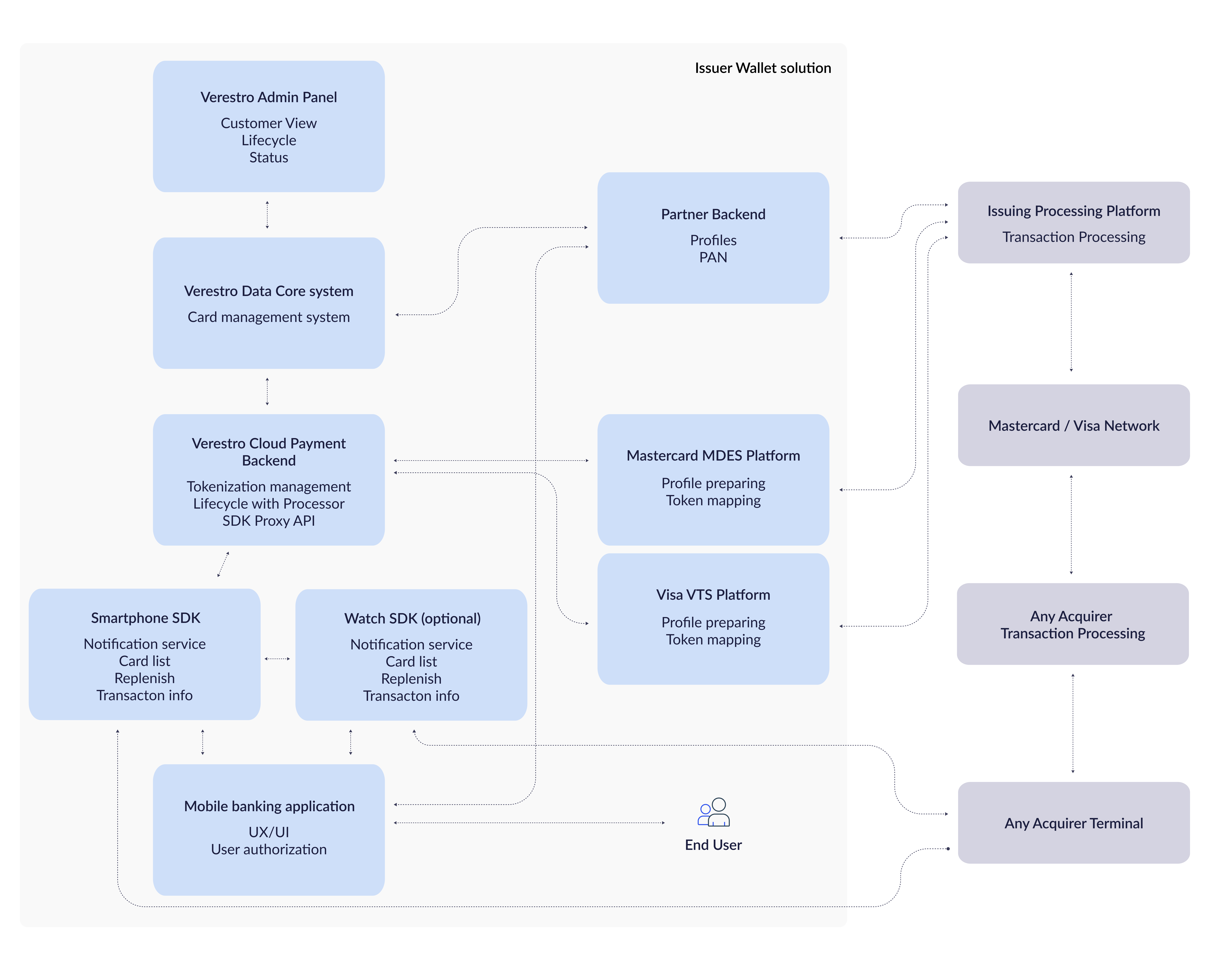
# Watch integration - FAQ

#### Supported Smartwatch Models

<p class="callout info">Which smartwatches are supported?</p>

The following models are supported:

- Huawei Watch Ultimate Green
- All models of Huawei Watch 5
- All models of Huawei Watch GT5 and GT5 Pro
- All models of Huawei Fit4 and Fit4 Pro

#### Verestro Components Required

<p class="callout info">What Verestro components are required to enable smartwatch payments?</p>

To enable secure smartwatch payments, the following components are required:

- [Watch payment ](https://developer.verestro.com/books/token-requestor-issuer-wallet/page/watch-integration)with Wearengine SDK - SDK for integration and communication to the Watch (Android and [iOS](https://developer-ios.verestro.com/wearenginewearablessdk/latest/documentation/))
- [LifeCycle](https://developer.verestro.com/books/user-lifecycle-card-management-api-sdk/page/overview) - for secure card data storage
- [Transaction History Core](https://developer.verestro.com/books/transaction-history-api) - for processing transaction history
- VCP Wallet Server - server-side component of the Verestro Contactless Platform (VCP)
- [MDC SDK](https://developer.verestro.com/books/token-requestor-issuer-wallet/page/technical-documentation-mdc-sdk) and VCP SDK - to be integrated into the mobile application ([Android](https://developer.verestro.com/books/token-requestor-issuer-wallet/page/technical-documentation-vcp-sdk) or [iOS](https://developer.verestro.com/books/token-requestor-issuer-wallet/page/technical-documentation-vcp-sdk-ios))
- [Token Management Platform](https://developer.verestro.com/books/token-management-platform) - required for Issuer Wallet service

#### Third-party Integrations

<p class="callout info">What third-party integrations are needed?</p>

To tokenize payment cards, active connectivity with Mastercard MDES or Visa VTS is required. Each token requestor (bank) must have their own access. Existing connections can be reused if already in place.

#### AppGallery Connect (AGC)

<p class="callout info">How do I create an account on AGC (AppGallery Connect)?</p>

Follow steps on [Appgallery Connect Registration Page](https://id7.cloud.huawei.com/CAS/portal/userRegister/regbyemail.html)

<p class="callout info">What data from AGC is required for smartwatch payment integration?</p>

After creating the application in AGC, the following identifiers will be available:

- MPA packageID
- bundleID

These are used to associate the smartwatch app with the mobile application.

#### Component Substitution

<p class="callout info">Can I replace Verestro components with my own?</p>

The fastest integration path is through the use of all Verestro components. However:

- A different Token Management Platform can be used
- Replacing the Wallet Server is possible if adapted to work with the VCP SDK

#### Device Pairing Limitations

<p class="callout info">Can I pair multiple smartwatches with a single smartphone?</p>

No. Only one active smartwatch can be connected to a smartphone at a time. Connecting a new watch will disconnect the previous one.

<p class="callout info">Can I pair one smartwatch with multiple smartphones?</p>

No. A smartwatch can be connected to only one smartphone at any given time. Pairing with another smartphone will disconnect it from the first one.

#### Required Setup Processes

<p class="callout info">What processes must be completed to enable smartwatch payments?</p>

- User registration - via manual registration or using LifeCycle API provided by the partner.
- User authentication - via password, PIN, or Trusted Identity in case of SDK integration with a partner app.
- Card provisioning - either by importing existing card data or creating a new card via Card Issuing.
- Card digitization - token creation through MDES or VTS. This must be performed separately for smartphone and smartwatch, but can be unified via mobile app UI.
- Smartwatch provisioning - data provisioning and synchronization with the watch.

There are multiple ways to fulfill these requirements. A proper analysis will help determine the most effective approach.

#### Activating Payments on Smartwatch

<p class="callout info">How does a user activate smartwatch payments, step by step?</p>

1. The user installs the payment app on both the smartphone and the smartwatch.
2. If the watch is unsupported, no payment app will be available for download.
3. The user sets the payment app as the default app on the watch and optionally enables double-press shortcut via the hardware button.
4. The user completes required onboarding steps (registration, KYC)
5. Card is created or delivered to Veresto VCP Wallet Server
6. Applications on smartphone and watch deliver payment tokens with processes digitization and provisioning

##### Supported Smartphone OS Versions

<p class="callout info">What smartphone operating system versions are supported?</p>

The last 3 major versions from the current system version are supported. Using the latest available version for a given device is recommended.

#### Installing the Smartwatch App

<p class="callout info">How can I install the payment app on my smartwatch?</p>

Use the Huawei Health application to install the payment app on the smartwatch.

#### Security &amp; Card Management

<p class="callout info">Is the solution secure?</p>

Yes. The service is regularly audited by accredited organizations on behalf of Mastercard and Visa.

<p class="callout info">What if the smartwatch is lost?</p>

The watch can be remotely removed (unpaired) from the paired mobile application. Customer Service can also assist in watch removal. After removal, no transactions initiated from the lost watch will be accepted.

<p class="callout info">Can I store multiple cards on one smartwatch?</p>

Yes, each card issued within the Issuer Wallet can be added to the smartwatch, unless restricted by project-specific configurations.

#### Compatibility with Apple Pay and Google Pay

<p class="callout info">Is this solution compatible with Apple Pay or Google Pay?</p>

No. Issuer Wallet is an alternative to Apple and Google Pay. Cards issued or managed within Verestro services cannot be added to Apple Pay or Google Pay, and vice versa.

#### Setting as Default Payment App

<p class="callout info">How do I set this solution as the default payment app?</p>

The default payment app can be set in the system settings of the smartphone or smartwatch. Alternatively, a one-time payment can be initiated directly from the partner app without changing the default payment app.

# Technical Documentation VCP SDK - iOS

SDK for smartphones: [https://developer-ios.verestro.com/vcpsdk/latest/documentation/](https://developer-ios.verestro.com/vcpsdk/latest/documentation/)

SDK for communciation to the Watch: [https://developer-ios.verestro.com/wearenginewearablessdk/latest/documentation/](https://developer-ios.verestro.com/wearenginewearablessdk/latest/documentation/)

# Technical Documentation MDC SDK

<table border="1" id="bkmrk-mdc---basic-applicat"><tbody><tr><td>### MDC - Basic application flow

</td></tr><tr><td>**Android** [Link to Mobile DC SDK technical documentation](https://developer.verestro.com/books/user-lifecycle-card-management-api-sdk/page/technical-documentation-mdc-sdk "User Lifecycle & Card Management API & SDK")</td></tr><tr><td>**iOS** [https://developer-ios.verestro.com/mobiledcsdk/latest/documentation/](https://developer-ios.verestro.com/mobiledcsdk/latest/documentation/)</td></tr></tbody></table>

# Technical documentation VCP External API

Technical Documentation VCP External API

@swagger="https://services.upaidtest.pl/ucp/doc.yaml/external"

# DRAFT W MD Technical Documentation VCP SDK

<h2 style="background-color: #252747; color: white; padding: 15px 20px; margin-top: 30px; border-radius: 4px; border-left: 5px solid #252747;">
  VCP SDK Introduction
</h2>

### **Basic abbreviations and definitions**

| **Field** | **Description** |
| :---- | :--- |
| CDCVM | Consumer Device Cardholder Verification Method |
| CVM | Cardholder Verification Method |
| Contactless | Transactions performed by tapping the mobile device on a POS, which starts data exchange. On the Android device operating system passes received data from POS to the HCE service, implemented in the MPA, and then to VCP SDK. HCE support is required for contactless transactions |
| DSRP | Digital Secure Remote Payments - transactions initiated from a mobile device, engaging interaction with the remote merchant system. HCE support is not required for DSRP transactions |
| FCM | Firebase Cloud Messaging |
| HCE | Host Card Emulation |
| IBAN | Bank Account Number |
| MCBP | Mastercard Cloud Based Payments |
| MDC | Mobile Data Core. Verestro core library. |
| MPA | Mobile Payment Application - an application that uses VCP SDK for payments |
| NFC | Near Field Communication |
| One tap | Flow in a contactless transaction, in which the consumer after authentication (using the PIN, fingerprint, etc.) taps the device to POS to start exchanging data |
| PAN | Primary account number. Know as a card number. |
| Payment Instrument | Model keeping all data considering entity used for payments |
| POS | Point Of Sale |
| SUK | Single Use Key - unique credential used for single transaction for Mastercard |
| LUK | Limited Use Key - payment credential for usage with Visa |
| Two tap | Flow in a contactless transaction, in which consumer firstly taps device to POS, authenticates (using the PIN, fingerprint, etc.), then taps to POS one more time for exchanging data |
| TVC | Token Verification Code |
| EWS | External Wallet Server |
| VCP | Verestro Cloud Payment |

### **What is VCP SDK?**
The VCP (Verestro Cloud Payments) SDK is a module for digitization, payment, and token management for available payment instruments. Usage of VCP SDK depends on Mobile DC SDK which is the core of the Verestro module. Payment instruments can be provided to VCP SDK using the Mobile DC module.

### **How VCP SDK works?**
Provides methods to manage digitization using main domains:

* [x] **IBANs**
* [x] **Payment**
* [x] **Cloud Messaging**
* [x] **Cards**
* [x] **External Wallet Server**

*Depending on the selected payment instrument source (Card, Iban, External Wallet Server) VCP SDK allows to digitize it and provide methods for the payment process. Usage of the following domains depends on client requirements.*


### **Versioning and backward compatibility**


SDK version contains three digits. For example: `1.0.0`.

| **Version digit** | **Description** | **Update requirement** |
| :--- | :--- | :--- |
| **First** | Tracks compatibility-breaking changes in SDK public APIs. | 🔴 **Mandatory** to update the application code to use SDK when this is incremented. |
| **Second** | Tracks new, not compatibility-breaking changes in public API of SDK. | 🟡 **Optional** to update the application code when this digit is incremented. |
| **Third** | Tracks internal changes in SDK. | 🟢 **No updates** in application code are necessary to update to the version, which has this number incremented. |

Changes not breaking compatibility:

* Adding a new optional interface to SDK setup
* Adding a new method to any domain
* Adding a new ENUM value to input or output
* Adding a new field in the input or output model 

<h2 style="background-color: #252747; color: white; padding: 15px 20px; margin-top: 30px; border-radius: 4px; border-left: 5px solid #252747;">
  Technical overview
</h2>

### **SDK Basic configuration**

The `minSdkVersion` must be at least 23 (Android 6.0). The application must use AndroidX. 

SDK is available on the Verestro maven repository and can be configured in a project using the Gradle build system. **The username and password are provided by Verestro.**

```gradle
repositories{
	maven {
		credentials {
			username "<enter_username_here>"
			password "<enter_password_here>"
		}
		url "https://artifactory.upaid.pl/artifactory/libs-release-local/"

		//if the sync time takes too long, add filters to match the repository with specific modules as below
		content {
    		includeGroupByRegex "pl.upaid.*"
    		includeGroup "com.mastercard"
            includeGroup "com.visa" //Only when Visa is used
		}
	}
}
```

VCP SDK is available in two versions: **debug** and **release**.

Debug version is ended with appendix "-debug" in version name. Samples below:

**For release version:**

```gradle
dependencies{
	implementation 'pl.upaid.module:ucpsdk:{version}'

    //Use below code ONLY if using Visa

    //implementation 'pl.upaid.internal.module:vts_v6:{verestroVtsModuleVersion}'
        
    //def strictVtsVersionBeta = "6.4.0-sandbox"
    //def strictVtsVersionProduction = "6.4.0-production"
    
    //implementation('com.visa:cbp') {
    //    version { strictly strictVtsVersionBeta }
    //}
}
```

**For debug version:**

```gradle
dependencies{
	implementation 'pl.upaid.module:ucpsdk:{version}-debug'

    //Use below code ONLY if using Visa

    //implementation 'pl.upaid.internal.module:vts_v6:{verestroVtsModuleVersion}-debug'
        
    //def strictVtsVersionBeta = "6.4.0-sandbox"
    //def strictVtsVersionProduction = "6.4.0-production"
    
    //implementation('com.visa:cbp') {
    //    version { strictly strictVtsVersionBeta }
    //}
 
}
```
**Min SDK version:**
The minSdkVersion must be at least 23 (Android 6.0). In case of using SDK on lower Android API version declare in the application manifest.

```gradle
<uses-sdk tools:overrideLibrary="pl.upaid.nativesecurity, 
pl.upaid.module.ucpsdk,
pl.upaid.module.mobiledc,
pl.upaid.internal.module.mcbp-v3,
pl.upaid.internal.module:vts_v6,
pl.upaid.internal.module.security, 
pl.upaid.internal.module.worker, 
com.mastercard.mpsdk,
com.visa.cbp" />

```
SDK cannot be initialized on a lower Android API version, and none of the SDK methods should be used on it.


### **VCP SDK Application Signing requirements**


<div style="display: flex; align-items: flex-start; margin-bottom: 25px;">
  <img src="https://upload.wikimedia.org/wikipedia/commons/thumb/2/2a/Mastercard-logo.svg/200px-Mastercard-logo.svg.png" width="55" style="margin-right: 20px; margin-top: 3px;">
  <div>
    <strong>Mastercard:</strong><br>
    There is no requirement related to Application signing.
  </div>
</div>

<div style="display: flex; align-items: flex-start; margin-bottom: 20px;">
  <img src="https://upload.wikimedia.org/wikipedia/commons/5/5c/Visa_Inc._logo_%282021%E2%80%93present%29.svg" width="55" style="margin-right: 20px; margin-top: 5px;">
  <div>
    <strong>Visa:</strong><br>
    Both sandbox (test) and production environment require APK signed with valid key. To add Application as Trusted in Visa services please provide Signing Key Certificate from chain in PEM format using below script:
  </div>
</div>


```bash
keytool -exportcert -keystore your_apk_keystore.jks -alias your_keystore_key_alias -rfc -file certificate.pem
```

Output will be provided in certificate.pem file.
Please provide an result to Verestro representative with related applicationId (package).

<p class="callout info"><strong>Note:</strong> When using only Google Play signing key tests local tests related to Visa tokenization and payments will be not possible.</p>


### **VCP SDK Size**


The size of SDK is dependent on its distribution system.

The table below shows the size of the module for the ask and bundle file.

| **Format** | **Size increment** | **Notes** |
| :--- | :--- | :--- |
| APK all architectures | ~13,6 MB | Size compared to empty application. Size already include Mobile DC library size as it's required dependency. |
| APK Arm64 | ~2.8 MB | Size compared to empty application. Size already include Mobile DC library size as it's required dependency. |

**VCP size already includes Mobile DC SDK size.**

Additional information:

- size from the table above is referred to release version;
- size depends on configured proguard;  
    

### **VCP SDK Usage**


This chapter describes the structure and basic usage of VCP SDK.


#### ▹ **Domains**

#### **— Domains**

#### **· Domains**

#### **› Domains**

#### **▸ Domains**

#### ▸ Domains

#### **Domains**

Every of the described facades is divided into domains with different responsibilities. Available domains:

* [x] **IBANs**
* [x] **Payment**
* [x] **Cloud Messaging**
* [x] **Cards**
* [x] **External Wallet Server**
* [x] **Every domain contains domain-related methods**

#### **Error handling**

Works like in Mobile DC SDK, but provides additional BackendException reason codes (only when Verestro Wallet Server is used) and additional exceptions for specific methods.

SDK provides errors by exceptions, which could be caught by the application and shown on UI with a detailed message.

<p class="callout info"><strong>Note:</strong> VCP SDK can throw exceptions from Mobile DC SDK as its core of the Verestro module.</p>


| **Exception type** | **Exception class** | **Description** |
| :--- | :--- | :--- |
| SDK validation | ValidationException | Additional reason codes for ValidationException used in Mobile DC SDK |
| Backend exception | BackendException | Additional reason codes for BackendException used in Mobile DC SDK.<br>**Note:** Not applicable for[ External Wallet Server domain ](https://wiki.verestro.com/display/UCP/External+Wallet+Server+domain) |
| SDK exception | UcpSdkException | Something went wrong on the SDK side, check the table below with possible reasons |
| Process related | - | As every process is different some methods could throw a specified exception<br>Types of possible exceptions are described in the method description |

Additional BackendException reason codes:

| **Reason** | **Description** |
| :--- | :--- |
| INTERNAL\_ERROR | Error occurred on server |
| VALIDATION\_ERROR | Client sent invalid data |
| CRYPTOGRAPHY\_ERROR | Error occurred during cryptography operation |
| PAYMENT\_CARD\_PREDIGITIZE\_ERROR | Predigitize of payment card failed |
| PAYMENT\_IBAN\_PREDIGITIZE\_ERROR | Predigitize of payment IBAN failed |
| PAYMENT\_CARD\_DIGITIZE\_ERROR | Digitize of payment card failed |
| PAYMENT\_IBAN\_DIGITIZE\_ERROR | Digitize of payment IBAN failed |
| PAYMENT\_CARD\_PREDIGITIZE\_NOT\_EXECUTED | Predigitize for payment card must be executed |
| PAYMENT\_IBAN\_PREDIGITIZE\_NOT\_EXECUTED | Predigitize for payment IBAN must be executed |
| CLIENT\_UNAUTHORIZED | Client of the API is unauthorized |
| USER\_UNAUTHORIZED | User is unauthorized |
| CANT\_FIND\_USER | Cannot find user |
| CANT\_FIND\_DEVICE | Cannot find device |
| CANT\_FIND\_IBAN | Cannot find payment IBAN |
| CANT\_FIND\_CARD | Cannot find payment card |
| CANT\_FIND\_PAYMENT\_TOKEN | Cannot find payment token |
| OPERATION\_NOT\_SUPPORTED | Requested operation is not supported |
| OPERATION\_NOT\_ALLOWED | Requested operation is not allowed |
| DEVICE\_TEMPORARILY\_LOCKED | Device is temporarily locked |
| DEVICE\_PERMANENTLY\_LOCKED | Device is permanently locked |
| INVALID\_PAN | The PAN format is not valid, or other data associated with the PAN was incorrect or entered incorrectly |
| MISSING\_EXPIRY\_DATE | The expiry date is required for this product but was missing |
| PAN\_INELIGIBLE | The PAN is not in an approved account range for TSP |
| DEVICE\_INELIGIBLE | The device is not supported for use |
| PAN\_INELIGIBLE\_FOR\_DEVICE | The PAN is not allowed to be provisioned to the device because of Issuer rules |
| IBAN\_INELIGIBLE | The financial account does not have an associated account range in TSP |
| PARALLEL\_REQUESTS\_ATTEMPTS | Action is already processing. Please try again after the time included in headers |
| INVALID\_JWS\_TOKEN | Specified JWS token is invalid |

Additional ValidationException reason codes:

| **Reason** | **Description** |
| :--- | :--- |
| INVALID\_SECURITY\_CODE | Security code is empty |
| INVALID\_LANGUAGE\_CODE | Language code is empty |
| INVALID\_PAYMENT\_INSTRUMENT\_ID | Payment instrument id is empty |

UcpSdkException reason codes:

| **Reason** | **Description** |
| :--- | :--- |
| PUSH\_INVALID\_SOURCE | Relates to push processing process. Push message should be consumed in another module |
| PUSH\_INVALID\_PUSH\_CONTENT | Cannot process push message. The message is invalid or some process failed |
| PAYMENT\_INSTRUMENT\_DEFAULT\_NOT\_FOUND | Cannot find default PaymentInstrument |
| PAYMENT\_INSTRUMENT\_NOT\_FOUND | Selected PaymentInstrument cannot be found, is not digitized or active |
| APPLICATION\_PROCESS\_NOT\_KILLED | Occurs when after using the reset method, there is a try of using any of the facade methods without previously stopping the application process |


#### **Facade**

The facade is an entry point to communication with VCP SDK.

Contains SDK initialization method and domains which allows for payment instrument management.

#### **Method structure**

Please read Mobile DC Documentation for details.

#### **Multiple facade types**

VCP SDK provides three public APIs with the same functionalities, the APIs are:

- UcpJavaApi for projects which use Java programming language.
- UcpKotlinApi for projects which use Kotlin programming language.

The difference between the APIs is a way of providing data to SDK methods and getting the results from them. Input and output as information data are the same.

This documentation presents I/O types in a Kotlin way as it’s easier to mark nullable fields (as a question mark).

#### **HceApduService registration**

To register HceApduService firstly it needs to be created a class that extends a default HostApduService. Added class needs to be added to the manifest file as a service.

Properly configured meta-data in service will also register an application as tap&amp;pay ready.

Exemplary service below:

```xml
<service
	android:name=".WalletHceService"
	android:exported="true"
	android:permission="android.permission.BIND_NFC_SERVICE">
		
		<intent-filter>
			<action android:name="android.nfc.cardemulation.action.HOST_APDU_SERVICE" />		
		</intent-filter>
		
		<meta-data
			android:name="android.nfc.cardemulation.host_apdu_service"
			android:resource="@xml/hce_apdu_service" />
 </service>
```

Below listing of the default source file hce\_apud\_service.xml:

```xml
<host-apdu-service xmlns:android="http://schemas.android.com/apk/res/android"
	android:apduServiceBanner="@drawable/hce_logo"
	android:description="@string/hce_service_description"
	android:requireDeviceUnlock="false">
	<!-- If the requireDeviceUnlock is set to false, on some phones you can pay if the screen is not awake, 
    but on most devices the screen must be awake to make a payment. -->
	
	<aid-group
    	    android:category="payment"
    	    android:description="@string/aid_description">

		<!-- Following is a PPSE AID. You must always include this AID in order for payments to work-->

	 	<aid-filter android:name="325041592E5359532E4444463031" />

		<!-- Following AID list is specific to the application requirements.
	       If your application supports the type of card that these AID represents,
	       you must include those AID in your configuration file -->

		<aid-filter android:name="A0000000041010" /> <!-- Mastercard DEBIT/CREDIT -->
	    <aid-filter android:name="A0000000042203" /> <!-- Mastercard US DEBIT/CREDIT -->
	    <aid-filter android:name="A0000000043060" /> <!-- Maestro DEBIT -->
	    <aid-filter android:name="A0000000049100" /> <!-- Private label AID-->

        <!-- uncomment only when Visa is used-->
        <!--  <aid-filter android:name="A0000000031010" /> --> <!-- VISA DEBIT/CREDIT -->
        <!--  <aid-filter android:name="A0000000980840" /> --> <!-- US COMMON DEBIT -->
        <!--  <aid-filter android:name="A0000000032020" /> --> <!-- VPAY -->
        <!--  <aid-filter android:name="A0000000032010" /> --> <!-- VISA ELECTRON -->
        <!--  <aid-filter android:name="A0000000033010" /> --> <!-- VISA INTERLINK -->
        <!--  <aid-filter android:name="A00000000307010001" /> --> <!-- PRIVATE LABEL -->
	</aid-group>
</host-apdu-service>
```

Check if the application is set as default for payment.

```kotlin
fun isSystemDefault(): Boolean {
	val cardEmulation = CardEmulation.getInstance(NfcAdapter.getDefaultAdapter(context))
    return cardEmulation.isDefaultServiceForCategory(
        WalletHceService::class.java,
        CardEmulation.CATEGORY_PAYMENT
    )
}
```

Request for set your application as default for payment - will show a dialog for the user to approve the changes.

```kotlin
fun requestForSystemDefault() {
    val intent = Intent().apply {
        action = "android.nfc.cardemulation.action.ACTION_CHANGE_DEFAULT"
        putExtra("component", WalletHceService::class.java)
        putExtra("category", CardEmulation.CATEGORY_PAYMENT)
    }
    context.startActivity(intent)
}
```

If the application is not set as default for payment and wants to make payment from opened application needs to set the preferred service. Requires system option "On top application is the default for HCE" enabled.

```kotlin
fun registerAsOnTopHceApplication() {
	val cardEmulation = CardEmulation.getInstance(NfcAdapter.getDefaultAdapter(context))
    cardEmulation.setPreferredService(
        activity, ComponentName(activity, WalletHceService::class.java)
    )
}

fun unregisterFromOnTopHceApplication() {
	val cardEmulation = CardEmulation.getInstance(NfcAdapter.getDefaultAdapter(context))
    cardEmulation.unsetPreferredService(activity)
}
```

#### **Models**

##### **PaymentInstrument**

| **Parameter** | **Type** | **Description** |
| :--- | :--- | :--- |
| id | String | Id of payment instrument. For card it is cardId, for IBAN sha256Hex.<br>In the context of the External Wallet Server use tokenUniqueReference from MDES |
| paymentTokenId | String | Id of payment token. Used for getting transactions history (see Mobile DC documentation) only for selected token id |
| displayablePanDigits | String | Token last 4 digits which can be used to display |
| paymentInstrumentStatus | PaymentInstrumentStatus | Enum with status of payment instrument. |
| contactlessSupported | Boolean | Information if payment instrument supports contactless transactions. |
| dsrpSupported | Boolean | Information if the payment instrument supports DSRP transactions. |
| qrcSupported | Boolean | Information if the payment instrument supports QR transactions. |
| onDeviceCvmSupported | Boolean | Information about supporting CVM on device. |
| credentialsCount | Int | Amount of credentials that can be used for payments.<br>Always 0 for Visa Cards. |
| isDefaultForContactlessPayment | Boolean | Information if payment instrument is default for contactless payments. |
| isDefaultForRemotePayment | Boolean | Information if payment instrument is default for remote payments. |
| additionalAuthenticationRequired | Boolean | Is additional authentication for payment token activation required. If true, available authentication methods can be obtained using getAdditionalAuthenticationMethods |
| tokenLastFourDigits | String? | Payment Token last four digits. Present only when multistep digitization is used(checkEligibility and digitize called separately). |
| paymentInstrumentExpirationDate | String? | Payment instrument expiry date in format MM/YY. Present only when multistep digitization is used(checkEligibility and digitize called separately). |
| paymentInstrumentLastFourDigits | String? | Payment instrument last four digits. Present only when multistep digitization is used(checkEligibility and digitize called separately). |
| productConfig | ProductConfig? | Payment Token configuration. Present only when multistep digitization is used(checkEligibility and digitize called separately). |
| provisioningStatus | String | Current state of provisioning process. One of:<br>IN\_PROGRESS - in case of waiting for *onProvisioningSuccess*(),<br>SUCCESS - when token is provisioned. |
| paymentTokenExpirationDate | String? | Payment token expiry date in format MM/YY. Not present when External Wallet Server is enabled. |

##### **PaymentInstrumentStatus**

| **Field** | **Description** |
| :--- | :--- |
| INACTIVE | Payment instrument is not active, it can not be used for transactions.<br>The activation process depends on integration. Read the product overview for more information. |
| ACTIVE | Payment instrument is active and it can be used for transactions. |
| SUSPENDED | Payment instrument is suspended. |
| DELETED | Payment instrument is DELETED. |
| UNKNOWN | Payment instrument status is unknown. |

##### **AdditionalAuthenticationMethod**

| **Parameter** | **Type** | **Description** |
| :--- | :--- | :--- |
| id | String | Identifier of additional authentication method |
| name | String | Method name. One of:<br>OTP\_TO\_CARDHOLDER\_NUMBER, OTP\_TO\_CARDHOLDER\_EMAIL, CARDHOLDER\_TO\_CALL\_CUSTOMER\_SERVICE, CARDHOLDER\_TO\_VISIT\_WEBSITE, CARDHOLDER\_TO\_USE\_ISSUER\_MOBILE\_APPLICATION, ISSUER\_TO\_CALL\_CARDHOLDER\_NUMBER |
| value | String | Value depends on method name. Described below. |
| issuerParameters | AuthMethodsIssuerParameters? | Non null if method is CARDHOLDER\_TO\_USE\_ISSUER\_MOBILE\_APPLICATION |

##### **Additional authentication method values:**

<div id="bkmrk-method-value-descrip">

| **Method** | **Value** | **Description** |
| :--- | :--- | :--- |
| `OTP_TO_CARDHOLDER_NUMBER` | Masked phone number | Text message to Account holder’s mobile phone number. The value will be the Account holder’s masked mobile phone number. |
| `OTP_TO_CARDHOLDER_EMAIL` | Masked email | Email to Account holder’s email address. The value will be the Account holder’s masked email address. |
| `CARDHOLDER_TO_CALL_CUSTOMER_SERVICE` | Phone number | Account holder-initiated call. The value will be the phone number for the Account holder to call Customer Service. |
| `CARDHOLDER_TO_VISIT_WEBSITE` | Website URL | Account holder to visit a website. The value will be the website URL. |
| `CARDHOLDER_TO_USE_ISSUER_MOBILE_APPLICATION` | Application name | (Conditional) Issuer’s mobile app name. The method is available for both MDES and VTS but the value will be presented only for VTS. |
| `ISSUER_TO_CALL_CARDHOLDER_NUMBER` | Masked phone number | Issuer-initiated voice call to Account holder’s phone. The value will be the Account holder’s masked voice call phone number. |

</div>   

##### **AuthMethodsIssuerParameters contains the following fields:**

| **Parameter** | **Type** | **Description** |
| :--- | :--- | :--- |
| mdes | AuthMethodsIssuerParametersMdes? | Plain AuthMethodsIssuerParametersMdes object, required for MDES Payment Token |
| vts | AuthMethodsIssuerParametersVts? | Required for VTS Payment token |

##### **AuthMethodsIssuerParametersMdes contains following fields:**

| **Parameter** | **Type** | **Description** |
| :--- | :--- | :--- |
| android | AuthMethodsIssuerParametersMdesAndroid | Plain AuthMethodsIssuerParametersMdesAndroid object. Required for Android device |
| ios | AuthMethodsIssuerParametersMdesIos | Plain AuthMethodsIssuerParametersMdesIos object. Required for IOS device |

##### **AuthMethodsIssuerParametersMdesAndroid contains following fields:**

| **Parameter** | **Type** | **Description** |
| :--- | :--- | :--- |
| action | String? | Name of the action to be performed |
| packageName | String? | The package name of the issuer's mobile app |
| extraTextValue | String? | Contains the data to be passed through to the target app in the intent as an extra key/value pair with key ‘android.intent.extra.TEXT’. This is Base64-encoded data of a JSON object of the MobileAppActivationParameters. This object is not described since the whole payload is passed to the issuer app |

##### **AuthMethodsIssuerParametersMdesIos contains following fields:**

| **Parameter** | **Type** | **Description** |
| :--- | :--- | :--- |
| deepLinkingUrl | String? | The deep linking URL of the issuer’s iOS mobile app. This identifies the app that the URL will resolve to. If the app is not installed on the user’s device, this URL can be used to open a link to the appropriate iOS app store for the user to download and install the app. |
| extraTextValue | String? | Contains the data to be passed through to the target app in the deep linking URL as a query parameter. It should be appended to the deepLinkingUrl when invoked in the format: deepLinkingUrl + ‘?extraTextValue=’ + extraTextValue. This is Base64-encoded data of a JSON object of the MobileAppActivationParameters. This object is not described since the whole payload is passed to the issuer app. |

##### **AuthMethodsIssuerParametersVts contains following fields:**

| **Parameter** | **Type** | **Description** |
| :--- | :--- | :--- |
| android | AuthMethodsIssuerParametersVtsAndroid? | Plain AuthMethodsIssuerParametersVtsAndroid object.<br>Required for Android devices |
| ios | AuthMethodsIssuerParametersVtsIos? | Plain AuthMethodsIssuerParametersVtsIos object.<br>Required for IOS devices |

##### **AuthMethodsIssuerParametersVtsAndroid contains following fields:**

| **Parameter** | **Type** | **Description** |
| :--- | :--- | :--- |
| appId | String? | Unique identifier for the application within the application store. |
| appUrl | String? | URL of the application in the application store. |
| intentUrl | String? | URL of banking app designed to respond to authentication code handling. |
| requestPayload | String? | The request payload is to be sent to the banking application on behalf of Visa.<br>This field is opaque to wallet providers. |

##### **AuthMethodsIssuerParametersVtsIos contains following fields:**

| **Parameter** | **Type** | **Description** |
| :--- | :--- | :--- |
| appId | String? | Unique identifier for the application within the application store. |
| appUrl | String? | URL of the application in the application store. |
| intentUrl | String? | URL of banking app designed to respond to authentication code handling. |
| requestPayload | String? | The request payload is to be sent to the banking application on behalf of Visa.<br>This field is opaque to wallet providers. |


##### **ContactlessTransactionInformation**

| **Parameter** | **Type** | **Description** |
| :--- | :--- | :--- |
| currencyCode | ByteArray | Code of currency, that was used in transaction. Formatted in ISO 4271. |
| amount | ByteArray | Transaction amount in bytes. Can be formatted as Int in pennies. |
| transactionRange | ContactlessTransactionRange | Type of transaction range. |
| richTransactionType | ContactlessRichTransactionType | Rich transaction type. |
| merchantAndLocation | ByteArray | Merchant and location data from terminal. Can be formatted as String, by using UTF\_8 Charset. |

**ContactlessTransactionRange**

| **Value** | **Description** |
| :--- | :--- |
| LVT | Low value transaction |
| HVT | High value transaction |
| UNKNOWN | Unknown |

**ContactlessRichTransactionType**

| **Value** |
| :--- |
| PURCHASE |
| REFUND |
| CASH |
| TRANSIT |
| PURCHASE\_WITH\_CASHBACK |
| UNKNOWN |

##### **DsrpTransactionInfo**

| **Parameter** | **Type** | **Descruption** |
| :--- | :--- | :--- |
| amount | Long | Transaction amount |
| currencyCode | Int | Code of currency, that was used in transaction. |
| countryCode | Int | Code of country. |
| issuerCryptogramType | String | Cryptogram type. |

##### **TransactionAbortReason**

| **Value** | **Description** |
| :--- | :--- |
| WALLET\_CANCEL\_REQUEST | Indicates that the wallet has requested a transaction cancellation during payment. |
| CARD\_ERROR | This indicates that a problem has been detected in the MChipEngine processing.<br>In some implementations, this can indicate badly formatted card profile data. |
| TERMINAL\_ERROR | This indicates incorrect terminal behavior. |
| NO\_TRANSACTION\_CREDENTIALS | There are no transaction credentials to finalize payment. The application should call replenish Credentials method to enable payment possibility. |
| NO\_CARDS | There is no active PaymentInstrument to start payment. Called when no card is added to Wallet or SDK is cleared by Security Issue (onSecurityIssueAppeared event). |
| TERMINAL\_INACTIVITY\_TIMEOUT | There is a problem with communication between the terminal and payment device.<br>For example, the terminal could abort communication with the mobile device for<br>a long period of time and then trigger a timeout.<br>Usually, a mobile device loses connection during payment due to a wrong or too short tap on the terminal.<br>The application should ignore this status as SDK waits for connection establishment and it could produce getting duplicate callbacks during payment.<br>**Note:** When user authentication is already provided it could be cleared - the application should handle card selection (if a non-default card is selected) and payment authentication again.<br>**Note:** Deprecated in 2.6.7, no longer used due to time difference between connection lost and providing result to application. Replaced by CONNECTION\_LOST which works immediatelly. |
| CONNECTION\_LOST | Connection between terminal and device is lost and payment is terminated. |
| PAYMENT\_NOT\_ALLOWED | Payment is not allowed at this moment.<br>For Mastercard Card application should show error and user should retry payment.<br>For Visa Card application should wait for UcpVtsPaymentAllowedListener::onPaymentAllowed() |

##### **NewTransaction**

| **Field** | **Type** | **Description** |
| :--- | :--- | :--- |
| clientTransactionId | String? | Identifier of transaction in TSP |
| type | String | The transaction type. One of: \[UNKNOWN, PURCHASE, REFUND, PAYMENT, ATM\_WITHDRAWAL, CASH\_DISBURSEMENT, ATM\_DEPOSIT, ATM\_TRANSFER\] |
| amountMinor | Long | The monetary amount in terms of the minor units of the currency. For example,<br>`EUR 2.35' will return 235, and `BHD -1.345' will return -1345 |
| currency | String | 3-digit ISO 4217 currency code |
| timestamp | String | The date/time when the transaction occurred. In ISO 8601 extended format |
| merchantName | String? | The merchant (``doing business as'') name |
| merchantPostalCode | String? | The postal code of the merchant |
| transactionCountryCode | String? | The country in which the transaction was performed. Expressed as a 3-letter (alpha-3) country code as defined in ISO 3166-1 |
| comboCardAccountType | String? | An indicator if Credit or Debit was chosen for a tokenized combo card at the time of the transaction. One of: \[UNKNOWN, CREDIT, DEBIT\] |
| issuerResponseInformation | String? | Additional information is provided by the issuer for a declined transaction. Only returned if the transaction is declined. One of: \[UNKNOWN, INVALID\_CARD\_NUMBER, FORMAT\_ERROR, MAX\_AMOUNT\_EXCEEDED, EXPIRED\_CARD, PIN\_AUTHORIZATION\_FAILED, TRANSACTION\_NOT\_PERMITTED, WITHDRAWL\_AMOUNT\_EXCEEDED, RESTRICTED\_CARD, WITHDRAWL\_COUNT\_EXCEEDED, PIN\_TRIES\_NUMBER\_EXCEEDED, INCORRECT\_PIN, DUPLICATE\_TRANSMISSION\] |
| status | String | The authorization status of the transaction. One of: \[AUTHORIZED, DECLINED, CLEARED, REVERSED\] |
| paymentTokenId | String | Identifier of payment token in VCP |

##### **ContactlessTransactionData**

| **Parameter** | **Type** | **Description** |
| :--- | :--- | :--- |
| currencyNumber | Int | Currency number assigned to the currencyCode in ISO 4271 e.g.: for PLN is 985. |
| currencyCode | String? | Code of currency, that was used in transaction formatted in ISO 4271. e.g.: PLN<br>Could be null as the terminal provides only the currencyNumber and a valid code could be not found. |
| amountMinor | Long | The monetary amount in terms of the minor units of the currency. For example, `EUR 2.35' will return 235, |
| transactionRange | ContactlessTransactionRange | Type of transaction range. |
| richTransactionType | ContactlessRichTransactionType | Rich transaction type. |
| merchantAndLocation | String | Merchant and location data from terminal.<br>**Deprecated** - field shouldn't be used as it could be not configured in terminal configuration or provides invalid data. |

**ContactlessTransactionRange**

| **Value** | **Description** |
| :--- | :--- |
| LVT | Low value transaction |
| HVT | High value transaction |
| UNKNOWN | Unknown |

**ContactlessRichTransactionType**

| **Value** | **Description** |
| :--- | :--- |
| PURCHASE |  |
| REFUND |  |
| CASH |  |
| TRANSIT |  |
| PURCHASE\_WITH\_CASHBACK |  |
| UNKNOWN |  |
| WITHDRAWAL |  |
| ATM\_CONTACTLESS |  |

##### **Report**

| **Parameter** | **Type** | **Description** |
| :--- | :--- | :--- |
| name | String | Action name |
| description | String | Action details message. |
| isSuccess | Boolean | Result of action. True when action is finished successfully, false otherwise. |
| timestamp | Long | Time when the action occurred. |
| errorMessage | String? | Detailed error message when isSuccess is false. |

##### **ContactlessAdvice**

| **Parameter** | **Description** |
| :--- | :--- |
| DECLINE | Declines a processing transaction.<br>When provided by SDK in *getFinalDecisionForTransaction* wallet should not overrule a DECLINE.<br>If the MPA overrules a DECLINE (and forces it into PROCEED), the transaction is likely to be declined by the issuer in the authorization response. |
| AUTHENTICATION\_REQUIRED | An user authentication is required for transaction processing, which could be overruled on the MPA side.<br>When the MPA decision is AUTHENTICATION\_REQUIRED, SDK will ask for user authentication in the *onAuthRequiredForContactless* method. |
| PROCEED | Transaction can be processed. |

##### **ContactlessTransactionResult**


<p class="callout warning"><strong>Important!</strong> MPA should always refer to transaction results on the terminal.</p>


| **Value** | **Description** | **Is success on MPA side** |
| :--- | :--- | :--- |
| AUTHORIZE\_ONLINE | This indicates that the SDK returned an ARQC cryptogram using valid credentials and the POS will send the transaction online for authorization.<br>The SDK is not informed whether or not the issuer actually approved or declined the transaction since this information is only returned to the terminal.<br>Should be treated as transaction success on the MPA side. | Yes |
| AUTHENTICATE\_OFFLINE | This indicates that the POS requested a decline (AAC) with a CDA signature.<br>SDK will have returned a cryptogram using valid credentials and the POS can authenticate the card offline using the CDA signature.<br>Typically a POS will request a decline when it simply wants to authenticate that a legitimate digital card is being used without requesting any authorization.<br>Should be treated as transaction success on the MPA side. | Yes |
| DECLINE\_BY\_TERMINAL | The POS has requested a decline without a CDA signature. This may correspond to a real decline by the terminal, or (in rare cases) to an online authentication request.<br>Paying on the terminal with offline-only network connectivity can also return this callback.<br>Application Cryptogram was generated with genuine credentials.<br>Should be treated as transaction success on the MPA side. | Yes |
| DECLINE\_BY\_CARD | The digitized card has declined the transaction. A non-exhaustive list of possible reasons may be:<br>- Context mismatch between first and second tap<br>- Terminal is offline-only<br>- Terminal is a transit gate, and transit transactions are not allowed by the card profile<br>- Transaction is international, while the card profile is domestic-only | No |
| WALLET\_ACTION\_REQUIRED | If the *getFinalDecisionForTransaction* returns an AUTHENTICATION\_REQUIRED status then this result will be returned.<br>The SDK will have declined the transaction but requested that the POS should keep the context active for a subsequent tap.<br>If the POS does not support mobile devices then the merchant may need to repeat the transaction with the same amount so that the second tap can take place. | No |

#### **External libraries**

The SDK uses several external Apache 2.0 libraries:

- com.nimbusds:nimbus-jose-jwt
- commons-codec:commons-codec
- com.fasterxml.jackson.core:jackson-core
- com.fasterxml.jackson.core:jackson-annotations
- com.fasterxml.jackson.core:jackson-databind
- com.fasterxml.jackson.module:jackson-module-kotlin
- io.insert-koin:koin-android
- io.reactivex.rxjava2:rxjava
- io.reactivex.rxjava2:rxandroid
- com.squareup.retrofit2:adapter-rxjava2
- com.squareup.retrofit2:retrofit
- com.squareup.retrofit2:converter
- com.squareup.okhttp3:logging
- com.squareup.okhttp3:okhttp<del class="diffdel"></del>
- com.google.zxing:core
- <del class="diffdel"></del>net.sf.flexjson:flexjson

<h2 style="background-color: #252747; color: white; padding: 15px 20px; margin-top: 30px; border-radius: 4px; border-left: 5px solid #252747;">
  VCP SDK Setup
</h2>

VCP SDK has to be configured every time when is used. Before VCP SDK usage Mobile DC SDK should be already configured.

### **setup**

| Synchronous. Offline.<br> 
 :--- |

<p class="callout info"><strong>Note:</strong> Contains all the necessary data to configure SDK.<br>Should be called at the very beginning of the application lifecycle. For example in the Android Application::onCreate method.<br><br>Requires MobileDC setup() already finished<br><br>Setup methods could be called in another thread then Main to improve application start time. In case of calling setup method in another thread application must check before every SDK usage if setup method is already finished.<br><br>When SDK is integrated into the app and user can enable or disable it as a featere - the SDK setup can be ommited during Application start and loaded on demand.<br> </p>

<p class="callout warning"><strong>Important!</strong> Before calling VCP SDK setup you must call setup from Mobile DC SDK. </p>

<p class="callout info"><strong>Note:</strong> Implementation of Application::on Create should be as quick as possible. Invocation time directly impacts on the performance of payment and loading first aplication screen. </p>


**Input**

| **Parameter** | **Type** | **Description** | **Validation conditions** |
| :--- | :--- | :--- | :--- |
| ucpConfiguration | UcpConfiguration | VCP configuration provided in builder described below. | Not empty. |

**UcpConfigurationBuilder** contains the following methods:

| **Metod** | **Parameter** | **Description** | **Validation conditions** |
| :--- | :--- | :--- | :--- |
| withApplication | Application | Application context. | Not empty |
| withCvmModel | WalletCvmModel (enum) | Customer Verification Method: CDCVM\_ALWAYS, FLEXIBLE\_CDCVM, CARD\_LIKE | Not empty |
| withUserAuthMode | WalletAuthMode (enum) | User authentication mode: WALLET\_PIN, CUSTOM, NONE<br>Contact Verestro to select proper configuration | Not empty |
| withUcpPaymentInstrument<br>EventListener | UcpPaymentInstrument<br>EventListener | Global listener for actions on PaymentInstrument. | Not empty |
| withUcpTransaction<br>EventListener | UcpTransactionEventListener | Deprecated - use MobileDcApiConfigurationBuilder.withOptionalMobileDcTransactionEventListener from MDC SDK instead. Global listener for actions during transaction processing | Not empty |
| withTransactionAcceptance<br>EventListener | UcpTransactionAcceptance<br>EventListener | Global listener which allow application take final decision about transaction acceptance during transaction | Not empty |
| withReplenishThreshold | Int | Number of credentials below which replenish process will automatically begin | Not empty |
| withMcbpPinningCertificates | List<String> | List of public key certificates in PEM format.<br>Pass list with empty String if *withOptionalUcpMcbpHttpExecutor* mentioned below is used with custom HTTP communication. | Not empty List |
| withOptionalEventsReports | UcpEventReportListener | Global listener for most important internal SDK actions related to token management. Could be useful for logs grabbing and debugging on debug. | Optional |
| withOptional<br>ExternalWalletServer |  | Prepares SDK for using external wallet server. | Optional |
| withOptional<br>UcpMcbpHttpExecutor | UcpMcbpHttpExecutor/<br>DefaultUcpMcbpHttpExecutor | Global listener for connection between SDK and MasterCards API. Could be use for adding action before connection - use DefaultUcpMcbpHttpExecutor or for completely replace this connection - use UcpMcbpHttpExecutor. | Optional |
| withOptional<br>UcpReProvisionEventListener | UcpReProvisionEventListener | Global listener for actions during reprovisioning. | Optional |
| withOptional<br>UcpTransactionConfiguration | UcpTransactionConfiguration | Transaction configuration. Allow to enable deprecated authentication timer called when authentication is peformed.<br>Timer is disabled by default, usage is not recomended. | Optional |
| withOptionalWallet<br>McbpHttpExecutor |  | Prepares SDK for processing CMS-D HTTP requests with Wallet Server proxy. | Optional |
| withOptionalEnableVisaSDK |  | Enables Visa SDK usage, requires gradle dependencies configuration | Optional |
| withOptionalVtsPayment<br>ReadyCallback | UcpVtsPaymentAllowedListener | Provides information if payment with Visa Token is allowed with callback onPaymentAllowed().<br>Application should wait for callback when Visa Card is used. | Optional |

**UcpPaymentInstrumentEventListener**

Contains callbacks for PaymentInstrument.

| **Method name** | **Parameters** | **Description** |
| :--- | :--- | :--- |
| onProvisioning<br>Success | paymentInstrument: PaymentInstrument | Method called after provisioning process. Information about PaymentInstrument activation process will be provided in onPaymentInstrumentStatusChanged callback described below |
| onProvisioning<br>Failure | errorMessage: String?,<br>exception: Exception? | Method called after provisioning failure. Try processing digitization again |
| onReplenish<br>Success | paymentInstrument: PaymentInstrument<br>numberOfTransactionCredentials: Int | Method called after successfully transaction credentials replenish. Provides information about PaymentInstrument and number of new transaction credentials.<br>Depending on flow is called after activation process and when requested by SDK based on *replenishThreshold* configuration.<br>**Note:** Replenish could be called just after transaction based on *withRplenishThreshold* configuration. It's recommended to not do complex process here. It could affect on next transaction processing time when multiple transactions are done in row |
| onReplenish<br>Failure | paymentInstrument: PaymentInstrument,<br>errorMessage: String?,<br>exception: Exception? | Method called after replenish failure with PaymentInstrument<br>**Note:** Replenish could be called just after transaction based on *withRplenishThreshold* configuration. It's recommended to not do complex process here. It could affect on next transaction processing time when multiple transactions are done in row |
| onPayment<br>Instrument<br>StatusChanged | newStatus: PaymentInstrument<br>Status<br>paymentInstrumentId: String | Provides information about PaymentInstrumentStatus state (check model) for selected payment instrument id |
| onNewTransaction | newTransaction: NewTransaction | Provides online result with details of transaction processed in VCP<br>Works only when application is online |

**UcpTransactionEventListener**

Callbacks related to transaction process.


<p class="callout warning"><strong>Important!</strong> It's recommended to not do complex process in there callbacks. It could significantly affect on transaction processing time. </p>


| **Method name** | **Parameters** | **Description** |
| :--- | :--- | :--- |
| onAuthRequired<br>ForContactless | paymentInstrument: PaymentInstrument, transactionInformation:<br>ContactlessTransactionInformation<br>transactionData: ContactlessTransactionData | Called when user authentication is required during contactless transaction<br>ContactlessTransactionInformation is deprecated in version 2.2.4. |
| onAuthRequired<br>ForDsrp | paymentInstrument: PaymentInstrument, dsrpTransactionInfo: DsrpTransactionInfo | Called when user authentication is required during Dsrp transaction |
| onAuthTimer<br>Updated | secondsRemaining: Int | Called on every update of remaining time for performing transaction, as SDK starts transaction timer based on card profile configuration.<br>Note: Deprecated and disabled by default in version 2.6.7.<br>To enable use configuration avaialble in SDK *setup::withOptionalUcpTransactionConfiguration.* |
| onContactless<br>PaymentStarted | \- | Called on very beginnging of every transaction start (SELECT\_PPSE APDU command). E.g. first tap to terminal or second tap if *onAuthRequiredForContactless* method was called.<br>Locks communication until method is finished.<br>Method duration directly impacts on transaction time. |
| onContactless<br>Payment<br>Completed | paymentInstrument: PaymentInstrument<br>transactionInformation:<br>ContactlessTransactionInformation<br>transactionResult: ContactlessTransactionResult<br>transactionData : ContactlessTransactionData,<br>transactionId:String | Called when transaction is completed with information about transaction and result.<br>ContactlessTransactionInformation is deprecated in version 2.2.4.<br>transactionId - transaction identifier for Mastercard transactions, allow to match transaction with processed transaction notification from Mobile DC SDK: *EventNewTransaction::clientTransactionId.* |
| onContactless<br>Payment<br>Incident | paymentInstrument: PaymentInstrument,<br>exception: Exception | Called when something went wrong during transaction and Mastercard marked transaction as incident |
| onContactless<br>Payment<br>Aborted | paymentInstrument: PaymentInstrument?,<br>abortReason: TransactionAbortReason,<br>exception: Exception | Called when transaction is aborted during payment from some reason described in method parameter<br>PaymentInstrument could be null if abortReason = TransactionAbortReason.NO\_CARDS is returned.<br>Note: SDK clears passed selected card with method *selectForPayment()* and authentication with *setUserAuthenticatedForPayment()* |
| onTransaction<br>Stopped |  | Method called on transaction stopped by SDK.<br>Deprecated in version 2.6.7, no longer used. |

**UcpTransactionAcceptanceEventListener**

Callbacks related to transaction process.

<p class="callout warning"><strong>Important!</strong> It's recommended to not do complex process in there callbacks. It could significantly affect on transaction processing time. </p>


| **Method name** | **Parameters** | **Description** |
| :--- | :--- | :--- |
| getFinal<br>Decision<br>ForTransaction | isUserAuthenticated : Boolean<br>recommendedAdvice : ContactlessAdvice<br>trasactionInformation :<br>ContactlessTransactionInformation<br>transactionData : ContactlessTransactionData | Called on every transaction for the final decision about transaction processing<br>An application can decide based on information about authentication, transaction details like amount, currency, and transaction types<br>The method also provide recommended by MCBP advice based on transaction<br>ContactlessTransactionInformation is deprecated in version 2.2.4. |

**UcpEventReportsListener**

| **Method name** | **Parameters** | **Description** |
| :--- | :--- | :--- |
| onNewReport | report: Report | Return logs related to token management. |

**UcpReProvisionEventListener**

Called when transaction is completed with information about transaction and result.

ContactlessTransactionInformation is deprecated in version 2.2.4.

| **Method Name** | **Parameters** | **Description** |
| :--- | :--- | :--- |
| onReProvisionSuccess | paymentInstrument: PaymentInstrument | Method called after reProvisioning process.<br>Information about PaymentInstrument activation process will be provided in onPaymentInstrumentStatusChanged callback. |
| onReProvisionFailure | paymentInstrument : PaymentInstrument<br>errorMessage : String?<br>exception : Exception? | Method called after reProvisioning failure. Try again. |

**UcpMcbpHttpExecutor**

| **Method name** | **Parameters** | **Description** |
| :--- | :--- | :--- |
| execute | ucpMcbpRequestType: UcpMcbpHttpExecutorRequestType,<br>ucpMcbpHttpMethod:<br>UcpMcbpHttpMethod,<br>url: String,<br>requestData:Any,<br>requestProperties:<br>Map<String, String> | Called on every time if SDK want to connect to MasterCard and should return UcpMcbpHttpResponse.<br>requestData could be one of request data type: UcpMcbpRequestSessionRequestData,<br>UcpMcbpReplenishRequestData, UcpMcbpProvisionRequestData, UcpMcbpNotifyProvisioningResultRequestData,<br>UcpMcbpChangeMobilePinRequestData, UcpMcbpDeleteRequestData.<br>```<br>ucpMcbpHttpMethod could be one of: POST, GET.<br>```<br>```<br>ucpMcbpRequestType could be one of: REQUEST_SESSION, REPLENISH, PROVISION,<br>NOTIFY_PROVISIONING_RESULT, CHANGE_MOBILE_PIN, DELETE.<br>``` |

**DefaultUcpMcbpHttpExecutor**

| **Method name** | **Parameters** | **Description** |
| :--- | :--- | :--- |
| execute | ucpMcbpRequestType: UcpMcbpHttpExecutorRequestType<br>ucpMcbpHttpMethod: UcpMcbpHttpMethod<br>url: String<br>requestData: Any<br>requestProperties: Map<String, String> | Called on every time if SDK want to connect to MasterCard and should return super.execute method.<br>requestData could be one of request data type: UcpMcbpRequestSessionRequestData,<br>UcpMcbpReplenishRequestData, UcpMcbpProvisionRequestData, UcpMcbpNotifyProvisioningResultRequestData,<br>UcpMcbpChangeMobilePinRequestData, UcpMcbpDeleteRequestData.<br>```<br>ucpMcbpHttpMethod could be one of: POST, GET.<br>```<br>```<br>ucpMcbpRequestType could be one of: REQUEST_SESSION, REPLENISH, PROVISION,<br>NOTIFY_PROVISIONING_RESULT, CHANGE_MOBILE_PIN, DELETE.<br>``` |

**UcpTransactionConfiguration**

| **Parameter** | **Type** | **Description** |
| :--- | :--- | :--- |
| enableTransaction<br>AuthenticationTimer | Boolean | Allows to enable deprecated authentication timer.<br>Timer is started along *setUserAuthenticatedForPayment(),* result is available in *onAuthTimerUpdated().* |

**Callback samples:**

**UcpTransactionEventListener**

```
// UcpTransactionEventListener comments

class BankingAppUcpTransactionEventListener : UcpTransactionEventListener {

    override fun onAuthRequiredForContactless(event: EventAuthRequiredForContactless) {
        //authorization is required for transaction, open payment screen with authorization
        //show PaymentInstrument and ContactlessTransactionData available in event object

        showPaymentScreen(event.paymentInstrument, event.transactionData)
    }

    override fun onAuthRequiredForDsrp(event: EventAuthRequiredForDsrp) {
        //authorization is required for transaction, open payment screen with authorization
        //show PaymentInstrument and DSRP transaction information available in event object

        showPaymentScreen(event.paymentInstrument, event.dsrpTransactionInfo)
    }

    override fun onAuthTimerUpdated(event: EventAuthTimerUpdated) {
        //check if user is on payment screen and update timer
        //when timer is 0, application should close payment with failure
        
		//deprcated, disabled by default, read method description how to enable
    }

    override fun onContactlessPaymentAborted(event: EventContactlessPaymentAborted) {
        //looks like payment is aborted, can provide result to payment screen 
        //and show user what is abort reason
    }

    override fun onContactlessPaymentCompleted(event: EventContactlessPaymentCompleted) {
        //payment completed, provide result to payment information
        //REMEMBER Transaction is processed on terminal and this is where 
        //you will see final transaction result
    }

    override fun onContactlessPaymentIncident(event: EventContactlessPaymentIncident) {
        //something went wrong during transaction, provide result to user
    }

    override fun onTransactionStopped() {
        //deprecated, not used anymore, 
    }
    
    override fun onContactlessPaymentStarted() {
        //Payment started or resumed after callback onAuthReqiredForContactless
        //Best place for checking if user is authenticated for payment and call
        //setUserAuthenticatedForPayment() and selectForPayment() methods if non-defaut card is selected
    }
}
```

**UcpPaymentInstrumentEventListener**

```
class BankingAppPaymentInstrumentEventListener : UcpPaymentInstrumentEventListener {

    override fun onNewTransaction(event: EventNewTransaction) {
        //information about new transaction processed by issuer
    }

    override fun onPaymentInstrumentStatusChanged(event: EventPaymentInstrumentStatusChanged) {
        //status of payment instrument was changed, refresh list, inform user about new status
    }

    override fun onProvisioningFailure(event: EventProvisioningFailure) {
        //provisioning failed, try again
    }

    override fun onProvisioningSuccess(event: EventProvisioningSuccess) {
        //provisioning success, wait for status and replenish changes until user can pay 
        //or provide activation method when required
    }

    override fun onReplenishFailure(event: EventReplenishFailure) {
        //transaction credentials replenish failed
    }

    override fun onReplenishSuccess(event: EventReplenishSuccess) {
        //transaction credentials replenish success
    }
}
```

**UcpTransactionAcceptanceEventListener**

```
class BankingAppUcpTransactionAcceptanceEventListener : UcpTransactionAcceptanceEventListener {

    //Sample implementation of transaction acceptance listener
    
	//For the scanario when authentication is required on issuer side for every transaction 
    //field even.isUserAuthenticated must be always true, otherwise 
    //ContactlessAdvice.AUTHENTICATION_REQUIRED should be returned

    override fun getFinalDecisionForTransaction(event: EventGetFinalDecision): ContactlessAdvice {

        val isScreenUnlocked = isScreenUnlocked()
        val isScreenProtectedByKeyguard = isScreenUnlocked()

        val isLvtTransaction =
            event.transactionInformation.transactionRange == ContactlessTransactionRange.LVT

        //discard all Transit transaction
        if (event.transactionInformation.richTransactionType == ContactlessRichTransactionType.TRANSIT) {
            return ContactlessAdvice.DECLINE
        }

        //allow for transaction when user is authenticated for payment and screen unlocked
        if (event.isUserAuthenticated && isScreenUnlocked) {
            return ContactlessAdvice.PROCEED
        }

        //allow for LVT transaction on unlocked screen when protected and don't require authentication
        if (isLvtTransaction && isScreenProtectedByKeyguard && isScreenUnlocked) {
            return ContactlessAdvice.PROCEED
        }

        // ...
        // much more cases

        //require authentication anyway
        return ContactlessAdvice.AUTHENTICATION_REQUIRED
    }
}
```

**UcpEventReportsListener**

```
class BankReportEventListener : UcpEventReportsListener {

    override fun onNewReport(report: Report) {
       //may be used for debugging SDK or gathering reports on client's app or backend
  	}
}
```

**UcpMcbpHttpExecutor**

```
//Use UcpMcbpHTtpExecutor as supertype if you want to replace connection
class BankUcpMcbpHttpExecutor : UcpMcbpHttpExecutor {
 
    override fun execute(
        ucpMcbpRequestType: UcpMcbpHttpExecutorRequestType,
        ucpMcbpHttpMethod: UcpMcbpHttpMethod,
        url: String,
        requestData: Any,
        requestProperties: Map<String, String>
    ): UcpMcbpHttpResponse {
 
 
        //additional action before request
 
 
        //invoke connect by custom connector
        return when (ucpMcbpRequestType) {
            UcpMcbpHttpExecutorRequestType.REQUEST_SESSION -> {
                executeRequestSession(ucpMcbpHttpMethod, url, requestData as UcpMcbpRequestSessionRequestData, 
                requestProperties)
            }
            UcpMcbpHttpExecutorRequestType.PROVISION -> {
                executeProvision(ucpMcbpHttpMethod, url, requestData as UcpMcbpProvisionRequestData, 
                requestProperties)
            }
            UcpMcbpHttpExecutorRequestType.REPLENISH -> {
                executeReplenish(ucpMcbpHttpMethod, url, requestData as UcpMcbpReplenishRequestData, 
                requestProperties)
            }
            UcpMcbpHttpExecutorRequestType.NOTIFY_PROVISIONING_RESULT -> {
                executeNotifyProvisioningResult(ucpMcbpHttpMethod, url, 
                requestData as UcpMcbpNotifyProvisioningResultRequestData, requestProperties)
            }
            UcpMcbpHttpExecutorRequestType.CHANGE_MOBILE_PIN -> {
                executeChangeMobilePin(ucpMcbpHttpMethod, url, 
                requestData as UcpMcbpChangeMobilePinRequestData, requestProperties)
            }
            UcpMcbpHttpExecutorRequestType.DELETE -> {
                executeDelete(ucpMcbpHttpMethod, url, requestData as UcpMcbpDeleteRequestData, 
                requestProperties)
            }
        }
    }
}
```

**DefaultUcpMcbpHttpExecutor**

```
//Use DefaultUcpMcbpHTtpExecutor as supertype if you want to only add some action before connection
class BankDefaultUcpMcbpHttpExecutor : DefaultUcpMcbpHttpExecutor() {
    override fun execute(
        ucpMcbpRequestType: UcpMcbpHttpExecutorRequestType,
        ucpMcbpHttpMethod: UcpMcbpHttpMethod,
        url: String,
        requestData: Any,
        requestProperties: Map<String, String>
    ): UcpMcbpHttpResponse {
 
        //additional action before request
 
        return super.execute(
            ucpMcbpRequestType,
            ucpMcbpHttpMethod,
            url,
            requestData,
            requestProperties
        )
    }
}
```

**UcpReProvisionEventListener**

```
class BankingAppUcpReProvisiongEventListener : UcpReProvisionEventListener() {
     override fun onReProvisionSuccess(event: EventReProvisionSuccess) {
     	//reProvisioning success, wait for status and replenish changes until user can pay 
  	}
 	
	override fun onReProvisionFailure(event: EventReProvisionFailure) {
       //reProvisioning failed, try again.
  	}
}
```

**UcpTransactionConfiguration**

```
class BankingAppUcpTransactionConfiguration : UcpTransactionConfiguration {
    override val enableTransactionAuthenticationTimer: Boolean = false
}
```

**UcpVtsPaymentAllowedListener**

```
class BankingAppUcpVtsPaymentAllowedListener : UcpVtsPaymentAllowedListener {
    override fun onPaymentAllowed() {
        //when during a payment an status of PAYMENT_NOT_ALLOWED is received 
        //Application UI should show transaction error and wait for onPaymentAllowed() callback
        //When received callback shouuld inform UI to process transaction again
    }}
```

**Sample VCP SDK setup implementation**

Mobile DC setup() and VCP setup() method could be called on MainThread in Application:onCreate as blocking or another thread.  
When applicaiton has multiple dependencies there is possible to call both setup() methods on another thread (MobileDC setup() method must be already finished until VCP setup() is called).   
<span style="text-decoration: underline;">Important:</span> In case of loading SDK on another thread and using contactless payments HostApduService must be used asynchronous way to prevet using SDK until loading is finished - check sample for method *PaymentService:processHceApduCommand*.

```kotlin
fun setup(
    application: Application,
    walletCvmModel: WalletCvmModel,
    walletAuthUserMode: WalletAuthUserMode,
    mcbpPinningCertificates: List<String>,
    replenishThreshold: Int
) {

    val ucpConfiguration = UcpConfiguration.create(
        UcpConfigurationBuilder()
            .withApplication(application)
            .withCvmModel(walletCvmModel)
            .withUserAuthMode(walletAuthUserMode)
            //marked as deprecated - see description above
            .withUcpTransactionEventListener(BankingAppUcpTransactionEventListener())
            .withUcpPaymentInstrumentEventListener(BankingAppPaymentInstrumentEventListener())
            .withMcbpPinningCertificates(mcbpPinningCertificates)
            .withUcpTransactionAcceptanceEventListener(BankingAppUcpTransactionAcceptanceEventListener())
            .withReplenishThreshold(replenishThreshold)
			.withOptionalEventsReports(BankReportEventListener())
    		.withOptionalUcpMcbpHttpExecutor(BankUcpMcbpHttpExecutor())
			//if you want to only add additional action before connection use below implementation
			//.withOptionalUcpMcbpHttpExecutor(BankDefaultUcpMcbpHttpExecutor())
			.withOptionalUcpReProvisionEventListener(BankingAppUcpReProvisionEventListener())
            //if you want to change standard transaction configuration use configuration below
            .withOptionalUcpTransactionConfiguration(BankingAppUcpTransactionConfiguration())
            //.withOptionalEnableVisaSDK() //optional when Visa is used
            //.withOptionalVtsPaymentReadyCallback(BankingAppUcpVtsPaymentAllowedListener()) //optional when Visa is used
    )

    UcpApiKotlin().setup(ucpConfiguration)
}
```

### **reset (DEPRECATED - use restart instead)**

| Synchronous. Offline.<br>Method for resetting SDK to uninitialized state.<br> |
| :--- |

<p class="callout info"><strong>Note:</strong> According to MCBP Deployment team there is no possibility for resetting SDK without killing application process for clearing all MC SDK local variables. Please kill application process after using this method. Trying using any facade method without stopping application process will cause throwing UcpSdkException.
To avoid closing application use restart() methods. </p>


**Input**

No input.

**Output**

No output.

**Sample**

**Sample VCP SDK reset implementation:**

```kotlin
fun reset() {
    UcpApiKotlin().reset()

	//Terminating JVM according to MC SDK Sample Application
    Runtime.getRuntime().exit(0);
}
```

### **restart**

| Synchronous. Offline.<br>Method for resetting SDK to uninitialized state.<br>Replaces reset() method which requires killing application process.<br>When restart finishes with error, application should repeat action. |
| :--- |

<p class="callout info"><strong>Note:</strong> SDK must be already initialized to call restart() method. During restart() SDK internally initializes SDK again. </p>


**Input**

No input.

**Output**

<p class="callout success">Success callback when SDK data is cleared and SDK is ready to use again. No any action is required to call facade methods.</p>
<p class="callout danger">Failure callback when something went wrong during restart. Application should repeat action.</p>


**Sample**

**Sample VCP SDK reset implementation:**

```
UcpApiKotlin().restart({
    //restart finished with success. UCP & MDC data is cleared, SDK is now ready to use without calling MDC & UCP setup methods
}, {
    //some error occured, please repeat action
})
```

<h2 style="background-color: #252747; color: white; padding: 15px 20px; margin-top: 30px; border-radius: 4px; border-left: 5px solid #252747;">
  Cards domain
</h2>

### **delete**

| Asynchronous. Online.<br>  Method allows delete PaymentInstument from VCP.<br>Payment token will be removed remote and local storage.<br>
 :--- |

<p class="callout info">Result of action will be notified with onPaymentInstrumentStatusChanged.<br> </p>

**Input**

| **Parameter** | **Type** | **Description** | **Validation conditions** |
| :--- | :--- | :--- | :--- |
| paymentInstrumentId | String | Id of PaymentInstrument to delete | Not empty. |
| reason | CharArray? | Optional reason of deletion |  |

**Output**

| Success / failure callback |
| :--- |

**Sample**

```kotlin
fun delete(paymentInstrumentId: String, reason: CharArray?) {
    ucpApi.cardsService
            .delete(paymentInstrumentId, reason,
                    {
                        //PaymentInstrument delete requested
                        //wait for confirmation from onPaymentInstrumentStatusChanged
                    },
                    { throwable ->
                        //Something went wrong, check excetpion with documentation
                    }
            )
}
```

### **checkEligibility**

| Asynchronous. Online.<br>Check eligibility required to process digitize. |
| :--- |

**Input**

| **Parameter** | **Type** | **Description** |
| :--- | :--- | :--- |
| checkEligibility | CheckEligibility | CheckEligibility object |

CheckEligibility

| **Parameter** | **Type** | **Description** |
| :--- | :--- | :--- |
| paymentInstrumentId | String | Identifier of payment instrument |
| paymentInstrumentType | PaymentInstrumentType | Payment instrument type. One of: \[MASTERCARD,VISA\] |
| userLanguage | String | User language |
| userCountry | String | User country |

**Output**

| Success callback with CheckEligibilityResult. |
| :--- |

CheckEligibilityResult

| **Parameter** | **Type** | **Description** |
| :--- | :--- | :--- |
| termsAndConditionsAssetId | String | Identifier of Terms and Conditions asset |

| Failure callback |
| :--- |

**Sample**

```
private fun checkEligibility(
    paymentInstrumentId: String,
    paymentInstrumentType: PaymentInstrumentType,
    userLanguage: String,
    userCountry: String
) {

    ucpApi.cardsService
        .checkEligibility(
            CheckEligibility(
                paymentInstrumentId,
                paymentInstrumentType,
                userLanguage,
                userCountry
            ),
            { checkEligibilityResult ->
                //Handle result
            },
            { throwable ->
                //Something went wrong, check exception with documentation
            }
        )
}
```

### **digitize**

| Asynchronous. Online.<br>Use only when *checkEligibility* method is used.<br>Creates payment token in VCP backend.<br>Expect push after successful finish and then proceed using process method in Cloud Messaging domain. |
| :--- |

**Input**

| **Parameter** | **Type** | **Description** | **Validation conditions** |
| :--- | :--- | :--- | :--- |
| digitizationRequest | DigitizationRequest | Plain object of DigitizationRequest | Not empty |

DigitizationRequest object contains following fields:

| **Parameter** | **Type** | **Description** | **Validation conditions** |
| :--- | :--- | :--- | :--- |
| paymentInstrumentId | String | Identifier of payment instrument | Not empty |
| paymentInstrumentType | PaymentInstrumentType | Payment instrument type. One of: \[MASTERCARD,VISA\] | Not empty |
| securityCode | CharArray? | Optional. The CVC2 for the card to be digitized |  |
| externalPaymentTokenId | String? | Optional. Unique external identifier of Payment Token |  |

**Output**

<p class="callout success">Success callback with DigitizationResult object</p>


| **Parameter** | **Type** | **Description** |
| :--- | :--- | :--- |
| digitizationResult | DigitizationResult | Plain object of DigitizationResult |

DigitizationResult contains following fields.

| **Parameter** | **Type** | **Description** |
| :--- | :--- | :--- |
| paymentInstrument | PaymentInstrument | Plain object of PaymentInstrument |
| additionalAuthenticationMethods | List<AdditionalAuthenticationMethod>? | All available additional authentication method |
| productConfig | ProductConfig | Plain object of ProductConfig, contains Payment Token configuration |
| externalPaymentTokenId | String? | Optional. External payment token id configured by the consumer. In case of identifier duplicate an random id is generated |

ProductConfig contains following fields.

| **Parameter** | **Type** | **Description** |
| :--- | :--- | :--- |
| isCoBranded | Boolean | Whether the product is co-branded |
| coBrandName | String? | Name of the co-branded partner |
| foregroundColor | String | Foreground color, used to overlay text on top of the card image |
| backgroundColor | String | Background color, used to overlay text on top of the card image |
| labelColor | String? | Label color of the mobile wallet entry for the card |
| issuerName | String | Name of the issuing bank |
| shortDescription | String | A short description for this product |
| longDescription | String? | A long description for this product |
| custoremServiceUrl | String? | Customer service website of the issuing bank |
| customerServiceEmail | String? | Customer service email address of issuing bank |
| customerServicePhoneNumber | String? | Customer service phone number of the issuing bank |
| productConfigIssuer | ProductConfigIssuer? | Contains one or more mobile app details that may be used to deep link from the Mobile Payment App to the issuer mobile app |
| onlineBankingLoginUrl | String? | Login URL for the issuing bank's online banking website |
| termsAndConditionsUrl | String? | URL linking to the issuing bank's terms and conditions for this product |
| privacyPolicyUrl | String? | URL linking to the issuing bank's privacy policy for this product |
| issuerProductConfigCode | String? | Freeform identifier for this product configuration as assigned by the issuer |
| contactName | String? | Name of the issuing bank |
| bankAppName | String? | Name of banking application for display |
| bankAppAddress | String? | The package name for the destination mobile application |
| unsupportedPresentationTypes | String? | The presentation types that are not supported such as "MSR" (for example). This is an advisory field to tell the wallet provider that they should not include the unsupported presentation type returned in this field in the provisioning request |
| unsupportedCardVerificationTypes | String? | The card verification types that are not supported such as "AVS" (for example). This is an advisory field to let the wallet provider know which card verification services are not supported for a given payment instrument. The wallet provider can use this information to relax any field validations on the Customer UI (such as Address) |
| issuerFlags | List<ProductConfigIssuerFlags>? | List of plain ProductConfigIssuerFlags object. Contains issuer flags |
| brandLogoAssetId | String | The Mastercard or Maestro brand logo associated with this card. Provided as an Asset ID |
| issuerLogoAssetId | String | The logo of the issuing bank. Provided as a Asset ID |
| coBrandLogoAssetId | String? | The co-brand logo (if any) for this product. Provided as an Asset ID |
| cardBackgroundCombinedAssetId | String? | The card image used to represent the digital card in the wallet. This ‘combined’ option contains the Mastercard, bank and any co-brand logos. Provided as an Asset ID |
| cardBackgroundAssetId | String? | The card image used to represent the digital card in the wallet. This ‘non-combined’ option does not contain the Mastercard, bank, or cobrand logos. Provided as an Asset ID |
| iconAssetId | String | The icon representing the primary brand(s) associated with this product. Provided as an Asset ID |

ProductConfigIssuer contains following fields.

| **Parameter** | **Type** | **Description** |
| :--- | :--- | :--- |
| openIssuerAndroidIntent | ProductConfigOpenIssuerAndroidIntent? | AndroidIntent object can be used to open the issuer mobile app |
| activateWithIssuerAndroidIntent | ProductConfigActivateWithIssuerAndroidIntent? | AndroidIntent object can be used to open the issuer mobile app |
| openIssuerIOSDeepLinkingUrl | ProductConfigOpenIssuerIOSDeepLinkingUrl? | IOSDeepLinkingUrl object can be used to open the issuer mobile app |
| activateWithIssuerIOSDeepLinkingUrl | ProductConfigActivateWithIssuerIOSDeepLinkingUrl? | IOSDeepLinkingUrl object can be used to open the issuer mobile app |

ProductConfigOpenIssuerAndroidIntent contains following fields.

| **Parameter** | **Type** | **Description** |
| :--- | :--- | :--- |
| action | String | The name of the action to be performed. This is a fully qualified name including the package name in order to create an explicit intent |
| packageName | String | The package name of the issuer’s mobile app. This identifies the app that the intent will resolve to. If the app is not installed on the user’s device, this package name can be used to open a link to the appropriate Android app store for the user to download and install the app |
| extraTextValue | String | Contains the data to be passed through to the target app in the intent as an extra key/value pair with key ‘android.intent.extra.TEXT’. This is Base64-encoded data of a JSON object |

ProductConfigActivateWithIssuerAndroidIntent contains following fields.

| **Parameter** | **Type** | **Description** |
| :--- | :--- | :--- |
| action | String | The name of the action to be performed. This is a fully qualified name including the package name in order to create an explicit intent |
| packageName | String | The package name of the issuer’s mobile app. This identifies the app that the intent will resolve to. If the app is not installed on the user’s device, this package name can be used to open a link to the appropriate Android app store for the user to download and install the app |
| extraTextValue | String | Contains the data to be passed through to the target app in the intent as an extra key/value pair with key ‘android.intent.extra.TEXT’. This is Base64-encoded data of a JSON object |

ProductConfigOpenIssuerIOSDeepLinkingUrl contains following fields.

| **Parameter** | **Type** | **Description** |
| :--- | :--- | :--- |
| deepLinkinUrl | String | The deep linking URL of the issuer’s iOS mobile app. This identifies the app that the URL will resolve to. If the app is not installed on the user’s device, this URL can be used to open a link to the appropriate iOS app store for the user to download and install the app |
| extraTextValue | String | Contains the data to be passed through to the target app in the deep linking URL as a query parameter.It should be appended to the deepLinkingUrl when invoked in the format: deepLinkingUrl + ‘?extraTextValue=’ + extraTextValue. This is Base64-encoded data of a JSON object |

ProductConfigActivateWithIssuerIOSDeepLinkingUrl contains following fields.

| **Parameter** | **Type** | **Description** |
| :--- | :--- | :--- |
| deepLinkingUrl | String | The deep linking URL of the issuer’s iOS mobile app. This identifies the app that the URL will resolve to. If the app is not installed on the user’s device, this URL can be used to open a link to the appropriate iOS app store for the user to download and install the app |
| extraTextValue | String | Contains the data to be passed through to the target app in the deep linking URL as a query parameter. It should be appended to the deepLinkingUrl when invoked in the format: deepLinkingUrl + ‘?extraTextValue=’ + extraTextValue. This is Base64-encoded data of a JSON object |

ProductConfigIssuerFlags contains following fields.

| **Parameter** | **Type** | **Description** |
| :--- | :--- | :--- |
| deviceBinding | Boolean | Device binding |
| cardholderVerification | Boolean | Whether the issuer participating in step-up flow |
| trustedBeneficiaryEnrollment | Boolean | Whether this is a trusted beneficiary enrollment |
| delegateAuthenticationSupported | String | Whether issuer supports delegated authentication |

| Failure callback |
| :--- |

Sample

```kotlin
fun digitizeCard(digitizationRequest: DigitizationRequest) {

    ucpApi.cardsService
            .digitize( digitizationRequest,
                    { digitizationResult ->
                        //digitization success, provisioning is in progress
                        //application should listen to push message and provide content to UCP
                        //refresh you payment instrument list form Cards::getPaymentInstruments
                        //new PaymentInstrument should be visible with INACTIVE state

                        //when push processed wait for onProvisioningSuccess or Failure callback
                        //and status change
                    },
                    { throwable ->
                        //Something went wrong, check exception with documentation
                    }
            )
}
```

### **digitize (deprecated)**

| Asynchronous. Online. |
| :--- |
<p class="callout warning">Deprecated - use digitize(DigitizationGreenPath) instead.</p>


| Creates payment token in VCP backend.<br>Expect push after successful finish and then proceed using process method in Cloud Messaging domain. |
| :--- |

**Input**

| **Parameter** | **Type** | **Description** | **Validation conditions** |
| :--- | :--- | :--- | :--- |
| paymentInstrumentId | String | Identifier of payment instrument | Not empty. |
| userLanguage | String | Language preference selected by the consumer. Formatted as an<br>ISO-639-1 two letter language code | Not empty. |
| securityCode | CharArray? | Optional. The CVC2 for the card to be digitized |  |

**Output**

| Success / failure callback |
| :--- |


**Sample**

```kotlin
fun digitizeCard(
        paymentInstrumentId: String,
        languageCode: String,
        securityCode: CharArray) {

    ucpApi.cardsService
            .digitize(paymentInstrumentId, languageCode, securityCode,
                    {
                        //digitization success, provisioning is in progress
                        //application should listen to push message and provide content to UCP
                        //refresh you payment instrument list form Cards::getPaymentInstruments
                        //new PaymentInstrument should be visible with INACTIVE state

                        //when push processed wait for onProvisioningSuccess or Failure callback
                        //and status change
                    },
                    { throwable ->
                        //Something went wrong, check exception with documentation
                    }
            )
}
```

### **digitize**

| Asynchronous. Online.<br>Creates payment token in VCP backend.<br>Expect push after successful finish and then proceed using process method in Cloud Messaging domain. |
| :--- |

**Input**

| **Parameter** | **Type** | **Description** | **Validation conditions** |
| :--- | :--- | :--- | :--- |
| digitizationGreenPath | DigitizationGreenPath | Plain object of DigitizationGreenPath | Not empty |

DigitizationGreenPath contains following fields.

| **Parameter** | **Type** | **Description** |
| :--- | :--- | :--- |
| paymentInstrumentId | String | Identifier of payment instrument |
| paymentInstrumentType | PaymentInstrumentType | Payment instrument type. One of: \[MASTERCARD,VISA\] |
| securityCode | CharArray? | Optional. The CVC2 for the card to be digitized |
| userLanguage | String | User language |
| userCountry | String | User country |
| externalPaymentTokenId | String? | Optional. Unique external identifier of Payment Token |

**Output**

| Success / failure callback |
| :--- |


**Sample**

```
fun digitizeCard(digitizationGreenPath: DigitizationGreenPath) {

    ucpApi.cardsService
            .digitize(digitizationGreenPath,
                    {
                        //digitization success, provisioning is in progress
                        //application should listen to push message and provide content to UCP
                        //refresh you payment instrument list form Cards::getPaymentInstruments
                        //new PaymentInstrument should be visible with INACTIVE state

                        //when push processed wait for onProvisioningSuccess or Failure callback
                        //and status change
                    },
                    { throwable ->
                        //Something went wrong, check exception with documentation
                    }
            )
}
```

### **getAdditionalAuthenticationMethods**

| Asynchronous. Online.<br>Retrieves additional user authentication methods. |
| :--- |

**Input**

| **Parameter** | **Type** | **Description** | **Validation conditions** |
| :--- | :--- | :--- | :--- |
| getAdditionalAuthenticationMethods | GetAdditionalAuthenticationMethods | Plain object of GetAdditionalAuthenticationMethods | Not empty |

Fields of GetAdditionalAuthenticationMethods object:

| **Parameter** | **Type** | **Description** |
| :--- | :--- | :--- |
| paymentInstrumentId | String | Identifier of payment instrument |

**Output**

| Success callback with AdditionalAuthenticationMethods object. |
| :--- |

| **Parameter** | **Type** | **Description** |
| :--- | :--- | :--- |
| additionalAuthenticationMethods | AdditionalAuthenticationMethods | Object carrying list of AdditionalAuthenticationMethod |

AdditionalAuthenticationMethods contains following value:

| **Parameter** | **Type** | **Description** |
| :--- | :--- | :--- |
| additionalAuthenticationMethods | List<AdditionalAuthenticationMethod> | List of AdditionalAuthenticationMethod objects |

| Failure callback. |
| :--- |

**Sample**

```
private fun getAdditionalAuthenticationMethods() {
    val getAdditionalAuthenticationMethod =
        GetAdditionalAuthenticationMethods("paymentInstrumentId")

    ucpApi
        .cardsService
        .getAdditionalAuthenticationMethods(
            getAdditionalAuthenticationMethod,
            { additionalAuthenticationMethods ->
                //Handle result
            },
            { throwable ->
                //Something went wrong, check exception with documentation
            })
}
```

### **submitTokenAuthenticationValue**

| Asynchronous. Online.<br>Submit authentication code when additional user authentication is required. |
| :--- |

**Input**

| **Parameter** | **Type** | **Description** |
| :--- | :--- | :--- |
| paymentInstrumentId | String | Identifier of payment instrument |
| authenticationCode | String | Authentication code |

**Output**

| Success callback/failure callback. |
| :--- |


**Sample**

```
private fun submitAuthenticationValue(paymentInstrumentId: String, authenticationCode: String) {

    ucpApi.cardsService
        .submitAuthenticationValue(
            SubmitAuthenticationValue(
                paymentInstrumentId,
                authenticationCode
            ),
            {
                //Handle success
            },
            { throwable ->
                //Something went wrong, check exception with documentation
            }
        )
}
```

### **submitTokenAuthenticationMethod**

| Asynchronous. Online.<br>Submit authentication method when additional user authentication is required. |
| :--- |

**Input**

| **Parameter** | **Type** | **Description** |
| :--- | :--- | :--- |
| paymentInstrumentId | String | Identifier of payment instrument |
| authenticationMethodId | String | Id of authentication method. Get it when digitize method return additionalAuthenticationRequired set to true. |

**Output**

| Success callback/failure callback. |
| :--- |


**Sample**

```
private fun submitAuthenticationMethod(paymentInstrumentId: String, authenticationMethodId: String) {

    ucpApi.cardsService
        .submitAuthenticationMethod(
            SubmitAuthenticationMethod(
                paymentInstrumentId,
                authenticationMethodId
            ),
            {
                //Handle success
            },
            { throwable ->
                //Something went wrong, check exception with documentation
            }
        )
}
```

### **getAllPaymentInstruments**

| Asynchronous. Online/Offline.<br>Method for getting all payment instruments from local or remote storage.<br>Local storage is always instant available and should be used to increase UX.<br>Use remote way when possible to keep your payment instruments always up to date. |
| :--- |

**Input**

| **Parameter** | **Type** | **Description** | **Validation conditions** |
| :--- | :--- | :--- | :--- |
| refresh | Boolean | Refresh all PaymentInstrument objects state with remote VCP server (network and user session required) |  |

**Output**

| Success callback with list of PaymentInstrument objects. |
| :--- |

| **Parameter** | **Type** | **Description** |
| :--- | :--- | :--- |
| paymentInstruments | List<PaymentInstrument> | List of retrieved payment instruments from local or remote storage |

| Failure callback. |
| :--- |

**Sample**

```kotlin
fun getAllPaymentInstrument(refresh: Boolean) {
    ucpApi.cardsService
            .getAllPaymentInstruments( refresh,
                    { paymentInstruments ->
                        //List of PaymentInstrument from local or remote storage
                    },
                    { throwable ->
                        //Something went wrong, check exception with documentation
                    }
            )
}
```

### **getPaymentInstrument (deprecated)**

| Asynchronous. Online/Offline.<br>Deprecated - use getAllPaymentInstruments instead.<br>Method for getting single PaymentInstrument from local or remote storage object based on id.<br>Local storage is always instant available and should be used to incerese UX.<br>Use remote way when possible to keep your payment instruments always up to date. |
| :--- |

**Input**

| **Parameter** | **Type** | **Description** | **Validation conditions** |
| :--- | :--- | :--- | :--- |
| paymentInstrumentId | String | Id of instrument to retrieve | Not empty |
| refresh | Boolean | Refresh selected PaymentInstrument state with remote VCP server (network required) |  |

**Output**

| Success callback with PaymentInstument object. |
| :--- |

| **Parameter** | **Type** | **Description** |
| :--- | :--- | :--- |
| paymentInstrument | PaymentInstrument | Retrieved payment instrument |

| Failure callback. |
| :--- |

**Sample**

```kotlin
fun getPaymentInstrument(paymentInstrumentId: String, refresh: Boolean) {
    ucpApi.cardsService
            .getPaymentInstrument(paymentInstrumentId, refresh,
                    { paymentInstrument ->
                        //PaymentInstrument from local or remote storage
                    },
                    { throwable ->
                        //Something went wrong, check exception with documentation
                    }
            )
}
```

<h2 style="background-color: #252747; color: white; padding: 15px 20px; margin-top: 30px; border-radius: 4px; border-left: 5px solid #252747;">
  IBANs domain
</h2>

### **digitize**

| Asynchronous. Online.<br>Registers user and device if already not registered in VCP backend. Creates payment token in VCP backend.<br>Expect push after successfull finish and then proceed using process method in Cloud Messaging domain. |
| :--- |

**Input**

| **Parameter** | **Type** | **Description** | **Validation conditions** |
| :--- | :--- | :--- | :--- |
| signedAccountInfo | String | Signed AccountInfo per RFC 7519<br>Instruction how to sign data with JWT can be found in *Data signing and encryption* chapter in Mobile DC documentation | Not empty. |
| fcmRegistrationToken | CharArray | FCM Cloud messaging registration token | Not empty. |
| languageCode | String | Language preference selected by the consumer. Formatted as an ISO-639-1 two letter language code | Not empty. |

**AccountInfo:**

| **Parameter** | **Type** | **Description** | **Validation conditions** |
| :--- | :--- | :--- | :--- |
| userId | String | External user id | Not empty. |
| iban | String | Bank Account Number | Not empty. |
| countryCode | String | The country of the financial account<br>Expressed as a 3-letter (alpha-3 country code as defined in ISO 3166-1 | Not empty. |

**Output**

| Success callback. Called when device token digitization finished with success .Result contains *IbanDigitizationResult* object.<br>Note: Cloud token digitization fail doesn't affect on success/failure callback. |
| :--- |

IbanDigitizationResult contains following fields:

| **Parameter** | **Type** | **Description** |
| :--- | :--- | :--- |
| (DEPRECATED) cloudDigitizationSuccess | Boolean | Cloud Token Digitization Details |
| result | CloudDigitizationResult | Cloud Token Digitization Details. One of: SUCCEED, FAILED, DISABLED, UNKNOWN |

| Failure callback. Called when **device token** digitization finished with failure. |
| :--- |

**Sample**

Sample generation of *signedAccountInfo* (see *Data signing and encryption* chapter in Mobile DC documentation)

```
class SignedAccountInfo {
    fun generate() {
        val claims = JWTClaimsSet.Builder()
            .claim("userId", "externalUserId")
            .claim("iban", "IN15HIND23467433866365")
            .claim("countryCode", "IND")
            .build()

        val signedAccountInfo = JwtGenerator.generate(claims, certificates, privateKey)
        // ...
    }
```

```kotlin
fun digitizeIban(
        signedAccountInfo: String,
        fcmRegistrationToken: CharArray,
        languageCode: String) {

    ucpApi.ibansService
            .digitize(signedAccountInfo, fcmRegistrationToken, languageCode,
                    { ibanDigitizationResult ->

                        //Device token digitization finished with success
                        //wait for onProvisioning(Success/Failure) callback and onTokenStatusChanged when success

                        val cloudDigitizationResult = ibanDigitizationResult.result

                        //check status of Cloud Token
                    },
                    { throwable ->
                        //Something went wrong, check exception with documentation
                    }
            )
}
```

### **createTVC**

| Asynchronous. Online.<br>Provides Transaction Verification Code required to process cloud payments. |
| :--- |

**Input**

| **Parameter** | **Type** | **Description** | **Validation conditions** |
| :--- | :--- | :--- | :--- |
| signedIbanInfo | String | Signed IbanInfo per RFC 7519<br>Instruction how to sign data with JWT can be found in *Data signing and encryption* chapter in Mobile DC documentation | Not empty. |

IbanInfo

| **Parameter** | **Type** | **Description** | **Validation conditions** |
| :--- | :--- | :--- | :--- |
| ibanId | String | Iban id returned in *addUserWithIban* methdod or *sha256Hex(iban)* | Not empty. |

**Output**

| Success callback with Tvc object or encrypted Tvc object as String. |
| :--- |

| **Parameter** | **Type** | **Description** |
| :--- | :--- | :--- |
| plainTvc | PlainTvc? | Plain PlainTvc object |
| encryptedTvc | CharArray? | Encrypted PlainTvc object per RFC 7516<br>Present when client decide to encrypt data. Instruction how tu use JWE can be found in *Data signing and encryption* chapter in Mobile DC documentation |

PlainTvc object contains following fields.

| **Parameter** | **Type** | **Description** |
| :--- | :--- | :--- |
| accountNumber | CharArray | Primary Account Number for the transaction – this is the Token PAN |
| dynamicExpiryDate | CharArray | Dynamic expiration date for the token. Expressed in YYMM format |
| dynamicCVC | CharArray | Dynamic CVC |

| Failure callback when TVC cannot be created. |
| :--- |

**Sample**

Sample generation of *signedIbanInfo* (see *Data signing and encryption* chapter in Mobile DC documentation)

```
class SignedIbanInfo {
    fun generate() {
        val claims = JWTClaimsSet.Builder()
            .claim("ibanId", "798c5c64d93c87b8ed7f108cde4753eb66faff760121ef2a05d0f44fb066b03b")
            .build();

        val signedIbanInfo = JwtGenerator.generate(claims, certificates, privateKey);
        // ...
    }
}
```

```kotlin
fun createTvc(signedIbanInfo: String) {
    ucpApi.ibansService
            .createTVC(signedIbanInfo, { tvc ->
                //result object could contains encrypted TVC
                val encryptedTvc: String? = tvc.encryptedTvc

                //or decrypted(plain) TVC object with parameters described in documentation
                val plainTvc = tvc.plainTvc
            }, { throwable ->
                //Something went wrong, check exception with documentation
            })
}
```

### **createPaymentData**

| Asynchronous. Online.<br>This method is responsible for creating payment data for given IBAN. Depending on configuration returned data are dedicated for payment using UCAF or TVC. Also depending on configuration payment data are returned in plain or encrypted form. |
| :--- |

**Input**

| **Parameter** | **Type** | **Description** | **Validation conditions** |
| :--- | :--- | :--- | :--- |
| signedIbanInfo | String | Signed IbanInfo per RFC 7519<br>Instruction how to sign data with JWT can be found in *Data signing and encryption* chapter in Mobile DC documentation | Not empty. |

IbanInfo

| **Parameter** | **Type** | **Description** | **Validation conditions** |
| :--- | :--- | :--- | :--- |
| ibanId | String | Iban id returned in *addUserWithIban* methdod or *sha256Hex(iban)* | Not empty. |
| userId | String | External user id given by the client | Not empty. |

**Output**

| Success callback with PaymentData object or encrypted payment data object as String. |
| :--- |

| **Parameter** | **Type** | **Description** |
| :--- | :--- | :--- |
| plainPaymentData | PlainPaymentData? | Plain PlainPaymentData object |
| encryptedPaymentData | String? | Encrypted PlainPaymentData object per RFC 7516<br>Present when client decide to encrypt data. Instruction how tu use JWE can be found in *Data signing and encryption* chapter in Mobile DC documentation |

PlainPaymentData object contains following fields.

| **Parameter** | **Type** | **Description** |
| :--- | :--- | :--- |
| accountNumber | String | Primary Account Number for the transaction – this is the Token PAN |
| applicationExpiryDate | String? | Required only for UCAF. Application expiry date for the Token. Expressed in YYMMDD format |
| panSequenceNumber | String? | Rrquired only for UCAF. Application PAN sequence number for the Token |
| track2Equivalent | String? | Required only for UCAF. Track 2 equivalent data for the Token. Expressed according to ISO/IEC 7813, excluding start sentinel, end sentinel, and Longitudinal Redundancy Check (LRC), using hex nibble 'D' as field separator, and padded to whole bytes using one hex nibble 'F' as needed |
| ucafCryptogram | String? | Required only for UCAF. UCAF cryptogram |
| dynamicExpiryDate | String? | Dynamic expiration date for the token. Expressed in YYMM format |
| dynamicCVC | String? | Dynamic CVC |

| Failure callback when PaymentData cannot be created. |
| :--- |

**Sample**

Sample generation of *signedIbanInfo* (see [Data signing and encryption](https://wiki.verestro.com/display/UCP/Data+signing+and+encryption) chapter in Mobile DC documentation)

```
class SignedIbanInfo {
    fun generate() {
        val claims = JWTClaimsSet.Builder()
            .claim("ibanId", "798c5c64d93c87b8ed7f108cde4753eb66faff760121ef2a05d0f44fb066b03b")
			.claim("userId", "123")
            .build();

        val signedIbanInfo = JwtGenerator.generate(claims, certificates, privateKey);
        // ...
    }
}
```

```kotlin
fun createPaymentData(signedIbanInfo: String) {
    ucpApi.ibansService
            .createPaymentData(signedIbanInfo, { paymentData ->
                //result object could contains encrypted PaymentData
                val encryptedPaymentData: String? = paymentData.encryptedPaymentData

                //or decrypted(plain) PaymentData object with parameters described in documentation
                val plainPaymentData = paymentData.plainPaymentData
            }, { throwable ->
                //Something went wrong, check exception with documentation
            })
}
```

### **getAllPaymentInstruments**

| Asynchronous. Online/Offline.<br>Method for getting all payment instruments from local or remote storage.<br>Local storage is always instant available and should be used to incerese UX.<br>Use remote way when possible to keep your payment instruments always up to date. |
| :--- |

**Input**

| **Parameter** | **Type** | **Description** | **Validation conditions** |
| :--- | :--- | :--- | :--- |
| refresh | Boolean | Refresh all PaymentInstrument objects state with remote VCP server (network required) |  |

**Output**

| Success callback with list of PaymentInstrument objects |
| :--- |

| **Parameter** | **Type** | **Description** |
| :--- | :--- | :--- |
| paymentInstruments | List<PaymentInstrument> | List of retrieved payment instruments |

| Failure callback |
| :--- |

**Sample**

```kotlin
fun getAllPaymentInstrument(refresh: Boolean) {
    ucpApi.ibansService
            .getAllPaymentInstruments( refresh,
                    { paymentInstruments ->
                        //List of PaymentInstrument from local or remote storage
                    },
                    { throwable ->
                        //Something went wrong, check exception with documentation
                    }
            )
}
```

### **getPaymentInstrument(deprecated)**

| Asynchronous. Online/Offline.<br>Use *getAllPaymentInstruments* instead.<br>Method for getting single PaymentInstrument from local or remote storage object based on id.<br>Local storage is always instant available and should be used to incerese UX.<br>Use remote way when possible to keep your payment instruments always up to date. |
| :--- |

**Input**

| **Parameter** | **Type** | **Description** | **Validation conditions** |
| :--- | :--- | :--- | :--- |
| paymentInstrumentId | String | Id of instrument to retrieve. | Not empty |
| refresh | Boolean | Refresh selected PaymentInstrument state with remote VCP server (network required) |  |

**Output**

| Success callback with PaymentInstument object |
| :--- |

| **Parameter** | **Type** | **Description** |
| :--- | :--- | :--- |
| paymentInstrument | PaymentInstrument | Retrieved payment instrument |

| Failure callback |
| :--- |

**Sample**

```kotlin
fun getPaymentInstrument(paymentInstrumentId: String, refresh: Boolean) {
    ucpApi.ibansService
            .getPaymentInstrument(paymentInstrumentId, refresh,
                    { paymentInstrument ->
                        //PaymentInstrument from local or remote storage
                    },
                    { throwable ->
                        //Something went wrong, check exception with documentation
                    }
            )
}
```

### **delete**

| Asynchronous. Online.<br>Method allows delete PaymentInstument from VCP.<br>Payment token will be removed remote and local storage.<br>Result of action will be notified with *onPaymentInstrumentStatusChanged*. |
| :--- |

**Input**

| **Parameter** | **Type** | **Description** | **Validation conditions** |
| :--- | :--- | :--- | :--- |
| paymentInstrumentId | String | Id of PaymentInstrument to delete | Not empty. |
| reason | CharArray? | Optional reason of deletion |  |

**Output**

| Success / failure callback |
| :--- |

**Sample**

```kotlin
fun delete(paymentInstrumentId: String, reason: CharArray?) {
    ucpApi.ibansService
            .delete(paymentInstrumentId, reason,
                    {
                        //PaymentInstrument delete requested
                        //wait for confirmation from onPaymentInstrumentStatusChanged
                    },
                    { throwable ->
                        //Something went wrong, check excetpion with documentation
                    }
            )
}
```

<h2 style="background-color: #252747; color: white; padding: 15px 20px; margin-top: 30px; border-radius: 4px; border-left: 5px solid #252747;">
  Payment domain
</h2>

### **setDefaultForContactless**

| Asynchronous. Offline.<br>Sets payment instrument as default for contactless payment.<br>Payment instrument set as default will be used if no other payment instrument was selected by method selectForPayment.<br>Default payment instrument will be used automatically after linking with PoS terminal.<br>Make sure PaymentInstrument status is ACTIVE. Only active payments instruments can be set as default. |
| :--- |

**Input**

| **Parameter** | **Type** | **Description** | **Validation conditions** |
| :--- | :--- | :--- | :--- |
| paymentInstrumentId | String | Payment instrument identity | Not empty |

**Output**

| Success / failure callback |
| :--- |

**Sample**

```kotlin
fun setDefaultForContactless(paymentInstrument: PaymentInstrument) {

    if (paymentInstrument.status != PaymentInstrumentStatus.ACTIVE) {
        //make sure selected PaymentInstrument can be seta as default
        return
    }

    val paymentInstrumentId = paymentInstrument.id

    ucpApi.paymentService
            .setDefaultForContactless(paymentInstrumentId, {
                //success
            }, { throwable ->
                //Something went wrong, check exception with documentation
            })
}
```

### **getDefaultForContactless**

| Asynchronous. Offline.Provides default PaymentInstrument for contactless payment.<br>Throws DefaultPaymentInstrumentNotFoundException when no PaymentInstrument is set as default. |
| :--- |

**Input**

| No input parameters |
| :--- |

**Output**

| Success callback with id new default PaymentInstrument |
| :--- |

| **Parameter** | **Type** | **Description** |
| :--- | :--- | :--- |
| paymentInstrument | PaymentInstrument | Default Payment instrument |

| Failure callback. |
| :--- |

**Sample**

```kotlin
fun getDefaultForContactless() {
    ucpApi.paymentService
            .getDefaultForContactless({ paymentInstrument ->
                // use PaymentInstrument
            }, { throwable ->
                when (throwable) {
                    is DefaultPaymentInstrumentNotFoundException -> {
                        //there is no default PaymentInstrument
                    }
                    else -> {
                        //check another exception with documentation
                    }
                }
            })
}
```

### **setDefaultForRemote (deprecated)**

| Asynchronous. Offline.<br>Sets payment instrument as default for DSRP payment.<br>Payment instrument set as default will be used if no other payment instrument was selected by method selectForPayment.<br>Default payment instrument will be used automatically to remote payments. |
| :--- |

**Input**

| **Parameter** | **Type** | **Description** | **Validation conditions** |
| :--- | :--- | :--- | :--- |
| paymentInstrumentId | String | Payment instrument identity | Not empty |

**Output**

| Success / failure callback |
| :--- |

**Sample**

```kotlin
fun setDefaultForRemote(paymentInstrument: PaymentInstrument) {

    if (paymentInstrument.status != PaymentInstrumentStatus.ACTIVE
            && !paymentInstrument.dsrpSupported) {
        
        //make sure selected PaymentInstrument can be set as default
        return
    }

    val paymentInstrumentId = paymentInstrument.id

    ucpApi.paymentService
            .setDefaultForRemote(paymentInstrumentId, {
                //success
            }, { throwable ->
                //Something went wrong, check exception with documentation
            })
}
```

### **getDefaultForRemote (deprecated)**

| Asynchronous. Offline.<br>Provides default PaymentInstrument for remote payments.<br>Throws DefaultPaymentInstrumentNotFoundException when no PaymentInstrument is set as default. |
| :--- |

**Input**

| No input parameters |
| :--- |

**Output**

| Success callback with id new default PaymentInstrument |
| :--- |

| **Parameter** | **Type** | **Description** |
| :--- | :--- | :--- |
| paymentInstrument | PaymentInstrument | Default Payment instrument |

| Failure callback. |
| :--- |

**Sample**

```kotlin
fun getDefaultForRemote() {
    ucpApi.paymentService
            .getDefaultForRemote({ paymentInstrument ->
                // use PaymentInstrument
            }, { throwable ->
                when (throwable) {
                    is DefaultPaymentInstrumentNotFoundException -> {
                        //there is no default PaymentInstrument
                    }
                    else -> {
                        //check another exception with documentation
                    }
                }
            })
}
```

### **selectForPayment**

| Asynchronous. Offline.<br>Sets payment instrument as primary for next incoming payment. |
| :--- |

**Input**

| **Parameter** | **Type** | **Description** | **Validation conditions** |
| :--- | :--- | :--- | :--- |
| paymentInstrumentd | String | Payment instrument identity | Not empty |

**Output**

| Success / failure callback |
| :--- |

**Sample**

| **Note:** This is only sample payment scenation |
| :--- |

```
//sample scenario of starting payment with authentication before payment

fun startPayment(paymentInstrument: PaymentInstrument) {

    //checking conditions before payment
    val isActive = paymentInstrument.status != PaymentInstrumentStatus.ACTIVE
    val isContactlessSupported = paymentInstrument.contactlessSupported
    val hasTransactionCredentials = paymentInstrument.credentialsCount > 0

    if (!isActive || !isContactlessSupported || !hasTransactionCredentials) {
        //PaymentInstrument doesn't meet requirements for payment
        return
    }
    
    //selecting PaymentInstrument to payment
    ucpApi.paymentService
            .selectForPayment(paymentInstrument.id, {
                //selection success

                //request user authentication when 
                //... authentication presented

                //use setUserAuthenticatedForPayment method

            }, { throwable ->
                //something went wrong, check exception with documentation
            })
}
```

### **setUserAuthenticatedForPayment**

| Asynchronous. Offline.<br>Sets user as authenticated to payment with provided payment instrument.<br>Authentication clearing depends on authentication timer configuration in *UcpTransactionConfiguration:enableTransactionAuthenticationTimer*.<br>By default timer is disabled and authentication is cancelled when user perform transaction and SDK send callback *onContactlessPaymentCompleted/Aborted/Incident* from *UcpTransactionEventListener*.<br>When timer is enabled authentication is cleared when auth timer finishes - it could casue problems when user start to pay just before timer finish. Authentication could be cleared by SDK during payement.<br>If application call *setUserAuthenticatedForPayment* without contactless payment context and authentication timer is disabled, authentication is never cleared by SDK. To clear authentication use *abortUserAuthenticationForPayment.*<br>*UcpTransactionEventListener:onContactlessPaymentStarted* is recommended place for payment authentication.<br>**Note:** User can be authenticated based on conditions like screen unlock. Method must be called before payment in method UcpTransactionEventListener:onContactlessPaymentStarted()<br>Make sure that authentication on this step is done securely. Transaction information is not available on this step. |
| :--- |

**Input**

| **Parameter** | **Type** | **Description** | **Validation conditions** |
| :--- | :--- | :--- | :--- |
| paymentInstrumentId | String | Payment instrument identity | Not empty |
| pin | CharArray? | PIN or null for CUSTOM WalletAuthUserMode |  |

**Output**

| Success / failure callback |
| :--- |

**Sample**

Basic user authentication usage below, call when user is authenticated.

```
private fun setUserAuthenticatedForPayment(
    paymentInstrument: PaymentInstrument,
    pinProvidedByUser: CharArray
) {
    ucpApi
        .paymentService
        .setUserAuthenticatedForPayment(paymentInstrument.id, pinProvidedByUser,
            {
                //user authentication provided
                //start one tap payment or continue two tap with 2nd tap to terminal after authentication
                //listen for auth timer changes
                //user abortUserAuthentication method when transaction cancelled by user
            }, { throwable ->
                //some error, check exception
            })
}
```

Optional authentication before making transaction based on custom conditions.

```
override fun onContactlessPaymentStarted() {

    //check internal conditions
    //like user performed authentication, is logged in application, is device unlocked etc
    val isUserAuthenticated = true

    //check if use selected any token for payment and select it in UCP SDK
    //otherwise default token will be used
    if (getSelectedPaymentInstrumentId() != null) {

        ucpApi
            .paymentService
            .selectForPayment(
                paymentInstrumentId = getSelectedPaymentInstrumentId(),
                success = {
                    //token will be used for actual payment
                    //call setUserAuthenticatedForPayment here - sample below in "else" block
                },
                failure = { throwable ->
                    //something went wrong, check throwable with documentation
                }
            )
    } else {

        if (isUserAuthenticated) {
            ucpApi
                .paymentService
                .setUserAuthenticatedForPayment(
                    paymentInstrumentId = getSelectedPaymentInstrumentId(),
                    pin = null, //or pin if MobilePin is used
                    success = 
                        //user authenticated in SDK
                    }, failure = {
                        //authentication failure, check exception
                    }
                )
        }
    }
}
```

### **abortUserAuthenticationForPayment**

| Asynchronous. Offline.<br>Abort user authentication during ongoing transaction. After calling this method transaction is cancelled and timer stopped. |
| :--- |

**Input**

| No input parameters |
| :--- |

**Output**

| Success / failure callback |
| :--- |

**Sample**

```kotlin
fun abortUserAuthenticationForPayment() {
    ucpApi
            .paymentService
            .abortUserAuthenticationForPayment(
                    {
                        //user authentication aborted
                        //listen for auth timer changes
                    },
                    { throwable ->
                        //some error, check exception
                    })
}
```

### **processHceApduCommand**

| Synchronous. Offline.<br>Processes APDU command from Point Of Sale (PoS) terminal. Returns callback APDU command to pass back to PoS.<br>Should be called inside registered Android Service extending HostApduService in implementation of overridden processCommandApdu method. |
| :--- |

**Input**

| **Parameter** | **Type** | **Description** | **Validation conditions** |
| :--- | :--- | :--- | :--- |
| context | Context | Application context, can be provided from HostApduService | Not empty |
| apdu | ByteArray | APDU command from HostApduService::processCommandApdu method parameter | Not empty |
| extras | Bundle? | Extras object from HostApduService::processCom mandApdu method parameter |  |

**Output**

| Apdu result - method called synchronous without callback |
| :--- |

| **Parameter.** | **Type** | **Description** |
| :--- | :--- | :--- |
| apdu | ByteArray | APDU command to return in implementation of overridden processCommandApdu method |

**Sample (synchronized HostApduService)**

Use this version if MobileDC:setup and UCP:setup() method is called in Application:onCreate on Main Thread.

```
//WalletHceService must be registerd in AndroidManifest as nfc service 
class WalletHceService : HostApduService() {

	//...
    //private val ucpApi = ..

    override fun processCommandApdu(commandApdu: ByteArray, extras: Bundle?): ByteArray? {
        return ucpApi 
            .paymentService
            .processHceApduCommand(this, commandApdu, extras)
    }
	//..
}
```

**Sample (aynchronous HostApduService)**

Use this version if SDK is called on another thread and HostApduService can receive APDU until VCP SDK is still in loading state.

```
//WalletHceService must be registerd in AndroidManifest as nfc service 
class WalletHceService : HostApduService() {

	//...
    //private val ucpApi = ..
    
	override fun processCommandApdu(commandApdu: ByteArray, extras: Bundle?): ByteArray? {

		//UcpSdkStateApplicationSingleton is sample class which keep SDK state and allow to observe when SDK load is finished
    	if (UcpSdkStateApplicationSingleton.isLoaded()) {
        	val result = processCommandApduInUcpSdk(context, commandApdu, extras)
        	sendResponseApdu(result)
    	} else {
        	sendResponseApdu(null)

        	UcpSdkStateApplicationSingleton.listenForSdkReady(
            	onSdkLoadListener = {
                	val result = processCommandApduInUcpSdk(context, commandApdu, extras)
                	sendResponseApdu(result)
            	}
        	)
    	}

    	return null
	}

	override fun onDeactivated(reason: Int) {
    	if (UcpSdkStateApplicationSingleton.isLoaded()) {
        	return ucpApi
            	.paymentService
            	.handleHceApduDeactivationEvent(reason)
    	}
	}
	
    
    private fun processCommandApduInUcpSdk(
        context: Context,
        commandApdu: ByteArray,
        extras: Bundle?
    ): ByteArray? {
        return ucpApi
            .paymentService
            .processHceApduCommand(context, commandApdu, extras)
    }
}

//sample objec which helps to listen SDK state
object UcpSdkStateApplicationSingleton : UcpSdkState {

	//flag could be synchronized
    private var isLoaded = false

    private var onSdkLoadListener: (() -> Unit)? = null

    override fun listenForSdkReady(onSdkLoadListener: () -> Unit) {
        this.onSdkLoadListener = onSdkLoadListener
        if (isLoaded) this.onSdkLoadListener?.invoke()
    }
        
	//call when SDK loading thread is finished
    //setupMdc() -> setupUcp() -> UcpSdkStateApplicationSingleton.onUcpSdkLoaded()
    override fun onUcpSdkLoaded() {
        isLoaded = true
        onSdkLoadListener?.invoke()
    }

    override fun isLoaded(): Boolean {
        return isLoaded
    }
}
```

### **replenishCredentials**

| Asynchronous. Online. User login session not required.<br>Method for manually replenishing payment credentials.<br>Application will receive push notification and notified about replenish process with global callback described in *setup* chapter. |
| :--- |

**Input**

| **Parameter** | **Type** | **Description** | **Validation conditions** |
| :--- | :--- | :--- | :--- |
| paymentInstrumentId | String | Id of paymentInstrument that needs it credentials replenished | Not empty |

**Output**

| Success / failure callback |
| :--- |

**Sample**

```kotlin
fun replenishCredentials(paymentInstrumentId: String) {
    ucpApi.paymentService
            .replenishCredentials(paymentInstrumentId,
                    {
                        //request for credentials replenish finished with success
                        //wait for push notification and pass to valid module
                        //when push processed application will be informed about replenish success/failure
                        //read chapter with setup for more information
                    },
                    { throwable ->
                        //Something went wrong, check exception with documentation
                    })
}
```

### **restartContactlessAuthTimer**

| Asynchronous. Offline.<br>Resets auth timer during payment. After calling method auth countdown will start again with default value from card profile.<br>Default auth time is provided by card profile. |
| :--- |

**Input**

| No input parameters |
| :--- |

**Output**

| Success / failure callback |
| :--- |

### **requestAuthenticationCodeForPayment**

| Asynchronous. Online.<br>Method dedicated for requesting authentication code for payment. Authentication code is delivered via Issuer. Only one valid Authentication Code can exist at a time for a given paymentInstrumentId and authenticationRequestId. Multiple valid codes can exist for the same token if different authenticationRequestIds are provided each in a different call. Once an Authentication Code has been generated for a given paymentInstrumentId and authenticationRequestId, it will be valid for a limited validity period, after which the code will expire. Method can be called again with the same authenticationRequestId and token unique reference , in order to trigger re-send. When an active authentication code exists for a given paymentInstrumentId and authenticationRequestId it is delivered again to the issuer. If the code has expired or the attempts has been exceeded then new code will be generated. |
| :--- |

**Input**

| **Parameter** | **Type** | **Description** | **Validation conditions** |
| :--- | :--- | :--- | :--- |
| requestAuthenticationCodeForPayment | RequestAuthenticationCodeForPayment | Plain RequestAuthenticationCodeForPayment object | Not empty |

RequestAuthenticationCodeForPayment object contains following fields

| **Parameter** | **Type** | **Description** | **Validation conditions** |
| :--- | :--- | :--- | :--- |
| paymentInstrumentId | String | Identifier of payment instrument | Not empty |
| authenticationRequestId | String | Authentication request id up to 64 alphanumeric characters long.<br>A new id should be used for each instance than an account holder needs to be authenticated | Not empty |

**Output**

| Success callback/failure callback. |
| :--- |

**Sample**

```kotlin
fun requestAuthenticationCodeForPayment(requestAuthenticationCodeForPayment: RequestAuthenticationCodeForPayment) {
    ucpApi.paymentService
            .requestAuthenticationCodeForPayment( requestAuthenticationCodeForPayment,
                    { 
                        //Requesting Authentication Code went successfully.
                    },
                    { throwable ->
                        //Something went wrong, check exception with documentation
                    }
            )
}
```

### **validateAuthenticationCodeForPayment**

| Asynchronous. Online.<br>Method dedicated for validation of an Authentication Code generated by the requestAuthenticationCodeForPayment() method. It is given limited number of attempts to enter a correct Authentication Code(typically 3 attempts), after which the Authentication Code becomes invalid. |
| :--- |

**Input**

| **Parameter** | **Type** | **Description** | **Validation conditions** |
| :--- | :--- | :--- | :--- |
| validateAuthenticationCodeForPayment | ValidateAuthenticationCodeForPayment | Plain ValidateAuthenticationCodeForPayment object | Not empty |

ValidateAuthenticationCodeForPayment object contains following fields

| **Parameter** | **Type** | **Description** | **Validation conditions** |
| :--- | :--- | :--- | :--- |
| paymentInstrumentId | String | Identifier of payment instrument | Not empty |
| authenticationRequestId | String | Authentication request id provided to the requestAuthenticationCodeForPayment when the authentication code was requested. | Not empty |
| authenticationCode | String | Authentication Code to authenticate the account holder | Not empty |

**Output**

| Success callback with ValidateAuthenticationCodeForPaymentResult object. |
| :--- |

ValidateAuthenticationCodeForPaymentResult object contains following field

| **Parameter** | **Type** | **Description** |
| :--- | :--- | :--- |
| signedAuthenticationProcessData | String | Signed AuthenticationProcessData per RFC 7519 |

AuthenticationProcessData model

| **Parameter** | **Type** | **Description** |
| :--- | :--- | :--- |
| authenticationRequestId | String | Authentication request id |

**Sample**

```kotlin
fun validateAuthenticationCodeForPayment(validateAuthenticationCodeForPayment: ValidateAuthenticationCodeForPayment) {
    ucpApi.paymentService
            .validateAuthenticationCodeForPayment( validateAuthenticationCodeForPayment,
                    { validateAuthenticationCodeForPaymentResult ->
                        //ValidateAuthenticationCodeForPaymentResult plain object, 
                        //contains data to validate on backend
						val signedAuthenticationProcessData = ValidateAuthenticationCodeForPaymentResult
                        		.signedAuthenticationProcessData
                    },
                    { throwable ->
                        //Something went wrong, check exception with documentation
                    }
            )
}
```

Sample verification of signedAuthenticationProcessData (see *Data signing and encryption* chapter in Mobile DC documentation)

```
class SignedAuthenticationProcessData {
    fun verifyAndGetAuthenticationRequestID() {
        val jwtClaimsSet = JWTVerifier.verify(signedAuthenticationProcessData, rsaPublicKey, 600);
        val authenticationRequestId = jwtClaimsSet.getStringClaim("authenticationRequestId")        
        // ...
    }
}
```

### **processDsrpTransaction(deprecated)**

| Asynchronous. Online. |
| :--- |

**Input**

| **Parameter** | **Type** | **Description** | **Validation conditions** |
| :--- | :--- | :--- | :--- |
| paymentInstrumentId | String | Payment instrument identity | Not empty |
| dsrpTransactionInfo | DsrpTransactionInfo |  |  |

**Output**

| Success callback with cryptogram for payment |
| :--- |

| Failure callback |
| :--- |

### **processDsrpTransaction**

| Asynchronous. Offline.<br>Method dedicated for starting DSRP transaction.<br>Every DSRP transaction has to be authenticated before processing.<br>Depending on implementation payment can be process with OTP authentication or device level authentication. |
| :--- |

| **Parameter** | **Type** | **Description** | **Validation conditions** |
| :--- | :--- | :--- | :--- |
| processDsrpTransaction | ProcessDsrpTransaction | Plain ProcessDsrpTransaction object | Not empty |

ProcessDsrpTranasction object contains following fields

| **Parameter** | **Type** | **Description** | **Validation conditions** |
| :--- | :--- | :--- | :--- |
| paymentInstrumentId | String | Identifier of payment instrument | Not empty |
| dsrpTransactionInfo | DsrpTransactionInfo | Plain DsrpTransactionInfo object | Not empty |

DsrpTransactionInfo object contains following fields

| **Parameter** | **Type** | **Description** | **Validation conditions** |
| :--- | :--- | :--- | :--- |
| amountMinor | Long | A long representing the transaction amount without the decimal. For instance 119.00 USD will be 11900 | Not empty |
| currencyCode | String | A char (integer) representing the transaction currency code with 3 numeric digits as per ISO 4217. For instance, value will be 840 for USD. The maximum value allowed is 999. | Not empty |
| countryCode | String? | A 3 digit ISO 3166 numeric country code, e.g., 826 for UK. If not sent, this value is initialized with 000. |  |
| issuer<br>Cryptogram<br>Type | DsrpIssuer<br>Cryptogram<br>Type | Enum with value represented by "UCAF" or "DE55" depending on cryptogram data format is to be used. | Not empty |
| unpredictable<br>Number | Long | A long representing the random number generated by the merchant or by the Payment Gateway. The maximum value is 4,294,967,295. | Not empty |
| transactionType | Dsrp<br>Transaction<br>Type | A type of financial transaction, one of: PURCHASE, CASH, PURCHASE\_WITH\_CASHBACK, REFUND | Not empty |
| transactionDate | Date? | A Date object indicating date of transaction. |  |

**Output**

| Success callback with ProcessDsrpTransactionResult object. |
| :--- |

ProcessDsrpTransactionResult object contains following field

| **Parameter** | **Type** | **Description** |
| :--- | :--- | :--- |
| transaction<br>Cryptogram<br>Data | ByteArray | A byte array containing a formatted response, either UCAF or a set of TLV data for the merchant to populate DE55 data. |
| pan | String | String containing the PAN of the card used. |
| panSequence<br>Number | Int | An integer value specifying the PAN Sequence Number (PSN) of the card used. |
| cryptogramType | DsrpIssuer<br>Cryptogram<br>Type | Enum value as UCAF or DE55 depending on cryptogram data format is used. |
| track2Data | String | String containing the data elements of track 2 according to ISO/IEC 7813. |
| par | String | String representation of byte array of permanent account reference. A non-financial reference assigned to each unique PAN and used to link a Payment Account represented by that PAN to affiliated Payment Tokens. |
| expirationDate | String | Date in ISO-8601 (YYYY-MM-DD) format indicating expiry date of the card. |
| transactionId | String | Hexed byte array containing a Transaction Identifier. |

**Errors**

<span class="line" id="bkmrk-dsrppaymentexception-1" lang="kotlin"><span class="nc">DsrpPaymentException exception throwed on error in DSRP processing  
</span></span>

| **DsrpPaymentException.reason** | **Description** |
| :--- | :--- |
| DSRP\_INVALID\_INPUT | Invalid input data. |
| DSRP\_UNEXPECTED\_DATA | Provided data is valid in context of validation, but doesn't mee |
| DSRP\_AUTHENTICATION\_REQUIRED | Authentication is not provided for DSRP payment. Authenticate and process DSRP transaction again. |
| DSRP\_TOKEN\_INACTIVE | Token used for DSRP is inactive. |
| DSRP\_NO\_TRANSACTION\_CREDENTIALS | There is no transaction credentials to procees DSRP payment |
| DSRP\_NOT\_SUPPORTED\_BY\_CARD | DSRP is not suported by Card. |
| DSRP\_TRANSACTION\_DECLINED | Transaction is declined by Card. |
| DSRP\_INCOMPATIBLE\_PROFILE | Card profile is incomaptible with DSRP. |
| DSRP\_WRONG\_STATE | DSRP transaction is in wrong state. |
| DSRP\_INTERNAL\_ERROR | Unknowne error during DSRP processing. |

**Sample** **DSRP transaction with device level authentication**

```
// After Merchant App delivers DSRP data application should authenticate user with device level authentication 
// and next execute setUserAuthenticationForPayment().

// Values for DsrpTransactionInfo delivered by Merchant APP 

val dsrpTransactionInfo: DsrpTransactionInfo = 
	DsrpTransactionInfo(amount, currencyCode, countryCode, issuerCryptographyType)
val processDsrpTransaction: ProcessDsrpTransaction = 
	ProcessDsrpTransaction(paymentInstrumentId, dsrpTransactionInfo)

private fun setUserAuthenticatedForPayment(
    paymentInstrumentId: String,
    pinProvidedByUser: CharArray
) {
    ucpApi
        .paymentService
        .setUserAuthenticatedForPayment(paymentInstrumentId, pinProvidedByUser,
            {
                //After succesfully authentication for payment MPA should execute processDsrpTransaction()
            }, { throwable ->
                //some error, check exception
            })
}

fun processDsrpTransaction(processDsrpTransaction : ProcessDsrpTransaction) {
    ucpApi.paymentService
            .processDsrpTransaction( processDsrpTransaction,
                    { processDsrpTranasctionResult ->
                        //DSRP transaction result with details went successfully result 
                        //should be delivered to Merchant APP
                    },
                    { throwable ->
                        //Something went wrong, check exception with documentation
                    }
            )
}
```

**Sample DSRP transaction with OTP authentication**

```
// After Merchant App delivers DSRP data user should request authentication 
// code for payment with selected paymentInstrument.

// Values for DsrpTransactionInfo delivered by Merchant APP 

val dsrpTransactionInfo: DsrpTransactionInfo = 
		DsrpTransactionInfo(amount, currencyCode, countryCode, issuerCryptographyType)
val processDsrpTransaction: ProcessDsrpTransaction = 
		ProcessDsrpTransaction(paymentInstrumentId, dsrpTransactionInfo)

val requestAuthenticationCodeForPayment: RequestAuthenticationCodeForPayment = 
		RequestAuthenticationCodeForPayment(paymentInstrumentId, authenticationRequestId)
fun requestAuthenticationCodeForPayment(requestAuthenticationCodeForPayment) {
   		ucpApi.paymentService.requestAuthenticationCodeForPayment( requestAuthenticationCodeForPayment,
                    {
                        //When requesting went successfully User will get authentication code. 
						//In next step authentication code should be passed to MPA and application 
                        //should validate this code with validateAuthenticationCode() method
                    },
                    { throwable ->
                        //Something went wrong, check exception with documentation
                    }
            )
}

val validateAuthenticationCode: ValidateAuthenticationCode = 
	ValidateAuthenticationCode(paymentInstrumentId, authenticationRequestId, authenticationCodeProvidedByUser)
fun validateAuthenticationCode(validateAuthenticationCode) {
    ucpApi.paymentService
            .validateAuthenticationCode( validateAuthenticationCode,
                    { validateAuthenticationCodeResulty ->
                        //ValidateAuthenticationCodeResult plain object
                        val signedAuthenticationProcessData = validateAuthenticationCodeResulty
                        		.signedAuthenticationProcessData

						//If validation went successfully MPA should show authentication view, 
                        //and after valid authentication MPA should execute setUserAuthenticatedForPayment()
                    },
                    { throwable ->
                        //Something went wrong, check exception with documentation
                    }
            )
}

private fun setUserAuthenticatedForPayment(
    paymentInstrumentId: String,
    pinProvidedByUser: CharArray
) {
    ucpApi
        .paymentService
        .setUserAuthenticatedForPayment(paymentInstrumentId, pinProvidedByUser,
            {
                //After succesfully authentication for payment MPA should execute processDsrpTransaction()
            }, { throwable ->
                //some error, check exception
            })
}

fun processDsrpTransaction(processDsrpTransaction : ProcessDsrpTransaction) {
    ucpApi.paymentService
            .processDsrpTransaction( processDsrpTransaction,
                    { processDsrpTransactionResult ->
	                    //DSRP transaction result with details went successfully result 
                        //should be delivered to Merchant APP
                    },
                    { throwable ->
                        //Something went wrong, check exception with documentation
                    }
            )
}
```

**Sample input and output DSRP data:**

```Java
Input:
amountMinor: 4321,
countryCode: 840, 
currencyCode: 840,
issuerCryptogramType: UCAF,
transactionDate: Apr 25, 2023 09:41:05, //Date() toString() format
transactionType: PURCHASE,
unpredictableNumber: 29496729

Output:
pan: 5204830959972699
track2Data: 5204830959972699D26052010000000000000
expirationDate: 2026-05-31 //YYYY-MM-DD
par: 500170A4PEV2GLWPFD00N6H5AX2YB
panSequenceNumber: 0
transactionId: df25a522a075680acbaa407fdc8a0348a321f77afa2f0231cd38f28e7ae691e2
cryptogramType: UCAF
transactionCryptogramData: 414d506a6d4a474650306149414155427768575a47674144464b553d //in Hex
```

<h2 style="background-color: #252747; color: white; padding: 15px 20px; margin-top: 30px; border-radius: 4px; border-left: 5px solid #252747;">
  Cloud messaging domain
</h2>

### **process (deprecated in 2.6.7)**

| Asynchronous. Online. User login session not required.<br>Processes data sent by VCP backend (push notification data).<br>Application should check senderId in RemoteMessage object (RemoteMessage::from method) and check source in Mobile DC SDK before passing data to this method.<br>Method can throw InvalidPushException in case of invalid push content passed to it.<br>Refer Mobile DC documentation how to handle push.<br>Deprecated in 2.6.7, use MobileDC:CloudMessaging:process() instead. |
| :--- |

**Input**

| **Parameter** | **Type** | **Description** | **Validation conditions** |
| :--- | :--- | :--- | :--- |
| pushData | Map<String, String> | Data received from notification service in object RemoteMessage object | Not empty |

**Output**

| Success / failure callback. When request fails try again |
| :--- |

**Sample**

```
//FirebaseMessagingService class from Firebase

override fun onMessageReceived(remoteMessage: RemoteMessage) {
    super.onMessageReceived(remoteMessage)

    val senderId: String = remoteMessage.from
    val pushData = remoteMessage.data

	//check push source only when push source is uPaid sender Id

    if (isUpaidSenderId(senderId)) {

		//checking push source and passing to proper uPaid module

        mobileDcApi
            .cloudMessagingService
            .getSource(pushData, { source ->
                when (source) {
                    "UCP" -> processUcpPush(pushData)
                }
            }, {
                //some error
            })

    } else {
        //proceed push from another source
    }
}

private fun processUcpPush(pushData: Map<String, String>) {
    ucpApi
        .cloudMessagingService
        .process(pushData, {
            //push processed in Mobile DC
        }, {
            //some error
        })
}
```

### **processMcbpNotificationData**

| Asynchronous. Offline.<br>Processes data sent by MCBP.<br>Application should check senderId in RemoteMessage object before passing data to VCP SDK.<br>Basic configuration for push processing from External Wallet Server: [External Wallet Server domain](https://wiki.verestro.com/display/UCP/External+Wallet+Server+domain).<br>Method can throw InvalidPushException in case of invalid push content passed to it.<br>**Note:** External Wallet Server Registration process mus be finished before push processing. |
| :--- |

**Input**

| **Parameter** | **Type** | **Description** | **Validation conditions** |
| :--- | :--- | :--- | :--- |
| encryptedPayload | String | Data received from notification service in object RemoteMessage object | Not empty |

**Output**

| Success / failure callback |
| :--- |

```
//FirebaseMessagingService class from Firebase

override fun onMessageReceived(remoteMessage: RemoteMessage) {
    super.onMessageReceived(remoteMessage)

    val senderId: String? = remoteMessage.from
    val pushData = remoteMessage.data

    //check push source based on senderId
    if (isVerestroSenderId(senderId)) {

        val verestroPayload: String = readVerestrpPushContent(pushData)

        ucpApi
            .cloudMessagingService
            .processMcbpNotificationData(verestroPayload, {
                //push processed in VCP
            }, {
                //some error
            })
        
    } else {
        //proceed push from another source
    }
}
```

<h2 style="background-color: #252747; color: white; padding: 15px 20px; margin-top: 30px; border-radius: 4px; border-left: 5px solid #252747;">
  External Wallet Server domain
</h2>

Chapter contains method for SDK when External Wallet Server is used.

Usage of method requires additional configuration with external API.

Basic MDES cloud messaging configuration:

| **Environment** | **FCM Sender Id** |
| :--- | :--- |
| MTF | 502118574555 |
| PRODUCTION | 993764297204 |

### **prepareRegistrationData**

| Asynchronous. Offline.<br>Method for preparing data used for activation.<br>Should be used before calling register method. |
| :--- |

**Input**

| **Parameter** | **Type** | **Description** | **Validation conditions** |
| :--- | :--- | :--- | :--- |
| paymentAppInstanceId | String | Identifier for the specific Mobile Payment App instance | Not empty |
| paymentAppProviderId | String | Globally unique identifier for the Wallet Provider, as assigned by MDES | Not empty |
| publicKeyCertificate | String | CMS-D public key certificate in pem format | Not empty |
| mobilePin | CharArray? | Mobile PIN used to payment confirmation |  |

**Output**

| Success callback with PrepareRegistrationResponse object. |
| :--- |

| **Parameter** | **Type** | **Description** |
| :--- | :--- | :--- |
| publicKeyCertificateFingerprint | String | CMS certificate fingerprint. Used algorithm: hex(sha1(certificate.encoded)) |
| encryptedRgk | String | Encrypted randomly-generated 128-bit AES key. |
| deviceInfo | EwsDeviceInfo | Device info. |
| deviceFingerprint | String | Unique device fingerprint. |
| encryptedPin | String? | Encrypted pin (if passed in input). |

EwsDeviceInfo model:

| **Parameter** | **Type** | **Description** |
| :--- | :--- | :--- |
| deviceName | String | Device model name. |
| formFactor | String | The form factor of the target provisioned device. |
| storageTechnology | String | The architecture or technology used for token storage. |
| osName | String | The name of the operating system of the target provisioned device. |
| osVersion | String | The version of the operating system of the target provisioned device. |
| nfcCapable | Boolean | Whether the target provisioned device has NFC capability. |

| Failure callback |
| :--- |

**Sample**

```kotlin
fun prepareRegistrationData(
        paymentAppInstanceId: String,
        paymentAppProviderId: String,
        publicKeyCertificate: String,
        mobilePin: CharArray?) {

    ucpApi
            .ewsService
            .prepareRegistrationData(paymentAppInstanceId,
                    paymentAppProviderId,
                    publicKeyCertificate,
                    mobilePin,
                    { prepareRegistrationResponse ->
                        //Prepared data for registration including encryptedMobilePin if mobilePin is used
                    },
                    { throwable ->
                        //Something went wrong, check exception with documentation
                    }
            )
}
```

### **register**

| Asynchronous. Online.<br>Method used for registration new Mobile Payment App instance with MDES for use. |
| :--- |

**Input**

| **Parameter** | **Type** | **Description** | **Validation conditions** |
| :--- | :--- | :--- | :--- |
| mobileKeysetId | String | Identifies the Mobile Keys used for this remote management session | Not empty |
| ewsMobileKeys | EwsMobileKeys | Contains the mobile keys used to secure the communication during subsequent remote management sessions | Not empty |
| remoteManagementUrl | String | The URL endpoint for subsequent remote management sessions<br>The Mobile Payment App must store this URL for future use in order to be able to request new remote management sessions | Not empty |

EwsMobileKeys

| **Parameter** | **Type** | **Description** |
| :--- | :--- | :--- |
| transportKey | String | The Mobile Transport Key used to provide confidentiality of data at the transport level between the Mobile Payment App and MDES |
| macKey | String | The Mobile MAC Key used to provide integrity of data at the transport level between the Mobile Payment App and MDES |
| dataEncryptionKey | String | The Mobile Data Encryption Key used to encrypt any sensitive data at the data field level between the Mobile Payment App and MDES |

**Output**

| Success / failure callback |
| :--- |

**Sample**

```kotlin
fun register(
        mobileKeysetId: String,
        ewsMobileKeys: EwsMobileKeys,
        remoteManagementUrl: String) {

    ucpApi
            .ewsService
            .register(mobileKeysetId, ewsMobileKeys, remoteManagementUrl,
                    {
                        //Device registration success 
                        //application should listen to push messages and UcpPaymentInstrumentEventListener callbacks
                    },
                    { throwable ->
                        //Something went wrong, check exception with documentation  
                    }
            )
}
```

### **activate**

| Asynchronous. Online.<br>Method to activate PaymentInstrument.<br>Should be used only on PaymentInstrumens which PaymentInstrumentStatus is SUSPENDED or INACTIVE.<br>Changes PaymentInstrumentStatus to ACTIVE, calls for transaction credentials replenish and set PaymentInstrument as default for payment when no other PaymentInstrument is available.<br>Method can be used when onProvisioningSuccess callback is trigerred to instantly activate card. |
| :--- |

**Input**

| **Parameter** | **Type** | **Description** | **Validation conditions** |
| :--- | :--- | :--- | :--- |
| paymentInstrumentId | String | Id of paymentInstrument to activate. | Not empty. |

**Output**

| Success / failure callback |
| :--- |

**Sample**

```kotlin
fun activate(paymentInstrumentId: String) {
    ucpApi
		.ewsService
        .activate(paymentInstrumentId,
		{
         	//Changes PaymentInstrumentStatus to ACTIVE, set card as default for payment if another 
            //is not already setted Performing replenish, 
            //application should listen to push message with information about replenish success/failure 
        }, 
		{ throwable ->
        	//Something went wrong, check exception with documentation
        }
	)
}
```

### **suspend**

| Asynchronous. Offline.<br>Method for suspending paymentInstrument.<br>Changes PaymentInstrumentStatus to SUSPENDED.<br>Use activate method to allow payments again. |
| :--- |

**Input**

| **Parameter** | **Type** | **Description** | **Validation conditions** |
| :--- | :--- | :--- | :--- |
| paymentInstrumentId | String | Id of paymentInstrument to suspend. | Not empty. |

**Output**

| Success / failure callback |
| :--- |

**Sample**

```kotlin
fun suspend(paymentInstrumentId: String) {
    	ucpApi
			.ewsService
            .suspend(paymentInstrumentId,
			{
           		 //Changes PaymentInstrumentStatus to SUSPENDED.
            }, 
			{ throwable ->
            	 //Something went wrong, check exception with documentation
            }
	)
}
```

### **getPaymentInstrument**

| Asynchronous. Offline.<br>Method for getting single PaymentInstrument from local storage object based on id. |
| :--- |

**Input**

| **Parameter** | **Type** | **Description** | **Validation conditions** |
| :--- | :--- | :--- | :--- |
| paymentInstrumentId | String | Id of paymentInstrument to get. | Not empty. |

**Output**

| Success callback with PaymentInstrument object. |
| :--- |

| **Parameter** | **Type** | **Description** |
| :--- | :--- | :--- |
| paymentInstrument | PaymentInstrument | Retrieved paymentInstrument |

| Failure callback. |
| :--- |

**Sample**

```kotlin
fun getPaymentInstrument(paymentInstrumentId: String) {
    ucpApi.ewsService
            .getPaymentInstrument(paymentInstrumentId,
                    { paymentInstrument ->
                        //PaymentInstrument from local storage
                    },
                    { throwable ->
                        //Something went wrong, check exception with documentation
                    }
            )
}
```

### **getAllPaymentInstruments**

| Asynchronous. Offline.<br>Method for getting all payment instruments from local storage. |
| :--- |

**Input**

| No input parameters |
| :--- |

**Output**

| Success callback with list of PaymentInstrument objects. |
| :--- |

| **Parameter** | **Type** | **Description** |
| :--- | :--- | :--- |
| paymentInstruments | List<PaymentInstrument> | List of retrieved payment instruments from local storage |

| Failure callback. |
| :--- |

**Sample**

```kotlin
fun getAllPaymentInstrument() {
    ucpApi.ewsService
            .getAllPaymentInstruments(
                    { paymentInstruments ->
                        //List of PaymentInstrument from local storage
                    },
                    { throwable ->
                        //Something went wrong, check exception with documentation
                    }
            )
}
```

### **getEncryptedPin**

| Asynchronous. Offline.\|<br>Method for encrypting mobilePin. When updated on MDES call method onMobilePinChganged. |
| :--- |

**Input**

| **Parameter** | **Type** | **Description** | **Validation conditions** |
| :--- | :--- | :--- | :--- |
| pin | CharArray | PIN to encrypt. | Not empty. |

**Output**

| Success callback with encrypted mobile PIN. |
| :--- |

| **Parameter** | **Type** | **Description** |
| :--- | :--- | :--- |
| encryptedMobilePin | String | Hex encoded encrypted mobile PIN. |

| Failure callback. |
| :--- |

**Sample**

```kotlin
fun getEncryptedPin(pin: CharArray) {
    ucpApi
            .ewsService
            .getEncryptedPin(pin, { encryptedPin ->
                //call to Wallet Server with new created encrypted mobile PIN
                //when updated call onMobilePinChanged method
            }, {
                //Something went wrong, check exception with documentation
            })
}
```

### **onMobilePinChanged**

| Asynchronous. Online.<br>Method for informing SDK about mobilePin change.<br>Should be used when mobilePin changed.<br>The result of action is deletion of existing transaction credentials and replenish. |
| :--- |

**Input**

| No input parameters |
| :--- |

**Output**

| Success / failure callback |
| :--- |

**Sample**

```kotlin
fun reactOnMobilePinChanged() {
    ucpApi
        .ewsService
        .onMobilePinChanged(
            {
				// Informing SDK about changing mobile pin processed succesfully.
				// SDK should delete and next replenish transaction credentials. 
				// Listen for UcpPaymentInstrumentEventListener events
            }, { throwable ->
				// Something went wrong, check exception with documentation.
            })
}
```

### **delete**

| Asynchronous. Online.<br>Method to removing PaymentInstrument.<br>Removed transaction credentials and PaymentInstrument from local storage and in MDES.<br>When success PaymentInstrument will be no longer available in *getPaymentInstrument* and *getPaymentInstruments* methods. |
| :--- |

**Input**

| **Parameter** | **Type** | **Description** | **Validation conditions** |
| :--- | :--- | :--- | :--- |
| paymentInstrumentId | String | Id of paymentInstrument to delete. | Not empty. |

**Output**

| Success / failure callback |
| :--- |

**Sample**

```kotlin
fun delete(paymentInstrumentId: String) {
    ucpApi
            .ewsService
            .delete(paymentInstrumentId,
                    {
                        //Selected Payment instrument is removed
                    },
                    { throwable ->
                        //Something went wrong, check exception with documentation
                    }
            )
}
```

<h2 style="background-color: #252747; color: white; padding: 15px 20px; margin-top: 30px; border-radius: 4px; border-left: 5px solid #252747;">
  Assets Domain
</h2>

### **getAsset**

| Asynchronous. Online.<br>Method for getting all assets for selected assetId. |
| :--- |

**Input**

| **Parameter** | **Type** | **Description** | **Validation conditions** |
| :--- | :--- | :--- | :--- |
| assetId | String | Id of assets to retrive | Not empty |

**Output**

| Success callback with list of Assets objects. |
| :--- |

| **Parameter** | **Type** | **Description** |
| :--- | :--- | :--- |
| ucpAsset | UcpAsset | Plain UcpAsset object |

UcpAsset object contains following field

| **Parameter** | **Type** | **Description** |
| :--- | :--- | :--- |
| content | List<UcpAssetContent> | Plain list of UcpAssetContent objects |

UcpAssetContent contains following fields.

| **Parameter** | **Type** | **Description** |
| :--- | :--- | :--- |
| data | String | The data for this asset. Base64-encoded data, given in the format as specified in type. |
| type | String | The data MIME type. One of: application/pdf, text/plain, text/html, image/png, image/svg+xml, image/pdf. |
| width | Long? | For image assets, the width of this image. Specified in pixels. |
| height | Long? | For image assets, the width of this image. Specified in pixels. |

| Failure callback |
| :--- |

**Sample**

```kotlin
fun getAsset(assetId: String) {
    ucpApi.assetsService
            .getAssets( assetId,
                    { ucpAsset ->
                        //List of assets of selected assetId
						val ucpAssetContentList = ucpAsset.content
                    },
                    { throwable ->
                        //Something went wrong, check exception with documentation
                    }
            )
}
```

<h2 style="background-color: #252747; color: white; padding: 15px 20px; margin-top: 30px; border-radius: 4px; border-left: 5px solid #252747;">
  Document changelog
</h2>

Vesion 2.10.10

- Added new field for digitization: *formFactor*
- Mobile DC updated to 2.17.3

Vesion 2.10.0

- Introduced support for 16kb page sizes: [https://developer.android.com/guide/practices/page-sizes](https://developer.android.com/guide/practices/page-sizes)
- Security tools updated to newest version
- Kotlin version updated to 2.0.21(minimum Kotlin version in an application using SDK is 1.8.22)
- AGP updated to 8.11.1
- Mobile DC updated to 2.17.0

Version 2.9.10

- Added new parameter *transactionId* to method *onContactlessPaymentCompleted* for Mastercard transactions.   
    New transaction identifier allow to match transaction with processed transaction notification *MobileDC::EventNewTransaction::clientTransactionId.*
- Mobile DC updated to 2.16.12

  
Version 2.9.8

- **IMPORTANT: Security tools updated to newest version. Recommneded update when using version 2.9.x due to changes fixes in security tools.**
- Visa SDK updated to 6.4.0
- Mobile DC updated to 2.16.10

Version 2.9.5

- Added MC *mtf* host name
- Update Mobile DC to 2.16.5

Version 2.9.4

- **Important:** Apply security and functional certification changes related to intruduction new security tools. Changes in security thread management and working in background
- Update Mobile DC to 2.16.4

Version 2.8.7

- Update Mobile DC to 2.15.8

Version 2.8.6

- Small fixes to 2.8.5

Version 2.8.5

- Update Proguard rules related to R8 changes

Version 2.8.2

- Added new field "externalPaymentTokenId" in DigitizationGreenPath, DigitizationRequest and DigitizationResult models.
- Added new optional configuration withOptionalWalletMcbpHttpExecutor
- Marked configuration withUcpTransactionEventListener from UcpConfigurationBuilder as deprecated. Use MobileDcTransactionEventListener.optionalMobileDcTransactionEventListener from MDC SDK instead.

Version 2.7.4

- Added new field "paymentTokenExpirationDate" in PaymentInstrument model.

Version 2.7.3

- update MobileDC dependency to 2.15.3

Version 2.7.1

- update MobileDC dependency to 2.15.1

Version 2.7.0

- update MobileDC dependency to 2.15.0

Version 2.6.9.2

- update MobileDC dependency to 2.14.7.2

Version 2.6.9.1 - Hotfix possible OutOfMemoryException in MDC 2.14.7

- update MobileDC dependency to 2.14.7.1

Version 2.6.9 - don't use, could cause OOM Exception

<div class="wiki-content" id="bkmrk--90"></div><div class="wiki-content" id="bkmrk--91"></div><div class="wiki-content" id="bkmrk--139"></div><div class="wiki-content" id="bkmrk--140"></div>- Updated Mobile DC dependency to 2.14.7.
- Updated *processDsrpTransaction* method.

Version 2.6.7

<div class="wiki-content" id="bkmrk-updated-mobile-dc-de-0"><div class="wiki-content">- Updated Mobile DC dependency to 2.14.6
- Added support for Mastercard India datacenter.
- **important** Added new method to UcpTransactionEventListener - *onContactlessPaymentStarted()***.** Callback allows application to get event about new transaction and it's a best place for token selection and user authentication. Read more in Product Overview.
- Due to adding new place for contactless payment authentiocation also updated code samples for *HostApduSevice* implementation and method *setUserAuthenthenticatedForPayment()*
- **Important** CloudMessagingService:process became deprecated due to introducing delivery message from server service. Read more in Product Overview and Mobile DC specification.
- **Important** Added new status *AbortReason:CONNECTION\_LOST* for *UcpTransactionEventListener:onContactlessPaymentAborted.* Status TERMINAL\_INACTIVITY\_TIMEOUT became deprecated. Change significally improves contactless payment UX. Method works immediatelly when connection between device and terminal is lost.
- **Important** Aded new optional configuration for *UcpTransactionConfiguration* with field *enableTransactionAuthenticationTimer.* Timer is now disabled by default, previously was always enabled and could cause problems when authentication time leading to zero and user performs transaction. It could cause clearing user authentication during processing payment on terminal. Change is related to other payments optimizations and introducing *onContactlessPaymentStarted()* and new *AbortReason CONNECTION\_LOST.* Please align your code to new changes, enabling timer is not recommended.

</div></div>Version 2.5.7

<div class="wiki-content" id="bkmrk-updated-mobile-dc-de"><div class="wiki-content">- Updated Mobile DC dependency to 2.13.7

</div></div>Version 2.5.6

<div class="wiki-content" id="bkmrk-resolved-google-play">- Resolved Google Play Console Security warning
- Updated Mobile DC dependency to 2.13.6

</div>Version 2.5.5

<div class="wiki-content" id="bkmrk-wrap-in-try-catch-bl">- Wrap in try-catch block callbacks from SDK *setup()* method to prevent breaking process in SDK. Read more in *setup*() method description.

</div>Version 2.5.3

- Update internal libraries. **IMPORTANT** Read more in Mobile DC changelog for version 2.13.3

Version 2.5.2

- Fixed UcpMcbpHttpExecutor from version 2.5.1. The issue doesn't impact on other functionality

Version 2.5.1

- Methods marked as deprecated:
    
    
    - reset (use restart instead)
    - getPaymentInstrument (use getAllPaymentInstruments instead)
    - setDefaultForRemote (usage is redundant)
    - getDefaultForRemote (usage is redundant)
    - processDsrpTransaction(use new processDsrpTransaction method with *ProcessDsrpTransaction* added model)
- Added new methods related to OTP authentication code:
    
    
    - requestAuthenticationCodeForPayment
    - validateAuthenticationCodeForPayment
- Added new methods for supporting yellow-path token activation:
    
    
    - checkEligibility
    - digitize (new version with support for checkEligibility usage)
    
    
    - submitTokenAuthenticationMethod
    - submitTokenAuthenticationValue
    - getAdditionalAuthenticationMethods
- Fixed getPaymentInstrument method (case invalid error when session expired error occurred).
- Updated Kotlin version to 1.5.31 and Koin to 2.1.6.
- Removed unused permissions *ACCESS\_FINE\_LOCATION* and *com.google.android.c2dm.permission.RECEIVE .*
- Added logs for all facade methods (available in SDK debug version).

Version 2.4.4

- Updated MDC SDK to 2.12.1 - fixed aggressive security process check
- Updated documentation for TransactionAbortReason:TERMINAL\_INACTIVITY\_TIMEOUT model

Version 2.4.3

- IMPORTANT Update security tools after EMV Security Evaluation - refer to Mobile DC technical documentation version changelog (version 2.12.0)
- Update Gradle and R8 tools
- Handled authentication flow for ContactlessRichTransactionType REFUND. SDK requires authentication if not provided.
- Improved description for ContactlesssTransactionResult model in documentation.
- Added new ContactlessRichTransactionType: WITHDRAWAL and ATM\_CONTACTLESS

Version 2.3.24

- Added new state for TransactionAbortReason::TERMINAL\_INACTIVITY\_TIMEOUT. Previously status was part of TransactionAbortReason::TERMINAL\_ERROR and produces contactless payment aborted handling problems. Status is used in onContactlessPaymentAborted callback. Application can ignore this state and do not perform any action.
- Added method on UcpApi for SDK restart(). Unlike reset() new method is asynchronous and allows to usage VCP SDK without application kill. Method clears all VCP SDK data and restarts to initial state.
- Introduced new approach to handling security issue. When application will call any SDK method after security issue reporting, UcpSkdExpcetion with SECURITY\_EVENT\_OCCURRED will be returned. Previously APPLICATION\_PROCESS\_NOT\_KILLED was returned. Change doesn't impact onSecurityIssue callback.
- Added Assets Domain and getAsset() method.
- Added verification of input parameters in token profile and transaction credentials replenish.
- Added more details in callbacks onProvisioningFailure and onReplenishFailure about errors in token related operations.

Version 2.3.22.2 - hotfix

- Added more validation for input parameters for External Wallet Server service
- Added data verification before accessing data in CMS-D processes
- Improved catching exceptions for MCBP processes
- Improved flow for reset() method - added protection agains processing messaging after SDK reset()
- Changed algorithm for calculating publicKeyCertificateFingerprint in PrepareRegistrationDataResponse. From hex(sha1(certificate.publicKey.encoded)) to hex(sha1(certificate.encoded))
- Added support for multiple calling setUserAuthenticatedForPayment() method

Version 2.3.22

- Improved internal SDK logs reporting
- Using androidX in end project is necessary now
- Improved automatic replenish credentials process
- Added handling ReDigititzation process in SDK. Use withOptionalReProvisionEventListener method in SDK setup method to observe PaymentInstrument changes

Version 2.3.21

- Added optional UcpHttpExecutor for handling CMS-D communication to UcpConfiguration
- Replenish process optimization

Version 2.3.18

- Updated security libraries

Version 2.3.17

- Fixed parsing merchantAndLocation field from ContactlessTransactionData.
- Added EWS configuration parameter in setup.

Version 2.3.13

- Added new parameter *result* to IbanDigitizationResult model
- Parameter *cloudDigitizationSuccess* in IbanDigitizationResult is now deprecated

Version 2.3.12

- Core module with update.
- Added new reports to Wallet Server.

Version 2.3.11

- Added new method in Payment Service: processDsrpTransaction
- Added new method in User Service: resendOtp
- Added new paremeter in createPaymentData IbanInfo model: userId
- Improved default PaymentInstrument management
- Fixed clearing SDK state when unpairing device (MobileDC unPair method)

<div class="wiki-content" id="bkmrk--93"></div><div class="wiki-content" id="bkmrk--94"></div>Version 2.3.8

- Improved facade exception throwing, now contains more details about error.
- Removing whitespaces from merchantAndLocation in ContectlessTransactionData model
- Updated security harmful process check mechanism
- Added MCBP cloud messaging queue handling to prevent processing errors

Version 2.3.2

- Fixed SDK provisionning process on Google Pixel devices
- Improved default Payment Instrument management
- Updated security harmful process check mechanism

Version 2.3.1

- Added *delete* method in External Wallet Server domain
- Added more detailed descriptions for methods from External Wallet Server domain
- Added more information about models related to payment processing

Version 2.2.7

- Added reset functionality.
- Addded method in Ibans service createPaymentDat.
- Method createTVC iban service is now deprecated.
- Added global listener for most important internal SDK actions related to token managem

Version 2.2.6

- Added new exception parameter to EventContactlessPaymentAborted, EventContactlessPaymentIncident, EventReplenishFailure, EventProvisioningFailure
- Fixed problem with flow cutting on digitalization process

Version 2.2.4

- Added new enum state TransactionAbortReason.NO\_CARDS. Callback onContactlessPaymentAborted is now called when no card is available for payment.
- Added new model ContactlessTransactionData with better formatting terminal data. New object is added for events EventGetFinalDecision, EventAuthRequiredForContactless, EventContactlessPaymentCompleted.
- ContactlessTransactionInformation is now deprecated.

Version 2.2.3

- Fixed setting default PaymentInstrument after activation
- Fixed doubled callback onPaymentInstrumentStatusChanged for DELETED status

Version 2.2.2

- Fixed dependencies conflicts
- Consumer Proguard rules update
- Certificate pinning implementation improvement

Version 2.2.0

- Added new method in EWS Service - getEncryptedPin
- SDK startup optimization

Version 2.1.1

- Fixed dependencies for release version
- Added information about SDK size
- Added information about SDK integration on lower Android API level

Version 2.1.0

- Added new methods in External Wallet Server domain (activate, suspend, getPaymentInstrument, getPaymentInstruments, onMobilePinChanged)

Version 2.0.0

- Changed approach to SDK setup
- Added UcpSdkException
- Added new reason codes to existing exceptions
- New methods in cards domain: digitize, getPaymentInstrument, getAllPaymentInstruments, delete
- New methods in ibans domain: digitize, getPaymentInstrument, getAllPaymentInstruments, delete
- New methods in cloud messaging domain: processMcbpNotificationData
- New methods in payment domain: abortUserAuthenticationForPayment, replenishCredentials, restartContactlessTimer
- New methods in external wallet server domain: prepareRegistrationData, register

Version 1.0.1

- Created

<div class="notranslate" id="bkmrk--114" style="all: initial;"></div><div class="notranslate" id="bkmrk--97" style="all: initial;"></div>

# draft v2

<h2 style="background-color: #002060; color: white; padding: 15px 20px; margin-top: 30px; border-radius: 4px; border-left: 5px solid #252747;">
  VCP SDK Introduction
</h2>

### **Basic abbreviations and definitions**

<table border="1" cellpadding="1" cellspacing="0" style="border-collapse: collapse; width: 100%;">
<colgroup>
<col style="width: 21.77%;">
<col style="width: 78.23%;">
</colgroup>
<tbody>
<tr valign="TOP">
<td bgcolor="#002060" style="padding: 6px 8px"><span style="font-family: Lato; color: #ecf0f1;"><strong>Field</strong></span></td>
<td bgcolor="#002060" style="padding: 6px 8px"><span style="font-family: Lato; color: #ecf0f1;"><strong>Description</strong></span></td>
</tr>
<tr>
<td style="padding: 6px 8px"><span style="font-family: Lato; color: #34495e;">CDCVM</span></td>
<td style="padding: 6px 8px"><span style="font-family: Lato; color: #34495e;">Consumer Device Cardholder Verification Method</span></td>
</tr>
<tr>
<td style="padding: 6px 8px"><span style="font-family: Lato; color: #34495e;">CVM</span></td>
<td style="padding: 6px 8px"><span style="font-family: Lato; color: #34495e;">Cardholder Verification Method</span></td>
</tr>
<tr>
<td style="padding: 6px 8px"><span style="font-family: Lato; color: #34495e;">Contactless</span></td>
<td style="padding: 6px 8px"><span style="font-family: Lato; color: #34495e;">Transactions performed by tapping the mobile device on a POS, which starts data exchange. On the Android device operating system passes received data from POS to the HCE service, implemented in the MPA, and then to VCP SDK. HCE support is required for contactless transactions</span></td>
</tr>
<tr>
<td style="padding: 6px 8px"><span style="font-family: Lato; color: #34495e;">DSRP</span></td>
<td style="padding: 6px 8px"><span style="font-family: Lato; color: #34495e;">Digital Secure Remote Payments - transactions initiated from a mobile device, engaging interaction with the remote merchant system. HCE support is not required for DSRP transactions</span></td>
</tr>
<tr>
<td style="padding: 6px 8px"><span style="font-family: Lato; color: #34495e;">FCM</span></td>
<td style="padding: 6px 8px"><span style="font-family: Lato; color: #34495e;">Firebase Cloud Messaging</span></td>
</tr>
<tr>
<td style="padding: 6px 8px"><span style="font-family: Lato; color: #34495e;">HCE</span></td>
<td style="padding: 6px 8px"><span style="font-family: Lato; color: #34495e;">Host Card Emulation</span></td>
</tr>
<tr>
<td style="padding: 6px 8px"><span style="font-family: Lato; color: #34495e;">IBAN</span></td>
<td style="padding: 6px 8px"><span style="font-family: Lato; color: #34495e;">Bank Account Number</span></td>
</tr>
<tr>
<td style="padding: 6px 8px"><span style="font-family: Lato; color: #34495e;">MCBP</span></td>
<td style="padding: 6px 8px"><span style="font-family: Lato; color: #34495e;">Mastercard Cloud Based Payments</span></td>
</tr>
<tr>
<td style="padding: 6px 8px"><span style="font-family: Lato; color: #34495e;">MDC</span></td>
<td style="padding: 6px 8px"><span style="font-family: Lato; color: #34495e;">Mobile Data Core. Verestro core library.</span></td>
</tr>
<tr>
<td style="padding: 6px 8px"><span style="font-family: Lato; color: #34495e;">MPA</span></td>
<td style="padding: 6px 8px"><span style="font-family: Lato; color: #34495e;">Mobile Payment Application - an application that uses VCP SDK for payments</span></td>
</tr>
<tr>
<td style="padding: 6px 8px"><span style="font-family: Lato; color: #34495e;">NFC</span></td>
<td style="padding: 6px 8px"><span style="font-family: Lato; color: #34495e;">Near Field Communication</span></td>
</tr>
<tr>
<td style="padding: 6px 8px"><span style="font-family: Lato; color: #34495e;">One tap</span></td>
<td style="padding: 6px 8px"><span style="font-family: Lato; color: #34495e;">Flow in a contactless transaction, in which the consumer after authentication (using the PIN, fingerprint, etc.) taps the device to POS to start exchanging data</span></td>
</tr>
<tr>
<td style="padding: 6px 8px"><span style="font-family: Lato; color: #34495e;">PAN</span></td>
<td style="padding: 6px 8px"><span style="font-family: Lato; color: #34495e;">Primary account number. Know as a card number.</span></td>
</tr>
<tr>
<td style="padding: 6px 8px"><span style="font-family: Lato; color: #34495e;">Payment Instrument</span></td>
<td style="padding: 6px 8px"><span style="font-family: Lato; color: #34495e;">Model keeping all data considering entity used for payments</span></td>
</tr>
<tr>
<td style="padding: 6px 8px"><span style="font-family: Lato; color: #34495e;">POS</span></td>
<td style="padding: 6px 8px"><span style="font-family: Lato; color: #34495e;">Point Of Sale</span></td>
</tr>
<tr>
<td style="padding: 6px 8px"><span style="font-family: Lato; color: #34495e;">SUK</span></td>
<td style="padding: 6px 8px"><span style="font-family: Lato; color: #34495e;">Single Use Key - unique credential used for single transaction for Mastercard</span></td>
</tr>
<tr>
<td style="padding: 6px 8px"><span style="font-family: Lato; color: #34495e;">LUK</span></td>
<td style="padding: 6px 8px"><span style="font-family: Lato; color: #34495e;">Limited Use Key - payment credential for usage with Visa</span></td>
</tr>
<tr>
<td style="padding: 6px 8px"><span style="font-family: Lato; color: #34495e;">Two tap</span></td>
<td style="padding: 6px 8px"><span style="font-family: Lato; color: #34495e;">Flow in a contactless transaction, in which consumer firstly taps device to POS, authenticates (using the PIN, fingerprint, etc.), then taps to POS one more time for exchanging data</span></td>
</tr>
<tr>
<td style="padding: 6px 8px"><span style="font-family: Lato; color: #34495e;">TVC</span></td>
<td style="padding: 6px 8px"><span style="font-family: Lato; color: #34495e;">Token Verification Code</span></td>
</tr>
<tr>
<td style="padding: 6px 8px"><span style="font-family: Lato; color: #34495e;">EWS</span></td>
<td style="padding: 6px 8px"><span style="font-family: Lato; color: #34495e;">External Wallet Server</span></td>
</tr>
<tr>
<td style="padding: 6px 8px"><span style="font-family: Lato; color: #34495e;">VCP</span></td>
<td style="padding: 6px 8px"><span style="font-family: Lato; color: #34495e;">Verestro Cloud Payment</span></td>
</tr>
</tbody></table>

### **What is VCP SDK?**
The VCP (Verestro Cloud Payments) SDK is a module for digitization, payment, and token management for available payment instruments. Usage of VCP SDK depends on Mobile DC SDK which is the core of the Verestro module. Payment instruments can be provided to VCP SDK using the Mobile DC module.

### **How VCP SDK works?**
Provides methods to manage digitization using main domains:

* [x] **IBANs**
* [x] **Payment**
* [x] **Cloud Messaging**
* [x] **Cards**
* [x] **External Wallet Server**

*Depending on the selected payment instrument source (Card, Iban, External Wallet Server) VCP SDK allows to digitize it and provide methods for the payment process. Usage of the following domains depends on client requirements.*


### **Versioning and backward compatibility**


SDK version contains three digits. For example: `1.0.0`.

<table border="1" cellpadding="1" cellspacing="0" style="border-collapse: collapse; width: 100%;">
<colgroup>
<col style="width: 14.00%;">
<col style="width: 32.33%;">
<col style="width: 53.67%;">
</colgroup>
<tbody>
<tr valign="TOP">
<td bgcolor="#002060" style="padding: 6px 8px"><span style="font-family: Lato; color: #ecf0f1;"><strong>Version digit</strong></span></td>
<td bgcolor="#002060" style="padding: 6px 8px"><span style="font-family: Lato; color: #ecf0f1;"><strong>Description</strong></span></td>
<td bgcolor="#002060" style="padding: 6px 8px"><span style="font-family: Lato; color: #ecf0f1;"><strong>Update requirement</strong></span></td>
</tr>
<tr>
<td style="padding: 6px 8px"><span style="font-family: Lato; color: #34495e;"><strong>First</strong></span></td>
<td style="padding: 6px 8px"><span style="font-family: Lato; color: #34495e;">Tracks compatibility-breaking changes in SDK public APIs.</span></td>
<td style="padding: 6px 8px"><span style="font-family: Lato; color: #34495e;">🔴 <strong>Mandatory</strong> to update the application code to use SDK when this is incremented.</span></td>
</tr>
<tr>
<td style="padding: 6px 8px"><span style="font-family: Lato; color: #34495e;"><strong>Second</strong></span></td>
<td style="padding: 6px 8px"><span style="font-family: Lato; color: #34495e;">Tracks new, not compatibility-breaking changes in public API of SDK.</span></td>
<td style="padding: 6px 8px"><span style="font-family: Lato; color: #34495e;">🟡 <strong>Optional</strong> to update the application code when this digit is incremented.</span></td>
</tr>
<tr>
<td style="padding: 6px 8px"><span style="font-family: Lato; color: #34495e;"><strong>Third</strong></span></td>
<td style="padding: 6px 8px"><span style="font-family: Lato; color: #34495e;">Tracks internal changes in SDK.</span></td>
<td style="padding: 6px 8px"><span style="font-family: Lato; color: #34495e;">🟢 <strong>No updates</strong> in application code are necessary to update to the version, which has this number incremented.</span></td>
</tr>
</tbody></table>

Changes not breaking compatibility:

* Adding a new optional interface to SDK setup
* Adding a new method to any domain
* Adding a new ENUM value to input or output
* Adding a new field in the input or output model 

<h2 style="background-color: #002060; color: white; padding: 15px 20px; margin-top: 30px; border-radius: 4px; border-left: 5px solid #252747;">
  Technical overview
</h2>

### **SDK Basic configuration**

The `minSdkVersion` must be at least 23 (Android 6.0). The application must use AndroidX. 

SDK is available on the Verestro maven repository and can be configured in a project using the Gradle build system. **The username and password are provided by Verestro.**
```gradle
repositories{
	maven {
		credentials {
			username "<enter_username_here>"
			password "<enter_password_here>"
		}
		url "https://artifactory.upaid.pl/artifactory/libs-release-local/"

		//if the sync time takes too long, add filters to match the repository with specific modules as below
		content {
    		includeGroupByRegex "pl.upaid.*"
    		includeGroup "com.mastercard"
            includeGroup "com.visa" //Only when Visa is used
		}
	}
}
```

VCP SDK is available in two versions: **debug** and **release**.

Debug version is ended with appendix "-debug" in version name. Samples below:

**For release version:**
```gradle
dependencies{
	implementation 'pl.upaid.module:ucpsdk:{version}'

    //Use below code ONLY if using Visa

    //implementation 'pl.upaid.internal.module:vts_v6:{verestroVtsModuleVersion}'
        
    //def strictVtsVersionBeta = "6.4.0-sandbox"
    //def strictVtsVersionProduction = "6.4.0-production"
    
    //implementation('com.visa:cbp') {
    //    version { strictly strictVtsVersionBeta }
    //}
}
```

**For debug version:**
```gradle
dependencies{
	implementation 'pl.upaid.module:ucpsdk:{version}-debug'

    //Use below code ONLY if using Visa

    //implementation 'pl.upaid.internal.module:vts_v6:{verestroVtsModuleVersion}-debug'
        
    //def strictVtsVersionBeta = "6.4.0-sandbox"
    //def strictVtsVersionProduction = "6.4.0-production"
    
    //implementation('com.visa:cbp') {
    //    version { strictly strictVtsVersionBeta }
    //}
 
}
```
**Min SDK version:**
The minSdkVersion must be at least 23 (Android 6.0). In case of using SDK on lower Android API version declare in the application manifest.
```gradle
<uses-sdk tools:overrideLibrary="pl.upaid.nativesecurity, 
pl.upaid.module.ucpsdk,
pl.upaid.module.mobiledc,
pl.upaid.internal.module.mcbp-v3,
pl.upaid.internal.module:vts_v6,
pl.upaid.internal.module.security, 
pl.upaid.internal.module.worker, 
com.mastercard.mpsdk,
com.visa.cbp" />

```
SDK cannot be initialized on a lower Android API version, and none of the SDK methods should be used on it.


### **VCP SDK Application Signing requirements**


<div style="display: flex; align-items: flex-start; margin-bottom: 25px;">
  <img src="https://upload.wikimedia.org/wikipedia/commons/thumb/2/2a/Mastercard-logo.svg/200px-Mastercard-logo.svg.png" width="55" style="margin-right: 20px; margin-top: 3px;">
  <div>
    <strong>Mastercard:</strong><br>
    There is no requirement related to Application signing.
  </div>
</div>

<div style="display: flex; align-items: flex-start; margin-bottom: 20px;">
  <img src="https://upload.wikimedia.org/wikipedia/commons/5/5c/Visa_Inc._logo_%282021%E2%80%93present%29.svg" width="55" style="margin-right: 20px; margin-top: 5px;">
  <div>
    <strong>Visa:</strong><br>
    Both sandbox (test) and production environment require APK signed with valid key. To add Application as Trusted in Visa services please provide Signing Key Certificate from chain in PEM format using below script:
  </div>
</div>

```bash
keytool -exportcert -keystore your_apk_keystore.jks -alias your_keystore_key_alias -rfc -file certificate.pem
```

Output will be provided in certificate.pem file.
Please provide an result to Verestro representative with related applicationId (package).

<p class="callout info"><strong>Note:</strong> When using only Google Play signing key tests local tests related to Visa tokenization and payments will be not possible.</p>


### **VCP SDK Size**


The size of SDK is dependent on its distribution system.

The table below shows the size of the module for the ask and bundle file.

<table border="1" cellpadding="1" cellspacing="0" style="border-collapse: collapse; width: 100%;">
<colgroup>
<col style="width: 15.42%;">
<col style="width: 16.42%;">
<col style="width: 68.16%;">
</colgroup>
<tbody>
<tr valign="TOP">
<td bgcolor="#002060" style="padding: 6px 8px"><span style="font-family: Lato; color: #ecf0f1;"><strong>Format</strong></span></td>
<td bgcolor="#002060" style="padding: 6px 8px"><span style="font-family: Lato; color: #ecf0f1;"><strong>Size increment</strong></span></td>
<td bgcolor="#002060" style="padding: 6px 8px"><span style="font-family: Lato; color: #ecf0f1;"><strong>Notes</strong></span></td>
</tr>
<tr>
<td style="padding: 6px 8px"><span style="font-family: Lato; color: #34495e;">APK all architectures</span></td>
<td style="padding: 6px 8px"><span style="font-family: Lato; color: #34495e;">~13,6 MB</span></td>
<td style="padding: 6px 8px"><span style="font-family: Lato; color: #34495e;">Size compared to empty application. Size already include Mobile DC library size as it's required dependency.</span></td>
</tr>
<tr>
<td style="padding: 6px 8px"><span style="font-family: Lato; color: #34495e;">APK Arm64</span></td>
<td style="padding: 6px 8px"><span style="font-family: Lato; color: #34495e;">~2.8 MB</span></td>
<td style="padding: 6px 8px"><span style="font-family: Lato; color: #34495e;">Size compared to empty application. Size already include Mobile DC library size as it's required dependency.</span></td>
</tr>
</tbody></table>

**VCP size already includes Mobile DC SDK size.**

Additional information:

- size from the table above is referred to release version;
- size depends on configured proguard;  
    

### **VCP SDK Usage**


This chapter describes the structure and basic usage of VCP SDK.

#### **· Domains**

Every of the described facades is divided into domains with different responsibilities. Available domains:

* [x] **IBANs**
* [x] **Payment**
* [x] **Cloud Messaging**
* [x] **Cards**
* [x] **External Wallet Server**
* [x] **Every domain contains domain-related methods**

#### **· Error handling**

Works like in Mobile DC SDK, but provides additional BackendException reason codes (only when Verestro Wallet Server is used) and additional exceptions for specific methods.

SDK provides errors by exceptions, which could be caught by the application and shown on UI with a detailed message.

<p class="callout info"><strong>Note:</strong> VCP SDK can throw exceptions from Mobile DC SDK as its core of the Verestro module.</p>


<table border="1" cellpadding="1" cellspacing="0" style="border-collapse: collapse; width: 100%;">
<colgroup>
<col style="width: 14.00%;">
<col style="width: 20.47%;">
<col style="width: 65.53%;">
</colgroup>
<tbody>
<tr valign="TOP">
<td bgcolor="#002060" style="padding: 6px 8px"><span style="font-family: Lato; color: #ecf0f1;"><strong>Exception type</strong></span></td>
<td bgcolor="#002060" style="padding: 6px 8px"><span style="font-family: Lato; color: #ecf0f1;"><strong>Exception class</strong></span></td>
<td bgcolor="#002060" style="padding: 6px 8px"><span style="font-family: Lato; color: #ecf0f1;"><strong>Description</strong></span></td>
</tr>
<tr>
<td style="padding: 6px 8px"><span style="font-family: Lato; color: #34495e;">SDK validation</span></td>
<td style="padding: 6px 8px"><span style="font-family: Lato; color: #34495e;">ValidationException</span></td>
<td style="padding: 6px 8px"><span style="font-family: Lato; color: #34495e;">Additional reason codes for ValidationException used in Mobile DC SDK</span></td>
</tr>
<tr>
<td style="padding: 6px 8px"><span style="font-family: Lato; color: #34495e;">Backend exception</span></td>
<td style="padding: 6px 8px"><span style="font-family: Lato; color: #34495e;">BackendException</span></td>
<td style="padding: 6px 8px"><span style="font-family: Lato; color: #34495e;">Additional reason codes for BackendException used in Mobile DC SDK.<br><strong>Note:</strong> Not applicable for<a href="https://wiki.verestro.com/display/UCP/External+Wallet+Server+domain"> External Wallet Server domain </a></span></td>
</tr>
<tr>
<td style="padding: 6px 8px"><span style="font-family: Lato; color: #34495e;">SDK exception</span></td>
<td style="padding: 6px 8px"><span style="font-family: Lato; color: #34495e;">UcpSdkException</span></td>
<td style="padding: 6px 8px"><span style="font-family: Lato; color: #34495e;">Something went wrong on the SDK side, check the table below with possible reasons</span></td>
</tr>
<tr>
<td style="padding: 6px 8px"><span style="font-family: Lato; color: #34495e;">Process related</span></td>
<td style="padding: 6px 8px"><span style="font-family: Lato; color: #34495e;">-</span></td>
<td style="padding: 6px 8px"><span style="font-family: Lato; color: #34495e;">As every process is different some methods could throw a specified exception<br>Types of possible exceptions are described in the method description</span></td>
</tr>
</tbody></table>

Additional BackendException reason codes:

<table border="1" cellpadding="1" cellspacing="0" style="border-collapse: collapse; width: 100%;">
<colgroup>
<col style="width: 28.00%;">
<col style="width: 72.00%;">
</colgroup>
<tbody>
<tr valign="TOP">
<td bgcolor="#002060" style="padding: 6px 8px"><span style="font-family: Lato; color: #ecf0f1;"><strong>Reason</strong></span></td>
<td bgcolor="#002060" style="padding: 6px 8px"><span style="font-family: Lato; color: #ecf0f1;"><strong>Description</strong></span></td>
</tr>
<tr>
<td style="padding: 6px 8px"><span style="font-family: Lato; color: #34495e;">INTERNAL\_ERROR</span></td>
<td style="padding: 6px 8px"><span style="font-family: Lato; color: #34495e;">Error occurred on server</span></td>
</tr>
<tr>
<td style="padding: 6px 8px"><span style="font-family: Lato; color: #34495e;">VALIDATION\_ERROR</span></td>
<td style="padding: 6px 8px"><span style="font-family: Lato; color: #34495e;">Client sent invalid data</span></td>
</tr>
<tr>
<td style="padding: 6px 8px"><span style="font-family: Lato; color: #34495e;">CRYPTOGRAPHY\_ERROR</span></td>
<td style="padding: 6px 8px"><span style="font-family: Lato; color: #34495e;">Error occurred during cryptography operation</span></td>
</tr>
<tr>
<td style="padding: 6px 8px"><span style="font-family: Lato; color: #34495e;">PAYMENT\_CARD\_PREDIGITIZE\_ERROR</span></td>
<td style="padding: 6px 8px"><span style="font-family: Lato; color: #34495e;">Predigitize of payment card failed</span></td>
</tr>
<tr>
<td style="padding: 6px 8px"><span style="font-family: Lato; color: #34495e;">PAYMENT\_IBAN\_PREDIGITIZE\_ERROR</span></td>
<td style="padding: 6px 8px"><span style="font-family: Lato; color: #34495e;">Predigitize of payment IBAN failed</span></td>
</tr>
<tr>
<td style="padding: 6px 8px"><span style="font-family: Lato; color: #34495e;">PAYMENT\_CARD\_DIGITIZE\_ERROR</span></td>
<td style="padding: 6px 8px"><span style="font-family: Lato; color: #34495e;">Digitize of payment card failed</span></td>
</tr>
<tr>
<td style="padding: 6px 8px"><span style="font-family: Lato; color: #34495e;">PAYMENT\_IBAN\_DIGITIZE\_ERROR</span></td>
<td style="padding: 6px 8px"><span style="font-family: Lato; color: #34495e;">Digitize of payment IBAN failed</span></td>
</tr>
<tr>
<td style="padding: 6px 8px"><span style="font-family: Lato; color: #34495e;">PAYMENT\_CARD\_PREDIGITIZE\_NOT\_EXECUTED</span></td>
<td style="padding: 6px 8px"><span style="font-family: Lato; color: #34495e;">Predigitize for payment card must be executed</span></td>
</tr>
<tr>
<td style="padding: 6px 8px"><span style="font-family: Lato; color: #34495e;">PAYMENT\_IBAN\_PREDIGITIZE\_NOT\_EXECUTED</span></td>
<td style="padding: 6px 8px"><span style="font-family: Lato; color: #34495e;">Predigitize for payment IBAN must be executed</span></td>
</tr>
<tr>
<td style="padding: 6px 8px"><span style="font-family: Lato; color: #34495e;">CLIENT\_UNAUTHORIZED</span></td>
<td style="padding: 6px 8px"><span style="font-family: Lato; color: #34495e;">Client of the API is unauthorized</span></td>
</tr>
<tr>
<td style="padding: 6px 8px"><span style="font-family: Lato; color: #34495e;">USER\_UNAUTHORIZED</span></td>
<td style="padding: 6px 8px"><span style="font-family: Lato; color: #34495e;">User is unauthorized</span></td>
</tr>
<tr>
<td style="padding: 6px 8px"><span style="font-family: Lato; color: #34495e;">CANT\_FIND\_USER</span></td>
<td style="padding: 6px 8px"><span style="font-family: Lato; color: #34495e;">Cannot find user</span></td>
</tr>
<tr>
<td style="padding: 6px 8px"><span style="font-family: Lato; color: #34495e;">CANT\_FIND\_DEVICE</span></td>
<td style="padding: 6px 8px"><span style="font-family: Lato; color: #34495e;">Cannot find device</span></td>
</tr>
<tr>
<td style="padding: 6px 8px"><span style="font-family: Lato; color: #34495e;">CANT\_FIND\_IBAN</span></td>
<td style="padding: 6px 8px"><span style="font-family: Lato; color: #34495e;">Cannot find payment IBAN</span></td>
</tr>
<tr>
<td style="padding: 6px 8px"><span style="font-family: Lato; color: #34495e;">CANT\_FIND\_CARD</span></td>
<td style="padding: 6px 8px"><span style="font-family: Lato; color: #34495e;">Cannot find payment card</span></td>
</tr>
<tr>
<td style="padding: 6px 8px"><span style="font-family: Lato; color: #34495e;">CANT\_FIND\_PAYMENT\_TOKEN</span></td>
<td style="padding: 6px 8px"><span style="font-family: Lato; color: #34495e;">Cannot find payment token</span></td>
</tr>
<tr>
<td style="padding: 6px 8px"><span style="font-family: Lato; color: #34495e;">OPERATION\_NOT\_SUPPORTED</span></td>
<td style="padding: 6px 8px"><span style="font-family: Lato; color: #34495e;">Requested operation is not supported</span></td>
</tr>
<tr>
<td style="padding: 6px 8px"><span style="font-family: Lato; color: #34495e;">OPERATION\_NOT\_ALLOWED</span></td>
<td style="padding: 6px 8px"><span style="font-family: Lato; color: #34495e;">Requested operation is not allowed</span></td>
</tr>
<tr>
<td style="padding: 6px 8px"><span style="font-family: Lato; color: #34495e;">DEVICE\_TEMPORARILY\_LOCKED</span></td>
<td style="padding: 6px 8px"><span style="font-family: Lato; color: #34495e;">Device is temporarily locked</span></td>
</tr>
<tr>
<td style="padding: 6px 8px"><span style="font-family: Lato; color: #34495e;">DEVICE\_PERMANENTLY\_LOCKED</span></td>
<td style="padding: 6px 8px"><span style="font-family: Lato; color: #34495e;">Device is permanently locked</span></td>
</tr>
<tr>
<td style="padding: 6px 8px"><span style="font-family: Lato; color: #34495e;">INVALID\_PAN</span></td>
<td style="padding: 6px 8px"><span style="font-family: Lato; color: #34495e;">The PAN format is not valid, or other data associated with the PAN was incorrect or entered incorrectly</span></td>
</tr>
<tr>
<td style="padding: 6px 8px"><span style="font-family: Lato; color: #34495e;">MISSING\_EXPIRY\_DATE</span></td>
<td style="padding: 6px 8px"><span style="font-family: Lato; color: #34495e;">The expiry date is required for this product but was missing</span></td>
</tr>
<tr>
<td style="padding: 6px 8px"><span style="font-family: Lato; color: #34495e;">PAN\_INELIGIBLE</span></td>
<td style="padding: 6px 8px"><span style="font-family: Lato; color: #34495e;">The PAN is not in an approved account range for TSP</span></td>
</tr>
<tr>
<td style="padding: 6px 8px"><span style="font-family: Lato; color: #34495e;">DEVICE\_INELIGIBLE</span></td>
<td style="padding: 6px 8px"><span style="font-family: Lato; color: #34495e;">The device is not supported for use</span></td>
</tr>
<tr>
<td style="padding: 6px 8px"><span style="font-family: Lato; color: #34495e;">PAN\_INELIGIBLE\_FOR\_DEVICE</span></td>
<td style="padding: 6px 8px"><span style="font-family: Lato; color: #34495e;">The PAN is not allowed to be provisioned to the device because of Issuer rules</span></td>
</tr>
<tr>
<td style="padding: 6px 8px"><span style="font-family: Lato; color: #34495e;">IBAN\_INELIGIBLE</span></td>
<td style="padding: 6px 8px"><span style="font-family: Lato; color: #34495e;">The financial account does not have an associated account range in TSP</span></td>
</tr>
<tr>
<td style="padding: 6px 8px"><span style="font-family: Lato; color: #34495e;">PARALLEL\_REQUESTS\_ATTEMPTS</span></td>
<td style="padding: 6px 8px"><span style="font-family: Lato; color: #34495e;">Action is already processing. Please try again after the time included in headers</span></td>
</tr>
<tr>
<td style="padding: 6px 8px"><span style="font-family: Lato; color: #34495e;">INVALID\_JWS\_TOKEN</span></td>
<td style="padding: 6px 8px"><span style="font-family: Lato; color: #34495e;">Specified JWS token is invalid</span></td>
</tr>
</tbody></table>

Additional ValidationException reason codes:

<table border="1" cellpadding="1" cellspacing="0" style="border-collapse: collapse; width: 100%;">
<colgroup>
<col style="width: 28.00%;">
<col style="width: 72.00%;">
</colgroup>
<tbody>
<tr valign="TOP">
<td bgcolor="#002060" style="padding: 6px 8px"><span style="font-family: Lato; color: #ecf0f1;"><strong>Reason</strong></span></td>
<td bgcolor="#002060" style="padding: 6px 8px"><span style="font-family: Lato; color: #ecf0f1;"><strong>Description</strong></span></td>
</tr>
<tr>
<td style="padding: 6px 8px"><span style="font-family: Lato; color: #34495e;">INVALID\_SECURITY\_CODE</span></td>
<td style="padding: 6px 8px"><span style="font-family: Lato; color: #34495e;">Security code is empty</span></td>
</tr>
<tr>
<td style="padding: 6px 8px"><span style="font-family: Lato; color: #34495e;">INVALID\_LANGUAGE\_CODE</span></td>
<td style="padding: 6px 8px"><span style="font-family: Lato; color: #34495e;">Language code is empty</span></td>
</tr>
<tr>
<td style="padding: 6px 8px"><span style="font-family: Lato; color: #34495e;">INVALID\_PAYMENT\_INSTRUMENT\_ID</span></td>
<td style="padding: 6px 8px"><span style="font-family: Lato; color: #34495e;">Payment instrument id is empty</span></td>
</tr>
</tbody></table>

UcpSdkException reason codes:

<table border="1" cellpadding="1" cellspacing="0" style="border-collapse: collapse; width: 100%;">
<colgroup>
<col style="width: 28.00%;">
<col style="width: 72.00%;">
</colgroup>
<tbody>
<tr valign="TOP">
<td bgcolor="#002060" style="padding: 6px 8px"><span style="font-family: Lato; color: #ecf0f1;"><strong>Reason</strong></span></td>
<td bgcolor="#002060" style="padding: 6px 8px"><span style="font-family: Lato; color: #ecf0f1;"><strong>Description</strong></span></td>
</tr>
<tr>
<td style="padding: 6px 8px"><span style="font-family: Lato; color: #34495e;">PUSH\_INVALID\_SOURCE</span></td>
<td style="padding: 6px 8px"><span style="font-family: Lato; color: #34495e;">Relates to push processing process. Push message should be consumed in another module</span></td>
</tr>
<tr>
<td style="padding: 6px 8px"><span style="font-family: Lato; color: #34495e;">PUSH\_INVALID\_PUSH\_CONTENT</span></td>
<td style="padding: 6px 8px"><span style="font-family: Lato; color: #34495e;">Cannot process push message. The message is invalid or some process failed</span></td>
</tr>
<tr>
<td style="padding: 6px 8px"><span style="font-family: Lato; color: #34495e;">PAYMENT\_INSTRUMENT\_DEFAULT\_NOT\_FOUND</span></td>
<td style="padding: 6px 8px"><span style="font-family: Lato; color: #34495e;">Cannot find default PaymentInstrument</span></td>
</tr>
<tr>
<td style="padding: 6px 8px"><span style="font-family: Lato; color: #34495e;">PAYMENT\_INSTRUMENT\_NOT\_FOUND</span></td>
<td style="padding: 6px 8px"><span style="font-family: Lato; color: #34495e;">Selected PaymentInstrument cannot be found, is not digitized or active</span></td>
</tr>
<tr>
<td style="padding: 6px 8px"><span style="font-family: Lato; color: #34495e;">APPLICATION\_PROCESS\_NOT\_KILLED</span></td>
<td style="padding: 6px 8px"><span style="font-family: Lato; color: #34495e;">Occurs when after using the reset method, there is a try of using any of the facade methods without previously stopping the application process</span></td>
</tr>
</tbody></table>


#### **· Facade**

The facade is an entry point to communication with VCP SDK.

Contains SDK initialization method and domains which allows for payment instrument management.

#### **· Method structure**

Please read Mobile DC Documentation for details.

#### **· Multiple facade types**

VCP SDK provides three public APIs with the same functionalities, the APIs are:

- UcpJavaApi for projects which use Java programming language.
- UcpKotlinApi for projects which use Kotlin programming language.

The difference between the APIs is a way of providing data to SDK methods and getting the results from them. Input and output as information data are the same.

This documentation presents I/O types in a Kotlin way as it’s easier to mark nullable fields (as a question mark).

#### **· HceApduService registration**

To register HceApduService firstly it needs to be created a class that extends a default HostApduService. Added class needs to be added to the manifest file as a service.

Properly configured meta-data in service will also register an application as tap&amp;pay ready.

Exemplary service below:
```xml
<service
	android:name=".WalletHceService"
	android:exported="true"
	android:permission="android.permission.BIND_NFC_SERVICE">
		
		<intent-filter>
			<action android:name="android.nfc.cardemulation.action.HOST_APDU_SERVICE" />		
		</intent-filter>
		
		<meta-data
			android:name="android.nfc.cardemulation.host_apdu_service"
			android:resource="@xml/hce_apdu_service" />
 </service>
```

Below listing of the default source file hce\_apud\_service.xml:
```xml
<host-apdu-service xmlns:android="http://schemas.android.com/apk/res/android"
	android:apduServiceBanner="@drawable/hce_logo"
	android:description="@string/hce_service_description"
	android:requireDeviceUnlock="false">
	<!-- If the requireDeviceUnlock is set to false, on some phones you can pay if the screen is not awake, 
    but on most devices the screen must be awake to make a payment. -->
	
	<aid-group
    	    android:category="payment"
    	    android:description="@string/aid_description">

		<!-- Following is a PPSE AID. You must always include this AID in order for payments to work-->

	 	<aid-filter android:name="325041592E5359532E4444463031" />

		<!-- Following AID list is specific to the application requirements.
	       If your application supports the type of card that these AID represents,
	       you must include those AID in your configuration file -->

		<aid-filter android:name="A0000000041010" /> <!-- Mastercard DEBIT/CREDIT -->
	    <aid-filter android:name="A0000000042203" /> <!-- Mastercard US DEBIT/CREDIT -->
	    <aid-filter android:name="A0000000043060" /> <!-- Maestro DEBIT -->
	    <aid-filter android:name="A0000000049100" /> <!-- Private label AID-->

        <!-- uncomment only when Visa is used-->
        <!--  <aid-filter android:name="A0000000031010" /> --> <!-- VISA DEBIT/CREDIT -->
        <!--  <aid-filter android:name="A0000000980840" /> --> <!-- US COMMON DEBIT -->
        <!--  <aid-filter android:name="A0000000032020" /> --> <!-- VPAY -->
        <!--  <aid-filter android:name="A0000000032010" /> --> <!-- VISA ELECTRON -->
        <!--  <aid-filter android:name="A0000000033010" /> --> <!-- VISA INTERLINK -->
        <!--  <aid-filter android:name="A00000000307010001" /> --> <!-- PRIVATE LABEL -->
	</aid-group>
</host-apdu-service>
```

Check if the application is set as default for payment.
```kotlin
fun isSystemDefault(): Boolean {
	val cardEmulation = CardEmulation.getInstance(NfcAdapter.getDefaultAdapter(context))
    return cardEmulation.isDefaultServiceForCategory(
        WalletHceService::class.java,
        CardEmulation.CATEGORY_PAYMENT
    )
}
```

Request for set your application as default for payment - will show a dialog for the user to approve the changes.
```kotlin
fun requestForSystemDefault() {
    val intent = Intent().apply {
        action = "android.nfc.cardemulation.action.ACTION_CHANGE_DEFAULT"
        putExtra("component", WalletHceService::class.java)
        putExtra("category", CardEmulation.CATEGORY_PAYMENT)
    }
    context.startActivity(intent)
}
```

If the application is not set as default for payment and wants to make payment from opened application needs to set the preferred service. Requires system option "On top application is the default for HCE" enabled.
```kotlin
fun registerAsOnTopHceApplication() {
	val cardEmulation = CardEmulation.getInstance(NfcAdapter.getDefaultAdapter(context))
    cardEmulation.setPreferredService(
        activity, ComponentName(activity, WalletHceService::class.java)
    )
}

fun unregisterFromOnTopHceApplication() {
	val cardEmulation = CardEmulation.getInstance(NfcAdapter.getDefaultAdapter(context))
    cardEmulation.unsetPreferredService(activity)
}
```

#### **· Models**

##### **PaymentInstrument**

<table border="1" cellpadding="1" cellspacing="0" style="border-collapse: collapse; width: 100%;">
<colgroup>
<col style="width: 28.00%;">
<col style="width: 20.82%;">
<col style="width: 51.18%;">
</colgroup>
<tbody>
<tr valign="TOP">
<td bgcolor="#002060" style="padding: 6px 8px"><span style="font-family: Lato; color: #ecf0f1;"><strong>Parameter</strong></span></td>
<td bgcolor="#002060" style="padding: 6px 8px"><span style="font-family: Lato; color: #ecf0f1;"><strong>Type</strong></span></td>
<td bgcolor="#002060" style="padding: 6px 8px"><span style="font-family: Lato; color: #ecf0f1;"><strong>Description</strong></span></td>
</tr>
<tr>
<td style="padding: 6px 8px"><span style="font-family: Lato; color: #34495e;">id</span></td>
<td style="padding: 6px 8px"><span style="font-family: Lato; color: #34495e;">String</span></td>
<td style="padding: 6px 8px"><span style="font-family: Lato; color: #34495e;">Id of payment instrument. For card it is cardId, for IBAN sha256Hex.<br>In the context of the External Wallet Server use tokenUniqueReference from MDES</span></td>
</tr>
<tr>
<td style="padding: 6px 8px"><span style="font-family: Lato; color: #34495e;">paymentTokenId</span></td>
<td style="padding: 6px 8px"><span style="font-family: Lato; color: #34495e;">String</span></td>
<td style="padding: 6px 8px"><span style="font-family: Lato; color: #34495e;">Id of payment token. Used for getting transactions history (see Mobile DC documentation) only for selected token id</span></td>
</tr>
<tr>
<td style="padding: 6px 8px"><span style="font-family: Lato; color: #34495e;">displayablePanDigits</span></td>
<td style="padding: 6px 8px"><span style="font-family: Lato; color: #34495e;">String</span></td>
<td style="padding: 6px 8px"><span style="font-family: Lato; color: #34495e;">Token last 4 digits which can be used to display</span></td>
</tr>
<tr>
<td style="padding: 6px 8px"><span style="font-family: Lato; color: #34495e;">paymentInstrumentStatus</span></td>
<td style="padding: 6px 8px"><span style="font-family: Lato; color: #34495e;">PaymentInstrumentStatus</span></td>
<td style="padding: 6px 8px"><span style="font-family: Lato; color: #34495e;">Enum with status of payment instrument.</span></td>
</tr>
<tr>
<td style="padding: 6px 8px"><span style="font-family: Lato; color: #34495e;">contactlessSupported</span></td>
<td style="padding: 6px 8px"><span style="font-family: Lato; color: #34495e;">Boolean</span></td>
<td style="padding: 6px 8px"><span style="font-family: Lato; color: #34495e;">Information if payment instrument supports contactless transactions.</span></td>
</tr>
<tr>
<td style="padding: 6px 8px"><span style="font-family: Lato; color: #34495e;">dsrpSupported</span></td>
<td style="padding: 6px 8px"><span style="font-family: Lato; color: #34495e;">Boolean</span></td>
<td style="padding: 6px 8px"><span style="font-family: Lato; color: #34495e;">Information if the payment instrument supports DSRP transactions.</span></td>
</tr>
<tr>
<td style="padding: 6px 8px"><span style="font-family: Lato; color: #34495e;">qrcSupported</span></td>
<td style="padding: 6px 8px"><span style="font-family: Lato; color: #34495e;">Boolean</span></td>
<td style="padding: 6px 8px"><span style="font-family: Lato; color: #34495e;">Information if the payment instrument supports QR transactions.</span></td>
</tr>
<tr>
<td style="padding: 6px 8px"><span style="font-family: Lato; color: #34495e;">onDeviceCvmSupported</span></td>
<td style="padding: 6px 8px"><span style="font-family: Lato; color: #34495e;">Boolean</span></td>
<td style="padding: 6px 8px"><span style="font-family: Lato; color: #34495e;">Information about supporting CVM on device.</span></td>
</tr>
<tr>
<td style="padding: 6px 8px"><span style="font-family: Lato; color: #34495e;">credentialsCount</span></td>
<td style="padding: 6px 8px"><span style="font-family: Lato; color: #34495e;">Int</span></td>
<td style="padding: 6px 8px"><span style="font-family: Lato; color: #34495e;">Amount of credentials that can be used for payments.<br>Always 0 for Visa Cards.</span></td>
</tr>
<tr>
<td style="padding: 6px 8px"><span style="font-family: Lato; color: #34495e;">isDefaultForContactlessPayment</span></td>
<td style="padding: 6px 8px"><span style="font-family: Lato; color: #34495e;">Boolean</span></td>
<td style="padding: 6px 8px"><span style="font-family: Lato; color: #34495e;">Information if payment instrument is default for contactless payments.</span></td>
</tr>
<tr>
<td style="padding: 6px 8px"><span style="font-family: Lato; color: #34495e;">isDefaultForRemotePayment</span></td>
<td style="padding: 6px 8px"><span style="font-family: Lato; color: #34495e;">Boolean</span></td>
<td style="padding: 6px 8px"><span style="font-family: Lato; color: #34495e;">Information if payment instrument is default for remote payments.</span></td>
</tr>
<tr>
<td style="padding: 6px 8px"><span style="font-family: Lato; color: #34495e;">additionalAuthenticationRequired</span></td>
<td style="padding: 6px 8px"><span style="font-family: Lato; color: #34495e;">Boolean</span></td>
<td style="padding: 6px 8px"><span style="font-family: Lato; color: #34495e;">Is additional authentication for payment token activation required. If true, available authentication methods can be obtained using getAdditionalAuthenticationMethods</span></td>
</tr>
<tr>
<td style="padding: 6px 8px"><span style="font-family: Lato; color: #34495e;">tokenLastFourDigits</span></td>
<td style="padding: 6px 8px"><span style="font-family: Lato; color: #34495e;">String?</span></td>
<td style="padding: 6px 8px"><span style="font-family: Lato; color: #34495e;">Payment Token last four digits. Present only when multistep digitization is used(checkEligibility and digitize called separately).</span></td>
</tr>
<tr>
<td style="padding: 6px 8px"><span style="font-family: Lato; color: #34495e;">paymentInstrumentExpirationDate</span></td>
<td style="padding: 6px 8px"><span style="font-family: Lato; color: #34495e;">String?</span></td>
<td style="padding: 6px 8px"><span style="font-family: Lato; color: #34495e;">Payment instrument expiry date in format MM/YY. Present only when multistep digitization is used(checkEligibility and digitize called separately).</span></td>
</tr>
<tr>
<td style="padding: 6px 8px"><span style="font-family: Lato; color: #34495e;">paymentInstrumentLastFourDigits</span></td>
<td style="padding: 6px 8px"><span style="font-family: Lato; color: #34495e;">String?</span></td>
<td style="padding: 6px 8px"><span style="font-family: Lato; color: #34495e;">Payment instrument last four digits. Present only when multistep digitization is used(checkEligibility and digitize called separately).</span></td>
</tr>
<tr>
<td style="padding: 6px 8px"><span style="font-family: Lato; color: #34495e;">productConfig</span></td>
<td style="padding: 6px 8px"><span style="font-family: Lato; color: #34495e;">ProductConfig?</span></td>
<td style="padding: 6px 8px"><span style="font-family: Lato; color: #34495e;">Payment Token configuration. Present only when multistep digitization is used(checkEligibility and digitize called separately).</span></td>
</tr>
<tr>
<td style="padding: 6px 8px"><span style="font-family: Lato; color: #34495e;">provisioningStatus</span></td>
<td style="padding: 6px 8px"><span style="font-family: Lato; color: #34495e;">String</span></td>
<td style="padding: 6px 8px"><span style="font-family: Lato; color: #34495e;">Current state of provisioning process. One of:<br>IN\_PROGRESS - in case of waiting for <em>onProvisioningSuccess</em>(),<br>SUCCESS - when token is provisioned.</span></td>
</tr>
<tr>
<td style="padding: 6px 8px"><span style="font-family: Lato; color: #34495e;">paymentTokenExpirationDate</span></td>
<td style="padding: 6px 8px"><span style="font-family: Lato; color: #34495e;">String?</span></td>
<td style="padding: 6px 8px"><span style="font-family: Lato; color: #34495e;">Payment token expiry date in format MM/YY. Not present when External Wallet Server is enabled.</span></td>
</tr>
</tbody></table>

##### **PaymentInstrumentStatus**

<table border="1" cellpadding="1" cellspacing="0" style="border-collapse: collapse; width: 100%;">
<colgroup>
<col style="width: 18.99%;">
<col style="width: 81.01%;">
</colgroup>
<tbody>
<tr valign="TOP">
<td bgcolor="#002060" style="padding: 6px 8px"><span style="font-family: Lato; color: #ecf0f1;"><strong>Field</strong></span></td>
<td bgcolor="#002060" style="padding: 6px 8px"><span style="font-family: Lato; color: #ecf0f1;"><strong>Description</strong></span></td>
</tr>
<tr>
<td style="padding: 6px 8px"><span style="font-family: Lato; color: #34495e;">INACTIVE</span></td>
<td style="padding: 6px 8px"><span style="font-family: Lato; color: #34495e;">Payment instrument is not active, it can not be used for transactions.<br>The activation process depends on integration. Read the product overview for more information.</span></td>
</tr>
<tr>
<td style="padding: 6px 8px"><span style="font-family: Lato; color: #34495e;">ACTIVE</span></td>
<td style="padding: 6px 8px"><span style="font-family: Lato; color: #34495e;">Payment instrument is active and it can be used for transactions.</span></td>
</tr>
<tr>
<td style="padding: 6px 8px"><span style="font-family: Lato; color: #34495e;">SUSPENDED</span></td>
<td style="padding: 6px 8px"><span style="font-family: Lato; color: #34495e;">Payment instrument is suspended.</span></td>
</tr>
<tr>
<td style="padding: 6px 8px"><span style="font-family: Lato; color: #34495e;">DELETED</span></td>
<td style="padding: 6px 8px"><span style="font-family: Lato; color: #34495e;">Payment instrument is DELETED.</span></td>
</tr>
<tr>
<td style="padding: 6px 8px"><span style="font-family: Lato; color: #34495e;">UNKNOWN</span></td>
<td style="padding: 6px 8px"><span style="font-family: Lato; color: #34495e;">Payment instrument status is unknown.</span></td>
</tr>
</tbody></table>

##### **AdditionalAuthenticationMethod**

<table border="1" cellpadding="1" cellspacing="0" style="border-collapse: collapse; width: 100%;">
<colgroup>
<col style="width: 15.66%;">
<col style="width: 27.40%;">
<col style="width: 56.94%;">
</colgroup>
<tbody>
<tr valign="TOP">
<td bgcolor="#002060" style="padding: 6px 8px"><span style="font-family: Lato; color: #ecf0f1;"><strong>Parameter</strong></span></td>
<td bgcolor="#002060" style="padding: 6px 8px"><span style="font-family: Lato; color: #ecf0f1;"><strong>Type</strong></span></td>
<td bgcolor="#002060" style="padding: 6px 8px"><span style="font-family: Lato; color: #ecf0f1;"><strong>Description</strong></span></td>
</tr>
<tr>
<td style="padding: 6px 8px"><span style="font-family: Lato; color: #34495e;">id</span></td>
<td style="padding: 6px 8px"><span style="font-family: Lato; color: #34495e;">String</span></td>
<td style="padding: 6px 8px"><span style="font-family: Lato; color: #34495e;">Identifier of additional authentication method</span></td>
</tr>
<tr>
<td style="padding: 6px 8px"><span style="font-family: Lato; color: #34495e;">name</span></td>
<td style="padding: 6px 8px"><span style="font-family: Lato; color: #34495e;">String</span></td>
<td style="padding: 6px 8px"><span style="font-family: Lato; color: #34495e;">Method name. One of:<br>OTP\_TO\_CARDHOLDER\_NUMBER, OTP\_TO\_CARDHOLDER\_EMAIL, CARDHOLDER\_TO\_CALL\_CUSTOMER\_SERVICE, CARDHOLDER\_TO\_VISIT\_WEBSITE, CARDHOLDER\_TO\_USE\_ISSUER\_MOBILE\_APPLICATION, ISSUER\_TO\_CALL\_CARDHOLDER\_NUMBER</span></td>
</tr>
<tr>
<td style="padding: 6px 8px"><span style="font-family: Lato; color: #34495e;">value</span></td>
<td style="padding: 6px 8px"><span style="font-family: Lato; color: #34495e;">String</span></td>
<td style="padding: 6px 8px"><span style="font-family: Lato; color: #34495e;">Value depends on method name. Described below.</span></td>
</tr>
<tr>
<td style="padding: 6px 8px"><span style="font-family: Lato; color: #34495e;">issuerParameters</span></td>
<td style="padding: 6px 8px"><span style="font-family: Lato; color: #34495e;">AuthMethodsIssuerParameters?</span></td>
<td style="padding: 6px 8px"><span style="font-family: Lato; color: #34495e;">Non null if method is CARDHOLDER\_TO\_USE\_ISSUER\_MOBILE\_APPLICATION</span></td>
</tr>
</tbody></table>

##### **Additional authentication method values:**

<div id="bkmrk-method-value-descrip">

<table border="1" cellpadding="1" cellspacing="0" style="border-collapse: collapse; width: 100%;">
<colgroup>
<col style="width: 28.00%;">
<col style="width: 16.31%;">
<col style="width: 55.69%;">
</colgroup>
<tbody>
<tr valign="TOP">
<td bgcolor="#002060" style="padding: 6px 8px"><span style="font-family: Lato; color: #ecf0f1;"><strong>Method</strong></span></td>
<td bgcolor="#002060" style="padding: 6px 8px"><span style="font-family: Lato; color: #ecf0f1;"><strong>Value</strong></span></td>
<td bgcolor="#002060" style="padding: 6px 8px"><span style="font-family: Lato; color: #ecf0f1;"><strong>Description</strong></span></td>
</tr>
<tr>
<td style="padding: 6px 8px"><span style="font-family: Lato; color: #34495e;"><code>OTP_TO_CARDHOLDER_NUMBER</code></span></td>
<td style="padding: 6px 8px"><span style="font-family: Lato; color: #34495e;">Masked phone number</span></td>
<td style="padding: 6px 8px"><span style="font-family: Lato; color: #34495e;">Text message to Account holder’s mobile phone number. The value will be the Account holder’s masked mobile phone number.</span></td>
</tr>
<tr>
<td style="padding: 6px 8px"><span style="font-family: Lato; color: #34495e;"><code>OTP_TO_CARDHOLDER_EMAIL</code></span></td>
<td style="padding: 6px 8px"><span style="font-family: Lato; color: #34495e;">Masked email</span></td>
<td style="padding: 6px 8px"><span style="font-family: Lato; color: #34495e;">Email to Account holder’s email address. The value will be the Account holder’s masked email address.</span></td>
</tr>
<tr>
<td style="padding: 6px 8px"><span style="font-family: Lato; color: #34495e;"><code>CARDHOLDER_TO_CALL_CUSTOMER_SERVICE</code></span></td>
<td style="padding: 6px 8px"><span style="font-family: Lato; color: #34495e;">Phone number</span></td>
<td style="padding: 6px 8px"><span style="font-family: Lato; color: #34495e;">Account holder-initiated call. The value will be the phone number for the Account holder to call Customer Service.</span></td>
</tr>
<tr>
<td style="padding: 6px 8px"><span style="font-family: Lato; color: #34495e;"><code>CARDHOLDER_TO_VISIT_WEBSITE</code></span></td>
<td style="padding: 6px 8px"><span style="font-family: Lato; color: #34495e;">Website URL</span></td>
<td style="padding: 6px 8px"><span style="font-family: Lato; color: #34495e;">Account holder to visit a website. The value will be the website URL.</span></td>
</tr>
<tr>
<td style="padding: 6px 8px"><span style="font-family: Lato; color: #34495e;"><code>CARDHOLDER_TO_USE_ISSUER_MOBILE_APPLICATION</code></span></td>
<td style="padding: 6px 8px"><span style="font-family: Lato; color: #34495e;">Application name</span></td>
<td style="padding: 6px 8px"><span style="font-family: Lato; color: #34495e;">(Conditional) Issuer’s mobile app name. The method is available for both MDES and VTS but the value will be presented only for VTS.</span></td>
</tr>
<tr>
<td style="padding: 6px 8px"><span style="font-family: Lato; color: #34495e;"><code>ISSUER_TO_CALL_CARDHOLDER_NUMBER</code></span></td>
<td style="padding: 6px 8px"><span style="font-family: Lato; color: #34495e;">Masked phone number</span></td>
<td style="padding: 6px 8px"><span style="font-family: Lato; color: #34495e;">Issuer-initiated voice call to Account holder’s phone. The value will be the Account holder’s masked voice call phone number.</span></td>
</tr>
</tbody></table>

</div>   

##### **AuthMethodsIssuerParameters contains the following fields:**

<table border="1" cellpadding="1" cellspacing="0" style="border-collapse: collapse; width: 100%;">
<colgroup>
<col style="width: 14.00%;">
<col style="width: 43.54%;">
<col style="width: 42.46%;">
</colgroup>
<tbody>
<tr valign="TOP">
<td bgcolor="#002060" style="padding: 6px 8px"><span style="font-family: Lato; color: #ecf0f1;"><strong>Parameter</strong></span></td>
<td bgcolor="#002060" style="padding: 6px 8px"><span style="font-family: Lato; color: #ecf0f1;"><strong>Type</strong></span></td>
<td bgcolor="#002060" style="padding: 6px 8px"><span style="font-family: Lato; color: #ecf0f1;"><strong>Description</strong></span></td>
</tr>
<tr>
<td style="padding: 6px 8px"><span style="font-family: Lato; color: #34495e;">mdes</span></td>
<td style="padding: 6px 8px"><span style="font-family: Lato; color: #34495e;">AuthMethodsIssuerParametersMdes?</span></td>
<td style="padding: 6px 8px"><span style="font-family: Lato; color: #34495e;">Plain AuthMethodsIssuerParametersMdes object, required for MDES Payment Token</span></td>
</tr>
<tr>
<td style="padding: 6px 8px"><span style="font-family: Lato; color: #34495e;">vts</span></td>
<td style="padding: 6px 8px"><span style="font-family: Lato; color: #34495e;">AuthMethodsIssuerParametersVts?</span></td>
<td style="padding: 6px 8px"><span style="font-family: Lato; color: #34495e;">Required for VTS Payment token</span></td>
</tr>
</tbody></table>

##### **AuthMethodsIssuerParametersMdes contains following fields:**

<table border="1" cellpadding="1" cellspacing="0" style="border-collapse: collapse; width: 100%;">
<colgroup>
<col style="width: 14.00%;">
<col style="width: 39.69%;">
<col style="width: 46.31%;">
</colgroup>
<tbody>
<tr valign="TOP">
<td bgcolor="#002060" style="padding: 6px 8px"><span style="font-family: Lato; color: #ecf0f1;"><strong>Parameter</strong></span></td>
<td bgcolor="#002060" style="padding: 6px 8px"><span style="font-family: Lato; color: #ecf0f1;"><strong>Type</strong></span></td>
<td bgcolor="#002060" style="padding: 6px 8px"><span style="font-family: Lato; color: #ecf0f1;"><strong>Description</strong></span></td>
</tr>
<tr>
<td style="padding: 6px 8px"><span style="font-family: Lato; color: #34495e;">android</span></td>
<td style="padding: 6px 8px"><span style="font-family: Lato; color: #34495e;">AuthMethodsIssuerParametersMdesAndroid</span></td>
<td style="padding: 6px 8px"><span style="font-family: Lato; color: #34495e;">Plain AuthMethodsIssuerParametersMdesAndroid object. Required for Android device</span></td>
</tr>
<tr>
<td style="padding: 6px 8px"><span style="font-family: Lato; color: #34495e;">ios</span></td>
<td style="padding: 6px 8px"><span style="font-family: Lato; color: #34495e;">AuthMethodsIssuerParametersMdesIos</span></td>
<td style="padding: 6px 8px"><span style="font-family: Lato; color: #34495e;">Plain AuthMethodsIssuerParametersMdesIos object. Required for IOS device</span></td>
</tr>
</tbody></table>

##### **AuthMethodsIssuerParametersMdesAndroid contains following fields:**

<table border="1" cellpadding="1" cellspacing="0" style="border-collapse: collapse; width: 100%;">
<colgroup>
<col style="width: 14.67%;">
<col style="width: 16.24%;">
<col style="width: 69.09%;">
</colgroup>
<tbody>
<tr valign="TOP">
<td bgcolor="#002060" style="padding: 6px 8px"><span style="font-family: Lato; color: #ecf0f1;"><strong>Parameter</strong></span></td>
<td bgcolor="#002060" style="padding: 6px 8px"><span style="font-family: Lato; color: #ecf0f1;"><strong>Type</strong></span></td>
<td bgcolor="#002060" style="padding: 6px 8px"><span style="font-family: Lato; color: #ecf0f1;"><strong>Description</strong></span></td>
</tr>
<tr>
<td style="padding: 6px 8px"><span style="font-family: Lato; color: #34495e;">action</span></td>
<td style="padding: 6px 8px"><span style="font-family: Lato; color: #34495e;">String?</span></td>
<td style="padding: 6px 8px"><span style="font-family: Lato; color: #34495e;">Name of the action to be performed</span></td>
</tr>
<tr>
<td style="padding: 6px 8px"><span style="font-family: Lato; color: #34495e;">packageName</span></td>
<td style="padding: 6px 8px"><span style="font-family: Lato; color: #34495e;">String?</span></td>
<td style="padding: 6px 8px"><span style="font-family: Lato; color: #34495e;">The package name of the issuer's mobile app</span></td>
</tr>
<tr>
<td style="padding: 6px 8px"><span style="font-family: Lato; color: #34495e;">extraTextValue</span></td>
<td style="padding: 6px 8px"><span style="font-family: Lato; color: #34495e;">String?</span></td>
<td style="padding: 6px 8px"><span style="font-family: Lato; color: #34495e;">Contains the data to be passed through to the target app in the intent as an extra key/value pair with key ‘android.intent.extra.TEXT’. This is Base64-encoded data of a JSON object of the MobileAppActivationParameters. This object is not described since the whole payload is passed to the issuer app</span></td>
</tr>
</tbody></table>

##### **AuthMethodsIssuerParametersMdesIos contains following fields:**

<table border="1" cellpadding="1" cellspacing="0" style="border-collapse: collapse; width: 100%;">
<colgroup>
<col style="width: 14.00%;">
<col style="width: 15.41%;">
<col style="width: 70.59%;">
</colgroup>
<tbody>
<tr valign="TOP">
<td bgcolor="#002060" style="padding: 6px 8px"><span style="font-family: Lato; color: #ecf0f1;"><strong>Parameter</strong></span></td>
<td bgcolor="#002060" style="padding: 6px 8px"><span style="font-family: Lato; color: #ecf0f1;"><strong>Type</strong></span></td>
<td bgcolor="#002060" style="padding: 6px 8px"><span style="font-family: Lato; color: #ecf0f1;"><strong>Description</strong></span></td>
</tr>
<tr>
<td style="padding: 6px 8px"><span style="font-family: Lato; color: #34495e;">deepLinkingUrl</span></td>
<td style="padding: 6px 8px"><span style="font-family: Lato; color: #34495e;">String?</span></td>
<td style="padding: 6px 8px"><span style="font-family: Lato; color: #34495e;">The deep linking URL of the issuer’s iOS mobile app. This identifies the app that the URL will resolve to. If the app is not installed on the user’s device, this URL can be used to open a link to the appropriate iOS app store for the user to download and install the app.</span></td>
</tr>
<tr>
<td style="padding: 6px 8px"><span style="font-family: Lato; color: #34495e;">extraTextValue</span></td>
<td style="padding: 6px 8px"><span style="font-family: Lato; color: #34495e;">String?</span></td>
<td style="padding: 6px 8px"><span style="font-family: Lato; color: #34495e;">Contains the data to be passed through to the target app in the deep linking URL as a query parameter. It should be appended to the deepLinkingUrl when invoked in the format: deepLinkingUrl + ‘?extraTextValue=’ + extraTextValue. This is Base64-encoded data of a JSON object of the MobileAppActivationParameters. This object is not described since the whole payload is passed to the issuer app.</span></td>
</tr>
</tbody></table>

##### **AuthMethodsIssuerParametersVts contains following fields:**

<table border="1" cellpadding="1" cellspacing="0" style="border-collapse: collapse; width: 100%;">
<colgroup>
<col style="width: 14.00%;">
<col style="width: 39.69%;">
<col style="width: 46.31%;">
</colgroup>
<tbody>
<tr valign="TOP">
<td bgcolor="#002060" style="padding: 6px 8px"><span style="font-family: Lato; color: #ecf0f1;"><strong>Parameter</strong></span></td>
<td bgcolor="#002060" style="padding: 6px 8px"><span style="font-family: Lato; color: #ecf0f1;"><strong>Type</strong></span></td>
<td bgcolor="#002060" style="padding: 6px 8px"><span style="font-family: Lato; color: #ecf0f1;"><strong>Description</strong></span></td>
</tr>
<tr>
<td style="padding: 6px 8px"><span style="font-family: Lato; color: #34495e;">android</span></td>
<td style="padding: 6px 8px"><span style="font-family: Lato; color: #34495e;">AuthMethodsIssuerParametersVtsAndroid?</span></td>
<td style="padding: 6px 8px"><span style="font-family: Lato; color: #34495e;">Plain AuthMethodsIssuerParametersVtsAndroid object.<br>Required for Android devices</span></td>
</tr>
<tr>
<td style="padding: 6px 8px"><span style="font-family: Lato; color: #34495e;">ios</span></td>
<td style="padding: 6px 8px"><span style="font-family: Lato; color: #34495e;">AuthMethodsIssuerParametersVtsIos?</span></td>
<td style="padding: 6px 8px"><span style="font-family: Lato; color: #34495e;">Plain AuthMethodsIssuerParametersVtsIos object.<br>Required for IOS devices</span></td>
</tr>
</tbody></table>

##### **AuthMethodsIssuerParametersVtsAndroid contains following fields:**

<table border="1" cellpadding="1" cellspacing="0" style="border-collapse: collapse; width: 100%;">
<colgroup>
<col style="width: 20.86%;">
<col style="width: 16.81%;">
<col style="width: 62.33%;">
</colgroup>
<tbody>
<tr valign="TOP">
<td bgcolor="#002060" style="padding: 6px 8px"><span style="font-family: Lato; color: #ecf0f1;"><strong>Parameter</strong></span></td>
<td bgcolor="#002060" style="padding: 6px 8px"><span style="font-family: Lato; color: #ecf0f1;"><strong>Type</strong></span></td>
<td bgcolor="#002060" style="padding: 6px 8px"><span style="font-family: Lato; color: #ecf0f1;"><strong>Description</strong></span></td>
</tr>
<tr>
<td style="padding: 6px 8px"><span style="font-family: Lato; color: #34495e;">appId</span></td>
<td style="padding: 6px 8px"><span style="font-family: Lato; color: #34495e;">String?</span></td>
<td style="padding: 6px 8px"><span style="font-family: Lato; color: #34495e;">Unique identifier for the application within the application store.</span></td>
</tr>
<tr>
<td style="padding: 6px 8px"><span style="font-family: Lato; color: #34495e;">appUrl</span></td>
<td style="padding: 6px 8px"><span style="font-family: Lato; color: #34495e;">String?</span></td>
<td style="padding: 6px 8px"><span style="font-family: Lato; color: #34495e;">URL of the application in the application store.</span></td>
</tr>
<tr>
<td style="padding: 6px 8px"><span style="font-family: Lato; color: #34495e;">intentUrl</span></td>
<td style="padding: 6px 8px"><span style="font-family: Lato; color: #34495e;">String?</span></td>
<td style="padding: 6px 8px"><span style="font-family: Lato; color: #34495e;">URL of banking app designed to respond to authentication code handling.</span></td>
</tr>
<tr>
<td style="padding: 6px 8px"><span style="font-family: Lato; color: #34495e;">requestPayload</span></td>
<td style="padding: 6px 8px"><span style="font-family: Lato; color: #34495e;">String?</span></td>
<td style="padding: 6px 8px"><span style="font-family: Lato; color: #34495e;">The request payload is to be sent to the banking application on behalf of Visa.<br>This field is opaque to wallet providers.</span></td>
</tr>
</tbody></table>

##### **AuthMethodsIssuerParametersVtsIos contains following fields:**

<table border="1" cellpadding="1" cellspacing="0" style="border-collapse: collapse; width: 100%;">
<colgroup>
<col style="width: 20.86%;">
<col style="width: 16.81%;">
<col style="width: 62.33%;">
</colgroup>
<tbody>
<tr valign="TOP">
<td bgcolor="#002060" style="padding: 6px 8px"><span style="font-family: Lato; color: #ecf0f1;"><strong>Parameter</strong></span></td>
<td bgcolor="#002060" style="padding: 6px 8px"><span style="font-family: Lato; color: #ecf0f1;"><strong>Type</strong></span></td>
<td bgcolor="#002060" style="padding: 6px 8px"><span style="font-family: Lato; color: #ecf0f1;"><strong>Description</strong></span></td>
</tr>
<tr>
<td style="padding: 6px 8px"><span style="font-family: Lato; color: #34495e;">appId</span></td>
<td style="padding: 6px 8px"><span style="font-family: Lato; color: #34495e;">String?</span></td>
<td style="padding: 6px 8px"><span style="font-family: Lato; color: #34495e;">Unique identifier for the application within the application store.</span></td>
</tr>
<tr>
<td style="padding: 6px 8px"><span style="font-family: Lato; color: #34495e;">appUrl</span></td>
<td style="padding: 6px 8px"><span style="font-family: Lato; color: #34495e;">String?</span></td>
<td style="padding: 6px 8px"><span style="font-family: Lato; color: #34495e;">URL of the application in the application store.</span></td>
</tr>
<tr>
<td style="padding: 6px 8px"><span style="font-family: Lato; color: #34495e;">intentUrl</span></td>
<td style="padding: 6px 8px"><span style="font-family: Lato; color: #34495e;">String?</span></td>
<td style="padding: 6px 8px"><span style="font-family: Lato; color: #34495e;">URL of banking app designed to respond to authentication code handling.</span></td>
</tr>
<tr>
<td style="padding: 6px 8px"><span style="font-family: Lato; color: #34495e;">requestPayload</span></td>
<td style="padding: 6px 8px"><span style="font-family: Lato; color: #34495e;">String?</span></td>
<td style="padding: 6px 8px"><span style="font-family: Lato; color: #34495e;">The request payload is to be sent to the banking application on behalf of Visa.<br>This field is opaque to wallet providers.</span></td>
</tr>
</tbody></table>


##### **ContactlessTransactionInformation**

<table border="1" cellpadding="1" cellspacing="0" style="border-collapse: collapse; width: 100%;">
<colgroup>
<col style="width: 23.40%;">
<col style="width: 36.95%;">
<col style="width: 39.65%;">
</colgroup>
<tbody>
<tr valign="TOP">
<td bgcolor="#002060" style="padding: 6px 8px"><span style="font-family: Lato; color: #ecf0f1;"><strong>Parameter</strong></span></td>
<td bgcolor="#002060" style="padding: 6px 8px"><span style="font-family: Lato; color: #ecf0f1;"><strong>Type</strong></span></td>
<td bgcolor="#002060" style="padding: 6px 8px"><span style="font-family: Lato; color: #ecf0f1;"><strong>Description</strong></span></td>
</tr>
<tr>
<td style="padding: 6px 8px"><span style="font-family: Lato; color: #34495e;">currencyCode</span></td>
<td style="padding: 6px 8px"><span style="font-family: Lato; color: #34495e;">ByteArray</span></td>
<td style="padding: 6px 8px"><span style="font-family: Lato; color: #34495e;">Code of currency, that was used in transaction. Formatted in ISO 4271.</span></td>
</tr>
<tr>
<td style="padding: 6px 8px"><span style="font-family: Lato; color: #34495e;">amount</span></td>
<td style="padding: 6px 8px"><span style="font-family: Lato; color: #34495e;">ByteArray</span></td>
<td style="padding: 6px 8px"><span style="font-family: Lato; color: #34495e;">Transaction amount in bytes. Can be formatted as Int in pennies.</span></td>
</tr>
<tr>
<td style="padding: 6px 8px"><span style="font-family: Lato; color: #34495e;">transactionRange</span></td>
<td style="padding: 6px 8px"><span style="font-family: Lato; color: #34495e;">ContactlessTransactionRange</span></td>
<td style="padding: 6px 8px"><span style="font-family: Lato; color: #34495e;">Type of transaction range.</span></td>
</tr>
<tr>
<td style="padding: 6px 8px"><span style="font-family: Lato; color: #34495e;">richTransactionType</span></td>
<td style="padding: 6px 8px"><span style="font-family: Lato; color: #34495e;">ContactlessRichTransactionType</span></td>
<td style="padding: 6px 8px"><span style="font-family: Lato; color: #34495e;">Rich transaction type.</span></td>
</tr>
<tr>
<td style="padding: 6px 8px"><span style="font-family: Lato; color: #34495e;">merchantAndLocation</span></td>
<td style="padding: 6px 8px"><span style="font-family: Lato; color: #34495e;">ByteArray</span></td>
<td style="padding: 6px 8px"><span style="font-family: Lato; color: #34495e;">Merchant and location data from terminal. Can be formatted as String, by using UTF\_8 Charset.</span></td>
</tr>
</tbody></table>

**ContactlessTransactionRange**

<table border="1" cellpadding="1" cellspacing="0" style="border-collapse: collapse; width: 100%;">
<colgroup>
<col style="width: 28.00%;">
<col style="width: 72.00%;">
</colgroup>
<tbody>
<tr valign="TOP">
<td bgcolor="#002060" style="padding: 6px 8px"><span style="font-family: Lato; color: #ecf0f1;"><strong>Value</strong></span></td>
<td bgcolor="#002060" style="padding: 6px 8px"><span style="font-family: Lato; color: #ecf0f1;"><strong>Description</strong></span></td>
</tr>
<tr>
<td style="padding: 6px 8px"><span style="font-family: Lato; color: #34495e;">LVT</span></td>
<td style="padding: 6px 8px"><span style="font-family: Lato; color: #34495e;">Low value transaction</span></td>
</tr>
<tr>
<td style="padding: 6px 8px"><span style="font-family: Lato; color: #34495e;">HVT</span></td>
<td style="padding: 6px 8px"><span style="font-family: Lato; color: #34495e;">High value transaction</span></td>
</tr>
<tr>
<td style="padding: 6px 8px"><span style="font-family: Lato; color: #34495e;">UNKNOWN</span></td>
<td style="padding: 6px 8px"><span style="font-family: Lato; color: #34495e;">Unknown</span></td>
</tr>
</tbody></table>

**ContactlessRichTransactionType**

<table border="1" cellpadding="1" cellspacing="0" style="border-collapse: collapse; width: 100%;">
<colgroup>
<col style="width: 100.00%;">
</colgroup>
<tbody>
<tr valign="TOP">
<td bgcolor="#002060" style="padding: 6px 8px"><span style="font-family: Lato; color: #ecf0f1;"><strong>Value</strong></span></td>
</tr>
<tr>
<td style="padding: 6px 8px"><span style="font-family: Lato; color: #34495e;">PURCHASE</span></td>
</tr>
<tr>
<td style="padding: 6px 8px"><span style="font-family: Lato; color: #34495e;">REFUND</span></td>
</tr>
<tr>
<td style="padding: 6px 8px"><span style="font-family: Lato; color: #34495e;">CASH</span></td>
</tr>
<tr>
<td style="padding: 6px 8px"><span style="font-family: Lato; color: #34495e;">TRANSIT</span></td>
</tr>
<tr>
<td style="padding: 6px 8px"><span style="font-family: Lato; color: #34495e;">PURCHASE\_WITH\_CASHBACK</span></td>
</tr>
<tr>
<td style="padding: 6px 8px"><span style="font-family: Lato; color: #34495e;">UNKNOWN</span></td>
</tr>
</tbody></table>

##### **DsrpTransactionInfo**

<table border="1" cellpadding="1" cellspacing="0" style="border-collapse: collapse; width: 100%;">
<colgroup>
<col style="width: 28.00%;">
<col style="width: 26.69%;">
<col style="width: 45.31%;">
</colgroup>
<tbody>
<tr valign="TOP">
<td bgcolor="#002060" style="padding: 6px 8px"><span style="font-family: Lato; color: #ecf0f1;"><strong>Parameter</strong></span></td>
<td bgcolor="#002060" style="padding: 6px 8px"><span style="font-family: Lato; color: #ecf0f1;"><strong>Type</strong></span></td>
<td bgcolor="#002060" style="padding: 6px 8px"><span style="font-family: Lato; color: #ecf0f1;"><strong>Descruption</strong></span></td>
</tr>
<tr>
<td style="padding: 6px 8px"><span style="font-family: Lato; color: #34495e;">amount</span></td>
<td style="padding: 6px 8px"><span style="font-family: Lato; color: #34495e;">Long</span></td>
<td style="padding: 6px 8px"><span style="font-family: Lato; color: #34495e;">Transaction amount</span></td>
</tr>
<tr>
<td style="padding: 6px 8px"><span style="font-family: Lato; color: #34495e;">currencyCode</span></td>
<td style="padding: 6px 8px"><span style="font-family: Lato; color: #34495e;">Int</span></td>
<td style="padding: 6px 8px"><span style="font-family: Lato; color: #34495e;">Code of currency, that was used in transaction.</span></td>
</tr>
<tr>
<td style="padding: 6px 8px"><span style="font-family: Lato; color: #34495e;">countryCode</span></td>
<td style="padding: 6px 8px"><span style="font-family: Lato; color: #34495e;">Int</span></td>
<td style="padding: 6px 8px"><span style="font-family: Lato; color: #34495e;">Code of country.</span></td>
</tr>
<tr>
<td style="padding: 6px 8px"><span style="font-family: Lato; color: #34495e;">issuerCryptogramType</span></td>
<td style="padding: 6px 8px"><span style="font-family: Lato; color: #34495e;">String</span></td>
<td style="padding: 6px 8px"><span style="font-family: Lato; color: #34495e;">Cryptogram type.</span></td>
</tr>
</tbody></table>

##### **TransactionAbortReason**

<table border="1" cellpadding="1" cellspacing="0" style="border-collapse: collapse; width: 100%;">
<colgroup>
<col style="width: 18.94%;">
<col style="width: 81.06%;">
</colgroup>
<tbody>
<tr valign="TOP">
<td bgcolor="#002060" style="padding: 6px 8px"><span style="font-family: Lato; color: #ecf0f1;"><strong>Value</strong></span></td>
<td bgcolor="#002060" style="padding: 6px 8px"><span style="font-family: Lato; color: #ecf0f1;"><strong>Description</strong></span></td>
</tr>
<tr>
<td style="padding: 6px 8px"><span style="font-family: Lato; color: #34495e;">WALLET\_CANCEL\_REQUEST</span></td>
<td style="padding: 6px 8px"><span style="font-family: Lato; color: #34495e;">Indicates that the wallet has requested a transaction cancellation during payment.</span></td>
</tr>
<tr>
<td style="padding: 6px 8px"><span style="font-family: Lato; color: #34495e;">CARD\_ERROR</span></td>
<td style="padding: 6px 8px"><span style="font-family: Lato; color: #34495e;">This indicates that a problem has been detected in the MChipEngine processing.<br>In some implementations, this can indicate badly formatted card profile data.</span></td>
</tr>
<tr>
<td style="padding: 6px 8px"><span style="font-family: Lato; color: #34495e;">TERMINAL\_ERROR</span></td>
<td style="padding: 6px 8px"><span style="font-family: Lato; color: #34495e;">This indicates incorrect terminal behavior.</span></td>
</tr>
<tr>
<td style="padding: 6px 8px"><span style="font-family: Lato; color: #34495e;">NO\_TRANSACTION\_CREDENTIALS</span></td>
<td style="padding: 6px 8px"><span style="font-family: Lato; color: #34495e;">There are no transaction credentials to finalize payment. The application should call replenish Credentials method to enable payment possibility.</span></td>
</tr>
<tr>
<td style="padding: 6px 8px"><span style="font-family: Lato; color: #34495e;">NO\_CARDS</span></td>
<td style="padding: 6px 8px"><span style="font-family: Lato; color: #34495e;">There is no active PaymentInstrument to start payment. Called when no card is added to Wallet or SDK is cleared by Security Issue (onSecurityIssueAppeared event).</span></td>
</tr>
<tr>
<td style="padding: 6px 8px"><span style="font-family: Lato; color: #34495e;">TERMINAL\_INACTIVITY\_TIMEOUT</span></td>
<td style="padding: 6px 8px"><span style="font-family: Lato; color: #34495e;">There is a problem with communication between the terminal and payment device.<br>For example, the terminal could abort communication with the mobile device for<br>a long period of time and then trigger a timeout.<br>Usually, a mobile device loses connection during payment due to a wrong or too short tap on the terminal.<br>The application should ignore this status as SDK waits for connection establishment and it could produce getting duplicate callbacks during payment.<br><strong>Note:</strong> When user authentication is already provided it could be cleared - the application should handle card selection (if a non-default card is selected) and payment authentication again.<br><strong>Note:</strong> Deprecated in 2.6.7, no longer used due to time difference between connection lost and providing result to application. Replaced by CONNECTION\_LOST which works immediatelly.</span></td>
</tr>
<tr>
<td style="padding: 6px 8px"><span style="font-family: Lato; color: #34495e;">CONNECTION\_LOST</span></td>
<td style="padding: 6px 8px"><span style="font-family: Lato; color: #34495e;">Connection between terminal and device is lost and payment is terminated.</span></td>
</tr>
<tr>
<td style="padding: 6px 8px"><span style="font-family: Lato; color: #34495e;">PAYMENT\_NOT\_ALLOWED</span></td>
<td style="padding: 6px 8px"><span style="font-family: Lato; color: #34495e;">Payment is not allowed at this moment.<br>For Mastercard Card application should show error and user should retry payment.<br>For Visa Card application should wait for UcpVtsPaymentAllowedListener::onPaymentAllowed()</span></td>
</tr>
</tbody></table>

##### **NewTransaction**

<table border="1" cellpadding="1" cellspacing="0" style="border-collapse: collapse; width: 100%;">
<colgroup>
<col style="width: 26.06%;">
<col style="width: 15.99%;">
<col style="width: 57.95%;">
</colgroup>
<tbody>
<tr valign="TOP">
<td bgcolor="#002060" style="padding: 6px 8px"><span style="font-family: Lato; color: #ecf0f1;"><strong>Field</strong></span></td>
<td bgcolor="#002060" style="padding: 6px 8px"><span style="font-family: Lato; color: #ecf0f1;"><strong>Type</strong></span></td>
<td bgcolor="#002060" style="padding: 6px 8px"><span style="font-family: Lato; color: #ecf0f1;"><strong>Description</strong></span></td>
</tr>
<tr>
<td style="padding: 6px 8px"><span style="font-family: Lato; color: #34495e;">clientTransactionId</span></td>
<td style="padding: 6px 8px"><span style="font-family: Lato; color: #34495e;">String?</span></td>
<td style="padding: 6px 8px"><span style="font-family: Lato; color: #34495e;">Identifier of transaction in TSP</span></td>
</tr>
<tr>
<td style="padding: 6px 8px"><span style="font-family: Lato; color: #34495e;">type</span></td>
<td style="padding: 6px 8px"><span style="font-family: Lato; color: #34495e;">String</span></td>
<td style="padding: 6px 8px"><span style="font-family: Lato; color: #34495e;">The transaction type. One of: \[UNKNOWN, PURCHASE, REFUND, PAYMENT, ATM\_WITHDRAWAL, CASH\_DISBURSEMENT, ATM\_DEPOSIT, ATM\_TRANSFER\]</span></td>
</tr>
<tr>
<td style="padding: 6px 8px"><span style="font-family: Lato; color: #34495e;">amountMinor</span></td>
<td style="padding: 6px 8px"><span style="font-family: Lato; color: #34495e;">Long</span></td>
<td style="padding: 6px 8px"><span style="font-family: Lato; color: #34495e;">The monetary amount in terms of the minor units of the currency. For example,<br><code>EUR 2.35' will return 235, and </code>BHD -1.345' will return -1345</span></td>
</tr>
<tr>
<td style="padding: 6px 8px"><span style="font-family: Lato; color: #34495e;">currency</span></td>
<td style="padding: 6px 8px"><span style="font-family: Lato; color: #34495e;">String</span></td>
<td style="padding: 6px 8px"><span style="font-family: Lato; color: #34495e;">3-digit ISO 4217 currency code</span></td>
</tr>
<tr>
<td style="padding: 6px 8px"><span style="font-family: Lato; color: #34495e;">timestamp</span></td>
<td style="padding: 6px 8px"><span style="font-family: Lato; color: #34495e;">String</span></td>
<td style="padding: 6px 8px"><span style="font-family: Lato; color: #34495e;">The date/time when the transaction occurred. In ISO 8601 extended format</span></td>
</tr>
<tr>
<td style="padding: 6px 8px"><span style="font-family: Lato; color: #34495e;">merchantName</span></td>
<td style="padding: 6px 8px"><span style="font-family: Lato; color: #34495e;">String?</span></td>
<td style="padding: 6px 8px"><span style="font-family: Lato; color: #34495e;">The merchant (``doing business as'') name</span></td>
</tr>
<tr>
<td style="padding: 6px 8px"><span style="font-family: Lato; color: #34495e;">merchantPostalCode</span></td>
<td style="padding: 6px 8px"><span style="font-family: Lato; color: #34495e;">String?</span></td>
<td style="padding: 6px 8px"><span style="font-family: Lato; color: #34495e;">The postal code of the merchant</span></td>
</tr>
<tr>
<td style="padding: 6px 8px"><span style="font-family: Lato; color: #34495e;">transactionCountryCode</span></td>
<td style="padding: 6px 8px"><span style="font-family: Lato; color: #34495e;">String?</span></td>
<td style="padding: 6px 8px"><span style="font-family: Lato; color: #34495e;">The country in which the transaction was performed. Expressed as a 3-letter (alpha-3) country code as defined in ISO 3166-1</span></td>
</tr>
<tr>
<td style="padding: 6px 8px"><span style="font-family: Lato; color: #34495e;">comboCardAccountType</span></td>
<td style="padding: 6px 8px"><span style="font-family: Lato; color: #34495e;">String?</span></td>
<td style="padding: 6px 8px"><span style="font-family: Lato; color: #34495e;">An indicator if Credit or Debit was chosen for a tokenized combo card at the time of the transaction. One of: \[UNKNOWN, CREDIT, DEBIT\]</span></td>
</tr>
<tr>
<td style="padding: 6px 8px"><span style="font-family: Lato; color: #34495e;">issuerResponseInformation</span></td>
<td style="padding: 6px 8px"><span style="font-family: Lato; color: #34495e;">String?</span></td>
<td style="padding: 6px 8px"><span style="font-family: Lato; color: #34495e;">Additional information is provided by the issuer for a declined transaction. Only returned if the transaction is declined. One of: \[UNKNOWN, INVALID\_CARD\_NUMBER, FORMAT\_ERROR, MAX\_AMOUNT\_EXCEEDED, EXPIRED\_CARD, PIN\_AUTHORIZATION\_FAILED, TRANSACTION\_NOT\_PERMITTED, WITHDRAWL\_AMOUNT\_EXCEEDED, RESTRICTED\_CARD, WITHDRAWL\_COUNT\_EXCEEDED, PIN\_TRIES\_NUMBER\_EXCEEDED, INCORRECT\_PIN, DUPLICATE\_TRANSMISSION\]</span></td>
</tr>
<tr>
<td style="padding: 6px 8px"><span style="font-family: Lato; color: #34495e;">status</span></td>
<td style="padding: 6px 8px"><span style="font-family: Lato; color: #34495e;">String</span></td>
<td style="padding: 6px 8px"><span style="font-family: Lato; color: #34495e;">The authorization status of the transaction. One of: \[AUTHORIZED, DECLINED, CLEARED, REVERSED\]</span></td>
</tr>
<tr>
<td style="padding: 6px 8px"><span style="font-family: Lato; color: #34495e;">paymentTokenId</span></td>
<td style="padding: 6px 8px"><span style="font-family: Lato; color: #34495e;">String</span></td>
<td style="padding: 6px 8px"><span style="font-family: Lato; color: #34495e;">Identifier of payment token in VCP</span></td>
</tr>
</tbody></table>

##### **ContactlessTransactionData**

<table border="1" cellpadding="1" cellspacing="0" style="border-collapse: collapse; width: 100%;">
<colgroup>
<col style="width: 18.20%;">
<col style="width: 28.73%;">
<col style="width: 53.07%;">
</colgroup>
<tbody>
<tr valign="TOP">
<td bgcolor="#002060" style="padding: 6px 8px"><span style="font-family: Lato; color: #ecf0f1;"><strong>Parameter</strong></span></td>
<td bgcolor="#002060" style="padding: 6px 8px"><span style="font-family: Lato; color: #ecf0f1;"><strong>Type</strong></span></td>
<td bgcolor="#002060" style="padding: 6px 8px"><span style="font-family: Lato; color: #ecf0f1;"><strong>Description</strong></span></td>
</tr>
<tr>
<td style="padding: 6px 8px"><span style="font-family: Lato; color: #34495e;">currencyNumber</span></td>
<td style="padding: 6px 8px"><span style="font-family: Lato; color: #34495e;">Int</span></td>
<td style="padding: 6px 8px"><span style="font-family: Lato; color: #34495e;">Currency number assigned to the currencyCode in ISO 4271 e.g.: for PLN is 985.</span></td>
</tr>
<tr>
<td style="padding: 6px 8px"><span style="font-family: Lato; color: #34495e;">currencyCode</span></td>
<td style="padding: 6px 8px"><span style="font-family: Lato; color: #34495e;">String?</span></td>
<td style="padding: 6px 8px"><span style="font-family: Lato; color: #34495e;">Code of currency, that was used in transaction formatted in ISO 4271. e.g.: PLN<br>Could be null as the terminal provides only the currencyNumber and a valid code could be not found.</span></td>
</tr>
<tr>
<td style="padding: 6px 8px"><span style="font-family: Lato; color: #34495e;">amountMinor</span></td>
<td style="padding: 6px 8px"><span style="font-family: Lato; color: #34495e;">Long</span></td>
<td style="padding: 6px 8px"><span style="font-family: Lato; color: #34495e;">The monetary amount in terms of the minor units of the currency. For example, `EUR 2.35' will return 235,</span></td>
</tr>
<tr>
<td style="padding: 6px 8px"><span style="font-family: Lato; color: #34495e;">transactionRange</span></td>
<td style="padding: 6px 8px"><span style="font-family: Lato; color: #34495e;">ContactlessTransactionRange</span></td>
<td style="padding: 6px 8px"><span style="font-family: Lato; color: #34495e;">Type of transaction range.</span></td>
</tr>
<tr>
<td style="padding: 6px 8px"><span style="font-family: Lato; color: #34495e;">richTransactionType</span></td>
<td style="padding: 6px 8px"><span style="font-family: Lato; color: #34495e;">ContactlessRichTransactionType</span></td>
<td style="padding: 6px 8px"><span style="font-family: Lato; color: #34495e;">Rich transaction type.</span></td>
</tr>
<tr>
<td style="padding: 6px 8px"><span style="font-family: Lato; color: #34495e;">merchantAndLocation</span></td>
<td style="padding: 6px 8px"><span style="font-family: Lato; color: #34495e;">String</span></td>
<td style="padding: 6px 8px"><span style="font-family: Lato; color: #34495e;">Merchant and location data from terminal.<br><strong>Deprecated</strong> - field shouldn't be used as it could be not configured in terminal configuration or provides invalid data.</span></td>
</tr>
</tbody></table>

**ContactlessTransactionRange**

<table border="1" cellpadding="1" cellspacing="0" style="border-collapse: collapse; width: 100%;">
<colgroup>
<col style="width: 28.00%;">
<col style="width: 72.00%;">
</colgroup>
<tbody>
<tr valign="TOP">
<td bgcolor="#002060" style="padding: 6px 8px"><span style="font-family: Lato; color: #ecf0f1;"><strong>Value</strong></span></td>
<td bgcolor="#002060" style="padding: 6px 8px"><span style="font-family: Lato; color: #ecf0f1;"><strong>Description</strong></span></td>
</tr>
<tr>
<td style="padding: 6px 8px"><span style="font-family: Lato; color: #34495e;">LVT</span></td>
<td style="padding: 6px 8px"><span style="font-family: Lato; color: #34495e;">Low value transaction</span></td>
</tr>
<tr>
<td style="padding: 6px 8px"><span style="font-family: Lato; color: #34495e;">HVT</span></td>
<td style="padding: 6px 8px"><span style="font-family: Lato; color: #34495e;">High value transaction</span></td>
</tr>
<tr>
<td style="padding: 6px 8px"><span style="font-family: Lato; color: #34495e;">UNKNOWN</span></td>
<td style="padding: 6px 8px"><span style="font-family: Lato; color: #34495e;">Unknown</span></td>
</tr>
</tbody></table>

**ContactlessRichTransactionType**

<table border="1" cellpadding="1" cellspacing="0" style="border-collapse: collapse; width: 100%;">
<colgroup>
<col style="width: 28.00%;">
<col style="width: 72.00%;">
</colgroup>
<tbody>
<tr valign="TOP">
<td bgcolor="#002060" style="padding: 6px 8px"><span style="font-family: Lato; color: #ecf0f1;"><strong>Value</strong></span></td>
<td bgcolor="#002060" style="padding: 6px 8px"><span style="font-family: Lato; color: #ecf0f1;"><strong>Description</strong></span></td>
</tr>
<tr>
<td style="padding: 6px 8px"><span style="font-family: Lato; color: #34495e;">PURCHASE</span></td>
<td style="padding: 6px 8px"><span style="font-family: Lato; color: #34495e;"></span></td>
</tr>
<tr>
<td style="padding: 6px 8px"><span style="font-family: Lato; color: #34495e;">REFUND</span></td>
<td style="padding: 6px 8px"><span style="font-family: Lato; color: #34495e;"></span></td>
</tr>
<tr>
<td style="padding: 6px 8px"><span style="font-family: Lato; color: #34495e;">CASH</span></td>
<td style="padding: 6px 8px"><span style="font-family: Lato; color: #34495e;"></span></td>
</tr>
<tr>
<td style="padding: 6px 8px"><span style="font-family: Lato; color: #34495e;">TRANSIT</span></td>
<td style="padding: 6px 8px"><span style="font-family: Lato; color: #34495e;"></span></td>
</tr>
<tr>
<td style="padding: 6px 8px"><span style="font-family: Lato; color: #34495e;">PURCHASE\_WITH\_CASHBACK</span></td>
<td style="padding: 6px 8px"><span style="font-family: Lato; color: #34495e;"></span></td>
</tr>
<tr>
<td style="padding: 6px 8px"><span style="font-family: Lato; color: #34495e;">UNKNOWN</span></td>
<td style="padding: 6px 8px"><span style="font-family: Lato; color: #34495e;"></span></td>
</tr>
<tr>
<td style="padding: 6px 8px"><span style="font-family: Lato; color: #34495e;">WITHDRAWAL</span></td>
<td style="padding: 6px 8px"><span style="font-family: Lato; color: #34495e;"></span></td>
</tr>
<tr>
<td style="padding: 6px 8px"><span style="font-family: Lato; color: #34495e;">ATM\_CONTACTLESS</span></td>
<td style="padding: 6px 8px"><span style="font-family: Lato; color: #34495e;"></span></td>
</tr>
</tbody></table>

##### **Report**

<table border="1" cellpadding="1" cellspacing="0" style="border-collapse: collapse; width: 100%;">
<colgroup>
<col style="width: 28.00%;">
<col style="width: 19.82%;">
<col style="width: 52.18%;">
</colgroup>
<tbody>
<tr valign="TOP">
<td bgcolor="#002060" style="padding: 6px 8px"><span style="font-family: Lato; color: #ecf0f1;"><strong>Parameter</strong></span></td>
<td bgcolor="#002060" style="padding: 6px 8px"><span style="font-family: Lato; color: #ecf0f1;"><strong>Type</strong></span></td>
<td bgcolor="#002060" style="padding: 6px 8px"><span style="font-family: Lato; color: #ecf0f1;"><strong>Description</strong></span></td>
</tr>
<tr>
<td style="padding: 6px 8px"><span style="font-family: Lato; color: #34495e;">name</span></td>
<td style="padding: 6px 8px"><span style="font-family: Lato; color: #34495e;">String</span></td>
<td style="padding: 6px 8px"><span style="font-family: Lato; color: #34495e;">Action name</span></td>
</tr>
<tr>
<td style="padding: 6px 8px"><span style="font-family: Lato; color: #34495e;">description</span></td>
<td style="padding: 6px 8px"><span style="font-family: Lato; color: #34495e;">String</span></td>
<td style="padding: 6px 8px"><span style="font-family: Lato; color: #34495e;">Action details message.</span></td>
</tr>
<tr>
<td style="padding: 6px 8px"><span style="font-family: Lato; color: #34495e;">isSuccess</span></td>
<td style="padding: 6px 8px"><span style="font-family: Lato; color: #34495e;">Boolean</span></td>
<td style="padding: 6px 8px"><span style="font-family: Lato; color: #34495e;">Result of action. True when action is finished successfully, false otherwise.</span></td>
</tr>
<tr>
<td style="padding: 6px 8px"><span style="font-family: Lato; color: #34495e;">timestamp</span></td>
<td style="padding: 6px 8px"><span style="font-family: Lato; color: #34495e;">Long</span></td>
<td style="padding: 6px 8px"><span style="font-family: Lato; color: #34495e;">Time when the action occurred.</span></td>
</tr>
<tr>
<td style="padding: 6px 8px"><span style="font-family: Lato; color: #34495e;">errorMessage</span></td>
<td style="padding: 6px 8px"><span style="font-family: Lato; color: #34495e;">String?</span></td>
<td style="padding: 6px 8px"><span style="font-family: Lato; color: #34495e;">Detailed error message when isSuccess is false.</span></td>
</tr>
</tbody></table>

##### **ContactlessAdvice**

<table border="1" cellpadding="1" cellspacing="0" style="border-collapse: collapse; width: 100%;">
<colgroup>
<col style="width: 18.63%;">
<col style="width: 81.37%;">
</colgroup>
<tbody>
<tr valign="TOP">
<td bgcolor="#002060" style="padding: 6px 8px"><span style="font-family: Lato; color: #ecf0f1;"><strong>Parameter</strong></span></td>
<td bgcolor="#002060" style="padding: 6px 8px"><span style="font-family: Lato; color: #ecf0f1;"><strong>Description</strong></span></td>
</tr>
<tr>
<td style="padding: 6px 8px"><span style="font-family: Lato; color: #34495e;">DECLINE</span></td>
<td style="padding: 6px 8px"><span style="font-family: Lato; color: #34495e;">Declines a processing transaction.<br>When provided by SDK in <em>getFinalDecisionForTransaction</em> wallet should not overrule a DECLINE.<br>If the MPA overrules a DECLINE (and forces it into PROCEED), the transaction is likely to be declined by the issuer in the authorization response.</span></td>
</tr>
<tr>
<td style="padding: 6px 8px"><span style="font-family: Lato; color: #34495e;">AUTHENTICATION\_REQUIRED</span></td>
<td style="padding: 6px 8px"><span style="font-family: Lato; color: #34495e;">An user authentication is required for transaction processing, which could be overruled on the MPA side.<br>When the MPA decision is AUTHENTICATION\_REQUIRED, SDK will ask for user authentication in the <em>onAuthRequiredForContactless</em> method.</span></td>
</tr>
<tr>
<td style="padding: 6px 8px"><span style="font-family: Lato; color: #34495e;">PROCEED</span></td>
<td style="padding: 6px 8px"><span style="font-family: Lato; color: #34495e;">Transaction can be processed.</span></td>
</tr>
</tbody></table>

##### **ContactlessTransactionResult**


<p class="callout warning"><strong>Important!</strong> MPA should always refer to transaction results on the terminal.</p>


<table border="1" cellpadding="1" cellspacing="0" style="border-collapse: collapse; width: 100%;">
<colgroup>
<col style="width: 14.00%;">
<col style="width: 70.65%;">
<col style="width: 15.35%;">
</colgroup>
<tbody>
<tr valign="TOP">
<td bgcolor="#002060" style="padding: 6px 8px"><span style="font-family: Lato; color: #ecf0f1;"><strong>Value</strong></span></td>
<td bgcolor="#002060" style="padding: 6px 8px"><span style="font-family: Lato; color: #ecf0f1;"><strong>Description</strong></span></td>
<td bgcolor="#002060" style="padding: 6px 8px"><span style="font-family: Lato; color: #ecf0f1;"><strong>Is success on MPA side</strong></span></td>
</tr>
<tr>
<td style="padding: 6px 8px"><span style="font-family: Lato; color: #34495e;">AUTHORIZE\_ONLINE</span></td>
<td style="padding: 6px 8px"><span style="font-family: Lato; color: #34495e;">This indicates that the SDK returned an ARQC cryptogram using valid credentials and the POS will send the transaction online for authorization.<br>The SDK is not informed whether or not the issuer actually approved or declined the transaction since this information is only returned to the terminal.<br>Should be treated as transaction success on the MPA side.</span></td>
<td style="padding: 6px 8px"><span style="font-family: Lato; color: #34495e;">Yes</span></td>
</tr>
<tr>
<td style="padding: 6px 8px"><span style="font-family: Lato; color: #34495e;">AUTHENTICATE\_OFFLINE</span></td>
<td style="padding: 6px 8px"><span style="font-family: Lato; color: #34495e;">This indicates that the POS requested a decline (AAC) with a CDA signature.<br>SDK will have returned a cryptogram using valid credentials and the POS can authenticate the card offline using the CDA signature.<br>Typically a POS will request a decline when it simply wants to authenticate that a legitimate digital card is being used without requesting any authorization.<br>Should be treated as transaction success on the MPA side.</span></td>
<td style="padding: 6px 8px"><span style="font-family: Lato; color: #34495e;">Yes</span></td>
</tr>
<tr>
<td style="padding: 6px 8px"><span style="font-family: Lato; color: #34495e;">DECLINE\_BY\_TERMINAL</span></td>
<td style="padding: 6px 8px"><span style="font-family: Lato; color: #34495e;">The POS has requested a decline without a CDA signature. This may correspond to a real decline by the terminal, or (in rare cases) to an online authentication request.<br>Paying on the terminal with offline-only network connectivity can also return this callback.<br>Application Cryptogram was generated with genuine credentials.<br>Should be treated as transaction success on the MPA side.</span></td>
<td style="padding: 6px 8px"><span style="font-family: Lato; color: #34495e;">Yes</span></td>
</tr>
<tr>
<td style="padding: 6px 8px"><span style="font-family: Lato; color: #34495e;">DECLINE\_BY\_CARD</span></td>
<td style="padding: 6px 8px"><span style="font-family: Lato; color: #34495e;">The digitized card has declined the transaction. A non-exhaustive list of possible reasons may be:<br>- Context mismatch between first and second tap<br>- Terminal is offline-only<br>- Terminal is a transit gate, and transit transactions are not allowed by the card profile<br>- Transaction is international, while the card profile is domestic-only</span></td>
<td style="padding: 6px 8px"><span style="font-family: Lato; color: #34495e;">No</span></td>
</tr>
<tr>
<td style="padding: 6px 8px"><span style="font-family: Lato; color: #34495e;">WALLET\_ACTION\_REQUIRED</span></td>
<td style="padding: 6px 8px"><span style="font-family: Lato; color: #34495e;">If the <em>getFinalDecisionForTransaction</em> returns an AUTHENTICATION\_REQUIRED status then this result will be returned.<br>The SDK will have declined the transaction but requested that the POS should keep the context active for a subsequent tap.<br>If the POS does not support mobile devices then the merchant may need to repeat the transaction with the same amount so that the second tap can take place.</span></td>
<td style="padding: 6px 8px"><span style="font-family: Lato; color: #34495e;">No</span></td>
</tr>
</tbody></table>

#### **· External libraries**

The SDK uses several external Apache 2.0 libraries:

- com.nimbusds:nimbus-jose-jwt
- commons-codec:commons-codec
- com.fasterxml.jackson.core:jackson-core
- com.fasterxml.jackson.core:jackson-annotations
- com.fasterxml.jackson.core:jackson-databind
- com.fasterxml.jackson.module:jackson-module-kotlin
- io.insert-koin:koin-android
- io.reactivex.rxjava2:rxjava
- io.reactivex.rxjava2:rxandroid
- com.squareup.retrofit2:adapter-rxjava2
- com.squareup.retrofit2:retrofit
- com.squareup.retrofit2:converter
- com.squareup.okhttp3:logging
- com.squareup.okhttp3:okhttp<del class="diffdel"></del>
- com.google.zxing:core
- <del class="diffdel"></del>net.sf.flexjson:flexjson

<h2 style="background-color: #002060; color: white; padding: 15px 20px; margin-top: 30px; border-radius: 4px; border-left: 5px solid #252747;">
  VCP SDK Setup
</h2>

VCP SDK has to be configured every time when is used. Before VCP SDK usage Mobile DC SDK should be already configured.

### **setup**

<table border="1" cellpadding="1" cellspacing="0" style="border-collapse: collapse; width: 100%;">
<colgroup>
<col style="width: 100.00%;">
</colgroup>
<tbody>
<tr valign="TOP">
<td bgcolor="#002060" style="padding: 6px 8px"><span style="font-family: Lato; color: #ecf0f1;"><strong>Synchronous. Offline.<br></strong></span></td>
</tr>
</tbody></table>

<p class="callout info"><strong>Note:</strong> Contains all the necessary data to configure SDK.<br>Should be called at the very beginning of the application lifecycle. For example in the Android Application::onCreate method.<br><br>Requires MobileDC setup() already finished<br><br>Setup methods could be called in another thread then Main to improve application start time. In case of calling setup method in another thread application must check before every SDK usage if setup method is already finished.<br><br>When SDK is integrated into the app and user can enable or disable it as a featere - the SDK setup can be ommited during Application start and loaded on demand.<br> </p>

<p class="callout warning"><strong>Important!</strong> Before calling VCP SDK setup you must call setup from Mobile DC SDK. </p>

<p class="callout info"><strong>Note:</strong> Implementation of Application::on Create should be as quick as possible. Invocation time directly impacts on the performance of payment and loading first aplication screen. </p>


**Input**

<table border="1" cellpadding="1" cellspacing="0" style="border-collapse: collapse; width: 100%;">
<colgroup>
<col style="width: 22.27%;">
<col style="width: 22.16%;">
<col style="width: 43.63%;">
<col style="width: 11.94%;">
</colgroup>
<tbody>
<tr valign="TOP">
<td bgcolor="#002060" style="padding: 6px 8px"><span style="font-family: Lato; color: #ecf0f1;"><strong>Parameter</strong></span></td>
<td bgcolor="#002060" style="padding: 6px 8px"><span style="font-family: Lato; color: #ecf0f1;"><strong>Type</strong></span></td>
<td bgcolor="#002060" style="padding: 6px 8px"><span style="font-family: Lato; color: #ecf0f1;"><strong>Description</strong></span></td>
<td bgcolor="#002060" style="padding: 6px 8px"><span style="font-family: Lato; color: #ecf0f1;"><strong>Validation conditions</strong></span></td>
</tr>
<tr>
<td style="padding: 6px 8px"><span style="font-family: Lato; color: #34495e;">ucpConfiguration</span></td>
<td style="padding: 6px 8px"><span style="font-family: Lato; color: #34495e;">UcpConfiguration</span></td>
<td style="padding: 6px 8px"><span style="font-family: Lato; color: #34495e;">VCP configuration provided in builder described below.</span></td>
<td style="padding: 6px 8px"><span style="font-family: Lato; color: #34495e;">Not empty.</span></td>
</tr>
</tbody></table>

**UcpConfigurationBuilder** contains the following methods:

<table border="1" cellpadding="1" cellspacing="0" style="border-collapse: collapse; width: 100%;">
<colgroup>
<col style="width: 19.38%;">
<col style="width: 18.70%;">
<col style="width: 50.76%;">
<col style="width: 11.16%;">
</colgroup>
<tbody>
<tr valign="TOP">
<td bgcolor="#002060" style="padding: 6px 8px"><span style="font-family: Lato; color: #ecf0f1;"><strong>Metod</strong></span></td>
<td bgcolor="#002060" style="padding: 6px 8px"><span style="font-family: Lato; color: #ecf0f1;"><strong>Parameter</strong></span></td>
<td bgcolor="#002060" style="padding: 6px 8px"><span style="font-family: Lato; color: #ecf0f1;"><strong>Description</strong></span></td>
<td bgcolor="#002060" style="padding: 6px 8px"><span style="font-family: Lato; color: #ecf0f1;"><strong>Validation conditions</strong></span></td>
</tr>
<tr>
<td style="padding: 6px 8px"><span style="font-family: Lato; color: #34495e;">withApplication</span></td>
<td style="padding: 6px 8px"><span style="font-family: Lato; color: #34495e;">Application</span></td>
<td style="padding: 6px 8px"><span style="font-family: Lato; color: #34495e;">Application context.</span></td>
<td style="padding: 6px 8px"><span style="font-family: Lato; color: #34495e;">Not empty</span></td>
</tr>
<tr>
<td style="padding: 6px 8px"><span style="font-family: Lato; color: #34495e;">withCvmModel</span></td>
<td style="padding: 6px 8px"><span style="font-family: Lato; color: #34495e;">WalletCvmModel (enum)</span></td>
<td style="padding: 6px 8px"><span style="font-family: Lato; color: #34495e;">Customer Verification Method: CDCVM\_ALWAYS, FLEXIBLE\_CDCVM, CARD\_LIKE</span></td>
<td style="padding: 6px 8px"><span style="font-family: Lato; color: #34495e;">Not empty</span></td>
</tr>
<tr>
<td style="padding: 6px 8px"><span style="font-family: Lato; color: #34495e;">withUserAuthMode</span></td>
<td style="padding: 6px 8px"><span style="font-family: Lato; color: #34495e;">WalletAuthMode (enum)</span></td>
<td style="padding: 6px 8px"><span style="font-family: Lato; color: #34495e;">User authentication mode: WALLET\_PIN, CUSTOM, NONE<br>Contact Verestro to select proper configuration</span></td>
<td style="padding: 6px 8px"><span style="font-family: Lato; color: #34495e;">Not empty</span></td>
</tr>
<tr>
<td style="padding: 6px 8px"><span style="font-family: Lato; color: #34495e;">withUcpPaymentInstrument<br>EventListener</span></td>
<td style="padding: 6px 8px"><span style="font-family: Lato; color: #34495e;">UcpPaymentInstrument<br>EventListener</span></td>
<td style="padding: 6px 8px"><span style="font-family: Lato; color: #34495e;">Global listener for actions on PaymentInstrument.</span></td>
<td style="padding: 6px 8px"><span style="font-family: Lato; color: #34495e;">Not empty</span></td>
</tr>
<tr>
<td style="padding: 6px 8px"><span style="font-family: Lato; color: #34495e;">withUcpTransaction<br>EventListener</span></td>
<td style="padding: 6px 8px"><span style="font-family: Lato; color: #34495e;">UcpTransactionEventListener</span></td>
<td style="padding: 6px 8px"><span style="font-family: Lato; color: #34495e;">Deprecated - use MobileDcApiConfigurationBuilder.withOptionalMobileDcTransactionEventListener from MDC SDK instead. Global listener for actions during transaction processing</span></td>
<td style="padding: 6px 8px"><span style="font-family: Lato; color: #34495e;">Not empty</span></td>
</tr>
<tr>
<td style="padding: 6px 8px"><span style="font-family: Lato; color: #34495e;">withTransactionAcceptance<br>EventListener</span></td>
<td style="padding: 6px 8px"><span style="font-family: Lato; color: #34495e;">UcpTransactionAcceptance<br>EventListener</span></td>
<td style="padding: 6px 8px"><span style="font-family: Lato; color: #34495e;">Global listener which allow application take final decision about transaction acceptance during transaction</span></td>
<td style="padding: 6px 8px"><span style="font-family: Lato; color: #34495e;">Not empty</span></td>
</tr>
<tr>
<td style="padding: 6px 8px"><span style="font-family: Lato; color: #34495e;">withReplenishThreshold</span></td>
<td style="padding: 6px 8px"><span style="font-family: Lato; color: #34495e;">Int</span></td>
<td style="padding: 6px 8px"><span style="font-family: Lato; color: #34495e;">Number of credentials below which replenish process will automatically begin</span></td>
<td style="padding: 6px 8px"><span style="font-family: Lato; color: #34495e;">Not empty</span></td>
</tr>
<tr>
<td style="padding: 6px 8px"><span style="font-family: Lato; color: #34495e;">withMcbpPinningCertificates</span></td>
<td style="padding: 6px 8px"><span style="font-family: Lato; color: #34495e;">List<String></span></td>
<td style="padding: 6px 8px"><span style="font-family: Lato; color: #34495e;">List of public key certificates in PEM format.<br>Pass list with empty String if <em>withOptionalUcpMcbpHttpExecutor</em> mentioned below is used with custom HTTP communication.</span></td>
<td style="padding: 6px 8px"><span style="font-family: Lato; color: #34495e;">Not empty List</span></td>
</tr>
<tr>
<td style="padding: 6px 8px"><span style="font-family: Lato; color: #34495e;">withOptionalEventsReports</span></td>
<td style="padding: 6px 8px"><span style="font-family: Lato; color: #34495e;">UcpEventReportListener</span></td>
<td style="padding: 6px 8px"><span style="font-family: Lato; color: #34495e;">Global listener for most important internal SDK actions related to token management. Could be useful for logs grabbing and debugging on debug.</span></td>
<td style="padding: 6px 8px"><span style="font-family: Lato; color: #34495e;">Optional</span></td>
</tr>
<tr>
<td style="padding: 6px 8px"><span style="font-family: Lato; color: #34495e;">withOptional<br>ExternalWalletServer</span></td>
<td style="padding: 6px 8px"><span style="font-family: Lato; color: #34495e;"></span></td>
<td style="padding: 6px 8px"><span style="font-family: Lato; color: #34495e;">Prepares SDK for using external wallet server.</span></td>
<td style="padding: 6px 8px"><span style="font-family: Lato; color: #34495e;">Optional</span></td>
</tr>
<tr>
<td style="padding: 6px 8px"><span style="font-family: Lato; color: #34495e;">withOptional<br>UcpMcbpHttpExecutor</span></td>
<td style="padding: 6px 8px"><span style="font-family: Lato; color: #34495e;">UcpMcbpHttpExecutor/<br>DefaultUcpMcbpHttpExecutor</span></td>
<td style="padding: 6px 8px"><span style="font-family: Lato; color: #34495e;">Global listener for connection between SDK and MasterCards API. Could be use for adding action before connection - use DefaultUcpMcbpHttpExecutor or for completely replace this connection - use UcpMcbpHttpExecutor.</span></td>
<td style="padding: 6px 8px"><span style="font-family: Lato; color: #34495e;">Optional</span></td>
</tr>
<tr>
<td style="padding: 6px 8px"><span style="font-family: Lato; color: #34495e;">withOptional<br>UcpReProvisionEventListener</span></td>
<td style="padding: 6px 8px"><span style="font-family: Lato; color: #34495e;">UcpReProvisionEventListener</span></td>
<td style="padding: 6px 8px"><span style="font-family: Lato; color: #34495e;">Global listener for actions during reprovisioning.</span></td>
<td style="padding: 6px 8px"><span style="font-family: Lato; color: #34495e;">Optional</span></td>
</tr>
<tr>
<td style="padding: 6px 8px"><span style="font-family: Lato; color: #34495e;">withOptional<br>UcpTransactionConfiguration</span></td>
<td style="padding: 6px 8px"><span style="font-family: Lato; color: #34495e;">UcpTransactionConfiguration</span></td>
<td style="padding: 6px 8px"><span style="font-family: Lato; color: #34495e;">Transaction configuration. Allow to enable deprecated authentication timer called when authentication is peformed.<br>Timer is disabled by default, usage is not recomended.</span></td>
<td style="padding: 6px 8px"><span style="font-family: Lato; color: #34495e;">Optional</span></td>
</tr>
<tr>
<td style="padding: 6px 8px"><span style="font-family: Lato; color: #34495e;">withOptionalWallet<br>McbpHttpExecutor</span></td>
<td style="padding: 6px 8px"><span style="font-family: Lato; color: #34495e;"></span></td>
<td style="padding: 6px 8px"><span style="font-family: Lato; color: #34495e;">Prepares SDK for processing CMS-D HTTP requests with Wallet Server proxy.</span></td>
<td style="padding: 6px 8px"><span style="font-family: Lato; color: #34495e;">Optional</span></td>
</tr>
<tr>
<td style="padding: 6px 8px"><span style="font-family: Lato; color: #34495e;">withOptionalEnableVisaSDK</span></td>
<td style="padding: 6px 8px"><span style="font-family: Lato; color: #34495e;"></span></td>
<td style="padding: 6px 8px"><span style="font-family: Lato; color: #34495e;">Enables Visa SDK usage, requires gradle dependencies configuration</span></td>
<td style="padding: 6px 8px"><span style="font-family: Lato; color: #34495e;">Optional</span></td>
</tr>
<tr>
<td style="padding: 6px 8px"><span style="font-family: Lato; color: #34495e;">withOptionalVtsPayment<br>ReadyCallback</span></td>
<td style="padding: 6px 8px"><span style="font-family: Lato; color: #34495e;">UcpVtsPaymentAllowedListener</span></td>
<td style="padding: 6px 8px"><span style="font-family: Lato; color: #34495e;">Provides information if payment with Visa Token is allowed with callback onPaymentAllowed().<br>Application should wait for callback when Visa Card is used.</span></td>
<td style="padding: 6px 8px"><span style="font-family: Lato; color: #34495e;">Optional</span></td>
</tr>
</tbody></table>

**UcpPaymentInstrumentEventListener**

Contains callbacks for PaymentInstrument.

<table border="1" cellpadding="1" cellspacing="0" style="border-collapse: collapse; width: 100%;">
<colgroup>
<col style="width: 14.00%;">
<col style="width: 17.88%;">
<col style="width: 68.12%;">
</colgroup>
<tbody>
<tr valign="TOP">
<td bgcolor="#002060" style="padding: 6px 8px"><span style="font-family: Lato; color: #ecf0f1;"><strong>Method name</strong></span></td>
<td bgcolor="#002060" style="padding: 6px 8px"><span style="font-family: Lato; color: #ecf0f1;"><strong>Parameters</strong></span></td>
<td bgcolor="#002060" style="padding: 6px 8px"><span style="font-family: Lato; color: #ecf0f1;"><strong>Description</strong></span></td>
</tr>
<tr>
<td style="padding: 6px 8px"><span style="font-family: Lato; color: #34495e;">onProvisioning<br>Success</span></td>
<td style="padding: 6px 8px"><span style="font-family: Lato; color: #34495e;">paymentInstrument: PaymentInstrument</span></td>
<td style="padding: 6px 8px"><span style="font-family: Lato; color: #34495e;">Method called after provisioning process. Information about PaymentInstrument activation process will be provided in onPaymentInstrumentStatusChanged callback described below</span></td>
</tr>
<tr>
<td style="padding: 6px 8px"><span style="font-family: Lato; color: #34495e;">onProvisioning<br>Failure</span></td>
<td style="padding: 6px 8px"><span style="font-family: Lato; color: #34495e;">errorMessage: String?,<br>exception: Exception?</span></td>
<td style="padding: 6px 8px"><span style="font-family: Lato; color: #34495e;">Method called after provisioning failure. Try processing digitization again</span></td>
</tr>
<tr>
<td style="padding: 6px 8px"><span style="font-family: Lato; color: #34495e;">onReplenish<br>Success</span></td>
<td style="padding: 6px 8px"><span style="font-family: Lato; color: #34495e;">paymentInstrument: PaymentInstrument<br>numberOfTransactionCredentials: Int</span></td>
<td style="padding: 6px 8px"><span style="font-family: Lato; color: #34495e;">Method called after successfully transaction credentials replenish. Provides information about PaymentInstrument and number of new transaction credentials.<br>Depending on flow is called after activation process and when requested by SDK based on <em>replenishThreshold</em> configuration.<br><strong>Note:</strong> Replenish could be called just after transaction based on <em>withRplenishThreshold</em> configuration. It's recommended to not do complex process here. It could affect on next transaction processing time when multiple transactions are done in row</span></td>
</tr>
<tr>
<td style="padding: 6px 8px"><span style="font-family: Lato; color: #34495e;">onReplenish<br>Failure</span></td>
<td style="padding: 6px 8px"><span style="font-family: Lato; color: #34495e;">paymentInstrument: PaymentInstrument,<br>errorMessage: String?,<br>exception: Exception?</span></td>
<td style="padding: 6px 8px"><span style="font-family: Lato; color: #34495e;">Method called after replenish failure with PaymentInstrument<br><strong>Note:</strong> Replenish could be called just after transaction based on <em>withRplenishThreshold</em> configuration. It's recommended to not do complex process here. It could affect on next transaction processing time when multiple transactions are done in row</span></td>
</tr>
<tr>
<td style="padding: 6px 8px"><span style="font-family: Lato; color: #34495e;">onPayment<br>Instrument<br>StatusChanged</span></td>
<td style="padding: 6px 8px"><span style="font-family: Lato; color: #34495e;">newStatus: PaymentInstrument<br>Status<br>paymentInstrumentId: String</span></td>
<td style="padding: 6px 8px"><span style="font-family: Lato; color: #34495e;">Provides information about PaymentInstrumentStatus state (check model) for selected payment instrument id</span></td>
</tr>
<tr>
<td style="padding: 6px 8px"><span style="font-family: Lato; color: #34495e;">onNewTransaction</span></td>
<td style="padding: 6px 8px"><span style="font-family: Lato; color: #34495e;">newTransaction: NewTransaction</span></td>
<td style="padding: 6px 8px"><span style="font-family: Lato; color: #34495e;">Provides online result with details of transaction processed in VCP<br>Works only when application is online</span></td>
</tr>
</tbody></table>

**UcpTransactionEventListener**

Callbacks related to transaction process.


<p class="callout warning"><strong>Important!</strong> It's recommended to not do complex process in there callbacks. It could significantly affect on transaction processing time. </p>


<table border="1" cellpadding="1" cellspacing="0" style="border-collapse: collapse; width: 100%;">
<colgroup>
<col style="width: 14.00%;">
<col style="width: 23.35%;">
<col style="width: 62.65%;">
</colgroup>
<tbody>
<tr valign="TOP">
<td bgcolor="#002060" style="padding: 6px 8px"><span style="font-family: Lato; color: #ecf0f1;"><strong>Method name</strong></span></td>
<td bgcolor="#002060" style="padding: 6px 8px"><span style="font-family: Lato; color: #ecf0f1;"><strong>Parameters</strong></span></td>
<td bgcolor="#002060" style="padding: 6px 8px"><span style="font-family: Lato; color: #ecf0f1;"><strong>Description</strong></span></td>
</tr>
<tr>
<td style="padding: 6px 8px"><span style="font-family: Lato; color: #34495e;">onAuthRequired<br>ForContactless</span></td>
<td style="padding: 6px 8px"><span style="font-family: Lato; color: #34495e;">paymentInstrument: PaymentInstrument, transactionInformation:<br>ContactlessTransactionInformation<br>transactionData: ContactlessTransactionData</span></td>
<td style="padding: 6px 8px"><span style="font-family: Lato; color: #34495e;">Called when user authentication is required during contactless transaction<br>ContactlessTransactionInformation is deprecated in version 2.2.4.</span></td>
</tr>
<tr>
<td style="padding: 6px 8px"><span style="font-family: Lato; color: #34495e;">onAuthRequired<br>ForDsrp</span></td>
<td style="padding: 6px 8px"><span style="font-family: Lato; color: #34495e;">paymentInstrument: PaymentInstrument, dsrpTransactionInfo: DsrpTransactionInfo</span></td>
<td style="padding: 6px 8px"><span style="font-family: Lato; color: #34495e;">Called when user authentication is required during Dsrp transaction</span></td>
</tr>
<tr>
<td style="padding: 6px 8px"><span style="font-family: Lato; color: #34495e;">onAuthTimer<br>Updated</span></td>
<td style="padding: 6px 8px"><span style="font-family: Lato; color: #34495e;">secondsRemaining: Int</span></td>
<td style="padding: 6px 8px"><span style="font-family: Lato; color: #34495e;">Called on every update of remaining time for performing transaction, as SDK starts transaction timer based on card profile configuration.<br>Note: Deprecated and disabled by default in version 2.6.7.<br>To enable use configuration avaialble in SDK <em>setup::withOptionalUcpTransactionConfiguration.</em></span></td>
</tr>
<tr>
<td style="padding: 6px 8px"><span style="font-family: Lato; color: #34495e;">onContactless<br>PaymentStarted</span></td>
<td style="padding: 6px 8px"><span style="font-family: Lato; color: #34495e;">\-</span></td>
<td style="padding: 6px 8px"><span style="font-family: Lato; color: #34495e;">Called on very beginnging of every transaction start (SELECT\_PPSE APDU command). E.g. first tap to terminal or second tap if <em>onAuthRequiredForContactless</em> method was called.<br>Locks communication until method is finished.<br>Method duration directly impacts on transaction time.</span></td>
</tr>
<tr>
<td style="padding: 6px 8px"><span style="font-family: Lato; color: #34495e;">onContactless<br>Payment<br>Completed</span></td>
<td style="padding: 6px 8px"><span style="font-family: Lato; color: #34495e;">paymentInstrument: PaymentInstrument<br>transactionInformation:<br>ContactlessTransactionInformation<br>transactionResult: ContactlessTransactionResult<br>transactionData : ContactlessTransactionData,<br>transactionId:String</span></td>
<td style="padding: 6px 8px"><span style="font-family: Lato; color: #34495e;">Called when transaction is completed with information about transaction and result.<br>ContactlessTransactionInformation is deprecated in version 2.2.4.<br>transactionId - transaction identifier for Mastercard transactions, allow to match transaction with processed transaction notification from Mobile DC SDK: <em>EventNewTransaction::clientTransactionId.</em></span></td>
</tr>
<tr>
<td style="padding: 6px 8px"><span style="font-family: Lato; color: #34495e;">onContactless<br>Payment<br>Incident</span></td>
<td style="padding: 6px 8px"><span style="font-family: Lato; color: #34495e;">paymentInstrument: PaymentInstrument,<br>exception: Exception</span></td>
<td style="padding: 6px 8px"><span style="font-family: Lato; color: #34495e;">Called when something went wrong during transaction and Mastercard marked transaction as incident</span></td>
</tr>
<tr>
<td style="padding: 6px 8px"><span style="font-family: Lato; color: #34495e;">onContactless<br>Payment<br>Aborted</span></td>
<td style="padding: 6px 8px"><span style="font-family: Lato; color: #34495e;">paymentInstrument: PaymentInstrument?,<br>abortReason: TransactionAbortReason,<br>exception: Exception</span></td>
<td style="padding: 6px 8px"><span style="font-family: Lato; color: #34495e;">Called when transaction is aborted during payment from some reason described in method parameter<br>PaymentInstrument could be null if abortReason = TransactionAbortReason.NO\_CARDS is returned.<br>Note: SDK clears passed selected card with method <em>selectForPayment()</em> and authentication with <em>setUserAuthenticatedForPayment()</em></span></td>
</tr>
<tr>
<td style="padding: 6px 8px"><span style="font-family: Lato; color: #34495e;">onTransaction<br>Stopped</span></td>
<td style="padding: 6px 8px"><span style="font-family: Lato; color: #34495e;"></span></td>
<td style="padding: 6px 8px"><span style="font-family: Lato; color: #34495e;">Method called on transaction stopped by SDK.<br>Deprecated in version 2.6.7, no longer used.</span></td>
</tr>
</tbody></table>

**UcpTransactionAcceptanceEventListener**

Callbacks related to transaction process.

<p class="callout warning"><strong>Important!</strong> It's recommended to not do complex process in there callbacks. It could significantly affect on transaction processing time. </p>


<table border="1" cellpadding="1" cellspacing="0" style="border-collapse: collapse; width: 100%;">
<colgroup>
<col style="width: 14.00%;">
<col style="width: 28.06%;">
<col style="width: 57.94%;">
</colgroup>
<tbody>
<tr valign="TOP">
<td bgcolor="#002060" style="padding: 6px 8px"><span style="font-family: Lato; color: #ecf0f1;"><strong>Method name</strong></span></td>
<td bgcolor="#002060" style="padding: 6px 8px"><span style="font-family: Lato; color: #ecf0f1;"><strong>Parameters</strong></span></td>
<td bgcolor="#002060" style="padding: 6px 8px"><span style="font-family: Lato; color: #ecf0f1;"><strong>Description</strong></span></td>
</tr>
<tr>
<td style="padding: 6px 8px"><span style="font-family: Lato; color: #34495e;">getFinal<br>Decision<br>ForTransaction</span></td>
<td style="padding: 6px 8px"><span style="font-family: Lato; color: #34495e;">isUserAuthenticated : Boolean<br>recommendedAdvice : ContactlessAdvice<br>trasactionInformation :<br>ContactlessTransactionInformation<br>transactionData : ContactlessTransactionData</span></td>
<td style="padding: 6px 8px"><span style="font-family: Lato; color: #34495e;">Called on every transaction for the final decision about transaction processing<br>An application can decide based on information about authentication, transaction details like amount, currency, and transaction types<br>The method also provide recommended by MCBP advice based on transaction<br>ContactlessTransactionInformation is deprecated in version 2.2.4.</span></td>
</tr>
</tbody></table>

**UcpEventReportsListener**

<table border="1" cellpadding="1" cellspacing="0" style="border-collapse: collapse; width: 100%;">
<colgroup>
<col style="width: 25.78%;">
<col style="width: 19.53%;">
<col style="width: 54.69%;">
</colgroup>
<tbody>
<tr valign="TOP">
<td bgcolor="#002060" style="padding: 6px 8px"><span style="font-family: Lato; color: #ecf0f1;"><strong>Method name</strong></span></td>
<td bgcolor="#002060" style="padding: 6px 8px"><span style="font-family: Lato; color: #ecf0f1;"><strong>Parameters</strong></span></td>
<td bgcolor="#002060" style="padding: 6px 8px"><span style="font-family: Lato; color: #ecf0f1;"><strong>Description</strong></span></td>
</tr>
<tr>
<td style="padding: 6px 8px"><span style="font-family: Lato; color: #34495e;">onNewReport</span></td>
<td style="padding: 6px 8px"><span style="font-family: Lato; color: #34495e;">report: Report</span></td>
<td style="padding: 6px 8px"><span style="font-family: Lato; color: #34495e;">Return logs related to token management.</span></td>
</tr>
</tbody></table>

**UcpReProvisionEventListener**

Called when transaction is completed with information about transaction and result.

ContactlessTransactionInformation is deprecated in version 2.2.4.

<table border="1" cellpadding="1" cellspacing="0" style="border-collapse: collapse; width: 100%;">
<colgroup>
<col style="width: 17.03%;">
<col style="width: 29.56%;">
<col style="width: 53.41%;">
</colgroup>
<tbody>
<tr valign="TOP">
<td bgcolor="#002060" style="padding: 6px 8px"><span style="font-family: Lato; color: #ecf0f1;"><strong>Method Name</strong></span></td>
<td bgcolor="#002060" style="padding: 6px 8px"><span style="font-family: Lato; color: #ecf0f1;"><strong>Parameters</strong></span></td>
<td bgcolor="#002060" style="padding: 6px 8px"><span style="font-family: Lato; color: #ecf0f1;"><strong>Description</strong></span></td>
</tr>
<tr>
<td style="padding: 6px 8px"><span style="font-family: Lato; color: #34495e;">onReProvisionSuccess</span></td>
<td style="padding: 6px 8px"><span style="font-family: Lato; color: #34495e;">paymentInstrument: PaymentInstrument</span></td>
<td style="padding: 6px 8px"><span style="font-family: Lato; color: #34495e;">Method called after reProvisioning process.<br>Information about PaymentInstrument activation process will be provided in onPaymentInstrumentStatusChanged callback.</span></td>
</tr>
<tr>
<td style="padding: 6px 8px"><span style="font-family: Lato; color: #34495e;">onReProvisionFailure</span></td>
<td style="padding: 6px 8px"><span style="font-family: Lato; color: #34495e;">paymentInstrument : PaymentInstrument<br>errorMessage : String?<br>exception : Exception?</span></td>
<td style="padding: 6px 8px"><span style="font-family: Lato; color: #34495e;">Method called after reProvisioning failure. Try again.</span></td>
</tr>
</tbody></table>

**UcpMcbpHttpExecutor**

<table border="1" cellpadding="1" cellspacing="0" style="border-collapse: collapse; width: 100%;">
<colgroup>
<col style="width: 14.00%;">
<col style="width: 25.34%;">
<col style="width: 60.66%;">
</colgroup>
<tbody>
<tr valign="TOP">
<td bgcolor="#002060" style="padding: 6px 8px"><span style="font-family: Lato; color: #ecf0f1;"><strong>Method name</strong></span></td>
<td bgcolor="#002060" style="padding: 6px 8px"><span style="font-family: Lato; color: #ecf0f1;"><strong>Parameters</strong></span></td>
<td bgcolor="#002060" style="padding: 6px 8px"><span style="font-family: Lato; color: #ecf0f1;"><strong>Description</strong></span></td>
</tr>
<tr>
<td style="padding: 6px 8px"><span style="font-family: Lato; color: #34495e;">execute</span></td>
<td style="padding: 6px 8px"><span style="font-family: Lato; color: #34495e;">ucpMcbpRequestType: UcpMcbpHttpExecutorRequestType,<br>ucpMcbpHttpMethod:<br>UcpMcbpHttpMethod,<br>url: String,<br>requestData:Any,<br>requestProperties:<br>Map<String, String></span></td>
<td style="padding: 6px 8px"><span style="font-family: Lato; color: #34495e;">Called on every time if SDK want to connect to MasterCard and should return UcpMcbpHttpResponse.<br>requestData could be one of request data type: UcpMcbpRequestSessionRequestData,<br>UcpMcbpReplenishRequestData, UcpMcbpProvisionRequestData, UcpMcbpNotifyProvisioningResultRequestData,<br>UcpMcbpChangeMobilePinRequestData, UcpMcbpDeleteRequestData.<br></span></td>
</tr>
</tbody></table>```<br>ucpMcbpHttpMethod could be one of: POST, GET.<br>```<br>```<br>ucpMcbpRequestType could be one of: REQUEST_SESSION, REPLENISH, PROVISION,<br>NOTIFY_PROVISIONING_RESULT, CHANGE_MOBILE_PIN, DELETE.<br>```<table border="1" cellpadding="1" cellspacing="0" style="border-collapse: collapse; width: 100%;">
<colgroup>
<col style="width: 100.00%;">
</colgroup>
<tbody>
<tr valign="TOP">
<td bgcolor="#002060" style="padding: 6px 8px"><span style="font-family: Lato; color: #ecf0f1;"><strong></strong></span></td>
</tr>
</tbody></table>
**DefaultUcpMcbpHttpExecutor**

<table border="1" cellpadding="1" cellspacing="0" style="border-collapse: collapse; width: 100%;">
<colgroup>
<col style="width: 14.00%;">
<col style="width: 24.90%;">
<col style="width: 61.10%;">
</colgroup>
<tbody>
<tr valign="TOP">
<td bgcolor="#002060" style="padding: 6px 8px"><span style="font-family: Lato; color: #ecf0f1;"><strong>Method name</strong></span></td>
<td bgcolor="#002060" style="padding: 6px 8px"><span style="font-family: Lato; color: #ecf0f1;"><strong>Parameters</strong></span></td>
<td bgcolor="#002060" style="padding: 6px 8px"><span style="font-family: Lato; color: #ecf0f1;"><strong>Description</strong></span></td>
</tr>
<tr>
<td style="padding: 6px 8px"><span style="font-family: Lato; color: #34495e;">execute</span></td>
<td style="padding: 6px 8px"><span style="font-family: Lato; color: #34495e;">ucpMcbpRequestType: UcpMcbpHttpExecutorRequestType<br>ucpMcbpHttpMethod: UcpMcbpHttpMethod<br>url: String<br>requestData: Any<br>requestProperties: Map<String, String></span></td>
<td style="padding: 6px 8px"><span style="font-family: Lato; color: #34495e;">Called on every time if SDK want to connect to MasterCard and should return super.execute method.<br>requestData could be one of request data type: UcpMcbpRequestSessionRequestData,<br>UcpMcbpReplenishRequestData, UcpMcbpProvisionRequestData, UcpMcbpNotifyProvisioningResultRequestData,<br>UcpMcbpChangeMobilePinRequestData, UcpMcbpDeleteRequestData.<br></span></td>
</tr>
</tbody></table>```<br>ucpMcbpHttpMethod could be one of: POST, GET.<br>```<br>```<br>ucpMcbpRequestType could be one of: REQUEST_SESSION, REPLENISH, PROVISION,<br>NOTIFY_PROVISIONING_RESULT, CHANGE_MOBILE_PIN, DELETE.<br>```<table border="1" cellpadding="1" cellspacing="0" style="border-collapse: collapse; width: 100%;">
<colgroup>
<col style="width: 100.00%;">
</colgroup>
<tbody>
<tr valign="TOP">
<td bgcolor="#002060" style="padding: 6px 8px"><span style="font-family: Lato; color: #ecf0f1;"><strong></strong></span></td>
</tr>
</tbody></table>
**UcpTransactionConfiguration**

<table border="1" cellpadding="1" cellspacing="0" style="border-collapse: collapse; width: 100%;">
<colgroup>
<col style="width: 18.29%;">
<col style="width: 15.87%;">
<col style="width: 65.84%;">
</colgroup>
<tbody>
<tr valign="TOP">
<td bgcolor="#002060" style="padding: 6px 8px"><span style="font-family: Lato; color: #ecf0f1;"><strong>Parameter</strong></span></td>
<td bgcolor="#002060" style="padding: 6px 8px"><span style="font-family: Lato; color: #ecf0f1;"><strong>Type</strong></span></td>
<td bgcolor="#002060" style="padding: 6px 8px"><span style="font-family: Lato; color: #ecf0f1;"><strong>Description</strong></span></td>
</tr>
<tr>
<td style="padding: 6px 8px"><span style="font-family: Lato; color: #34495e;">enableTransaction<br>AuthenticationTimer</span></td>
<td style="padding: 6px 8px"><span style="font-family: Lato; color: #34495e;">Boolean</span></td>
<td style="padding: 6px 8px"><span style="font-family: Lato; color: #34495e;">Allows to enable deprecated authentication timer.<br>Timer is started along <em>setUserAuthenticatedForPayment(),</em> result is available in <em>onAuthTimerUpdated().</em></span></td>
</tr>
</tbody></table>

**Callback samples:**

**UcpTransactionEventListener**
```
// UcpTransactionEventListener comments

class BankingAppUcpTransactionEventListener : UcpTransactionEventListener {

    override fun onAuthRequiredForContactless(event: EventAuthRequiredForContactless) {
        //authorization is required for transaction, open payment screen with authorization
        //show PaymentInstrument and ContactlessTransactionData available in event object

        showPaymentScreen(event.paymentInstrument, event.transactionData)
    }

    override fun onAuthRequiredForDsrp(event: EventAuthRequiredForDsrp) {
        //authorization is required for transaction, open payment screen with authorization
        //show PaymentInstrument and DSRP transaction information available in event object

        showPaymentScreen(event.paymentInstrument, event.dsrpTransactionInfo)
    }

    override fun onAuthTimerUpdated(event: EventAuthTimerUpdated) {
        //check if user is on payment screen and update timer
        //when timer is 0, application should close payment with failure
        
		//deprcated, disabled by default, read method description how to enable
    }

    override fun onContactlessPaymentAborted(event: EventContactlessPaymentAborted) {
        //looks like payment is aborted, can provide result to payment screen 
        //and show user what is abort reason
    }

    override fun onContactlessPaymentCompleted(event: EventContactlessPaymentCompleted) {
        //payment completed, provide result to payment information
        //REMEMBER Transaction is processed on terminal and this is where 
        //you will see final transaction result
    }

    override fun onContactlessPaymentIncident(event: EventContactlessPaymentIncident) {
        //something went wrong during transaction, provide result to user
    }

    override fun onTransactionStopped() {
        //deprecated, not used anymore, 
    }
    
    override fun onContactlessPaymentStarted() {
        //Payment started or resumed after callback onAuthReqiredForContactless
        //Best place for checking if user is authenticated for payment and call
        //setUserAuthenticatedForPayment() and selectForPayment() methods if non-defaut card is selected
    }
}
```

**UcpPaymentInstrumentEventListener**
```
class BankingAppPaymentInstrumentEventListener : UcpPaymentInstrumentEventListener {

    override fun onNewTransaction(event: EventNewTransaction) {
        //information about new transaction processed by issuer
    }

    override fun onPaymentInstrumentStatusChanged(event: EventPaymentInstrumentStatusChanged) {
        //status of payment instrument was changed, refresh list, inform user about new status
    }

    override fun onProvisioningFailure(event: EventProvisioningFailure) {
        //provisioning failed, try again
    }

    override fun onProvisioningSuccess(event: EventProvisioningSuccess) {
        //provisioning success, wait for status and replenish changes until user can pay 
        //or provide activation method when required
    }

    override fun onReplenishFailure(event: EventReplenishFailure) {
        //transaction credentials replenish failed
    }

    override fun onReplenishSuccess(event: EventReplenishSuccess) {
        //transaction credentials replenish success
    }
}
```

**UcpTransactionAcceptanceEventListener**
```
class BankingAppUcpTransactionAcceptanceEventListener : UcpTransactionAcceptanceEventListener {

    //Sample implementation of transaction acceptance listener
    
	//For the scanario when authentication is required on issuer side for every transaction 
    //field even.isUserAuthenticated must be always true, otherwise 
    //ContactlessAdvice.AUTHENTICATION_REQUIRED should be returned

    override fun getFinalDecisionForTransaction(event: EventGetFinalDecision): ContactlessAdvice {

        val isScreenUnlocked = isScreenUnlocked()
        val isScreenProtectedByKeyguard = isScreenUnlocked()

        val isLvtTransaction =
            event.transactionInformation.transactionRange == ContactlessTransactionRange.LVT

        //discard all Transit transaction
        if (event.transactionInformation.richTransactionType == ContactlessRichTransactionType.TRANSIT) {
            return ContactlessAdvice.DECLINE
        }

        //allow for transaction when user is authenticated for payment and screen unlocked
        if (event.isUserAuthenticated && isScreenUnlocked) {
            return ContactlessAdvice.PROCEED
        }

        //allow for LVT transaction on unlocked screen when protected and don't require authentication
        if (isLvtTransaction && isScreenProtectedByKeyguard && isScreenUnlocked) {
            return ContactlessAdvice.PROCEED
        }

        // ...
        // much more cases

        //require authentication anyway
        return ContactlessAdvice.AUTHENTICATION_REQUIRED
    }
}
```

**UcpEventReportsListener**
```
class BankReportEventListener : UcpEventReportsListener {

    override fun onNewReport(report: Report) {
       //may be used for debugging SDK or gathering reports on client's app or backend
  	}
}
```

**UcpMcbpHttpExecutor**
```
//Use UcpMcbpHTtpExecutor as supertype if you want to replace connection
class BankUcpMcbpHttpExecutor : UcpMcbpHttpExecutor {
 
    override fun execute(
        ucpMcbpRequestType: UcpMcbpHttpExecutorRequestType,
        ucpMcbpHttpMethod: UcpMcbpHttpMethod,
        url: String,
        requestData: Any,
        requestProperties: Map<String, String>
    ): UcpMcbpHttpResponse {
 
 
        //additional action before request
 
 
        //invoke connect by custom connector
        return when (ucpMcbpRequestType) {
            UcpMcbpHttpExecutorRequestType.REQUEST_SESSION -> {
                executeRequestSession(ucpMcbpHttpMethod, url, requestData as UcpMcbpRequestSessionRequestData, 
                requestProperties)
            }
            UcpMcbpHttpExecutorRequestType.PROVISION -> {
                executeProvision(ucpMcbpHttpMethod, url, requestData as UcpMcbpProvisionRequestData, 
                requestProperties)
            }
            UcpMcbpHttpExecutorRequestType.REPLENISH -> {
                executeReplenish(ucpMcbpHttpMethod, url, requestData as UcpMcbpReplenishRequestData, 
                requestProperties)
            }
            UcpMcbpHttpExecutorRequestType.NOTIFY_PROVISIONING_RESULT -> {
                executeNotifyProvisioningResult(ucpMcbpHttpMethod, url, 
                requestData as UcpMcbpNotifyProvisioningResultRequestData, requestProperties)
            }
            UcpMcbpHttpExecutorRequestType.CHANGE_MOBILE_PIN -> {
                executeChangeMobilePin(ucpMcbpHttpMethod, url, 
                requestData as UcpMcbpChangeMobilePinRequestData, requestProperties)
            }
            UcpMcbpHttpExecutorRequestType.DELETE -> {
                executeDelete(ucpMcbpHttpMethod, url, requestData as UcpMcbpDeleteRequestData, 
                requestProperties)
            }
        }
    }
}
```

**DefaultUcpMcbpHttpExecutor**
```
//Use DefaultUcpMcbpHTtpExecutor as supertype if you want to only add some action before connection
class BankDefaultUcpMcbpHttpExecutor : DefaultUcpMcbpHttpExecutor() {
    override fun execute(
        ucpMcbpRequestType: UcpMcbpHttpExecutorRequestType,
        ucpMcbpHttpMethod: UcpMcbpHttpMethod,
        url: String,
        requestData: Any,
        requestProperties: Map<String, String>
    ): UcpMcbpHttpResponse {
 
        //additional action before request
 
        return super.execute(
            ucpMcbpRequestType,
            ucpMcbpHttpMethod,
            url,
            requestData,
            requestProperties
        )
    }
}
```

**UcpReProvisionEventListener**
```
class BankingAppUcpReProvisiongEventListener : UcpReProvisionEventListener() {
     override fun onReProvisionSuccess(event: EventReProvisionSuccess) {
     	//reProvisioning success, wait for status and replenish changes until user can pay 
  	}
 	
	override fun onReProvisionFailure(event: EventReProvisionFailure) {
       //reProvisioning failed, try again.
  	}
}
```

**UcpTransactionConfiguration**
```
class BankingAppUcpTransactionConfiguration : UcpTransactionConfiguration {
    override val enableTransactionAuthenticationTimer: Boolean = false
}
```

**UcpVtsPaymentAllowedListener**
```
class BankingAppUcpVtsPaymentAllowedListener : UcpVtsPaymentAllowedListener {
    override fun onPaymentAllowed() {
        //when during a payment an status of PAYMENT_NOT_ALLOWED is received 
        //Application UI should show transaction error and wait for onPaymentAllowed() callback
        //When received callback shouuld inform UI to process transaction again
    }}
```

**Sample VCP SDK setup implementation**

Mobile DC setup() and VCP setup() method could be called on MainThread in Application:onCreate as blocking or another thread.  
When applicaiton has multiple dependencies there is possible to call both setup() methods on another thread (MobileDC setup() method must be already finished until VCP setup() is called).   
<span style="text-decoration: underline;">Important:</span> In case of loading SDK on another thread and using contactless payments HostApduService must be used asynchronous way to prevet using SDK until loading is finished - check sample for method *PaymentService:processHceApduCommand*.
```kotlin
fun setup(
    application: Application,
    walletCvmModel: WalletCvmModel,
    walletAuthUserMode: WalletAuthUserMode,
    mcbpPinningCertificates: List<String>,
    replenishThreshold: Int
) {

    val ucpConfiguration = UcpConfiguration.create(
        UcpConfigurationBuilder()
            .withApplication(application)
            .withCvmModel(walletCvmModel)
            .withUserAuthMode(walletAuthUserMode)
            //marked as deprecated - see description above
            .withUcpTransactionEventListener(BankingAppUcpTransactionEventListener())
            .withUcpPaymentInstrumentEventListener(BankingAppPaymentInstrumentEventListener())
            .withMcbpPinningCertificates(mcbpPinningCertificates)
            .withUcpTransactionAcceptanceEventListener(BankingAppUcpTransactionAcceptanceEventListener())
            .withReplenishThreshold(replenishThreshold)
			.withOptionalEventsReports(BankReportEventListener())
    		.withOptionalUcpMcbpHttpExecutor(BankUcpMcbpHttpExecutor())
			//if you want to only add additional action before connection use below implementation
			//.withOptionalUcpMcbpHttpExecutor(BankDefaultUcpMcbpHttpExecutor())
			.withOptionalUcpReProvisionEventListener(BankingAppUcpReProvisionEventListener())
            //if you want to change standard transaction configuration use configuration below
            .withOptionalUcpTransactionConfiguration(BankingAppUcpTransactionConfiguration())
            //.withOptionalEnableVisaSDK() //optional when Visa is used
            //.withOptionalVtsPaymentReadyCallback(BankingAppUcpVtsPaymentAllowedListener()) //optional when Visa is used
    )

    UcpApiKotlin().setup(ucpConfiguration)
}
```

### **reset (DEPRECATED - use restart instead)**

<table border="1" cellpadding="1" cellspacing="0" style="border-collapse: collapse; width: 100%;">
<colgroup>
<col style="width: 100.00%;">
</colgroup>
<tbody>
<tr valign="TOP">
<td bgcolor="#002060" style="padding: 6px 8px"><span style="font-family: Lato; color: #ecf0f1;"><strong>Synchronous. Offline.<br>Method for resetting SDK to uninitialized state.<br></strong></span></td>
</tr>
</tbody></table>

<p class="callout info"><strong>Note:</strong> According to MCBP Deployment team there is no possibility for resetting SDK without killing application process for clearing all MC SDK local variables. Please kill application process after using this method. Trying using any facade method without stopping application process will cause throwing UcpSdkException.
To avoid closing application use restart() methods. </p>


**Input**

No input.

**Output**

No output.

**Sample**

**Sample VCP SDK reset implementation:**
```kotlin
fun reset() {
    UcpApiKotlin().reset()

	//Terminating JVM according to MC SDK Sample Application
    Runtime.getRuntime().exit(0);
}
```

### **restart**

<table border="1" cellpadding="1" cellspacing="0" style="border-collapse: collapse; width: 100%;">
<colgroup>
<col style="width: 100.00%;">
</colgroup>
<tbody>
<tr valign="TOP">
<td bgcolor="#002060" style="padding: 6px 8px"><span style="font-family: Lato; color: #ecf0f1;"><strong>Synchronous. Offline.<br>Method for resetting SDK to uninitialized state.<br>Replaces reset() method which requires killing application process.<br>When restart finishes with error, application should repeat action.</strong></span></td>
</tr>
</tbody></table>

<p class="callout info"><strong>Note:</strong> SDK must be already initialized to call restart() method. During restart() SDK internally initializes SDK again. </p>


**Input**

No input.

**Output**

<p class="callout success">Success callback when SDK data is cleared and SDK is ready to use again. No any action is required to call facade methods.</p>
<p class="callout danger">Failure callback when something went wrong during restart. Application should repeat action.</p>


**Sample**

**Sample VCP SDK reset implementation:**
```
UcpApiKotlin().restart({
    //restart finished with success. UCP & MDC data is cleared, SDK is now ready to use without calling MDC & UCP setup methods
}, {
    //some error occured, please repeat action
})
```

<h2 style="background-color: #002060; color: white; padding: 15px 20px; margin-top: 30px; border-radius: 4px; border-left: 5px solid #252747;">
  Cards domain
</h2>

### **delete**

<table border="1" cellpadding="1" cellspacing="0" style="border-collapse: collapse; width: 100%;">
<colgroup>
<col style="width: 100.00%;">
</colgroup>
<tbody>
<tr valign="TOP">
<td bgcolor="#002060" style="padding: 6px 8px"><span style="font-family: Lato; color: #ecf0f1;"><strong>Asynchronous. Online.<br>  Method allows delete PaymentInstument from VCP.<br>Payment token will be removed remote and local storage.<br></strong></span></td>
</tr>
</tbody></table>

<p class="callout info">Result of action will be notified with onPaymentInstrumentStatusChanged.<br> </p>

**Input**

<table border="1" cellpadding="1" cellspacing="0" style="border-collapse: collapse; width: 100%;">
<colgroup>
<col style="width: 28.00%;">
<col style="width: 20.09%;">
<col style="width: 35.16%;">
<col style="width: 16.75%;">
</colgroup>
<tbody>
<tr valign="TOP">
<td bgcolor="#002060" style="padding: 6px 8px"><span style="font-family: Lato; color: #ecf0f1;"><strong>Parameter</strong></span></td>
<td bgcolor="#002060" style="padding: 6px 8px"><span style="font-family: Lato; color: #ecf0f1;"><strong>Type</strong></span></td>
<td bgcolor="#002060" style="padding: 6px 8px"><span style="font-family: Lato; color: #ecf0f1;"><strong>Description</strong></span></td>
<td bgcolor="#002060" style="padding: 6px 8px"><span style="font-family: Lato; color: #ecf0f1;"><strong>Validation conditions</strong></span></td>
</tr>
<tr>
<td style="padding: 6px 8px"><span style="font-family: Lato; color: #34495e;">paymentInstrumentId</span></td>
<td style="padding: 6px 8px"><span style="font-family: Lato; color: #34495e;">String</span></td>
<td style="padding: 6px 8px"><span style="font-family: Lato; color: #34495e;">Id of PaymentInstrument to delete</span></td>
<td style="padding: 6px 8px"><span style="font-family: Lato; color: #34495e;">Not empty.</span></td>
</tr>
<tr>
<td style="padding: 6px 8px"><span style="font-family: Lato; color: #34495e;">reason</span></td>
<td style="padding: 6px 8px"><span style="font-family: Lato; color: #34495e;">CharArray?</span></td>
<td style="padding: 6px 8px"><span style="font-family: Lato; color: #34495e;">Optional reason of deletion</span></td>
<td style="padding: 6px 8px"><span style="font-family: Lato; color: #34495e;"></span></td>
</tr>
</tbody></table>

**Output**

<table border="1" cellpadding="1" cellspacing="0" style="border-collapse: collapse; width: 100%;">
<colgroup>
<col style="width: 100.00%;">
</colgroup>
<tbody>
<tr valign="TOP">
<td bgcolor="#002060" style="padding: 6px 8px"><span style="font-family: Lato; color: #ecf0f1;"><strong>Success / failure callback</strong></span></td>
</tr>
</tbody></table>

**Sample**
```kotlin
fun delete(paymentInstrumentId: String, reason: CharArray?) {
    ucpApi.cardsService
            .delete(paymentInstrumentId, reason,
                    {
                        //PaymentInstrument delete requested
                        //wait for confirmation from onPaymentInstrumentStatusChanged
                    },
                    { throwable ->
                        //Something went wrong, check excetpion with documentation
                    }
            )
}
```

### **checkEligibility**

<table border="1" cellpadding="1" cellspacing="0" style="border-collapse: collapse; width: 100%;">
<colgroup>
<col style="width: 100.00%;">
</colgroup>
<tbody>
<tr valign="TOP">
<td bgcolor="#002060" style="padding: 6px 8px"><span style="font-family: Lato; color: #ecf0f1;"><strong>Asynchronous. Online.<br>Check eligibility required to process digitize.</strong></span></td>
</tr>
</tbody></table>

**Input**

<table border="1" cellpadding="1" cellspacing="0" style="border-collapse: collapse; width: 100%;">
<colgroup>
<col style="width: 28.00%;">
<col style="width: 36.00%;">
</colgroup>
<tbody>
<tr valign="TOP">
<td bgcolor="#002060" style="padding: 6px 8px"><span style="font-family: Lato; color: #ecf0f1;"><strong>Parameter</strong></span></td>
<td bgcolor="#002060" style="padding: 6px 8px"><span style="font-family: Lato; color: #ecf0f1;"><strong>Type</strong></span></td>
<td bgcolor="#002060" style="padding: 6px 8px"><span style="font-family: Lato; color: #ecf0f1;"><strong>Description</strong></span></td>
</tr>
<tr>
<td style="padding: 6px 8px"><span style="font-family: Lato; color: #34495e;">checkEligibility</span></td>
<td style="padding: 6px 8px"><span style="font-family: Lato; color: #34495e;">CheckEligibility</span></td>
<td style="padding: 6px 8px"><span style="font-family: Lato; color: #34495e;">CheckEligibility object</span></td>
</tr>
</tbody></table>

CheckEligibility

<table border="1" cellpadding="1" cellspacing="0" style="border-collapse: collapse; width: 100%;">
<colgroup>
<col style="width: 28.00%;">
<col style="width: 37.80%;">
<col style="width: 34.20%;">
</colgroup>
<tbody>
<tr valign="TOP">
<td bgcolor="#002060" style="padding: 6px 8px"><span style="font-family: Lato; color: #ecf0f1;"><strong>Parameter</strong></span></td>
<td bgcolor="#002060" style="padding: 6px 8px"><span style="font-family: Lato; color: #ecf0f1;"><strong>Type</strong></span></td>
<td bgcolor="#002060" style="padding: 6px 8px"><span style="font-family: Lato; color: #ecf0f1;"><strong>Description</strong></span></td>
</tr>
<tr>
<td style="padding: 6px 8px"><span style="font-family: Lato; color: #34495e;">paymentInstrumentId</span></td>
<td style="padding: 6px 8px"><span style="font-family: Lato; color: #34495e;">String</span></td>
<td style="padding: 6px 8px"><span style="font-family: Lato; color: #34495e;">Identifier of payment instrument</span></td>
</tr>
<tr>
<td style="padding: 6px 8px"><span style="font-family: Lato; color: #34495e;">paymentInstrumentType</span></td>
<td style="padding: 6px 8px"><span style="font-family: Lato; color: #34495e;">PaymentInstrumentType</span></td>
<td style="padding: 6px 8px"><span style="font-family: Lato; color: #34495e;">Payment instrument type. One of: \[MASTERCARD,VISA\]</span></td>
</tr>
<tr>
<td style="padding: 6px 8px"><span style="font-family: Lato; color: #34495e;">userLanguage</span></td>
<td style="padding: 6px 8px"><span style="font-family: Lato; color: #34495e;">String</span></td>
<td style="padding: 6px 8px"><span style="font-family: Lato; color: #34495e;">User language</span></td>
</tr>
<tr>
<td style="padding: 6px 8px"><span style="font-family: Lato; color: #34495e;">userCountry</span></td>
<td style="padding: 6px 8px"><span style="font-family: Lato; color: #34495e;">String</span></td>
<td style="padding: 6px 8px"><span style="font-family: Lato; color: #34495e;">User country</span></td>
</tr>
</tbody></table>

**Output**

<table border="1" cellpadding="1" cellspacing="0" style="border-collapse: collapse; width: 100%;">
<colgroup>
<col style="width: 100.00%;">
</colgroup>
<tbody>
<tr valign="TOP">
<td bgcolor="#002060" style="padding: 6px 8px"><span style="font-family: Lato; color: #ecf0f1;"><strong>Success callback with CheckEligibilityResult.</strong></span></td>
</tr>
</tbody></table>

CheckEligibilityResult

<table border="1" cellpadding="1" cellspacing="0" style="border-collapse: collapse; width: 100%;">
<colgroup>
<col style="width: 28.00%;">
<col style="width: 18.95%;">
<col style="width: 53.05%;">
</colgroup>
<tbody>
<tr valign="TOP">
<td bgcolor="#002060" style="padding: 6px 8px"><span style="font-family: Lato; color: #ecf0f1;"><strong>Parameter</strong></span></td>
<td bgcolor="#002060" style="padding: 6px 8px"><span style="font-family: Lato; color: #ecf0f1;"><strong>Type</strong></span></td>
<td bgcolor="#002060" style="padding: 6px 8px"><span style="font-family: Lato; color: #ecf0f1;"><strong>Description</strong></span></td>
</tr>
<tr>
<td style="padding: 6px 8px"><span style="font-family: Lato; color: #34495e;">termsAndConditionsAssetId</span></td>
<td style="padding: 6px 8px"><span style="font-family: Lato; color: #34495e;">String</span></td>
<td style="padding: 6px 8px"><span style="font-family: Lato; color: #34495e;">Identifier of Terms and Conditions asset</span></td>
</tr>
</tbody></table>

<table border="1" cellpadding="1" cellspacing="0" style="border-collapse: collapse; width: 100%;">
<colgroup>
<col style="width: 100.00%;">
</colgroup>
<tbody>
<tr valign="TOP">
<td bgcolor="#002060" style="padding: 6px 8px"><span style="font-family: Lato; color: #ecf0f1;"><strong>Failure callback</strong></span></td>
</tr>
</tbody></table>

**Sample**
```
private fun checkEligibility(
    paymentInstrumentId: String,
    paymentInstrumentType: PaymentInstrumentType,
    userLanguage: String,
    userCountry: String
) {

    ucpApi.cardsService
        .checkEligibility(
            CheckEligibility(
                paymentInstrumentId,
                paymentInstrumentType,
                userLanguage,
                userCountry
            ),
            { checkEligibilityResult ->
                //Handle result
            },
            { throwable ->
                //Something went wrong, check exception with documentation
            }
        )
}
```

### **digitize**

<table border="1" cellpadding="1" cellspacing="0" style="border-collapse: collapse; width: 100%;">
<colgroup>
<col style="width: 100.00%;">
</colgroup>
<tbody>
<tr valign="TOP">
<td bgcolor="#002060" style="padding: 6px 8px"><span style="font-family: Lato; color: #ecf0f1;"><strong>Asynchronous. Online.<br>Use only when <em>checkEligibility</em> method is used.<br>Creates payment token in VCP backend.<br>Expect push after successful finish and then proceed using process method in Cloud Messaging domain.</strong></span></td>
</tr>
</tbody></table>

**Input**

<table border="1" cellpadding="1" cellspacing="0" style="border-collapse: collapse; width: 100%;">
<colgroup>
<col style="width: 28.00%;">
<col style="width: 28.65%;">
<col style="width: 30.79%;">
<col style="width: 12.56%;">
</colgroup>
<tbody>
<tr valign="TOP">
<td bgcolor="#002060" style="padding: 6px 8px"><span style="font-family: Lato; color: #ecf0f1;"><strong>Parameter</strong></span></td>
<td bgcolor="#002060" style="padding: 6px 8px"><span style="font-family: Lato; color: #ecf0f1;"><strong>Type</strong></span></td>
<td bgcolor="#002060" style="padding: 6px 8px"><span style="font-family: Lato; color: #ecf0f1;"><strong>Description</strong></span></td>
<td bgcolor="#002060" style="padding: 6px 8px"><span style="font-family: Lato; color: #ecf0f1;"><strong>Validation conditions</strong></span></td>
</tr>
<tr>
<td style="padding: 6px 8px"><span style="font-family: Lato; color: #34495e;">digitizationRequest</span></td>
<td style="padding: 6px 8px"><span style="font-family: Lato; color: #34495e;">DigitizationRequest</span></td>
<td style="padding: 6px 8px"><span style="font-family: Lato; color: #34495e;">Plain object of DigitizationRequest</span></td>
<td style="padding: 6px 8px"><span style="font-family: Lato; color: #34495e;">Not empty</span></td>
</tr>
</tbody></table>

DigitizationRequest object contains following fields:

<table border="1" cellpadding="1" cellspacing="0" style="border-collapse: collapse; width: 100%;">
<colgroup>
<col style="width: 28.00%;">
<col style="width: 26.44%;">
<col style="width: 33.78%;">
<col style="width: 11.78%;">
</colgroup>
<tbody>
<tr valign="TOP">
<td bgcolor="#002060" style="padding: 6px 8px"><span style="font-family: Lato; color: #ecf0f1;"><strong>Parameter</strong></span></td>
<td bgcolor="#002060" style="padding: 6px 8px"><span style="font-family: Lato; color: #ecf0f1;"><strong>Type</strong></span></td>
<td bgcolor="#002060" style="padding: 6px 8px"><span style="font-family: Lato; color: #ecf0f1;"><strong>Description</strong></span></td>
<td bgcolor="#002060" style="padding: 6px 8px"><span style="font-family: Lato; color: #ecf0f1;"><strong>Validation conditions</strong></span></td>
</tr>
<tr>
<td style="padding: 6px 8px"><span style="font-family: Lato; color: #34495e;">paymentInstrumentId</span></td>
<td style="padding: 6px 8px"><span style="font-family: Lato; color: #34495e;">String</span></td>
<td style="padding: 6px 8px"><span style="font-family: Lato; color: #34495e;">Identifier of payment instrument</span></td>
<td style="padding: 6px 8px"><span style="font-family: Lato; color: #34495e;">Not empty</span></td>
</tr>
<tr>
<td style="padding: 6px 8px"><span style="font-family: Lato; color: #34495e;">paymentInstrumentType</span></td>
<td style="padding: 6px 8px"><span style="font-family: Lato; color: #34495e;">PaymentInstrumentType</span></td>
<td style="padding: 6px 8px"><span style="font-family: Lato; color: #34495e;">Payment instrument type. One of: \[MASTERCARD,VISA\]</span></td>
<td style="padding: 6px 8px"><span style="font-family: Lato; color: #34495e;">Not empty</span></td>
</tr>
<tr>
<td style="padding: 6px 8px"><span style="font-family: Lato; color: #34495e;">securityCode</span></td>
<td style="padding: 6px 8px"><span style="font-family: Lato; color: #34495e;">CharArray?</span></td>
<td style="padding: 6px 8px"><span style="font-family: Lato; color: #34495e;">Optional. The CVC2 for the card to be digitized</span></td>
<td style="padding: 6px 8px"><span style="font-family: Lato; color: #34495e;"></span></td>
</tr>
<tr>
<td style="padding: 6px 8px"><span style="font-family: Lato; color: #34495e;">externalPaymentTokenId</span></td>
<td style="padding: 6px 8px"><span style="font-family: Lato; color: #34495e;">String?</span></td>
<td style="padding: 6px 8px"><span style="font-family: Lato; color: #34495e;">Optional. Unique external identifier of Payment Token</span></td>
<td style="padding: 6px 8px"><span style="font-family: Lato; color: #34495e;"></span></td>
</tr>
</tbody></table>

**Output**

<p class="callout success">Success callback with DigitizationResult object</p>


<table border="1" cellpadding="1" cellspacing="0" style="border-collapse: collapse; width: 100%;">
<colgroup>
<col style="width: 28.00%;">
<col style="width: 34.26%;">
<col style="width: 37.74%;">
</colgroup>
<tbody>
<tr valign="TOP">
<td bgcolor="#002060" style="padding: 6px 8px"><span style="font-family: Lato; color: #ecf0f1;"><strong>Parameter</strong></span></td>
<td bgcolor="#002060" style="padding: 6px 8px"><span style="font-family: Lato; color: #ecf0f1;"><strong>Type</strong></span></td>
<td bgcolor="#002060" style="padding: 6px 8px"><span style="font-family: Lato; color: #ecf0f1;"><strong>Description</strong></span></td>
</tr>
<tr>
<td style="padding: 6px 8px"><span style="font-family: Lato; color: #34495e;">digitizationResult</span></td>
<td style="padding: 6px 8px"><span style="font-family: Lato; color: #34495e;">DigitizationResult</span></td>
<td style="padding: 6px 8px"><span style="font-family: Lato; color: #34495e;">Plain object of DigitizationResult</span></td>
</tr>
</tbody></table>

DigitizationResult contains following fields.

<table border="1" cellpadding="1" cellspacing="0" style="border-collapse: collapse; width: 100%;">
<colgroup>
<col style="width: 28.00%;">
<col style="width: 21.88%;">
<col style="width: 50.12%;">
</colgroup>
<tbody>
<tr valign="TOP">
<td bgcolor="#002060" style="padding: 6px 8px"><span style="font-family: Lato; color: #ecf0f1;"><strong>Parameter</strong></span></td>
<td bgcolor="#002060" style="padding: 6px 8px"><span style="font-family: Lato; color: #ecf0f1;"><strong>Type</strong></span></td>
<td bgcolor="#002060" style="padding: 6px 8px"><span style="font-family: Lato; color: #ecf0f1;"><strong>Description</strong></span></td>
</tr>
<tr>
<td style="padding: 6px 8px"><span style="font-family: Lato; color: #34495e;">paymentInstrument</span></td>
<td style="padding: 6px 8px"><span style="font-family: Lato; color: #34495e;">PaymentInstrument</span></td>
<td style="padding: 6px 8px"><span style="font-family: Lato; color: #34495e;">Plain object of PaymentInstrument</span></td>
</tr>
<tr>
<td style="padding: 6px 8px"><span style="font-family: Lato; color: #34495e;">additionalAuthenticationMethods</span></td>
<td style="padding: 6px 8px"><span style="font-family: Lato; color: #34495e;">List<AdditionalAuthenticationMethod>?</span></td>
<td style="padding: 6px 8px"><span style="font-family: Lato; color: #34495e;">All available additional authentication method</span></td>
</tr>
<tr>
<td style="padding: 6px 8px"><span style="font-family: Lato; color: #34495e;">productConfig</span></td>
<td style="padding: 6px 8px"><span style="font-family: Lato; color: #34495e;">ProductConfig</span></td>
<td style="padding: 6px 8px"><span style="font-family: Lato; color: #34495e;">Plain object of ProductConfig, contains Payment Token configuration</span></td>
</tr>
<tr>
<td style="padding: 6px 8px"><span style="font-family: Lato; color: #34495e;">externalPaymentTokenId</span></td>
<td style="padding: 6px 8px"><span style="font-family: Lato; color: #34495e;">String?</span></td>
<td style="padding: 6px 8px"><span style="font-family: Lato; color: #34495e;">Optional. External payment token id configured by the consumer. In case of identifier duplicate an random id is generated</span></td>
</tr>
</tbody></table>

ProductConfig contains following fields.

<table border="1" cellpadding="1" cellspacing="0" style="border-collapse: collapse; width: 100%;">
<colgroup>
<col style="width: 28.00%;">
<col style="width: 21.44%;">
<col style="width: 50.56%;">
</colgroup>
<tbody>
<tr valign="TOP">
<td bgcolor="#002060" style="padding: 6px 8px"><span style="font-family: Lato; color: #ecf0f1;"><strong>Parameter</strong></span></td>
<td bgcolor="#002060" style="padding: 6px 8px"><span style="font-family: Lato; color: #ecf0f1;"><strong>Type</strong></span></td>
<td bgcolor="#002060" style="padding: 6px 8px"><span style="font-family: Lato; color: #ecf0f1;"><strong>Description</strong></span></td>
</tr>
<tr>
<td style="padding: 6px 8px"><span style="font-family: Lato; color: #34495e;">isCoBranded</span></td>
<td style="padding: 6px 8px"><span style="font-family: Lato; color: #34495e;">Boolean</span></td>
<td style="padding: 6px 8px"><span style="font-family: Lato; color: #34495e;">Whether the product is co-branded</span></td>
</tr>
<tr>
<td style="padding: 6px 8px"><span style="font-family: Lato; color: #34495e;">coBrandName</span></td>
<td style="padding: 6px 8px"><span style="font-family: Lato; color: #34495e;">String?</span></td>
<td style="padding: 6px 8px"><span style="font-family: Lato; color: #34495e;">Name of the co-branded partner</span></td>
</tr>
<tr>
<td style="padding: 6px 8px"><span style="font-family: Lato; color: #34495e;">foregroundColor</span></td>
<td style="padding: 6px 8px"><span style="font-family: Lato; color: #34495e;">String</span></td>
<td style="padding: 6px 8px"><span style="font-family: Lato; color: #34495e;">Foreground color, used to overlay text on top of the card image</span></td>
</tr>
<tr>
<td style="padding: 6px 8px"><span style="font-family: Lato; color: #34495e;">backgroundColor</span></td>
<td style="padding: 6px 8px"><span style="font-family: Lato; color: #34495e;">String</span></td>
<td style="padding: 6px 8px"><span style="font-family: Lato; color: #34495e;">Background color, used to overlay text on top of the card image</span></td>
</tr>
<tr>
<td style="padding: 6px 8px"><span style="font-family: Lato; color: #34495e;">labelColor</span></td>
<td style="padding: 6px 8px"><span style="font-family: Lato; color: #34495e;">String?</span></td>
<td style="padding: 6px 8px"><span style="font-family: Lato; color: #34495e;">Label color of the mobile wallet entry for the card</span></td>
</tr>
<tr>
<td style="padding: 6px 8px"><span style="font-family: Lato; color: #34495e;">issuerName</span></td>
<td style="padding: 6px 8px"><span style="font-family: Lato; color: #34495e;">String</span></td>
<td style="padding: 6px 8px"><span style="font-family: Lato; color: #34495e;">Name of the issuing bank</span></td>
</tr>
<tr>
<td style="padding: 6px 8px"><span style="font-family: Lato; color: #34495e;">shortDescription</span></td>
<td style="padding: 6px 8px"><span style="font-family: Lato; color: #34495e;">String</span></td>
<td style="padding: 6px 8px"><span style="font-family: Lato; color: #34495e;">A short description for this product</span></td>
</tr>
<tr>
<td style="padding: 6px 8px"><span style="font-family: Lato; color: #34495e;">longDescription</span></td>
<td style="padding: 6px 8px"><span style="font-family: Lato; color: #34495e;">String?</span></td>
<td style="padding: 6px 8px"><span style="font-family: Lato; color: #34495e;">A long description for this product</span></td>
</tr>
<tr>
<td style="padding: 6px 8px"><span style="font-family: Lato; color: #34495e;">custoremServiceUrl</span></td>
<td style="padding: 6px 8px"><span style="font-family: Lato; color: #34495e;">String?</span></td>
<td style="padding: 6px 8px"><span style="font-family: Lato; color: #34495e;">Customer service website of the issuing bank</span></td>
</tr>
<tr>
<td style="padding: 6px 8px"><span style="font-family: Lato; color: #34495e;">customerServiceEmail</span></td>
<td style="padding: 6px 8px"><span style="font-family: Lato; color: #34495e;">String?</span></td>
<td style="padding: 6px 8px"><span style="font-family: Lato; color: #34495e;">Customer service email address of issuing bank</span></td>
</tr>
<tr>
<td style="padding: 6px 8px"><span style="font-family: Lato; color: #34495e;">customerServicePhoneNumber</span></td>
<td style="padding: 6px 8px"><span style="font-family: Lato; color: #34495e;">String?</span></td>
<td style="padding: 6px 8px"><span style="font-family: Lato; color: #34495e;">Customer service phone number of the issuing bank</span></td>
</tr>
<tr>
<td style="padding: 6px 8px"><span style="font-family: Lato; color: #34495e;">productConfigIssuer</span></td>
<td style="padding: 6px 8px"><span style="font-family: Lato; color: #34495e;">ProductConfigIssuer?</span></td>
<td style="padding: 6px 8px"><span style="font-family: Lato; color: #34495e;">Contains one or more mobile app details that may be used to deep link from the Mobile Payment App to the issuer mobile app</span></td>
</tr>
<tr>
<td style="padding: 6px 8px"><span style="font-family: Lato; color: #34495e;">onlineBankingLoginUrl</span></td>
<td style="padding: 6px 8px"><span style="font-family: Lato; color: #34495e;">String?</span></td>
<td style="padding: 6px 8px"><span style="font-family: Lato; color: #34495e;">Login URL for the issuing bank's online banking website</span></td>
</tr>
<tr>
<td style="padding: 6px 8px"><span style="font-family: Lato; color: #34495e;">termsAndConditionsUrl</span></td>
<td style="padding: 6px 8px"><span style="font-family: Lato; color: #34495e;">String?</span></td>
<td style="padding: 6px 8px"><span style="font-family: Lato; color: #34495e;">URL linking to the issuing bank's terms and conditions for this product</span></td>
</tr>
<tr>
<td style="padding: 6px 8px"><span style="font-family: Lato; color: #34495e;">privacyPolicyUrl</span></td>
<td style="padding: 6px 8px"><span style="font-family: Lato; color: #34495e;">String?</span></td>
<td style="padding: 6px 8px"><span style="font-family: Lato; color: #34495e;">URL linking to the issuing bank's privacy policy for this product</span></td>
</tr>
<tr>
<td style="padding: 6px 8px"><span style="font-family: Lato; color: #34495e;">issuerProductConfigCode</span></td>
<td style="padding: 6px 8px"><span style="font-family: Lato; color: #34495e;">String?</span></td>
<td style="padding: 6px 8px"><span style="font-family: Lato; color: #34495e;">Freeform identifier for this product configuration as assigned by the issuer</span></td>
</tr>
<tr>
<td style="padding: 6px 8px"><span style="font-family: Lato; color: #34495e;">contactName</span></td>
<td style="padding: 6px 8px"><span style="font-family: Lato; color: #34495e;">String?</span></td>
<td style="padding: 6px 8px"><span style="font-family: Lato; color: #34495e;">Name of the issuing bank</span></td>
</tr>
<tr>
<td style="padding: 6px 8px"><span style="font-family: Lato; color: #34495e;">bankAppName</span></td>
<td style="padding: 6px 8px"><span style="font-family: Lato; color: #34495e;">String?</span></td>
<td style="padding: 6px 8px"><span style="font-family: Lato; color: #34495e;">Name of banking application for display</span></td>
</tr>
<tr>
<td style="padding: 6px 8px"><span style="font-family: Lato; color: #34495e;">bankAppAddress</span></td>
<td style="padding: 6px 8px"><span style="font-family: Lato; color: #34495e;">String?</span></td>
<td style="padding: 6px 8px"><span style="font-family: Lato; color: #34495e;">The package name for the destination mobile application</span></td>
</tr>
<tr>
<td style="padding: 6px 8px"><span style="font-family: Lato; color: #34495e;">unsupportedPresentationTypes</span></td>
<td style="padding: 6px 8px"><span style="font-family: Lato; color: #34495e;">String?</span></td>
<td style="padding: 6px 8px"><span style="font-family: Lato; color: #34495e;">The presentation types that are not supported such as "MSR" (for example). This is an advisory field to tell the wallet provider that they should not include the unsupported presentation type returned in this field in the provisioning request</span></td>
</tr>
<tr>
<td style="padding: 6px 8px"><span style="font-family: Lato; color: #34495e;">unsupportedCardVerificationTypes</span></td>
<td style="padding: 6px 8px"><span style="font-family: Lato; color: #34495e;">String?</span></td>
<td style="padding: 6px 8px"><span style="font-family: Lato; color: #34495e;">The card verification types that are not supported such as "AVS" (for example). This is an advisory field to let the wallet provider know which card verification services are not supported for a given payment instrument. The wallet provider can use this information to relax any field validations on the Customer UI (such as Address)</span></td>
</tr>
<tr>
<td style="padding: 6px 8px"><span style="font-family: Lato; color: #34495e;">issuerFlags</span></td>
<td style="padding: 6px 8px"><span style="font-family: Lato; color: #34495e;">List<ProductConfigIssuerFlags>?</span></td>
<td style="padding: 6px 8px"><span style="font-family: Lato; color: #34495e;">List of plain ProductConfigIssuerFlags object. Contains issuer flags</span></td>
</tr>
<tr>
<td style="padding: 6px 8px"><span style="font-family: Lato; color: #34495e;">brandLogoAssetId</span></td>
<td style="padding: 6px 8px"><span style="font-family: Lato; color: #34495e;">String</span></td>
<td style="padding: 6px 8px"><span style="font-family: Lato; color: #34495e;">The Mastercard or Maestro brand logo associated with this card. Provided as an Asset ID</span></td>
</tr>
<tr>
<td style="padding: 6px 8px"><span style="font-family: Lato; color: #34495e;">issuerLogoAssetId</span></td>
<td style="padding: 6px 8px"><span style="font-family: Lato; color: #34495e;">String</span></td>
<td style="padding: 6px 8px"><span style="font-family: Lato; color: #34495e;">The logo of the issuing bank. Provided as a Asset ID</span></td>
</tr>
<tr>
<td style="padding: 6px 8px"><span style="font-family: Lato; color: #34495e;">coBrandLogoAssetId</span></td>
<td style="padding: 6px 8px"><span style="font-family: Lato; color: #34495e;">String?</span></td>
<td style="padding: 6px 8px"><span style="font-family: Lato; color: #34495e;">The co-brand logo (if any) for this product. Provided as an Asset ID</span></td>
</tr>
<tr>
<td style="padding: 6px 8px"><span style="font-family: Lato; color: #34495e;">cardBackgroundCombinedAssetId</span></td>
<td style="padding: 6px 8px"><span style="font-family: Lato; color: #34495e;">String?</span></td>
<td style="padding: 6px 8px"><span style="font-family: Lato; color: #34495e;">The card image used to represent the digital card in the wallet. This ‘combined’ option contains the Mastercard, bank and any co-brand logos. Provided as an Asset ID</span></td>
</tr>
<tr>
<td style="padding: 6px 8px"><span style="font-family: Lato; color: #34495e;">cardBackgroundAssetId</span></td>
<td style="padding: 6px 8px"><span style="font-family: Lato; color: #34495e;">String?</span></td>
<td style="padding: 6px 8px"><span style="font-family: Lato; color: #34495e;">The card image used to represent the digital card in the wallet. This ‘non-combined’ option does not contain the Mastercard, bank, or cobrand logos. Provided as an Asset ID</span></td>
</tr>
<tr>
<td style="padding: 6px 8px"><span style="font-family: Lato; color: #34495e;">iconAssetId</span></td>
<td style="padding: 6px 8px"><span style="font-family: Lato; color: #34495e;">String</span></td>
<td style="padding: 6px 8px"><span style="font-family: Lato; color: #34495e;">The icon representing the primary brand(s) associated with this product. Provided as an Asset ID</span></td>
</tr>
</tbody></table>

ProductConfigIssuer contains following fields.

<table border="1" cellpadding="1" cellspacing="0" style="border-collapse: collapse; width: 100%;">
<colgroup>
<col style="width: 28.00%;">
<col style="width: 40.86%;">
<col style="width: 31.14%;">
</colgroup>
<tbody>
<tr valign="TOP">
<td bgcolor="#002060" style="padding: 6px 8px"><span style="font-family: Lato; color: #ecf0f1;"><strong>Parameter</strong></span></td>
<td bgcolor="#002060" style="padding: 6px 8px"><span style="font-family: Lato; color: #ecf0f1;"><strong>Type</strong></span></td>
<td bgcolor="#002060" style="padding: 6px 8px"><span style="font-family: Lato; color: #ecf0f1;"><strong>Description</strong></span></td>
</tr>
<tr>
<td style="padding: 6px 8px"><span style="font-family: Lato; color: #34495e;">openIssuerAndroidIntent</span></td>
<td style="padding: 6px 8px"><span style="font-family: Lato; color: #34495e;">ProductConfigOpenIssuerAndroidIntent?</span></td>
<td style="padding: 6px 8px"><span style="font-family: Lato; color: #34495e;">AndroidIntent object can be used to open the issuer mobile app</span></td>
</tr>
<tr>
<td style="padding: 6px 8px"><span style="font-family: Lato; color: #34495e;">activateWithIssuerAndroidIntent</span></td>
<td style="padding: 6px 8px"><span style="font-family: Lato; color: #34495e;">ProductConfigActivateWithIssuerAndroidIntent?</span></td>
<td style="padding: 6px 8px"><span style="font-family: Lato; color: #34495e;">AndroidIntent object can be used to open the issuer mobile app</span></td>
</tr>
<tr>
<td style="padding: 6px 8px"><span style="font-family: Lato; color: #34495e;">openIssuerIOSDeepLinkingUrl</span></td>
<td style="padding: 6px 8px"><span style="font-family: Lato; color: #34495e;">ProductConfigOpenIssuerIOSDeepLinkingUrl?</span></td>
<td style="padding: 6px 8px"><span style="font-family: Lato; color: #34495e;">IOSDeepLinkingUrl object can be used to open the issuer mobile app</span></td>
</tr>
<tr>
<td style="padding: 6px 8px"><span style="font-family: Lato; color: #34495e;">activateWithIssuerIOSDeepLinkingUrl</span></td>
<td style="padding: 6px 8px"><span style="font-family: Lato; color: #34495e;">ProductConfigActivateWithIssuerIOSDeepLinkingUrl?</span></td>
<td style="padding: 6px 8px"><span style="font-family: Lato; color: #34495e;">IOSDeepLinkingUrl object can be used to open the issuer mobile app</span></td>
</tr>
</tbody></table>

ProductConfigOpenIssuerAndroidIntent contains following fields.

<table border="1" cellpadding="1" cellspacing="0" style="border-collapse: collapse; width: 100%;">
<colgroup>
<col style="width: 14.00%;">
<col style="width: 15.76%;">
<col style="width: 70.24%;">
</colgroup>
<tbody>
<tr valign="TOP">
<td bgcolor="#002060" style="padding: 6px 8px"><span style="font-family: Lato; color: #ecf0f1;"><strong>Parameter</strong></span></td>
<td bgcolor="#002060" style="padding: 6px 8px"><span style="font-family: Lato; color: #ecf0f1;"><strong>Type</strong></span></td>
<td bgcolor="#002060" style="padding: 6px 8px"><span style="font-family: Lato; color: #ecf0f1;"><strong>Description</strong></span></td>
</tr>
<tr>
<td style="padding: 6px 8px"><span style="font-family: Lato; color: #34495e;">action</span></td>
<td style="padding: 6px 8px"><span style="font-family: Lato; color: #34495e;">String</span></td>
<td style="padding: 6px 8px"><span style="font-family: Lato; color: #34495e;">The name of the action to be performed. This is a fully qualified name including the package name in order to create an explicit intent</span></td>
</tr>
<tr>
<td style="padding: 6px 8px"><span style="font-family: Lato; color: #34495e;">packageName</span></td>
<td style="padding: 6px 8px"><span style="font-family: Lato; color: #34495e;">String</span></td>
<td style="padding: 6px 8px"><span style="font-family: Lato; color: #34495e;">The package name of the issuer’s mobile app. This identifies the app that the intent will resolve to. If the app is not installed on the user’s device, this package name can be used to open a link to the appropriate Android app store for the user to download and install the app</span></td>
</tr>
<tr>
<td style="padding: 6px 8px"><span style="font-family: Lato; color: #34495e;">extraTextValue</span></td>
<td style="padding: 6px 8px"><span style="font-family: Lato; color: #34495e;">String</span></td>
<td style="padding: 6px 8px"><span style="font-family: Lato; color: #34495e;">Contains the data to be passed through to the target app in the intent as an extra key/value pair with key ‘android.intent.extra.TEXT’. This is Base64-encoded data of a JSON object</span></td>
</tr>
</tbody></table>

ProductConfigActivateWithIssuerAndroidIntent contains following fields.

<table border="1" cellpadding="1" cellspacing="0" style="border-collapse: collapse; width: 100%;">
<colgroup>
<col style="width: 14.00%;">
<col style="width: 15.76%;">
<col style="width: 70.24%;">
</colgroup>
<tbody>
<tr valign="TOP">
<td bgcolor="#002060" style="padding: 6px 8px"><span style="font-family: Lato; color: #ecf0f1;"><strong>Parameter</strong></span></td>
<td bgcolor="#002060" style="padding: 6px 8px"><span style="font-family: Lato; color: #ecf0f1;"><strong>Type</strong></span></td>
<td bgcolor="#002060" style="padding: 6px 8px"><span style="font-family: Lato; color: #ecf0f1;"><strong>Description</strong></span></td>
</tr>
<tr>
<td style="padding: 6px 8px"><span style="font-family: Lato; color: #34495e;">action</span></td>
<td style="padding: 6px 8px"><span style="font-family: Lato; color: #34495e;">String</span></td>
<td style="padding: 6px 8px"><span style="font-family: Lato; color: #34495e;">The name of the action to be performed. This is a fully qualified name including the package name in order to create an explicit intent</span></td>
</tr>
<tr>
<td style="padding: 6px 8px"><span style="font-family: Lato; color: #34495e;">packageName</span></td>
<td style="padding: 6px 8px"><span style="font-family: Lato; color: #34495e;">String</span></td>
<td style="padding: 6px 8px"><span style="font-family: Lato; color: #34495e;">The package name of the issuer’s mobile app. This identifies the app that the intent will resolve to. If the app is not installed on the user’s device, this package name can be used to open a link to the appropriate Android app store for the user to download and install the app</span></td>
</tr>
<tr>
<td style="padding: 6px 8px"><span style="font-family: Lato; color: #34495e;">extraTextValue</span></td>
<td style="padding: 6px 8px"><span style="font-family: Lato; color: #34495e;">String</span></td>
<td style="padding: 6px 8px"><span style="font-family: Lato; color: #34495e;">Contains the data to be passed through to the target app in the intent as an extra key/value pair with key ‘android.intent.extra.TEXT’. This is Base64-encoded data of a JSON object</span></td>
</tr>
</tbody></table>

ProductConfigOpenIssuerIOSDeepLinkingUrl contains following fields.

<table border="1" cellpadding="1" cellspacing="0" style="border-collapse: collapse; width: 100%;">
<colgroup>
<col style="width: 14.00%;">
<col style="width: 15.53%;">
<col style="width: 70.47%;">
</colgroup>
<tbody>
<tr valign="TOP">
<td bgcolor="#002060" style="padding: 6px 8px"><span style="font-family: Lato; color: #ecf0f1;"><strong>Parameter</strong></span></td>
<td bgcolor="#002060" style="padding: 6px 8px"><span style="font-family: Lato; color: #ecf0f1;"><strong>Type</strong></span></td>
<td bgcolor="#002060" style="padding: 6px 8px"><span style="font-family: Lato; color: #ecf0f1;"><strong>Description</strong></span></td>
</tr>
<tr>
<td style="padding: 6px 8px"><span style="font-family: Lato; color: #34495e;">deepLinkinUrl</span></td>
<td style="padding: 6px 8px"><span style="font-family: Lato; color: #34495e;">String</span></td>
<td style="padding: 6px 8px"><span style="font-family: Lato; color: #34495e;">The deep linking URL of the issuer’s iOS mobile app. This identifies the app that the URL will resolve to. If the app is not installed on the user’s device, this URL can be used to open a link to the appropriate iOS app store for the user to download and install the app</span></td>
</tr>
<tr>
<td style="padding: 6px 8px"><span style="font-family: Lato; color: #34495e;">extraTextValue</span></td>
<td style="padding: 6px 8px"><span style="font-family: Lato; color: #34495e;">String</span></td>
<td style="padding: 6px 8px"><span style="font-family: Lato; color: #34495e;">Contains the data to be passed through to the target app in the deep linking URL as a query parameter.It should be appended to the deepLinkingUrl when invoked in the format: deepLinkingUrl + ‘?extraTextValue=’ + extraTextValue. This is Base64-encoded data of a JSON object</span></td>
</tr>
</tbody></table>

ProductConfigActivateWithIssuerIOSDeepLinkingUrl contains following fields.

<table border="1" cellpadding="1" cellspacing="0" style="border-collapse: collapse; width: 100%;">
<colgroup>
<col style="width: 14.00%;">
<col style="width: 15.53%;">
<col style="width: 70.47%;">
</colgroup>
<tbody>
<tr valign="TOP">
<td bgcolor="#002060" style="padding: 6px 8px"><span style="font-family: Lato; color: #ecf0f1;"><strong>Parameter</strong></span></td>
<td bgcolor="#002060" style="padding: 6px 8px"><span style="font-family: Lato; color: #ecf0f1;"><strong>Type</strong></span></td>
<td bgcolor="#002060" style="padding: 6px 8px"><span style="font-family: Lato; color: #ecf0f1;"><strong>Description</strong></span></td>
</tr>
<tr>
<td style="padding: 6px 8px"><span style="font-family: Lato; color: #34495e;">deepLinkingUrl</span></td>
<td style="padding: 6px 8px"><span style="font-family: Lato; color: #34495e;">String</span></td>
<td style="padding: 6px 8px"><span style="font-family: Lato; color: #34495e;">The deep linking URL of the issuer’s iOS mobile app. This identifies the app that the URL will resolve to. If the app is not installed on the user’s device, this URL can be used to open a link to the appropriate iOS app store for the user to download and install the app</span></td>
</tr>
<tr>
<td style="padding: 6px 8px"><span style="font-family: Lato; color: #34495e;">extraTextValue</span></td>
<td style="padding: 6px 8px"><span style="font-family: Lato; color: #34495e;">String</span></td>
<td style="padding: 6px 8px"><span style="font-family: Lato; color: #34495e;">Contains the data to be passed through to the target app in the deep linking URL as a query parameter. It should be appended to the deepLinkingUrl when invoked in the format: deepLinkingUrl + ‘?extraTextValue=’ + extraTextValue. This is Base64-encoded data of a JSON object</span></td>
</tr>
</tbody></table>

ProductConfigIssuerFlags contains following fields.

<table border="1" cellpadding="1" cellspacing="0" style="border-collapse: collapse; width: 100%;">
<colgroup>
<col style="width: 28.00%;">
<col style="width: 19.12%;">
<col style="width: 52.88%;">
</colgroup>
<tbody>
<tr valign="TOP">
<td bgcolor="#002060" style="padding: 6px 8px"><span style="font-family: Lato; color: #ecf0f1;"><strong>Parameter</strong></span></td>
<td bgcolor="#002060" style="padding: 6px 8px"><span style="font-family: Lato; color: #ecf0f1;"><strong>Type</strong></span></td>
<td bgcolor="#002060" style="padding: 6px 8px"><span style="font-family: Lato; color: #ecf0f1;"><strong>Description</strong></span></td>
</tr>
<tr>
<td style="padding: 6px 8px"><span style="font-family: Lato; color: #34495e;">deviceBinding</span></td>
<td style="padding: 6px 8px"><span style="font-family: Lato; color: #34495e;">Boolean</span></td>
<td style="padding: 6px 8px"><span style="font-family: Lato; color: #34495e;">Device binding</span></td>
</tr>
<tr>
<td style="padding: 6px 8px"><span style="font-family: Lato; color: #34495e;">cardholderVerification</span></td>
<td style="padding: 6px 8px"><span style="font-family: Lato; color: #34495e;">Boolean</span></td>
<td style="padding: 6px 8px"><span style="font-family: Lato; color: #34495e;">Whether the issuer participating in step-up flow</span></td>
</tr>
<tr>
<td style="padding: 6px 8px"><span style="font-family: Lato; color: #34495e;">trustedBeneficiaryEnrollment</span></td>
<td style="padding: 6px 8px"><span style="font-family: Lato; color: #34495e;">Boolean</span></td>
<td style="padding: 6px 8px"><span style="font-family: Lato; color: #34495e;">Whether this is a trusted beneficiary enrollment</span></td>
</tr>
<tr>
<td style="padding: 6px 8px"><span style="font-family: Lato; color: #34495e;">delegateAuthenticationSupported</span></td>
<td style="padding: 6px 8px"><span style="font-family: Lato; color: #34495e;">String</span></td>
<td style="padding: 6px 8px"><span style="font-family: Lato; color: #34495e;">Whether issuer supports delegated authentication</span></td>
</tr>
</tbody></table>

<table border="1" cellpadding="1" cellspacing="0" style="border-collapse: collapse; width: 100%;">
<colgroup>
<col style="width: 100.00%;">
</colgroup>
<tbody>
<tr valign="TOP">
<td bgcolor="#002060" style="padding: 6px 8px"><span style="font-family: Lato; color: #ecf0f1;"><strong>Failure callback</strong></span></td>
</tr>
</tbody></table>

Sample
```kotlin
fun digitizeCard(digitizationRequest: DigitizationRequest) {

    ucpApi.cardsService
            .digitize( digitizationRequest,
                    { digitizationResult ->
                        //digitization success, provisioning is in progress
                        //application should listen to push message and provide content to UCP
                        //refresh you payment instrument list form Cards::getPaymentInstruments
                        //new PaymentInstrument should be visible with INACTIVE state

                        //when push processed wait for onProvisioningSuccess or Failure callback
                        //and status change
                    },
                    { throwable ->
                        //Something went wrong, check exception with documentation
                    }
            )
}
```

### **digitize (deprecated)**

<table border="1" cellpadding="1" cellspacing="0" style="border-collapse: collapse; width: 100%;">
<colgroup>
<col style="width: 100.00%;">
</colgroup>
<tbody>
<tr valign="TOP">
<td bgcolor="#002060" style="padding: 6px 8px"><span style="font-family: Lato; color: #ecf0f1;"><strong>Asynchronous. Online.</strong></span></td>
</tr>
</tbody></table>
<p class="callout warning">Deprecated - use digitize(DigitizationGreenPath) instead.</p>


<table border="1" cellpadding="1" cellspacing="0" style="border-collapse: collapse; width: 100%;">
<colgroup>
<col style="width: 100.00%;">
</colgroup>
<tbody>
<tr valign="TOP">
<td bgcolor="#002060" style="padding: 6px 8px"><span style="font-family: Lato; color: #ecf0f1;"><strong>Creates payment token in VCP backend.<br>Expect push after successful finish and then proceed using process method in Cloud Messaging domain.</strong></span></td>
</tr>
</tbody></table>

**Input**

<table border="1" cellpadding="1" cellspacing="0" style="border-collapse: collapse; width: 100%;">
<colgroup>
<col style="width: 26.63%;">
<col style="width: 13.95%;">
<col style="width: 47.48%;">
<col style="width: 11.94%;">
</colgroup>
<tbody>
<tr valign="TOP">
<td bgcolor="#002060" style="padding: 6px 8px"><span style="font-family: Lato; color: #ecf0f1;"><strong>Parameter</strong></span></td>
<td bgcolor="#002060" style="padding: 6px 8px"><span style="font-family: Lato; color: #ecf0f1;"><strong>Type</strong></span></td>
<td bgcolor="#002060" style="padding: 6px 8px"><span style="font-family: Lato; color: #ecf0f1;"><strong>Description</strong></span></td>
<td bgcolor="#002060" style="padding: 6px 8px"><span style="font-family: Lato; color: #ecf0f1;"><strong>Validation conditions</strong></span></td>
</tr>
<tr>
<td style="padding: 6px 8px"><span style="font-family: Lato; color: #34495e;">paymentInstrumentId</span></td>
<td style="padding: 6px 8px"><span style="font-family: Lato; color: #34495e;">String</span></td>
<td style="padding: 6px 8px"><span style="font-family: Lato; color: #34495e;">Identifier of payment instrument</span></td>
<td style="padding: 6px 8px"><span style="font-family: Lato; color: #34495e;">Not empty.</span></td>
</tr>
<tr>
<td style="padding: 6px 8px"><span style="font-family: Lato; color: #34495e;">userLanguage</span></td>
<td style="padding: 6px 8px"><span style="font-family: Lato; color: #34495e;">String</span></td>
<td style="padding: 6px 8px"><span style="font-family: Lato; color: #34495e;">Language preference selected by the consumer. Formatted as an<br>ISO-639-1 two letter language code</span></td>
<td style="padding: 6px 8px"><span style="font-family: Lato; color: #34495e;">Not empty.</span></td>
</tr>
<tr>
<td style="padding: 6px 8px"><span style="font-family: Lato; color: #34495e;">securityCode</span></td>
<td style="padding: 6px 8px"><span style="font-family: Lato; color: #34495e;">CharArray?</span></td>
<td style="padding: 6px 8px"><span style="font-family: Lato; color: #34495e;">Optional. The CVC2 for the card to be digitized</span></td>
<td style="padding: 6px 8px"><span style="font-family: Lato; color: #34495e;"></span></td>
</tr>
</tbody></table>

**Output**

<table border="1" cellpadding="1" cellspacing="0" style="border-collapse: collapse; width: 100%;">
<colgroup>
<col style="width: 100.00%;">
</colgroup>
<tbody>
<tr valign="TOP">
<td bgcolor="#002060" style="padding: 6px 8px"><span style="font-family: Lato; color: #ecf0f1;"><strong>Success / failure callback</strong></span></td>
</tr>
</tbody></table>


**Sample**
```kotlin
fun digitizeCard(
        paymentInstrumentId: String,
        languageCode: String,
        securityCode: CharArray) {

    ucpApi.cardsService
            .digitize(paymentInstrumentId, languageCode, securityCode,
                    {
                        //digitization success, provisioning is in progress
                        //application should listen to push message and provide content to UCP
                        //refresh you payment instrument list form Cards::getPaymentInstruments
                        //new PaymentInstrument should be visible with INACTIVE state

                        //when push processed wait for onProvisioningSuccess or Failure callback
                        //and status change
                    },
                    { throwable ->
                        //Something went wrong, check exception with documentation
                    }
            )
}
```

### **digitize**

<table border="1" cellpadding="1" cellspacing="0" style="border-collapse: collapse; width: 100%;">
<colgroup>
<col style="width: 100.00%;">
</colgroup>
<tbody>
<tr valign="TOP">
<td bgcolor="#002060" style="padding: 6px 8px"><span style="font-family: Lato; color: #ecf0f1;"><strong>Asynchronous. Online.<br>Creates payment token in VCP backend.<br>Expect push after successful finish and then proceed using process method in Cloud Messaging domain.</strong></span></td>
</tr>
</tbody></table>

**Input**

<table border="1" cellpadding="1" cellspacing="0" style="border-collapse: collapse; width: 100%;">
<colgroup>
<col style="width: 28.00%;">
<col style="width: 29.61%;">
<col style="width: 30.43%;">
<col style="width: 11.96%;">
</colgroup>
<tbody>
<tr valign="TOP">
<td bgcolor="#002060" style="padding: 6px 8px"><span style="font-family: Lato; color: #ecf0f1;"><strong>Parameter</strong></span></td>
<td bgcolor="#002060" style="padding: 6px 8px"><span style="font-family: Lato; color: #ecf0f1;"><strong>Type</strong></span></td>
<td bgcolor="#002060" style="padding: 6px 8px"><span style="font-family: Lato; color: #ecf0f1;"><strong>Description</strong></span></td>
<td bgcolor="#002060" style="padding: 6px 8px"><span style="font-family: Lato; color: #ecf0f1;"><strong>Validation conditions</strong></span></td>
</tr>
<tr>
<td style="padding: 6px 8px"><span style="font-family: Lato; color: #34495e;">digitizationGreenPath</span></td>
<td style="padding: 6px 8px"><span style="font-family: Lato; color: #34495e;">DigitizationGreenPath</span></td>
<td style="padding: 6px 8px"><span style="font-family: Lato; color: #34495e;">Plain object of DigitizationGreenPath</span></td>
<td style="padding: 6px 8px"><span style="font-family: Lato; color: #34495e;">Not empty</span></td>
</tr>
</tbody></table>

DigitizationGreenPath contains following fields.

<table border="1" cellpadding="1" cellspacing="0" style="border-collapse: collapse; width: 100%;">
<colgroup>
<col style="width: 28.00%;">
<col style="width: 36.59%;">
<col style="width: 35.41%;">
</colgroup>
<tbody>
<tr valign="TOP">
<td bgcolor="#002060" style="padding: 6px 8px"><span style="font-family: Lato; color: #ecf0f1;"><strong>Parameter</strong></span></td>
<td bgcolor="#002060" style="padding: 6px 8px"><span style="font-family: Lato; color: #ecf0f1;"><strong>Type</strong></span></td>
<td bgcolor="#002060" style="padding: 6px 8px"><span style="font-family: Lato; color: #ecf0f1;"><strong>Description</strong></span></td>
</tr>
<tr>
<td style="padding: 6px 8px"><span style="font-family: Lato; color: #34495e;">paymentInstrumentId</span></td>
<td style="padding: 6px 8px"><span style="font-family: Lato; color: #34495e;">String</span></td>
<td style="padding: 6px 8px"><span style="font-family: Lato; color: #34495e;">Identifier of payment instrument</span></td>
</tr>
<tr>
<td style="padding: 6px 8px"><span style="font-family: Lato; color: #34495e;">paymentInstrumentType</span></td>
<td style="padding: 6px 8px"><span style="font-family: Lato; color: #34495e;">PaymentInstrumentType</span></td>
<td style="padding: 6px 8px"><span style="font-family: Lato; color: #34495e;">Payment instrument type. One of: \[MASTERCARD,VISA\]</span></td>
</tr>
<tr>
<td style="padding: 6px 8px"><span style="font-family: Lato; color: #34495e;">securityCode</span></td>
<td style="padding: 6px 8px"><span style="font-family: Lato; color: #34495e;">CharArray?</span></td>
<td style="padding: 6px 8px"><span style="font-family: Lato; color: #34495e;">Optional. The CVC2 for the card to be digitized</span></td>
</tr>
<tr>
<td style="padding: 6px 8px"><span style="font-family: Lato; color: #34495e;">userLanguage</span></td>
<td style="padding: 6px 8px"><span style="font-family: Lato; color: #34495e;">String</span></td>
<td style="padding: 6px 8px"><span style="font-family: Lato; color: #34495e;">User language</span></td>
</tr>
<tr>
<td style="padding: 6px 8px"><span style="font-family: Lato; color: #34495e;">userCountry</span></td>
<td style="padding: 6px 8px"><span style="font-family: Lato; color: #34495e;">String</span></td>
<td style="padding: 6px 8px"><span style="font-family: Lato; color: #34495e;">User country</span></td>
</tr>
<tr>
<td style="padding: 6px 8px"><span style="font-family: Lato; color: #34495e;">externalPaymentTokenId</span></td>
<td style="padding: 6px 8px"><span style="font-family: Lato; color: #34495e;">String?</span></td>
<td style="padding: 6px 8px"><span style="font-family: Lato; color: #34495e;">Optional. Unique external identifier of Payment Token</span></td>
</tr>
</tbody></table>

**Output**

<table border="1" cellpadding="1" cellspacing="0" style="border-collapse: collapse; width: 100%;">
<colgroup>
<col style="width: 100.00%;">
</colgroup>
<tbody>
<tr valign="TOP">
<td bgcolor="#002060" style="padding: 6px 8px"><span style="font-family: Lato; color: #ecf0f1;"><strong>Success / failure callback</strong></span></td>
</tr>
</tbody></table>


**Sample**
```
fun digitizeCard(digitizationGreenPath: DigitizationGreenPath) {

    ucpApi.cardsService
            .digitize(digitizationGreenPath,
                    {
                        //digitization success, provisioning is in progress
                        //application should listen to push message and provide content to UCP
                        //refresh you payment instrument list form Cards::getPaymentInstruments
                        //new PaymentInstrument should be visible with INACTIVE state

                        //when push processed wait for onProvisioningSuccess or Failure callback
                        //and status change
                    },
                    { throwable ->
                        //Something went wrong, check exception with documentation
                    }
            )
}
```

### **getAdditionalAuthenticationMethods**

<table border="1" cellpadding="1" cellspacing="0" style="border-collapse: collapse; width: 100%;">
<colgroup>
<col style="width: 100.00%;">
</colgroup>
<tbody>
<tr valign="TOP">
<td bgcolor="#002060" style="padding: 6px 8px"><span style="font-family: Lato; color: #ecf0f1;"><strong>Asynchronous. Online.<br>Retrieves additional user authentication methods.</strong></span></td>
</tr>
</tbody></table>

**Input**

<table border="1" cellpadding="1" cellspacing="0" style="border-collapse: collapse; width: 100%;">
<colgroup>
<col style="width: 28.00%;">
<col style="width: 30.33%;">
<col style="width: 11.34%;">
</colgroup>
<tbody>
<tr valign="TOP">
<td bgcolor="#002060" style="padding: 6px 8px"><span style="font-family: Lato; color: #ecf0f1;"><strong>Parameter</strong></span></td>
<td bgcolor="#002060" style="padding: 6px 8px"><span style="font-family: Lato; color: #ecf0f1;"><strong>Type</strong></span></td>
<td bgcolor="#002060" style="padding: 6px 8px"><span style="font-family: Lato; color: #ecf0f1;"><strong>Description</strong></span></td>
<td bgcolor="#002060" style="padding: 6px 8px"><span style="font-family: Lato; color: #ecf0f1;"><strong>Validation conditions</strong></span></td>
</tr>
<tr>
<td style="padding: 6px 8px"><span style="font-family: Lato; color: #34495e;">getAdditionalAuthenticationMethods</span></td>
<td style="padding: 6px 8px"><span style="font-family: Lato; color: #34495e;">GetAdditionalAuthenticationMethods</span></td>
<td style="padding: 6px 8px"><span style="font-family: Lato; color: #34495e;">Plain object of GetAdditionalAuthenticationMethods</span></td>
<td style="padding: 6px 8px"><span style="font-family: Lato; color: #34495e;">Not empty</span></td>
</tr>
</tbody></table>

Fields of GetAdditionalAuthenticationMethods object:

<table border="1" cellpadding="1" cellspacing="0" style="border-collapse: collapse; width: 100%;">
<colgroup>
<col style="width: 28.00%;">
<col style="width: 22.22%;">
<col style="width: 49.78%;">
</colgroup>
<tbody>
<tr valign="TOP">
<td bgcolor="#002060" style="padding: 6px 8px"><span style="font-family: Lato; color: #ecf0f1;"><strong>Parameter</strong></span></td>
<td bgcolor="#002060" style="padding: 6px 8px"><span style="font-family: Lato; color: #ecf0f1;"><strong>Type</strong></span></td>
<td bgcolor="#002060" style="padding: 6px 8px"><span style="font-family: Lato; color: #ecf0f1;"><strong>Description</strong></span></td>
</tr>
<tr>
<td style="padding: 6px 8px"><span style="font-family: Lato; color: #34495e;">paymentInstrumentId</span></td>
<td style="padding: 6px 8px"><span style="font-family: Lato; color: #34495e;">String</span></td>
<td style="padding: 6px 8px"><span style="font-family: Lato; color: #34495e;">Identifier of payment instrument</span></td>
</tr>
</tbody></table>

**Output**

<table border="1" cellpadding="1" cellspacing="0" style="border-collapse: collapse; width: 100%;">
<colgroup>
<col style="width: 100.00%;">
</colgroup>
<tbody>
<tr valign="TOP">
<td bgcolor="#002060" style="padding: 6px 8px"><span style="font-family: Lato; color: #ecf0f1;"><strong>Success callback with AdditionalAuthenticationMethods object.</strong></span></td>
</tr>
</tbody></table>

<table border="1" cellpadding="1" cellspacing="0" style="border-collapse: collapse; width: 100%;">
<colgroup>
<col style="width: 28.00%;">
<col style="width: 35.71%;">
<col style="width: 36.29%;">
</colgroup>
<tbody>
<tr valign="TOP">
<td bgcolor="#002060" style="padding: 6px 8px"><span style="font-family: Lato; color: #ecf0f1;"><strong>Parameter</strong></span></td>
<td bgcolor="#002060" style="padding: 6px 8px"><span style="font-family: Lato; color: #ecf0f1;"><strong>Type</strong></span></td>
<td bgcolor="#002060" style="padding: 6px 8px"><span style="font-family: Lato; color: #ecf0f1;"><strong>Description</strong></span></td>
</tr>
<tr>
<td style="padding: 6px 8px"><span style="font-family: Lato; color: #34495e;">additionalAuthenticationMethods</span></td>
<td style="padding: 6px 8px"><span style="font-family: Lato; color: #34495e;">AdditionalAuthenticationMethods</span></td>
<td style="padding: 6px 8px"><span style="font-family: Lato; color: #34495e;">Object carrying list of AdditionalAuthenticationMethod</span></td>
</tr>
</tbody></table>

AdditionalAuthenticationMethods contains following value:

<table border="1" cellpadding="1" cellspacing="0" style="border-collapse: collapse; width: 100%;">
<colgroup>
<col style="width: 28.00%;">
<col style="width: 17.43%;">
<col style="width: 54.57%;">
</colgroup>
<tbody>
<tr valign="TOP">
<td bgcolor="#002060" style="padding: 6px 8px"><span style="font-family: Lato; color: #ecf0f1;"><strong>Parameter</strong></span></td>
<td bgcolor="#002060" style="padding: 6px 8px"><span style="font-family: Lato; color: #ecf0f1;"><strong>Type</strong></span></td>
<td bgcolor="#002060" style="padding: 6px 8px"><span style="font-family: Lato; color: #ecf0f1;"><strong>Description</strong></span></td>
</tr>
<tr>
<td style="padding: 6px 8px"><span style="font-family: Lato; color: #34495e;">additionalAuthenticationMethods</span></td>
<td style="padding: 6px 8px"><span style="font-family: Lato; color: #34495e;">List<AdditionalAuthenticationMethod></span></td>
<td style="padding: 6px 8px"><span style="font-family: Lato; color: #34495e;">List of AdditionalAuthenticationMethod objects</span></td>
</tr>
</tbody></table>

<table border="1" cellpadding="1" cellspacing="0" style="border-collapse: collapse; width: 100%;">
<colgroup>
<col style="width: 100.00%;">
</colgroup>
<tbody>
<tr valign="TOP">
<td bgcolor="#002060" style="padding: 6px 8px"><span style="font-family: Lato; color: #ecf0f1;"><strong>Failure callback.</strong></span></td>
</tr>
</tbody></table>

**Sample**
```
private fun getAdditionalAuthenticationMethods() {
    val getAdditionalAuthenticationMethod =
        GetAdditionalAuthenticationMethods("paymentInstrumentId")

    ucpApi
        .cardsService
        .getAdditionalAuthenticationMethods(
            getAdditionalAuthenticationMethod,
            { additionalAuthenticationMethods ->
                //Handle result
            },
            { throwable ->
                //Something went wrong, check exception with documentation
            })
}
```

### **submitTokenAuthenticationValue**

<table border="1" cellpadding="1" cellspacing="0" style="border-collapse: collapse; width: 100%;">
<colgroup>
<col style="width: 100.00%;">
</colgroup>
<tbody>
<tr valign="TOP">
<td bgcolor="#002060" style="padding: 6px 8px"><span style="font-family: Lato; color: #ecf0f1;"><strong>Asynchronous. Online.<br>Submit authentication code when additional user authentication is required.</strong></span></td>
</tr>
</tbody></table>

**Input**

<table border="1" cellpadding="1" cellspacing="0" style="border-collapse: collapse; width: 100%;">
<colgroup>
<col style="width: 28.00%;">
<col style="width: 25.85%;">
<col style="width: 46.15%;">
</colgroup>
<tbody>
<tr valign="TOP">
<td bgcolor="#002060" style="padding: 6px 8px"><span style="font-family: Lato; color: #ecf0f1;"><strong>Parameter</strong></span></td>
<td bgcolor="#002060" style="padding: 6px 8px"><span style="font-family: Lato; color: #ecf0f1;"><strong>Type</strong></span></td>
<td bgcolor="#002060" style="padding: 6px 8px"><span style="font-family: Lato; color: #ecf0f1;"><strong>Description</strong></span></td>
</tr>
<tr>
<td style="padding: 6px 8px"><span style="font-family: Lato; color: #34495e;">paymentInstrumentId</span></td>
<td style="padding: 6px 8px"><span style="font-family: Lato; color: #34495e;">String</span></td>
<td style="padding: 6px 8px"><span style="font-family: Lato; color: #34495e;">Identifier of payment instrument</span></td>
</tr>
<tr>
<td style="padding: 6px 8px"><span style="font-family: Lato; color: #34495e;">authenticationCode</span></td>
<td style="padding: 6px 8px"><span style="font-family: Lato; color: #34495e;">String</span></td>
<td style="padding: 6px 8px"><span style="font-family: Lato; color: #34495e;">Authentication code</span></td>
</tr>
</tbody></table>

**Output**

<table border="1" cellpadding="1" cellspacing="0" style="border-collapse: collapse; width: 100%;">
<colgroup>
<col style="width: 100.00%;">
</colgroup>
<tbody>
<tr valign="TOP">
<td bgcolor="#002060" style="padding: 6px 8px"><span style="font-family: Lato; color: #ecf0f1;"><strong>Success callback/failure callback.</strong></span></td>
</tr>
</tbody></table>


**Sample**
```
private fun submitAuthenticationValue(paymentInstrumentId: String, authenticationCode: String) {

    ucpApi.cardsService
        .submitAuthenticationValue(
            SubmitAuthenticationValue(
                paymentInstrumentId,
                authenticationCode
            ),
            {
                //Handle success
            },
            { throwable ->
                //Something went wrong, check exception with documentation
            }
        )
}
```

### **submitTokenAuthenticationMethod**

<table border="1" cellpadding="1" cellspacing="0" style="border-collapse: collapse; width: 100%;">
<colgroup>
<col style="width: 100.00%;">
</colgroup>
<tbody>
<tr valign="TOP">
<td bgcolor="#002060" style="padding: 6px 8px"><span style="font-family: Lato; color: #ecf0f1;"><strong>Asynchronous. Online.<br>Submit authentication method when additional user authentication is required.</strong></span></td>
</tr>
</tbody></table>

**Input**

<table border="1" cellpadding="1" cellspacing="0" style="border-collapse: collapse; width: 100%;">
<colgroup>
<col style="width: 28.00%;">
<col style="width: 16.64%;">
<col style="width: 55.36%;">
</colgroup>
<tbody>
<tr valign="TOP">
<td bgcolor="#002060" style="padding: 6px 8px"><span style="font-family: Lato; color: #ecf0f1;"><strong>Parameter</strong></span></td>
<td bgcolor="#002060" style="padding: 6px 8px"><span style="font-family: Lato; color: #ecf0f1;"><strong>Type</strong></span></td>
<td bgcolor="#002060" style="padding: 6px 8px"><span style="font-family: Lato; color: #ecf0f1;"><strong>Description</strong></span></td>
</tr>
<tr>
<td style="padding: 6px 8px"><span style="font-family: Lato; color: #34495e;">paymentInstrumentId</span></td>
<td style="padding: 6px 8px"><span style="font-family: Lato; color: #34495e;">String</span></td>
<td style="padding: 6px 8px"><span style="font-family: Lato; color: #34495e;">Identifier of payment instrument</span></td>
</tr>
<tr>
<td style="padding: 6px 8px"><span style="font-family: Lato; color: #34495e;">authenticationMethodId</span></td>
<td style="padding: 6px 8px"><span style="font-family: Lato; color: #34495e;">String</span></td>
<td style="padding: 6px 8px"><span style="font-family: Lato; color: #34495e;">Id of authentication method. Get it when digitize method return additionalAuthenticationRequired set to true.</span></td>
</tr>
</tbody></table>

**Output**

<table border="1" cellpadding="1" cellspacing="0" style="border-collapse: collapse; width: 100%;">
<colgroup>
<col style="width: 100.00%;">
</colgroup>
<tbody>
<tr valign="TOP">
<td bgcolor="#002060" style="padding: 6px 8px"><span style="font-family: Lato; color: #ecf0f1;"><strong>Success callback/failure callback.</strong></span></td>
</tr>
</tbody></table>


**Sample**
```
private fun submitAuthenticationMethod(paymentInstrumentId: String, authenticationMethodId: String) {

    ucpApi.cardsService
        .submitAuthenticationMethod(
            SubmitAuthenticationMethod(
                paymentInstrumentId,
                authenticationMethodId
            ),
            {
                //Handle success
            },
            { throwable ->
                //Something went wrong, check exception with documentation
            }
        )
}
```

### **getAllPaymentInstruments**

<table border="1" cellpadding="1" cellspacing="0" style="border-collapse: collapse; width: 100%;">
<colgroup>
<col style="width: 100.00%;">
</colgroup>
<tbody>
<tr valign="TOP">
<td bgcolor="#002060" style="padding: 6px 8px"><span style="font-family: Lato; color: #ecf0f1;"><strong>Asynchronous. Online/Offline.<br>Method for getting all payment instruments from local or remote storage.<br>Local storage is always instant available and should be used to increase UX.<br>Use remote way when possible to keep your payment instruments always up to date.</strong></span></td>
</tr>
</tbody></table>

**Input**

<table border="1" cellpadding="1" cellspacing="0" style="border-collapse: collapse; width: 100%;">
<colgroup>
<col style="width: 14.00%;">
<col style="width: 11.32%;">
<col style="width: 63.36%;">
<col style="width: 11.32%;">
</colgroup>
<tbody>
<tr valign="TOP">
<td bgcolor="#002060" style="padding: 6px 8px"><span style="font-family: Lato; color: #ecf0f1;"><strong>Parameter</strong></span></td>
<td bgcolor="#002060" style="padding: 6px 8px"><span style="font-family: Lato; color: #ecf0f1;"><strong>Type</strong></span></td>
<td bgcolor="#002060" style="padding: 6px 8px"><span style="font-family: Lato; color: #ecf0f1;"><strong>Description</strong></span></td>
<td bgcolor="#002060" style="padding: 6px 8px"><span style="font-family: Lato; color: #ecf0f1;"><strong>Validation conditions</strong></span></td>
</tr>
<tr>
<td style="padding: 6px 8px"><span style="font-family: Lato; color: #34495e;">refresh</span></td>
<td style="padding: 6px 8px"><span style="font-family: Lato; color: #34495e;">Boolean</span></td>
<td style="padding: 6px 8px"><span style="font-family: Lato; color: #34495e;">Refresh all PaymentInstrument objects state with remote VCP server (network and user session required)</span></td>
<td style="padding: 6px 8px"><span style="font-family: Lato; color: #34495e;"></span></td>
</tr>
</tbody></table>

**Output**

<table border="1" cellpadding="1" cellspacing="0" style="border-collapse: collapse; width: 100%;">
<colgroup>
<col style="width: 100.00%;">
</colgroup>
<tbody>
<tr valign="TOP">
<td bgcolor="#002060" style="padding: 6px 8px"><span style="font-family: Lato; color: #ecf0f1;"><strong>Success callback with list of PaymentInstrument objects.</strong></span></td>
</tr>
</tbody></table>

<table border="1" cellpadding="1" cellspacing="0" style="border-collapse: collapse; width: 100%;">
<colgroup>
<col style="width: 27.76%;">
<col style="width: 16.80%;">
<col style="width: 55.44%;">
</colgroup>
<tbody>
<tr valign="TOP">
<td bgcolor="#002060" style="padding: 6px 8px"><span style="font-family: Lato; color: #ecf0f1;"><strong>Parameter</strong></span></td>
<td bgcolor="#002060" style="padding: 6px 8px"><span style="font-family: Lato; color: #ecf0f1;"><strong>Type</strong></span></td>
<td bgcolor="#002060" style="padding: 6px 8px"><span style="font-family: Lato; color: #ecf0f1;"><strong>Description</strong></span></td>
</tr>
<tr>
<td style="padding: 6px 8px"><span style="font-family: Lato; color: #34495e;">paymentInstruments</span></td>
<td style="padding: 6px 8px"><span style="font-family: Lato; color: #34495e;">List<PaymentInstrument></span></td>
<td style="padding: 6px 8px"><span style="font-family: Lato; color: #34495e;">List of retrieved payment instruments from local or remote storage</span></td>
</tr>
</tbody></table>

<table border="1" cellpadding="1" cellspacing="0" style="border-collapse: collapse; width: 100%;">
<colgroup>
<col style="width: 100.00%;">
</colgroup>
<tbody>
<tr valign="TOP">
<td bgcolor="#002060" style="padding: 6px 8px"><span style="font-family: Lato; color: #ecf0f1;"><strong>Failure callback.</strong></span></td>
</tr>
</tbody></table>

**Sample**
```kotlin
fun getAllPaymentInstrument(refresh: Boolean) {
    ucpApi.cardsService
            .getAllPaymentInstruments( refresh,
                    { paymentInstruments ->
                        //List of PaymentInstrument from local or remote storage
                    },
                    { throwable ->
                        //Something went wrong, check exception with documentation
                    }
            )
}
```

### **getPaymentInstrument (deprecated)**

<table border="1" cellpadding="1" cellspacing="0" style="border-collapse: collapse; width: 100%;">
<colgroup>
<col style="width: 100.00%;">
</colgroup>
<tbody>
<tr valign="TOP">
<td bgcolor="#002060" style="padding: 6px 8px"><span style="font-family: Lato; color: #ecf0f1;"><strong>Asynchronous. Online/Offline.<br>Deprecated - use getAllPaymentInstruments instead.<br>Method for getting single PaymentInstrument from local or remote storage object based on id.<br>Local storage is always instant available and should be used to incerese UX.<br>Use remote way when possible to keep your payment instruments always up to date.</strong></span></td>
</tr>
</tbody></table>

**Input**

<table border="1" cellpadding="1" cellspacing="0" style="border-collapse: collapse; width: 100%;">
<colgroup>
<col style="width: 28.00%;">
<col style="width: 12.31%;">
<col style="width: 47.38%;">
<col style="width: 12.31%;">
</colgroup>
<tbody>
<tr valign="TOP">
<td bgcolor="#002060" style="padding: 6px 8px"><span style="font-family: Lato; color: #ecf0f1;"><strong>Parameter</strong></span></td>
<td bgcolor="#002060" style="padding: 6px 8px"><span style="font-family: Lato; color: #ecf0f1;"><strong>Type</strong></span></td>
<td bgcolor="#002060" style="padding: 6px 8px"><span style="font-family: Lato; color: #ecf0f1;"><strong>Description</strong></span></td>
<td bgcolor="#002060" style="padding: 6px 8px"><span style="font-family: Lato; color: #ecf0f1;"><strong>Validation conditions</strong></span></td>
</tr>
<tr>
<td style="padding: 6px 8px"><span style="font-family: Lato; color: #34495e;">paymentInstrumentId</span></td>
<td style="padding: 6px 8px"><span style="font-family: Lato; color: #34495e;">String</span></td>
<td style="padding: 6px 8px"><span style="font-family: Lato; color: #34495e;">Id of instrument to retrieve</span></td>
<td style="padding: 6px 8px"><span style="font-family: Lato; color: #34495e;">Not empty</span></td>
</tr>
<tr>
<td style="padding: 6px 8px"><span style="font-family: Lato; color: #34495e;">refresh</span></td>
<td style="padding: 6px 8px"><span style="font-family: Lato; color: #34495e;">Boolean</span></td>
<td style="padding: 6px 8px"><span style="font-family: Lato; color: #34495e;">Refresh selected PaymentInstrument state with remote VCP server (network required)</span></td>
<td style="padding: 6px 8px"><span style="font-family: Lato; color: #34495e;"></span></td>
</tr>
</tbody></table>

**Output**

<table border="1" cellpadding="1" cellspacing="0" style="border-collapse: collapse; width: 100%;">
<colgroup>
<col style="width: 100.00%;">
</colgroup>
<tbody>
<tr valign="TOP">
<td bgcolor="#002060" style="padding: 6px 8px"><span style="font-family: Lato; color: #ecf0f1;"><strong>Success callback with PaymentInstument object.</strong></span></td>
</tr>
</tbody></table>

<table border="1" cellpadding="1" cellspacing="0" style="border-collapse: collapse; width: 100%;">
<colgroup>
<col style="width: 28.00%;">
<col style="width: 36.72%;">
<col style="width: 35.28%;">
</colgroup>
<tbody>
<tr valign="TOP">
<td bgcolor="#002060" style="padding: 6px 8px"><span style="font-family: Lato; color: #ecf0f1;"><strong>Parameter</strong></span></td>
<td bgcolor="#002060" style="padding: 6px 8px"><span style="font-family: Lato; color: #ecf0f1;"><strong>Type</strong></span></td>
<td bgcolor="#002060" style="padding: 6px 8px"><span style="font-family: Lato; color: #ecf0f1;"><strong>Description</strong></span></td>
</tr>
<tr>
<td style="padding: 6px 8px"><span style="font-family: Lato; color: #34495e;">paymentInstrument</span></td>
<td style="padding: 6px 8px"><span style="font-family: Lato; color: #34495e;">PaymentInstrument</span></td>
<td style="padding: 6px 8px"><span style="font-family: Lato; color: #34495e;">Retrieved payment instrument</span></td>
</tr>
</tbody></table>

<table border="1" cellpadding="1" cellspacing="0" style="border-collapse: collapse; width: 100%;">
<colgroup>
<col style="width: 100.00%;">
</colgroup>
<tbody>
<tr valign="TOP">
<td bgcolor="#002060" style="padding: 6px 8px"><span style="font-family: Lato; color: #ecf0f1;"><strong>Failure callback.</strong></span></td>
</tr>
</tbody></table>

**Sample**
```kotlin
fun getPaymentInstrument(paymentInstrumentId: String, refresh: Boolean) {
    ucpApi.cardsService
            .getPaymentInstrument(paymentInstrumentId, refresh,
                    { paymentInstrument ->
                        //PaymentInstrument from local or remote storage
                    },
                    { throwable ->
                        //Something went wrong, check exception with documentation
                    }
            )
}
```

<h2 style="background-color: #002060; color: white; padding: 15px 20px; margin-top: 30px; border-radius: 4px; border-left: 5px solid #252747;">
  IBANs domain
</h2>

### **digitize**

<table border="1" cellpadding="1" cellspacing="0" style="border-collapse: collapse; width: 100%;">
<colgroup>
<col style="width: 100.00%;">
</colgroup>
<tbody>
<tr valign="TOP">
<td bgcolor="#002060" style="padding: 6px 8px"><span style="font-family: Lato; color: #ecf0f1;"><strong>Asynchronous. Online.<br>Registers user and device if already not registered in VCP backend. Creates payment token in VCP backend.<br>Expect push after successfull finish and then proceed using process method in Cloud Messaging domain.</strong></span></td>
</tr>
</tbody></table>

**Input**

<table border="1" cellpadding="1" cellspacing="0" style="border-collapse: collapse; width: 100%;">
<colgroup>
<col style="width: 21.70%;">
<col style="width: 11.25%;">
<col style="width: 55.79%;">
<col style="width: 11.26%;">
</colgroup>
<tbody>
<tr valign="TOP">
<td bgcolor="#002060" style="padding: 6px 8px"><span style="font-family: Lato; color: #ecf0f1;"><strong>Parameter</strong></span></td>
<td bgcolor="#002060" style="padding: 6px 8px"><span style="font-family: Lato; color: #ecf0f1;"><strong>Type</strong></span></td>
<td bgcolor="#002060" style="padding: 6px 8px"><span style="font-family: Lato; color: #ecf0f1;"><strong>Description</strong></span></td>
<td bgcolor="#002060" style="padding: 6px 8px"><span style="font-family: Lato; color: #ecf0f1;"><strong>Validation conditions</strong></span></td>
</tr>
<tr>
<td style="padding: 6px 8px"><span style="font-family: Lato; color: #34495e;">signedAccountInfo</span></td>
<td style="padding: 6px 8px"><span style="font-family: Lato; color: #34495e;">String</span></td>
<td style="padding: 6px 8px"><span style="font-family: Lato; color: #34495e;">Signed AccountInfo per RFC 7519<br>Instruction how to sign data with JWT can be found in <em>Data signing and encryption</em> chapter in Mobile DC documentation</span></td>
<td style="padding: 6px 8px"><span style="font-family: Lato; color: #34495e;">Not empty.</span></td>
</tr>
<tr>
<td style="padding: 6px 8px"><span style="font-family: Lato; color: #34495e;">fcmRegistrationToken</span></td>
<td style="padding: 6px 8px"><span style="font-family: Lato; color: #34495e;">CharArray</span></td>
<td style="padding: 6px 8px"><span style="font-family: Lato; color: #34495e;">FCM Cloud messaging registration token</span></td>
<td style="padding: 6px 8px"><span style="font-family: Lato; color: #34495e;">Not empty.</span></td>
</tr>
<tr>
<td style="padding: 6px 8px"><span style="font-family: Lato; color: #34495e;">languageCode</span></td>
<td style="padding: 6px 8px"><span style="font-family: Lato; color: #34495e;">String</span></td>
<td style="padding: 6px 8px"><span style="font-family: Lato; color: #34495e;">Language preference selected by the consumer. Formatted as an ISO-639-1 two letter language code</span></td>
<td style="padding: 6px 8px"><span style="font-family: Lato; color: #34495e;">Not empty.</span></td>
</tr>
</tbody></table>

**AccountInfo:**

<table border="1" cellpadding="1" cellspacing="0" style="border-collapse: collapse; width: 100%;">
<colgroup>
<col style="width: 19.90%;">
<col style="width: 15.08%;">
<col style="width: 49.95%;">
<col style="width: 15.07%;">
</colgroup>
<tbody>
<tr valign="TOP">
<td bgcolor="#002060" style="padding: 6px 8px"><span style="font-family: Lato; color: #ecf0f1;"><strong>Parameter</strong></span></td>
<td bgcolor="#002060" style="padding: 6px 8px"><span style="font-family: Lato; color: #ecf0f1;"><strong>Type</strong></span></td>
<td bgcolor="#002060" style="padding: 6px 8px"><span style="font-family: Lato; color: #ecf0f1;"><strong>Description</strong></span></td>
<td bgcolor="#002060" style="padding: 6px 8px"><span style="font-family: Lato; color: #ecf0f1;"><strong>Validation conditions</strong></span></td>
</tr>
<tr>
<td style="padding: 6px 8px"><span style="font-family: Lato; color: #34495e;">userId</span></td>
<td style="padding: 6px 8px"><span style="font-family: Lato; color: #34495e;">String</span></td>
<td style="padding: 6px 8px"><span style="font-family: Lato; color: #34495e;">External user id</span></td>
<td style="padding: 6px 8px"><span style="font-family: Lato; color: #34495e;">Not empty.</span></td>
</tr>
<tr>
<td style="padding: 6px 8px"><span style="font-family: Lato; color: #34495e;">iban</span></td>
<td style="padding: 6px 8px"><span style="font-family: Lato; color: #34495e;">String</span></td>
<td style="padding: 6px 8px"><span style="font-family: Lato; color: #34495e;">Bank Account Number</span></td>
<td style="padding: 6px 8px"><span style="font-family: Lato; color: #34495e;">Not empty.</span></td>
</tr>
<tr>
<td style="padding: 6px 8px"><span style="font-family: Lato; color: #34495e;">countryCode</span></td>
<td style="padding: 6px 8px"><span style="font-family: Lato; color: #34495e;">String</span></td>
<td style="padding: 6px 8px"><span style="font-family: Lato; color: #34495e;">The country of the financial account<br>Expressed as a 3-letter (alpha-3 country code as defined in ISO 3166-1</span></td>
<td style="padding: 6px 8px"><span style="font-family: Lato; color: #34495e;">Not empty.</span></td>
</tr>
</tbody></table>

**Output**

<table border="1" cellpadding="1" cellspacing="0" style="border-collapse: collapse; width: 100%;">
<colgroup>
<col style="width: 100.00%;">
</colgroup>
<tbody>
<tr valign="TOP">
<td bgcolor="#002060" style="padding: 6px 8px"><span style="font-family: Lato; color: #ecf0f1;"><strong>Success callback. Called when device token digitization finished with success .Result contains <em>IbanDigitizationResult</em> object.<br>Note: Cloud token digitization fail doesn't affect on success/failure callback.</strong></span></td>
</tr>
</tbody></table>

IbanDigitizationResult contains following fields:

<table border="1" cellpadding="1" cellspacing="0" style="border-collapse: collapse; width: 100%;">
<colgroup>
<col style="width: 28.00%;">
<col style="width: 30.39%;">
<col style="width: 41.61%;">
</colgroup>
<tbody>
<tr valign="TOP">
<td bgcolor="#002060" style="padding: 6px 8px"><span style="font-family: Lato; color: #ecf0f1;"><strong>Parameter</strong></span></td>
<td bgcolor="#002060" style="padding: 6px 8px"><span style="font-family: Lato; color: #ecf0f1;"><strong>Type</strong></span></td>
<td bgcolor="#002060" style="padding: 6px 8px"><span style="font-family: Lato; color: #ecf0f1;"><strong>Description</strong></span></td>
</tr>
<tr>
<td style="padding: 6px 8px"><span style="font-family: Lato; color: #34495e;">(DEPRECATED) cloudDigitizationSuccess</span></td>
<td style="padding: 6px 8px"><span style="font-family: Lato; color: #34495e;">Boolean</span></td>
<td style="padding: 6px 8px"><span style="font-family: Lato; color: #34495e;">Cloud Token Digitization Details</span></td>
</tr>
<tr>
<td style="padding: 6px 8px"><span style="font-family: Lato; color: #34495e;">result</span></td>
<td style="padding: 6px 8px"><span style="font-family: Lato; color: #34495e;">CloudDigitizationResult</span></td>
<td style="padding: 6px 8px"><span style="font-family: Lato; color: #34495e;">Cloud Token Digitization Details. One of: SUCCEED, FAILED, DISABLED, UNKNOWN</span></td>
</tr>
</tbody></table>

<table border="1" cellpadding="1" cellspacing="0" style="border-collapse: collapse; width: 100%;">
<colgroup>
<col style="width: 100.00%;">
</colgroup>
<tbody>
<tr valign="TOP">
<td bgcolor="#002060" style="padding: 6px 8px"><span style="font-family: Lato; color: #ecf0f1;"><strong>Failure callback. Called when device token digitization finished with failure.</strong></span></td>
</tr>
</tbody></table>

**Sample**

Sample generation of *signedAccountInfo* (see *Data signing and encryption* chapter in Mobile DC documentation)
```
class SignedAccountInfo {
    fun generate() {
        val claims = JWTClaimsSet.Builder()
            .claim("userId", "externalUserId")
            .claim("iban", "IN15HIND23467433866365")
            .claim("countryCode", "IND")
            .build()

        val signedAccountInfo = JwtGenerator.generate(claims, certificates, privateKey)
        // ...
    }
```
```kotlin
fun digitizeIban(
        signedAccountInfo: String,
        fcmRegistrationToken: CharArray,
        languageCode: String) {

    ucpApi.ibansService
            .digitize(signedAccountInfo, fcmRegistrationToken, languageCode,
                    { ibanDigitizationResult ->

                        //Device token digitization finished with success
                        //wait for onProvisioning(Success/Failure) callback and onTokenStatusChanged when success

                        val cloudDigitizationResult = ibanDigitizationResult.result

                        //check status of Cloud Token
                    },
                    { throwable ->
                        //Something went wrong, check exception with documentation
                    }
            )
}
```

### **createTVC**

<table border="1" cellpadding="1" cellspacing="0" style="border-collapse: collapse; width: 100%;">
<colgroup>
<col style="width: 100.00%;">
</colgroup>
<tbody>
<tr valign="TOP">
<td bgcolor="#002060" style="padding: 6px 8px"><span style="font-family: Lato; color: #ecf0f1;"><strong>Asynchronous. Online.<br>Provides Transaction Verification Code required to process cloud payments.</strong></span></td>
</tr>
</tbody></table>

**Input**

<table border="1" cellpadding="1" cellspacing="0" style="border-collapse: collapse; width: 100%;">
<colgroup>
<col style="width: 14.00%;">
<col style="width: 10.77%;">
<col style="width: 64.46%;">
<col style="width: 10.77%;">
</colgroup>
<tbody>
<tr valign="TOP">
<td bgcolor="#002060" style="padding: 6px 8px"><span style="font-family: Lato; color: #ecf0f1;"><strong>Parameter</strong></span></td>
<td bgcolor="#002060" style="padding: 6px 8px"><span style="font-family: Lato; color: #ecf0f1;"><strong>Type</strong></span></td>
<td bgcolor="#002060" style="padding: 6px 8px"><span style="font-family: Lato; color: #ecf0f1;"><strong>Description</strong></span></td>
<td bgcolor="#002060" style="padding: 6px 8px"><span style="font-family: Lato; color: #ecf0f1;"><strong>Validation conditions</strong></span></td>
</tr>
<tr>
<td style="padding: 6px 8px"><span style="font-family: Lato; color: #34495e;">signedIbanInfo</span></td>
<td style="padding: 6px 8px"><span style="font-family: Lato; color: #34495e;">String</span></td>
<td style="padding: 6px 8px"><span style="font-family: Lato; color: #34495e;">Signed IbanInfo per RFC 7519<br>Instruction how to sign data with JWT can be found in <em>Data signing and encryption</em> chapter in Mobile DC documentation</span></td>
<td style="padding: 6px 8px"><span style="font-family: Lato; color: #34495e;">Not empty.</span></td>
</tr>
</tbody></table>

IbanInfo

<table border="1" cellpadding="1" cellspacing="0" style="border-collapse: collapse; width: 100%;">
<colgroup>
<col style="width: 14.00%;">
<col style="width: 13.56%;">
<col style="width: 58.87%;">
<col style="width: 13.57%;">
</colgroup>
<tbody>
<tr valign="TOP">
<td bgcolor="#002060" style="padding: 6px 8px"><span style="font-family: Lato; color: #ecf0f1;"><strong>Parameter</strong></span></td>
<td bgcolor="#002060" style="padding: 6px 8px"><span style="font-family: Lato; color: #ecf0f1;"><strong>Type</strong></span></td>
<td bgcolor="#002060" style="padding: 6px 8px"><span style="font-family: Lato; color: #ecf0f1;"><strong>Description</strong></span></td>
<td bgcolor="#002060" style="padding: 6px 8px"><span style="font-family: Lato; color: #ecf0f1;"><strong>Validation conditions</strong></span></td>
</tr>
<tr>
<td style="padding: 6px 8px"><span style="font-family: Lato; color: #34495e;">ibanId</span></td>
<td style="padding: 6px 8px"><span style="font-family: Lato; color: #34495e;">String</span></td>
<td style="padding: 6px 8px"><span style="font-family: Lato; color: #34495e;">Iban id returned in <em>addUserWithIban</em> methdod or <em>sha256Hex(iban)</em></span></td>
<td style="padding: 6px 8px"><span style="font-family: Lato; color: #34495e;">Not empty.</span></td>
</tr>
</tbody></table>

**Output**

<table border="1" cellpadding="1" cellspacing="0" style="border-collapse: collapse; width: 100%;">
<colgroup>
<col style="width: 100.00%;">
</colgroup>
<tbody>
<tr valign="TOP">
<td bgcolor="#002060" style="padding: 6px 8px"><span style="font-family: Lato; color: #ecf0f1;"><strong>Success callback with Tvc object or encrypted Tvc object as String.</strong></span></td>
</tr>
</tbody></table>

<table border="1" cellpadding="1" cellspacing="0" style="border-collapse: collapse; width: 100%;">
<colgroup>
<col style="width: 14.47%;">
<col style="width: 16.83%;">
<col style="width: 68.70%;">
</colgroup>
<tbody>
<tr valign="TOP">
<td bgcolor="#002060" style="padding: 6px 8px"><span style="font-family: Lato; color: #ecf0f1;"><strong>Parameter</strong></span></td>
<td bgcolor="#002060" style="padding: 6px 8px"><span style="font-family: Lato; color: #ecf0f1;"><strong>Type</strong></span></td>
<td bgcolor="#002060" style="padding: 6px 8px"><span style="font-family: Lato; color: #ecf0f1;"><strong>Description</strong></span></td>
</tr>
<tr>
<td style="padding: 6px 8px"><span style="font-family: Lato; color: #34495e;">plainTvc</span></td>
<td style="padding: 6px 8px"><span style="font-family: Lato; color: #34495e;">PlainTvc?</span></td>
<td style="padding: 6px 8px"><span style="font-family: Lato; color: #34495e;">Plain PlainTvc object</span></td>
</tr>
<tr>
<td style="padding: 6px 8px"><span style="font-family: Lato; color: #34495e;">encryptedTvc</span></td>
<td style="padding: 6px 8px"><span style="font-family: Lato; color: #34495e;">CharArray?</span></td>
<td style="padding: 6px 8px"><span style="font-family: Lato; color: #34495e;">Encrypted PlainTvc object per RFC 7516<br>Present when client decide to encrypt data. Instruction how tu use JWE can be found in <em>Data signing and encryption</em> chapter in Mobile DC documentation</span></td>
</tr>
</tbody></table>

PlainTvc object contains following fields.

<table border="1" cellpadding="1" cellspacing="0" style="border-collapse: collapse; width: 100%;">
<colgroup>
<col style="width: 28.00%;">
<col style="width: 17.97%;">
<col style="width: 54.03%;">
</colgroup>
<tbody>
<tr valign="TOP">
<td bgcolor="#002060" style="padding: 6px 8px"><span style="font-family: Lato; color: #ecf0f1;"><strong>Parameter</strong></span></td>
<td bgcolor="#002060" style="padding: 6px 8px"><span style="font-family: Lato; color: #ecf0f1;"><strong>Type</strong></span></td>
<td bgcolor="#002060" style="padding: 6px 8px"><span style="font-family: Lato; color: #ecf0f1;"><strong>Description</strong></span></td>
</tr>
<tr>
<td style="padding: 6px 8px"><span style="font-family: Lato; color: #34495e;">accountNumber</span></td>
<td style="padding: 6px 8px"><span style="font-family: Lato; color: #34495e;">CharArray</span></td>
<td style="padding: 6px 8px"><span style="font-family: Lato; color: #34495e;">Primary Account Number for the transaction – this is the Token PAN</span></td>
</tr>
<tr>
<td style="padding: 6px 8px"><span style="font-family: Lato; color: #34495e;">dynamicExpiryDate</span></td>
<td style="padding: 6px 8px"><span style="font-family: Lato; color: #34495e;">CharArray</span></td>
<td style="padding: 6px 8px"><span style="font-family: Lato; color: #34495e;">Dynamic expiration date for the token. Expressed in YYMM format</span></td>
</tr>
<tr>
<td style="padding: 6px 8px"><span style="font-family: Lato; color: #34495e;">dynamicCVC</span></td>
<td style="padding: 6px 8px"><span style="font-family: Lato; color: #34495e;">CharArray</span></td>
<td style="padding: 6px 8px"><span style="font-family: Lato; color: #34495e;">Dynamic CVC</span></td>
</tr>
</tbody></table>

<table border="1" cellpadding="1" cellspacing="0" style="border-collapse: collapse; width: 100%;">
<colgroup>
<col style="width: 100.00%;">
</colgroup>
<tbody>
<tr valign="TOP">
<td bgcolor="#002060" style="padding: 6px 8px"><span style="font-family: Lato; color: #ecf0f1;"><strong>Failure callback when TVC cannot be created.</strong></span></td>
</tr>
</tbody></table>

**Sample**

Sample generation of *signedIbanInfo* (see *Data signing and encryption* chapter in Mobile DC documentation)
```
class SignedIbanInfo {
    fun generate() {
        val claims = JWTClaimsSet.Builder()
            .claim("ibanId", "798c5c64d93c87b8ed7f108cde4753eb66faff760121ef2a05d0f44fb066b03b")
            .build();

        val signedIbanInfo = JwtGenerator.generate(claims, certificates, privateKey);
        // ...
    }
}
```
```kotlin
fun createTvc(signedIbanInfo: String) {
    ucpApi.ibansService
            .createTVC(signedIbanInfo, { tvc ->
                //result object could contains encrypted TVC
                val encryptedTvc: String? = tvc.encryptedTvc

                //or decrypted(plain) TVC object with parameters described in documentation
                val plainTvc = tvc.plainTvc
            }, { throwable ->
                //Something went wrong, check exception with documentation
            })
}
```

### **createPaymentData**

<table border="1" cellpadding="1" cellspacing="0" style="border-collapse: collapse; width: 100%;">
<colgroup>
<col style="width: 100.00%;">
</colgroup>
<tbody>
<tr valign="TOP">
<td bgcolor="#002060" style="padding: 6px 8px"><span style="font-family: Lato; color: #ecf0f1;"><strong>Asynchronous. Online.<br>This method is responsible for creating payment data for given IBAN. Depending on configuration returned data are dedicated for payment using UCAF or TVC. Also depending on configuration payment data are returned in plain or encrypted form.</strong></span></td>
</tr>
</tbody></table>

**Input**

<table border="1" cellpadding="1" cellspacing="0" style="border-collapse: collapse; width: 100%;">
<colgroup>
<col style="width: 14.00%;">
<col style="width: 10.77%;">
<col style="width: 64.46%;">
<col style="width: 10.77%;">
</colgroup>
<tbody>
<tr valign="TOP">
<td bgcolor="#002060" style="padding: 6px 8px"><span style="font-family: Lato; color: #ecf0f1;"><strong>Parameter</strong></span></td>
<td bgcolor="#002060" style="padding: 6px 8px"><span style="font-family: Lato; color: #ecf0f1;"><strong>Type</strong></span></td>
<td bgcolor="#002060" style="padding: 6px 8px"><span style="font-family: Lato; color: #ecf0f1;"><strong>Description</strong></span></td>
<td bgcolor="#002060" style="padding: 6px 8px"><span style="font-family: Lato; color: #ecf0f1;"><strong>Validation conditions</strong></span></td>
</tr>
<tr>
<td style="padding: 6px 8px"><span style="font-family: Lato; color: #34495e;">signedIbanInfo</span></td>
<td style="padding: 6px 8px"><span style="font-family: Lato; color: #34495e;">String</span></td>
<td style="padding: 6px 8px"><span style="font-family: Lato; color: #34495e;">Signed IbanInfo per RFC 7519<br>Instruction how to sign data with JWT can be found in <em>Data signing and encryption</em> chapter in Mobile DC documentation</span></td>
<td style="padding: 6px 8px"><span style="font-family: Lato; color: #34495e;">Not empty.</span></td>
</tr>
</tbody></table>

IbanInfo

<table border="1" cellpadding="1" cellspacing="0" style="border-collapse: collapse; width: 100%;">
<colgroup>
<col style="width: 15.55%;">
<col style="width: 53.34%;">
<col style="width: 15.56%;">
</colgroup>
<tbody>
<tr valign="TOP">
<td bgcolor="#002060" style="padding: 6px 8px"><span style="font-family: Lato; color: #ecf0f1;"><strong>Parameter</strong></span></td>
<td bgcolor="#002060" style="padding: 6px 8px"><span style="font-family: Lato; color: #ecf0f1;"><strong>Type</strong></span></td>
<td bgcolor="#002060" style="padding: 6px 8px"><span style="font-family: Lato; color: #ecf0f1;"><strong>Description</strong></span></td>
<td bgcolor="#002060" style="padding: 6px 8px"><span style="font-family: Lato; color: #ecf0f1;"><strong>Validation conditions</strong></span></td>
</tr>
<tr>
<td style="padding: 6px 8px"><span style="font-family: Lato; color: #34495e;">ibanId</span></td>
<td style="padding: 6px 8px"><span style="font-family: Lato; color: #34495e;">String</span></td>
<td style="padding: 6px 8px"><span style="font-family: Lato; color: #34495e;">Iban id returned in <em>addUserWithIban</em> methdod or <em>sha256Hex(iban)</em></span></td>
<td style="padding: 6px 8px"><span style="font-family: Lato; color: #34495e;">Not empty.</span></td>
</tr>
<tr>
<td style="padding: 6px 8px"><span style="font-family: Lato; color: #34495e;">userId</span></td>
<td style="padding: 6px 8px"><span style="font-family: Lato; color: #34495e;">String</span></td>
<td style="padding: 6px 8px"><span style="font-family: Lato; color: #34495e;">External user id given by the client</span></td>
<td style="padding: 6px 8px"><span style="font-family: Lato; color: #34495e;">Not empty.</span></td>
</tr>
</tbody></table>

**Output**

<table border="1" cellpadding="1" cellspacing="0" style="border-collapse: collapse; width: 100%;">
<colgroup>
<col style="width: 100.00%;">
</colgroup>
<tbody>
<tr valign="TOP">
<td bgcolor="#002060" style="padding: 6px 8px"><span style="font-family: Lato; color: #ecf0f1;"><strong>Success callback with PaymentData object or encrypted payment data object as String.</strong></span></td>
</tr>
</tbody></table>

<table border="1" cellpadding="1" cellspacing="0" style="border-collapse: collapse; width: 100%;">
<colgroup>
<col style="width: 19.49%;">
<col style="width: 17.68%;">
<col style="width: 62.83%;">
</colgroup>
<tbody>
<tr valign="TOP">
<td bgcolor="#002060" style="padding: 6px 8px"><span style="font-family: Lato; color: #ecf0f1;"><strong>Parameter</strong></span></td>
<td bgcolor="#002060" style="padding: 6px 8px"><span style="font-family: Lato; color: #ecf0f1;"><strong>Type</strong></span></td>
<td bgcolor="#002060" style="padding: 6px 8px"><span style="font-family: Lato; color: #ecf0f1;"><strong>Description</strong></span></td>
</tr>
<tr>
<td style="padding: 6px 8px"><span style="font-family: Lato; color: #34495e;">plainPaymentData</span></td>
<td style="padding: 6px 8px"><span style="font-family: Lato; color: #34495e;">PlainPaymentData?</span></td>
<td style="padding: 6px 8px"><span style="font-family: Lato; color: #34495e;">Plain PlainPaymentData object</span></td>
</tr>
<tr>
<td style="padding: 6px 8px"><span style="font-family: Lato; color: #34495e;">encryptedPaymentData</span></td>
<td style="padding: 6px 8px"><span style="font-family: Lato; color: #34495e;">String?</span></td>
<td style="padding: 6px 8px"><span style="font-family: Lato; color: #34495e;">Encrypted PlainPaymentData object per RFC 7516<br>Present when client decide to encrypt data. Instruction how tu use JWE can be found in <em>Data signing and encryption</em> chapter in Mobile DC documentation</span></td>
</tr>
</tbody></table>

PlainPaymentData object contains following fields.

<table border="1" cellpadding="1" cellspacing="0" style="border-collapse: collapse; width: 100%;">
<colgroup>
<col style="width: 25.95%;">
<col style="width: 16.30%;">
<col style="width: 57.75%;">
</colgroup>
<tbody>
<tr valign="TOP">
<td bgcolor="#002060" style="padding: 6px 8px"><span style="font-family: Lato; color: #ecf0f1;"><strong>Parameter</strong></span></td>
<td bgcolor="#002060" style="padding: 6px 8px"><span style="font-family: Lato; color: #ecf0f1;"><strong>Type</strong></span></td>
<td bgcolor="#002060" style="padding: 6px 8px"><span style="font-family: Lato; color: #ecf0f1;"><strong>Description</strong></span></td>
</tr>
<tr>
<td style="padding: 6px 8px"><span style="font-family: Lato; color: #34495e;">accountNumber</span></td>
<td style="padding: 6px 8px"><span style="font-family: Lato; color: #34495e;">String</span></td>
<td style="padding: 6px 8px"><span style="font-family: Lato; color: #34495e;">Primary Account Number for the transaction – this is the Token PAN</span></td>
</tr>
<tr>
<td style="padding: 6px 8px"><span style="font-family: Lato; color: #34495e;">applicationExpiryDate</span></td>
<td style="padding: 6px 8px"><span style="font-family: Lato; color: #34495e;">String?</span></td>
<td style="padding: 6px 8px"><span style="font-family: Lato; color: #34495e;">Required only for UCAF. Application expiry date for the Token. Expressed in YYMMDD format</span></td>
</tr>
<tr>
<td style="padding: 6px 8px"><span style="font-family: Lato; color: #34495e;">panSequenceNumber</span></td>
<td style="padding: 6px 8px"><span style="font-family: Lato; color: #34495e;">String?</span></td>
<td style="padding: 6px 8px"><span style="font-family: Lato; color: #34495e;">Rrquired only for UCAF. Application PAN sequence number for the Token</span></td>
</tr>
<tr>
<td style="padding: 6px 8px"><span style="font-family: Lato; color: #34495e;">track2Equivalent</span></td>
<td style="padding: 6px 8px"><span style="font-family: Lato; color: #34495e;">String?</span></td>
<td style="padding: 6px 8px"><span style="font-family: Lato; color: #34495e;">Required only for UCAF. Track 2 equivalent data for the Token. Expressed according to ISO/IEC 7813, excluding start sentinel, end sentinel, and Longitudinal Redundancy Check (LRC), using hex nibble 'D' as field separator, and padded to whole bytes using one hex nibble 'F' as needed</span></td>
</tr>
<tr>
<td style="padding: 6px 8px"><span style="font-family: Lato; color: #34495e;">ucafCryptogram</span></td>
<td style="padding: 6px 8px"><span style="font-family: Lato; color: #34495e;">String?</span></td>
<td style="padding: 6px 8px"><span style="font-family: Lato; color: #34495e;">Required only for UCAF. UCAF cryptogram</span></td>
</tr>
<tr>
<td style="padding: 6px 8px"><span style="font-family: Lato; color: #34495e;">dynamicExpiryDate</span></td>
<td style="padding: 6px 8px"><span style="font-family: Lato; color: #34495e;">String?</span></td>
<td style="padding: 6px 8px"><span style="font-family: Lato; color: #34495e;">Dynamic expiration date for the token. Expressed in YYMM format</span></td>
</tr>
<tr>
<td style="padding: 6px 8px"><span style="font-family: Lato; color: #34495e;">dynamicCVC</span></td>
<td style="padding: 6px 8px"><span style="font-family: Lato; color: #34495e;">String?</span></td>
<td style="padding: 6px 8px"><span style="font-family: Lato; color: #34495e;">Dynamic CVC</span></td>
</tr>
</tbody></table>

<table border="1" cellpadding="1" cellspacing="0" style="border-collapse: collapse; width: 100%;">
<colgroup>
<col style="width: 100.00%;">
</colgroup>
<tbody>
<tr valign="TOP">
<td bgcolor="#002060" style="padding: 6px 8px"><span style="font-family: Lato; color: #ecf0f1;"><strong>Failure callback when PaymentData cannot be created.</strong></span></td>
</tr>
</tbody></table>

**Sample**

Sample generation of *signedIbanInfo* (see [Data signing and encryption](https://wiki.verestro.com/display/UCP/Data+signing+and+encryption) chapter in Mobile DC documentation)
```
class SignedIbanInfo {
    fun generate() {
        val claims = JWTClaimsSet.Builder()
            .claim("ibanId", "798c5c64d93c87b8ed7f108cde4753eb66faff760121ef2a05d0f44fb066b03b")
			.claim("userId", "123")
            .build();

        val signedIbanInfo = JwtGenerator.generate(claims, certificates, privateKey);
        // ...
    }
}
```
```kotlin
fun createPaymentData(signedIbanInfo: String) {
    ucpApi.ibansService
            .createPaymentData(signedIbanInfo, { paymentData ->
                //result object could contains encrypted PaymentData
                val encryptedPaymentData: String? = paymentData.encryptedPaymentData

                //or decrypted(plain) PaymentData object with parameters described in documentation
                val plainPaymentData = paymentData.plainPaymentData
            }, { throwable ->
                //Something went wrong, check exception with documentation
            })
}
```

### **getAllPaymentInstruments**

<table border="1" cellpadding="1" cellspacing="0" style="border-collapse: collapse; width: 100%;">
<colgroup>
<col style="width: 100.00%;">
</colgroup>
<tbody>
<tr valign="TOP">
<td bgcolor="#002060" style="padding: 6px 8px"><span style="font-family: Lato; color: #ecf0f1;"><strong>Asynchronous. Online/Offline.<br>Method for getting all payment instruments from local or remote storage.<br>Local storage is always instant available and should be used to incerese UX.<br>Use remote way when possible to keep your payment instruments always up to date.</strong></span></td>
</tr>
</tbody></table>

**Input**

<table border="1" cellpadding="1" cellspacing="0" style="border-collapse: collapse; width: 100%;">
<colgroup>
<col style="width: 14.00%;">
<col style="width: 11.68%;">
<col style="width: 62.64%;">
<col style="width: 11.68%;">
</colgroup>
<tbody>
<tr valign="TOP">
<td bgcolor="#002060" style="padding: 6px 8px"><span style="font-family: Lato; color: #ecf0f1;"><strong>Parameter</strong></span></td>
<td bgcolor="#002060" style="padding: 6px 8px"><span style="font-family: Lato; color: #ecf0f1;"><strong>Type</strong></span></td>
<td bgcolor="#002060" style="padding: 6px 8px"><span style="font-family: Lato; color: #ecf0f1;"><strong>Description</strong></span></td>
<td bgcolor="#002060" style="padding: 6px 8px"><span style="font-family: Lato; color: #ecf0f1;"><strong>Validation conditions</strong></span></td>
</tr>
<tr>
<td style="padding: 6px 8px"><span style="font-family: Lato; color: #34495e;">refresh</span></td>
<td style="padding: 6px 8px"><span style="font-family: Lato; color: #34495e;">Boolean</span></td>
<td style="padding: 6px 8px"><span style="font-family: Lato; color: #34495e;">Refresh all PaymentInstrument objects state with remote VCP server (network required)</span></td>
<td style="padding: 6px 8px"><span style="font-family: Lato; color: #34495e;"></span></td>
</tr>
</tbody></table>

**Output**

<table border="1" cellpadding="1" cellspacing="0" style="border-collapse: collapse; width: 100%;">
<colgroup>
<col style="width: 100.00%;">
</colgroup>
<tbody>
<tr valign="TOP">
<td bgcolor="#002060" style="padding: 6px 8px"><span style="font-family: Lato; color: #ecf0f1;"><strong>Success callback with list of PaymentInstrument objects</strong></span></td>
</tr>
</tbody></table>

<table border="1" cellpadding="1" cellspacing="0" style="border-collapse: collapse; width: 100%;">
<colgroup>
<col style="width: 28.00%;">
<col style="width: 20.06%;">
<col style="width: 51.94%;">
</colgroup>
<tbody>
<tr valign="TOP">
<td bgcolor="#002060" style="padding: 6px 8px"><span style="font-family: Lato; color: #ecf0f1;"><strong>Parameter</strong></span></td>
<td bgcolor="#002060" style="padding: 6px 8px"><span style="font-family: Lato; color: #ecf0f1;"><strong>Type</strong></span></td>
<td bgcolor="#002060" style="padding: 6px 8px"><span style="font-family: Lato; color: #ecf0f1;"><strong>Description</strong></span></td>
</tr>
<tr>
<td style="padding: 6px 8px"><span style="font-family: Lato; color: #34495e;">paymentInstruments</span></td>
<td style="padding: 6px 8px"><span style="font-family: Lato; color: #34495e;">List<PaymentInstrument></span></td>
<td style="padding: 6px 8px"><span style="font-family: Lato; color: #34495e;">List of retrieved payment instruments</span></td>
</tr>
</tbody></table>

<table border="1" cellpadding="1" cellspacing="0" style="border-collapse: collapse; width: 100%;">
<colgroup>
<col style="width: 100.00%;">
</colgroup>
<tbody>
<tr valign="TOP">
<td bgcolor="#002060" style="padding: 6px 8px"><span style="font-family: Lato; color: #ecf0f1;"><strong>Failure callback</strong></span></td>
</tr>
</tbody></table>

**Sample**
```kotlin
fun getAllPaymentInstrument(refresh: Boolean) {
    ucpApi.ibansService
            .getAllPaymentInstruments( refresh,
                    { paymentInstruments ->
                        //List of PaymentInstrument from local or remote storage
                    },
                    { throwable ->
                        //Something went wrong, check exception with documentation
                    }
            )
}
```

### **getPaymentInstrument(deprecated)**

<table border="1" cellpadding="1" cellspacing="0" style="border-collapse: collapse; width: 100%;">
<colgroup>
<col style="width: 100.00%;">
</colgroup>
<tbody>
<tr valign="TOP">
<td bgcolor="#002060" style="padding: 6px 8px"><span style="font-family: Lato; color: #ecf0f1;"><strong>Asynchronous. Online/Offline.<br>Use <em>getAllPaymentInstruments</em> instead.<br>Method for getting single PaymentInstrument from local or remote storage object based on id.<br>Local storage is always instant available and should be used to incerese UX.<br>Use remote way when possible to keep your payment instruments always up to date.</strong></span></td>
</tr>
</tbody></table>

**Input**

<table border="1" cellpadding="1" cellspacing="0" style="border-collapse: collapse; width: 100%;">
<colgroup>
<col style="width: 27.92%;">
<col style="width: 12.25%;">
<col style="width: 47.58%;">
<col style="width: 12.25%;">
</colgroup>
<tbody>
<tr valign="TOP">
<td bgcolor="#002060" style="padding: 6px 8px"><span style="font-family: Lato; color: #ecf0f1;"><strong>Parameter</strong></span></td>
<td bgcolor="#002060" style="padding: 6px 8px"><span style="font-family: Lato; color: #ecf0f1;"><strong>Type</strong></span></td>
<td bgcolor="#002060" style="padding: 6px 8px"><span style="font-family: Lato; color: #ecf0f1;"><strong>Description</strong></span></td>
<td bgcolor="#002060" style="padding: 6px 8px"><span style="font-family: Lato; color: #ecf0f1;"><strong>Validation conditions</strong></span></td>
</tr>
<tr>
<td style="padding: 6px 8px"><span style="font-family: Lato; color: #34495e;">paymentInstrumentId</span></td>
<td style="padding: 6px 8px"><span style="font-family: Lato; color: #34495e;">String</span></td>
<td style="padding: 6px 8px"><span style="font-family: Lato; color: #34495e;">Id of instrument to retrieve.</span></td>
<td style="padding: 6px 8px"><span style="font-family: Lato; color: #34495e;">Not empty</span></td>
</tr>
<tr>
<td style="padding: 6px 8px"><span style="font-family: Lato; color: #34495e;">refresh</span></td>
<td style="padding: 6px 8px"><span style="font-family: Lato; color: #34495e;">Boolean</span></td>
<td style="padding: 6px 8px"><span style="font-family: Lato; color: #34495e;">Refresh selected PaymentInstrument state with remote VCP server (network required)</span></td>
<td style="padding: 6px 8px"><span style="font-family: Lato; color: #34495e;"></span></td>
</tr>
</tbody></table>

**Output**

<table border="1" cellpadding="1" cellspacing="0" style="border-collapse: collapse; width: 100%;">
<colgroup>
<col style="width: 100.00%;">
</colgroup>
<tbody>
<tr valign="TOP">
<td bgcolor="#002060" style="padding: 6px 8px"><span style="font-family: Lato; color: #ecf0f1;"><strong>Success callback with PaymentInstument object</strong></span></td>
</tr>
</tbody></table>

<table border="1" cellpadding="1" cellspacing="0" style="border-collapse: collapse; width: 100%;">
<colgroup>
<col style="width: 28.00%;">
<col style="width: 36.72%;">
<col style="width: 35.28%;">
</colgroup>
<tbody>
<tr valign="TOP">
<td bgcolor="#002060" style="padding: 6px 8px"><span style="font-family: Lato; color: #ecf0f1;"><strong>Parameter</strong></span></td>
<td bgcolor="#002060" style="padding: 6px 8px"><span style="font-family: Lato; color: #ecf0f1;"><strong>Type</strong></span></td>
<td bgcolor="#002060" style="padding: 6px 8px"><span style="font-family: Lato; color: #ecf0f1;"><strong>Description</strong></span></td>
</tr>
<tr>
<td style="padding: 6px 8px"><span style="font-family: Lato; color: #34495e;">paymentInstrument</span></td>
<td style="padding: 6px 8px"><span style="font-family: Lato; color: #34495e;">PaymentInstrument</span></td>
<td style="padding: 6px 8px"><span style="font-family: Lato; color: #34495e;">Retrieved payment instrument</span></td>
</tr>
</tbody></table>

<table border="1" cellpadding="1" cellspacing="0" style="border-collapse: collapse; width: 100%;">
<colgroup>
<col style="width: 100.00%;">
</colgroup>
<tbody>
<tr valign="TOP">
<td bgcolor="#002060" style="padding: 6px 8px"><span style="font-family: Lato; color: #ecf0f1;"><strong>Failure callback</strong></span></td>
</tr>
</tbody></table>

**Sample**
```kotlin
fun getPaymentInstrument(paymentInstrumentId: String, refresh: Boolean) {
    ucpApi.ibansService
            .getPaymentInstrument(paymentInstrumentId, refresh,
                    { paymentInstrument ->
                        //PaymentInstrument from local or remote storage
                    },
                    { throwable ->
                        //Something went wrong, check exception with documentation
                    }
            )
}
```

### **delete**

<table border="1" cellpadding="1" cellspacing="0" style="border-collapse: collapse; width: 100%;">
<colgroup>
<col style="width: 100.00%;">
</colgroup>
<tbody>
<tr valign="TOP">
<td bgcolor="#002060" style="padding: 6px 8px"><span style="font-family: Lato; color: #ecf0f1;"><strong>Asynchronous. Online.<br>Method allows delete PaymentInstument from VCP.<br>Payment token will be removed remote and local storage.<br>Result of action will be notified with <em>onPaymentInstrumentStatusChanged</em>.</strong></span></td>
</tr>
</tbody></table>

**Input**

<table border="1" cellpadding="1" cellspacing="0" style="border-collapse: collapse; width: 100%;">
<colgroup>
<col style="width: 28.00%;">
<col style="width: 20.09%;">
<col style="width: 35.16%;">
<col style="width: 16.75%;">
</colgroup>
<tbody>
<tr valign="TOP">
<td bgcolor="#002060" style="padding: 6px 8px"><span style="font-family: Lato; color: #ecf0f1;"><strong>Parameter</strong></span></td>
<td bgcolor="#002060" style="padding: 6px 8px"><span style="font-family: Lato; color: #ecf0f1;"><strong>Type</strong></span></td>
<td bgcolor="#002060" style="padding: 6px 8px"><span style="font-family: Lato; color: #ecf0f1;"><strong>Description</strong></span></td>
<td bgcolor="#002060" style="padding: 6px 8px"><span style="font-family: Lato; color: #ecf0f1;"><strong>Validation conditions</strong></span></td>
</tr>
<tr>
<td style="padding: 6px 8px"><span style="font-family: Lato; color: #34495e;">paymentInstrumentId</span></td>
<td style="padding: 6px 8px"><span style="font-family: Lato; color: #34495e;">String</span></td>
<td style="padding: 6px 8px"><span style="font-family: Lato; color: #34495e;">Id of PaymentInstrument to delete</span></td>
<td style="padding: 6px 8px"><span style="font-family: Lato; color: #34495e;">Not empty.</span></td>
</tr>
<tr>
<td style="padding: 6px 8px"><span style="font-family: Lato; color: #34495e;">reason</span></td>
<td style="padding: 6px 8px"><span style="font-family: Lato; color: #34495e;">CharArray?</span></td>
<td style="padding: 6px 8px"><span style="font-family: Lato; color: #34495e;">Optional reason of deletion</span></td>
<td style="padding: 6px 8px"><span style="font-family: Lato; color: #34495e;"></span></td>
</tr>
</tbody></table>

**Output**

<table border="1" cellpadding="1" cellspacing="0" style="border-collapse: collapse; width: 100%;">
<colgroup>
<col style="width: 100.00%;">
</colgroup>
<tbody>
<tr valign="TOP">
<td bgcolor="#002060" style="padding: 6px 8px"><span style="font-family: Lato; color: #ecf0f1;"><strong>Success / failure callback</strong></span></td>
</tr>
</tbody></table>

**Sample**
```kotlin
fun delete(paymentInstrumentId: String, reason: CharArray?) {
    ucpApi.ibansService
            .delete(paymentInstrumentId, reason,
                    {
                        //PaymentInstrument delete requested
                        //wait for confirmation from onPaymentInstrumentStatusChanged
                    },
                    { throwable ->
                        //Something went wrong, check excetpion with documentation
                    }
            )
}
```

<h2 style="background-color: #002060; color: white; padding: 15px 20px; margin-top: 30px; border-radius: 4px; border-left: 5px solid #252747;">
  Payment domain
</h2>

### **setDefaultForContactless**

<table border="1" cellpadding="1" cellspacing="0" style="border-collapse: collapse; width: 100%;">
<colgroup>
<col style="width: 100.00%;">
</colgroup>
<tbody>
<tr valign="TOP">
<td bgcolor="#002060" style="padding: 6px 8px"><span style="font-family: Lato; color: #ecf0f1;"><strong>Asynchronous. Offline.<br>Sets payment instrument as default for contactless payment.<br>Payment instrument set as default will be used if no other payment instrument was selected by method selectForPayment.<br>Default payment instrument will be used automatically after linking with PoS terminal.<br>Make sure PaymentInstrument status is ACTIVE. Only active payments instruments can be set as default.</strong></span></td>
</tr>
</tbody></table>

**Input**

<table border="1" cellpadding="1" cellspacing="0" style="border-collapse: collapse; width: 100%;">
<colgroup>
<col style="width: 28.00%;">
<col style="width: 18.51%;">
<col style="width: 34.98%;">
<col style="width: 18.51%;">
</colgroup>
<tbody>
<tr valign="TOP">
<td bgcolor="#002060" style="padding: 6px 8px"><span style="font-family: Lato; color: #ecf0f1;"><strong>Parameter</strong></span></td>
<td bgcolor="#002060" style="padding: 6px 8px"><span style="font-family: Lato; color: #ecf0f1;"><strong>Type</strong></span></td>
<td bgcolor="#002060" style="padding: 6px 8px"><span style="font-family: Lato; color: #ecf0f1;"><strong>Description</strong></span></td>
<td bgcolor="#002060" style="padding: 6px 8px"><span style="font-family: Lato; color: #ecf0f1;"><strong>Validation conditions</strong></span></td>
</tr>
<tr>
<td style="padding: 6px 8px"><span style="font-family: Lato; color: #34495e;">paymentInstrumentId</span></td>
<td style="padding: 6px 8px"><span style="font-family: Lato; color: #34495e;">String</span></td>
<td style="padding: 6px 8px"><span style="font-family: Lato; color: #34495e;">Payment instrument identity</span></td>
<td style="padding: 6px 8px"><span style="font-family: Lato; color: #34495e;">Not empty</span></td>
</tr>
</tbody></table>

**Output**

<table border="1" cellpadding="1" cellspacing="0" style="border-collapse: collapse; width: 100%;">
<colgroup>
<col style="width: 100.00%;">
</colgroup>
<tbody>
<tr valign="TOP">
<td bgcolor="#002060" style="padding: 6px 8px"><span style="font-family: Lato; color: #ecf0f1;"><strong>Success / failure callback</strong></span></td>
</tr>
</tbody></table>

**Sample**
```kotlin
fun setDefaultForContactless(paymentInstrument: PaymentInstrument) {

    if (paymentInstrument.status != PaymentInstrumentStatus.ACTIVE) {
        //make sure selected PaymentInstrument can be seta as default
        return
    }

    val paymentInstrumentId = paymentInstrument.id

    ucpApi.paymentService
            .setDefaultForContactless(paymentInstrumentId, {
                //success
            }, { throwable ->
                //Something went wrong, check exception with documentation
            })
}
```

### **getDefaultForContactless**

<table border="1" cellpadding="1" cellspacing="0" style="border-collapse: collapse; width: 100%;">
<colgroup>
<col style="width: 100.00%;">
</colgroup>
<tbody>
<tr valign="TOP">
<td bgcolor="#002060" style="padding: 6px 8px"><span style="font-family: Lato; color: #ecf0f1;"><strong>Asynchronous. Offline.Provides default PaymentInstrument for contactless payment.<br>Throws DefaultPaymentInstrumentNotFoundException when no PaymentInstrument is set as default.</strong></span></td>
</tr>
</tbody></table>

**Input**

<table border="1" cellpadding="1" cellspacing="0" style="border-collapse: collapse; width: 100%;">
<colgroup>
<col style="width: 100.00%;">
</colgroup>
<tbody>
<tr valign="TOP">
<td bgcolor="#002060" style="padding: 6px 8px"><span style="font-family: Lato; color: #ecf0f1;"><strong>No input parameters</strong></span></td>
</tr>
</tbody></table>

**Output**

<table border="1" cellpadding="1" cellspacing="0" style="border-collapse: collapse; width: 100%;">
<colgroup>
<col style="width: 100.00%;">
</colgroup>
<tbody>
<tr valign="TOP">
<td bgcolor="#002060" style="padding: 6px 8px"><span style="font-family: Lato; color: #ecf0f1;"><strong>Success callback with id new default PaymentInstrument</strong></span></td>
</tr>
</tbody></table>

<table border="1" cellpadding="1" cellspacing="0" style="border-collapse: collapse; width: 100%;">
<colgroup>
<col style="width: 28.00%;">
<col style="width: 38.05%;">
<col style="width: 33.95%;">
</colgroup>
<tbody>
<tr valign="TOP">
<td bgcolor="#002060" style="padding: 6px 8px"><span style="font-family: Lato; color: #ecf0f1;"><strong>Parameter</strong></span></td>
<td bgcolor="#002060" style="padding: 6px 8px"><span style="font-family: Lato; color: #ecf0f1;"><strong>Type</strong></span></td>
<td bgcolor="#002060" style="padding: 6px 8px"><span style="font-family: Lato; color: #ecf0f1;"><strong>Description</strong></span></td>
</tr>
<tr>
<td style="padding: 6px 8px"><span style="font-family: Lato; color: #34495e;">paymentInstrument</span></td>
<td style="padding: 6px 8px"><span style="font-family: Lato; color: #34495e;">PaymentInstrument</span></td>
<td style="padding: 6px 8px"><span style="font-family: Lato; color: #34495e;">Default Payment instrument</span></td>
</tr>
</tbody></table>

<table border="1" cellpadding="1" cellspacing="0" style="border-collapse: collapse; width: 100%;">
<colgroup>
<col style="width: 100.00%;">
</colgroup>
<tbody>
<tr valign="TOP">
<td bgcolor="#002060" style="padding: 6px 8px"><span style="font-family: Lato; color: #ecf0f1;"><strong>Failure callback.</strong></span></td>
</tr>
</tbody></table>

**Sample**
```kotlin
fun getDefaultForContactless() {
    ucpApi.paymentService
            .getDefaultForContactless({ paymentInstrument ->
                // use PaymentInstrument
            }, { throwable ->
                when (throwable) {
                    is DefaultPaymentInstrumentNotFoundException -> {
                        //there is no default PaymentInstrument
                    }
                    else -> {
                        //check another exception with documentation
                    }
                }
            })
}
```

### **setDefaultForRemote (deprecated)**

<table border="1" cellpadding="1" cellspacing="0" style="border-collapse: collapse; width: 100%;">
<colgroup>
<col style="width: 100.00%;">
</colgroup>
<tbody>
<tr valign="TOP">
<td bgcolor="#002060" style="padding: 6px 8px"><span style="font-family: Lato; color: #ecf0f1;"><strong>Asynchronous. Offline.<br>Sets payment instrument as default for DSRP payment.<br>Payment instrument set as default will be used if no other payment instrument was selected by method selectForPayment.<br>Default payment instrument will be used automatically to remote payments.</strong></span></td>
</tr>
</tbody></table>

**Input**

<table border="1" cellpadding="1" cellspacing="0" style="border-collapse: collapse; width: 100%;">
<colgroup>
<col style="width: 28.00%;">
<col style="width: 18.51%;">
<col style="width: 34.98%;">
<col style="width: 18.51%;">
</colgroup>
<tbody>
<tr valign="TOP">
<td bgcolor="#002060" style="padding: 6px 8px"><span style="font-family: Lato; color: #ecf0f1;"><strong>Parameter</strong></span></td>
<td bgcolor="#002060" style="padding: 6px 8px"><span style="font-family: Lato; color: #ecf0f1;"><strong>Type</strong></span></td>
<td bgcolor="#002060" style="padding: 6px 8px"><span style="font-family: Lato; color: #ecf0f1;"><strong>Description</strong></span></td>
<td bgcolor="#002060" style="padding: 6px 8px"><span style="font-family: Lato; color: #ecf0f1;"><strong>Validation conditions</strong></span></td>
</tr>
<tr>
<td style="padding: 6px 8px"><span style="font-family: Lato; color: #34495e;">paymentInstrumentId</span></td>
<td style="padding: 6px 8px"><span style="font-family: Lato; color: #34495e;">String</span></td>
<td style="padding: 6px 8px"><span style="font-family: Lato; color: #34495e;">Payment instrument identity</span></td>
<td style="padding: 6px 8px"><span style="font-family: Lato; color: #34495e;">Not empty</span></td>
</tr>
</tbody></table>

**Output**

<table border="1" cellpadding="1" cellspacing="0" style="border-collapse: collapse; width: 100%;">
<colgroup>
<col style="width: 100.00%;">
</colgroup>
<tbody>
<tr valign="TOP">
<td bgcolor="#002060" style="padding: 6px 8px"><span style="font-family: Lato; color: #ecf0f1;"><strong>Success / failure callback</strong></span></td>
</tr>
</tbody></table>

**Sample**
```kotlin
fun setDefaultForRemote(paymentInstrument: PaymentInstrument) {

    if (paymentInstrument.status != PaymentInstrumentStatus.ACTIVE
            && !paymentInstrument.dsrpSupported) {
        
        //make sure selected PaymentInstrument can be set as default
        return
    }

    val paymentInstrumentId = paymentInstrument.id

    ucpApi.paymentService
            .setDefaultForRemote(paymentInstrumentId, {
                //success
            }, { throwable ->
                //Something went wrong, check exception with documentation
            })
}
```

### **getDefaultForRemote (deprecated)**

<table border="1" cellpadding="1" cellspacing="0" style="border-collapse: collapse; width: 100%;">
<colgroup>
<col style="width: 100.00%;">
</colgroup>
<tbody>
<tr valign="TOP">
<td bgcolor="#002060" style="padding: 6px 8px"><span style="font-family: Lato; color: #ecf0f1;"><strong>Asynchronous. Offline.<br>Provides default PaymentInstrument for remote payments.<br>Throws DefaultPaymentInstrumentNotFoundException when no PaymentInstrument is set as default.</strong></span></td>
</tr>
</tbody></table>

**Input**

<table border="1" cellpadding="1" cellspacing="0" style="border-collapse: collapse; width: 100%;">
<colgroup>
<col style="width: 100.00%;">
</colgroup>
<tbody>
<tr valign="TOP">
<td bgcolor="#002060" style="padding: 6px 8px"><span style="font-family: Lato; color: #ecf0f1;"><strong>No input parameters</strong></span></td>
</tr>
</tbody></table>

**Output**

<table border="1" cellpadding="1" cellspacing="0" style="border-collapse: collapse; width: 100%;">
<colgroup>
<col style="width: 100.00%;">
</colgroup>
<tbody>
<tr valign="TOP">
<td bgcolor="#002060" style="padding: 6px 8px"><span style="font-family: Lato; color: #ecf0f1;"><strong>Success callback with id new default PaymentInstrument</strong></span></td>
</tr>
</tbody></table>

<table border="1" cellpadding="1" cellspacing="0" style="border-collapse: collapse; width: 100%;">
<colgroup>
<col style="width: 28.00%;">
<col style="width: 38.05%;">
<col style="width: 33.95%;">
</colgroup>
<tbody>
<tr valign="TOP">
<td bgcolor="#002060" style="padding: 6px 8px"><span style="font-family: Lato; color: #ecf0f1;"><strong>Parameter</strong></span></td>
<td bgcolor="#002060" style="padding: 6px 8px"><span style="font-family: Lato; color: #ecf0f1;"><strong>Type</strong></span></td>
<td bgcolor="#002060" style="padding: 6px 8px"><span style="font-family: Lato; color: #ecf0f1;"><strong>Description</strong></span></td>
</tr>
<tr>
<td style="padding: 6px 8px"><span style="font-family: Lato; color: #34495e;">paymentInstrument</span></td>
<td style="padding: 6px 8px"><span style="font-family: Lato; color: #34495e;">PaymentInstrument</span></td>
<td style="padding: 6px 8px"><span style="font-family: Lato; color: #34495e;">Default Payment instrument</span></td>
</tr>
</tbody></table>

<table border="1" cellpadding="1" cellspacing="0" style="border-collapse: collapse; width: 100%;">
<colgroup>
<col style="width: 100.00%;">
</colgroup>
<tbody>
<tr valign="TOP">
<td bgcolor="#002060" style="padding: 6px 8px"><span style="font-family: Lato; color: #ecf0f1;"><strong>Failure callback.</strong></span></td>
</tr>
</tbody></table>

**Sample**
```kotlin
fun getDefaultForRemote() {
    ucpApi.paymentService
            .getDefaultForRemote({ paymentInstrument ->
                // use PaymentInstrument
            }, { throwable ->
                when (throwable) {
                    is DefaultPaymentInstrumentNotFoundException -> {
                        //there is no default PaymentInstrument
                    }
                    else -> {
                        //check another exception with documentation
                    }
                }
            })
}
```

### **selectForPayment**

<table border="1" cellpadding="1" cellspacing="0" style="border-collapse: collapse; width: 100%;">
<colgroup>
<col style="width: 100.00%;">
</colgroup>
<tbody>
<tr valign="TOP">
<td bgcolor="#002060" style="padding: 6px 8px"><span style="font-family: Lato; color: #ecf0f1;"><strong>Asynchronous. Offline.<br>Sets payment instrument as primary for next incoming payment.</strong></span></td>
</tr>
</tbody></table>

**Input**

<table border="1" cellpadding="1" cellspacing="0" style="border-collapse: collapse; width: 100%;">
<colgroup>
<col style="width: 28.00%;">
<col style="width: 18.51%;">
<col style="width: 34.98%;">
<col style="width: 18.51%;">
</colgroup>
<tbody>
<tr valign="TOP">
<td bgcolor="#002060" style="padding: 6px 8px"><span style="font-family: Lato; color: #ecf0f1;"><strong>Parameter</strong></span></td>
<td bgcolor="#002060" style="padding: 6px 8px"><span style="font-family: Lato; color: #ecf0f1;"><strong>Type</strong></span></td>
<td bgcolor="#002060" style="padding: 6px 8px"><span style="font-family: Lato; color: #ecf0f1;"><strong>Description</strong></span></td>
<td bgcolor="#002060" style="padding: 6px 8px"><span style="font-family: Lato; color: #ecf0f1;"><strong>Validation conditions</strong></span></td>
</tr>
<tr>
<td style="padding: 6px 8px"><span style="font-family: Lato; color: #34495e;">paymentInstrumentd</span></td>
<td style="padding: 6px 8px"><span style="font-family: Lato; color: #34495e;">String</span></td>
<td style="padding: 6px 8px"><span style="font-family: Lato; color: #34495e;">Payment instrument identity</span></td>
<td style="padding: 6px 8px"><span style="font-family: Lato; color: #34495e;">Not empty</span></td>
</tr>
</tbody></table>

**Output**

<table border="1" cellpadding="1" cellspacing="0" style="border-collapse: collapse; width: 100%;">
<colgroup>
<col style="width: 100.00%;">
</colgroup>
<tbody>
<tr valign="TOP">
<td bgcolor="#002060" style="padding: 6px 8px"><span style="font-family: Lato; color: #ecf0f1;"><strong>Success / failure callback</strong></span></td>
</tr>
</tbody></table>

**Sample**

<table border="1" cellpadding="1" cellspacing="0" style="border-collapse: collapse; width: 100%;">
<colgroup>
<col style="width: 100.00%;">
</colgroup>
<tbody>
<tr valign="TOP">
<td bgcolor="#002060" style="padding: 6px 8px"><span style="font-family: Lato; color: #ecf0f1;"><strong>Note: This is only sample payment scenation</strong></span></td>
</tr>
</tbody></table>
```
//sample scenario of starting payment with authentication before payment

fun startPayment(paymentInstrument: PaymentInstrument) {

    //checking conditions before payment
    val isActive = paymentInstrument.status != PaymentInstrumentStatus.ACTIVE
    val isContactlessSupported = paymentInstrument.contactlessSupported
    val hasTransactionCredentials = paymentInstrument.credentialsCount > 0

    if (!isActive || !isContactlessSupported || !hasTransactionCredentials) {
        //PaymentInstrument doesn't meet requirements for payment
        return
    }
    
    //selecting PaymentInstrument to payment
    ucpApi.paymentService
            .selectForPayment(paymentInstrument.id, {
                //selection success

                //request user authentication when 
                //... authentication presented

                //use setUserAuthenticatedForPayment method

            }, { throwable ->
                //something went wrong, check exception with documentation
            })
}
```

### **setUserAuthenticatedForPayment**

<table border="1" cellpadding="1" cellspacing="0" style="border-collapse: collapse; width: 100%;">
<colgroup>
<col style="width: 100.00%;">
</colgroup>
<tbody>
<tr valign="TOP">
<td bgcolor="#002060" style="padding: 6px 8px"><span style="font-family: Lato; color: #ecf0f1;"><strong>Asynchronous. Offline.<br>Sets user as authenticated to payment with provided payment instrument.<br>Authentication clearing depends on authentication timer configuration in <em>UcpTransactionConfiguration:enableTransactionAuthenticationTimer</em>.<br>By default timer is disabled and authentication is cancelled when user perform transaction and SDK send callback <em>onContactlessPaymentCompleted/Aborted/Incident</em> from <em>UcpTransactionEventListener</em>.<br>When timer is enabled authentication is cleared when auth timer finishes - it could casue problems when user start to pay just before timer finish. Authentication could be cleared by SDK during payement.<br>If application call <em>setUserAuthenticatedForPayment</em> without contactless payment context and authentication timer is disabled, authentication is never cleared by SDK. To clear authentication use <em>abortUserAuthenticationForPayment.</em><br><em>UcpTransactionEventListener:onContactlessPaymentStarted</em> is recommended place for payment authentication.<br>Note: User can be authenticated based on conditions like screen unlock. Method must be called before payment in method UcpTransactionEventListener:onContactlessPaymentStarted()<br>Make sure that authentication on this step is done securely. Transaction information is not available on this step.</strong></span></td>
</tr>
</tbody></table>

**Input**

<table border="1" cellpadding="1" cellspacing="0" style="border-collapse: collapse; width: 100%;">
<colgroup>
<col style="width: 28.00%;">
<col style="width: 18.86%;">
<col style="width: 37.41%;">
<col style="width: 15.73%;">
</colgroup>
<tbody>
<tr valign="TOP">
<td bgcolor="#002060" style="padding: 6px 8px"><span style="font-family: Lato; color: #ecf0f1;"><strong>Parameter</strong></span></td>
<td bgcolor="#002060" style="padding: 6px 8px"><span style="font-family: Lato; color: #ecf0f1;"><strong>Type</strong></span></td>
<td bgcolor="#002060" style="padding: 6px 8px"><span style="font-family: Lato; color: #ecf0f1;"><strong>Description</strong></span></td>
<td bgcolor="#002060" style="padding: 6px 8px"><span style="font-family: Lato; color: #ecf0f1;"><strong>Validation conditions</strong></span></td>
</tr>
<tr>
<td style="padding: 6px 8px"><span style="font-family: Lato; color: #34495e;">paymentInstrumentId</span></td>
<td style="padding: 6px 8px"><span style="font-family: Lato; color: #34495e;">String</span></td>
<td style="padding: 6px 8px"><span style="font-family: Lato; color: #34495e;">Payment instrument identity</span></td>
<td style="padding: 6px 8px"><span style="font-family: Lato; color: #34495e;">Not empty</span></td>
</tr>
<tr>
<td style="padding: 6px 8px"><span style="font-family: Lato; color: #34495e;">pin</span></td>
<td style="padding: 6px 8px"><span style="font-family: Lato; color: #34495e;">CharArray?</span></td>
<td style="padding: 6px 8px"><span style="font-family: Lato; color: #34495e;">PIN or null for CUSTOM WalletAuthUserMode</span></td>
<td style="padding: 6px 8px"><span style="font-family: Lato; color: #34495e;"></span></td>
</tr>
</tbody></table>

**Output**

<table border="1" cellpadding="1" cellspacing="0" style="border-collapse: collapse; width: 100%;">
<colgroup>
<col style="width: 100.00%;">
</colgroup>
<tbody>
<tr valign="TOP">
<td bgcolor="#002060" style="padding: 6px 8px"><span style="font-family: Lato; color: #ecf0f1;"><strong>Success / failure callback</strong></span></td>
</tr>
</tbody></table>

**Sample**

Basic user authentication usage below, call when user is authenticated.
```
private fun setUserAuthenticatedForPayment(
    paymentInstrument: PaymentInstrument,
    pinProvidedByUser: CharArray
) {
    ucpApi
        .paymentService
        .setUserAuthenticatedForPayment(paymentInstrument.id, pinProvidedByUser,
            {
                //user authentication provided
                //start one tap payment or continue two tap with 2nd tap to terminal after authentication
                //listen for auth timer changes
                //user abortUserAuthentication method when transaction cancelled by user
            }, { throwable ->
                //some error, check exception
            })
}
```

Optional authentication before making transaction based on custom conditions.
```
override fun onContactlessPaymentStarted() {

    //check internal conditions
    //like user performed authentication, is logged in application, is device unlocked etc
    val isUserAuthenticated = true

    //check if use selected any token for payment and select it in UCP SDK
    //otherwise default token will be used
    if (getSelectedPaymentInstrumentId() != null) {

        ucpApi
            .paymentService
            .selectForPayment(
                paymentInstrumentId = getSelectedPaymentInstrumentId(),
                success = {
                    //token will be used for actual payment
                    //call setUserAuthenticatedForPayment here - sample below in "else" block
                },
                failure = { throwable ->
                    //something went wrong, check throwable with documentation
                }
            )
    } else {

        if (isUserAuthenticated) {
            ucpApi
                .paymentService
                .setUserAuthenticatedForPayment(
                    paymentInstrumentId = getSelectedPaymentInstrumentId(),
                    pin = null, //or pin if MobilePin is used
                    success = 
                        //user authenticated in SDK
                    }, failure = {
                        //authentication failure, check exception
                    }
                )
        }
    }
}
```

### **abortUserAuthenticationForPayment**

<table border="1" cellpadding="1" cellspacing="0" style="border-collapse: collapse; width: 100%;">
<colgroup>
<col style="width: 100.00%;">
</colgroup>
<tbody>
<tr valign="TOP">
<td bgcolor="#002060" style="padding: 6px 8px"><span style="font-family: Lato; color: #ecf0f1;"><strong>Asynchronous. Offline.<br>Abort user authentication during ongoing transaction. After calling this method transaction is cancelled and timer stopped.</strong></span></td>
</tr>
</tbody></table>

**Input**

<table border="1" cellpadding="1" cellspacing="0" style="border-collapse: collapse; width: 100%;">
<colgroup>
<col style="width: 100.00%;">
</colgroup>
<tbody>
<tr valign="TOP">
<td bgcolor="#002060" style="padding: 6px 8px"><span style="font-family: Lato; color: #ecf0f1;"><strong>No input parameters</strong></span></td>
</tr>
</tbody></table>

**Output**

<table border="1" cellpadding="1" cellspacing="0" style="border-collapse: collapse; width: 100%;">
<colgroup>
<col style="width: 100.00%;">
</colgroup>
<tbody>
<tr valign="TOP">
<td bgcolor="#002060" style="padding: 6px 8px"><span style="font-family: Lato; color: #ecf0f1;"><strong>Success / failure callback</strong></span></td>
</tr>
</tbody></table>

**Sample**
```kotlin
fun abortUserAuthenticationForPayment() {
    ucpApi
            .paymentService
            .abortUserAuthenticationForPayment(
                    {
                        //user authentication aborted
                        //listen for auth timer changes
                    },
                    { throwable ->
                        //some error, check exception
                    })
}
```

### **processHceApduCommand**

<table border="1" cellpadding="1" cellspacing="0" style="border-collapse: collapse; width: 100%;">
<colgroup>
<col style="width: 100.00%;">
</colgroup>
<tbody>
<tr valign="TOP">
<td bgcolor="#002060" style="padding: 6px 8px"><span style="font-family: Lato; color: #ecf0f1;"><strong>Synchronous. Offline.<br>Processes APDU command from Point Of Sale (PoS) terminal. Returns callback APDU command to pass back to PoS.<br>Should be called inside registered Android Service extending HostApduService in implementation of overridden processCommandApdu method.</strong></span></td>
</tr>
</tbody></table>

**Input**

<table border="1" cellpadding="1" cellspacing="0" style="border-collapse: collapse; width: 100%;">
<colgroup>
<col style="width: 14.00%;">
<col style="width: 13.81%;">
<col style="width: 59.39%;">
<col style="width: 12.80%;">
</colgroup>
<tbody>
<tr valign="TOP">
<td bgcolor="#002060" style="padding: 6px 8px"><span style="font-family: Lato; color: #ecf0f1;"><strong>Parameter</strong></span></td>
<td bgcolor="#002060" style="padding: 6px 8px"><span style="font-family: Lato; color: #ecf0f1;"><strong>Type</strong></span></td>
<td bgcolor="#002060" style="padding: 6px 8px"><span style="font-family: Lato; color: #ecf0f1;"><strong>Description</strong></span></td>
<td bgcolor="#002060" style="padding: 6px 8px"><span style="font-family: Lato; color: #ecf0f1;"><strong>Validation conditions</strong></span></td>
</tr>
<tr>
<td style="padding: 6px 8px"><span style="font-family: Lato; color: #34495e;">context</span></td>
<td style="padding: 6px 8px"><span style="font-family: Lato; color: #34495e;">Context</span></td>
<td style="padding: 6px 8px"><span style="font-family: Lato; color: #34495e;">Application context, can be provided from HostApduService</span></td>
<td style="padding: 6px 8px"><span style="font-family: Lato; color: #34495e;">Not empty</span></td>
</tr>
<tr>
<td style="padding: 6px 8px"><span style="font-family: Lato; color: #34495e;">apdu</span></td>
<td style="padding: 6px 8px"><span style="font-family: Lato; color: #34495e;">ByteArray</span></td>
<td style="padding: 6px 8px"><span style="font-family: Lato; color: #34495e;">APDU command from HostApduService::processCommandApdu method parameter</span></td>
<td style="padding: 6px 8px"><span style="font-family: Lato; color: #34495e;">Not empty</span></td>
</tr>
<tr>
<td style="padding: 6px 8px"><span style="font-family: Lato; color: #34495e;">extras</span></td>
<td style="padding: 6px 8px"><span style="font-family: Lato; color: #34495e;">Bundle?</span></td>
<td style="padding: 6px 8px"><span style="font-family: Lato; color: #34495e;">Extras object from HostApduService::processCom mandApdu method parameter</span></td>
<td style="padding: 6px 8px"><span style="font-family: Lato; color: #34495e;"></span></td>
</tr>
</tbody></table>

**Output**

<table border="1" cellpadding="1" cellspacing="0" style="border-collapse: collapse; width: 100%;">
<colgroup>
<col style="width: 100.00%;">
</colgroup>
<tbody>
<tr valign="TOP">
<td bgcolor="#002060" style="padding: 6px 8px"><span style="font-family: Lato; color: #ecf0f1;"><strong>Apdu result - method called synchronous without callback</strong></span></td>
</tr>
</tbody></table>

<table border="1" cellpadding="1" cellspacing="0" style="border-collapse: collapse; width: 100%;">
<colgroup>
<col style="width: 14.00%;">
<col style="width: 17.18%;">
<col style="width: 68.82%;">
</colgroup>
<tbody>
<tr valign="TOP">
<td bgcolor="#002060" style="padding: 6px 8px"><span style="font-family: Lato; color: #ecf0f1;"><strong>Parameter.</strong></span></td>
<td bgcolor="#002060" style="padding: 6px 8px"><span style="font-family: Lato; color: #ecf0f1;"><strong>Type</strong></span></td>
<td bgcolor="#002060" style="padding: 6px 8px"><span style="font-family: Lato; color: #ecf0f1;"><strong>Description</strong></span></td>
</tr>
<tr>
<td style="padding: 6px 8px"><span style="font-family: Lato; color: #34495e;">apdu</span></td>
<td style="padding: 6px 8px"><span style="font-family: Lato; color: #34495e;">ByteArray</span></td>
<td style="padding: 6px 8px"><span style="font-family: Lato; color: #34495e;">APDU command to return in implementation of overridden processCommandApdu method</span></td>
</tr>
</tbody></table>

**Sample (synchronized HostApduService)**

Use this version if MobileDC:setup and UCP:setup() method is called in Application:onCreate on Main Thread.
```
//WalletHceService must be registerd in AndroidManifest as nfc service 
class WalletHceService : HostApduService() {

	//...
    //private val ucpApi = ..

    override fun processCommandApdu(commandApdu: ByteArray, extras: Bundle?): ByteArray? {
        return ucpApi 
            .paymentService
            .processHceApduCommand(this, commandApdu, extras)
    }
	//..
}
```

**Sample (aynchronous HostApduService)**

Use this version if SDK is called on another thread and HostApduService can receive APDU until VCP SDK is still in loading state.
```
//WalletHceService must be registerd in AndroidManifest as nfc service 
class WalletHceService : HostApduService() {

	//...
    //private val ucpApi = ..
    
	override fun processCommandApdu(commandApdu: ByteArray, extras: Bundle?): ByteArray? {

		//UcpSdkStateApplicationSingleton is sample class which keep SDK state and allow to observe when SDK load is finished
    	if (UcpSdkStateApplicationSingleton.isLoaded()) {
        	val result = processCommandApduInUcpSdk(context, commandApdu, extras)
        	sendResponseApdu(result)
    	} else {
        	sendResponseApdu(null)

        	UcpSdkStateApplicationSingleton.listenForSdkReady(
            	onSdkLoadListener = {
                	val result = processCommandApduInUcpSdk(context, commandApdu, extras)
                	sendResponseApdu(result)
            	}
        	)
    	}

    	return null
	}

	override fun onDeactivated(reason: Int) {
    	if (UcpSdkStateApplicationSingleton.isLoaded()) {
        	return ucpApi
            	.paymentService
            	.handleHceApduDeactivationEvent(reason)
    	}
	}
	
    
    private fun processCommandApduInUcpSdk(
        context: Context,
        commandApdu: ByteArray,
        extras: Bundle?
    ): ByteArray? {
        return ucpApi
            .paymentService
            .processHceApduCommand(context, commandApdu, extras)
    }
}

//sample objec which helps to listen SDK state
object UcpSdkStateApplicationSingleton : UcpSdkState {

	//flag could be synchronized
    private var isLoaded = false

    private var onSdkLoadListener: (() -> Unit)? = null

    override fun listenForSdkReady(onSdkLoadListener: () -> Unit) {
        this.onSdkLoadListener = onSdkLoadListener
        if (isLoaded) this.onSdkLoadListener?.invoke()
    }
        
	//call when SDK loading thread is finished
    //setupMdc() -> setupUcp() -> UcpSdkStateApplicationSingleton.onUcpSdkLoaded()
    override fun onUcpSdkLoaded() {
        isLoaded = true
        onSdkLoadListener?.invoke()
    }

    override fun isLoaded(): Boolean {
        return isLoaded
    }
}
```

### **replenishCredentials**

<table border="1" cellpadding="1" cellspacing="0" style="border-collapse: collapse; width: 100%;">
<colgroup>
<col style="width: 100.00%;">
</colgroup>
<tbody>
<tr valign="TOP">
<td bgcolor="#002060" style="padding: 6px 8px"><span style="font-family: Lato; color: #ecf0f1;"><strong>Asynchronous. Online. User login session not required.<br>Method for manually replenishing payment credentials.<br>Application will receive push notification and notified about replenish process with global callback described in <em>setup</em> chapter.</strong></span></td>
</tr>
</tbody></table>

**Input**

<table border="1" cellpadding="1" cellspacing="0" style="border-collapse: collapse; width: 100%;">
<colgroup>
<col style="width: 26.67%;">
<col style="width: 11.90%;">
<col style="width: 49.53%;">
<col style="width: 11.90%;">
</colgroup>
<tbody>
<tr valign="TOP">
<td bgcolor="#002060" style="padding: 6px 8px"><span style="font-family: Lato; color: #ecf0f1;"><strong>Parameter</strong></span></td>
<td bgcolor="#002060" style="padding: 6px 8px"><span style="font-family: Lato; color: #ecf0f1;"><strong>Type</strong></span></td>
<td bgcolor="#002060" style="padding: 6px 8px"><span style="font-family: Lato; color: #ecf0f1;"><strong>Description</strong></span></td>
<td bgcolor="#002060" style="padding: 6px 8px"><span style="font-family: Lato; color: #ecf0f1;"><strong>Validation conditions</strong></span></td>
</tr>
<tr>
<td style="padding: 6px 8px"><span style="font-family: Lato; color: #34495e;">paymentInstrumentId</span></td>
<td style="padding: 6px 8px"><span style="font-family: Lato; color: #34495e;">String</span></td>
<td style="padding: 6px 8px"><span style="font-family: Lato; color: #34495e;">Id of paymentInstrument that needs it credentials replenished</span></td>
<td style="padding: 6px 8px"><span style="font-family: Lato; color: #34495e;">Not empty</span></td>
</tr>
</tbody></table>

**Output**

<table border="1" cellpadding="1" cellspacing="0" style="border-collapse: collapse; width: 100%;">
<colgroup>
<col style="width: 100.00%;">
</colgroup>
<tbody>
<tr valign="TOP">
<td bgcolor="#002060" style="padding: 6px 8px"><span style="font-family: Lato; color: #ecf0f1;"><strong>Success / failure callback</strong></span></td>
</tr>
</tbody></table>

**Sample**
```kotlin
fun replenishCredentials(paymentInstrumentId: String) {
    ucpApi.paymentService
            .replenishCredentials(paymentInstrumentId,
                    {
                        //request for credentials replenish finished with success
                        //wait for push notification and pass to valid module
                        //when push processed application will be informed about replenish success/failure
                        //read chapter with setup for more information
                    },
                    { throwable ->
                        //Something went wrong, check exception with documentation
                    })
}
```

### **restartContactlessAuthTimer**

<table border="1" cellpadding="1" cellspacing="0" style="border-collapse: collapse; width: 100%;">
<colgroup>
<col style="width: 100.00%;">
</colgroup>
<tbody>
<tr valign="TOP">
<td bgcolor="#002060" style="padding: 6px 8px"><span style="font-family: Lato; color: #ecf0f1;"><strong>Asynchronous. Offline.<br>Resets auth timer during payment. After calling method auth countdown will start again with default value from card profile.<br>Default auth time is provided by card profile.</strong></span></td>
</tr>
</tbody></table>

**Input**

<table border="1" cellpadding="1" cellspacing="0" style="border-collapse: collapse; width: 100%;">
<colgroup>
<col style="width: 100.00%;">
</colgroup>
<tbody>
<tr valign="TOP">
<td bgcolor="#002060" style="padding: 6px 8px"><span style="font-family: Lato; color: #ecf0f1;"><strong>No input parameters</strong></span></td>
</tr>
</tbody></table>

**Output**

<table border="1" cellpadding="1" cellspacing="0" style="border-collapse: collapse; width: 100%;">
<colgroup>
<col style="width: 100.00%;">
</colgroup>
<tbody>
<tr valign="TOP">
<td bgcolor="#002060" style="padding: 6px 8px"><span style="font-family: Lato; color: #ecf0f1;"><strong>Success / failure callback</strong></span></td>
</tr>
</tbody></table>

### **requestAuthenticationCodeForPayment**

<table border="1" cellpadding="1" cellspacing="0" style="border-collapse: collapse; width: 100%;">
<colgroup>
<col style="width: 100.00%;">
</colgroup>
<tbody>
<tr valign="TOP">
<td bgcolor="#002060" style="padding: 6px 8px"><span style="font-family: Lato; color: #ecf0f1;"><strong>Asynchronous. Online.<br>Method dedicated for requesting authentication code for payment. Authentication code is delivered via Issuer. Only one valid Authentication Code can exist at a time for a given paymentInstrumentId and authenticationRequestId. Multiple valid codes can exist for the same token if different authenticationRequestIds are provided each in a different call. Once an Authentication Code has been generated for a given paymentInstrumentId and authenticationRequestId, it will be valid for a limited validity period, after which the code will expire. Method can be called again with the same authenticationRequestId and token unique reference , in order to trigger re-send. When an active authentication code exists for a given paymentInstrumentId and authenticationRequestId it is delivered again to the issuer. If the code has expired or the attempts has been exceeded then new code will be generated.</strong></span></td>
</tr>
</tbody></table>

**Input**

<table border="1" cellpadding="1" cellspacing="0" style="border-collapse: collapse; width: 100%;">
<colgroup>
<col style="width: 28.00%;">
<col style="width: 30.34%;">
<col style="width: 11.32%;">
</colgroup>
<tbody>
<tr valign="TOP">
<td bgcolor="#002060" style="padding: 6px 8px"><span style="font-family: Lato; color: #ecf0f1;"><strong>Parameter</strong></span></td>
<td bgcolor="#002060" style="padding: 6px 8px"><span style="font-family: Lato; color: #ecf0f1;"><strong>Type</strong></span></td>
<td bgcolor="#002060" style="padding: 6px 8px"><span style="font-family: Lato; color: #ecf0f1;"><strong>Description</strong></span></td>
<td bgcolor="#002060" style="padding: 6px 8px"><span style="font-family: Lato; color: #ecf0f1;"><strong>Validation conditions</strong></span></td>
</tr>
<tr>
<td style="padding: 6px 8px"><span style="font-family: Lato; color: #34495e;">requestAuthenticationCodeForPayment</span></td>
<td style="padding: 6px 8px"><span style="font-family: Lato; color: #34495e;">RequestAuthenticationCodeForPayment</span></td>
<td style="padding: 6px 8px"><span style="font-family: Lato; color: #34495e;">Plain RequestAuthenticationCodeForPayment object</span></td>
<td style="padding: 6px 8px"><span style="font-family: Lato; color: #34495e;">Not empty</span></td>
</tr>
</tbody></table>

RequestAuthenticationCodeForPayment object contains following fields

<table border="1" cellpadding="1" cellspacing="0" style="border-collapse: collapse; width: 100%;">
<colgroup>
<col style="width: 24.41%;">
<col style="width: 11.08%;">
<col style="width: 53.43%;">
<col style="width: 11.08%;">
</colgroup>
<tbody>
<tr valign="TOP">
<td bgcolor="#002060" style="padding: 6px 8px"><span style="font-family: Lato; color: #ecf0f1;"><strong>Parameter</strong></span></td>
<td bgcolor="#002060" style="padding: 6px 8px"><span style="font-family: Lato; color: #ecf0f1;"><strong>Type</strong></span></td>
<td bgcolor="#002060" style="padding: 6px 8px"><span style="font-family: Lato; color: #ecf0f1;"><strong>Description</strong></span></td>
<td bgcolor="#002060" style="padding: 6px 8px"><span style="font-family: Lato; color: #ecf0f1;"><strong>Validation conditions</strong></span></td>
</tr>
<tr>
<td style="padding: 6px 8px"><span style="font-family: Lato; color: #34495e;">paymentInstrumentId</span></td>
<td style="padding: 6px 8px"><span style="font-family: Lato; color: #34495e;">String</span></td>
<td style="padding: 6px 8px"><span style="font-family: Lato; color: #34495e;">Identifier of payment instrument</span></td>
<td style="padding: 6px 8px"><span style="font-family: Lato; color: #34495e;">Not empty</span></td>
</tr>
<tr>
<td style="padding: 6px 8px"><span style="font-family: Lato; color: #34495e;">authenticationRequestId</span></td>
<td style="padding: 6px 8px"><span style="font-family: Lato; color: #34495e;">String</span></td>
<td style="padding: 6px 8px"><span style="font-family: Lato; color: #34495e;">Authentication request id up to 64 alphanumeric characters long.<br>A new id should be used for each instance than an account holder needs to be authenticated</span></td>
<td style="padding: 6px 8px"><span style="font-family: Lato; color: #34495e;">Not empty</span></td>
</tr>
</tbody></table>

**Output**

<table border="1" cellpadding="1" cellspacing="0" style="border-collapse: collapse; width: 100%;">
<colgroup>
<col style="width: 100.00%;">
</colgroup>
<tbody>
<tr valign="TOP">
<td bgcolor="#002060" style="padding: 6px 8px"><span style="font-family: Lato; color: #ecf0f1;"><strong>Success callback/failure callback.</strong></span></td>
</tr>
</tbody></table>

**Sample**
```kotlin
fun requestAuthenticationCodeForPayment(requestAuthenticationCodeForPayment: RequestAuthenticationCodeForPayment) {
    ucpApi.paymentService
            .requestAuthenticationCodeForPayment( requestAuthenticationCodeForPayment,
                    { 
                        //Requesting Authentication Code went successfully.
                    },
                    { throwable ->
                        //Something went wrong, check exception with documentation
                    }
            )
}
```

### **validateAuthenticationCodeForPayment**

<table border="1" cellpadding="1" cellspacing="0" style="border-collapse: collapse; width: 100%;">
<colgroup>
<col style="width: 100.00%;">
</colgroup>
<tbody>
<tr valign="TOP">
<td bgcolor="#002060" style="padding: 6px 8px"><span style="font-family: Lato; color: #ecf0f1;"><strong>Asynchronous. Online.<br>Method dedicated for validation of an Authentication Code generated by the requestAuthenticationCodeForPayment() method. It is given limited number of attempts to enter a correct Authentication Code(typically 3 attempts), after which the Authentication Code becomes invalid.</strong></span></td>
</tr>
</tbody></table>

**Input**

<table border="1" cellpadding="1" cellspacing="0" style="border-collapse: collapse; width: 100%;">
<colgroup>
<col style="width: 28.00%;">
<col style="width: 30.36%;">
<col style="width: 11.28%;">
</colgroup>
<tbody>
<tr valign="TOP">
<td bgcolor="#002060" style="padding: 6px 8px"><span style="font-family: Lato; color: #ecf0f1;"><strong>Parameter</strong></span></td>
<td bgcolor="#002060" style="padding: 6px 8px"><span style="font-family: Lato; color: #ecf0f1;"><strong>Type</strong></span></td>
<td bgcolor="#002060" style="padding: 6px 8px"><span style="font-family: Lato; color: #ecf0f1;"><strong>Description</strong></span></td>
<td bgcolor="#002060" style="padding: 6px 8px"><span style="font-family: Lato; color: #ecf0f1;"><strong>Validation conditions</strong></span></td>
</tr>
<tr>
<td style="padding: 6px 8px"><span style="font-family: Lato; color: #34495e;">validateAuthenticationCodeForPayment</span></td>
<td style="padding: 6px 8px"><span style="font-family: Lato; color: #34495e;">ValidateAuthenticationCodeForPayment</span></td>
<td style="padding: 6px 8px"><span style="font-family: Lato; color: #34495e;">Plain ValidateAuthenticationCodeForPayment object</span></td>
<td style="padding: 6px 8px"><span style="font-family: Lato; color: #34495e;">Not empty</span></td>
</tr>
</tbody></table>

ValidateAuthenticationCodeForPayment object contains following fields

<table border="1" cellpadding="1" cellspacing="0" style="border-collapse: collapse; width: 100%;">
<colgroup>
<col style="width: 28.00%;">
<col style="width: 11.53%;">
<col style="width: 48.93%;">
<col style="width: 11.54%;">
</colgroup>
<tbody>
<tr valign="TOP">
<td bgcolor="#002060" style="padding: 6px 8px"><span style="font-family: Lato; color: #ecf0f1;"><strong>Parameter</strong></span></td>
<td bgcolor="#002060" style="padding: 6px 8px"><span style="font-family: Lato; color: #ecf0f1;"><strong>Type</strong></span></td>
<td bgcolor="#002060" style="padding: 6px 8px"><span style="font-family: Lato; color: #ecf0f1;"><strong>Description</strong></span></td>
<td bgcolor="#002060" style="padding: 6px 8px"><span style="font-family: Lato; color: #ecf0f1;"><strong>Validation conditions</strong></span></td>
</tr>
<tr>
<td style="padding: 6px 8px"><span style="font-family: Lato; color: #34495e;">paymentInstrumentId</span></td>
<td style="padding: 6px 8px"><span style="font-family: Lato; color: #34495e;">String</span></td>
<td style="padding: 6px 8px"><span style="font-family: Lato; color: #34495e;">Identifier of payment instrument</span></td>
<td style="padding: 6px 8px"><span style="font-family: Lato; color: #34495e;">Not empty</span></td>
</tr>
<tr>
<td style="padding: 6px 8px"><span style="font-family: Lato; color: #34495e;">authenticationRequestId</span></td>
<td style="padding: 6px 8px"><span style="font-family: Lato; color: #34495e;">String</span></td>
<td style="padding: 6px 8px"><span style="font-family: Lato; color: #34495e;">Authentication request id provided to the requestAuthenticationCodeForPayment when the authentication code was requested.</span></td>
<td style="padding: 6px 8px"><span style="font-family: Lato; color: #34495e;">Not empty</span></td>
</tr>
<tr>
<td style="padding: 6px 8px"><span style="font-family: Lato; color: #34495e;">authenticationCode</span></td>
<td style="padding: 6px 8px"><span style="font-family: Lato; color: #34495e;">String</span></td>
<td style="padding: 6px 8px"><span style="font-family: Lato; color: #34495e;">Authentication Code to authenticate the account holder</span></td>
<td style="padding: 6px 8px"><span style="font-family: Lato; color: #34495e;">Not empty</span></td>
</tr>
</tbody></table>

**Output**

<table border="1" cellpadding="1" cellspacing="0" style="border-collapse: collapse; width: 100%;">
<colgroup>
<col style="width: 100.00%;">
</colgroup>
<tbody>
<tr valign="TOP">
<td bgcolor="#002060" style="padding: 6px 8px"><span style="font-family: Lato; color: #ecf0f1;"><strong>Success callback with ValidateAuthenticationCodeForPaymentResult object.</strong></span></td>
</tr>
</tbody></table>

ValidateAuthenticationCodeForPaymentResult object contains following field

<table border="1" cellpadding="1" cellspacing="0" style="border-collapse: collapse; width: 100%;">
<colgroup>
<col style="width: 28.00%;">
<col style="width: 17.84%;">
<col style="width: 54.16%;">
</colgroup>
<tbody>
<tr valign="TOP">
<td bgcolor="#002060" style="padding: 6px 8px"><span style="font-family: Lato; color: #ecf0f1;"><strong>Parameter</strong></span></td>
<td bgcolor="#002060" style="padding: 6px 8px"><span style="font-family: Lato; color: #ecf0f1;"><strong>Type</strong></span></td>
<td bgcolor="#002060" style="padding: 6px 8px"><span style="font-family: Lato; color: #ecf0f1;"><strong>Description</strong></span></td>
</tr>
<tr>
<td style="padding: 6px 8px"><span style="font-family: Lato; color: #34495e;">signedAuthenticationProcessData</span></td>
<td style="padding: 6px 8px"><span style="font-family: Lato; color: #34495e;">String</span></td>
<td style="padding: 6px 8px"><span style="font-family: Lato; color: #34495e;">Signed AuthenticationProcessData per RFC 7519</span></td>
</tr>
</tbody></table>

AuthenticationProcessData model

<table border="1" cellpadding="1" cellspacing="0" style="border-collapse: collapse; width: 100%;">
<colgroup>
<col style="width: 28.00%;">
<col style="width: 26.18%;">
<col style="width: 45.82%;">
</colgroup>
<tbody>
<tr valign="TOP">
<td bgcolor="#002060" style="padding: 6px 8px"><span style="font-family: Lato; color: #ecf0f1;"><strong>Parameter</strong></span></td>
<td bgcolor="#002060" style="padding: 6px 8px"><span style="font-family: Lato; color: #ecf0f1;"><strong>Type</strong></span></td>
<td bgcolor="#002060" style="padding: 6px 8px"><span style="font-family: Lato; color: #ecf0f1;"><strong>Description</strong></span></td>
</tr>
<tr>
<td style="padding: 6px 8px"><span style="font-family: Lato; color: #34495e;">authenticationRequestId</span></td>
<td style="padding: 6px 8px"><span style="font-family: Lato; color: #34495e;">String</span></td>
<td style="padding: 6px 8px"><span style="font-family: Lato; color: #34495e;">Authentication request id</span></td>
</tr>
</tbody></table>

**Sample**
```kotlin
fun validateAuthenticationCodeForPayment(validateAuthenticationCodeForPayment: ValidateAuthenticationCodeForPayment) {
    ucpApi.paymentService
            .validateAuthenticationCodeForPayment( validateAuthenticationCodeForPayment,
                    { validateAuthenticationCodeForPaymentResult ->
                        //ValidateAuthenticationCodeForPaymentResult plain object, 
                        //contains data to validate on backend
						val signedAuthenticationProcessData = ValidateAuthenticationCodeForPaymentResult
                        		.signedAuthenticationProcessData
                    },
                    { throwable ->
                        //Something went wrong, check exception with documentation
                    }
            )
}
```

Sample verification of signedAuthenticationProcessData (see *Data signing and encryption* chapter in Mobile DC documentation)
```
class SignedAuthenticationProcessData {
    fun verifyAndGetAuthenticationRequestID() {
        val jwtClaimsSet = JWTVerifier.verify(signedAuthenticationProcessData, rsaPublicKey, 600);
        val authenticationRequestId = jwtClaimsSet.getStringClaim("authenticationRequestId")        
        // ...
    }
}
```

### **processDsrpTransaction(deprecated)**

<table border="1" cellpadding="1" cellspacing="0" style="border-collapse: collapse; width: 100%;">
<colgroup>
<col style="width: 100.00%;">
</colgroup>
<tbody>
<tr valign="TOP">
<td bgcolor="#002060" style="padding: 6px 8px"><span style="font-family: Lato; color: #ecf0f1;"><strong>Asynchronous. Online.</strong></span></td>
</tr>
</tbody></table>

**Input**

<table border="1" cellpadding="1" cellspacing="0" style="border-collapse: collapse; width: 100%;">
<colgroup>
<col style="width: 28.00%;">
<col style="width: 36.64%;">
<col style="width: 19.29%;">
<col style="width: 16.07%;">
</colgroup>
<tbody>
<tr valign="TOP">
<td bgcolor="#002060" style="padding: 6px 8px"><span style="font-family: Lato; color: #ecf0f1;"><strong>Parameter</strong></span></td>
<td bgcolor="#002060" style="padding: 6px 8px"><span style="font-family: Lato; color: #ecf0f1;"><strong>Type</strong></span></td>
<td bgcolor="#002060" style="padding: 6px 8px"><span style="font-family: Lato; color: #ecf0f1;"><strong>Description</strong></span></td>
<td bgcolor="#002060" style="padding: 6px 8px"><span style="font-family: Lato; color: #ecf0f1;"><strong>Validation conditions</strong></span></td>
</tr>
<tr>
<td style="padding: 6px 8px"><span style="font-family: Lato; color: #34495e;">paymentInstrumentId</span></td>
<td style="padding: 6px 8px"><span style="font-family: Lato; color: #34495e;">String</span></td>
<td style="padding: 6px 8px"><span style="font-family: Lato; color: #34495e;">Payment instrument identity</span></td>
<td style="padding: 6px 8px"><span style="font-family: Lato; color: #34495e;">Not empty</span></td>
</tr>
<tr>
<td style="padding: 6px 8px"><span style="font-family: Lato; color: #34495e;">dsrpTransactionInfo</span></td>
<td style="padding: 6px 8px"><span style="font-family: Lato; color: #34495e;">DsrpTransactionInfo</span></td>
<td style="padding: 6px 8px"><span style="font-family: Lato; color: #34495e;"></span></td>
</tr>
</tbody></table>

**Output**

<table border="1" cellpadding="1" cellspacing="0" style="border-collapse: collapse; width: 100%;">
<colgroup>
<col style="width: 100.00%;">
</colgroup>
<tbody>
<tr valign="TOP">
<td bgcolor="#002060" style="padding: 6px 8px"><span style="font-family: Lato; color: #ecf0f1;"><strong>Success callback with cryptogram for payment</strong></span></td>
</tr>
</tbody></table>

<table border="1" cellpadding="1" cellspacing="0" style="border-collapse: collapse; width: 100%;">
<colgroup>
<col style="width: 100.00%;">
</colgroup>
<tbody>
<tr valign="TOP">
<td bgcolor="#002060" style="padding: 6px 8px"><span style="font-family: Lato; color: #ecf0f1;"><strong>Failure callback</strong></span></td>
</tr>
</tbody></table>

### **processDsrpTransaction**

<table border="1" cellpadding="1" cellspacing="0" style="border-collapse: collapse; width: 100%;">
<colgroup>
<col style="width: 100.00%;">
</colgroup>
<tbody>
<tr valign="TOP">
<td bgcolor="#002060" style="padding: 6px 8px"><span style="font-family: Lato; color: #ecf0f1;"><strong>Asynchronous. Offline.<br>Method dedicated for starting DSRP transaction.<br>Every DSRP transaction has to be authenticated before processing.<br>Depending on implementation payment can be process with OTP authentication or device level authentication.</strong></span></td>
</tr>
</tbody></table>

<table border="1" cellpadding="1" cellspacing="0" style="border-collapse: collapse; width: 100%;">
<colgroup>
<col style="width: 28.00%;">
<col style="width: 30.04%;">
<col style="width: 11.92%;">
</colgroup>
<tbody>
<tr valign="TOP">
<td bgcolor="#002060" style="padding: 6px 8px"><span style="font-family: Lato; color: #ecf0f1;"><strong>Parameter</strong></span></td>
<td bgcolor="#002060" style="padding: 6px 8px"><span style="font-family: Lato; color: #ecf0f1;"><strong>Type</strong></span></td>
<td bgcolor="#002060" style="padding: 6px 8px"><span style="font-family: Lato; color: #ecf0f1;"><strong>Description</strong></span></td>
<td bgcolor="#002060" style="padding: 6px 8px"><span style="font-family: Lato; color: #ecf0f1;"><strong>Validation conditions</strong></span></td>
</tr>
<tr>
<td style="padding: 6px 8px"><span style="font-family: Lato; color: #34495e;">processDsrpTransaction</span></td>
<td style="padding: 6px 8px"><span style="font-family: Lato; color: #34495e;">ProcessDsrpTransaction</span></td>
<td style="padding: 6px 8px"><span style="font-family: Lato; color: #34495e;">Plain ProcessDsrpTransaction object</span></td>
<td style="padding: 6px 8px"><span style="font-family: Lato; color: #34495e;">Not empty</span></td>
</tr>
</tbody></table>

ProcessDsrpTranasction object contains following fields

<table border="1" cellpadding="1" cellspacing="0" style="border-collapse: collapse; width: 100%;">
<colgroup>
<col style="width: 28.00%;">
<col style="width: 29.53%;">
<col style="width: 12.94%;">
</colgroup>
<tbody>
<tr valign="TOP">
<td bgcolor="#002060" style="padding: 6px 8px"><span style="font-family: Lato; color: #ecf0f1;"><strong>Parameter</strong></span></td>
<td bgcolor="#002060" style="padding: 6px 8px"><span style="font-family: Lato; color: #ecf0f1;"><strong>Type</strong></span></td>
<td bgcolor="#002060" style="padding: 6px 8px"><span style="font-family: Lato; color: #ecf0f1;"><strong>Description</strong></span></td>
<td bgcolor="#002060" style="padding: 6px 8px"><span style="font-family: Lato; color: #ecf0f1;"><strong>Validation conditions</strong></span></td>
</tr>
<tr>
<td style="padding: 6px 8px"><span style="font-family: Lato; color: #34495e;">paymentInstrumentId</span></td>
<td style="padding: 6px 8px"><span style="font-family: Lato; color: #34495e;">String</span></td>
<td style="padding: 6px 8px"><span style="font-family: Lato; color: #34495e;">Identifier of payment instrument</span></td>
<td style="padding: 6px 8px"><span style="font-family: Lato; color: #34495e;">Not empty</span></td>
</tr>
<tr>
<td style="padding: 6px 8px"><span style="font-family: Lato; color: #34495e;">dsrpTransactionInfo</span></td>
<td style="padding: 6px 8px"><span style="font-family: Lato; color: #34495e;">DsrpTransactionInfo</span></td>
<td style="padding: 6px 8px"><span style="font-family: Lato; color: #34495e;">Plain DsrpTransactionInfo object</span></td>
<td style="padding: 6px 8px"><span style="font-family: Lato; color: #34495e;">Not empty</span></td>
</tr>
</tbody></table>

DsrpTransactionInfo object contains following fields

<table border="1" cellpadding="1" cellspacing="0" style="border-collapse: collapse; width: 100%;">
<colgroup>
<col style="width: 15.64%;">
<col style="width: 11.48%;">
<col style="width: 61.41%;">
<col style="width: 11.47%;">
</colgroup>
<tbody>
<tr valign="TOP">
<td bgcolor="#002060" style="padding: 6px 8px"><span style="font-family: Lato; color: #ecf0f1;"><strong>Parameter</strong></span></td>
<td bgcolor="#002060" style="padding: 6px 8px"><span style="font-family: Lato; color: #ecf0f1;"><strong>Type</strong></span></td>
<td bgcolor="#002060" style="padding: 6px 8px"><span style="font-family: Lato; color: #ecf0f1;"><strong>Description</strong></span></td>
<td bgcolor="#002060" style="padding: 6px 8px"><span style="font-family: Lato; color: #ecf0f1;"><strong>Validation conditions</strong></span></td>
</tr>
<tr>
<td style="padding: 6px 8px"><span style="font-family: Lato; color: #34495e;">amountMinor</span></td>
<td style="padding: 6px 8px"><span style="font-family: Lato; color: #34495e;">Long</span></td>
<td style="padding: 6px 8px"><span style="font-family: Lato; color: #34495e;">A long representing the transaction amount without the decimal. For instance 119.00 USD will be 11900</span></td>
<td style="padding: 6px 8px"><span style="font-family: Lato; color: #34495e;">Not empty</span></td>
</tr>
<tr>
<td style="padding: 6px 8px"><span style="font-family: Lato; color: #34495e;">currencyCode</span></td>
<td style="padding: 6px 8px"><span style="font-family: Lato; color: #34495e;">String</span></td>
<td style="padding: 6px 8px"><span style="font-family: Lato; color: #34495e;">A char (integer) representing the transaction currency code with 3 numeric digits as per ISO 4217. For instance, value will be 840 for USD. The maximum value allowed is 999.</span></td>
<td style="padding: 6px 8px"><span style="font-family: Lato; color: #34495e;">Not empty</span></td>
</tr>
<tr>
<td style="padding: 6px 8px"><span style="font-family: Lato; color: #34495e;">countryCode</span></td>
<td style="padding: 6px 8px"><span style="font-family: Lato; color: #34495e;">String?</span></td>
<td style="padding: 6px 8px"><span style="font-family: Lato; color: #34495e;">A 3 digit ISO 3166 numeric country code, e.g., 826 for UK. If not sent, this value is initialized with 000.</span></td>
<td style="padding: 6px 8px"><span style="font-family: Lato; color: #34495e;"></span></td>
</tr>
<tr>
<td style="padding: 6px 8px"><span style="font-family: Lato; color: #34495e;">issuer<br>Cryptogram<br>Type</span></td>
<td style="padding: 6px 8px"><span style="font-family: Lato; color: #34495e;">DsrpIssuer<br>Cryptogram<br>Type</span></td>
<td style="padding: 6px 8px"><span style="font-family: Lato; color: #34495e;">Enum with value represented by "UCAF" or "DE55" depending on cryptogram data format is to be used.</span></td>
<td style="padding: 6px 8px"><span style="font-family: Lato; color: #34495e;">Not empty</span></td>
</tr>
<tr>
<td style="padding: 6px 8px"><span style="font-family: Lato; color: #34495e;">unpredictable<br>Number</span></td>
<td style="padding: 6px 8px"><span style="font-family: Lato; color: #34495e;">Long</span></td>
<td style="padding: 6px 8px"><span style="font-family: Lato; color: #34495e;">A long representing the random number generated by the merchant or by the Payment Gateway. The maximum value is 4,294,967,295.</span></td>
<td style="padding: 6px 8px"><span style="font-family: Lato; color: #34495e;">Not empty</span></td>
</tr>
<tr>
<td style="padding: 6px 8px"><span style="font-family: Lato; color: #34495e;">transactionType</span></td>
<td style="padding: 6px 8px"><span style="font-family: Lato; color: #34495e;">Dsrp<br>Transaction<br>Type</span></td>
<td style="padding: 6px 8px"><span style="font-family: Lato; color: #34495e;">A type of financial transaction, one of: PURCHASE, CASH, PURCHASE\_WITH\_CASHBACK, REFUND</span></td>
<td style="padding: 6px 8px"><span style="font-family: Lato; color: #34495e;">Not empty</span></td>
</tr>
<tr>
<td style="padding: 6px 8px"><span style="font-family: Lato; color: #34495e;">transactionDate</span></td>
<td style="padding: 6px 8px"><span style="font-family: Lato; color: #34495e;">Date?</span></td>
<td style="padding: 6px 8px"><span style="font-family: Lato; color: #34495e;">A Date object indicating date of transaction.</span></td>
<td style="padding: 6px 8px"><span style="font-family: Lato; color: #34495e;"></span></td>
</tr>
</tbody></table>

**Output**

<table border="1" cellpadding="1" cellspacing="0" style="border-collapse: collapse; width: 100%;">
<colgroup>
<col style="width: 100.00%;">
</colgroup>
<tbody>
<tr valign="TOP">
<td bgcolor="#002060" style="padding: 6px 8px"><span style="font-family: Lato; color: #ecf0f1;"><strong>Success callback with ProcessDsrpTransactionResult object.</strong></span></td>
</tr>
</tbody></table>

ProcessDsrpTransactionResult object contains following field

<table border="1" cellpadding="1" cellspacing="0" style="border-collapse: collapse; width: 100%;">
<colgroup>
<col style="width: 18.39%;">
<col style="width: 16.99%;">
<col style="width: 64.62%;">
</colgroup>
<tbody>
<tr valign="TOP">
<td bgcolor="#002060" style="padding: 6px 8px"><span style="font-family: Lato; color: #ecf0f1;"><strong>Parameter</strong></span></td>
<td bgcolor="#002060" style="padding: 6px 8px"><span style="font-family: Lato; color: #ecf0f1;"><strong>Type</strong></span></td>
<td bgcolor="#002060" style="padding: 6px 8px"><span style="font-family: Lato; color: #ecf0f1;"><strong>Description</strong></span></td>
</tr>
<tr>
<td style="padding: 6px 8px"><span style="font-family: Lato; color: #34495e;">transaction<br>Cryptogram<br>Data</span></td>
<td style="padding: 6px 8px"><span style="font-family: Lato; color: #34495e;">ByteArray</span></td>
<td style="padding: 6px 8px"><span style="font-family: Lato; color: #34495e;">A byte array containing a formatted response, either UCAF or a set of TLV data for the merchant to populate DE55 data.</span></td>
</tr>
<tr>
<td style="padding: 6px 8px"><span style="font-family: Lato; color: #34495e;">pan</span></td>
<td style="padding: 6px 8px"><span style="font-family: Lato; color: #34495e;">String</span></td>
<td style="padding: 6px 8px"><span style="font-family: Lato; color: #34495e;">String containing the PAN of the card used.</span></td>
</tr>
<tr>
<td style="padding: 6px 8px"><span style="font-family: Lato; color: #34495e;">panSequence<br>Number</span></td>
<td style="padding: 6px 8px"><span style="font-family: Lato; color: #34495e;">Int</span></td>
<td style="padding: 6px 8px"><span style="font-family: Lato; color: #34495e;">An integer value specifying the PAN Sequence Number (PSN) of the card used.</span></td>
</tr>
<tr>
<td style="padding: 6px 8px"><span style="font-family: Lato; color: #34495e;">cryptogramType</span></td>
<td style="padding: 6px 8px"><span style="font-family: Lato; color: #34495e;">DsrpIssuer<br>Cryptogram<br>Type</span></td>
<td style="padding: 6px 8px"><span style="font-family: Lato; color: #34495e;">Enum value as UCAF or DE55 depending on cryptogram data format is used.</span></td>
</tr>
<tr>
<td style="padding: 6px 8px"><span style="font-family: Lato; color: #34495e;">track2Data</span></td>
<td style="padding: 6px 8px"><span style="font-family: Lato; color: #34495e;">String</span></td>
<td style="padding: 6px 8px"><span style="font-family: Lato; color: #34495e;">String containing the data elements of track 2 according to ISO/IEC 7813.</span></td>
</tr>
<tr>
<td style="padding: 6px 8px"><span style="font-family: Lato; color: #34495e;">par</span></td>
<td style="padding: 6px 8px"><span style="font-family: Lato; color: #34495e;">String</span></td>
<td style="padding: 6px 8px"><span style="font-family: Lato; color: #34495e;">String representation of byte array of permanent account reference. A non-financial reference assigned to each unique PAN and used to link a Payment Account represented by that PAN to affiliated Payment Tokens.</span></td>
</tr>
<tr>
<td style="padding: 6px 8px"><span style="font-family: Lato; color: #34495e;">expirationDate</span></td>
<td style="padding: 6px 8px"><span style="font-family: Lato; color: #34495e;">String</span></td>
<td style="padding: 6px 8px"><span style="font-family: Lato; color: #34495e;">Date in ISO-8601 (YYYY-MM-DD) format indicating expiry date of the card.</span></td>
</tr>
<tr>
<td style="padding: 6px 8px"><span style="font-family: Lato; color: #34495e;">transactionId</span></td>
<td style="padding: 6px 8px"><span style="font-family: Lato; color: #34495e;">String</span></td>
<td style="padding: 6px 8px"><span style="font-family: Lato; color: #34495e;">Hexed byte array containing a Transaction Identifier.</span></td>
</tr>
</tbody></table>

**Errors**

<span class="line" id="bkmrk-dsrppaymentexception-1" lang="kotlin"><span class="nc">DsrpPaymentException exception throwed on error in DSRP processing  
</span></span>

<table border="1" cellpadding="1" cellspacing="0" style="border-collapse: collapse; width: 100%;">
<colgroup>
<col style="width: 28.00%;">
<col style="width: 72.00%;">
</colgroup>
<tbody>
<tr valign="TOP">
<td bgcolor="#002060" style="padding: 6px 8px"><span style="font-family: Lato; color: #ecf0f1;"><strong>DsrpPaymentException.reason</strong></span></td>
<td bgcolor="#002060" style="padding: 6px 8px"><span style="font-family: Lato; color: #ecf0f1;"><strong>Description</strong></span></td>
</tr>
<tr>
<td style="padding: 6px 8px"><span style="font-family: Lato; color: #34495e;">DSRP\_INVALID\_INPUT</span></td>
<td style="padding: 6px 8px"><span style="font-family: Lato; color: #34495e;">Invalid input data.</span></td>
</tr>
<tr>
<td style="padding: 6px 8px"><span style="font-family: Lato; color: #34495e;">DSRP\_UNEXPECTED\_DATA</span></td>
<td style="padding: 6px 8px"><span style="font-family: Lato; color: #34495e;">Provided data is valid in context of validation, but doesn't mee</span></td>
</tr>
<tr>
<td style="padding: 6px 8px"><span style="font-family: Lato; color: #34495e;">DSRP\_AUTHENTICATION\_REQUIRED</span></td>
<td style="padding: 6px 8px"><span style="font-family: Lato; color: #34495e;">Authentication is not provided for DSRP payment. Authenticate and process DSRP transaction again.</span></td>
</tr>
<tr>
<td style="padding: 6px 8px"><span style="font-family: Lato; color: #34495e;">DSRP\_TOKEN\_INACTIVE</span></td>
<td style="padding: 6px 8px"><span style="font-family: Lato; color: #34495e;">Token used for DSRP is inactive.</span></td>
</tr>
<tr>
<td style="padding: 6px 8px"><span style="font-family: Lato; color: #34495e;">DSRP\_NO\_TRANSACTION\_CREDENTIALS</span></td>
<td style="padding: 6px 8px"><span style="font-family: Lato; color: #34495e;">There is no transaction credentials to procees DSRP payment</span></td>
</tr>
<tr>
<td style="padding: 6px 8px"><span style="font-family: Lato; color: #34495e;">DSRP\_NOT\_SUPPORTED\_BY\_CARD</span></td>
<td style="padding: 6px 8px"><span style="font-family: Lato; color: #34495e;">DSRP is not suported by Card.</span></td>
</tr>
<tr>
<td style="padding: 6px 8px"><span style="font-family: Lato; color: #34495e;">DSRP\_TRANSACTION\_DECLINED</span></td>
<td style="padding: 6px 8px"><span style="font-family: Lato; color: #34495e;">Transaction is declined by Card.</span></td>
</tr>
<tr>
<td style="padding: 6px 8px"><span style="font-family: Lato; color: #34495e;">DSRP\_INCOMPATIBLE\_PROFILE</span></td>
<td style="padding: 6px 8px"><span style="font-family: Lato; color: #34495e;">Card profile is incomaptible with DSRP.</span></td>
</tr>
<tr>
<td style="padding: 6px 8px"><span style="font-family: Lato; color: #34495e;">DSRP\_WRONG\_STATE</span></td>
<td style="padding: 6px 8px"><span style="font-family: Lato; color: #34495e;">DSRP transaction is in wrong state.</span></td>
</tr>
<tr>
<td style="padding: 6px 8px"><span style="font-family: Lato; color: #34495e;">DSRP\_INTERNAL\_ERROR</span></td>
<td style="padding: 6px 8px"><span style="font-family: Lato; color: #34495e;">Unknowne error during DSRP processing.</span></td>
</tr>
</tbody></table>

**Sample** **DSRP transaction with device level authentication**
```
// After Merchant App delivers DSRP data application should authenticate user with device level authentication 
// and next execute setUserAuthenticationForPayment().

// Values for DsrpTransactionInfo delivered by Merchant APP 

val dsrpTransactionInfo: DsrpTransactionInfo = 
	DsrpTransactionInfo(amount, currencyCode, countryCode, issuerCryptographyType)
val processDsrpTransaction: ProcessDsrpTransaction = 
	ProcessDsrpTransaction(paymentInstrumentId, dsrpTransactionInfo)

private fun setUserAuthenticatedForPayment(
    paymentInstrumentId: String,
    pinProvidedByUser: CharArray
) {
    ucpApi
        .paymentService
        .setUserAuthenticatedForPayment(paymentInstrumentId, pinProvidedByUser,
            {
                //After succesfully authentication for payment MPA should execute processDsrpTransaction()
            }, { throwable ->
                //some error, check exception
            })
}

fun processDsrpTransaction(processDsrpTransaction : ProcessDsrpTransaction) {
    ucpApi.paymentService
            .processDsrpTransaction( processDsrpTransaction,
                    { processDsrpTranasctionResult ->
                        //DSRP transaction result with details went successfully result 
                        //should be delivered to Merchant APP
                    },
                    { throwable ->
                        //Something went wrong, check exception with documentation
                    }
            )
}
```

**Sample DSRP transaction with OTP authentication**
```
// After Merchant App delivers DSRP data user should request authentication 
// code for payment with selected paymentInstrument.

// Values for DsrpTransactionInfo delivered by Merchant APP 

val dsrpTransactionInfo: DsrpTransactionInfo = 
		DsrpTransactionInfo(amount, currencyCode, countryCode, issuerCryptographyType)
val processDsrpTransaction: ProcessDsrpTransaction = 
		ProcessDsrpTransaction(paymentInstrumentId, dsrpTransactionInfo)

val requestAuthenticationCodeForPayment: RequestAuthenticationCodeForPayment = 
		RequestAuthenticationCodeForPayment(paymentInstrumentId, authenticationRequestId)
fun requestAuthenticationCodeForPayment(requestAuthenticationCodeForPayment) {
   		ucpApi.paymentService.requestAuthenticationCodeForPayment( requestAuthenticationCodeForPayment,
                    {
                        //When requesting went successfully User will get authentication code. 
						//In next step authentication code should be passed to MPA and application 
                        //should validate this code with validateAuthenticationCode() method
                    },
                    { throwable ->
                        //Something went wrong, check exception with documentation
                    }
            )
}

val validateAuthenticationCode: ValidateAuthenticationCode = 
	ValidateAuthenticationCode(paymentInstrumentId, authenticationRequestId, authenticationCodeProvidedByUser)
fun validateAuthenticationCode(validateAuthenticationCode) {
    ucpApi.paymentService
            .validateAuthenticationCode( validateAuthenticationCode,
                    { validateAuthenticationCodeResulty ->
                        //ValidateAuthenticationCodeResult plain object
                        val signedAuthenticationProcessData = validateAuthenticationCodeResulty
                        		.signedAuthenticationProcessData

						//If validation went successfully MPA should show authentication view, 
                        //and after valid authentication MPA should execute setUserAuthenticatedForPayment()
                    },
                    { throwable ->
                        //Something went wrong, check exception with documentation
                    }
            )
}

private fun setUserAuthenticatedForPayment(
    paymentInstrumentId: String,
    pinProvidedByUser: CharArray
) {
    ucpApi
        .paymentService
        .setUserAuthenticatedForPayment(paymentInstrumentId, pinProvidedByUser,
            {
                //After succesfully authentication for payment MPA should execute processDsrpTransaction()
            }, { throwable ->
                //some error, check exception
            })
}

fun processDsrpTransaction(processDsrpTransaction : ProcessDsrpTransaction) {
    ucpApi.paymentService
            .processDsrpTransaction( processDsrpTransaction,
                    { processDsrpTransactionResult ->
	                    //DSRP transaction result with details went successfully result 
                        //should be delivered to Merchant APP
                    },
                    { throwable ->
                        //Something went wrong, check exception with documentation
                    }
            )
}
```

**Sample input and output DSRP data:**
```Java
Input:
amountMinor: 4321,
countryCode: 840, 
currencyCode: 840,
issuerCryptogramType: UCAF,
transactionDate: Apr 25, 2023 09:41:05, //Date() toString() format
transactionType: PURCHASE,
unpredictableNumber: 29496729

Output:
pan: 5204830959972699
track2Data: 5204830959972699D26052010000000000000
expirationDate: 2026-05-31 //YYYY-MM-DD
par: 500170A4PEV2GLWPFD00N6H5AX2YB
panSequenceNumber: 0
transactionId: df25a522a075680acbaa407fdc8a0348a321f77afa2f0231cd38f28e7ae691e2
cryptogramType: UCAF
transactionCryptogramData: 414d506a6d4a474650306149414155427768575a47674144464b553d //in Hex
```

<h2 style="background-color: #002060; color: white; padding: 15px 20px; margin-top: 30px; border-radius: 4px; border-left: 5px solid #252747;">
  Cloud messaging domain
</h2>

### **process (deprecated in 2.6.7)**

<table border="1" cellpadding="1" cellspacing="0" style="border-collapse: collapse; width: 100%;">
<colgroup>
<col style="width: 100.00%;">
</colgroup>
<tbody>
<tr valign="TOP">
<td bgcolor="#002060" style="padding: 6px 8px"><span style="font-family: Lato; color: #ecf0f1;"><strong>Asynchronous. Online. User login session not required.<br>Processes data sent by VCP backend (push notification data).<br>Application should check senderId in RemoteMessage object (RemoteMessage::from method) and check source in Mobile DC SDK before passing data to this method.<br>Method can throw InvalidPushException in case of invalid push content passed to it.<br>Refer Mobile DC documentation how to handle push.<br>Deprecated in 2.6.7, use MobileDC:CloudMessaging:process() instead.</strong></span></td>
</tr>
</tbody></table>

**Input**

<table border="1" cellpadding="1" cellspacing="0" style="border-collapse: collapse; width: 100%;">
<colgroup>
<col style="width: 14.00%;">
<col style="width: 12.46%;">
<col style="width: 61.07%;">
<col style="width: 12.47%;">
</colgroup>
<tbody>
<tr valign="TOP">
<td bgcolor="#002060" style="padding: 6px 8px"><span style="font-family: Lato; color: #ecf0f1;"><strong>Parameter</strong></span></td>
<td bgcolor="#002060" style="padding: 6px 8px"><span style="font-family: Lato; color: #ecf0f1;"><strong>Type</strong></span></td>
<td bgcolor="#002060" style="padding: 6px 8px"><span style="font-family: Lato; color: #ecf0f1;"><strong>Description</strong></span></td>
<td bgcolor="#002060" style="padding: 6px 8px"><span style="font-family: Lato; color: #ecf0f1;"><strong>Validation conditions</strong></span></td>
</tr>
<tr>
<td style="padding: 6px 8px"><span style="font-family: Lato; color: #34495e;">pushData</span></td>
<td style="padding: 6px 8px"><span style="font-family: Lato; color: #34495e;">Map<String, String></span></td>
<td style="padding: 6px 8px"><span style="font-family: Lato; color: #34495e;">Data received from notification service in object RemoteMessage object</span></td>
<td style="padding: 6px 8px"><span style="font-family: Lato; color: #34495e;">Not empty</span></td>
</tr>
</tbody></table>

**Output**

<table border="1" cellpadding="1" cellspacing="0" style="border-collapse: collapse; width: 100%;">
<colgroup>
<col style="width: 100.00%;">
</colgroup>
<tbody>
<tr valign="TOP">
<td bgcolor="#002060" style="padding: 6px 8px"><span style="font-family: Lato; color: #ecf0f1;"><strong>Success / failure callback. When request fails try again</strong></span></td>
</tr>
</tbody></table>

**Sample**
```
//FirebaseMessagingService class from Firebase

override fun onMessageReceived(remoteMessage: RemoteMessage) {
    super.onMessageReceived(remoteMessage)

    val senderId: String = remoteMessage.from
    val pushData = remoteMessage.data

	//check push source only when push source is uPaid sender Id

    if (isUpaidSenderId(senderId)) {

		//checking push source and passing to proper uPaid module

        mobileDcApi
            .cloudMessagingService
            .getSource(pushData, { source ->
                when (source) {
                    "UCP" -> processUcpPush(pushData)
                }
            }, {
                //some error
            })

    } else {
        //proceed push from another source
    }
}

private fun processUcpPush(pushData: Map<String, String>) {
    ucpApi
        .cloudMessagingService
        .process(pushData, {
            //push processed in Mobile DC
        }, {
            //some error
        })
}
```

### **processMcbpNotificationData**

<table border="1" cellpadding="1" cellspacing="0" style="border-collapse: collapse; width: 100%;">
<colgroup>
<col style="width: 100.00%;">
</colgroup>
<tbody>
<tr valign="TOP">
<td bgcolor="#002060" style="padding: 6px 8px"><span style="font-family: Lato; color: #ecf0f1;"><strong>Asynchronous. Offline.<br>Processes data sent by MCBP.<br>Application should check senderId in RemoteMessage object before passing data to VCP SDK.<br>Basic configuration for push processing from External Wallet Server: <a href="https://wiki.verestro.com/display/UCP/External+Wallet+Server+domain">External Wallet Server domain</a>.<br>Method can throw InvalidPushException in case of invalid push content passed to it.<br>Note: External Wallet Server Registration process mus be finished before push processing.</strong></span></td>
</tr>
</tbody></table>

**Input**

<table border="1" cellpadding="1" cellspacing="0" style="border-collapse: collapse; width: 100%;">
<colgroup>
<col style="width: 21.77%;">
<col style="width: 11.80%;">
<col style="width: 54.63%;">
<col style="width: 11.80%;">
</colgroup>
<tbody>
<tr valign="TOP">
<td bgcolor="#002060" style="padding: 6px 8px"><span style="font-family: Lato; color: #ecf0f1;"><strong>Parameter</strong></span></td>
<td bgcolor="#002060" style="padding: 6px 8px"><span style="font-family: Lato; color: #ecf0f1;"><strong>Type</strong></span></td>
<td bgcolor="#002060" style="padding: 6px 8px"><span style="font-family: Lato; color: #ecf0f1;"><strong>Description</strong></span></td>
<td bgcolor="#002060" style="padding: 6px 8px"><span style="font-family: Lato; color: #ecf0f1;"><strong>Validation conditions</strong></span></td>
</tr>
<tr>
<td style="padding: 6px 8px"><span style="font-family: Lato; color: #34495e;">encryptedPayload</span></td>
<td style="padding: 6px 8px"><span style="font-family: Lato; color: #34495e;">String</span></td>
<td style="padding: 6px 8px"><span style="font-family: Lato; color: #34495e;">Data received from notification service in object RemoteMessage object</span></td>
<td style="padding: 6px 8px"><span style="font-family: Lato; color: #34495e;">Not empty</span></td>
</tr>
</tbody></table>

**Output**

<table border="1" cellpadding="1" cellspacing="0" style="border-collapse: collapse; width: 100%;">
<colgroup>
<col style="width: 100.00%;">
</colgroup>
<tbody>
<tr valign="TOP">
<td bgcolor="#002060" style="padding: 6px 8px"><span style="font-family: Lato; color: #ecf0f1;"><strong>Success / failure callback</strong></span></td>
</tr>
</tbody></table>
```
//FirebaseMessagingService class from Firebase

override fun onMessageReceived(remoteMessage: RemoteMessage) {
    super.onMessageReceived(remoteMessage)

    val senderId: String? = remoteMessage.from
    val pushData = remoteMessage.data

    //check push source based on senderId
    if (isVerestroSenderId(senderId)) {

        val verestroPayload: String = readVerestrpPushContent(pushData)

        ucpApi
            .cloudMessagingService
            .processMcbpNotificationData(verestroPayload, {
                //push processed in VCP
            }, {
                //some error
            })
        
    } else {
        //proceed push from another source
    }
}
```

<h2 style="background-color: #002060; color: white; padding: 15px 20px; margin-top: 30px; border-radius: 4px; border-left: 5px solid #252747;">
  External Wallet Server domain
</h2>

Chapter contains method for SDK when External Wallet Server is used.

Usage of method requires additional configuration with external API.

Basic MDES cloud messaging configuration:

<table border="1" cellpadding="1" cellspacing="0" style="border-collapse: collapse; width: 100%;">
<colgroup>
<col style="width: 28.00%;">
<col style="width: 72.00%;">
</colgroup>
<tbody>
<tr valign="TOP">
<td bgcolor="#002060" style="padding: 6px 8px"><span style="font-family: Lato; color: #ecf0f1;"><strong>Environment</strong></span></td>
<td bgcolor="#002060" style="padding: 6px 8px"><span style="font-family: Lato; color: #ecf0f1;"><strong>FCM Sender Id</strong></span></td>
</tr>
<tr>
<td style="padding: 6px 8px"><span style="font-family: Lato; color: #34495e;">MTF</span></td>
<td style="padding: 6px 8px"><span style="font-family: Lato; color: #34495e;">502118574555</span></td>
</tr>
<tr>
<td style="padding: 6px 8px"><span style="font-family: Lato; color: #34495e;">PRODUCTION</span></td>
<td style="padding: 6px 8px"><span style="font-family: Lato; color: #34495e;">993764297204</span></td>
</tr>
</tbody></table>

### **prepareRegistrationData**

<table border="1" cellpadding="1" cellspacing="0" style="border-collapse: collapse; width: 100%;">
<colgroup>
<col style="width: 100.00%;">
</colgroup>
<tbody>
<tr valign="TOP">
<td bgcolor="#002060" style="padding: 6px 8px"><span style="font-family: Lato; color: #ecf0f1;"><strong>Asynchronous. Offline.<br>Method for preparing data used for activation.<br>Should be used before calling register method.</strong></span></td>
</tr>
</tbody></table>

**Input**

<table border="1" cellpadding="1" cellspacing="0" style="border-collapse: collapse; width: 100%;">
<colgroup>
<col style="width: 28.00%;">
<col style="width: 14.84%;">
<col style="width: 44.80%;">
<col style="width: 12.36%;">
</colgroup>
<tbody>
<tr valign="TOP">
<td bgcolor="#002060" style="padding: 6px 8px"><span style="font-family: Lato; color: #ecf0f1;"><strong>Parameter</strong></span></td>
<td bgcolor="#002060" style="padding: 6px 8px"><span style="font-family: Lato; color: #ecf0f1;"><strong>Type</strong></span></td>
<td bgcolor="#002060" style="padding: 6px 8px"><span style="font-family: Lato; color: #ecf0f1;"><strong>Description</strong></span></td>
<td bgcolor="#002060" style="padding: 6px 8px"><span style="font-family: Lato; color: #ecf0f1;"><strong>Validation conditions</strong></span></td>
</tr>
<tr>
<td style="padding: 6px 8px"><span style="font-family: Lato; color: #34495e;">paymentAppInstanceId</span></td>
<td style="padding: 6px 8px"><span style="font-family: Lato; color: #34495e;">String</span></td>
<td style="padding: 6px 8px"><span style="font-family: Lato; color: #34495e;">Identifier for the specific Mobile Payment App instance</span></td>
<td style="padding: 6px 8px"><span style="font-family: Lato; color: #34495e;">Not empty</span></td>
</tr>
<tr>
<td style="padding: 6px 8px"><span style="font-family: Lato; color: #34495e;">paymentAppProviderId</span></td>
<td style="padding: 6px 8px"><span style="font-family: Lato; color: #34495e;">String</span></td>
<td style="padding: 6px 8px"><span style="font-family: Lato; color: #34495e;">Globally unique identifier for the Wallet Provider, as assigned by MDES</span></td>
<td style="padding: 6px 8px"><span style="font-family: Lato; color: #34495e;">Not empty</span></td>
</tr>
<tr>
<td style="padding: 6px 8px"><span style="font-family: Lato; color: #34495e;">publicKeyCertificate</span></td>
<td style="padding: 6px 8px"><span style="font-family: Lato; color: #34495e;">String</span></td>
<td style="padding: 6px 8px"><span style="font-family: Lato; color: #34495e;">CMS-D public key certificate in pem format</span></td>
<td style="padding: 6px 8px"><span style="font-family: Lato; color: #34495e;">Not empty</span></td>
</tr>
<tr>
<td style="padding: 6px 8px"><span style="font-family: Lato; color: #34495e;">mobilePin</span></td>
<td style="padding: 6px 8px"><span style="font-family: Lato; color: #34495e;">CharArray?</span></td>
<td style="padding: 6px 8px"><span style="font-family: Lato; color: #34495e;">Mobile PIN used to payment confirmation</span></td>
<td style="padding: 6px 8px"><span style="font-family: Lato; color: #34495e;"></span></td>
</tr>
</tbody></table>

**Output**

<table border="1" cellpadding="1" cellspacing="0" style="border-collapse: collapse; width: 100%;">
<colgroup>
<col style="width: 100.00%;">
</colgroup>
<tbody>
<tr valign="TOP">
<td bgcolor="#002060" style="padding: 6px 8px"><span style="font-family: Lato; color: #ecf0f1;"><strong>Success callback with PrepareRegistrationResponse object.</strong></span></td>
</tr>
</tbody></table>

<table border="1" cellpadding="1" cellspacing="0" style="border-collapse: collapse; width: 100%;">
<colgroup>
<col style="width: 28.00%;">
<col style="width: 21.77%;">
<col style="width: 50.23%;">
</colgroup>
<tbody>
<tr valign="TOP">
<td bgcolor="#002060" style="padding: 6px 8px"><span style="font-family: Lato; color: #ecf0f1;"><strong>Parameter</strong></span></td>
<td bgcolor="#002060" style="padding: 6px 8px"><span style="font-family: Lato; color: #ecf0f1;"><strong>Type</strong></span></td>
<td bgcolor="#002060" style="padding: 6px 8px"><span style="font-family: Lato; color: #ecf0f1;"><strong>Description</strong></span></td>
</tr>
<tr>
<td style="padding: 6px 8px"><span style="font-family: Lato; color: #34495e;">publicKeyCertificateFingerprint</span></td>
<td style="padding: 6px 8px"><span style="font-family: Lato; color: #34495e;">String</span></td>
<td style="padding: 6px 8px"><span style="font-family: Lato; color: #34495e;">CMS certificate fingerprint. Used algorithm: hex(sha1(certificate.encoded))</span></td>
</tr>
<tr>
<td style="padding: 6px 8px"><span style="font-family: Lato; color: #34495e;">encryptedRgk</span></td>
<td style="padding: 6px 8px"><span style="font-family: Lato; color: #34495e;">String</span></td>
<td style="padding: 6px 8px"><span style="font-family: Lato; color: #34495e;">Encrypted randomly-generated 128-bit AES key.</span></td>
</tr>
<tr>
<td style="padding: 6px 8px"><span style="font-family: Lato; color: #34495e;">deviceInfo</span></td>
<td style="padding: 6px 8px"><span style="font-family: Lato; color: #34495e;">EwsDeviceInfo</span></td>
<td style="padding: 6px 8px"><span style="font-family: Lato; color: #34495e;">Device info.</span></td>
</tr>
<tr>
<td style="padding: 6px 8px"><span style="font-family: Lato; color: #34495e;">deviceFingerprint</span></td>
<td style="padding: 6px 8px"><span style="font-family: Lato; color: #34495e;">String</span></td>
<td style="padding: 6px 8px"><span style="font-family: Lato; color: #34495e;">Unique device fingerprint.</span></td>
</tr>
<tr>
<td style="padding: 6px 8px"><span style="font-family: Lato; color: #34495e;">encryptedPin</span></td>
<td style="padding: 6px 8px"><span style="font-family: Lato; color: #34495e;">String?</span></td>
<td style="padding: 6px 8px"><span style="font-family: Lato; color: #34495e;">Encrypted pin (if passed in input).</span></td>
</tr>
</tbody></table>

EwsDeviceInfo model:

<table border="1" cellpadding="1" cellspacing="0" style="border-collapse: collapse; width: 100%;">
<colgroup>
<col style="width: 28.00%;">
<col style="width: 17.39%;">
<col style="width: 54.61%;">
</colgroup>
<tbody>
<tr valign="TOP">
<td bgcolor="#002060" style="padding: 6px 8px"><span style="font-family: Lato; color: #ecf0f1;"><strong>Parameter</strong></span></td>
<td bgcolor="#002060" style="padding: 6px 8px"><span style="font-family: Lato; color: #ecf0f1;"><strong>Type</strong></span></td>
<td bgcolor="#002060" style="padding: 6px 8px"><span style="font-family: Lato; color: #ecf0f1;"><strong>Description</strong></span></td>
</tr>
<tr>
<td style="padding: 6px 8px"><span style="font-family: Lato; color: #34495e;">deviceName</span></td>
<td style="padding: 6px 8px"><span style="font-family: Lato; color: #34495e;">String</span></td>
<td style="padding: 6px 8px"><span style="font-family: Lato; color: #34495e;">Device model name.</span></td>
</tr>
<tr>
<td style="padding: 6px 8px"><span style="font-family: Lato; color: #34495e;">formFactor</span></td>
<td style="padding: 6px 8px"><span style="font-family: Lato; color: #34495e;">String</span></td>
<td style="padding: 6px 8px"><span style="font-family: Lato; color: #34495e;">The form factor of the target provisioned device.</span></td>
</tr>
<tr>
<td style="padding: 6px 8px"><span style="font-family: Lato; color: #34495e;">storageTechnology</span></td>
<td style="padding: 6px 8px"><span style="font-family: Lato; color: #34495e;">String</span></td>
<td style="padding: 6px 8px"><span style="font-family: Lato; color: #34495e;">The architecture or technology used for token storage.</span></td>
</tr>
<tr>
<td style="padding: 6px 8px"><span style="font-family: Lato; color: #34495e;">osName</span></td>
<td style="padding: 6px 8px"><span style="font-family: Lato; color: #34495e;">String</span></td>
<td style="padding: 6px 8px"><span style="font-family: Lato; color: #34495e;">The name of the operating system of the target provisioned device.</span></td>
</tr>
<tr>
<td style="padding: 6px 8px"><span style="font-family: Lato; color: #34495e;">osVersion</span></td>
<td style="padding: 6px 8px"><span style="font-family: Lato; color: #34495e;">String</span></td>
<td style="padding: 6px 8px"><span style="font-family: Lato; color: #34495e;">The version of the operating system of the target provisioned device.</span></td>
</tr>
<tr>
<td style="padding: 6px 8px"><span style="font-family: Lato; color: #34495e;">nfcCapable</span></td>
<td style="padding: 6px 8px"><span style="font-family: Lato; color: #34495e;">Boolean</span></td>
<td style="padding: 6px 8px"><span style="font-family: Lato; color: #34495e;">Whether the target provisioned device has NFC capability.</span></td>
</tr>
</tbody></table>

<table border="1" cellpadding="1" cellspacing="0" style="border-collapse: collapse; width: 100%;">
<colgroup>
<col style="width: 100.00%;">
</colgroup>
<tbody>
<tr valign="TOP">
<td bgcolor="#002060" style="padding: 6px 8px"><span style="font-family: Lato; color: #ecf0f1;"><strong>Failure callback</strong></span></td>
</tr>
</tbody></table>

**Sample**
```kotlin
fun prepareRegistrationData(
        paymentAppInstanceId: String,
        paymentAppProviderId: String,
        publicKeyCertificate: String,
        mobilePin: CharArray?) {

    ucpApi
            .ewsService
            .prepareRegistrationData(paymentAppInstanceId,
                    paymentAppProviderId,
                    publicKeyCertificate,
                    mobilePin,
                    { prepareRegistrationResponse ->
                        //Prepared data for registration including encryptedMobilePin if mobilePin is used
                    },
                    { throwable ->
                        //Something went wrong, check exception with documentation
                    }
            )
}
```

### **register**

<table border="1" cellpadding="1" cellspacing="0" style="border-collapse: collapse; width: 100%;">
<colgroup>
<col style="width: 100.00%;">
</colgroup>
<tbody>
<tr valign="TOP">
<td bgcolor="#002060" style="padding: 6px 8px"><span style="font-family: Lato; color: #ecf0f1;"><strong>Asynchronous. Online.<br>Method used for registration new Mobile Payment App instance with MDES for use.</strong></span></td>
</tr>
</tbody></table>

**Input**

<table border="1" cellpadding="1" cellspacing="0" style="border-collapse: collapse; width: 100%;">
<colgroup>
<col style="width: 17.66%;">
<col style="width: 11.49%;">
<col style="width: 59.45%;">
<col style="width: 11.40%;">
</colgroup>
<tbody>
<tr valign="TOP">
<td bgcolor="#002060" style="padding: 6px 8px"><span style="font-family: Lato; color: #ecf0f1;"><strong>Parameter</strong></span></td>
<td bgcolor="#002060" style="padding: 6px 8px"><span style="font-family: Lato; color: #ecf0f1;"><strong>Type</strong></span></td>
<td bgcolor="#002060" style="padding: 6px 8px"><span style="font-family: Lato; color: #ecf0f1;"><strong>Description</strong></span></td>
<td bgcolor="#002060" style="padding: 6px 8px"><span style="font-family: Lato; color: #ecf0f1;"><strong>Validation conditions</strong></span></td>
</tr>
<tr>
<td style="padding: 6px 8px"><span style="font-family: Lato; color: #34495e;">mobileKeysetId</span></td>
<td style="padding: 6px 8px"><span style="font-family: Lato; color: #34495e;">String</span></td>
<td style="padding: 6px 8px"><span style="font-family: Lato; color: #34495e;">Identifies the Mobile Keys used for this remote management session</span></td>
<td style="padding: 6px 8px"><span style="font-family: Lato; color: #34495e;">Not empty</span></td>
</tr>
<tr>
<td style="padding: 6px 8px"><span style="font-family: Lato; color: #34495e;">ewsMobileKeys</span></td>
<td style="padding: 6px 8px"><span style="font-family: Lato; color: #34495e;">EwsMobileKeys</span></td>
<td style="padding: 6px 8px"><span style="font-family: Lato; color: #34495e;">Contains the mobile keys used to secure the communication during subsequent remote management sessions</span></td>
<td style="padding: 6px 8px"><span style="font-family: Lato; color: #34495e;">Not empty</span></td>
</tr>
<tr>
<td style="padding: 6px 8px"><span style="font-family: Lato; color: #34495e;">remoteManagementUrl</span></td>
<td style="padding: 6px 8px"><span style="font-family: Lato; color: #34495e;">String</span></td>
<td style="padding: 6px 8px"><span style="font-family: Lato; color: #34495e;">The URL endpoint for subsequent remote management sessions<br>The Mobile Payment App must store this URL for future use in order to be able to request new remote management sessions</span></td>
<td style="padding: 6px 8px"><span style="font-family: Lato; color: #34495e;">Not empty</span></td>
</tr>
</tbody></table>

EwsMobileKeys

<table border="1" cellpadding="1" cellspacing="0" style="border-collapse: collapse; width: 100%;">
<colgroup>
<col style="width: 17.44%;">
<col style="width: 16.15%;">
<col style="width: 66.41%;">
</colgroup>
<tbody>
<tr valign="TOP">
<td bgcolor="#002060" style="padding: 6px 8px"><span style="font-family: Lato; color: #ecf0f1;"><strong>Parameter</strong></span></td>
<td bgcolor="#002060" style="padding: 6px 8px"><span style="font-family: Lato; color: #ecf0f1;"><strong>Type</strong></span></td>
<td bgcolor="#002060" style="padding: 6px 8px"><span style="font-family: Lato; color: #ecf0f1;"><strong>Description</strong></span></td>
</tr>
<tr>
<td style="padding: 6px 8px"><span style="font-family: Lato; color: #34495e;">transportKey</span></td>
<td style="padding: 6px 8px"><span style="font-family: Lato; color: #34495e;">String</span></td>
<td style="padding: 6px 8px"><span style="font-family: Lato; color: #34495e;">The Mobile Transport Key used to provide confidentiality of data at the transport level between the Mobile Payment App and MDES</span></td>
</tr>
<tr>
<td style="padding: 6px 8px"><span style="font-family: Lato; color: #34495e;">macKey</span></td>
<td style="padding: 6px 8px"><span style="font-family: Lato; color: #34495e;">String</span></td>
<td style="padding: 6px 8px"><span style="font-family: Lato; color: #34495e;">The Mobile MAC Key used to provide integrity of data at the transport level between the Mobile Payment App and MDES</span></td>
</tr>
<tr>
<td style="padding: 6px 8px"><span style="font-family: Lato; color: #34495e;">dataEncryptionKey</span></td>
<td style="padding: 6px 8px"><span style="font-family: Lato; color: #34495e;">String</span></td>
<td style="padding: 6px 8px"><span style="font-family: Lato; color: #34495e;">The Mobile Data Encryption Key used to encrypt any sensitive data at the data field level between the Mobile Payment App and MDES</span></td>
</tr>
</tbody></table>

**Output**

<table border="1" cellpadding="1" cellspacing="0" style="border-collapse: collapse; width: 100%;">
<colgroup>
<col style="width: 100.00%;">
</colgroup>
<tbody>
<tr valign="TOP">
<td bgcolor="#002060" style="padding: 6px 8px"><span style="font-family: Lato; color: #ecf0f1;"><strong>Success / failure callback</strong></span></td>
</tr>
</tbody></table>

**Sample**
```kotlin
fun register(
        mobileKeysetId: String,
        ewsMobileKeys: EwsMobileKeys,
        remoteManagementUrl: String) {

    ucpApi
            .ewsService
            .register(mobileKeysetId, ewsMobileKeys, remoteManagementUrl,
                    {
                        //Device registration success 
                        //application should listen to push messages and UcpPaymentInstrumentEventListener callbacks
                    },
                    { throwable ->
                        //Something went wrong, check exception with documentation  
                    }
            )
}
```

### **activate**

<table border="1" cellpadding="1" cellspacing="0" style="border-collapse: collapse; width: 100%;">
<colgroup>
<col style="width: 100.00%;">
</colgroup>
<tbody>
<tr valign="TOP">
<td bgcolor="#002060" style="padding: 6px 8px"><span style="font-family: Lato; color: #ecf0f1;"><strong>Asynchronous. Online.<br>Method to activate PaymentInstrument.<br>Should be used only on PaymentInstrumens which PaymentInstrumentStatus is SUSPENDED or INACTIVE.<br>Changes PaymentInstrumentStatus to ACTIVE, calls for transaction credentials replenish and set PaymentInstrument as default for payment when no other PaymentInstrument is available.<br>Method can be used when onProvisioningSuccess callback is trigerred to instantly activate card.</strong></span></td>
</tr>
</tbody></table>

**Input**

<table border="1" cellpadding="1" cellspacing="0" style="border-collapse: collapse; width: 100%;">
<colgroup>
<col style="width: 28.00%;">
<col style="width: 15.93%;">
<col style="width: 40.14%;">
<col style="width: 15.93%;">
</colgroup>
<tbody>
<tr valign="TOP">
<td bgcolor="#002060" style="padding: 6px 8px"><span style="font-family: Lato; color: #ecf0f1;"><strong>Parameter</strong></span></td>
<td bgcolor="#002060" style="padding: 6px 8px"><span style="font-family: Lato; color: #ecf0f1;"><strong>Type</strong></span></td>
<td bgcolor="#002060" style="padding: 6px 8px"><span style="font-family: Lato; color: #ecf0f1;"><strong>Description</strong></span></td>
<td bgcolor="#002060" style="padding: 6px 8px"><span style="font-family: Lato; color: #ecf0f1;"><strong>Validation conditions</strong></span></td>
</tr>
<tr>
<td style="padding: 6px 8px"><span style="font-family: Lato; color: #34495e;">paymentInstrumentId</span></td>
<td style="padding: 6px 8px"><span style="font-family: Lato; color: #34495e;">String</span></td>
<td style="padding: 6px 8px"><span style="font-family: Lato; color: #34495e;">Id of paymentInstrument to activate.</span></td>
<td style="padding: 6px 8px"><span style="font-family: Lato; color: #34495e;">Not empty.</span></td>
</tr>
</tbody></table>

**Output**

<table border="1" cellpadding="1" cellspacing="0" style="border-collapse: collapse; width: 100%;">
<colgroup>
<col style="width: 100.00%;">
</colgroup>
<tbody>
<tr valign="TOP">
<td bgcolor="#002060" style="padding: 6px 8px"><span style="font-family: Lato; color: #ecf0f1;"><strong>Success / failure callback</strong></span></td>
</tr>
</tbody></table>

**Sample**
```kotlin
fun activate(paymentInstrumentId: String) {
    ucpApi
		.ewsService
        .activate(paymentInstrumentId,
		{
         	//Changes PaymentInstrumentStatus to ACTIVE, set card as default for payment if another 
            //is not already setted Performing replenish, 
            //application should listen to push message with information about replenish success/failure 
        }, 
		{ throwable ->
        	//Something went wrong, check exception with documentation
        }
	)
}
```

### **suspend**

<table border="1" cellpadding="1" cellspacing="0" style="border-collapse: collapse; width: 100%;">
<colgroup>
<col style="width: 100.00%;">
</colgroup>
<tbody>
<tr valign="TOP">
<td bgcolor="#002060" style="padding: 6px 8px"><span style="font-family: Lato; color: #ecf0f1;"><strong>Asynchronous. Offline.<br>Method for suspending paymentInstrument.<br>Changes PaymentInstrumentStatus to SUSPENDED.<br>Use activate method to allow payments again.</strong></span></td>
</tr>
</tbody></table>

**Input**

<table border="1" cellpadding="1" cellspacing="0" style="border-collapse: collapse; width: 100%;">
<colgroup>
<col style="width: 28.00%;">
<col style="width: 16.18%;">
<col style="width: 39.64%;">
<col style="width: 16.18%;">
</colgroup>
<tbody>
<tr valign="TOP">
<td bgcolor="#002060" style="padding: 6px 8px"><span style="font-family: Lato; color: #ecf0f1;"><strong>Parameter</strong></span></td>
<td bgcolor="#002060" style="padding: 6px 8px"><span style="font-family: Lato; color: #ecf0f1;"><strong>Type</strong></span></td>
<td bgcolor="#002060" style="padding: 6px 8px"><span style="font-family: Lato; color: #ecf0f1;"><strong>Description</strong></span></td>
<td bgcolor="#002060" style="padding: 6px 8px"><span style="font-family: Lato; color: #ecf0f1;"><strong>Validation conditions</strong></span></td>
</tr>
<tr>
<td style="padding: 6px 8px"><span style="font-family: Lato; color: #34495e;">paymentInstrumentId</span></td>
<td style="padding: 6px 8px"><span style="font-family: Lato; color: #34495e;">String</span></td>
<td style="padding: 6px 8px"><span style="font-family: Lato; color: #34495e;">Id of paymentInstrument to suspend.</span></td>
<td style="padding: 6px 8px"><span style="font-family: Lato; color: #34495e;">Not empty.</span></td>
</tr>
</tbody></table>

**Output**

<table border="1" cellpadding="1" cellspacing="0" style="border-collapse: collapse; width: 100%;">
<colgroup>
<col style="width: 100.00%;">
</colgroup>
<tbody>
<tr valign="TOP">
<td bgcolor="#002060" style="padding: 6px 8px"><span style="font-family: Lato; color: #ecf0f1;"><strong>Success / failure callback</strong></span></td>
</tr>
</tbody></table>

**Sample**
```kotlin
fun suspend(paymentInstrumentId: String) {
    	ucpApi
			.ewsService
            .suspend(paymentInstrumentId,
			{
           		 //Changes PaymentInstrumentStatus to SUSPENDED.
            }, 
			{ throwable ->
            	 //Something went wrong, check exception with documentation
            }
	)
}
```

### **getPaymentInstrument**

<table border="1" cellpadding="1" cellspacing="0" style="border-collapse: collapse; width: 100%;">
<colgroup>
<col style="width: 100.00%;">
</colgroup>
<tbody>
<tr valign="TOP">
<td bgcolor="#002060" style="padding: 6px 8px"><span style="font-family: Lato; color: #ecf0f1;"><strong>Asynchronous. Offline.<br>Method for getting single PaymentInstrument from local storage object based on id.</strong></span></td>
</tr>
</tbody></table>

**Input**

<table border="1" cellpadding="1" cellspacing="0" style="border-collapse: collapse; width: 100%;">
<colgroup>
<col style="width: 28.00%;">
<col style="width: 17.27%;">
<col style="width: 37.47%;">
<col style="width: 17.26%;">
</colgroup>
<tbody>
<tr valign="TOP">
<td bgcolor="#002060" style="padding: 6px 8px"><span style="font-family: Lato; color: #ecf0f1;"><strong>Parameter</strong></span></td>
<td bgcolor="#002060" style="padding: 6px 8px"><span style="font-family: Lato; color: #ecf0f1;"><strong>Type</strong></span></td>
<td bgcolor="#002060" style="padding: 6px 8px"><span style="font-family: Lato; color: #ecf0f1;"><strong>Description</strong></span></td>
<td bgcolor="#002060" style="padding: 6px 8px"><span style="font-family: Lato; color: #ecf0f1;"><strong>Validation conditions</strong></span></td>
</tr>
<tr>
<td style="padding: 6px 8px"><span style="font-family: Lato; color: #34495e;">paymentInstrumentId</span></td>
<td style="padding: 6px 8px"><span style="font-family: Lato; color: #34495e;">String</span></td>
<td style="padding: 6px 8px"><span style="font-family: Lato; color: #34495e;">Id of paymentInstrument to get.</span></td>
<td style="padding: 6px 8px"><span style="font-family: Lato; color: #34495e;">Not empty.</span></td>
</tr>
</tbody></table>

**Output**

<table border="1" cellpadding="1" cellspacing="0" style="border-collapse: collapse; width: 100%;">
<colgroup>
<col style="width: 100.00%;">
</colgroup>
<tbody>
<tr valign="TOP">
<td bgcolor="#002060" style="padding: 6px 8px"><span style="font-family: Lato; color: #ecf0f1;"><strong>Success callback with PaymentInstrument object.</strong></span></td>
</tr>
</tbody></table>

<table border="1" cellpadding="1" cellspacing="0" style="border-collapse: collapse; width: 100%;">
<colgroup>
<col style="width: 28.00%;">
<col style="width: 36.00%;">
</colgroup>
<tbody>
<tr valign="TOP">
<td bgcolor="#002060" style="padding: 6px 8px"><span style="font-family: Lato; color: #ecf0f1;"><strong>Parameter</strong></span></td>
<td bgcolor="#002060" style="padding: 6px 8px"><span style="font-family: Lato; color: #ecf0f1;"><strong>Type</strong></span></td>
<td bgcolor="#002060" style="padding: 6px 8px"><span style="font-family: Lato; color: #ecf0f1;"><strong>Description</strong></span></td>
</tr>
<tr>
<td style="padding: 6px 8px"><span style="font-family: Lato; color: #34495e;">paymentInstrument</span></td>
<td style="padding: 6px 8px"><span style="font-family: Lato; color: #34495e;">PaymentInstrument</span></td>
<td style="padding: 6px 8px"><span style="font-family: Lato; color: #34495e;">Retrieved paymentInstrument</span></td>
</tr>
</tbody></table>

<table border="1" cellpadding="1" cellspacing="0" style="border-collapse: collapse; width: 100%;">
<colgroup>
<col style="width: 100.00%;">
</colgroup>
<tbody>
<tr valign="TOP">
<td bgcolor="#002060" style="padding: 6px 8px"><span style="font-family: Lato; color: #ecf0f1;"><strong>Failure callback.</strong></span></td>
</tr>
</tbody></table>

**Sample**
```kotlin
fun getPaymentInstrument(paymentInstrumentId: String) {
    ucpApi.ewsService
            .getPaymentInstrument(paymentInstrumentId,
                    { paymentInstrument ->
                        //PaymentInstrument from local storage
                    },
                    { throwable ->
                        //Something went wrong, check exception with documentation
                    }
            )
}
```

### **getAllPaymentInstruments**

<table border="1" cellpadding="1" cellspacing="0" style="border-collapse: collapse; width: 100%;">
<colgroup>
<col style="width: 100.00%;">
</colgroup>
<tbody>
<tr valign="TOP">
<td bgcolor="#002060" style="padding: 6px 8px"><span style="font-family: Lato; color: #ecf0f1;"><strong>Asynchronous. Offline.<br>Method for getting all payment instruments from local storage.</strong></span></td>
</tr>
</tbody></table>

**Input**

<table border="1" cellpadding="1" cellspacing="0" style="border-collapse: collapse; width: 100%;">
<colgroup>
<col style="width: 100.00%;">
</colgroup>
<tbody>
<tr valign="TOP">
<td bgcolor="#002060" style="padding: 6px 8px"><span style="font-family: Lato; color: #ecf0f1;"><strong>No input parameters</strong></span></td>
</tr>
</tbody></table>

**Output**

<table border="1" cellpadding="1" cellspacing="0" style="border-collapse: collapse; width: 100%;">
<colgroup>
<col style="width: 100.00%;">
</colgroup>
<tbody>
<tr valign="TOP">
<td bgcolor="#002060" style="padding: 6px 8px"><span style="font-family: Lato; color: #ecf0f1;"><strong>Success callback with list of PaymentInstrument objects.</strong></span></td>
</tr>
</tbody></table>

<table border="1" cellpadding="1" cellspacing="0" style="border-collapse: collapse; width: 100%;">
<colgroup>
<col style="width: 28.00%;">
<col style="width: 17.20%;">
<col style="width: 54.80%;">
</colgroup>
<tbody>
<tr valign="TOP">
<td bgcolor="#002060" style="padding: 6px 8px"><span style="font-family: Lato; color: #ecf0f1;"><strong>Parameter</strong></span></td>
<td bgcolor="#002060" style="padding: 6px 8px"><span style="font-family: Lato; color: #ecf0f1;"><strong>Type</strong></span></td>
<td bgcolor="#002060" style="padding: 6px 8px"><span style="font-family: Lato; color: #ecf0f1;"><strong>Description</strong></span></td>
</tr>
<tr>
<td style="padding: 6px 8px"><span style="font-family: Lato; color: #34495e;">paymentInstruments</span></td>
<td style="padding: 6px 8px"><span style="font-family: Lato; color: #34495e;">List<PaymentInstrument></span></td>
<td style="padding: 6px 8px"><span style="font-family: Lato; color: #34495e;">List of retrieved payment instruments from local storage</span></td>
</tr>
</tbody></table>

<table border="1" cellpadding="1" cellspacing="0" style="border-collapse: collapse; width: 100%;">
<colgroup>
<col style="width: 100.00%;">
</colgroup>
<tbody>
<tr valign="TOP">
<td bgcolor="#002060" style="padding: 6px 8px"><span style="font-family: Lato; color: #ecf0f1;"><strong>Failure callback.</strong></span></td>
</tr>
</tbody></table>

**Sample**
```kotlin
fun getAllPaymentInstrument() {
    ucpApi.ewsService
            .getAllPaymentInstruments(
                    { paymentInstruments ->
                        //List of PaymentInstrument from local storage
                    },
                    { throwable ->
                        //Something went wrong, check exception with documentation
                    }
            )
}
```

### **getEncryptedPin**

<table border="1" cellpadding="1" cellspacing="0" style="border-collapse: collapse; width: 100%;">
<colgroup>
<col style="width: 21.10%;">
<col style="width: 78.90%;">
</colgroup>
<tbody>
<tr valign="TOP">
<td bgcolor="#002060" style="padding: 6px 8px"><span style="font-family: Lato; color: #ecf0f1;"><strong>Asynchronous. Offline.\</strong></span></td>
<td bgcolor="#002060" style="padding: 6px 8px"><span style="font-family: Lato; color: #ecf0f1;"><strong><br>Method for encrypting mobilePin. When updated on MDES call method onMobilePinChganged.</strong></span></td>
</tr>
</tbody></table>

**Input**

<table border="1" cellpadding="1" cellspacing="0" style="border-collapse: collapse; width: 100%;">
<colgroup>
<col style="width: 24.21%;">
<col style="width: 26.15%;">
<col style="width: 25.42%;">
<col style="width: 24.22%;">
</colgroup>
<tbody>
<tr valign="TOP">
<td bgcolor="#002060" style="padding: 6px 8px"><span style="font-family: Lato; color: #ecf0f1;"><strong>Parameter</strong></span></td>
<td bgcolor="#002060" style="padding: 6px 8px"><span style="font-family: Lato; color: #ecf0f1;"><strong>Type</strong></span></td>
<td bgcolor="#002060" style="padding: 6px 8px"><span style="font-family: Lato; color: #ecf0f1;"><strong>Description</strong></span></td>
<td bgcolor="#002060" style="padding: 6px 8px"><span style="font-family: Lato; color: #ecf0f1;"><strong>Validation conditions</strong></span></td>
</tr>
<tr>
<td style="padding: 6px 8px"><span style="font-family: Lato; color: #34495e;">pin</span></td>
<td style="padding: 6px 8px"><span style="font-family: Lato; color: #34495e;">CharArray</span></td>
<td style="padding: 6px 8px"><span style="font-family: Lato; color: #34495e;">PIN to encrypt.</span></td>
<td style="padding: 6px 8px"><span style="font-family: Lato; color: #34495e;">Not empty.</span></td>
</tr>
</tbody></table>

**Output**

<table border="1" cellpadding="1" cellspacing="0" style="border-collapse: collapse; width: 100%;">
<colgroup>
<col style="width: 100.00%;">
</colgroup>
<tbody>
<tr valign="TOP">
<td bgcolor="#002060" style="padding: 6px 8px"><span style="font-family: Lato; color: #ecf0f1;"><strong>Success callback with encrypted mobile PIN.</strong></span></td>
</tr>
</tbody></table>

<table border="1" cellpadding="1" cellspacing="0" style="border-collapse: collapse; width: 100%;">
<colgroup>
<col style="width: 28.00%;">
<col style="width: 21.75%;">
<col style="width: 50.25%;">
</colgroup>
<tbody>
<tr valign="TOP">
<td bgcolor="#002060" style="padding: 6px 8px"><span style="font-family: Lato; color: #ecf0f1;"><strong>Parameter</strong></span></td>
<td bgcolor="#002060" style="padding: 6px 8px"><span style="font-family: Lato; color: #ecf0f1;"><strong>Type</strong></span></td>
<td bgcolor="#002060" style="padding: 6px 8px"><span style="font-family: Lato; color: #ecf0f1;"><strong>Description</strong></span></td>
</tr>
<tr>
<td style="padding: 6px 8px"><span style="font-family: Lato; color: #34495e;">encryptedMobilePin</span></td>
<td style="padding: 6px 8px"><span style="font-family: Lato; color: #34495e;">String</span></td>
<td style="padding: 6px 8px"><span style="font-family: Lato; color: #34495e;">Hex encoded encrypted mobile PIN.</span></td>
</tr>
</tbody></table>

<table border="1" cellpadding="1" cellspacing="0" style="border-collapse: collapse; width: 100%;">
<colgroup>
<col style="width: 100.00%;">
</colgroup>
<tbody>
<tr valign="TOP">
<td bgcolor="#002060" style="padding: 6px 8px"><span style="font-family: Lato; color: #ecf0f1;"><strong>Failure callback.</strong></span></td>
</tr>
</tbody></table>

**Sample**
```kotlin
fun getEncryptedPin(pin: CharArray) {
    ucpApi
            .ewsService
            .getEncryptedPin(pin, { encryptedPin ->
                //call to Wallet Server with new created encrypted mobile PIN
                //when updated call onMobilePinChanged method
            }, {
                //Something went wrong, check exception with documentation
            })
}
```

### **onMobilePinChanged**

<table border="1" cellpadding="1" cellspacing="0" style="border-collapse: collapse; width: 100%;">
<colgroup>
<col style="width: 100.00%;">
</colgroup>
<tbody>
<tr valign="TOP">
<td bgcolor="#002060" style="padding: 6px 8px"><span style="font-family: Lato; color: #ecf0f1;"><strong>Asynchronous. Online.<br>Method for informing SDK about mobilePin change.<br>Should be used when mobilePin changed.<br>The result of action is deletion of existing transaction credentials and replenish.</strong></span></td>
</tr>
</tbody></table>

**Input**

<table border="1" cellpadding="1" cellspacing="0" style="border-collapse: collapse; width: 100%;">
<colgroup>
<col style="width: 100.00%;">
</colgroup>
<tbody>
<tr valign="TOP">
<td bgcolor="#002060" style="padding: 6px 8px"><span style="font-family: Lato; color: #ecf0f1;"><strong>No input parameters</strong></span></td>
</tr>
</tbody></table>

**Output**

<table border="1" cellpadding="1" cellspacing="0" style="border-collapse: collapse; width: 100%;">
<colgroup>
<col style="width: 100.00%;">
</colgroup>
<tbody>
<tr valign="TOP">
<td bgcolor="#002060" style="padding: 6px 8px"><span style="font-family: Lato; color: #ecf0f1;"><strong>Success / failure callback</strong></span></td>
</tr>
</tbody></table>

**Sample**
```kotlin
fun reactOnMobilePinChanged() {
    ucpApi
        .ewsService
        .onMobilePinChanged(
            {
				// Informing SDK about changing mobile pin processed succesfully.
				// SDK should delete and next replenish transaction credentials. 
				// Listen for UcpPaymentInstrumentEventListener events
            }, { throwable ->
				// Something went wrong, check exception with documentation.
            })
}
```

### **delete**

<table border="1" cellpadding="1" cellspacing="0" style="border-collapse: collapse; width: 100%;">
<colgroup>
<col style="width: 100.00%;">
</colgroup>
<tbody>
<tr valign="TOP">
<td bgcolor="#002060" style="padding: 6px 8px"><span style="font-family: Lato; color: #ecf0f1;"><strong>Asynchronous. Online.<br>Method to removing PaymentInstrument.<br>Removed transaction credentials and PaymentInstrument from local storage and in MDES.<br>When success PaymentInstrument will be no longer available in <em>getPaymentInstrument</em> and <em>getPaymentInstruments</em> methods.</strong></span></td>
</tr>
</tbody></table>

**Input**

<table border="1" cellpadding="1" cellspacing="0" style="border-collapse: collapse; width: 100%;">
<colgroup>
<col style="width: 28.00%;">
<col style="width: 16.44%;">
<col style="width: 39.12%;">
<col style="width: 16.44%;">
</colgroup>
<tbody>
<tr valign="TOP">
<td bgcolor="#002060" style="padding: 6px 8px"><span style="font-family: Lato; color: #ecf0f1;"><strong>Parameter</strong></span></td>
<td bgcolor="#002060" style="padding: 6px 8px"><span style="font-family: Lato; color: #ecf0f1;"><strong>Type</strong></span></td>
<td bgcolor="#002060" style="padding: 6px 8px"><span style="font-family: Lato; color: #ecf0f1;"><strong>Description</strong></span></td>
<td bgcolor="#002060" style="padding: 6px 8px"><span style="font-family: Lato; color: #ecf0f1;"><strong>Validation conditions</strong></span></td>
</tr>
<tr>
<td style="padding: 6px 8px"><span style="font-family: Lato; color: #34495e;">paymentInstrumentId</span></td>
<td style="padding: 6px 8px"><span style="font-family: Lato; color: #34495e;">String</span></td>
<td style="padding: 6px 8px"><span style="font-family: Lato; color: #34495e;">Id of paymentInstrument to delete.</span></td>
<td style="padding: 6px 8px"><span style="font-family: Lato; color: #34495e;">Not empty.</span></td>
</tr>
</tbody></table>

**Output**

<table border="1" cellpadding="1" cellspacing="0" style="border-collapse: collapse; width: 100%;">
<colgroup>
<col style="width: 100.00%;">
</colgroup>
<tbody>
<tr valign="TOP">
<td bgcolor="#002060" style="padding: 6px 8px"><span style="font-family: Lato; color: #ecf0f1;"><strong>Success / failure callback</strong></span></td>
</tr>
</tbody></table>

**Sample**
```kotlin
fun delete(paymentInstrumentId: String) {
    ucpApi
            .ewsService
            .delete(paymentInstrumentId,
                    {
                        //Selected Payment instrument is removed
                    },
                    { throwable ->
                        //Something went wrong, check exception with documentation
                    }
            )
}
```

<h2 style="background-color: #002060; color: white; padding: 15px 20px; margin-top: 30px; border-radius: 4px; border-left: 5px solid #252747;">
  Assets Domain
</h2>

### **getAsset**

<table border="1" cellpadding="1" cellspacing="0" style="border-collapse: collapse; width: 100%;">
<colgroup>
<col style="width: 100.00%;">
</colgroup>
<tbody>
<tr valign="TOP">
<td bgcolor="#002060" style="padding: 6px 8px"><span style="font-family: Lato; color: #ecf0f1;"><strong>Asynchronous. Online.<br>Method for getting all assets for selected assetId.</strong></span></td>
</tr>
</tbody></table>

**Input**

<table border="1" cellpadding="1" cellspacing="0" style="border-collapse: collapse; width: 100%;">
<colgroup>
<col style="width: 21.69%;">
<col style="width: 34.92%;">
<col style="width: 21.70%;">
</colgroup>
<tbody>
<tr valign="TOP">
<td bgcolor="#002060" style="padding: 6px 8px"><span style="font-family: Lato; color: #ecf0f1;"><strong>Parameter</strong></span></td>
<td bgcolor="#002060" style="padding: 6px 8px"><span style="font-family: Lato; color: #ecf0f1;"><strong>Type</strong></span></td>
<td bgcolor="#002060" style="padding: 6px 8px"><span style="font-family: Lato; color: #ecf0f1;"><strong>Description</strong></span></td>
<td bgcolor="#002060" style="padding: 6px 8px"><span style="font-family: Lato; color: #ecf0f1;"><strong>Validation conditions</strong></span></td>
</tr>
<tr>
<td style="padding: 6px 8px"><span style="font-family: Lato; color: #34495e;">assetId</span></td>
<td style="padding: 6px 8px"><span style="font-family: Lato; color: #34495e;">String</span></td>
<td style="padding: 6px 8px"><span style="font-family: Lato; color: #34495e;">Id of assets to retrive</span></td>
<td style="padding: 6px 8px"><span style="font-family: Lato; color: #34495e;">Not empty</span></td>
</tr>
</tbody></table>

**Output**

<table border="1" cellpadding="1" cellspacing="0" style="border-collapse: collapse; width: 100%;">
<colgroup>
<col style="width: 100.00%;">
</colgroup>
<tbody>
<tr valign="TOP">
<td bgcolor="#002060" style="padding: 6px 8px"><span style="font-family: Lato; color: #ecf0f1;"><strong>Success callback with list of Assets objects.</strong></span></td>
</tr>
</tbody></table>

<table border="1" cellpadding="1" cellspacing="0" style="border-collapse: collapse; width: 100%;">
<colgroup>
<col style="width: 28.00%;">
<col style="width: 29.15%;">
<col style="width: 42.85%;">
</colgroup>
<tbody>
<tr valign="TOP">
<td bgcolor="#002060" style="padding: 6px 8px"><span style="font-family: Lato; color: #ecf0f1;"><strong>Parameter</strong></span></td>
<td bgcolor="#002060" style="padding: 6px 8px"><span style="font-family: Lato; color: #ecf0f1;"><strong>Type</strong></span></td>
<td bgcolor="#002060" style="padding: 6px 8px"><span style="font-family: Lato; color: #ecf0f1;"><strong>Description</strong></span></td>
</tr>
<tr>
<td style="padding: 6px 8px"><span style="font-family: Lato; color: #34495e;">ucpAsset</span></td>
<td style="padding: 6px 8px"><span style="font-family: Lato; color: #34495e;">UcpAsset</span></td>
<td style="padding: 6px 8px"><span style="font-family: Lato; color: #34495e;">Plain UcpAsset object</span></td>
</tr>
</tbody></table>

UcpAsset object contains following field

<table border="1" cellpadding="1" cellspacing="0" style="border-collapse: collapse; width: 100%;">
<colgroup>
<col style="width: 21.79%;">
<col style="width: 56.42%;">
</colgroup>
<tbody>
<tr valign="TOP">
<td bgcolor="#002060" style="padding: 6px 8px"><span style="font-family: Lato; color: #ecf0f1;"><strong>Parameter</strong></span></td>
<td bgcolor="#002060" style="padding: 6px 8px"><span style="font-family: Lato; color: #ecf0f1;"><strong>Type</strong></span></td>
<td bgcolor="#002060" style="padding: 6px 8px"><span style="font-family: Lato; color: #ecf0f1;"><strong>Description</strong></span></td>
</tr>
<tr>
<td style="padding: 6px 8px"><span style="font-family: Lato; color: #34495e;">content</span></td>
<td style="padding: 6px 8px"><span style="font-family: Lato; color: #34495e;">List<UcpAssetContent></span></td>
<td style="padding: 6px 8px"><span style="font-family: Lato; color: #34495e;">Plain list of UcpAssetContent objects</span></td>
</tr>
</tbody></table>

UcpAssetContent contains following fields.

<table border="1" cellpadding="1" cellspacing="0" style="border-collapse: collapse; width: 100%;">
<colgroup>
<col style="width: 14.00%;">
<col style="width: 17.04%;">
<col style="width: 68.96%;">
</colgroup>
<tbody>
<tr valign="TOP">
<td bgcolor="#002060" style="padding: 6px 8px"><span style="font-family: Lato; color: #ecf0f1;"><strong>Parameter</strong></span></td>
<td bgcolor="#002060" style="padding: 6px 8px"><span style="font-family: Lato; color: #ecf0f1;"><strong>Type</strong></span></td>
<td bgcolor="#002060" style="padding: 6px 8px"><span style="font-family: Lato; color: #ecf0f1;"><strong>Description</strong></span></td>
</tr>
<tr>
<td style="padding: 6px 8px"><span style="font-family: Lato; color: #34495e;">data</span></td>
<td style="padding: 6px 8px"><span style="font-family: Lato; color: #34495e;">String</span></td>
<td style="padding: 6px 8px"><span style="font-family: Lato; color: #34495e;">The data for this asset. Base64-encoded data, given in the format as specified in type.</span></td>
</tr>
<tr>
<td style="padding: 6px 8px"><span style="font-family: Lato; color: #34495e;">type</span></td>
<td style="padding: 6px 8px"><span style="font-family: Lato; color: #34495e;">String</span></td>
<td style="padding: 6px 8px"><span style="font-family: Lato; color: #34495e;">The data MIME type. One of: application/pdf, text/plain, text/html, image/png, image/svg+xml, image/pdf.</span></td>
</tr>
<tr>
<td style="padding: 6px 8px"><span style="font-family: Lato; color: #34495e;">width</span></td>
<td style="padding: 6px 8px"><span style="font-family: Lato; color: #34495e;">Long?</span></td>
<td style="padding: 6px 8px"><span style="font-family: Lato; color: #34495e;">For image assets, the width of this image. Specified in pixels.</span></td>
</tr>
<tr>
<td style="padding: 6px 8px"><span style="font-family: Lato; color: #34495e;">height</span></td>
<td style="padding: 6px 8px"><span style="font-family: Lato; color: #34495e;">Long?</span></td>
<td style="padding: 6px 8px"><span style="font-family: Lato; color: #34495e;">For image assets, the width of this image. Specified in pixels.</span></td>
</tr>
</tbody></table>

<table border="1" cellpadding="1" cellspacing="0" style="border-collapse: collapse; width: 100%;">
<colgroup>
<col style="width: 100.00%;">
</colgroup>
<tbody>
<tr valign="TOP">
<td bgcolor="#002060" style="padding: 6px 8px"><span style="font-family: Lato; color: #ecf0f1;"><strong>Failure callback</strong></span></td>
</tr>
</tbody></table>

**Sample**
```kotlin
fun getAsset(assetId: String) {
    ucpApi.assetsService
            .getAssets( assetId,
                    { ucpAsset ->
                        //List of assets of selected assetId
						val ucpAssetContentList = ucpAsset.content
                    },
                    { throwable ->
                        //Something went wrong, check exception with documentation
                    }
            )
}
```

<h2 style="background-color: #002060; color: white; padding: 15px 20px; margin-top: 30px; border-radius: 4px; border-left: 5px solid #252747;">
  Document changelog
</h2>

Vesion 2.10.10

- Added new field for digitization: *formFactor*
- Mobile DC updated to 2.17.3

Vesion 2.10.0

- Introduced support for 16kb page sizes: [https://developer.android.com/guide/practices/page-sizes](https://developer.android.com/guide/practices/page-sizes)
- Security tools updated to newest version
- Kotlin version updated to 2.0.21(minimum Kotlin version in an application using SDK is 1.8.22)
- AGP updated to 8.11.1
- Mobile DC updated to 2.17.0

Version 2.9.10

- Added new parameter *transactionId* to method *onContactlessPaymentCompleted* for Mastercard transactions.   
    New transaction identifier allow to match transaction with processed transaction notification *MobileDC::EventNewTransaction::clientTransactionId.*
- Mobile DC updated to 2.16.12

  
Version 2.9.8

- **IMPORTANT: Security tools updated to newest version. Recommneded update when using version 2.9.x due to changes fixes in security tools.**
- Visa SDK updated to 6.4.0
- Mobile DC updated to 2.16.10

Version 2.9.5

- Added MC *mtf* host name
- Update Mobile DC to 2.16.5

Version 2.9.4

- **Important:** Apply security and functional certification changes related to intruduction new security tools. Changes in security thread management and working in background
- Update Mobile DC to 2.16.4

Version 2.8.7

- Update Mobile DC to 2.15.8

Version 2.8.6

- Small fixes to 2.8.5

Version 2.8.5

- Update Proguard rules related to R8 changes

Version 2.8.2

- Added new field "externalPaymentTokenId" in DigitizationGreenPath, DigitizationRequest and DigitizationResult models.
- Added new optional configuration withOptionalWalletMcbpHttpExecutor
- Marked configuration withUcpTransactionEventListener from UcpConfigurationBuilder as deprecated. Use MobileDcTransactionEventListener.optionalMobileDcTransactionEventListener from MDC SDK instead.

Version 2.7.4

- Added new field "paymentTokenExpirationDate" in PaymentInstrument model.

Version 2.7.3

- update MobileDC dependency to 2.15.3

Version 2.7.1

- update MobileDC dependency to 2.15.1

Version 2.7.0

- update MobileDC dependency to 2.15.0

Version 2.6.9.2

- update MobileDC dependency to 2.14.7.2

Version 2.6.9.1 - Hotfix possible OutOfMemoryException in MDC 2.14.7

- update MobileDC dependency to 2.14.7.1

Version 2.6.9 - don't use, could cause OOM Exception

<div class="wiki-content" id="bkmrk--90"></div><div class="wiki-content" id="bkmrk--91"></div><div class="wiki-content" id="bkmrk--139"></div><div class="wiki-content" id="bkmrk--140"></div>- Updated Mobile DC dependency to 2.14.7.
- Updated *processDsrpTransaction* method.

Version 2.6.7

<div class="wiki-content" id="bkmrk-updated-mobile-dc-de-0"><div class="wiki-content">- Updated Mobile DC dependency to 2.14.6
- Added support for Mastercard India datacenter.
- **important** Added new method to UcpTransactionEventListener - *onContactlessPaymentStarted()***.** Callback allows application to get event about new transaction and it's a best place for token selection and user authentication. Read more in Product Overview.
- Due to adding new place for contactless payment authentiocation also updated code samples for *HostApduSevice* implementation and method *setUserAuthenthenticatedForPayment()*
- **Important** CloudMessagingService:process became deprecated due to introducing delivery message from server service. Read more in Product Overview and Mobile DC specification.
- **Important** Added new status *AbortReason:CONNECTION\_LOST* for *UcpTransactionEventListener:onContactlessPaymentAborted.* Status TERMINAL\_INACTIVITY\_TIMEOUT became deprecated. Change significally improves contactless payment UX. Method works immediatelly when connection between device and terminal is lost.
- **Important** Aded new optional configuration for *UcpTransactionConfiguration* with field *enableTransactionAuthenticationTimer.* Timer is now disabled by default, previously was always enabled and could cause problems when authentication time leading to zero and user performs transaction. It could cause clearing user authentication during processing payment on terminal. Change is related to other payments optimizations and introducing *onContactlessPaymentStarted()* and new *AbortReason CONNECTION\_LOST.* Please align your code to new changes, enabling timer is not recommended.

</div></div>Version 2.5.7

<div class="wiki-content" id="bkmrk-updated-mobile-dc-de"><div class="wiki-content">- Updated Mobile DC dependency to 2.13.7

</div></div>Version 2.5.6

<div class="wiki-content" id="bkmrk-resolved-google-play">- Resolved Google Play Console Security warning
- Updated Mobile DC dependency to 2.13.6

</div>Version 2.5.5

<div class="wiki-content" id="bkmrk-wrap-in-try-catch-bl">- Wrap in try-catch block callbacks from SDK *setup()* method to prevent breaking process in SDK. Read more in *setup*() method description.

</div>Version 2.5.3

- Update internal libraries. **IMPORTANT** Read more in Mobile DC changelog for version 2.13.3

Version 2.5.2

- Fixed UcpMcbpHttpExecutor from version 2.5.1. The issue doesn't impact on other functionality

Version 2.5.1

- Methods marked as deprecated:
    
    
    - reset (use restart instead)
    - getPaymentInstrument (use getAllPaymentInstruments instead)
    - setDefaultForRemote (usage is redundant)
    - getDefaultForRemote (usage is redundant)
    - processDsrpTransaction(use new processDsrpTransaction method with *ProcessDsrpTransaction* added model)
- Added new methods related to OTP authentication code:
    
    
    - requestAuthenticationCodeForPayment
    - validateAuthenticationCodeForPayment
- Added new methods for supporting yellow-path token activation:
    
    
    - checkEligibility
    - digitize (new version with support for checkEligibility usage)
    
    
    - submitTokenAuthenticationMethod
    - submitTokenAuthenticationValue
    - getAdditionalAuthenticationMethods
- Fixed getPaymentInstrument method (case invalid error when session expired error occurred).
- Updated Kotlin version to 1.5.31 and Koin to 2.1.6.
- Removed unused permissions *ACCESS\_FINE\_LOCATION* and *com.google.android.c2dm.permission.RECEIVE .*
- Added logs for all facade methods (available in SDK debug version).

Version 2.4.4

- Updated MDC SDK to 2.12.1 - fixed aggressive security process check
- Updated documentation for TransactionAbortReason:TERMINAL\_INACTIVITY\_TIMEOUT model

Version 2.4.3

- IMPORTANT Update security tools after EMV Security Evaluation - refer to Mobile DC technical documentation version changelog (version 2.12.0)
- Update Gradle and R8 tools
- Handled authentication flow for ContactlessRichTransactionType REFUND. SDK requires authentication if not provided.
- Improved description for ContactlesssTransactionResult model in documentation.
- Added new ContactlessRichTransactionType: WITHDRAWAL and ATM\_CONTACTLESS

Version 2.3.24

- Added new state for TransactionAbortReason::TERMINAL\_INACTIVITY\_TIMEOUT. Previously status was part of TransactionAbortReason::TERMINAL\_ERROR and produces contactless payment aborted handling problems. Status is used in onContactlessPaymentAborted callback. Application can ignore this state and do not perform any action.
- Added method on UcpApi for SDK restart(). Unlike reset() new method is asynchronous and allows to usage VCP SDK without application kill. Method clears all VCP SDK data and restarts to initial state.
- Introduced new approach to handling security issue. When application will call any SDK method after security issue reporting, UcpSkdExpcetion with SECURITY\_EVENT\_OCCURRED will be returned. Previously APPLICATION\_PROCESS\_NOT\_KILLED was returned. Change doesn't impact onSecurityIssue callback.
- Added Assets Domain and getAsset() method.
- Added verification of input parameters in token profile and transaction credentials replenish.
- Added more details in callbacks onProvisioningFailure and onReplenishFailure about errors in token related operations.

Version 2.3.22.2 - hotfix

- Added more validation for input parameters for External Wallet Server service
- Added data verification before accessing data in CMS-D processes
- Improved catching exceptions for MCBP processes
- Improved flow for reset() method - added protection agains processing messaging after SDK reset()
- Changed algorithm for calculating publicKeyCertificateFingerprint in PrepareRegistrationDataResponse. From hex(sha1(certificate.publicKey.encoded)) to hex(sha1(certificate.encoded))
- Added support for multiple calling setUserAuthenticatedForPayment() method

Version 2.3.22

- Improved internal SDK logs reporting
- Using androidX in end project is necessary now
- Improved automatic replenish credentials process
- Added handling ReDigititzation process in SDK. Use withOptionalReProvisionEventListener method in SDK setup method to observe PaymentInstrument changes

Version 2.3.21

- Added optional UcpHttpExecutor for handling CMS-D communication to UcpConfiguration
- Replenish process optimization

Version 2.3.18

- Updated security libraries

Version 2.3.17

- Fixed parsing merchantAndLocation field from ContactlessTransactionData.
- Added EWS configuration parameter in setup.

Version 2.3.13

- Added new parameter *result* to IbanDigitizationResult model
- Parameter *cloudDigitizationSuccess* in IbanDigitizationResult is now deprecated

Version 2.3.12

- Core module with update.
- Added new reports to Wallet Server.

Version 2.3.11

- Added new method in Payment Service: processDsrpTransaction
- Added new method in User Service: resendOtp
- Added new paremeter in createPaymentData IbanInfo model: userId
- Improved default PaymentInstrument management
- Fixed clearing SDK state when unpairing device (MobileDC unPair method)

<div class="wiki-content" id="bkmrk--93"></div><div class="wiki-content" id="bkmrk--94"></div>Version 2.3.8

- Improved facade exception throwing, now contains more details about error.
- Removing whitespaces from merchantAndLocation in ContectlessTransactionData model
- Updated security harmful process check mechanism
- Added MCBP cloud messaging queue handling to prevent processing errors

Version 2.3.2

- Fixed SDK provisionning process on Google Pixel devices
- Improved default Payment Instrument management
- Updated security harmful process check mechanism

Version 2.3.1

- Added *delete* method in External Wallet Server domain
- Added more detailed descriptions for methods from External Wallet Server domain
- Added more information about models related to payment processing

Version 2.2.7

- Added reset functionality.
- Addded method in Ibans service createPaymentDat.
- Method createTVC iban service is now deprecated.
- Added global listener for most important internal SDK actions related to token managem

Version 2.2.6

- Added new exception parameter to EventContactlessPaymentAborted, EventContactlessPaymentIncident, EventReplenishFailure, EventProvisioningFailure
- Fixed problem with flow cutting on digitalization process

Version 2.2.4

- Added new enum state TransactionAbortReason.NO\_CARDS. Callback onContactlessPaymentAborted is now called when no card is available for payment.
- Added new model ContactlessTransactionData with better formatting terminal data. New object is added for events EventGetFinalDecision, EventAuthRequiredForContactless, EventContactlessPaymentCompleted.
- ContactlessTransactionInformation is now deprecated.

Version 2.2.3

- Fixed setting default PaymentInstrument after activation
- Fixed doubled callback onPaymentInstrumentStatusChanged for DELETED status

Version 2.2.2

- Fixed dependencies conflicts
- Consumer Proguard rules update
- Certificate pinning implementation improvement

Version 2.2.0

- Added new method in EWS Service - getEncryptedPin
- SDK startup optimization

Version 2.1.1

- Fixed dependencies for release version
- Added information about SDK size
- Added information about SDK integration on lower Android API level

Version 2.1.0

- Added new methods in External Wallet Server domain (activate, suspend, getPaymentInstrument, getPaymentInstruments, onMobilePinChanged)

Version 2.0.0

- Changed approach to SDK setup
- Added UcpSdkException
- Added new reason codes to existing exceptions
- New methods in cards domain: digitize, getPaymentInstrument, getAllPaymentInstruments, delete
- New methods in ibans domain: digitize, getPaymentInstrument, getAllPaymentInstruments, delete
- New methods in cloud messaging domain: processMcbpNotificationData
- New methods in payment domain: abortUserAuthenticationForPayment, replenishCredentials, restartContactlessTimer
- New methods in external wallet server domain: prepareRegistrationData, register

Version 1.0.1

- Created

<div class="notranslate" id="bkmrk--114" style="all: initial;"></div><div class="notranslate" id="bkmrk--97" style="all: initial;"></div>

# Watch integration

<div id="bkmrk-the-watch-payment-pr" style="text-align: justify; line-height: 1.75;"><div style="padding: 24px 28px; border-radius: 12px; background: #252747; margin-bottom: 32px; color: white; font-family: Lato, Arial, sans-serif;"> The Watch Payment product allows payments using Watch connected to Android and iOS smartphones. Payments are based on the MDES Token Requestor solution from Mastercard. Contactless payments are possible without a constant internet connection—both on the smartphone and the smartwatch.

</div>The core payment and token provisioning process is based on the [Token Requestor](https://developer.verestro.com/books/token-requestor-issuer-wallet) product and requires an active project with Mastercard. VCPSDK is a certified and secure product, approved by EMVCo and Mastercard, and has been launched in multiple banking and partner applications.

## Introduction 

### **Basic information**

**The Wearables SDK** is an SDK designed to integrate with **Watch as Payment Instrument**. Wearables SDK enabling direct communication between smartwatches and payment systems. It allows to create applications that support contactless payments directly from the Watch, eliminating the need for a paired smartphone during transactions. This streamlined integration offers a secure and efficient way for users to make payments simply by wearing their smartwatch.

<p class="callout info">**Note:** Product is based on Verestro Cloud Payment solutions for NFC Issuer Wallet with Mobile MasterCard MCBP 2.1 SDK. </p>

See Verestro Product description here [Token Requestor](https://developer.verestro.com/books/token-requestor-issuer-wallet).

### **Requirements**

<div style="display: grid; grid-template-columns: repeat(3, minmax(0, 1fr)); gap: 16px; margin-bottom: 32px;"><div style="padding: 18px; border-radius: 8px; background: #f8f9fb; color: #1F2937; font-family: Lato, Arial, sans-serif;"> **Issuer Wallet integration**  
  
 <span style="color: #4B5563;"> Verestro Cloud Payment solutions for NFC Issuer Wallet integration as described [Token Requestor](https://developer.verestro.com/books/token-requestor-issuer-wallet) </span> </div><div style="padding: 18px; border-radius: 8px; background: #f8f9fb; color: #1F2937; font-family: Lato, Arial, sans-serif;"> **Wearables SDK**  
  
 <span style="color: #4B5563;"> Verestro Wearables SDK for [Android](https://developer-android.verestro.com/wearablessdk/latest/documentation/) or [iOS](https://developer-ios.verestro.com/wearenginewearablessdk/latest/documentation/) </span> </div><div style="padding: 18px; border-radius: 8px; background: #f8f9fb; color: #1F2937; font-family: Lato, Arial, sans-serif;"> **Watch Manufacturer**  
  
 <span style="color: #4B5563;"> Integration with Watch Manufacturer </span> </div></div>### **Components**

- **Mobile Payment Application (MPA)** - application for integrating Verestro Cloud Payments for safe device&amp;user authentication, card management and tokenization
- **User management MDC SDK (Mobile DC SDK)** - Verestro SDK for device, user and cards management
- **Token Requestor SDK (VCP SDK)** - Verestro SDK for tokenization, token management and payment
- **Wearengine SDK (Wearables SDK)** - Verestro SDK for enabling VCP SDK tokenization on Watch SDK
- **Watch payment SDK** - Verestro SDK for token management and payment on Watch
- **Watch communication SDK** - SDK on the watch for communication with watch.
- **Watch Application** - Verestro integration layer integrated directly to Client's watch application for communication with Wearables SDK and Watch SDK

### **Architecture**

<div style="text-align: center; margin: 20px 0 32px 0; font-family: Lato, Arial, sans-serif;"> ![architecture_watch.png](https://developer.verestro.com/attachments/63)</div>##  Use Cases 

### **Watch integration**

Connection to Watch is usually realized by Watch's manufacturer application which allow to create connection and pair Watch device with Android/iOS Phone.  
Development requires additional configuration on Watch manufacturer store. In order to start integrate Watch in client Mobile Payment Application (MPA) client need to:

- create account on Watch manufacturer Store
- add MPA packageId or bundleId
- configure MPA trusted certificates for signing

### **MPA to Watch Connection**

Connection from MPA to Watch is realized by Watch's manufacturer Library.  
Wearables SDK allows to simply use Watch library along Verestro UCP SDK.

<div style="text-align: center; margin: 20px 0 32px 0; font-family: Lato, Arial, sans-serif;"> ![Watch connection](https://uml.verestro.com/png/ZLDDRzim3BthLn3T8HtG0Wjwys50chMNTO21jDjPaTYOY4Twakej6_RV9pc9Fn8RcU63HJu-FZxAVajSQQU_GwvT84ELvf1hQuatSFT1-JP_Bxz6uom17uN3KafnyEwnUKxozzfiDqxUs1vGy-NyuUuC9SwYkunuBiXi6Rs7UI_lySSRia7uenREoSyXJnFgoJo6JH0trdUVE9Lz6Av99h9Ls9K8QocjwjatnjTFJvZHWvpxUPBiDNwYLtmYdlIupO-e-gkKJhF0YqUdggu7VCaNW_FLLtJeWnFuXj7kTOaULfy-Nu7sRIIU9sfUbdcBZjz3rB4SSYSrHOqp3ukgQi37q9GM7KpHwKYdCn5xJ2GioUX0mXqs1fLAzmganhq9DsqcQvi3UJ32Z2QW1SqMQlAK51F3h4KDvSzKeeFRZydA3AH21js9K36QaZtlii4X8wPm_LwfjDEgqt8G4YaQ9Nx7fd32zBkXXVYksui0eN2ehOBuNEpdGtHjsRAlqDLaC2f8rJraOZcgoS1XS8GrWgurbSqQBQP2tzIriazRZyCdsyHrnpZveZz_4D1b6d3NMy-UJltVp0utv4FwAuwaIrsMoS3hyz059yh4nF0gWnsPGlCcJjVKTbSjAhlfIbU86JpBDfPR7VJPKlD2E5qs2gJZZ0hPgdy0)</div>### **MPA to Watch Pairing**

Once Watch is connected with MPA it can be used with Watch application for communication with Wearables SDK.  
In order to create secure channel to WatchSDK bundled with Watch application UCP SDK must exchange pairing data with WatchSDK.

<div style="text-align: center; margin: 20px 0 32px 0; font-family: Lato, Arial, sans-serif;"> ![Watch pairing](https://uml.verestro.com/png/ZLN1Rjim3BthAzZki1J8YXMz-J0WJLTWM0i4JTTTTb5b9XRYIfuajqs7_VieoNOKE-wQYsFoFOfy96MxaQhYXZ_2WXidXQouSWkUvrAjuVmpivt_GhySj2ljy4ehDzUbDl3XAlnw_WikDckZQvKtgBFvsTVp0KgR7Ct_4NU551k5ri9PuhVukqOb4FwmcJ7wUJzEC2LfjcRXj3bqRdJqqswA2quVREcs9SA3BdEMo7SeNkeU4IE13FNiEPE3h-KAhwKQrRZp7yZgBsFLBZ3yi6Zs33UBsTxxyJqQjCve-8aa-aE95fQNtu-1syv2xoES7_D5XwR_-wYM3WkZdoHb-j72hAe2k3Nr6Do9mcDAARYJMiKql9MCOta7KfUpV_C9CrywVFhIqJFG5Qe6pdTdi1RGWOcUmJSbdUIbV4MOcstbDCZ7giH7L2xGO4Mg1_WljIHJRM-uuciqMMRHHSeaFjfYJqQEwj5bT_BalGnxYKzIu89BWpcn62zT1mTU6kJv5gARTVP473Wwoa8tMsmLiNv5GJ-XIMICPpM8AMqfPd2dDwHjpXq7krMYC5h9rwXJ53mMvIWagfozhwmrkbrTT4jTKlXMaZJ_m1MKD-LQAqcNHaZEtsi-euC5Pm4Im_kuZB6Z75UqLN0_kpN-vh5kIQN4d6xHrbxItKPaMTyxUGwnQrVGZ3J3TRUjSDexwYHHbTPncXGn64vmHj96qlHHUUGYF90LYRk5mRf0oMiI7vwbAmusW_dhf7gZmc5ZWbOFjInpQ3Zm9gaTzcm0Yyre_U60HCuHU08PCDue8moP5uiuDDRDW2xH-2PasQuXatvl_1AqfCfeuJzAlL4PRL-p6SsuxcP-2ZHOqXPzG5w7nqeQ6yi5V145LsiyfKl5xzKyJlKIHMtymrhguka_)</div>### **Secure channel for data sending**

During this process Wearables SDK create secure connection between UCP SDK and Watch SDK to send card profile and transaction credentials.

- Every data synchronization requires to create new secure channel.
- Both sender and receiver is verified during connection.
- Process is transparent for MPA.

<div style="text-align: center; margin: 20px 0 32px 0; font-family: Lato, Arial, sans-serif;"> ![Secure channel](https://uml.verestro.com/png/ZLN1Rjim3BthAxZki0JeW0Qz-J0WJTVBEi2es-wiIcmZs9DSIKdN3lltIRRbABRY98SW9jyZ7ya7nvH2rbJJtv1JRGKJDPKsfvmB-GAN5yJq-Ilr9ncNokADadQbAgNXyqtp6UIlA2jVjDf8tg4MgyNton5AQOxwEE9-BLWfqHXOH7c3hnkK3E4lMMgjtlRhDA58PWWpgtIgRviOokw6QvA-M67VAuGdLN4IhIzLBquVM4O46Uzpa8mQtufdl1Nou8xxV4BLFqAedmKU36fIxth0ptovztpsY1gDrGf-eLltKuK6YkiVPq1D7t7F1pWFgxn7kz_xg427NAkjS1g_65ZMTGCEeKDQg6NhdGx_D1BHObp1IZ1gXP8xh0iI4gc7hz-yl0pkLOcoGBqL3BECQQGM2sGRxRwDSJLcS-9dSlY8deKvdHSZx3Mrb11_chgNc6MhSL7oYUEpknGyBk-qTxEn2THqZTc6rGKlYw60EG7t6SowfxsT4hh6aDANA14EbD82t4_kIG7LDEqsFyq8g9xXDHvdXC42OtAJ12Ltzq_nG4XX1Qt41quSDKtj5ldM1ARGVWbZM71AT9lKu7TeDfKzpJ8jTjeuBMOsb3DFNwEHVjmndSXXYIdJT5hJrebsSW9rmkqd-CB_tu3QkixkNNWUtJSuhnsVdpjZOFVAQ7g3UPTihPKK7ytx1lArSXTg7UK8v3y0)</div>### **Token creation**

During this process new Token is created for usage on dedicated Watch device.  
Verestro SDK allow to create multiple Device along one SDK instance and tokenize same Card for each device.

[ Read more](https://developer.verestro.com/books/token-requestor-issuer-wallet) about Verestro SDK integration in order to tokenization.

### **Add Token to Watch**

During this process new created token for unique device (Watch) is transferred from certified UCP SDK to to Watch SDK using a secure channel.  
Transferred Token contains token data to show on Watch UI like last four digits, expiration date and card visual.

<div style="text-align: center; margin: 20px 0 32px 0; font-family: Lato, Arial, sans-serif;"> ![Add Token to Watch](https://uml.verestro.com/png/hLPDR-Cs4BthLqotXyH0MZJOcmuBUEq6CBgBDTPnUkc54SSE4OLKISfPj-X_xv0KPUh3rgQe3xPClfbvysOuedaMicAQlS2QQIiAKJ5frunp8VVm_fVCjFiVrRVHTQaitYbf5wfK6dwyyv_U_aTMFE-rgYLlKBUBsr_V3r1ASzJJYFidKJnBD0Pkats3VzOe2uI_ixdMwhNhnoybDEDoOPKUYnis-hIRvFocSxQnnnBXKPKyI-GRyvTkdn4ZWGprx6qcWJ-97NuIygp6xVu8gt-oh3evXgr1tLdul9vt_hzxG8t6QWM_8ud-MAA1pVAtTy1CkqB_pzXi5-iMJSzTL3I7jLO7GKol3CohoeFZKi-2sUB9OKfHC2kK33JSAYsUu-sDMixkdoESNRds0dL0xLMu2LivD0R202irCdw4Gac9XKKEJ78mHrayQIN5NxJmAkoJq-mFkK7C6zC6J_oyGLWycNdccOi9FtrmnZbii2G3M33DmIgWG-T-l24HTJMkO8a7GRt-mYJRumjAcrq1VLHbeI2Ub8l4L-0UjU8WTkxy07uJni8rxdy6JMJK2sotg-Kis5BibaBZevQ23jN9pOvw9oJWdf3KEZQyl0UKFBjoNraWwJDOYhsmCK-7EYbDeMvS9xYK4JfzGYNdDOdmXN07GQcuW5OzOvICI5acIfFvU0ttf0TpfzkzCxYEz6-2Wrcaz-MHF4WlLDCMMDGQwSUO8Td4zqtRE9vvhBG9vYOnZxW1kLU_4P1BPbcMoBQXPpTcFNkdn4wK6DoTN3YFNZgFsZYL2ippFLg_q5XTL-pekcCbITdQFv4C9q7wD6O-Z2j0T7zWfU2k5mQC4sGdDHh2-bYv0-Bb1kx07XtIQxNBvqs5Lb9O3t2V7pZkQ5p1m_mhI_OX1O-dvSCjGrlCMdyzpJfK7sjHSj3kpM6w4SwPnr6KTz0XnsWICJvSCuukuIEcY-_bFu5M5OPEtgxeJRx7C8iePkYF2Ml33jYqMpnMyJodXKkawzJkAvgwdAnWGC7Gy7esGUzycNgHK_FnIZKapjShROzBXZrjufdr8-z1c9gLzCPGxIc-r5ETc9L6UdCXtD7f3KLCN4vtfI4UtdQY6uUu2vtHPz3B_NlcwFymIzysJyVwTp1ubcaRZBIjsuSKV6dmjEFplqsT3fV9gUEPlM7g3F6JKsTv4HqAHjUOp_uAelFStMcQruwNgg2k6L4d5kN2J77WwPboGi7Gy8qpPTJjTuwLXCVRnigOeLEdRTjU5_YRMHWdH3RUDqrT5DJtyVBGZdoufokUOVxckT38gLS5QmPxxmhMFO5p7j_SHMBcI2MtH7TXJSX45ly2)</div>### **Add Token Credentials to Watch**

During this process encrypted transaction credentials are transferred to Watch SDK and assigned to Token making it ready for contactless payments.  
These credentials are stored on the device, enabling payments even without a constant internet connection or a direct link to the phone.  
Process is used both for credentials add after sending token and for data synchronization between UCP SDK and Watch SDK.

<div style="text-align: center; margin: 20px 0 32px 0; font-family: Lato, Arial, sans-serif;"> ![Add Token Credentials to Watch](https://uml.verestro.com/png/hLLDRnen4BtxLqpJGwcKIerosqCb0es4cgWeG7BfnTYJn69ZRsql55NzxxMz7vXbboLjzi9wvhtPcUU7RLP2PbJJ5vXIRGKJ6PLsIZaNyWakFnDJvw_KhzQuL1QlbRGZbIeDxw_3qyXVKRPwqYgNl4HTZ2w-NXwWbEQe-n7pPy5M4es1YoXly6UEaY7y9aEjrMQ_JWX5RLPXPfLk-swHQBPT3XUIljZCRbE4fKevYUHhgnUdEyI888TwDfBHXs_48zu8sQbndM_fwWyXsQumB0pglS3jTBYtFhj7ZSPg1G_eH5-cQ60s_dO6rDGHj-xWB4RJ6ktUzr4L7QPQhONhz8E1OPO5S1LgCAXbpnwJ2aQjKB9emqTTiAllGAfxzYlVCF7k0hL67KGuhpC9m5ojK88mG5EDb6_1_GkGWosB_P0pn6J8UGciueGuzU3JbrYOn7C3RAIHexI2fcR0SIqOJlWvP7Jxug8JwNhDmnl_I8ZVrGo-BoqL4YHkgY6GvHhTZp5kU0BksKqHVJGUnhTQqar1Dn6zmXrqlGc90ZccbXAKlEfhvjxzeL1CFzTK6ihyTaGZab2-mDVDUCsQMaoai07hdtSS7vrnuNvuHzkXq55Yq2faLJSQxM3IPIvI3jgV9QQpV5UbogT95n6u5wzYL_3GH6dR4waLV9_QBLGFKMLOE6inSVV04y96s6VOUJhUIbybR7-qfP62NRjwXoPF-_euIVqZbNeteE0UsORO2oVMQ8fnpD_Z-CF7_UsXq56YpT_dm7QWDpBxNhklCNje_j_CVaXzZTd7Hud56RYLx9PAPtET9COjsi-i0QEQjyhwIlVxbjx6_JsLUdVaVztVLgCMes4FT_abvUaH2UZlFp0vO-uk8IHS8vvRtfJ-wkqX_GK0)</div>### **Token data synchronization**

This process ensures that all token and payment-related data on the watch remains up to date.  
During synchronization, both the MPA and the Watch application update the token status (active, suspended, or deleted) and the status of transaction credentials within the Watch SDK.  
The Wearables SDK is responsible for maintaining the maximum number of transaction credentials on the Watch SDK to enable standalone payments directly from the watch.  
Token and transaction credentials synchronization can be initiated by either the MPA or Watch application and should be performed every time the application is launched.

<div style="display: grid; grid-template-columns: repeat(2, minmax(0, 1fr)); gap: 16px; margin-bottom: 32px;"><div style="padding: 18px; border-radius: 8px; background: #f8f9fb; color: #1F2937; font-family: Lato, Arial, sans-serif;"> **Additional Token synchronization use cases**  
  
 <span style="color: #4B5563;"> • token managed by MPA or Client's Admin Panel  
 • token updated by MasterCard with re-digitization  
 • application and related tokens ares removed on Phone or Watch </span> </div><div style="padding: 18px; border-radius: 8px; background: #f8f9fb; color: #1F2937; font-family: Lato, Arial, sans-serif;"> **Additional transaction credentials synchronization use cases**  
  
 <span style="color: #4B5563;"> • sending new transaction credentials along with associated Token  
 • transaction is performed on Terminal and Watch request synchronization  
 • finished replenish credentials process on MPA </span> </div></div>#### **Synchronization**

<div style="text-align: center; margin: 20px 0 32px 0; font-family: Lato, Arial, sans-serif;"> ![Token data - synchronization](https://uml.verestro.com/png/lLTDR-Cs4BthLx3Rmzg02pJOcx0Rm6idGD0KQyJ9zf8BBOuYrZIfafIzRj7_tY4foPGbEMbHh0-9H0xduysyuSXikIoffZkoejhoZ9TKsXLbZCiNyk7dnBJxdzMtmNMfBDmgQHTAA4r-lFM_i_tFDDk-Q5L9LajTBQvkFlIab6QWNvTuB7YsbM0CkOhs3VnHWSo0_9NCjLQ7hXw_5BdPB6TMwI6xOUFSxJeul-cKhUrH0DaemP88lY5zyVO869587y-ppSZmFS_XdijHZDlz0Q_-JXBgOY5F1dHIdcoGNrVpplkxhw31MAt8Ru1mRmGOibx-yevGqwxW-yYPfyMgbSRdhbHpdAoqsdFqyRqXyxBqmitIc2_KPiN93_VMSoB8e4B1CsgvaYTPN4oInCLEVhfkbrAYIf19yzhTuf9RJWN_4mWzgKmSy6NhGFe25hMoXGO6qicRlZedH_g2asdIR7SjttDZFtxP_0wPdMHKipisoqx75fXuExsU4QI0FfOMs9dUEvch12HB6bzFIKlJzL5cQqjjPHx0LCAE1B-fk614Ew8PIouUQXANziG8evOcpRut4Bao8Xw9l7fYSl1-LBPmeOS4FHvBc3rZfpZkSF5EOlLKxYcS0vDwT5V3szVFikg3EGreddc6rPsIHxK5kGQzvncaQLLY2E3NuZmFgXpIji1acrORLinSY9wdPl8i3HxEYbkbbv1J1A8MMe8x-KMAuwSS3S4CCvWZWOhmEaqSEyz13KupKYE6TTzQQYh88Ew5Lj9neUSFCHuwiW5x092nSa8bEt7rKcONQeTKXgPzD5P853QnTHTuRsAHVeQnqmdVraY1z1Vkzh0k9VYlSFur_X3y_S0Wnuv9eimjGO15Jquharun8IFhr7kRdvOtzpUFDykfrtdM8T98azztlqjOTBdNysnCnuc7aS70gUP4XuejrqV5Xrl3i4EE8ODdV4ZC2xhohXlQz2GSjxz8EE3hAoXgVe69SNvtIjUoG_aLIfKansiFzg2F0yMBimOfaIBkMM7yda5tTIm350tE3LT4SpW4LtCD_SHhHevKwwAWyWNOiBvELRbupoi53pC1KI46TPDfcv8Mhb7QSaCOptEyPmC2paw7jZ5DliuVelG7c_-EAH_hHZjjg-p_fSiRJdyleWo1TPah4R_gyWz92cbyjPP3zhngDq8JpLyA6meGvoYU7mdF4QXIWEIcY6uaSa0YKQ61iYF9g11u7JX3teSPpjkmCvufpLsX8ffvUmqZ-qwr7BMQIeCpADxHCQC3QGU3wPHW6vN2w9sjMTGoveoHysktlIzGuXdlQ4XRAJ8YrgLDaoQF-meq8h8ZTG0Nql0i7H2cK1MMPHaA2Iz7ryhT-0dVIio5_tpP70EWxaDh39r3tD98fgI488IyfNlAXIli5g1XffyFZ-xi1eGwUDPmtCKak371VMICa6PWFXcgfBSqnZQJ0dBRvV9WSQAtIWhNVW8-EDtfC30w39hPH64dyfU5nztIBP0S3bYxY1aphU6uApzbPG-icpt-SICYIEmGgP8FZKlhAijmbdXhXEFz-hzg_AxL_my0)</div>Standard communication between MPA and Watch in order to keep both up to date.

#### **Token status update**

Invoked on MPA or remote (Admin Panel) action related to Token.

<div style="text-align: center; margin: 20px 0 32px 0; font-family: Lato, Arial, sans-serif;"> ![Token data - status update](https://uml.verestro.com/png/XLHHRzCm47xthpZ60qCQ4jNU8fZKbKsQ629IrlM55pU-jLPTEzXEHeNuxvpT9dNJ12Arik_x_DtvkqlSHkgAMxw5d5ilIrbnxNCkXDGhkFx8N8VVcb-3SMqytXljPqOP2s_luzF3RtcvMLbJQt5WJMQJk-ipbh42xVyPJsjPRZGw1vC4T_YpHbqY_6PJQythgKuC9MMsuT8REvHt3_JBFbmkWa6iy3k5i3HAiCI-8RqK7Z4ZePpxsGEJn8_o1H-b7lMummUg-iDOTHI6YwdOIasJe55T07SGzoUKR_dqzCY2AuKU2hGDsdXeKPmodj6YyzR0V9P3yULh9D5wXBL0QkTIeUkuROJslTm7079h6actUqSbLrKyr8R6id1VheyPmkvSFd98KCcIUsdqaKj1nlPkVRZPsvI1G782mPiDwYEuA7h8eWXXCZA3gdPhsD8aynKoYWI0dEa1B8m-6F9td-cggo63fo09Mxw39HxI25Zk8EaaKCCfCdTqdcAKveSk4BDWaQXB3zz9kP7uobZeK5lRlAnoljkYzW-QBAl3wgwXlqVfF6gqMMRq6QFmtDTkjkPwXUAowiCFuWfSfBndNFb36wI3qcYD9HNVsf0qFGEI4mhZNTC4bm8RMIA9_ZCHqFD6u0kz1D1mDQy4zwaO997XaXFovqzxsPkzRdZZgcv-iYoHYdXuagkStMnPIoN0Xc-NyuFLZScq0vwbvGEjU7UYfSIitSYCqblAANsq9jI2XTzV)</div>### **Watch Payment**

Process describes Payment flow on Watch.

- User must unlock Watch to process payment and open Payment application.
- Once the Payment Token is selected, the user can Tap &amp; Pay on a terminal.
- After the payment, the watch should attempt to communicate with the MPA to synchronize the credential state.

<div style="text-align: center; margin: 20px 0 32px 0; font-family: Lato, Arial, sans-serif;"> ![Payment](https://uml.verestro.com/png/ZLLDRzim3BtxLn3ReItGVHIz-J0WJLUWM5iOIBfTUb5jDXRYK9eaD-s6_VTHiXnRZOCj9vjy91yVISUk9MbXn0OAOPmifHRa2b5LabPm_ZcpE_-5Ufcqat9ufSZDLQCClByAlpV-2r6kLqQrL4NKsVpiw_aUIfaApRyHorgMQq9huMpaj_YpHIeHVcSpOzGspHDC8vgzkNJAJDNj76zfn-Q2qoTRkDS6uL4rLJQIRohVs7r0Z15aNyytpb7X6_c4Dv8EQhppJx3wasLwI0pt5arYUFT3kBA6cTQDB8MJYjw1i12iR4ontz6WTKPrRbXSVXl0_9A22_6wGNvOejb84as0zY_Jq3jqMsNM0HbjqNIGHzEWWmMQPpIHYxTqXWD1z_DYHvsV4zHjCJjK2da77nkqGzlHuZi_IZMD7YYCUfOyaoFh5UxwYgOiyxE03rzsMkUWD1BeA8RG6WHLlFKDbYoZMYDbFTR7zLhci1GwZaJH877MAAMX9ISRS4QG5QMVBpn9ahR6oeD3rATT2F2lVqcfpOhB--0UC-W7d_VJkXKaLcZoN1jLyldETDKU-z2J8PRnQMeMM2koE5rZw3B58LLPjaSc9FGLIjw3HxuNRdBEryIjy-Xif3bN6yrRWjNn0qNJDV6KM_zqodNQnfqSIBuSAOalPIreXM3RqhVxyO4MY8dONJ8ljTlDPQnmkkOvYDRLoiXVIPOiHKtBagGTt8jQRU7QsfQNRP_O0oKRuxykkkValyVoANuLmbpsQOpFBGVTsXgsqjL9fGgTa8sDantmFfxlxt_2_Caocg-JZuJkS3kQml4ewBABwRQDqQ64zTIibs4gVTWZ_yy3odFg1ttQKUDDsRJaDS2EeKyQhlALojeeyfEoZjtTwCELGYMS6262WF50hqawoN0k-XS0)</div>#### **Payment authentication**

Transactions must be authenticated, but this does not mean that every transaction requires separate confirmation.  
The application uses **Consumer Device Cardholder Verification Method (CDCVM)** to authenticate the user. Depending on specific circumstances, the app may request biometric authentication or a PIN.  
Since the service uses on-device authentication, no additional security mechanisms need to be implemented by the integrator.

### **Disabling Payments**

The table below summarizes how different unpairing or blocking scenarios affect smartwatch payment availability.

<table border="1" cellpadding="1" cellspacing="0" style="width: 100%; border-collapse: collapse; margin: 18px 0 32px 0; font-family: Lato, Arial, sans-serif; color: #4B5563;"><tbody><tr><td bgcolor="#252747" style="width: 34%; padding: 10px 12px;"><span style="color: #ecf0f1;">**Situation**</span></td><td bgcolor="#252747" style="width: 33%; padding: 10px 12px;"><span style="color: #ecf0f1;">**Result**</span></td><td bgcolor="#252747" style="width: 33%; padding: 10px 12px;"><span style="color: #ecf0f1;">**Payment availability**</span></td></tr><tr><td style="padding: 10px 12px; color: #4B5563;">Watch is unpaired from the phone via the Wearable Provider's app or the payment app</td><td style="padding: 10px 12px; color: #4B5563;">It is no longer able to process payments.</td><td style="padding: 10px 12px; color: #4B5563;">**Not available**</td></tr><tr><td style="padding: 10px 12px; color: #4B5563;">Watch was connected to the phone at the time of unpairing</td><td style="padding: 10px 12px; color: #4B5563;">Stored payment data is automatically deleted from the watch</td><td style="padding: 10px 12px; color: #4B5563;">**Not available**</td></tr><tr><td style="padding: 10px 12px; color: #4B5563;">User switches to a new phone or another watch</td><td style="padding: 10px 12px; color: #4B5563;">Payment data cannot be transferred between devices or retained on the watch</td><td style="padding: 10px 12px; color: #4B5563;">**Requires new setup**</td></tr><tr><td style="padding: 10px 12px; color: #4B5563;">Payments are blocked through the [Admin Panel](https://developer.verestro.com/books/administration-panel?shelf=6)</td><td style="padding: 10px 12px; color: #4B5563;">Payments are blocked on both the phone and watch</td><td style="padding: 10px 12px; color: #4B5563;">**Not available**</td></tr><tr><td style="padding: 10px 12px; color: #4B5563;">User removes the watch pairing from the mobile application</td><td style="padding: 10px 12px; color: #4B5563;">Smartwatch payments are disabled</td><td style="padding: 10px 12px; color: #4B5563;">**Not available**</td></tr></tbody></table>

</div>

# Watch integration - FAQ

<div id="bkmrk-this-faq-provides-an" style="padding: 24px 28px; border-radius: 12px; background: #252747; margin-bottom: 32px; color: white; font-family: Lato, Arial, sans-serif;"> This FAQ provides answers to the most common questions related to smartwatch payment integration.

</div>##### **Supported Smartwatch Models**

<details id="bkmrk-which-smartwatches-a" style="margin-bottom: 12px; padding: 16px 18px; border-radius: 8px; background: #f8f9fb; font-family: Lato, Arial, sans-serif;"> <summary style="cursor: pointer; color: #252747; font-weight: 400;"> Which smartwatches are supported? </summary>

<div style="margin-top: 14px; color: #4B5563; line-height: 1.75;"> The following models are supported: - Huawei Watch Ultimate Green
- All models of Huawei Watch 5
- All models of Huawei Watch GT5 and GT5 Pro
- All models of Huawei Fit4 and Fit4 Pro
 
 </div></details>##### **Verestro Components Required**

<details id="bkmrk-what-verestro-compon" style="margin-bottom: 12px; padding: 16px 18px; border-radius: 8px; background: #f8f9fb; font-family: Lato, Arial, sans-serif;"> <summary style="cursor: pointer; color: #252747; font-weight: 400;"> What Verestro components are required to enable smartwatch payments? </summary>

<div style="margin-top: 14px; color: #4B5563; line-height: 1.75;"> To enable secure smartwatch payments, the following components are required: - [Watch payment](https://developer.verestro.com/books/token-requestor-issuer-wallet/page/watch-integration) with Wearengine SDK - SDK for integration and communication to the Watch (Android and [iOS](https://developer-ios.verestro.com/wearenginewearablessdk/latest/documentation/))
- [LifeCycle](https://developer.verestro.com/books/user-lifecycle-card-management-api-sdk/page/overview) - for secure card data storage
- [Transaction History Core](https://developer.verestro.com/books/transaction-history-api) - for processing transaction history
- VCP Wallet Server - server-side component of the Verestro Contactless Platform (VCP)
- [MDC SDK](https://developer.verestro.com/books/token-requestor-issuer-wallet/page/technical-documentation-mdc-sdk) and VCP SDK - to be integrated into the mobile application ([Android](https://developer.verestro.com/books/token-requestor-issuer-wallet/page/technical-documentation-vcp-sdk) or [iOS](https://developer.verestro.com/books/token-requestor-issuer-wallet/page/technical-documentation-vcp-sdk-ios))
- [Token Management Platform](https://developer.verestro.com/books/token-management-platform) - required for Issuer Wallet service
 
 </div></details>##### **Third-party Integrations**

<details id="bkmrk-what-third-party-int" style="margin-bottom: 12px; padding: 16px 18px; border-radius: 8px; background: #f8f9fb; font-family: Lato, Arial, sans-serif;"> <summary style="cursor: pointer; color: #252747; font-weight: 400;"> What third-party integrations are needed? </summary>

<div style="margin-top: 14px; color: #4B5563; line-height: 1.75;"> To tokenize payment cards, active connectivity with Mastercard MDES or Visa VTS is required. Each token requestor (bank) must have their own access. Existing connections can be reused if already in place. </div></details>##### **AppGallery Connect (AGC)**

<details id="bkmrk-how-do-i-create-an-a" style="margin-bottom: 12px; padding: 16px 18px; border-radius: 8px; background: #f8f9fb; font-family: Lato, Arial, sans-serif;"> <summary style="cursor: pointer; color: #252747; font-weight: 400;"> How do I create an account on AGC (AppGallery Connect)? </summary>

<div style="margin-top: 14px; color: #4B5563; line-height: 1.75;"> Follow steps on [Appgallery Connect Registration Page](https://id7.cloud.huawei.com/CAS/portal/userRegister/regbyemail.html). </div></details><details id="bkmrk-what-data-from-agc-i" style="margin-bottom: 12px; padding: 16px 18px; border-radius: 8px; background: #f8f9fb; font-family: Lato, Arial, sans-serif;"> <summary style="cursor: pointer; color: #252747; font-weight: 400;"> What data from AGC is required for smartwatch payment integration? </summary>

<div style="margin-top: 14px; color: #4B5563; line-height: 1.75;"> After creating the application in AGC, the following identifiers will be available: - MPA packageID
- bundleID
 
 These are used to associate the smartwatch app with the mobile application. </div></details>##### **Component Substitution**

<details id="bkmrk-can-i-replace-verest" style="margin-bottom: 12px; padding: 16px 18px; border-radius: 8px; background: #f8f9fb; font-family: Lato, Arial, sans-serif;"> <summary style="cursor: pointer; color: #252747; font-weight: 400;"> Can I replace Verestro components with my own? </summary>

<div style="margin-top: 14px; color: #4B5563; line-height: 1.75;"> The fastest integration path is through the use of all Verestro components. However: - A different Token Management Platform can be used
- Replacing the Wallet Server is possible if adapted to work with the VCP SDK
 
 </div></details>##### **Device Pairing Limitations**

<details id="bkmrk-can-i-pair-multiple-" style="margin-bottom: 12px; padding: 16px 18px; border-radius: 8px; background: #f8f9fb; font-family: Lato, Arial, sans-serif;"> <summary style="cursor: pointer; color: #252747; font-weight: 400;"> Can I pair multiple smartwatches with a single smartphone? </summary>

<div style="margin-top: 14px; color: #4B5563; line-height: 1.75;"> No. Only one active smartwatch can be connected to a smartphone at a time. Connecting a new watch will disconnect the previous one. </div></details><details id="bkmrk-can-i-pair-one-smart" style="margin-bottom: 12px; padding: 16px 18px; border-radius: 8px; background: #f8f9fb; font-family: Lato, Arial, sans-serif;"> <summary style="cursor: pointer; color: #252747; font-weight: 400;"> Can I pair one smartwatch with multiple smartphones? </summary>

<div style="margin-top: 14px; color: #4B5563; line-height: 1.75;"> No. A smartwatch can be connected to only one smartphone at any given time. Pairing with another smartphone will disconnect it from the first one. </div></details>##### **Required Setup Processes**

<details id="bkmrk-what-processes-must-" style="margin-bottom: 12px; padding: 16px 18px; border-radius: 8px; background: #f8f9fb; font-family: Lato, Arial, sans-serif;"> <summary style="cursor: pointer; color: #252747; font-weight: 400;"> What processes must be completed to enable smartwatch payments? </summary>

<div style="margin-top: 14px; color: #4B5563; line-height: 1.75;">- User registration - via manual registration or using LifeCycle API provided by the partner.
- User authentication - via password, PIN, or Trusted Identity in case of SDK integration with a partner app.
- Card provisioning - either by importing existing card data or creating a new card via Card Issuing.
- Card digitization - token creation through MDES or VTS. This must be performed separately for smartphone and smartwatch, but can be unified via mobile app UI.
- Smartwatch provisioning - data provisioning and synchronization with the watch.
 
 There are multiple ways to fulfill these requirements. A proper analysis will help determine the most effective approach. </div></details>##### **Activating Payments on Smartwatch**

<details id="bkmrk-how-does-a-user-acti" style="margin-bottom: 12px; padding: 16px 18px; border-radius: 8px; background: #f8f9fb; font-family: Lato, Arial, sans-serif;"> <summary style="cursor: pointer; color: #252747; font-weight: 400;"> How does a user activate smartwatch payments, step by step? </summary>

<div style="margin-top: 14px; color: #4B5563; line-height: 1.75;">1. The user installs the payment app on both the smartphone and the smartwatch.
2. If the watch is unsupported, no payment app will be available for download.
3. The user sets the payment app as the default app on the watch and optionally enables double-press shortcut via the hardware button.
4. The user completes required onboarding steps (registration, KYC)
5. Card is created or delivered to Veresto VCP Wallet Server
6. Applications on smartphone and watch deliver payment tokens with processes digitization and provisioning
 
 </div></details>##### **Supported Smartphone OS Versions**

<details id="bkmrk-what-smartphone-oper" style="margin-bottom: 12px; padding: 16px 18px; border-radius: 8px; background: #f8f9fb; font-family: Lato, Arial, sans-serif;"> <summary style="cursor: pointer; color: #252747; font-weight: 400;"> What smartphone operating system versions are supported? </summary>

<div style="margin-top: 14px; color: #4B5563; line-height: 1.75;"> The last 3 major versions from the current system version are supported. Using the latest available version for a given device is recommended. </div></details>##### **Installing the Smartwatch App**

<details id="bkmrk-how-can-i-install-th" style="margin-bottom: 12px; padding: 16px 18px; border-radius: 8px; background: #f8f9fb; font-family: Lato, Arial, sans-serif;"> <summary style="cursor: pointer; color: #252747; font-weight: 400;"> How can I install the payment app on my smartwatch? </summary>

<div style="margin-top: 14px; color: #4B5563; line-height: 1.75;"> Use the Huawei Health application to install the payment app on the smartwatch. </div></details>##### **Security &amp; Card Management**

<details id="bkmrk-is-the-solution-secu" style="margin-bottom: 12px; padding: 16px 18px; border-radius: 8px; background: #f8f9fb; font-family: Lato, Arial, sans-serif;"> <summary style="cursor: pointer; color: #252747; font-weight: 400;"> Is the solution secure? </summary>

<div style="margin-top: 14px; color: #4B5563; line-height: 1.75;"> Yes. The service is regularly audited by accredited organizations on behalf of Mastercard and Visa. </div></details><details id="bkmrk-what-if-the-smartwat" style="margin-bottom: 12px; padding: 16px 18px; border-radius: 8px; background: #f8f9fb; font-family: Lato, Arial, sans-serif;"> <summary style="cursor: pointer; color: #252747; font-weight: 400;"> What if the smartwatch is lost? </summary>

<div style="margin-top: 14px; color: #4B5563; line-height: 1.75;"> The watch can be remotely removed (unpaired) from the paired mobile application. Customer Service can also assist in watch removal. After removal, no transactions initiated from the lost watch will be accepted. </div></details><details id="bkmrk-can-i-store-multiple" style="margin-bottom: 12px; padding: 16px 18px; border-radius: 8px; background: #f8f9fb; font-family: Lato, Arial, sans-serif;"> <summary style="cursor: pointer; color: #252747; font-weight: 400;"> Can I store multiple cards on one smartwatch? </summary>

<div style="margin-top: 14px; color: #4B5563; line-height: 1.75;"> Yes, each card issued within the Issuer Wallet can be added to the smartwatch, unless restricted by project-specific configurations. </div></details>##### **Compatibility with Apple Pay and Google Pay**

<details id="bkmrk-is-this-solution-com" style="margin-bottom: 12px; padding: 16px 18px; border-radius: 8px; background: #f8f9fb; font-family: Lato, Arial, sans-serif;"> <summary style="cursor: pointer; color: #252747; font-weight: 400;"> Is this solution compatible with Apple Pay or Google Pay? </summary>

<div style="margin-top: 14px; color: #4B5563; line-height: 1.75;"> No. Issuer Wallet is an alternative to Apple and Google Pay. Cards issued or managed within Verestro services cannot be added to Apple Pay or Google Pay, and vice versa. </div></details>##### **Setting as Default Payment App**

<details id="bkmrk-how-do-i-set-this-so" style="margin-bottom: 12px; padding: 16px 18px; border-radius: 8px; background: #f8f9fb; font-family: Lato, Arial, sans-serif;"> <summary style="cursor: pointer; color: #252747; font-weight: 400;"> How do I set this solution as the default payment app? </summary>

<div style="margin-top: 14px; color: #4B5563; line-height: 1.75;"> The default payment app can be set in the system settings of the smartphone or smartwatch. Alternatively, a one-time payment can be initiated directly from the partner app without changing the default payment app. </div></details>

# Quick introduction to Payments Tokenization

##### **NFC Payments and Issuer Wallets: Simplicity Through Experience**

<div id="bkmrk-nfc-payments-and-iss-1" style="padding: 24px 28px; border-radius: 12px; background: #252747; margin-bottom: 32px; color: white; font-family: Lato, Arial, sans-serif;">NFC payments and issuer wallets are among the most complex and often misunderstood areas in the world of digital finance. Mastering them requires not only deep technological knowledge but also expertise that goes far beyond traditional payment processing. What’s more, because these solutions provide direct access to processed funds, they demand the highest standards of security and compliance.

</div>At Verestro, we have learned all these lessons the hard way- and we’ve encapsulated our expertise into easy-to-integrate SDKs. This means that entering the world of NFC payments and issuer wallets with us is as simple as it gets.

**We guide our clients through every step:**

- launching projects with Mastercard and Visa,
- configuring project requirements,
- outlining the needs of every component in the process,
- enabling services even in locations with legal restrictio.

Our SDKs are designed for seamless integration into client applications, and our team is ready to help with even the most complex internal processes. None of these challenges are new to us- we’ve successfully navigated them many times before.

We have real-world experience enabling contactless payments on **Android** and **iOS** devices, and even on **wearables** running dedicated operating systems.

**With Verestro, it’s possible! Let us make NFC payments and issuer wallets easy for you.**