# Rewards & Loyalty

Verestro loyalty platform, which offers various integration possibilities and functionalities.

# Article

You can find more knowledge about products on this site.

# Card Benefits in card issuing projects

<span style="font-weight: 400;">Once you are launching your **card program** it is important to think about additional **benefits** that you can deliver for your users or products that can increase the value of your program. In this article we will show a few ideas and examples that you can use to enhance your [**card issuing**](https://www.verestro.com/card-issuing) project. </span>

#### <span style="font-weight: 400;">How to strenghten your card issuing program? </span>

- **Education and messaging** <span style="font-weight: 400;">- the most important but very often forgotten. No cost benefit. Just start teaching your users how to use cards, how to behave in a secure way, how to pay on the internet, how to connect to Apple Pay or Google Pay etc. Build ways or use our white label ways of communication. It will pay back for sure.</span>
- **Enable new ways of payments**<span style="font-weight: 400;"> - enable new ways of payments for your users. Teach them how to use their card in a friendly, secure, internal environment. Maybe they can buy something on your platform, maybe you can enable money transfer from cards etc. Thanks to such activities you will teach them how the card works and what they can experience. You will lower the level of fear and risks they may fear at Point-of-Sale.</span>
- **Insurances**<span style="font-weight: 400;"> - think of launching a program with insurances. This became very popular 10-20 years ago in the card business. Many banks give users additional insurances that they can buy in their apps. Insurance is an ideal product and card benefit because it increases security feeling among your users. Examples of such insurances are eCommerce payment extended insurance, lost &amp; theft insurance, travel insurance etc.</span>
- **Point based loyalty program**<span style="font-weight: 400;"> - think of launching a point based loyalty program or join an existing one. We are using the Priceless Specials program done by Mastercard. This can be a strong added value that you can communicate. You can also increase revenues thanks to it and increase cross-selling if you start giving points to users for using non-card based services that you are selling. It may seem difficult to implement but actually it is not. </span>
- **Voucher based loyalty program**<span style="font-weight: 400;"> - once you have a growing number of users you can start arranging special promos with eCommerce or offline merchants. We can help with it as we are building a network of such partners. Thanks to such activities your users will get additional margin or cash back and it will increase retention and happiness of your customers. </span>
- **Premium cards** <span style="font-weight: 400;">- maybe it is worth thinking of launching new gold, platinum or World Elite cards for your users. Maybe you could offer much better VIP service, together with a concierge for much higher fees. It is very popular among banks and it is one of the easiest ways to increase profitability of the portfolio. </span>

<span style="font-weight: 400;">There may be more activities but these are the ones that you can implement relatively quickly in order to offer better service and increase revenue. </span>

# Introduction

The Verestro Loyalty platform offers many functionalities and possibilities to support loyalty services.

Including: rewards catalogue management, rewards redemption, voucher system management, benefits management, customized offers and much more.

<p class="callout info">**Note:** Some of these components require an additional connection to the Mastercard Reward System (MRS).</p>

### Architecture

[![bez nazwy (2).png](https://developer.verestro.com/uploads/images/gallery/2023-12/scaled-1680-/bez-nazwy-2.png)](https://developer.verestro.com/uploads/images/gallery/2023-12/bez-nazwy-2.png)

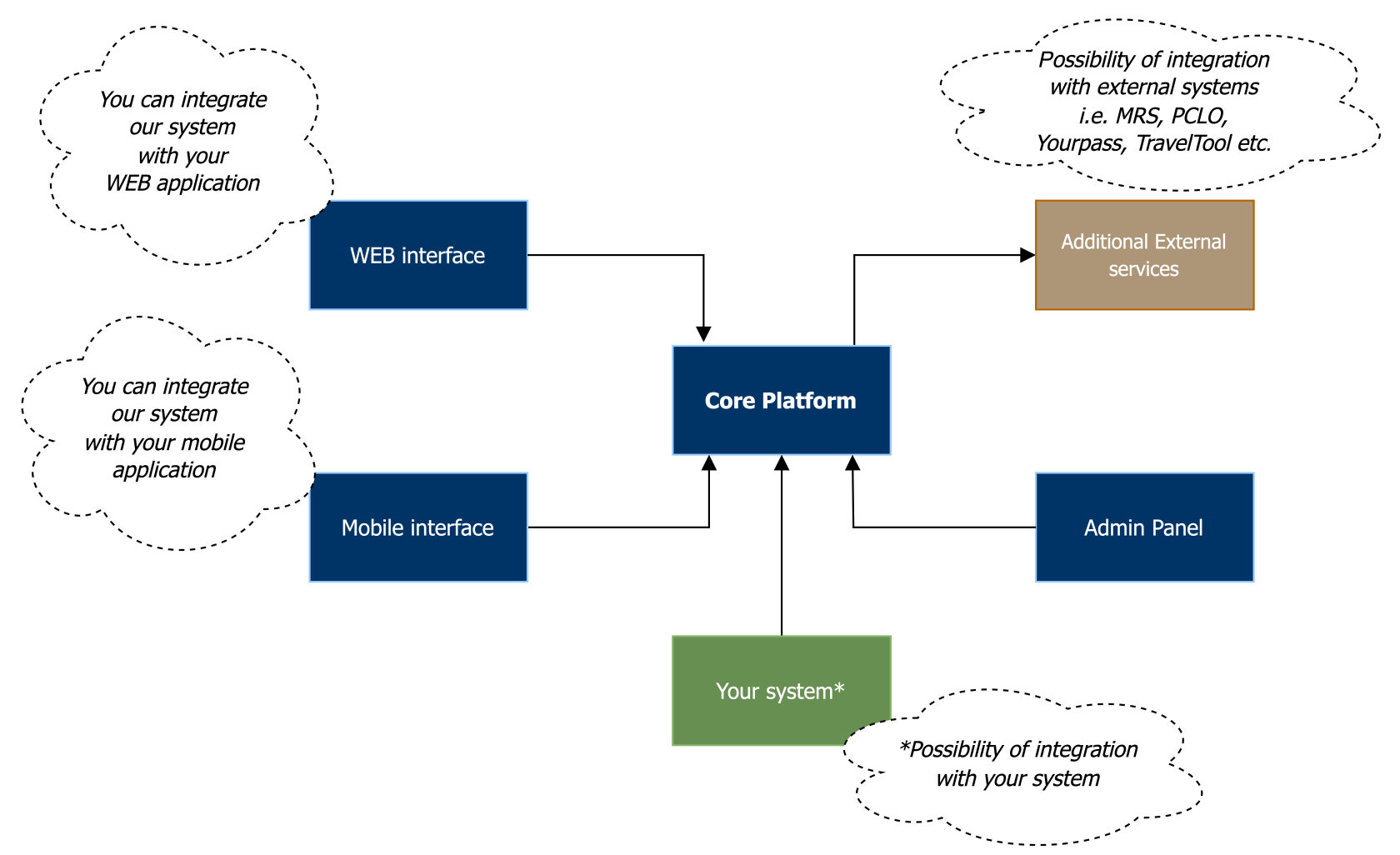
Our **Core platform** is responsible for the main functionalities and data flow between services.

We offer various integration models with our platform:

- you can display selected components in your WEB or mobile application, e.g. using Webview interface.
- you can integrate with the services offered by our API.
- we can create a loyalty stand-alone platform with selected functionalities.

Additionally, we offer services integrated with external Partners - such as **Mastercard**, from where we have access to additional APIs.

# Intro slides

## Rewards &amp; Loyalty

<span style="font-weight: 200;">Loyalty platform integrated with Mastercard Rewards Systems and other solutions enables collection of points, redemption of rewards and various value added functionalities.</span>

<span style="font-weight: 200;">Link to: [Priceless Specials Program](https://www.bezcennechwile.pl)</span>

- <span style="font-weight: 200;">API: Mastercard Reward Systems, Pay With Rewards, Travel Tool, YesMail, Your Pass, Enrollment Widget to MRS</span>
- <span style="font-weight: 200;">Readiness: Live</span>
- <span style="font-weight: 200;">Widget available: Yes</span>
- <span style="font-weight: 200;">White label solution available: Yes</span>
- <span style="font-weight: 200;">Certification: Yes</span>
- <span style="font-weight: 200;">Implementation time: 6 months</span>

**[![Priceless Mastercard Rewards & Loyalty.png](https://developer.verestro.com/uploads/images/gallery/2022-07/scaled-1680-/priceless-mastercard-rewards-loyalty.png)](https://developer.verestro.com/uploads/images/gallery/2022-07/priceless-mastercard-rewards-loyalty.png)**

**[![MRS.png](https://developer.verestro.com/uploads/images/gallery/2022-07/scaled-1680-/mrs.png)](https://developer.verestro.com/uploads/images/gallery/2022-07/mrs.png)**
**[![Priceless Specials.png](https://developer.verestro.com/uploads/images/gallery/2022-07/scaled-1680-/priceless-specials.png)](https://developer.verestro.com/uploads/images/gallery/2022-07/priceless-specials.png)**
# Overview

## Main functionalities

This document provides information about the functionalities offered by the Verestro loyalty platform.  
They can be freely combined by the Partner and used in accordance with the description provided.

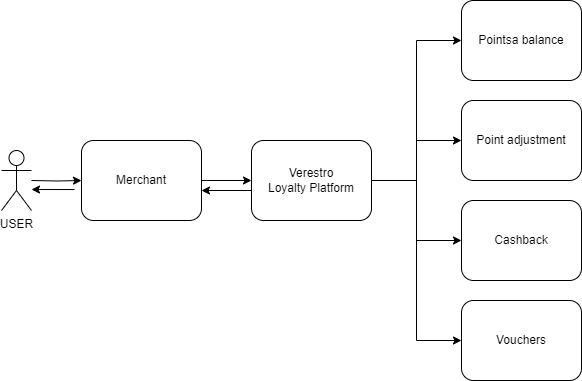
### Points balance

To display the point balance information for registered cards, Verestro send separate (per each card) API request to MRS system via getPointDetails WS.

The cardholder receives points for making any transaction with the card. For making a transaction with a partner. Points can be changed to various vouchers, rewards and can be withdraw as a cashback.

[![image-1702029673481.png](https://developer.verestro.com/uploads/images/gallery/2023-12/scaled-1680-/image-1702029673481.png)](https://developer.verestro.com/uploads/images/gallery/2023-12/image-1702029673481.png)
### Cashback

Cashback is functionality connected to the points service. Point are converted into the real currency with specific ratio, ex. 1:100. Ratio can be setup differently for the issuer.

### Vouchers

Vouchers as a functionality allows to add voucher codes to every type of available content. Vouchers are displayed to the user in the widget.

There are two types of voucher codes:

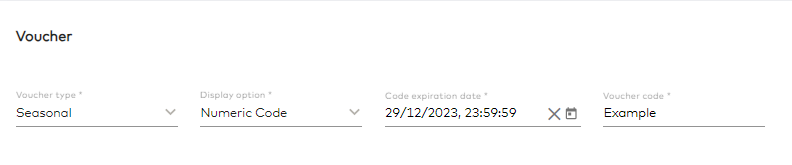
**Multi-use** - same code for every user capabile to redeem the code.

[![image-1699347650241.png](https://developer.verestro.com/uploads/images/gallery/2023-11/scaled-1680-/image-1699347650241.png)](https://developer.verestro.com/uploads/images/gallery/2023-11/image-1699347650241.png)

**Unique-use** - every redemption is a different code. One user can redeem multiple codes depending on limits.

[![image-1699347680834.png](https://developer.verestro.com/uploads/images/gallery/2023-11/scaled-1680-/image-1699347680834.png)](https://developer.verestro.com/uploads/images/gallery/2023-11/image-1699347680834.png)
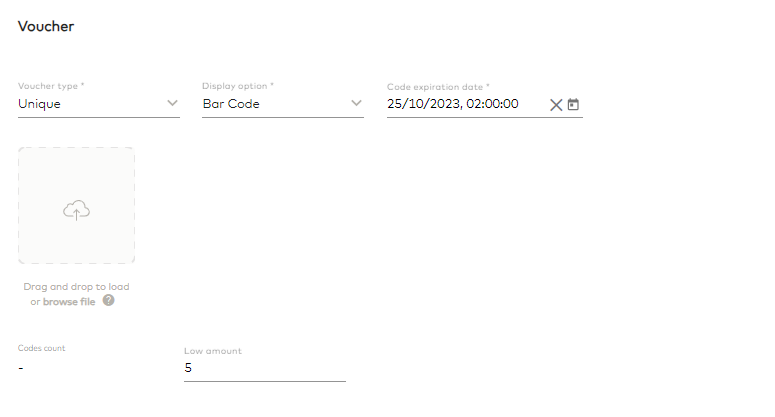
**Fields related to Vouchers:**

Voucher type (required) - Seasonal (multi-use)/Unique

Display option (required) - Bar code/Alphanumeric/QR code

Code expiration date (required) - After this date code will not be visible to the user

Voucher code (required for the multi-use) - code can be added

Add CSV file (required for the unique codes) - CSV file with codes can be added

Codes count (for the unique codes) - will show the number of added codes in the last added file

Low amount (for unique codes) - the administrator can set when the end user will be shown a low stock message

### Free vouchers

Free vouchers ale related to rewards with similar fields, but without connection to an external API. All Free Vouchers can be added, edited and deleted in Admin Panel.

Limits:

- Start/end date
- Limit per user
- Total amount
- Status (active/inactive)

Additional fields:

- Description
- Usage instruction
- Terms and conditions
- Images


### Benefits

#### Static benefits

Static benefits are a type of offers added and fully managed in CMS. Benefits are always active and their main goal is to display descriptions.

##### Fields in Static Benefits:

Name (<span style="color: #ba372a;">required</span>) - name of the benefit

Access type (<span style="color: #ba372a;">required</span>) - related to the card status. Options to choose from are: Premium, Mass and All.

Status (<span style="color: #ba372a;">required</span>) - Active/Inactive

Market (<span style="color: #ba372a;">required</span>) - options to choose from are PL/CZ/SK. New market can be added.

ProgramId - identifier from MRS. Benefit will be shown only for specific Program.

Phone number - number will be displayed as a link and will open the phone app.

Start/end date - Benefit will only be displayed for the specified time period.

Activate link - when it is fulfilled with URL, "Activate" button will be displayed for the end user.

Activate button label - customizable button name.

Descriptions - Benefit informations.

Images - Images for decoration.

#### Voucher benefits

Voucher benefits are additional type of benefits. Fields are the same with descriptions and limits/decorators, but with additional possibility to add voucher codes.

##### Fields in Voucher Benefits:

Name (<span style="color: #ba372a;">required</span>) - name of the benefit

Access type (<span style="color: #ba372a;">required</span>) - related to the card status. Options to choose from are: Premium, Mass and All.

Status (<span style="color: #ba372a;">required</span>) - Active/Inactive

Market (<span style="color: #ba372a;">required</span>) - options to choose from are PL/CZ/SK. New market can be added.

ProgramId - identifier from MRS. Benefit will be shown only for specific Program.

Phone number - number will be displayed as a link and will open the phone app.

Start/end date - Benefit will only be displayed for the specified time period.

Activate link - when it is fulfilled with URL, "Activate" button will be displayed for the end user.

Activate button label - customizable button name.

Descriptions - Benefit informations.

Images - Images for decoration.

Vouchers:

[![image-1702031667000.png](https://developer.verestro.com/uploads/images/gallery/2023-12/scaled-1680-/image-1702031667000.png)](https://developer.verestro.com/uploads/images/gallery/2023-12/image-1702031667000.png)
#####   


#### Usage-based Benefits

<p class="callout info">Usage-based Benefits require access to user spending e.g. transaction history.</p>

This type of benefits are directly connected to user spending. Admin can setup conditions regarding spending amount or transactions.

##### Fields in Usage-based Benefits:

Name (<span style="color: #ba372a;">required</span>) - name of the benefit

Status (<span style="color: #ba372a;">required</span>) - Active/Inactive

Market (<span style="color: #ba372a;">required</span>) - options to choose from are PL/CZ/SK. New market can be added.

Provider URL - URL for the prividers website.

Descriptions - Benefit informations.

Images - Images for decoration.

Requirements:

Spending - limitation only for the users with spending amount higher than N

Transactions - limitation only for the users with transactions amount higher than N

Vouchers:

[![image-1702031667000.png](https://developer.verestro.com/uploads/images/gallery/2023-12/scaled-1680-/image-1702031667000.png)](https://developer.verestro.com/uploads/images/gallery/2023-12/image-1702031667000.png)

#### Benefits from External Partners

##### Travel Tool

Travel Tool is supported by existing Travel Tool vendor (Inspire). Benefit enables possibility to use the points on various travel selections (Hotel, Car Rental, Flight).

While in the loyalty platform, the customer can go to the service from the benefits screen, clicking on this Travel Tool benefit is transferred to the dedicated TravelTool website where is logged in (based on SSO login). There is information about the number of available point and list of offers.

<p class="callout info">Travel tool benefit requires connection to MRS API and the available MRS program.</p>

###   


### Offers

RPM is using Personalized Card Links Offers (PCLO) to provide possibility for cardholders to accrue additional points per specific merchant offers.

#### Cashback Offers

Cashback Offers are provided to users based on transactions made at participating merchants with Mastercard card and MRS points earned from this spend due to MRS Always-On Promotions configured for all cards (except Business). Cashback means points that can be converted into money back collected/provided by the merchant on cardholder’s virtual account and can be later redeemed for specific catalog item or redeemed as cash. In addition to MRS Always-On Promotions the Program will have the PCLO offers configured per merchant to allow accruing additional points for user based on their transaction activity at these merchants.

Generic offer refers to standalone MRS offer without matching with PCLO offer. It can be set-up separately in CMS.

<span style="color: #1c1e3f; font-size: 2.333em; font-weight: 400;">Rewards catalog</span>

<p class="callout info">Rewards catalog requires connection to MRS API and the available MRS program.</p>

In order to retrieve information on Catalog, Verestro uses getRewardCatalog WS and getRewardItems WS which return a full listing of the rewards catalog for a given program of cardholder’s card.

Verestro displays different categories for Cardholder.

**The following data will be received from MRS API response:**

1. rewardMatrixItemId – the internal MRS Matrix ID associated with the item,
2. rewardItemShortDescription - The short description of the item,
3. rewardItemLongDescription - The long description of the item,
4. Image URL - The url that links to the item image,
5. rewardMatrixItemPointValue – The point value of the reward item,
6. shippingAddressSw – indicates whether or not a Shipping Address is required (e.g. physical or instant),
7. redeemableItemSw – indicates if the Reward Item can be redeemed,
8. physicalAddressRequiredSw – indicates whether or not the Reward Item will be shipped to a physical address,
9. SingleQuantityRedemptionSw – indicates whether or not the Reward Item can only be redeemed with a quantity of one,
10. emailAddressRequiredSw – indicates if an Email Address is required for the Reward Item when redeemed,
11. orderInformation - the Shipping Message associated to the Reward Matrix Item’s Reward Category in the requested language,
12. personalizationInformationSw,
13. personalizationInformationLength,
14. personalizationLabel.

The cardholder can choose to mark a specific reward as “selected”. Such a reward is displayed on the main page.

# Priceless Specials Webview

## Overview

This documentation describe integration into Priceless Specials platform using few services provided by Verestro.

We should highlight few main products:

- Full SDK (called in document WEB SDK) - web based service, that allows to integrate Priceless Specials product into partners application. It can be embedded in the mobile application or provide service after redirect to it from partners web panel.
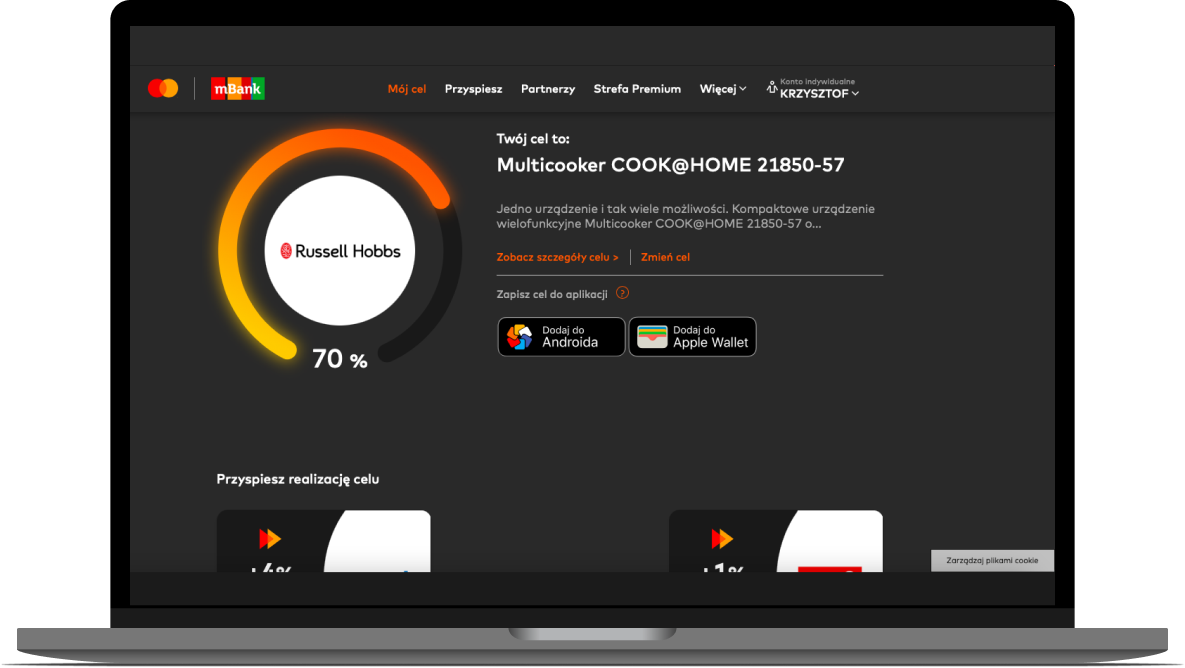
- Goal widget - web based micro app, that can display selected reward and progress % for particular card info.
- Company API - API that allows partner to interact with Priceless Specials product specific data e.g., *customer point adjustment.* The more information about API specifications is [here.](https://developer.verestro.com/books/priceless-specials/page/technical-documentation)

## API Domain

All methods are available on below URL except initialization method.

**Endpoint URLs:**

Stage: [https://rpm-management.upaidtest.pl/](https://rpm-management.upaidtest.pl/),

Prod: [https://rpm.secure-verestro.com/](https://rpm.secure-verestro.com/).

## Security and authentication

For backend-backend communication, it is required to attach appropriate certificates to the requests sent. This applies to:

- Registration process - /company/enroll, company/add\_card,
- Endpoints described in Chapter 6.

Method issuer/initialize\_sdk does not require certificate.

### Certificate generation process.

First, the Partner needs generate a CSR (Certificate Signing Request).

The command to generate the CSR:

**openssl req -new -newkey rsa:4096 -keyout client.key -out client.csr -nodes -subj '/CN=bankname cert/emailAddress=rpm@bankname.pl'**

Once the CSR is generated, it should be passed to Verestro. Verestro will sign the CSR and provide x509 certificates based on it:

- certificate CERT.CRT – used for backend-backend communication,
- certificate CA.CRT – (recommended) used for backend-backend communication,
- certificate to sign the trustedIdentityToken (one of the payload parameters of initializeSdkToken).

JWS tokens must have additional header:

<table id="bkmrk-name-description-x5c" style="width: 1072px;" width="546"><tbody><tr><td style="width: 127.812px;" width="27">**Name**

</td><td style="width: 681.188px;">**Description**

</td></tr><tr><td style="width: 127.812px;" width="27">x5c

</td><td style="width: 681.188px;">Parameter contains the X.509 certificates chain ([RFC7515#section-4.1.6](https://tools.ietf.org/html/rfc7515#section-4.1.6))

</td></tr></tbody></table>

### PAN hash generating

PAN hash is an identifier in the Partner-Verestro communication and specifies the card for which the action should be performed.

It is used in:

- Endpoints described in Chapter 6,
- As a parameter in the trustedIdentityToken payload.

PAN hash generation process:

Hash value is as SHA-256 HMAC, please see links below for more details:

RFC: https://tools.ietf.org/html/rfc4868#page-3,

Wiki: [https://en.wikipedia.org/wiki/HMAC](https://en.wikipedia.org/wiki/HMAC).

Test and prod value of key used to calculate HMAC will be delivered by Verestro at the later stage of integration process.

To validate your implementation please check plain and hashed values below:

<table id="bkmrk-plaintext-%28hex%29-hash" style="width: 101.728%; height: 141.6px;"><tbody><tr style="height: 35.4px;"><td style="width: 32.0148%; height: 35.4px;" width="186">**Plaintext (HEX)**

</td><td style="width: 67.9852%; height: 35.4px;" width="394">**Hash**

</td></tr><tr style="height: 35.4px;"><td style="width: 32.0148%; height: 35.4px;" width="186">5555444433332222

</td><td style="width: 67.9852%; height: 35.4px;" width="394">4f64c445c859f7e53209e0091a5faef7e8b3ebbad899fbf8c74df09a6bfe5646

</td></tr><tr style="height: 35.4px;"><td style="width: 32.0148%; height: 35.4px;" width="186">6984576897634895763948576

</td><td style="width: 67.9852%; height: 35.4px;" width="394">4b2eab65ab16183fa6ac8a8b12ad690890db98c5ce20e6d56aa037b723bbe84

</td></tr><tr style="height: 35.4px;"><td style="width: 32.0148%; height: 35.4px;" width="186">someTestValue398048096859607

</td><td style="width: 67.9852%; height: 35.4px;" width="394">29596a78a7382e90159d8ec78a8d37baff57d05f676c0607dd7fb24b0396270ce

</td></tr></tbody></table>

### Encrypted PAN number

The structure of encrypted card number sent in the requests for methods:  
\- POST company/enroll  
\- POST company/add\_card  
\- POST company/card\_replace

**JWE structure**

Header:  
{  
"enc": "A256CBC-HS512",  
"alg": "RSA-OAEP-256"  
}  
Payload:   
"{"privateClaim":{"cardNumber":"5555666677778888"}}"

  
To encrypt the JWE, use the public key returned by GET company/public\_key

## <span style="color: #000000;">Registration flow</span>

Registration method are used to add the user and his cards to the MRS system and create an account on the Priceless Spiecials platform. Registration is possible without providing an email address, in which case the user will have to verify it in first log in.

### Card status

This endpoint returns information about card and consents status in MRS. If the card does not exist in the system, then the API returns: **code 404**.

**Headers:**

<table id="bkmrk-name-value-accept-ap" width="320"><tbody><tr><td width="130">**Name**

</td><td>**Value**

</td></tr><tr><td width="130">Accept

</td><td>application/json

</td></tr><tr><td width="130">Content-Type

</td><td>application/json

</td></tr></tbody></table>

**Request Details:**

HTTP GET/company/card\_agreements\_status/*{panHash}*

**Responses**

<table id="bkmrk-status%2C-body-descrip" style="width: 808px;" width="577"><tbody><tr><td style="width: 423.5px;" width="302">**Status, Body**

</td><td style="width: 396.5px;" width="275">**Description**

</td></tr><tr><td style="width: 423.5px;" width="302">HTTP\_200, SUCCES

{

 "termsAndCondition": true,

 "disclosureOfPersonalData": true,

 "processingPersonalData": true,

 "marketingInfoEmail": true,

 "marketingInfoPhone": true,

 "errorMessage": null

}

</td><td style="width: 396.5px;" width="275">Success.

</td></tr><tr><td style="width: 423.5px;" width="302">HTTP\_200, SUCCESS

{

 "termsAndCondition": null,

 "disclosureOfPersonalData": null,

 "processingPersonalData": null,

 "marketingInfoEmail": null,

 "marketingInfoPhone": null,

 "errorMessage": "CARD\_IS\_INACTIVE"

}

</td><td style="width: 396.5px;" width="275">Card is inactive in MRS System.

</td></tr><tr><td style="width: 423.5px;" width="302">HTTP\_200, SUCCES

{

 "termsAndCondition": true,

 "disclosureOfPersonalData": true,

 "processingPersonalData": true,

 "marketingInfoEmail": true,

 "marketingInfoPhone": true,

 "errorMessage": "USER\_EMAIL\_NOT\_VERIFIED"

}

</td><td style="width: 396.5px;" width="275">User didn’t confirm email address.

</td></tr><tr><td style="width: 423.5px;" width="302">HTTP\_404

</td><td style="width: 396.5px;" width="275">The card does not exist in system.

</td></tr></tbody></table>

### Add User with Cards

**Supported methods**

User add - POST company/enroll.

**Data structure**

For POST methods request body should contain JSON with combination of objects mentioned below.

**Request**

<table id="bkmrk-field-required-type-" style="width: 820px;" width="595"><tbody><tr><td colspan="2" style="width: 277.4px;" width="189">**Field**

</td><td style="width: 157.2px;" width="113">**Required**

</td><td style="width: 120.2px;" width="76">**Type**

</td><td style="width: 261.2px;" width="217">**Additional information**

</td></tr><tr><td colspan="2" style="width: 277.4px;" width="189">requestId

</td><td style="width: 157.2px;" width="113">No

</td><td style="width: 120.2px;" width="76">String

</td><td style="width: 261.2px;" width="217">External User Identifier provided by client. It can be used as an identifier in system (in standard UUID4).

</td></tr><tr><td colspan="2" style="width: 277.4px;" width="189">firstName

</td><td style="width: 157.2px;" width="113">Yes

</td><td style="width: 120.2px;" width="76">String

</td><td style="width: 261.2px;" width="217"></td></tr><tr><td colspan="2" style="width: 277.4px;" width="189">lastName

</td><td style="width: 157.2px;" width="113">Yes

</td><td style="width: 120.2px;" width="76">String

</td><td style="width: 261.2px;" width="217"></td></tr><tr><td colspan="2" style="width: 277.4px;" width="189">phoneNumber

</td><td style="width: 157.2px;" width="113">No

</td><td style="width: 120.2px;" width="76">String

</td><td style="width: 261.2px;" width="217">Should be passed with prefix.

</td></tr><tr><td colspan="2" style="width: 277.4px;" width="189">email

</td><td style="width: 157.2px;" width="113">No

</td><td style="width: 120.2px;" width="76">String

</td><td style="width: 261.2px;" width="217"></td></tr><tr><td colspan="2" style="width: 277.4px;" width="189">zipCode

</td><td style="width: 157.2px;" width="113">No, recommended

</td><td style="width: 120.2px;" width="76">String, optional

</td><td style="width: 261.2px;" width="217">format: NN-NNN.

</td></tr><tr><td colspan="2" style="width: 277.4px;" width="189">birthDate

</td><td style="width: 157.2px;" width="113">No, recommended

</td><td style="width: 120.2px;" width="76">String, optional

</td><td style="width: 261.2px;" width="217">format: YYYY-MM-DD.

</td></tr><tr><td colspan="2" style="width: 277.4px;" width="189">cards

</td><td style="width: 157.2px;" width="113">Yes

</td><td style="width: 120.2px;" width="76">Array

</td><td style="width: 261.2px;" width="217">Array of Card Objects.

</td></tr><tr><td style="width: 138.7px;" width="19"></td><td style="width: 138.7px;" width="170">encryptedNumberCard

</td><td style="width: 157.2px;" width="113">Yes

</td><td style="width: 120.2px;" width="76">String

</td><td style="width: 261.2px;" width="217">Encrypted PAN JWE.

</td></tr><tr><td style="width: 138.7px;" width="19"></td><td style="width: 138.7px;" width="170">programId

</td><td style="width: 157.2px;" width="113">No

</td><td style="width: 120.2px;" width="76">String

</td><td style="width: 261.2px;" width="217"></td></tr><tr><td style="width: 138.7px;" width="19"></td><td style="width: 138.7px;" width="170">programIdentifier

</td><td style="width: 157.2px;" width="113">No

</td><td style="width: 120.2px;" width="76">String

</td><td style="width: 261.2px;" width="217"></td></tr><tr><td style="width: 138.7px;" width="19"></td><td style="width: 138.7px;" width="170">termsAndCondition

</td><td style="width: 157.2px;" width="113">Yes

</td><td style="width: 120.2px;" width="76">Boolean

</td><td style="width: 261.2px;" width="217">true or false.

</td></tr><tr><td style="width: 138.7px;" width="19"></td><td style="width: 138.7px;" width="170">disclosureOfPersonalData

</td><td style="width: 157.2px;" width="113">Yes

</td><td style="width: 120.2px;" width="76">Boolean

</td><td style="width: 261.2px;" width="217">true or false.

</td></tr><tr><td style="width: 138.7px;" width="19"></td><td style="width: 138.7px;" width="170">processingPersonalData

</td><td style="width: 157.2px;" width="113">Yes

</td><td style="width: 120.2px;" width="76">Boolean

</td><td style="width: 261.2px;" width="217">true or false.

</td></tr><tr><td style="width: 138.7px;" width="19"></td><td style="width: 138.7px;" width="170">marketingInfoEmail

</td><td style="width: 157.2px;" width="113">Yes

</td><td style="width: 120.2px;" width="76">Boolean

</td><td style="width: 261.2px;" width="217">true or false.

</td></tr><tr><td style="width: 138.7px;" width="19"></td><td style="width: 138.7px;" width="170">marketingInfoPhone

</td><td style="width: 157.2px;" width="113">Yes

</td><td style="width: 120.2px;" width="76">Boolean

</td><td style="width: 261.2px;" width="217">true or false.

</td></tr></tbody></table>

**Example:**

```JSON
{
   "requestId":"123e4567-e89b-12d3-a456-426614174000",
   "firstName":"John",
   "lastName":"Smith",
   "phoneNumber":"+48777666555",
   "email":"john.smith@gmail.com",
   "zipCode":"25-345",
   "birthDate":"1998-12-12",
   "cards":[
      {  
        "encryptedNumberCard":"eyJhbGciOiJIUzI1NiIsInR5cCI6IkpXVCJ9.eyJlbmNyeXB0ZWROdW1iZXJDYXJkIjoiNTEzODQzMDMxMjA0MjA0MCJ9",
         "programId":345353,
         "termsAndCondition":true,
         "disclosureOfPersonalData":true,
         "processingPersonalData":true,
         "marketingInfoEmail":true,
         "marketingInfoPhone":true
      }
   ]
}
```

**Responses for Partners that use PAN (primary account number) as BCN (bank customer number)**

<table id="bkmrk-status%2C-body-descrip-0" style="width: 971px;" width="644"><tbody><tr><td style="width: 450.5px;" width="369">**Status, Body**

</td><td style="width: 356.5px;" width="275">**Description**

</td></tr><tr><td style="width: 450.5px;" width="369">HTTP\_201, SUCCESS

</td><td style="width: 356.5px;" width="275">Success (email/userId passed in a request).

</td></tr><tr><td style="width: 450.5px;" width="369">HTTP\_201, SUCCESS

{  
 ”requestId”: "123e4567-e89b-12d3-a456-426614174000"

}

</td><td style="width: 356.5px;" width="275">Success (email/userId passed in a request).

requestid returned to add new cards if user does not verify email address.

</td></tr><tr><td style="width: 450.5px;" width="369">HTTP\_201, SUCCESS

{

 "requestId": "123e4567-e89b-12d3-a456-426614174000",

 "failedPanHashes": \[

 {

 "panHash": "a7a89543br958437543bf984375bc3498nvuiey74783"

 }

 \]

}

</td><td style="width: 356.5px;" width="275">Passed card/cards failed during adding to MRS system.

</td></tr><tr><td style="width: 450.5px;" width="369">HTTP\_400: CARD\_ALREADY\_EXIST

{

 "failedPanHashes": \[

 {

 "panHash": "a7a89543br958437543bf984375bc3498nvuiey74783"

 }

 \]

}

</td><td style="width: 356.5px;" width="275">Passed value is not unique in system.

</td></tr><tr><td style="width: 450.5px;" width="369">HTTP\_400: INVALID\_VALUE\_CARD

</td><td style="width: 356.5px;" width="275">Passed Card value is invalid.

</td></tr><tr><td style="width: 450.5px;" width="369">HTTP\_400: INVALID\_VALUE\_EMAIL

</td><td style="width: 356.5px;" width="275">Passed email is invalid.

</td></tr><tr><td style="width: 450.5px;" width="369">HTTP\_400: INVALID\_VALUE\_BIRTH\_DATE

</td><td style="width: 356.5px;" width="275">Passed Birth date is invalid.

</td></tr><tr><td style="width: 450.5px;" width="369">HTTP\_400: CARDS\_LIMIT\_EXCEEDED

</td><td style="width: 356.5px;" width="275">Too many passed Cards. Limit 10 cards.

</td></tr><tr><td style="width: 450.5px;" width="369">HTTP\_403: ACCESS\_DENIED

</td><td style="width: 356.5px;" width="275">Method is not available.

</td></tr><tr><td style="width: 450.5px;" width="369">HTTP\_401: INVALID\_CERTIFICATE

</td><td style="width: 356.5px;" width="275">Passed certificate is invalid.

</td></tr></tbody></table>

**Responses for banks that use clientId as BCN (bank customer number)**

<table id="bkmrk-status%2C-body-descrip-1" style="width: 971px;" width="644"><tbody><tr><td style="width: 450.5px;" width="369">**Status, Body**

</td><td style="width: 356.5px;" width="275">**Description**

</td></tr><tr><td style="width: 450.5px;" width="369">HTTP\_201, SUCCESS

{

“clientId”: “PXPYVJ2HZTW0CK0G4840K4WGGOWOKO”

}

</td><td style="width: 356.5px;" width="275">Success (email/userId passed in a request).

</td></tr><tr><td style="width: 450.5px;" width="369">HTTP\_201, SUCCESS

{  
“clientId”:“PXPYVJ2HZTW0CK0G4840K4WGGOWOKO”,

”requestId”: "123e4567-e89b-12d3-a456-426614174000"

}

</td><td style="width: 356.5px;" width="275">Success (email/userId passed in a request).

requestid returned to add new cards if user does not verify email address.

</td></tr><tr><td style="width: 450.5px;" width="369">HTTP\_201, SUCCESS

{

 "clientId":"PXPYVJ2HZTW0CK0G4840K4WGGOWOKO ",

 "requestId": "123e4567-e89b-12d3-a456-426614174000",

 "failedPanHashes": \[

 {

 "panHash": "a7a89543br958437543bf984375bc3498nvuiey74783"

 }

 \]

}

</td><td style="width: 356.5px;" width="275">Passed card/cards failed during adding to MRS system.

</td></tr><tr><td style="width: 450.5px;" width="369">HTTP\_400: CARD\_ALREADY\_EXIST

{

 "failedPanHashes": \[

 {

 "panHash": "a7a89543br958437543bf984375bc3498nvuiey74783"

 }

 \]

}

</td><td style="width: 356.5px;" width="275">Passed value is not unique in system.

</td></tr><tr><td style="width: 450.5px;" width="369">HTTP\_400: INVALID\_VALUE\_CARD

</td><td style="width: 356.5px;" width="275">Passed Card value is invalid.

</td></tr><tr><td style="width: 450.5px;" width="369">HTTP\_400: INVALID\_VALUE\_EMAIL

</td><td style="width: 356.5px;" width="275">Passed email is invalid.

</td></tr><tr><td style="width: 450.5px;" width="369">HTTP\_400: INVALID\_VALUE\_BIRTH\_DATE

</td><td style="width: 356.5px;" width="275">Passed Birth date is invalid.

</td></tr><tr><td style="width: 450.5px;" width="369">HTTP\_400: CARDS\_LIMIT\_EXCEEDED

</td><td style="width: 356.5px;" width="275">Too many passed Cards. Limit 10 cards.

</td></tr><tr><td style="width: 450.5px;" width="369">HTTP\_403: ACCESS\_DENIED

</td><td style="width: 356.5px;" width="275">Method is not available.

</td></tr><tr><td style="width: 450.5px;" width="369">HTTP\_401: INVALID\_CERTIFICATE

</td><td style="width: 356.5px;" width="275">Passed certificate is invalid.

</td></tr></tbody></table>

### Add Card to existing account

**Supported methods**

User add - POST company/add\_card.

**Data structure**

For POST methods request body should contain JSON with combination of objects mentioned below.

**Request**

<table id="bkmrk-field-required-type--0" style="width: 982px; height: 671.2px;" width="633"><tbody><tr style="height: 35.4px;"><td colspan="2" style="width: 304.25px; height: 35.4px;" width="199">**Field**

</td><td style="width: 109.113px; height: 35.4px;" width="94">**Required**

</td><td style="width: 133.15px; height: 35.4px;" width="113">**Type**

</td><td style="width: 262.487px; height: 35.4px;" width="227">**Additional information**

</td></tr><tr style="height: 35.4px;"><td colspan="2" style="width: 304.25px; height: 35.4px;" width="199">email

</td><td style="width: 109.113px; height: 35.4px;" width="94">No

</td><td style="width: 133.15px; height: 35.4px;" width="113">String

</td><td style="width: 262.487px; height: 35.4px;" width="227">Email or userId is mandatory.

</td></tr><tr style="height: 35.4px;"><td colspan="2" style="width: 304.25px; height: 35.4px;" width="199">userId

</td><td style="width: 109.113px; height: 35.4px;" width="94">No

</td><td style="width: 133.15px; height: 35.4px;" width="113">String

</td><td style="width: 262.487px; height: 35.4px;" width="227">Email or userId is mandatory.

</td></tr><tr style="height: 35.4px;"><td colspan="2" style="width: 304.25px; height: 35.4px;" width="199">cards

</td><td style="width: 109.113px; height: 35.4px;" width="94">Yes

</td><td style="width: 133.15px; height: 35.4px;" width="113">Array

</td><td style="width: 262.487px; height: 35.4px;" width="227">Array of Card Objects.

</td></tr><tr style="height: 80.2px;"><td style="width: 118.125px; height: 80.2px;" width="19"></td><td style="width: 186.125px; height: 80.2px;" width="180">encryptedNumberCard

</td><td style="width: 109.113px; height: 80.2px;" width="94">Yes

</td><td style="width: 133.15px; height: 80.2px;" width="113">Sting

</td><td style="width: 262.487px; height: 80.2px;" width="227">Encrypted PAN JWE.

</td></tr><tr style="height: 35.4px;"><td style="width: 118.125px; height: 35.4px;" width="19"></td><td style="width: 186.125px; height: 35.4px;" width="180">programId

</td><td style="width: 109.113px; height: 35.4px;" width="94">No

</td><td style="width: 133.15px; height: 35.4px;" width="113">String

</td><td style="width: 262.487px; height: 35.4px;" width="227"></td></tr><tr style="height: 35.4px;"><td style="width: 118.125px; height: 35.4px;" width="19"></td><td style="width: 186.125px; height: 35.4px;" width="180">programIdentifier

</td><td style="width: 109.113px; height: 35.4px;" width="94">No

</td><td style="width: 133.15px; height: 35.4px;" width="113">String

</td><td style="width: 262.487px; height: 35.4px;" width="227"></td></tr><tr style="height: 80.2px;"><td style="width: 118.125px; height: 80.2px;" width="19"></td><td style="width: 186.125px; height: 80.2px;" width="180">termsAndCondition

</td><td style="width: 109.113px; height: 80.2px;" width="94">Yes

</td><td style="width: 133.15px; height: 80.2px;" width="113">Boolean

</td><td style="width: 262.487px; height: 80.2px;" width="227">true or false.

</td></tr><tr style="height: 80.2px;"><td style="width: 118.125px; height: 80.2px;" width="19"></td><td style="width: 186.125px; height: 80.2px;" width="180">disclosureOfPersonalData

</td><td style="width: 109.113px; height: 80.2px;" width="94">Yes

</td><td style="width: 133.15px; height: 80.2px;" width="113">Boolean

</td><td style="width: 262.487px; height: 80.2px;" width="227">true or false.

</td></tr><tr style="height: 57.8px;"><td style="width: 118.125px; height: 57.8px;" width="19"></td><td style="width: 186.125px; height: 57.8px;" width="180">processingPersonalData

</td><td style="width: 109.113px; height: 57.8px;" width="94">Yes

</td><td style="width: 133.15px; height: 57.8px;" width="113">Boolean

</td><td style="width: 262.487px; height: 57.8px;" width="227">true or false.

</td></tr><tr style="height: 80.2px;"><td style="width: 118.125px; height: 80.2px;" width="19"></td><td style="width: 186.125px; height: 80.2px;" width="180">marketingInfoEmail

</td><td style="width: 109.113px; height: 80.2px;" width="94">Yes

</td><td style="width: 133.15px; height: 80.2px;" width="113">Boolean

</td><td style="width: 262.487px; height: 80.2px;" width="227">true or false.

</td></tr><tr style="height: 80.2px;"><td style="width: 118.125px; height: 80.2px;" width="19"></td><td style="width: 186.125px; height: 80.2px;" width="180">marketingInfoPhone

</td><td style="width: 109.113px; height: 80.2px;" width="94">Yes

</td><td style="width: 133.15px; height: 80.2px;" width="113">Boolean

</td><td style="width: 262.487px; height: 80.2px;" width="227">true or false.

</td></tr></tbody></table>

**Example:**

```JSON
{
   "email":"john.smith@gmail.com",
   "cards":[
      {
		 "encryptedNumberCard":"eyJhbGciOiJIUzI1NiIsInR5cCI6IkpXVCJ9.eyJlbmNyeXB0ZWROdW1iZXJDYXJkIjoiNTEzODQzMDMxMjA0MjA0MCJ9",
         "programId":345353,
         "termsAndCondition":true,
         "disclosureOfPersonalData":true,
         "processingPersonalData":true,
         "marketingInfoEmail":true,
         "marketingInfoPhone":true
      }
   ]
}
```

**Responses for banks that use PAN (primary account number) as BCN (bank customer number)**

<table id="bkmrk-status%2C-body-descrip-2" style="width: 1000px;" width="623"><tbody><tr><td style="width: 456px;" width="378">**Status, Body**

</td><td style="width: 355px;" width="245">**Description**

</td></tr><tr><td style="width: 456px;" width="378">HTTP\_201, SUCCES

</td><td style="width: 355px;" width="245">Success.

</td></tr><tr><td style="width: 456px;" width="378">HTTP\_201, SUCCESS

{

 "failedPanHashes": \[

 {

 "panHash": "a7a89543br958437543bf984375bc3498nvuiey74783"

 }

 \]

}

</td><td style="width: 355px;" width="245">Passed card/cards failed during adding to MRS system.

</td></tr><tr><td style="width: 456px;" width="378">HTTP\_400: CARD\_ALREADY\_EXIST

{

 "failedPanHashes": \[

 {

 "panHash": "a7a89543br958437543bf984375bc3498nvuiey74783"

 }

 \]

}

</td><td style="width: 355px;" width="245">Passed value is not unique in system.

Request is rejected, no cards have been added to the system.

</td></tr><tr><td style="width: 456px;" width="378">HTTP\_400: INVALID\_VALUE\_CARD

</td><td style="width: 355px;" width="245">Passed Card value is invalid.

</td></tr><tr><td style="width: 456px;" width="378">HTTP\_400: INVALID\_VALUE\_EMAIL

</td><td style="width: 355px;" width="245">Passed email is invalid.

</td></tr><tr><td style="width: 456px;" width="378">HTTP\_400: INVALID\_VALUE\_USERID

</td><td style="width: 355px;" width="245">Passed userId is invalid

</td></tr><tr><td style="width: 456px;" width="378">HTTP\_400: CARDS\_LIMIT\_EXCEEDED

</td><td style="width: 355px;" width="245">Too many passed Cards. Limit 10 cards.

</td></tr><tr><td style="width: 456px;" width="378">HTTP\_403: ACCESS\_DENIED

</td><td style="width: 355px;" width="245">Method is not available.

</td></tr><tr><td style="width: 456px;" width="378">HTTP\_401: INVALID\_CERTIFICATE

</td><td style="width: 355px;" width="245">Passed certificate is invalid.

</td></tr></tbody></table>

**Responses for banks that use clientId as BCN (bank customer number)**

<table id="bkmrk-status%2C-body-descrip-3" style="width: 994px;" width="633"><tbody><tr><td style="width: 459px;" width="369">**Status, Body**

</td><td style="width: 354px;" width="264">**Description**

</td></tr><tr><td style="width: 459px;" width="369">HTTP\_200, SUCCES

{

“clientId” : “asdh-adss-sada-sadss”

}

</td><td style="width: 354px;" width="264">Success.

</td></tr><tr><td style="width: 459px;" width="369">HTTP\_200, SUCCESS

{

 "clientId": "asdh-adss-sada-sadss",

 "failedPanHashes": \[

 {

 "panHash": "a7a89543br958437543bf984375bc3498nvuiey74783"

 }

 \]

}

</td><td style="width: 354px;" width="264">Passed card/cards failed during adding to MRS system.

</td></tr><tr><td style="width: 459px;" width="369">HTTP\_400: CARD\_ALREADY\_EXIST

{

 "failedPanHashes": \[

 {

 "panHash": "a7a89543br958437543bf984375bc3498nvuiey74783"

 }

 \]

}

</td><td style="width: 354px;" width="264">Passed value is not unique in system.

Request is rejected, no cards have been added to the system.

</td></tr><tr><td style="width: 459px;" width="369">HTTP\_400: INVALID\_VALUE\_CARD

</td><td style="width: 354px;" width="264">Passed Card value is invalid.

</td></tr><tr><td style="width: 459px;" width="369">HTTP\_400: INVALID\_VALUE\_EMAIL

</td><td style="width: 354px;" width="264">Passed email is invalid.

</td></tr><tr><td style="width: 459px;" width="369">HTTP\_400: INVALID\_VALUE\_USERID

</td><td style="width: 354px;" width="264">Passed userId is invalid

</td></tr><tr><td style="width: 459px;" width="369">HTTP\_400: CARDS\_LIMIT\_EXCEEDED

</td><td style="width: 354px;" width="264">Too many passed Cards. Limit 10 cards.

</td></tr><tr><td style="width: 459px;" width="369">HTTP\_403: ACCESS\_DENIED

</td><td style="width: 354px;" width="264">Method is not available.

</td></tr><tr><td style="width: 459px;" width="369">HTTP\_401: INVALID\_CERTIFICATE

</td><td style="width: 354px;" width="264">Passed certificate is invalid.

</td></tr></tbody></table>

### Download key to encrypt PAN

**Supported methods**

Download key – HTTP GET /company/enrollment/public\_key.

**Data structure**

Body of this method should be empty.

**Responses**

<table id="bkmrk-status%2C-body-descrip-4" style="width: 1048px;" width="577"><tbody><tr><td style="width: 561.5px;" width="444">**Status, Body**

</td><td style="width: 250.5px;" width="133">**Description**

</td></tr><tr><td style="width: 561.5px;" width="444">HTTP\_200, SUCCESS

{

”publicKey” : "LS0tLS1CRUdJTiBQVUJMSUMgS0VZLS0tLS0KTUlJQ0lqQU5CZ2txaGtpRzl3MEJBUUVGQUFPQ0FnOEFNSUlDQ2dLQ0FnRUFwTS9IamdEZHlXUXVVRWhRNkV2MgpHVGx5SnlrcHBUdU1jODFxTSt1Mm03ZDFVdnpHNXdUT1k3OVZVWGdDdFBJMkNXZ05BcXo0aGk4Ymp4WjhOSi9UCjRoMzhya2xoSWh2anJqQ0w0NUlESUVqOTlmREt1R1IySzBkQlY4eDhjT2drL09jaUhqblFTVytoL05RTFRpTHIKTHkzbzV0dDhOaVNvWVJuTjlmZEo3cytaRjdFdU1kMkhuMm1iSkVOS2MwYXRXekZtZkFQbnM4SmRVWWdNWWQxSgpsbll0cXdXVWdGYUxnVUplaDhyZGRrd3lqeHdUZVZ5M0lFQ1hYMHNMcWIwTTZ2NURFWGk5Y1ZVV09PT0FUSG1pCng0a2dreUNESG9uN3FZNjFaZEhQdVlSOFRDbXoxaW9sOGpLNkJZTUdlZjFsb01Qem9XVTVPeHFRTjVCMUJrdVMKOWJJUFZTZFlUYTdRanB5aGRHbGhSeWRrNFNVYmFTR2d2cXc1N01VRXJkZ2NKOW4rV2hPNUorc0VOclpOSFZhdQo1czlCaytiRlZuQXltZEtldEdQZzVtZC94Ulo0NzVwQ1FPVXR5UUErNnduSitONTlWZlJnTlNvaDhKK2lnYkhRCmJ2YTNqcjFqKzA1dkw1V1JhNnR1SzRoeTBQQ29JRUtYZGNUTk1uZjdDa3dVUlFsaTlVdEJqOVo5bHozL0VBTy8KWll5cnlxOWJqN0J0cTRMU0llNFR2K2c2NDg4bXVXMENnSGlQRDJGV3NsWUdMcGQ2V3JvQlR0ZCtCajhhUk5jMQo5YXFmcE1DTmZBdUJIMm5Lc1ZITkxJRnlrbEY3TktVVGRxcm8vcnBKUEFidFJJb0YvK3JtcUtHUVh2L0duSWQyCjN3SzNhMDUrNnZZeXhmcXNldUtUWGNNQ0F3RUFBUT09Ci0tLS0tRU5EIFBVQkxJQyBLRVktLS0tLQo="

}

</td><td style="width: 250.5px;" width="133">Success. Base 64 encrypted.

</td></tr></tbody></table>

## Connection to SDK and widgets

### Initialization

To connect you need to send HTTP POST request to /initialize\_sdk endpoint with required parameters. To choose what front-end way want to load, you need to provide *widget\_type* parameter that determines also required parameters.

You can also add the parameter “redirect”: false, which is optional – the default value is true. That causes that you are not redirected, but you receive a response 201 with the body (in this case, you have to redirect manually):

{

 "redirectUrl": "https://something.com"

}

**Endpoint URLs:**

Stage: https://rpm.upaidtest.pl/issuer,

Prod: https://rpm.upaid.pl/issuer.

**Headers:**

<table id="bkmrk-name-value-accept-ap-0" width="320"><tbody><tr><td width="130">**Name**

</td><td>**Value**

</td></tr><tr><td width="130">Accept

</td><td>application/json

</td></tr><tr><td width="130">Content-Type

</td><td>application/json

</td></tr></tbody></table>

**cURL example:**

```JSON
curl -X POST "http://rpm.upaidtest.pl/issuer/initialize_sdk" -H "Accept: application/json" -H "Content-Type: application/json" -d "{ \"initializeSDKToken\": \"eyJ0eXAiOiJKV1QiLCJhbGciOiJIUzI1NiJ9.eyJ0cnVzdGVkSWRlbnRpdHlUb2tlbiI6ImV5SmhiR2NpT2lKU1V6STFOaUlzSW5nMVl5STZXeUpOU1VsRk4zcERRMEYwWTBORFVVUkpiR1ZOYkVwS09FVnpWRUZPUW1kcmNXaHJhVWM1ZHpCQ1FWRnpSa0ZFUW1KTlVYTjNRMUZaUkZaUlVVZEZkMHBSVkVSRlZVMUNTVWRCTVZWRlEwRjNUR0pYUmpaaU0yUndXbGRPY21GWFZYaEZWRUZRUW1kT1ZrSkJZMDFEUm1Sb1kyNU9ObGxZWkdoTlVUUjNSRUZaUkZaUlVVdEVRVlpXWTBkR2NGcEVSVlJOUWtWSFFURlZSVU4zZDB0VFZsRm5WVzA1ZG1SRFFrUlJWRUZsUm5jd2VVMUVRVEJOYWtsNFRrUkJNRTVVWkdGR2R6QXdUVVJCTUUxVVkzaE9SRUV3VGxSa1lVMUNaM2hHYWtGVlFtZE9Wa0pCVFUxRVZsWlJVVlZzUlV4V1FrSlZiRkpQVWxaSmQyZG5TV2xOUVRCSFExTnhSMU5KWWpORVVVVkNRVkZWUVVFMFNVTkVkMEYzWjJkSlMwRnZTVU5CVVVSS2RXcHJTa0p2WjFoR1NFbHFVSEZEVUhGclRtY3ZRbnB1TkRWVFZIaFFTVFoyVm5kdk1YSktkV2cxT0RoT1RqZGxNa2cxT1dVNVRWUkNUbXRpWVRJMFFuUjZhMlJUY1U5VVJuZFhZV0pZTlVvclYyMW1UbnBuU3pkV1UwZG5TMDlYTVRBMVowZDNUM1pQV1RKcFUwSlhka3BDVTNKRlZuTkNhVWhuY1U0NVZtcDBVMWt5YTBZNGFFeHRRM1F6U21Odk1YVjBRVTF5UzB4SVUxRlNUbkV2VVhGbmVXWnZOVXRpVXpkT2R6YzJTblJTT0V4QmRsWndTUzhyVDI1bmRUWkhVblJIZDBNemRUTnhia05qZVZKU055dDVNSHBKUm5waU1YSm5SV3hNVkVzNFJXWjJVMlo2WW1NMVdFOXhUMjF3WkdjMUwzVlNTRXA1U25aRFQwTk9jRVp2V0M5YVNIaHpWMmR1TmtweFlqQk9SVXRtY21WcmFERlRNbGRVYkhSRWQwaGlhR0pNZDBOb05HVXlhMDU0TDFaeUwwbFNaRFp3TlhGQmRpdHVZMVl4YVZwVWJXcENRMlZ4Y0hwUk5XczFSalJLVlcxb2RrdzFRVzFPY1d0b01GRkVaR1ZvYTNKc1YwNU5RM0JXZVZCaGJFRlJWWGd5VmxaWFNsRjJSMHcwWlZCUmIxUmhSVkk1VDJ4YVlVZFZaV0psZGxFM2RrMXBTRXRaWmpCV05Hb3lPWGM0WmxSNFNXMUtTREJLTTJOSlEwaHZiVU00Y2xoMlpHWjZRVzlyWVdOT1QwTlJPV2w0WldGaWREY3ZTMjFYVkhkYWRHWllUamxwYXpSRVFUZExVbkprSzFWU1VHbzFkRkJaV21WQ2FIaGhlVTF0ZVc0dlNsUlRaVVZYS3l0WGNXeGhSR3gxVUd0MFdrbEpNVzEwTVhCVWMxVlBjekpwZURoa2VuQjBNMUkzYTBNNVJIVjBUVWxhU0VVMU4ycGtSV0YxTm1SWE4zUklhMGRGUjFWUlNtaHZjbkZpVVdaNVFYbGxNMkZGTUdKalozUnBWV3R0VlM4elMwRjVXRzU0ZG14d1prZGxTaTkwYmpGTmNVbHhXR2x1YUhCQk1UUk9haTh5YVRBM05XYzJVSEF2Ym5KVVQyRkNjRmdyU3paMGNGUlFjemRaYUc1SVNIUnhSRE5CTUdsdmMyWjROWFZ0VVVsRVFWRkJRazFCTUVkRFUzRkhVMGxpTTBSUlJVSkRkMVZCUVRSSlEwRlJRbXRsUWxVNE5tZERXbkp2TUM5b1dIUk9RUzlQYTFSdFZWWm9ObWh5WmxNck5tUlFOME12VG1wd1FXRmplR3BQWmtFdkx6Umlja3BLUVhGcU4wbElNVGxPWTJabVQwVkdNVTByYzI1TWJHWldOMU50T1RSblJ6WjNaRGc1U0RWUE9UZzNOVXA1ZUd4dmFXSk5UemN6TTNsVmIwWk5XVXN6VjJWTFIzaEJaekZhYjBGSVlXRTFNMlJ5VEU5bVQwYzJOMjlDWjNKME1EUnllSFZzZVZCcFZXbHFjemxMYzBzM1RVNXBNbFpSUlRKRVZXWmpRWE5xSzI1ak1WTjVXa3hCUVZoWFRtSTRiV2RPYm5aUVdVSnlaRFk1Wm1KblpuVTFjVXRPTmk5cGVWSTRPVVJyVVd0WE1YTjJjWE56YWtnM1IxcFFRbTV0UkN0eVlrSldWMkozTTB0M1NqSjFTR1pVZDNkNVVtTXdaRmxpWkRkM1l6TmtOVVZEUjBOemFVbHNSa2RrVTNWVUsyaE1WazVVU21GVFNWZHFhVzVoV1RWYU9WVlBTMk12ZWtSMU1IUlpPVVIyV0ZWcWJVeExlamhsZDB0dVR6RjZSVWN4ZVVSUlQwOWpVRXBuYjJwU2FrOXBRa1l5V0dzNGVtazNjMFp0VWpkeE9HWkVkR3hDZGxob09IaFhjWEIwZVhKUVlVZElhMWhMV2xsUVNuSXliRll3UjBKaE5pdHRUVWhqWkdaSVVXTkpTQzlhS3poU2JEbDVUemx1ZEdGd2VGWnNlVVpuYVdGbk9WWmpVa1JTYmsxeE5GRm1ia1JOV1VSWlEzcERRV1pQT0VwYWNXZG1iVzlXUldWNVV6RmxPSFpaWlhGc2VFa3ZjbmR5TjAxd2RYTXplblZYWmtablNUVldiMEpJY20xNWIwNTRkMkppVWxCdVQxY3hibWxVU2tRNWRFRldUemw2U0ZVM1pIbE5WbHBETkhKc2RIVTNjRU4xUnk5RldtczVOMjQyV2xwTlRVbzJNbU00WjJwUlpIbHVRMk4xUm1OdU5FWXlURVpUT1doelltZFpMMFpRTnpKSWMwazBPR1o2WkcxemNtVnJjMHhwTjBRekswTmhlRzF6WlhoTGFWZDZSakYwUWxnMk5GWjFWMGc1VEdoWGMybDFMM0JJT1ZkUmQwSldNWHBJTW5vclpIVlhaemgzS3pOaWVUVm5QVDBpWFgwLlcxMC5DblRISmpoRkRCekhYY0I3TjZsNFMtMS02Wk9TVngzc1hsRkg4TnV0T3dVY2p0Zmk4VE01SUtSaFlGMElFVWFDTjAxU1hHdGdzY3VJOGZ3ampPVVNleW5Ub1lhN2xRXzB4aHF1V0Y2aWZBNnRBTFBWVDFZa0VoaHRTT293Y3hWUVc1aF9yRU9QbmxLWmFTR2QzQ21WdU02dkdodFVsdWh5UXpRakloTFhTaHBpQllPLThSaG14dnI2Ykc5QXA3WVlyRGV5YWg0clY2T1F0ek9GNkhONUM4ZUFlYmRvMVExcVQxQ2pUWUVTQVR4NElmREpfRVhLejg4ZE1aWEV1Nk5ZWXEwZ0RGbGpqa3VIMUxCTzlDb2ZRbDY4NGpJSkFpeDFTVFVoS3R1M0Z5RWt0Uy1Wd05jMWZBb3RLZEV2VkxNZ0o5ZEpmSFdOempoNEVrSlVxU1ltTE45OHVBNklYSnhONk0wLURoUW0yNW83M3Q2Y19ZZjEwbXhvWDFIRFFsZGk5WXI3c1NaMGVRSy1Oc2F6MjlSMkxZMHhNMnFneVBnRUlCZFp6TE95M0JJbmw3NF9yeU5VSHFwWF9oUk9Md2JpUW5CLUVjT1ZWVnQ4SzZ4bDBmRDM4YU5IaGVJUVd3TjJhbmFWUFNsNXZkalF0R2tuUThFV3Y3bHZ1d0xSUThuSlp4Ukg0akdnMjRBV1hLY1BsNDJyejhWLWJSQmNhcVpIMDFPMjJ1OEFOaXN1MDlTSXY0aGFtekdFaklEVERjNGR5VUNTRTk0bmlqU0NadkRUVXY3RFEzd0dUaVJzZ1BJSjExOHpueS1EZk9xaDVSWHcxUS1LVzBSd3lkZFVsM3dlX1VjcEM0TkdWYkwzWFIwTDFqVHVIWWJYZkh2aTlMd1k2RlJYU2tEN2VtcyIsInBhbkhhc2giOiJhNjU4ODM1ZDEwZWVjMTQ3YjJiNDFhMWYwZmJiMjg0YWNkMjZiZTExZTkzYmQwNTVkYWQwZTQ1MzE5NWViNjhiIiwib3MiOiJ3aW5kb3dzIiwiZGV2aWNlSWQiOiJjdXN0b21lci1pZC0yMDAwIiwicmV0dXJuVXJsIjoiaHR0cDovL3d3dy5leGFtcGxlLmNvbS9yZXR1cm4iLCJrZWVwU2Vzc2lvblVybCI6Imh0dHA6Ly93d3cuZXhhbXBsZS5jb20va2VlcF9zZXNzaW9uX2hhc2giLCJ3aWRnZXRUeXBlIjoiZnVsbCIsImNvbXBhbnlJZCI6InRlc3RJc3N1ZXIiLCJleHAiOiIxNjEwOTY5MjczOTE0In0.R-BGPxI_zaVs20eISQVgxtBLeDZkI0mAFvQSRLAISb8\"}"
```

**Parameters:**

<table id="bkmrk-name-required-type-d" style="width: 763px;" width="575"><tbody><tr><td style="width: 209.75px;" width="151">**Name**

</td><td style="width: 199.75px;" width="141">**Required**

</td><td style="width: 197.75px;" width="139">**Type**

</td><td style="width: 202.75px;" width="144">**Description**

</td></tr><tr><td style="width: 209.75px;" width="151">initializeSDKToken

</td><td style="width: 199.75px;" width="141">yes

</td><td style="width: 197.75px;" width="139">string

</td><td style="width: 202.75px;" width="144">JWT token signed by private key delivered by Partner.

</td></tr><tr><td style="width: 209.75px;" width="151">redirect

</td><td style="width: 199.75px;" width="141">no

</td><td style="width: 197.75px;" width="139">bool

</td><td style="width: 202.75px;" width="144">The default is redirect true. When you set it as false, you will receive a response 201.

</td></tr></tbody></table>

**Token payload data:**

<table id="bkmrk-name-required-type-d-0" style="width: 100.37%;"><tbody><tr><td style="width: 26.3889%;" width="152">**Name**

</td><td style="width: 24.4792%;" width="141">**Required**

</td><td style="width: 24.1319%;" width="139">**Type**

</td><td style="width: 25%;" width="144">**Description**

</td></tr><tr><td style="width: 26.3889%;" width="152">trustedIdentityToken

</td><td style="width: 24.4792%;" width="141">yes

</td><td style="width: 24.1319%;" width="139">string

</td><td style="width: 25%;" width="144">Trusted identity token.

</td></tr><tr><td style="width: 26.3889%;" width="152">panHash

</td><td style="width: 24.4792%;" width="141">yes

</td><td style="width: 24.1319%;" width="139">string

</td><td style="width: 25%;" width="144">PAN hash – described in 3.2.

</td></tr><tr><td style="width: 26.3889%;" width="152">deviceId

</td><td style="width: 24.4792%;" width="141">yes

</td><td style="width: 24.1319%;" width="139">string

</td><td style="width: 25%;" width="144">Unique ID of device. Base64 encoded. It is a string of numbers and letters that identifies every individual device. It is generated on the device and can be retrieved by any app session with the same way. It should be generated with various parameters like, serial number, os version, screen information, device build, device number, battery information, so it can provide uniquity from each device.

</td></tr><tr><td style="width: 26.3889%;" width="152">os

</td><td style="width: 24.4792%;" width="141">yes

</td><td style="width: 24.1319%;" width="139">string

</td><td style="width: 25%;" width="144">One of: "android", "ios", "linux", "macos", "windows".

</td></tr><tr><td style="width: 26.3889%;" width="152">publicKey

</td><td style="width: 24.4792%;" width="141">no

</td><td style="width: 24.1319%;" width="139">string

</td><td style="width: 25%;" width="144">This is public key from device biometrics authentication module. Base64 encoded.

</td></tr><tr><td style="width: 26.3889%;" width="152">returnUrl

</td><td style="width: 24.4792%;" width="141">yes – for WEB integration

</td><td style="width: 24.1319%;" width="139">string

</td><td style="width: 25%;" width="144">Url which will allow to return form RPM to External Issuer System. Recommended in web integration.

</td></tr><tr><td style="width: 26.3889%;" width="152">errorUrl

</td><td style="width: 24.4792%;" width="141">no

</td><td style="width: 24.1319%;" width="139">string

</td><td style="width: 25%;" width="144">Url which will allow to redirect, in case of any errors. Recommended in web integration.

*Planned for the future.*

</td></tr><tr><td style="width: 26.3889%;" width="152">logOutUrl

</td><td style="width: 24.4792%;" width="141">no

</td><td style="width: 24.1319%;" width="139">string

</td><td style="width: 25%;" width="144">Url which will be triggered when log out will appear. Recommended in web integration. **If this parameter is not present, user will set default login page of program!**

*Planned for the future.*

</td></tr><tr><td style="width: 26.3889%;" width="152">keepSessionUrl

</td><td style="width: 24.4792%;" width="141">yes – for WEB integration

</td><td style="width: 24.1319%;" width="139">string

</td><td style="width: 25%;" width="144">Value signed by EIS, it allows RPM to periodically extend user session in EIS. EIS should be able to validate if it is properly sign with their key.

</td></tr><tr><td style="width: 26.3889%;" width="152">widgetType

</td><td style="width: 24.4792%;" width="141">yes

</td><td style="width: 24.1319%;" width="139">string

</td><td style="width: 25%;" width="144">One of: "full", "goal". Default: "goal".

This value tells which frontend should be loaded.

"full" - Full SDK will be loaded, that allows you to use all functionalities.

"goal" - Selected goal widget will be loaded.

</td></tr><tr><td style="width: 26.3889%;" width="152">companyId

</td><td style="width: 24.4792%;" width="141">yes

</td><td style="width: 24.1319%;" width="139">string

</td><td style="width: 25%;" width="144">For example: “citi”.

</td></tr><tr><td style="width: 26.3889%;" width="152">exp

</td><td style="width: 24.4792%;" width="141">yes

</td><td style="width: 24.1319%;" width="139">String

</td><td style="width: 25%;" width="144">Expiration time (seconds since unix epoch).

</td></tr><tr><td style="width: 26.3889%;" width="152">additionalItems

</td><td style="width: 24.4792%;" width="141">no

</td><td style="width: 24.1319%;" width="139">array

</td><td style="width: 25%;" width="144">Additional items for the particular cardholder.

</td></tr></tbody></table>

The additional Items is an array of objects:

<table id="bkmrk-name-required-type-d-1" style="width: 100.37%;"><tbody><tr><td style="width: 26.3889%;" width="152">**Name**

</td><td style="width: 24.4792%;" width="141">**Required**

</td><td style="width: 24.1319%;" width="139">**Type**

</td><td style="width: 25%;" width="144">**Description**

</td></tr><tr><td style="width: 26.3889%;" width="152">id

</td><td style="width: 24.4792%;" width="141">yes

</td><td style="width: 24.1319%;" width="139">string

</td><td style="width: 25%;" width="144">The ID of selected item type. (From GET /company/available\_item\_types).

</td></tr><tr><td style="width: 26.3889%;" width="152">count

</td><td style="width: 24.4792%;" width="141">optional

</td><td style="width: 24.1319%;" width="139">int

</td><td style="width: 25%;" width="144">The count, default: 1.

</td></tr></tbody></table>

### Goal Widget communication

#### Initialization 

To initialize Priceless Specials web SDK within mobile application, it is required to make POST request to RPM backend (API) with parameters (section 3.3). Make sure that parameter widget\_type is set to "goal".

Example POST request body:

{

*initializeSDKToken: eyJhbGciOiJIUzI1NiIsInR5cCI6IkpXVCJ9.eyJzdWIiOiIxMjM0NTY3ODkwIiwibmFtZSI6InRlc3QiLCJpYXQiOjE1MTYyMzkwMjJ9.tRF6jrkFnCfv6ksyU-JwVq0xsW3SR3y5cNueSTdHdAg*

}

#### JavaScript events for mobile applications

For getting proper messages on error or session expiration from widget you need to implement:

**Android**

<table id="bkmrk-android.showmessage%28"><tbody><tr><td>*Android.showMessage(message);*

</td></tr></tbody></table>

 Android developers must binding javascript code to android code using @JavascriptInterface annotation. More info [here](https://developer.android.com/guide/webapps/webview.html#BindingJavaScript).

**iOS**

<table id="bkmrk-window.webkit.messag"><tbody><tr><td width="472">*window.webkit.messageHandlers.payment.postMessage({ status: message });*

</td></tr></tbody></table>

More info [here](https://developer.apple.com/documentation/webkit/wkscriptmessagehandler).

Partner can react on those in various ways that suits given use case or interface.

#### Events list

There are some rare cases that error will occur, here are list of most common:

- 'ERROR: Missing parameters',
- 'ERROR: Missing rewards',
- 'ERROR: Session expired'.

#### WEB application

If there is an error, and returnUrl is set, app will redirect to returnUrl so partner can react.

If there is no returnUrl, error page will be displayed.

### Initialization of Priceless Specials Webview

<table id="bkmrk-solution-is-prepared" style="width: 86.5432%;"><tbody><tr><td style="width: 100%;" width="557">Solution is prepared to open in webview and should be implemented in a way, where no iframe is used at all!

Please make sure support for local storage and cookies is enabled.

</td></tr></tbody></table>

**Base flow:**

- Banking mobile app authenticates user,
- Bank's backend system generates trusted identity token,
- Mobile application initializes Native SDK – developed by Bank,
- Native SDK generates missing data: 
    - Unique device ID,
    - System name,
    - Public key.

Native SDK opens Priceless Specials Webview by POST request, like described below.

To initialize Priceless Specials Webview within mobile application, it is required to make POST request to RPM backend (API) with parameters (section 3.3). Make sure that parameter widgetType is set to "full".

Example **POST** request body:

{

*initializeSDKToken: eyJhbGciOiJIUzI1NiIsInR5cCI6IkpXVCJ9.eyJzdWIiOiIxMjM0NTY3ODkwIiwibmFtZSI6InRlc3QiLCJpYXQiOjE1MTYyMzkwMjJ9.tRF6jrkFnCfv6ksyU-JwVq0xsW3SR3y5cNueSTdHdAg*

}

Partner will perform POST action /initialize\_sdk with parameters as described above.

It will trigger communication between WEB APP and RPM API to log in user by provided trusted identity.

### Closing of the session

#### Integration with Web application

In this type, if parameter returnUrl is present, in GUI customer will see button to go back, and will be redirected to returnUrl.

#### Integration with Mobile application

In mobile integration, parent mobile app can close web view at any time, but in case of some errors or loosing session, WEB APP will trigger JavaScript events to inform webview about it.

### Session support mechanism

<table id="bkmrk-only-for-web-flow%21" width="161"><tbody><tr><td width="161">Only for WEB flow!

</td></tr></tbody></table>

Partner should share endpoint, that will allow to extend user session, so if user will come back to issuer service, it should be still logged in.

This endpoint should be able to validate, if it is secure to extend user session, so keepSessionUrl should be signed by issuer.

WEB APP will periodically call this endpoint (Request GET) to avoid session timeout on issuer side. After user decide to return, WEB APP will log user out and redirect to partner site (returnUrl).

## SDK Customization

### Font styles and colors

Priceless Specials SDK allows to customize some parts of application layout:

- Header color,
- Footer color,
- Main font color,
- Font type (in the entire application).

### Card selection screen

During the integration process, the partner may choose to enable/disable the card selection screen.

This functionality is enabled by default.

## Additional API endpoints

Endpoints that are not required. They are used to get additional information from the system via the API and allow additional functionalities.

The more information about API specifications is [here.](https://developer.verestro.com/books/priceless-specials/page/technical-documentation)

# Enrollment Widget

This document is intended for Mastercard partners willing to integrate their mobile applications or website solutions with Mastercard Reward System using Enrollment Website/Widget tool provided by Verestro.

The document is designed to cover the following fundamentals:

- High level overview of Enrollment Widget capabilities and architecture,
- Integration description,
- Data flow diagrams,
- Illustrative User flows and Screens.

## Abbreviations:

**AES** – Advanced Encryption Standard ,

**API** – Application Programming Interface,

**MRS** - The Mastercard Rewards System - the platform from Mastercard dedicated to deliver loyalty solutions for customers,

**PCI DSS** - Payment Card Industry Data Security Standard.

## Overview

Online Enrollment Capability (Enrollment Website/Widget) is a tool that can be integrated with Merchants, Issuers or other Clients and allows secure registration of cardholder PAN (and PII data, if applicable) into the MRS system. In addition to card enrollment (and PII, if applicable) into MRS, it also allows to perform certain card management activities (optional), including unenrollment and card replacements.

The Enrollment Capability (Enrollment Website/Widget) designed by Verestro supports all key web-browsers (see further in the document) and has mobile responsive design, as well as can be embedded into mobile applications (WebView). Also, it can be customized &amp; localized per specific Client/Country (with unique URL) and enabled upon specific request from Mastercard.

Verestro is using MRS API v.2.0 to facilitate operation of Enrollment Capability (Enrollment Website/Widget). The Enrollment Capability will be hosted in Poland (EU) in Verestro PCI DSS certified environment (hosting center).

Limited PII data elements, stored in Verestro database are encrypted using AES 256 encryption standard. PAN is not stored in Verestro database at any time.

## High Level Description of Flow and Requirements

### Enrollment

#### Initialization Process

In order to start using Verestro solution, each Client is required to be setup in the Verestro back-end system. The Client setup process includes assignment of unique Client ID, Program ID, and Security Key exchange process.

In order to initialize Enrollment Website/Widget capability, Client will be required to trigger a dedicated URL provided by Verestro with parameters included into signed request described in 3.2 “Initialization process” (HTTP POST action /company/non\_auth\_initialize request with JWT token ([RFC](https://tools.ietf.org/html/rfc7519) 7519) which contains valid payload data). For any new registration, payload should contain valid actionCode parameter that is equal to “N” value for new customer/card enrollments.

Please note – Client is required to authenticate/verify the customer and submit valid Customer ID in the initialization request to Verestro. If the Client does not provide Customer ID during the initialization of enrollment, Verestro will generate a Customer ID on behalf of the Client. In such case, Verestro will provide back to the Client the assigned Customer ID value and will display assigned value to the customer. The Customer ID enables further card management purposes such as e.g. opt-out) but is not a default option and will require additional security measures on Verestro side (including Re-captcha and/or 3DS process).

Upon successful validation on Verestro side, the Website/Widget is displayed, where user can enter the following data:

- PAN (Required),
- First Name (Optional),
- Last Name (Optional),
- Email (Optional),
- Terms &amp; Condition consent (Optional, used in majority of cases),
- Privacy Notice consents (Optional, used in majority of cases).

The PAN during customer’s input in Website/Widget is validated using Luhn algorithm in real-time (in the browser). If successful Luhn check is passed in the browser, Verestro will encrypt the PAN using MC public key (see full process in section Security 3.3) and will pass the encrypted card information into MRS. After successful MRS enrollment, MRS will supply back to Verestro successful enrollment notification with Account Ref ID or RANAC (unique ID assigned by MRS per card) for further card management activities.

In addition, Verestro will be required to immediately feedback the enrollment result with assigned values to the Client (Customer ID, Account Ref ID or RANAC, additional values if required). Partner can use the one of initialization parameters (ranac\_url) to send a specific endpoint to which Verestro will send RANAC after successful enrollment.

#### 3DS authentication *(optional)*

Optionally, Verestro allows to trigger 3DS 2.0 authentication after submission of the registration data. If the card authentication is successful, the card enroll is performed into MRS.

This case must enable the decryption of the card on the API side.

### Un-Enrollment User Flow

In order to initialize the Enrollment Website/Widget to execute un-enrollment, Client will be required to trigger dedicated URL provided by Verestro with required parameters included into signed request described in 3.2 “Initialization process”. In this case actionCode parameter should contain “C” value and Customer ID value is always required.

Verestro system will perform a search of Account Ref ID or RANAC assigned to Customer ID in Verestro database (decrypt stored values) and will trigger updateCustomerAccount MRS API with “CANCELLED” status. Upon successful un-enrollment in MRS, Verestro will immediately feedback the result of un-enrollment to the Client.

After X days from the status change to Canceled, the record with the any associated PII data (including Customer ID, Account Ref ID or RANAC, others) will be completely removed (deleted) from Verestro database. Please note – if there are multiple cards under single Customer ID, Verestro will be required to search Account Ref ID or RANAC having last 4 digits of card to perform card un-enrollment under associated Customer ID (only Account Ref ID or RANAC will be purged upon cancelation of card).

X – it is parameter configurable per Client/Program (e.g. 30 days).

### Replacement User Flow

In order to initialize the Enrollment Website/Widget to execute replacement, Client will be required to trigger dedicated URL provided by Verestro with required parameters included into signed request described in 3.2 “Initialization process”. In this case actionCode parameter should contain “R” value and Customer ID is always required.Verestro system finds the cards assigned to this Customer ID in Verestro database and display the cards list in the following format:

\- 1234 XXXX XXXX 1234

User can select the card he wants to replace and enters a new PAN.

Upon selection of card to replace, Verestro will propose to enter a new PAN. Verestro will capture &amp; validate a new card number (in browser) and will trigger the new card enrollment into MRS (2.1 Enrollment). Upon successful enrollment of the new card, the cancelation of the old card will be triggered by Verestro into MRS (sequence will be followed). If by any reason, the card enrollment of the new card is not successful, Verestro will not delete the old card and will inform Client about the unsuccessful replacement attempt.

Verestro will immediately feedback the results of replacement including Customer ID, new Account Ref ID or RANAC (additional data if any) to the Client and confirm the successful replacement of old card.

After X days from the replacement, the record with the any associated PII data (including Customer ID, Account Ref ID or RANAC, others) will be completely removed (deleted) from Verestro database. X – it is parameter configurable per Client/Program (e.g. 30 days).

### Widget Customization &amp; Localization

Some parts of Enrollment Capability (Enrollment Website/Widget) can be customized per each integrating partner:

- Logotype.

Supported format is: PNG. Supported proportion is 21:9 with transparent background. Minimum height is 100px.

- Background image.

Supported format is: PNG Supported resolution is: Full HD (1920px x 1080px)

- Text/Translations.

The client will receive a translation file in JSON format, example below.

```JSON
{

   "register":{
      "header":"Mastercard - Rewards",
      "tittle":"Registration",
      "accept_terms":"Accept Terms&Conditions",
      "userData":{
         "card_number":"Your card number",
         "first_name":"First name",
         "last_name":"Last name",
         "email":"E-mail"
      },
      "optional":"optional",
      "confirm":"Confirm"
   },
   "error":{
      "title":"Something went wrong...",
      "info_first_part":"Your card does not belong to the program. Read more about how to join the program.",
      "info_second_part":"Incident identifier: "
   },
   "success":{
      "title":"Success!",
      "info":"Your card has been attached to the program."
   },
   "read_more":"Read more"
}
```

![](https://developer.verestro.com/uploads/images/gallery/2022-07/embedded-image-nw9vl4ag.png)

**Browsers supported**

Enrollment Website tool works on modern browsers including the most recent versions of Chrome, Firefox, Safari, and Microsoft Edge. Older legacy versions may still work, but for an optimal experience, please use the most up to date browser versions.

## Technical description of the setup

Before configuring the Client on the Verestro side, Mastercard should provide a complete set of data for specified for the Partner (Client) and Program:

- Partner Name,
- Partner Language/Country (Translation File),
- Terms &amp; Conditions or Privacy Notice (URL or Content),
- Type of Bank Customer Number,
- Member ICA,
- Bank Product Code,
- Program Identifier,
- List of BINs.

### Initialization Parameters

In order to initialize the Enrollment Website/Widget, Client is required to make HTTP POST action /company/non\_auth\_initialize request to Enrollment Website (API) with JWT token ([RFC 7519](https://tools.ietf.org/html/rfc7519) algo: RS-256) which contains valid payload data signed with secret key.

**Service URLs:**

Test: https://rpm.upaidtest.pl

Prod: https://rpm.upaid.pl

**Token** **signing**

Client should generate key pair using commands:

 **openssl genrsa -out private-key.pem 2048**

 **openssl rsa -in private-key.pem -pubout -out public-key.pem**

Client provides public key for Verestro. Client signs JWT token with private key. Verestro will verify token signature by provided public key.

**Headers:**

The endpoint expect the following headers:

<table id="bkmrk-name-value-accept-ap"><tbody><tr><td width="170">**Name**

</td><td width="180">**Value**

</td></tr><tr><td width="170">**Accept**

</td><td width="180">application/json

</td></tr><tr><td width="170">**Content-Type**

</td><td width="180">application/json

</td></tr></tbody></table>

Client should execute HTTP POST /company/non\_auth\_initialize method with initializeWebsiteToken parameter in the JSON body.

**JSON Body example:**

*{*

*"initializeWebsiteToken": "eyJ0eXAiOiJKV1QiLCJhbGciOiJSUzI1NiJ9.eyJpc3MiOiJtaWxlc2FuZG1vcmUiLCJzdWIiOiJ0ZXN0YWhkZmprc2RoZmciLCJwcm9ncmFtSWQiOiIxMDc2NSIsImFjdGlvbkNvZGUiOiJOIiwiY29uZmlybWF0aW9uVXJsIjoiaHR0cDpcL1wvdGVzdHVwZGFpZC5wbCIsImxhbmd1YWdlIjoicGwiLCJleHAiOjE2MTI5NTg3NTJ9.FV13fKPst5DLhCOz4VLOoeSUjKGtOxMlceJtDtXE\_8Fa498fnP3DWqK763AQNF0U32UDeq10X6ctUYKxe2-xwTMFdBe8PU2xmz-khRFfV0l0fz9J3xFGjR59PTBdmYzLWJ5AmU5EDg4SpWCT4Oaobq2eBYJ\_WGO7MKDx\_7okFa7Z\_H1OjMOAone3OSJWIY84J9rmeqt3GvD5r7CwewReExGI15MBy5VfUqh5\_543b5gNjJgTeYBGha46DdtFChk7mJNfjNQwGMcqJZsjlCxoqRbWC9Jcz0T0eLfZBGLMeSszSwfXgKqM0NelFhVUSU99kFLvl8MSBcz1j6yhG6VziQ"*

*}*

**HTTP Request parameters:**

<table id="bkmrk-name-required-type-d" style="width: 1018px;" width="607"><tbody><tr><td style="width: 230.25px;" width="179">**Name**

</td><td style="width: 127.25px;" width="76">**Required**

</td><td style="width: 145.25px;" width="94">**Type**

</td><td style="width: 309.25px;" width="258">**Description**

</td></tr><tr><td style="width: 230.25px;" width="179">**initializeWebsiteToken**

</td><td style="width: 127.25px;" width="76">Yes

</td><td style="width: 145.25px;" width="94">string

</td><td style="width: 309.25px;" width="258">JWT token signed by Client private key

</td></tr></tbody></table>

**Token payload data:**

<table id="bkmrk-name-required-type-d-0" style="width: 799px; height: 831.399px;" width="616"><tbody><tr style="height: 35.1333px;"><td colspan="2" style="width: 183.4px; height: 35.1333px;" width="105">Name

</td><td style="width: 119.2px; height: 35.1333px;" width="80">Required

</td><td style="width: 111.2px; height: 35.1333px;" width="72">Type

</td><td style="width: 399.2px; height: 35.1333px;" width="360">Description.

</td></tr><tr style="height: 79.9333px;"><td style="width: 91.7px; height: 79.9333px;" width="1"></td><td style="width: 91.7px; height: 79.9333px;" width="104">iss

</td><td style="width: 119.2px; height: 79.9333px;" width="80">Yes

</td><td style="width: 111.2px; height: 79.9333px;" width="72">string

</td><td style="width: 399.2px; height: 79.9333px;" width="360">Partner ID (Client ID) – unique value assigned by Verestro per Client that is required to display the proper website/experience.

</td></tr><tr style="height: 214.333px;"><td style="width: 91.7px; height: 214.333px;" width="1"></td><td style="width: 91.7px; height: 214.333px;" width="104">sub

</td><td style="width: 119.2px; height: 214.333px;" width="80">Yes

</td><td style="width: 111.2px; height: 214.333px;" width="72">string

</td><td style="width: 399.2px; height: 214.333px;" width="360">External Customer ID - Unique Customer Identifier (unique Customer ID) assigned by the Client (e.g. Customer ID, Parent ID).

Please note – Client is required to authenticate/verify the customer and submit Customer ID in the initialization request. If the Client does not generate Customer ID during the initialization of enrollment, but it is not default option and will require additional security measures on Verestro side (including Re-captcha and/or 3DS process).

</td></tr><tr style="height: 102.333px;"><td style="width: 91.7px; height: 102.333px;" width="1"></td><td style="width: 91.7px; height: 102.333px;" width="104">actionCode

</td><td style="width: 119.2px; height: 102.333px;" width="80">Yes

</td><td style="width: 111.2px; height: 102.333px;" width="72">string

</td><td style="width: 399.2px; height: 102.333px;" width="360">Unique action code for optional functionally:

· N – New registration,

· R – Replacement,

· C – Opt-out.

</td></tr><tr style="height: 57.5333px;"><td style="width: 91.7px; height: 57.5333px;" width="1"></td><td style="width: 91.7px; height: 57.5333px;" width="104">programId

</td><td style="width: 119.2px; height: 57.5333px;" width="80">Yes

</td><td style="width: 111.2px; height: 57.5333px;" width="72">string

</td><td style="width: 399.2px; height: 57.5333px;" width="360">Program ID – unique value assigned by Mastercard for specific Program.

</td></tr><tr style="height: 102.333px;"><td style="width: 91.7px; height: 102.333px;" width="1"></td><td style="width: 91.7px; height: 102.333px;" width="104">iat

</td><td style="width: 119.2px; height: 102.333px;" width="80">Yes

</td><td style="width: 111.2px; height: 102.333px;" width="72">numeric

</td><td style="width: 399.2px; height: 102.333px;" width="360">The "iat" (issued at) claim identifies the time at which the JWT was issued. This claim can be used to determine the age of the JWT. Its value MUST be a number containing a numeric date value. Eg. 1516239022.

</td></tr><tr style="height: 79.9333px;"><td style="width: 91.7px; height: 79.9333px;" width="1"></td><td style="width: 91.7px; height: 79.9333px;" width="104">exp

</td><td style="width: 119.2px; height: 79.9333px;" width="80">Yes

</td><td style="width: 111.2px; height: 79.9333px;" width="72">numeric

</td><td style="width: 399.2px; height: 79.9333px;" width="360">The "exp" (expiration time) claim identifies the expiration time on after which the JWT MUST NOT be accepted for processing. Please set token lifetime to 10 min.

</td></tr><tr style="height: 79.9333px;"><td style="width: 91.7px; height: 79.9333px;" width="1"></td><td style="width: 91.7px; height: 79.9333px;" width="104">language

</td><td style="width: 119.2px; height: 79.9333px;" width="80">No

</td><td style="width: 111.2px; height: 79.9333px;" width="72">string

</td><td style="width: 399.2px; height: 79.9333px;" width="360">Partner preferred language code. If field is not specified then is return default language for given Partner.

Eg. en\_US (IETF language tag ISO 3316 &amp; ISO 639).

</td></tr><tr style="height: 79.9333px;"><td style="width: 91.7px; height: 79.9333px;" width="1"></td><td style="width: 91.7px; height: 79.9333px;" width="104">confirmationUrl

</td><td style="width: 119.2px; height: 79.9333px;" width="80">No

</td><td style="width: 111.2px; height: 79.9333px;" width="72">string

</td><td style="width: 399.2px; height: 79.9333px;" width="360">The URL that will allow sending to partner backend status and parameters like RANAC (REFID from MRS API) parameter or other error codes allowing full tracking.

</td></tr></tbody></table>

**Token payload example:**

```JSON
{

  "sub": "CustomerID",
  "actionCode": "N",
  "programId": "ProgramID",
  "iss": "ClientID",
  "iat": 1516239022,
  "exp": 1516269622,
  "confirmationUrl": https://confirmation-sys.com/id/123,
  "language": "en_US"     

}
```

**Response**

This request will always respond with HTTP 302 code which is redirect status response. It’s because at first you hit a security layer application that translate tokens and grants access to main application.

The URL returned in HTML tag should be use to open the widget.

### Security Details

#### General Security Measures

- Enrollment Website/Widget will be hosted in Poland (EU) in Verestro PCI PSS certified environment (hosting center).
- Vulnerability scans are performed quarterly on Verestro systems and external, certified PCI DSS auditor performs annual audit (latest PCI DSS certification has been successfully passed in October 2019).
- All systems are backed-up.
- Security policies are available anytime for Mastercard and its partners.
- All PII data elements, stored in Verestro database, are encrypted using AES 256 encryption standard. All parameters provided by the client at point of enrollment or card management (initialization) must be signed. PAN is not stored in Verestro database at any time - unique MRS card IDs will be assigned for any further activities with account.

#### PAN encryption process

The PAN is not stored in Verestro database at any time and the following PAN enrollment process is followed by Verestro:

1. CH inputs PAN on the browser (enrollment page/widget hosted by Verestro), where Verestro will perform auto-check of Luhn to ensure correctness of card number input (still inside the browser - javascript). If supplied PAN number doesn’t pass the Luhn check, a notification will occur to cardholder to correct the PAN number.
2. If successful Luhn check is passed in the browser, Verestro encrypts the PAN using MC public key (MTF – refid: 119009, Production – refid: 122744) and will pass the encrypted card information into https to backend API (Verestro) to further trigger enrollment of card data into MRS. The PAN is the field being encrypted. Verestro will take the encrypted data from the browser and will put it unchanged (encrypted) into the field along with the indicator that it is an encrypted value.

**Example:**

An unencrypted PAN would be sent like this:

**&lt;cus:bank\_account\_number&gt;**

**5xxxxxxxxxxxxxxx&lt;/cus:bank\_account\_numbe&gt;**

 An encrypted PAN would be sent like this:

**&lt;cus:bankAccountNumber encrypted="true"&gt;**

**{"key":"&lt;received from browser&gt;",**

**"data":"&lt;received from browser&gt;"}&lt;/cus:bankAccountNumber&gt;**

The values for “key” and “data” would be generated in the browser and sent to Verestro to relay on to us.

3. Verestro backend will send this encrypted value (encrypted in browser) on to MRS within an enroll MRS API call.
4. MRS will decrypt using MRS private key to check eligibility (incuding BIN-ranges) and upon successful check enroll PAN into MRS. After successful enrollment into MRS, MRS will supply back to Verestro successful enrollment notification with Account Ref ID or RANAC (unique per card) assigned for account (for further activities, if applicable).
5. Other PII data (e.g. Customer IDs) will be stored by Verestro under AES 256 encryption. uPaid will also store Account Ref ID but at no time full PAN data.

#### Data storage

Any PII data (e.g. Customer ID), will be stored by Verestro only under AES 256 encryption that will allow to decrypt the PII data when there is a need to fulfill certain business requirements. In addition, Verestro will store Account Ref ID/RANAC under AES 256 (unique card ID assigned by MRS) but at no time full PAN data.

#### Communication from website

In general, all communication to and from the website we can list in a few categories below.

- Initialize. 
    - Partner not allowed - Signature for the token is invalid, or the partner has no access to that functionality.
    - Invalid parameters - Some of the required parameters are invalid or required ones are not present.
- Ending confirmation – By JS events or HTTPS backend to backend request. 
    - Success - Enrollment, replacement, or removal was performed successfully.
    - Error - There was some problem during enrollment, replacement, or removal.

The widget can be used in a couple of ways, eg.

- Web redirect (full page),
- Web iframe,
- Mobile WebView.

Widget supports two ways of feedback to partners.

- JS Event for WebView,
- HTTPS request for all above, optionally.

<table id="bkmrk-name-required-type-d-1" style="width: 802px;" width="642"><tbody><tr><td style="width: 160.8px;" width="122">Name

</td><td style="width: 114px;" width="76">Required

</td><td style="width: 114px;" width="76">Type

</td><td style="width: 412.2px;" width="369">Description.

</td></tr><tr><td style="width: 160.8px;" width="122">status

</td><td style="width: 114px;" width="76">Yes

</td><td style="width: 114px;" width="76">string

</td><td style="width: 412.2px;" width="369">Main status, all possibilities listed above.

</td></tr><tr><td style="width: 160.8px;" width="122">status\_code

</td><td style="width: 114px;" width="76">No

</td><td style="width: 114px;" width="76">string

</td><td style="width: 412.2px;" width="369">MRS error code, present only when the source of error is MRS API.

</td></tr><tr><td style="width: 160.8px;" width="122">parentId

</td><td style="width: 114px;" width="76">No

</td><td style="width: 114px;" width="76">string

</td><td style="width: 412.2px;" width="369">External Customer ID - Unique Customer Identifier.

</td></tr><tr><td style="width: 160.8px;" width="122">ranac

</td><td style="width: 114px;" width="76">No

</td><td style="width: 114px;" width="76">string

</td><td style="width: 412.2px;" width="369">Unique ID assigned by MRS per card.

</td></tr><tr><td style="width: 160.8px;" width="122">designCode

</td><td style="width: 114px;" width="76">No

</td><td style="width: 114px;" width="76">string

</td><td style="width: 412.2px;" width="369">Code representing card visual design. Eg. Gold, Blue.

</td></tr><tr><td style="width: 160.8px;" width="122">bin

</td><td style="width: 114px;" width="76">No

</td><td style="width: 114px;" width="76">string

</td><td style="width: 412.2px;" width="369">First 6 digits of PAN aka bin.

</td></tr><tr><td style="width: 160.8px;" width="122">last4

</td><td style="width: 114px;" width="76">No

</td><td style="width: 114px;" width="76">string

</td><td style="width: 412.2px;" width="369">Last 4 digits of PAN.

</td></tr></tbody></table>

All the supported processes can have main statuses:

- Partner not allowed, 
    - ACCESS\_DENIED,
    - TOKEN\_EXPIRED,
- Invalid parameters, 
    - INVALID\_PARAMETERS,
- Success, 
    - SUCCESS\_ENROLLMENT,
    - SUCCESS\_REPLACEMENT,
    - SUCCESS\_REMOVAL,
- Error, 
    - ERROR\_ENROLLMENT,
    - ERROR\_REPLACEMENT,
    - ERROR\_REMOVAL.

Application support optional confirmation using secure backend to backend system HTTPS requests. This is optional, a partner can rely only on data from JavaScript event, or use both, depends on preferences. This request is sent, only when parameter *confirmationUrl* is present in the initialization process.

For each interaction with MRS (enrollment, replacement, or delete) system will send a request with the overall process status with all necessary parameters described below.

All potential statuses from MRS, that can be in the STATUS\_CODE field, listed below:

<table id="bkmrk-code-description-0-s" style="width: 770px; height: 728.6px;" width="632"><tbody><tr style="height: 35.1333px;"><td style="width: 141px; height: 35.1333px;" width="56">Code

</td><td style="width: 661px; height: 35.1333px;" width="576">Description.

</td></tr><tr style="height: 35.1333px;"><td style="width: 141px; height: 35.1333px;" width="56">0

</td><td style="width: 661px; height: 35.1333px;" width="576">Success .

</td></tr><tr style="height: 57.5333px;"><td style="width: 141px; height: 57.5333px;" width="56">-1

</td><td style="width: 661px; height: 57.5333px;" width="576">Invalid parameters (e.g. when invalid Bank Product Code is sent, but it should not happen as Verestro is hard coded).

</td></tr><tr style="height: 57.5333px;"><td style="width: 141px; height: 57.5333px;" width="56">-5

</td><td style="width: 661px; height: 57.5333px;" width="576">Invalid Account was not found within MRS (e.g. if Veresto will send invalid RANAC for replacement, but it should not happen as Verestro has it mapped on their side).

</td></tr><tr style="height: 35.1333px;"><td style="width: 141px; height: 35.1333px;" width="56">-10

</td><td style="width: 661px; height: 35.1333px;" width="576">Invalid Account Status (should not happen as Verestro knows the status of account).

</td></tr><tr style="height: 57.5333px;"><td style="width: 141px; height: 57.5333px;" width="56">-32

</td><td style="width: 661px; height: 57.5333px;" width="576">Invalid Program ID (e.g. when Veresto will send the invalid Program ID to enroll the card, but should not happen as Verestro is hard coded to single ID).

</td></tr><tr style="height: 57.5333px;"><td style="width: 141px; height: 57.5333px;" width="56">-44

</td><td style="width: 661px; height: 57.5333px;" width="576">Invalid Bank Account Number (e.g. when PAN doesn’t pass Luhn validation, impossible as Verestro checks in browser during input).

</td></tr><tr style="height: 35.1333px;"><td style="width: 141px; height: 35.1333px;" width="56">-45

</td><td style="width: 661px; height: 35.1333px;" width="576">Bank Account Number Already Enrolled (e.g. when PAN is already enrolled under different Parent ID).

</td></tr><tr style="height: 35.1333px;"><td style="width: 141px; height: 35.1333px;" width="56">-46

</td><td style="width: 661px; height: 35.1333px;" width="576">Invalid Bank Product Code (e.g. when BPC is not valid, should not happen as Verestro is hard coded).

</td></tr><tr style="height: 57.5333px;"><td style="width: 141px; height: 57.5333px;" width="56">-47

</td><td style="width: 661px; height: 57.5333px;" width="576">Invalid Account Status Code (e.g. when non-standard code input, but Verestro knows all our status codes for enrollment and cancelations).

</td></tr><tr style="height: 57.5333px;"><td style="width: 141px; height: 57.5333px;" width="56">-48

</td><td style="width: 661px; height: 57.5333px;" width="576">Invalid Program Identifier (when invalid Program Identifier input, but Verestro knows and coded to single Program Identifier so should not happen).

</td></tr><tr style="height: 57.5333px;"><td style="width: 141px; height: 57.5333px;" width="56">-50

</td><td style="width: 661px; height: 57.5333px;" width="576">Bank Customer Number Already Enrolled (when Parent ID already enrolled, should not be a issue, as we have 1-1 customer account approach + Verestro keeps track of Parent IDs).

</td></tr><tr style="height: 57.5333px;"><td style="width: 141px; height: 57.5333px;" width="56">-52

</td><td style="width: 661px; height: 57.5333px;" width="576">Account not qualified for the Program (when card doesn’t fall under DKB co-brand range, but should not happen as initially Verestro checks it).

</td></tr><tr style="height: 57.5333px;"><td style="width: 141px; height: 57.5333px;" width="56">-85

</td><td style="width: 661px; height: 57.5333px;" width="576">Bank account number does not exist (when RANAC is not enrolled, but should not happen as Verestro has a track of RANACs with Parent IDs).

</td></tr><tr style="height: 35.1333px;"><td style="width: 141px; height: 35.1333px;" width="56">-1001

</td><td style="width: 661px; height: 35.1333px;" width="576">Server Side Error. Internal Error (Connection to MRS error).

</td></tr></tbody></table>

Example confirmation request:

HTTPS request (POST) to confirmationUrl

Body (JSON):

```JSON
{
   "status":"SUCCESS_ENROLLMENT",
   "statusCode":"-50",
   "parentId":"5d7703f9-7df2-4323-9745-9474f3182aef",
   "ranac":"03643782610476418733",
   "designCode":"Gold",
   "bin":"523400",
   "last4":"0123"
}
```

Example JS event integration for communication widget à native mobile application.

Event name: "enrollmentEnded” for all type of actions.

Event data structure:

```JSON
{
   status: "SUCCESS_ENROLLMENT",
   statusCode: "-50",
   parentId: "5d7703f9-7df2-4323-9745-9474f3182aef",
   ranac: "03643782610476418733",
   designCode: "Gold",
   bin: "523400",
   last4: "0123"
}
```