IBAN Management
IBAN Management Service is a solution provided by Verestro that enables comprehensive management of bank accounts for both Partners and endusers. The system allows for the generation of virtual accounts linked to an existing master account. IBAN Management Service also supports incoming and outgoing transfers both from the master account and the virtual accounts, ensuring flexible and transparent management of financial resources.
Article
You can find more knowledge about products on this site.
Guide to IBAN setup process
In this article we would like to focus on IBAN, bank accounts delivery to your customers. This topic is raising a lot of questions and requires attention.
Let's assume that you would like to offer IBANs for your customers. If you are a fintech provider, money transfer organization, lending company, eCom marketplace, it could make a lot of sense as a value added product. In such a case Verestro, together with partnering payment institutions and banks can provide you IBANs via API or inside our SDKs or white label products and your customers will be able to transfer money to and from those bank accounts in the same way they do it in normal mobile or internet banking.
But what happens in the background? How does it work?
There are a few dimensions that we need to remember about once enabling the IBAN product - technology, money movement, money holding, liquidity management etc.
Technology
From a technology perspective it is not very difficult. You just go to section IBAN management in our Developer Zone and can find APIs. Please remember that you must create a user first in our database, perform KYC in majority of cases, create a balance or account for this user and once it is done you will use this IBAN API to create an account number (IBAN) for this payment account.
In the background, during project setup and operations, Verestro and our partnering payment institutions create for you a set of IBANs from one or more banks that will be used in case you request IBANs or transfers via API. Once transactions come to this IBAN, technically you are receiving information from our system that the balance of the account changed and you can display this information to the user.
Money Movement
By Money Movement we mean a process of transferring real money from sender to receiver. Because we are using various payment institutions and banks behind our system, it is worth discussing. There are the following steps in this transaction:
- Sender sends money to IBAN of your user generated at Verestro platform
- Our partnering payment institution or bank receives information about incoming transfer to this IBAN
- Verestro platform informs you about the incoming transfer and optionally initiates movement of money to another bank which acts as settlement bank for your transactions. This happens in case IBAN is generated in another payment institution than Settlement Bank
- Money gets available on user or your account or for settlements of card transactions at the moment it arrives at Settlement Bank (usually you do not experience any problems as it is at D+1 time)
Money Holding
In all cases money is held by banks cooperating with Verestro so they are secure in the same way as any other banking account in those banks. We cooperate only with strong and reliable banks in various countries (usually based in Poland).
Liquidity Management
In some cases once you are receiving and sending money from and to IBANs, in order to avoid delays of money transfers between various payment institutions and banks, it is necessary to place and manage additional liquidity benefits so that your users could send money faster. We will inform you about such situations during the project depending on the requirements and use case we are going to implement together.
Thank you for reading.
How can I reload a payment account or card?
There are many ways of transferring money to payment accounts or cards. In this article we would like to explain how it can be done with Verestro and in other cases.
Let's start with definitions so that we speak the same language. What is a payment card? What is a payment account? What is an IBAN? It seems simple, but in fact many customers use these words in a different way.
- Payment Account - it is a place in the system of a payment institution which holds information about money stored for a particular customer. Just it - a kind of a Record ID in a payment institution. It is not an IBAN, it is not a card.
- IBAN - IBAN is a payment account number in an international banking standard. This number helps sending wire transfers to a Payment Account.
- Payment Card - it is another number (PAN - Primary Account Number in the terminology of Mastercard and VISA) connected with a Payment Account and usually another payment instrument connected with a Payment Account. The Payment Card is a tool to pay using money on a Payment Account and sometimes it is a way to transfer money to a Payment Account. To be honest, I do not know situations where a Payment Card works without a Payment Account. In some countries (like USA) usually a Payment Account is not used in common discussions, but in fact there is always a Payment Account connected to a Payment Card.
Once we know those 3 definitions, let's look at the ways of transferring money to a Payment Account, which in other words could mean ways of reloading a Payment Card. There are several ways that we can use:
- Bank transfer to IBAN - in such a case the user is sending money from an external bank account to our Payment Account, using an IBAN connected with our Payment Account. Usually it is a very easy, fast and effective way of transferring money in case of domestic transfers. It could be a costly way of reloading an account if the customer is abroad.
- Payout to Card - in such a case the user is sending money from another bank or money transfer organisation using a Payment Card number issued by Verestro and our issuing partner. The customer is using Mastercard Moneysend or VISA Direct to transfer money from another account to their Payment Account at Verestro. Usually it is very fast but not cheap way of money transfers.
- Card-to-card - card-to-card transfer is used when the user provides at external service another Mastercard or VISA card and transfers money to a card issued at Verestro. In such a case a funding card (a card issued by another bank) is debited and our Payment Card is credited, which means that money will appear on the Payment Account soon.
- Reload by another card via PSP, Google Pay or Apple Pay - in any wallet of our partners we can provide functionality called Paytool which enables charging another card and sending money directly to the user's Payment Account. In this situation a funding card is charged as if it was an eCommerce transaction. The user's Payment Account can be reloaded quickly.
- Reload by partner - in many cases our partners can use their own funds to reload the user's Payment Account. Examples of such situations are lending institutions that issue a card and reload a Payment Account with a loan amount. Similar example could be issuing cards for insurance related claims - in such a situation our partner (insurance company) adds money to the user's card and sends the card to the insured person. Usually such a reload happens via MasterBalance which is an account that we hold for our partners and it contains their money. This account can be used for a reload, as is usually used for transaction processing.
- Reload by crypto assets - in some cases it is possible that our partners send crypto assets and we will convert them in cooperation with our partners into FIAT currencies to reload the user's account.
- Openbanking - our partners can use open banking PIS (Payment Initiation) messages to transfer money to the user's Payment Account. We can help with such reload tools using our Paytool product.
Those are ways of reload we use today. We are happy to work on other ways of money transfers and enable new ones.
Thanks for reading.
Introduction
IBAN Management Service is a solution provided by Verestro that enables comprehensive management of bank accounts for both Partners and endusers. The system allows for the generation of virtual accounts linked to an existing master account. IBAN Management Service also supports incoming and outgoing transfers both from the master account and the virtual accounts, ensuring flexible and transparent management of financial resources.
As part of the integration, it is also possible to create an Admin Panel instance for you which allows you to track and manage transfers made using the IBAN Management solution.
The solution is available to Partners integrated with Antaca. For more information about Antaca service, please open this link
Key Capabilities:
- Virtual account generation- create unlimited virtual IBANs linked to existing master accounts;
- Multi-currency support- process transactions in PLN, EUR, and USD;
- Transfer processing- handle incoming and outgoing transfers through multiple banking channels;
- Real-time management- monitor banking operations through Admin Panel
How to connect with us?
Verestro provides access to the solution through REST API implementation model.
The REST API integration model involves connecting directly via a server to server path. In this case we do not provide any application view - each process is performed using the API methods according with the REST protocol. In this integration model, authorization is performed using x509 certificate authentication. More detailed information about integration with IBAN Management is provided in the documentation. Verestro actively supports the Partner throughout the integration process.
Overview
This document provides a high-level description of the functionalities offered by the IBAN Management Service. The service enables management of the master account assigned to your institution as the Partner, as well as virtual accounts of endusers- including corporations. Within the service, it is possible to generate accounts, receive transfers, and send them.
The implementation of the service requires the payment institution to open a master account with a partnering bank. To initiate this process, please contact our Sales Department.
Abbreviations
This section shortly describes abbreviations and acronyms used in the document.
|
Abbreviation |
Description |
|
SDK |
Software Development Kit |
|
API |
Application Programming Interface |
|
IBAN |
International Bank Account Number |
|
OS |
Operative System |
|
IMS |
IBAN Management Service |
|
THC |
Transaction History Core |
|
AP |
Admin Panel |
Terminology
This section explains a meaning of key terms and concepts used in this document.
|
Name |
Description |
|
IBAN |
International bank account number. The IBAN length may vary depending on the country. More detailed information about the IBAN can be found in the IBAN generating chapter. |
|
IBAN prefix |
The part of the IBAN that identifies the bank or financial institution. It enables users to generate IBANs. |
|
Balance |
The current amount in the Antaca that is available for use. Each outgoing transfer reduces the balance, and each top-up to the account increases the balance. |
|
Master account |
This is the account number assigned to the Partner in the bank's system. |
|
Master balance |
Also referred to as the “partner balance”- it is shared with the Partner and the BIN sponsor. Both credit and deposit types are available. |
|
Partner |
An institution using Verestro products. Essentially, a Partner can be referred to as a Verestro client. |
|
IBAN Issuing Institution |
Licensed financial entity that generates and manages IBANs on behalf of its partners, ensuring compliance and settlement with the connected bank. |
|
Bank |
Licensed financial institution that holds and manages funds, processes payments, and provides financial services |
|
Currency |
Monetary unit- the name of the money used in a particular country or economic region. To see the list of the supported currencies please visit supported currencies chapter. |
Application components
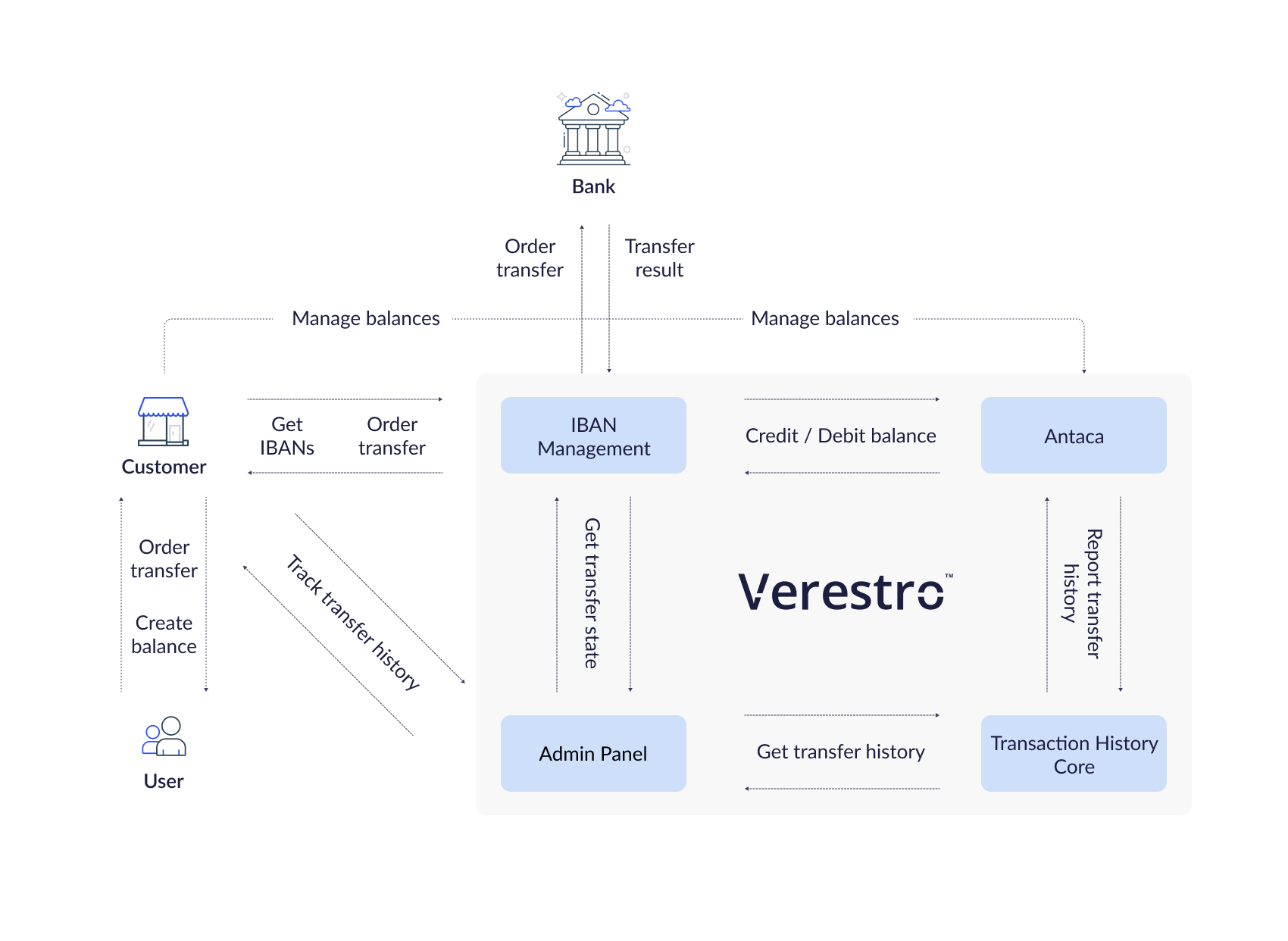
This chapter describes IBAN Management as a complete solution, divided into all the components that support and are required for managing the IBAN domain. The individual functionalities for which these services are responsible reduce the additional work on your part as a Partner. Processes such as transaction validation, debiting and topping up balances, and saving transaction history per enduser are handled on our side.
IBAN Management API
A backend component that, by communicating with internal and external services, enables the management of master and virtual accounts, including their creation and the execution of transfers.
Supporting services
The following services are not a direct part of the IBAN Management API implementation. However, they are involved in the processes of creating and issuing IBAN numbers. Additionally, they enable the execution of money transfers and the storage of transfer history.
Antaca API
A backend component responsible for creating and managing balances. Each account must be assigned to a balance in order to receive and initiate transfers. It is possible to automatically generate a virtual account based on a balance creation event in Antaca, or manually- using the appropriate API method or through the Admin Panel, which also requires the balance to be created beforehand. The IBAN Management Service also communicates with Antaca to debit or top up the balance of a user, corporation, or Partner.
Deployment in Antaca is required for bank account generation and transfer execution.
Transaction History Core
A backend component responsible for storing the history of performed transactions. The history is available in the Admin Panel as well as directly through the API. Configuration in THC is also available, allowing you to receive notifications.
Admin Panel
A tool for Partners to work with Verestro services. The main purpose of Admin Panel is to provide a web-based environment with the ability to manage Partner service actions. The features available in the Admin Panel within the IBAN service are accessible in a dedicated section. Depending on operator permissions, it is possible to generate accounts, view generated accounts, monitor transactions, and manage AML-related decisions.
The features available in the Admin Panel as part of the IBAN Management Service are available here. The availability of functionality depends on your role.
Application details
The IBAN Management Service enables the execution- receiving and sending-of various types of transfers. The available types depend on the sender’s and recipient’s countries, the transfer currency, as well as the capabilities of the respective bank.
This chapter provides a high-level overview of the integration methods, the differences between banks along with the supported transfer types, and the criteria that define each type of transfer.
|
Domain |
Description |
| IBAN generating | Domain of the solution responsible for generating IBANs using a special algorithm based on the IBAN prefix that Partner received from the Payment Institution. |
| IBAN transfer receiving | Domain of the solution responsible for handling incoming transfers to the received IBAN and thus for initiating the process of topping up recipient's balance. |
| IBAN transfer sending | Domain of the solution responsible for handling outgoing transfers and thus for initiating the sender's balance charging process. |
IBAN generating
The basis of the IBAN Management Service is a master account opened in a bank by a payment institution. Depending on the bank, the account is generated based on a prefix received after opening the master account, or it is generated directly by the bank. The IBAN prefix is assigned to your account in the Verestro system during configuration. Each IBAN prefix is created in the context of a specific currency. For example, if you want to have a master account in both PLN and USD, two prefixes will be assigned to your account in our system.
Note: Only one bank account number can be assigned to one balance. The account will be created in the currency of the balance.
IBAN structure
Each IBAN has a specific structure. The IBAN structure is defined in ISO 13616-1 and consists of:
- two-letter ISO 3166-1 country code;
- two check digits;
- up to thirty alphanumeric characters for a BBAN (Basic Bank Account Number) which has a fixed length per country and, included within it, a bank identifier with a fixed position and a fixed length per country.
Example: Polish IBAN numbers consist of 2 letters of the country and 26 digits according to the following division PL00123456789090909090909090.
PL |
2 letters of the country. |
00 12345678 |
2 digits of the checksum and 8 digits tracking a given bank and, for example, it's specific branch - IBAN prefix. Based on this number we will generate bank account numbers for every user in your context. |
9090909090909090 |
16 digits tracking a specific account. |
Transfer funds
After creating a balance and generating an IBAN number, you can perform fund transfer operations. Funds can be transferred in two directions: sending funds to a recipient's bank account and receiving funds into the balance using the assigned IBAN.
Depending on the origin of the IBAN and the countries of the sender's and recipient's accounts, the transfer may be processed as an internal, Elixir, SEPA, or SWIFT transfer. Transfer times may vary depending on the method used. Additional fees may also apply.
|
Transfer type |
Condition |
Potential transfer time |
Instant |
|
Internal |
The sender's IBAN and the recipient's IBAN indicate the Antaca balance within the same instance. |
Instant |
Yes |
|
Elixir |
The sender’s and recipient’s IBAN must have the currency PLN. Transfers between Polish banks using the Elixir system. |
Up to 1 business day
|
Yes, if the bank supports Elixir Express |
|
SEPA |
Both sender’s and recipient’s IBANs must be in EUR and in countries within the SEPA area. Both banks must participate in SEPA. |
Up to 1 business day
|
Yes, if SEPA Instant supported |
|
SWIFT |
Used for international transfers outside the SEPA zone or in currencies other than EUR. Also used if one bank doesn’t support SEPA. |
Up to 5 business day
|
No |
|
SORBNET |
Polish high-value domestic transfer system for PLN transactions. Used for large transfers- above 1million PLN. |
Instant |
Yes |
Integrated Banks
Our cooperation with the payment institution has enabled us to integrate with the banks listed below. This allows us to process transfers ordered by you and your endusers who have accounts generated in Antaca. The list of integrated banks is growing regularly, and we actively invite banking partners to join this cooperation. Please contact us if you are interested in partnering with us in offering IBAN services.
Supported transfer types
|
Integrated bank |
Elixir |
SEPA |
SWIFT |
SORBNET |
|
|
|
|
|
|
Supported currencies
|
Integrated bank |
PLN |
EUR |
USD |
|
|
|
|
|
Implementation model
The REST API implementation model was created for Partners who want to share the IBAN Management Service solution through server-to-server communication. After integration with the appropriate methods issued by IBAN Management Service your endusers will be able to display their IBANs assigned to their balances and order transfers to potential recipients. In this model, communication is carried out with accordance to the REST protocol- each action is reflected in a specific API method to which you must integrate. Partner authorization is performed by checking the signature in the x509 certificate, which was generated in the context of your Partner account during the onboarding process. REST methods provided by IBAN Management Service are described in the Technical documentation chapter.
@startuml
skinparam ParticipantPadding 30
skinparam BoxPadding 30
skinparam noteFontColor #FFFFFF
skinparam noteBackgroundColor #1C1E3F
skinparam noteBorderColor #1C1E3F
skinparam noteBorderThickness 1
skinparam sequence {
ArrowColor #1C1E3F
ArrowFontColor #1C1E3F
ActorBorderColor #1C1E3F
ActorBackgroundColor #FFFFFF
ActorFontStyle bold
ParticipantBorderColor #1C1E3F
ParticipantBackgroundColor #1C1E3F
ParticipantFontColor #FFFFFF
ParticipantFontStyle bold
LifeLineBackgroundColor #1C1E3F
LifeLineBorderColor #1C1E3F
}
participant "User" as user
participant "Partner App" as issuer
participant "Verestro" as ims
note right of user: In this case user authentication is Partners responsibility
user->issuer: Authenticate user
user<-issuer: Authentication success
user->issuer: Check my IBAN
issuer->ims: Get user IBANs
issuer-->ims: Provide x509 certificate
ims->ims: Validate certificate signature
issuer<-ims: Return user's IBAN
user<-issuer: Display IBAN to the user
user->issuer: Perform money transfer
note right of user: User provides receiver IBAN in Partner App
issuer->ims: Send funds on provided receivers IBAN
ims->ims: Order transfer
issuer<-ims: OK - Transfer ordered
user<-issuer: Transfer ordered
@enduml
Use cases
This section provides a guide to the Use Cases available within the IBAN Management Service.
Available functionalities vary based on the specific deployment configuration and access rights.
Account Management
You have the ability to create and delete bank accounts, as well as retrieve their details based on the balance within the Verestro ecosystem. Virtual accounts generated for your users are directly linked to the balance.
Bank account creation
This process enables you to generate bank accounts for your users, assigned to balances in a specific currency. Depending on the configuration and permissions, various mechanisms for generating virtual accounts are available:
-
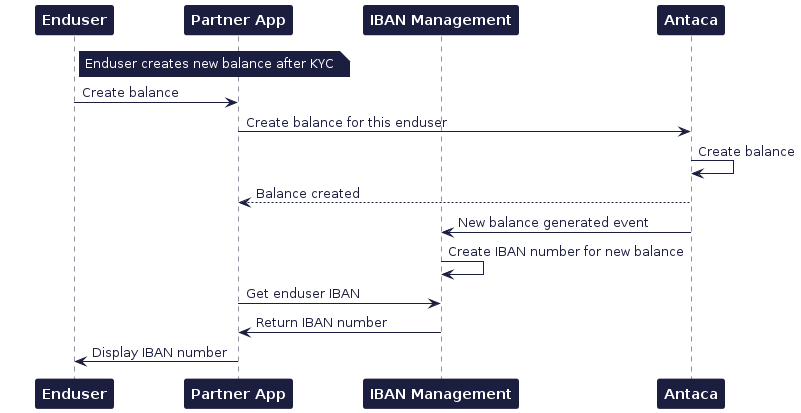
Automatically after balance creation – once the KYC process is approved and the balance is created, the account will be generated automatically for the user.
-
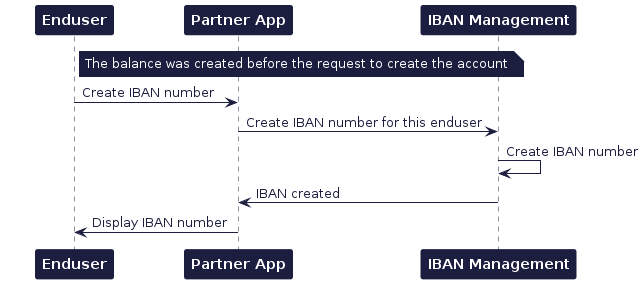
Via API – use the dedicated method
POST /secure/bank-accounts. To use this method, the balance must be created before attempting to create the account.
-
In the Admin Panel – by navigating to the section with endusers and their balances, it is possible to generate an account for a specific balance. This action requires appropriate permissions (primarily intended for Payment Institutions).
In the case of a corporation, a successfully completed KYB process is required, as well as providing the corporation entity with an address using the Lifecycle API.
Bank account details
The GET /secure/bank-accounts allows you to retrieve the full details of a virtual bank account linked to a specific balanceID.
Using this method, you can check the status of a generated bank account and display it to your users, allowing them to receive incoming transfers or top up their balance via external transfers. If an enduser initiates an outgoing transfer, the IBAN assigned to the balance from which the funds are being debited will appear as the sender's account number in the transfer history.
Bank account deletion
You have the option to delete a bank account:
- Directly, by using the dedicated method
DELETE /secure/bank-accounts– in this case, the balance remains active, and it will be possible to generate a new account linked to the same balance; - By deleting the balance – in this case, the virtual bank account will also be deleted.
Before removing your balance, remember that the balance is shared by all payment methods, including cards!
Transfers
The IBAN Management Service allows you to facilitate incoming and outgoing payments for your master account, as well as for your users' virtual accounts. All IBAN Management Service API methods are described in the Technical documentation chapter.
Incoming transfers
This functionality enables the enduser to receive transfers. Endusers of your application can share their IBAN with potential payers. This type of transfer tops up the enduser's balance.
When funds are transferred to a virtual bank account, the transaction is processed automatically. To receive notifications about such transfers, appropriate configuration within the Transaction History Core (THC) is required.
Outgoing transfers
By using the POST /secure/bank-accounts/transfers method, you can enable your users to execute transfers, as well as initiate transfers directly from the master balance. The user balance serves as the primary identifier for initiating a transfer. However, for transfers originating from the master balance, both the master balance and the master account are required.
As available transfer options vary depending on the sender and beneficiary details, we recommend using the POST /secure/bank-accounts/transfers/options method. By submitting transfer data before initialization, you can verify the correctness of the input, identify potential error causes, check available transfer options, and determine if any additional fields are required. You can find transfer types here.
Reporting
At Verestro, we provide various channels for retrieving transfer information. Using the methods and services below, you can verify the status and check the details of your transactions.
Transfer details
- Use the
GET /secure/bank-accounts/transfers/{transactionId}method to retrieve full details of a specific outgoing transfer. This returns comprehensive data includingpayment data,delivery mode,payment system,receiverandstatus. - Use the
GET /external/transactions/{id}method to retrieve detailed information about a specific transaction based on its unique identifier.
Transfer history
Transaction history can be retrieved via the Transaction History Core or monitored directly through the Administration Panel.
- To retrieve and display transaction lists to your endusers, use the
GET /external/transactionsendpoint. This allows for automated, paginated data fetching directly into your application. - For back-office operations and manual verification, use the dedicated tab in the Admin Panel. Detailed information about the IBAN Management Service functionalities available in the panel can be found here.
Transfer notifications
Integration with the Transaction History Core enables you to receive notifications for both transfer creation and related status updates. To enable this:
- Expose an endpoint: you must expose a dedicated
POST /transaction-eventendpoint on your server. - Receive event: when a transaction status changes, our system will send an event to your endpoint.
- Fetch details: each event contains a unique identifier. Use this ID to call the
GET /external/transactions/{id}method and retrieve the full, latest record.
@startuml
skinparam ParticipantPadding 30
skinparam BoxPadding 30
skinparam noteFontColor #FFFFFF
skinparam noteBackgroundColor #1C1E3F
skinparam noteBorderColor #1C1E3F
skinparam noteBorderThickness 1
skinparam sequence {
ArrowColor #1C1E3F
ArrowFontColor #1C1E3F
ActorBorderColor #1C1E3F
ActorBackgroundColor #FFFFFF
ActorFontStyle bold
ParticipantBorderColor #1C1E3F
ParticipantBackgroundColor #1C1E3F
ParticipantFontColor #FFFFFF
ParticipantFontStyle bold
LifeLineBackgroundColor #1C1E3F
LifeLineBorderColor #1C1E3F
}
participant "IBAN Management" as ims
participant "Transaction History Core" as THC
participant "Partner's Server" as issuer
ims->THC: Report performed transfer
THC->issuer: Send notification event on the Partner endpoint
issuer->THC: Get transaction details by received transaction id
issuer<--THC: Return transaction details
@enduml
Technical documentation
Server to server integration
This chapter provides technical information about the integration with IBAN Management Service using REST API integration model.
Tip: This API requires Mutual TLS authentication. You can use the same certificate for all mTLS-secured APIs exposed by Verestro. If you don't have one, follow this instruction: Connecting to server-to-server APIs
In a server-to-server connection, the authentication of the enduser is your responsibility. Our system exclusively authenticates the Partner Instance (the partner application).
@swagger="https://iban-management.verestro.com/doc/server.yaml"
Test guide
This chapter provides guidelines of functionalities offered by IBAN Management Service.
How to test?
In order to test the functionalities offered by IBAN Management Service, you need to be onboarded. Authorization on beta environment is aslo performed using x509 certificate authentication.
Note: For tests you should connect url dedicated for beta environment to chosen method.
|
Url |
Method (example) |
Result (example) |
|
https://iban-management.secure-verestro.dev |
/secure/bank-accounts
|
https://iban-management.secure-verestro.dev/secure/bank-accounts |
Functionalities
You can call all the methods given below and in the Technical documentation, using the appropriate URL, but during tests, outgoing and incoming transfers will not be performed. This means that it is possible to call the method, but the funds will not be transferred to the recipient's account.
Important! Realization of sending and receiving transfers won't be possible during tests.
Technical documentation
@swagger="https://iban-management.verestro.com/doc/server.yaml"