# AML Transaction Monitoring
AML Transaction Monitoring system enables real-time screening of transactions based on configurable rulesets.
It processes each transaction live, determines whether to approve, decline, or hold it, and can notify AML officers when a ruleset is triggered.
An internal AI module calculates a transaction risk score based on Verestro’s proprietary specification, but does not influence the decision-making process yet.
# Introduction
Verestro’s AML Transaction Monitoring is a compliance solution that helps businesses detect and prevent suspicious or fraudulent transactions while maintaining full AML compliance.
The system provides **real-time transaction monitoring** based on configurable rulesets and can use **KYC data**, **end user transaction history**, and **transaction details** to support effective risk management.
Each customer can define **custom AML rulesets** tailored to their specific risk profile and operational needs.
#### Monitor and control all suspicious transactions in one place
- Define custom rulesets that use transaction data, KYC information, and end user transaction history.
- Specify custom actions for your system to execute when a ruleset is triggered; the action logic remains on your side.
- Send notifications automatically when a transaction matches a defined ruleset.
#### Test rulesets before activating them
- Run a new or modified ruleset against historical transactions (a dry run) to see how it would have behaved — without affecting live decisions.
- Review how many transactions would have been matched, and the decisions and alerts the ruleset would have produced, then enable it once you are satisfied.
- Each test covers a selected time window of up to 7 days.
#### Suspicious entity detection
- The AML system lets you define individuals as fraudsters (blacklist) or as suspected of fraud (greylist) using their personal and address data.
- You can create rulesets that detect such entities and trigger appropriate actions.
- This enables fast identification of fraudsters across all your instances.
#### Handle screening results with human expertise
- The AML system can send notifications when a transaction is flagged by a specific ruleset.
- In the current architecture, the system can create an issue in YouTrack — a tool for managing tasks and incidents.
- These notifications allow authorized staff to review and investigate complex cases that require manual expertise.
#### Notify end users about unusual transactions
- A ruleset can notify the end user (balance owner) directly when it detects an unusual transaction.
- Notifications are sent via SMS or email using predefined templates.
- An optional cooldown period prevents repeated notifications to the same end user within a short time window.
#### Empower your AML process with AI assistance
- The AI module currently provides a numerical risk score (0–100) for each end user transaction.
- The score is calculated by a machine learning model.
- To solve the cold-start problem, the model is seeded with a predefined specification prepared by our AML specialists — for example, lists of high-risk MCC codes and the number of risk points to add for specific property values (such as additional points when the end user’s KYC risk level is high).
- We collaborate with AML specialists to continuously improve the AI model.
**Note:** Planned improvements include an AI assistant that will suggest AML ruleset and support human expertise in transaction verification and case assessment.
#### How to connect with us?
There are two integration methods available:
1. Plug & Play Package
2. Standalone REST API Integration
Details of both integration options can be found in the following section: [Quick start guide | Verestro Developer Zone](https://developer.verestro.com/books/aml-transaction-monitoring/page/quick-start-guide).
# Overview
This document provides a high-level overview of the functionalities offered by the AML Transaction Monitoring service.
AML Transaction Monitoring allows you to define rulesets that process transactions in real time.
This document explains in detail how to construct AML rulesets and describes the available conditions that can be used within those rulesets.
Other configurable system elements required for a complete AML Transaction Monitoring setup are also described.
## Architecture
### C4 Context diagram
[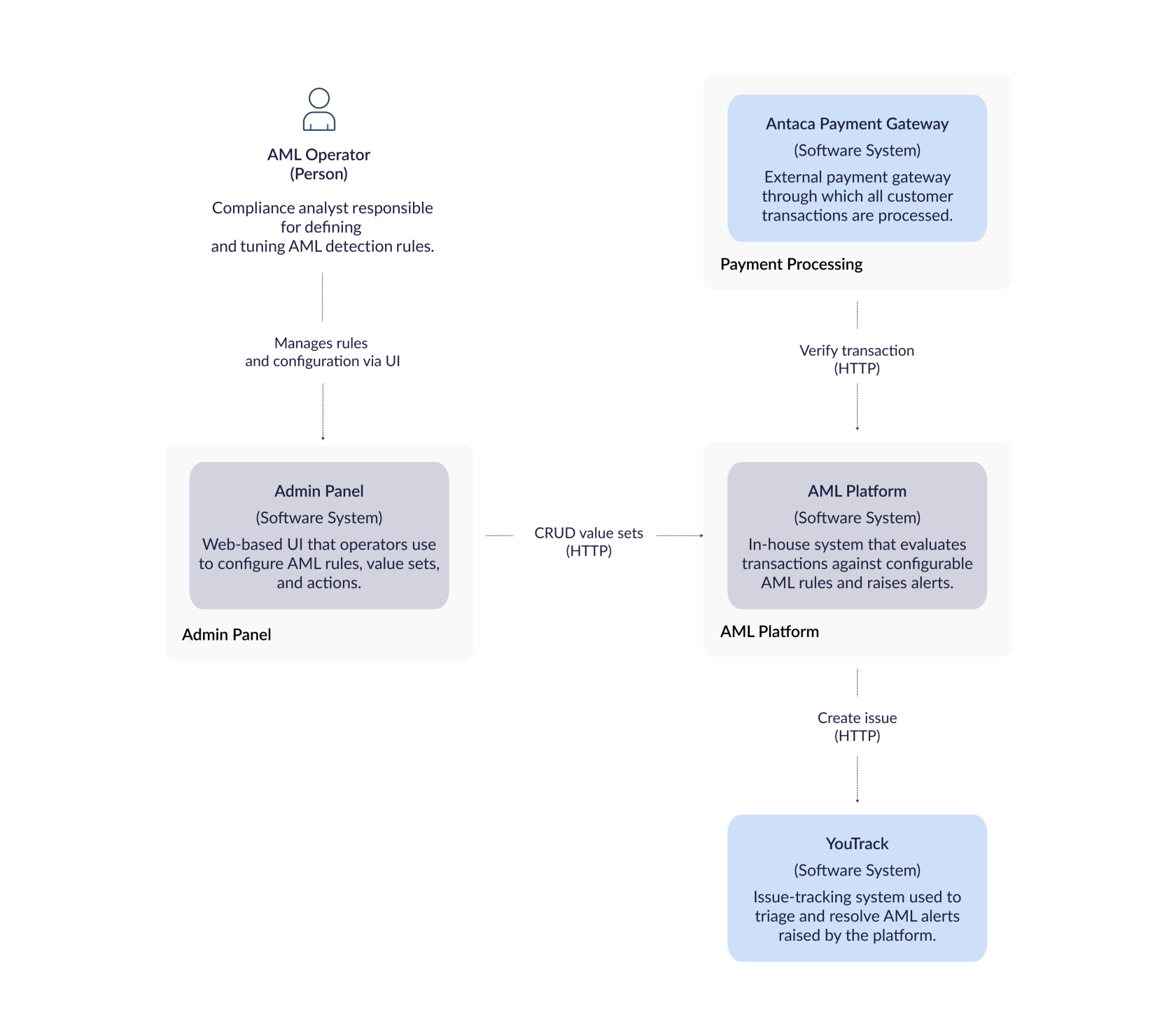](https://developer.verestro.com/uploads/images/gallery/2025-11/12.png)
## System configuration elements
Elements used to configure the logic for transaction processing are:
| **Element name** | **Element description** |
| **Ruleset** | A set of conditions evaluated during transaction processing, and instructions that the system considers when returning the transaction outcome. |
| **Action** | Returned by the engine when processing a transaction; actions are interpreted and handled by the service requesting AML verification. |
| **Value set** | Helper variables that let you define sets of data, such as a list of high-risk countries. |
The following sections describe each of these elements in detail.
### Ruleset
A ruleset defines a set of conditions to check during transaction monitoring and the outcomes to apply when a transaction matches those conditions.
When a transaction is processed, all enabled rulesets are applied to see if the transaction matches their criteria.
Each ruleset consists of:
- a ruleset name,
- logic conditions checked by the processing engine,
- a trigger that defines the outcome when the ruleset is matched.
#### Condition types
Conditions define what the ruleset checks when the AML engine processes a transaction. Each ruleset can contain one or more conditions, combined with logical operators (`AND` / `OR`). The engine evaluates these conditions and returns a single decision for the transaction. The following types of conditions are supported:
| **Condition name** | **Condition description** |
| **AND / OR** | Group multiple conditions:
`AND` means all conditions must be true,
`OR` means at least one must be true. |
| **request\_property\_check** | Compares a specific field from the transaction request (for example, amount, currency or transaction country) to a value or list of values. |
| **kyc\_property\_check** | Compares a property from the end user’s KYC record, such as risk level or nationality, to a value or list of values. |
| **transactions\_volume\_check** | Evaluates the cumulative transaction volume over a defined period and scope (e.g. by end user, card, balance or corporation) and can be grouped by merchant or country. Supports currency aggregation (`currencyAggregation`, e.g. `SAME_CURRENCY_ONLY`). |
| **transactions\_quantity\_check** | Evaluates the number of transactions over a defined period and scope, also grouped by merchant or country. |
| **blacklist\_check** | Checks whether certain end user or transaction values (e.g. PESEL, IBAN, name) match entries in a predefined blacklist. |
| **greylist\_check** | Similar to `blacklist_check`, but matches data against a greylist of entities that are considered suspicious but not definitively fraudulent. |
| **compare\_with\_last\_transaction** | Compares fields from the current transaction with those from the last transaction within a specified time window (e.g. 5 minutes) and context (card, balance or balance owner). |
Each condition uses comparators (e.g. `=`, `!=`, `>`, `>=`, `<`, `<=`, `IN`, `NOT_IN`, `CONTAINS`, `NOT_CONTAINS`) to compare values. You can also refer to predefined *value sets* when supplying a list of values (for example, a set of high‑risk countries).
**Info:** We continuously develop new condition types to address all business needs related to AML transaction monitoring.
**Tip:** In order to set up AML rulesets, check out **[Technical Documentation – AML Ruleset Definition Language](https://developer.verestro.com/books/aml-transaction-monitoring/page/technical-documentation-aml-ruleset-definition-language "Technical documentation - DSL schema documentation for transaction rules")**
#### Trigger types
A trigger defines the outcome when a ruleset is matched during transaction processing.
You can combine actions, alerts and end-user notifications with a decision in a single trigger block.
There are four trigger types:
| **Trigger type** | **Trigger description** |
| **Decision (required)** | The main result of single ruleset processing. You set it to one of: `APPROVED`, `DECLINED`, or `ON_HOLD`. Only one decision is returned for the whole transaction, even if multiple rulesets match. |
| **Actions (optional)** | Actions are instructions returned by the engine and executed by the requesting system. Example action: block an end user.
Actions must be defined in advance in your system or via API. |
| **Alert (optional)** | Alerts are notifications sent to selected channels when a ruleset is matched. Supported channels: `YOUTRACK_TICKET`. You can use alerts to inform AML officers about suspicious activity. |
| **Balance owner notification (optional)** | Notifications sent directly to the end user (balance owner) when a ruleset is matched. Supported types: `SMS` and `EMAIL`. Each uses a predefined template and an optional cooldown period. |
### Action
An action is an instruction returned by the AML engine when a ruleset is triggered.
Actions define additional operations that should be performed by the system requesting AML verification.
Examples of actions:
- Block an end user
- Block an account
Actions are optional and must be defined in advance via GUI or via API.
**Warning:** The AML system only allows you to define and return actions when processing a transaction. The logic for executing each action is the responsibility of the system that receives the action from the AML engine.
**Warning:** Before using actions in AML rulesets, make sure they are defined in the system.
### Value set
A value set is a helper list you can use in AML rulesets to simplify configuration and maintenance.
Value sets let you store reusable sets of values, such as lists of high-risk countries, transaction types, or merchants.
You can reference a value set in any ruleset condition, instead of listing all the values every time.
Examples of value sets:
- List of high-risk countries
- List of blocked merchants
- List of suspicious transaction types
Value sets are optional. You define them in the [administration panel](https://developer.verestro.com/books/administration-panel) or via API, and update them as your risk policies change.
**Warning:** Before using value set in AML rulesets, make sure they are defined in the system.
## Ruleset testing
Ruleset testing (dry run) lets you evaluate a new or modified ruleset against historical transactions before it starts affecting production decisions. A dry run does not change any system state — it only shows how the ruleset *would have behaved* over a selected time window (up to 7 days).
**Recommended usage:**
1. **Create the ruleset** — newly created rulesets are disabled by default.
2. **Test the ruleset** — run a dry run on a representative date range.
3. **Review the results** — check how many transactions were matched, which alerts would have been triggered, and the aggregate decision and volumes.
4. **Optimize the ruleset if needed** — adjust conditions or thresholds and re-test.
5. **Turn on the ruleset** — enable it once the results meet expectations.
## Ruleset drafts
A ruleset draft is a work-in-progress version of a ruleset. Drafts let you iterate on ruleset content without affecting the live configuration — they are not evaluated against transactions until they are published as a ruleset. A draft can be standalone or linked to an existing ruleset, in which case it represents a proposed next version of that ruleset. Once a draft is ready, it is converted into a ruleset; from that moment the new ruleset can be tested (see *Ruleset testing*) and enabled. Drafts are scoped per financial institution.
## Watchlist management
The AML system supports two types of watchlists for identifying suspicious end users.
1. **Blacklist** – designed to store end users confirmed or proven to be involved in fraudulent activity.
2. **Greylist** – designed to store end users suspected of fraudulent behavior but not yet confirmed.
Managing watchlists involves adding end users by their personal and address data. End users can also be removed from a list at any time.
Entries on these lists are automatically verified when the `blacklist_check` or `greylist_check` condition is used in AML rulesets.
#### Purpose and benefits
1. **Cross-instance fraud detection** - with properly defined AML rulesets, the system can identify and block a known fraudulent end user across all BIN sponsor instances. This is possible because verification relies on personal and address data instead of instance-specific end user identifiers.
2. **Monitoring suspicious end users** - using greylists, AML operators can add end users suspected of fraudulent activity and monitor their presence across different instances. Configured AML rulesets can trigger an alert when a transaction involves an end user found on the greylist.
## Alerts
When defining an AML ruleset, the operator configures how alerts related to that ruleset should be sent. The system sends an alert according to the defined alert configuration when a transaction matches the AML ruleset.
#### Alert configuration
Each AML ruleset can define how alerts are sent when triggered.
The alert configuration includes following key parameters:
| **Alert parameter** | **Alert parameter description** |
| **channel** | Defines where the alert is sent. Supported channels are `YOUTRACK_TICKET` (creates an issue in the predefined YouTrack project). |
| **cooldown\_period** | Defines the minimum time (in seconds) between two identical alerts generated by the same ruleset for the same end user or corporation. This prevents multiple alerts of the same type from being created within a short time window. |
These parameters are defined inside the `alert` block of the AML ruleset configuration.
**Info:** In addition to internal alerts, a ruleset can notify the end user (balance owner) directly via `SMS` or `EMAIL` using the `balance_owner_notifications` trigger block.
## AI risk scoring
Each verified transaction is also analyzed by a machine learning–based system that calculates the probability of fraud.
The result is a numerical score ranging from **0 to 100.**
- 0 means the transaction is considered completely safe
- **100** represents the highest possible fraud probability assigned by the system
**Warning:** At this stage, the AI score is not used in any way when making AML decisions about a transaction.
All decisions are made solely based on the outcomes of individual AML rulesets that process the transaction.
## Transaction evaluation process
To enable the system to check transactions against AML rulesets, the rulesets must first be defined.
This can be done through the graphical interface available in the [**Administration Panel**](https://developer.verestro.com/books/administration-panel).
Once the rulesets are configured, the transaction processing system must start calling the AML service using the `aml-verify` endpoint.
When the AML system receives a request on this endpoint, it begins evaluating the transaction against all rulesets defined in the system.
As a result of this evaluation, the system returns:
- **verificationId** – a unique identifier of the verification entity,
- **result** – a single decision for the transaction,
- **actions** – an array of actions returned by the matching rulesets.
The AML system always returns all actions triggered by the rulesets, but only one final decision.
**Warning: decision return logic** If all rulesets return `APPROVED`, the final result is `APPROVED`.
If at least one ruleset returns `DECLINED`, the final result is `DECLINED`.
If no ruleset returns `DECLINED` but at least one returns `ON_HOLD`, the final result is `ON_HOLD`.
# Quick start guide
To start using Verestro AML Transaction Monitoring, select one of the following integration methods:
##### **Option 1 – Plug & play package**
Get started instantly by choosing the **[Antaca](https://developer.verestro.com/books/card-issuing-and-core-banking) + AML Transaction Monitoring + [Administration Panel](https://developer.verestro.com/books/administration-panel) bundle**.
No development or integration is needed — just define your AML rulesets in the [Verestro Administration Panel](https://developer.verestro.com/books/administration-panel), and the system will handle all transaction monitoring automatically.
**Advantages:** - No integration or development required
- Fastest time-to-market
- All modules work out-of-the-box
- Centralized management via [Administration Panel](https://developer.verestro.com/books/administration-panel)
- Technical support included
##### **Option 2 – Standalone REST API integration**
Integrate AML Transaction Monitoring as a standalone service via REST API.
This requires connecting your systems to our REST API, including KYC, KYB, and transaction history modules.
We provide sandbox access, documentation, and support for rulesets setup and testing.
**Important:** This option requires your technical team to manage API integration and maintain connections with external data sources.
**Warning:** This option may require additional development on Verestro’s side regarding integration with KYC, KYB, and transaction history modules, depending on your setup and business requirements.
# Technical Documentation – AML Ruleset Definition Language
# **DSL Schema Documentation for Transaction Rulesets**
## **Overview**
This DSL (Domain-Specific Language) defines ruleset-based conditions for handling transactions. The rulesets specify conditions under which transactions should be blocked, allowed, or flagged. The schema enables defining logical conditions using `AND`, `OR`, `request_property_check`, `transactions_volume_check`, `transactions_quantity_check`, `blacklist_check`, `greylist_check`, `kyc_property_check` and `compare_with_last_transaction`statements, along with customizable triggers and actions.
---
## **Schema Structure**
```yaml
conditions:
AND | OR: # Logical operator grouping conditions
- request_property_check: # Check type
property: # The property to check (e.g., "transactionData.acquirerCountry")
comparator: # enums: "IN", "NOT_IN", "=", "!=", ">", ">=", "<", "<=", "CONTAINS"
value: # Expected value or variable reference, eg: string: "123", list: "value1, value2, value3" or variable (`{{ vars.UHRC_COUNTRIES }}`)
treat_missing_value_as: # optional, How to handle missing fields (default: false)
- transactions_volume_check:
scope: # enums: CORPORATION, USER, CARD, BALANCE, TENANT
by: # optional, enums: MERCHANT, COUNTRY, grouping parameter
period: # 1d -> 1 day, 1M -> one month etc.
amount: # cumulative amount for given scope/by and period, as minor > 50000
currency: # country currency codes e.g. PLN, USD, AOA
currencyAggregation: # enums: SAME_CURRENCY_ONLY, CONVERT_TO_CURRENCY
filters: # optional
- field: > #enum: type, subtype, transactionData.merchantName, transactionData.mcc, transactionData.countryCode, transactionData.contrahentName, transactionData.captureMode
comparator: # enums: "IN", "NOT_IN", "=", "!="
value: ATM #
- transactions_quantity_check:
scope: BALANCE # enums: CORPORATION, USER, CARD, BALANCE, TENANT
by: COUNTRY # optional, enums: MERCHANT, COUNTRY, grouping parameter
period: # 1d -> 1 day, 1M -> one month etc.
quantity: 5 # transactions count for given scope/by and period, > 5
filters: # optional
- field: > #enum: type, subType, transactionData.merchantName, transactionData.mcc, transactionData.countryCode, transactionData.contrahentName, transactionData.captureMode
comparator: # enums: "IN", "NOT_IN", "=", "!="
value: ATM #
- kyc_property_check:
property:
comparator: # enums: "IN", "NOT_IN", "=", "!=", ">", ">=", "<", "<=", "CONTAINS"
value:
treat_missing_value_as: # optional, How to handle missing fields (default: false)
- blacklist_check:
properties:
- property: # blacklist record property
kyc_value: # user's KYC record property to evaluate
- property: # blacklist record property
request_value: # aml-verify request property to evaluate
- greylist_check:
properties:
- property: # greylist record property
kyc_value: # user's KYC record property to evaluate
- property: # greylist record property
request_value: # aml-verify request property to evaluate
- compare_with_last_transaction:
options:
within_seconds: # time in seconds
subType: list # types of transactions will be searched for in the transaction history, e.g. ["ATM_WITHDRAWAL", "PURCHASE"]
context: # enums: CARD, BALANCE, BALANCE_OWNER
captureMode: list # Payment channel/method (e.g. CONTACT, CONTACTLESS, ECOMMERCE, CLOUD, MONEYSEND, etc.)
property: # The property to check in history transaction (e.g., "transactionData.acquirerCountry")
comparator: # enums: "IN", "NOT_IN", "=", "!=", ">", ">=", "<", "<=", "CONTAINS"
request_property: # The property to check in request (e.g., "transactionData.acquirerCountry")
treat_missing_value_as: # optional, How to handle missing fields (default: false)
- AND | OR:
- request_property_check: null
field:
#...
trigger:
decision: # enum ( APPROVED, DECLINED)
decline_reason: # optional, required when decision is DECLINED, enum (FRAUD_SUSPECTED, TRANSACTION_NOT_PERMITTED, LIMIT_EXCEEDED, DO_NOT_HONOR)
actions:
: # Action group
- name: # Action name (e.g. block_resource)
properties:
: # Action properties (e.g. reason: fraud_suspected, resource_type: user)
alert:
channels: # enum: YOUTRACK_TICKET
cooldown_period: # optional, 1d -> 1 day, 1M -> one month etc.
balance_owner_notifications:
- type: # enum: SMS, EMAIL
template_name: # notification template name
cooldown_period: # optional, 1d -> 1 day, 1M -> one month etc.
```
---
## **Field Descriptions**
### **Top-Level Fields**
| Field | Type | Description |
|---|
| `conditions` | `Object` | Defines logical conditions using `AND` / `OR`. |
| `trigger` | `Object` | Specifies what happens when the conditions are met. |
### **Condition Fields**
| Field | Type | Description |
|---|
| `AND` / `OR` | `List` | Groups multiple conditions where all (`AND`) or at least one (`OR`) must be met. |
| `request_property_check` | `Object` | Specifies a [request property](#bkmrk-request-property-che) condition check. |
| `kyc_property_check` | `Object` | Specifies a [kyc value](#bkmrk-kyc-check) check. |
| `transactions_volume_check` | `Object` | Specifies a [transactions volume](#bkmrk-transactions-volume) check. |
| `transactions_quantity_check` | `Object` | Specifies a [transactions quantity](#bkmrk-transactions-quantit) check. |
| `blacklist_check` | `Object` | Specifies a [blacklist](#bkmrk-blacklist-and-greyli) check. |
| `greylist_check` | `Object` | Specifies a [greylist](#bkmrk-blacklist-and-greyli) check. |
| `compare_with_last_transaction` | `Object` | Specifies a [last transaction](#bkmrk-last-transaction-che) check. |
### **Common check fields**
| Field | Type | Description |
|---|
| `comparator` | `String` | Comparison operator, enums: `IN`, `NOT_IN`, `=`, `!=`, `>`, `>=`, `<`, `<=`, `CONTAINS`, in case of date comparison uses ISO-8601 format for parsing date). |
| `property` | `String` | The data field to evaluate (e.g., `transactionData.acquirerCountry`). |
| `value` | `String`/`List` | The expected value in the form of:
string `value`
list `value1, value2, value3`
or a reference to a variable called "Value set" `{{ vars.UHRC_COUNTRIES }}`. Reference variables must be defined in API or front end administration panel. Only defined reference variables are allowed. |
| `treat_missing_value_as` | `Boolean` | Determines handling of missing fields (default `false`). |
### **Comparators**
Comparators are used to compare the value of a property with a given value.
| Comparator | Accepted value type | Description |
|---|
| `=` | `String` | Property value equals the given value string (case-insensitive). |
| `!=` | `String` | Property value does not equals the given value string (case-insensitive). |
| `>` | `String` | Property value is greater than the given value string (case-insensitive). |
| `>=` | `String` | Property value is greater than or equal the given value string (case-insensitive). |
| `<` | `String` | Property value is less than the given value string (case-insensitive). |
| `<=` | `String` | Property value is less than or equal the given value string (case-insensitive). |
| `IN` | `List` | Property value matches any of the strings in the given value list (case-sensitive). |
| `NOT_IN` | `List` | Property value matches none of the strings in the given value list (case-sensitive). |
| `CONTAINS` | `String/List` | Property value contains the given value string, or any string from the provided value list (case-insensitive) |
| `NOT_CONTAINS` | `String/List` | Property value does not contain the given value string, nor any string from the provided value list (case-insensitive) |
### **Request property check**
| Field | Type | Description |
|---|
| `property` | `String` | See [property](#bkmrk-common-check-fields). |
| `comparator` | `String` | See [comparator](#bkmrk-comparators). |
| `value` | `String`/`List` | See [value](#bkmrk-common-check-fields). |
| `treat_missing_value_as` | `Boolean` | See [treat\_missing\_value\_as](#bkmrk-common-check-fields). |
### **Kyc check**
| Field | Type | Description |
|---|
| `property` | `String` | The Kyc property to evaluate (e.g., `riskLvl`). |
| `comparator` | | See [comparator](#bkmrk-common-check-fields). |
| `value` | | See [value](#bkmrk-common-check-fields). |
| `treat_missing_value_as` | | See [treat\_missing\_value\_as](#bkmrk-common-check-fields). |
### **Transactions volume check**
Aggregates the monetary volume of transactions for a given scope (optionally grouped by) over a rolling period, and triggers when the cumulative amount exceeds amount.
The incoming request is included in the sum only when it satisfies filters; otherwise it contributes 0.
When `by` is set, the volume is computed per group and the rule triggers if any group exceeds the threshold.
If by is specified but the request lacks that property, the check is skipped (no trigger).
| Field | Type | Description | AML-Verify request mapping |
|---|
| `scope` | `String` | Defines the level at which the transaction volume is calculated. It determines whose transaction volume is being measured.
enums: `CORPORATION`, `USER`, `CARD`, `BALANCE`, `TENANT` | `CORPORATION` → `balance.ownerId` (if balance.owner == CORPORATION)
`USER` → `balance.ownerId` (if balance.owner == USER)
`CARD` → `resourceId` (if resource == CARD)
`BALANCE` → `balance.id`
`TENANT` → `tenantId` |
| `by` | `String` | Specifies the parameter used to group transaction volume within the selected scope.
enums: `MERCHANT`, `COUNTRY` | `MERCHANT` → `transactionData.merchantIdentifier`
`COUNTRY` → `transactionData.acquirerCountry` |
| `period` | `String` | The time interval over which to aggregate transaction volume. See [periods](#bkmrk-periods) | - |
| `amount` | `Number` | Cumulative amount. | - |
| `currency` | `String` | Cumulative amount currency. | - |
| `currencyAggregation` | `String` | Defines how transactions in different currencies are aggregated. | - |
| `filters` | `List` | See [transaction filters](#bkmrk-transaction-check-fi). | - |
### **Transactions quantity check**
| Field | Type | Description | AML-Verify request mapping |
|---|
| `scope` | `String` | Defines the level at which the transaction quantity is calculated. It determines whose transaction quantity is being measured.
enums: `CORPORATION`, `USER`, `CARD`, `BALANCE`, `TENANT` | `CORPORATION` → `balance.ownerId` (if balance.owner == CORPORATION)
`USER` → `balance.ownerId` (if balance.owner == USER)
`CARD` → `resourceId` (if resource == CARD)
`BALANCE` → `balance.id`
`TENANT` → `tenantId` |
| `by` | `String` | Specifies the parameter used to group transaction quantity within the selected scope.
enums: `MERCHANT`, `COUNTRY` | `MERCHANT` → `transactionData.merchantIdentifier`
`COUNTRY` → `transactionData.acquirerCountry` |
| `period` | `String` | The time interval over which to count transactions. See [periods](#bkmrk-periods) | - |
| `quantity` | `Number` | Transactions count. | - |
| `filters` | `List` | See [transaction filters](#bkmrk-transaction-check-fi). | - |
### **Blacklist and greylist check**
| Field | Type | Description |
|---|
| `property` | `String` | The property from the blacklist/greylist record to be checked (e.g., `name`, `pesel`). |
| `kyc_value` | `String` | The user's KYC field that will be compared against the `property`. (e.g. `firstName`,`lastName`) |
| `request_value` | `String` | The request field (from `aml-verify` body) that will be compared against the `property`. |
### **Last transaction check**
| Field | Type | Description |
|---|
| `options.within_seconds` | `String` | Time in seconds to search transaction history from. |
| `options.subType` | `List` | Last transaction subType, e.g. `ATM_WITHDRAWAL, PURCHASE` |
| `options.context` | `String` | Last transaction context, enums: `CARD, BALANCE, BALANCE_OWNER` |
| `options.captureMode` | `List`|`null` | Last transaction captureMode, will be matched with event's `transactionData.channel` |
| `property` | `String` | The property to check in history transaction (e.g., `transactionData.acquirerCountry`). |
| `comparator` | `String` | See [comparator](#bkmrk-common-check-fields). |
| `request_property` | `String` | The property to check in request (e.g., `transactionData.acquirerCountry`). |
| `treat_missing_value_as` | `String` | See [treat\_missing\_value\_as](#bkmrk-common-check-fields). |
### **Allowed values for fields inside ruleset parameters**
| Ruleset check type | Allowed value |
|---|
| Request property check `property` | transactionId, balance.id, balance.owner, balance.ownerId, resourceId, externalTransactionId, externalReferenceTransactionId, resource, type, subType, amount, currency, originalAmount, originalCurrency, status, description, transactionDate, tenantId, transactionData.mcc, transactionData.merchantIdentifier, transactionData.merchantName, transactionData.captureMode, transactionData.lastFourDigits, transactionData.countryCode, transactionData.acquirerCountry, transactionData.mdesDigitizedWalletId, transactionData.cashbackPosCurrencyCode, transactionData.cashbackPosAmount, transactionData.lastFourDpan, transactionData.adjustmentReasonDescription, transactionData.retrievalReferenceNumber, transactionData.contrahentName, transactionData.contrahentIban, transactionData.contrahentBic, customData.\* |
| Kyc check `property` | status, tenantId, customerId, dcUserId, verificationId, firstName, lastName, birthDate, nationality, riskLvl, createdAt, usaResident, taxResident, sourceOfFunds, pesel, country, city, identityCardNo, documents, kycLevel |
| Blacklist / greylist check `property` | userId, tenantId, name, surname, fullName, birthDate, pesel, documentNumber, documentType, addressCountry, addressCity, iban |
| Last transaction check `property` | transactionId, eventTimestamp, tenantId, type, subType, amount, currency, status, description, card.cardOwner, card.cardOwnerId, balance.balanceOwner, balance.balanceOwnerId, transactionDate, createdAt, clearedAt, externalTransactionId, externalReferenceTransactionId, transactionData.lastFourDigits, transactionData.mcc, transactionData.merchantName, transactionData.channel, transactionData.countryCode, transactionData.originalAmount, transactionData.originalCurrency, transactionData.walletReference, transactionData.contrahentName, transactionData.contrahentBic, transactionData.merchantId |
### **Trigger Fields**
| Field | Type | Description |
|---|
| `decision` | `String` | The decision taken if the ruleset is triggered (`DECLINED`, `ON_HOLD`, `APPROVED`). |
| `decline_reason` | `String` | Optional, required when `decision` is `DECLINED`. Possible values: `FRAUD_SUSPECTED`, `TRANSACTION_NOT_PERMITTED`, `LIMIT_EXCEEDED`, `DO_NOT_HONOR`. |
| `actions` | `List` | A list of actions executed when the ruleset is triggered. Actions and their properties must be defined in API. Only defined in API actions are allowed |
| `alert` | `Object` | Definition of alerts that should be sent to internal channels (e.g. YouTrack). |
| `balance_owner_notifications` | `List` | A list of direct notifications sent to the balance owner when the ruleset is triggered. See [balance owner notification fields](#bkmrk-balance-owner-notifi). |
### **Alert Fields**
| Field | Type | Description |
|---|
| `channels` | `List` | List of channels where send alert. Possible values: `YOUTRACK_TICKET` |
| `cooldown_period` | `String` | How long the sending of a repeated alert is suspended for a given (USER + TENANT) or (CORPORATION + TENANT). See [periods](#bkmrk-periods) |
### **Balance Owner Notification Fields**
| Field | Type | Description |
|---|
| `type` | `String` | Notification channel type. Possible values: `SMS`, `EMAIL` |
| `template_name` | `String` | Name of the notification template to use. |
| `cooldown_period` | `String` | Optional. How long sending of a repeated notification is suspended for a given balance owner. See [periods](#bkmrk-periods) |
### **Transaction check filters**
`[0-*]` filters to narrow the transaction history search.
Each filter consists of:
| Field | Type | Description |
|---|
| `field` | `String` | Filter field by. Possible values: `type, subType, transactionData.mcc, transactionData.countryCode, transactionData.merchantName, transactionData.contrahentName, transactionData.captureMode` |
| `comparator` | `String` | See [comparator](#bkmrk-common-check-fields). |
| `value` | `String`/`List` | See [value](#bkmrk-common-check-fields). |
#### **Periods**
Allowed period values:
| Unit variants | ChronoUnit |
|---|
| Y, y, yr, year, years | YEARS |
| M, m, mo, mon, month, months | MONTHS |
| w, week, weeks | WEEKS |
| d, day, days | DAYS |
| h, hr, hour, hours | HOURS |
| min, mins, minute, minutes | MINUTES |
Additional literal values:
- `current_day` – allowed only for **check period** (used by `TransactionsVolumeCheck` and `TransactionsQuantityCheck`); represents period from start of current day to now.
- `current_month` – allowed only for **check period** (used by `TransactionsVolumeCheck` and `TransactionsQuantityCheck`); represents period from start of current month to now.
- `previous_month` – allowed only for **check period** (used by `TransactionsVolumeCheck` and `TransactionsQuantityCheck`); represents the full previous calendar month.
---
## **Key Aspects**
### Ruleset
The rulesets specify conditions under which transactions should be blocked, allowed, or flagged. If a ruleset's conditions are true, its actions are executed.
### Conditions
Conditions are the core of each ruleset. They can be simple or complex, using logical operators to combine multiple checks. Conditions are evaluated using the logical operators specified.
### Actions
Actions are executed when a ruleset's conditions are met. These can include any number of predefined actions, such as blocking a card or notifying a user. Actions are executed in the order they appear in the list. If multiple rulesets match with the transaction and contain an action, it will only be returned and executed once.
### Decision
If all rulesets return `APPROVED`, the final result = `APPROVED`. If at least one ruleset returns `DECLINED`, the final result = `DECLINED`. If no rulesets return `DECLINED` but at least one ruleset returns `ON_HOLD`, the final result = `ON_HOLD`.
---
## **Example Rulesets**
### **Example 1: Blocking Transactions from UHRC Countries for every Partner**
### **Ruleset description**
This ruleset blocks any transaction where the acquirer country belongs to the UHRC (Unusual High-Risk Countries) list. It enforces a global AML policy and applies to all partners. Any transaction coming from high-risk jurisdictions is automatically declined and reported through an alert.
```yaml
conditions:
AND:
- request_property_check:
property: transactionData.acquirerCountry
comparator: IN
value: {{ vars.UHRC_COUNTRIES }}
treat_missing_value_as: false
trigger:
decision: DECLINED
decline_reason: FRAUD_SUSPECTED
alert:
channels: [ YOUTRACK_TICKET ]
```
---
### **Example 2: Additional Tenant and User ID Constraints**
### **Ruleset description**
This ruleset blocks UHRC transactions specifically for the Acme tenant. It excludes internal or system accounts based on ownerId. When triggered, the user is also blocked at the Antaca level. It represents a stricter, tenant-specific AML policy tailored for Acme.
```yaml
conditions:
AND:
- request_property_check:
property: transactionData.acquirerCountry
comparator: IN
value: {{ vars.UHRC_COUNTRIES }}
- request_property_check:
property: tenantId
comparator: =
value: Acme
- request_property_check:
property: balance.ownerId
comparator: NOT_IN
value: [ 1,2,3 ]
trigger:
decision: DECLINED
decline_reason: FRAUD_SUSPECTED
actions:
antaca:
- name: block_resource
properties:
reason: fraud_suspected
resource_type: user
```
---
### **Example 3: Structuring pattern in high-risk merchant categories**
### **Ruleset description**
This ruleset detects potential structuring (smurfing) behavior. If many small transactions or a high cumulative transaction amount occurs in high-risk MCC categories within one day, an alert is generated. Transactions are approved to avoid blocking—but the AML team is notified for review.
```yaml
conditions:
OR:
- transactions_volume_check:
scope: BALANCE
by: MERCHANT
period: "1d"
amount: 1500000
currency: PLN
filters:
- field: transactionData.mcc
comparator: IN
value: {{ vars.HIGH_RISK_MCC }}
- field: type
comparator: "="
value: "DEBIT"
- transactions_quantity_check:
scope: BALANCE
by: MERCHANT
period: "1d"
quantity: 10
filters:
- field: transactionData.mcc
comparator: IN
value: {{ vars.HIGH_RISK_MCC }}
- field: type
comparator: "="
value: "DEBIT"
trigger:
decision: APPROVED
alert:
channels: [ YOUTRACK_TICKET ]
cooldown_period: "1d"
```
---
### **Example 4: High KYC risk level or high risk nationality alert**
### **Ruleset description**
This ruleset identifies users with a high KYC risk level or with a nationality belonging to a high-risk jurisdiction. It does not block transactions but produces an alert to highlight increased AML exposure and enable continuous monitoring of risky users.
```yaml
conditions:
OR:
- kyc_property_check:
property: riskLvl
comparator: =
value: HIGH
- kyc_property_check:
property: nationality
comparator: IN
value: {{ vars.UHRC_COUNTRIES }}
treat_missing_value_as: true
trigger:
decision: APPROVED
alert:
channels:
- YOUTRACK_TICKET
```
---
### **Example 5: Blacklist match on personal or national identifiers**
### **Ruleset description**
This ruleset checks if the user matches any record in the blacklist based on personal identifiers such as PESEL, name, surname, nationality, date of birth, or counterparty IBAN. If a match occurs, the transaction is declined and the user is blocked. This ensures that individuals previously flagged for fraud or AML reasons cannot transact further.
```yaml
conditions:
OR:
- blacklist_check:
properties:
- property: pesel
kyc_value: pesel
- blacklist_check:
properties:
- property: iban
request_value: transactionData.contrahentIban
- blacklist_check:
properties:
- property: name
kyc_value: firstName
- property: surname
kyc_value: lastName
- property: addressCountry
kyc_value: nationality
- property: birthDate
kyc_value: birthDate
trigger:
decision: DECLINED
decline_reason: FRAUD_SUSPECTED
actions:
antaca:
- name: block_resource
properties:
reason: fraud_suspected
resource_type: user
```
---
### **Example 6: Rapid cross-border card transaction on terminal or ATM detection**
### **Ruleset description**
This ruleset detects impossible or highly suspicious card activity across borders. If two transactions occur within 300 seconds but originate from two different countries, the system assumes the card may be compromised. The transaction is declined and an alert is raised, as physical cross-border movement is not feasible in such a short time.
```yaml
conditions:
AND:
- request_property_check:
property: subType
comparator: IN
value: [ PURCHASE, ATM_WITHDRAWAL ]
- request_property_check:
property: transactionData.captureMode
comparator: IN
value: [ MAG, EMV, NFC ]
- compare_with_last_transaction:
options:
within_seconds: 300
subType: [ PURCHASE, ATM_WITHDRAWAL ]
context: CARD
captureMode: [ CONTACT, CONTACTLESS ]
property: transactionData.countryCode
comparator: "="
request_property: transactionData.countryCode
treat_missing_value_as: false
trigger:
decision: DECLINED
decline_reason: FRAUD_SUSPECTED
alert:
channels: [ YOUTRACK_TICKET ]
```
### **Example 7: Unusual debit transaction with balance owner notifications**
### **Ruleset description**
This ruleset detects unusual debit transactions in gambling and casino-related merchant categories and notifies the balance owner directly via SMS and EMAIL in addition to raising an internal alert. The MCC codes associated with gambling are defined as a variable (`GAMBLING_MCC`). Both notifications have an optional cooldown period to avoid spamming the user and use a predefined template.
```yaml
conditions:
AND:
- request_property_check:
property: type
comparator: =
value: DEBIT
- request_property_check:
property: transactionData.mcc
comparator: IN
value: {{ vars.GAMBLING_MCC }}
trigger:
decision: DECLINED
decline_reason: FRAUD_SUSPECTED
alert:
channels:
- YOUTRACK_TICKET
cooldown_period: 1d
balance_owner_notifications:
- type: SMS
template_name: unusual_transaction_detected
cooldown_period: 1d
- type: EMAIL
template_name: unusual_transaction_detected
cooldown_period: 1d
```
### **Example 8: Monthly turnover threshold without extended verification**
### **Ruleset description**
This ruleset detects when a user without extended KYC verification exceeds the defined monthly turnover threshold in EUR or PLN. When triggered, the system declines further transactions and requires the user to complete extended verification.
```yaml
conditions:
AND:
- kyc_property_check:
property: kycLevel
comparator: "!="
value: EXTENDED
treat_missing_value_as: true
- OR:
- transactions_volume_check:
scope: USER
period: "1M"
amount: 1000000
currency: EUR
- transactions_volume_check:
scope: USER
period: "1M"
amount: 4300000
currency: PLN
trigger:
decision: DECLINED
decline_reason: FRAUD_SUSPECTED
actions:
antaca:
- name: extended_verification_required
properties:
reason: monthly_turnover_exceeded
resource_type: user
```
---
### **Example 9: Tenant-wide daily activity threshold**
### **Ruleset description**
This ruleset monitors aggregate activity across an entire tenant (`financial_institution`). When the cumulative transaction volume or the total number of transactions for the tenant exceeds the daily threshold, an alert is raised for the AML team while transactions are still approved. Aggregating at the `TENANT` scope (mapped to `tenantId`) is useful for spotting institution-level spikes that individual user or balance scopes would miss.
```yaml
conditions:
OR:
- transactions_volume_check:
scope: TENANT
period: "1d"
amount: 500000000
currency: PLN
currencyAggregation: CONVERT_TO_CURRENCY
- transactions_quantity_check:
scope: TENANT
period: "1d"
quantity: 10000
trigger:
decision: APPROVED
alert:
channels: [ YOUTRACK_TICKET ]
cooldown_period: "1d"
```
---
## **Tools**
- [kaml](https://github.com/charleskorn/kaml)
- [yamlkt](https://github.com/Him188/yamlkt)
- [jackson yaml](https://github.com/FasterXML/jackson-dataformats-text)
# Technical documentation - AML Core API
AML Core is the main processing engine responsible for real-time verification of incoming transactions against active AML rulesets.
It provides a REST API that external systems can call to evaluate transactions.
The service applies configured logic and returns a decision (`APPROVED`, `DECLINED`, or `ON_HOLD`) along with any defined actions to be executed.
Integration with this API is not required when the client uses **[Verestro’s Antaca](https://developer.verestro.com/books/card-issuing-and-core-banking)** system, which is already natively integrated with AML Core.
When purchasing the full **[Administration Panel](https://developer.verestro.com/books/administration-panel) + [Antaca](https://developer.verestro.com/books/card-issuing-and-core-banking)+ AML Transaction Monitoring** package, the only required client action is defining AML ruleset through the Administration Panel.
@swagger="https://s3.verestro.com/falcon-documentation-public/AML/aml-core-openapi.json"
# Technical documentation - AML Configuration API
AML Config is the configuration module that enables management of AML rulesets, actions, and value sets through an administrative panel.
It exposes a REST API for defining, activating, and updating AML configuration used by the AML Core service.
Integration with this API is not required when the client uses [**Verestro’s Administration Panel**](https://developer.verestro.com/books/administration-panel), which is already fully integrated with AML Config.
When purchasing the full **[Administration Panel](https://developer.verestro.com/books/administration-panel) + [Antaca](https://developer.verestro.com/books/card-issuing-and-core-banking)+ AML Transaction Monitoring** package, the only required client action is defining AML rulesets through the Administration Panel.
@swagger="https://aml-config.verestro.dev/api-docs"
# Administration panel documentation - user interface manual
A detailed manual for AML Transaction Monitoring administration panel operators, covering all main interface areas and typical operator workflows.
[ 👉 Open Operator Interface Manual ](https://developer.verestro.com/books/administration-panel/page/aml-management-administration-panel-overview)