# Finance Administration Panel Overview

<span style="color: #000000;">The Finance Administration Panel is the essential tool for you to work with your online application. Here you can manage balances for both corporations and endusers and generate virtual cards also. The presented solution is prepared for rebranding for the client's brand. The document is divided into sections that describe the various components of the system. Each section contains a screen presenting the functionality and a detailed description of the states occurring in it.</span>

### <span style="color: #000000;">Purpose and scope</span>

<span style="color: #000000;">This product guide provides a high-level overview of Admin Panel Finance section. This document covers the following topics:</span>

<div bis_size="{"x":150,"y":272,"w":840,"h":156,"abs_x":615,"abs_y":486}" class="page" id="bkmrk-description-of-the-a" title="Page 5"><div bis_size="{"x":150,"y":272,"w":840,"h":156,"abs_x":615,"abs_y":486}" class="page" title="Page 5"><div bis_size="{"x":150,"y":272,"w":840,"h":156,"abs_x":615,"abs_y":486}" class="layoutArea"><div bis_size="{"x":150,"y":272,"w":840,"h":156,"abs_x":615,"abs_y":486}" class="column">- <span style="color: #000000;">managing End-user Balance,  
    </span>
- <span style="color: #000000;">managing Master balances,</span>
- <span style="color: #000000;">managing Company balances,</span>
- <span style="color: #000000;">transaction clearing,</span>
- <span style="color: #000000;">partner accounting,</span>
- <span style="color: #000000;">AML user lock</span>
- <span style="color: #000000;">privileges per role</span>.

</div></div></div></div>### <span style="color: #000000;">Terminology</span>

<span style="color: #000000;">This section explains a number of key terms and concepts used in this document.</span>

<table border="1" id="bkmrk-name-description-cus" style="border-collapse: collapse; width: 100%; height: 258.547px;"><tbody><tr style="height: 29.7969px;"><td bgcolor="#1C1E3F" style="width: 50.6667%; height: 29.7969px;" width="353"><span style="color: #ecf0f1;">**Name**</span>

</td><td bgcolor="#1C1E3F" style="width: 49.4321%; height: 29.7969px;" width="353"><span style="color: #ecf0f1;">**Description**</span>

</td></tr><tr style="height: 35.375px;"><td style="width: 18.2857%; height: 35.375px;"><span style="color: #000000;">Customer, Partner  
</span></td><td style="width: 81.668%; height: 35.375px; text-align: justify;"><span style="color: #000000;">Customer who uses MPA.</span>

</td></tr><tr style="height: 35.375px;"><td style="width: 18.2857%; height: 35.375px;"><span style="color: #000000;">Operator</span>

</td><td style="width: 81.668%; height: 35.375px; text-align: justify;"><span style="color: #000000;">User using the Admin Panel.</span>

</td></tr><tr><td style="width: 18.2857%;"><span style="color: #000000;">BIN Sponsor</span>

</td><td style="width: 81.668%; text-align: justify;"><span style="color: #000000;">Financial institution holding a direct license from card networks (e.g., Visa, Mastercard). The BIN Sponsor provides its Bank Identification Number (BIN) and acts as the formal guarantor responsible for the regulatory and legal compliance of transactions processed by its Client.</span>

</td></tr><tr style="height: 35.0156px;"><td style="width: 18.2857%; height: 35.0156px;"><span style="color: #000000;">Balance</span>

</td><td style="width: 81.668%; height: 35.0156px; text-align: justify;"><span style="color: #000000;">Representation of funding collection in specific currency.</span>

</td></tr><tr style="height: 63.3906px;"><td style="width: 18.2857%; height: 63.3906px;"><span style="color: #000000;">Session token</span>

</td><td style="width: 81.668%; height: 63.3906px; text-align: justify;"><span style="color: #000000;">Access to the system by a web application user is secured using a session token to uniquely associate the session with the user. It is required to perform any action.</span>

</td></tr><tr style="height: 29.7969px;"><td style="width: 18.2857%; height: 29.7969px;"><span style="color: #000000;">IBAN</span>

</td><td style="width: 81.668%; height: 29.7969px; text-align: justify;"><span style="color: #000000;">International Bank Account Number</span>

</td></tr><tr style="height: 29.7969px;"><td style="width: 18.2857%; height: 29.7969px;"><span style="color: #000000;">AML</span>

</td><td style="width: 81.668%; height: 29.7969px; text-align: justify;"><span style="color: #000000;">Anti-Money Laundering</span>

</td></tr></tbody></table>

## <span style="color: #000000;">Customer Balance</span>

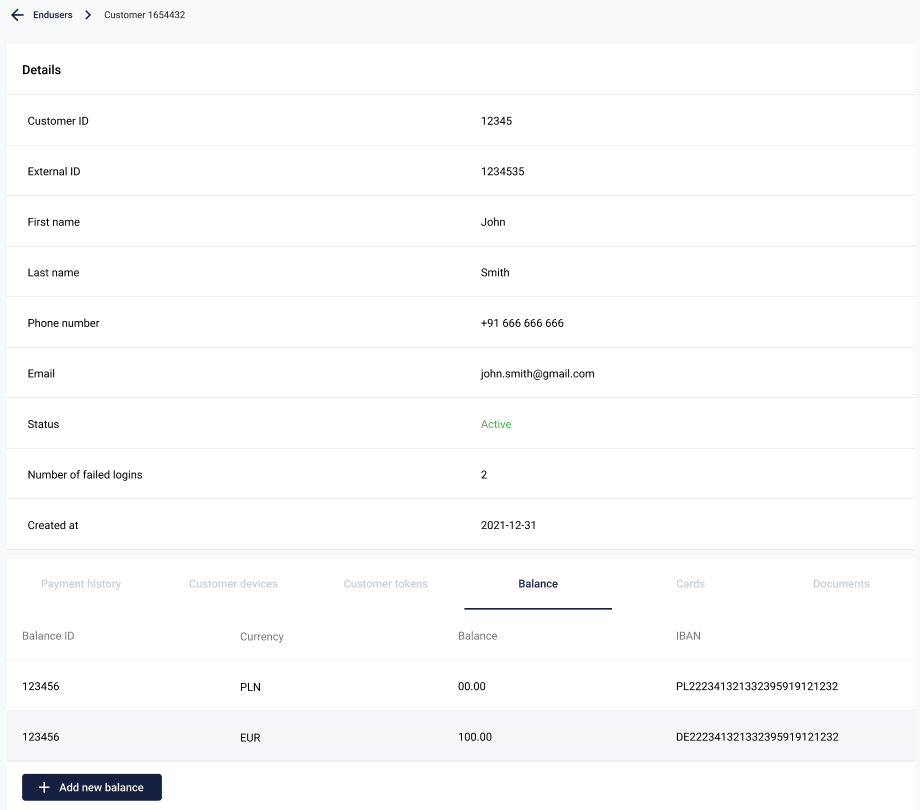
<span style="color: #000000;">Customer balances can be managed from end-user detail view, in "Balances" section. (*Customers tab -&gt; Endusers tab -&gt; Enduser details -&gt; Balances section*).  
  
[![end user detailed view balances tab.png](https://developer.verestro.com/uploads/images/gallery/2024-03/scaled-1680-/end-user-detailed-view-balances-tab.png)](https://developer.verestro.com/uploads/images/gallery/2024-03/end-user-detailed-view-balances-tab.png)  
</span>

<span style="color: rgb(0, 0, 0);">Balance view provides the following key information for each entry:</span>

<table id="bkmrk-parametr-description-0" style="border-collapse: collapse; width: 102.738%; border-style: solid; height: 193.766px;"><tbody><tr style="height: 35.1875px;"><td bgcolor="#1C1E3F" style="width: 50.6639%; height: 35.1875px;" width="353"><span style="color: #ecf0f1;">**Parameter**</span>

</td><td bgcolor="#1C1E3F" style="width: 49.4382%; height: 35.1875px;" width="353"><span style="color: #ecf0f1;">**Description**</span>

</td></tr><tr style="height: 35.5938px;"><td style="width: 50.6639%; height: 35.5938px;" width="141"><span style="color: #000000;">Balance ID  
</span>

</td><td style="width: 49.4382%; height: 35.5938px;" width="567"><span style="color: #000000;">Unique balance ID.  
</span>

</td></tr><tr style="height: 29.7969px;"><td style="width: 50.6639%; height: 29.7969px;" width="141"><span style="color: #000000;">Currency</span>  
</td><td style="width: 49.4382%; height: 29.7969px;" width="567"><span style="color: #000000;">Currency for given balance in ISO 4217 format.</span>  
</td></tr><tr style="height: 29.7969px;"><td style="width: 50.6639%; height: 29.7969px;" width="141"><span style="color: #000000;">Balance</span>  
</td><td style="width: 49.4382%; height: 29.7969px;" width="567"><span style="color: #000000;">Amount of funds available on the balance.</span>  
</td></tr><tr style="height: 63.3906px;"><td style="width: 50.6639%; height: 63.3906px;" width="141"><span style="color: #000000;">IBAN</span>  
</td><td style="width: 49.4382%; height: 63.3906px;" width="567"><span style="color: rgb(0, 0, 0);">IBAN for the given balance.</span>

<span style="color: rgb(0, 0, 0);">By default, it is hidden for security reasons and can be viewed by clicking the 'Reveal' button.</span>

<span style="text-decoration: underline; color: rgb(0, 0, 0);">This functionality is available only if IBANs are within the scope of the project.</span>

</td></tr></tbody></table>

##### <span style="color: #000000;">Add new balance</span>

<span style="color: #000000;">Operator can create new balances with **`Add new balance`** button. After clicking it, operator should choose currency for new balance from dropdown list. Newly created balance is visible on Balances list right away.  
</span>

<p class="callout info"><span style="color: #000000;">  
Balances can be created for any currency. However cards can be created only for currency compliant with end-user balance currency and currency configured in terminal for given project.   
  
</span></p>

##### <span style="color: #000000;">Balance detail view</span>

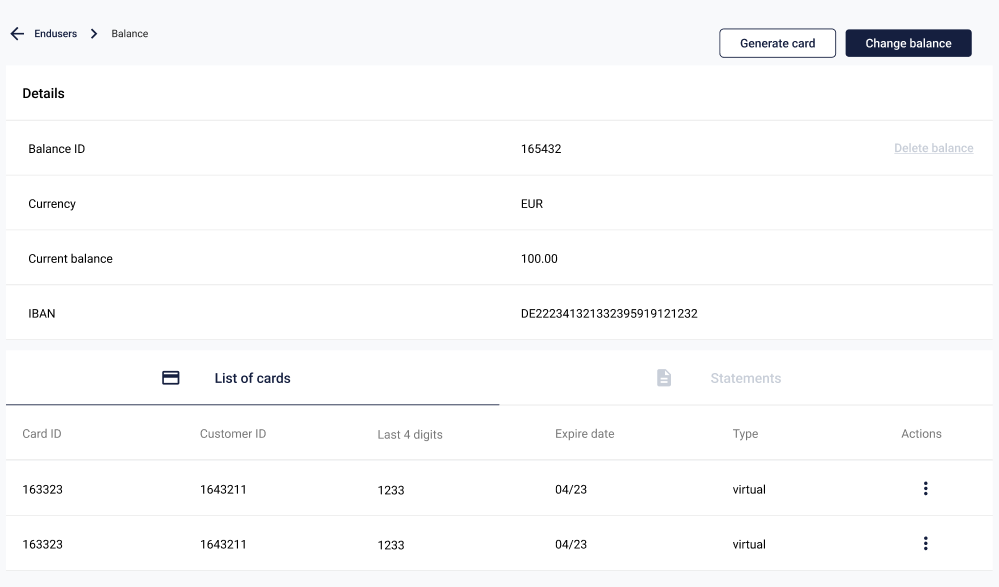
<span style="color: #000000;">Balance detail view can be entered by click on a row in Balance table, described above.   
</span>

<span style="color: #000000;">[![balance detail view (2).png](https://developer.verestro.com/uploads/images/gallery/2024-03/scaled-1680-/balance-detail-view-2.png)](https://developer.verestro.com/uploads/images/gallery/2024-03/balance-detail-view-2.png)</span>

<span style="color: #000000;">  
The page is divided into four distinct sections:  
</span>

<span style="color: #000000;">1. **Details**  
Contains: Balance ID, Balance Currency and Current Balance.  
</span>

<span style="color: #000000;">2. **List of IBANs**  
Contains all IBAN information: IBAN ID, Created date, Currency, IBAN, Status.</span>

<span style="color: #000000;">3. **List of cards**  
Contains all cards assigned to given balance along with informations: Card ID, Activation date, Expiration date, Type and Processor ID. </span>

<span style="color: #000000;">4. **Statements**  
A list of statements generated for the given balance. These statements can be automatically generated and added on a monthly basis.  
  
</span>

##### <span style="color: #000000;">Generate card</span>

<span style="color: rgb(0, 0, 0);">This functionality enables the Operator to create a virtual card. Upon clicking **`Generate card`**, a pop-up displays a list of terminals configured for the project. </span>

<span style="color: rgb(0, 0, 0);">The Operator must select a terminal with a currency that corresponds to the end-user's balance currency. The newly generated virtual card is verified immediately.  
</span>

##### <span style="color: #000000;">Change balance</span>

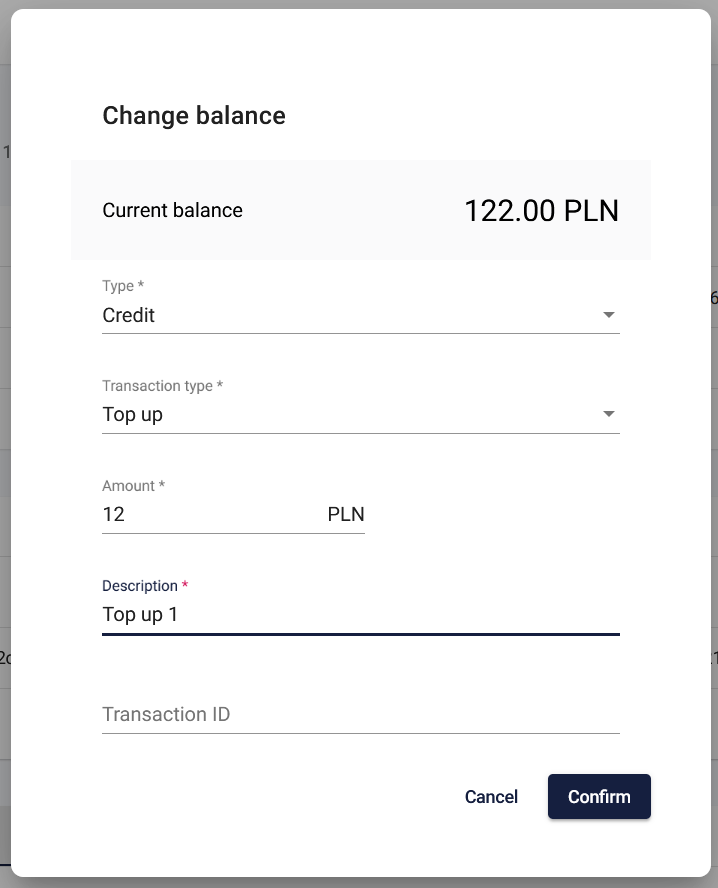
<span style="color: #000000;">Operator with Admin role can change end-user balance using **`Change balance`** button. </span>

<span style="color: #000000;">[![change balance.png](https://developer.verestro.com/uploads/images/gallery/2024-03/scaled-1680-/change-balance.png)](https://developer.verestro.com/uploads/images/gallery/2024-03/change-balance.png)</span>

1. <span style="color: #000000;">Select Type:  
    </span><span style="color: #000000;"> a) Credit - A transaction crediting the balance  
     b) Debit - A transaction debiting the balance</span>
2. <span style="color: #000000;">Select Transaction type (described in the table below). </span>
3. <span style="color: #000000;">Enter Transaction amount.</span>
4. <span style="color: #000000;">Enter Transaction description.</span>
5. <span style="color: #000000;">Enter Transaction ID - optional parameter.</span>
6. <span style="color: rgb(0, 0, 0);">Click **`Confirm`**. </span>

<span style="color: rgb(0, 0, 0);">The balance is updated immediately.</span>

<table id="bkmrk-type-transaction-typ" style="border-collapse: collapse; width: 102.024%; border-style: solid; height: 302.6px;"><tbody><tr style="height: 35.2px;"><td bgcolor="#1C1E3F" style="width: 20.9068%; height: 35.2px;" width="353"><span style="color: #ecf0f1;">**Type**</span>

</td><td bgcolor="#1C1E3F" style="width: 20.2771%; height: 35.2px;" width="353"><span style="color: #ecf0f1;">**<span style="color: #ffffff;">Transaction type</span>** </span>

</td><td bgcolor="#1C1E3F" style="width: 58.8161%; height: 35.2px;" width="353"><span style="color: #ecf0f1;">**Description**</span>

</td></tr><tr style="height: 30.6px;"><td rowspan="4" style="height: 30.6px; width: 20.9068%;" width="141"><span style="color: #000000;">Credit  
</span>

</td><td style="width: 20.2771%; height: 30.6px;"><span style="color: #000000;">Cashback  
</span>

</td><td style="width: 58.8161%; height: 30.6px;" width="567"><span style="color: rgb(0, 0, 0);">Internal transaction for a Partner who wants to top up the user's balance as part of the loyalty program.</span>

<span style="color: rgb(0, 0, 0);">Antaca automatically debits the credit Master balance with this transaction.</span>

</td></tr><tr style="height: 29.6px;"><td style="width: 20.2771%; height: 29.6px;"><span style="color: #000000;">Loan  
</span></td><td style="width: 58.8161%; height: 29.6px;" width="567"><span style="color: rgb(0, 0, 0);">Internal transaction for a Partner who want to top up end user's balance as part of the credit agreement. </span>

<span style="color: rgb(0, 0, 0);">Antaca automatically debits the credit Master Balance with this transaction.</span>

</td></tr><tr style="height: 29.6px;"><td style="width: 20.2771%; height: 29.6px;"><span style="color: #000000;">Payment  
</span></td><td style="width: 58.8161%; height: 29.6px;" width="567"><span style="color: rgb(0, 0, 0);">Internal transaction type used to top up the user's balance. This type indicates that the funds come from the Antaca system, usually in conjunction with a funding type a debit transaction on the user's balance.</span>

<span style="color: rgb(0, 0, 0);">Antaca automatically debits the credit Master balance with this transaction.</span>

</td></tr><tr style="height: 29.6px;"><td style="width: 20.2771%; height: 29.6px;"><span style="color: #000000;">Top up  
</span></td><td style="width: 58.8161%; height: 29.6px;" width="567"><span style="color: rgb(0, 0, 0);">Internal transaction type used to top up end user balance. This type indicates that the funds come from outside the Antaca system, e.g. payment to an account at a bank branch.</span>

<span style="color: rgb(0, 0, 0);">Antaca automatically debits the credit Master balance with this transaction.</span>

</td></tr><tr style="height: 29.6px;"><td class="align-center" rowspan="4" style="height: 29.6px; width: 20.9068%;"><span style="color: rgb(0, 0, 0);">Debit</span>

</td><td style="width: 20.2771%; height: 29.6px;"><span style="color: #000000;">Commission</span></td><td style="width: 58.8161%; height: 29.6px;"><span style="color: rgb(0, 0, 0);">Internal transaction for a partner who wants to debit user balance as a commission referenced to the other transaction.</span>

</td></tr><tr style="height: 29.6px;"><td style="width: 20.2771%; height: 29.6px;"><span style="color: #000000;">Fee</span></td><td style="width: 58.8161%; height: 29.6px;"><span style="color: rgb(0, 0, 0);">Internal transaction for a partner who wants to debit user balance as a fee.</span>

<span style="color: rgb(0, 0, 0);">Antaca automatically credits Company balance with the funds debited from end user balance.</span>

</td></tr><tr style="height: 29.6px;"><td style="width: 20.2771%; height: 29.6px;"><span style="color: #000000;">Funding  
</span></td><td style="width: 58.8161%; height: 29.6px;"><span style="color: rgb(0, 0, 0);">Internal transaction type used to debit the user's balance. This type indicates that the funds still remain in the Antaca system, usually in conjunction with a credit type transaction on the user's balance.</span>

<span style="color: rgb(0, 0, 0);">Antaca automatically credits the credit Master Balance with this transaction.</span>

</td></tr><tr style="height: 29.6px;"><td style="width: 20.2771%; height: 29.6px;"><span style="color: #000000;">Withdrawal  
</span></td><td style="width: 58.8161%; height: 29.6px;"><span style="color: rgb(0, 0, 0);">Internal transaction type used to debit end user balance. This type indicates that the funds go outside of Antaca system, e.g. withdrawal from an account at a bank branch.</span>

</td></tr></tbody></table>

##### <span style="color: #000000;">Delete balance</span>

<span style="color: #000000;">Delete balance option is available only for balances equal to 0.00 and all transactions are cleared. Deleted balance is no longer visible in the End-user's Balances tab. All cards assigned to deleted balance are deleted as well. </span>

<p class="callout info"><span style="color: #000000;">Operator with Admin or Manager role can delete end-user balance on balance detail view.</span></p>

## <span style="color: #000000;">Master balance</span>

<span style="color: #000000;">The Master Balance tab allows for the management of the Master Balance account and provides visibility into all transactions that have been executed on that balance.</span>

<span style="color: #000000;">1. Deposits - includes a list of Master Balances created for Partner with amount of funds and currency.</span>

<span style="color: #000000;">2. Filters - allow searching for transactions specific for given time frame, type (credit or debit), amount and transaction title. </span>

<span style="color: #000000;">3. List of transactions - list of transactions generated for selected Master Balance. </span>

<span style="color: #000000;">List includes following information:</span>

<table id="bkmrk-parametr-description-1" style="border-collapse: collapse; width: 98.8095%; border-style: solid; height: 181.6px;"><tbody><tr style="height: 35.2px;"><td bgcolor="#1C1E3F" style="width: 50.6639%; height: 35.2px;" width="353"><span style="color: #ecf0f1;">**Parameter**</span>

</td><td bgcolor="#1C1E3F" style="width: 49.4382%; height: 35.2px;" width="353"><span style="color: #ecf0f1;">**Description**</span>

</td></tr><tr style="height: 57.6px;"><td style="width: 50.6639%; height: 57.6px;" width="141"><span style="color: #000000;">Transaction date  
</span>

</td><td style="width: 49.4382%; height: 57.6px;" width="567"><span style="color: #000000;">Transaction date in YYYY-MM-DD format and 24 hour format (UTC+0).  
</span>

</td></tr><tr style="height: 29.6px;"><td style="width: 50.6639%; height: 29.6px;" width="141"><span style="color: #000000;">Title</span>  
</td><td style="width: 49.4382%; height: 29.6px;" width="567"><span style="color: #000000;">Description of the transaction.</span>  
</td></tr><tr style="height: 29.6px;"><td style="width: 50.6639%; height: 29.6px;" width="141"><span style="color: #000000;">Amount</span>  
</td><td style="width: 49.4382%; height: 29.6px;" width="567"><span style="color: #000000;">Amount of transaction with currency code.</span>  
</td></tr><tr style="height: 29.6px;"><td style="width: 50.6639%; height: 29.6px;" width="141"><span style="color: #000000;">Type</span>  
</td><td style="width: 49.4382%; height: 29.6px;" width="567"><span style="color: #000000;">Type of transaction. </span>

<span style="color: #000000;">Available values "Debit" and "Credit".</span>

</td></tr></tbody></table>

##### <span style="color: #000000;">Change balance</span>

<span style="color: rgb(0, 0, 0);">To generate a transaction on the Master Balance, the Operator should perform the following actions:</span>

<span style="color: rgb(0, 0, 0);">1. Select proper Master balance.  
2\. Select "Change balance" button.  
3\. Select transaction type.  
4\. Enter transaction amount.   
5\. Enter transaction description.  
6\. Add transaction ID (optional).   
7\. Click "Confirm". </span>

<span style="color: rgb(0, 0, 0);">This action results in a change to the Master Balance and the immediate saving of a transaction in the "List of transactions" table. These transactions are recorded instantly with the status `CLEARED`.</span>

<p class="callout info"><span style="color: #000000;">Only the BIN Sponsor is authorized to modify the state of the Master Balance.</span></p>

##### <span style="color: #000000;">Generate report</span>

<span style="color: rgb(0, 0, 0);">Additionally, this screen allows for the generation of a transaction report based on the applied filters.</span>

<span style="color: rgb(0, 0, 0);">The report includes the following data fields:</span>

<table id="bkmrk-parametr-description-5" style="border-collapse: collapse; width: 99.6429%; border-style: solid; height: 713.797px;"><tbody><tr style="height: 35.1875px;"><td bgcolor="#1C1E3F" style="width: 29.8805%; height: 35.1875px;" width="353"><span style="color: #ecf0f1;">**Parameter**</span>

</td><td bgcolor="#1C1E3F" style="width: 70.1195%; height: 35.1875px;" width="353"><span style="color: #ecf0f1;">**Description**</span>

</td></tr><tr style="height: 29.7969px;"><td style="width: 29.8805%; height: 29.7969px;" width="141"><span style="color: rgb(0, 0, 0);">ID</span>  
</td><td style="width: 70.1195%; height: 29.7969px;" width="567"><span style="color: #000000;">Unique ID of the transaction.</span>

</td></tr><tr style="height: 29.7969px;"><td style="width: 29.8805%; height: 29.7969px;" width="141"><span style="color: #000000;">External ID</span>  
</td><td style="width: 70.1195%; height: 29.7969px;" width="567"><span style="color: #000000;">An identifier from an external system linked to this transaction.</span>  
</td></tr><tr style="height: 46.5938px;"><td style="width: 29.8805%; height: 46.5938px;"><span style="color: #000000;">EventType</span>  
</td><td style="width: 70.1195%; height: 46.5938px;"><span style="color: #000000;"><span data-path-to-node="2,3,1,0">Indicates the type of event that triggered the transaction.</span></span>

<span style="color: #000000;"><span data-path-to-node="2,3,1,0">Available values: Credit, Debit.</span></span>

</td></tr><tr style="height: 46.5938px;"><td style="width: 29.8805%; height: 46.5938px;"><span style="color: #000000;">Type</span>  
</td><td style="width: 70.1195%; height: 46.5938px;"><span style="color: #000000;">Transaction type.</span>

</td></tr><tr style="height: 29.7969px;"><td style="width: 29.8805%; height: 29.7969px;"><span style="color: #000000;">TransactionDate</span></td><td style="width: 70.1195%; height: 29.7969px;"><span style="color: #000000;">The date and time when the transaction was initiated.</span>

</td></tr><tr style="height: 46.5938px;"><td style="width: 29.8805%; height: 46.5938px;"><span style="color: #000000;">Amount</span></td><td style="width: 70.1195%; height: 46.5938px;"><span style="color: #000000;">The original value of the transaction before any adjustments or reversals (minor value).</span>

</td></tr><tr style="height: 63.3906px;"><td style="width: 29.8805%; height: 63.3906px;"><span style="color: #000000;">AdjustmentAmount</span></td><td style="width: 70.1195%; height: 63.3906px;"><span style="color: #000000;">The amount added or subtracted due to a correction or modification of the original transaction.</span>

**<span style="color: #000000;">This value is typically 0 for Master Balance transactions.</span>**

</td></tr><tr style="height: 63.375px;"><td style="width: 29.8805%; height: 63.375px;"><span style="color: #000000;">ReversalAmount</span></td><td style="width: 70.1195%; height: 63.375px;"><span style="color: #000000;">The amount related to the cancellation or partial-reversal a previously posted transaction.</span>

**<span style="color: #000000;">This value is typically 0 for Master Balance transactions.</span>**

</td></tr><tr style="height: 46.5938px;"><td style="width: 29.8805%; height: 46.5938px;"><span style="color: #000000;">Finalamount</span></td><td style="width: 70.1195%; height: 46.5938px;"><span style="color: #000000;">The final amount calculated after considering the original amount, adjustments, and reversals.</span>

</td></tr><tr style="height: 46.5938px;"><td style="width: 29.8805%; height: 46.5938px;"><span style="color: #000000;">Currency</span></td><td style="width: 70.1195%; height: 46.5938px;"><span style="color: #000000;">The three-letter ISO 4217 code of the currency used for the transaction amount (e.g., PLN, USD).</span>

</td></tr><tr style="height: 29.7969px;"><td style="width: 29.8805%; height: 29.7969px;"><span style="color: #000000;">Description</span></td><td style="width: 70.1195%; height: 29.7969px;"><span style="color: #000000;">Description of the transaction.</span>

</td></tr><tr style="height: 46.9062px;"><td style="width: 29.8805%; height: 46.9062px;"><span style="color: #000000;">Status</span></td><td style="width: 70.1195%; height: 46.9062px;"><span style="color: #000000;">The current processing status of the transaction. </span>

<span style="color: #000000;">This value is typically `CLEARED` for Master Balance transactions.</span>

</td></tr><tr style="height: 46.5938px;"><td style="width: 29.8805%; height: 46.5938px;"><span style="color: rgb(0, 0, 0);"><span style="color: #000000;">ReferenceTransactionId</span></span></td><td style="width: 70.1195%; height: 46.5938px;"><span style="color: #000000;">The ID of another transaction related to this transaction.</span>

</td></tr><tr style="height: 29.7969px;"><td style="width: 29.8805%; height: 29.7969px;"><span style="color: rgb(0, 0, 0);"><span style="color: #000000;">AccountingBalance</span></span></td><td style="width: 70.1195%; height: 29.7969px;"><span style="color: #000000;">The balance of the company account after this transaction was cleared.</span>

</td></tr><tr style="height: 29.7969px;"><td style="width: 29.8805%; height: 29.7969px;"><span style="color: rgb(0, 0, 0);"><span style="color: #000000;">ClearedAt</span></span></td><td style="width: 70.1195%; height: 29.7969px;"><span style="color: #000000;">The date and time when the transaction was finally settled (cleared).</span>

</td></tr><tr style="height: 46.5938px;"><td style="width: 29.8805%; height: 46.5938px;"><span style="color: rgb(0, 0, 0);"><span style="color: #000000;">TerminalId</span></span></td><td style="width: 70.1195%; height: 46.5938px;"><span style="color: #000000;"><span data-path-to-node="1,1,1,0">The ID of the card terminal that processed the transaction associated with this record.</span></span>

</td></tr></tbody></table>

<p class="callout info"><span style="color: rgb(0, 0, 0);">The maximum time range allowable for generating reports is 3 months.</span></p>

## Balance statistics

<span style="color: rgb(0, 0, 0);">The Balance Statistics page provides crucial information regarding the necessary capital a Partner must maintain in their bank account to ensure money liquidity for their project. It aggregates the totals of end users' balances and the Partner's own balances for a selected currency.</span>

<span style="color: rgb(0, 0, 0);">On this screen, you can choose the currency you are interested in. After selection, the page shows the current values for:</span>

<table id="bkmrk-parametr-description-2" style="border-collapse: collapse; width: 99.6429%; border-style: solid; height: 228.922px;"><tbody><tr style="height: 35.1875px;"><td bgcolor="#1C1E3F" style="width: 37.6949%; height: 35.1875px;" width="353"><span style="color: #ecf0f1;">**Parameter**</span>

</td><td bgcolor="#1C1E3F" style="width: 62.3051%; height: 35.1875px;" width="353"><span style="color: #ecf0f1;">**Description**</span>

</td></tr><tr style="height: 35.5938px;"><td style="width: 37.6949%; height: 35.5938px;" width="141"><span style="color: #000000;">Total user balance  
</span>

</td><td style="width: 62.3051%; height: 35.5938px;" width="567"><span style="color: #000000;">The aggregate funds across all end-user balances.</span>

</td></tr><tr style="height: 29.7969px;"><td style="width: 37.6949%; height: 29.7969px;" width="141"><span style="color: #000000;">Total company balance</span>  
</td><td style="width: 62.3051%; height: 29.7969px;" width="567"><span style="color: #000000;">The total amount held in the company balance.</span>  
</td></tr><tr style="height: 35.375px;"><td style="width: 37.6949%; height: 35.375px;" width="141"><span style="color: #000000;">Total deposit Master balance</span>  
</td><td style="width: 62.3051%; height: 35.375px;" width="567"><span style="color: #000000;">The total amount held in the deposit Master balance.</span>

<span style="color: #000000;">**Is applicable only if the Partner has the deposit Master Balance enabled.**</span>

</td></tr><tr style="height: 46.375px;"><td style="width: 37.6949%; height: 46.375px;"><span style="color: #000000;">Total credit Master balance</span>  
</td><td style="width: 62.3051%; height: 46.375px;"><span style="color: #000000;">The total amount held in the credit Master balance.</span>

<span style="color: #000000;">**Is applicable only if the Partner has the credit Master Balance enabled.**</span>

</td></tr><tr style="height: 46.5938px;"><td style="width: 37.6949%; height: 46.5938px;"><span style="color: #000000;">Bank Account</span>  
</td><td style="width: 62.3051%; height: 46.5938px;"><span style="color: #000000;">The sum of the Total User Balance, Total Company Balance, and Total Master Balance.</span>  
</td></tr></tbody></table>

## Manual clearings

<span style="color: rgb(0, 0, 0);">The Manual Clearings page displays all transactions registered in Antaca as well as settlements generated within the payment network. The Manual Clearings feature enables the BIN Sponsor to clear transactions that were not processed automatically.</span>

<span style="color: rgb(0, 0, 0);">Page is divided into two sections:</span>

##### <span style="color: rgb(0, 0, 0);">1. Transactions</span>  


<span style="color: rgb(0, 0, 0);">Operator can filter transactions using following filters: </span>

- <span style="color: rgb(0, 0, 0);">Date from, </span>
- <span style="color: rgb(0, 0, 0);">Date to, </span>
- <span style="color: rgb(0, 0, 0);">Terminal, </span>
- <span style="color: rgb(0, 0, 0);">Transaction ID, </span>
- <span style="color: rgb(0, 0, 0);">Customer ID, </span>
- <span style="color: rgb(0, 0, 0);">Card ID, </span>
- <span style="color: rgb(0, 0, 0);">Type, </span>
- <span style="color: rgb(0, 0, 0);">Status</span>

<span style="color: rgb(0, 0, 0);">The main list provides the following information about the transactions: </span>

<table id="bkmrk-parameter-descriptio" style="border-collapse: collapse; width: 99.6429%; border-style: solid; height: 287.8px;"><tbody><tr style="height: 35.2px;"><td bgcolor="#1C1E3F" style="width: 50.6639%; height: 35.2px;" width="353"><span style="color: #ecf0f1;">**Parameter**</span>

</td><td bgcolor="#1C1E3F" style="width: 49.4382%; height: 35.2px;" width="353"><span style="color: #ecf0f1;">**Description**</span>

</td></tr><tr style="height: 35.6px;"><td style="width: 50.6639%; height: 35.6px;" width="141"><span style="color: #000000;">Transaction ID  
</span>

</td><td style="width: 49.4382%; height: 35.6px;" width="567"><span style="color: #000000;">An identifier from an external system linked to this transaction.</span>

</td></tr><tr style="height: 29.6px;"><td style="width: 50.6639%; height: 29.6px;" width="141"><span style="color: #000000;">Description</span>  
</td><td style="width: 49.4382%; height: 29.6px;" width="567"><span style="color: #000000;">Description of the transaction.</span>  
</td></tr><tr style="height: 35.4px;"><td style="width: 50.6639%; height: 35.4px;" width="141"><span style="color: #000000;">Card ID</span>  
</td><td style="width: 49.4382%; height: 35.4px;" width="567"><span style="color: #000000;">The unique, internal numerical identifier assigned to the card (integer).</span>  
</td></tr><tr style="height: 46.4px;"><td style="width: 50.6639%; height: 46.4px;"><span style="color: #000000;">Type</span>  
</td><td style="width: 49.4382%; height: 46.4px;"><span style="color: #000000;">Type of transaction.</span>  
</td></tr><tr style="height: 29.6px;"><td style="width: 50.6639%; height: 29.6px;"><span style="color: #000000;">Final amount</span>  
</td><td style="width: 49.4382%; height: 29.6px;"><span style="color: #000000;">The final amount calculated after considering the original amount, adjustments, and reversals (gross value).</span>  
</td></tr><tr style="height: 29.6px;"><td style="width: 50.6639%; height: 29.6px;"><span style="color: #000000;">Transaction date</span>  
</td><td style="width: 49.4382%; height: 29.6px;"><span style="color: #000000;">Transaction date in YYYY-MM-DD format and 24 hour format (UTC+0).</span></td></tr><tr style="height: 46.4px;"><td style="width: 50.6639%; height: 46.4px;"><span style="color: #000000;">Status</span>  
</td><td style="width: 49.4382%; height: 46.4px;"><span style="color: #000000;">The current processing status of the transaction. </span>

<span style="color: #000000;">Available values: </span>

- <span style="color: #000000;">`Authorized`, </span>
- <span style="color: #000000;">`Cleared`, </span>
- <span style="color: #000000;">`Reversed`. </span>

</td></tr></tbody></table>

<span style="color: rgb(0, 0, 0);">Clicking on a transaction record opens a popup window displaying the detailed transaction information:  
</span>

<table id="bkmrk-parameter-descriptio-1" style="border-collapse: collapse; width: 99.6429%; border-style: solid; height: 350.344px;"><tbody><tr style="height: 35.1875px;"><td bgcolor="#1C1E3F" style="width: 50.6639%; height: 35.1875px;" width="353"><span style="color: #ecf0f1;">**Parameter**</span>

</td><td bgcolor="#1C1E3F" style="width: 49.4382%; height: 35.1875px;" width="353"><span style="color: #ecf0f1;">**Description**</span>

</td></tr><tr style="height: 29.7969px;"><td style="width: 50.6639%; height: 29.7969px;"><span style="color: #000000;">Transaction ID</span>

</td><td style="width: 49.4382%; height: 29.7969px;"><span style="color: #000000;">Unique ID of the transaction. </span>

</td></tr><tr style="height: 35.5938px;"><td style="width: 50.6639%; height: 35.5938px;" width="141"><span style="color: #000000;">Transaction External ID  
</span>

</td><td style="width: 49.4382%; height: 35.5938px;" width="567"><span style="color: #000000;">An identifier from an external system linked to this transaction.</span>

</td></tr><tr style="height: 46.5938px;"><td style="width: 50.6639%; height: 46.5938px;" width="141"><span style="color: #000000;">Amount</span>  
</td><td style="width: 49.4382%; height: 46.5938px;" width="567"><span style="color: #000000;">The original value of the transaction before any adjustments or reversals (gross value).</span>  
</td></tr><tr style="height: 46.5938px;"><td style="width: 50.6639%; height: 46.5938px;" width="141"><span style="color: #000000;">Currency</span>  
</td><td style="width: 49.4382%; height: 46.5938px;" width="567"><span style="color: #000000;">The three-letter ISO 4217 code of the currency used for the transaction amount (e.g., PLN, USD).</span>  
</td></tr><tr style="height: 46.5938px;"><td style="width: 50.6639%; height: 46.5938px;"><span style="color: #000000;"><span class="mat-mdc-list-item-title mdc-list-item__primary-text title">Adjustment amount</span></span>  
</td><td style="width: 49.4382%; height: 46.5938px;"><span style="color: #000000;">The amount added or subtracted due to a correction or modification of the original transaction.</span>  
</td></tr><tr style="height: 46.5938px;"><td style="width: 50.6639%; height: 46.5938px;"><span style="color: #000000;"><span class="mat-mdc-list-item-title mdc-list-item__primary-text title">Reversal amount</span></span>  
</td><td style="width: 49.4382%; height: 46.5938px;"><span style="color: #000000;">The amount related to the cancellation or partial-reversal a previously posted transaction.</span>  
</td></tr><tr style="height: 63.3906px;"><td style="width: 50.6639%; height: 63.3906px;"><span style="color: rgb(0, 0, 0);">Related transactions</span>

</td><td style="width: 49.4382%; height: 63.3906px;"><span style="color: #000000;">A list of transactional events (e.g., authorizations, settlements, reversals, adjustments) that influenced to the final state and amount of the current transaction record.</span></td></tr></tbody></table>

##### <span style="color: rgb(0, 0, 0);">2. Settlements</span>

<span style="color: rgb(0, 0, 0);">Operator can filter settlements using following filters: </span>

- <span style="color: rgb(0, 0, 0);">Date from, </span>
- <span style="color: rgb(0, 0, 0);">Date to, </span>
- <span style="color: rgb(0, 0, 0);">Terminal, </span>
- <span style="color: rgb(0, 0, 0);">Transaction ID, </span>
- <span style="color: rgb(0, 0, 0);">Customer ID, </span>
- <span style="color: rgb(0, 0, 0);">Card ID, </span>
- <span style="color: rgb(0, 0, 0);">Status, </span>
- <span style="color: rgb(0, 0, 0);">Processed. </span>

<span style="color: rgb(0, 0, 0);">The main list provides the following information about the settlements: </span>

<table id="bkmrk-parametr-description-3" style="border-collapse: collapse; width: 101.31%; border-style: solid; height: 286.953px;"><tbody><tr style="height: 35.1875px;"><td bgcolor="#1C1E3F" style="width: 50.6639%; height: 35.1875px;" width="353"><span style="color: #ecf0f1;">**Parametr**</span>

</td><td bgcolor="#1C1E3F" style="width: 49.4382%; height: 35.1875px;" width="353"><span style="color: #ecf0f1;">**Description**</span>

</td></tr><tr style="height: 35.5938px;"><td style="width: 50.6639%; height: 35.5938px;" width="141"><span style="color: #000000;">Transaction ID  
</span>

</td><td style="width: 49.4382%; height: 35.5938px;" width="567"><span style="color: #000000;">An identifier from an external system linked to this transaction.</span>

</td></tr><tr style="height: 29.7969px;"><td style="width: 50.6639%; height: 29.7969px;" width="141"><span style="color: #000000;">Description</span>  
</td><td style="width: 49.4382%; height: 29.7969px;" width="567"><span style="color: #000000;">Transaction description.</span>  
</td></tr><tr style="height: 46.5938px;"><td style="width: 50.6639%; height: 46.5938px;" width="141"><span style="color: #000000;">Card ID</span>  
</td><td style="width: 49.4382%; height: 46.5938px;" width="567"><span style="color: #000000;">The unique, internal numerical identifier assigned to the card (integer).</span>  
</td></tr><tr style="height: 46.5938px;"><td style="width: 50.6639%; height: 46.5938px;"><span style="color: #000000;">Amount</span>  
</td><td style="width: 49.4382%; height: 46.5938px;"><span style="color: #000000;">The final, confirmed amount transferred during the clearing process.</span>  
</td></tr><tr style="height: 46.5938px;"><td style="width: 50.6639%; height: 46.5938px;"><span style="color: #000000;">Transaction date</span>  
</td><td style="width: 49.4382%; height: 46.5938px;"><span style="color: #000000;">Transaction date in YYYY-MM-DD format and 24 hour format (UTC+0).</span></td></tr><tr style="height: 46.5938px;"><td style="width: 50.6639%; height: 46.5938px;"><span style="color: #000000;">Processed at</span>  
</td><td style="width: 49.4382%; height: 46.5938px;"><span style="color: #000000;">Settlement clearing date in YYYY-MM-DD format and 24 hour format (UTC+0).  
</span></td></tr></tbody></table>

<span style="color: rgb(0, 0, 0);">Clicking on a settlement record opens a popup window displaying the detailed information:  
</span>

<table id="bkmrk-parameter-descriptio-2" style="border-collapse: collapse; width: 99.6429%; border-style: solid; height: 436.953px;"><tbody><tr style="height: 35.1875px;"><td bgcolor="#1C1E3F" style="width: 50.6639%; height: 35.1875px;" width="353"><span style="color: #ecf0f1;">**Parameter**</span>

</td><td bgcolor="#1C1E3F" style="width: 49.4382%; height: 35.1875px;" width="353"><span style="color: #ecf0f1;">**Description**</span>

</td></tr><tr style="height: 46.5938px;"><td style="width: 50.6639%; height: 46.5938px;" width="141"><span style="color: #000000;">Currency  
</span>

</td><td style="width: 49.4382%; height: 46.5938px;" width="567"><span style="color: #000000;">The three-letter ISO 4217 code of the currency used for the transaction amount (e.g., PLN, USD).</span>

</td></tr><tr style="height: 103.625px;"><td style="width: 50.6639%; height: 103.625px;" width="141"><span style="color: #000000;">Type</span>  
</td><td style="width: 49.4382%; height: 103.625px;" width="567"><span style="color: #000000;">describes the transaction type, such as:</span>- <span style="color: rgb(0, 0, 0);">DEDUCT</span>
- <span style="color: rgb(0, 0, 0);">LOAD</span>
- <span style="color: rgb(0, 0, 0);">REVERSAL</span>

</td></tr><tr style="height: 46.5938px;"><td style="width: 50.6639%; height: 46.5938px;" width="141"><span style="color: #000000;"><span class="mat-mdc-list-item-title mdc-list-item__primary-text title">Settlement amount</span></span>  
</td><td style="width: 49.4382%; height: 46.5938px;" width="567"><span style="color: #000000;">Settlement amount of the transaction.</span></td></tr><tr style="height: 46.5938px;"><td style="width: 50.6639%; height: 46.5938px;"><span style="color: #000000;"><span class="mat-mdc-list-item-title mdc-list-item__primary-text title">Transaction narrative</span></span>  
</td><td style="width: 49.4382%; height: 46.5938px;"><span style="color: #000000;">The merchant’s description.</span>  
</td></tr><tr style="height: 46.5938px;"><td style="width: 50.6639%; height: 46.5938px;"><span style="color: #000000;"><span class="mat-mdc-list-item-title mdc-list-item__primary-text title">System date</span></span>  
</td><td style="width: 49.4382%; height: 46.5938px;"><span style="color: #000000;">Issuer processor's system date.</span>  
</td></tr><tr style="height: 35.375px;"><td style="width: 50.6639%; height: 35.375px;"><span style="color: rgb(0, 0, 0);">Sequence number</span>

</td><td style="width: 49.4382%; height: 35.375px;"><span style="color: #000000;">Unique sequence card identifier from the Issuer processor. </span></td></tr><tr style="height: 29.7969px;"><td style="width: 50.6639%; height: 29.7969px;"><span style="color: rgb(0, 0, 0);">Tracking number</span>

</td><td style="width: 49.4382%; height: 29.7969px;"><span style="color: #000000;">Unique tracking identifier from the Issuer processor.</span></td></tr><tr style="height: 46.5938px;"><td style="width: 50.6639%; height: 46.5938px;"><span style="color: rgb(0, 0, 0);">Interchange amount</span>

</td><td style="width: 49.4382%; height: 46.5938px;"><span style="color: #000000;">Cost or income generated as a result of settlement previously authorized transactions.</span></td></tr></tbody></table>

##### <span style="color: rgb(0, 0, 0);">Download settlement</span>

<span style="color: rgb(0, 0, 0);">Download settlement option allows for the re-initiation of the settlement file download for a specific day and terminal, in cases where the automatic download failed for any reason.</span>

##### <span style="color: rgb(0, 0, 0);">Reverse transaction</span>

<span style="color: rgb(0, 0, 0);">It is possible to reverse a transaction that remains in the **AUTHORIZED** status (not CLEARED or REVERSED).</span>

1. <span style="color: rgb(0, 0, 0);">Select the relevant transaction on the list.</span>
2. <span style="color: rgb(0, 0, 0);">Choose the **"Clear transaction"** option.</span>
3. <span style="color: rgb(0, 0, 0);">Enter the amount to be reversed.</span>

<span style="color: rgb(0, 0, 0);">Possible results: </span>

- <span style="color: rgb(0, 0, 0);">Partial Reversal - If the amount entered is lower than the authorized transaction amount, a partial reversal should be generated.</span>
- <span style="color: rgb(0, 0, 0);">Full Reversal - If the amount entered is equal to the authorized transaction amount, the entire transaction is reversed, and its status changes to `REVERSED`.</span>
- <span style="color: rgb(0, 0, 0);">Error - If the amount entered is higher than the authorized transaction amount, an error should be returned indicating this discrepancy.</span>

##### Clear transactions

<span style="color: rgb(0, 0, 0);">To clear transactions, the Operator should perform the following actions:</span>

1. <span style="color: rgb(0, 0, 0);">Select one or more transactions to be cleared.</span>
2. <span style="color: rgb(0, 0, 0);">Select the settlement to be linked with the transactions chosen in step 1 (this step is optional).</span>
3. <span style="color: rgb(0, 0, 0);">Click the **Clear transactions** button at the top right of the page.</span>

<span style="color: rgb(0, 0, 0);">Following this process:</span>

- - <span style="color: rgb(0, 0, 0);">The status of the selected transactions is changed to `CLEARED`.</span>
    - <span style="color: rgb(0, 0, 0);">The settlement chosen in step 2 (if selected) will have its **<span class="math-inline" data-math="\text{Processed at}">`Processed at` </span>**parameter set to the date of the clearing action.</span>
    - <span style="color: rgb(0, 0, 0);">The corresponding<span class="math-inline" data-math="\text{INTERCHANGE}">`INTERCHANGE`</span> transaction will be generated.</span>

<p class="callout info"><span style="color: rgb(0, 0, 0);">Manual clearings tab is only available to the BIN Sponsor.</span></p>

## Partner accounting

<span style="color: rgb(0, 0, 0);">The Partner Accounting page was designed to present information regarding the Partner's profit for a given project. It contains a list of transactions, such as fees, interchange, FX conversion and transactions generated manually by the BIN Sponsor.</span>  
  
<span style="color: rgb(0, 0, 0);">The page is divided into 3 sections:</span>

<span style="color: rgb(0, 0, 0);">1. Company balance - list of Partner balances with balanceId and specific currency.</span>

<span style="color: rgb(0, 0, 0);">2. Filters - allow searching for transactions specific for given time frame and type of transaction (credit or debit).</span>

<span style="color: rgb(0, 0, 0);">3. List of transactions</span>

<table id="bkmrk-parametr-description-4" style="border-collapse: collapse; width: 100.238%; border-style: solid; height: 371.782px;"><tbody><tr style="height: 35.1875px;"><td bgcolor="#1C1E3F" style="width: 50.6213%; height: 35.1875px;" width="353"><span style="color: #ecf0f1;">**Parametr**</span>

</td><td bgcolor="#1C1E3F" style="width: 49.3806%; height: 35.1875px;" width="353"><span style="color: #ecf0f1;">**Description**</span>

</td></tr><tr style="height: 46.5938px;"><td style="width: 50.6213%; height: 46.5938px;" width="141"><span style="color: #000000;">Transaction date  
</span>

</td><td style="width: 49.3806%; height: 46.5938px;" width="567"><span style="color: #000000;">Transaction date in YYYY-MM-DD format and 24 hour format (UTC+0).</span>

</td></tr><tr style="height: 29.7969px;"><td style="width: 50.6213%; height: 29.7969px;" width="141"><span style="color: #000000;">Title</span>  
</td><td style="width: 49.3806%; height: 29.7969px;" width="567"><span style="color: #000000;">Transaction description.</span>  
</td></tr><tr style="height: 29.7969px;"><td style="width: 50.6213%; height: 29.7969px;"><span style="color: #000000;">Amount</span>  
</td><td style="width: 49.3806%; height: 29.7969px;"><span style="color: #000000;">Transaction gross value with currency.</span>  
</td></tr><tr style="height: 46.5938px;"><td style="width: 50.6213%; height: 46.5938px;"><span style="color: #000000;">Type</span>  
</td><td style="width: 49.3806%; height: 46.5938px;"><span style="color: #000000;">Transaction type. </span>

<span style="color: #000000;">Available values: Credit, Debit.   
</span>

</td></tr><tr style="height: 137.219px;"><td style="width: 50.6213%; height: 137.219px;"><span style="color: #000000;">Subtype</span></td><td style="width: 49.3806%; height: 137.219px;"><span style="color: #000000;"><span data-path-to-node="1,1,1,0">Detailed transaction classification</span></span>

<span style="color: #000000;"><span data-path-to-node="1,1,1,0">Examples:</span></span>

- <span style="color: #000000;"><span data-path-to-node="1,1,1,0">**INTERCHANGE** - This transaction is generated as a result of the settlement of authorized transactions.</span></span>
- <span style="color: #000000;"><span data-path-to-node="1,1,1,0">**FOREX** - A transaction specifically related to foreign currency exchange or conversion.</span></span>
- <span style="color: #000000;"><span data-path-to-node="1,1,1,0">**FEE** - A transaction that charges the customer and credits the company's balance. It is related to a charge for a specific service or account management. </span></span>
- **<span style="color: #000000;"><span data-path-to-node="1,1,1,0">COMPANY - </span></span>**<span style="color: #000000;"><span data-path-to-node="1,1,1,0">internal transaction dedicated only for bin-sponsor to debit/credit company balance used for settlements between the partner and the bin-sponsor.</span></span>

</td></tr><tr style="height: 46.5938px;"><td style="width: 50.6213%; height: 46.5938px;"><span style="color: #000000;">Terminal ID</span></td><td style="width: 49.3806%; height: 46.5938px;"><span style="color: #000000;"><span data-path-to-node="1,1,1,0">The ID of the card terminal that processed the transaction associated with this record.</span></span>

</td></tr></tbody></table>

##### <span style="color: #000000;">Generate a transaction</span>

To generate a transaction and modify the Company balance, the Operator should perform the following actions:

1. <span style="color: #000000;">Select proper company balance.  
    2. </span><span style="color: #000000;">Select 'Generate a transaction' button.  
    3. Select transaction type.  
    4. Enter transaction amount.   
    5. Enter transaction description.  
    6. Add transaction ID (optional).   
    7. Click 'Confirm'.</span>
2. <span style="color: #000000;">The transaction will be processed with a subType of `COMPANY`.</span>

<p class="callout info"><span style="color: #000000;">The 'Generate a transaction' action can only be performed by the **BIN Sponsor.**</span></p>

##### <span style="color: #000000;">Generate a report</span>

<span style="color: rgb(0, 0, 0);">Additionally, this screen allows for the generation of a transaction report based on the applied filters.</span>

<span style="color: rgb(0, 0, 0);">The report includes the following data fields:</span>

<table id="bkmrk-parameter-descriptio-3" style="border-collapse: collapse; width: 99.6429%; border-style: solid; height: 713.813px;"><tbody><tr style="height: 35.1875px;"><td bgcolor="#1C1E3F" style="width: 29.8805%; height: 35.1875px;" width="353"><span style="color: #ecf0f1;">**Parameter**</span>

</td><td bgcolor="#1C1E3F" style="width: 70.1195%; height: 35.1875px;" width="353"><span style="color: #ecf0f1;">**Description**</span>

</td></tr><tr style="height: 29.7969px;"><td style="width: 29.8805%; height: 29.7969px;" width="141"><span style="color: rgb(0, 0, 0);">ID</span>  
</td><td style="width: 70.1195%; height: 29.7969px;" width="567"><span style="color: #000000;">Unique ID of the transaction.</span>

</td></tr><tr style="height: 29.7969px;"><td style="width: 29.8805%; height: 29.7969px;" width="141"><span style="color: #000000;">External ID</span>  
</td><td style="width: 70.1195%; height: 29.7969px;" width="567"><span style="color: #000000;">An identifier from an external system linked to this transaction.</span>  
</td></tr><tr style="height: 46.5938px;"><td style="width: 29.8805%; height: 46.5938px;"><span style="color: #000000;">EventType</span>  
</td><td style="width: 70.1195%; height: 46.5938px;"><span style="color: #000000;"><span data-path-to-node="2,3,1,0">Indicates the type of event that triggered the transaction.</span></span>

<span style="color: #000000;"><span data-path-to-node="2,3,1,0">Available values: Credit, Debit.</span></span>

</td></tr><tr style="height: 46.5938px;"><td style="width: 29.8805%; height: 46.5938px;"><span style="color: #000000;">Type</span>  
</td><td style="width: 70.1195%; height: 46.5938px;"><span style="color: #000000;">Transaction type.</span>

</td></tr><tr style="height: 29.7969px;"><td style="width: 29.8805%; height: 29.7969px;"><span style="color: #000000;">TransactionDate</span></td><td style="width: 70.1195%; height: 29.7969px;"><span style="color: #000000;">The date and time when the transaction was initiated.</span>

</td></tr><tr style="height: 46.5938px;"><td style="width: 29.8805%; height: 46.5938px;"><span style="color: #000000;">Amount</span></td><td style="width: 70.1195%; height: 46.5938px;"><span style="color: #000000;">The original value of the transaction before any adjustments or reversals (minor value).</span>

</td></tr><tr style="height: 63.3906px;"><td style="width: 29.8805%; height: 63.3906px;"><span style="color: #000000;">AdjustmentAmount</span></td><td style="width: 70.1195%; height: 63.3906px;"><span style="color: #000000;">The amount added or subtracted due to a correction or modification of the original transaction.</span>

**<span style="color: #000000;">This value is typically 0 for Company Balance transactions.</span>**

</td></tr><tr style="height: 63.3906px;"><td style="width: 29.8805%; height: 63.3906px;"><span style="color: #000000;">ReversalAmount</span></td><td style="width: 70.1195%; height: 63.3906px;"><span style="color: #000000;">The amount related to the cancellation or partial-reversal a previously posted transaction.</span>

**<span style="color: #000000;">This value is typically 0 for Company Balance transactions.</span>**

</td></tr><tr style="height: 46.5938px;"><td style="width: 29.8805%; height: 46.5938px;"><span style="color: #000000;">Finalamount</span></td><td style="width: 70.1195%; height: 46.5938px;"><span style="color: #000000;">The final amount calculated after considering the original amount, adjustments, and reversals.</span>

</td></tr><tr style="height: 46.5938px;"><td style="width: 29.8805%; height: 46.5938px;"><span style="color: #000000;">Currency</span></td><td style="width: 70.1195%; height: 46.5938px;"><span style="color: #000000;">The three-letter ISO 4217 code of the currency used for the transaction amount (e.g., PLN, USD).</span>

</td></tr><tr style="height: 29.7969px;"><td style="width: 29.8805%; height: 29.7969px;"><span style="color: #000000;">Description</span></td><td style="width: 70.1195%; height: 29.7969px;"><span style="color: #000000;">Description of the transaction.</span>

</td></tr><tr style="height: 46.9062px;"><td style="width: 29.8805%; height: 46.9062px;"><span style="color: #000000;">Status</span></td><td style="width: 70.1195%; height: 46.9062px;"><span style="color: #000000;">The current processing status of the transaction. </span>

<span style="color: #000000;">This value is typically `CLEARED` for Company Balance transactions.</span>

</td></tr><tr style="height: 46.5938px;"><td style="width: 29.8805%; height: 46.5938px;"><span style="color: rgb(0, 0, 0);"><span style="color: #000000;">ReferenceTransactionId</span></span></td><td style="width: 70.1195%; height: 46.5938px;"><span style="color: #000000;">The ID of another transaction related to this transaction.</span>

</td></tr><tr style="height: 29.7969px;"><td style="width: 29.8805%; height: 29.7969px;"><span style="color: rgb(0, 0, 0);"><span style="color: #000000;">AccountingBalance</span></span></td><td style="width: 70.1195%; height: 29.7969px;"><span style="color: #000000;">The balance of the company account after this transaction was cleared.</span>

</td></tr><tr style="height: 29.7969px;"><td style="width: 29.8805%; height: 29.7969px;"><span style="color: rgb(0, 0, 0);"><span style="color: #000000;">ClearedAt</span></span></td><td style="width: 70.1195%; height: 29.7969px;"><span style="color: #000000;">The date and time when the transaction was finally settled (cleared).</span>

</td></tr><tr style="height: 46.5938px;"><td style="width: 29.8805%; height: 46.5938px;"><span style="color: rgb(0, 0, 0);"><span style="color: #000000;">TerminalId</span></span></td><td style="width: 70.1195%; height: 46.5938px;"><span style="color: #000000;"><span data-path-to-node="1,1,1,0">The ID of the card terminal that processed the transaction associated with this record.</span></span>

</td></tr></tbody></table>

<p class="callout info"><span style="color: rgb(0, 0, 0);">The maximum time range allowable for generating reports is 3 months.</span></p>

<p class="callout info"><span style="color: #000000;">Operator with any role can use 'Generate report' functionality. </span></p>

## <span style="color: #000000;">AML User lock</span>

<span style="color: rgb(0, 0, 0);">The AML User Lock enables an Operator with any role to lock a resource that does not comply with AML (Anti-Money Laundering) regulations. This functionality results in the transactional blockade of the resource. Any transaction being processed for the locked resource will be automatically rejected with the reason code: `FRAUD_SUSPECTED`.</span>

<span style="color: rgb(0, 0, 0);">The page is divided into two main sections:</span>

1. <span style="color: rgb(0, 0, 0);">**Filters** – Allows browsing locked resources by their type (e.g., Customer), ID, and Lock reason.</span>
2. <span style="color: rgb(0, 0, 0);">**List of locked resources** – Displays the resulting list of locked entries.</span>

<table id="bkmrk-parameter-descriptio-4" style="border-collapse: collapse; width: 98.9286%; border-style: solid; height: 150.8px;"><tbody><tr style="height: 35.2px;"><td bgcolor="#1C1E3F" style="width: 29.7622%; height: 35.2px;" width="353"><span style="color: #ecf0f1;">**Parameter**</span>

</td><td bgcolor="#1C1E3F" style="width: 70.2378%; height: 35.2px;" width="353"><span style="color: #ecf0f1;">**Description**</span>

</td></tr><tr style="height: 26.8px;"><td style="width: 29.7622%; height: 26.8px;" width="141"><span style="color: rgb(0, 0, 0);">Blocked resource</span>  
</td><td style="width: 70.2378%; height: 26.8px;" width="567"><span style="color: #000000;">Shows blocked resource type.  
</span>

<span style="color: #000000;">Available values:</span>

<span style="color: #000000;">CUSTOMER</span>

<span style="color: #000000;">CORPORATION</span>

</td></tr><tr style="height: 29.6px;"><td style="width: 29.7622%; height: 29.6px;" width="141"><span style="color: #000000;">Resource ID</span>  
</td><td style="width: 70.2378%; height: 29.6px;" width="567"><span style="color: #000000;">Verestro ID for given resource.</span>  
</td></tr><tr style="height: 29.6px;"><td style="width: 29.7622%; height: 29.6px;"><span style="color: #000000;">Reason</span>  
</td><td style="width: 70.2378%; height: 29.6px;"><span style="color: #000000;">Available values:</span>

<span style="color: rgb(0, 0, 0);">DOCUMENT EXPIRED</span>  
<span style="color: rgb(0, 0, 0);">FRAUD SUSPECTED</span>  
<span style="color: rgb(0, 0, 0);">SCREENING DETECTED</span>  
<span style="color: rgb(0, 0, 0);">TEMPORARY LOCKED</span>  
<span style="color: rgb(0, 0, 0);">PEKAO LOCK</span>  
<span style="color: rgb(0, 0, 0);">ZEN LOCK</span>  
<span style="color: rgb(0, 0, 0);">PROSECUTOR LOCK</span>  
<span style="color: rgb(0, 0, 0);">FENIGE LOCK</span>  
<span style="color: rgb(0, 0, 0);">POLICE LOCK</span>  
<span style="color: rgb(0, 0, 0);">MANY CARDS LOCK</span>  
<span style="color: rgb(0, 0, 0);">NAGATIVE VERIFICATION</span>  
<span style="color: rgb(0, 0, 0);">PRADO VERIFICATION</span>

</td></tr><tr style="height: 29.6px;"><td style="width: 29.7622%; height: 29.6px;"><span style="color: #000000;">Action</span>  
</td><td style="width: 70.2378%; height: 29.6px;"><span style="color: #000000;">Available actions: </span>

<span style="color: #000000;">- Remove the lock.  
</span>

</td></tr></tbody></table>

##### <span style="color: #000000;">  
Add new lock</span>

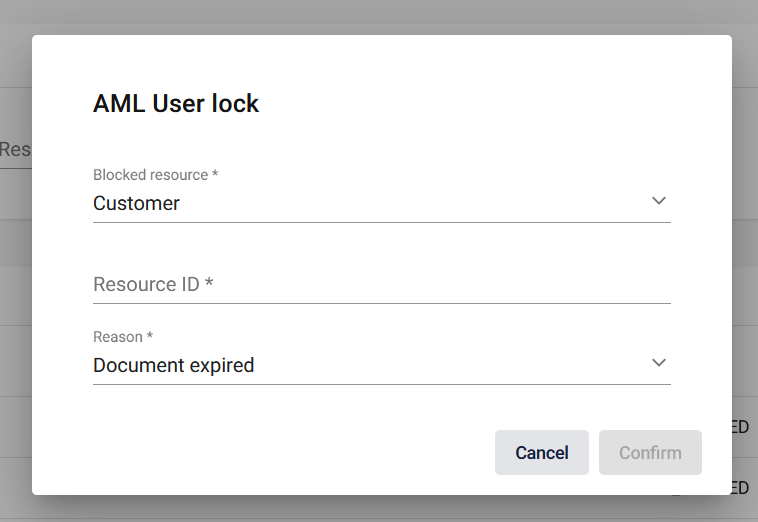
<span style="color: #000000;">To create a new lock, use the "New lock" button in the top right corner of the page. Clicking this button opens a popup window:  
</span>

<span style="color: #000000;">[![AML user lock new lock.png](https://developer.verestro.com/uploads/images/gallery/2024-05/scaled-1680-/aml-user-lock-new-lock.png)](https://developer.verestro.com/uploads/images/gallery/2024-05/aml-user-lock-new-lock.png)</span>

<span style="color: rgb(0, 0, 0);">Once the Blocked resource, Resource ID, and Reason for lock are entered, the newly added lock becomes visible in the list of locked resources.</span>

##### <span style="color: rgb(0, 0, 0);">Remove the lock</span>

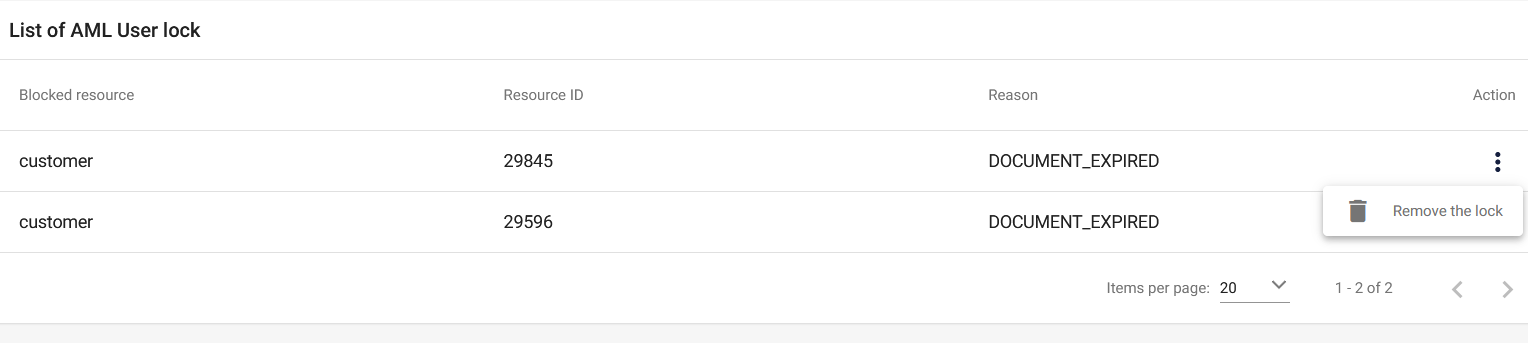
<span style="color: rgb(0, 0, 0);">To remove the lock, the Operator should click on the 'Action' menu within the lock list and select the "Remove the lock" option.</span>

<span style="color: #000000;">[![AML lock remove the lock.png](https://developer.verestro.com/uploads/images/gallery/2024-05/scaled-1680-/aml-lock-remove-the-lock.png)](https://developer.verestro.com/uploads/images/gallery/2024-05/aml-lock-remove-the-lock.png)</span>

<span style="color: rgb(0, 0, 0);">The lock will be instantly removed from the list.</span>

<p class="callout info">The 'Remove the lock' option is available only to Operators with the Admin role.</p>

##### <span style="color: #000000;">Automatic Lock Triggers</span>

<span style="color: #000000;">In addition to manual creation by an Operator, locks may also be imposed by automated processes. These automated locks typically occur based on predefined system rules or risk assessments. Automated processes that can result in a lock being placed are: </span>

- <span style="color: #000000;">Document Expired - Applied when the documents required for the KYC (Know Your Customer) process have expired. </span>
- <span style="color: #000000;">Screening Detected - Applied when a customer screening reveals a match on a sanctions list.</span>

## <span style="color: #000000;">Default privileges per role in the portal</span>

<span style="color: #000000;">Below are the default function settings for described product divided into areas.</span>

<table id="bkmrk-aggregate-action-adm" style="height: 935.751px;" width="827"><tbody><tr style="height: 35.375px;"><td bgcolor="#1C1E3F" style="width: 161.833px; height: 35.375px;" width="353"><span style="color: #ecf0f1;">**Area**</span>

</td><td bgcolor="#1C1E3F" style="width: 161.85px; height: 35.375px;" width="353"><span style="color: #ecf0f1;">**Action**</span>

</td><td bgcolor="#1C1E3F" style="width: 161.833px; height: 35.375px;" width="353"><span style="color: #ecf0f1;">**Admin**</span>

</td><td bgcolor="#1C1E3F" style="width: 161.85px; height: 35.375px;" width="353"><span style="color: #ecf0f1;">**Manager**</span>

</td><td bgcolor="#1C1E3F" style="width: 161.833px; height: 35.375px;" width="353"><span style="color: #ecf0f1;">**Employee**</span>

</td></tr><tr style="height: 46.5938px;"><td class="align-left" rowspan="6" style="height: 294.875px; width: 161.833px;"><span style="color: #000000;">Customer Balance  
</span></td><td style="height: 46.5938px; width: 161.85px;"><span style="color: #000000;">View Company Balance   
</span></td><td style="height: 46.5938px; width: 161.833px;"><span style="color: #000000;">x</span></td><td style="height: 46.5938px; width: 161.85px;"><span style="color: #000000;">x</span></td><td style="height: 46.5938px; width: 161.833px;"><span style="color: #000000;">-</span></td></tr><tr style="height: 46.5938px;"><td style="width: 161.85px; height: 46.5938px;"><span style="color: #000000;">Create Customer Balance</span></td><td style="width: 161.833px; height: 46.5938px;"><span style="color: #000000;">x</span></td><td style="width: 161.85px; height: 46.5938px;"><span style="color: #000000;">x</span></td><td style="width: 161.833px; height: 46.5938px;"><span style="color: #000000;">-</span></td></tr><tr style="height: 46.5938px;"><td style="width: 161.85px; height: 46.5938px;"><span style="color: #000000;">View Customer Balance</span></td><td style="width: 161.833px; height: 46.5938px;"><span style="color: #000000;">x</span></td><td style="width: 161.85px; height: 46.5938px;"><span style="color: #000000;">x</span></td><td style="width: 161.833px; height: 46.5938px;"><span style="color: #000000;">x</span></td></tr><tr style="height: 55px;"><td style="width: 161.85px; height: 55px;"><span style="color: #000000;">View Customer Balance Details</span></td><td style="width: 161.833px; height: 55px;"><span style="color: #000000;">x</span></td><td style="width: 161.85px; height: 55px;"><span style="color: #000000;">x</span></td><td style="width: 161.833px; height: 55px;"><span style="color: #000000;">x</span></td></tr><tr style="height: 52px;"><td style="width: 161.85px; height: 52px;"><span style="color: #000000;">Topup Customer Balance</span></td><td style="width: 161.833px; height: 52px;"><span style="color: #000000;">x</span></td><td style="width: 161.85px; height: 52px;"><span style="color: #000000;">-</span></td><td style="width: 161.833px; height: 52px;"><span style="color: #000000;">-</span></td></tr><tr style="height: 48.0938px;"><td style="width: 161.85px; height: 48.0938px;"><span style="color: #000000;">Delete Customer Balance</span></td><td style="width: 161.833px; height: 48.0938px;"><span style="color: #000000;">x</span></td><td style="width: 161.85px; height: 48.0938px;"><span style="color: #000000;">x</span></td><td style="width: 161.833px; height: 48.0938px;"><span style="color: #000000;">-</span></td></tr><tr style="height: 29.7969px;"><td style="width: 161.833px; height: 29.7969px;">Customer  
</td><td style="width: 161.85px; height: 29.7969px;"><span style="color: #000000;">Delete Customer</span></td><td style="width: 161.833px; height: 29.7969px;"><span style="color: #000000;">x</span></td><td style="width: 161.85px; height: 29.7969px;"><span style="color: #000000;">x</span></td><td style="width: 161.833px; height: 29.7969px;">-</td></tr><tr style="height: 44.6875px;"><td rowspan="2" style="height: 89.375px; width: 161.833px;"><span style="color: #000000;">Master Balances</span>  
</td><td style="width: 161.85px; height: 44.6875px;"><span style="color: #000000;">View Master Balance</span>  
</td><td style="width: 161.833px; height: 44.6875px;">x  
</td><td style="width: 161.85px; height: 44.6875px;">x  
</td><td style="width: 161.833px; height: 44.6875px;">-  
</td></tr><tr style="height: 44.6875px;"><td style="width: 161.85px; height: 44.6875px;"><span style="color: #000000;">Edit Master Balance</span>  
</td><td style="width: 161.833px; height: 44.6875px;">x  
</td><td style="width: 161.85px; height: 44.6875px;">-  
</td><td style="width: 161.833px; height: 44.6875px;">-  
</td></tr><tr style="height: 29.7969px;"><td style="width: 161.833px; height: 29.7969px;"><span style="color: #000000;">KYC   
</span></td><td style="width: 161.85px; height: 29.7969px;"><span style="color: #000000;">View KYC applications  
</span></td><td style="width: 161.833px; height: 29.7969px;"><span style="color: #000000;">x  
</span></td><td style="width: 161.85px; height: 29.7969px;"><span style="color: #000000;">x  
</span></td><td style="width: 161.833px; height: 29.7969px;"><span style="color: #000000;">-  
</span></td></tr><tr style="height: 46.5938px;"><td style="width: 161.833px; height: 46.5938px;"><span style="color: #000000;">  
</span></td><td style="width: 161.85px; height: 46.5938px;"><span style="color: #000000;">Update KYC applications  
</span></td><td style="width: 161.833px; height: 46.5938px;"><span style="color: #000000;">x  
</span></td><td style="width: 161.85px; height: 46.5938px;"><span style="color: #000000;">x  
</span></td><td style="width: 161.833px; height: 46.5938px;"><span style="color: #000000;">-  
</span></td></tr><tr style="height: 29.7969px;"><td style="width: 161.833px; height: 29.7969px;"><span style="color: #000000;">Cards  
</span></td><td style="width: 161.85px; height: 29.7969px;"><span style="color: #000000;">Create virtual card  
</span></td><td style="width: 161.833px; height: 29.7969px;"><span style="color: #000000;">x  
</span></td><td style="width: 161.85px; height: 29.7969px;"><span style="color: #000000;">x  
</span></td><td style="width: 161.833px; height: 29.7969px;"><span style="color: #000000;">x  
</span></td></tr><tr style="height: 29.7969px;"><td style="width: 161.833px; height: 29.7969px;"><span style="color: #000000;">  
</span></td><td style="width: 161.85px; height: 29.7969px;"><span style="color: #000000;">View cards  
</span></td><td style="width: 161.833px; height: 29.7969px;"><span style="color: #000000;">x  
</span></td><td style="width: 161.85px; height: 29.7969px;"><span style="color: #000000;">x  
</span></td><td style="width: 161.833px; height: 29.7969px;"><span style="color: #000000;">-  
</span></td></tr><tr style="height: 29.7969px;"><td style="width: 161.833px; height: 29.7969px;"><span style="color: #000000;">  
</span></td><td style="width: 161.85px; height: 29.7969px;"><span style="color: #000000;">Delete cards  
</span></td><td style="width: 161.833px; height: 29.7969px;"><span style="color: #000000;">x  
</span></td><td style="width: 161.85px; height: 29.7969px;"><span style="color: #000000;">x  
</span></td><td style="width: 161.833px; height: 29.7969px;"><span style="color: #000000;">-  
</span></td></tr><tr style="height: 41.0625px;"><td style="width: 161.833px; height: 41.0625px;"><span style="color: #000000;">  
</span></td><td style="height: 41.0625px; width: 161.85px;"><span style="color: #000000;">Create Card Limit</span></td><td style="height: 41.0625px; width: 161.833px;"><span style="color: #000000;">x</span></td><td style="height: 41.0625px; width: 161.85px;"><span style="color: #000000;">x</span></td><td style="height: 41.0625px; width: 161.833px;"><span style="color: #000000;">x</span></td></tr><tr style="height: 41.1094px;"><td style="width: 161.833px; height: 41.1094px;"><span style="color: #000000;">  
</span></td><td style="height: 41.1094px; width: 161.85px;"><span style="color: #000000;">View Card Limits</span></td><td style="height: 41.1094px; width: 161.833px;"><span style="color: #000000;">x</span></td><td style="height: 41.1094px; width: 161.85px;"><span style="color: #000000;">x</span></td><td style="height: 41.1094px; width: 161.833px;"><span style="color: #000000;">x</span></td></tr><tr style="height: 29.7969px;"><td style="width: 161.833px; height: 29.7969px;"><span style="color: #000000;">  
</span></td><td style="width: 161.85px; height: 29.7969px;"><span style="color: #000000;">Update Card Limits</span></td><td style="width: 161.833px; height: 29.7969px;"><span style="color: #000000;">x</span></td><td style="width: 161.85px; height: 29.7969px;"><span style="color: #000000;">x</span></td><td style="width: 161.833px; height: 29.7969px;"><span style="color: #000000;">x</span></td></tr><tr style="height: 29.7969px;"><td style="width: 161.833px; height: 29.7969px;"><span style="color: #000000;">  
</span></td><td style="width: 161.85px; height: 29.7969px;"><span style="color: #000000;">Delete Card Limits</span></td><td style="width: 161.833px; height: 29.7969px;"><span style="color: #000000;">x</span></td><td style="width: 161.85px; height: 29.7969px;"><span style="color: #000000;">x</span></td><td style="width: 161.833px; height: 29.7969px;"><span style="color: #000000;">x</span></td></tr><tr style="height: 29.7969px;"><td style="width: 161.833px; height: 29.7969px;"><span style="color: #000000;">  
</span></td><td style="width: 161.85px; height: 29.7969px;"><span style="color: #000000;">Generate CVV</span></td><td style="width: 161.833px; height: 29.7969px;"><span style="color: #000000;">x</span></td><td style="width: 161.85px; height: 29.7969px;"><span style="color: #000000;">x</span></td><td style="width: 161.833px; height: 29.7969px;"><span style="color: #000000;">x</span></td></tr><tr style="height: 29.7969px;"><td style="width: 161.833px; height: 29.7969px;"><span style="color: #000000;">Clearing</span></td><td style="width: 161.85px; height: 29.7969px;"><span style="color: #000000;">Manual clearing</span></td><td style="width: 161.833px; height: 29.7969px;"><span style="color: #000000;">x</span></td><td style="width: 161.85px; height: 29.7969px;"><span style="color: #000000;">-</span></td><td style="width: 161.833px; height: 29.7969px;"><span style="color: #000000;">-</span></td></tr><tr style="height: 29.7969px;"><td style="width: 161.833px; height: 29.7969px;"><span style="color: #000000;">  
</span></td><td style="width: 161.85px; height: 29.7969px;"><span style="color: #000000;">Manual reversal</span></td><td style="width: 161.833px; height: 29.7969px;"><span style="color: #000000;">x</span></td><td style="width: 161.85px; height: 29.7969px;"><span style="color: #000000;">-</span></td><td style="width: 161.833px; height: 29.7969px;"><span style="color: #000000;">-</span></td></tr><tr><td style="width: 161.833px;"><span style="color: #000000;">Partner accounting</span></td><td style="width: 161.85px;"><span style="color: #000000;">View Company Balance</span>

</td><td style="width: 161.833px;"><span style="color: #000000;">x</span></td><td style="width: 161.85px;"><span style="color: #000000;">x</span></td><td style="width: 161.833px;"><span style="color: #000000;">-</span></td></tr><tr><td style="width: 161.833px;"><span style="color: #000000;">  
</span></td><td style="width: 161.85px;"><span style="color: #000000;">Edit Company Balance</span>

</td><td style="width: 161.833px;"><span style="color: #000000;">x</span></td><td style="width: 161.85px;"><span style="color: #000000;">-</span></td><td style="width: 161.833px;"><span style="color: #000000;">-</span></td></tr><tr><td style="width: 161.833px;"><span style="color: #000000;">  
</span></td><td style="width: 161.85px;"><span style="color: #000000;">Report generating</span>

</td><td style="width: 161.833px;"><span style="color: #000000;">x</span></td><td style="width: 161.85px;"><span style="color: #000000;">x</span></td><td style="width: 161.833px;"><span style="color: #000000;">x</span></td></tr><tr style="height: 29.7969px;"><td style="width: 161.833px; height: 29.7969px;"><span style="color: #000000;">AML User Lock</span></td><td style="width: 161.85px; height: 29.7969px;"><span style="color: #000000;">List of locks</span></td><td style="width: 161.833px; height: 29.7969px;"><span style="color: #000000;">x</span></td><td style="width: 161.85px; height: 29.7969px;"><span style="color: #000000;">-</span></td><td style="width: 161.833px; height: 29.7969px;"><span style="color: #000000;">-</span></td></tr><tr style="height: 29.7969px;"><td style="width: 161.833px; height: 29.7969px;"><span style="color: #000000;">  
</span></td><td style="width: 161.85px; height: 29.7969px;"><span style="color: #000000;">Add new lock</span></td><td style="width: 161.833px; height: 29.7969px;"><span style="color: #000000;">x</span></td><td style="width: 161.85px; height: 29.7969px;"><span style="color: #000000;">-</span></td><td style="width: 161.833px; height: 29.7969px;"><span style="color: #000000;">-</span></td></tr><tr style="height: 29.7969px;"><td style="width: 161.833px; height: 29.7969px;"><span style="color: #000000;">  
</span></td><td style="width: 161.85px; height: 29.7969px;"><span style="color: #000000;">Remove the lock</span></td><td style="width: 161.833px; height: 29.7969px;"><span style="color: #000000;">x</span></td><td style="width: 161.85px; height: 29.7969px;"><span style="color: #000000;">-</span></td><td style="width: 161.833px; height: 29.7969px;"><span style="color: #000000;">-</span></td></tr></tbody></table>